4 AI 3D Model Segmentation Tools Compared: Tripo, Meshy, Hitem and Rodin
AI 3D model segmentation turns a single mesh into separate parts for printing, rigging, animation, texturing and further editing. The most useful tool is not necessarily the one that creates the first split fastest, but the one that fits what happens next: how much control you have over part count and boundaries, whether textures remain intact, which models you can import and how easily the result moves into the rest of your workflow. This comparison looks at Tripo Smart Segmentation, Meshy Auto Split, Hitem and Rodin across those practical decisions.
How We Compared the Tools
This comparison reflects product information and workflow observations available in July 2026. Processing times are approximate and can vary with model complexity, queue conditions and selected settings. Feature availability may also change as the products evolve, so readers should confirm current requirements before choosing a production workflow.
AI 3D Model Segmentation Tools at a Glance
| Tripo Smart Segmentation | Meshy Auto Split | Hitem | Rodin | |
|---|---|---|---|---|
| Speed | ~90 seconds | ~40 seconds | 4–5 minutes | 90 seconds and up, across multiple steps |
| Precision Tiers | ✅ Three (Simple / Balanced / Detailed) | Part count decided for you | ✅ Three tiers | No presets |
| Model Sources | ✅ Generated and imported | Meshy 6 untextured drafts only | ✅ Generated and imported | ✅ Generated and imported |
| Texture Preservation | ✅ Textures and UVs kept | Untextured models only | Textures not carried through export | Textures not carried through |
| Post-Split Editing | ✅ Add, merge, rename, adjust boundaries | Accept or re-run | Merging only | Re-generate to change the result |
| Sealing | ✅ Quick Cap (free) and AI Completion | ✅ Automatic watertight caps | ✅ Yes | ✅ Yes |
| Print-Bed Arrangement | Handled in your slicer | ✅ Automatic | ✅ Smart Arrangement | Handled in your slicer |
| Slicer Integration | ✅ Bambu Studio | ✅ Bambu Studio, OrcaSlicer, ElegooSlicer | ✅ Multiple slicers | Export and import manually |
| Best For | Printing, games, animation, rigging | Print-only runs inside Meshy | Printing, some game use | Games and creative editing |
Precision Control: Choose the Part Count Before You Split
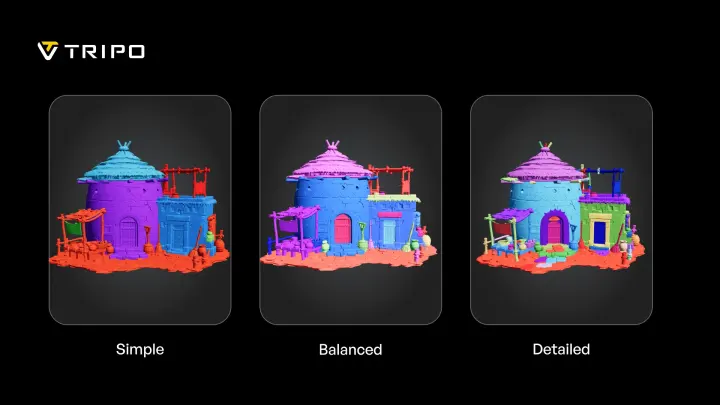
Tripo gives you three segmentation levels: Simple for three to six parts, Balanced for six to 15 and Detailed for 15 and up. You pick the level before processing, which means an FDM print that wants a handful of chunky components and a resin display piece that wants fine separation are two settings, not two workflows. If you are new to the feature, our walkthrough on how to segment a 3D model covers a first run end to end.
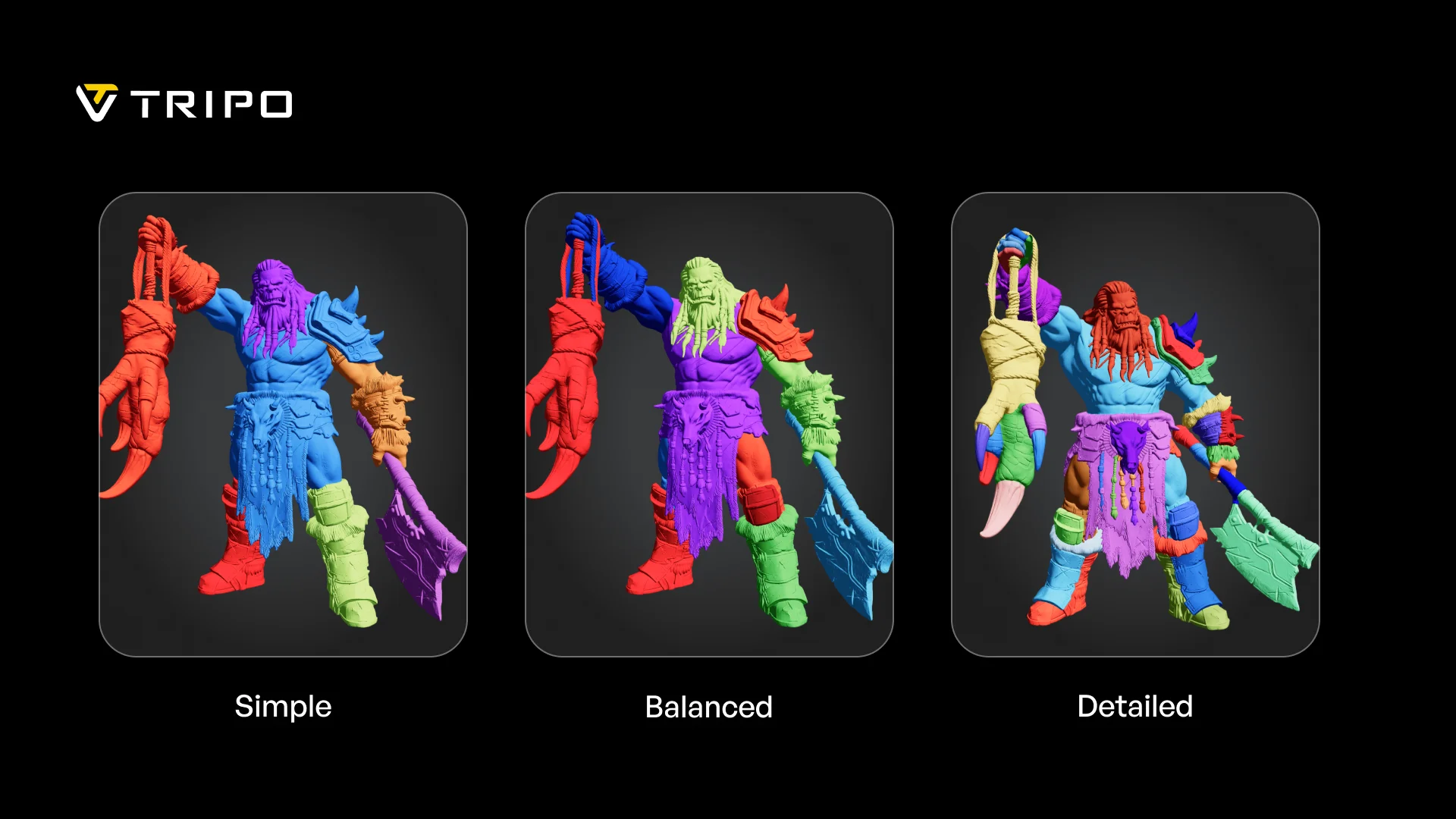
Tripo Smart Segmentation precision tiers on a character model: Simple, Balanced and Detailed.
Hitem is the other tool here with tiered control, offering a similar three-level choice. The trade-off is turnaround: a Hitem split takes four to five minutes against roughly 90 seconds in Tripo, so comparing two tiers on the same model costs you most of 10 minutes rather than three.
Meshy Auto Split and Rodin ship without presets, so the number of parts is whatever the system decides.
The same three tiers on an architectural asset: Simple, Balanced and Detailed.
Model Compatibility: Which Tools Split Imported Models
Tripo splits both AI-generated and externally created models. If your pipeline already runs through Blender, ZBrush or a marketplace asset, AI model segmentation drops into it rather than asking you to start over inside one platform. Hitem and Rodin also accept imported models, so on this dimension the three of them are close.
Meshy Auto Split is the outlier. It runs on untextured draft models from Meshy 6, and external models cannot be imported for splitting. In practice that ties the feature to Meshy's own generator, which also ties your result to the mesh that generator produces. Our Smart Mesh P1 and Meshy T2 mesh quality test walks through what that difference looks like on the same prompt.
Texture Preservation: Which Tools Keep Textures After Splitting
Among the four tools compared, Tripo stands out for keeping textures and UV information intact through segmentation. The separated parts retain visual context for a game engine, renderer or paint workflow, while resin painters can preview where colors land on each piece before anything reaches the build plate.
Hitem and Rodin separate geometry without carrying texture data through to the split parts, while Meshy Auto Split works on untextured models to begin with. Among the four workflows evaluated here, Tripo is the option designed to preserve textures and UVs without requiring materials to be re-projected by hand.
Post-Split Editing: Refine Instead of Re-Run
A first split is a starting point. Tripo lets you add parts, merge parts, rename components and move boundaries after the initial result, so many near-miss splits can be refined without restarting the entire pass. The Smart Segmentation v2 release notes cover what each editing action does.
The other three tools handle corrections in different ways. Hitem supports merging, which covers the common case of two parts that should have been one, but does not offer the same range of splitting, renaming or boundary controls. Rodin handles changes by re-generating, which may produce a different result. Meshy Auto Split supports re-running the split, but does not provide direct boundary editing comparable to Tripo.
Boundary Quality: Cuts That Follow the Structure
Tripo places boundaries along structural lines such as joints, armor seams and major components and visualizes each part clearly, so you can confirm the split before exporting.
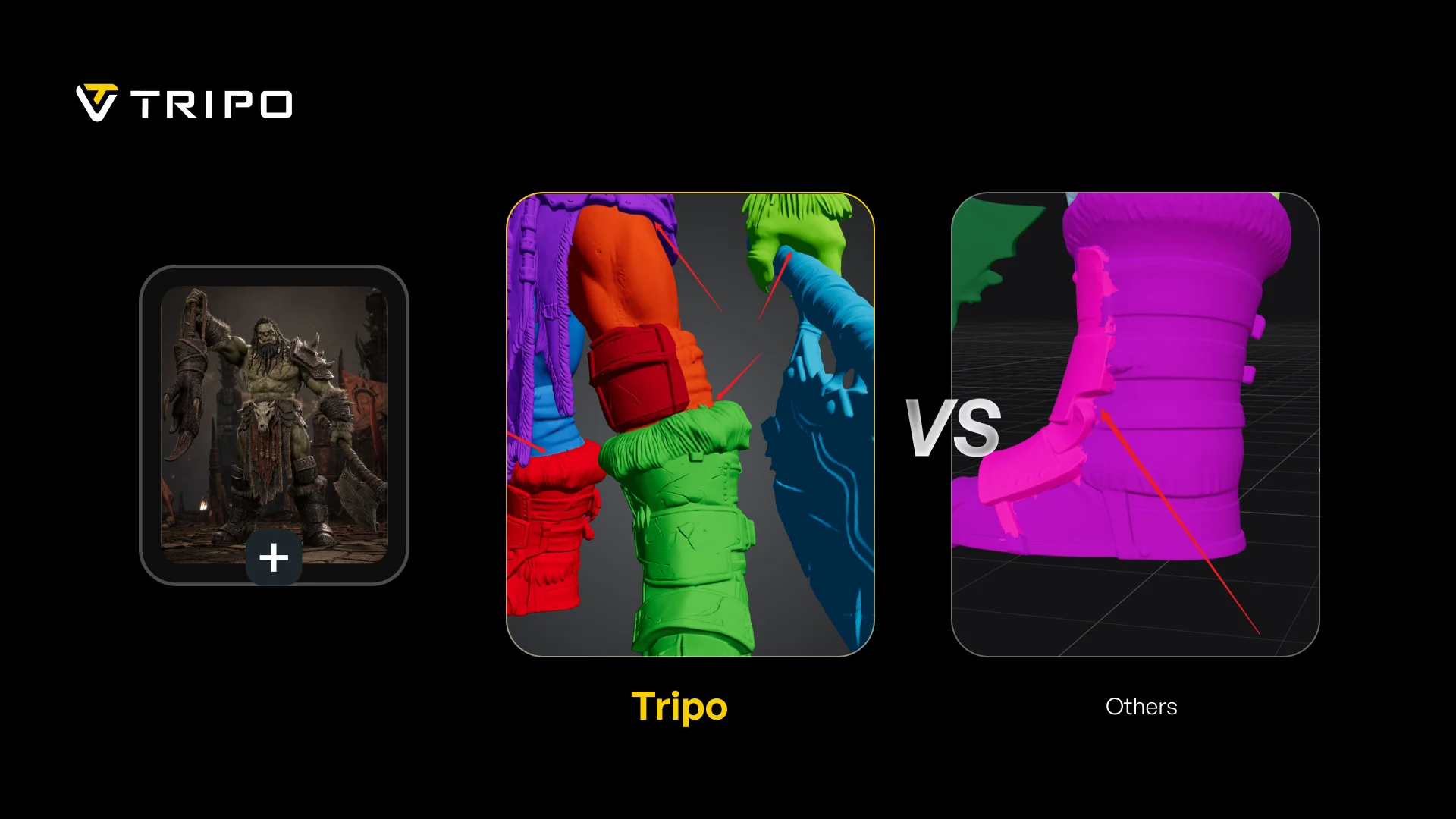
Boundary visualization on a character model, with the Tripo result shown in the center and labeled.
Hitem generally produces useful splits, although boundary consistency can vary by model. Rodin may produce different part groupings as model complexity changes, while Meshy aims for semantic boundaries in a print-focused workflow. The practical difference is what happens when the first result does not match your intent: Tripo lets you adjust the boundary directly instead of relying only on another generation.
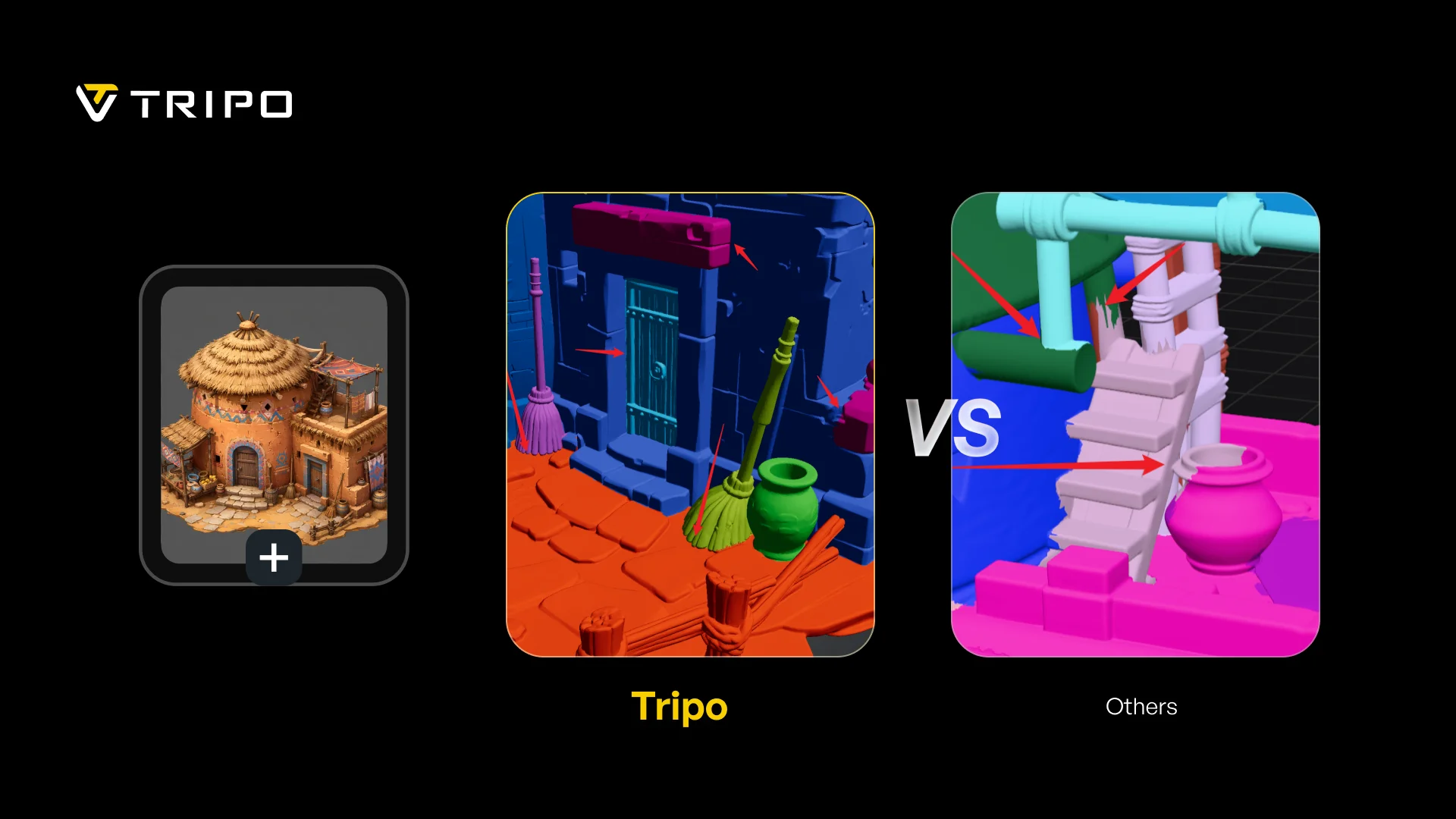
Boundary visualization on an architectural asset, with the Tripo result labeled for comparison.
Print-Readiness: How to Split a 3D Model for Printing
Meshy Auto Split is quick, at roughly 40 seconds, arranges parts on the print bed automatically and exports STL or 3MF into Bambu Studio, OrcaSlicer or ElegooSlicer. Conversational splitting is on its roadmap. Hitem covers similar ground with Smart Arrangement and support for several slicers, at four to five minutes a pass. Rodin leaves both bed layout and slicer handoff to you, which fits its focus on game and creative work rather than printing.
Tripo covers the same last mile while keeping more downstream options open. Quick Cap seals cut surfaces watertight for every user at no extra credit cost, AI Completion handles geometry that needs more than a cap, and parts export as STL or 3MF with direct Bambu Studio integration. Bed layout happens in your slicer, where printing workflows typically tune orientation and supports, while the segmented parts can also continue into a game-engine, animation or rigging workflow.
Which AI Segmentation Tool Fits Your Workflow
Choose Meshy Auto Split if you generate untextured models inside Meshy, print them and want the shortest possible path to a slicer.
Choose Hitem if you print more than you render, want tiered control and automatic bed arrangement, and four to five minutes a pass is acceptable.
Choose Rodin if segmentation is part of a game or creative editing pass and printing is not the destination.
Choose Tripo Smart Segmentation if you want control over part-count ranges, support for Tripo-generated and compatible imported models, textures that remain attached after splitting and the ability to refine the result until it better matches your workflow.
Verdict
Each tool prioritizes a different workflow. Meshy offers a fast route from an untextured Meshy model to a slicer, Hitem emphasizes print preparation and automatic arrangement, and Rodin fits creative asset workflows. Tripo is the strongest fit when the split is not the end of the process and you need textured, editable parts that can move into more than one production path.
Tripo Smart Segmentation is built for the work that continues after the split, with a typical pass taking about 90 seconds. Whether the next destination is a print bed, game engine, animation rig or paint workflow, preserving textures and retaining editing control can reduce the manual work required between stages. For a fuller platform-level view, the side-by-side Tripo and Meshy feature breakdown covers generation, editing and pricing, while our roundup of Meshy alternatives looks at the wider range of available 3D workflows.
Every user gets one free trial segmentation.
👉 Try Smart Segmentation in Tripo Studio
Frequently Asked Questions
What is AI 3D model segmentation?
It is the automatic separation of a single 3D mesh into distinct parts, such as a character's limbs and armor pieces or a building's roof, walls and fittings. The parts can then be printed individually, rigged, textured or edited on their own. Tripo Smart Segmentation does it in about 90 seconds and lets you choose how many parts you get.
How many parts can Tripo Smart Segmentation produce?
The output range depends on the precision tier and the model. Simple targets three to six parts, Balanced targets six to 15 and Detailed targets 15 or more. You choose the tier before processing, and a typical pass takes about 90 seconds, making it practical to compare more than one level.
Which AI segmentation tools preserve textures?
Among the four tools evaluated here, Tripo Smart Segmentation keeps textures and UV information on the split parts. Hitem and Rodin separate geometry without carrying textures through, while Meshy Auto Split works on untextured models.
Which is the fastest AI 3D segmentation tool?
Meshy Auto Split is quickest at around 40 seconds, followed by Tripo at about 90 seconds. Rodin starts around 90 seconds but accumulates across multiple steps, and Hitem takes four to five minutes. Speed matters most when you expect to iterate, which is also where tier selection and post-split editing earn their keep.
Can I edit the result after splitting?
In Tripo, yes: add parts, merge parts, rename components and adjust boundaries. Hitem supports merging only, while Rodin requires re-generating to change the result. Meshy Auto Split supports re-running the split but does not provide the same direct boundary-editing controls.
How do I split a 3D model for 3D printing?
Upload or generate the model, pick a precision tier, run the split, then seal the cut faces so each part is watertight before export. In Tripo, Quick Cap does the sealing for free and parts export as STL or 3MF straight into Bambu Studio. For an untextured model made inside Meshy, Auto Split is a fast alternative with automatic bed arrangement, and Hitem is reasonable if you want tiers plus arrangement and do not mind waiting four to five minutes.