SketchUp vs Blender: Which 3D Tool Is Right for You?
TL;DR:
- SketchUp is best for architecture, interior design, and fast concept modeling with an easier learning curve.
- Blender is better for advanced 3D work, including animation, rendering, games, and organic modeling.
- Beginners can learn SketchUp faster, while Blender takes more time but offers more possibilities.
- For 3D printing, SketchUp works for simple geometric parts; Blender is stronger for characters and detailed models.
- Blender is the best free option with professional tools and no subscription limits.
- Many creators use both: SketchUp for precision design, Blender for rendering and creative editing.
- AI tools like Tripo AI can speed up workflows by generating 3D models from images or text.
SketchUp is purpose-built for architectural and interior design drafting, with a shallow learning curve and clean interface. Blender is a free, open-source powerhouse covering modeling, sculpting, animation, and rendering. The right choice depends on your use case: SketchUp suits design professionals, while Blender fits artists and makers.
Both tools are free to start — but that's where the similarity ends. SketchUp has been the go-to app for architects and interior designers for over two decades, while Blender has grown into one of the most capable 3D suites on the planet, used everywhere from indie game studios to NASA visualization teams. This article breaks down exactly where each tool excels, who should use which, and how a modern AI workflow can shortcut the hardest parts of either.
SketchUp vs Blender: Core Differences at a Glance
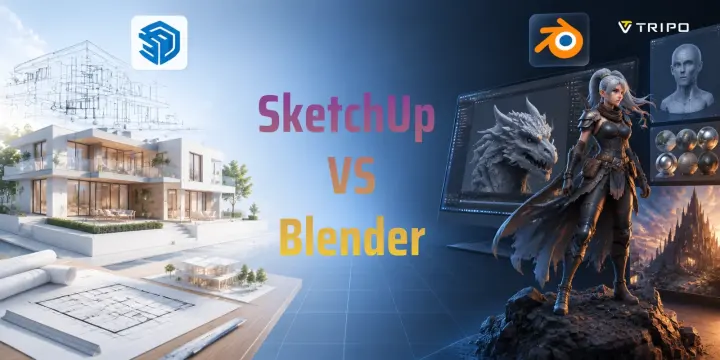
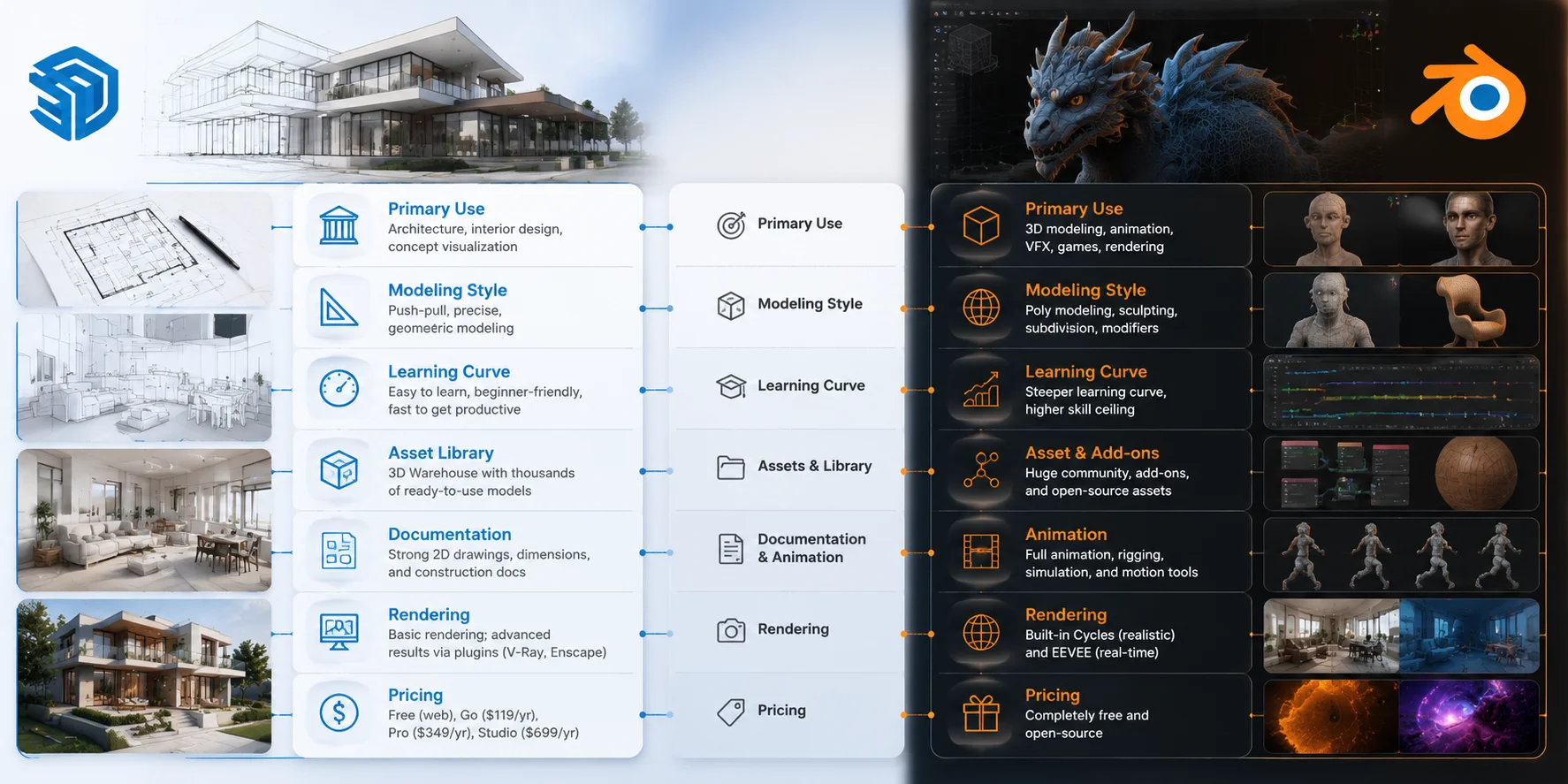
The biggest difference between SketchUp and Blender is their purpose. SketchUp is a precision design and visualization tool, while Blender is a complete 3D production suite.
| Category | SketchUp | Blender |
|---|---|---|
| Primary Use | Architecture, interior design, concept visualization | General 3D modeling, animation, VFX, games |
| Learning Curve | Beginner-friendly and fast | More difficult but more powerful |
| Free Plan | SketchUp Free (web-based, limited features) | Completely free and open-source |
| Rendering Built-in | Basic rendering; plugins often needed | Cycles and EEVEE included |
| Animation | Limited animation features | Full animation and rigging tools |
| Best For | Architects, designers, quick models | Artists, developers, creators |
Before choosing, understand the pricing difference. SketchUp Free is useful for learning and simple projects, but many professional features require SketchUp Pro. Blender does not have this limitation because every feature is available for free.
Think of SketchUp as a digital drafting studio and Blender as a complete creative factory. One helps you design accurately; the other helps you create almost anything.
SketchUp vs Blender: Key Differences at a Glance
Learning Curve — Which One Is Easier to Pick Up?
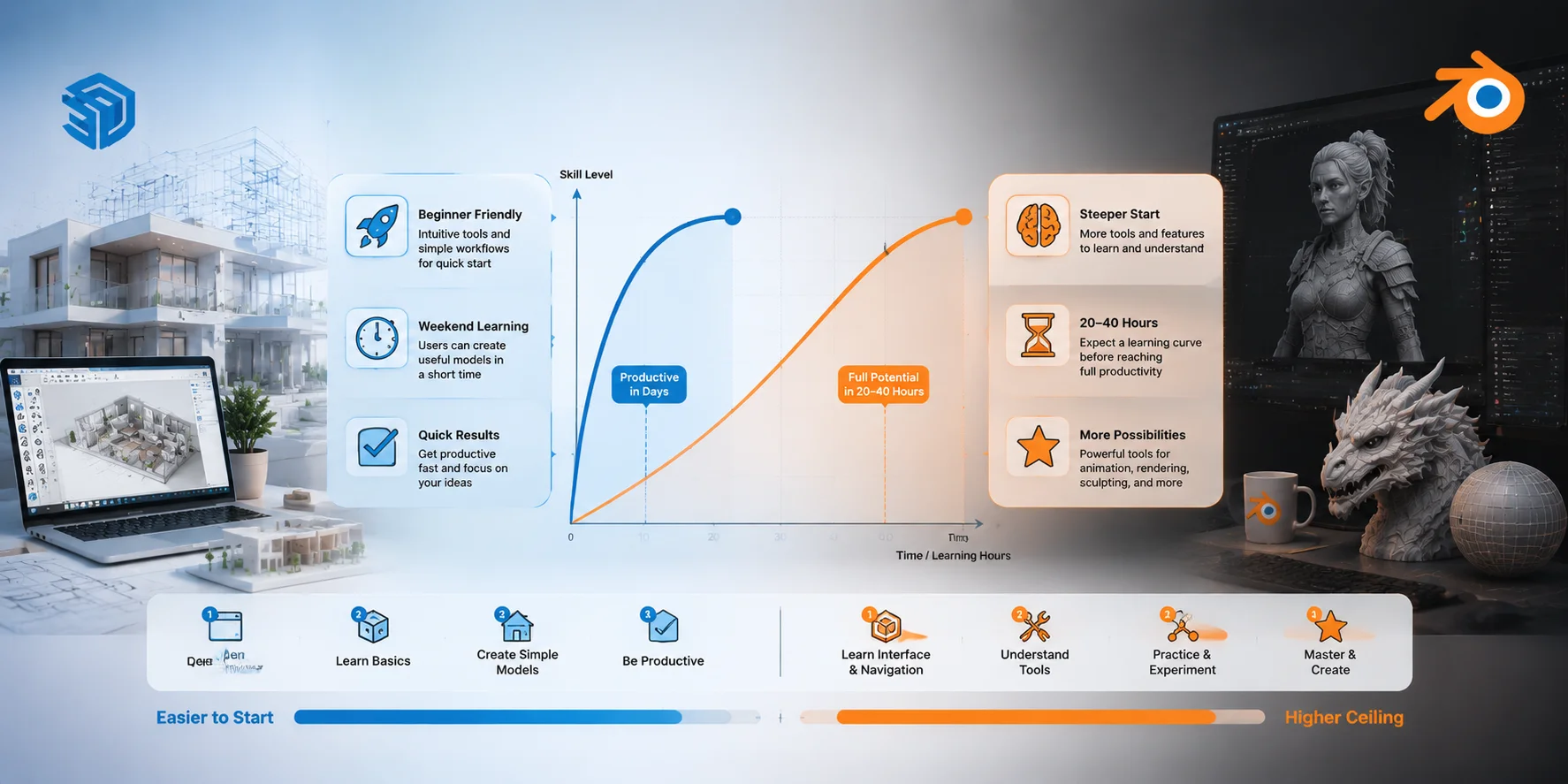
If you are completely new to 3D, SketchUp is usually easier to learn. Its push-pull modeling system is simple: draw a shape, pull it into 3D, and adjust the size. This approach feels natural for people coming from CAD, architecture, or basic design tools.
Many beginners can create useful models in SketchUp within a weekend. You can quickly build walls, furniture layouts, simple buildings, and product concepts without learning complicated workflows.
This is why SketchUp is often recommended for 3D modeling for beginners who need quick results. It removes many technical barriers and lets you focus on design ideas.
Blender requires more patience. Its interface includes many advanced systems: modifiers, sculpting, materials, UV mapping, animation, lighting, and compositing. New users often spend their first few hours learning navigation and keyboard shortcuts before creating anything complex.
However, Blender has improved significantly since version 2.8. The interface became easier to understand, and the huge online community provides thousands of free tutorials.
A realistic learning comparison:
- Need a simple architecture model for a client soon? SketchUp can make you productive within days.
- Want to build professional 3D skills across multiple industries? Blender is worth the 20–40 hours of early learning investment.
SketchUp is faster to start. Blender takes longer but gives you a much higher ceiling.
SketchUp vs Blender: Learning Curve Comparison
SketchUp vs Blender for Architecture and Interior Design
Architecture is where SketchUp has one of its strongest advantages. Many professionals use SketchUp because it allows them to turn ideas into visual concepts quickly.
SketchUp for architecture works well for early-stage design, space planning, and client presentations. Architects can create buildings, test layouts, and communicate design ideas without spending too much time on technical setup.
Another advantage is the 3D Warehouse library. Users can download thousands of ready-made models, including furniture, windows, doors, appliances, and building components. This saves significant modeling time during interior projects.
For interior designers, speed matters. A designer can create a room, experiment with different furniture arrangements, and show clients several concepts in a short time. This is why SketchUp remains one of the most popular interior design software choices.
Blender can also create impressive architectural visuals. Its rendering capabilities are excellent, especially with Cycles and EEVEE. However, Blender does not include the same architecture-focused workflows that many professionals need, such as BIM integration, construction documentation, and parametric design tools.
Do architects still use SketchUp?
Yes. Architects still use SketchUp widely for concept development, early planning, and client communication. Many firms combine SketchUp with BIM software such as Revit for detailed documentation.
Why don't architects use Blender more often?
The issue is not Blender’s quality. Blender can create beautiful architectural renders, but it does not fit the traditional architecture pipeline as easily. Professional teams often depend on precision tools, BIM workflows, and existing software ecosystems.
A common professional workflow is:
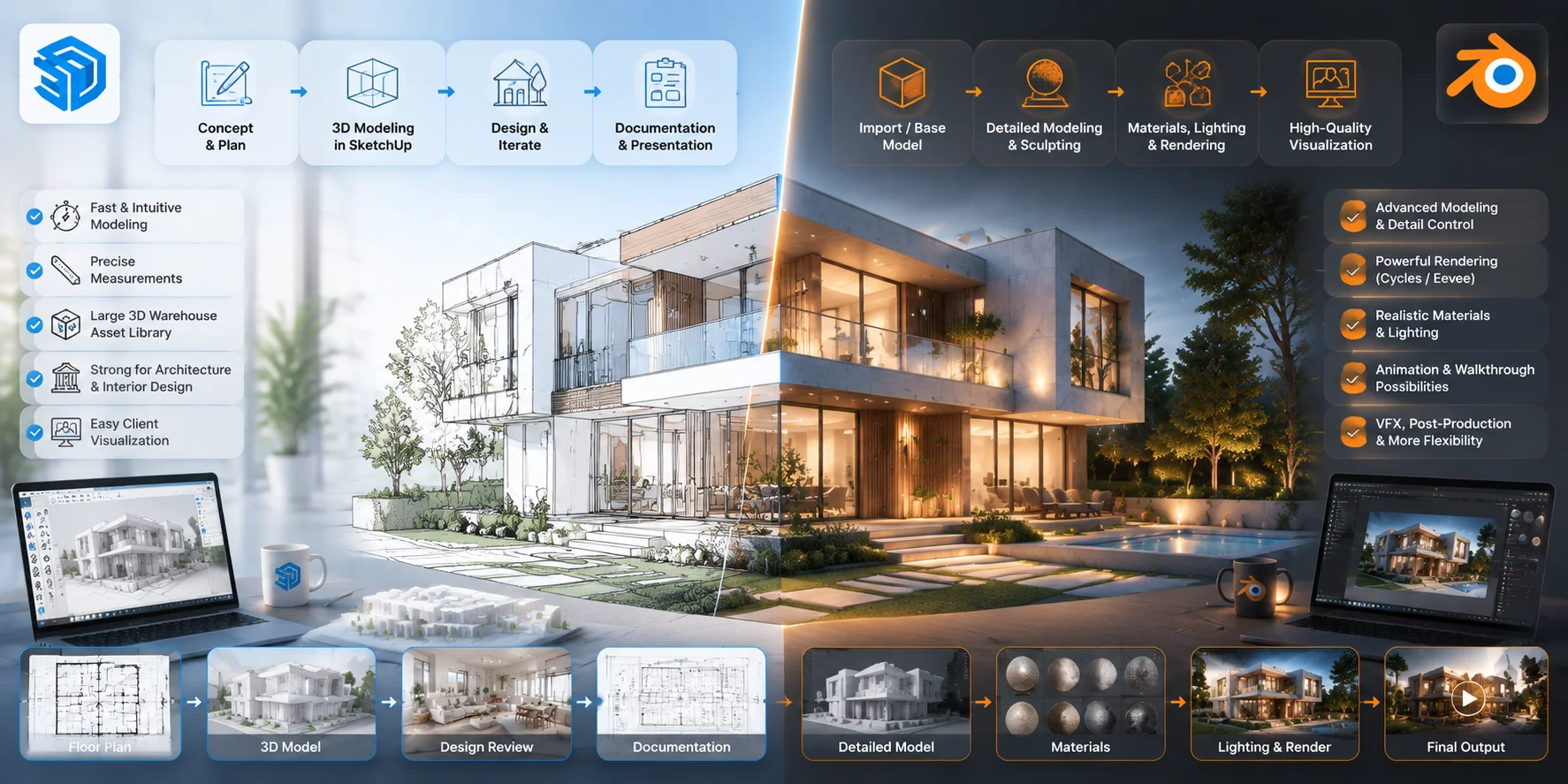
- SketchUp + V-Ray or Enscape for architecture visualization.
- Blender + Archimesh and other add-ons for users who want a lower-cost creative workflow.
SketchUp vs Blender: Architecture Workflow Comparison
SketchUp vs Blender for 3D Printing
Both SketchUp and Blender can create models for 3D printing, but they are designed for different types of objects.
SketchUp is excellent for simple geometric designs. If you want to create furniture parts, architectural models, boxes, brackets, or basic mechanical objects, SketchUp’s precise measurements make the process easy.
However, SketchUp was not originally designed as a mesh modeling tool. When exporting STL files, some models may contain problems such as reversed faces, gaps, or non-manifold geometry. These issues may require repair in software like Meshmixer, Netfabb, or a slicer program before printing.
Blender has stronger tools for complex models. Its sculpting workflow, mesh editing tools, and 3D Print Toolbox make it better for characters, miniatures, sculptures, and detailed objects.
For example:
- Functional parts with simple geometry → SketchUp works well.
- Organic models and artistic prints → Blender is usually the better choice.
You can also combine AI tools with both workflows. An AI 3D Model Generator can create a starting mesh from a text prompt or reference image in seconds. You can then import the model into SketchUp or Blender, clean up the geometry, and prepare it for printing.
This approach is especially useful for objects that are slow to build manually, such as creatures, characters, props, and decorative models.
Rendering and Visualization Quality
Rendering is another major difference between SketchUp and Blender.
SketchUp’s built-in rendering is basic. It is useful for quick previews, but professional-quality images usually require third-party tools. Popular options include V-Ray, Enscape, and Lumion.
The advantage is that these plugins are designed specifically for architecture. They help users create realistic walkthroughs, lighting studies, and client presentations without complicated setups.
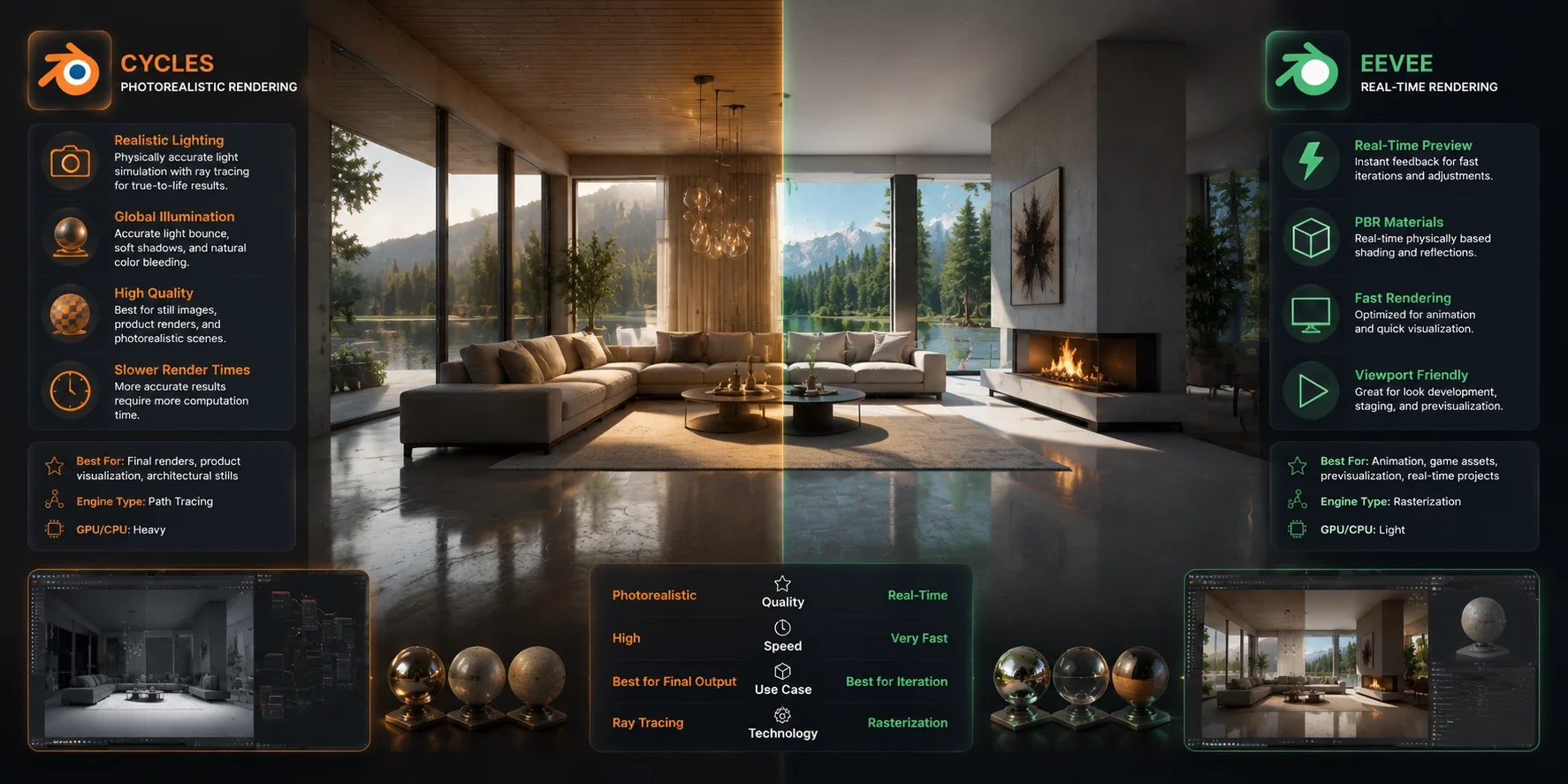
Blender includes powerful rendering tools for free.
Cycles uses path tracing to create realistic lighting, reflections, and shadows. It produces high-quality results but requires more processing power.
EEVEE focuses on speed. It provides real-time previews and works well for animation, quick testing, and stylized scenes.
For cinematic visuals, game assets, and product rendering, Blender has a stronger built-in pipeline. For architectural presentations, SketchUp’s ecosystem may feel more efficient.
Blender Rendering Engines: Cycles vs EEVEE Comparison
Pricing — What Does Each Tool Actually Cost?
Price is one of Blender’s biggest advantages.
Blender
- Completely free and open-source.
- No subscription.
- No export limits.
- All features included.
SketchUp
- SketchUp Free: Browser-based version with limited tools.
- SketchUp Go: Around $119/year with additional features.
- SketchUp Pro: Around $349/year with professional tools.
- SketchUp Studio: Around $699/year with advanced visualization features.
For students, hobbyists, and creators with limited budgets, Blender provides incredible value. It is one of the most capable free 3D modeling software options available.
For architecture professionals, SketchUp Pro can still be worth the cost because faster workflows and industry compatibility can save time.
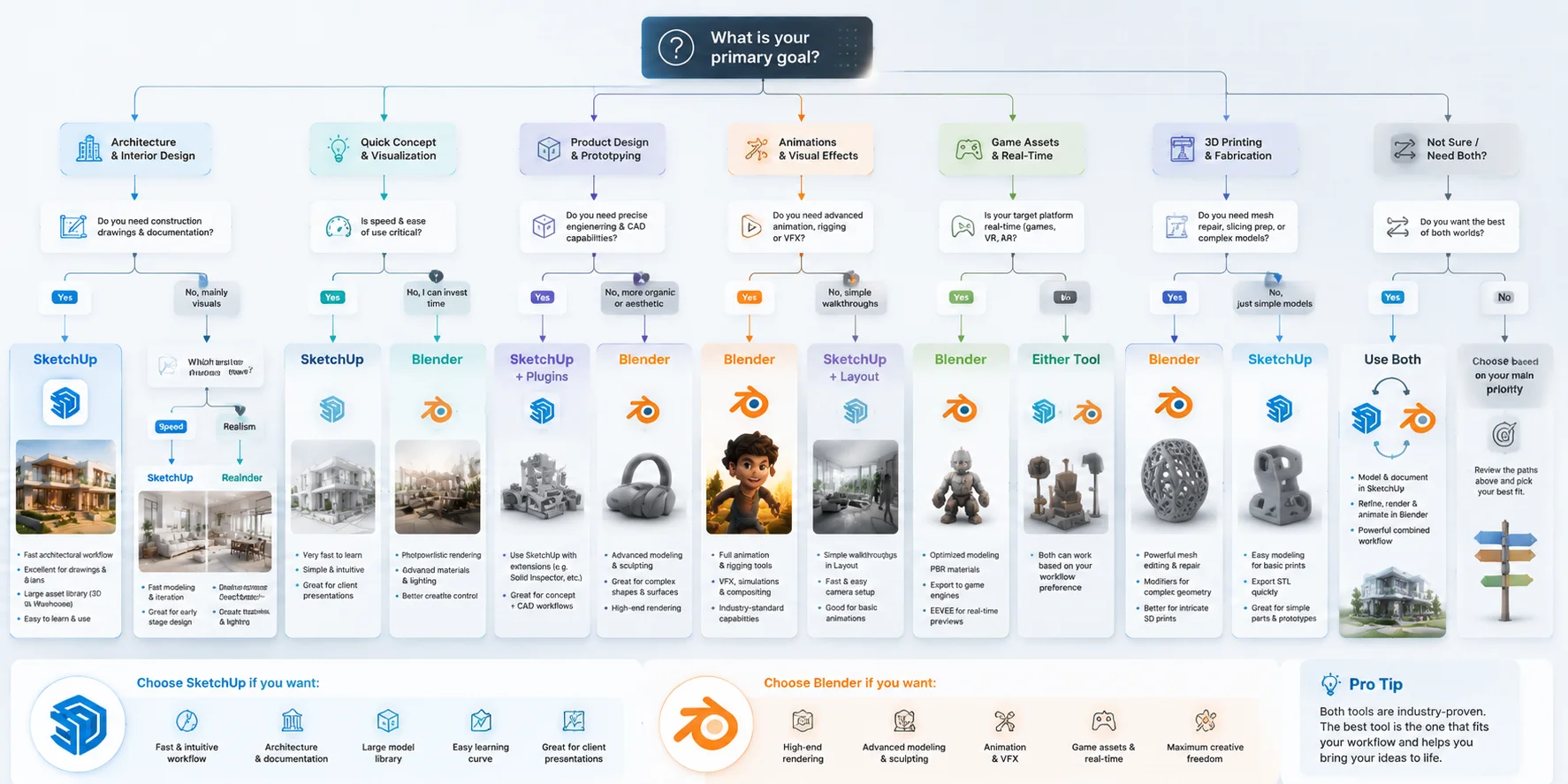
Which Tool Should You Choose? (Use-Case Decision Guide)
The best choice between SketchUp and Blender depends on what you want to create. Instead of asking which software is better overall, choose the tool that matches your workflow, learning time, and project goals.
You are an architect or interior designer → Choose SketchUp Pro SketchUp Pro is the better fit for architecture, interior layouts, and client presentations. Its precision tools, 3D Warehouse library, and industry adoption make it easier to create accurate designs and communicate ideas quickly.
You want to 3D print characters or organic props → Choose Blender Blender is the stronger choice for miniatures, figurines, creatures, and detailed printable models. Its sculpting tools, mesh editing features, and 3D Print Toolbox give you more control over complex shapes.
You want to create game assets or animations → Choose Blender Blender provides a complete pipeline for modeling, texturing, rigging, animation, and rendering. It is better suited for creators who need more than static models.
You need to learn 3D quickly for a client project → Choose SketchUp If your priority is creating useful models within days, SketchUp has a much shorter learning curve. You can build architectural concepts and simple scenes without spending weeks learning advanced workflows.
You have a limited budget and time to learn → Choose Blender Blender requires more initial effort, but it gives you professional-level modeling, rendering, and animation tools completely free.
You can also combine both tools when needed. If you want to skip the modeling stage and create a ready-to-edit asset faster, Tripo AI’s Image-to-3D can turn a photo or sketch into a textured 3D model that you can refine in either SketchUp or Blender.
SketchUp vs Blender: Which Tool Should You Choose?
Frequently Asked Questions
Do architects still use SketchUp?
Yes. Architects still use SketchUp for concept design, visualization, and client communication. Its speed and large model library make it valuable during early project stages.
Why don't architects use Blender?
Blender lacks some architecture-specific features, including BIM workflows and parametric modeling. Many firms already rely on SketchUp, AutoCAD, and Revit.
Does NASA use Blender?
Yes. NASA has used Blender for scientific visualization, animations, and public communication projects.
What are the disadvantages of SketchUp?
SketchUp is weaker for organic modeling, advanced rendering without plugins, and complex 3D printing workflows.
Is Blender better than SketchUp for beginners?
It depends on your goal. SketchUp is easier at the beginning, while Blender offers more long-term possibilities.
Can I use SketchUp and Blender together?
Yes. Many workflows use SketchUp for accurate modeling and Blender for rendering or advanced editing.
Is SketchUp free to use?
SketchUp Free is available online, but professional features require paid plans.
Which is better for 3D printing — SketchUp or Blender?
Blender is usually better for detailed printing because it provides stronger mesh editing and checking tools.
How does SketchUp compare to Fusion 360?
SketchUp focuses on visualization, while Fusion 360 focuses on engineering and manufacturing.
Can AI tools replace SketchUp or Blender?
No. AI tools speed up creation, but users still need SketchUp or Blender for editing, optimization, and final production.
Conclusion
SketchUp and Blender are built for different goals. SketchUp is the practical choice for architecture, interior design, and fast visualization, while Blender provides a complete 3D pipeline for modeling, animation, rendering, and printing.
If you want to speed up your workflow, you can start with Tripo AI Studio to generate textured 3D models and refine them in the software that fits your project. When you are ready to explore available options, check Tripo AI Pricing to find a plan that matches your needs.