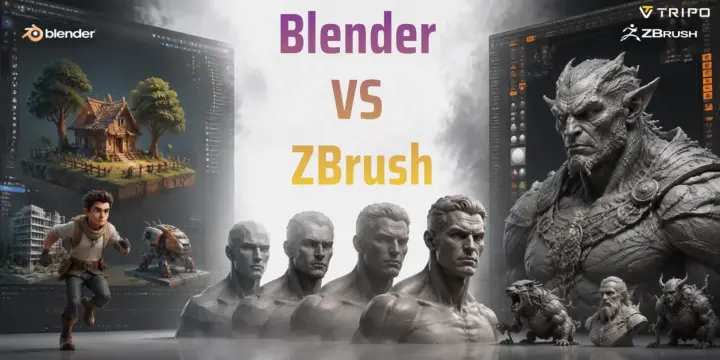
Blender vs ZBrush: Which Should You Learn?
TL;DR:
- Blender is best for beginners, full 3D workflows, polygon modeling, animation, and rendering.
- ZBrush is best for professional digital sculpting and high-detail 3D character art.
- Blender sculpt mode is powerful, but ZBrush still leads in extreme high-poly sculpting.
- Choose Blender for versatility and budget, ZBrush for advanced sculpting, or use both together for a professional workflow.
- AI tools like Tripo AI can help you create a base mesh faster before refining it in Blender or ZBrush.
Blender is a free, open-source 3D suite that handles modeling, animation, rendering, and sculpting in one package. ZBrush is a specialized digital sculpting tool built for high-resolution character and creature art, favored by film and game studios worldwide. If you need an all-in-one tool at zero cost, Blender wins. If ultra-detailed organic sculpting is your priority, ZBrush is the industry standard.
Over 12 million artists use Blender — and yet ZBrush still ships credits on blockbuster films like Avatar and countless AAA game characters. So which one actually belongs in your workflow? In this guide, you'll get a straight comparison of Blender and ZBrush across price, learning curve, sculpting power, and real-world use cases, so you can make the right call without wading through forum debates.
What Is Blender?
Blender is a free, open-source 3D creation software maintained by the Blender Foundation. First released in 1994, Blender has grown into a complete tool that supports almost every stage of 3D production.
Unlike specialized software, Blender lets you handle an entire project in one place. You can create models, build environments, animate characters, simulate effects, edit videos, and render final images using its built-in Cycles and EEVEE engines.
Blender is also much stronger at sculpting than it was in the past. Since version 2.81, improvements to Blender sculpt mode, including Multiresolution Sculpting, Dynamic Topology, voxel remeshing, and advanced brushes, have made it a serious option for digital artists.
However, Blender’s biggest strength is flexibility. It works well for indie game developers, animation artists, architects, VFX creators, and 3D printing users who need one tool that can handle many tasks.
For beginners, Blender is attractive because you can learn modeling, texturing, lighting, and animation without paying for expensive software.
What Is ZBrush?
ZBrush is a professional sculpting application originally created by Pixologic and now developed by Maxon. Released in 1999, ZBrush changed the way artists create digital characters by allowing them to sculpt millions of polygons like working with digital clay.
ZBrush introduced the concept of pixols, which store depth and surface information beyond normal pixels. This technology allows artists to work with extremely high polygon counts while maintaining a smooth sculpting experience.
The software became a standard tool in film, games, and concept art because of its ability to create detailed organic models. Artists use ZBrush for realistic characters, creatures, monsters, clothing details, and fantasy designs.
Its biggest advantage is specialized sculpting tools. Features such as ZRemesher, IMM brushes, Dynamic Subdivision, Fibermesh, and ZModeler give artists precise control over high-detail models.
Compared with Blender, ZBrush has a narrower purpose. It does not provide a complete animation or rendering pipeline, but it remains one of the best tools for creating detailed digital sculptures.
Blender vs ZBrush — Key Differences at a Glance
The main difference is simple: Blender is an all-in-one 3D tool, while ZBrush is a dedicated sculpting tool.
| Category | Blender | ZBrush |
|---|---|---|
| Price | Free and open-source | Paid license or subscription |
| Platform | Windows, macOS, Linux | Windows, macOS |
| Main Purpose | Complete 3D workflow | Professional sculpting |
| Modeling Style | Polygon modeling + sculpting | High-resolution sculpting |
| Polygon Handling | Multires, Dyntopo, modifiers | Extremely high-poly sculpting |
| Learning Curve | Moderate | Steeper for beginners |
| Industry Use | Games, animation, VFX, architecture | Film, AAA games, character art |
| Export Formats | FBX, OBJ, GLB, STL, USD | OBJ, FBX, STL, GoZ |
| Rendering | Cycles and EEVEE built-in | Preview rendering only |
If you need a complete 3D workspace, Blender has the advantage. If you mainly create detailed characters and creatures, ZBrush is usually the stronger choice.
Blender vs ZBrush: Feature Comparison at a Glance
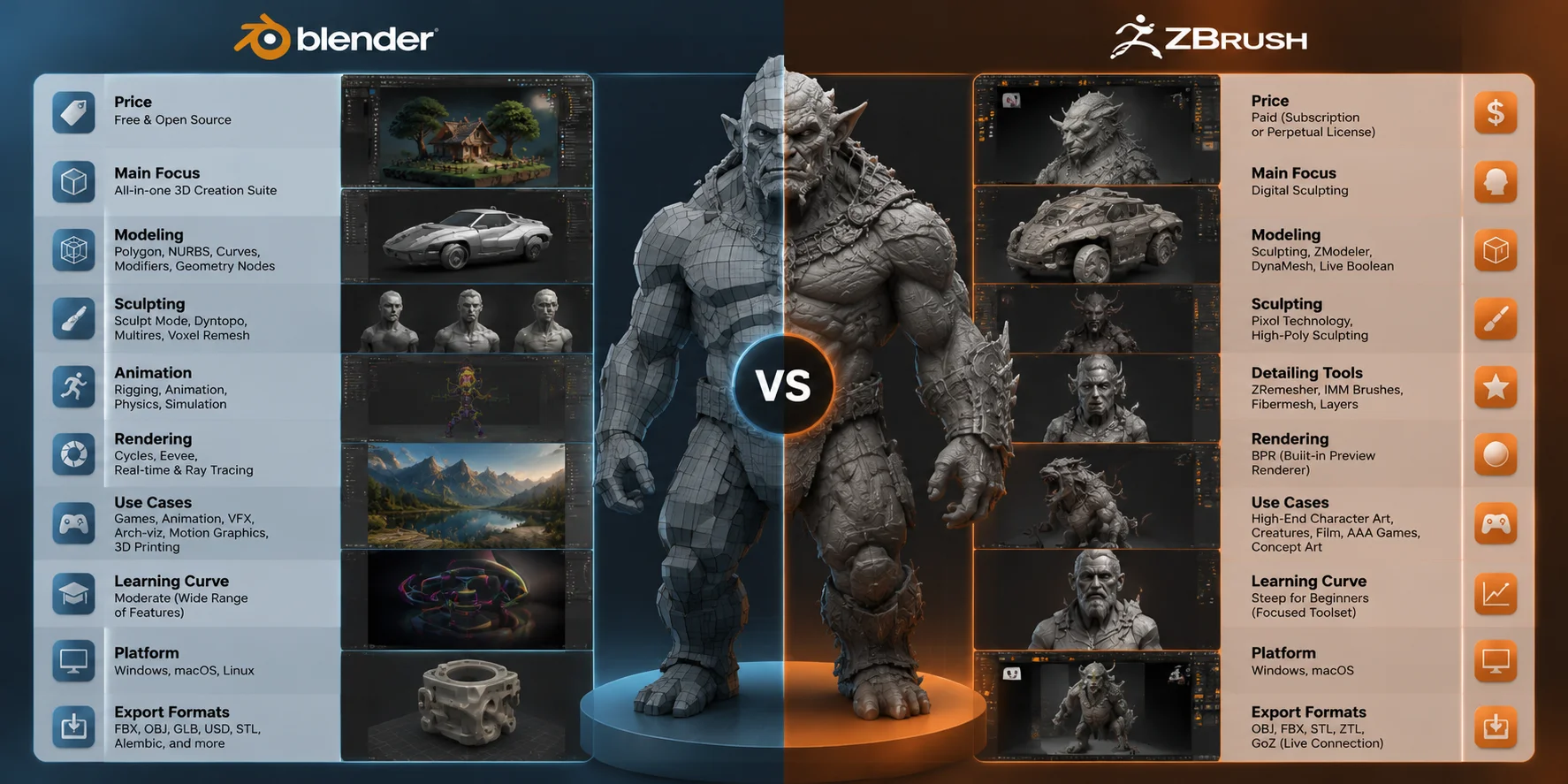
Sculpting — Where ZBrush Still Leads
The biggest difference in the Blender vs ZBrush comparison appears in high-level sculpting workflows.
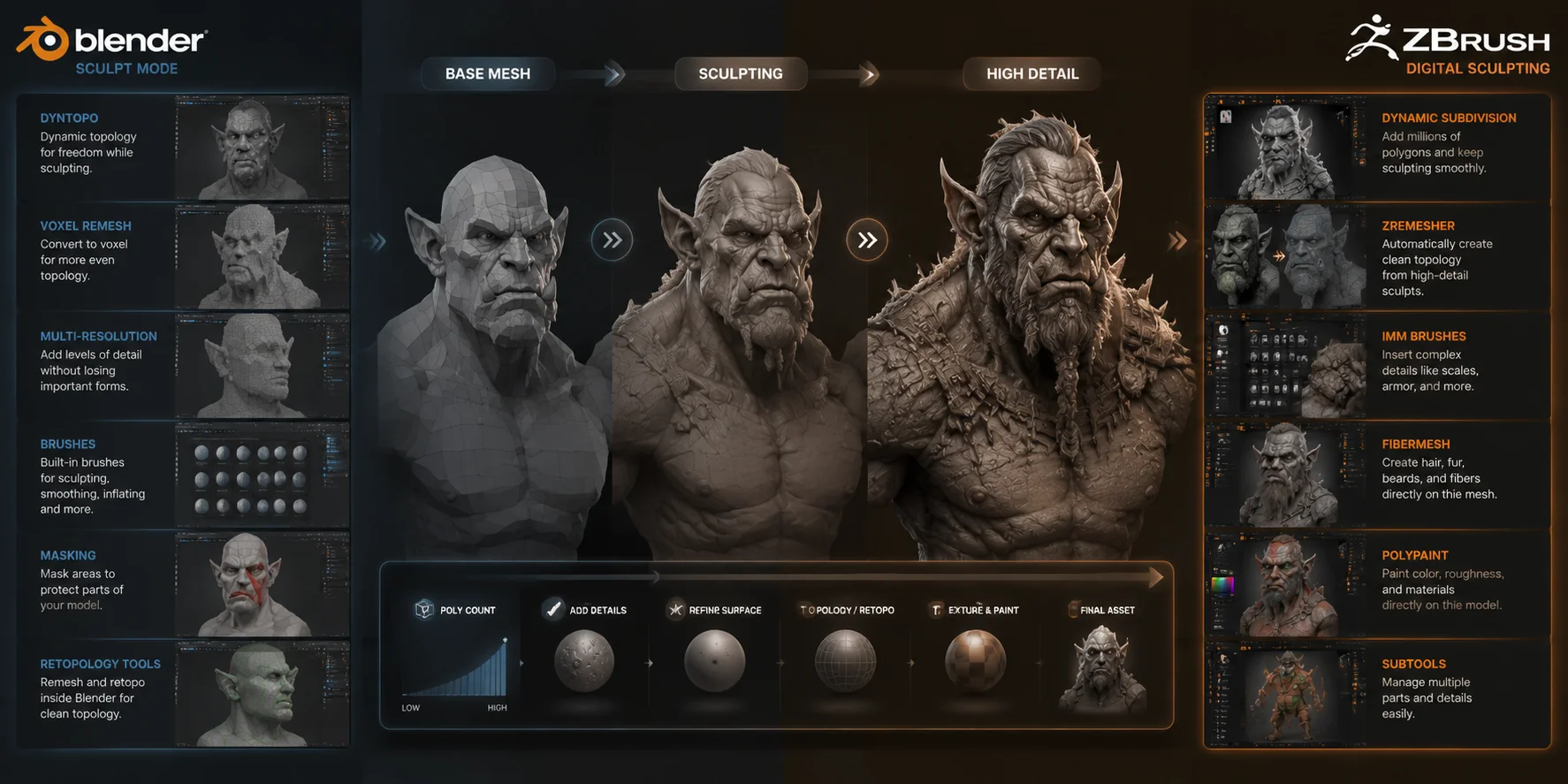
ZBrush was built specifically for digital sculpting. It can handle extremely dense models with millions or even tens of millions of polygons while keeping the sculpting process smooth. This makes it ideal for professional character artists who need fine details such as skin pores, wrinkles, muscles, scales, and fabric textures.
Tools like ZRemesher help artists create cleaner topology after sculpting, while IMM brushes allow them to quickly add repeated details such as horns, teeth, or mechanical parts. Fibermesh also provides dedicated tools for creating hair and fur.
For professional 3D character art, these features save a significant amount of time. Many film and AAA game studios still rely on ZBrush because it fits high-detail character workflows.
Blender sculpting has improved greatly and is enough for many creators. Blender sculpt mode works well for concept art, indie games, and learning digital sculpting. Features like Dynamic Topology and voxel remeshing give artists a flexible workflow without needing extra software.
However, Blender can become less comfortable when working with extremely high polygon counts, especially on average hardware. For complex creatures or hero characters that require millions of tiny details, ZBrush still provides a smoother experience.
The general recommendation is:
- Choose Blender for learning, indie projects, and general 3D work.
- Choose ZBrush for professional character and creature sculpting.
Blender Sculpt Mode vs ZBrush: Digital Sculpting Workflow Comparison
Modeling & Workflow Beyond Sculpting
Although ZBrush is famous for sculpting, Blender vs ZBrush is not only about sculpting. Many 3D projects require modeling, texturing, animation, rendering, and exporting assets into other applications.
This is where Blender has a major advantage.
Blender provides a complete polygon modeling workflow with tools for hard-surface modeling, UV editing, modifiers, Geometry Nodes, and procedural workflows. You can create everything from game props and vehicles to buildings and product designs. Its modifier system also allows you to make changes quickly without permanently affecting the original model.
For example, a game developer can create a weapon in Blender, optimize the mesh, add materials, rig a character, and export the final asset to Unity or Unreal Engine.
ZBrush can also create hard-surface models using tools like ZModeler and Boolean workflows, but its approach is different. It is designed around sculpting rather than traditional object modeling. Creating precise mechanical objects or architectural assets is usually easier in Blender.
In many professional pipelines, artists do not choose between Blender and ZBrush. They use both:
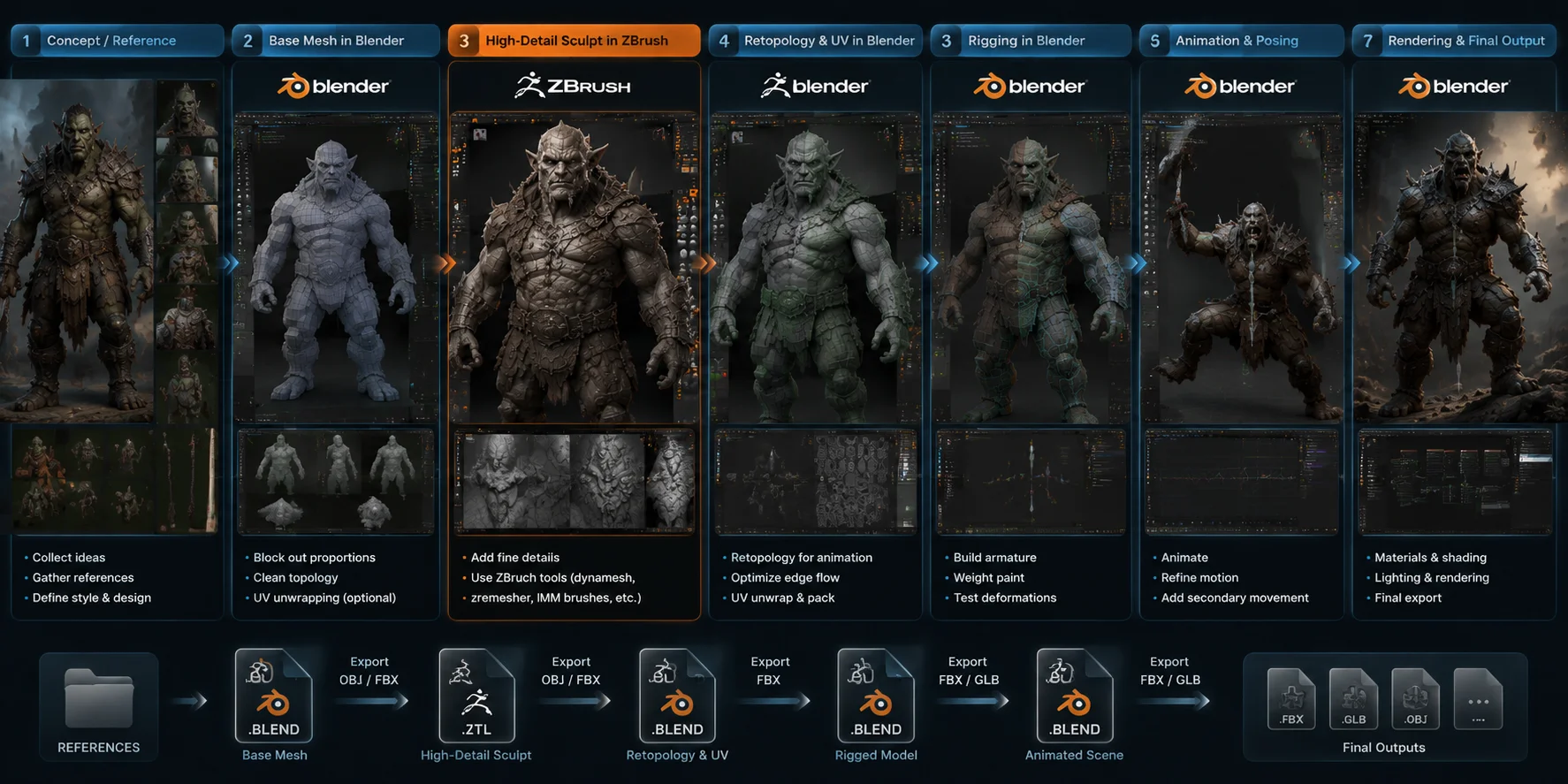
- Create a base mesh in Blender.
- Sculpt high-resolution details in ZBrush.
- Optimize the model through retopology.
- Return to Blender for rigging, animation, rendering, and export.
This workflow combines the strengths of both programs.
Blender also fits better into general production pipelines. It supports common formats such as FBX, OBJ, GLB, and USD, works with major game engines, and includes Python tools for automation. ZBrush connects with other applications through GoZ, but its ecosystem is more focused on sculpting.
Blender + ZBrush Professional 3D Character Workflow
Learning Curve — Which Is Easier to Pick Up?
When comparing Blender vs ZBrush for beginners, the learning experience depends on what you want to create. Both programs have a learning curve, but they challenge users in different ways.
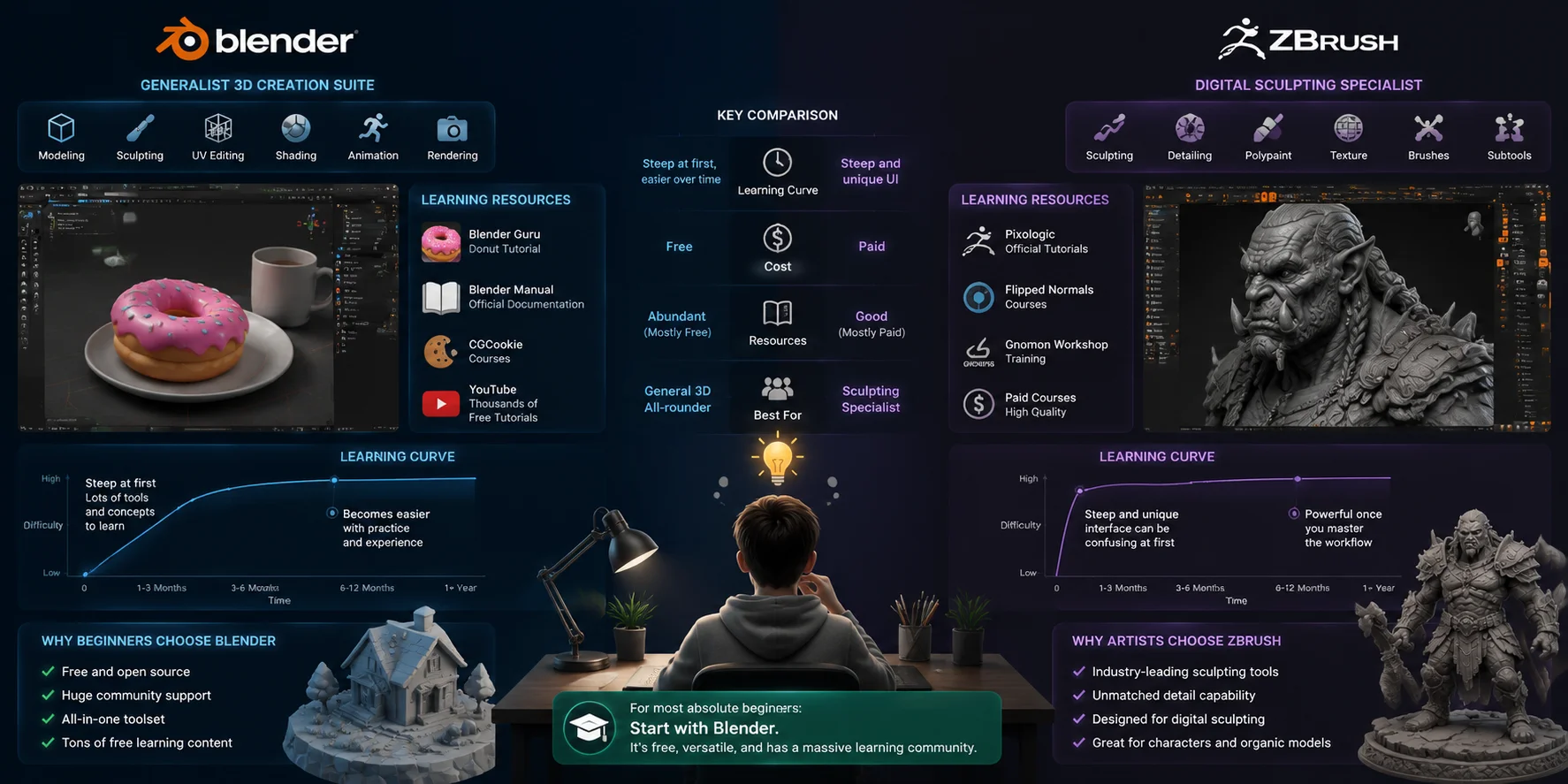
Blender has a reputation for being difficult at first because it combines many tools into one application. New users need to learn modeling, materials, lighting, animation, and navigation, which can feel overwhelming. In earlier versions, Blender’s interface conventions were also very different from other software. However, the major UI update in version 2.80 made Blender much more approachable, with improved layouts and more beginner-friendly workflows.
Another advantage of Blender is its huge learning community. Because Blender is free and widely used, beginners can access thousands of tutorials and guides. Resources such as Blender Guru’s Donut tutorial, the official Blender Manual, CGCookie courses, and countless YouTube channels make it easier to learn step by step.
ZBrush has a different challenge. Its interface is designed specifically for digital sculpting and does not follow common software patterns. Features like palettes, trays, and the Lightbox system can confuse new users who are familiar with traditional 3D applications. However, once mastered, ZBrush offers an extremely efficient sculpting workflow.
ZBrush also has strong learning resources, including official tutorials, Flipped Normals courses, and Gnomon training, although many advanced courses require payment.
For most absolute beginners, learning Blender first is the common recommendation. Its free price, broad feature set, and large community help you build a strong 3D foundation before specializing in ZBrush.
Blender vs ZBrush: Learning Curve and Beginner Guide
Pricing — Free vs Paid
Price is one of the clearest differences between Blender and ZBrush.
Blender is completely free and open-source. You can download the full version without subscriptions, watermarks, or feature restrictions. Its development is supported by the Blender Foundation, community donations, and industry sponsors.
For beginners, students, and independent creators, this makes Blender one of the most accessible professional 3D tools.
ZBrush uses a paid model through Maxon. It is available through licensing options that include subscription plans and perpetual license choices, depending on current availability.
Many users search for “ZBrush free”, but there is no permanently free full version of ZBrush. Maxon offers trial options and educational licenses for eligible students and teachers. ZBrushCoreMini provides a simplified free sculpting experience for beginners.
Your budget can make the decision simple:
Choose Blender if:
- You are learning 3D.
- You need a free professional tool.
- You want modeling, animation, and rendering together.
Choose ZBrush if:
- You focus on professional sculpting.
- You create high-end characters.
- You can justify the software cost.
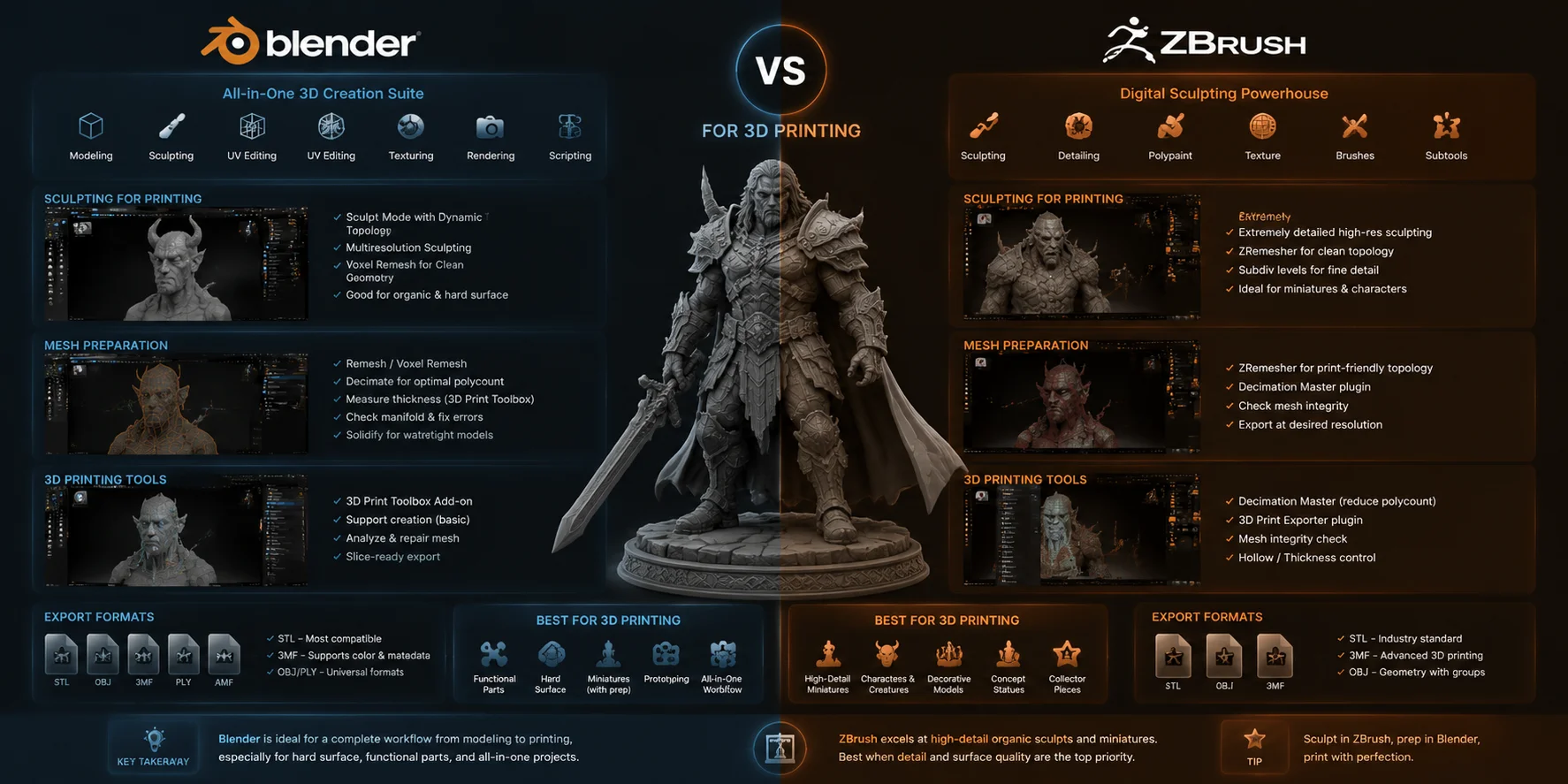
Blender vs ZBrush for 3D Printing
Both Blender and ZBrush can create models for 3D printing, but they work better for different types of projects.
ZBrush is excellent for detailed organic models such as figurines, miniatures, statues, and character busts. Its sculpting tools allow artists to add tiny surface details that make printed models look more realistic.
The downside is that ZBrush models can contain extremely high polygon counts. Before printing, you usually need to reduce the mesh size while keeping important details.
Blender is often better for functional models and technical designs. Its traditional modeling tools allow you to create accurate shapes, measurements, and clean geometry. Blender also includes the 3D Print Toolbox, which helps check issues such as:
- Non-manifold geometry
- Wall thickness problems
- Overlapping faces
- Print preparation errors
For many creators, the best workflow is combining both:
- Sculpt detailed characters in ZBrush.
- Clean and prepare the model in Blender.
AI tools can also speed up the early stage. For example, Tripo AI can generate a 3D base model from text or images and export formats like OBJ, FBX, and GLB. You can then refine the model in Blender or ZBrush instead of starting from an empty scene.
Blender vs ZBrush for 3D Printing: Workflow Comparison
Which Should You Use? (Scenarios)
The choice between Blender vs ZBrush depends on what you want to create and where you are in your 3D journey. Neither tool is the universal winner — each one is designed for different types of artists and workflows.
Choose Blender if you want a complete 3D creation tool without paying for expensive software. It is the better option for beginners, indie developers, and creators who need modeling, animation, rendering, and sculpting in one package. Blender works especially well for game assets used in Unreal Engine or Unity, motion graphics, architectural visualization, VFX projects, and functional 3D printing models. If you want to learn the fundamentals of 3D production, Blender gives you the broadest foundation.
Choose ZBrush if your main goal is advanced digital sculpting and high-quality 3D character art. It is built for artists who create detailed characters, creatures, and cinematic assets with millions of polygons. If you are aiming for a career in film VFX, AAA game studios, or professional character design, ZBrush offers specialized sculpting tools and workflows that Blender does not fully replace.
For many professional artists, the best workflow is using both. You can sculpt high-resolution details in ZBrush, then bring the model into Blender for retopology, rigging, animation, materials, and rendering. This combination gives you the strengths of both platforms.
You can also speed up the early modeling stage with AI. Instead of starting from an empty scene, AI 3D Model Generator) tools can create a base mesh from text prompts or images in seconds. Tripo AI generates export-ready OBJ, FBX, and GLB files that you can refine further in Blender or ZBrush. This “generate a base model → sculpt and optimize → finish the asset” workflow helps artists spend less time on repetitive setup and more time on creative decisions.
Frequently Asked Questions (FAQ)
Can Blender do everything ZBrush can do?
No. Blender can handle many sculpting tasks, but ZBrush still has advantages for extremely high-poly models and specialized tools like ZRemesher and Fibermesh.
Should I learn ZBrush or Blender first?
Most beginners should learn Blender first because it is free and teaches broader 3D skills. You can learn ZBrush later for advanced sculpting.
What does ZBrush have that Blender doesn't?
ZBrush offers specialized sculpting tools, better high-poly performance, Fibermesh, ZRemesher, and workflows designed for professional character creation.
Is ZBrush still popular in 2025?
Yes. ZBrush remains widely used in film VFX, AAA games, and professional character production.
Is ZBrush harder than Blender?
ZBrush can feel harder because its interface is unique. Blender has more features but provides more beginner resources.
Can Blender and ZBrush work together?
Yes. Many professionals sculpt in ZBrush and use Blender for retopology, animation, rendering, and export.
Is there a free version of ZBrush?
There is no permanently free full version. Users can try trial options or use ZBrushCoreMini for basic sculpting.
Which is better for 3D printing?
ZBrush is better for detailed figurines and organic sculptures. Blender is better for precise objects and print preparation.
Conclusion
Blender and ZBrush are not direct competitors. They solve different problems. Blender gives you a complete 3D workflow for free, while ZBrush provides unmatched power for detailed digital sculpting.
If you are starting your 3D journey, Blender is the smarter first step. If you want professional 3D character art, ZBrush is worth learning. Many experienced artists eventually use both tools together.
Want to create a starting model faster? Try Tripo AI Studio) to generate a 3D base mesh from text or images, then refine it in Blender or ZBrush. Check Tripo AI Pricing) for plans that fit your workflow.