Resin 3D Printing: How It Works and Is It Worth It
- Resin 3D printing creates smooth, highly detailed parts with UV-cured liquid resin.
- It is best for miniatures, jewelry, dental models, and detailed prototypes.
- FDM is better for large, tough, or flexible functional parts.
- Resin printing needs washing, curing, ventilation, gloves, and careful waste handling.
- Tripo AI can generate STL, OBJ, and 3MF models for resin printing.
Resin 3D printing is an additive manufacturing process that uses UV light to cure liquid photopolymer resin layer by layer. It produces parts with exceptionally fine detail, sharp edges, and smooth surface finishes that most filament printers cannot match.
The market around photopolymer and vat-photopolymerization 3D printing continues to grow, driven by dental labs, jewelry makers, product designers, and creators who need accuracy and fine surface quality. Market estimates vary by scope, but photopolymer and vat-photopolymerization forecasts point to multi-billion-dollar growth through 2030. In this guide, you will learn how resin 3D printing works, how SLA, DLP, and MSLA compare, what it costs, how to stay safe, and how AI-generated models can become resin-ready print files.
What Is Resin 3D Printing?
Resin 3D printing is a form of vat photopolymerization. A tank, or vat, holds liquid resin. A UV light source cures one thin cross-section of the model at a time. After each layer hardens, the build plate moves, fresh resin flows into place, and the next layer cures.
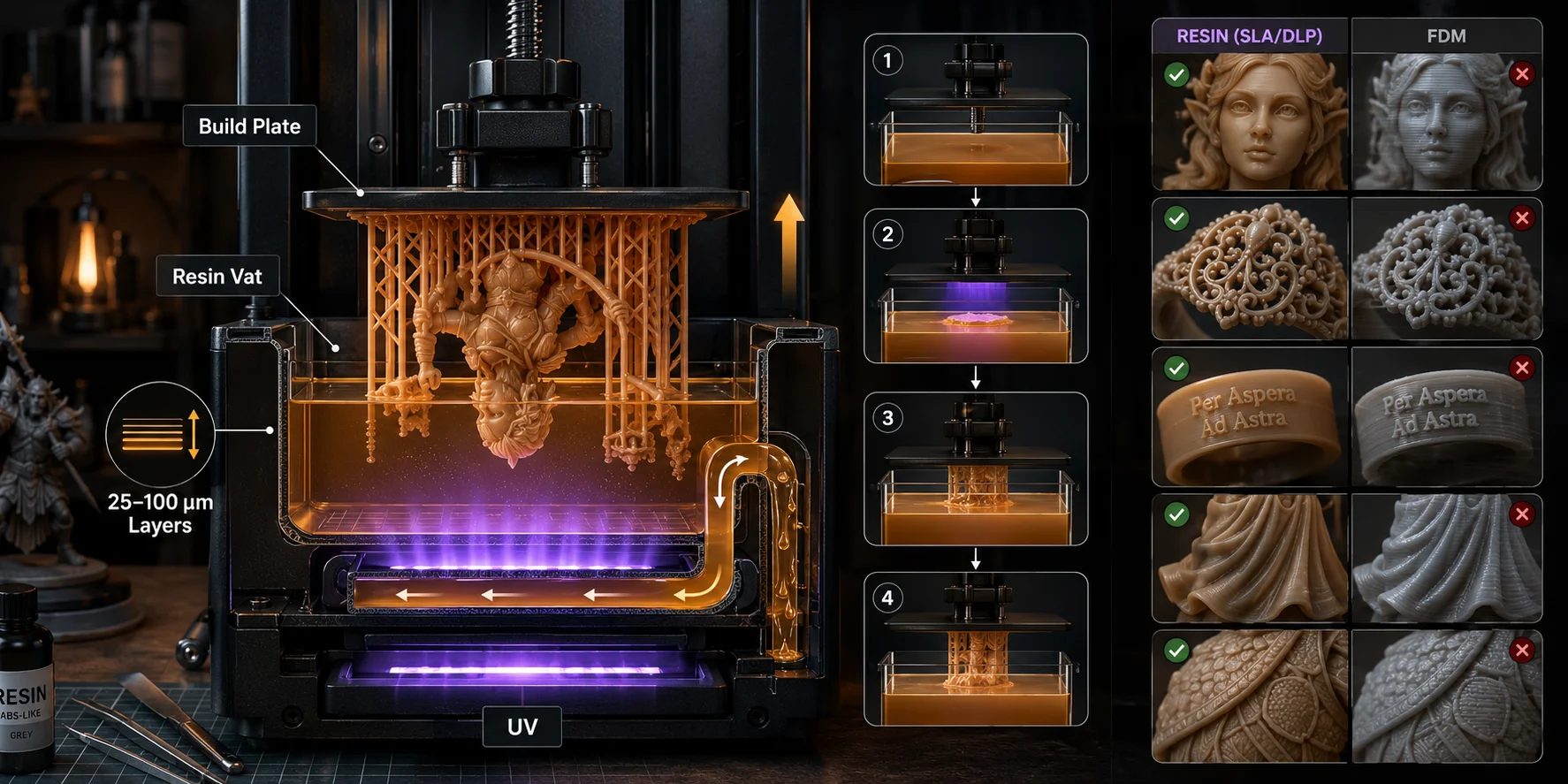
Unlike FDM 3D printing, which melts and extrudes plastic filament, resin printing starts with a liquid and ends with a hardened polymer. That difference is why resin prints can show very fine facial features, jewelry details, text, wrinkles, cloth folds, and tiny surface patterns.
Most desktop resin prints are built in layers between about 25 and 100 microns thick. Thinner layers can look smoother, but they also increase print time. Resin printing is not only about resolution, though. Your final quality also depends on resin type, exposure settings, support placement, washing, curing, and how well the model was prepared before slicing.
How Does Resin 3D Printing Work? (Step by Step)
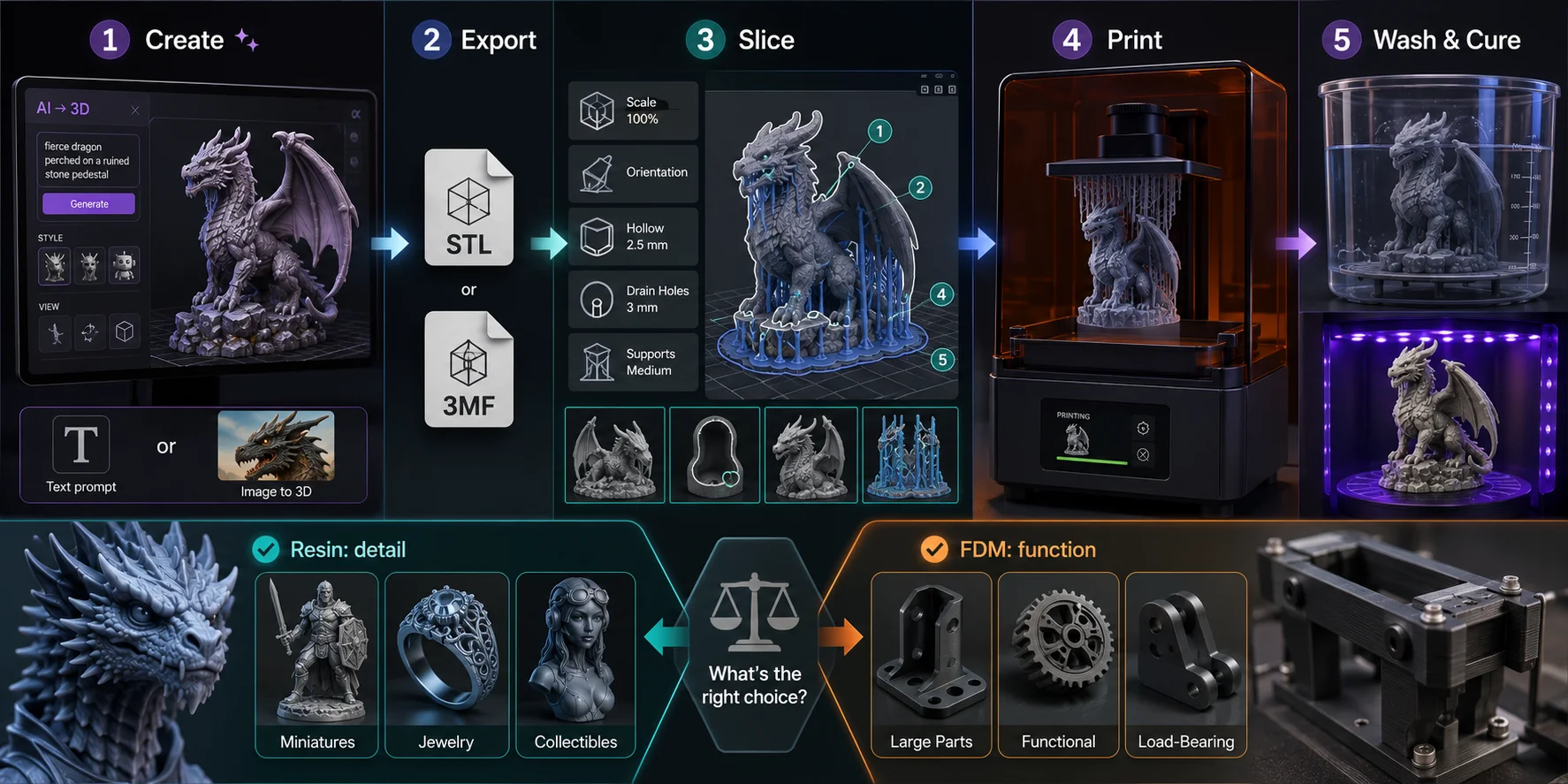
Step 1: Model preparation. Every resin print begins with a 3D model file, usually STL, OBJ, or 3MF. Import it into resin slicing software such as CHITUBOX, Lychee Slicer, or the printer's bundled slicer. A typical workflow is to load the model, repair and orient it, add supports, slice it, and export the printer-specific file.
This is where you set layer height, exposure settings, orientation, supports, hollowing, and drain holes. If you do not already have a model, Tripo AI can help you generate one from a prompt or image before slicing.
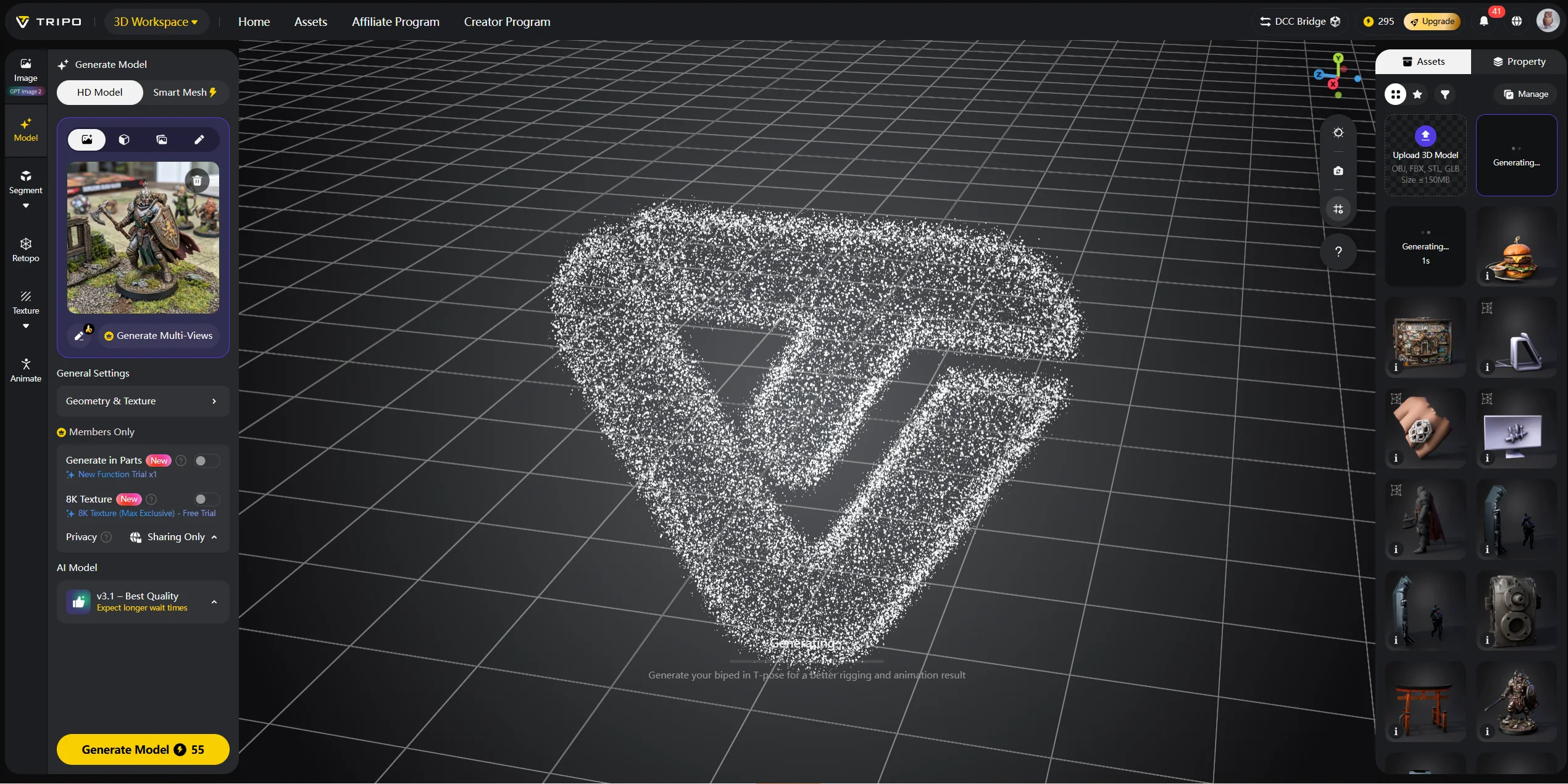
Step 2 — Printing. The build plate lowers into the resin vat. A UV light source cures the first layer against the transparent film at the bottom of the vat. The plate lifts slightly, the cured layer releases, and the next layer begins. Depending on the printer, resin, and layer height, each layer may expose for only a few seconds.
Step 3 — Washing. When the print finishes, it is still coated in uncured liquid resin. You wash it in isopropyl alcohol, a dedicated wash solution, or water if you use water-washable resin. Washing removes sticky surface resin from details, supports, and hollow cavities.
Step 4 — Curing. After washing and drying, the print needs UV post-curing. This final cure improves hardness and stability. Under-cured parts may feel tacky, while over-curing can make some resins brittle or yellowed.
A small figurine may take two to four hours to print and another 30 minutes to wash, dry, cure, and clean up.
Types of Resin 3D Printing Technologies
| Technology | Light Source | Speed | Typical Use Case |
|---|---|---|---|
| SLA | UV laser | Slower for full layers | Dental, engineering, accurate parts |
| DLP | Digital projector | Fast layer exposure | Desktop and professional resin printing |
| MSLA / LCD | UV LED array + LCD mask | Fast and affordable | Consumer desktop resin printers |
SLA, or stereolithography, is the original resin 3D printing technology. It uses a UV laser to trace each layer point by point. SLA is known for accuracy and smooth surface finish, which is why it appears often in dental, engineering, and professional prototyping workflows.
DLP, or Digital Light Processing, uses a projector to flash an entire layer at once. It can be faster than laser-based SLA for many prints because it cures a full layer in one exposure. Resolution depends on projector pixel size and build area.
MSLA, also called LCD resin printing, is now the most common desktop option. It uses a UV LED array below a monochrome LCD screen. The LCD acts as a mask, allowing light through only where resin should cure. Modern monochrome LCD screens cure faster and last longer than older RGB LCD screens, which helped make affordable resin printers much more capable. Formlabs explains that SLA, DLP, and MSLA all cure liquid resin with light, but differ in how they deliver that light.
Resin Materials — What Can You Print With?
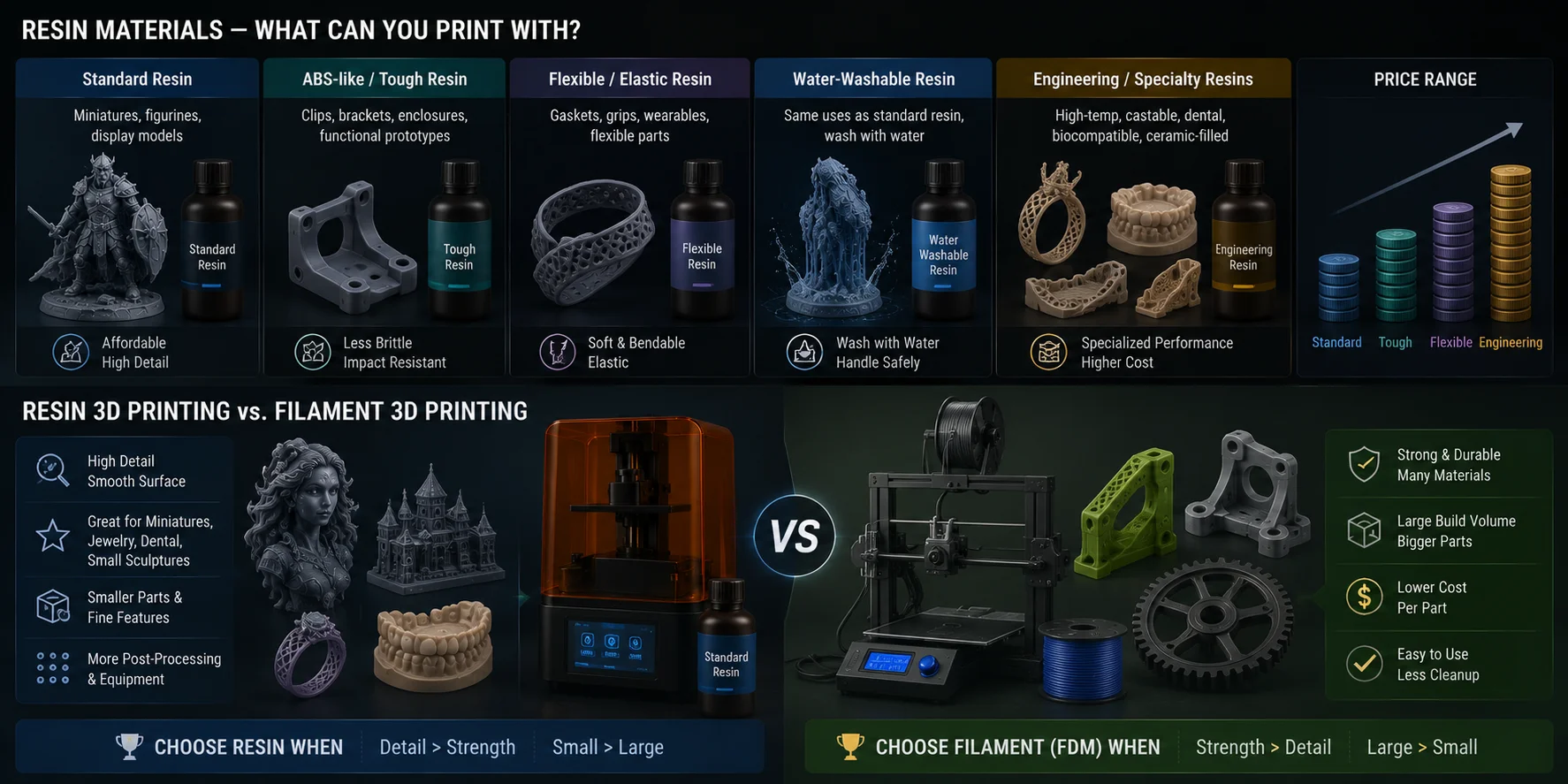
Standard resin is the most common starting point. It is affordable, easy to find, and good for display models, miniatures, figurines, and visual prototypes. Its weakness is brittleness. Drop a thin standard-resin part, and it may crack.
ABS-like or tough resin is designed to be less brittle. It works better for parts that need moderate impact resistance, such as clips, brackets, enclosures, and prototypes that will be handled often.
Flexible or elastic resin stays soft or bendable after curing. Makers use it for gaskets, grips, wearable pieces, and parts that need some deformation. It can be harder to support and clean than standard resin.
Water-washable resin lets you wash prints with water instead of IPA. This sounds easier, and it can reduce solvent handling, but the wash water still contains uncured resin and must not be poured down the drain untreated.
Engineering resins include high-temperature, castable, dental, biocompatible, and ceramic-filled materials. Castable resin is useful for jewelry masters because it burns out during investment casting. Dental resin requires strict certification and workflow control. High-temp resin can hold shape better under heat.
Prices vary widely. Standard resin is often the cheapest, while engineering and specialty resins can cost several times more.
Resin 3D Printing vs. Filament 3D Printing
Resin printing wins on detail and surface finish. Layer lines are much less visible, and small features print more cleanly. If you make miniatures, jewelry prototypes, dental-style models, small sculptures, or display pieces, resin is usually the better tool.
Filament printing, also called FDM or FFF printing, wins on material variety, durability, build size, and ease of handling. PLA, PETG, ABS, ASA, TPU, and nylon cover many practical uses that standard resin cannot match. If you need a large bracket, flexible phone case, tool holder, outdoor part, or impact-resistant enclosure, FDM is usually safer.
Cost is different too. Entry-level printers exist in both categories, but resin printing requires more supporting equipment. You need resin, gloves, cleaning solution, a curing setup, replacement vat film, and a safe workspace. FDM prints usually come off the bed closer to finished.
The decision is simple: choose resin when detail matters more than strength. Choose FDM when size, toughness, flexibility, or low-cost iteration matters more than surface finish.
Post-Processing Resin Prints
Post-processing is not optional. A resin print is not finished when the printer stops.
Washing comes first. Remove the print from the build plate, then wash it for several minutes to remove uncured resin. A wash station with agitation usually cleans better than a static container. Do not over-wash delicate parts, because thin details can soften or crack depending on resin type.
Support removal is easier before full curing. After washing and before final cure, the resin is often slightly more flexible. Clip or snap supports carefully, especially around faces, fingers, jewelry prongs, and tiny surface details.
Curing hardens the part. Use a UV curing station or direct sunlight, but control the time. Under-cured prints may remain sticky. Over-cured prints can become brittle, warped, or yellowed, especially with clear resin.
Finishing depends on the final use. Sand support marks with 400–800 grit sandpaper. Use primer before painting. Acrylic and enamel paints can work well on fully cured resin. For clear resin, polish carefully and consider a UV-resistant clear coat to reduce yellowing.
Safety Considerations for Resin 3D Printing
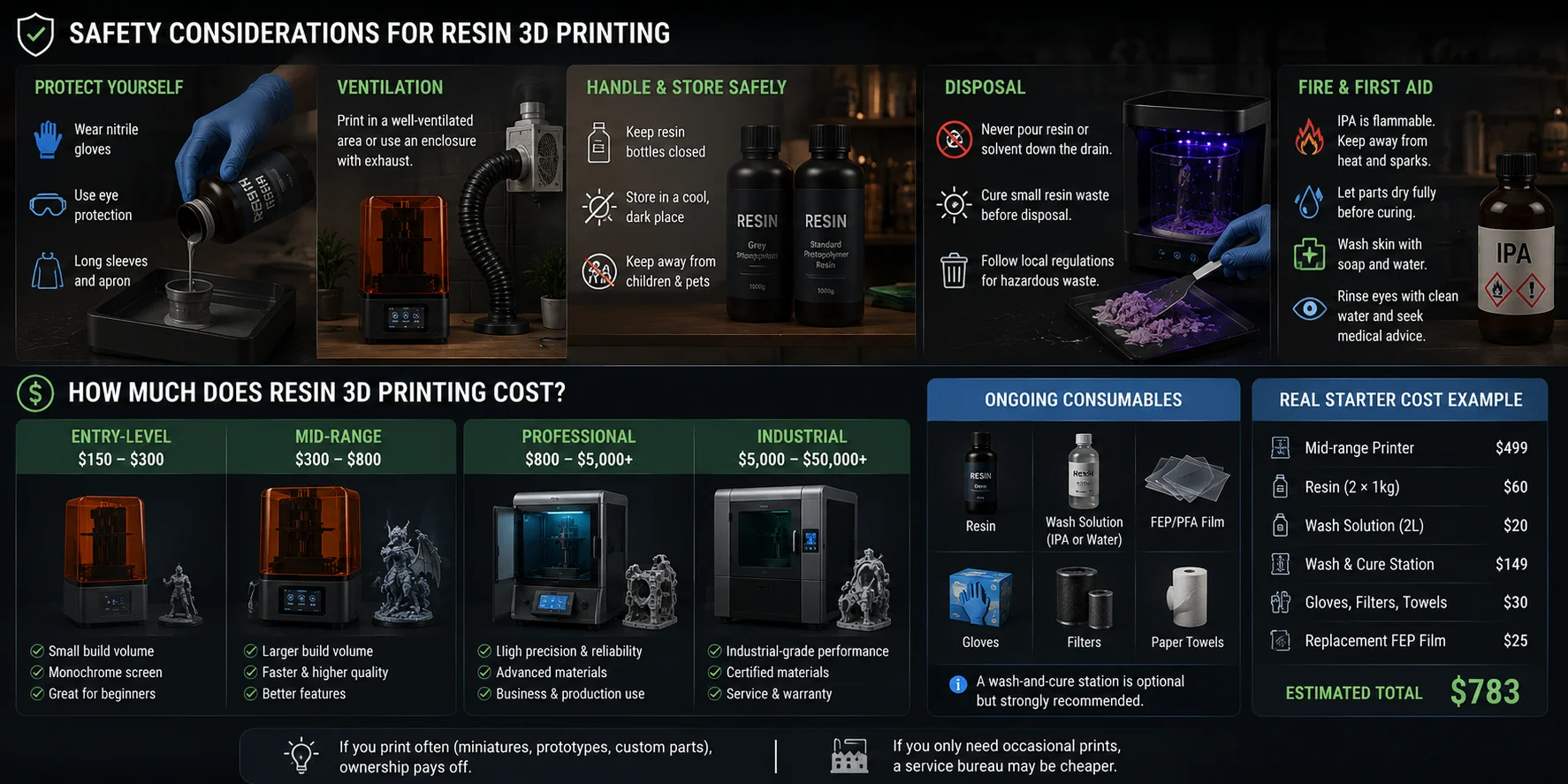
Resin printing is safe only when you treat uncured resin with respect. Liquid resin can irritate skin and eyes, and repeated exposure may increase sensitivity. Wear nitrile gloves whenever you handle resin, uncured prints, contaminated tools, vat film, or wash containers.
Ventilation matters. Do not run a resin printer in a bedroom or unventilated office. Use a garage, workshop, utility space, enclosure with exhaust, or well-ventilated area. Activated carbon filters can reduce odor, but they should not replace good airflow.
Never pour uncured resin or resin-contaminated solvent down the drain. Cure small resin waste under sunlight or a UV lamp until solid, then dispose of it according to local rules. Formlabs advises checking safety data sheets and local authorities because resin and solvent waste may be classified as hazardous in some areas.
IPA is flammable. Keep it away from heat, sparks, and UV curing stations. Let washed parts dry fully before curing. If resin touches your skin, wash with soap and water. If it gets in your eyes, rinse with clean water and seek medical advice.
How Much Does Resin 3D Printing Cost?
Resin printing costs more than the printer price.
Entry-level desktop printers often sit around the low hundreds of dollars. Tom’s Hardware notes that capable resin printers can be found for under $300, though high-end systems cost far more.
Mid-range desktop printers usually cost more but add larger build volumes, faster motion systems, improved light engines, better screens, and more quality-of-life features.
Professional and industrial systems can cost thousands to tens of thousands of dollars, especially when they include certified materials, service contracts, and validated workflows.
Consumables add up. You need resin, replacement FEP or PFA film, gloves, filters, cleaning solution, and paper towels. A wash-and-cure station is optional but strongly recommended. Budget calculators and recent beginner guides commonly include printer cost, resin, wash solution, curing equipment, gloves, and replacement film as part of the real starter cost.
If you only need occasional prints, a service bureau may be cheaper. If you print miniatures, prototypes, or custom parts every week, owning a resin printer can pay off quickly.
How to Get Your 3D Model Print-Ready
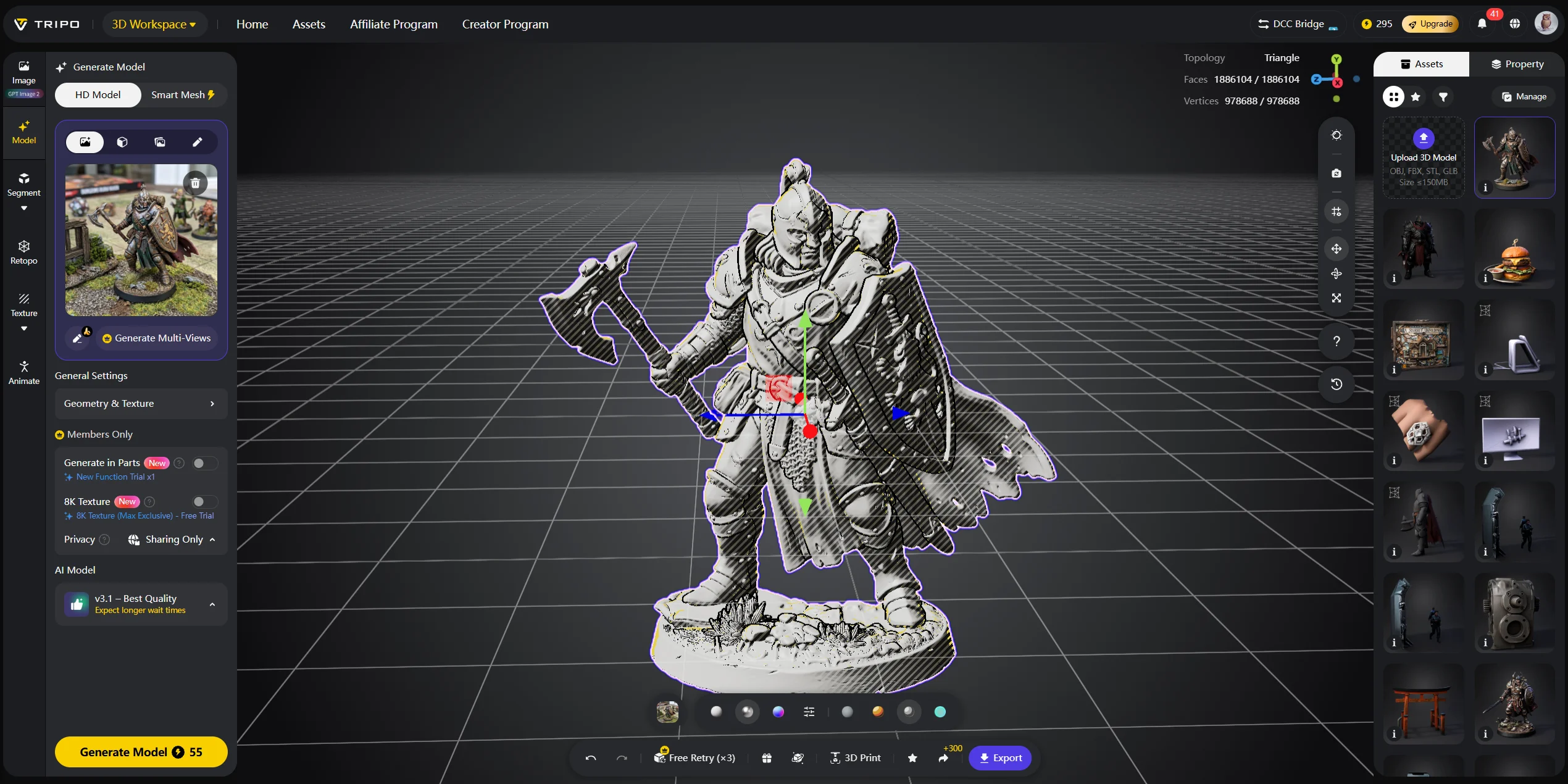
Before you can print anything, you need a 3D model file in STL, OBJ, or 3MF format. You can download models from repositories like Printables or MyMiniFactory, design your own in CAD software, sculpt in Blender, or use an AI model generator to create something custom in minutes.
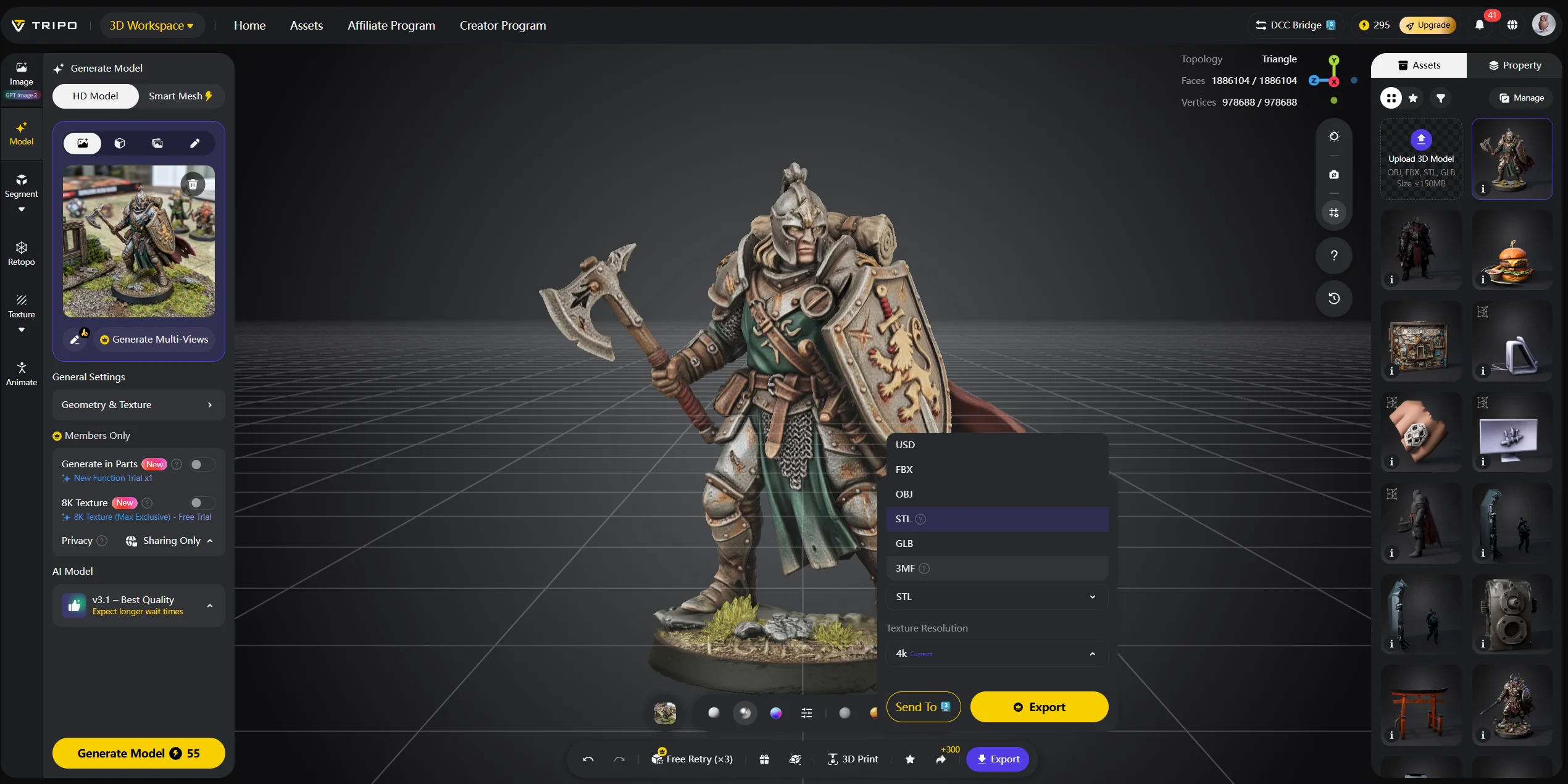
This is where Tripo AI fits naturally. Tripo AI’s Text-to-3D and Image-to-3D tools let you create a 3D model from a text prompt or reference photo. You can generate a print-ready model, export it as STL or 3MF, and bring it into most resin slicers without starting from a blank CAD workspace.
A simple workflow looks like this: generate the model in Tripo AI Studio, export STL or 3MF, import it into Chitubox, Lychee Slicer, or your printer’s bundled slicer, then scale, orient, hollow, support, slice, and print. For large resin parts, hollowing saves material, while drain holes let trapped liquid resin escape during washing and curing.
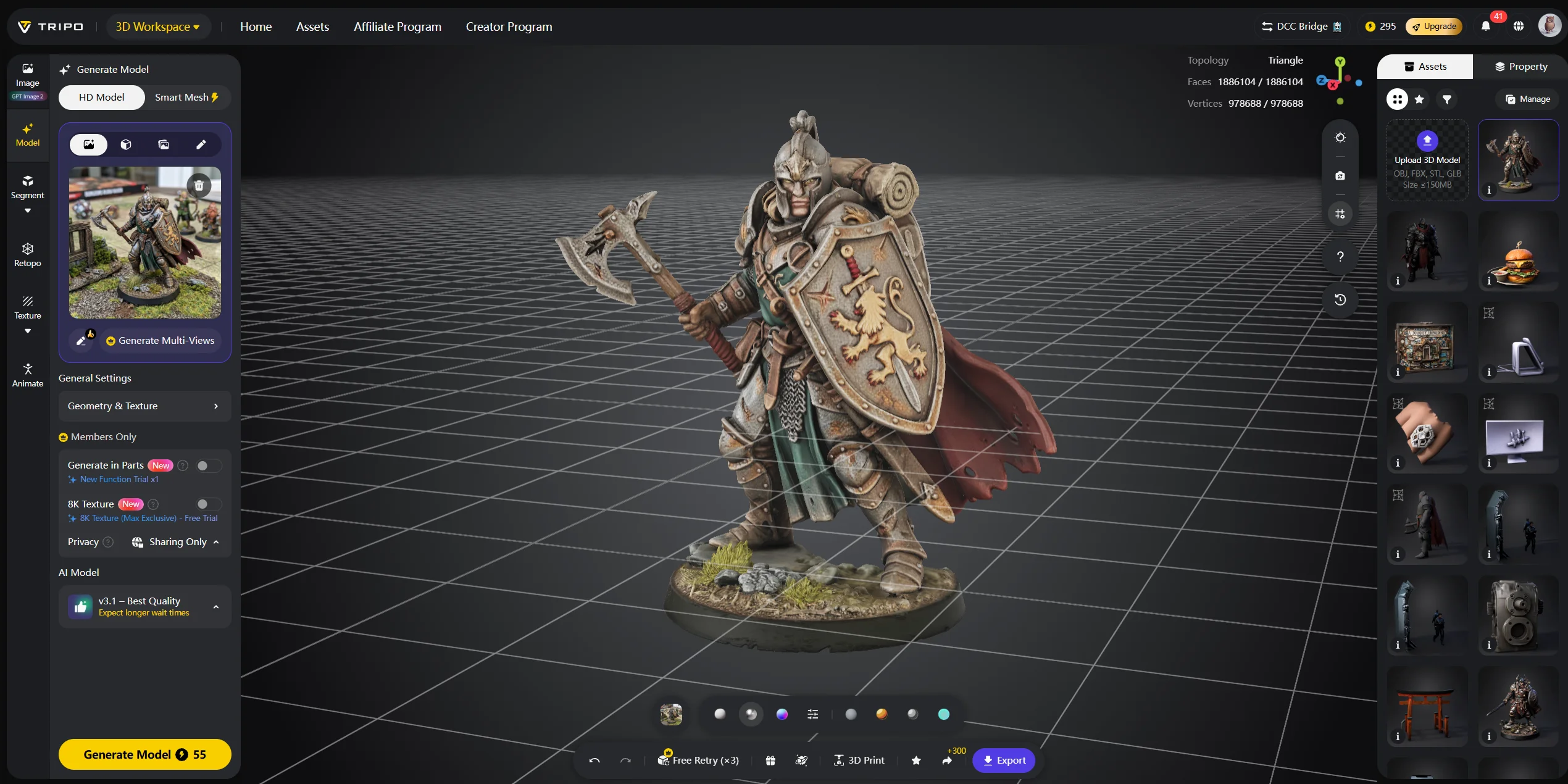
For resin printing, the slicer step still matters. Check wall thickness, island detection, suction cups, support contact points, and model scale before printing. Tripo AI Image-to-3D is especially useful for custom figurines and product mockups: upload a reference image, generate a detailed mesh, then prepare it for slicing.
AI does not remove every printing skill, but it removes the blank-page problem. A hobbyist can describe a custom creature, a product designer can turn a reference image into a mockup, and a maker can create a printable concept without learning CAD first.
Is Resin 3D Printing Worth It for You?
Resin printing is worth it if your projects depend on fine detail. It is a strong fit for miniatures, tabletop figures, jewelry masters, dental-style models, collectibles, display sculptures, and small prototypes where surface finish matters.
It is less ideal if you mainly need tough parts, big objects, flexible components, workshop tools, or simple household fixes. In those cases, FDM is often cheaper, safer, and easier to maintain.
Use this decision framework:
- Choose resin if your parts are small, detailed, and visual.
- Choose FDM if your parts are large, functional, or load-bearing.
- Choose a service bureau if you only print a few resin parts per year.
- Choose AI generation plus resin printing if you want custom designs fast.
Workspace is the final deciding factor. If you cannot create a ventilated, washable, chemical-safe area, do not buy a resin printer yet. The technology is powerful, but it rewards careful handling.
Frequently Asked Questions
What are the downsides of a resin 3D printer? Resin printers require washing, curing, ventilation, gloves, and careful waste disposal. Prints can also be brittle compared with FDM parts. Desktop resin printers usually have smaller build volumes than filament machines.
Is resin better than filament for 3D printing? Resin is better for fine detail, miniatures, jewelry, and smooth surfaces. Filament is better for large, strong, flexible, or low-cost functional parts. Neither is universally better.
Is resin 3D printing beginner-friendly? It is more demanding than FDM, but beginners can learn it. Start with standard or water-washable resin, use a ventilated workspace, and follow safe handling habits from day one.
Is it worth buying a resin 3D printer? Yes, if you regularly print detailed small objects. It is less worthwhile if you only need occasional prints or lack space for ventilation and post-processing.
What software is used for resin 3D printing? Common resin slicers include CHITUBOX, Lychee Slicer, and printer-specific software. These tools handle orientation, hollowing, supports, slicing, and printer-ready export.
How long does a resin 3D print take? A small figurine often takes one to four hours to print, depending on layer height and size. Washing, drying, curing, and cleanup can add another 30–60 minutes.
Can you reuse uncured resin? Yes, if it is clean. Filter it before returning it to the bottle. Do not reuse resin that has cured bits, debris, or contamination.
What is FEP film and why does it need replacing? FEP film is the transparent release layer at the bottom of the resin vat. It wears from peel forces, scratches, failed prints, and UV exposure. Replace it when it becomes cloudy, dented, loose, or damaged.
What is the difference between SLA, DLP, and MSLA? SLA uses a laser point. DLP projects an entire layer with a projector. MSLA uses an LCD mask and UV LED array, making it the most common affordable desktop option.
Can resin prints be painted or finished? Yes. Fully cured resin sands, primes, and paints well. Remove support marks first, then apply primer before painting for the best surface finish.
Conclusion
Resin 3D printing delivers surface quality and fine detail that most desktop manufacturing methods cannot match. It is ideal for miniatures, jewelry prototypes, dental-style models, display pieces, and detailed product concepts. It is less ideal for large structural parts, flexible components, or users without a safe workspace.
The key is matching the process to the project. If you can handle washing, curing, ventilation, and resin waste, resin printing gives you a powerful way to turn digital models into smooth physical objects.
Need a custom model to print? Generate a resin-ready STL or OBJ with Tripo AI Studio, then bring it into your slicer for supports and final prep. Explore Tripo AI Pricing when you are ready to build a faster AI-to-print workflow.