Maya vs 3ds Max: Which Should You Choose?
TL;DR:
- Maya is best for character animation, VFX, and advanced rigging workflows.
- 3ds Max is better for 3D modeling, architecture, and product visualization.
- Choose Maya for film, animation, and game characters.
- Choose 3ds Max for ArchViz, hard-surface models, and game environments.
- Many studios use both: Maya for characters, 3ds Max for environments.
- Tripo AI can speed up both workflows by creating FBX/OBJ base models for further editing
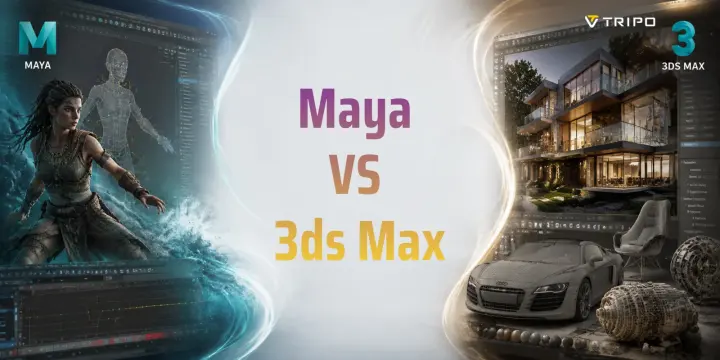
Maya excels at character animation and rigging, making it the top choice in film and game studios. 3ds Max is built for architectural visualization and hard-surface modeling, favored by designers and VFX artists. Both are Autodesk products — the right one depends entirely on what you create.
Both Maya and 3ds Max have powered blockbuster films and AAA games for decades — yet they solve fundamentally different problems. If you've ever spent hours choosing between them, you're not alone: this question drives thousands of searches every month. In this guide, you'll learn the real differences in modeling, animation, rigging, and rendering, plus which industries lean on each tool — so you can make a confident call.
What Is Maya?
Autodesk Maya is a professional 3D animation and visual effects software used in film, television, and game production. Since its introduction in the late 1990s, Maya has become one of the most widely used tools for creating digital characters, creatures, and cinematic effects.
Maya is best known for its animation capabilities. Its powerful character rigging system, joint-based skeleton tools, and blend shape workflow allow artists to create realistic movement and facial expressions. Many studios choose Maya because it gives animators precise control over every part of a character performance.
Another important feature is Maya’s node-based architecture. Instead of treating every element as an isolated object, artists can connect different parts of a scene and create complex relationships. This gives technical artists more control when building large production pipelines.
Maya also supports MEL and Python scripting, which allows studios to automate repetitive tasks and customize workflows. Many professional animation and VFX companies use Maya because it fits complex production environments.
If your goal is Maya animation, character creation, or film-quality VFX, Maya remains one of the strongest choices available.
What Is 3ds Max?
Autodesk 3ds Max is a 3D modeling, rendering, and animation software widely used in architectural visualization, product design, and game development.
The biggest advantage of 3ds Max is its modifier-stack workflow. Instead of permanently changing a model, you can apply modifiers and adjust them later. This non-destructive approach allows you to test ideas, change shapes, and refine models without rebuilding everything from scratch.
For 3ds Max modeling, this workflow is especially useful. Tools like Edit Poly, TurboSmooth, and ProBoolean are widely used for creating buildings, vehicles, furniture, mechanical objects, and game environment assets.
3ds Max also has strong rendering support. Many professional artists use it with V-Ray, Corona Renderer, or Arnold to create realistic architectural images, product shots, and design presentations.
While Maya is often associated with animation, 3ds Max is often associated with efficient modeling and visualization. For architects, interior designers, and environment artists, 3ds Max remains a major industry tool.
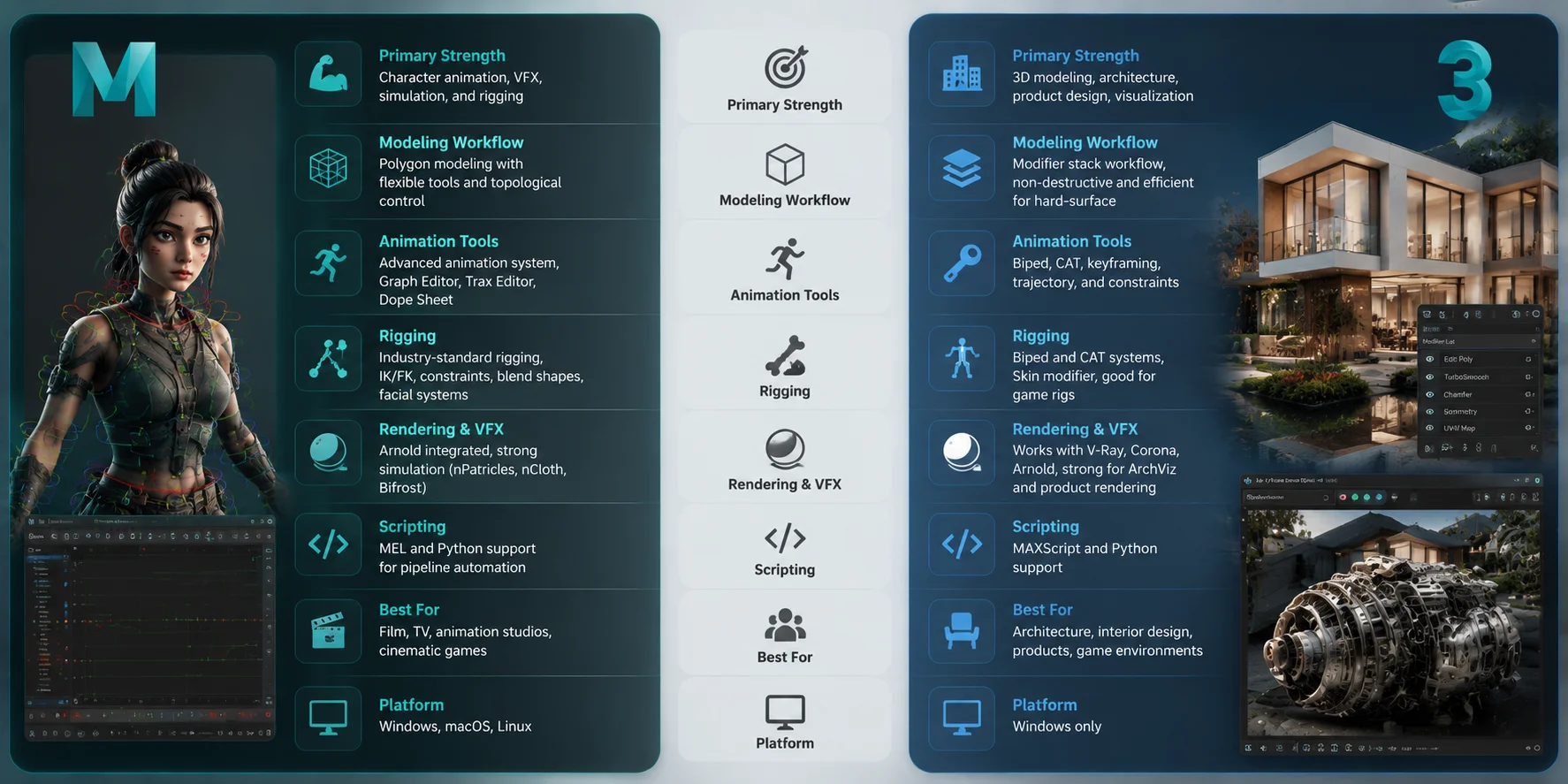
Maya vs 3ds Max: Key Differences at a Glance
Although Maya and 3ds Max are both made by Autodesk, they are separate software products. They have different workflows, interfaces, and industry strengths.
| Category | Maya | 3ds Max |
|---|---|---|
| Primary Use | Character animation, VFX, film | Modeling, ArchViz, product visualization |
| Animation | Advanced character animation tools | Good animation, stronger for environments |
| Modeling Workflow | Flexible polygon and character modeling | Modifier-based non-destructive modeling |
| Rigging | Industry-standard character rigging | Biped, CAT, Skin systems |
| Scripting | MEL and Python | MAXScript and Python |
| Operating System | Windows, macOS, Linux | Windows only |
| Learning Curve | More difficult for beginners | Easier to start |
| Best For | Animators and VFX artists | Modelers and visualization artists |
Both tools have professional subscription pricing, so the main question is not cost. The better question is: Which workflow matches your career goals?
Maya vs 3ds Max: Workflow & Feature Comparison
Modeling: Where Each Tool Shines
Both Maya and 3ds Max can create high-quality 3D models, but they approach modeling in different ways.
Maya includes strong polygon modeling tools and the Modeling Toolkit. Artists can create detailed characters, creatures, and organic shapes using vertex, edge, and face editing tools. Recent Maya versions have improved modeling features, making it more competitive for general asset creation.
However, Maya’s biggest strength has always been animation rather than pure modeling. Many character artists use Maya together with sculpting software such as ZBrush to create detailed characters before moving into rigging and animation.
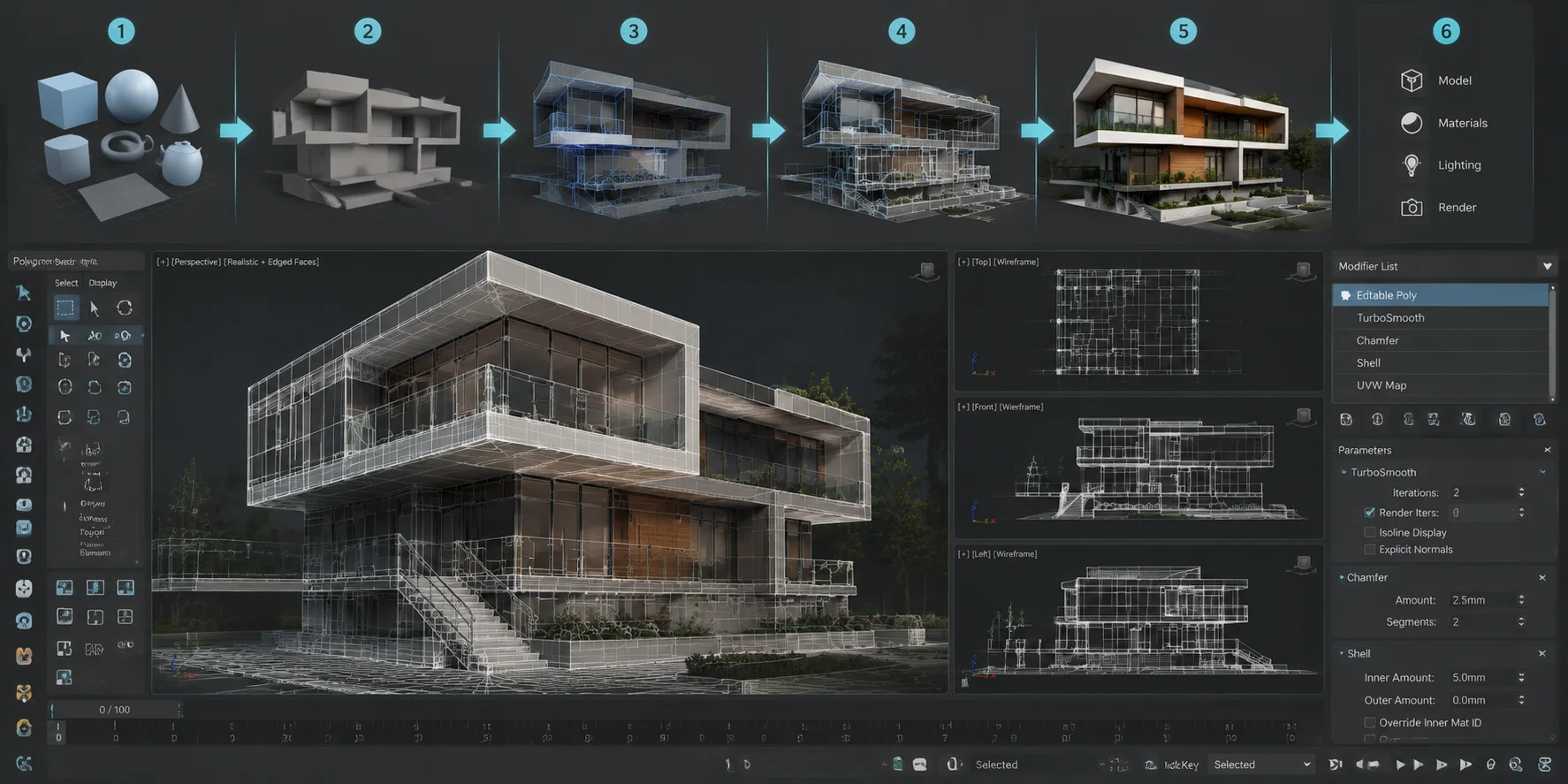
3ds Max has a stronger reputation for traditional modeling workflows. Its modifier stack allows artists to keep their models flexible during production. You can add a modifier, change settings, reorder operations, or remove changes later without destroying the original mesh.
This makes 3ds Max especially effective for hard-surface modeling. For example, an environment artist creating a building can quickly adjust walls, details, and materials without rebuilding the entire object.
A simple comparison:
- Organic characters and creatures → Maya is often preferred.
- Architecture and hard-surface assets → 3ds Max has an advantage.
- General modeling → both work, but their workflows are different.
3ds Max Modeling Workflow: From Base Mesh to Final Render
Animation and Rigging: Maya’s Home Turf
Animation is the area where Maya has the strongest advantage.
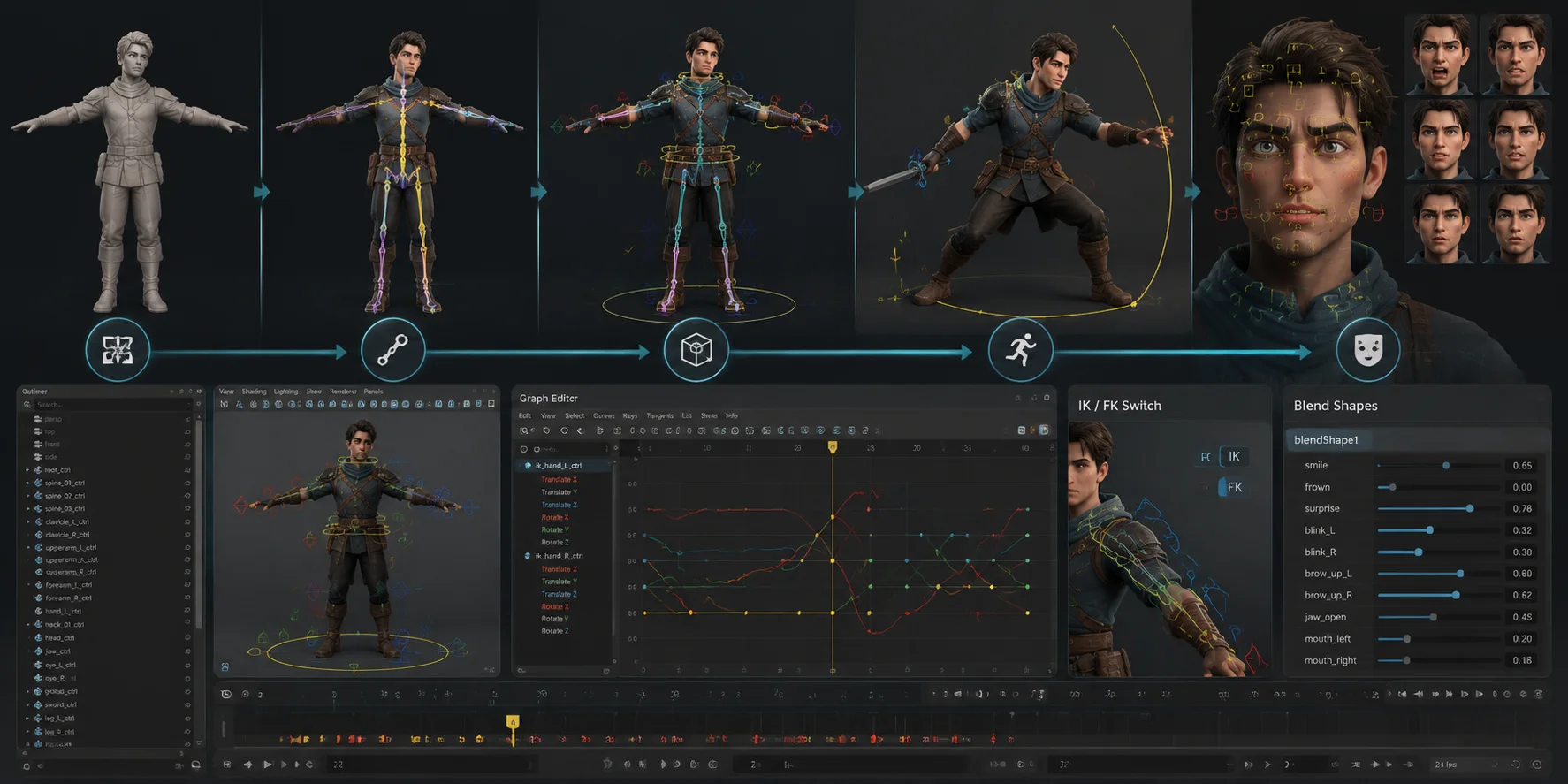
Maya is considered one of the leading tools for professional character animation. Its Graph Editor gives animators detailed control over motion curves, while the Dope Sheet helps manage timing and keyframes.
For advanced character work, Maya’s rigging system is especially important. Artists can create skeletons, control systems, and deformation setups that allow characters to move naturally.
Features such as IK/FK switching are commonly used in professional character rigs. They allow animators to switch between different control methods depending on the action. For example, an animator can use forward kinematics for arm movement and inverse kinematics for realistic hand placement.
Maya’s blend shape system is also widely used for facial animation. It helps artists create expressions, lip syncing, and emotional performances.
3ds Max also provides animation tools, including Biped, CAT (Character Animation Toolkit), and Skin modifiers. These tools are useful for game characters, simulations, and environment animation.
However, for film-quality character animation and complex character rigging, Maya is usually the preferred option.
In game development, both programs remain important game development tools:
- Maya → character animation, facial systems, rigging.
- 3ds Max → environments, props, hard-surface assets.
Many studios use both tools together.
Maya Character Animation & Rigging Workflow
Rendering and Visual Effects Capabilities
Both Maya and 3ds Max support professional 3D rendering pipelines and work with industry-standard renderers such as Arnold, V-Ray, and Redshift.
Maya has a strong connection with film and VFX production. Arnold is included with Maya and is widely used for realistic lighting, materials, and cinematic rendering. Maya also includes simulation tools such as Bifrost, nParticles, and nCloth for creating effects like smoke, water, fire, and destruction.
3ds Max is especially popular for architectural visualization and product rendering. The combination of 3ds Max with V-Ray or Corona Renderer is widely used to create realistic interiors, buildings, furniture, and product images.
The difference is mainly about industry focus:
- Maya + Arnold → film, VFX, creatures, cinematic scenes.
- 3ds Max + V-Ray/Corona → architecture, products, realistic visualization.
For game assets, both tools support modern PBR workflows and export formats used by engines such as Unity and Unreal Engine.
Industry Use Cases — Which Pros Choose Which?
The best way to decide between Maya and 3ds Max is to look at how professionals use them in real production environments. Different industries prefer different workflows, and the choice often depends on the type of assets you create.
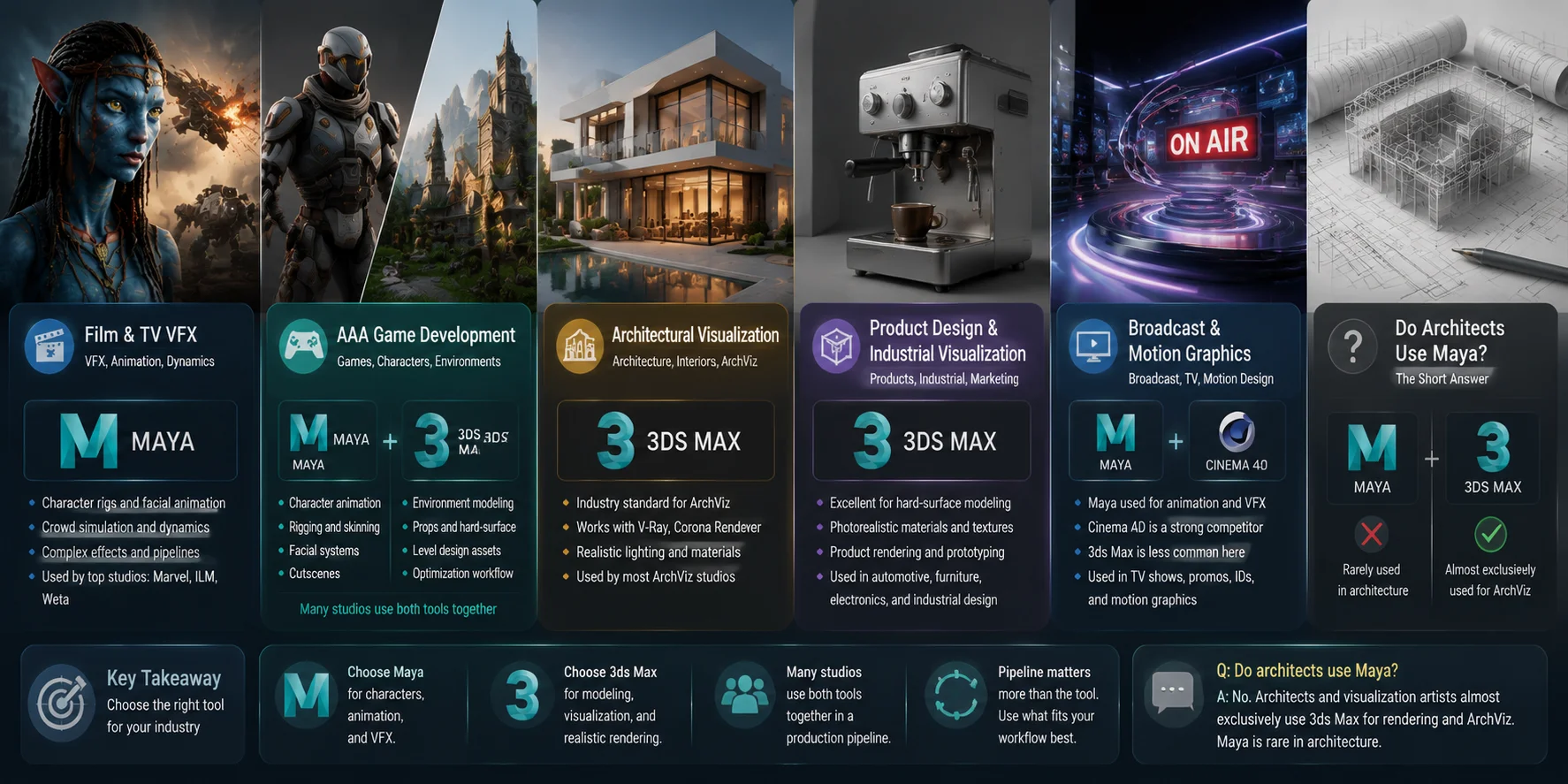
Film and TV VFX: Maya is the dominant choice for many visual effects pipelines. Studios working on large productions use Maya for character rigs, creature animation, crowd systems, and complex dynamics simulations. Its advanced animation and rigging tools make it a strong fit for cinematic projects that require detailed character performances.
AAA Game Development: Both Maya and 3ds Max are common game development tools, but they are often used for different tasks. Game studios typically use Maya for character animation, facial systems, and rigging, while 3ds Max is frequently used for environment assets, props, and hard-surface modeling. Many studios combine both tools in the same pipeline.
Architectural Visualization (ArchViz): 3ds Max is the clear leader in this field. Most ArchViz studios use 3ds Max together with renderers like V-Ray or Corona Renderer to create realistic buildings, interiors, and product scenes. If you ask, “Do architects use Maya?” the answer is usually no. Architects and visualization artists almost exclusively use 3ds Max for rendering workflows, while Maya is rare in architecture.
Product Design and Industrial Visualization: 3ds Max works well for hard-surface geometry, detailed materials, and photorealistic product renders. It is widely used for furniture, vehicles, electronics, and industrial design presentations.
Broadcast and Motion Graphics: Maya can be used for animation and visual effects, but it competes more directly with tools like Cinema 4D in broadcast workflows. 3ds Max is less common in this space.
In short, choose Maya for characters, animation, and VFX. Choose 3ds Max for modeling, visualization, and realistic rendering.
**Maya vs 3ds Max Industry Use Cases **
Pricing and Learning Curve
Maya and 3ds Max are both professional Autodesk subscription products. As of 2025, both are priced around 2,285 per year, although Autodesk pricing may change.
These tools are expensive because they target professional studios and production teams. Their pricing includes years of research, advanced features, updates, and technical support.
Autodesk also provides educational licenses for eligible students and teachers.
For beginners, 3ds Max is usually easier to learn. Its modifier stack gives a more direct modeling experience, and users can quickly understand how changes affect objects.
Maya has a steeper learning curve because its animation systems and node-based workflow require more time to understand. However, that complexity gives professional artists greater control over advanced projects.
How Tripo AI Fits Into Your Maya or 3ds Max Workflow
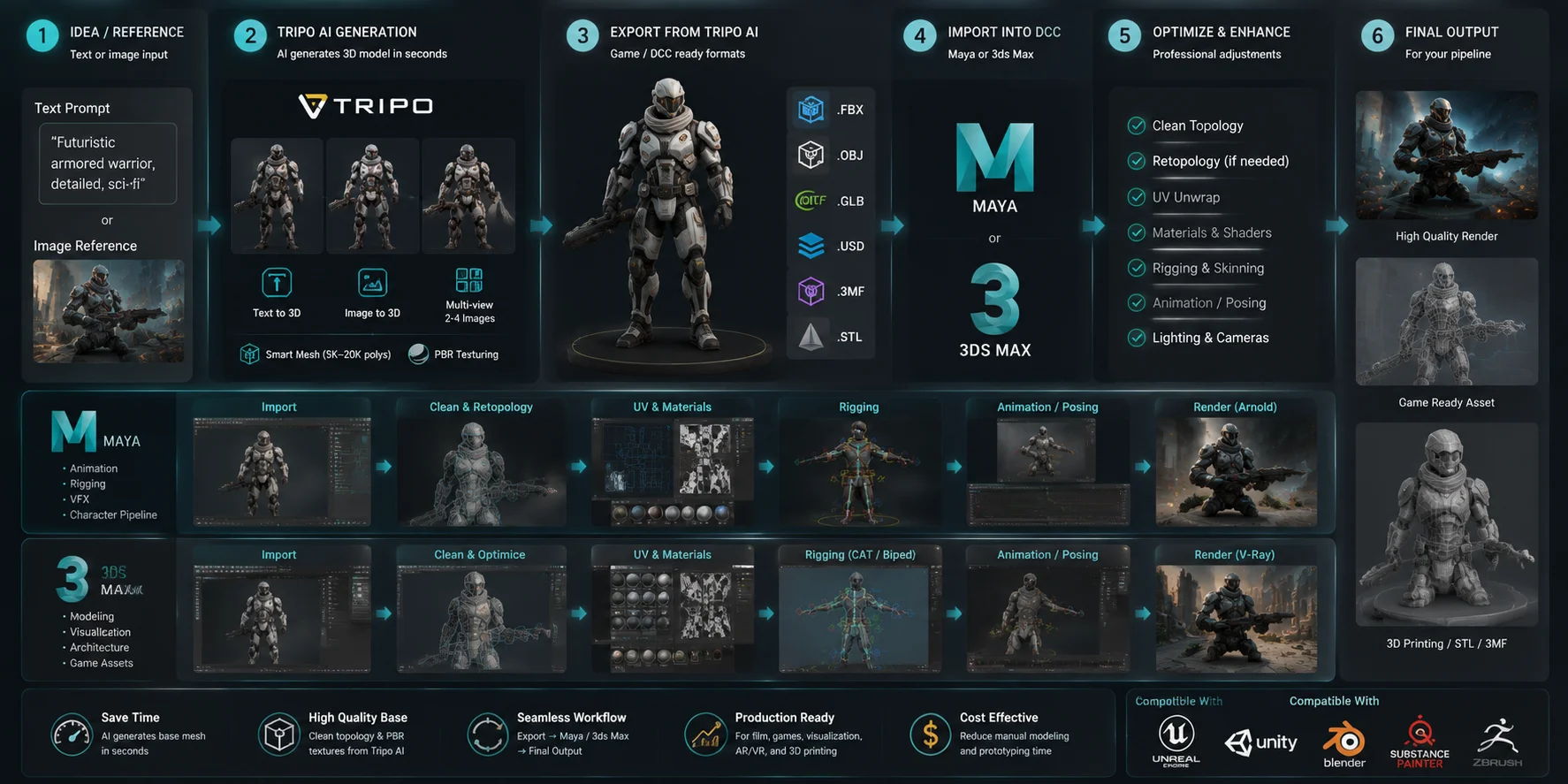
One of the biggest time costs in a Maya or 3ds Max project is not always the final polish — it is creating the first usable version of a 3D asset. Building a clean base mesh from scratch can take hours, especially when you are working on early concepts, game prototypes, or testing new ideas.
An AI 3D model generator like Tripo AI can speed up this first stage by turning a text prompt or reference image into a textured 3D model within seconds. You can then export the result as FBX or OBJ, two widely supported formats that import directly into both Maya and 3ds Max workflows.
For example, a character artist can generate a base character model with Tripo AI, export it as FBX, and bring it into Maya for further character rigging, animation, and final adjustments before sending it to a game engine. An environment artist can create a prop or architectural object with Tripo AI, import it into 3ds Max, refine materials, and prepare it for V-Ray rendering.
Tripo AI’s Auto-Rig feature can also help reduce manual setup time by creating an initial rig for compatible character models before further animation work in Maya.
The key point is that Tripo AI does not replace Maya or 3ds Max. Instead, it works as a front-end accelerator for the ideation and blockout stages, helping you move from an idea to a workable 3D asset faster. You can explore more workflows with the AI 3D Model Generator and integrate generated assets into your existing 3D pipeline.
Tripo AI + Maya + 3ds Max: AI-Powered 3D Workflow Pipeline
Maya vs 3ds Max: Which Should You Choose?
Choose Maya if you:
- Want to create animated characters.
- Work in film or VFX.
- Need advanced character rigging.
- Plan to become an animator.
- Build cinematic game assets.
Choose 3ds Max if you:
- Create architectural visualization.
- Model products or hard-surface objects.
- Build game environments.
- Need fast modeling workflows.
- Use V-Ray or Corona Renderer.
If you work in game development, learning both can be valuable.
| Goal | Recommended Tool |
|---|---|
| Character animation | Maya |
| Film VFX | Maya |
| Character rigging | Maya |
| Architecture | 3ds Max |
| Product rendering | 3ds Max |
| Game environments | 3ds Max |
| Full production workflow | Both |
Frequently Asked Questions
Is Maya the same as 3ds Max?
No. Maya and 3ds Max are different Autodesk products. Maya focuses on animation and VFX, while 3ds Max focuses on modeling and visualization.
Why is Maya so expensive?
Maya is professional software used by major studios. The price reflects advanced tools, development costs, and professional support.
Do architects use Maya?
Usually not. Architects mainly use 3ds Max because it works better with architectural modeling and rendering workflows.
Do people still use 3ds Max?
Yes. 3ds Max remains widely used in architecture, product visualization, and game environment creation.
Which is easier to learn?
3ds Max is usually easier for beginners. Maya takes longer but provides stronger animation and rigging tools.
Can Maya and 3ds Max work together?
Yes. Many studios use Maya for characters and 3ds Max for environments. FBX is a common format between both tools.
Conclusion
Maya and 3ds Max are both industry-standard 3D tools, but they serve different purposes. Choose Maya for animation, VFX, and character work. Choose 3ds Max for modeling, architecture, and visualization.
Want to speed up your workflow? Try Tripo AI Studio to generate FBX or OBJ base meshes quickly, then refine them in Maya or 3ds Max. Check Tripo AI Pricing to find the plan that fits your needs.