Best AI 3D Model Generators for Game Prototypes (2026)
TL;DR
- AI 3D generators help game developers quickly create characters, props, and environments from text prompts or images, making prototyping much faster.
- The best tools go beyond visual generation by offering cleaner topology, optimized meshes, textures, rigging support, and easy exports to Unity or Unreal.
- When choosing an AI 3D tool, focus on how much cleanup is required after generation and whether it can smoothly fit into a game development workflow.
The best AI 3D model generators for game prototypes let you turn a text prompt or concept art into textured, game-ready 3D assets in minutes. For prototyping, the best tools are not only fast—they also produce cleaner topology, usable materials, and assets that can move into Unity or Unreal with less manual cleanup.
Studios using text-to-3D and image-to-3D workflows report significantly faster asset production cycles, helping teams explore more ideas in less time. For solo developers and small teams working under tight deadlines, this can mean the difference between a playable prototype and an unfinished project. In this guide, we compare AI 3D generators by quality, speed, formats, and game-ready features, review the top tools, provide a decision table, and walk through the basic workflow from idea to engine-ready asset.
Can AI Actually Generate Game-Ready 3D Models?
Yes, AI can generate 3D models that are useful for game development, especially during the prototype, concept, and greybox stages. Modern AI 3D generators can turn text prompts or images into textured 3D meshes within seconds or minutes, making it much faster to test characters, props, environments, and gameplay ideas. However, an AI-generated model is not automatically a production-ready asset.
The key difference is between prototype-ready and game-ready models. Prototype-ready assets are good enough to place into a scene, test scale, explore visual direction, or build an early playable demo. Most AI 3D tools can achieve this level because speed and visual approximation are their main strengths.
Game-ready assets require a higher standard. They need clean topology, optimized polygon counts, proper UV mapping, quality textures, consistent materials, and often a structure suitable for rigging and animation. Some AI tools can provide these features directly or with built-in optimization, while others still require cleanup in Blender or another 3D package.
So the real question is not simply “Can AI make a 3D model?”—it is “How much production work remains after generation?” In this guide, we evaluate AI 3D generators based on the factors that matter most for game workflows: mesh quality, topology, textures, export formats, engine compatibility, and how close the final result is to a usable game asset.
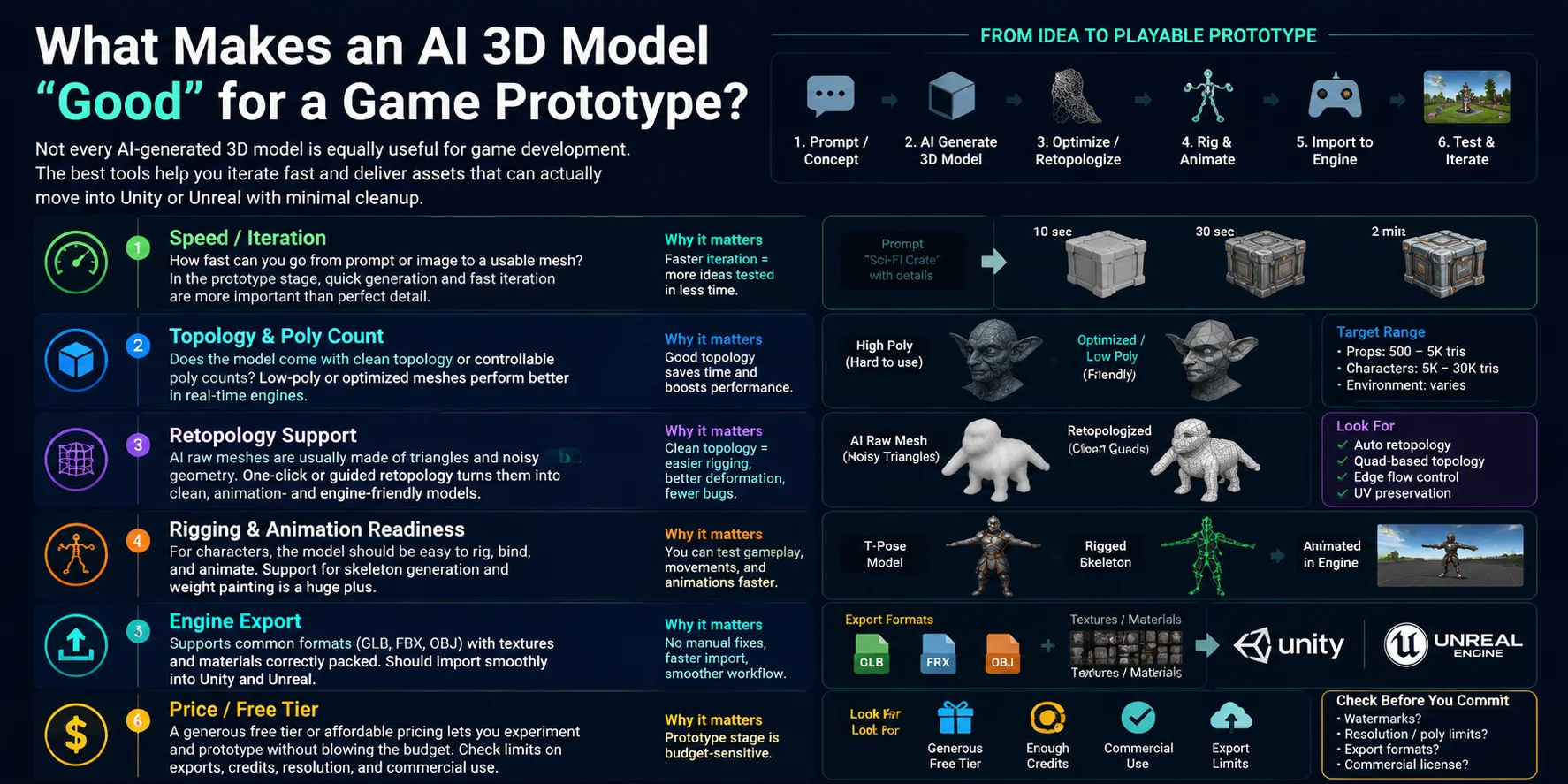
What Makes an AI 3D Model "Good" for a Game Prototype?
Not every AI-generated 3D model is equally useful for game development. A model that looks impressive in a preview may still require hours of cleanup before it can work inside Unity or Unreal. For prototypes, the best AI 3D tools are not only judged by visual quality, but also by how quickly they help developers test ideas and move assets into a playable scene.
Speed / Iteration
For game prototypes, speed is often the most important factor. A good AI 3D generator should turn a prompt, image, or concept idea into a usable mesh quickly so developers can test different characters, props, and environments without spending days on manual modeling.
Topology & Poly Count
A useful prototype asset needs manageable geometry. Some AI-generated models contain dense triangle meshes that look detailed but are difficult to edit or optimize. Better tools provide cleaner topology, adjustable polygon counts, or low-poly options that make assets easier to use in real-time engines.
Retopology Support
Retopology is one of the biggest differences between a simple AI model and a production-friendly asset. Many AI-generated meshes are created with irregular triangle patterns and noisy surfaces, which can cause problems with deformation, animation, and performance. Built-in or automated retopology features can turn these messy meshes into cleaner game-ready geometry much faster.
Rigging & Animation Readiness
For character assets, modeling is only the first step. A good AI 3D workflow should support skeleton creation, bone binding, and animation preparation. Characters that are easier to rig can move from concept to gameplay testing much faster.
Engine Export
A game prototype needs assets that can quickly enter the development pipeline. Support for common formats such as GLB, FBX, and OBJ, along with properly packaged textures and materials, makes it easier to import models directly into engines like Unity and Unreal Engine.
Price / Free Tier
Budget also matters, especially for indie developers, students, and game-jam projects. A tool with a useful free tier allows teams to experiment before committing to paid plans, but it is important to check limits on exports, credits, resolution, and commercial usage.
When comparing AI 3D generators, the best choice is not simply the tool that creates the most detailed model. It is the one that produces assets you can iterate on, optimize, animate, and actually use inside your game workflow.
The Best AI 3D Model Generators for Game Prototypes
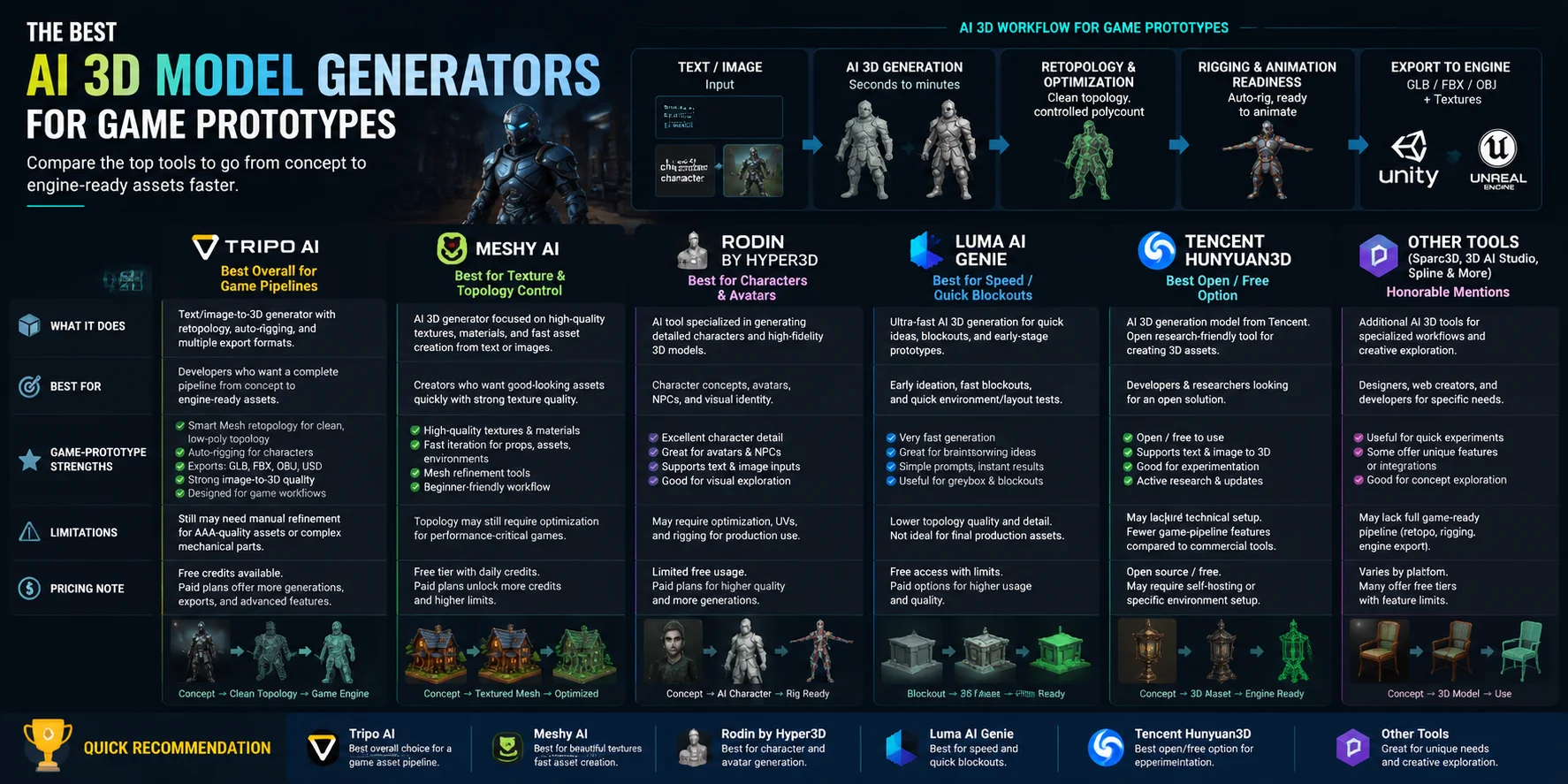
Choosing the best AI 3D model generator for game prototypes depends on more than just how fast it creates a mesh. A useful game-development tool needs to help with the entire pipeline: generating assets, improving topology, creating textures, preparing animation, and exporting files that work inside engines like Unity and Unreal. Below are the leading AI 3D generators and where each one fits best.
Tripo AI — Best Overall for Game Pipelines
What it does
Tripo AI is an AI-powered 3D generation platform that converts text prompts or images into textured 3D models. It is designed for a complete workflow, helping users move from an initial concept to an asset that can be tested inside a game engine.
Best for
Tripo AI is best for indie developers, game designers, and creators who need a fast path from concept → playable 3D asset. It works well for characters, props, environments, and early production assets.
Game-prototype strengths
One of Tripo’s biggest advantages is that it focuses on improving the usability of AI-generated meshes rather than only producing visually detailed models. Features like Smart Mesh retopology help transform irregular AI geometry into cleaner, more controllable topology with lower polygon counts, making assets easier to optimize for real-time engines.
It also supports auto-rigging, allowing character models to receive a skeleton structure faster for animation testing. With support for formats such as GLB, FBX, OBJ, and USD, assets can be moved into common game workflows more easily.
The image-to-3D workflow is especially useful for turning concept art, references, or existing designs into prototype-ready models quickly.
Limitations
Like most AI 3D generators, Tripo outputs may still require artistic review and adjustments for final production. Complex characters, highly precise mechanical parts, or AAA-quality assets may need additional refinement in Blender or other DCC tools.
Pricing note
Tripo offers different plans with generation credits and feature availability depending on the subscription level. Users should check current export options and limits based on their production needs.
Meshy AI — Best for Texture & Topology Control
What it does
Meshy AI is an AI 3D generation platform focused on creating models from text and images, with strong emphasis on textures, materials, and fast asset creation.
Best for
Meshy is a good choice for creators who prioritize visual quality and quick iteration, especially when making props, stylized assets, and concept models.
Game-prototype strengths
Meshy’s strength is its ability to quickly generate textured models with attractive materials. Its workflow is beginner-friendly and useful for rapidly exploring different visual ideas before moving into a full production pipeline.
It also provides tools for texture generation and mesh refinement, making it useful when appearance matters more than perfect production topology.
Limitations
Some AI-generated meshes may still require cleanup, optimization, or retopology before being used in a performance-sensitive game environment. Developers working on large-scale games may need additional tools for final asset preparation.
Pricing note
Meshy provides free credits and paid plans with higher generation limits and additional features.
Rodin by Hyper3D — Best for Characters & Avatars
What it does
Rodin by Hyper3D specializes in generating detailed 3D characters and objects from images or descriptions.
Best for
Rodin is particularly useful for character concepts, avatars, and projects where visual identity is the main priority.
Game-prototype strengths
Its character-focused generation can produce detailed models quickly, making it valuable for testing character ideas, NPC concepts, and early game visuals.
For teams exploring different character directions, Rodin can reduce the time needed to move from a concept image to a 3D representation.
Limitations
Highly detailed outputs may require optimization before real-time use. Animation-ready topology, UV preparation, and rigging may still require additional workflow steps.
Pricing note
Rodin offers limited free access and paid options depending on generation needs and usage volume.
Luma AI Genie — Best for Speed & Quick Blockouts
What it does
Luma AI Genie focuses on rapid AI 3D generation, allowing users to quickly create models from simple prompts.
Best for
It is best suited for early prototypes, brainstorming, and quick blockouts where speed matters more than final asset quality.
Game-prototype strengths
Luma AI Genie is useful during the idea stage when developers need many rough concepts quickly. It can help visualize gameplay ideas, environment layouts, or prop variations before investing time in detailed modeling.
Limitations
The generated assets may not always have the topology quality, optimization, or production readiness needed for final game assets. Additional cleanup is usually required.
Pricing note
Luma provides access options that may include free usage limits and paid upgrades depending on current availability.
Tencent Hunyuan3D — Best Open/Free Option
What it does
Tencent Hunyuan3D is an AI 3D generation solution designed to create 3D assets from images and text.
Best for
It is attractive for developers and researchers interested in open AI 3D workflows and experimentation.
Game-prototype strengths
Its accessibility makes it useful for testing AI-generated assets without relying entirely on commercial platforms. It can help developers explore automated asset creation workflows.
Limitations
Compared with specialized commercial platforms, users may need more technical knowledge for setup, optimization, and integration into production pipelines.
Pricing note
Availability and licensing depend on the specific version and deployment method.
Sparc3D & Other Honorable Mentions: 3D AI Studio, Spline
What they do
Other AI 3D tools such as Sparc3D, 3D AI Studio, and Spline provide additional options for generating or editing 3D content.
Best for
These tools are useful for designers, web creators, and developers looking for quick experimentation or specific workflows.
Game-prototype strengths
They can accelerate idea generation, create visual references, and help fill early prototype asset needs.
Limitations
Many secondary tools focus more on visual creation than complete game pipelines. Developers may still need separate solutions for retopology, rigging, optimization, and engine export.
Pricing note
Free tiers, credits, and feature availability vary between platforms.
Quick Recommendation
- Best overall game prototype workflow: Tripo AI
- Best for textures and fast asset creation: Meshy AI
- Best for characters and avatars: Rodin by Hyper3D
- Best for quick blockouts: Luma AI Genie
- Best open/free experimentation: Tencent Hunyuan3D
For most game prototypes, the best AI 3D generator is the one that reduces the most work after generation. A fast model is useful, but a model that can be optimized, rigged, exported, and tested in an engine is what truly speeds up development.
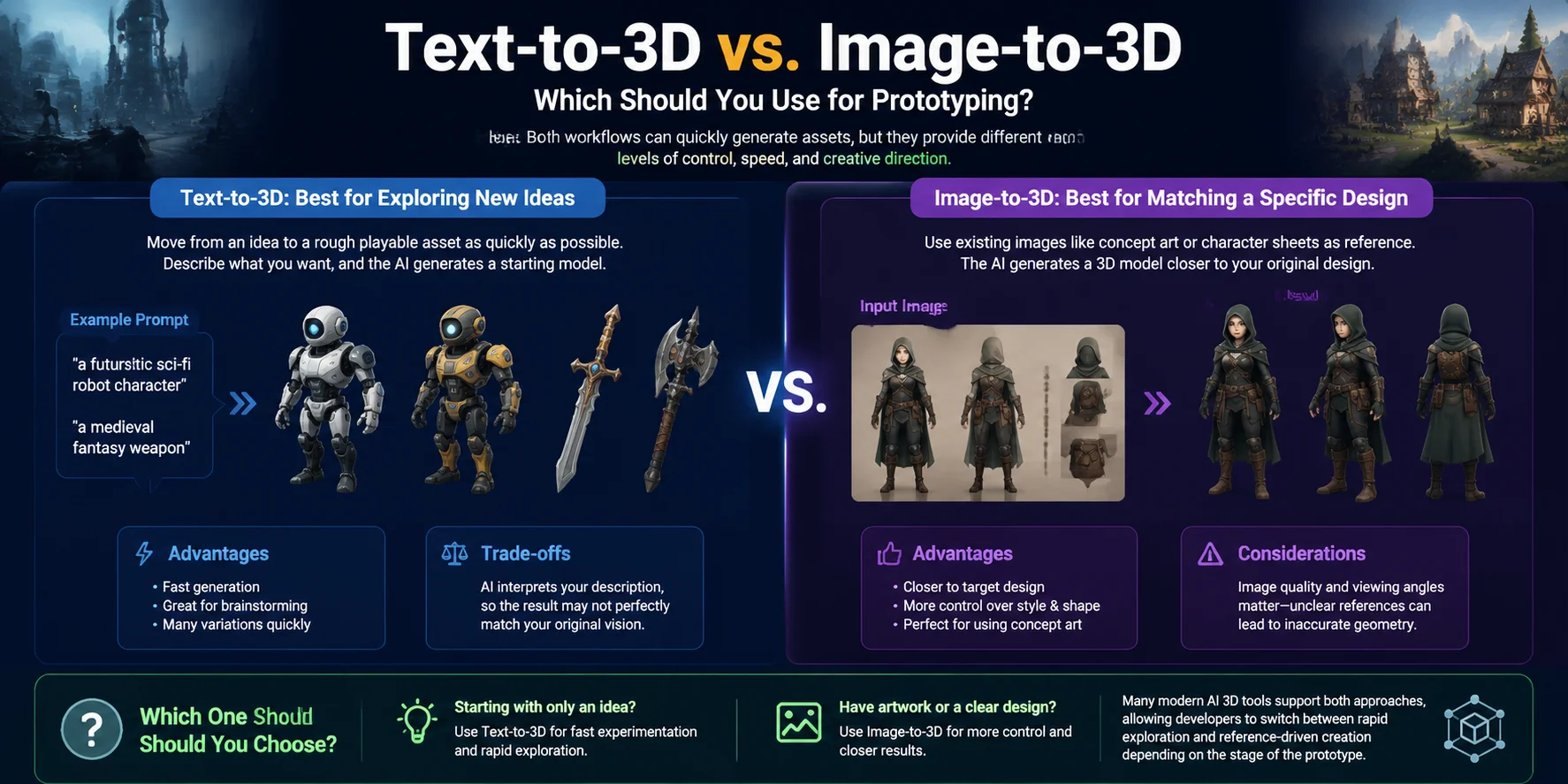
Text-to-3D vs. Image-to-3D: Which Should You Use for Prototyping?
When creating game prototypes, choosing between text-to-3D and image-to-3D depends on where your idea starts. Both workflows can quickly generate assets, but they provide different levels of control, speed, and creative direction.
| Input | Best when | Control over result | Typical use in prototyping |
|---|---|---|---|
| Text-to-3D | You have an idea but no finished artwork or reference images | Lower control; AI interprets the description and creates a possible design | Quickly testing new characters, props, environments, and gameplay concepts |
| Image-to-3D | You already have concept art, sketches, screenshots, or reference images | Higher control; the generated model usually follows the provided visual reference more closely | Creating assets that match an existing art style, character design, or game concept |
Text-to-3D: Best for Exploring New Ideas
Text-to-3D is ideal when you want to move from an idea to a rough playable asset as quickly as possible. A simple description such as “a futuristic sci-fi robot character” or “a medieval fantasy weapon” can generate a starting model without requiring any previous modeling experience.
The advantage is speed and flexibility. Developers can create many variations during brainstorming, especially during game jams or early concept stages. The trade-off is that the result may not perfectly match your original vision because the AI has to interpret the description.
Image-to-3D: Best for Matching a Specific Design
Image-to-3D works better when you already have a visual target. A concept painting, character sheet, or product image gives the AI more information about shape, style, and proportions, making the output easier to guide.
This workflow is especially useful for game teams that already have concept art and want to turn 2D designs into 3D prototypes faster. However, image quality and viewing angles matter—unclear references can lead to inaccurate geometry.
Which One Should You Choose?
If you are starting with only an idea and need fast experimentation, text-to-3D is usually the better choice. If you already have artwork and want the model to stay closer to a specific design, image-to-3D provides more control.
Many modern AI 3D tools support both approaches, allowing developers to switch between rapid exploration and reference-driven creation depending on the stage of the prototype.
From AI Model to Game-Ready Asset: The Cleanup Step Nobody Talks About
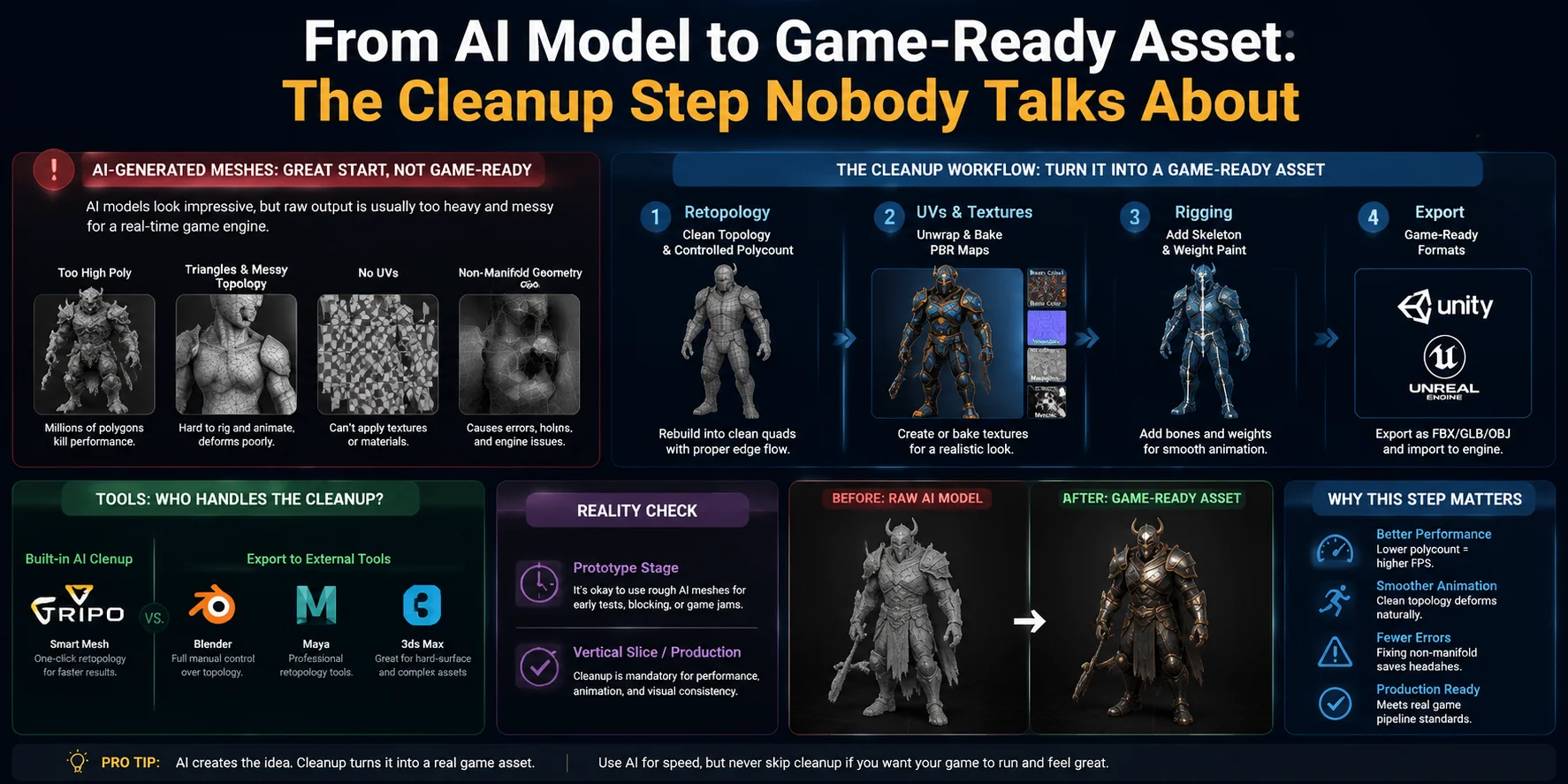
AI can generate a 3D model in seconds, but the first output is rarely ready to drop directly into a game engine. Most AI-generated meshes are created for visual similarity, not production performance. They often contain extremely high polygon counts, dense triangle-heavy geometry, messy edge flow, missing UV maps, and even non-manifold issues. While the model may look impressive in a viewer, using it directly in Unity or Unreal can lead to slower performance, larger file sizes, broken animations, or problems during rigging.
The cleanup stage is where a prototype becomes a usable game asset. The most important step is usually retopology—rebuilding the mesh into cleaner geometry with controlled polygon density and better edge flow. Instead of thousands of randomly arranged triangles, a retopologized model uses a more organized structure, typically with cleaner quad-based topology that deforms better during animation. This makes it easier to add bones, create facial expressions, adjust shapes, and optimize the asset for real-time rendering.
After retopology, the next steps are usually UV unwrapping and texture preparation. A clean UV layout allows artists to generate or bake textures correctly, including color maps, normal maps, roughness maps, and other PBR materials. Once the model has optimized geometry and proper textures, it can move into the rigging stage, where a skeleton is added and the asset is prepared for animation.
Modern AI 3D tools are starting to simplify this workflow by including automatic cleanup features. Some platforms provide built-in solutions such as AI retopology or Smart Mesh, which can automatically rebuild dense AI-generated geometry into a cleaner, more production-friendly mesh. This is useful for quickly turning generated concepts into game-ready prototypes without spending hours manually fixing topology. However, for professional production, artists may still export the model to tools like Blender for detailed adjustments, especially for characters, complex deformation, or assets that require strict polygon budgets.
The amount of cleanup depends on the project stage. For early prototypes, game jams, or simple visual tests, a rough AI-generated model may be enough. But once an asset moves into a vertical slice or production pipeline, optimization is no longer optional. A polished game asset needs clean topology, efficient geometry, proper textures, and reliable rigging before it can perform well inside a real-time engine.
AI speeds up the creation process, but the cleanup step is what transforms a generated model into a true game-ready asset.
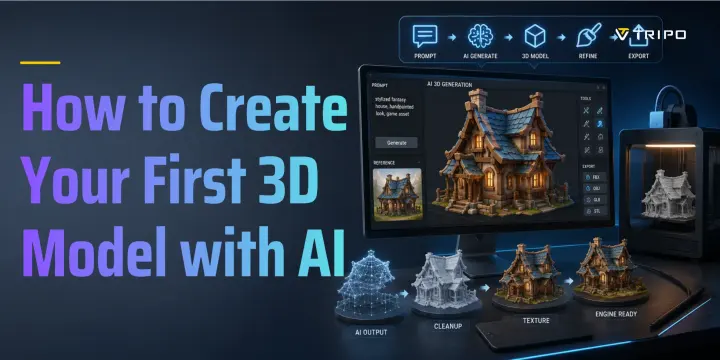
How to Prototype a Game Asset With AI in Under 15 Minutes
Creating a game asset from scratch traditionally requires modeling, texturing, and technical skills that can take hours or even days. With modern AI 3D tools, you can create a rough playable prototype much faster. The goal is not to replace the full production pipeline, but to quickly turn an idea into a usable asset for testing gameplay, style, or level concepts.
Step 1 — Write a Clear Prompt or Add Concept Art
Start with a strong description or visual reference. The more specific your input, the easier it is for AI to understand the shape, style, and purpose of the asset.
For example:
“A futuristic sci-fi soldier robot character, armored body, mechanical joints, realistic game-ready design, detailed hard-surface parts, standing pose.”
If you already have concept art, sketches, or reference images, image-to-3D generation can provide more control over the final shape and proportions.
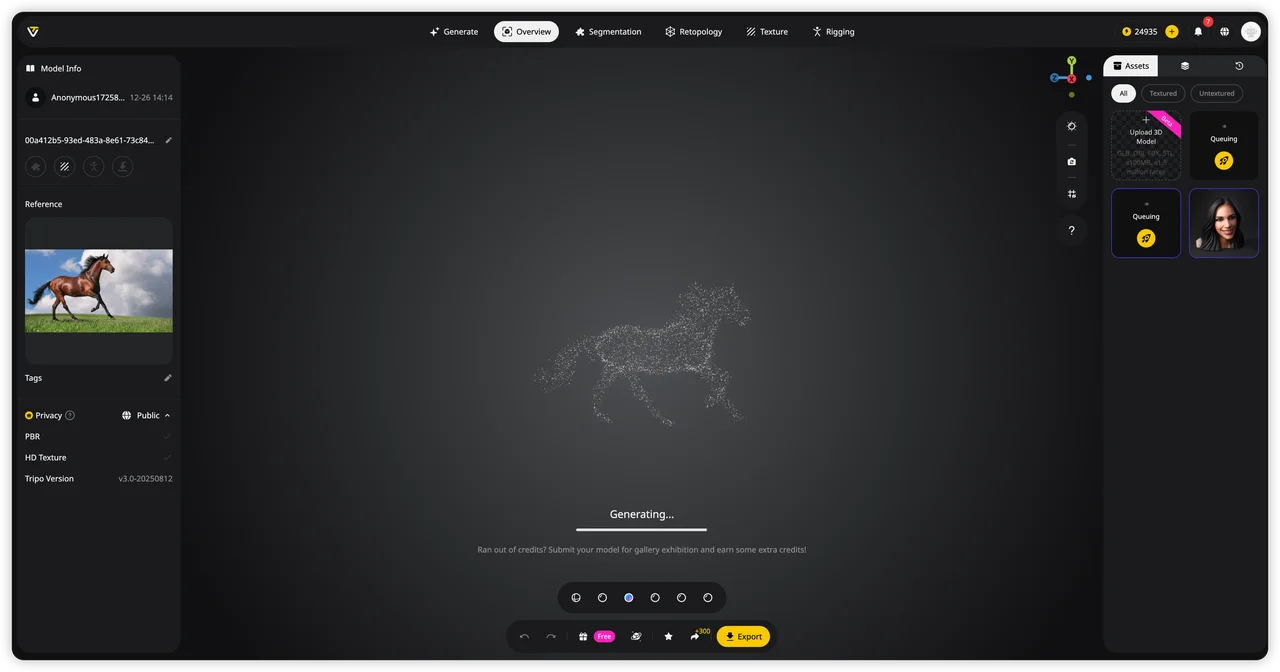
Step 2 — Generate the Base Mesh
Once the input is ready, generate the first 3D model. AI tools can quickly create the base geometry, allowing you to test different designs without spending time on manual blockouts.
At this stage, focus on overall shape and visual direction rather than perfect topology. The first version is a prototype that can be improved later.
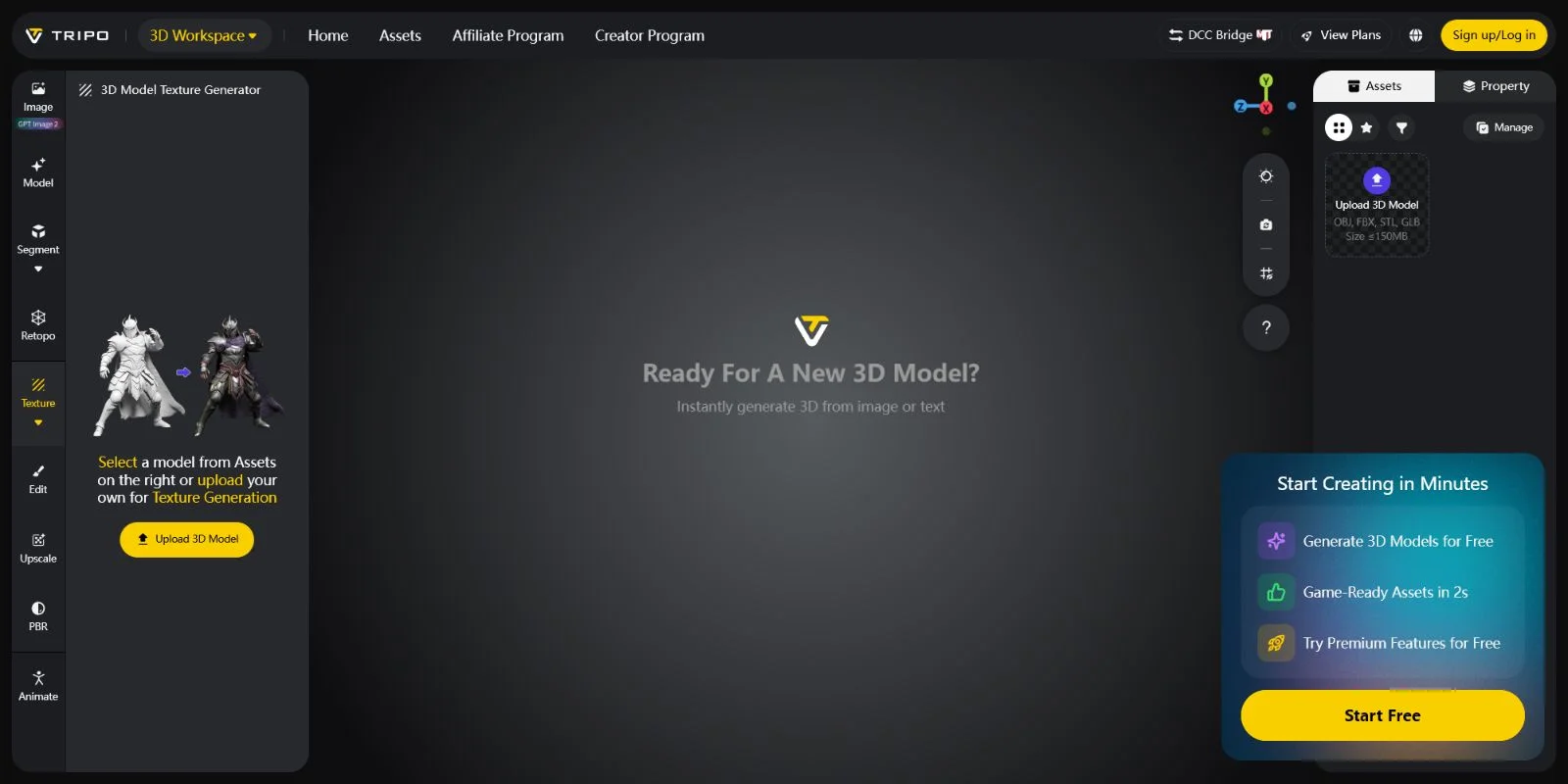
Step 3 — Retopologize for a Game-Friendly Mesh
Raw AI-generated models often contain too many polygons or messy geometry that is not suitable for real-time engines. Retopology reduces unnecessary complexity and creates cleaner topology for better performance and animation.
Some AI platforms include automatic solutions such as AI retopology or Smart Mesh features, while more advanced projects may require cleanup in Blender or other 3D software.
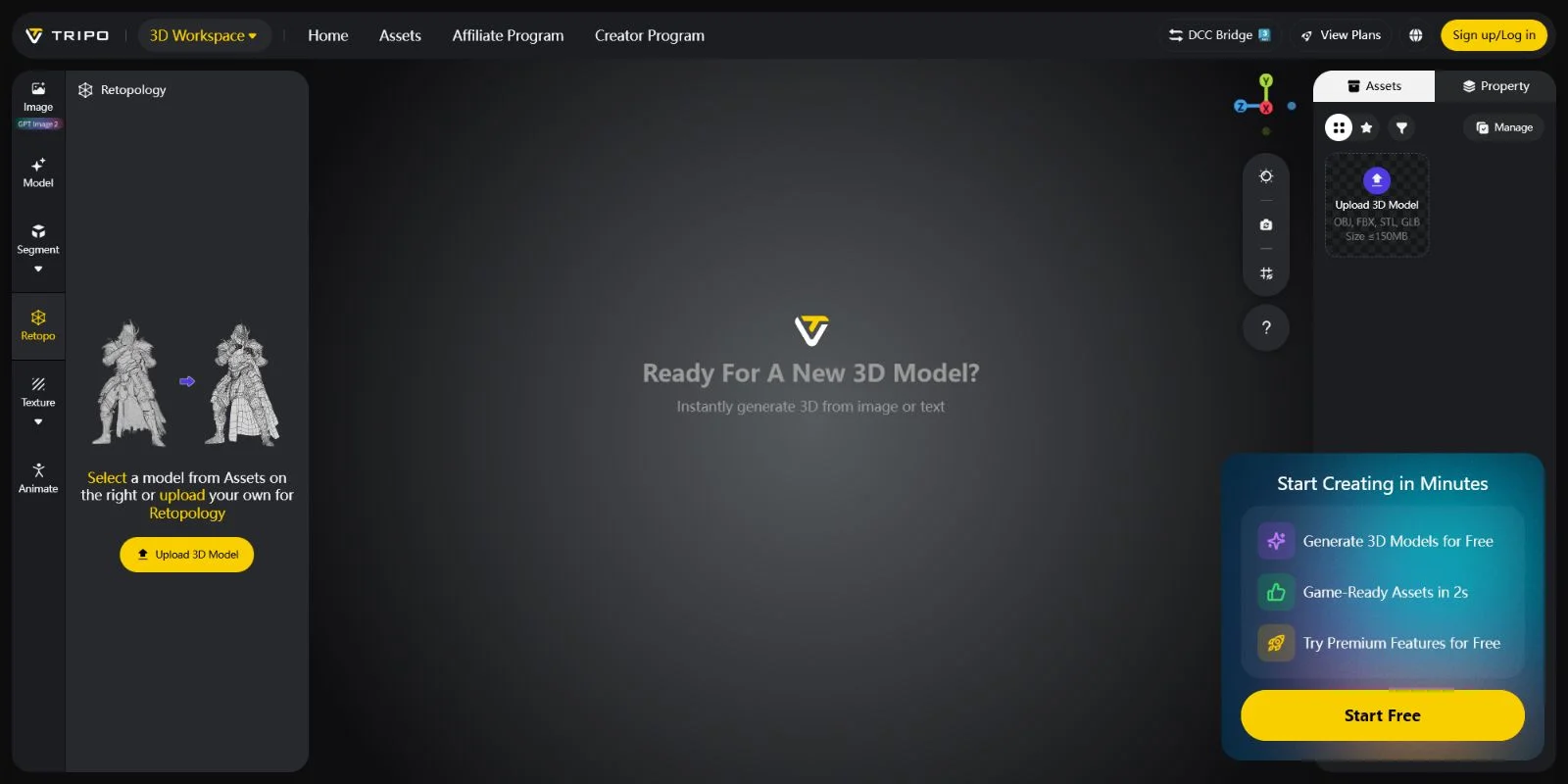
Step 4 — Generate or Adjust PBR Textures
After the geometry is ready, create or refine the materials. PBR textures such as base color, normal maps, and roughness maps help the model look consistent inside a game engine.
Good textures can make a simple prototype feel much closer to a finished asset.
Step 5 — Auto-Rig Characters for Animation
For character assets, the next step is adding a skeleton. Auto-rigging tools can automatically create bones and skin weights, allowing the character to walk, pose, or interact in a game environment.
This step is especially useful for quickly testing gameplay ideas before investing in detailed animation work.
Step 6 — Export and Test in Your Game Engine
Finally, export the asset in a compatible format such as GLB or FBX and import it into engines like Unity or Unreal Engine. Check the model’s scale, materials, performance, and animations before using it in your prototype.
A complete AI workflow can take you from idea to playable asset in minutes, making it easier to experiment and iterate.
**Try the full flow in Tripo AI Studio **
Frequently Asked Questions
Can AI generate 3D models for games?
Yes, AI can generate 3D models for games by turning text prompts, images, or concept art into usable 3D assets. These models are great for rapid prototyping and early development, but they usually need optimization, retopology, and texture adjustments before being used in a production game.
What is the best AI game maker for 3D?
The best AI game maker for 3D depends on your needs. For creating 3D assets quickly, AI 3D tools like Tripo AI can generate models from text or images, while game engines like Unity and Unreal Engine provide more complete environments for building and testing 3D games.
What AI can I use to make a 3D prototype?
You can use AI 3D generation tools like Tripo AI, Meshy, or similar platforms to quickly create 3D prototypes from text prompts or images. These tools are useful for generating characters, props, and environments before refining them in Blender or a game engine like Unity or Unreal.
Which AI model is best for game development?
The best AI model for game development depends on the task. For creating 3D assets, AI tools that generate models from text or images are useful, while coding assistants and game-focused AI tools can help with scripts, design, and workflow automation. A combination of AI tools usually works best for a complete game development pipeline.
Do AI-generated 3D models need retopology for games?
Yes, most AI-generated 3D models need retopology before being used in games. AI models often have high polygon counts, messy topology, or poor edge flow, so retopology helps create a cleaner, optimized mesh for better performance, rigging, and animation.
Can AI-generated 3D models be rigged and animated?
Yes, AI-generated 3D models can be rigged and animated, especially with the help of auto-rigging tools. However, the model may need cleanup, proper topology, and UV preparation first to ensure smooth deformation and reliable animation in game engines.
Conclusion
Choosing an AI tool for game prototypes is not just about generating a good-looking model—it is about whether the asset can move smoothly into a real game pipeline. A simple rule: check if the tool provides game-ready topology, optimized meshes, and rigging support before committing to a workflow.
Start creating your own AI-generated game assets with Tripo AI Studio** →** and explore available plans, features, and usage options with Tripo AI Pricing.