Jewelry Prototype Generator: AI Concept to Cast Metal
TL;DR
- A jewelry prototype generator turns ideas or images into printable 3D jewelry models.
- AI speeds up concept creation, but you still need mesh checks and casting preparation.
- The workflow is AI design → 3D print → resin pattern → metal casting.
- STL is the most common format for jewelry printing.
- AI helps you test more designs before investing in production.
A jewelry prototype generator is a tool that turns a text prompt or reference photo into a 3D model you can actually print and cast — not just an image. The output is a mesh file that you can check, resin-print as a pattern, and send to a casting house for lost-wax casting.
The jewelry industry is moving toward faster digital workflows as designers look for ways to reduce the time between an idea and a physical piece. The global 3D printed jewelry market reached USD 4.17 billion in 2025 and is expected to grow to USD 9.26 billion by 2030, with a CAGR of 17.3%, driven by demand for rapid prototyping and customized production. In this guide, you will learn how AI jewelry design generators create concepts, how to check the mesh, how to prepare a jewelry 3D printing prototype, how to communicate with a casting house, and how to manage iteration costs.
What a Jewelry Prototype Generator Actually Produces
In jewelry manufacturing, a prototype means a physical proof of a design that you can hold, measure, weigh, and try on before committing to precious metal. It is not simply a beautiful render shown in a client presentation. A prototype answers practical questions: Does the ring feel comfortable? Is the pendant balanced? Are the details possible to manufacture?
This difference matters because many people searching for a jewelry prototype generator online are actually looking for two different things. One type of tool creates a 2D image. It can produce a stunning concept sketch, but it only describes how the jewelry should look. A true 3D generator creates geometry with volume, thickness, and measurable dimensions.
A printable jewelry model is usually a mesh file. Instead of pixels, it contains thousands of connected triangles that describe the outside surface of the object. The model is sized in millimetres, so a printer or casting workflow can understand its real-world dimensions.
For example, an AI jewelry design generator can create a ring concept with a gemstone, curved band, and decorative details. However, the generated model is only the starting point. Before production, you still need to check whether the mesh is closed, whether the thickness works for printing, and whether the design can survive casting.
A jewelry prototype generator also has clear limits. It does not automatically provide a complete parametric CAD history, certified stone-setting seats, or a foundry-approved shrinkage allowance. Professional jewelry CAD tools are still valuable when you need precise manufacturing control. AI works best as a fast concept and modeling assistant that helps you move from an idea to a physical prototype faster.
What Does a Jewelry Prototype Generator Create? — Image vs 3D Mesh Comparison
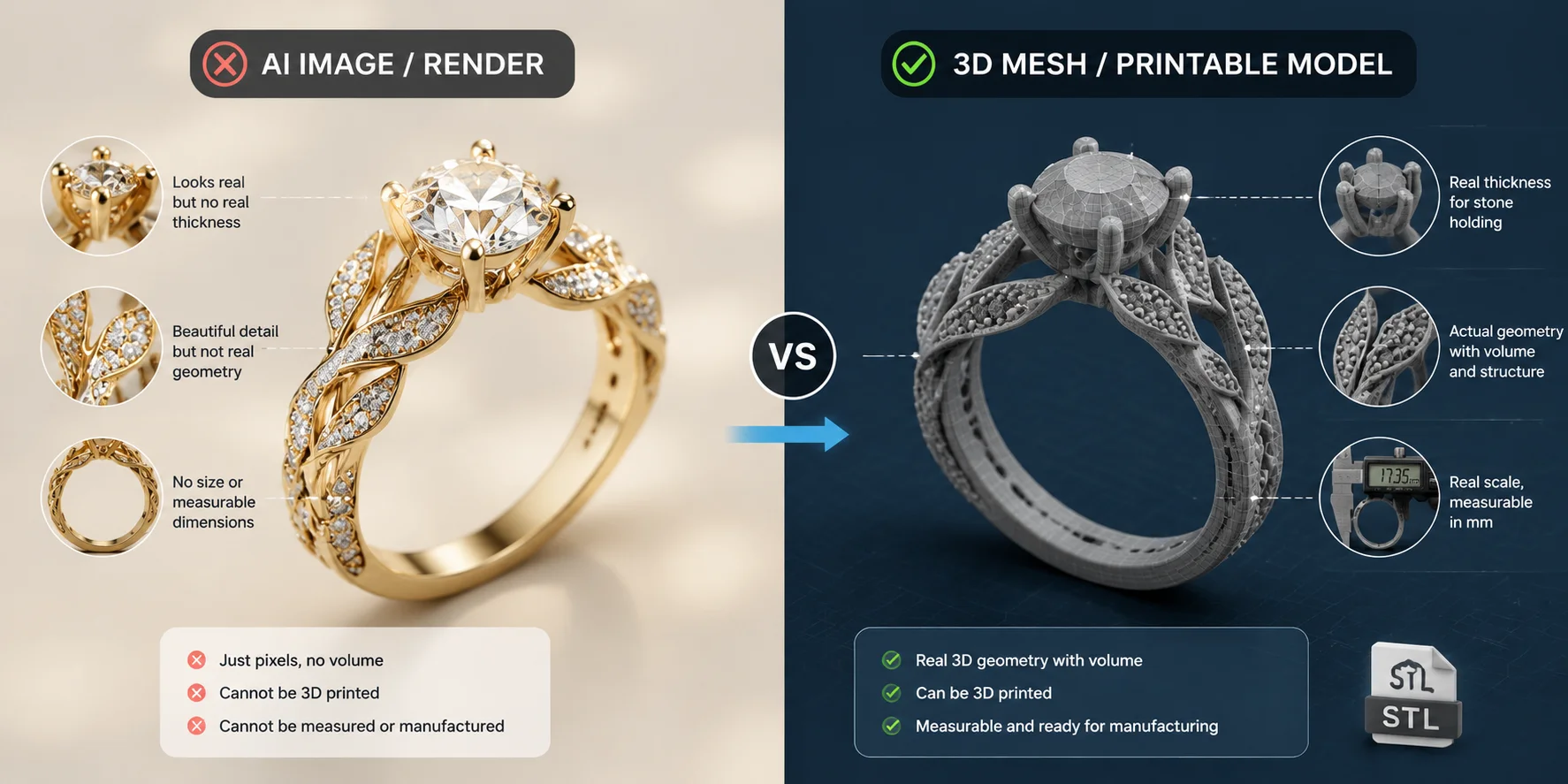
Picture vs. Printable Model: Why AI Renders Fail at the Bench
A realistic jewelry image can look production-ready while being impossible to manufacture. The reason is simple: an image does not contain physical information.
A render can show a tiny claw holding a gemstone, but that claw may only exist as a few pixels on screen. It has no actual thickness, no structure, and nothing a slicer can process. When you try to turn the image directly into a physical object, those missing details become manufacturing problems.
AI image tools also tend to create visually attractive but physically unrealistic jewelry. They may generate floating stones, impossible prong angles, or pavé patterns that look correct from a camera view but leave no space for real drilling, setting, or polishing.
A jeweler working at the bench will notice these issues immediately because manufacturing depends on details that images cannot describe. A ring needs a wearable inner diameter. A pendant needs enough strength around the bail. A stone setting needs real geometry, not just a painted suggestion.
The practical solution is to separate the creative and manufacturing stages. You can use an AI jewelry design app to explore shapes, styles, and variations. Then you convert the chosen concept into actual geometry.
Feeding that reference into an image-to-3D converter is what turns a flat concept into geometry you can measure.
Even then, your first generated mesh should be treated as a proof of form, not a final production file. You usually need several rounds of adjustments before a design is ready for printing and casting.
A good workflow looks like this:
- Generate ideas quickly with AI.
- Select the designs that match your vision.
- Convert the strongest concept into a 3D model.
- Check manufacturing requirements.
- Print only the candidates you would actually wear.
- Cast the final version.
This approach saves time because you test ideas digitally before spending money on resin, labor, and metal.
AI Jewelry Design to Printable Model Pipeline
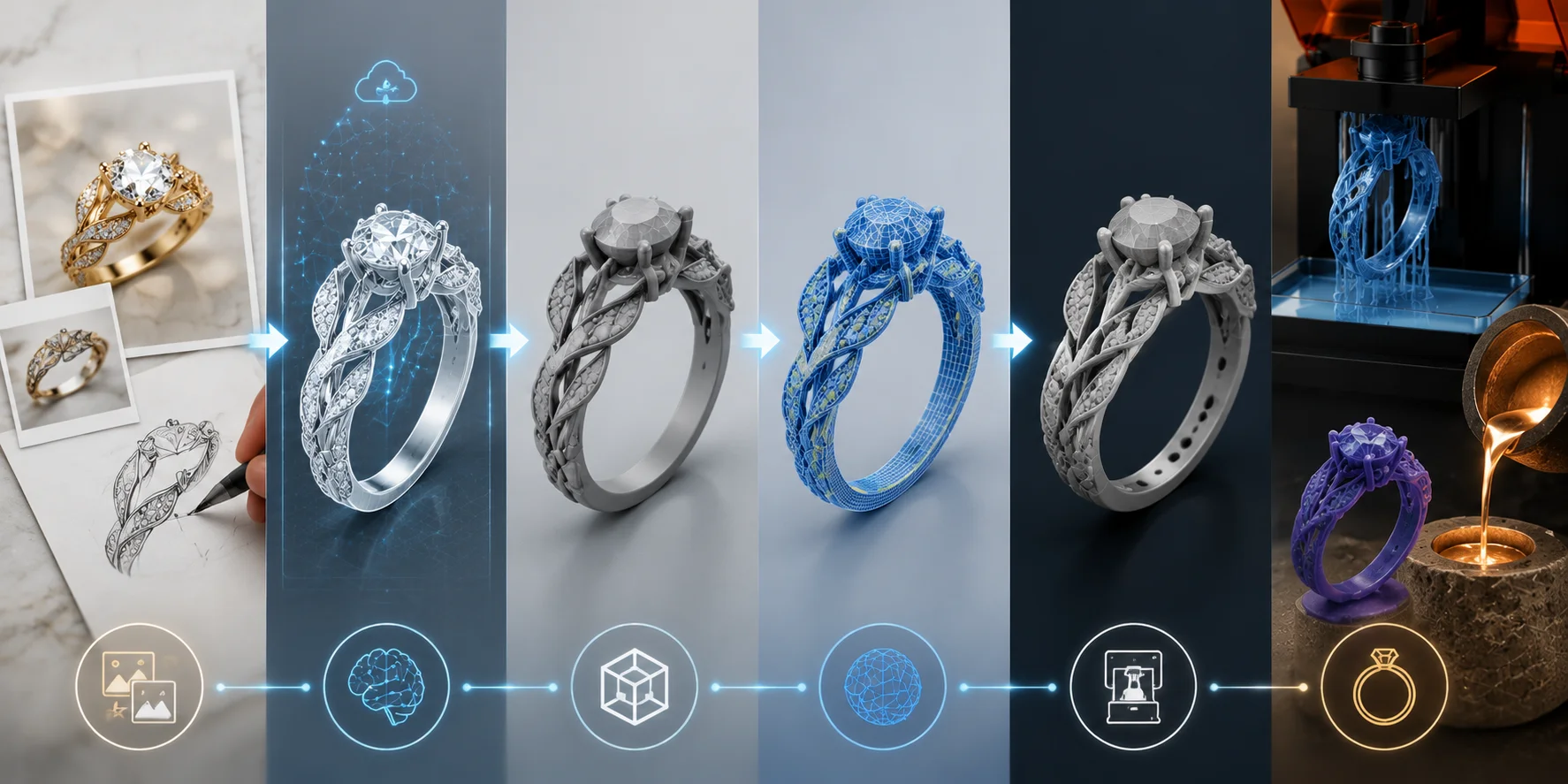
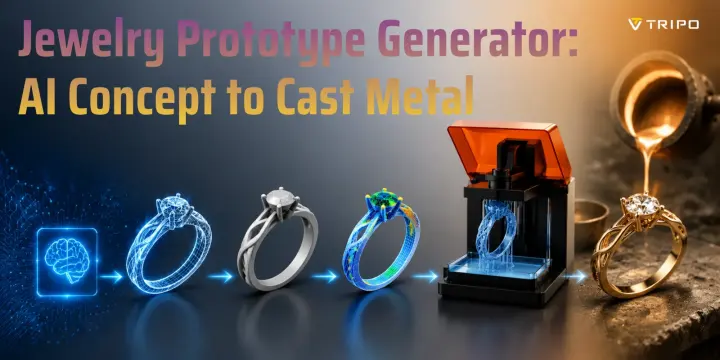
From Prompt to Metal: The Five-Stage Prototype Path
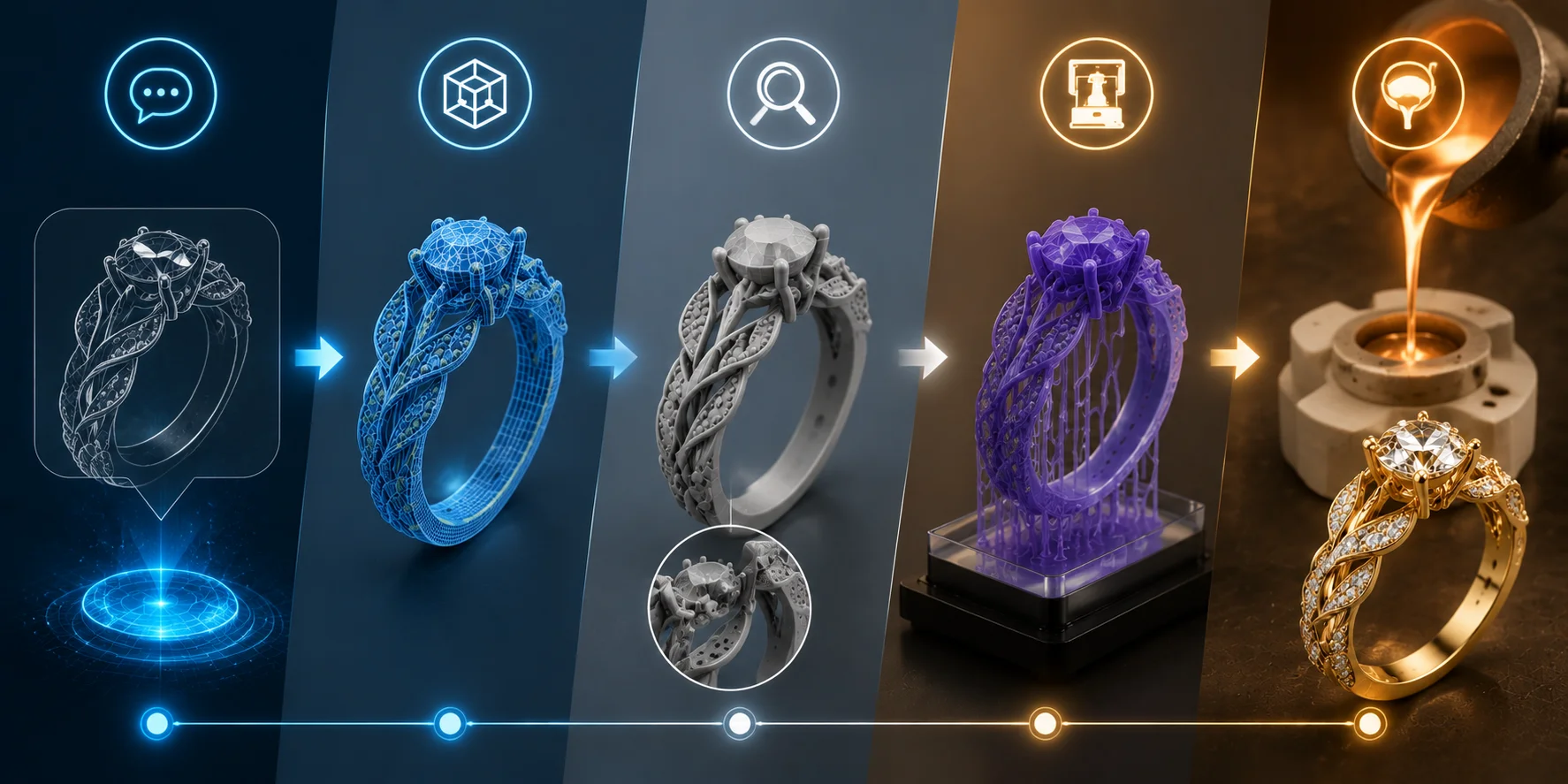
Creating a jewelry 3D printing prototype is not a single-click process. The generator gives you a starting model, but you still guide the piece through several manufacturing stages.
From Prompt to Metal: Five-Stage Jewelry Prototype Workflow
Generate the Concept
The first stage is exploration. You describe the piece you want or upload a reference image.
A strong prompt includes the important design decisions:
- Type of jewelry: ring, necklace, bracelet, earrings, or pendant
- Metal style: gold, silver, platinum appearance, or mixed materials
- Stone shape: round, oval, emerald cut, pear, or custom form
- Overall silhouette: minimal, vintage, geometric, organic, luxury, or futuristic
For example, instead of writing:
“Create a beautiful ring”
you can provide more useful direction:
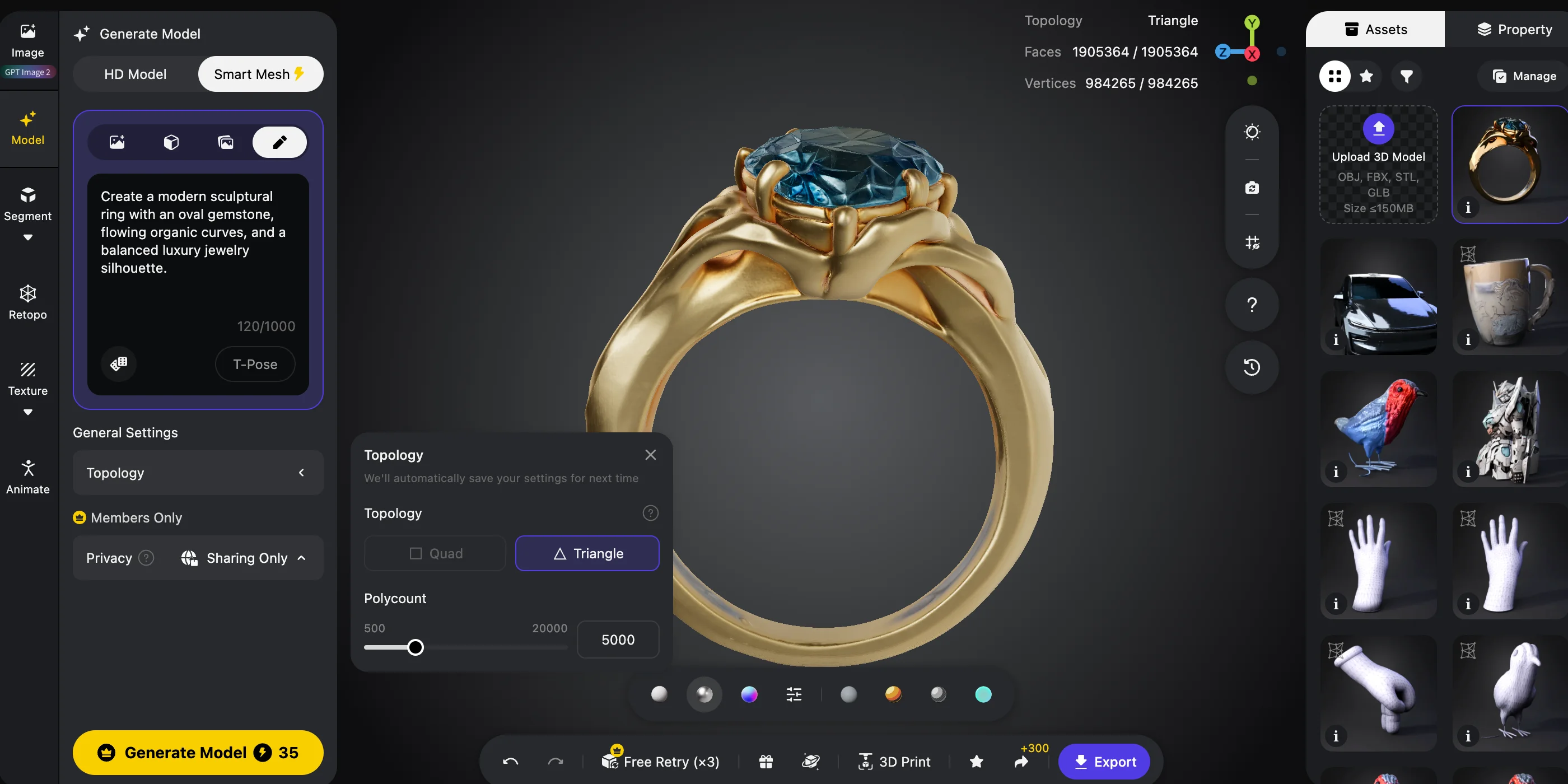
“Create a modern sculptural ring with an oval gemstone, flowing organic curves, and a balanced luxury jewelry silhouette.”
The more clearly you describe the shape, the easier it becomes to create useful variations.
At this stage, generate multiple versions. A designer rarely chooses the first idea. The advantage of an AI jewelry design generator is that you can explore many directions quickly before investing time in detailed modeling.
File change: Input: text prompt or reference image → Output: concept variations
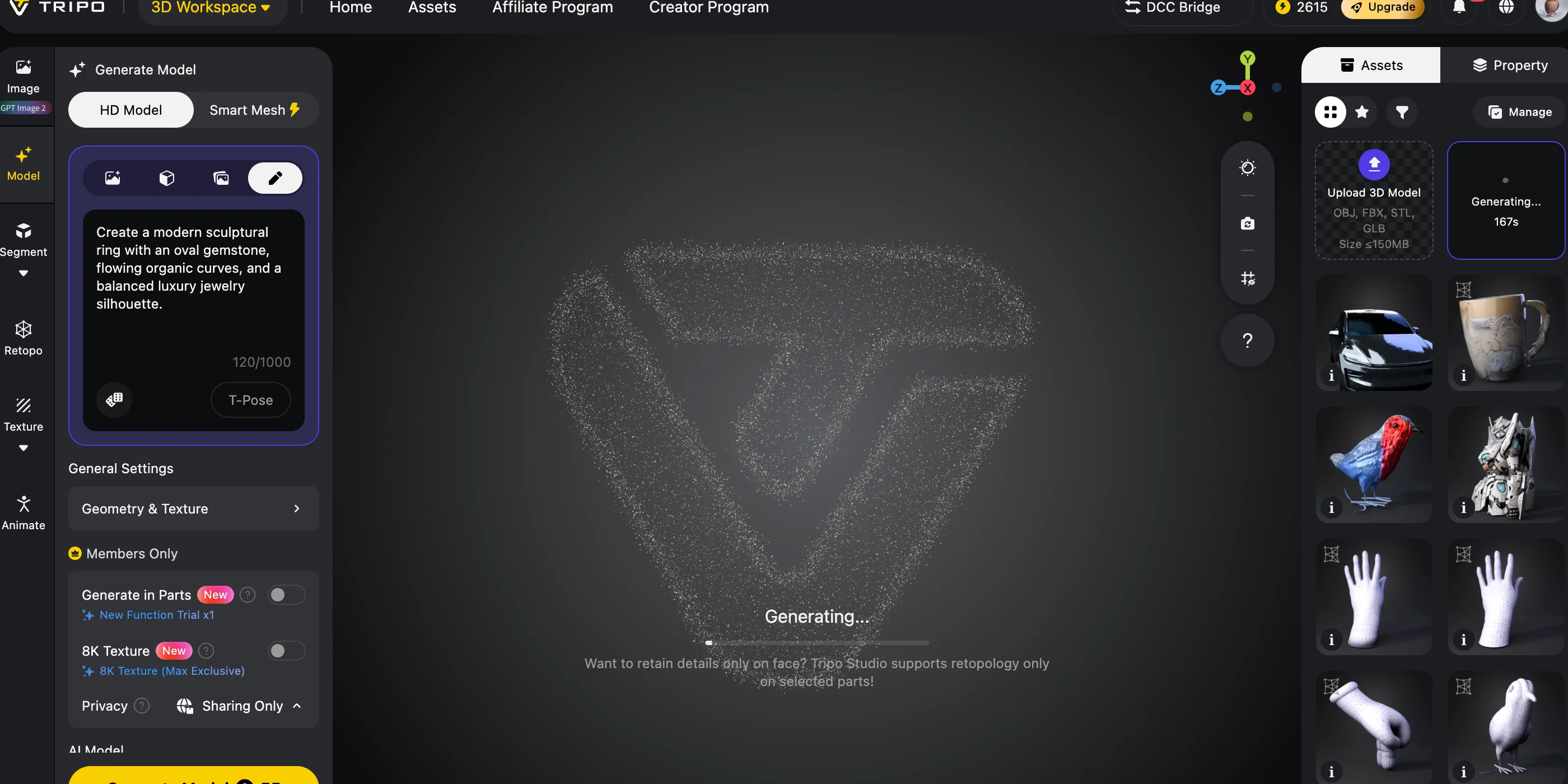
Build the Printable Model
After selecting a concept, the next step is creating actual 3D geometry.
A text-to-3D or image-to-3D workflow transforms the visual idea into a mesh that contains depth and surface information. For jewelry work, choose the highest available detail setting because small design features matter.
When preparing a jewelry prototype, focus on geometry rather than appearance. Color textures are useful for product visualization, but they do not affect a resin pattern used for casting.
The goal is not to create a beautiful screen image. The goal is to create a solid object that can be measured, sliced, and printed.
A good best jewelry prototype generator workflow should help you create models that are easy to inspect and refine. AI gives you speed, but you still need to think like a manufacturer.
File change: Input: prompt or image reference → Output: 3D mesh file
You can test this full process from concept to model generation in Tripo AI Studio →
Check the Mesh
Before printing, inspect the model carefully. A generated mesh may look correct from the outside but still contain hidden problems.
Start with basic checks:
- Confirm the model is watertight.
- Make sure it is one closed shell.
- Check that the scale is set correctly in millimetres.
- Look for self-intersections around thin areas.
- Inspect connections such as prongs, chains, and pendant loops.
A watertight model means the surface is completely closed with no unwanted holes. If the mesh has open edges, the slicer may not know how to create a solid print.
You should also pay attention to areas where jewelry often fails:
- Thin claws holding stones
- Small connection points
- Narrow bracelet sections
- Decorative gaps that are too fragile
AI generation focuses on appearance, but casting requires physical logic. A beautiful design still needs enough structure to survive printing and handling.
File change: Input: raw AI mesh → Output: checked and printable mesh
Print the Pattern
After the mesh passes inspection, you can create the physical pattern. Jewelry prototypes are usually printed with a resin printer using a castable resin designed for lost-wax casting workflows.
The printing stage is where your digital design becomes something you can touch. The goal is not to create a final wearable piece. The goal is to create a clean pattern that preserves the details of your design before casting.
Fine jewelry details depend heavily on print quality. Small features such as engraving, stone settings, and curved edges can disappear if the layer height is too large or if the print orientation is poor. For this reason, jewelry makers often use lower layer heights and carefully position the model to protect important surfaces.
Industrial jewelry printing systems are built specifically for this purpose. For example, 3D Systems describes jewelry-focused wax printing platforms that support fine-detail production workflows, including layer thickness ranges around 30–50 µm and production speeds designed for jewelry patterns.
The material choice also matters. Castable resins are designed to burn out cleanly during the investment casting process. They are not regular display resins, because leftover material can affect the final metal casting.
Before printing a large batch, print one or two prototypes first. This helps you discover problems before spending money on metal.
File change: Input: checked mesh → Output: castable resin pattern
Hand Off for Casting
The final stage connects your digital workflow with traditional jewelry manufacturing.
For lost-wax casting, the printed resin pattern acts as a replacement for a wax model. The casting house places the pattern into investment material, removes the original pattern through burnout, and fills the empty space with molten metal.
At this point, communication becomes just as important as the model itself. A casting house needs more than a beautiful 3D file. They need enough information to understand what you want to produce.
Your handoff package should include:
- The printable model file
- The intended metal or alloy
- The expected finished weight range
- Ring size or jewelry dimensions
- Stone information
- Any surfaces that need special attention
Different metals and casting processes behave differently, so you should ask your caster for their own specifications before production.
File change: Input: printed pattern or production-ready mesh → Output: cast metal prototype
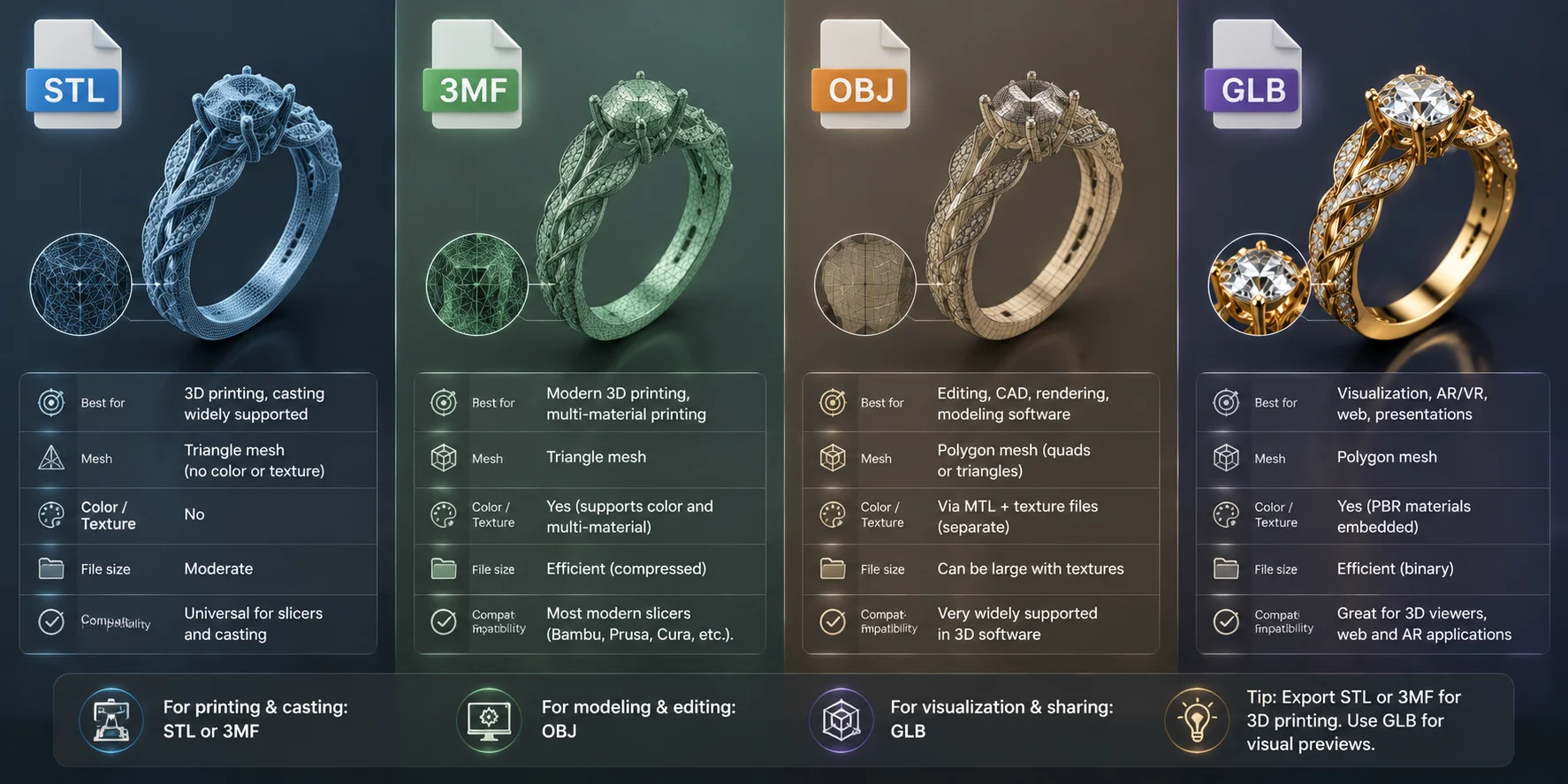
Which File Formats to Export for Printing and Casting
Choosing the right file format prevents unnecessary conversions. For jewelry manufacturing, the most important requirement is that your model keeps accurate geometry and real-world scale.
| Format | Best for | Watch out for |
|---|---|---|
| STL | The default hand-off to most slicers and printing services | Geometry only, so colour and texture information do not travel with it |
| 3MF | Modern printing workflows that can store additional print information | Some older slicers or service providers may not support it |
| OBJ | Universal editing hand-off and basic printing workflows | Usually needs a companion material file when textures are involved |
| GLB / FBX / USD | Client previews, rendering, and moving between 3D software | These are not primary print formats; do not send them directly to a caster |
For most jewelry 3D printing prototype workflows, STL remains the safest choice because almost every slicer understands it. If your printing service supports it, 3MF can provide a more modern workflow.
Keep a GLB copy of your model for client presentations or online previews. It allows you to show the design visually while keeping the manufacturing file separate.
If your bureau only accepts STL, a quick 3D file converter can help you prepare the correct output.
Lost-Wax Casting Process for AI Jewelry Prototypes
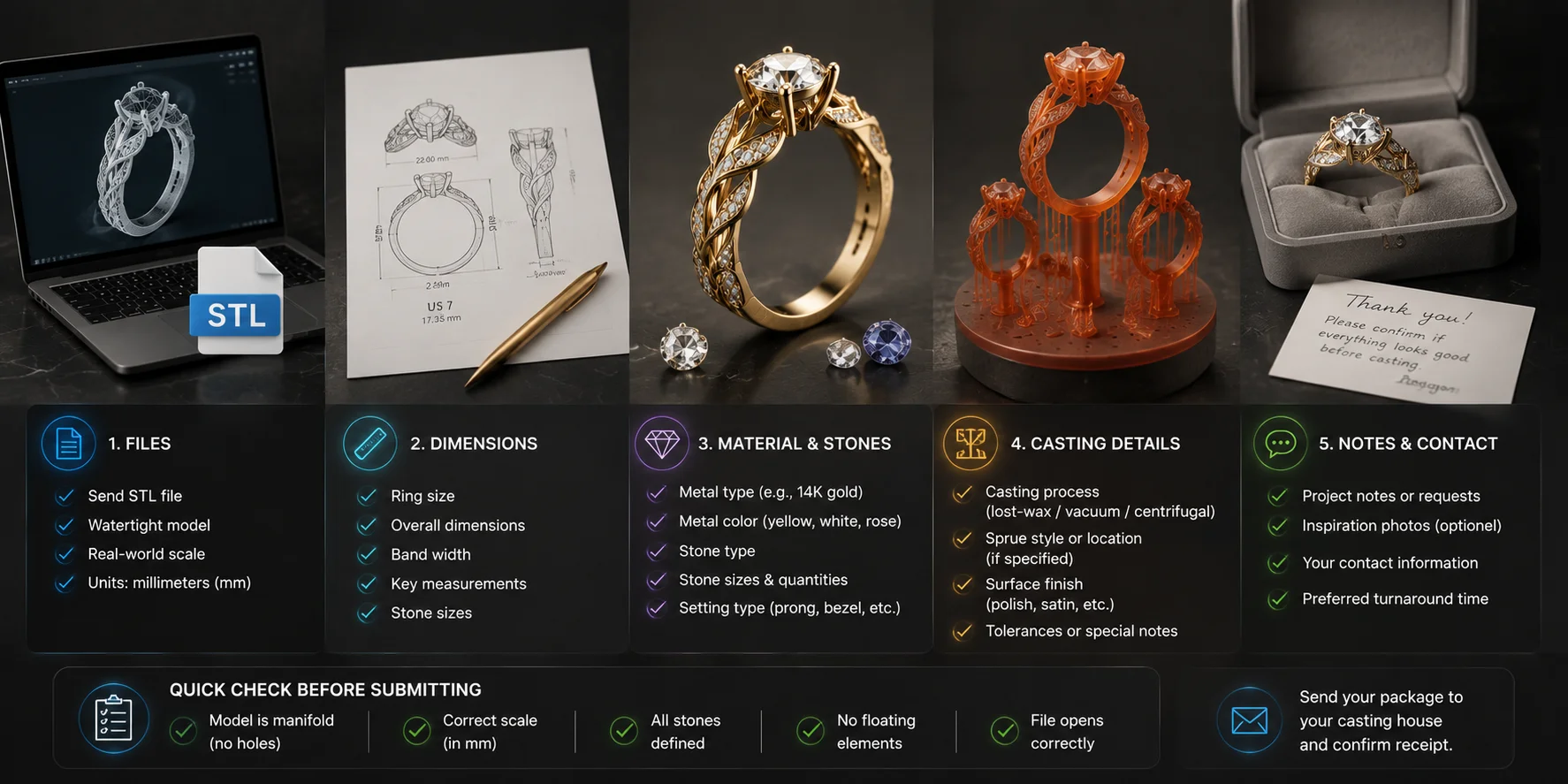
What Your Casting House Actually Needs From You
A successful casting job depends on a clear handoff. Many prototype failures happen because the model looks correct on screen but important production information is missing.
Before sending your file, prepare this checklist:
A Single Watertight Model
Your file should contain one closed shell with no open edges or disconnected parts. Scale it in millimetres and export it as STL or 3MF.
A casting house needs a solid object definition, not a visual approximation.
Metal and Weight Expectations
Tell the caster what metal you plan to use and what kind of finished piece you expect.
Gold, silver, platinum, and other alloys have different properties, so the final result depends on the specific material choice.
Wall and Feature Requirements
Do not assume a universal minimum thickness works for every project.
Instead, ask your casting house for their specification sheet. Their recommended dimensions depend on the alloy, casting method, finishing process, and the size of the jewelry piece.
Sprue Planning
A sprue is the channel that allows molten metal to flow into the mold during casting.
Its position matters because the sprue area often requires cutting and polishing afterward. Your caster can help decide where it should be attached so important visible surfaces stay clean.
Stone Setting Information
AI models often create gemstone areas visually, but real stone setting requires accurate planning.
Tell your caster:
- Which stones will be used
- Their sizes
- Whether stone seats will be adjusted after casting
A generated model can show the design direction, but a professional setter may still refine the final stone placement.
**Jewelry Casting House Submission Checklist **
Cost and How Fast You Can Iterate
One of the biggest advantages of a jewelry prototype generator is speed. Instead of rebuilding every idea manually, you can explore many concepts before choosing one for production.
Your total cost usually comes from three areas:
Generation Cost
AI tools may charge through credits, subscriptions, or usage plans. This is the cost of creating design variations and generating 3D models.
Resin Pattern Cost
Printing costs depend on the printer, resin, model size, and whether you print yourself or use a service bureau.
Casting Cost
Casting prices depend on factors such as:
- Metal type
- Weight
- Labour
- Finishing requirements
- Stone setting
Instead of asking “How much does an AI jewelry prototype cost?”, think about the complete workflow.
A generated variation may take minutes to create. A traditional CAD revision may take hours. A recast piece costs additional material and labour.
A practical workflow is:
- Generate many digital options.
- Select the strongest designs.
- Print only the final candidates.
- Cast the piece you truly want to produce.
This approach helps you spend money only after the design has already proven itself digitally.
Common Prototype Failures and How to Fix Them
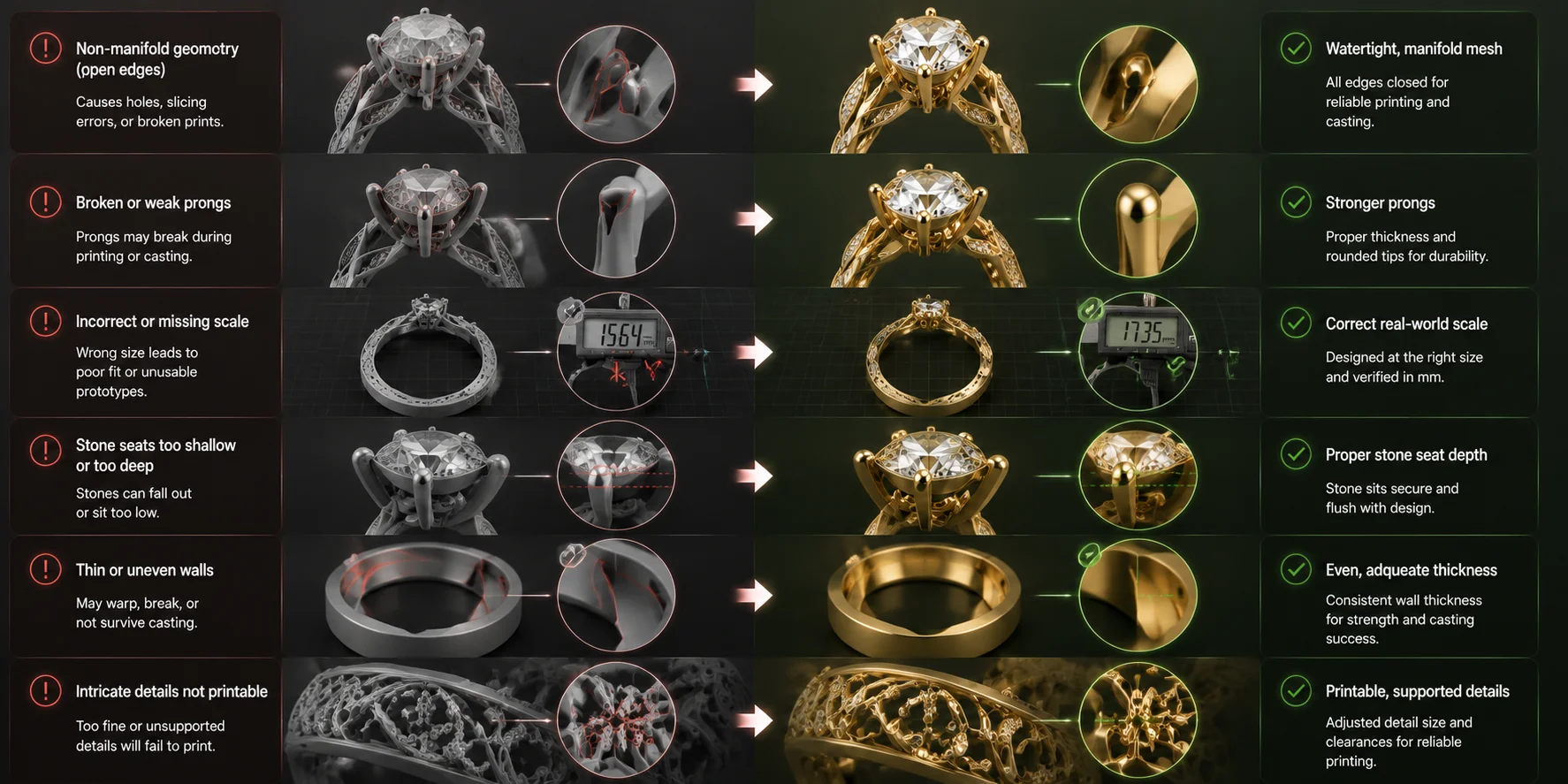
AI-generated jewelry models can speed up design, but they can also create problems. Knowing common failures helps you avoid wasted resin and casting costs.
| Symptom | Cause | Fix |
|---|---|---|
| Slicer reports a non-manifold mesh | The generation process created open edges or broken geometry | Repair the mesh or regenerate it as one closed shell before slicing |
| Prongs print but snap off the pattern | Details are smaller than the printer can reliably reproduce | Make fragile features thicker in the model before printing |
| Model prints extremely small or oversized | The exported mesh has incorrect units or scale information | Set the model scale in millimetres before export |
| Cast piece loses sharp details | Printing and investment processes cannot reproduce every tiny edge | Use finer print settings and confirm casting requirements with your caster |
| Pavé stones do not fit correctly | Stone seats were generated as decoration instead of functional geometry | Plan stone seats as part of the finishing and setting process |
Before using expensive resin, load the file in an online 3D viewer to check the shape, scale, and visible problems.
The key idea is simple: AI helps you create faster, but manufacturing still requires inspection.
Common AI Jewelry Prototype Failures and Fixes
Frequently Asked Questions
What is a jewelry prototype generator?
A jewelry prototype generator creates a 3D model from a text prompt, sketch, or photo. Unlike a simple image generator, it produces geometry that you can inspect, print, and prepare for casting.
Can AI-generated jewelry designs actually be manufactured?
Yes, but the model usually needs checking and refinement before production. You should verify the mesh, scale, and manufacturing details with a casting professional.
What file format should I send for jewelry 3D printing?
STL is the most common choice because most slicers and printing services support it. 3MF is another option if your provider accepts it.
Do I still need CAD software?
AI tools are great for concepts and fast prototypes, while CAD software provides precise control for production details such as measurements and stone settings.
How much does a 3D printed jewelry prototype cost?
The cost depends on generation, resin printing, and casting. Ask local providers for quotes based on your design, material, and production requirements.
Is resin print wearable jewelry?
No. Castable resin is usually a temporary pattern for lost-wax casting. The final wearable piece is made from metal.
Can AI create a ring in a specific size?
Yes, but you should confirm the scale and measurements before printing. Always verify the final dimensions before casting.
What is the difference between a prototype and a render?
A render is only an image of a design. A prototype is a measurable object that can be tested and used for manufacturing.
What wall thickness should I use?
There is no universal number. Ask your casting house for specifications based on your metal, alloy, and process.
Can I sell AI-generated jewelry?
Possibly, but check your AI tool’s commercial terms and make sure your design does not violate third-party rights.
Conclusion
A jewelry prototype generator helps you turn ideas into measurable 3D models faster. The best results come from combining AI generation with mesh checks, resin printing, and professional casting.
Start your workflow with Tripo AI Studio and explore available export options through Tripo AI Pricing.