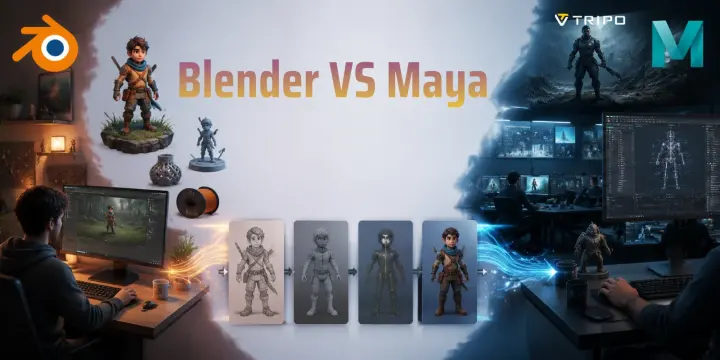
Blender vs Maya: Which 3D Software Is Right for You?
TL;DR:
- Blender is free, powerful, and beginner-friendly, making it ideal for indie games, personal projects, and learning 3D.
- Maya is the industry standard for many studios, especially for AAA games, animation, and VFX pipelines.
- Blender wins on cost, while Maya offers advanced professional animation and simulation tools.
- Choose Blender for flexibility and low cost; choose Maya for studio-focused careers.
- Many artists use both tools together, and AI 3D tools can speed up asset creation in either workflow.
Blender is a free, open-source 3D software suited for beginners, indie creators, and studios on a budget. Maya is a professional, subscription-based tool preferred by AAA game studios and film production houses. The right choice depends on your goals, budget, and the industry you want to work in.
Over 20 million people have downloaded Blender, yet Hollywood blockbusters and hit video game franchises still rely heavily on Maya. So which one should you actually learn? In this guide, you'll get a head-to-head breakdown of Blender and Maya across features, cost, learning curve, and real-world use — so you can stop second-guessing and start creating.
What Is Blender? A Quick Overview
Blender is a free, open-source 3D creation suite developed by the Blender Foundation. First released in 1994, it has grown from a small community project into one of the most popular 3D software platforms available today.
The biggest advantage of Blender is that it covers the entire 3D pipeline inside one application. You can use it for polygon modeling, sculpting, UV mapping, texturing, rigging, animation, rendering, video editing, and compositing without buying additional software.
For example, an indie game developer can model a character, create textures, build animations, and export the final asset to Unity or Unreal Engine using only Blender. A YouTube creator can also use Blender to produce 3D animations without paying for expensive software subscriptions.
Blender is especially popular among independent artists, freelancers, 3D printing users, and small studios because it removes the biggest barrier for beginners: cost. Since Blender is completely free 3D software, anyone can download it, learn it, and use it for commercial projects.
What Is Maya? A Quick Overview
Maya is a professional 3D computer graphics application developed by Autodesk. Originally released in 1998, it has become one of the most recognized animation software tools in film, television, and AAA game production.
Maya is best known for its advanced character animation, rigging systems, and simulation tools. Features such as HumanIK, nCloth, nParticles, and Bifrost make it a strong choice for complex animation, visual effects, and cinematic production.
Many large studios have built their pipelines around Maya because of its long history, extensive plugins, and industry experience. Companies working in VFX, feature animation, and AAA game development often rely on Maya because their artists, tools, and production systems are already designed around it.
However, Maya is a professional investment rather than a casual beginner tool. Autodesk uses a subscription model, with pricing typically around 1,875 per year depending on the plan and region. Always check Autodesk's official pricing before purchasing.
A higher price does not automatically make Maya better for everyone. For a solo creator making indie projects, Blender may provide everything needed at zero cost.
Blender vs Maya: Feature Comparison
Blender and Maya both support professional 3D workflows, but they have different strengths.
| Feature | Blender | Maya |
|---|---|---|
| Modeling | Strong polygon modeling and excellent sculpting tools | Excellent precision modeling and NURBS workflows |
| Animation | Professional animation tools with growing capabilities | Industry-leading character animation and rigging |
| Rendering | Built-in Cycles and EEVEE render engines | Arnold renderer for production-quality visuals |
| Simulation | Mantaflow for fluids, smoke, and effects | Advanced Bifrost, nCloth, and particle systems |
| Scripting | Python API and strong community tools | Powerful Python and studio pipeline integration |
| File formats | FBX, OBJ, GLB, USD, STL and more | FBX, OBJ, USD and professional pipeline formats |
| Price | Free | Paid subscription |
Modeling
Both Blender and Maya can handle traditional polygon modeling and subdivision workflows. Blender has become especially popular for sculpting organic shapes such as characters, creatures, and fantasy assets.
Its sculpting tools, including Dyntopo and Multires, allow artists to quickly explore ideas. This makes Blender attractive for character artists and independent creators.
Maya is particularly strong in precision modeling, especially for hard-surface assets such as vehicles, machines, and product designs. Many professional pipelines still prefer Maya when accuracy and consistency are critical.
Neither software is universally better. The right choice depends on what you create.
Animation and Rigging
Maya has been the industry standard for character animation for many years. Its Graph Editor, HumanIK system, and rigging workflow are widely used in professional studios.
Blender also offers a complete animation pipeline with armatures, constraints, keyframes, and a powerful animation editor. The Blender community has also created many free rigs and learning resources.
For beginners, Blender is often easier to access because you can learn everything without paying for software. For studio animation careers, Maya knowledge can be valuable because many employers still use it.
Rendering and Simulation
Blender includes two powerful built-in render engines: Cycles and EEVEE. Cycles provides realistic ray-traced rendering, while EEVEE offers faster real-time previews.
Maya commonly works with Arnold, a production renderer used for high-quality film and animation work.
For simulations, Maya has an advantage in large-scale production environments. Its Bifrost system supports advanced effects such as fluids and procedural simulations. Blender's Mantaflow system covers many common needs for indie projects and smaller productions.
Blender vs Maya Feature Comparison Infographic
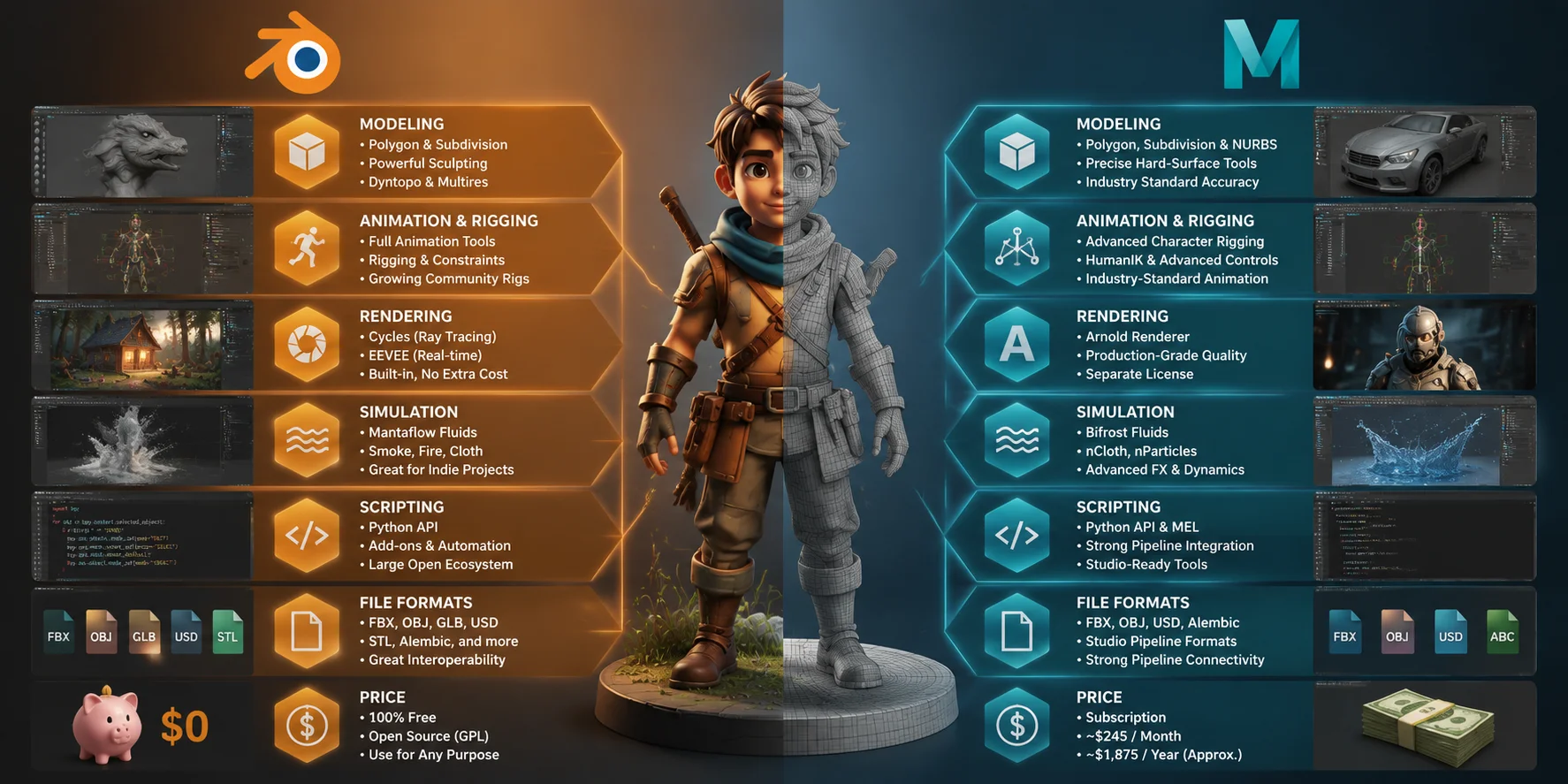
Cost and Licensing: The Biggest Difference
One of the biggest differences between Blender vs Maya is the cost and licensing model. Blender is completely free and open-source under the GPL license. Anyone can download Blender, use all features, and create commercial work without paying subscription fees. This zero-cost model has made Blender especially popular among beginners, freelancers, indie game developers, and creators working on personal projects.
Maya uses a paid subscription model from Autodesk. As of 2025, Maya pricing is approximately 1,875 per year, but you should verify the latest pricing on Autodesk’s official website before publishing or purchasing. Autodesk also provides free educational licenses for eligible students and educators, which allows many future professionals to learn Maya before entering the industry.
For individual creators and small studios, the price difference can be a major factor. Blender removes the financial barrier completely, making it easier to start learning 3D without a large investment.
However, Maya’s cost can make sense for larger studios. Its long-established pipeline, industry integrations, and production tools can save teams significant time when working on complex animation, VFX, and film projects.
The choice is not simply about free versus paid. Blender is ideal when budget flexibility and accessibility matter most, while Maya can justify its subscription cost when professional pipeline compatibility and studio efficiency are the priority.
Blender vs Maya Cost Comparison: Free vs Subscription
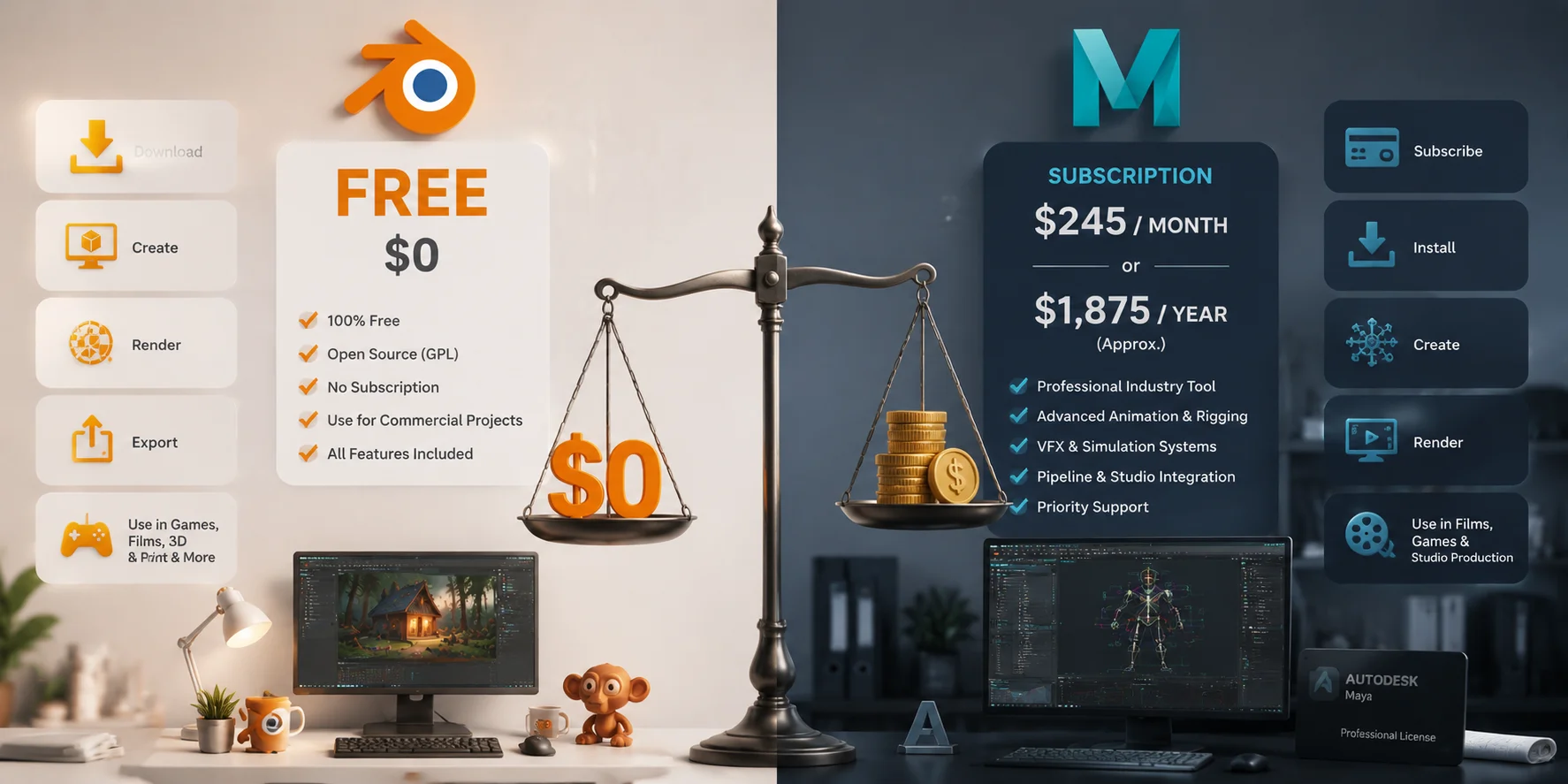
Learning Curve: Which Is Easier to Pick Up?
Both Blender and Maya have learning curves. Neither is a simple beginner app.
Blender can feel confusing at first because its interface and shortcuts are different from many traditional creative programs. However, after learning the workflow, many artists find Blender extremely fast.
One major advantage is the huge free learning community. You can find thousands of Blender tutorials, documentation pages, and community discussions online.
Maya has a more traditional professional interface, but its difficulty comes from the number of advanced systems available. Learning animation, rigging, simulation, and production workflows can take significant time.
If you are completely new to 3D and want a free starting point, Blender is usually the more accessible choice.
If you are studying animation at school or joining a company that already uses Autodesk tools, learning Maya may better match your future career path.
Blender vs Maya Learning Curve: Which Is Easier to Learn?
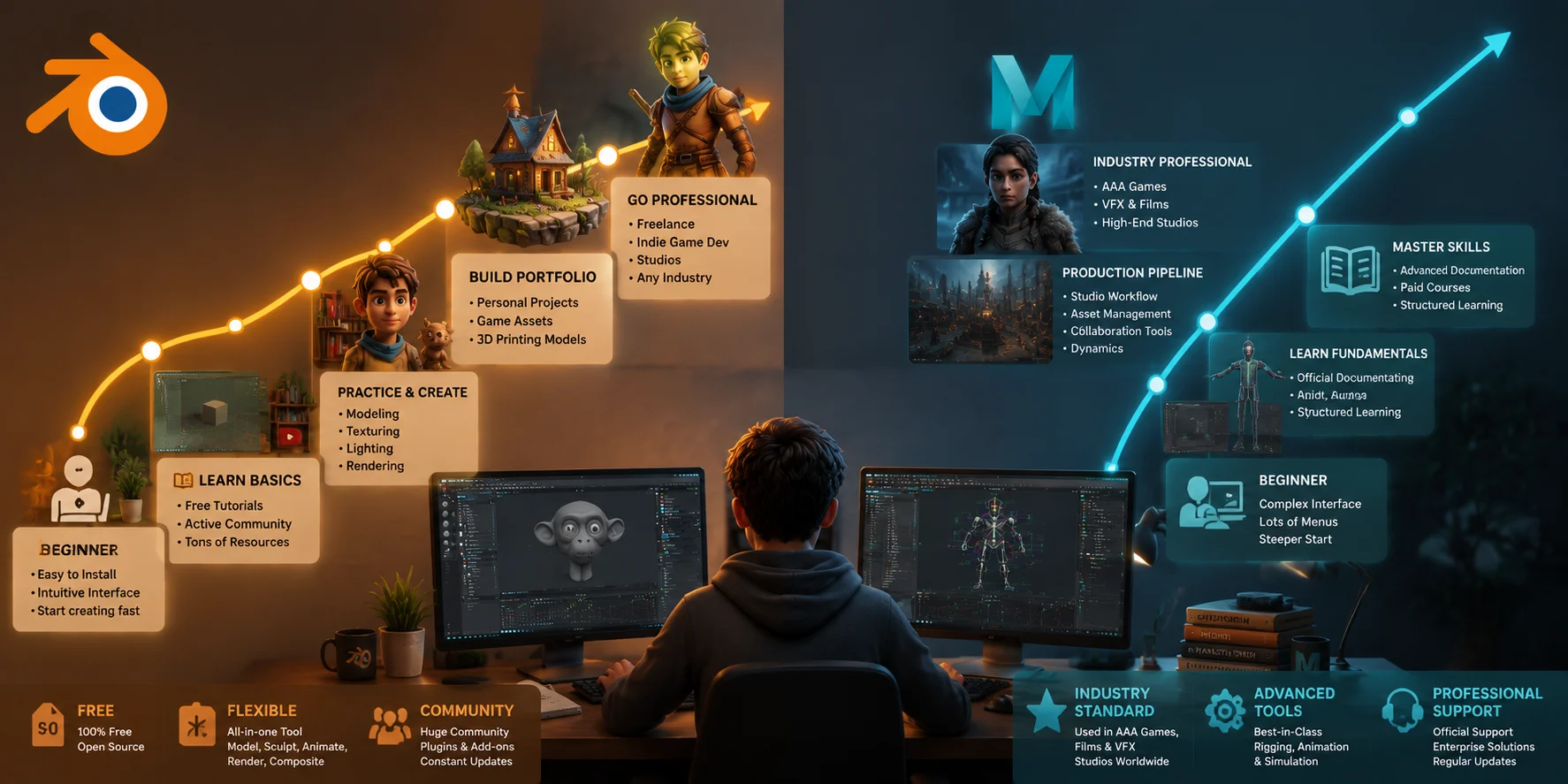
Industry Use: Who Uses Blender vs Maya?
Maya remains one of the most common tools in AAA game development and professional VFX studios. Its long history means many large companies have built their workflows around it.
Studios such as Ubisoft and many animation and VFX companies have used Maya in their production pipelines. However, software choices change over time, and studios often combine multiple tools.
Blender's professional adoption has grown quickly. It is now widely used by indie game developers, motion designers, freelancers, and content creators.
For game asset creation, Blender has become especially practical. It exports common formats such as FBX and OBJ, making it easy to move assets into engines like Unity and Unreal Engine.
The gap between Blender and Maya is smaller than it was years ago. Blender's Python API, improved rendering, and expanding ecosystem have made it a serious professional option.
When to Use Both Tools Together
You do not always need to choose between Blender vs Maya. Many professional artists and studios use both tools in the same pipeline because each one has different strengths.
A common workflow is using Blender for tasks that benefit from speed and flexibility, such as quick modeling, sculpting, UV editing, and asset preparation. Artists can then export their models to Maya for advanced rigging, character animation, and rendering with tools like Arnold. This approach allows creators to combine Blender’s accessibility with Maya’s strong position in professional animation pipelines.
Another practical workflow is using Blender to prototype game assets quickly and at a lower cost. Once a project grows and requires studio-level compatibility, teams can move assets into Maya for final rigging, animation, or integration into an existing production pipeline.
The key is not choosing one tool as the winner, but understanding where each application performs best. Both Blender and Maya support common formats such as FBX and OBJ, making it easier to transfer models between applications without rebuilding assets from scratch.
AI tools can also fit naturally into this workflow. AI 3D Model Generator tools like Tripo AI can create a starting 3D base mesh from text prompts or images. You can export the generated model as FBX or OBJ, then refine it in Blender with sculpting and detailing tools, or bring it into Maya for rigging and animation. This reduces the time spent on initial modeling and lets artists focus more on customization, optimization, and final production quality.
AI 3D Workflow: From Generation to Blender, Maya, and Final Production
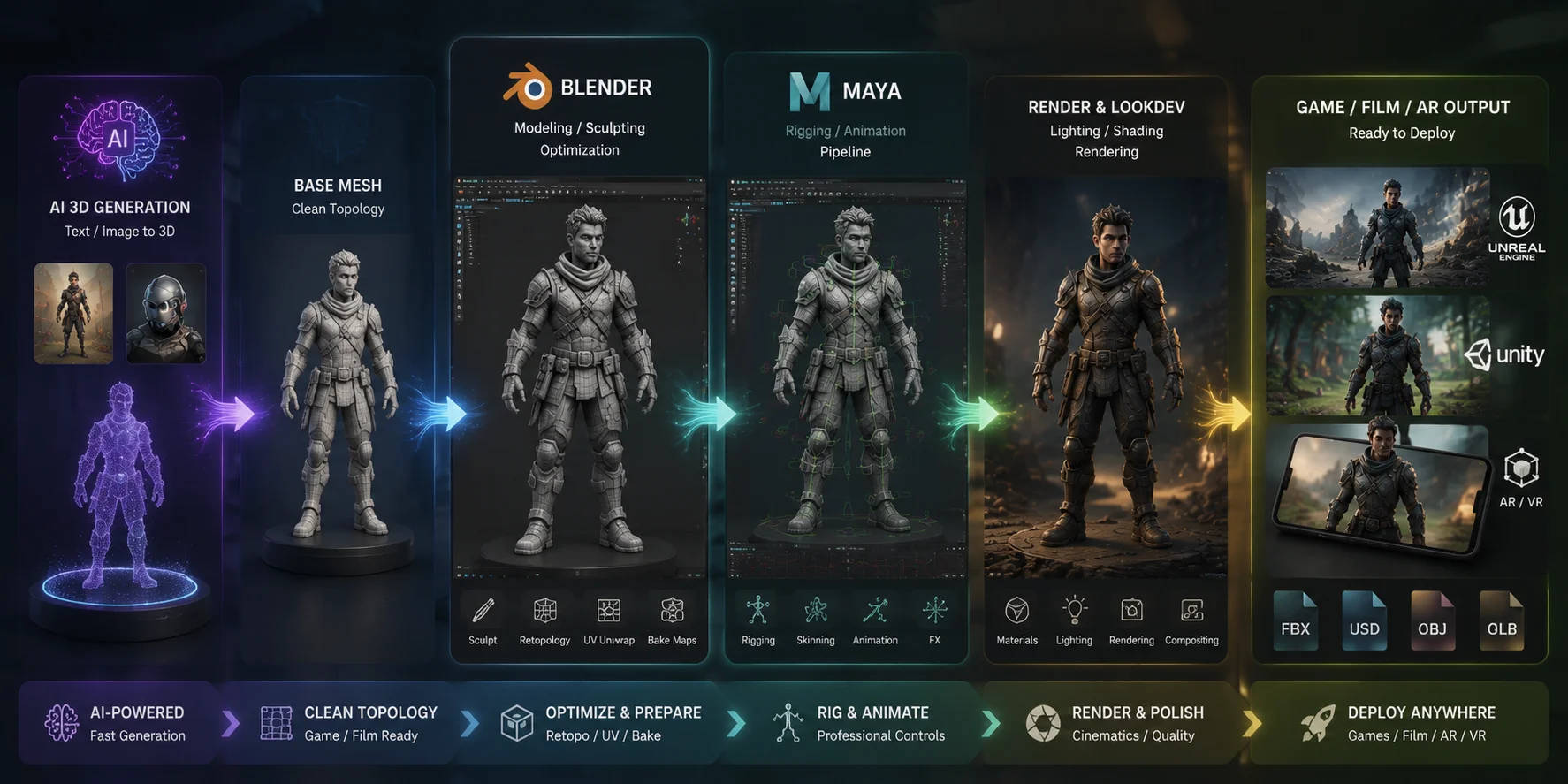
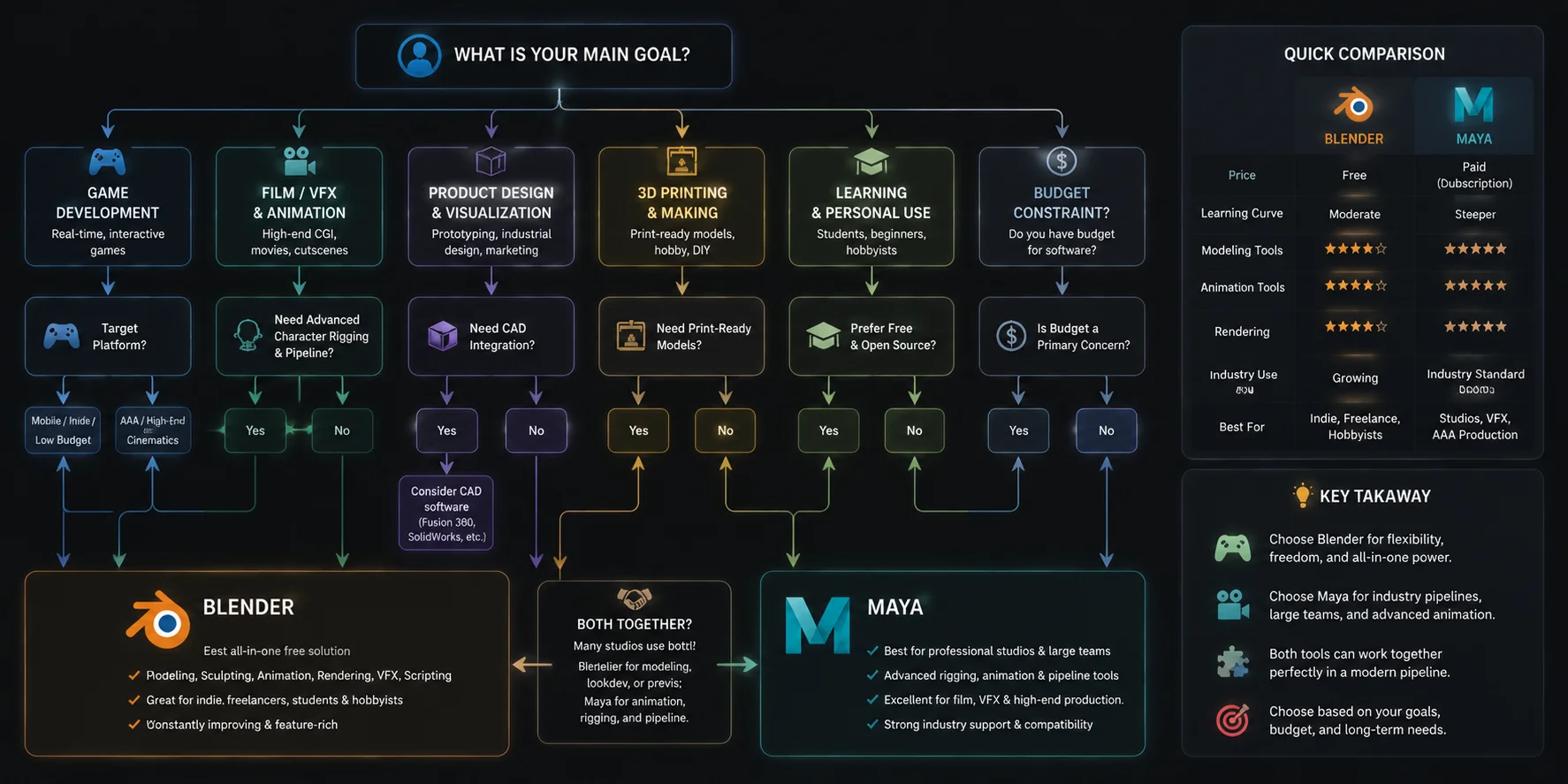
Which Should You Choose? A Simple Decision Framework
Choose Blender if:
- You are new to 3D and want free software
- You are creating indie games or personal projects
- You need an all-in-one 3D modeling software
- You work with 3D printing or product visualization
- You want a large free learning community
Choose Maya if:
- You want a career in AAA games or film VFX
- Your school or employer provides a license
- You need advanced animation and simulation tools
- Your workplace already uses Maya pipelines
Choose both if:
- You work as a freelancer
- You want flexibility across different projects
- You want the strengths of both tools
Blender vs Maya: Which 3D Software Should You Choose?
Frequently Asked Questions
Is Blender better for modeling than Maya?
Blender is excellent for sculpting and organic modeling, while Maya is very strong for precision hard-surface modeling and professional workflows. Neither is always better. Your choice depends on the type of models you create.
Why do studios use Maya instead of Blender?
Many studios use Maya because their pipelines, plugins, and teams have been built around it for years. Changing software can create major production costs.
What does Maya do that Blender can't?
Maya offers advanced tools such as Bifrost, deep studio pipeline integration, and mature production systems. Blender continues to improve, but some large studio workflows still depend on Maya.
Is Blender free for commercial use?
Yes. Blender is free for commercial use under the GNU GPL license. You can create and sell projects made with Blender.
How much does Maya cost?
Maya pricing varies by region and subscription plan. It is generally around hundreds of dollars per month for commercial users. Check Autodesk's current pricing before purchasing.
Which is easier to learn, Blender or Maya?
Blender is often easier for beginners because it is free and has a huge learning community. Maya may be easier for users already familiar with professional animation workflows.
Can I use Blender and Maya together?
Yes. Many artists use both. FBX and OBJ files allow assets to move between Blender and Maya easily.
Is Blender good for animation?
Yes. Blender has professional animation tools and has been used for high-quality productions. Maya is still more common in many large studio pipelines.
Which software is better for game development?
Both work well for game development. Blender is popular for indie game asset creation because it is free and flexible, while Maya remains common in AAA studios.
Conclusion
Blender and Maya are both powerful 3D tools, but they serve different needs. Blender is the best starting point for many creators because it is free, flexible, and covers the complete 3D workflow. Maya is a strong choice when you need professional studio pipelines, advanced animation, or industry-standard workflows.
The best choice depends on where you are today and where you want to go. Whichever software you choose, modern AI 3D tools can help you create base models faster and spend more time improving your final results.
Ready to speed up your 3D workflow? Try Tripo AI Studio to generate 3D assets faster, or explore **Tripo AI pricing plans **to find the option that fits your workflow.