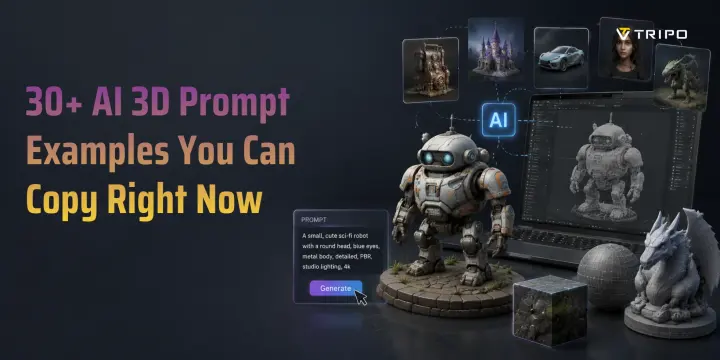
30+ AI 3D Prompt Examples You Can Copy Right Now
TL;DR
- A strong AI 3D prompt describes the subject, style, material, key details, and mood or lighting.
- Use this formula: Subject + Art style + Material/texture + Key details + Mood or lighting.
- This guide includes more than 30 copy-paste prompts for characters, environments, products, stylized assets, and game props.
- Text prompts work best when they are specific, visual, and focused on visible geometry rather than backstory.
- When text alone does not give you enough control, create or choose a reference image and use Image to 3D.
A good AI 3D model starts with a good prompt. The challenge is that many prompts are either too vague to produce useful detail or too scattered to give the model a clear visual direction.
A prompt such as “a fantasy weapon” leaves too much open to interpretation. A stronger description defines the object, visual style, materials, distinctive features, and presentation. This guide gives you a practical prompt formula, more than 30 copy-paste examples, common mistakes to avoid, and advanced techniques for getting more predictable 3D results.
What Makes a Good AI 3D Prompt?
A good AI 3D prompt answers five basic questions: What is the subject? What style should it use? What materials should it have? Which details matter most? What mood or lighting should shape the result?
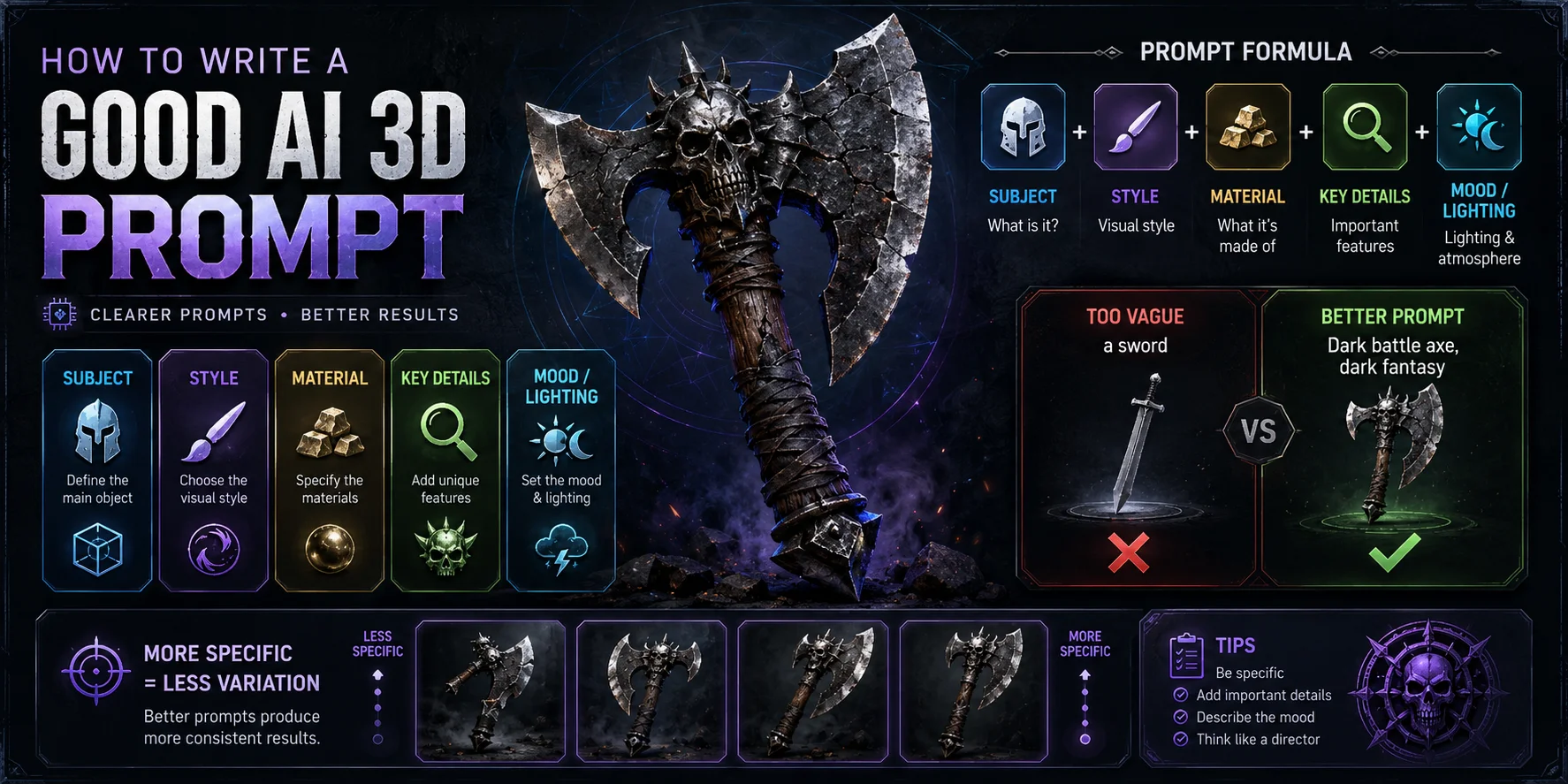
The simplest formula is:
Subject + Art style + Material/texture + Key details + Mood or lighting
For example, this prompt is too vague:
❌ a sword
It gives the model almost no direction about shape, materials, style, or function. Compare it with this:
✅ Dark battle axe, spiked skull decoration, cracked iron blade, wooden handle wrapped in dark cloth, barbarian dark fantasy style
The second prompt defines the object, visual language, materials, damage, and major silhouette details. That makes it easier for the model to produce something closer to your intended result.
Specific prompts also reduce unwanted variation. AI generation contains a degree of randomness, so repeated generations can differ even when the prompt stays the same. Clear descriptors narrow the possible outcomes, while a few retries help you compare variations and select the strongest version. Tripo AI’s text to 3D model workflow turns a descriptive sentence into a 3D model, so the words you choose directly influence the mesh, textures, and overall design direction.
How to Write AI 3D Prompts — Step by Step
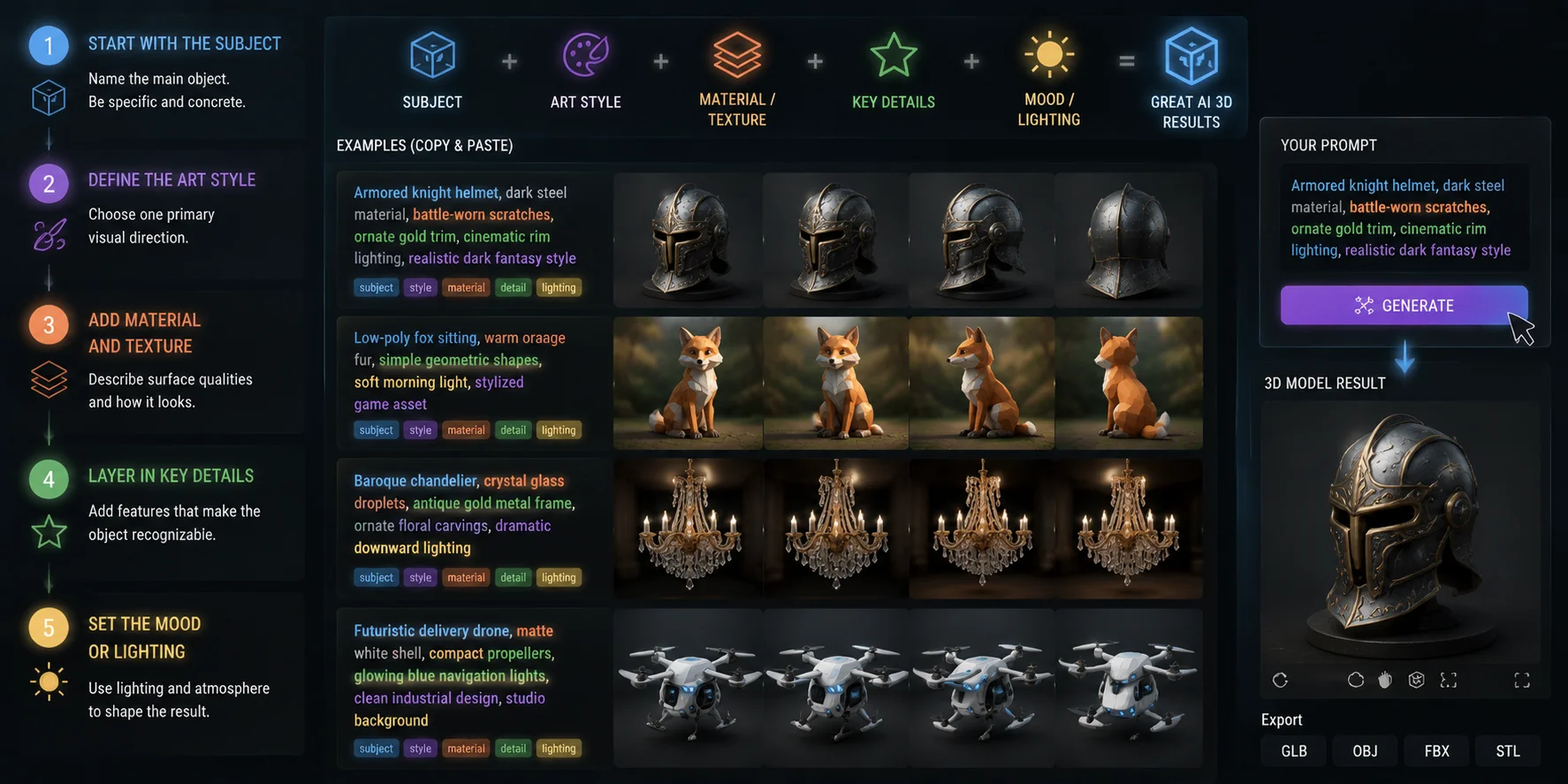
1. Start with the subject
Name the main object first. Be concrete: “medieval shield,” “cyberpunk helmet,” or “low-poly fox” is much clearer than “something cool.”
2. Define the art style
Choose one primary visual direction, such as realistic, stylized, low-poly, cartoon, dark fantasy, sci-fi, cel-shaded, or voxel. A single strong style is usually more reliable than multiple competing style labels.
3. Add material and texture
Describe visible surface qualities: brushed steel, cracked stone, weathered leather, polished ceramic, translucent glass, or rough wood. Material words help shape both texture and lighting behavior.
4. Layer in key details
Add the features that make the object recognizable: runes, straps, dents, glowing panels, carved ornaments, damage, or accessories. Focus on visual details that can be modeled.
5. Set the mood or lighting
Use lighting to reinforce the intended presentation. Cinematic rim light, warm studio lighting, foggy atmosphere, golden-hour sunlight, and dark product-render lighting all provide useful visual direction.
Here are four copy-paste examples that combine the full formula:
Armored knight helmet, dark steel material, battle-worn scratches, ornate gold trim, cinematic rim lighting, realistic dark fantasy style subject + style + material + detail + lighting
Low-poly fox sitting, warm orange fur, simple geometric shapes, soft morning light, stylized game asset subject + style + material + mood
Baroque chandelier, crystal glass droplets, antique gold metal frame, ornate floral carvings, dramatic downward lighting subject + art style + material + detail + lighting
Futuristic delivery drone, matte white shell, compact propellers, glowing blue navigation lights, clean industrial design, studio background subject + style + material + detail + lighting
Once your prompt is ready, paste it directly into Tripo AI Studio to generate your 3D model.
AI 3D Prompt Examples by Category
All of the prompts below can be used with Tripo AI’s AI 3D model generator. Paste one into the generator, then refine the wording or regenerate when you want more variations.
Character Prompts
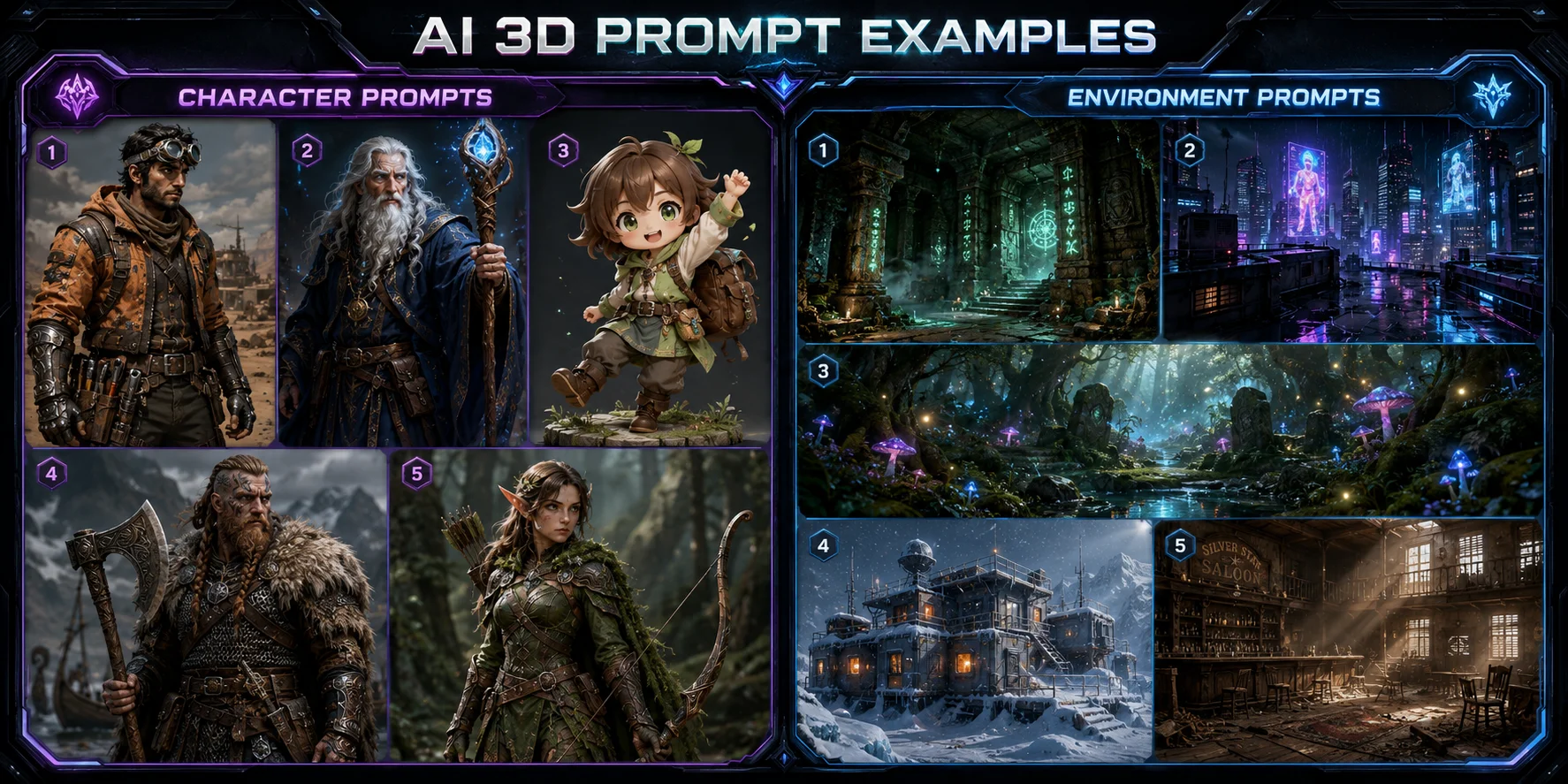
Character prompts work best when they specify pose, clothing, major accessories, facial expression, and material details. Keep the silhouette readable and avoid relying on story details that are not visible.
Cyberpunk desert mechanic, worn orange utility jacket, black armored gloves, silver goggles, compact tool belt, alert expression, front-facing pose, sci-fi style
Elderly wizard, long silver beard, weathered face, deep blue velvet robes, glowing wooden staff, ornate bronze amulet, high-fantasy style
Chibi anime adventurer, oversized head, large expressive eyes, pastel green travel outfit, small leather backpack, cheerful pose, stylized toy-like proportions
Viking warrior, braided red beard, fur-lined cloak, chainmail vest, iron battle axe, scarred leather boots, dramatic foggy lighting, realistic style
Female elf ranger, pointed ears, leaf-green leather armor, longbow with carved wooden limbs, mossy cloak, calm expression, high-fantasy style
Environment and Scene Prompts
Environment prompts need a strong focal object, clear surface materials, and atmospheric lighting. Describe the structure, terrain, weather, and mood instead of adding too many unrelated subjects.
Ancient underground temple, crumbling stone columns, glowing green runes across the floor, thick fog, damp rock walls, mysterious atmospheric lighting
Futuristic city rooftop at night, rain-slicked concrete, holographic billboards, neon reflections, ventilation units, cyberpunk dystopian atmosphere
Enchanted forest clearing, massive glowing mushrooms, moss-covered stones, floating fireflies, magical light through tree canopy, ethereal fantasy style
Arctic research station exterior, snowstorm, low visibility, ice-covered metal walls, warm orange lights from windows, realistic sci-fi style
Abandoned Western saloon interior, dusty sunbeams, broken wooden planks, worn bar counter, empty bottles, cinematic golden lighting
Product and Object Prompts
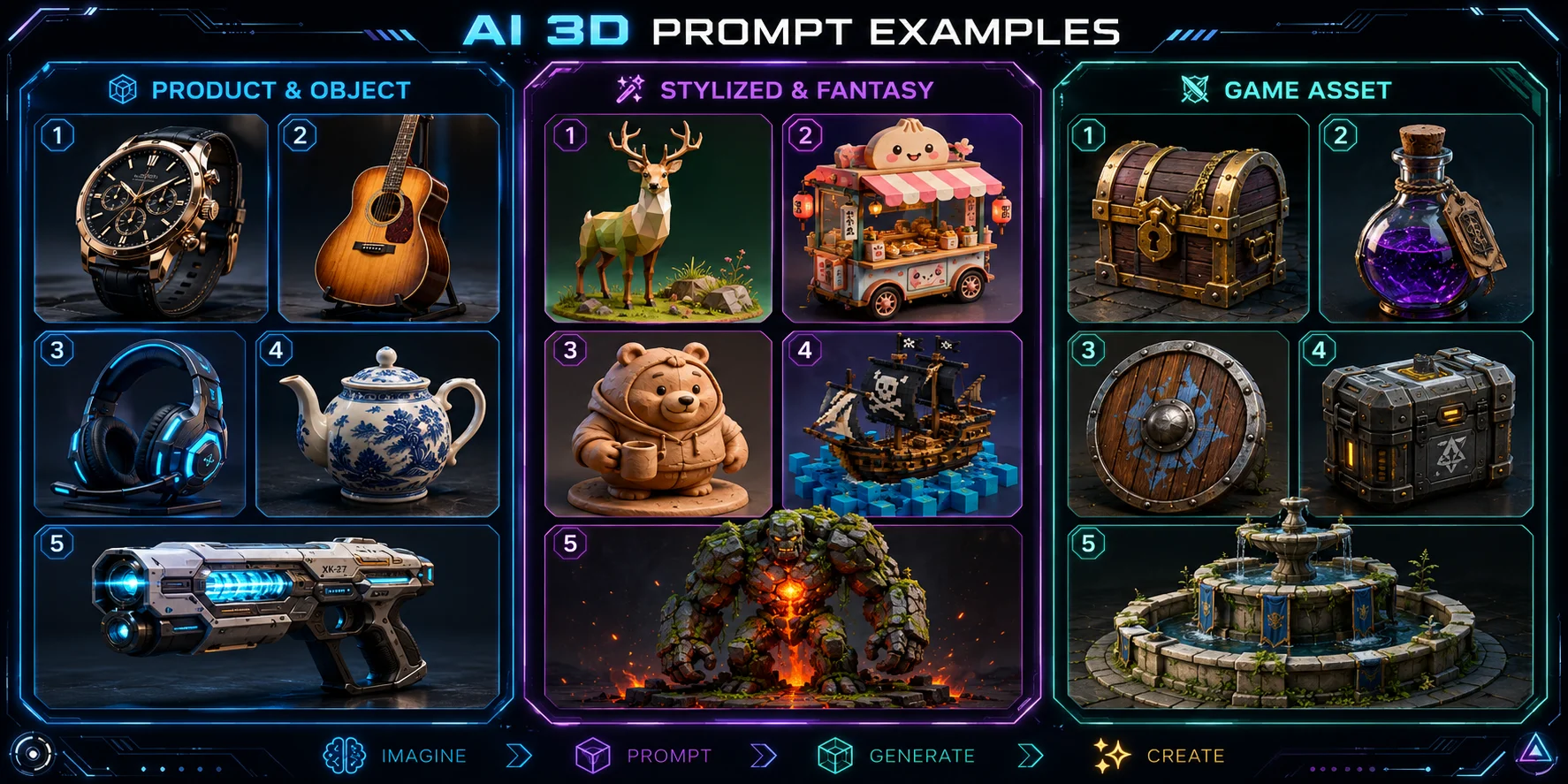
For product-style models, describe the object’s structure, materials, finish, and lighting. Adding “product render style” or “studio background” can help keep the output focused.
Luxury wristwatch, rose gold case, black leather strap, sapphire crystal face, detailed crown, white studio background, premium product render style
Vintage acoustic guitar, spruce wood body, rosewood fretboard, worn satin finish, brass tuning pegs, soft warm studio lighting
Futuristic gaming headset, matte black shell, RGB LED strips, padded ear cushions, adjustable metal headband, sleek industrial product design
Ceramic teapot, hand-painted blue and white floral patterns, smooth glazed surface, curved bamboo handle, traditional Chinese style, soft diffused lighting
Sci-fi energy pistol, translucent blue power cell, chrome barrel, worn black grip, small scuff marks, dramatic rim lighting, dark background
Stylized and Fantasy Prompts
Stylized prompts need a clear style modifier. Terms such as low-poly, clay render, voxel, cel-shaded, and kawaii help lock the overall aesthetic before you add materials and details.
Low-poly geometric deer, teal and mint color palette, faceted crystal-like body, minimal design, soft ambient occlusion, white background
Kawaii food cart, pastel yellow cart, strawberry-striped awning, smiling face on the front, soft rounded edges, chibi style
Clay render cartoon bear, matte clay texture, warm earth tones, small backpack, playful walking pose, soft studio shadows
Voxel art pirate ship, blocky pixel aesthetic, bright primary colors, cannon ports, striped sails, jolly roger flag, isometric game style
Moss-covered stone golem, cracked granite body, glowing red lava core, large heavy fists, imposing silhouette, cinematic dark fantasy lighting
Game Asset Prompts
Game asset prompts should define the object’s practical role. Add terms such as game-ready, low-poly, PBR-ready, inventory prop, modular prop, or environment asset when they match the intended use.
Game-ready treasure chest, medieval fantasy style, dark oak wood, iron lock and hinges, scattered gold coins, PBR-ready textures
Fantasy potion bottle, rounded glass vessel, glowing purple liquid, cork stopper, red wax seal, game inventory prop, clean silhouette
Stylized wooden shield, painted sun emblem, battle scratches, bronze studs around the rim, low-poly game asset, front-facing view
Sci-fi ammo crate, heavy-duty metal construction, caution stripe markings, digital lock panel, modular game prop, worn industrial texture
Medieval stone fountain, mossy basin, weathered carved faces on the spout, shallow flowing water, game environment prop, low-poly style
Common AI 3D Prompt Mistakes to Avoid
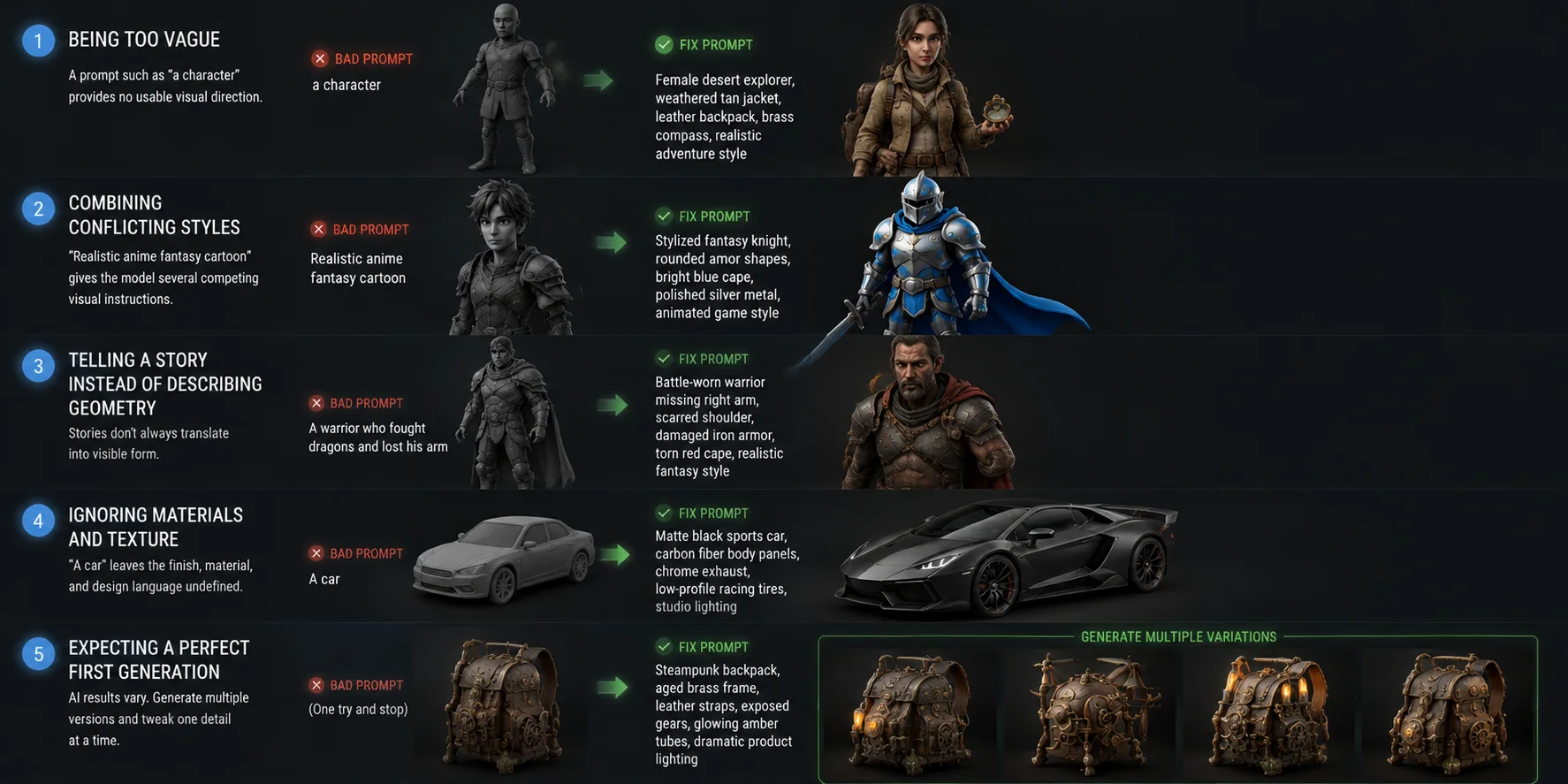
1. Being too vague. A prompt such as “a character” provides no usable visual direction. Add at least four descriptors covering style, materials, clothing, pose, or mood. Fix prompt: Female desert explorer, weathered tan jacket, leather backpack, brass compass, realistic adventure style
2. Combining conflicting styles. “Realistic anime fantasy cartoon” gives the model several competing visual instructions. Choose one dominant style and add supporting descriptors that match it. Fix prompt: Stylized fantasy knight, rounded armor shapes, bright blue cape, polished silver metal, animated game style
3. Telling a story instead of describing geometry. A sentence such as “a warrior who fought dragons and lost his arm” contains narrative information that may not translate into visible form. Describe the physical evidence instead. Fix prompt: Battle-worn warrior missing right arm, scarred shoulder, damaged iron armor, torn red cape, realistic fantasy style
4. Ignoring materials and texture. “A car” leaves the finish, material, and design language undefined. Give the model surface information it can translate into a clearer object. Fix prompt: Matte black sports car, carbon fiber body panels, chrome exhaust, low-profile racing tires, studio lighting
5. Expecting a perfect first generation. AI results can vary because generation includes randomness. Keep a strong base prompt, generate two or three versions, compare them, then change one important descriptor at a time. Steampunk backpack, aged brass frame, leather straps, exposed gears, glowing amber tubes, dramatic product lighting
Advanced AI 3D Prompt Techniques
Use style modifiers intentionally
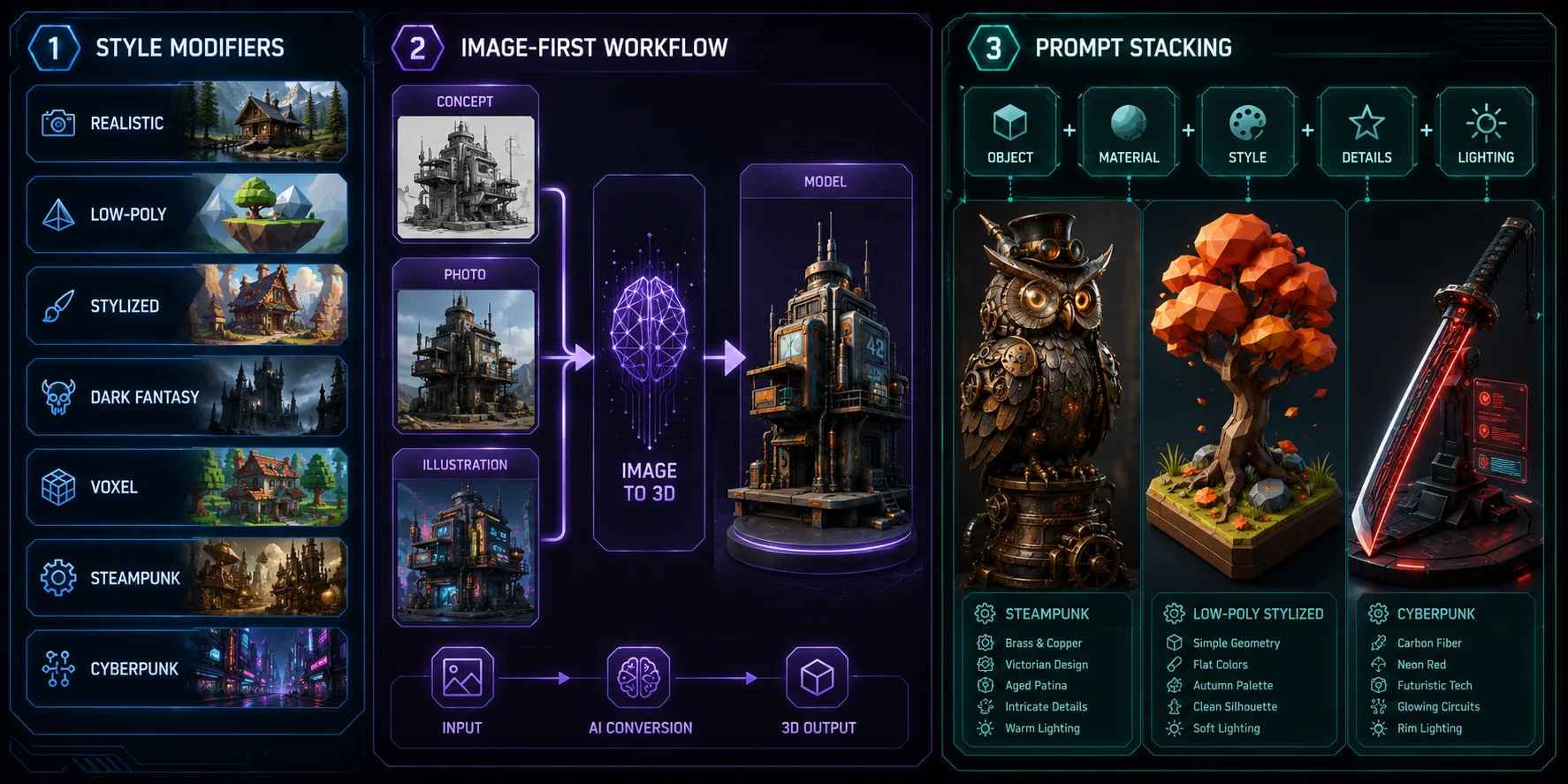
A style modifier can define the visual language of the entire asset. Useful options include realistic, low-poly, stylized, dark fantasy, cel-shaded, clay render, voxel, steampunk, cyberpunk, and art deco.
Place the modifier close to the end of the prompt, then support it with matching material and lighting terms. For example, “voxel art” works well with blocky forms and bright primary colors, while “dark fantasy” fits aged metal, stone, fog, and dramatic shadows.
Use an image-first workflow for more control
When text does not produce the exact silhouette or composition you need, create a concept image first and convert that image into a model. Tripo AI’s Image to 3D workflow supports photos, sketches, illustrations, and concept art as visual references. This is especially useful for branded original concepts, product mockups, character designs, and stylized assets where the shape matters more than verbal description alone.
Build prompts through iteration
Use “prompt stacking” instead of trying to write the perfect final prompt immediately. Start with the core object, identify what worked, then add one layer at a time: material, style, accessories, damage, lighting, or technical context.
Try these advanced examples:
Steampunk mechanical owl, brass gears integrated into layered metal feathers, glowing amber lens eyes, Victorian craftsmanship, aged patina finish, dramatic overhead spotlight
Low-poly stylized tree, autumn orange and red leaves, faceted geometric trunk, minimal shadow, isometric game asset style, white background
Cyberpunk katana, carbon fiber blade, glowing red circuitry etched into the metal, wrapped black grip, holographic blade edge, dark sci-fi product render lighting
Frequently Asked Questions
How do I create a 3D AI prompt?
Start with the subject, then add the style, material, major details, and mood or lighting. A useful formula is: subject + art style + material + key details + mood. Keep the prompt visual and specific instead of describing a long story. When it is ready, paste it into Tripo AI Studio and compare a few generated variations.
What prompt should I use for a 3D model?
Use a prompt that clearly defines the object and its visible features. For example: Medieval lantern, black iron frame, amber glass panels, decorative chain handle, weathered metal texture, dark fantasy style. This works because it identifies the subject, material, shape-defining components, and visual style. Use the category examples above as templates, then replace the object and details with your own idea.
What are some really good AI prompts?
The strongest AI prompts are specific, visually consistent, and built around one main style. Good prompts usually include material words such as leather, glass, steel, wood, stone, or ceramic. Examples include Low-poly geometric deer, teal and mint color palette, faceted crystal-like body, minimal design and Sci-fi ammo crate, heavy-duty metal construction, caution stripe markings, digital lock panel, modular game prop. Both give the generator a clear subject, materials, details, and intended visual direction.
What’s an example of an AI prompt?
Here is a complete example: Armored knight helmet, dark steel material, battle-worn scratches, ornate gold trim, cinematic rim lighting, realistic dark fantasy style.
- Subject: armored knight helmet
- Material: dark steel
- Key details: battle-worn scratches and ornate gold trim
- Lighting: cinematic rim lighting
- Style: realistic dark fantasy
Each part contributes something visible, which makes the output more predictable than a vague prompt such as “fantasy helmet.”
Can I use AI prompts to make game-ready 3D assets?
Yes. Add terms such as low-poly, game-ready, modular prop, PBR-ready, or inventory asset when they match your pipeline. Tripo AI’s Smart Mesh workflow focuses on structured low-poly topology for real-time projects, with optimized meshes around 5,000 polygons by default. 3D model generator can export assets into common formats for downstream game workflows.
Do longer prompts always produce better results?
No. Prompt quality matters more than length. Extra words that do not describe visible shape, material, style, or lighting can distract from the main instruction. As a practical target, keep most prompts around 15 to 30 focused words, then add detail only when the result needs clearer direction.
What’s the difference between a text-to-3D prompt and an image-to-3D workflow?
Text-to-3D starts from written instructions, so it is fast and flexible but depends heavily on prompt quality. Image to 3D starts from a visual reference, making the result more predictable when silhouette, colors, or proportions matter. Use text to 3D for original ideas and fast exploration; use image-to-3D when you already have a concept image, sketch, photo, or render.
How do I avoid getting bad results from AI 3D prompts?
Avoid vague words such as “nice,” “cool,” or “beautiful” unless you pair them with visible details. Change one important variable at a time so you can see whether material, style, lighting, or accessories caused the improvement. Finally, generate multiple variations before rewriting the entire prompt, because AI output naturally varies between runs.
Conclusion
Strong AI 3D prompts follow a simple pattern: subject + style + material + key details + mood or lighting. The more clearly you describe visible form, surface quality, and visual direction, the easier it becomes to generate models that match your idea.
Start by copying one of the examples in this guide, then replace only the subject, materials, and details that matter to your project. That gives you a reliable foundation for experimentation without having to write every prompt from scratch.
Ready to turn your prompts into 3D models? Try Tripo AI Studio for free and generate your first model in seconds. Explore Tripo AI pricing to find the plan that fits your workflow.