Image to 3D API Use Cases: From Product Photos to Game Assets
TL;DR:
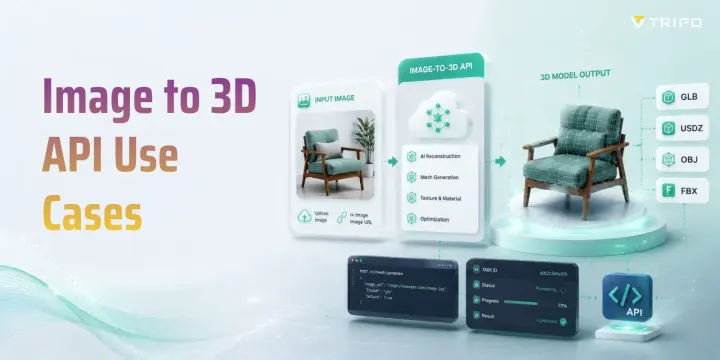
- An image-to-3D API turns one or more 2D photos into a textured 3D model your app downloads as GLB/FBX/OBJ/USDZ.
- Highest-value use cases: e-commerce/AR product views, game & avatar assets, architecture & interior design, robotics synthetic data, and cultural archiving.
- Pick an API on more than quality: latency (sync vs async), batch throughput, output formats, poly-count control, and licensing.
- A typical flow is three calls: upload/submit image → poll the task → fetch the model URL.
- Know the limits: single-photo blind spots, fixed accuracy, and IP/copyright on generated assets.
An image-to-3D API lets your application send a photo and receive a ready-to-use 3D model in seconds—no manual modeling. Developers use it to turn product shots into AR previews, sketches into game assets, and scanned objects into archives. This guide walks through the most valuable image-to-3D API use cases, how to choose an API, and a minimal integration example.
What an Image-to-3D API Actually Does
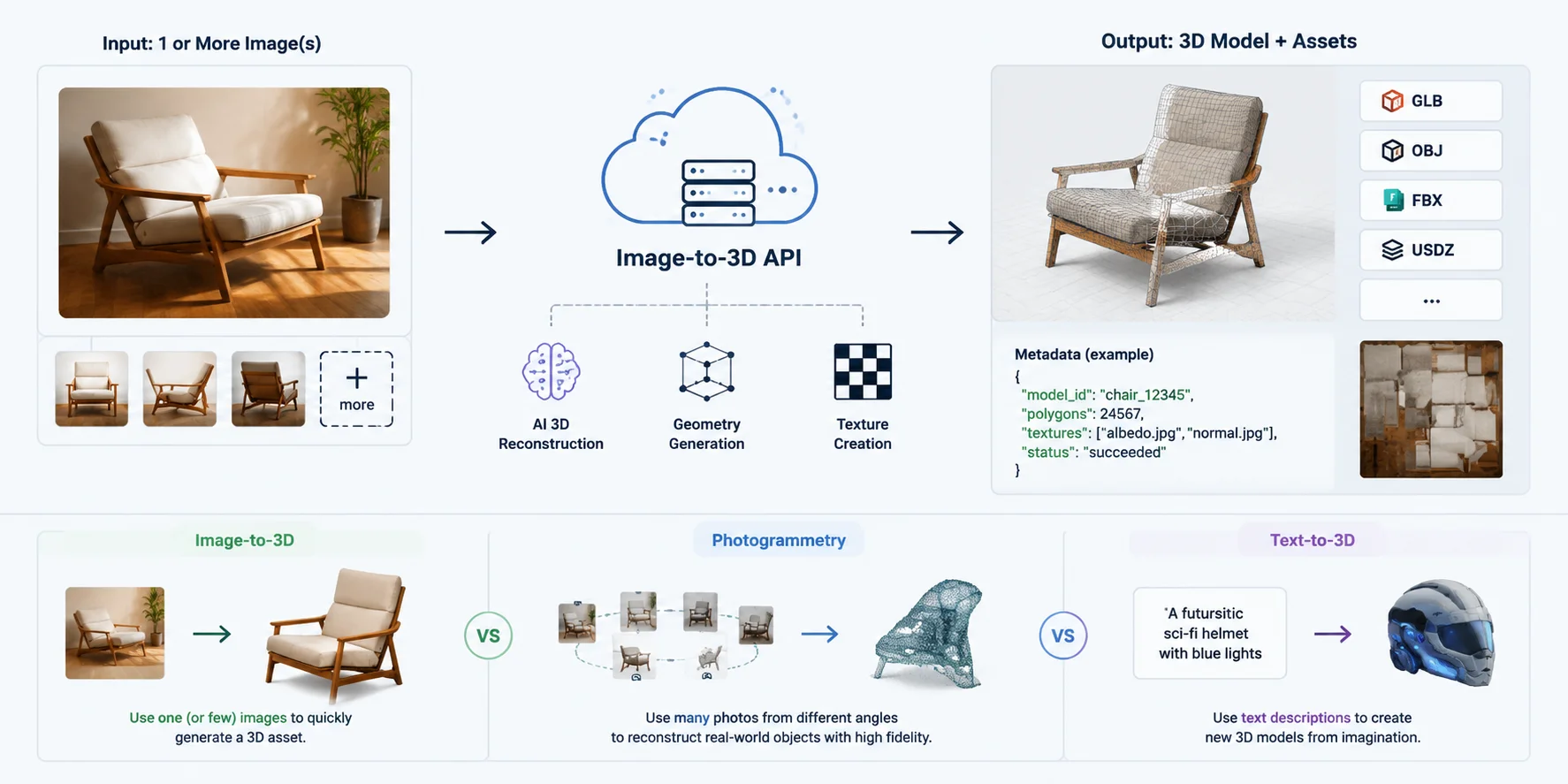
An image-to-3D API is a service that converts one or more 2D images into a usable 3D asset through a programmatic interface. In a typical workflow, you upload a product photo, character image, or reference picture, and the API returns a generated 3D mesh with textures, materials, and related asset data. Instead of manually modeling an object, developers can integrate an image based 3D API into their own applications, allowing users to create 3D content directly from images.
The output from a 3D reconstruction API usually includes a downloadable model file URL and metadata such as model ID, generation status, texture information, polygon count, or preview images. Common export formats include GLB, OBJ, FBX, and USDZ, depending on the platform and the target workflow. For example, a shopping app could send a product image to an API and receive a textured GLB model ready for AR viewing, while a game pipeline could generate an asset that is later optimized for real-time engines.
Compared with traditional photogrammetry, image-to-3D APIs focus on faster AI-based generation rather than requiring a full camera capture process. Photogrammetry usually reconstructs an object by combining many overlapping photos taken from different angles, while AI image-to-3D methods can often create a complete asset from a single image. This makes them easier to integrate into large-scale content pipelines where speed and automation matter.
Developers can also connect these services through workflows such as image to 3D API Python scripts, automatically sending images, processing API responses, and importing generated models into other tools.
Image-to-3D vs Photogrammetry vs Text-to-3D
These three approaches solve different problems:
- Image-to-3D: Best when you have a reference image and want to quickly generate a recognizable 3D asset from visual input.
- Photogrammetry: Best when you need high-fidelity reconstruction of real-world objects using multiple photos from different angles.
- Text-to-3D: Best when you only have an idea or description and need to create a new object without a reference image.
For many practical image to 3d api use cases, image-based generation offers a balance between simplicity and production speed, making it useful for product visualization, game assets, AR experiences, and rapid prototyping.
How an Image-to-3D API Works: From Images to 3D Models
The Highest-Value Image-to-3D API Use Cases
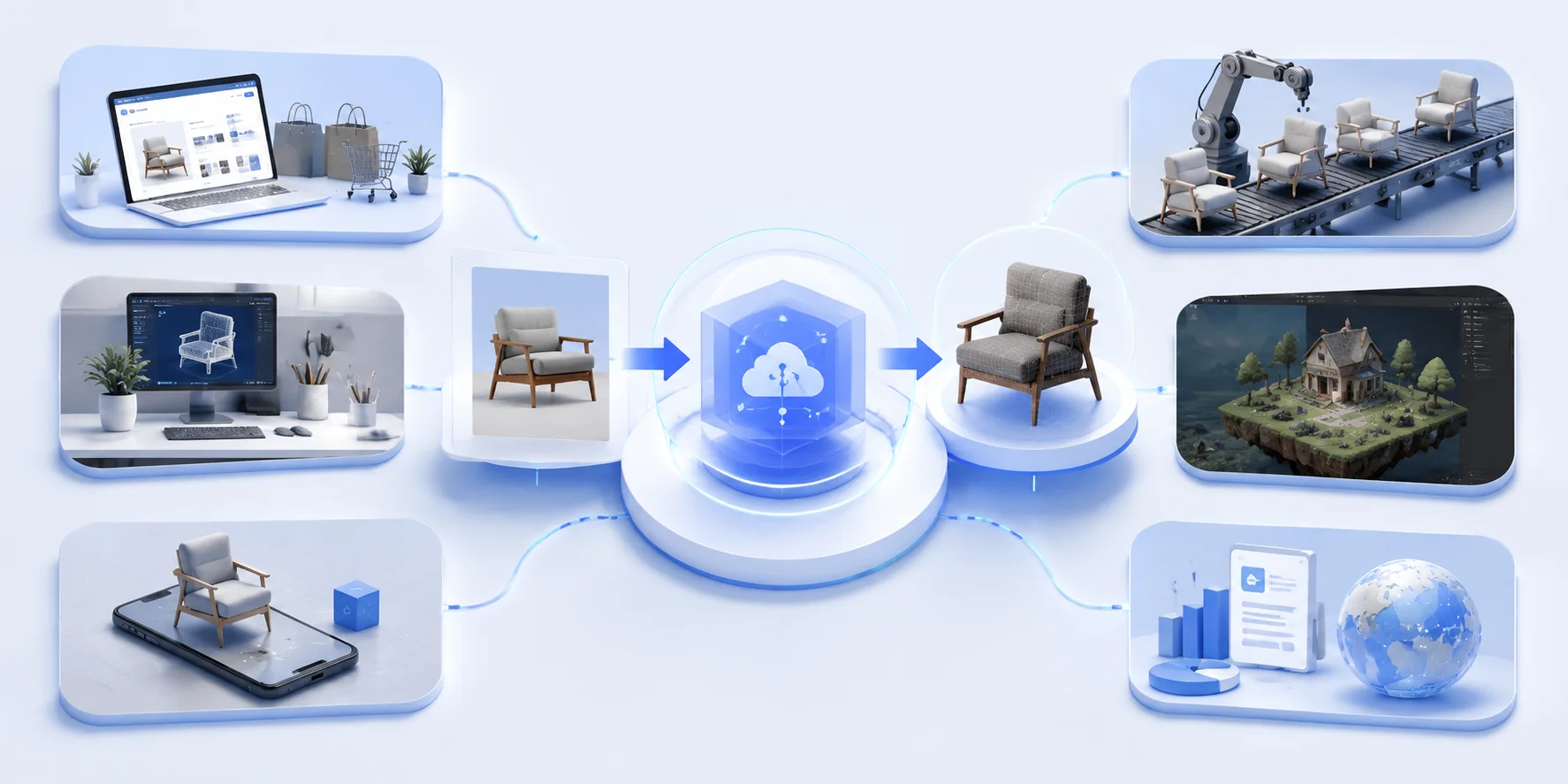
Image-to-3D APIs are becoming useful across multiple industries because they turn visual references into reusable 3D assets without requiring every model to be built manually. The highest-value applications usually fall into three categories: commercial visualization, where companies need scalable product experiences; creative production, where artists and developers need faster asset creation; and data-driven workflows, where 3D generation supports simulation, AI training, and digital archives. Instead of treating 3D generation as a one-off design task, APIs make it possible to automate creation at scale, connect it with existing software, and generate thousands of assets through repeatable pipelines.
E-commerce & AR Product Visualization
E-commerce brands use image-to-3D API use cases to transform existing product photos into interactive 3D shopping experiences. A single product image set can be converted into a textured 3D model for web-based 360° viewers, product configurators, and AR “place it in your space” experiences. This is especially valuable for furniture, home decor, fashion accessories, and consumer electronics, where customers benefit from seeing products from different angles before buying.
The main advantage of using an API is scalability. Instead of manually modeling every SKU, retailers can process large product catalogs automatically and generate consistent assets through the same pipeline. For mobile AR experiences, formats such as USDZ are important because they support Apple AR Quick Look, allowing customers to preview products directly on iOS devices. Other common outputs such as GLB and OBJ can support websites, apps, and 3D commerce platforms.
Game & Real-Time Assets
Game studios and interactive applications use image-to-3D APIs to turn concept art, sketches, and reference images into production-ready 3D assets. A developer can start with a character design, weapon concept, or environment reference and quickly generate a model that can be refined and imported into a real-time engine. This reduces the time between idea creation and playable content, especially for indie teams and rapid prototyping workflows.
For game development, raw AI-generated models are not always enough. Assets need proper topology, reasonable polygon counts, UVs, and textures to perform well in engines such as Unity and Unreal Engine. AI workflows with features like Smart Mesh can help create more game-ready topology and make generated assets easier to integrate into existing pipelines. Developers can use an Image to 3D workflow to move from visual references to editable 3D models faster while keeping optimization requirements in mind.
3D Avatars from Photos
Photo-to-avatar generation is another major photo to 3d api example, especially for social platforms, virtual worlds, gaming communities, and VR applications. Users can upload selfies or portrait images and receive personalized 3D characters without needing professional modeling skills. This makes avatar creation accessible to millions of users while allowing platforms to automate the process.
The key value of an API approach is high-volume generation. Social apps or virtual environments may need to create thousands or millions of avatars while maintaining consistent quality and processing speed. A connected API pipeline can automatically handle image uploads, model generation, texture processing, and delivery, making personalized 3D identity a scalable feature rather than a manual service.
Architecture & Interior Design
Architects, interior designers, and furniture companies use 3D reconstruction API use cases to convert photos of objects, rooms, or design references into editable 3D assets. A furniture catalog, for example, can become a library of digital models that customers can place inside virtual room planners or configuration tools.
Compared with traditional modeling, API-based generation helps teams create large collections of objects faster. Designers can test layouts, visualize different furniture combinations, and build interactive planning experiences without manually modeling every item. Export formats such as GLB and USDZ also make these assets easier to reuse across web viewers, AR applications, and design software.
Robotics & AI Synthetic Data
Robotics companies and AI researchers use image-based 3D APIs to generate synthetic environments and training data for machine learning systems. Instead of collecting every possible real-world scenario, teams can create large libraries of 3D objects and scenes for simulation, perception training, and testing.
This approach is valuable because AI models often require huge amounts of visual data. Generated 3D assets can be modified, duplicated, and placed in different simulated environments, creating diverse training examples at lower cost. In robotics, autonomous systems, and computer vision research, a free image to 3D API or low-cost API tier can help teams experiment with automated asset generation before scaling to larger production workflows.
Cultural Heritage & Product Archiving
Museums, manufacturers, and organizations with physical collections use image-to-3D APIs to create searchable digital archives. Historical artifacts, limited-edition products, and inventory items can be converted into 3D representations that are easier to preserve, display, and access online.
For cultural heritage projects, 3D models can support virtual exhibitions, education platforms, and long-term digital preservation. For businesses, the same workflow can turn large inventories into structured 3D libraries for internal management or customer-facing experiences. Compared with manual reconstruction, API-driven generation makes it possible to digitize more objects with fewer specialized 3D artists.
Image-to-3D API Use Cases Across Industries
How to Choose an Image-to-3D API
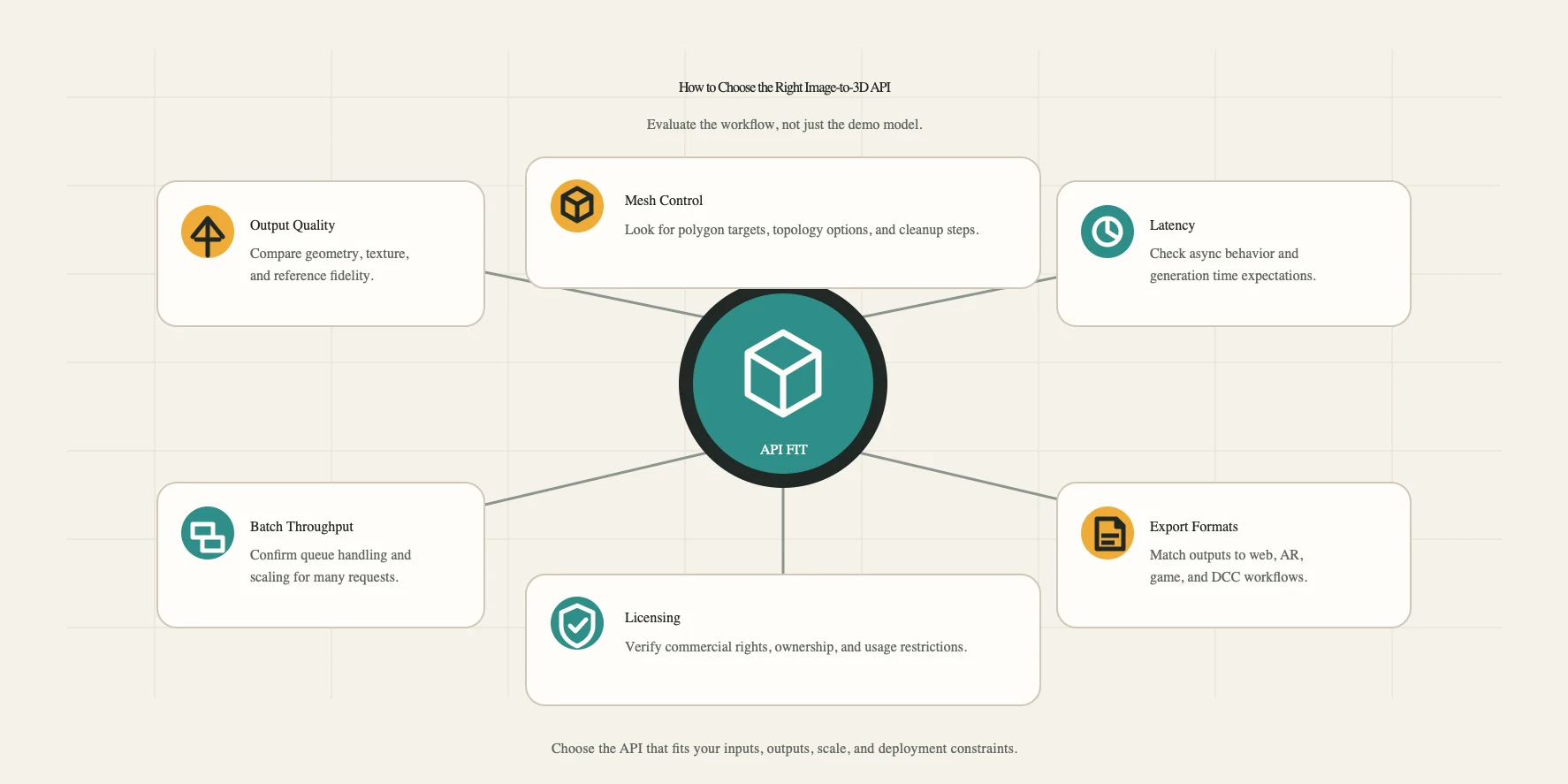
Choosing an image-to-3D API is not only about the visual quality of the generated model. A model that looks good in a demo may still fail in a real production workflow if it is too slow, difficult to integrate, expensive at scale, or limited by export options. Before selecting an API, developers should evaluate factors such as processing speed, batch capacity, output formats, optimization controls, and commercial licensing.
Latency — Synchronous vs Asynchronous
The first choice depends on how users interact with your application. Synchronous APIs are suitable for real-time experiences, such as instant previews in an e-commerce configurator or interactive design tools, where users expect results within seconds or minutes. Asynchronous APIs are better for large-scale generation tasks, where images are submitted, processed in the background, and retrieved later through a job ID or callback system.
For production workflows, asynchronous processing is often more practical because 3D generation can involve complex reconstruction, texture creation, and mesh optimization steps.
Batch Throughput & Cost at Scale
For businesses generating hundreds or thousands of models, API scalability matters as much as individual model quality. A good solution should support batch processing, queue management, and predictable pricing structures. Developers should compare request limits, generation credits, volume discounts, and whether the provider offers bulk pricing for high-frequency usage.
A free image to 3D API or free trial credits can be useful for testing workflows, but production teams usually need to evaluate the total cost per generated asset at scale.
Output Formats & Poly-Count Control
The right export format depends on where the model will be used. GLB is commonly used for web 3D viewers and real-time applications, USDZ is important for iOS AR Quick Look experiences, while OBJ and FBX remain widely supported in traditional 3D pipelines and game engines.
Poly-count control is another important factor. Game developers and real-time applications often need optimized meshes rather than highly detailed models. APIs that provide options for mesh simplification, polygon targets, or game-ready optimization are easier to integrate into professional workflows.
Licensing & Commercial Use
Before deploying generated assets commercially, teams should understand the API provider’s usage rights. Important questions include whether generated models can be used in paid products, whether ownership is transferred, and whether there are restrictions on resale, marketplaces, or customer-generated content.
For companies building commercial applications, licensing clarity is just as important as technical performance. A reliable API should provide clear terms for generated assets and allow businesses to confidently use models in their products.
| Selection Factor | Best For | Key Questions |
|---|---|---|
| Latency | Real-time apps, previews | Does it support synchronous generation or fast previews? |
| Batch Processing | Large catalogs, content pipelines | Can it handle bulk generation efficiently? |
| Formats & Optimization | Games, AR, web 3D | Does it export GLB/USDZ/OBJ/FBX and control poly count? |
| Licensing | Commercial products | Can generated assets be used and distributed commercially? |
The best image to 3d api examples are not necessarily the ones with the highest-quality demo models, but the ones that fit your workflow, scale requirements, and final use case.
How to Choose the Right Image-to-3D API: Key Evaluation Factors
A Minimal Integration Example (3 Calls)
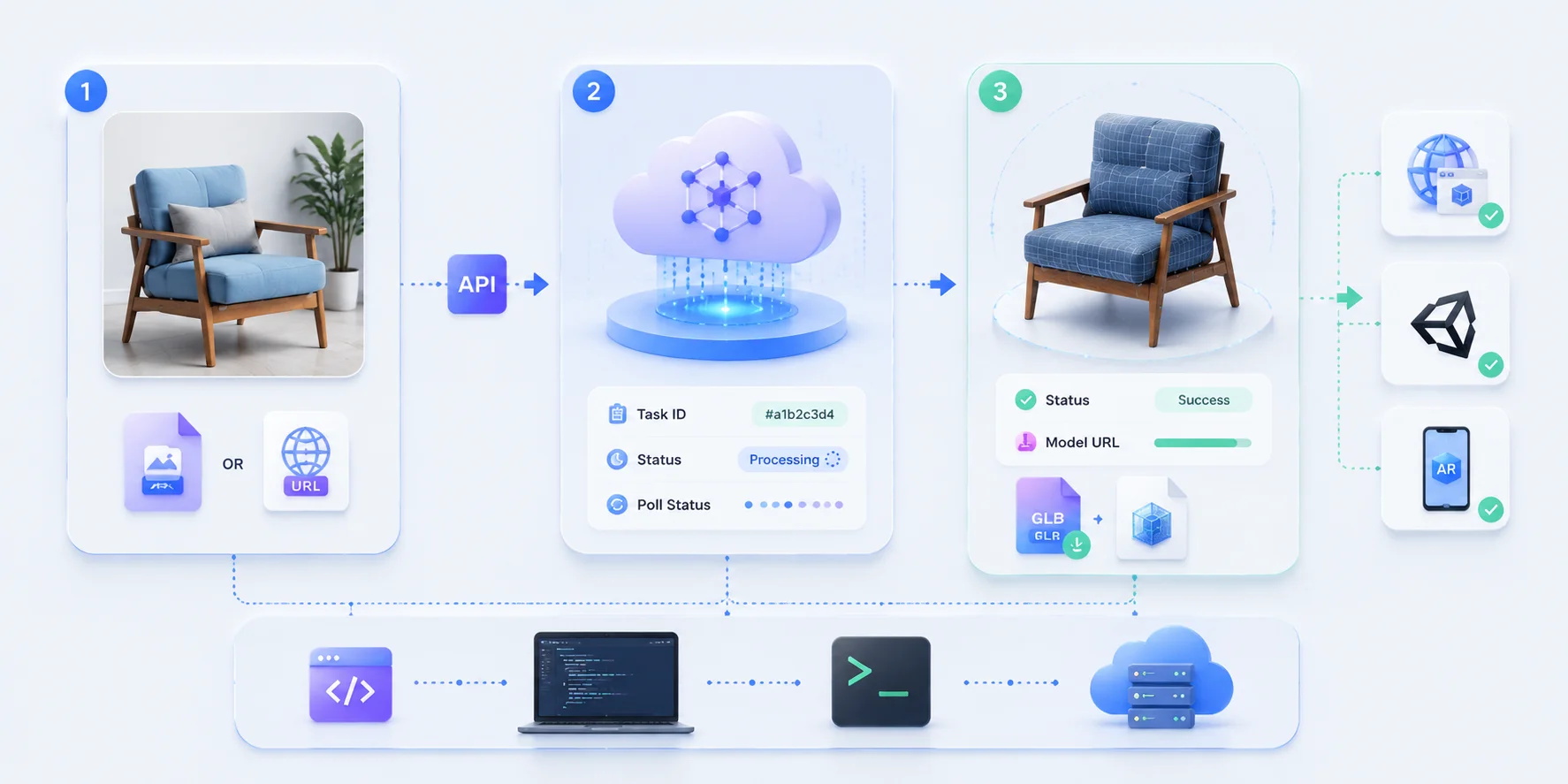
Integrating an image-to-3D API usually follows a simple three-step REST workflow: submit an image, track the generation process, and retrieve the final 3D model. Although different providers may use different endpoints and authentication methods, most image based 3D API workflows follow the same structure. The goal is to turn an uploaded image into a downloadable 3D asset with minimal manual processing.
Submit an Image Generation Request
The first step is sending the input image to the API. Developers can usually provide either a local image file through a multipart upload or an online image URL. After receiving the request, the API creates a generation task and returns a unique task ID. This ID is used to track the progress of the 3D reconstruction process.
Check the Generation Status
3D generation is usually an asynchronous process because the system needs to analyze the image, build the mesh, generate textures, and optimize the final asset. The application should periodically check the task status until the result changes from processing to successful completion. A production workflow should include proper error handling, timeout limits, and retry logic to deal with failed requests or temporary service issues.
This workflow can be implemented with different programming languages, including Python or cURL-based scripts. When building an image to 3d api Python integration, developers should validate API responses, use status checks such as raise_for_status() for HTTP errors, and avoid assuming every request will succeed.
Retrieve and Download the 3D Model
After successful processing, the API returns a model download URL, usually pointing to a file such as GLB. The generated model can then be imported into web viewers, AR applications, game engines, or 3D editing tools. This simple three-call pattern allows developers to connect image-to-3D generation with existing software systems and automate asset creation at scale.
Input Image Best Practices
The quality of the input image has a direct impact on the final 3D output. Even the best 3D reconstruction API cannot fully recover missing details from unclear or poorly prepared images, so image preparation is an important part of the workflow.
For better results, use a single clear subject placed near the center of the frame, with minimal background distractions. A clean background helps the AI separate the object from its surroundings, while even lighting reduces unwanted shadows and reflections that may affect geometry and texture generation. Whenever possible, provide a complete front-facing view of the object with all important parts visible.
Well-prepared input images improve reconstruction accuracy, texture consistency, and overall model quality, making the entire image-to-3D pipeline more reliable.
Image-to-3D API Integration Workflow: Upload, Generate, Download
Limitations & When Not to Use an Image-to-3D API
Although an image-to-3D API can significantly speed up asset creation, it is not a replacement for every 3D workflow. AI-generated models are built from visual information, which means the quality of the input and the complexity of the object directly affect the final result. Understanding these limitations helps teams decide when automation is suitable and when traditional methods are still necessary.
Single-Image Blind Spots
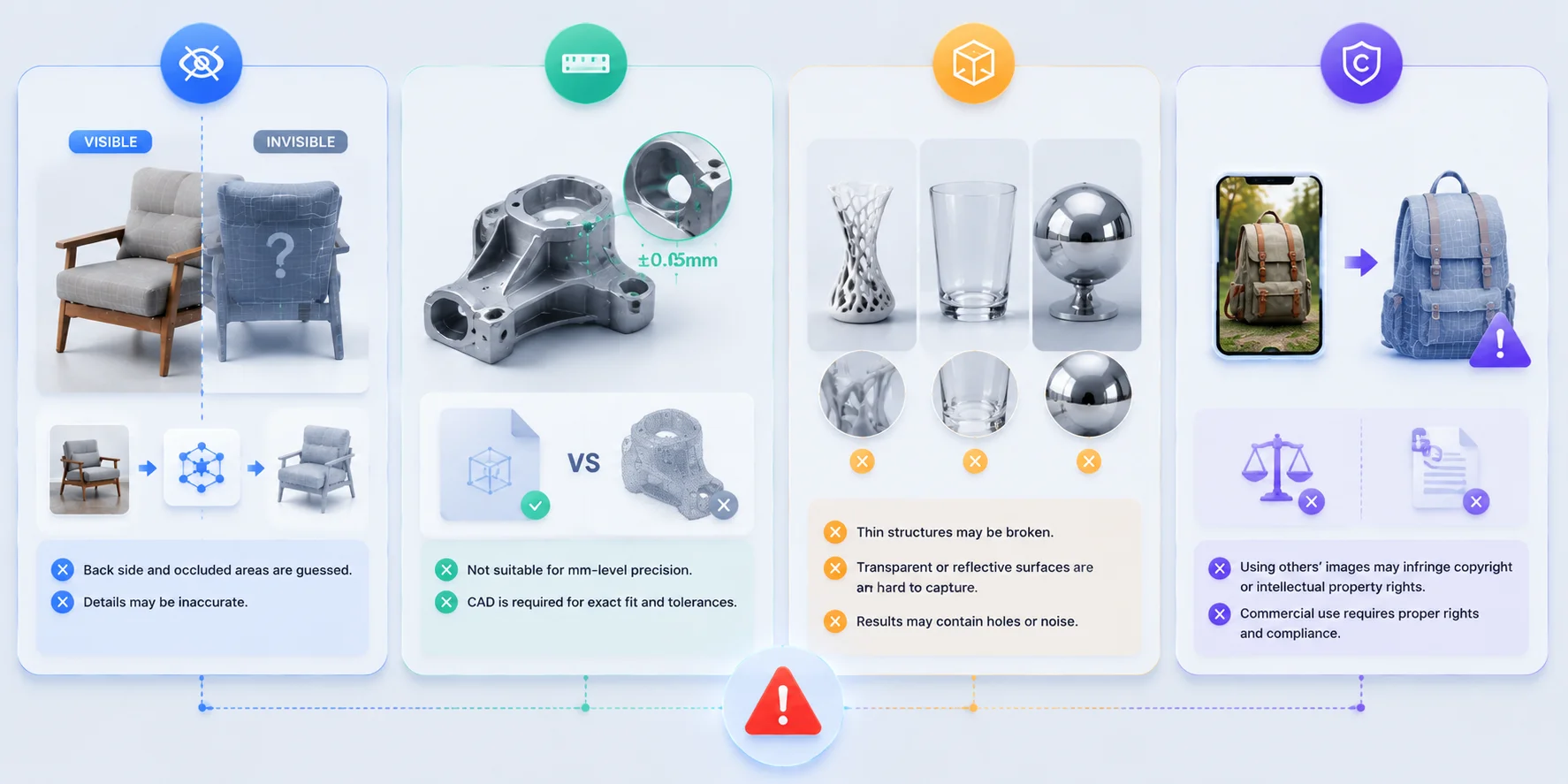
The biggest limitation of many image-to-3D workflows is missing information. When only one image is provided, the AI has to estimate hidden areas such as the back side, internal structure, or partially covered surfaces. While the front-facing appearance may look convincing, unseen details may be inaccurate or creatively generated. For products where every angle matters, providing multiple views or using traditional scanning methods may produce more reliable results.
Precision Engineering Parts Still Need CAD
Image-to-3D APIs are designed for visual reconstruction rather than exact measurement. If a component requires millimeter-level accuracy, mechanical fitting, manufacturing tolerances, or functional testing, a CAD-based workflow is still the better choice. Engineering parts such as machine components, connectors, and industrial assemblies usually require precise dimensions that AI reconstruction cannot guarantee.
Difficult Materials and Complex Geometry
Some objects remain challenging for AI reconstruction, especially thin structures, transparent materials, reflective surfaces, and highly detailed objects. Glass, polished metal, wires, and objects with complex internal shapes may produce incomplete geometry or inaccurate textures. These cases often require additional modeling, cleanup, or manual refinement after generation.
Copyright and IP Considerations
Another important limitation is legal compliance. Using someone else’s image to generate a 3D model may create copyright, trademark, or intellectual property concerns, especially for commercial use. Businesses should confirm that they have the rights to use input images and understand the provider’s policies regarding generated assets. A technically successful model does not automatically mean it is safe to distribute or sell.
An image based 3D API works best when speed, scalability, and visual similarity are the priorities. For precision manufacturing, highly controlled assets, or legally sensitive projects, a traditional 3D workflow may still be the better option.
Image-to-3D API Limitations: When AI Reconstruction Falls Short
Frequently Asked Questions (FAQ)
What is an image-to-3D API and how does it work?
An image-to-3D API accepts one or more reference images and creates a generated mesh, usually with materials or textures and a downloadable model file. The application submits the image, receives a task ID, checks the asynchronous job status, and retrieves the result after generation succeeds. Output formats and metadata differ by provider, so the integration should follow the current API schema rather than assume a universal response. The generated asset should be inspected because surfaces not visible in the input may be inferred.
What can you build with an image-to-3D API?
Image-to-3D APIs can generate product models for e-commerce viewers, AR previews, game props, avatars, interior-design assets, and digital archives. They can also supply objects for simulation or synthetic-data pipelines when visual variety matters more than exact physical measurement. The API approach is valuable when many images must be processed through a repeatable workflow instead of being modeled individually. Each use case still needs its own quality checks, optimization targets, and licensing review.
Is there a free image to 3D API?
Some providers offer trial credits or limited free access, but the limits may apply only to a web product rather than to API usage. Confirm whether the free allowance covers API requests, model export, the required quality mode, and commercial use. Test with representative images because a free tier that cannot produce or export usable assets may not validate the production workflow. Recheck the pricing page before launch because quotas and plan rules can change.
Can I batch-process many images into 3D models via API?
Yes, either through a documented bulk endpoint or by orchestrating multiple asynchronous tasks in your own queue. Give every image a task record, respect concurrency and rate limits, and retry only transient failures with backoff. Store the source image, task ID, status, and output URL so partial batches can resume without starting over. Automated geometry checks and human sampling are important before large batches are released.
Which output format should I request — GLB, USDZ, OBJ, or FBX?
Choose the format according to the destination, not simply the longest format list offered by the provider. GLB is compact and convenient for web and many real-time workflows, FBX is common for game and animation exchange, and OBJ is broadly supported for editing but often uses separate material and texture files. USDZ is useful for Apple AR Quick Look, but support is provider-specific; Tripo's current official export list names USD rather than USDZ. Import-test the selected format with the actual target application before committing a production pipeline.
What are the limitations of image-to-3D APIs?
Image-to-3D systems must infer surfaces that are hidden, cropped, or poorly lit in the source image. Transparent, reflective, very thin, or highly detailed objects can produce incomplete geometry or inconsistent textures. Generated models are visual reconstructions, not dimensionally reliable CAD parts, so precision engineering and manufacturing fits require measured design data. Plan for inspection, cleanup, and possibly multi-view input when shape fidelity matters.
How is an image-to-3D API different from photogrammetry?
Photogrammetry reconstructs a real object from many overlapping photographs captured from multiple angles, while an image-to-3D API can generate a plausible model from one or a few references. Photogrammetry usually requires a controlled capture process and more source images, but it can preserve real-world geometry more faithfully when the capture and processing are done well. Image-to-3D is faster to automate and works when a full photo set is unavailable, though unseen surfaces may be invented. Choose photogrammetry for measured reconstruction and image-to-3D for speed, accessibility, and scalable visual asset creation.
Conclusion
From product photos to game-ready assets, an image-to-3D API helps transform 2D images into scalable 3D content for commerce, gaming, AR, and AI workflows. Choose the right solution based on your required speed, output formats, scalability, and budget, then integrate it into your pipeline.
Start creating 3D models with Tripo AI Studio for quick generation, or connect your own workflow with Tripo API for automated 3D asset creation at scale.