Why AI 3D Models Have Bad Topology — And How to Actually Fix It
TL;DR
- AI 3D models often have bad topology because they optimize visual appearance rather than clean geometric structure.
- Common problems include dense triangulation, holes, non-manifold geometry, intersecting faces, poor edge flow, and floating mesh islands.
- These issues can break rigging, subdivision, UV unwrapping, baking, game-engine imports, and real-time performance.
- Different workflows need different topology: games prioritize efficiency, animation needs deformation-friendly loops, and 3D printing requires watertight manifold geometry.
- Text-to-3D, image-to-3D, and scan-to-mesh systems produce different topology failure patterns.
- Traditional modeling offers more topology control, while AI generation is faster but usually requires post-processing.
- A practical repair workflow is to diagnose, clean, fill holes, fix non-manifolds, retopologize or quad-remesh, and validate before export.
- AI topology tools are improving, but complex production assets still benefit from human judgment and manual refinement.
You generated a 3D model in seconds, only to discover it falls apart the moment you import it into Blender, Unity, Unreal, or a rigging tool. The surface may look impressive, but underneath you'll often find messy mesh topology AI outputs: tangled triangles, triangulation artifacts, uneven edge flow, stretched polygons, and even non-manifold geometry that causes animation glitches, shading errors, failed exports, or impossible edits. AI 3D models often have bad topology because generative models optimize for visual surface appearance rather than geometric structure. That trade-off explains why bad topology 3D modeling remains one of the biggest obstacles to production-ready assets. The good news is that poor AI 3D model quality is usually fixable with the right retopology workflow and cleanup process. Here's what's going wrong—and how to clean it up.
What Is Topology in 3D Modeling?
Topology is the structure of a 3D mesh—the arrangement of vertices, edges, and polygons that defines a model's surface. While the shape is what you see, topology determines how that shape behaves when you edit, animate, or optimize it. A model can look perfectly smooth at first glance yet still have poor underlying topology that causes problems later.
Good topology is the foundation for almost every downstream task. Clean edge loops deform predictably during character animation, make UV unwrapping easier, produce cleaner subdivision surfaces, and reduce shading issues during rendering. It also improves compatibility with game engines and export pipelines, which is why clean topology is essential for AI auto-rigging to work correctly.

Most production meshes are built primarily with quads (four-sided polygons), while triangles (tris) are common in real-time game assets, especially after optimization. N-gons are polygons with five or more sides and can introduce unpredictable behavior during subdivision or deformation if not managed carefully. The goal is not to eliminate every triangle, but to create a mesh with clean, consistent topology that matches its intended use.
Types of Topology Problems in AI 3D Models
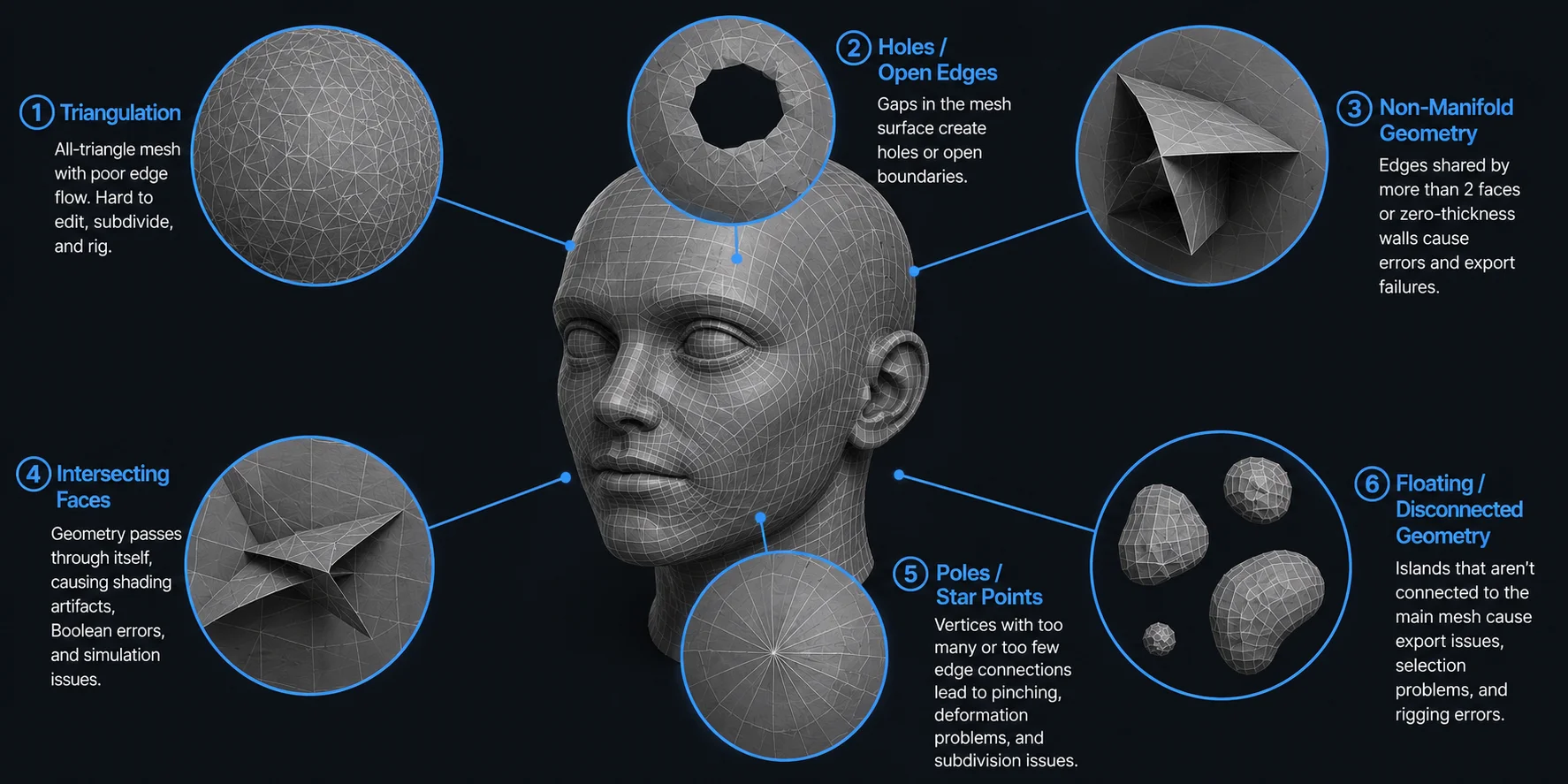
AI-generated meshes can look convincing from a distance while hiding structural problems that make them difficult to edit, animate, or export. The most common issues include:
- Triangulation (all-triangle mesh): Some AI models are generated almost entirely from triangles instead of clean quad loops. Heavy triangulation creates poor edge flow, makes subdivision surfaces less predictable, and complicates rigging and mesh editing.
- Holes and open edges: Parts of the mesh are missing or not fully connected, leaving visible gaps in the surface. These openings often prevent watertight exports, create rendering artifacts, and cause problems in 3D printing or physics simulations.
- Non-manifold geometry: Edges shared by more than two faces, internal faces, or zero-thickness walls create geometry that many modeling tools cannot process correctly. Non-manifold meshes frequently break Boolean operations, UV workflows, and repair tools.
- Intersecting faces: Different parts of the mesh pass through each other instead of forming a clean surface. Self-intersections can produce shading errors, failed Boolean operations, and unexpected results during collision or simulation.
- Poles and star points: A pole is a vertex connected to an unusually high or low number of edges. While some poles are unavoidable, excessive or poorly placed ones create pinching, uneven deformation, and visible artifacts after subdivision.
- Floating or disconnected geometry: Small mesh islands are not welded to the main model. These loose pieces can be accidentally deleted, cause export issues, or interfere with rigging, texturing, and mesh cleanup.
Common AI 3D Mesh Topology Problems
Why AI Generates Bad Topology: The Root Causes
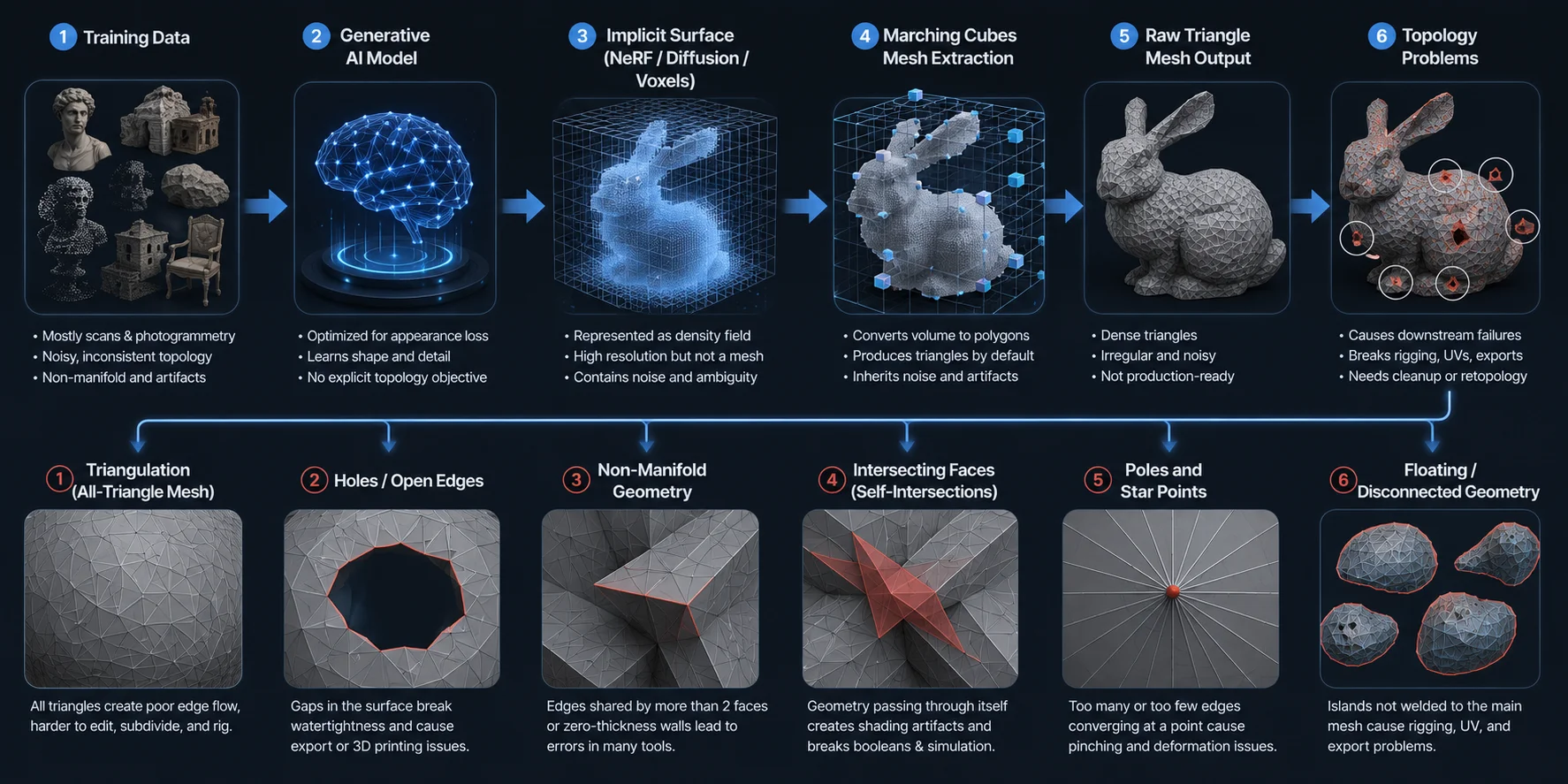
Poor topology is not simply the result of "bad AI." It is largely a consequence of how today's generative 3D systems are designed and trained. Most models prioritize producing convincing shapes as quickly as possible, while clean mesh structure is treated as a secondary concern. Understanding that trade-off makes it much easier to decide what needs fixing—and what can safely be ignored.
Visual quality and mesh structure are optimized differently. Many generative 3D systems are evaluated primarily on whether the resulting asset resembles the requested object or reference. The model may therefore look convincing in a render while still needing topology checks for editing, deformation, UV work, or real-time use. The exact failure pattern varies by model and output mode, so treat this as a common workflow risk rather than a universal property of every AI-generated mesh.
Mesh extraction can leave triangle-heavy or noisy geometry. Some reconstruction pipelines represent shape with implicit, volumetric, point-based, or other intermediate forms before producing a polygon mesh. When an extracted surface is converted into polygons, it can contain irregular triangle density, small bumps, or noise that later needs cleanup. Other systems generate mesh data more directly, so avoid presenting Marching Cubes as the universal cause of bad topology.
Deformation-ready edge flow is a separate requirement. A visually plausible model does not automatically contain the loops a character rigger would place around elbows, knees, shoulders, fingers, or facial features. For assets that must deform, inspect the joint areas and retopologize or manually refine them as needed. Static props and 3D-printing meshes may be judged by different criteria.
Training data is often noisy to begin with. A large portion of publicly available 3D datasets comes from photogrammetry, laser scanning, or other reconstruction techniques. While these assets capture real-world detail extremely well, they frequently contain uneven polygon density, scan noise, floating fragments, and non-manifold geometry. AI models inevitably learn statistical patterns from this data, including many of its imperfections, which then appear in newly generated meshes.
There is no penalty for breaking downstream workflows. Perhaps the biggest reason AI produces messy meshes is that it is rarely evaluated on how well those meshes perform after generation. A model is not typically penalized because Blender reports mesh errors, a game engine struggles with deformation, or a rigging pipeline fails. From the training objective's perspective, a visually convincing model is already a success. That is why cleanup and retopology workflow remain essential steps: they transform a visually accurate surface into geometry that artists, game engines, animation systems, and 3D printing software can reliably use.
Why AI-Generated Meshes Develop Bad Topology
Consequences of Bad Topology
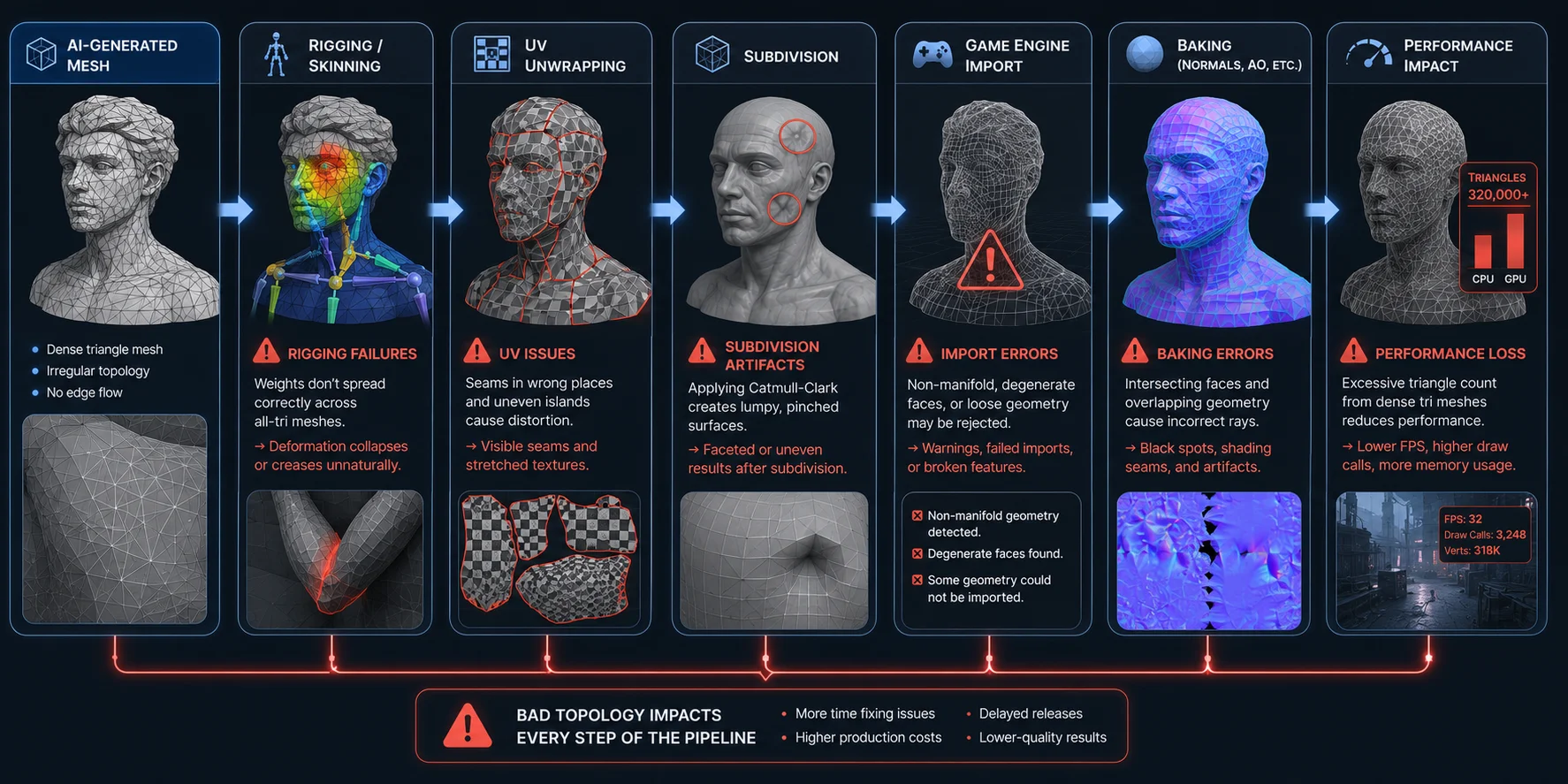
Poor topology rarely causes problems while you're looking at a static render. The issues appear once the model enters a real production pipeline, where every downstream tool expects clean, predictable geometry.
- Rigging and skinning failures: Dense triangle meshes and inconsistent edge flow make weight painting less predictable, so joints such as elbows, knees, and shoulders collapse or crease unnaturally during animation. This means more manual weight cleanup instead of a smooth rigging workflow.
- Subdivision artifacts: Applying Catmull-Clark subdivision to messy geometry often produces pinching, bumps, and uneven surfaces. Rather than creating a smoother model, subdivision exaggerates the mesh's structural flaws.
- UV unwrapping issues: Irregular polygons and poorly placed loops make it difficult to create clean UV islands. As a result, seams appear in visible areas, textures stretch, and painting detailed materials becomes much harder.
- Lower real-time performance: AI-generated meshes often contain far more triangles than necessary. Instead of rendering a clean 20,000-triangle asset, your game may process two or three times that number, increasing GPU workload and reducing frame rate—especially on mobile and VR platforms.
- Game engine import errors: Non-manifold geometry, degenerate faces, and disconnected mesh islands can trigger warnings or failed imports in some engines and asset pipelines. Even if the model imports successfully, collision generation, physics, or lighting may behave unexpectedly.
- Baking and normal map errors: Intersecting faces and overlapping geometry confuse ray projection during normal baking. The result is black spots, shading seams, and incorrect surface detail that can be difficult to diagnose later in the pipeline.
In short, bad topology is not just a modeling inconvenience—it slows every stage that follows, from texturing and animation to optimization and final deployment.
How Bad Topology Breaks the 3D Pipeline
How Different Applications Need Different Topology
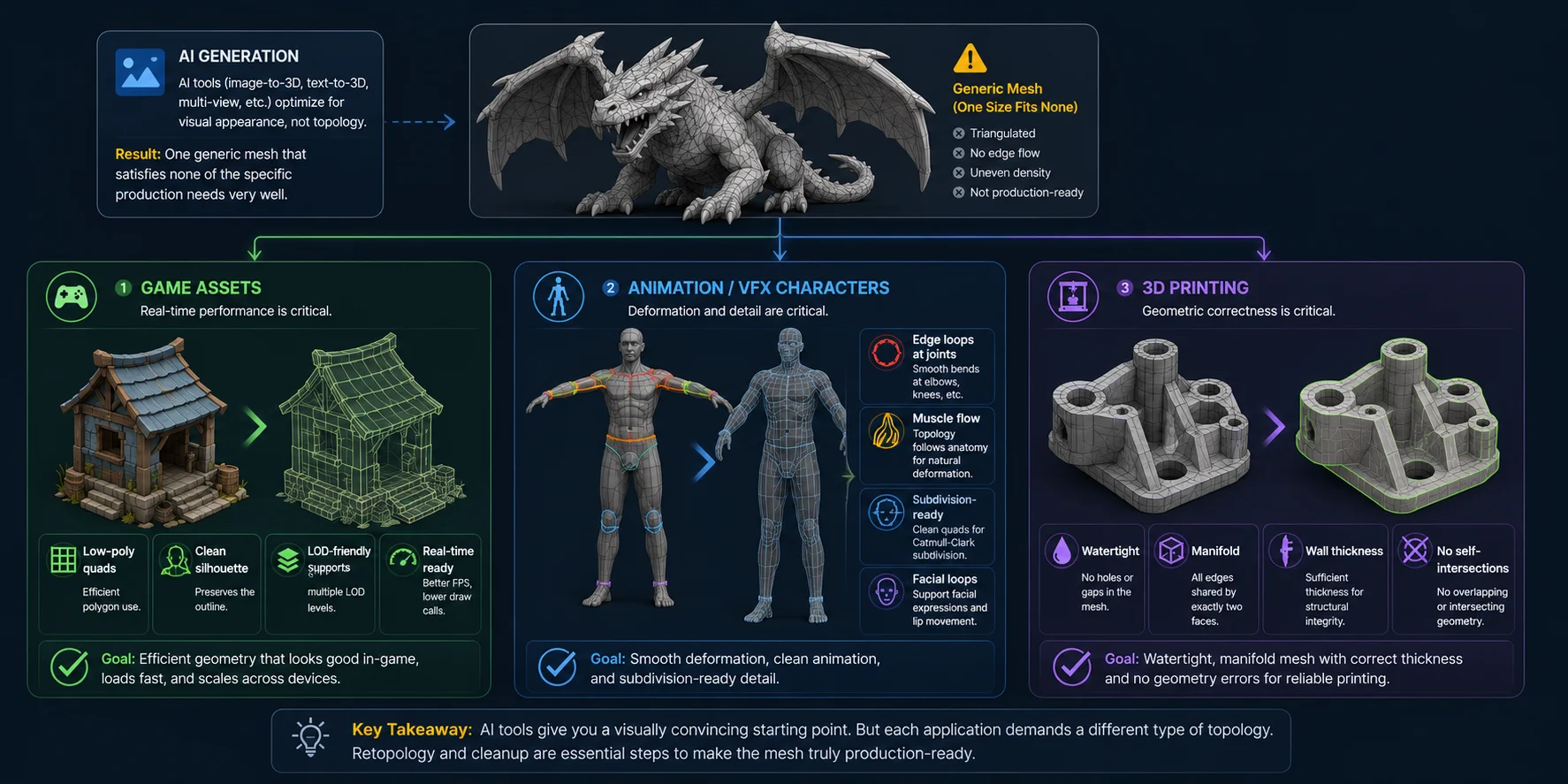
There is no single definition of "good topology." The ideal mesh depends on what you plan to do with it. Most AI generators produce one general-purpose mesh designed to look convincing, but that same mesh is rarely optimized for games, animation, or manufacturing. This is especially true when generating an** image-to-3D **model, where preserving the appearance of the reference photo often takes priority over creating production-ready geometry.
Game Assets
Game models need efficient topology that balances visual quality with rendering performance. Clean quad-based edge loops help preserve the silhouette while keeping polygon counts under control, and they simplify LOD generation for real-time engines. Dense, irregular triangle meshes waste polygons in flat areas, making optimization more difficult without improving what players actually see.
Animation and VFX Characters
Characters require topology that deforms naturally. Edge loops should follow the movement of elbows, knees, shoulders, fingers, and facial muscles so skinning weights can blend smoothly during animation. Animation-ready meshes also need subdivision-friendly topology for high-quality close-up renders. A mesh that looks fine in a static pose can quickly reveal creases, pinching, or collapsing joints once it starts moving.
3D Printing
For 3D printing, visual edge flow matters far less than geometric correctness. The mesh must be watertight, manifold, have sufficient wall thickness, and contain no self-intersections or floating geometry that could confuse the slicer. A highly detailed AI model may appear perfect on screen, but if it contains holes or non-manifold regions, it can still fail before the printer ever begins building the part.
The key takeaway is that AI usually generates a single generic mesh, while production workflows expect topology tailored to a specific job. That mismatch—not the model's appearance—is why cleanup and retopology are often necessary before the asset is truly ready to use.
Different Applications Require Different Topology
Traditional Modeling vs AI Modeling: A Topology Perspective
Traditional 3D modeling workflows are built around intentional topology. Whether an artist starts with box modeling or sculpts a high-poly mesh before retopology, every major edge loop is placed for a purpose—supporting deformation, subdivision, shading, or efficient polygon distribution. AI generation takes a different approach: it creates a visually convincing mesh first, then leaves topology optimization as a separate step.
| Workflow | Traditional Modeling | AI Modeling |
|---|---|---|
| Control over edge flow | ✓ Artists place edge loops intentionally | May not place deformation-oriented loops intentionally; validate the output for the target workflow |
| Speed of initial mesh | Slower, often hours of manual work | ✓ Seconds to a few minutes |
| Downstream usability | Often ready for editing, but scanned or sculpted assets may still need cleanup | Often needs validation and workflow-specific cleanup before production use |
| Retopology required | Sometimes, especially after sculpting or when adapting the asset to a new destination | Depends on the output and destination; common for deforming characters or strict quad-based workflows |
Neither workflow is universally better—they simply optimize for different goals. Traditional modeling prioritizes precision and production-ready geometry, while AI prioritizes speed and creative exploration. For concept art, rapid iteration, and early asset creation, AI provides a major productivity boost. For final production assets, however, topology quality still matters, which is why post-processing remains an important part of the pipeline.
The gap is steadily shrinking. Modern AI tools are beginning to generate cleaner meshes instead of treating topology as an afterthought. Features such as Tripo AI's Smart Mesh are designed specifically to improve topology, reduce unnecessary triangles, and produce meshes that require far less cleanup before moving into game engines, animation pipelines, or 3D printing workflows.
How to Fix Bad Topology in AI-Generated Models: A Repair Workflow
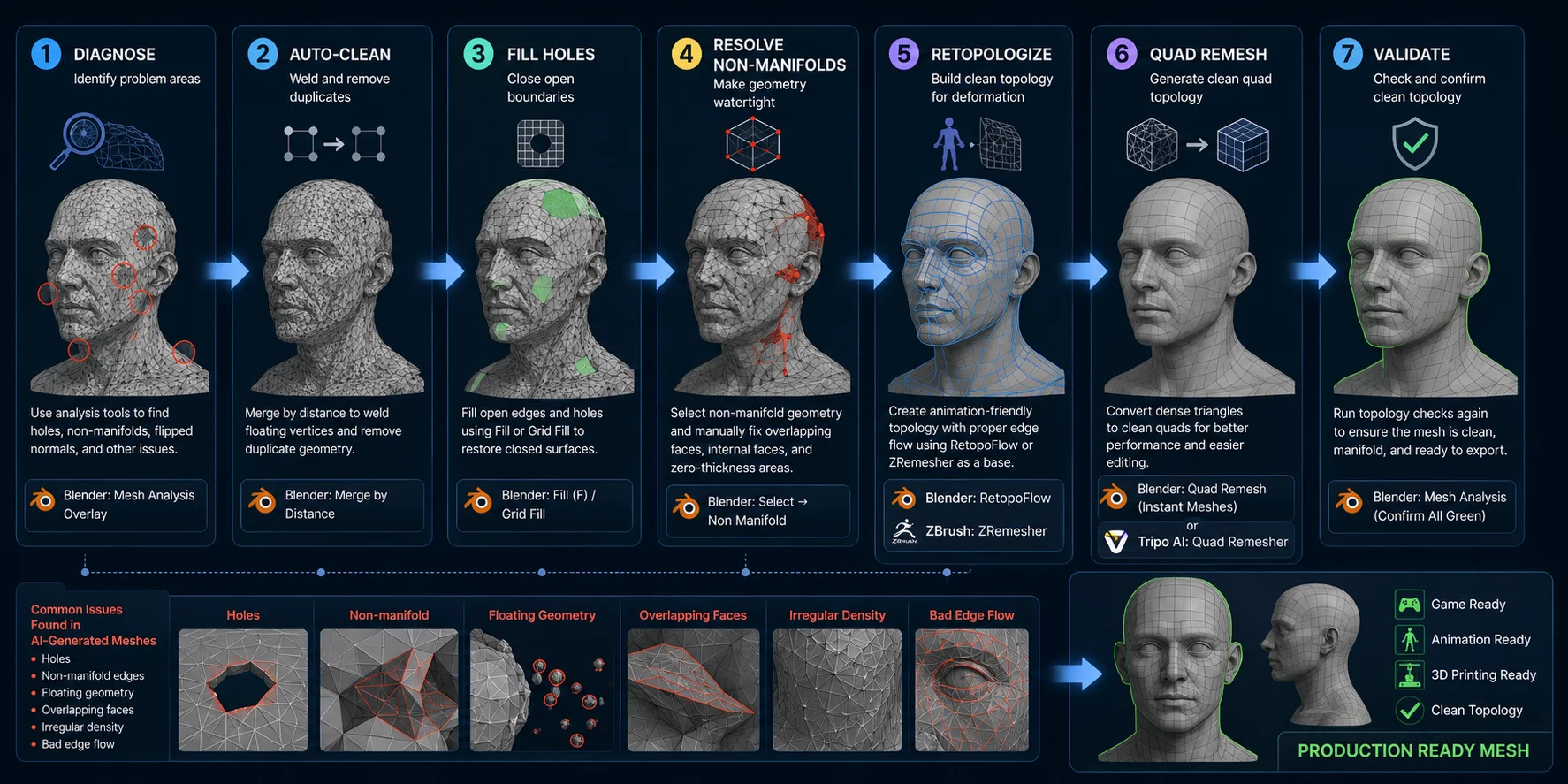
- Diagnose the mesh first. Before editing anything, identify where the real problems are. In Blender, enable Mesh Analysis overlays to inspect distorted faces, non-manifold areas, and inconsistent geometry. If you use 3D-Coat, its topology inspection tools provide a similar overview. Spending a minute diagnosing the mesh prevents unnecessary edits later.
- Auto-clean the geometry. Start with the simplest fixes. In Blender, run Merge by Distance (formerly Remove Doubles) to weld overlapping vertices and eliminate tiny floating points that often appear in AI-generated meshes. This immediately removes many minor issues without changing the overall shape.
- Fill holes and repair open edges. Open boundaries can cause export failures, physics errors, and 3D printing problems. Use Fill (F) for simple openings or Grid Fill for larger gaps to rebuild missing surfaces while maintaining a clean polygon layout.
- Resolve non-manifold geometry. Use Select → Select All by Trait → Non-Manifold to highlight problematic regions such as internal faces, zero-thickness walls, or overlapping edges. Some issues can be fixed automatically, but complex areas usually require manual editing to restore a clean, manifold mesh.
- Retopologize organic models. Characters, creatures, and other organic assets benefit from a dedicated retopology pass. Tools such as Blender's RetopoFlow add-on or ZBrush ZRemesher provide an excellent starting point by generating cleaner edge loops around joints and facial features. You can then refine those loops manually where deformation matters most.
- Optimize hard-surface and game assets for the target budget. For props and environment assets, first decide whether the deliverable needs a triangle budget, quad-oriented editability, or both. Remove redundant detail, preserve the silhouette, and check UVs and shading after optimization. For a Tripo-native option, Smart Mesh is positioned for low-poly, game-ready assets with clean topology; still validate the exported mesh in the target DCC or engine before production use.
- Validate before exporting. After repairs are complete, run topology analysis one more time. Confirm that non-manifold regions, holes, disconnected geometry, and obvious shading artifacts have been eliminated. A final validation pass helps ensure the model imports cleanly into Blender, game engines, animation software, or slicing tools without introducing new problems downstream.
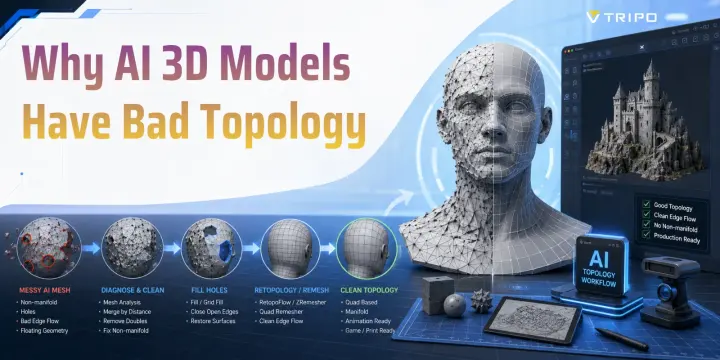
AI Mesh Topology Repair Workflow
AI Topology Failure Modes by Model Type
Not all AI-generated meshes fail in the same way. The topology problems you encounter often depend on how the model was created, because each generation method has different assumptions and reconstruction limitations.
Text-to-3D (diffusion-based generation). Models created from a text-to-3D model pipeline often prioritize overall shape and visual plausibility over structural accuracy. Common topology issues include fused fingers or limbs, floating mesh fragments, mirrored artifacts, and uneven polygon density caused by the model trying to satisfy multiple plausible interpretations of a prompt.
Image-to-3D (depth estimation and reconstruction). Image-based generation typically reconstructs only the visible side of an object with confidence. The hidden areas must be inferred, which can produce incorrect back-side geometry, paper-thin extruded walls, missing internal structure, or stretched polygons where the AI has limited visual information.
Scan-to-mesh (photogrammetry). Photogrammetry captures real-world detail extremely well but also reproduces unwanted imperfections. The resulting meshes frequently contain high-frequency surface noise, overlapping faces around occluded regions, fragmented geometry, and irregular triangle density that require cleanup before animation, game development, or 3D printing.
Recognizing these patterns helps you choose the right repair strategy instead of treating every AI-generated mesh as if it has the same topology problems.
Frequently Asked Questions
What is bad topology in 3D modeling?
Bad topology is a mesh structure that causes problems during rigging, animation, UV mapping, or rendering. Common issues include excessive triangles, non-manifold edges, poor edge flow, and badly placed poles.
Are AI-generated 3D models any good?
They are useful for rapid concept creation and prototyping. For production use, inspect the mesh against the needs of the specific workflow; some assets need cleanup or retopology, while others may only need validation and optimization.
Can AI do topology?
AI can generate and optimize meshes with cleaner topology than a raw reconstruction. Whether the result is ready for a specific game, rigging, or printing workflow still depends on the asset, output mode, and validation checks.
Will AI make 3D modeling obsolete?
No. AI can accelerate asset creation and iteration, while artists and technical teams still make workflow-specific decisions about topology, deformation, optimization, materials, and final quality.
What is the difference between good and bad topology?
Good topology suits its intended task: a deforming character needs intentional loops, a real-time prop needs an efficient triangle budget, and a printable part needs watertight manifold geometry. Bad topology is geometry that prevents those workflow requirements from being met.
Can AI help fix 3D model topology?
Yes. AI-assisted remeshing and low-poly generation can provide a cleaner starting mesh. For deformation-critical characters or strict production requirements, review the result and refine it manually where necessary.
Why do AI 3D models look fine in a viewer but break in Blender or Unity?
A viewer can show the surface without exercising every downstream operation. Editing, rigging, baking, collision generation, and import validation can expose hidden issues such as non-manifold areas, disconnected parts, unsuitable density, or deformation-unfriendly edge flow.
Conclusion
Bad topology is a structural issue, not a cosmetic one. It comes from how AI models generate and extract meshes, but the solution is straightforward: diagnose the mesh, clean it up, remesh or retopologize, then validate before export.
Try Tripo AI's topology-aware generation tools in Tripo AI Studio, or compare features and generation limits in Tripo AI Pricing.