FBX vs OBJ: Which 3D File Format Should You Use in 2026?
TL;DR
- FBX supports animations, rigging, materials, and scene hierarchy — the professional choice for game engines and film pipelines
- OBJ is a simple, universal format for static geometry — ideal for 3D printing and cross-software model transfer
- FBX is recommended for Unity, Unreal Engine, and any workflow requiring skeletal animation
- Tripo AI supports FBX and OBJ exports, so you can choose the format that fits the next stage of your workflow
Introduction
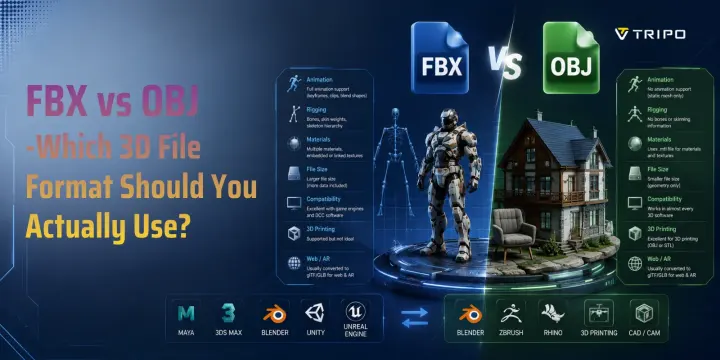
If you're choosing between FBX and OBJ in 2026, the short answer is simple: use FBX for animated assets, game engines, and complex production workflows, and use OBJ for static 3D models, 3D printing, and broad software compatibility. While both formats can store 3D geometry, they are designed for different purposes. FBX supports animations, rigs, materials, cameras, and other scene data, making it the standard choice for game development and animation. OBJ focuses on mesh geometry and is lightweight, easy to exchange, and widely supported across 3D modeling and printing software. This guide compares FBX vs OBJ in detail so you can choose the right format for your workflow.
What Is FBX? A Quick Overview
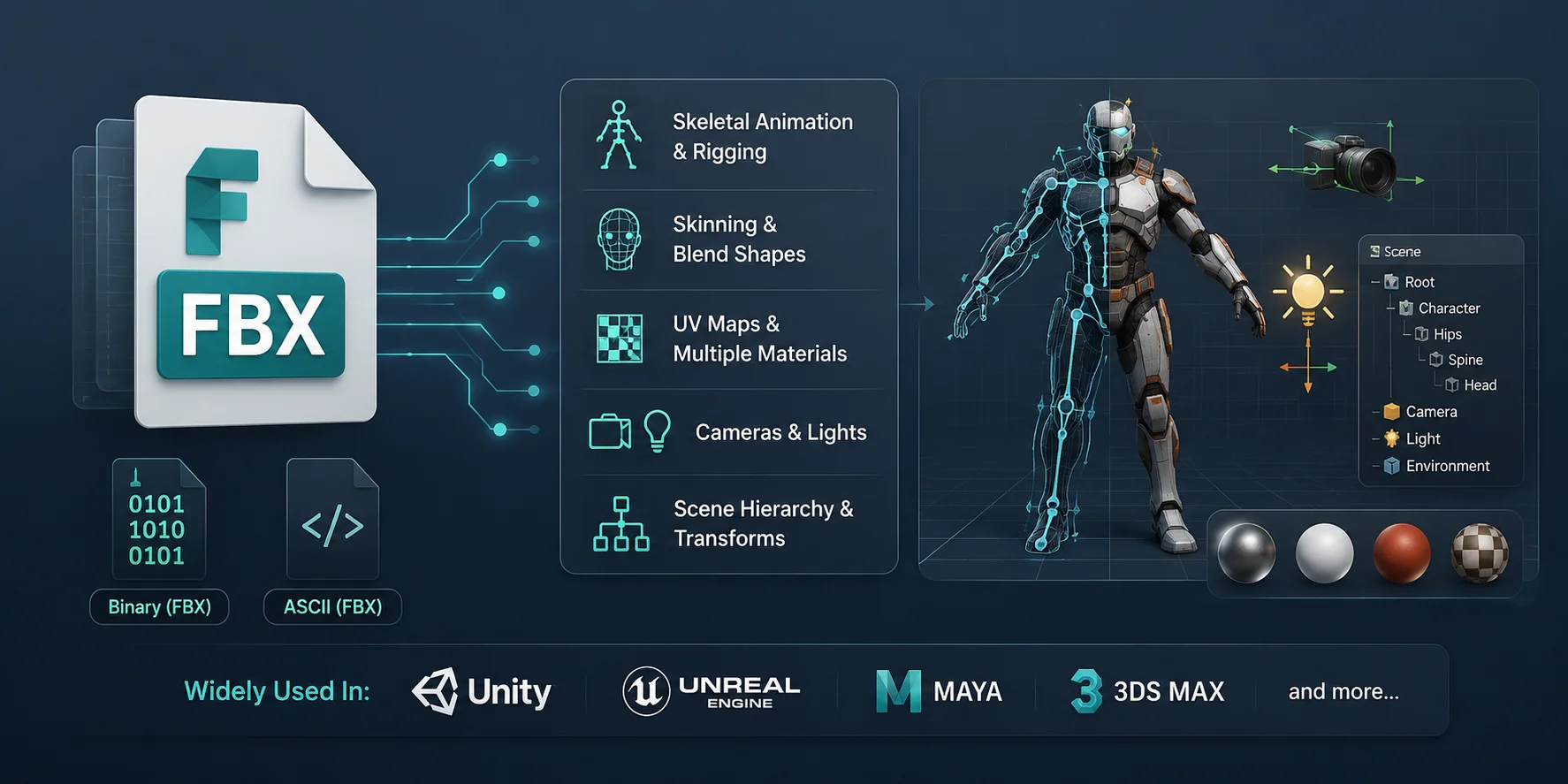
FBX (Filmbox) is a 3D file format originally developed by Kaydara and later acquired by Autodesk. It was created to move complete 3D scenes between different software without losing important production data. Today, FBX is one of the most widely used interchange formats in game development, animation, and visual effects, with native support in tools such as Unity, Unreal Engine, Maya, and 3ds Max.
FBX can be stored in binary or ASCII form. In practice, export behavior and compatibility depend on the DCC application and target importer, so test the exported asset in the destination tool when a pipeline depends on a specific FBX variant.
Unlike simple mesh formats, FBX can store much more than geometry, including:
- Skeletal animation and rigging
- Skinning and blend shapes (morph targets)
- UV maps and multiple materials
- Cameras and lights
- Scene hierarchy and object transforms
Because it preserves both geometry and animation data, FBX has become the industry-standard exchange format for game engines, animation studios, and VFX pipelines. If your workflow involves animated characters, interactive experiences, or assets moving between multiple applications, FBX is usually the safest and most capable choice.
FBX File Format at a Glance
What Is OBJ? A Quick Overview
OBJ is one of the oldest and most widely supported 3D file formats. It was developed by Wavefront Technologies in the late 1980s and remains a popular choice for exchanging static 3D models between applications. Its open, simple specification gives it broad support, but you should still check the target application's importer for material, unit, and texture-path behavior.
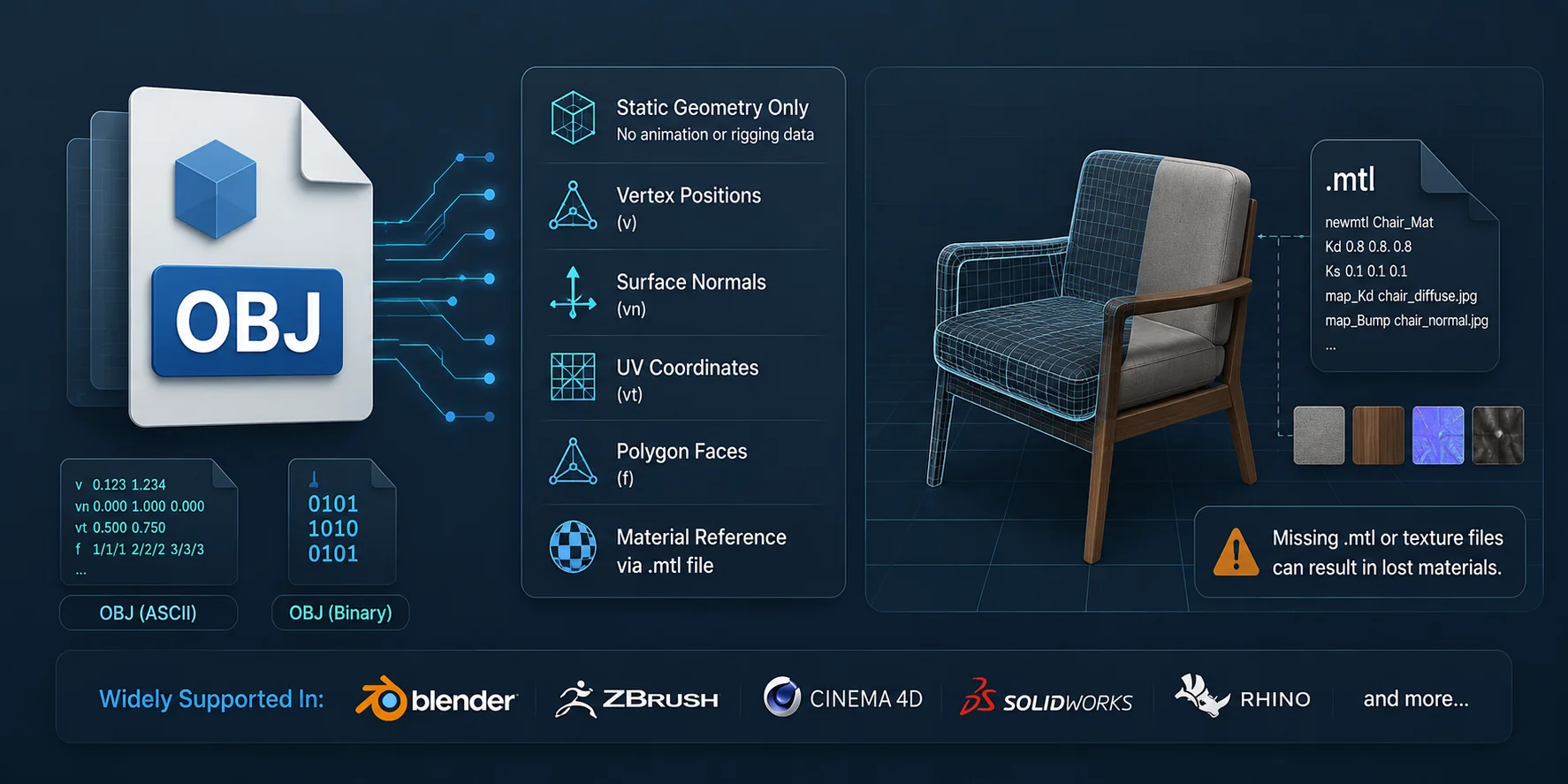
Unlike FBX, the OBJ format stores static geometry only. It records the essential information needed to describe a 3D mesh, including:
- Vertex positions
- Surface normals
- UV coordinates
- Polygon faces
- References to material definitions
Materials are stored separately in a companion .mtl (Material Template Library) file. The OBJ file references this material file rather than embedding it directly, so if the .mtl file or linked texture images are missing, the model will usually import without its original materials or textures.
Another advantage of OBJ is that it is a human-readable ASCII text format. You can open it in any text editor to inspect or troubleshoot geometry data, making it useful for debugging and simple file conversions. While it lacks support for skeletal animation, rigging, cameras, and scene hierarchies, its simplicity and universal compatibility make OBJ the preferred format for static assets, 3D printing, and basic model exchange.
OBJ File Format at a Glance
FBX vs OBJ — Head-to-Head Comparison
FBX and OBJ are both widely used 3D file formats, but they were designed with different goals in mind. FBX focuses on preserving an entire production scene—including animation, rigs, materials, and hierarchy—making it ideal for game engines and animation software. OBJ, by contrast, is a simple geometry exchange format that prioritizes compatibility and ease of use. If you're unsure which one to choose, comparing them feature by feature is the fastest way to make the right decision.
| Feature | FBX | OBJ | Recommendation |
|---|---|---|---|
| Animation Support | ✅ Stores skeletal animation, keyframes, animation clips, and blend shapes. Ideal for animated characters and moving assets. | ❌ Does not support animation data. Stores only the static mesh. | Use FBX if your model needs to move, animate, or be used in a game engine. |
| Rigging | ✅ Preserves bones, skin weights, skeleton hierarchy, and character rigs. | ❌ No support for bones or skinning information. | Use FBX for character models, avatars, and any rigged asset. |
| Materials & Textures | ✅ Supports multiple materials, embedded or linked textures, UV maps, and more complex material data. | ✅ Supports UV coordinates and material references through a separate .mtl file. | Use FBX if you want more reliable material transfer. Use OBJ for simpler textured models. |
| File Size | Usually larger because it stores geometry, animations, rigs, materials, cameras, lights, and scene metadata. | Generally smaller since it contains only mesh geometry and material references. | Use OBJ when keeping files lightweight is more important than preserving production data. |
| Software Compatibility | Excellent support in Unity, Unreal Engine, Maya, Blender, 3ds Max, Cinema 4D, and many professional DCC tools. | Supported by virtually every 3D modeling, CAD, rendering, scanning, and 3D printing application. | Use OBJ if maximum compatibility across different software is your priority. |
| 3D Printing | Can be used, but most of the extra animation and scene data is unnecessary for printing. | A common static-mesh option for printing; STL and 3MF are also widely used depending on the slicer and color/material needs. | Choose the format your slicer accepts, then verify scale, watertightness, wall thickness, and repair status before printing. |
| Web & AR | Sometimes used during content creation but usually converted before publishing. | Also commonly converted before deployment. | Use FBX or OBJ during production, then export to glTF/GLB for modern web and AR applications. |
Strengths of FBX
FBX is designed for production pipelines where assets move through multiple stages of development. It keeps animations, rigs, skin weights, cameras, lights, materials, and hierarchy together in a single file, reducing the risk of losing important data during import and export. This makes it the preferred format for game development, character animation, film production, and visual effects.
Strengths of OBJ
OBJ excels because of its simplicity. It stores only the information required to describe a static mesh, making files smaller, easier to inspect, and compatible with almost every 3D application. For product visualization, architectural models, scanned objects, static props, and 3D printing, OBJ remains one of the safest and most universally supported formats available.
Which Format Should You Choose?
A simple rule works for most projects:
- Choose FBX if your asset includes animations, skeletons, blend shapes, or needs to move between game engines and professional animation software.
- Choose OBJ if you're working with static models, exchanging geometry between different applications, or preparing files for 3D printing.
- Choose glTF/GLB as the final delivery format for web viewers, AR experiences, and many modern real-time applications.
In practice, many artists use both formats during the same project. An animated character might be exported as FBX for Unity or Unreal Engine, while the same model could also be exported as OBJ for static rendering, client review, or 3D printing. Choosing the right format at the right stage helps preserve the data you need while keeping your workflow as efficient as possible.
When to Use FBX
FBX is the best choice whenever your project depends on animation, character rigs, or moving assets between professional 3D applications. If preserving production data is more important than keeping file size small, FBX is almost always the right format.
Game Development (Unity, Unreal Engine, Godot)
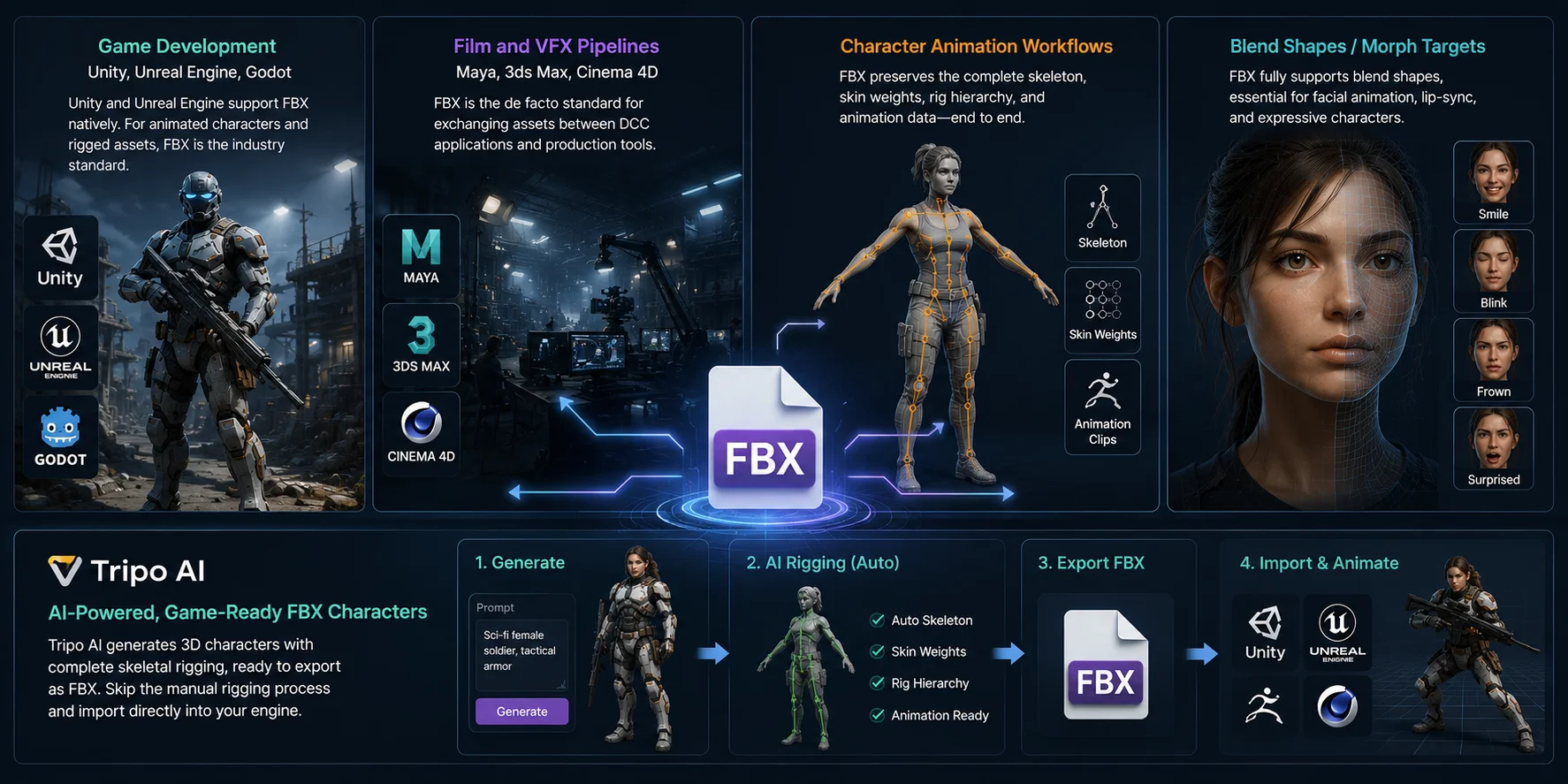
FBX is the standard asset format for game development. Unity and Unreal Engine both support FBX natively, making it the easiest way to import animated characters, weapons, vehicles, and other rigged assets. While Godot commonly uses glTF at runtime, many artists still create assets in FBX before converting them for deployment. If your model contains bones or animations, FBX should be your first choice.
Film and VFX Pipelines (Maya, 3ds Max, Cinema 4D)
Professional DCC (Digital Content Creation) software relies on FBX as the de facto interchange format. Studios use it to transfer assets between Maya, 3ds Max, Cinema 4D, MotionBuilder, and other production tools while preserving scene hierarchy, materials, cameras, and animation. This consistency makes FBX a cornerstone of modern film and VFX pipelines.
Character Animation Workflows
Animated characters require much more than a mesh—they need skeletons, skin weights, rig hierarchies, and animation clips. FBX keeps all of this data together in a single file, allowing artists to move characters between modeling, rigging, animation, and game engines without rebuilding the rig.
Projects Using Blend Shapes or Morph Targets
Facial animation, lip-sync, and expressive character performances rely on blend shapes (also called morph targets). FBX fully supports these deformation targets, allowing smiles, blinks, phonemes, and other facial expressions to transfer correctly into animation software and game engines.
Generate Game-Ready FBX Characters with Tripo AI
If you're using AI to create 3D characters, Tripo AI can support the workflow from generation through export. For a character that needs animation, use Tripo's Rigging & Animation tools, review the resulting skeleton and skin weights, then export FBX for the destination DCC or engine. Test the exported asset in the target tool before production use, because rig, material, and scale handling can vary by importer.
When to Use FBX
When to Use OBJ
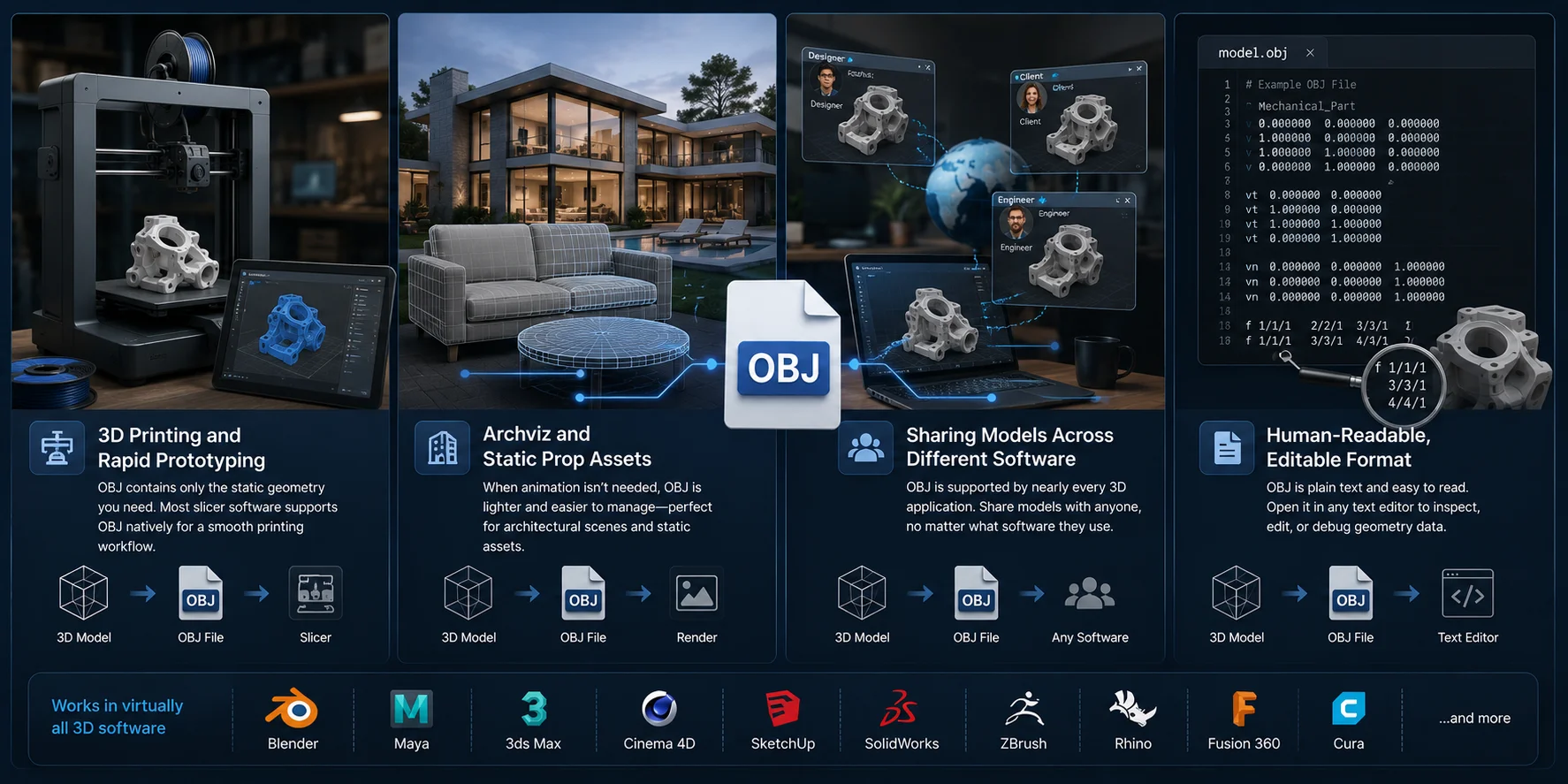
OBJ is the better choice when your model is static and doesn't require animation, rigging, or scene data. Its simple structure, broad compatibility, and lightweight nature make it ideal for exchanging geometry between applications.
3D Printing and Rapid Prototyping
OBJ is a popular format for 3D printing because it stores exactly what most printing workflows need: mesh geometry, surface normals, and UV coordinates. Most slicer software can import OBJ files directly, and the format avoids carrying unnecessary animation or rigging data. For prototypes, product models, and printable parts, OBJ is often the simplest option.
Architectural Visualization and Static Assets
Architectural scenes, furniture, product models, and environment props rarely require animation. In these cases, OBJ provides a lightweight way to exchange clean static meshes without the overhead of bones, cameras, or scene hierarchies. This makes it well suited for archviz projects, product rendering, and static game props.
Sharing Models Between Different Software
Few 3D formats are as universally supported as OBJ. Nearly every modeling, CAD, rendering, scanning, and 3D printing application can import and export OBJ files, making it an excellent choice for sharing models with clients, collaborators, or teams using different software. If compatibility is your top priority, OBJ is hard to beat.
When You Need a Human-Readable Format
Unlike binary formats, OBJ is stored as plain ASCII text, so you can open it with any text editor. Vertex positions, UV coordinates, normals, and face definitions are all easy to inspect, making the format useful for debugging, validating exports, or writing custom conversion scripts. If you need to troubleshoot a model or understand exactly how its geometry is stored, OBJ offers a level of transparency that binary formats cannot.
When to Use OBJ
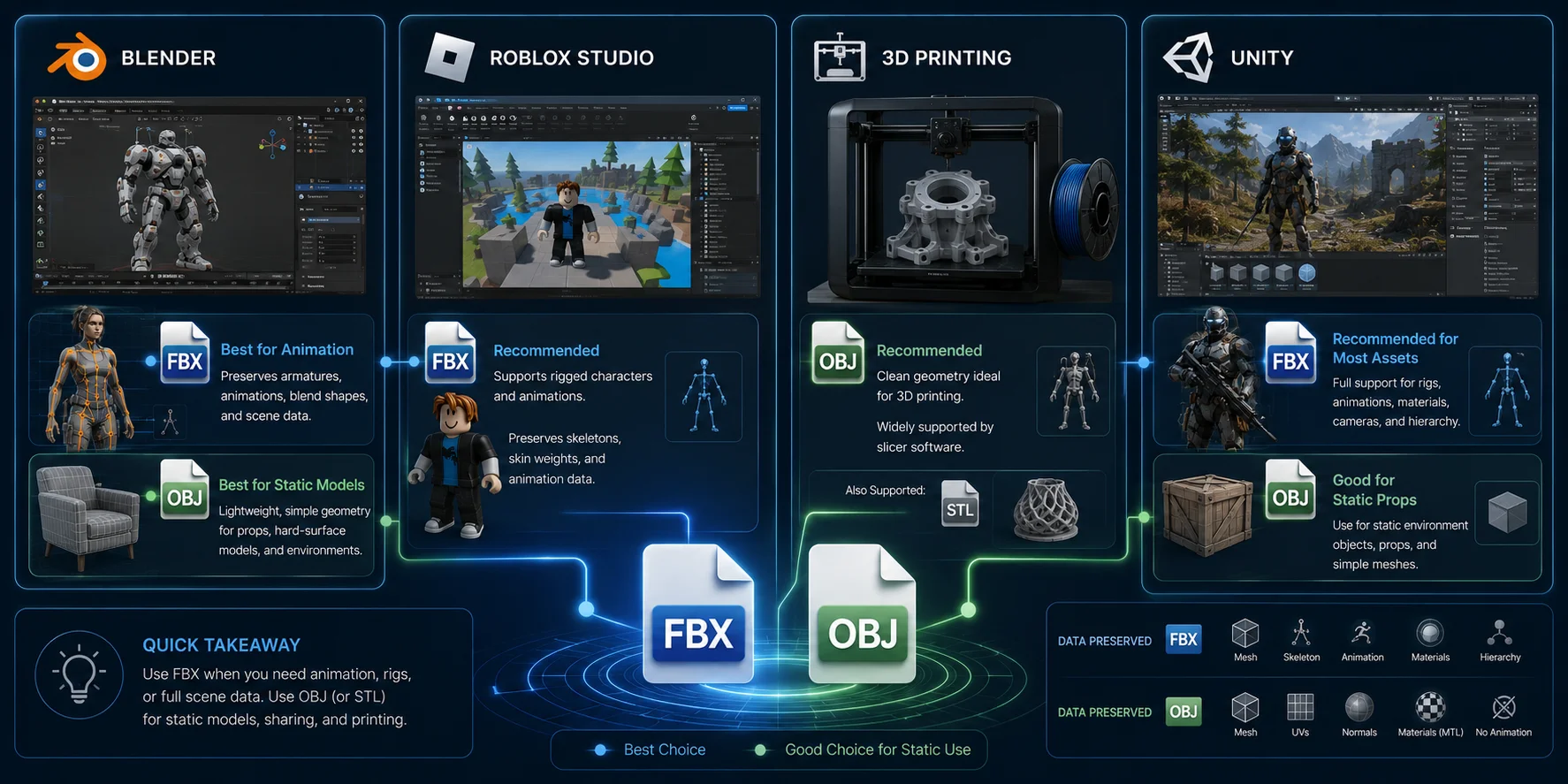
FBX vs OBJ for Popular Use Cases
Although FBX and OBJ can both store 3D models, the better choice depends on what you're building and where the model will be used. Some software supports both formats equally well, while others clearly favor one over the other because of animation, rigging, or workflow requirements. The examples below cover the most common use cases in 2026.
| Use Case | Recommended Format | Why |
|---|---|---|
| Blender | FBX for animationOBJ for static models | Blender imports both formats natively. Use FBX when your model contains rigs, animations, or blend shapes. Use OBJ for simple meshes, product models, or static assets without animation. |
| Roblox Studio | FBX for rigged or animated assets; OBJ for static meshes | Roblox Studio imports FBX, glTF, and OBJ. Use FBX when an asset needs rigging or animation data; use OBJ for static geometry, then validate the imported mesh and settings in Studio. |
| 3D Printing | OBJ, STL, or 3MF | Use the format your slicer accepts. A printable result also depends on mesh repair, scale, wall thickness, and watertight geometry. |
| Unity | FBX for animated or rigged assets; OBJ for static meshes | Unity supports multiple model-file formats. Use FBX when the asset must carry rigging or animation data; OBJ can suit simple static meshes. Test the import in the target Unity project. |
FBX or OBJ for Blender?
Blender has excellent support for both formats, so the right choice depends on the asset you're importing. If you're working with animated characters, skeletal rigs, cameras, or blend shapes, FBX preserves all of that information and integrates smoothly into Blender's animation tools. For furniture, scanned objects, product models, or other static meshes, OBJ is often the cleaner and lighter option.
FBX or OBJ for Roblox?
For Roblox Studio, both FBX and OBJ can be imported, but FBX is the appropriate choice when an asset needs rigging or animation data. OBJ is suitable for static geometry; it does not carry a skeletal rig or animation clips. Validate the imported mesh, scale, materials, and any rigging settings in Roblox Studio before treating an asset as avatar- or animation-ready.
FBX or OBJ for 3D Printing?
If your goal is to produce a physical object, OBJ can be a practical choice for a static mesh, while STL and 3MF are also common in printing workflows. The file format alone does not make a model printable: check that the mesh is closed, has appropriate wall thickness and scale, and passes the slicer's repair checks. Use the format your selected slicer and printer workflow accepts best.
FBX or OBJ for Unity?
For Unity, use FBX when an asset needs to carry rigging, animation clips, or related character data through the import workflow. OBJ can be suitable for simple static environment props or placeholder geometry. In either case, test the imported asset in the target Unity project, because materials, scale, and importer settings affect the final result.
Quick Recommendation
If you're still unsure, use this simple rule:
- Choose FBX for games, animation, characters, Unity, Unreal Engine, Roblox, and professional production pipelines.
- Choose OBJ for static models, 3D printing, architectural visualization, product rendering, and sharing geometry between different 3D applications.
In most modern workflows, you'll probably use both formats at different stages. FBX handles animated production assets, while OBJ remains the universal format for lightweight static models and maximum software compatibility.
FBX vs OBJ for Popular Use Cases
What About glTF/GLB?
If you've researched modern 3D file formats, you've probably come across glTF and its binary version, GLB. While FBX and OBJ remain two of the most widely used formats, glTF/GLB has become the preferred format for real-time web, AR, VR, and many mobile applications. Designed by the Khronos Group, it packages geometry, PBR materials, textures, and animations into a format that loads efficiently in modern rendering engines.
That doesn't mean glTF replaces FBX. In professional content creation, FBX still dominates desktop DCC (Digital Content Creation) software and game production pipelines. Tools such as Maya, 3ds Max, Blender, Unity, and Unreal Engine continue to rely heavily on FBX for exchanging animated characters, rigs, and production assets throughout development.
A simple way to think about the three formats is:
- FBX → Best for animation, character rigs, and game development pipelines.
- OBJ → Best for static models, 3D printing, and maximum software compatibility.
- glTF/GLB → Best for web viewers, AR/VR experiences, and real-time applications where efficient loading and modern PBR rendering are important.
In many projects, all three formats work together. Artists often create and animate assets in FBX, export static versions as OBJ when needed, and publish the final interactive experience as GLB for the web or mobile devices.
Frequently Asked Questions
Which one is better, FBX or OBJ?
Neither format is universally better—it depends on your workflow. FBX is the better choice for animation, character rigs, game engines, and professional production pipelines, while OBJ is ideal for static models, 3D printing, and maximum compatibility across different 3D applications.
Is FBX or OBJ better for Roblox?
FBX is the appropriate choice for a Roblox asset that needs to carry rigging or animation data. OBJ is suitable for a static mesh but does not carry a skeletal rig or animation clips. In either case, verify the imported mesh, materials, scale, and any rigging settings in Roblox Studio.
What are the disadvantages of using OBJ files?
The biggest limitation of OBJ is that it cannot store skeletal animation, rigging, blend shapes, cameras, or scene hierarchy. Materials are also stored separately in a .mtl file, so missing the MTL or texture files can cause your model to import without its original appearance.
Is FBX good for 3D printing?
FBX can be used for 3D printing, but it is rarely the most convenient handoff format. OBJ, STL, and 3MF are common alternatives for static printable meshes; choose the format your slicer accepts and validate the model's scale, watertightness, wall thickness, and repair status before printing.
What are the advantages and disadvantages of FBX vs OBJ?
FBX's biggest advantage is its ability to preserve complete production data, including animations, rigs, materials, cameras, lights, and scene hierarchy, making it perfect for games and animation. Its main drawback is larger file sizes and a more complex format. OBJ, on the other hand, is lightweight, human-readable, and supported by virtually every 3D application, but it only stores static geometry and lacks support for animation or rigging.
Should I choose FBX or OBJ for my project?
A simple rule works for most projects: choose FBX if your asset needs to move, animate, or be used in a game engine. Choose OBJ if you're sharing a static model, creating assets for 3D printing, or exchanging geometry between different software. Picking the format that matches your workflow will save time and prevent compatibility issues later.
Conclusion
Choosing between FBX and OBJ starts with the data your next tool needs. Choose FBX when an animated or rigged asset must carry scene and character data into a compatible DCC or engine; choose OBJ when you need a simple static-mesh exchange format. For printing, also consider STL or 3MF and validate the mesh in the selected slicer. With Tripo AI, you can generate a model, use the relevant refinement or rigging steps, and export a supported format for the next stage of your workflow.