What Is Gaussian Splatting? A Practical Guide for 3D Artists and Developers
- 3DGS represents scenes as millions of fuzzy 3D ellipsoids.
- It renders photorealistic captures in real time on modern GPUs.
- It is faster than NeRF and handles thin details well.
- It works best for environments, VR scenes, and simulations.
- It does not replace clean polygon assets; Tripo AI fills that gap.
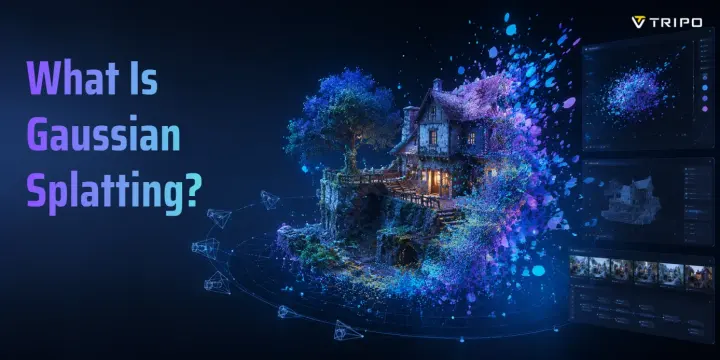
3D Gaussian Splatting, or 3DGS, is a real-time rendering technique that represents a scene as millions of small, oriented ellipsoids called Gaussians. Each Gaussian stores position, shape, opacity, and color. Trained from a set of photos, 3DGS can render high-quality novel views in real time on modern GPUs, with the original INRIA work highlighting fast training and real-time rendering.
You have probably seen the result: someone walks around a room with a phone, and minutes later there is a photorealistic 3D scene you can fly through in real time. That is Gaussian Splatting at work. In this guide, you will learn how it works, how it compares with NeRF and photogrammetry, what you can build with it, and where it still falls short.
What Exactly Is a "Gaussian" in 3D Gaussian Splatting?
Think of each Gaussian as a fuzzy paint blob floating in 3D space. It has a position, which tells the renderer where it sits. It has a shape, like a stretched or squashed ball, which tells the renderer how it spreads through space. It also has opacity and color, so it can appear solid, transparent, bright, dark, or view-dependent.
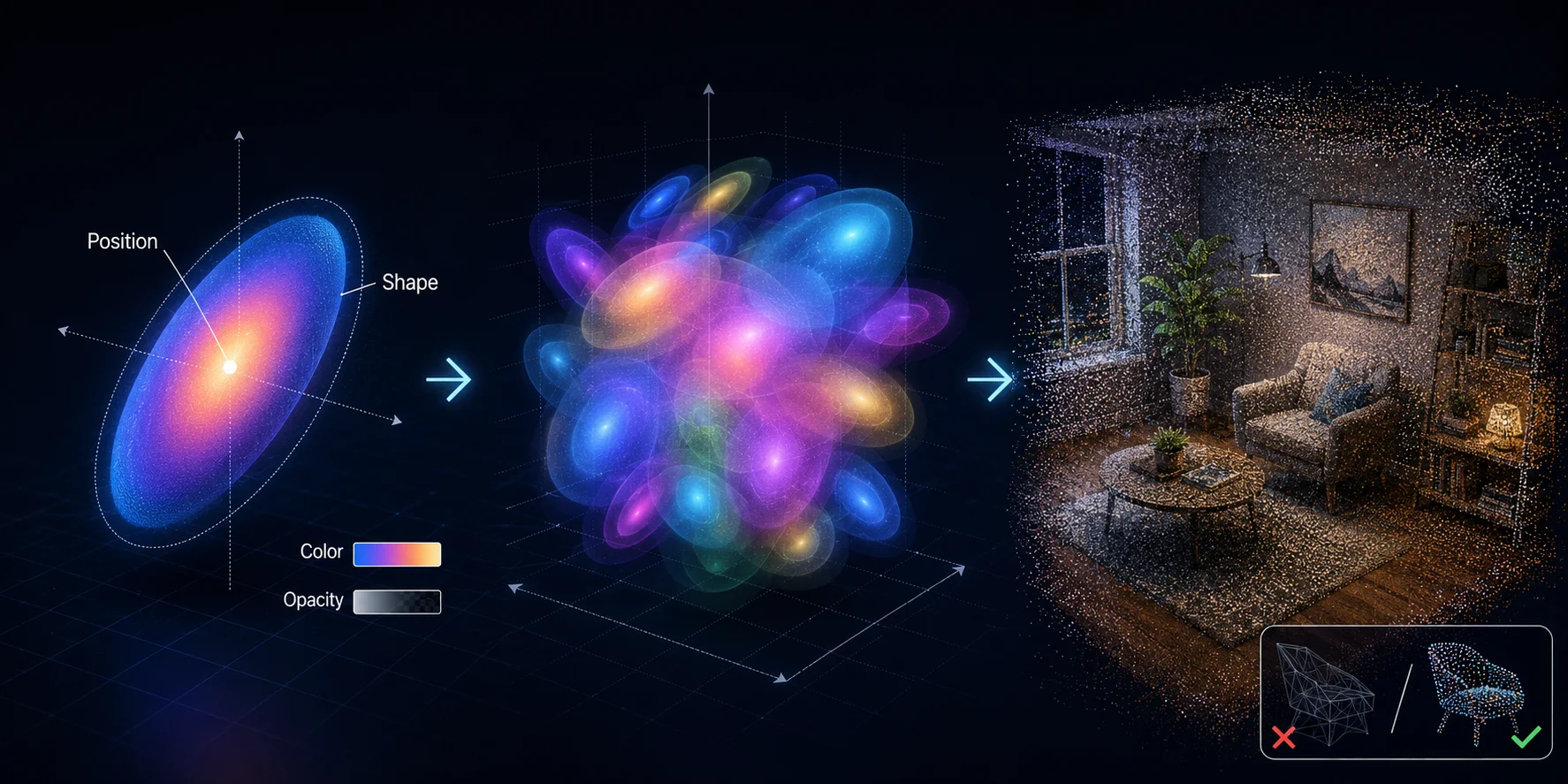
The word “Gaussian” comes from the bell-curve probability distribution. The blob is strongest at its center and fades smoothly outward. That smooth falloff is what lets millions of Gaussians overlap and blend into a scene that looks continuous.
A typical scene may use millions of these blobs. Together, they approximate walls, floors, furniture, plants, hair, glass, smoke, and thin details that can be difficult for polygon meshes or photogrammetry to capture cleanly.
This is the key idea: instead of building a surface from flat triangles, 3DGS builds a viewable scene from volumetric splats. It is not a normal mesh. It is a visual reconstruction designed for fast, realistic viewing.
How Does 3D Gaussian Splatting Work?
3DGS starts with photos. You capture overlapping images of a scene from different angles. Polycam, for example, recommends image sets typically 50–300 images, with more varied viewpoints usually improving the result.
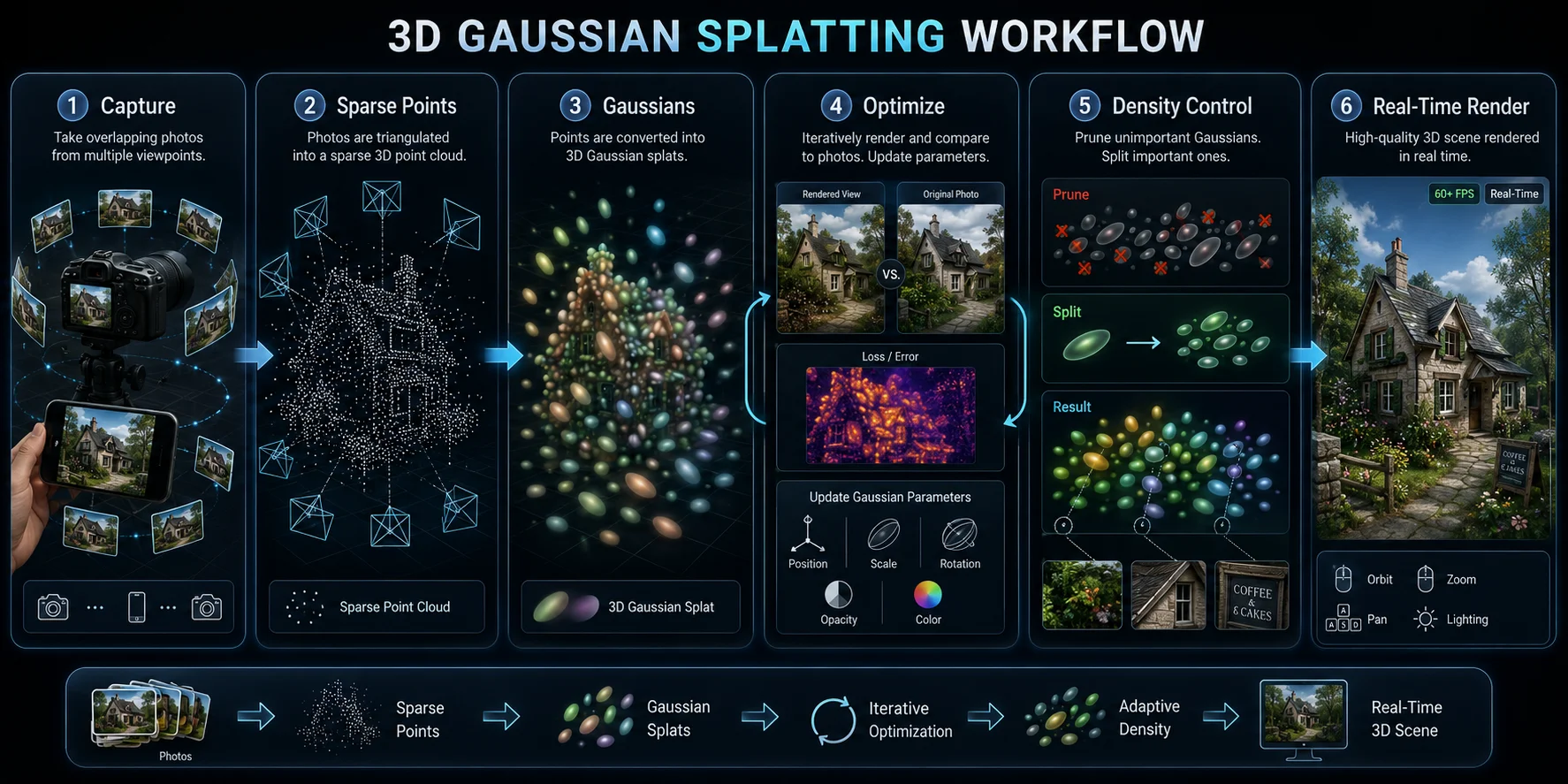
Step 1: Capture. Photograph a room, object display, street corner, museum space, or another real location. The images need enough overlap for the system to estimate how the camera moved through the space.
Step 2 — Build a sparse point cloud. A Structure-from-Motion system, such as COLMAP, estimates camera positions and extracts 3D points from the photos. This gives the process a rough map of where visible features sit in space.
Step 3 — Initialize Gaussians. Each point becomes the starting location for a Gaussian. At the beginning, these Gaussians are only rough guesses. They still need the right size, shape, opacity, and color.
Step 4 — Optimize. The system renders the Gaussians from the same camera angles as your original photos. It compares each render with the real photo, then adjusts the Gaussians to reduce the difference. Position, scale, rotation, opacity, and color all change during training.
Step 5 — Adaptive density control. As training continues, the system prunes Gaussians that do not help and adds or splits Gaussians where more detail is needed. Large flat areas can use fewer splats. Hair, edges, foliage, text, and fine texture may need more.
Step 6 — Real-time rendering. After training, the Gaussians are projected onto the screen, sorted by depth, and blended together on the GPU. This makes 3DGS much more interactive than older neural rendering methods, which often require slower network inference at render time.
3DGS vs NeRF vs Photogrammetry — Which Is Right for You?
| Feature | 3D Gaussian Splatting | NeRF | Photogrammetry |
|---|---|---|---|
| Core idea | Millions of explicit 3D splats | Neural radiance field | Polygon mesh from photos |
| Output | Splat scene | Neural scene representation | Mesh and texture maps |
| Output format | Splat file | Neural model | Polygon mesh |
| Render speed | Real time after training | Usually slower | Real time after processing |
| Editability | Limited | Limited | Stronger in DCC tools |
| Thin details | Strong | Good but slow | Often struggles |
| File size | Hundreds of MB to GB | Large | Small-medium |
| Hardware needs | GPU required | GPU required, more intensive | CPU/GPU accessible |
| Best for | Scene capture, VR environments, real-time walkthroughs | Research, high-quality view synthesis | Editable assets, surveying, printing |
| Main weakness | Not a clean mesh | Slow rendering and training | Requires cleanup and good geometry |
Use 3DGS when you need a photorealistic scene that people can move through in real time. Use NeRF when you care about research-quality view synthesis and can accept slower rendering. Use photogrammetry when you need a standard mesh that can be edited, measured, printed, or imported into traditional 3D tools.
For practitioners, the distinction is simple. 3DGS is excellent for viewing scenes. Photogrammetry is better when you need geometry you can edit. NeRF is powerful, but often less practical for interactive production.
What Is Gaussian Splatting Used For?
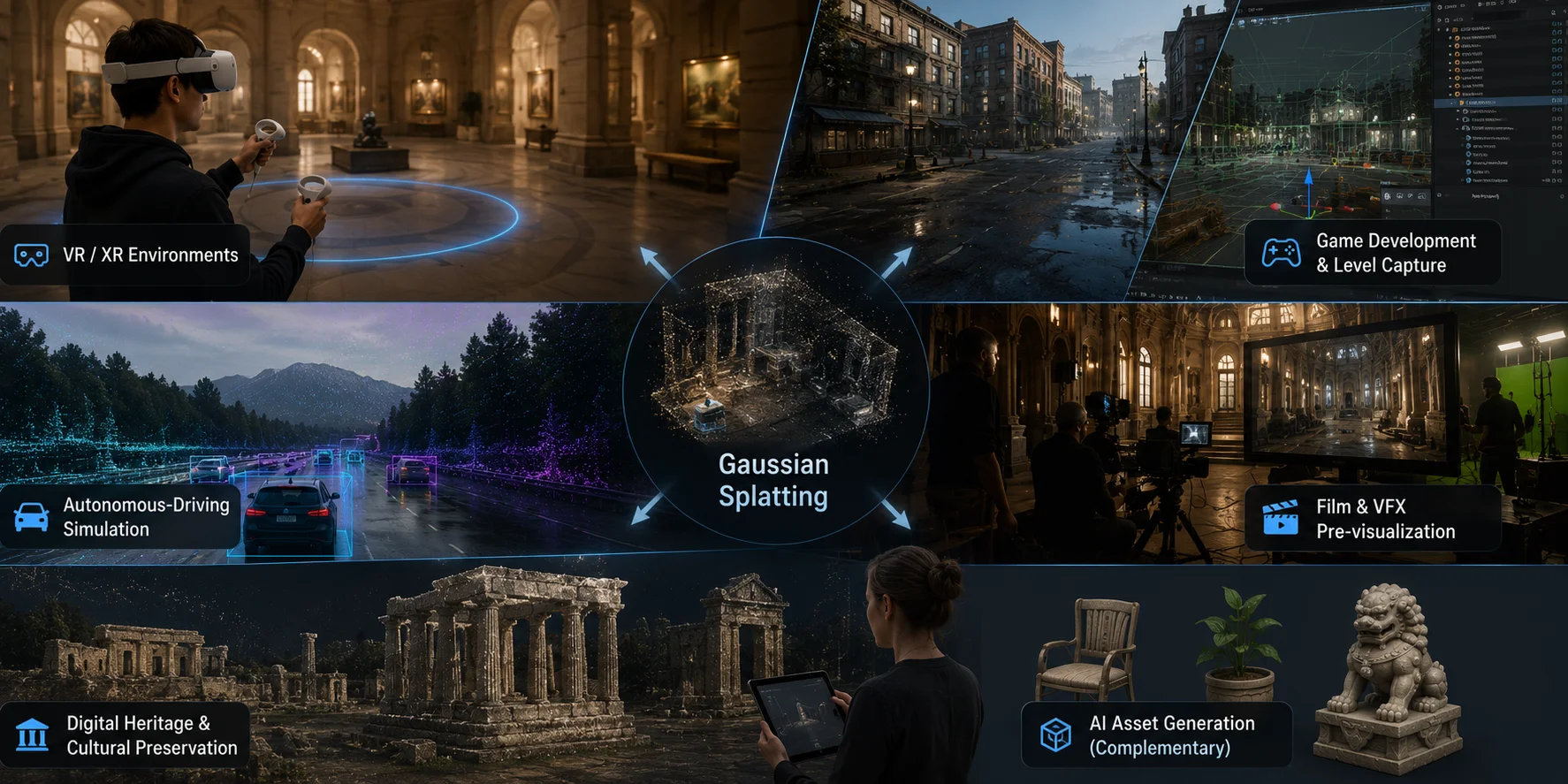
VR and XR environments. 3DGS can capture a real location — an office, gallery, museum, apartment, store, or street — and turn it into a navigable scene. The real-time frame rate matters because VR users need smooth movement to avoid discomfort.
Game development and level capture. A developer can photograph a location, process it into a splat, and use it as a photorealistic background or level reference. It does not replace foreground characters, collision meshes, or interactive props, but it can speed up environment creation.
Autonomous-driving simulation. Tesla engineers have publicly discussed Generative Gaussian Splatting in the context of driving-world simulation and dynamic scenes. It is best described as a reported technical direction, not a consumer product feature.
Film and VFX pre-visualization. A director or VFX supervisor can scan a real location, create a splat scene, and use it for camera planning, previs, and virtual production blocking before heavier production work begins.
Digital heritage and cultural preservation. Museums and preservation teams can capture historical sites, ruins, interiors, and artifacts as photorealistic spaces that viewers can explore remotely.
This is also where the Tripo AI workflow becomes complementary. Use Gaussian Splatting for real environments, then use AI asset generation to create clean objects, props, and characters that can live inside those scenes.
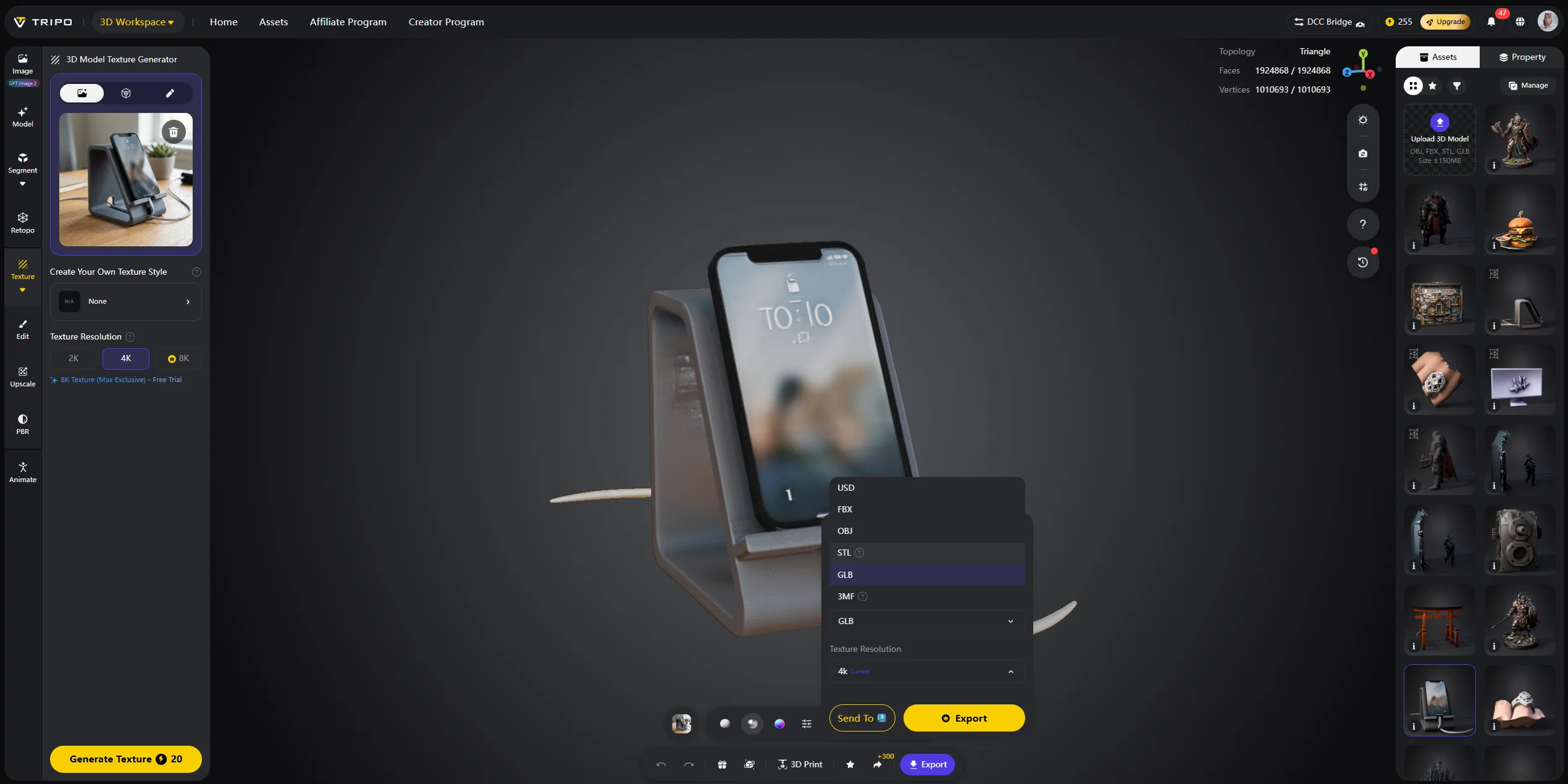
The specific steps are as follows:
- Select Image-to-3D in Tripo Studio and upload the reference image;
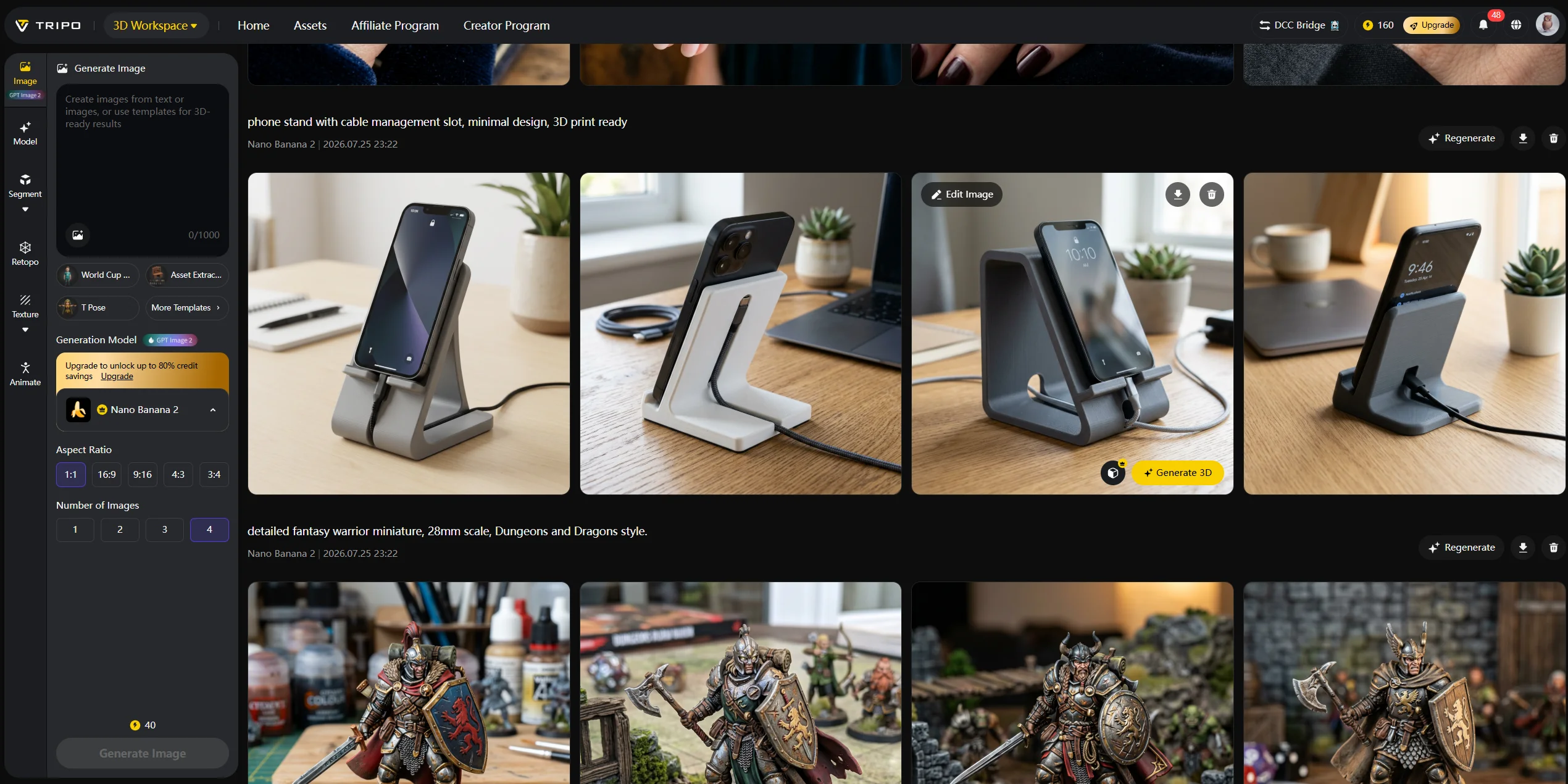
- Choose HD Model / Smart Mesh mode to generate;
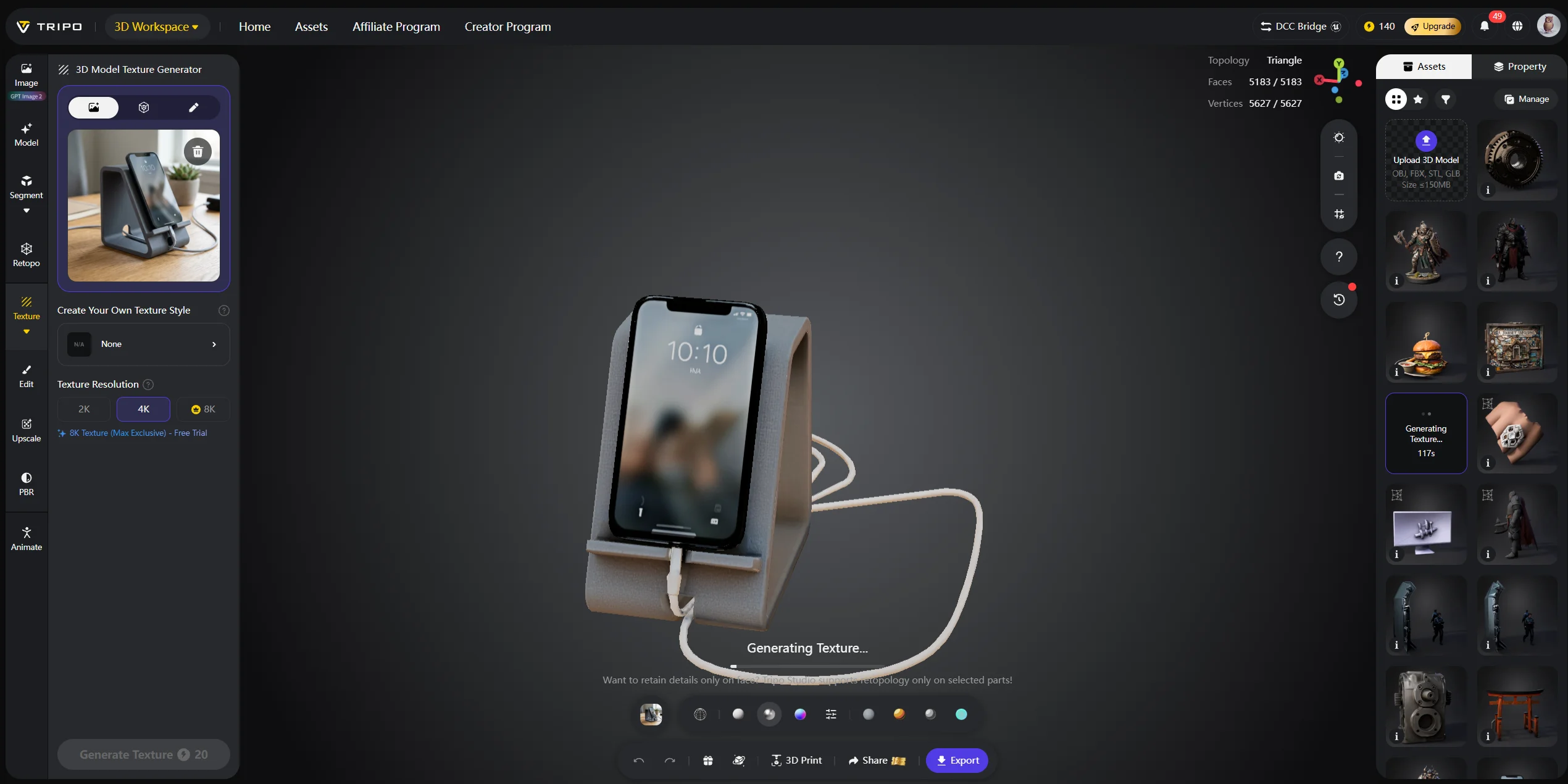
- Export in GLB/FBX format for use in the engine or DCC tools.
Gaussian Splatting Software and Tools
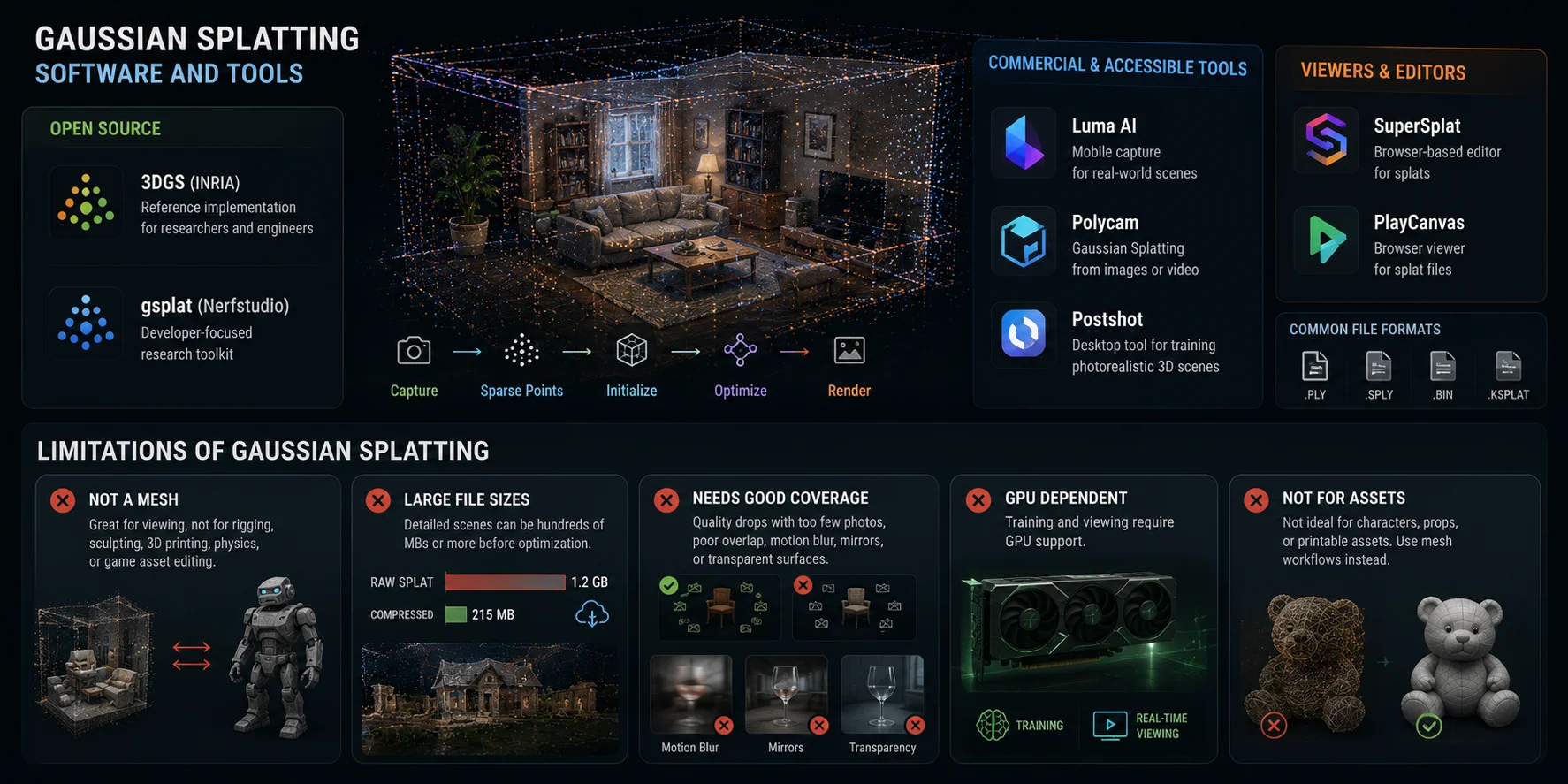
Open source. The original INRIA 3DGS implementation remains the reference starting point for researchers and engineers. It requires technical setup and a CUDA-capable GPU. Nerfstudio’s gsplat is another popular developer-focused option, built for research and engineering workflows.
Commercial and accessible tools. Luma AI and Polycam are common beginner-friendly options for capturing real-world spaces and objects. Polycam supports Gaussian Splatting from image sets or video, while Luma AI is known for mobile capture workflows. Postshot is a desktop tool focused on training photorealistic 3D scenes from ordinary images. Tripo AI complements these scene-reconstruction tools with AI-powered asset generation through Text-to-3D and Image-to-3D workflows.
Viewers and editors. SuperSplat is a browser-based editor for manipulating and optimizing 3D Gaussian Splats, and PlayCanvas also provides browser viewing tools for splat files. These tools are useful when you want to inspect, trim, optimize, share, or publish a splat without building a custom viewer.
Limitations of Gaussian Splatting
Gaussian Splatting is powerful, but it has clear limits.
First, it does not give you a clean polygon mesh by default. A splat is great for viewing, but not ideal for rigging, sculpting, 3D printing, physics, collision, or normal game asset editing.
Second, file sizes can be large. Detailed 3DGS scenes can reach hundreds of megabytes or more before compression and streaming optimization. Web delivery is improving, but it is still an engineering challenge.
Third, it needs enough image coverage. Quality drops when there are too few photos, poor overlap, motion blur, moving people, mirrors, or transparent surfaces. The system can only reconstruct what your capture gives it.
Fourth, training and viewing need GPU support. Cloud tools hide this from users, but local pipelines still require suitable hardware, especially for large scenes.
Finally, 3DGS is not the right tool for characters, props, or printable assets. If you need a clean, rigged, game-ready model, you need a mesh-based workflow.
Where Tripo AI Fits In
3D Gaussian Splatting is a scene reconstruction tool. It takes photos of something that already exists and builds a viewable copy. It is excellent for environments, walkthroughs, scans, and real-world captures.
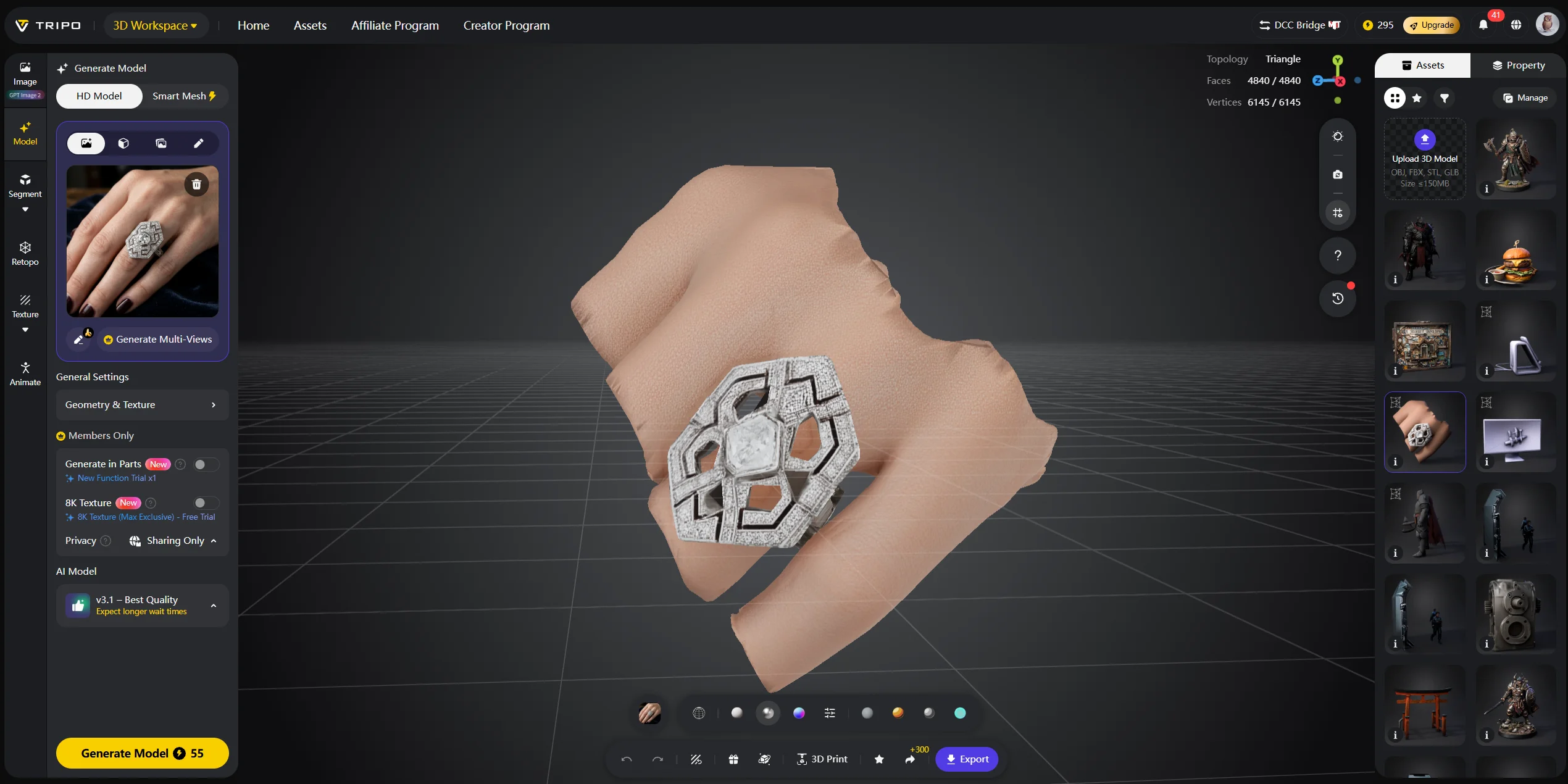
Step 1 — Upload or describe the asset. In Tripo Studio, choose Image-to-3D and upload a clear reference image. If no reference is available, use Text-to-3D to describe the prop, character, or object you want to place in the reconstructed scene.

Step 2 — Generate and review the mesh. Choose HD Model when surface detail matters or Smart Mesh when you need a lighter asset for iteration. Generate the model, then review its silhouette, topology, scale, and visible artifacts; treat the result as a starting point rather than an automatically production-ready asset.
Step 3 — Export for the target workflow. After checking the model, export GLB or FBX for engines and DCC tools, or use OBJ, STL, or 3MF when the downstream workflow requires those formats. Inspect topology, scale, materials, and rigging or print requirements before combining the asset with a Gaussian Splatting scene.
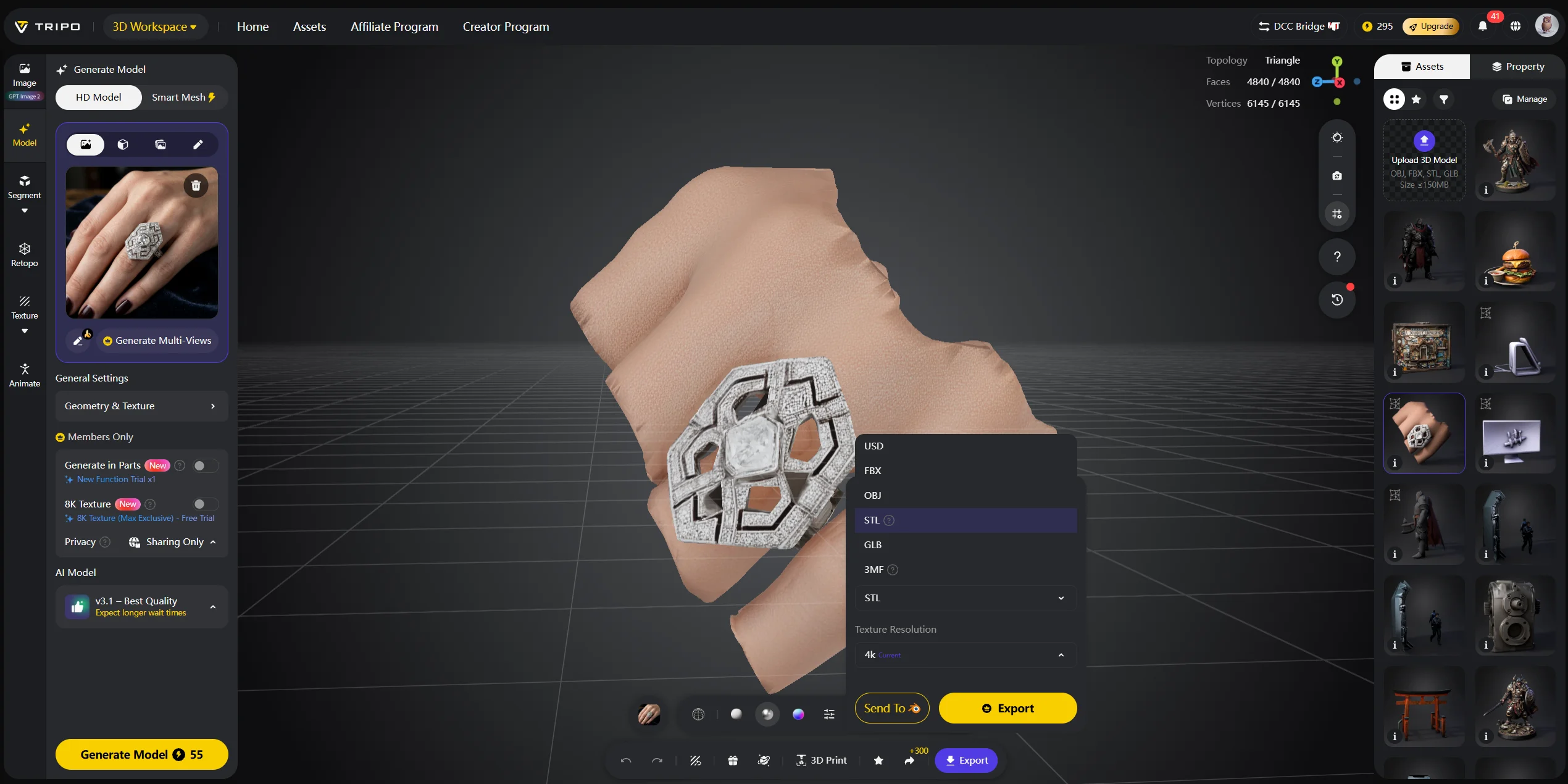
Think of the two as complementary. A game developer might use 3DGS to scan a real building as a backdrop, then create props and characters with Tripo AI. A VR creator might reconstruct a room with Gaussian Splatting, then add Tripo AI-generated furniture or objects.
Use 3DGS for environments. Use Tripo AI for assets. In many production workflows, you may want both.
Frequently Asked Questions
How does Gaussian Splatting work?
It starts with overlapping photos of a scene. Structure-from-Motion estimates camera positions and creates a sparse point cloud, then each point seeds a Gaussian. The system optimizes those Gaussians until rendered views match the original photos.
Is Gaussian Splatting better than photogrammetry?
It depends on the goal. Gaussian Splatting is often better for photorealistic, real-time scene viewing. Photogrammetry is better when you need a standard editable mesh.
Does Tesla use Gaussian Splatting?
Tesla engineers have publicly discussed Generative Gaussian Splatting in the context of driving-world simulation for Autopilot and Full Self-Driving systems. These simulated environments let engineers test edge-case driving scenarios with different lighting, weather, or traffic conditions without re-running real-world drives.
How long does Gaussian Splatting take to train?
Training time depends on image count, scene size, resolution, and GPU. Small captures may train in minutes on modern hardware, while larger scenes can take longer. Hosted tools hide most of this setup.
What is the difference between Gaussian Splatting and NeRF?
NeRF stores a scene inside a neural network and usually renders more slowly. Gaussian Splatting stores explicit 3D ellipsoids that the GPU can rasterize directly, enabling real-time viewing.
What is Gaussian Splatting used for?
It is used for VR and XR environment capture, game level references, real-world scene visualization, autonomous-driving simulation, film previs, and cultural heritage archives.
What software can I use for Gaussian Splatting?
Beginner-friendly tools include Luma AI and Polycam. More technical options include the original INRIA implementation, Nerfstudio/gsplat, and Postshot. SuperSplat is useful for browser viewing and editing.
Is Gaussian Splatting open source?
Yes. The original INRIA implementation is available as a research reference, and tools such as SuperSplat are also open source. Local training still requires technical setup and GPU hardware.
Can Gaussian Splatting produce a 3D model for printing or games?
Not directly. A splat scene is not the same as a clean polygon mesh. For printing, rigging, or game-ready props, use photogrammetry cleanup or an AI mesh generator like Tripo AI.
What are the hardware requirements for Gaussian Splatting?
Local training generally requires a CUDA-capable NVIDIA GPU. More images, higher resolution, and larger scenes need more VRAM. Browser viewers are lighter, but smooth playback still benefits from a capable GPU.
Conclusion
3D Gaussian Splatting is one of the most important recent advances in real-time 3D rendering. For artists and developers, it makes photorealistic scene capture, VR walkthroughs, and simulation environments much more practical.
Its main limitation is also its clearest boundary: 3DGS builds scenes, not clean production assets. For characters, props, printable objects, or game-ready meshes, you still need an asset-generation workflow.
Ready to generate a clean 3D asset from a single image? Try Tripo AI Studio or explore Tripo AI pricing to find the plan that fits your workflow.