VRChat Models: Free Downloads, Upload Guide & Custom Avatars
TL;DR
- VRChat models are avatars that represent you inside VRChat.
- Avatars must meet polygon, bone, shader, and platform performance limits.
- Free models are available on VRCMods, Sketchfab, and VRCArena.
- Custom uploads require Unity, VRChat Creator Companion, and the Avatar SDK.
- Tripo AI can generate original character meshes from prompts or images.
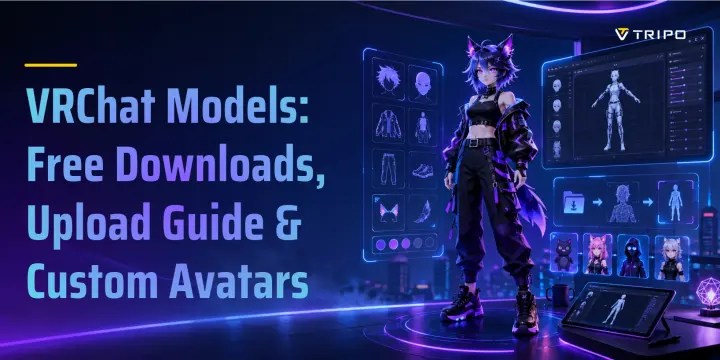
VRChat models — also called avatars — are 3D character meshes that represent you inside the VRChat social platform. Any avatar you wear in VRChat needs to pass a technical checklist: polygon count, bone limits, shader compatibility, and file format. Getting that right is what separates a usable model from one that crashes other players' games.
VRChat Avatar Requirements You Need to Know
Before downloading or uploading a VRChat model, understand VRChat’s Avatar Performance Rating system. Avatars are ranked as Excellent, Good, Medium, Poor, or Very Poor based on triangles, bones, material slots, texture memory, skinned meshes, PhysBones, contacts, constraints, and animators. VRChat recommends aiming for Good; Medium is usually acceptable if Good is not realistic.
A key point: VRChat measures triangles, not polygons. Many older guides mention “70,000 polygons,” but the official PC Excellent limit is 32,000 triangles. The 70,000 triangles / 150 bones target belongs to the PC Good tier.
| Metric | PC Excellent | PC Good | PC Medium | PC Poor | Mobile Excellent | Mobile Good | Mobile Medium | Mobile Poor |
|---|---|---|---|---|---|---|---|---|
| Triangles | 32,000 | 70,000 | 70,000 | 70,000 | 7,500 | 10,000 | 15,000 | 20,000 |
| Bones | 75 | 150 | 256 | 400 | 75 | 90 | 150 | 150 |
| Material slots | 4 | 8 | 16 | 32 | 1 | 1 | 2 | 4 |
| Texture memory | 40 MB | 75 MB | 110 MB | 150 MB | 10 MB | 18 MB | 25 MB | 40 MB |
| PhysBone components | 4 | 8 | 16 | 32 | 0 | 4 | 6 | 8 |
If an avatar exceeds the Poor threshold, it becomes Very Poor. This is why some downloaded VRChat models may appear as fallback avatars, lose components, or fail to display for other users. Mobile limits are stricter, so Poor or Very Poor mobile avatars are more likely to be blocked or partially removed.
Best Sites to Find Free VRChat Models
Free VRChat models are easy to find, but quality varies widely. Before downloading, always check the license, included files, Unity version, shader requirements, and whether the model is already rigged for VRChat.
| Site | Free models? | Type | Notes |
|---|---|---|---|
| VRCMods | Yes | Community-uploaded VRChat avatars | Large free library with avatars, props, animations, and Unity assets. Quality varies, so check comments, files, and SDK compatibility. |
| Sketchfab / VRChat tag | Free + paid | General 3D model marketplace | Useful for characters and props, but many assets are not VRChat-ready. Always check the license before use. |
| VRCArena | Mostly free/community resources | Species-organized VRChat asset directory | Good for browsing avatars, species bases, accessories, shaders, and community tools, especially niche categories. |
| Gumroad | Mostly paid, some free | Creator storefronts | Common for polished VRChat avatar packages with PhysBones, toggles, expressions, and Unity setup included. |
| VRModels | Free + paid | VRChat model listings | Offers avatar files and related assets, but licensing can vary. Only use models with clear personal or commercial rights. |
VRCMods is the simplest starting point for free uploads. Sketchfab is broader but often needs conversion, rigging, or shader cleanup. VRCArena is useful for species and asset discovery, while Gumroad is better for premium ready-made avatars. VRModels adds more options, but license checking is especially important.
Paid vs. Free VRChat Avatars — What’s the Difference?
Free VRChat avatars are useful for testing, learning Unity, and joining VRChat without spending money. They include anime avatars, furry characters, robots, mascots, meme models, props, and experimental uploads. The trade-off is inconsistent quality: some are polished, while others may be outdated, missing textures, poorly optimized, or not configured for current VRChat SDK workflows. Many also lack PhysBones, facial expressions, toggles, or complete Unity packages.
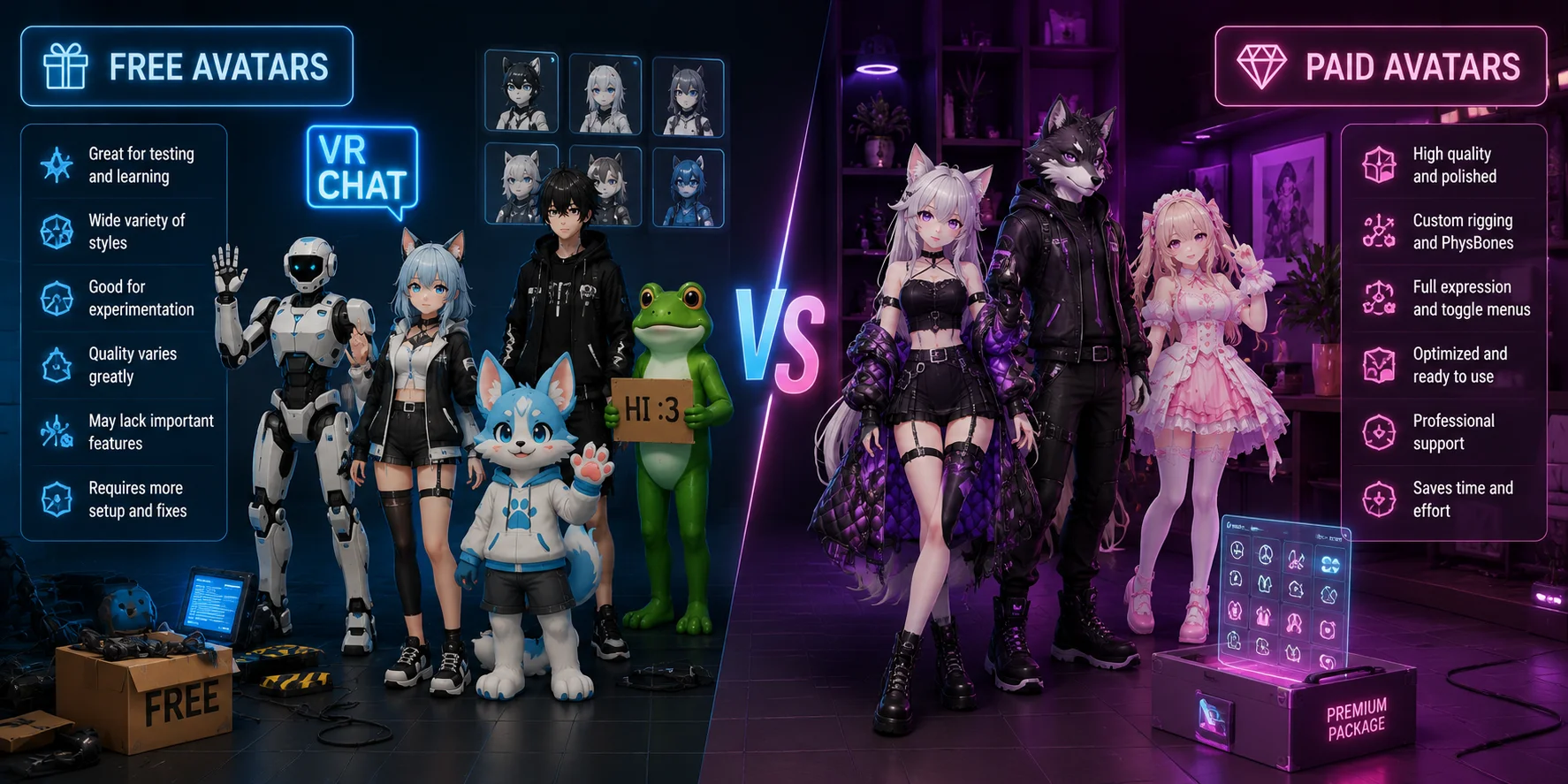
Paid avatars, especially from Gumroad or BOOTH.pm, usually cost more because they save setup time. A good premium avatar may include custom rigging, PhysBones, expression menus, clothing toggles, optimized materials, shader setup, gestures, documentation, and a ready-to-import Unity package. Prices often range from 150, depending on complexity and creator support.
Choose free avatars for experimentation or heavy customization. Choose paid avatars if you want a polished, social-ready model with fewer setup issues. In both cases, always check the license before modifying, reuploading, reselling, or redistributing the avatar.
How to Upload a VRChat Model (Step-by-Step)
Uploading a custom VRChat model requires VRChat Creator Companion, a Unity version that Creator Companion identifies as VRChat-SDK-compatible, and the VRCSDK3-Avatars package. To upload for other users, you need a VRChat.com account with a New User trust rank or higher; link a Steam, Meta, Pico, or Viveport account first if that is how you play.
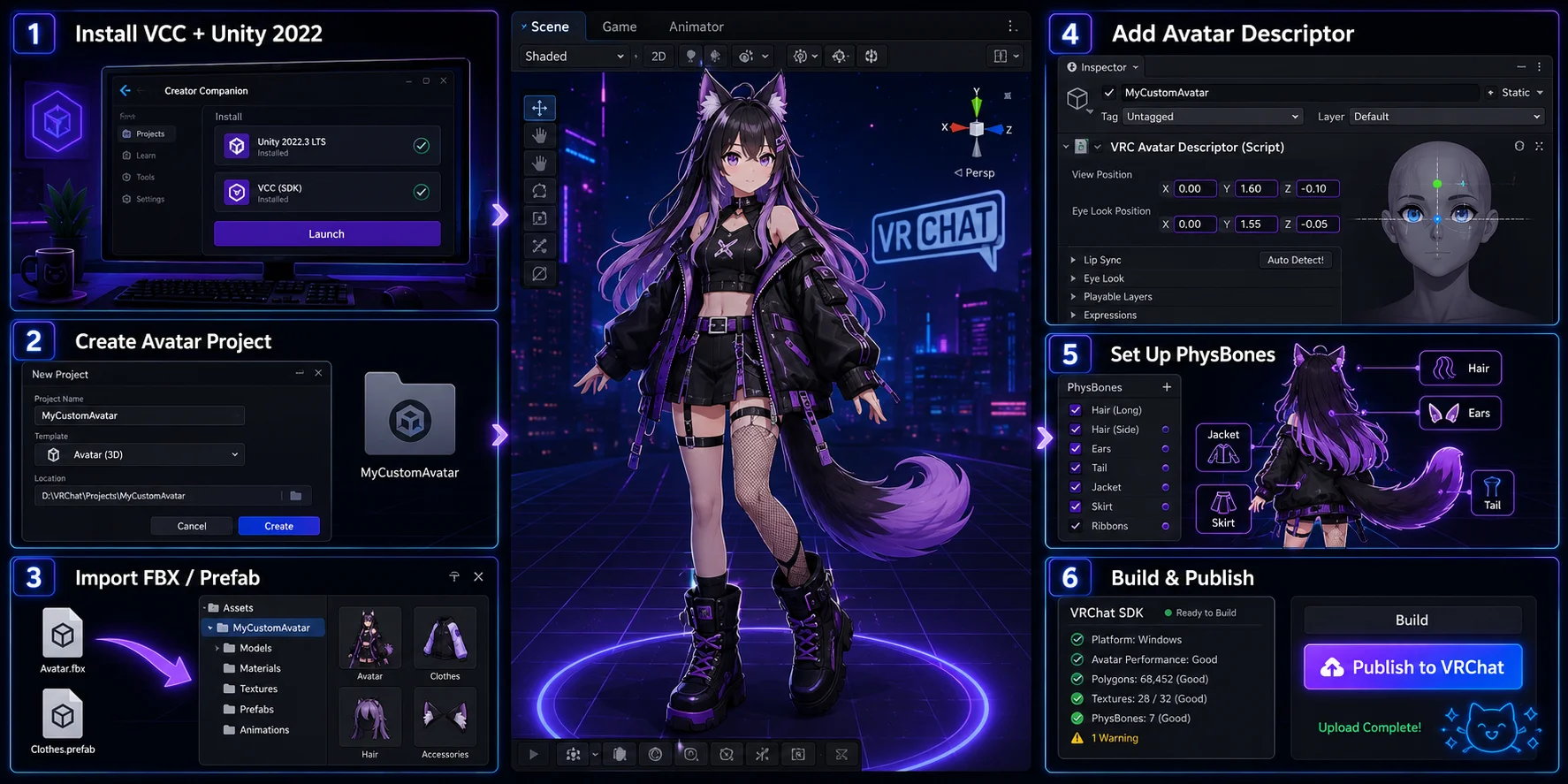
- Install VRChat Creator Companion and its current compatible Unity version. Use Creator Companion to install Unity and manage the VRChat SDK packages for the project.
- Create a Unity avatar project. Open VCC, create a new Avatar project, and make sure VRCSDK3-Avatars is installed.
- Import your FBX or prefab. Drag the FBX, prefab, textures, and materials into the Unity Assets folder. For humanoid avatars, set the rig type to Humanoid.
- Add VRCAvatarDescriptor. Select the avatar root object, add VRC Avatar Descriptor, and set the View Position between the avatar’s eyes.
- Set up PhysBones for dynamic parts. Add VRCPhysBone components to hair, tails, ears, clothing, or accessories that need secondary motion.
- Build and publish. Open the VRChat SDK panel, fix blocking warnings, then click Build & Publish. Test the avatar in VRChat before treating it as final.
Illustration note: the workflow image is a visual overview, not a literal VRChat interface. For a real upload, use current screenshots of Creator Companion project creation, the Avatar Descriptor, and the VRChat SDK Builder / validation panel.
Common VRChat Avatar Problems and Fixes
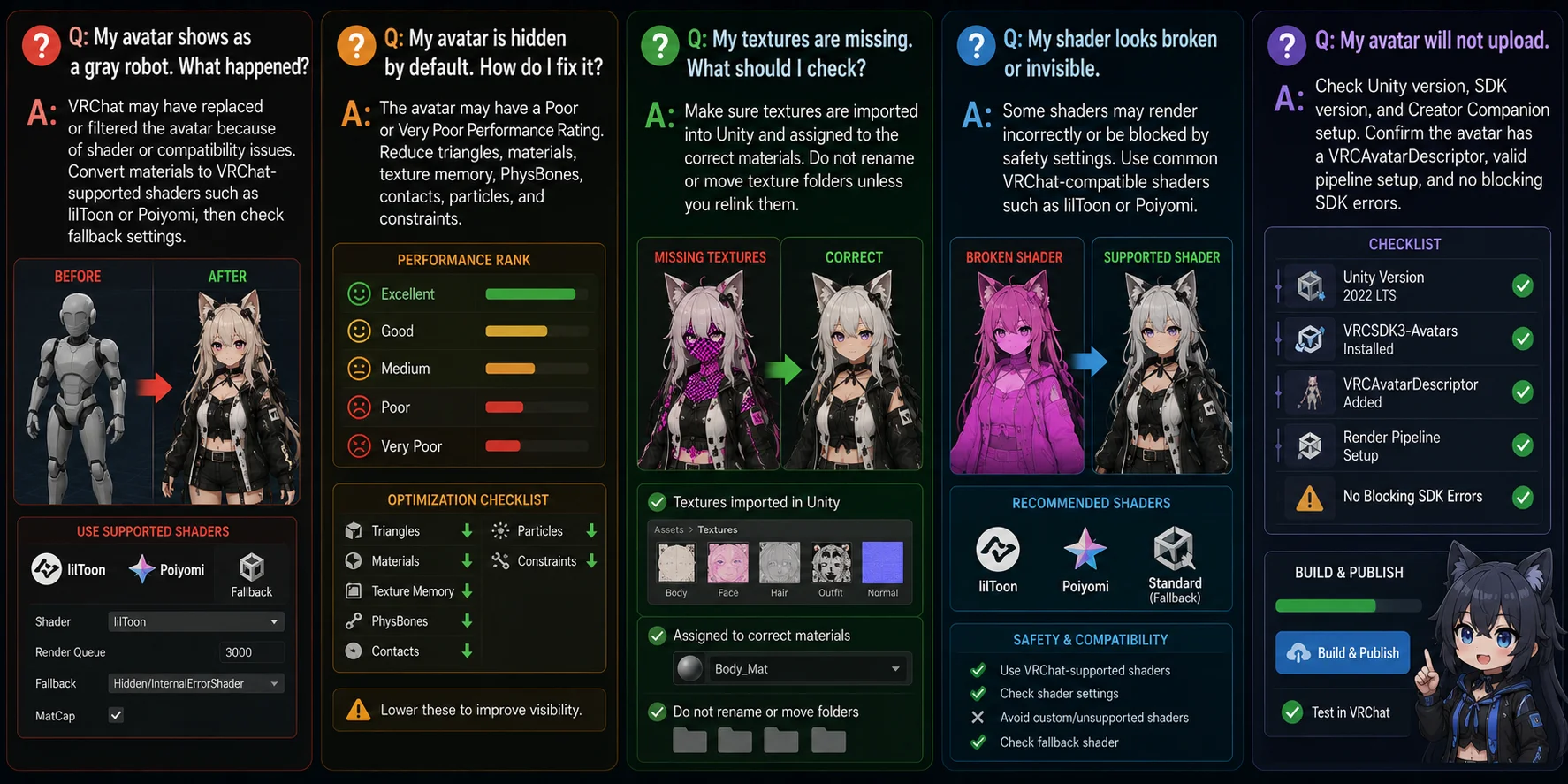
Q: My avatar is hidden by default. How do I fix it? A: On mobile, VRChat blocks Poor and Very Poor avatars by default, while PC users can choose their own performance-rank visibility settings. Reduce triangles, materials, texture memory, PhysBones, contacts, particles, and constraints, then test the avatar's rank on each target platform.
Q: My avatar shows as a gray robot. What happened? A: A gray robot usually means VRChat is showing a fallback avatar. First check the viewer's Safety and avatar visibility settings, then review the avatar's performance rank and any material or shader fallback issues. Change shaders only when the specific material problem calls for it.
Q: My textures are missing. What should I check? A: Make sure textures are imported into Unity and assigned to the correct materials. Do not rename or move texture folders unless you relink them.
Q: My shader looks broken or invisible. A: Check whether the material's shader and dependencies imported correctly, then test VRChat's shader fallback behavior. Use a shader supported by the avatar package and target platform; replacing every material with a different shader can break the creator's intended look or features.
Q: My avatar will not upload. A: Check Unity version, SDK version, and Creator Companion setup. Confirm the avatar has a VRCAvatarDescriptor, valid pipeline setup, and no blocking SDK errors.
VRChat Avatar Formats and Tools
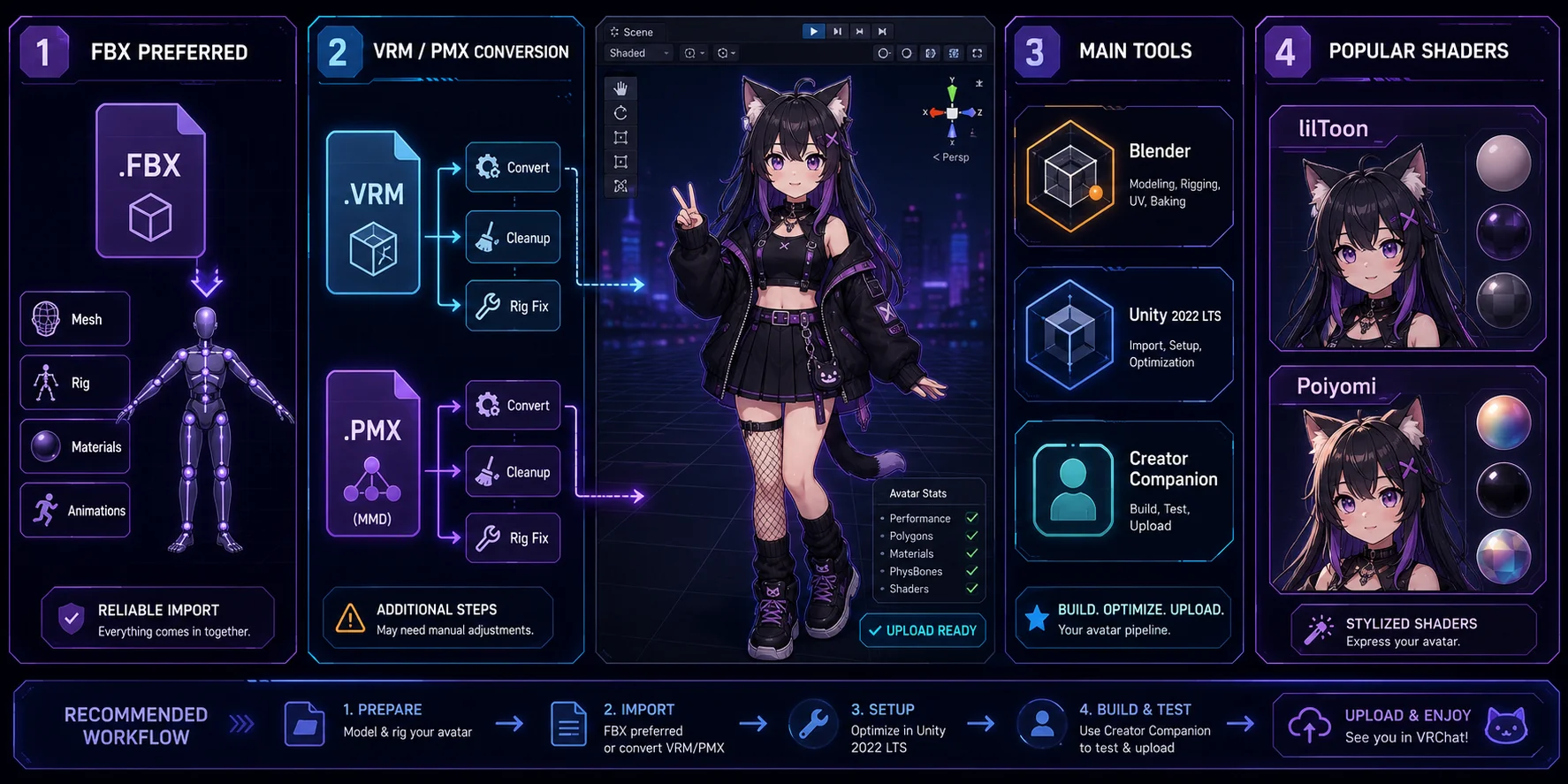
The preferred VRChat avatar format is FBX because Unity imports meshes, skeletons, materials, and animations reliably. VRChat’s avatar workflow also requires configuring the rig in Unity before upload.
VRM avatars from VRoid Studio need a VRM-to-Unity or VRChat conversion workflow. MMD/PMX models can also be used, but usually require plugins, Blender cleanup, material conversion, and rig adjustment.
The main tools are Blender for free model editing, the Unity version currently supported by VRChat Creator Companion for avatar setup, and VRChat Creator Companion for SDK management. lilToon and Poiyomi Toon Shader are common stylized-avatar options, but always check the package's requirements and target-platform compatibility before changing materials.
Create a Unique VRChat Model with Tripo AI
Instead of scrolling through avatar libraries, you can generate an original starting mesh with Tripo AI. Describe your character in a prompt or upload a reference image, and Tripo AI can create a textured 3D model in seconds.
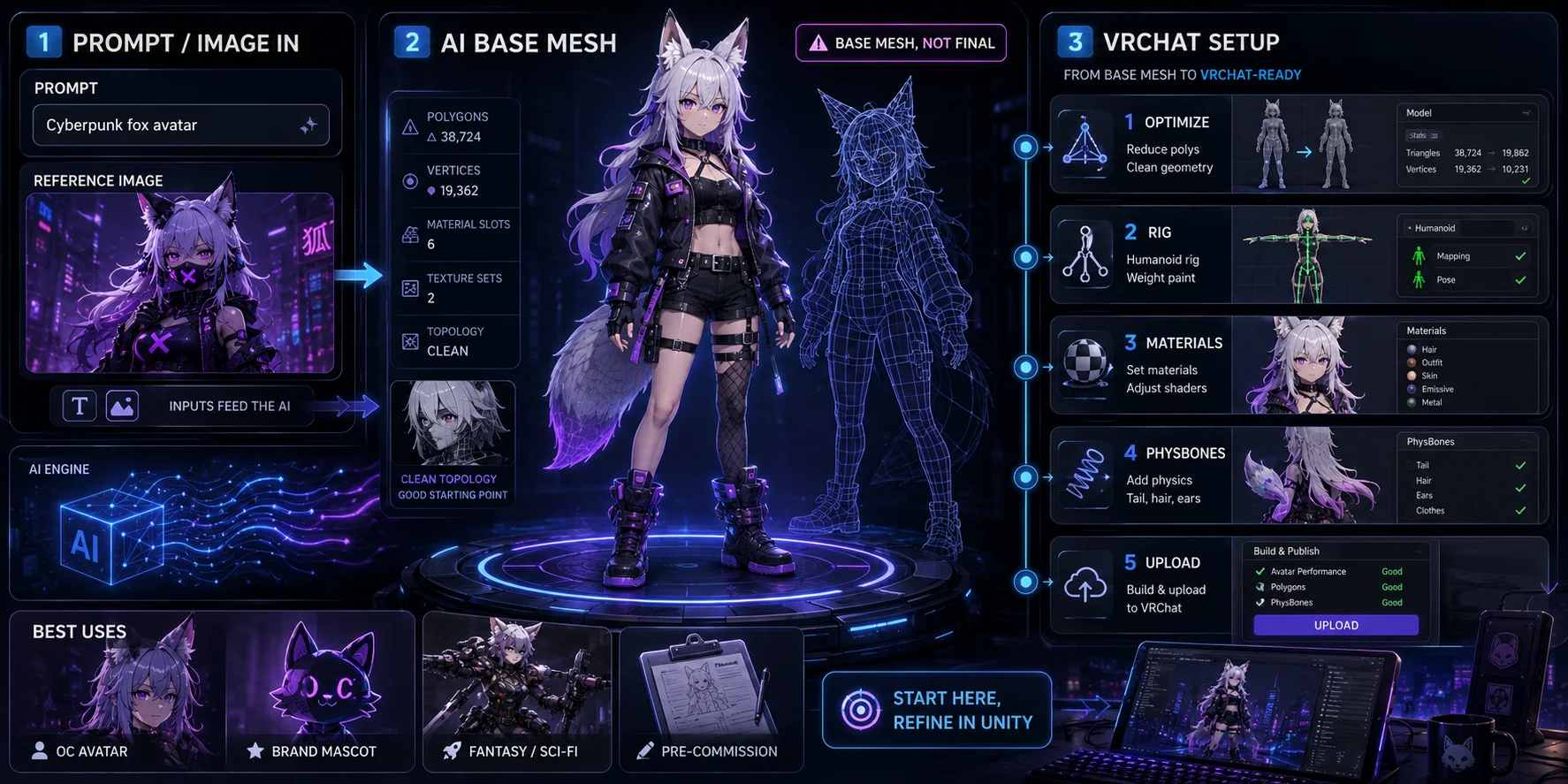
For VRChat, treat the result as a starting point, not an upload-ready avatar. You still need to check topology, reduce triangles, prepare materials, rig the character, add a VRCAvatarDescriptor, configure PhysBones, and test it in Unity.
This workflow gives creators a unique base character faster than manual modeling or library browsing. You can generate a cyberpunk fox, fantasy mage, robot mascot, chibi sci-fi pilot, or branded character, then export it as FBX or GLB for Blender and Unity setup.
Great use cases include:
- Original OC avatars: create a personal character instead of modifying a common base.
- Brand mascots in VR: build a mascot for events, social spaces, or community worlds.
- Fantasy and sci-fi characters: test silhouettes, armor, clothing, or creature concepts.
- Pre-commission prototypes: show an artist a clear 3D direction before commissioning.
If your model is a T-pose humanoid or standard standing quadruped, Tripo AI’s auto-rigging workflow can help create a usable skeleton. Final VRChat readiness still requires inspection, optimization, and upload testing.
Frequently Asked Questions
What is a VRChat model?
A VRChat model usually means a 3D avatar used to represent you inside VRChat. It includes a mesh, skeleton, materials, textures, shaders, and Unity setup data.
How do I upload a custom 3D model to VRChat?
Install VRChat Creator Companion, create an Avatar project, import the model, add a VRCAvatarDescriptor, set the view position, fix SDK warnings, and publish through the VRChat SDK panel. Uploading for other users requires a VRChat.com account with a New User trust rank or higher.
Can I use AI to create a VRChat avatar?
Yes. AI tools such as Tripo AI can generate a custom character mesh from text or images. You still need to rig, optimize, configure, and upload the model through Unity before using it as a VRChat avatar.
What file format does VRChat use for 3D models?
FBX is the most common format for VRChat avatar workflows because Unity handles FBX meshes and rigs well. VRM and PMX models generally need conversion and cleanup before use.
How do I rig a 3D model for VRChat?
The model needs a skeleton, usually a humanoid rig for human-like avatars. You can rig in Blender, use an auto-rigging tool, or start from a model that already includes a VRChat-ready armature.
What polygon limit should VRChat models have?
VRChat measures triangles rather than polygons. For PC, 32,000 triangles is Excellent and 70,000 is the Good threshold; mobile budgets are much lower, starting at 7,500 triangles for Excellent.
Can I sell custom VRChat models?
Yes, if you own the rights to the model, textures, rig, and included assets. Check marketplace rules, VRChat terms, and any third-party asset licenses before selling or redistributing.
How do I add physics to a VRChat model?
Use VRCPhysBone components on chains such as hair, tails, ears, ribbons, or clothing. Keep PhysBone counts within the avatar performance budget, especially for Quest and mobile support.
What is the best free tool for making VRChat avatars?
Blender is a widely used free tool for modeling, editing, rigging, UVs, and cleanup. You still need Unity and VRChat Creator Companion to upload the avatar.
Can I import a Tripo AI model into VRChat?
Yes, but treat it as a generated 3D starting mesh. Export it, prepare it in Blender or Unity, rig and optimize it, add VRChat components, then upload it through the standard SDK workflow.
Conclusion
Whether you grab a free community upload or build something entirely original, VRChat is most fun when your avatar actually feels like you. For a character that's 100% yours, generate it from scratch with Tripo AI — no scrolling required.