Kuse x Tripo: Build a 3D Product Launch Website
3D assets are becoming easier to create with AI. Product teams, designers, game creators, and marketers can now generate product concepts, objects, characters, and campaign visuals much faster than before. But a 3D asset alone is not a launch.
To introduce a product clearly, teams still need a website. They need a page structure, product story, visual sections, feature descriptions, and a clear call to action. This is where Tripo and Kuse can work together.
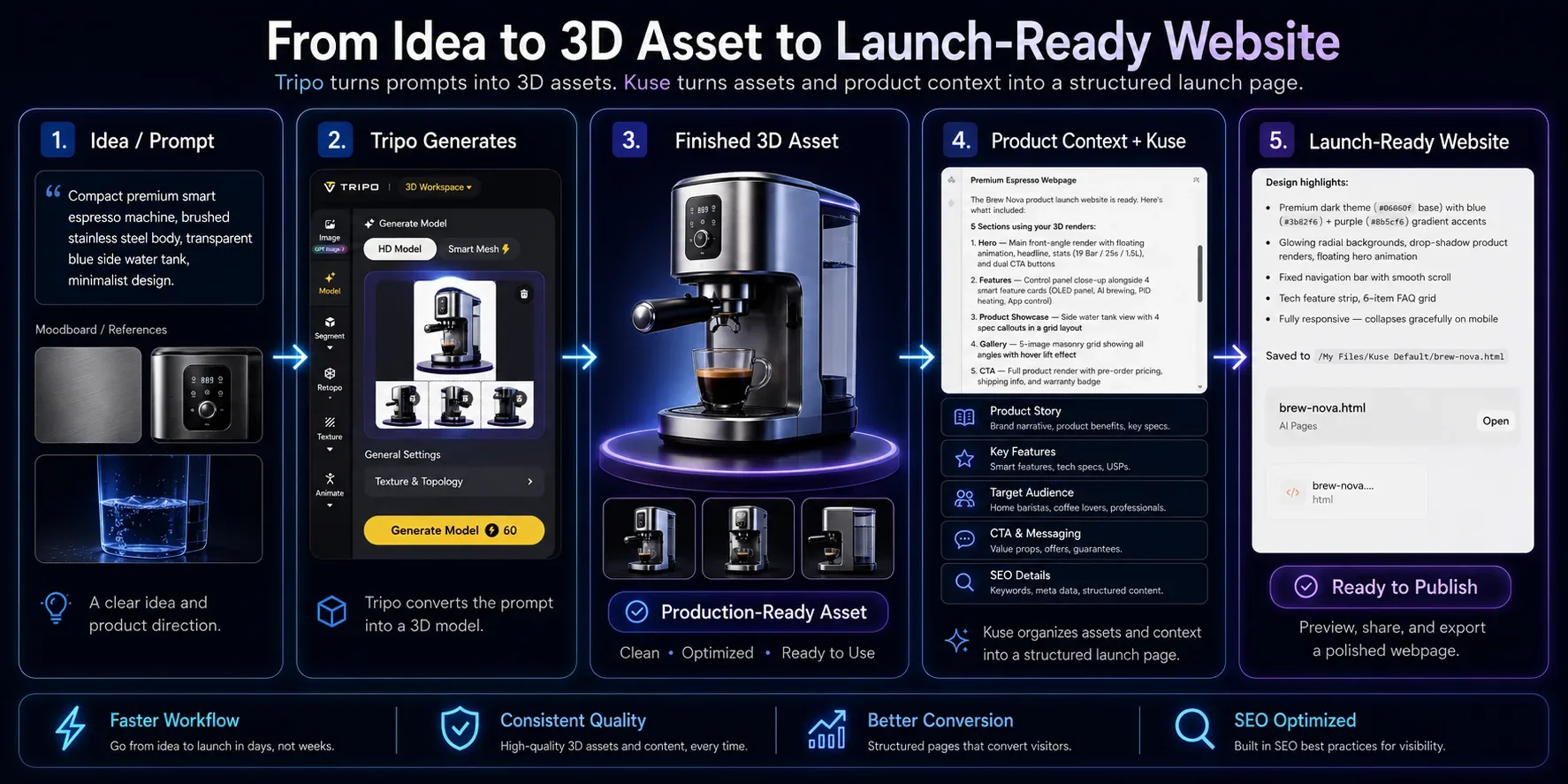
Tripo helps creators generate 3D assets. Kuse helps turn those assets, product notes, and launch goals into a launch-ready website. Together, they support a faster workflow from 3D concept to published web page.
This guide shows how to build a 3D product launch website using Tripo and Kuse.
What Is Tripo?
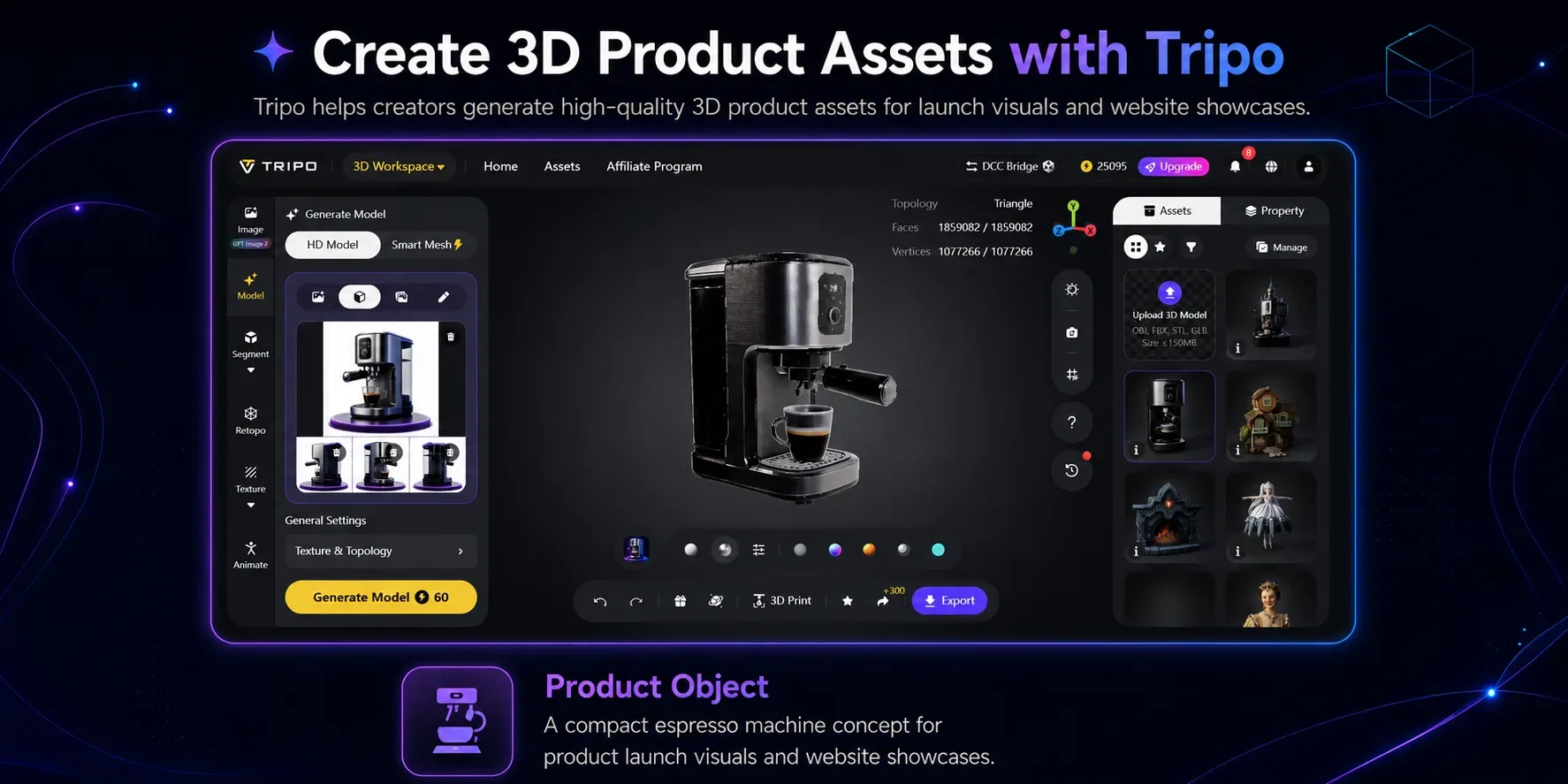
Tripo is an AI 3D model generator that helps creators turn text or images into 3D assets. It can be used for product concepts, game assets, characters, digital objects, creative campaigns, and visual experiments.
For a product launch website, Tripo can help create the visual materials that make the page more engaging. Instead of relying only on flat images, teams can use 3D objects, stylized renders, or product-inspired models to make the launch feel more vivid.
In this workflow, Tripo is used to create or prepare the 3D product assets that will appear on the website.
What Is Kuse?
Kuse is an AI website builder that helps teams turn ideas, files, product context, and creative assets into structured web pages.
For a product launch, Kuse can help generate the page structure, website copy, product story, feature sections, CTA copy, FAQ, and launch page content. Instead of starting from a blank page, teams can use Kuse to organize their launch materials and create a clearer website workflow.
SEO can still be part of the publishing process, but it works best as a built-in bonus rather than the main reason to use this workflow. The main value is turning 3D assets and product context into a complete website experience, while Kuse can also help prepare useful SEO details such as headings, FAQ, metadata, and image alt text.
In this workflow, Kuse is used to turn 3D assets and product information into a launch-ready website.
Step-by-Step Workflow: Build a 3D Product Launch Website
Step 1: Create 3D Product Assets with Tripo
Start by creating the visual assets for the product launch. These might include product renders, digital objects, game assets, virtual fashion pieces, collectibles, character models, or product concept visuals.
The goal is to prepare strong visual materials that can be used across the website, especially in the hero section, product showcase, and feature sections.
Step 2: Define the Product Launch Goal
Before building the website, define what the launch page needs to achieve.
Useful inputs include:
- Product name
- Target audience
- Main value proposition
- Key features
- Use cases
- Brand tone
- Launch goal
- Optional search keyword target
- Call to action
For example:
Create a product launch website for a new digital collectible series. The page should explain the concept, showcase the 3D assets, describe the collection, and encourage visitors to join the waitlist.
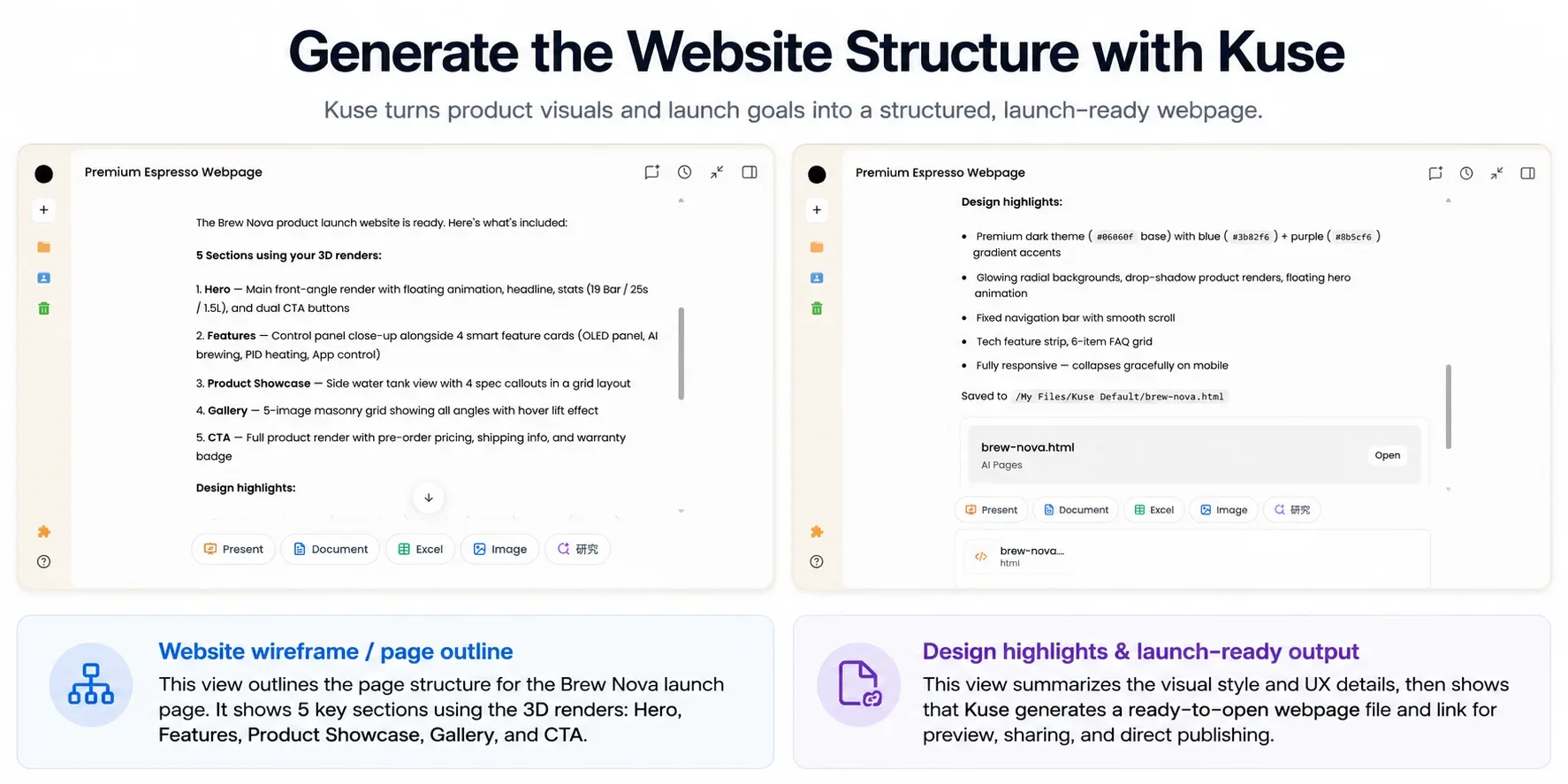
Step 3: Generate the Website Structure with Kuse
Next, use Kuse as an AI landing page builder to create the website structure.
- Hero section
- Product overview
- 3D visual showcase
- Feature highlights
- Use case section
- Product story
- FAQ
- Gallery section
- Call to action
Kuse helps turn the product context into a logical page flow, so the website does not feel like a random collection of visuals.
Step 4: Turn Product Context into Website Copy
After the structure is ready, Kuse can help draft the copy for each section.
This may include the hero headline, subheading, product description, feature bullets, gallery captions, CTA copy, FAQ answers, image alt text, and meta description.
The key is to connect the 3D visuals with the product story. The page should not only show what the asset looks like. It should explain what the product is, why it matters, and what visitors should do next.
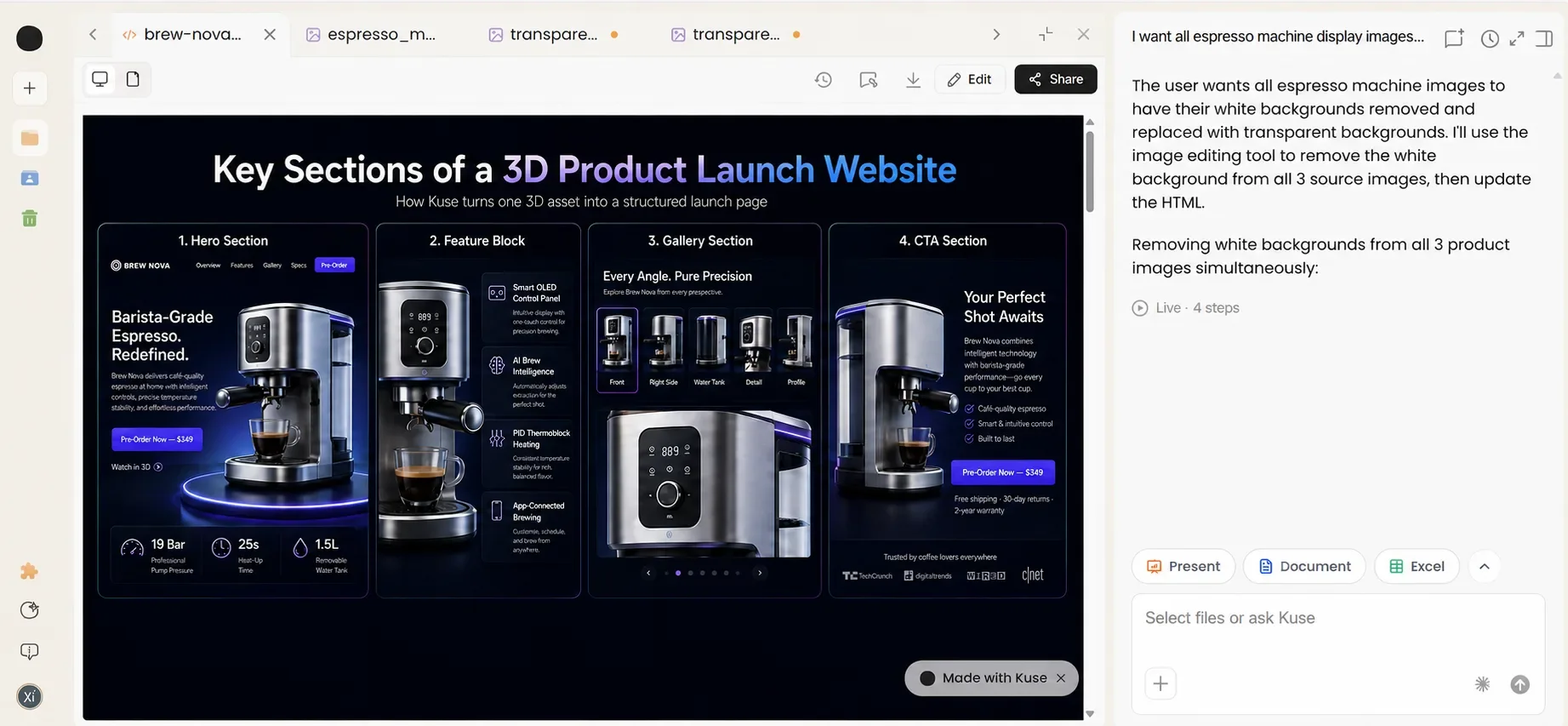
Step 5: Match 3D Assets with Website Sections
Use the strongest 3D asset in the hero section. Use close-up renders to explain features. Use galleries to show different angles or variations. Use captions and alt text to explain what visitors are seeing.
This makes the 3D assets part of the website narrative instead of simple decoration.
Step 6: Review and Publish
Before publishing, check whether the page is clear and useful.
Review:
- Is the product message easy to understand?
- Do the visuals support the story?
- Is the CTA clear?
- Are the page sections in a logical order?
- Are image alt texts descriptive?
- Are the title and meta description ready for sharing and search?
Workflow Comparison
A 3D product launch website usually requires several separate steps: visual creation, page planning, copywriting, visual placement, and final publishing. The table below shows how the traditional workflow compares with a Tripo and Kuse workflow. The main difference is that Tripo helps create the visual starting point, while Kuse helps turn that material into a complete website experience.
| Task | Traditional workflow | Tripo + Kuse workflow |
|---|---|---|
| 3D visuals | Designed or modeled manually | Generated or prepared with Tripo |
| Starting point | Blank page or template | Product context, goals, SEO keywords, and 3D assets |
| Page structure | Planned manually | Generated with Kuse |
| Copywriting | Written from scratch | Drafted from product notes in Kuse |
| Launch polish | Handled late in the process | Refined together with page structure, CTA, FAQ, metadata, and image alt text |
| Visual integration | Added after layout decisions | Matched with page sections |
| Iteration | Manual rewriting and restructuring | Faster refinement through AI |
The most useful takeaway is not simply that the workflow becomes faster. It also becomes more connected. The visual assets, page structure, copy, product story, and CTA can be planned together instead of being handled as disconnected tasks.
Use Cases
This workflow is especially useful when the website needs to make visual assets understandable and actionable. Tripo can provide the 3D material, while Kuse can help shape that material into a page that explains the product, highlights the value, and guides visitors toward the next step.
| Use case | How Tripo helps | How Kuse helps |
|---|---|---|
| Product launch landing pages | Creates 3D product visuals for the page | Turns product context into a launch page with copy, CTA, and SEO sections |
| Product showcase pages | Provides visual assets that make the page richer | Turns product details into a product showcase website with sections, captions, and CTA |
| Game asset showcase pages | Generates characters, props, or environment assets | Builds a page for promotion, updates, or community sharing |
| Virtual fashion campaign pages | Creates 3D fashion items or avatar assets | Turns the campaign concept into a visual landing page |
| Digital collectible pages | Creates 3D collectible assets or variations | Builds a page that explains the concept, story, gallery, and waitlist CTA |
FAQ
What is an AI website builder?
An AI website builder helps users create website structure, page copy, sections, and content from prompts, project context, or creative materials.
How can 3D assets be used in a product launch website?
3D assets can be used in hero sections, product galleries, feature explanations, campaign visuals, and interactive previews.
How does Tripo help in this workflow?
Tripo helps generate or prepare the 3D assets that make the product launch website more visual and engaging.
How does Kuse help in this workflow?
Kuse helps organize product context, generate website structure, draft page copy, create CTA sections, write FAQ content, and prepare a launch-ready website.
How can Kuse help with SEO while building the page?
Kuse can help structure the page in a way that is easier to publish and optimize: clear sections, descriptive headings, FAQ content, image alt text, metadata, and CTA copy can be prepared together with the page. This means SEO does not need to be a separate afterthought. It becomes a useful publishing bonus while the main workflow still focuses on turning 3D assets and product context into a complete website experience.
What should a 3D product launch website include?
A strong page should include a hero section, product overview, 3D visual showcase, feature highlights, use cases, CTA, and FAQ.
Conclusion
Tripo and Kuse support two connected parts of the creative launch process.
Tripo helps create the 3D assets. Kuse helps turn those assets and product ideas into a structured, launch-ready website.
For creators and teams, this means the workflow can move faster from visual concept to published product page. Instead of treating 3D creation, website building, copywriting, and publishing as separate tasks, teams can connect them into one practical launch workflow.