Multi-View to 3D: How It Works, Best Tools & Step-by-Step Guide
TL;DR
- Multi-view to 3D turns multiple angled images into one 3D model.
- Traditional photogrammetry needs many photos, while AI tools need fewer views.
- Clean lighting, consistent angles, and sharp images improve reconstruction quality.
- Tripo AI supports multi-view generation with 2–4 reference images.
- Use multi-view 3D for games, ecommerce, printing, and product visualization.
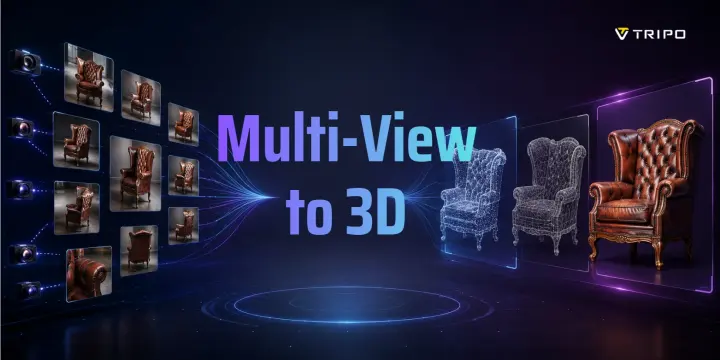
Multi-view to 3D is the process of reconstructing a three-dimensional model from a set of 2D images captured from different angles. Instead of manually building geometry in a 3D editor, you feed the system reference views — front, back, left, right — and AI or photogrammetry algorithms infer the complete 3D structure. The result is a downloadable mesh, ready for games, product visualization, 3D printing, or animation.
How Multi-View to 3D Reconstruction Works
Multi-view to 3D reconstruction usually follows two approaches: traditional photogrammetry and AI-based generation.
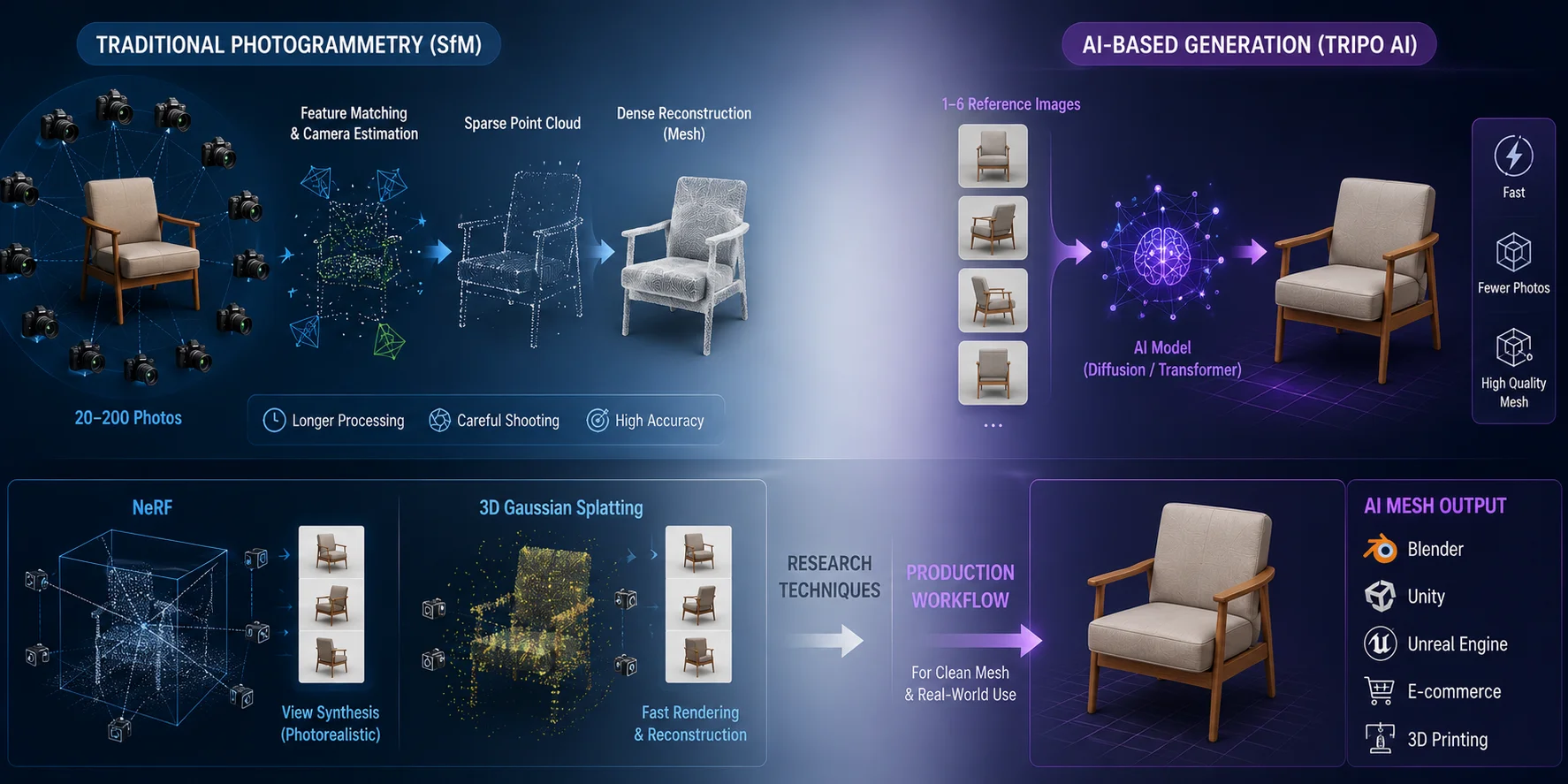
Traditional photogrammetry relies on Structure from Motion, or SfM. It compares matching visual features across many overlapping photos, estimates camera positions, triangulates a 3D point cloud, and then builds a denser surface from that data. This method can capture real-world objects accurately, but it often requires 20–200 photos, careful shooting conditions, and longer processing time.
AI-based generation works differently. Instead of only matching image features, a diffusion or transformer-based model learns 3D structure from millions of 3D assets and rendered views. Given a small number of sparse reference images, from a small set of reference images, the model can infer missing geometry, surface detail, and texture information. Tripo AI follows this modern AI-based approach, making multi-view reconstruction faster and more accessible for creators who need usable meshes without complex photogrammetry setup.
NeRF and 3D Gaussian Splatting are important intermediate research techniques for view synthesis and scene reconstruction. However, when the goal is a clean mesh for Blender, Unity, Unreal Engine, ecommerce, or 3D printing, direct AI mesh generation can be more practical when the downstream workflow needs a mesh.
What Images Work Best for Multi-View 3D
Better input images produce better 3D models. Multi-view generation is powerful, but it still depends on clean, consistent visual information.
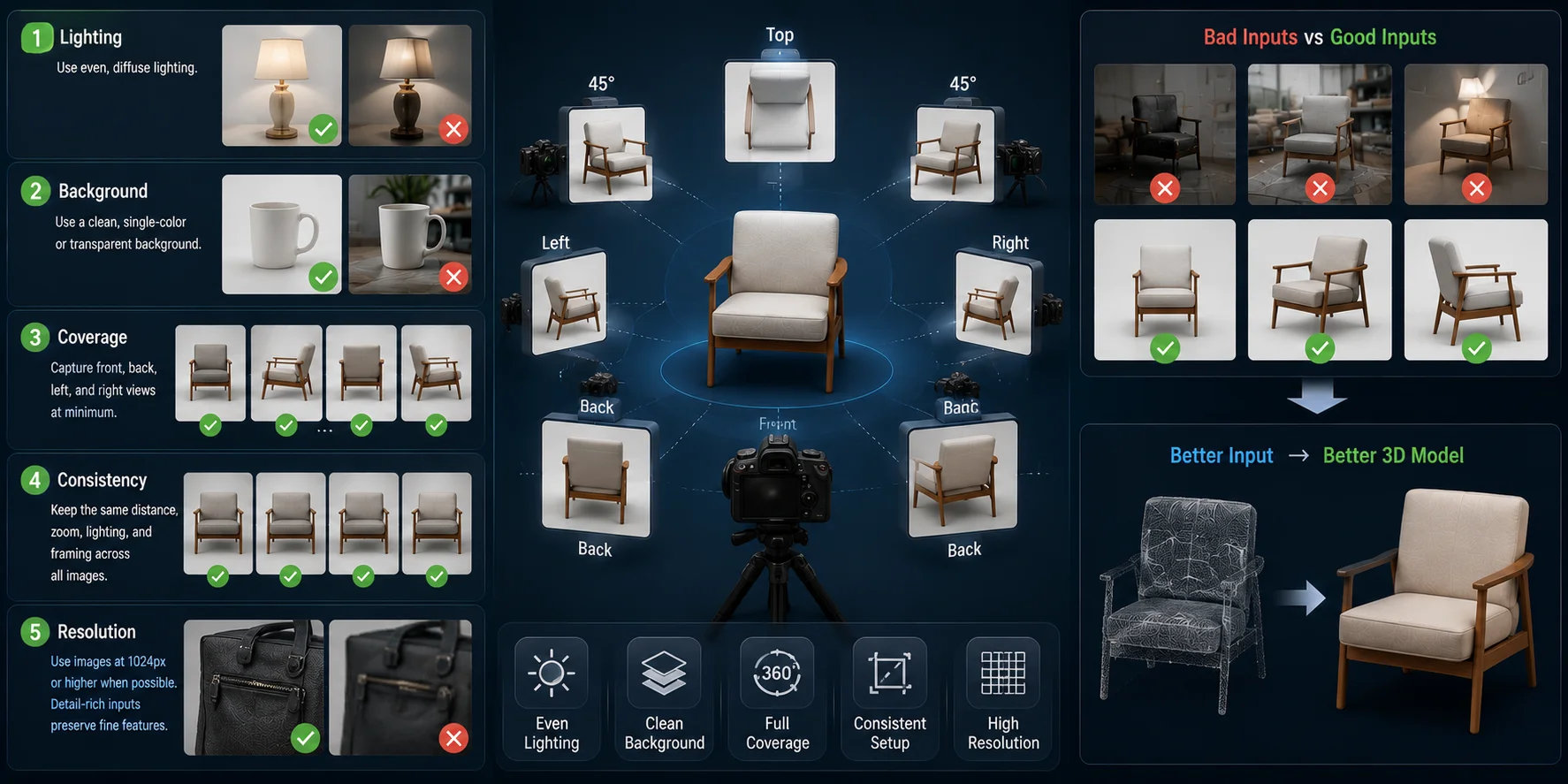
- Lighting: Use even, diffuse lighting. Avoid harsh shadows because the model may misread shadows as geometry.
- Background: Use a clean, single-color, or transparent background so the object is easy to separate from the scene.
- Coverage: Capture front, back, left, and right views at minimum. For complex objects, add top-down or 45-degree shots.
- Consistency: Keep the same distance, zoom, lighting, and framing across all images.
- Resolution: Use images at 1024px or higher when possible. Detail-rich inputs help preserve seams, grooves, buttons, labels, and surface texture.
Think of the capture process like preparing product photos. You do not need a professional camera, but you do need clear views, consistent angles, and enough visual detail for the AI to understand the object.
Multi-View to 3D Online — Top Tools Compared
Online multi-view to 3D tools remove the need for local photogrammetry software, GPU setup, or manual reconstruction. The best option depends on input flexibility, export formats, and final use case.
| Tool | Free tier | Max input images | Output formats | Best for |
|---|---|---|---|---|
| Tripo AI | Free to start | 2–4 reference images | GLB, FBX, OBJ, STL, USD, 3MF | Browser-based multi-view workflow with broad export support |
| Manex3D | Available online | Up to 3 photos | GLB-focused | Simple multi-image generation |
| Alpha3D | Free/trial options vary | Product image or prompt | Web-ready assets | Ecommerce product visualization |
| Neural4D | Online generation available | Up to 6 views | STL, OBJ, GLB | Watertight meshes and rendering |
| CAT3D | Research demo | Multiple observed views | Research output | Experimental multi-view diffusion |
Tripo AI stands out because it combines a browser-based workflow with practical production exports. Its multi-view mode supports 2–4 reference images. Additional views can improve shape accuracy, preserve proportions, and reduce missing or distorted geometry compared with a single image. Supported export formats include GLB, FBX, OBJ, STL, USD, and 3MF, so the output can move smoothly into web viewing, game engines, 3D editing, product visualization, and printing workflows. Before moving the asset into a production pipeline, you can also preview the generated model directly in the browser with the Tripo AI 3D Viewer.
How to Use Tripo AI for Multi-View 3D
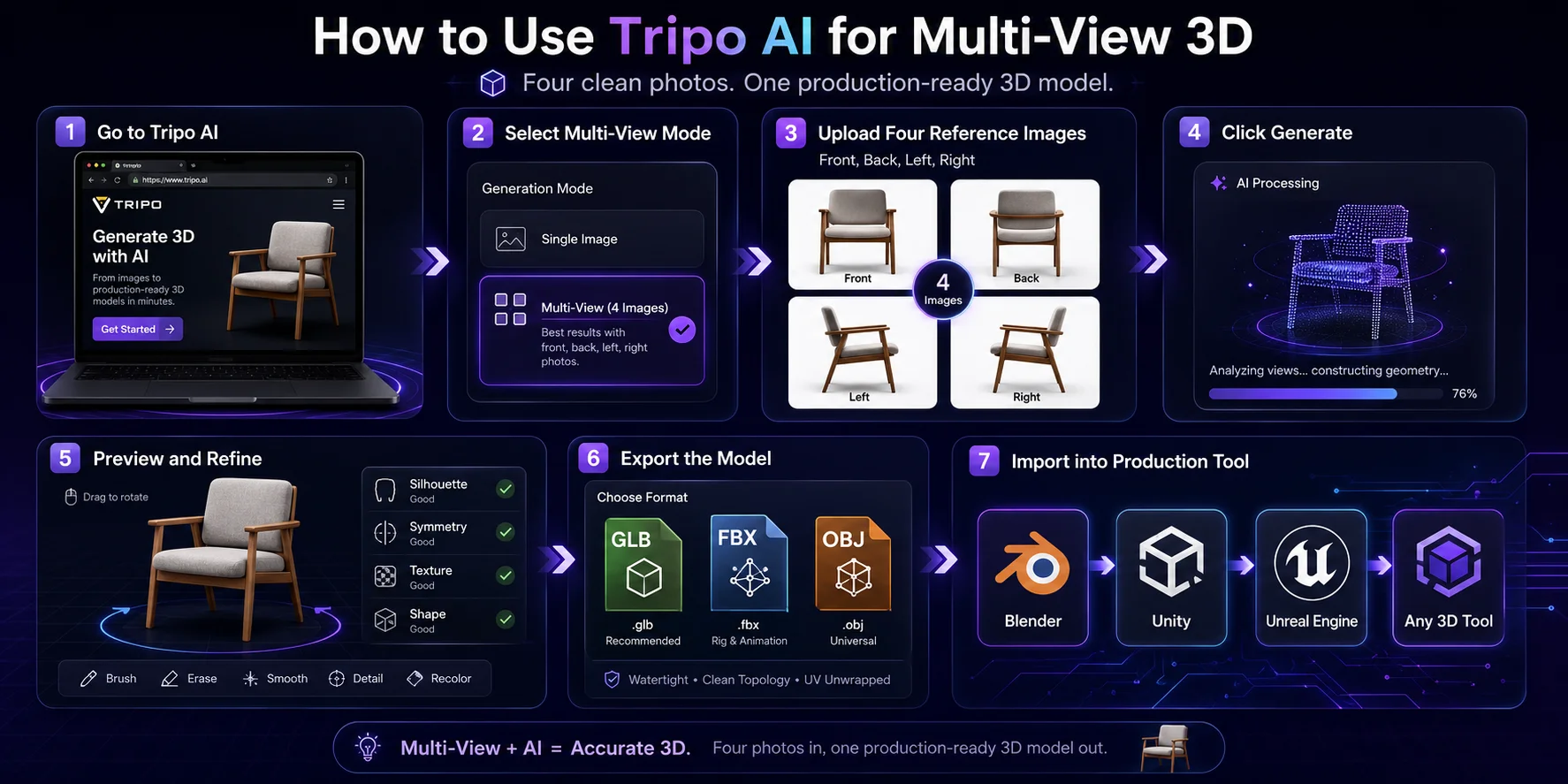
Step 1 — Go to Tripo AI
Start at Tripo AI and open the generation workflow. Since it runs in the browser, you do not need to install photogrammetry software or configure a local GPU.
Step 2 — Select Multi-View mode
Choose the multi-view image workflow when you already have several reference images of the same object. This usually provides better shape consistency than a single-image workflow.
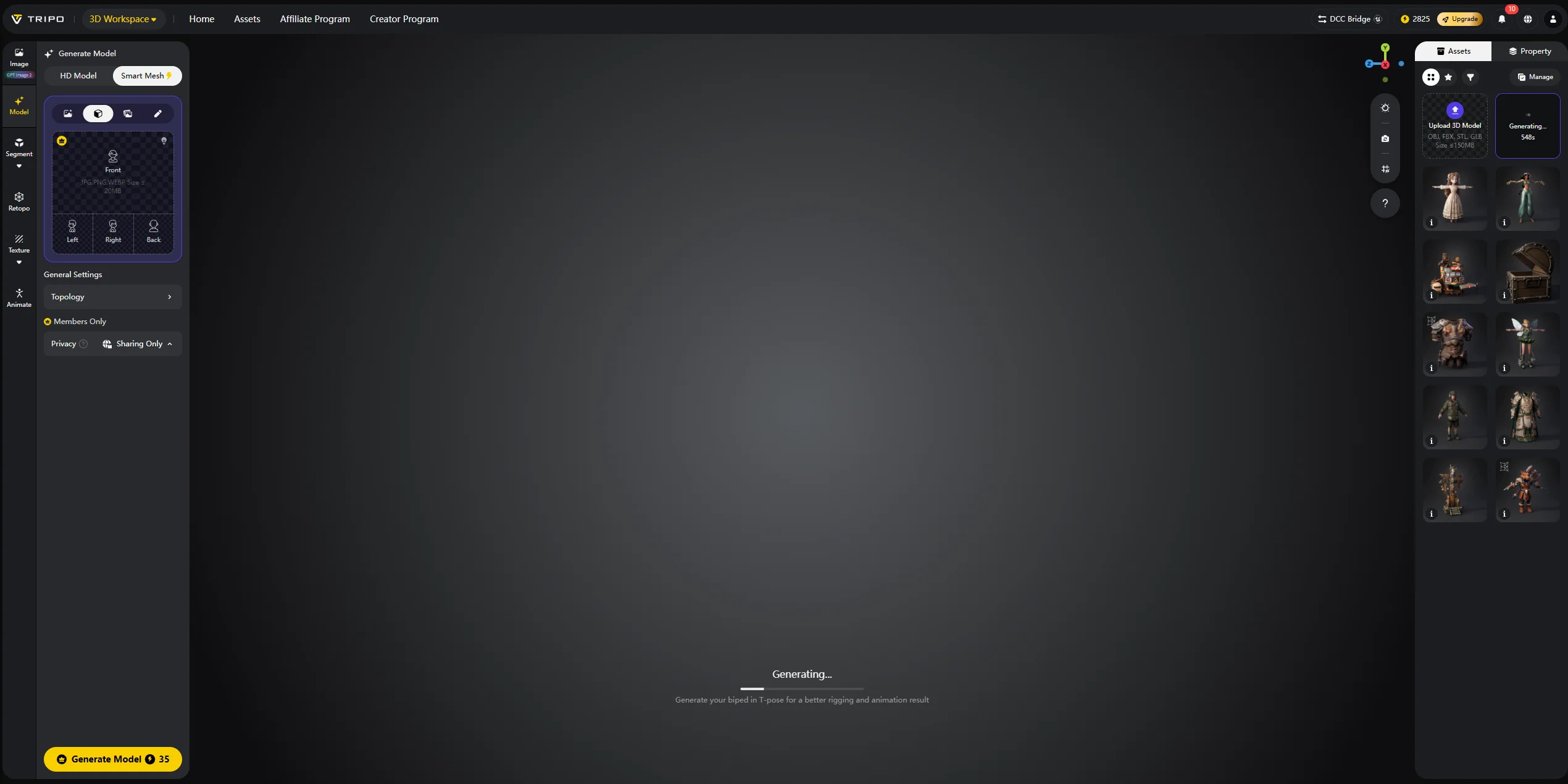
Step 3 — Upload 2–4 reference images
Upload front, back, left, and right views. Use clean backgrounds, balanced lighting, and consistent framing. These four views are usually enough for products, props, accessories, and many design prototypes.
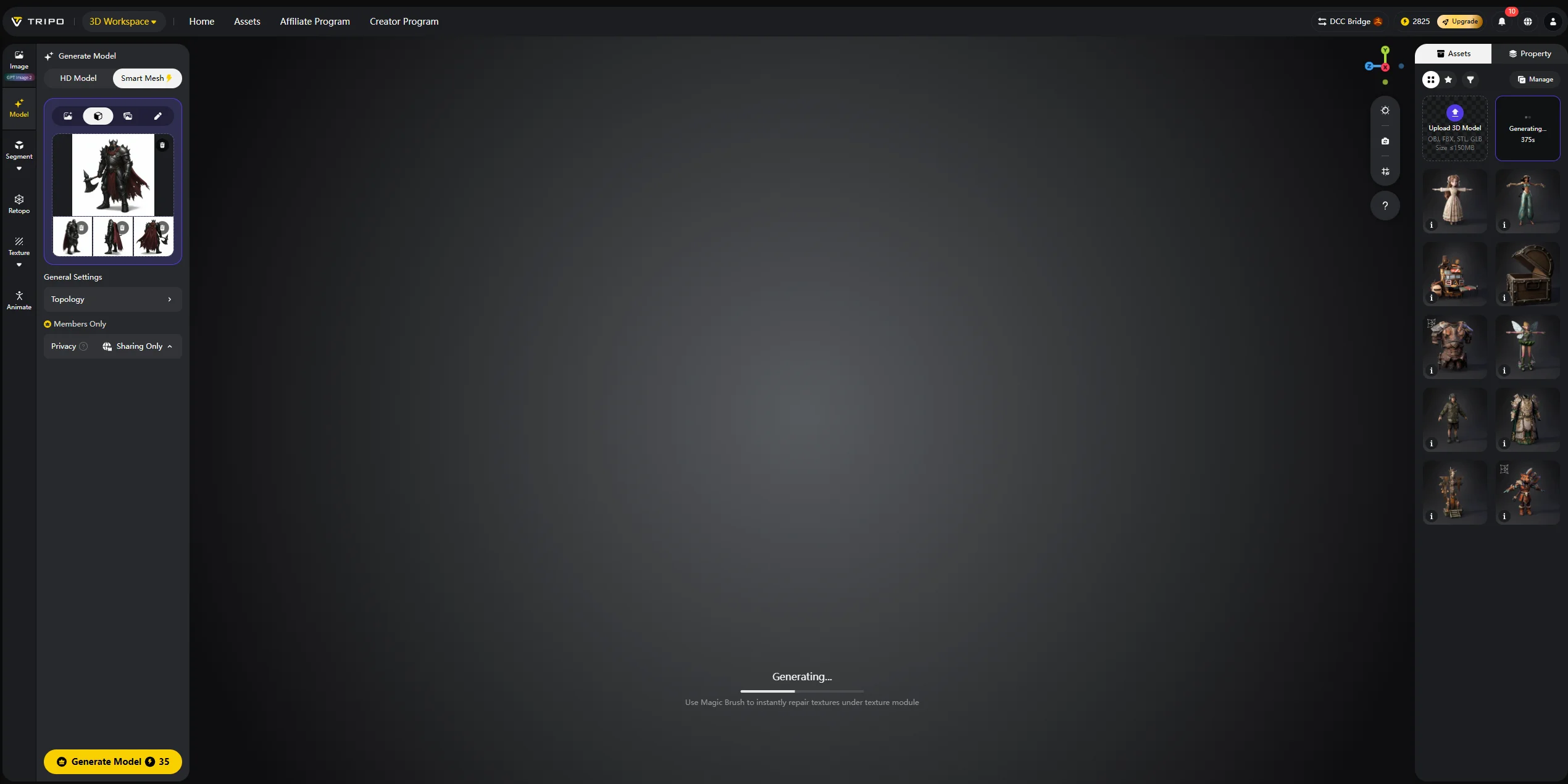
Step 4 — Click Generate
Start the generation process. Tripo AI is designed for fast AI 3D creation, helping users move from reference images to a previewable 3D model without a full manual modeling session.
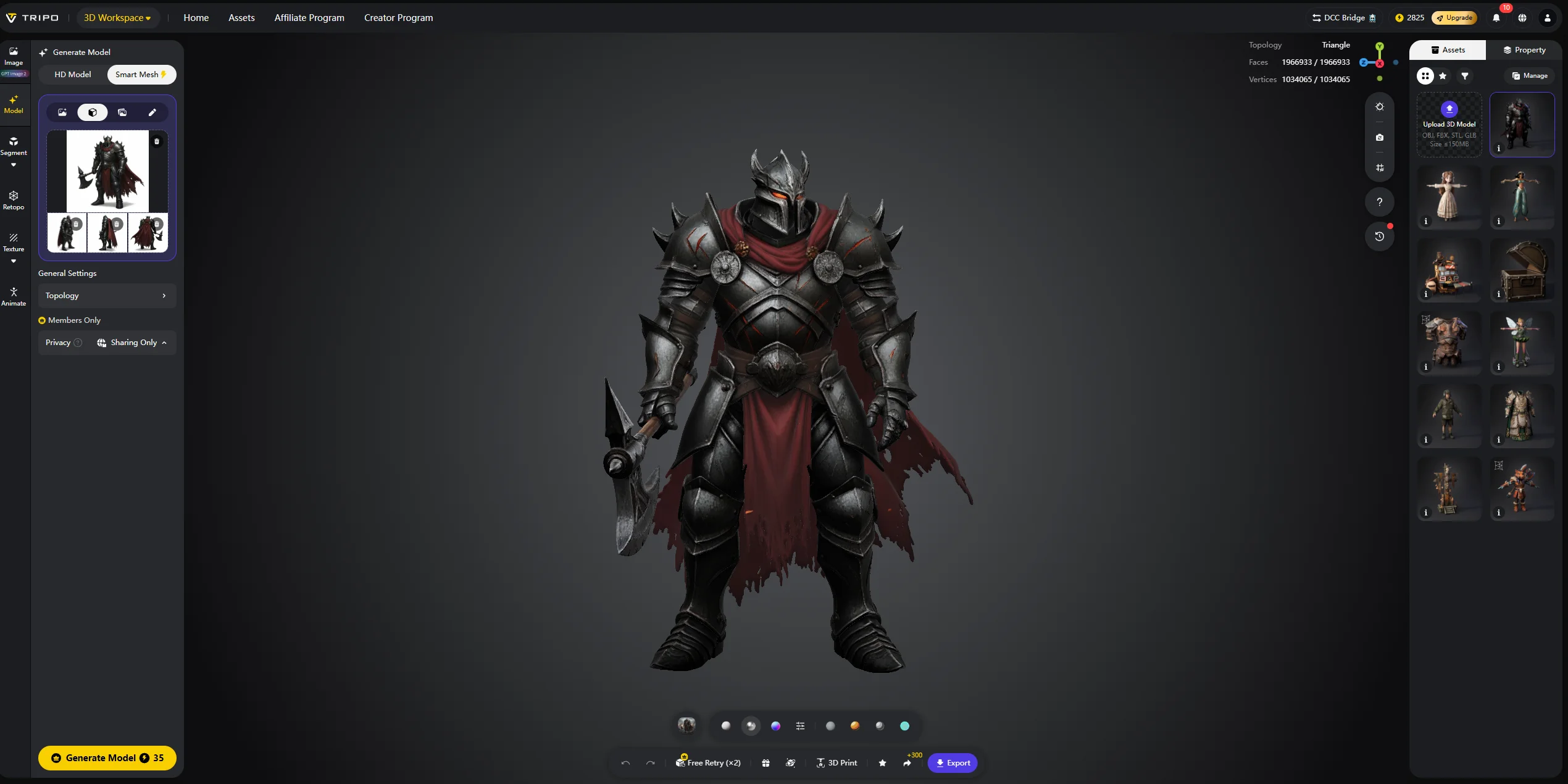
Step 5 — Preview and refine
Rotate the model and check silhouette, symmetry, texture quality, missing surfaces, and overall shape accuracy. If the result is close but not clean enough, improve the input images and regenerate.
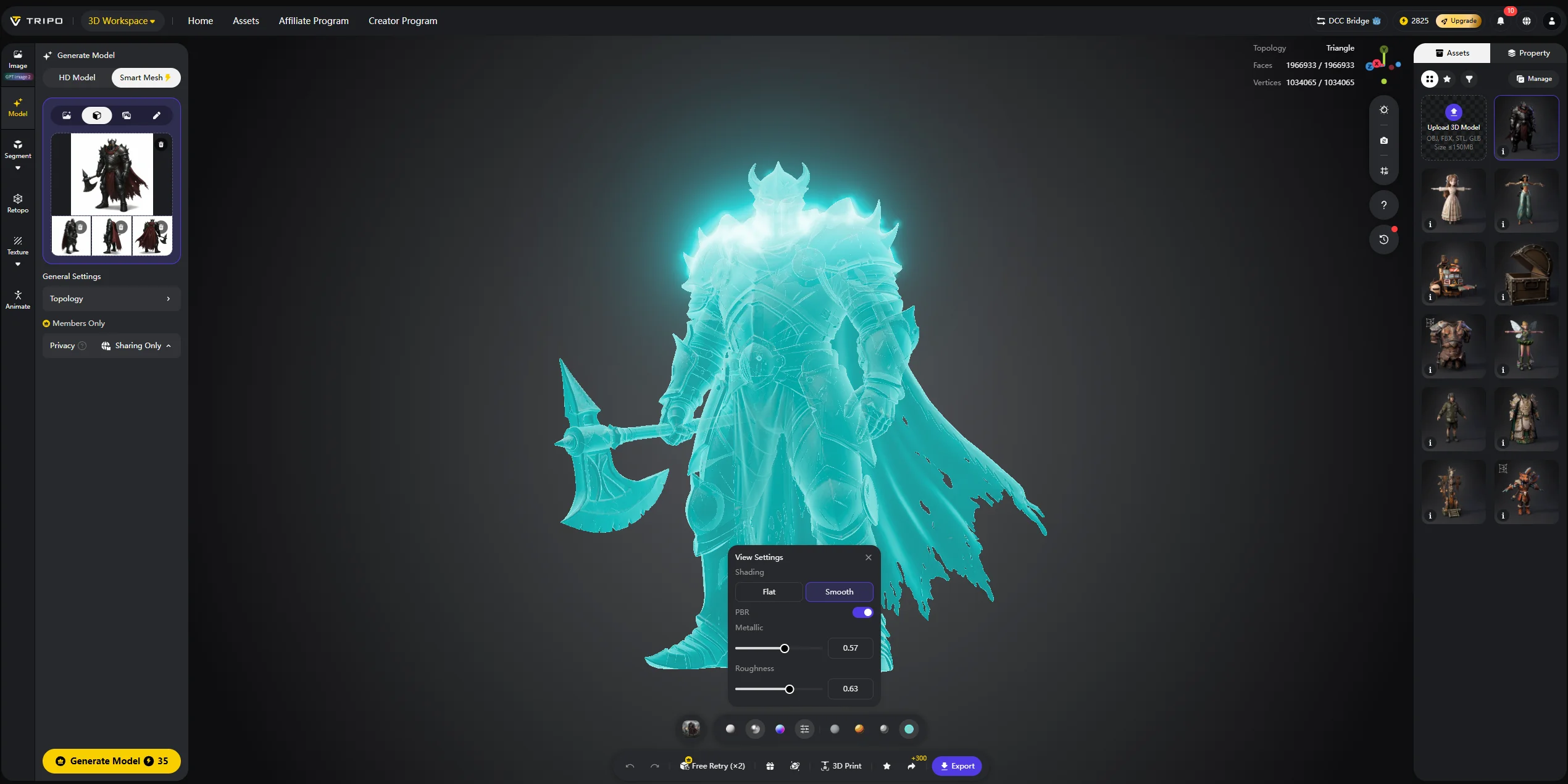
Step 6 — Export the model
Export the model in the format that fits your workflow. Use GLB for web and real-time preview, FBX for game engines or animation pipelines, and OBJ for editing in 3D software. For a broader format overview, see Tripo AI’s export formats guide.
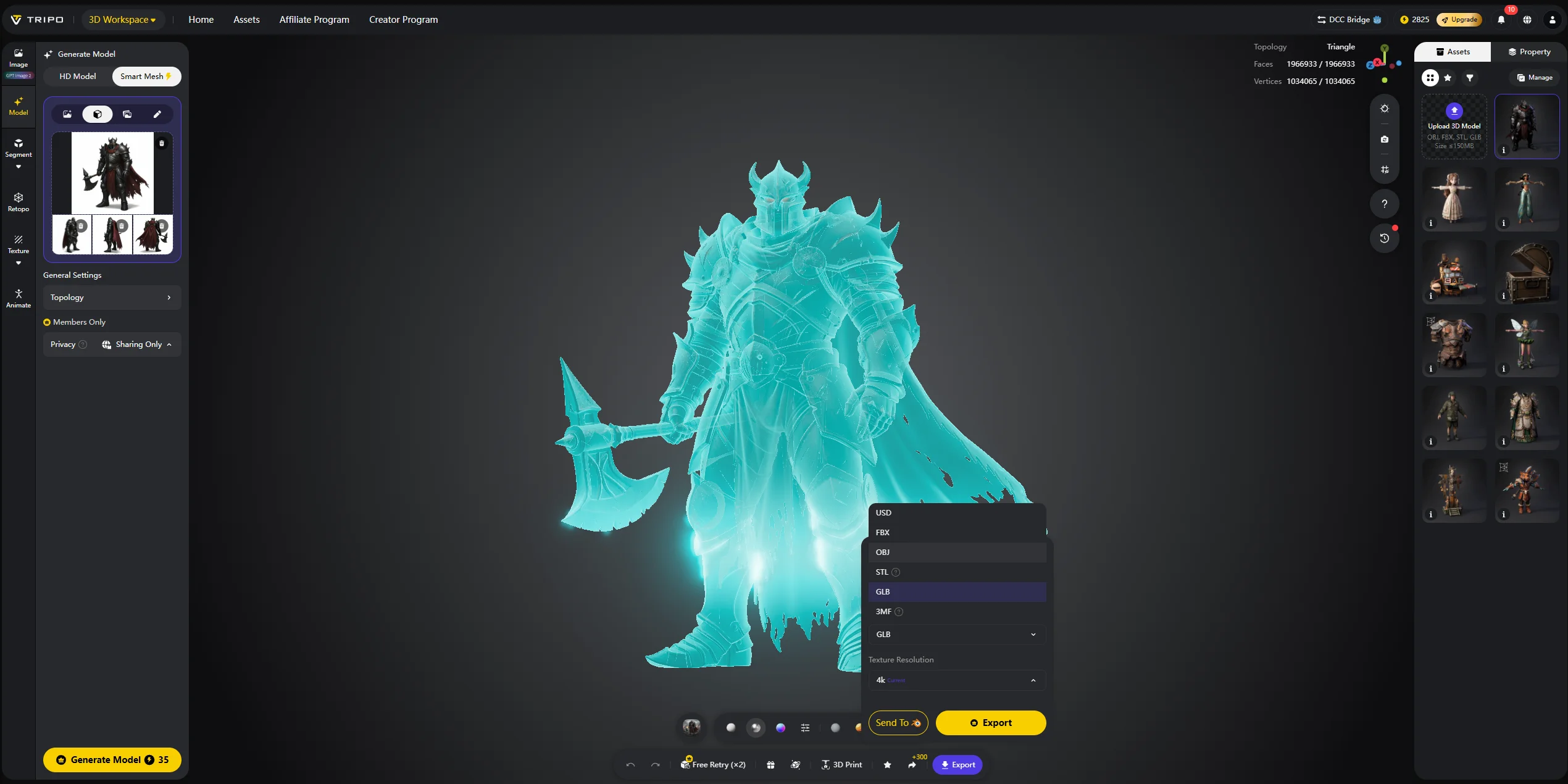
Step 7 — Import into your production tool
Bring the model into Blender, Unity, Unreal Engine, or another 3D tool. From there, you can adjust materials, optimize polygons, add collision, prepare prints, or use the asset in a scene.
Tripo AI vs. Traditional Photogrammetry
Traditional photogrammetry and Tripo AI both turn images into 3D assets, but they are built for different production workflows.
| Workflow | Input requirement | Setup | Strength | Best use case |
|---|---|---|---|---|
| Traditional photogrammetry | Usually 20–200 overlapping photos | Desktop or professional software such as Meshroom, RealityCapture, or Metashape; often hours of processing | Captures fine surface texture from real photos | Accurate scanning of real objects, environments, heritage assets, and detailed surfaces |
| Tripo AI multi-view | 2–4 clean reference views | Browser-based AI workflow; no software install required; generation time varies by settings and job conditions | Fast, clean, exportable mesh with usable topology | Product visualization, game props, rapid prototyping, ecommerce assets, and concept design |
Photogrammetry is still useful when exact real-world capture matters. It can preserve subtle surface detail, especially when the object is matte, well lit, and photographed from many overlapping angles.
Tripo AI is better when speed, accessibility, and immediate usability matter more than perfect scan fidelity. It can infer a complete model from only a few reference views, making it practical for ecommerce products, concept assets, game props, and design exploration.
The trade-off is simple: photogrammetry captures reality, while AI generation completes and regularizes it. For most production use cases, Tripo AI is faster and the output is easier to use immediately.
Multi-View 3D for Product Visualization
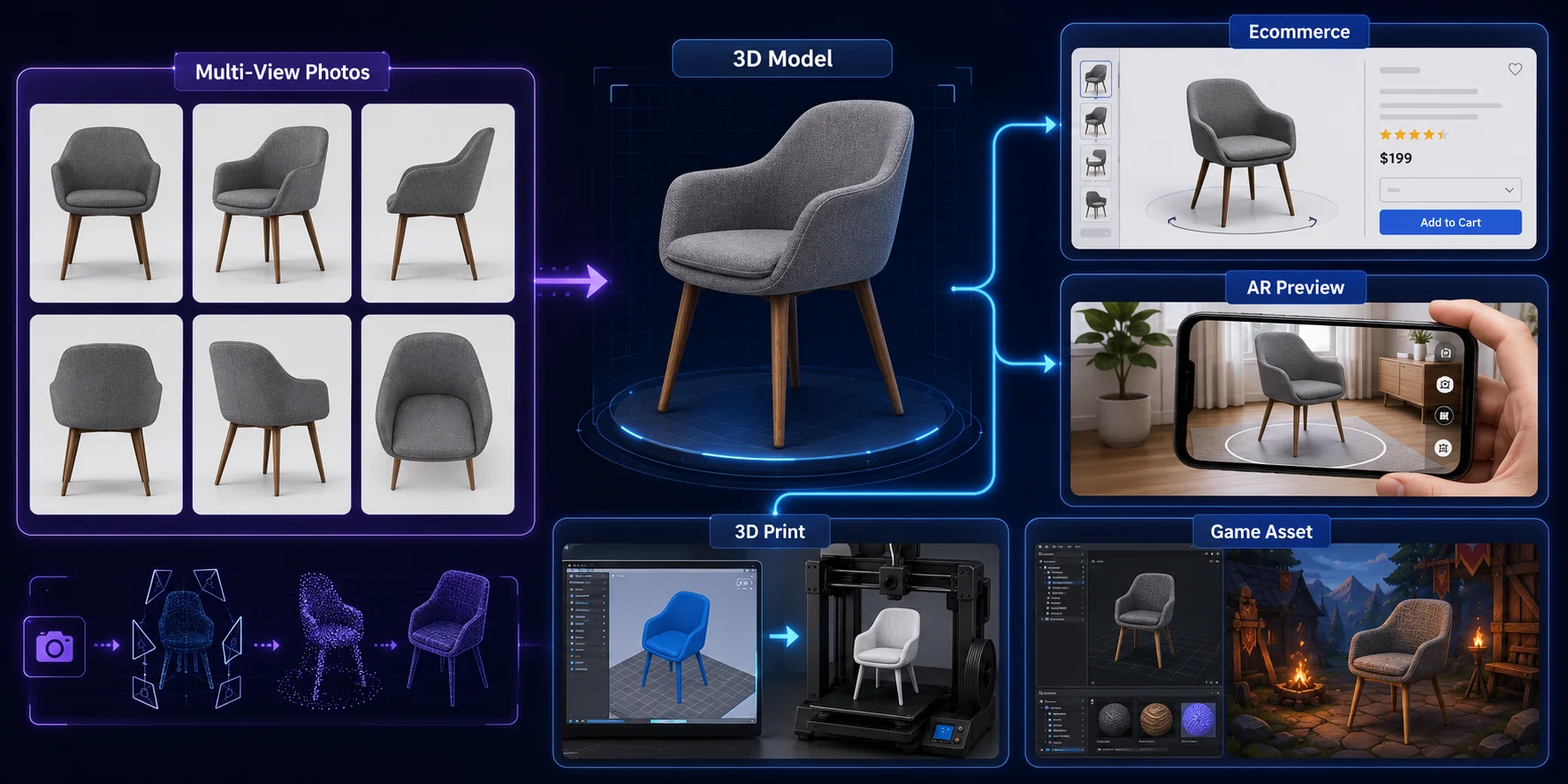
Multi-view to 3D is especially useful for product visualization because many teams already have catalog photos from the front, side, and back. These images can be converted into interactive 3D models for ecommerce product pages, investor decks, design reviews, and customer demos.
In ecommerce, a 3D model helps shoppers inspect shape, material, texture, and scale more confidently than static photos. For AR try-on or AR preview, the same model can be deployed in a WebXR viewer or mobile AR workflow, allowing customers to place a product in their space or view it more realistically before purchase.
For 3D printing, multi-view generation can produce a rough physical prototype after cleanup and STL export. In game development, it can replace a full manual modeling session for props, accessories, collectibles, background assets, and other non-hero objects.
Common Challenges and How to Fix Them
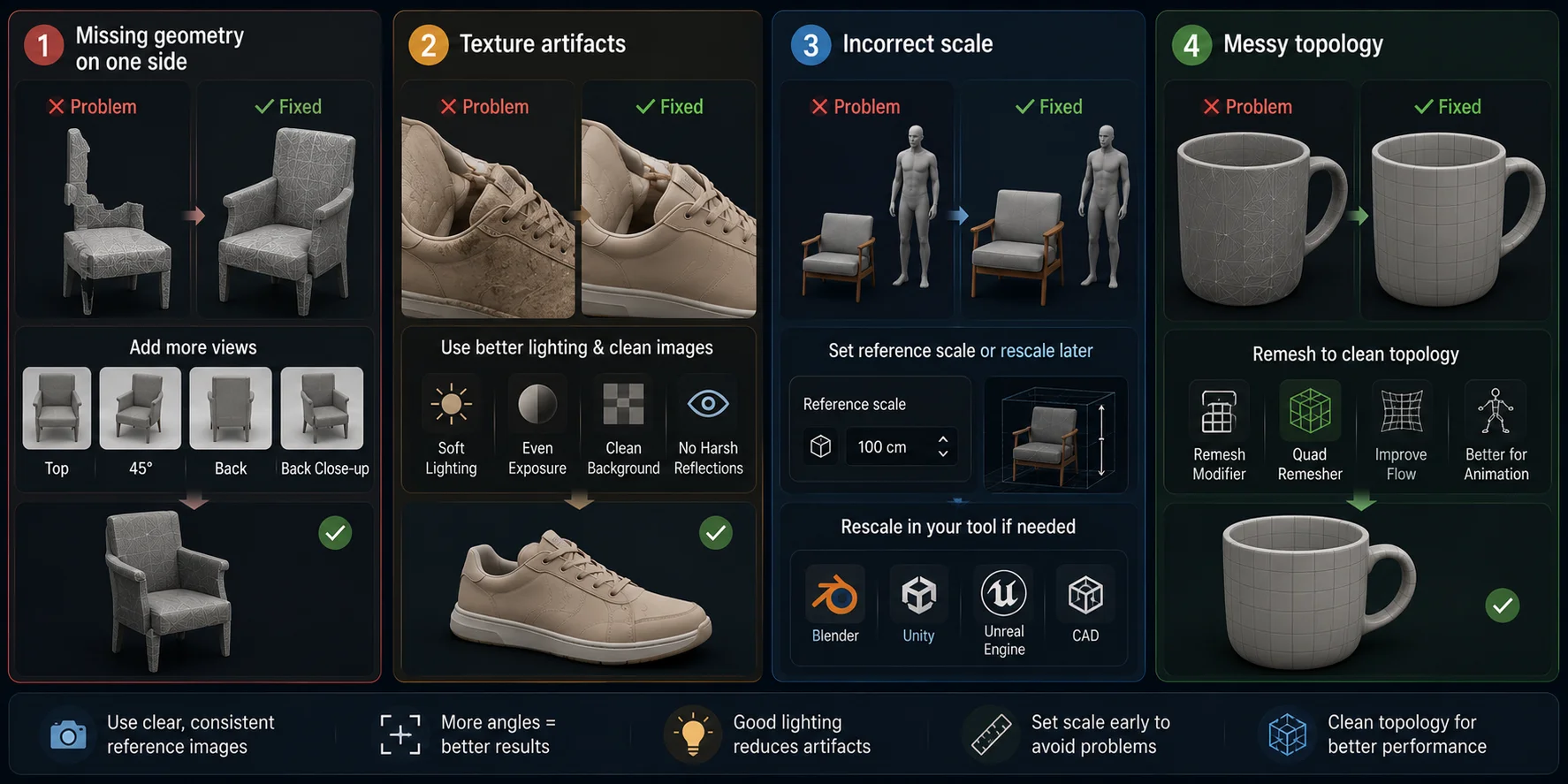
Missing geometry on one side. Add a top-down view, a 45-degree angle shot, or a clearer back view, then regenerate the model.
Texture artifacts. Use soft, even lighting and avoid harsh shadows, reflections, compression artifacts, or colored light spills.
Incorrect scale. Set the reference scale in the tool settings before export, or rescale the model later in Blender, Unity, Unreal Engine, or CAD software.
Messy topology. Use a remesh tool, such as Blender’s Remesh modifier or a quad remesher, to clean the mesh before animation rigging or game-ready optimization.
Frequently Asked Questions
Photogrammetry software for 3D models from photos
Common options include Meshroom, COLMAP, RealityCapture, and Agisoft Metashape. They work best when you have many overlapping photos and want to reconstruct a real object or environment.
What is the best way to create a 3D model from photos?
For maximum scan fidelity, use photogrammetry with many overlapping photos. For speed, use an AI multi-view tool like Tripo AI with front, back, left, and right views.
Affordable 3D scanning from photos for hobbyists
Hobbyists can start with phone photos and low-cost AI tools. AI multi-view generation is often easier than traditional photogrammetry because it needs fewer images and less setup.
How many images do I need for multi-view 3D generation?
Traditional photogrammetry may need 20–200 photos. AI multi-view tools can often work with four key images: front, back, left, and right.
What is the best AI tool for multi-view to 3D reconstruction?
Tripo AI is a strong practical choice for creators who need fast generation, browser-based workflow, and export formats for real production tools.
How accurate is AI multi-view 3D reconstruction?
It can be visually accurate when the input images are clean and consistent. However, it is not a replacement for precision CAD or metrology-grade scanning.
Can I use phone photos for multi-view 3D?
Yes. Use sharp, evenly lit phone photos with a plain background and capture at least front, back, left, and right views.
Conclusion
Multi-view to 3D has turned a complex photogrammetry process into a fast AI-assisted workflow: upload a few reference views and generate a usable 3D model in minutes, or even around 60 seconds with the right tool.
To try it yourself, start with Tripo AI: upload 2–4 clean images in multi-view mode, preview the result online, and export a production-ready model for Blender, Unity, Unreal Engine, product visualization, or 3D printing.