How Do 3D Printers Work? FDM, Resin & More Explained
TL;DR
- How do 3D printers work? They turn digital models into physical objects layer by layer.
- FDM printers melt filament, while resin printers cure liquid resin.
- Slicers convert 3D models into printable machine instructions.
- Supports, materials, and layer height strongly affect print quality.
- Tripo AI can generate 3D models from text or images; inspect, repair if needed, scale, and slice the result before printing.
Most people have seen a 3D printer move back and forth as an object slowly appears layer by layer. But inside the machine, a simple process is happening: a digital 3D file is sliced into thin layers, then turned into a physical object by depositing, curing, or fusing material.
The exact method depends on the printer type — filament, resin, nylon powder, or metal — but the principle is the same. This guide explains how 3D printers work, what types exist, and how to prepare your first model for printing.
What Is 3D Printing?
3D printing, also called additive manufacturing, is a process that builds a physical object from a digital 3D model by adding material layer by layer. Unlike subtractive manufacturing, where material is cut, drilled, or milled away from a larger block, 3D printing starts with empty space and adds only what the object needs.
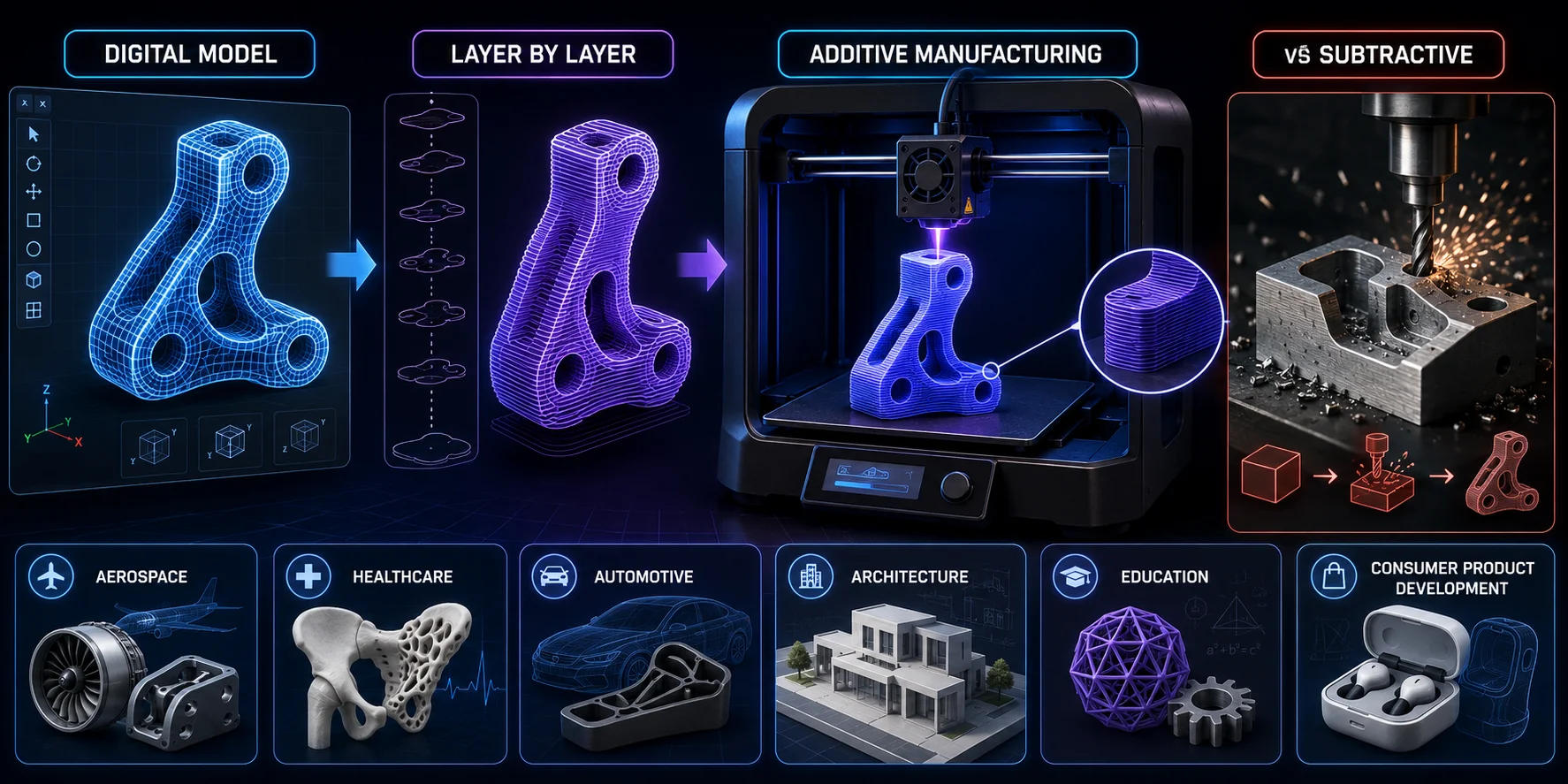
This layer-by-layer method makes it useful for prototypes, custom parts, internal channels, lightweight structures, and shapes that are difficult or expensive to make with traditional manufacturing.
The technology was developed in the 1980s and was first used mainly for industrial rapid prototyping. Today, desktop 3D printers can cost as little as $200, while professional systems are used in aerospace, healthcare, automotive design, architecture, education, and consumer product development.
How Does 3D Printing Work? (Process Overview)
Every 3D print follows the same basic workflow, regardless of printer type. The material process changes, but the path from digital model to physical object stays consistent.
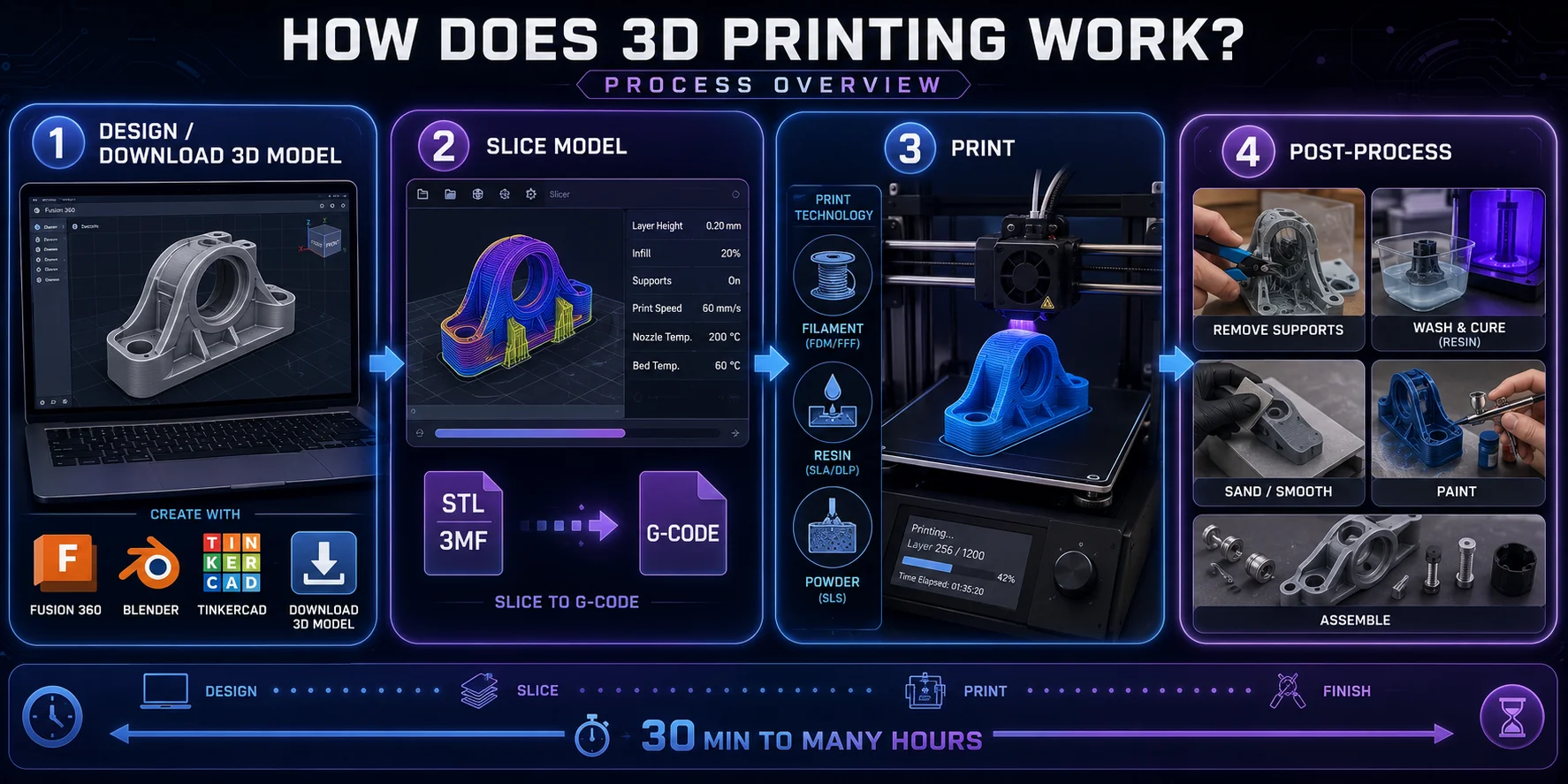
- Design or download a 3D model. Create a model in Fusion 360, Blender, TinkerCAD, or similar software, or download one from Thingiverse, Printables, or MyMiniFactory. Printable files are usually STL or 3MF.
- Slice the model. Use Cura, PrusaSlicer, Bambu Studio, or Chitubox to convert the model into thin layers and create a printer-compatible sliced file. FDM workflows commonly use G-code, while resin workflows often use a printer-specific file format. Here you set layer height, infill, speed, supports, and temperatures or exposure settings.
- Send the file and print. The printer reads its compatible sliced file and builds the object layer by layer by melting filament, curing resin, or sintering powder.
- Post-process the part. Remove supports, wash and cure resin prints, sand rough edges, paint, or assemble parts if needed.
The process can take 30 minutes for a small FDM part or many hours for large or high-detail prints.
Types of 3D Printers
There are several distinct 3D printing technologies, each suited to different materials, budgets, surface finishes, and applications. The three most common types for desktop and professional use are FDM, resin printing, and SLS.
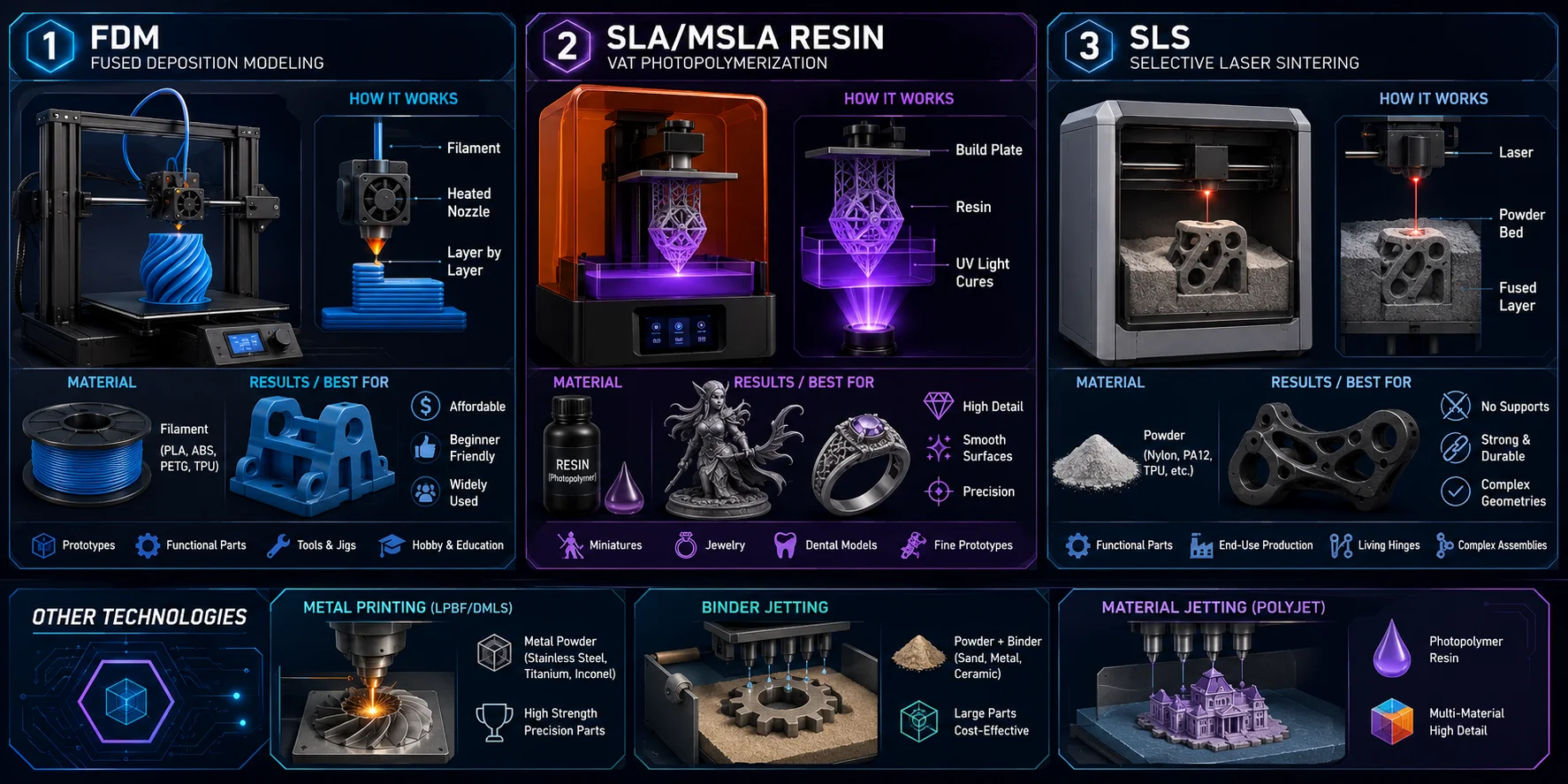
- FDM (Fused Deposition Modeling): Melts and extrudes thermoplastic filament layer by layer. It is the most affordable, beginner-friendly, and widely used desktop 3D printing method.
- SLA/MSLA (Stereolithography / Masked Stereolithography): Uses UV light to cure liquid photopolymer resin. It produces smoother surfaces and finer details than typical FDM printing, making it popular for miniatures, jewelry, dental models, and display parts.
- SLS (Selective Laser Sintering): Uses a laser to fuse nylon or other powder materials. Because unsintered powder supports the object during printing, SLS does not need support structures in the same way FDM or resin printers do.
Less common but growing technologies include SLM/DMLS metal printing, binder jetting, and material jetting. The right choice depends on material requirements, part size, surface finish, strength, budget, and intended use.
How FDM 3D Printers Work
FDM, or Fused Deposition Modeling, is the most widely used desktop 3D printing technology. Printers such as the Creality Ender series, Bambu Lab X1, and Prusa MK4 all use FDM because it is affordable, reliable, and beginner-friendly.
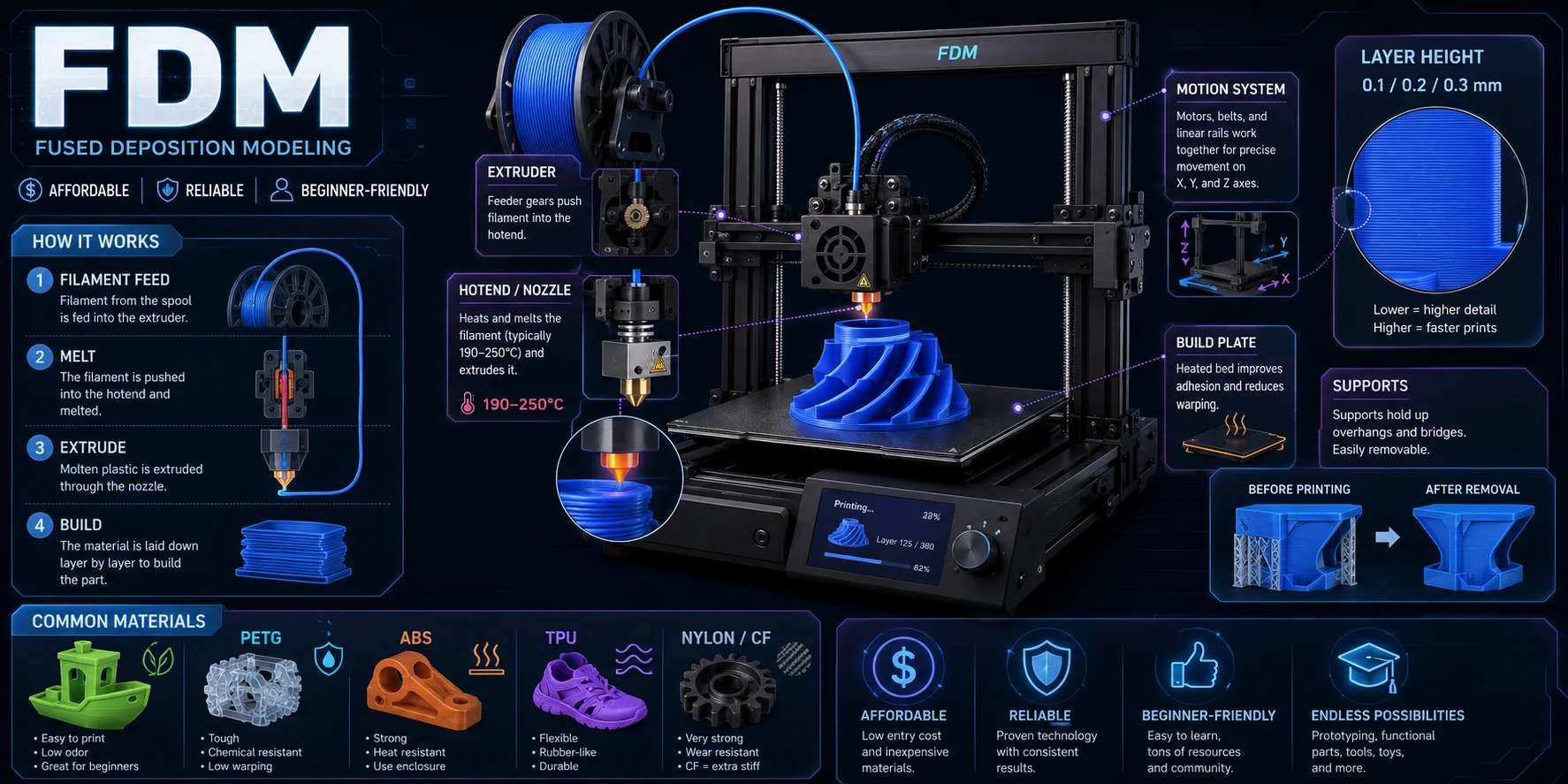
The mechanism: A spool of thermoplastic filament — most commonly PLA, PETG, or ABS — feeds into an extruder, which pushes the material toward a heated nozzle called a hotend. The hotend melts the filament, typically between 190°C and 250°C, and extrudes it onto the build plate following the toolpath generated by the slicer. As the material cools, each layer bonds to the one below it, gradually building the object one cross-section at a time.
Key Components
- Extruder: Grips and pushes filament toward the hotend.
- Hotend / nozzle: Melts and deposits plastic; a 0.4 mm nozzle is standard and balances speed with detail.
- Build plate: The surface where the object is printed, often heated to improve adhesion.
- Motion system: Moves the printhead, the bed, or both across the X, Y, and Z axes.
Supports
FDM cannot print melted plastic in mid-air. Overhangs beyond roughly 45 degrees usually need support structures, which are printed with the model and removed afterward.
Layer Height
A typical FDM layer height is 0.2 mm. Thinner layers, such as 0.1 mm, create smoother surfaces but increase print time. Thicker layers, such as 0.3 mm, print faster but show more visible layer lines.
Common FDM Materials
PLA is easy for beginners, PETG is stronger and slightly flexible, ABS is heat-resistant but prone to warping, TPU is flexible, and engineering-grade filaments such as PA nylon or carbon fiber composites are used for stronger functional parts.
How Resin 3D Printers Work: SLA and MSLA
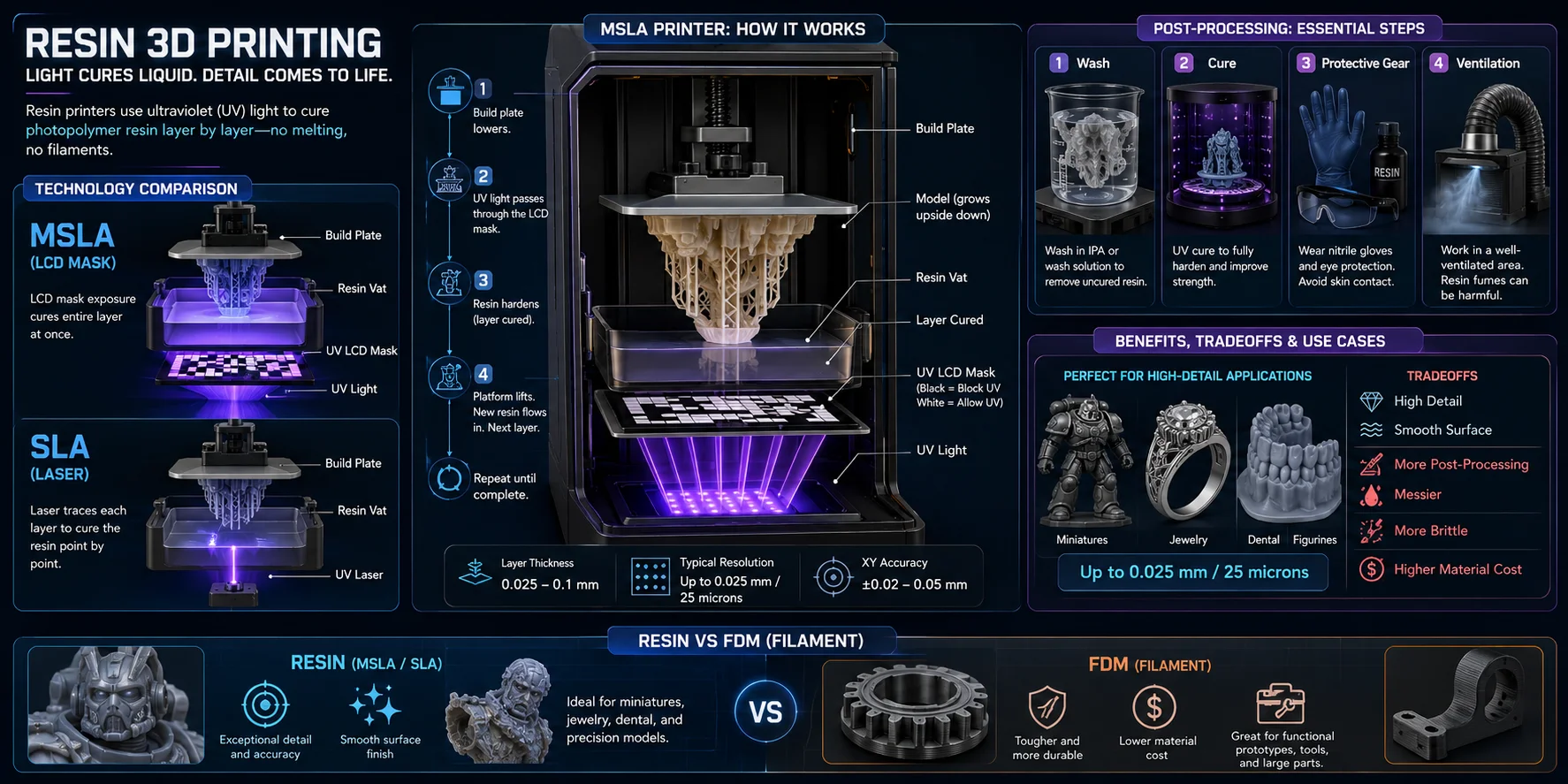
Resin printers do not melt plastic. Instead, they use light to cure liquid photopolymer resin into solid layers. The two main resin technologies are SLA, or stereolithography, and MSLA, or masked stereolithography. Most consumer resin printers today, such as the Elegoo Mars and Anycubic Photon series, use MSLA.
How MSLA Works
In an MSLA printer, a UV LCD screen sits beneath a transparent resin vat. For each layer, the screen displays a black-and-white mask. UV light passes through only the transparent areas and cures the resin in that exact shape. After each exposure, the build plate lifts slightly, fresh resin flows underneath, and the next layer is cured. The object gradually grows downward from the build plate.
How SLA Works
SLA uses a UV laser instead of an LCD mask. The laser traces each layer across the resin surface with high precision. SLA machines, such as professional Formlabs printers, are widely used in dental, jewelry, engineering, and prototyping workflows because they can produce smooth surfaces and very fine details.
Post-Processing
Resin prints must be washed in isopropyl alcohol, or IPA, or a dedicated wash solution to remove uncured resin. They also need UV post-curing to reach final strength. Uncured resin can irritate skin and release harmful fumes, so gloves, eye protection, and ventilation are required.
Resolution Advantage
Resin printers can achieve layer heights as fine as 0.025 mm, or 25 microns. This creates smoother surfaces and sharper details than typical FDM prints, making resin ideal for miniatures, jewelry masters, dental models, figurines, and display parts.
Tradeoffs vs. FDM
Resin printing is messier, requires more post-processing, and usually costs more per kilogram than PLA filament. Resin parts can also be more brittle. For high detail, choose resin; for tough, low-cost functional parts, FDM is often the better first choice.
How Metal 3D Printers Work
Metal 3D printing is mainly used for engineering, aerospace, medical implants, custom tooling, and other high-performance parts. The most common industrial methods are Selective Laser Melting (SLM) and Direct Metal Laser Sintering (DMLS).
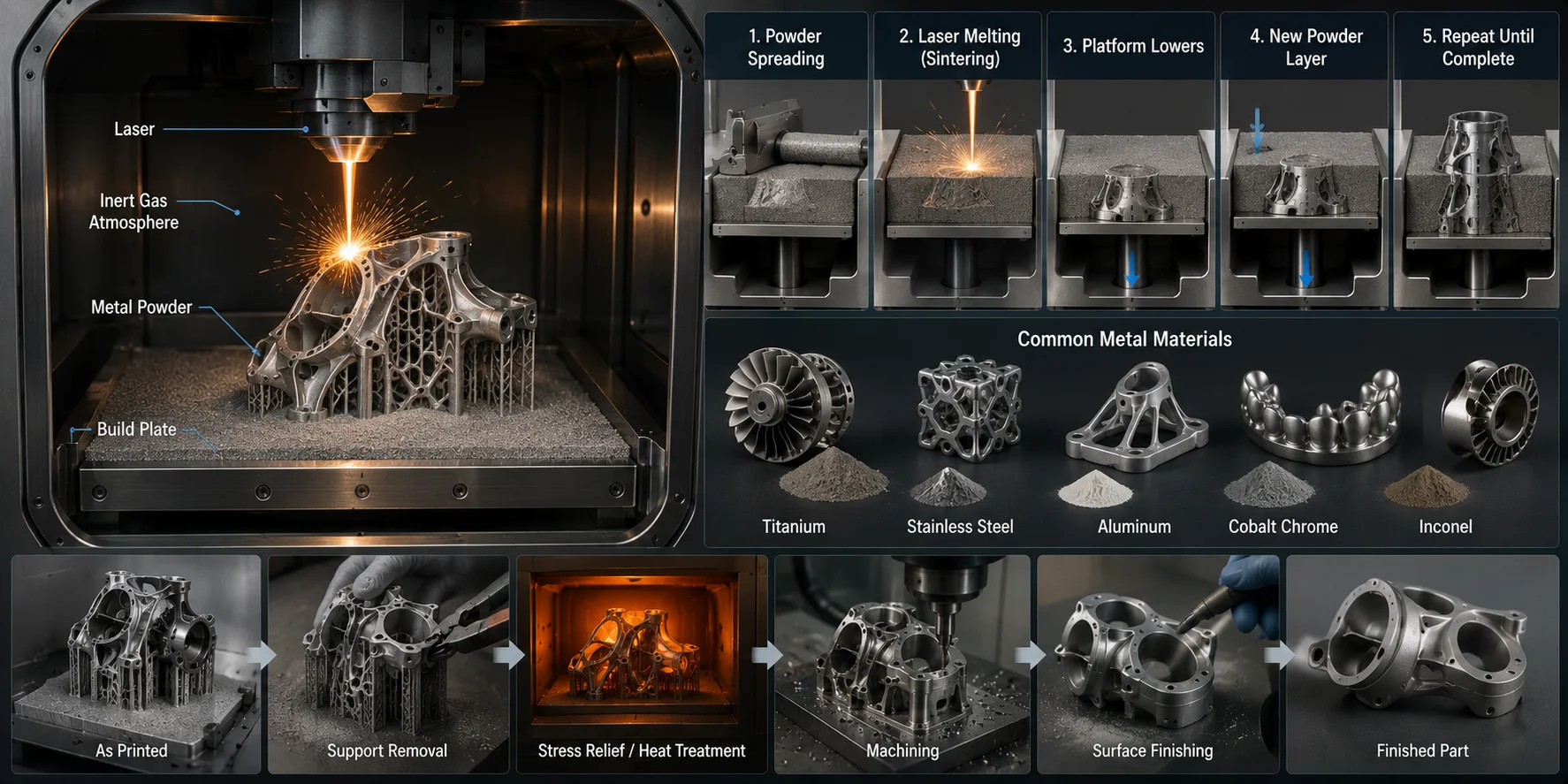
In these systems, a thin layer of metal powder is spread across a build platform. A high-powered laser then melts or sinters selected areas according to the sliced 3D model. The platform lowers, a new powder layer is added, and the process repeats until the part is complete. Common materials include titanium, stainless steel, aluminum, cobalt chrome, and Inconel.
Metal printing usually happens inside a sealed, inert-gas chamber to reduce oxidation. The result can be a dense metal part with mechanical properties close to traditionally manufactured metal, though heat treatment, support removal, machining, or surface finishing is often required afterward.
Desktop metal printing is also becoming more accessible through bound metal deposition systems. These printers extrude a metal-and-binder composite, then sinter the part in a furnace. They are still far more expensive than plastic printers, so most hobbyists and small studios outsource metal prints to professional service bureaus.
Step-by-Step: From 3D Model to Print-Ready File
This is where many beginners get stuck. Having a 3D printer is only half the story — you also need a model that is printable, correctly scaled, and sliced with the right settings. Here is the full workflow from 3D file to finished print.
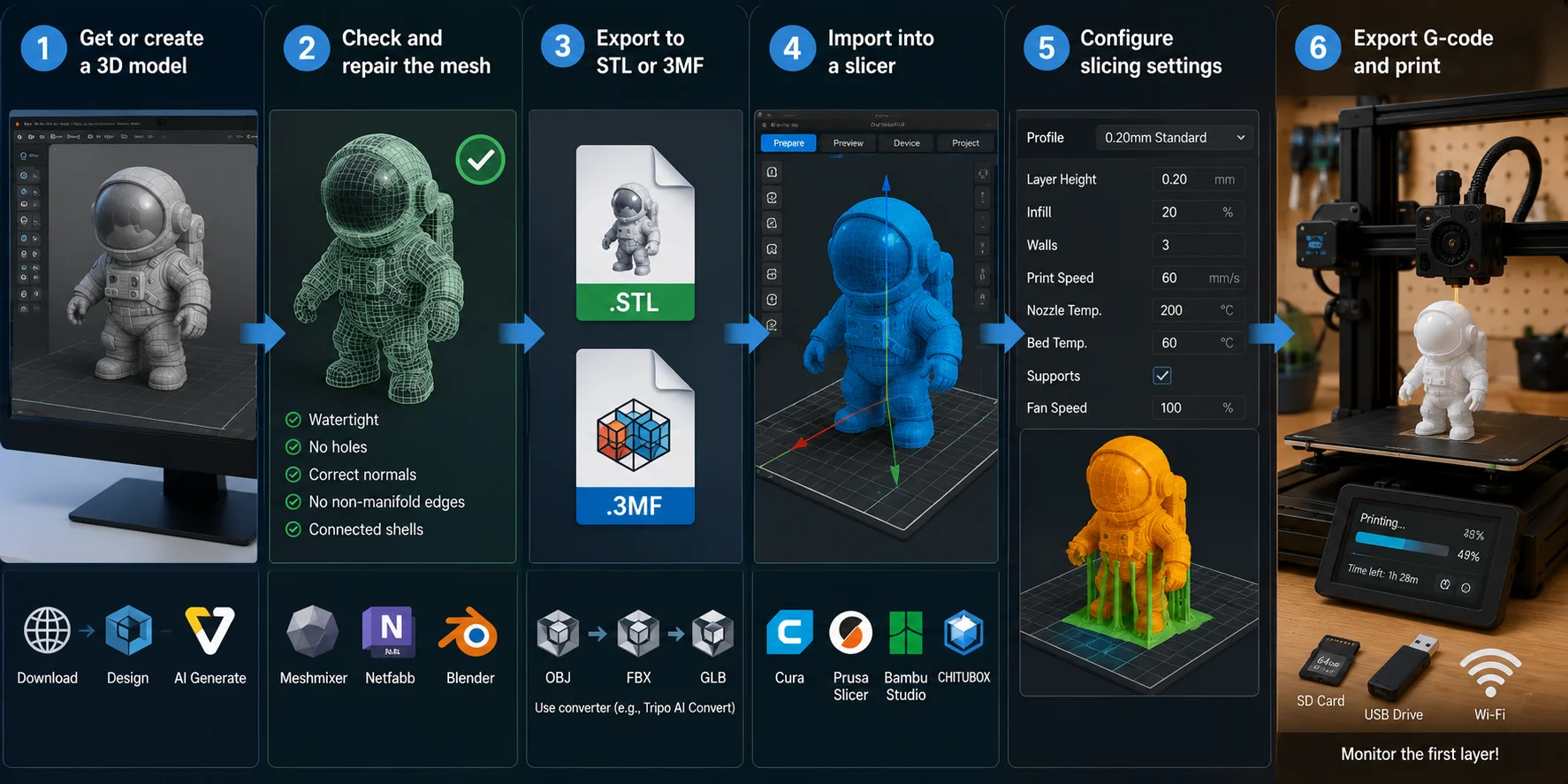
- Get or create a 3D model. You can download a ready-made model from platforms like Thingiverse, Printables, or MyMiniFactory; design one in Fusion 360, Blender, or TinkerCAD; or generate one with AI. For a fast concept, Tripo AI’s text-to-3D generator can generate a 3D model from a written prompt for you to inspect, repair if needed, scale, and slice.
- Check and repair the mesh. A printable model should be watertight, or manifold. That means no holes, inverted normals, non-manifold edges, or disconnected shells that may confuse the slicer. Tools such as Meshmixer, Netfabb, Blender, or PrusaSlicer’s repair tools can fix many common issues. If you are starting from a product photo or reference image, Tripo AI’s image-to-3D tool can generate a mesh before you repair, scale, and slice it.
- Export to STL or 3MF. STL is the most universal 3D printing format, while 3MF preserves more metadata, including color, units, and print settings. If your file starts as OBJ, FBX, GLB, or another format, use a dedicated 3D file converter such as Tripo AI Convert before importing it into a slicer.
- Import into a slicer. Load the file into Cura, PrusaSlicer, Bambu Studio, or Chitubox. Scale, orient, and position the model on the virtual build plate. Good orientation can reduce supports, improve surface quality, and increase strength along critical axes.
- Configure slicing settings. Key settings include layer height, infill percentage, wall count, print speed, supports, nozzle temperature, and bed temperature. For FDM, 0.2 mm is a common layer height. Decorative prints often use 15–20% infill, while functional parts may need 40–60% infill and three or four wall perimeters.
- Export G-code and print. Save the sliced file to an SD card, USB drive, or send it over Wi-Fi. Start the print and monitor the first layer carefully, because good first-layer adhesion is one of the biggest factors in a successful print.
How to Choose a 3D Printing Technology
The right 3D printing technology depends on what you want to make. There is no single best printer for every user, because each process balances cost, detail, strength, material choice, and post-processing differently.
| Need | Best technology | Why |
|---|---|---|
| Beginner-friendly printing | FDM | Lowest cost, safest materials, and easiest workflow |
| Functional plastic parts | FDM | Supports PETG, ABS, nylon, TPU, and composite filaments |
| Miniatures and fine detail | Resin / SLA / MSLA | Produces smooth surfaces and sharp small features |
| Dental, jewelry, and casting | Resin / SLA | Offers high precision and specialized resins |
| Strong nylon parts | SLS | No support structures and good mechanical properties |
| Metal engineering parts | SLM / DMLS | Creates high-strength metal components |
| Fast visual prototypes | FDM or resin | Use FDM for size and cost, resin for detail |
If you are buying your first printer, choose FDM unless you specifically need miniature-level detail. For industrial nylon or metal parts, SLS and metal printing are usually outsourced to professional services.
3D Printing Materials
Material choice is inseparable from technology choice. Different printer types support different material families, and each material affects strength, flexibility, surface finish, heat resistance, and post-processing needs.
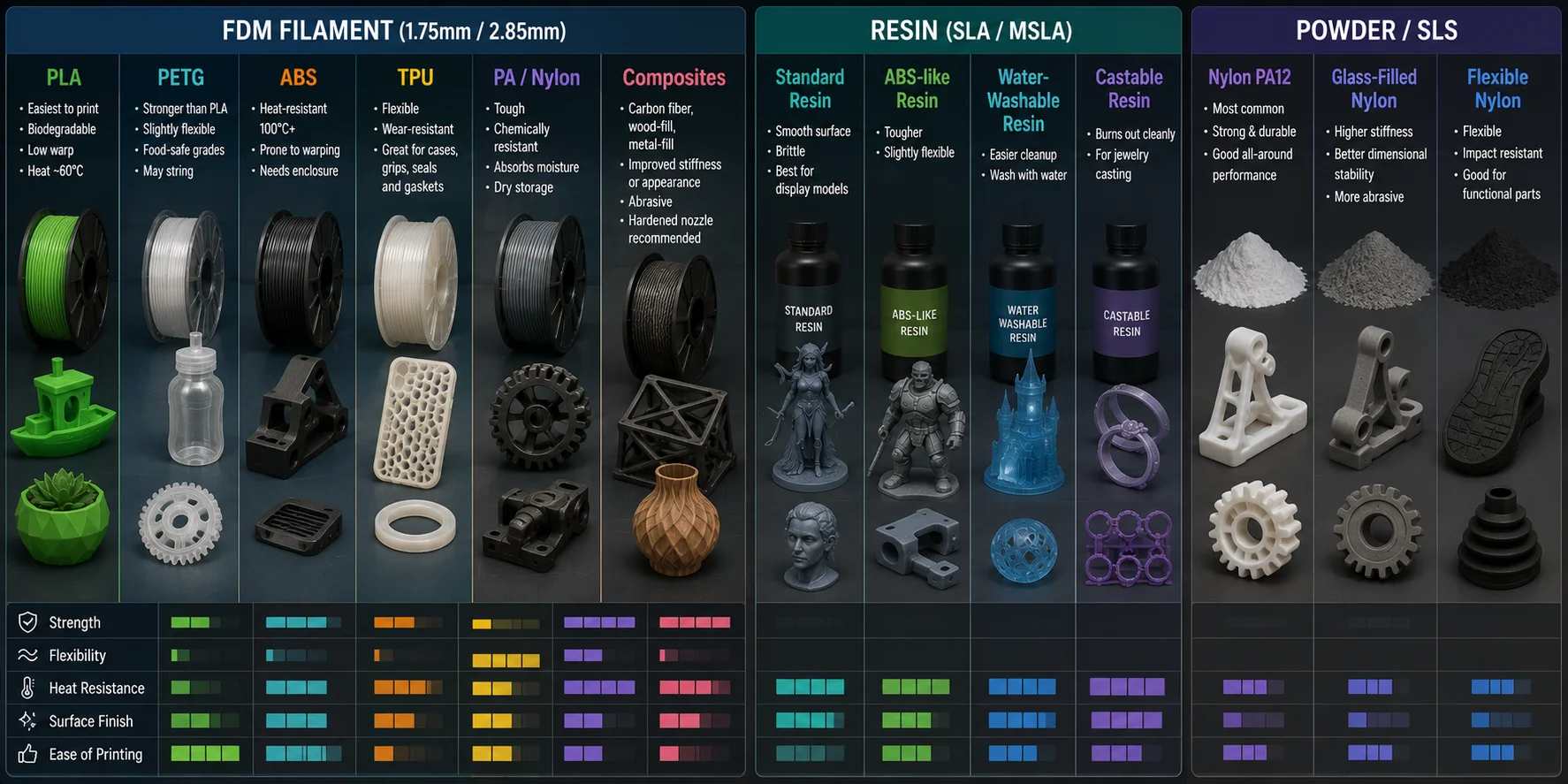
FDM filament usually comes in 1.75 mm or 2.85 mm diameter:
- PLA: easiest to print, biodegradable, low warp; limited heat resistance of about 60°C.
- PETG: stronger than PLA, slightly flexible, with food-safe grades available; may cause slight stringing.
- ABS: heat-resistant to 100°C+ but prone to warping, so it usually requires an enclosure.
- TPU: flexible and wear-resistant; good for phone cases, grips, seals, and gaskets.
- PA / Nylon: tough and chemically resistant, but absorbs moisture and requires dry storage.
- Composites: carbon fiber, wood-fill, or metal-fill filaments improve stiffness or appearance but are abrasive and often need a hardened nozzle.
Resin:
- Standard resin: smooth surface but brittle; best for display models.
- ABS-like resin: tougher and slightly flexible.
- Water-washable resin: easier cleanup.
- Castable resin: burns out cleanly for jewelry casting.
Powder / SLS: Nylon PA12 is the most common material, with glass-filled and flexible variants available.
Benefits of 3D Printing
3D printing is valuable because it makes physical production faster, more flexible, and more accessible.
- Design freedom: Create complex geometries that are difficult or impossible with injection molding or CNC milling.
- Rapid prototyping: Go from digital concept to physical prototype in hours, not weeks.
- Low-volume production: Make small batches economically without expensive molds or tooling.
- Customization: Each print can be unique, with no major penalty for variation.
- Reduced waste: Additive manufacturing uses only the material needed, plus supports.
- Accessibility: Desktop printers bring manufacturing capability to individuals, schools, labs, and small teams.
For makers, the biggest advantage is iteration speed: design, print, test, adjust, and print again quickly.
Applications of 3D Printing
3D printing is used across virtually every industry:
- Product design and prototyping: Iterate physical form factors quickly before mass production.
- Healthcare: Create custom prosthetics, surgical guides, dental aligners, and hearing aids.
- Aerospace and defense: Produce lightweight brackets, engine components, jigs, and fixtures.
- Architecture: Build scale models and structural experiments.
- Education: Support hands-on STEM learning with physical models and classroom projects.
- Consumer goods: Print custom phone cases, replacement parts, home decor, and accessories.
- Entertainment and gaming: Create miniatures, cosplay props, collectibles, and set pieces.
For creators working with digital 3D assets — game developers, AR/VR designers, and product visualizers — AI-generated 3D models increasingly serve as the starting point before any physical printing happens.
Frequently Asked Questions
What Is Needed to Run a 3D Printer?
You need a printer, material such as filament or resin, slicing software, and a printable 3D model. A computer plus SD card, USB drive, or Wi-Fi transfer is also common.
Is Anything Illegal to 3D Print?
Yes. Functional firearms, regulated weapon parts, counterfeit goods, or copyrighted designs may be illegal or legally risky, so always check local laws and model licenses.
Is 3D Printing Expensive?
Entry-level FDM printers start around 15–25 per kilogram. Resin printing adds costs for resin, washing, curing, gloves, and ventilation.
Can You Drink Out of 3D Printed Cups?
Usually not without caution. Standard FDM prints have layer gaps that can trap bacteria, so food-safe material, sealing, or a liner is recommended.
How Long Does a 3D Print Take?
Print time depends on size, layer height, speed, and complexity. A small keychain may take 30 minutes, while a large figurine can take 12–20 hours.
Can I Print Multiple Objects at Once?
Yes. FDM printers take longer because the nozzle visits each object, while resin printers can print multiple objects with little added time if they fit on the plate.
Conclusion
3D printing has evolved from an industrial technology into an accessible way to turn digital ideas into physical objects. Whether you use FDM for functional parts, resin for high-detail models, SLS for nylon components, or metal printing for engineering applications, the core principle remains the same: a digital file is sliced into layers and printed one cross-section at a time.
If you want a faster way to move from concept to a 3D model, Tripo AI can generate models from text prompts or images. Inspect the mesh, repair and scale it as needed, then export a format your slicer supports before printing. Try it in Tripo AI Studio, or check Tripo AI Pricing to choose the right plan.