Best Images for Image to 3D Conversion (What Actually Works)
TL;DR
- Clear, centered images with plain backgrounds convert best to 3D models.
- Even lighting and sharp focus help AI infer shape and depth.
- Product photos, concept art, logos, and object photos usually work well.
- Avoid cluttered backgrounds, low resolution, cropped subjects, and heavy filters.
- Tripo AI helps turn clean 2D images into export-ready 3D models.
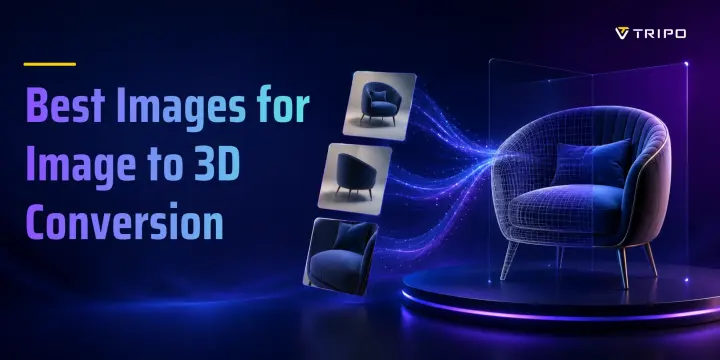
The best images for image-to-3D conversion are clear, high-resolution photos with a centered subject, clean background, and even lighting. The object should be easy to separate from its surroundings, visible from a useful angle, and detailed enough for the AI to infer shape, depth, texture, and material cues. In this guide, we will break down what makes a source image work, which image types produce the strongest 3D results, what to avoid, and how to use tools like Tripo AI to turn better images into better 3D models.
Why Image Quality Matters for 3D Conversion
Image-to-3D conversion depends on the visual information available in the source image. The AI reads the object’s outline, visible surfaces, shadows, texture patterns, and perspective cues, then uses them to infer depth, hidden geometry, and surface materials. In simple terms, it follows the “garbage in, garbage out” rule: a clean image gives the model reliable evidence, while a blurry or cluttered image forces it to guess.
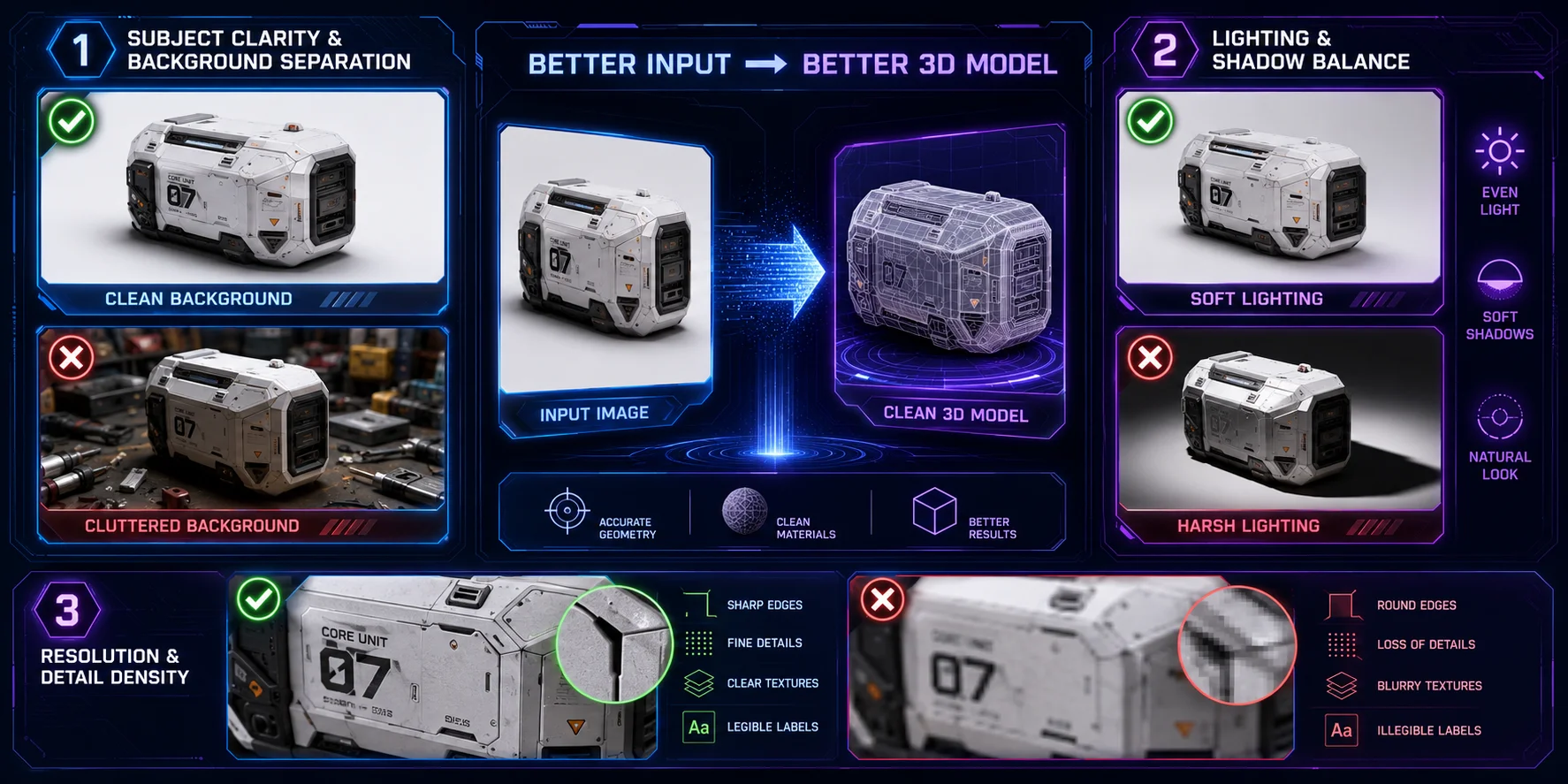
- Subject clarity and background separation
The subject should be clearly separated from the background. White, grey, black, or single-color backgrounds work best because they make object boundaries easier to detect. Busy backgrounds can confuse depth estimation and cause the AI to mistake background patterns for object edges.
- Lighting and shadow balance
Soft, even lighting usually produces better results than dramatic side lighting. Front or diffuse light preserves shape and texture, while harsh shadows can hide details or be misread as geometry.
- Resolution and detail density
Use images at 1024 × 1024 pixels or higher when possible. Higher-resolution images preserve seams, grooves, labels, and material details, helping the AI generate cleaner geometry and more accurate UV textures.
The Best Types of Images for Image to 3D
Different image types work better for different 3D goals. The best source depends on whether you are creating a product model, game asset, character, architectural blockout, logo, or physical prototype.
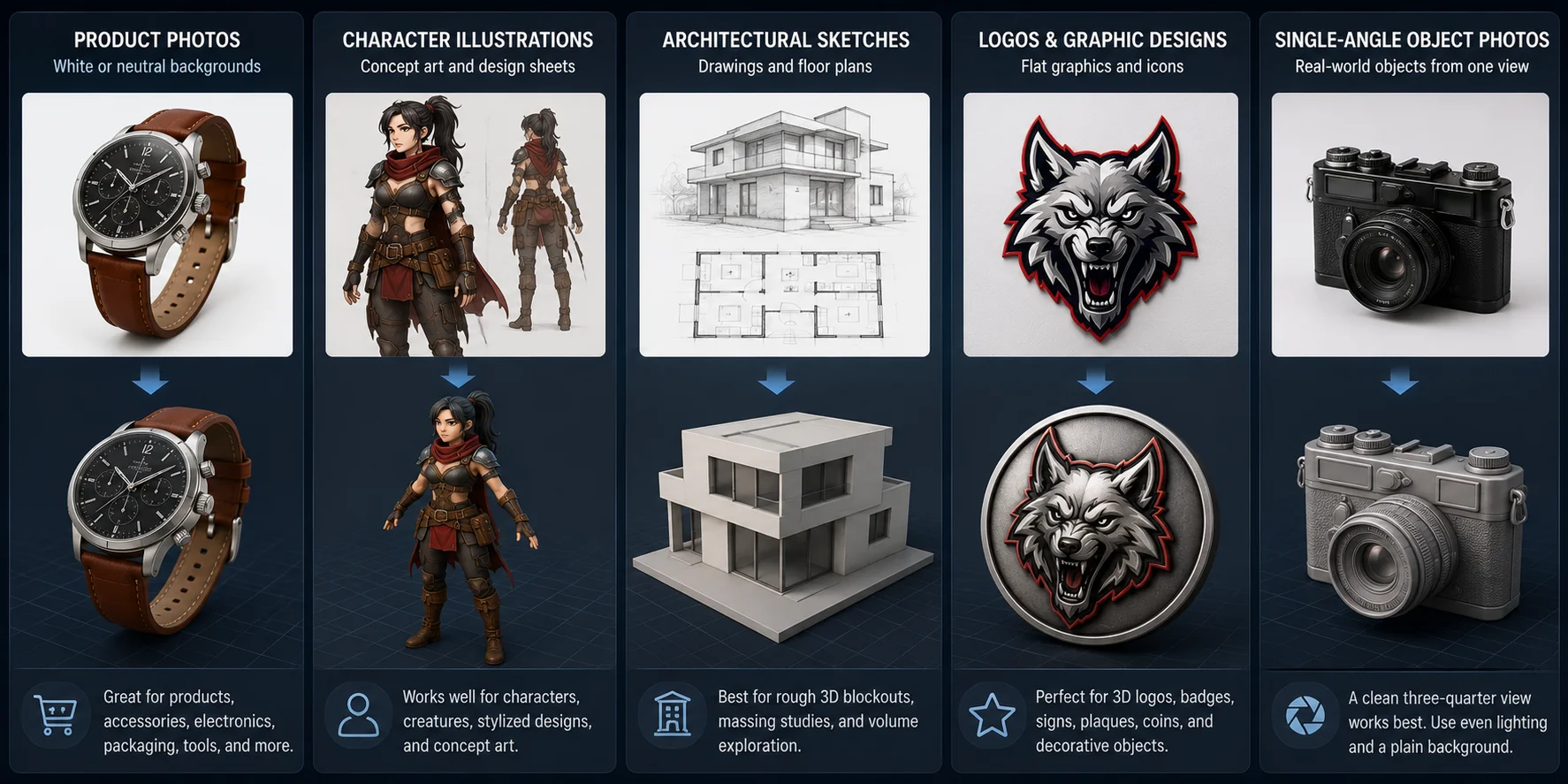
- Product photos on white or neutral backgrounds
Product photos are often the strongest source images for image-to-3D conversion. Ecommerce images usually show the object clearly, with clean lighting and minimal background distraction. Toys, household items, electronics, shoes, bottles, packaging, tools, and accessories all work well when the silhouette is visible.
- Character illustrations and concept art
Character illustrations, creature concepts, and stylized design sheets can also convert well, especially when the pose and outline are clear. AI tools can recognize common body structures such as heads, arms, legs, tails, wings, armor, or clothing layers. A front-facing or three-quarter view usually works better than an extreme action pose.
- Architectural sketches and floor plans
Architectural sketches, elevation drawings, massing diagrams, and simple floor plans are useful for generating rough 3D blockouts. They are best for quick volume studies rather than final production architecture models.
- Logos and flat graphic designs
Logos, icons, emblems, and flat graphics can become 3D badges, signs, plaques, coins, or decorative objects. High-contrast designs with clean edges work better than complex graphics with gradients or tiny text.
- Real-world object photos from a single angle
Single-angle object photos can still produce usable 3D models. A clean three-quarter view is usually best because it shows the front, side, and depth together. Use a plain background, even lighting, and keep the full object visible.
What to Avoid — Images That Produce Poor Results
Some images may look acceptable to human viewers but perform poorly in image-to-3D conversion. The problem is usually not visual style, but missing, noisy, or misleading 3D information.
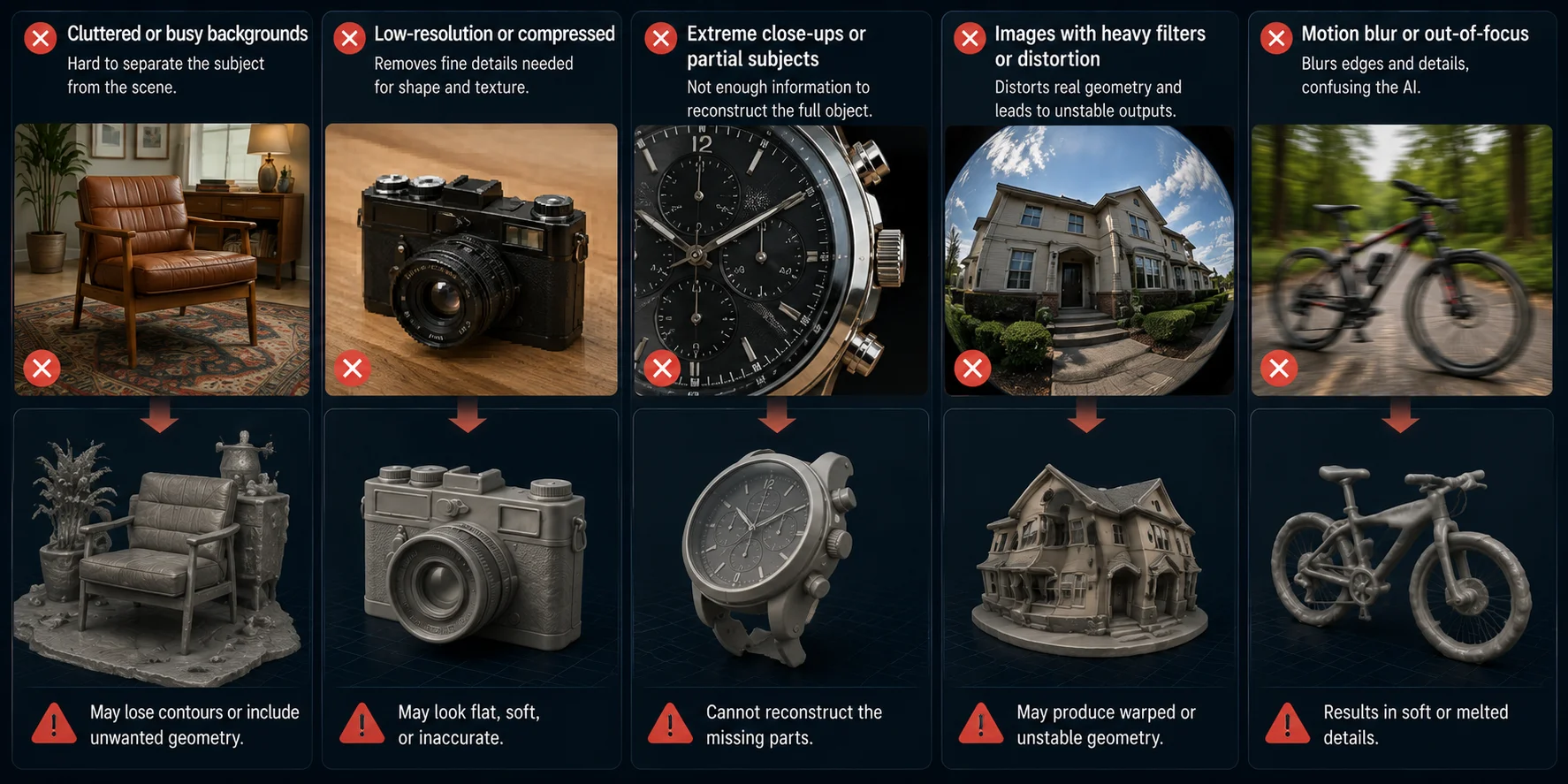
Cluttered or busy backgrounds. Messy backgrounds make it harder for the AI to separate the subject from the scene. If the object edge blends into surrounding colors or textures, the generated model may lose contours or include unwanted geometry.
Low-resolution or heavily compressed images. Pixelated or compressed images remove the fine details needed to infer shape and texture. The result may look flat, soft, or inaccurate.
Extreme close-ups or partial subjects. A cropped face, logo, wheel, or handle does not provide enough information to reconstruct the full object. Show the complete subject whenever possible.
Images with heavy filters or distortion. Strong filters, fisheye effects, motion blur, and exaggerated perspective can distort real geometry, leading to unstable or warped 3D outputs.
Best Practices for Taking Photos for 3D Conversion
If you are taking your own photos, you do not need a professional studio. A modern phone camera is enough, as long as the image is sharp, well-lit, and visually clean.
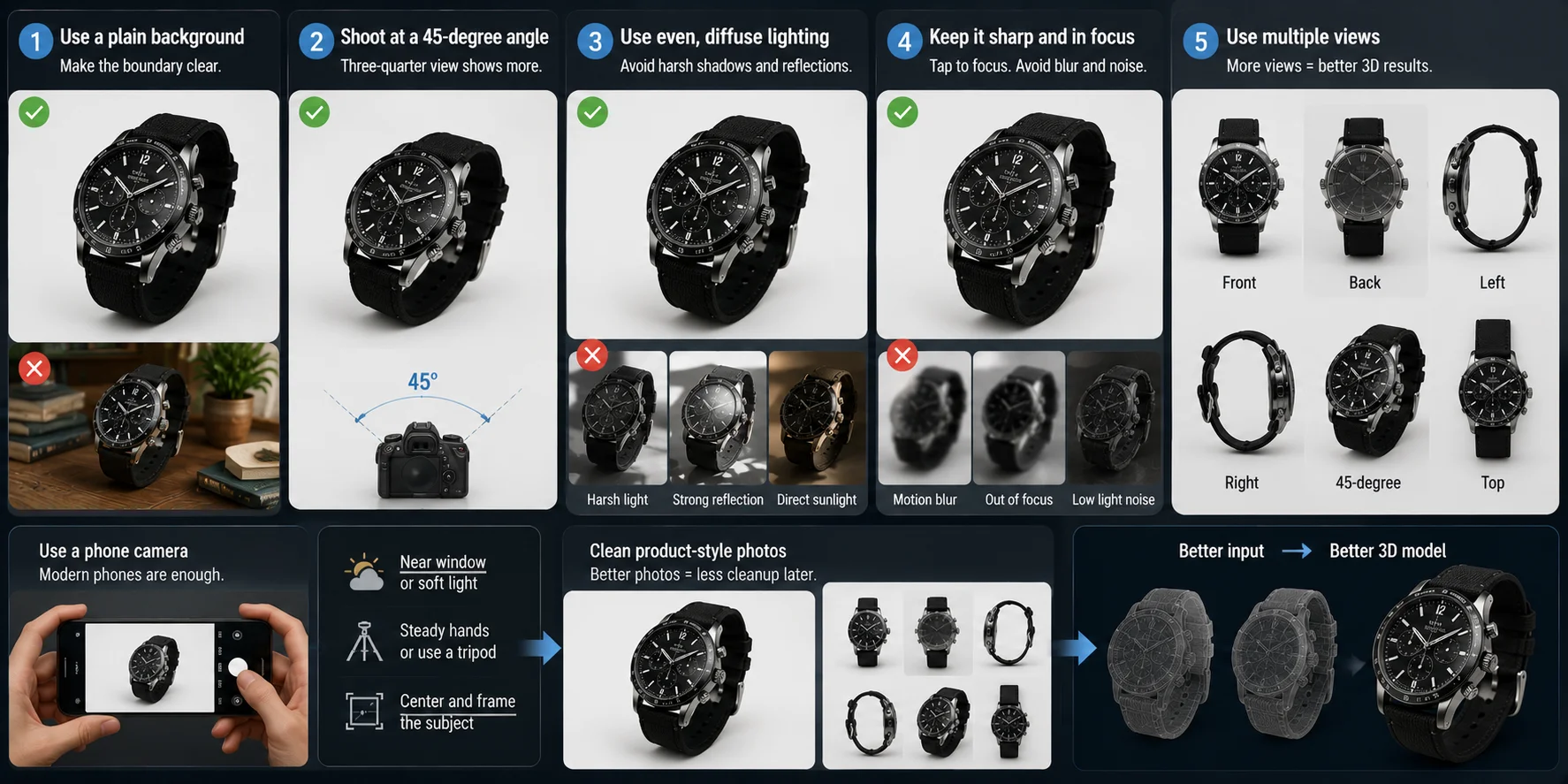
- Use a plain background. Place the object in front of white paper, grey cardboard, dark cloth, or a simple wall. The goal is to make the object boundary clear so the AI can separate the subject from the background.
- Shoot at a 45-degree angle. A three-quarter view captures the front, side, and depth of the object at the same time. This is often the best single-view angle because it gives the AI more visible surface information.
- Use even, diffuse lighting. Shoot near a window on a cloudy day, use soft indoor light, or place a diffuser between the light and the object. Avoid direct sunlight, harsh shadows, and strong reflections.
- Keep the subject sharp and in focus. Tap the center of the object on your phone screen before shooting. Avoid motion blur, shallow focus, low-light noise, or tilted framing.
- Use multiple views if your tool supports it. Multi-view input usually improves shape consistency. Capture front, back, left, right, and one 45-degree angle when possible.
For ecommerce products, prepare clean product-style photos first. Better source images usually mean less mesh cleanup later.
Best Free and Paid Image to 3D Tools (2026)
The best image-to-3D tool depends on what you want to create. Some tools are built for fast product visualization, some focus on game-ready props, and others are better for lightweight design visuals or comparing multiple generators. For most users, the key factors are input type, export format, free-tier access, and whether the output can move into Blender, Unity, Unreal Engine, ecommerce pages, or 3D printing workflows.
| Tool | Free / paid access | Best fit | Input type | Output / workflow |
|---|---|---|---|---|
| Tripo AI | Free to start; available generation and export options depend on the current plan and feature settings | A practical option for product, game, ecommerce, and design assets | Image and text | Generates 3D models from photos, sketches, illustrations, or concept images; supports USD, FBX, OBJ, STL, GLB, and 3MF exports. |
| Meshy | Free AI 3D generator with paid plans for higher usage | Fast prototyping and creator workflows | Image, text, and chat | Creates 3D assets from text and images, including multi-image workflows; supports common exports such as FBX, OBJ, GLB, and STL. |
| Sloyd.ai | Free to start; paid plans for unlimited downloads and advanced features | Game assets, props, and template-driven models | Photos, sketches, reference images, and templates | Creates 3D models from images for games, prototyping, and 3D printing; supports FBX, GLB, and OBJ exports. |
| Canva AI 3D | Included in Canva’s broader AI design ecosystem, with plan-based limits | Lightweight 3D-style design visuals | Text prompt | Designed for creating 3D images and visual content from prompts, rather than serving as a full 3D production pipeline. |
| 3D AI Studio | Free credits to start; paid plans for larger-scale generation | Tool comparison and multi-model experimentation | Image and text | Provides access to multiple AI models and image-to-3D workflows in one platform for comparison and experimentation. |
Overall, Tripo AI is a practical option when you need an image-to-3D workflow rather than just a visual effect. It supports image-based generation, common production formats, and downstream use in games, ecommerce, design visualization, and 3D printing.
Tripo AI — Image to 3D Model
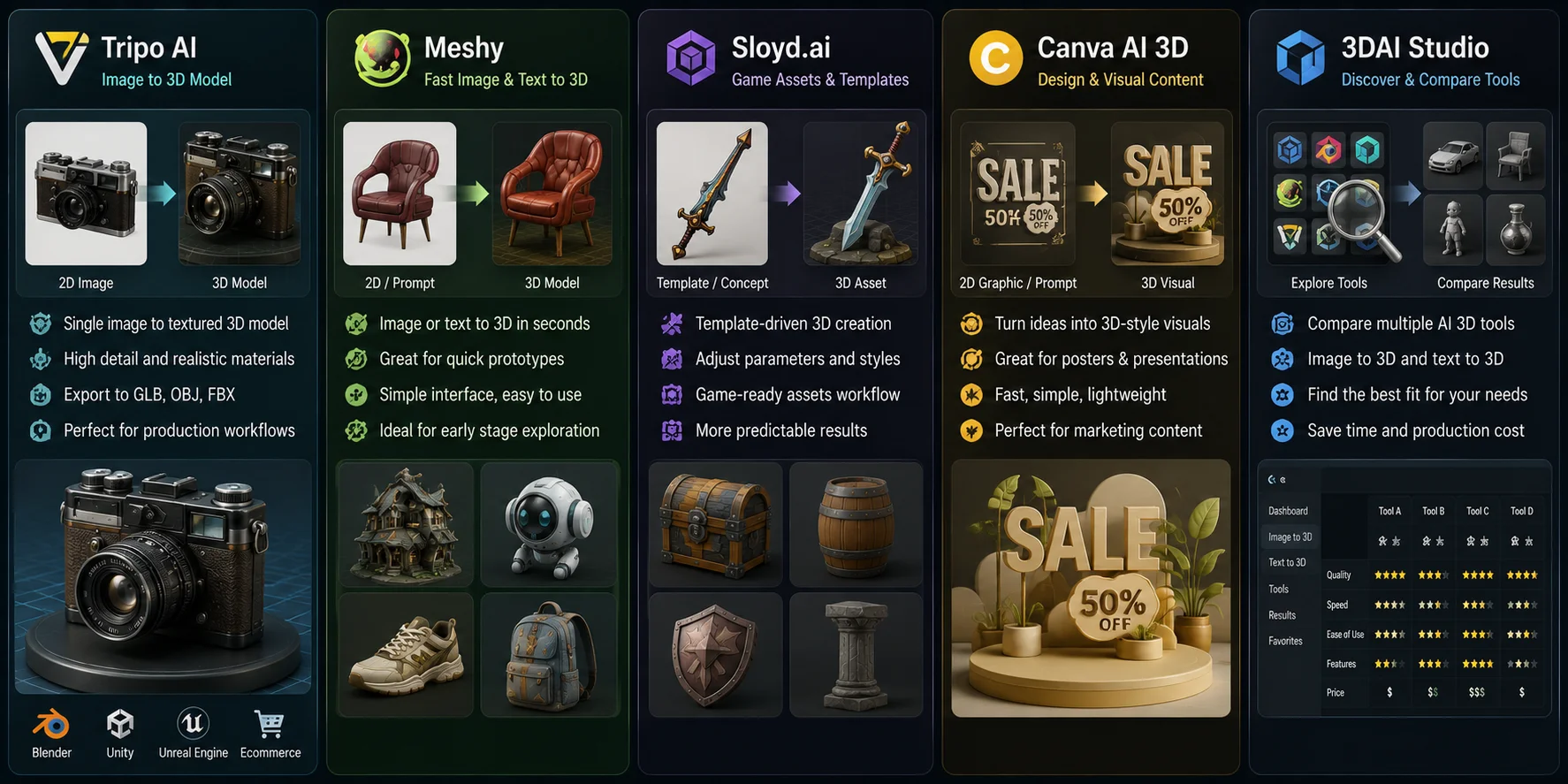
Tripo AI is the first tool to try if you want a direct image-to-3D workflow without learning traditional 3D modeling. Its image-to-3D feature can turn a single product photo, sketch, illustration, or concept image into a textured 3D model with recognizable shape, surface detail, and depth.
For creators, this is useful because the model is not locked inside the platform. You can export assets in common formats such as GLB, OBJ, and FBX, making them suitable for Blender, Unity, Unreal Engine, ecommerce product visualization, design presentations, and game asset workflows.
Meshy
Meshy is a strong alternative for fast image-to-3D and text-to-3D generation. It has a simple interface and works well for quick prototypes, concept models, and early visual exploration when speed matters more than detailed production control.
Sloyd.ai
Sloyd.ai is more focused on game assets and template-driven 3D creation. Its strength is guided generation: users can start from templates, adjust asset parameters, and create stylized props or game-ready objects more predictably than with a pure prompt-only workflow.
Canva AI 3D
Canva AI 3D is better suited for lightweight design visuals than technical 3D production. It is useful for turning simple prompts or graphic ideas into 3D-style elements for posters, presentations, social content, and marketing visuals.
3DAI Studio
3DAI Studio is useful for users who want to compare different image-to-3D and text-to-3D workflows in one place. It works well as a tool-discovery platform, especially for creators evaluating multiple generators before choosing a main production workflow.
How to Get the Best Results with Tripo AI’s Image to 3D
Step 1: Prepare your image
Start with a clean source image. Use a plain background, center the object, and remove clutter before uploading. If needed, use a background remover such as remove.bg to isolate the subject more clearly.
Step 2: Upload and select generation settings
Upload the image to Tripo AI and choose the workflow that matches your goal, such as game asset creation, ecommerce visualization, design prototyping, or 3D printing. A clear use case makes it easier to evaluate the result.
Step 3: Preview and refine the mesh
After generation, rotate the model and inspect it from every side. Check for missing geometry, distorted details, texture artifacts, or incorrect proportions, then use the built-in tools to refine the mesh if needed.
Step 4: Export in your preferred format
Export the model as GLB, OBJ, or FBX, depending on your workflow. You can then review the model in the viewer and continue with any needed editing or export steps.
When your goal is a physical print rather than a digital asset, you can convert the image into an STL and prepare the resulting mesh for your printer.
Frequently Asked Questions
How do you choose the right photos for 3D reconstruction?
Choose photos where the object is sharp, fully visible, and clearly separated from the background. Avoid heavy shadows, strong reflections, motion blur, low resolution, and cropped subjects because they reduce the AI’s ability to infer shape and depth.
What types of images work best for converting 2D images into 3D models?
Clear, high-resolution images with a centered subject, plain background, and even lighting work best. Product photos, clean concept art, character illustrations, logos, and real-world object photos usually perform well when the full object is visible.
What is the best image-to-3D software?
There is no single best tool for every workflow. Tripo AI is a practical option for image-to-3D generation and common exports, while Meshy, Sloyd.ai, and 3D AI Studio may suit rapid prototyping, template-based assets, or tool comparison.
How do you create a 3D model from a single image?
Upload a clean source image to an AI image-to-3D tool such as Tripo AI, generate the model, preview the mesh, and export it in your preferred format. A three-quarter view usually works better than a flat front view because it shows more depth and surface information.
AI image-to-3D vs. traditional photogrammetry: which yields better results?
Traditional photogrammetry can produce highly faithful scans when you have many overlapping photos and controlled shooting conditions. AI image-to-3D is faster and easier for rapid prototyping, ecommerce visualization, game props, and concept assets, but hidden geometry may still need review or cleanup.
Single image vs. multi-image for 3D conversion: which is better?
A single image is faster and easier, especially for early concepts or quick experiments. Multi-image input can provide better structural context because the AI can see more angles and rely less on guessing hidden geometry.
Conclusion
Better source images lead to better 3D outputs. When your image has a clear subject, clean background, even lighting, and enough detail, AI has a stronger foundation for predicting shape, depth, texture, and surface structure. In other words, the quality of the input directly shapes the quality of the final model.
To test the workflow yourself, start with Tripo AI. Upload a clean product photo, sketch, illustration, or concept image, preview the generated model, and export it for games, ecommerce, design visualization, 3D printing, or further editing.