Best Free 3D Rendering Software in 2026 (No Watermark Picks)
TL;DR
- The best free 3D rendering software in 2026 depends on your workflow and goals. Blender is the best all-around free option, while D5 Render and Twinmotion are strong choices for real-time architecture visualization.
- For photorealistic results, Cycles and LuxCoreRender provide high-quality offline rendering. When choosing a tool, consider your field, hardware, learning curve, and free-version limitations.
- AI rendering tools can speed up concept visualization by creating realistic images quickly, but they do not replace fully controllable 3D workflows. Professional projects often combine AI tools with traditional renderers for better control.
- Need a model before rendering? Generate a 3D asset with Tripo AI Studio, then import it into your preferred rendering software to create final visuals.
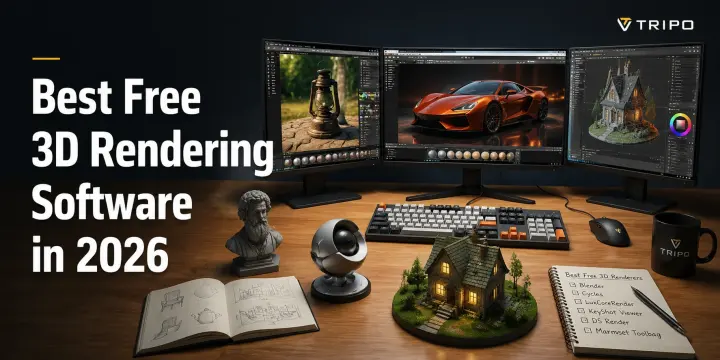
The best free 3D rendering software in 2026 includes Blender, which is fully free and open source, D5 Render and Twinmotion, which offer free tiers for real-time architectural visualization, and LuxCoreRender for photorealistic rendering. The right choice depends on whether you work in architecture, product design, animation, or games, as well as each free version’s limits on features, assets, and output quality.
You don't need a $60/month license to create professional-looking renders anymore. Free and freemium rendering tools now offer powerful real-time engines, realistic materials, and advanced lighting features that were once limited to expensive software. In this guide, we'll first explain the difference between 3D modeling and rendering, then cover key selection criteria, recommend the best free options by use case, and compare how much each tool actually gives you without paying.
Rendering vs. Modeling: What "Rendering Software" Actually Means
One of the most common sources of confusion is treating 3D modeling and 3D rendering as the same thing. Modeling is the process of creating the 3D object itself—the shapes, geometry, and structure. Tools like Blender, SketchUp, and Maya are mainly used to build 3D assets, from simple objects to complex characters and environments.
Rendering happens after (or alongside) modeling. It takes a finished 3D model and calculates how it should look with lighting, materials, textures, shadows, reflections, and camera settings to produce a realistic image or animation. Rendering tools and engines such as V-Ray, D5 Render, Enscape, and Cycles focus on turning digital models into final visuals.
The difference matters because not every rendering tool creates models, and not every modeling tool is designed for high-quality final output. Some applications, like Blender, combine both workflows by offering modeling, texturing, animation, and rendering in one package. Others, such as V-Ray and Corona Renderer, work primarily as dedicated rendering engines that connect with existing 3D software.
Before you can render anything, you need a 3D model. If you don't already have one, AI tools like Tripo AI can help generate a starting 3D asset from text or images before bringing it into your rendering workflow.
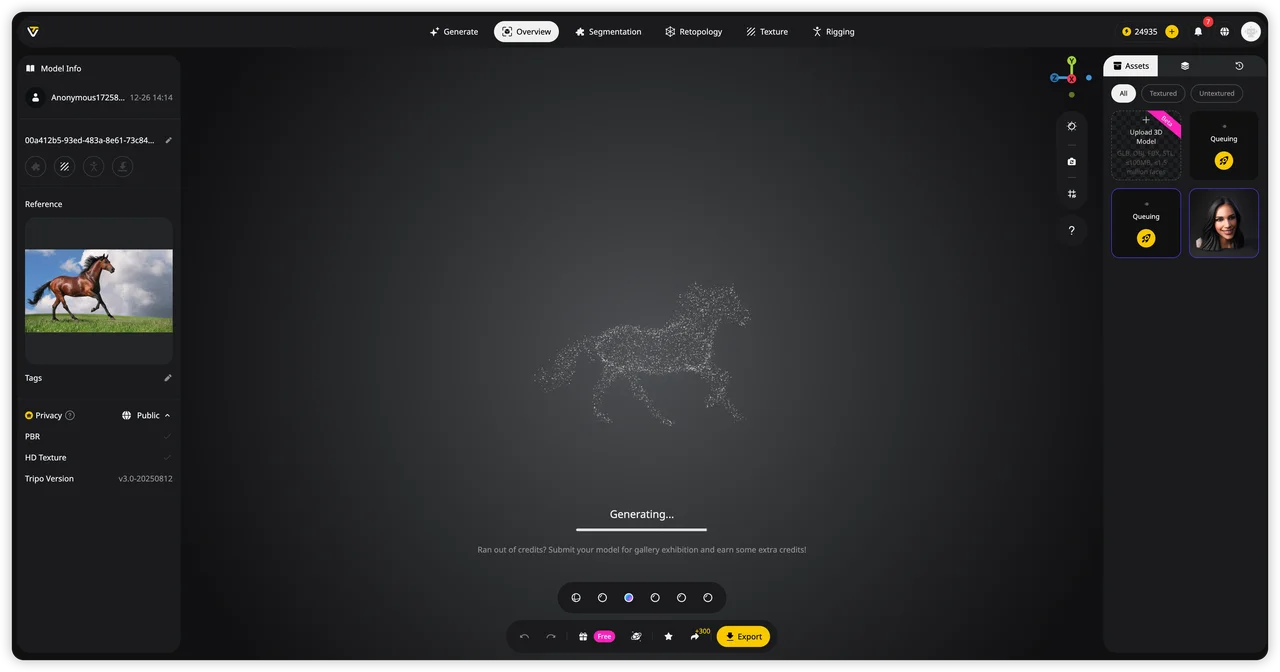
So when people search for “free 3D rendering software,” they are usually looking for one of two categories: all-in-one 3D creation tools or dedicated rendering engines and plugins. This guide covers both, helping you choose the right option based on your workflow and goals.
How to Choose a Free 3D Rendering Tool
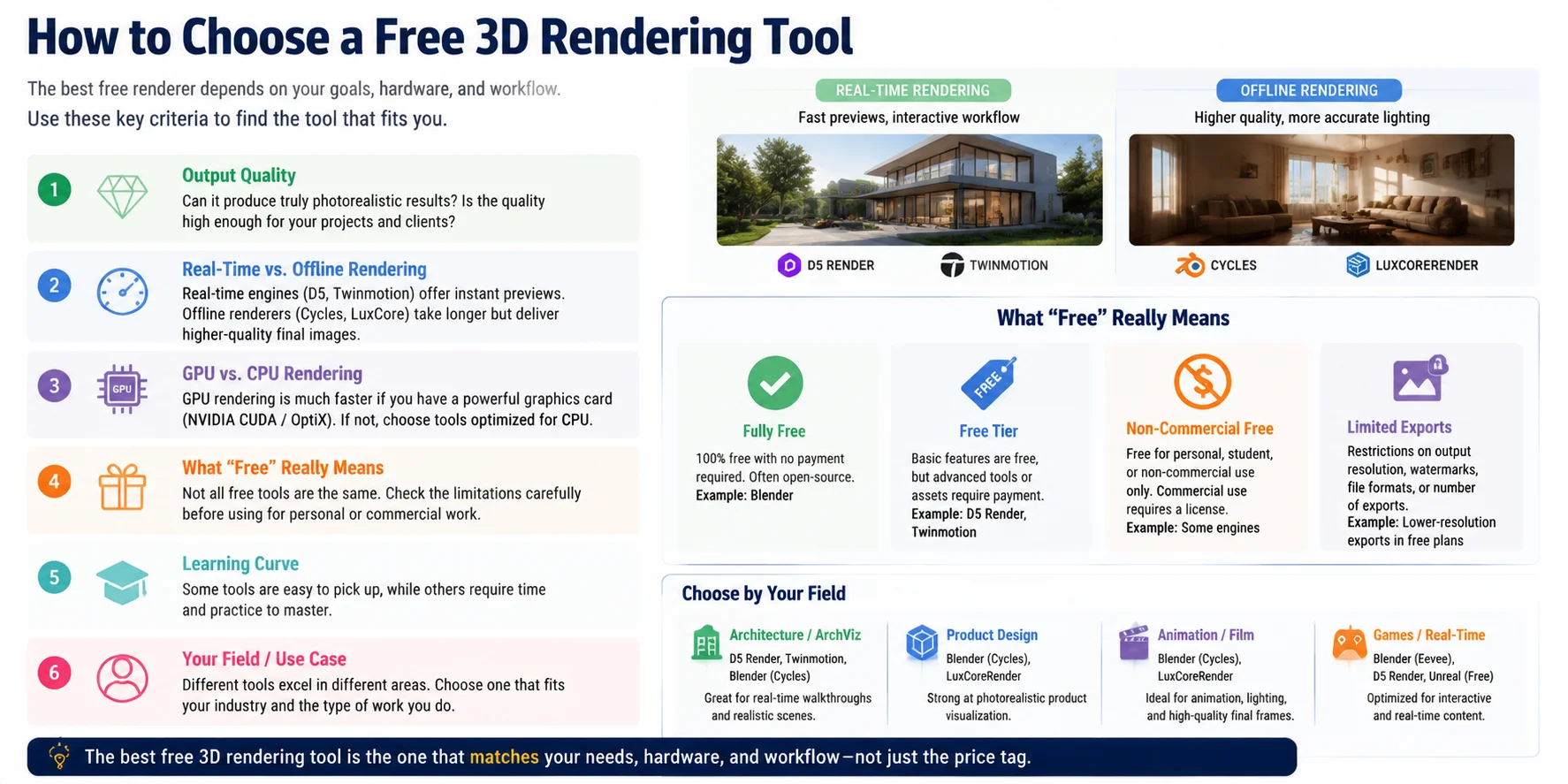
Choosing the right free 3D rendering software is not only about finding the tool with the best-looking results. The best option depends on your workflow, hardware, experience level, and whether the free version actually provides everything you need. Some tools are completely free, while others offer limited free tiers with restrictions on features, resolution, assets, or commercial use.
Output Quality
The first thing to consider is the final image quality you need. If you want photorealistic product shots, architectural visuals, or cinematic scenes, look for tools with strong lighting, realistic materials, global illumination, and advanced shading. For simple previews or concept work, a lighter real-time renderer may be enough.
Real-Time vs. Offline Rendering
Real-time and offline rendering serve different purposes. Tools like D5 Render and Twinmotion focus on fast previews, interactive scenes, and quick architectural visualization. Offline renderers like Cycles and LuxCoreRender usually take longer but can produce higher-quality final images with more accurate lighting calculations.
GPU vs. CPU Rendering
Your hardware plays a major role in rendering speed. GPU-based rendering is usually much faster for modern workflows, especially when using NVIDIA CUDA/OptiX or similar acceleration technologies. If you have a powerful graphics card, choose software that can take advantage of it. If you rely mainly on CPU rendering, prioritize engines optimized for processor-based workflows.
What “Free” Really Means
Not all free rendering software has the same meaning. Always check the limitations:
- Fully free: No payment required, often open-source (such as Blender).
- Free tier: Basic features available but advanced tools may require payment.
- Non-commercial free: Free for learning or personal projects only.
- Limited exports: Restrictions on resolution, watermarks, assets, or output formats.
A free tool with no watermark may still have other limits, so check the license before using it commercially.
Learning Curve
Ease of use matters, especially for beginners. Blender offers professional-level features but has a steeper learning curve because it covers modeling, animation, simulation, and rendering. Tools like D5 Render and Twinmotion are easier to learn because they focus on fast visualization workflows.
Your Field
Your industry should influence your choice:
- Architecture: D5 Render, Twinmotion, and Blender are popular for visualization.
- Product design: Blender, KeyShot alternatives, and realistic render engines work well.
- Animation: Blender is a strong all-in-one option.
- Games: Blender combined with real-time engines provides flexibility.
The best free 3D rendering tool is the one that matches your actual needs. Before choosing, compare quality, speed, hardware support, restrictions, and workflow compatibility—not just the price tag.
The Best Free 3D Rendering Software
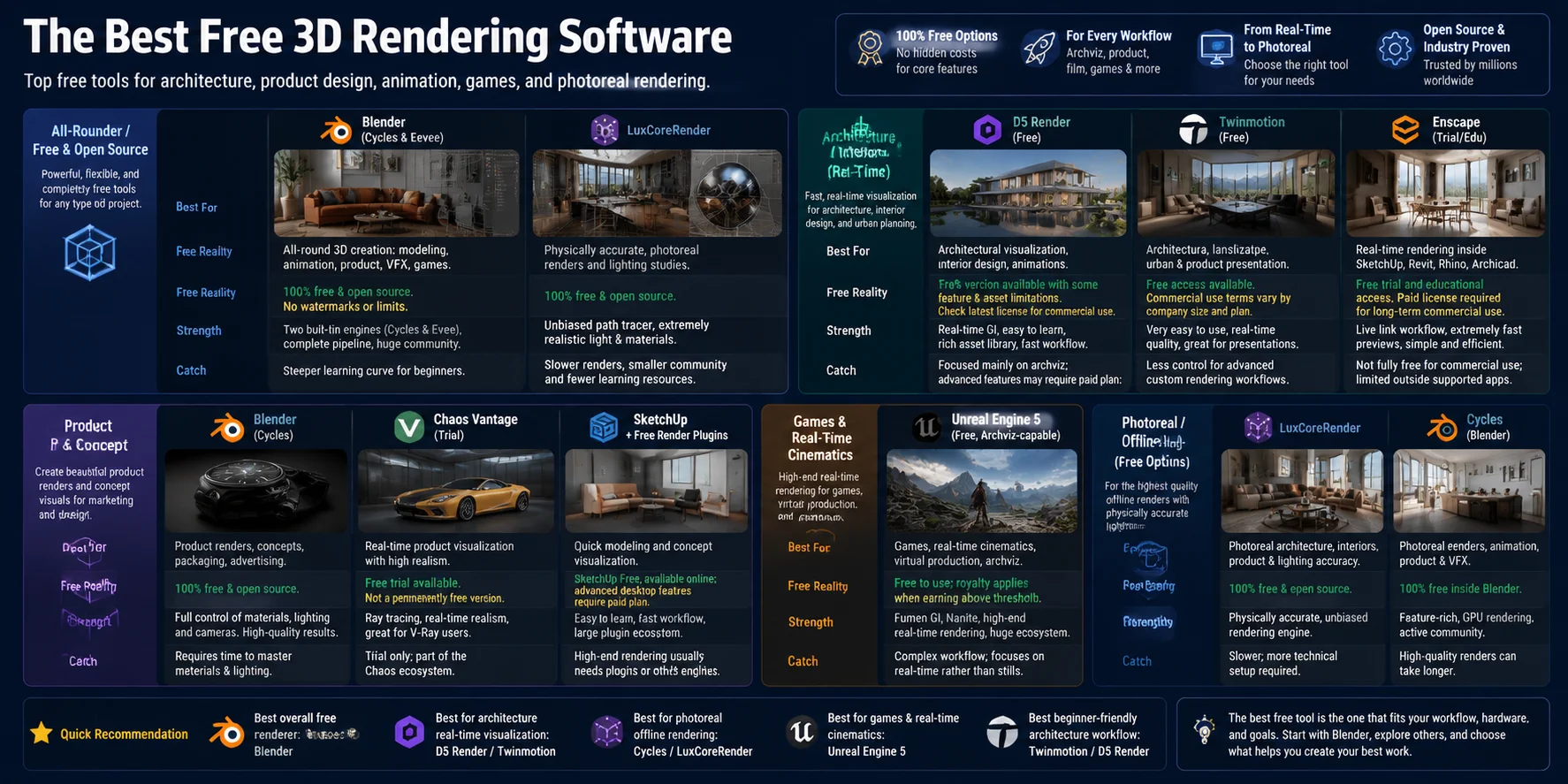
The “best” free 3D rendering software depends on what you are creating. A tool that works perfectly for architectural walkthroughs may not be the best choice for product visualization, animation, or game development. Some programs are completely free and open source, while others offer free tiers with limits on features, assets, resolution, or commercial use.
Below are the best free rendering options organized by real-world workflow.
All-Rounder / Free & Open Source: Blender (Cycles & Eevee), LuxCoreRender
Blender (Cycles & Eevee)
What it's best for: Blender is the strongest all-around free 3D solution because it combines modeling, animation, simulation, compositing, and rendering in one application. It works well for beginners learning 3D and professionals creating assets for games, products, films, and visual effects.
Free tier reality: Blender is completely free and open source. There are no subscription fees, watermarks, commercial-use restrictions, or export limitations.
Strength: Blender offers two powerful built-in render engines:
- Cycles — a physically based path tracer designed for realistic lighting and high-quality final renders.
- Eevee — a real-time renderer optimized for speed, previews, animation, and interactive workflows.
Because it supports the entire pipeline from modeling to final output, Blender is often the best starting point for anyone who wants a free professional workflow.
Catch: The learning curve is steeper than many specialized rendering tools. Beginners may need time to understand materials, lighting, nodes, and scene setup.
LuxCoreRender
What it's best for: LuxCoreRender is designed for users who want physically accurate, photorealistic rendering without paying for commercial engines.
Free tier reality: LuxCoreRender is fully free and open source.
Strength: It focuses heavily on realistic light simulation, materials, and physically based rendering. It is a strong option for users who care more about final image quality than fast previews.
Catch: Rendering can be slower compared with GPU-focused real-time solutions. It is also less beginner-friendly and has a smaller ecosystem than Blender.
Architecture & Interior (Real-Time): D5 Render, Twinmotion, Enscape
D5 Render
What it's best for: D5 Render is one of the most popular choices for architects and interior designers who need fast, realistic walkthroughs and presentations.
Free tier reality: D5 Render provides a free version, but some advanced features, assets, and professional capabilities may depend on the current plan. Commercial users should check the latest licensing terms before production use.
Strength: Its biggest advantage is real-time rendering speed combined with realistic lighting, materials, and a large asset library. Designers can quickly test scenes without waiting for long offline renders.
Catch: It is more focused on architectural visualization than general-purpose 3D production.
Twinmotion
What it's best for: Twinmotion is ideal for architecture, landscape design, urban visualization, and interactive presentations.
Free tier reality: Twinmotion offers free access options, but licensing conditions can vary depending on commercial use, company size, and project requirements.
Strength: It provides a beginner-friendly interface, real-time rendering, animation tools, weather effects, and easy scene creation. It is especially useful for architects who need fast client presentations.
Catch: Compared with Blender, it offers less control over advanced modeling and custom rendering workflows.
Enscape
What it's best for: Enscape is designed for real-time architectural visualization directly inside tools like SketchUp, Revit, Rhino, and Archicad.
Free tier reality: Enscape generally provides trial and educational access rather than a permanently free full commercial version.
Strength: Its biggest advantage is workflow integration. Architects can preview designs directly inside their modeling software without exporting complicated scenes.
Catch: For long-term commercial use, a paid license is usually required.
Product & Concept Visualization: Blender, Vantage, SketchUp + Free Render Plugins
Blender
What it's best for: Blender is excellent for product renders, concept visualization, and creating custom scenes from scratch.
Free tier reality: Fully free with no commercial restrictions.
Strength: It provides complete control over materials, lighting, cameras, and animation. With Cycles, users can create highly realistic product images.
Catch: Creating polished product renders requires learning Blender’s material and lighting systems.
Chaos Vantage
What it's best for: Vantage is designed for high-quality real-time visualization using scenes created with V-Ray workflows.
Free tier reality: Chaos products typically provide trials rather than unlimited free commercial versions.
Strength: It delivers impressive real-time photorealism, especially for users already working in professional visualization pipelines.
Catch: It is not a fully free solution and is mainly useful for users already in the Chaos ecosystem.
SketchUp + Free Render Plugins
What it's best for: SketchUp is popular among designers who want quick modeling and simple visualization workflows.
Free tier reality: SketchUp offers free options, but advanced desktop features and professional rendering workflows may require paid plans or plugins.
Strength: It is easy to learn and widely used in architecture and interior design.
Catch: High-end rendering usually requires additional engines or plugins.
Games & Real-Time Cinematics: Unreal Engine 5
Unreal Engine 5
What it's best for: Unreal Engine 5 is one of the strongest free choices for game development, virtual production, and real-time cinematic rendering.
Free tier reality: Unreal Engine is free to download and use, with licensing terms applying when projects generate commercial revenue.
Strength: It provides advanced real-time rendering features such as Lumen global illumination, Nanite virtualized geometry, cinematic tools, and powerful real-time environments.
Catch: It is optimized for real-time production rather than simple still-image rendering. Beginners may find the workflow complex compared with dedicated visualization tools.
Photoreal / Offline High-End Free Options: LuxCoreRender & Cycles
The following options focus on photorealistic offline rendering.
Cycles (Blender)
What it's best for:
Cycles is ideal when you need realistic lighting, physically accurate materials, and final-quality images.
Free tier reality:
It is included with Blender and is completely free.
Strength:
Cycles supports GPU acceleration and advanced rendering features while remaining accessible through Blender’s ecosystem.
Catch:
High-quality renders can take longer to produce than renders from real-time engines.
LuxCoreRender
What it's best for:
LuxCoreRender is suitable for users who prioritize realism and accurate light behavior.
Free tier reality:
It is completely free and open source.
Strength:
Its physically based approach works well for realistic scenes, architectural renders, and material studies.
Catch:
Its smaller community and slower workflow may make it less suitable for beginners or fast production environments.
Quick Recommendation
- Best overall free renderer: Blender
- Best for real-time architectural visualization: D5 Render or Twinmotion
- Best for photorealistic offline rendering: Blender Cycles or LuxCoreRender
- Best for games and real-time cinematics: Unreal Engine 5
- Best beginner-friendly architecture workflow: Twinmotion or D5 Render
The best free 3D rendering software is not always the one with the most features. It is the one that fits your workflow, hardware, and production goals. For most users, Blender is the safest starting point because it provides a complete free pipeline for creating 3D models and producing final renders.
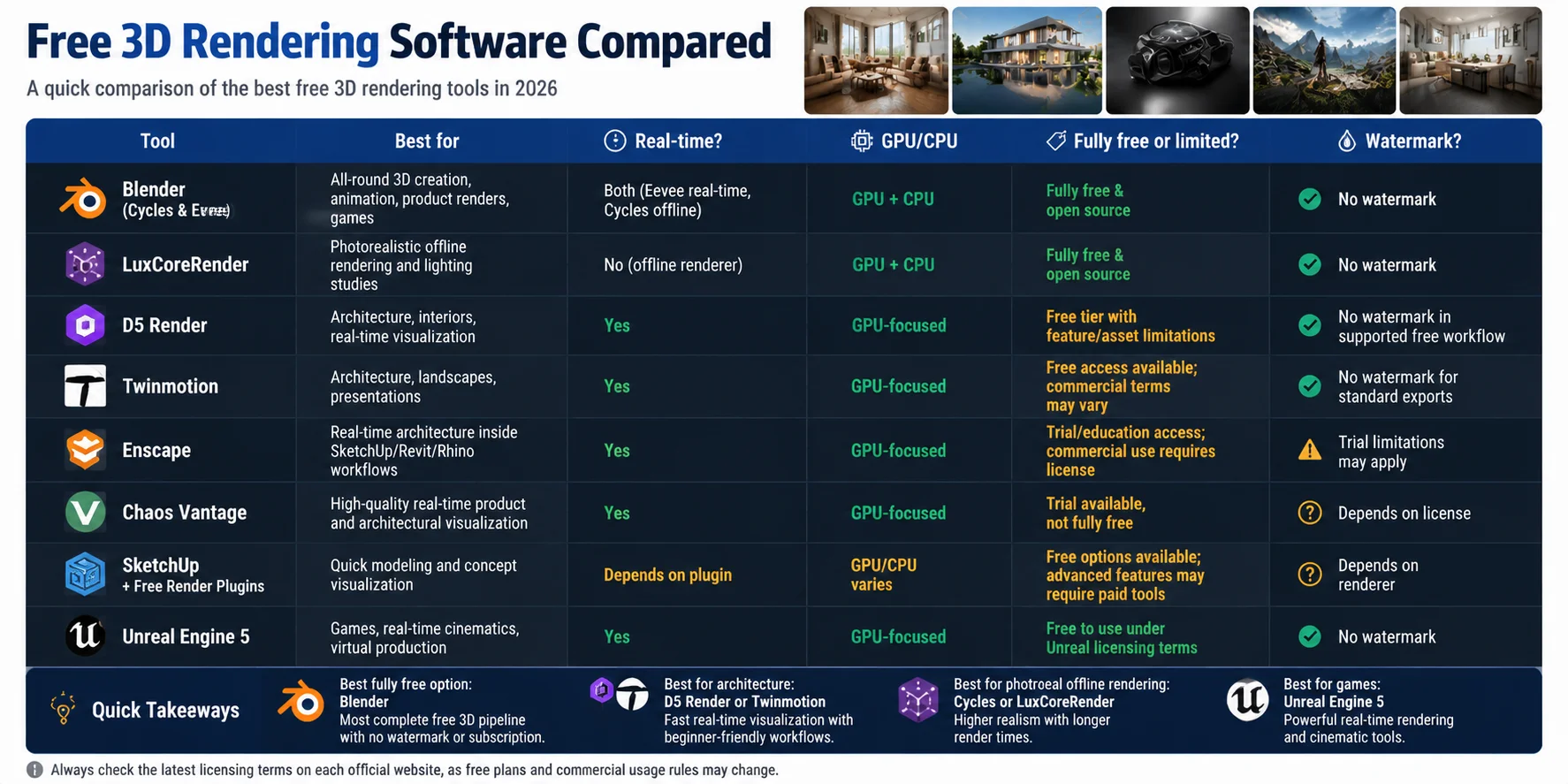
Free 3D Rendering Software Compared
| Tool | Best for | Real-time? | GPU/CPU | Fully free or limited? | Watermark? |
|---|---|---|---|---|---|
| Blender (Cycles & Eevee) | All-round 3D creation, animation, product renders, games | Both (Eevee real-time, Cycles offline) | GPU + CPU | Fully free & open source | No watermark |
| LuxCoreRender | Photorealistic offline rendering and lighting studies | No (offline renderer) | GPU + CPU | Fully free & open source | No watermark |
| D5 Render | Architecture, interiors, real-time visualization | Yes | GPU-focused | Free tier with feature/asset limitations | No watermark in supported free workflow |
| Twinmotion | Architecture, landscapes, presentations | Yes | GPU-focused | Free access available; commercial terms may vary | No watermark for standard exports |
| Enscape | Real-time architecture inside SketchUp/Revit/Rhino workflows | Yes | GPU-focused | Trial/education access; commercial use requires license | Trial limitations may apply |
| Chaos Vantage | High-quality real-time product and architectural visualization | Yes | GPU-focused | Trial available, not fully free | Depends on license |
| SketchUp + Free Render Plugins | Quick modeling and concept visualization | Depends on plugin | GPU/CPU varies | Free options available; advanced features may require paid tools | Depends on renderer |
| Unreal Engine 5 | Games, real-time cinematics, virtual production | Yes | GPU-focused | Free to use under Unreal licensing terms | No watermark |
Quick Takeaways
- Best fully free option: Blender — the most complete free 3D pipeline with no watermark or subscription.
- Best for architecture: D5 Render or Twinmotion — fast real-time visualization with beginner-friendly workflows.
- Best for photoreal offline rendering: Cycles or LuxCoreRender — higher realism with longer render times.
- Best for games: Unreal Engine 5 — powerful real-time rendering and cinematic tools.
When comparing free rendering software, always check more than the price. Hardware support, export limits, watermarks, commercial licensing, and workflow compatibility often matter more than whether a tool is labeled “free.”
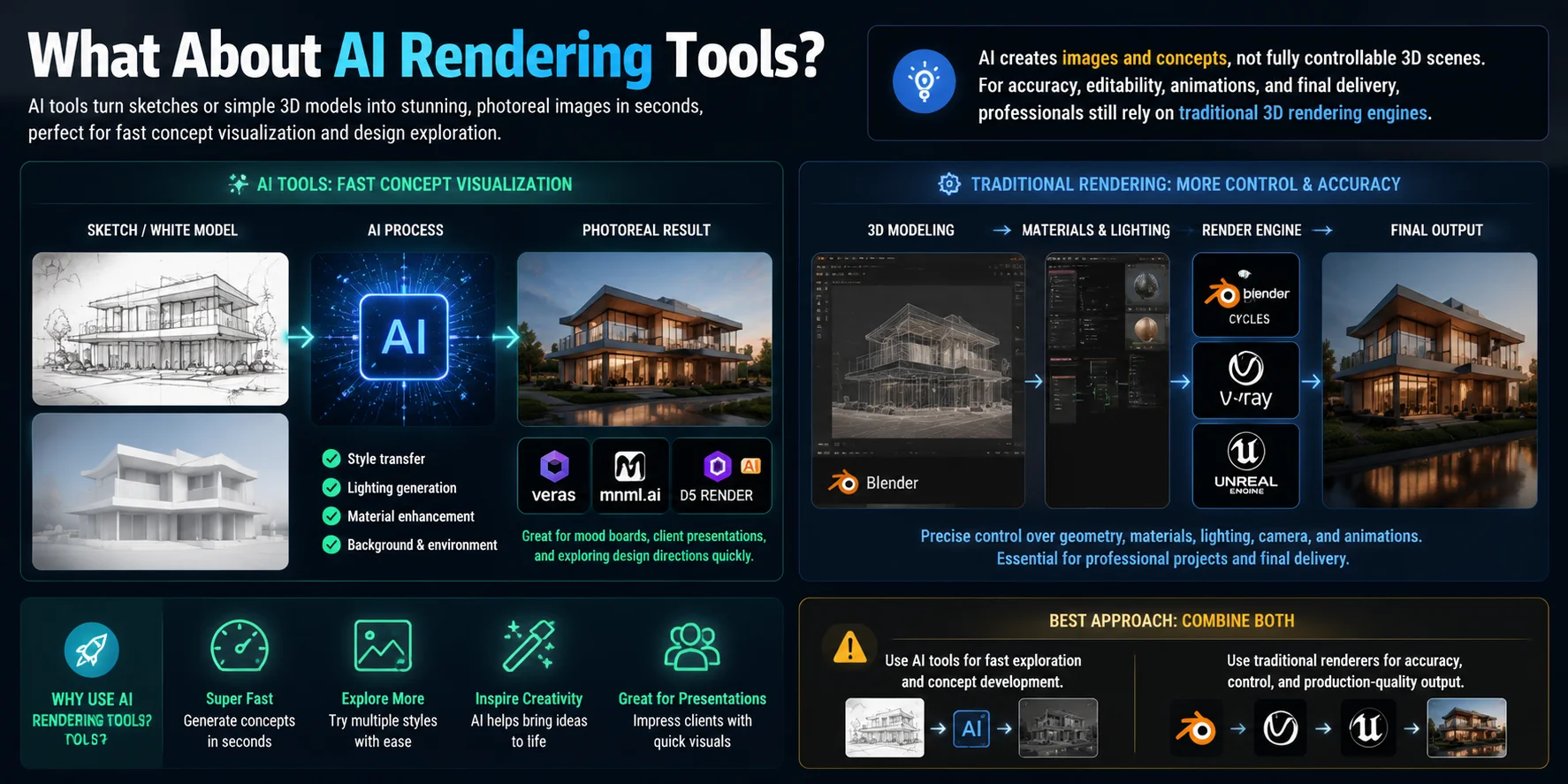
What About AI Rendering Tools?
AI rendering tools have become a growing trend in 3D visualization, helping designers turn rough ideas, sketches, or simple 3D scenes into realistic-looking images much faster. Instead of manually adjusting every material, light, and camera setting, AI-powered tools can generate concept visuals in seconds and help explore different design directions early in the process.
Tools such as Veras, mnml.ai, and AI features inside platforms like D5 Render are commonly used for rapid concept visualization, especially in architecture, interior design, and product ideation. They are useful for creating mood boards, testing styles, and presenting early concepts before committing to a detailed production workflow.
However, AI rendering has an important limitation: it usually creates images or visual concepts, not fully controllable 3D scenes. The output may look realistic, but it does not always provide editable geometry, accurate dimensions, or production-ready assets.
For professional workflows that require precise materials, animations, CAD accuracy, or final delivery, traditional rendering engines such as Blender Cycles, V-Ray, or real-time engines are still widely used. The most effective approach is often combining both: use AI tools for fast exploration, then move to traditional 3D workflows when accuracy and control matter.
Frequently Asked Questions(FAQ)
Which 3D rendering software is free?
Several 3D rendering tools are available for free, including Blender, LuxCoreRender, and free versions of D5 Render and Twinmotion. Blender is fully free and open source, making it a strong all-round option for most users. If your main focus is real-time architectural visualization, D5 Render and Twinmotion are popular choices. LuxCoreRender is another free option worth considering.
What is the best free software for 3D design?
Blender is one of the best free programs for 3D design because it is completely free and open source. It includes tools for modeling, sculpting, animation, and rendering in a single application. For simpler projects, beginners may find SketchUp Free or Tinkercad easier to use. The right choice depends on the complexity of your project and the tools you need.
Is D5 Render completely free?
D5 Render offers a free version, but it comes with some limitations. The free tier gives users access to real-time rendering features, while certain advanced tools, assets, and professional features may require a paid plan. The available features can vary depending on the plan you choose. Before using D5 Render for a commercial project, check its latest licensing terms and plan details.
Is Blender still free?
Yes, Blender is still completely free and open source. It has no subscription fees or watermarks, and it can be used for commercial projects. Blender includes professional tools for 3D modeling, sculpting, animation, and rendering. Its built-in rendering engines include Cycles and Eevee.
Is there free 3D rendering software with no watermark?
Yes, Blender and LuxCoreRender are free 3D rendering programs that do not add watermarks and can be used for commercial projects. Some commercial renderers also provide watermark-free plans at no cost. However, these free tiers may limit the tools or assets available to users. Always review the licensing terms before using any renderer for commercial work.
How do you render a 3D model for free?
You can render a 3D model for free using software such as Blender. Start by importing the model, applying materials, and setting up the lighting and camera. Once the scene is ready, use Cycles or Eevee to produce the final image. If you need faster results, you can try the free tier of a real-time renderer such as D5 Render or Twinmotion.
Conclusion
Choose your rendering software based on two things: your field and how many free-version limitations you are willing to accept. Architecture, product design, animation, and games all have different ideal tools, so the “best” option depends on your workflow.
Need a 3D model for your next render? Create one from text or images with Tripo AI Studio, then import it into your preferred rendering software. You can compare available plans and features on the Tripo AI pricing page.