Water Texture Guide: Free Downloads, PBR Maps & 3D Workflows
TL;DR
- Water textures are image maps or procedural shaders that simulate the look of water surfaces, from calm pools to choppy ocean waves.
- Seamless PBR water textures can combine maps such as normal, roughness, and opacity to control surface detail, reflections, and transparency.
- Surface-normal detail is often one of the most noticeable factors in a water material, especially when the base mesh is flat.
- Tripo AI can turn text prompts and reference images into 3D models for water-related scene assets; moving water still needs materials, animation, particles, or simulation in a 3D tool.
A water texture is a 2D image map or procedural shader that simulates water’s color, reflections, refraction, transparency, ripples, and waves. In 3D graphics, it is applied to a plane or mesh to create pools, oceans, rivers, puddles, and wet surfaces.
How to Describe the Texture of Water
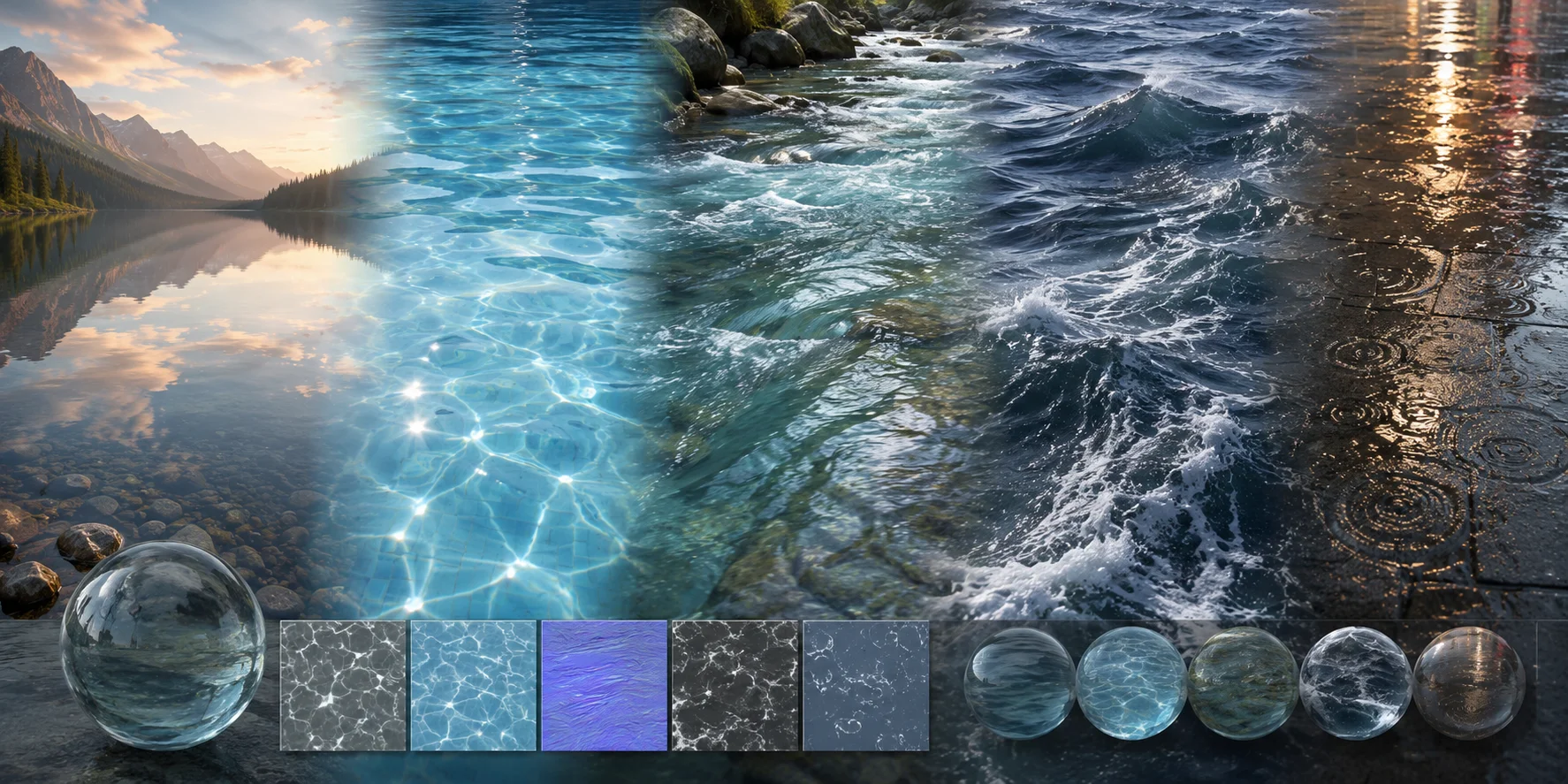
Water is translucent, reflective, refractive, and constantly changing. A still lake may resemble polished glass, while wind breaks it into ridges, highlights, and dark troughs. Rivers show directional streaks and turbulence; rain creates expanding circular ripples.
Photographers describe water as mirror-smooth, silky, rippled, foamy, or choppy. In 3D art, these qualities are built with layered normal or bump maps, changing roughness, animated coordinates, and displaced waves. Fine detail controls sparkle; larger geometry controls the silhouette.
Types of Water Textures
Calm Pool or Lake Water
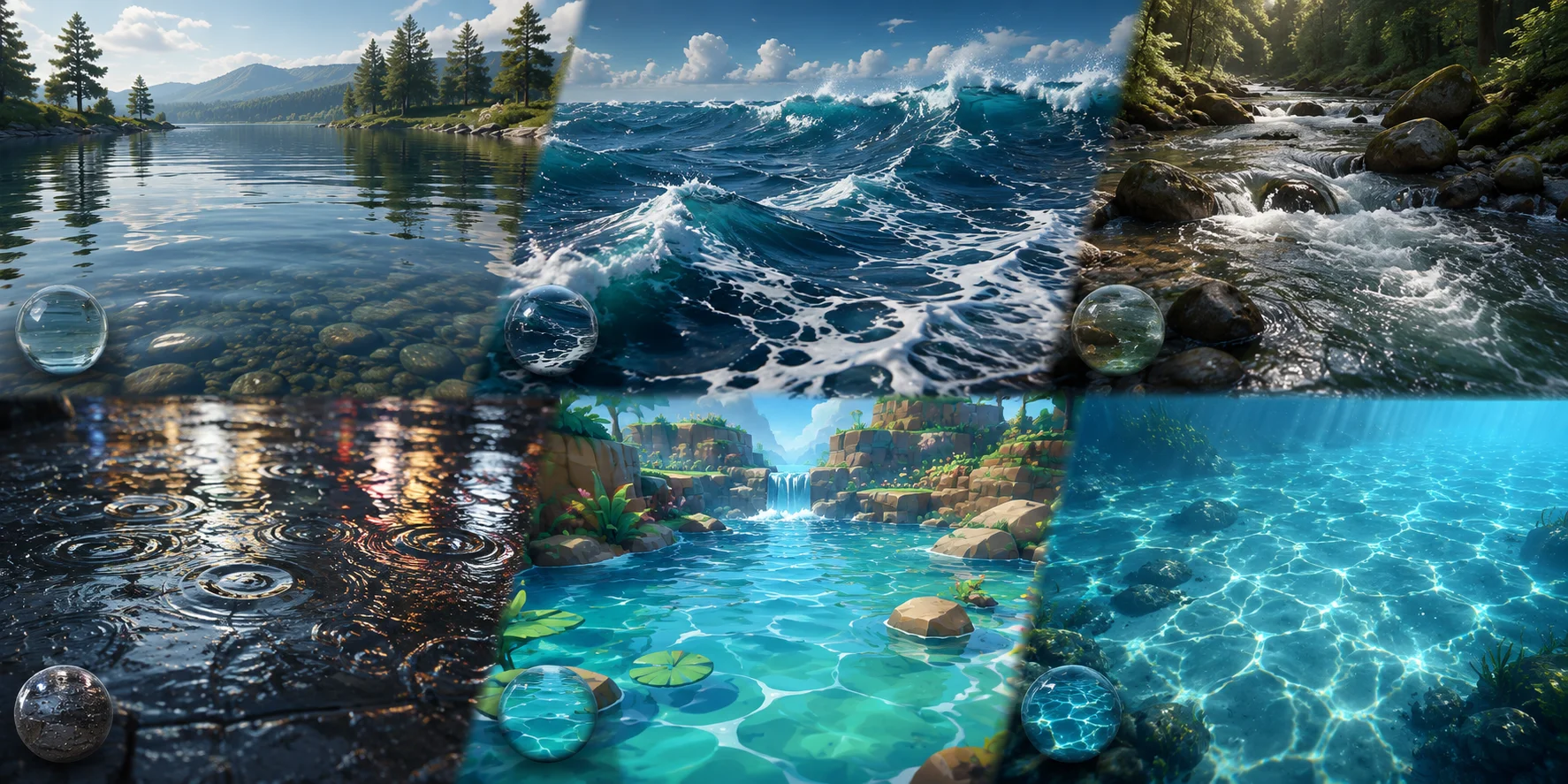
Calm water uses wide, gentle ripples and low roughness, producing clear reflections. It suits architectural visualization, pools, ponds, and quiet cinematic scenes. Subtle normal detail prevents it from looking like rigid glass.
Ocean Surface Textures
Ocean textures combine broad swells with dense, high-frequency wave detail. Layer normal maps at different scales and directions to hide repetition. Use them in games, coastal scenes, ship environments, and wide shots.
River and Stream Textures
River textures need directional flow rather than random motion. Stretched normals, foam masks, and animated UVs help water move along a channel or around rocks. They work well in landscapes, games, and nature animation.
Rain Ripple Textures
Rain textures combine radial ripple normals, scattered rings, droplets, and reflective roughness variation. Apply them to puddles or mix them into wet asphalt and pavement materials. Offset impact timing so the rings do not appear synchronized.
Stylized Cartoon Water
Stylized water uses simplified wave shapes, bold color bands, painted foam, and controlled highlights instead of strict realism. It suits mobile games, animation, low-poly scenes, and cel-shaded projects.
Underwater Caustics
Caustics are moving light patterns projected onto pool floors, rocks, walls, or submerged objects. They are usually created with animated grayscale textures, decals, or projected materials. They complement the water shader rather than replacing it.
What's Inside a PBR Water Texture Pack
A PBR water texture pack usually contains several maps that work together to control color, reflection, transparency, and surface detail.
| Map type | What it does | Effect on water |
|---|---|---|
| Albedo / Diffuse | Provides the base color, often blue, teal, green, or gray. | Sets the visible water tint. |
| Normal Map | Simulates ripples, waves, and small surface direction changes. | Adds surface detail without extra geometry. |
| Roughness Map | Controls how sharp or blurry reflections appear. | Makes water look glassy, oily, choppy, or disturbed. |
| Opacity / Transparency Mask | Controls which areas are transparent or partially visible. | Useful for puddles, edges, foam breaks, and shallow water. |
| Height / Displacement Map | Pushes the surface up or down through geometry or shader displacement. | Adds stronger wave form and close-up depth. |
For many water materials, normal detail is one of the most noticeable controls. It can suggest small ripples and changing surface direction even when the mesh itself is flat.
How to Make a Water Texture
Create a Photo-Based Texture
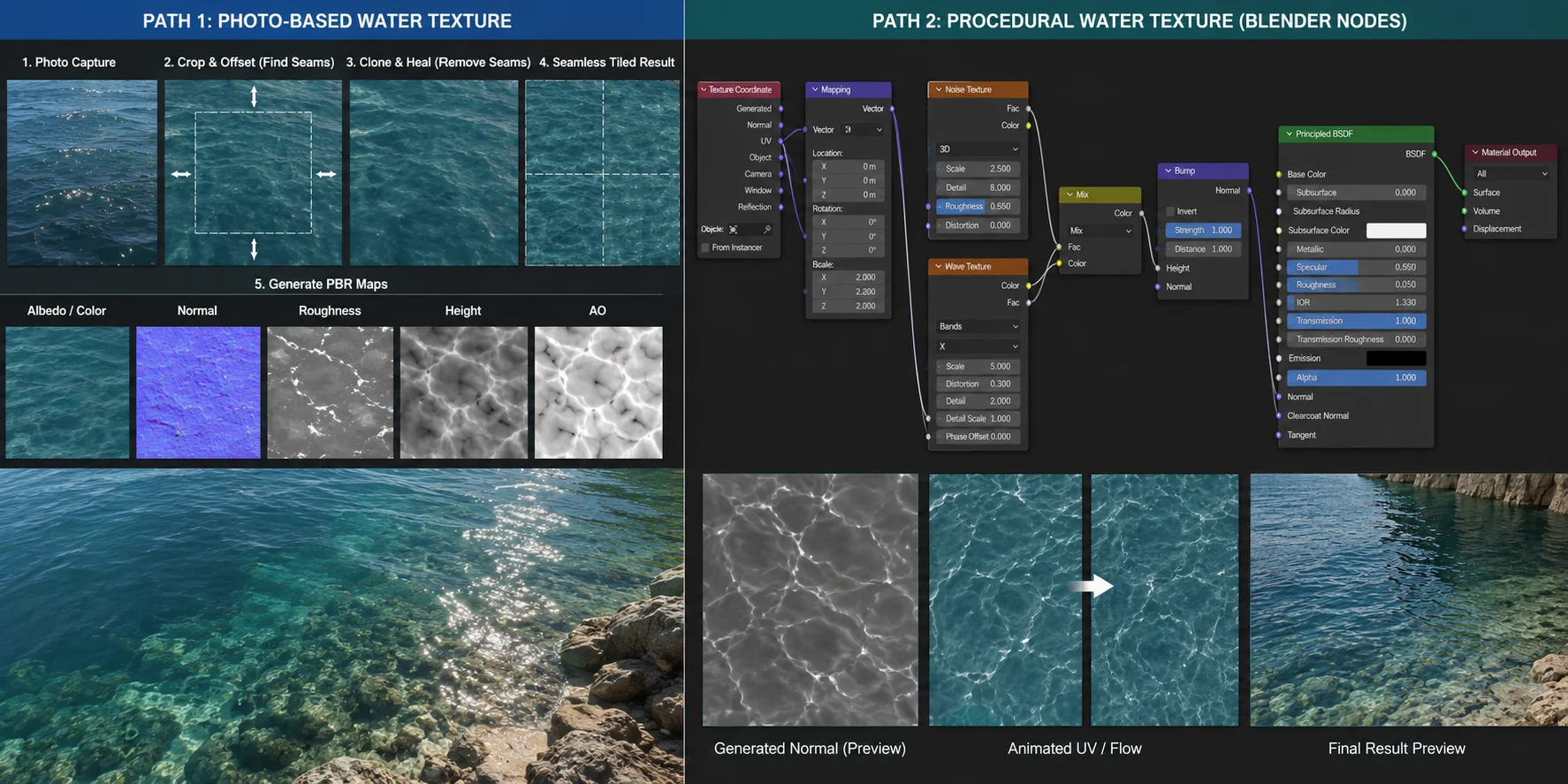
Photograph the surface from nearly overhead in even light, avoiding leaves, boats, shorelines, and strong reflections. Crop a useful section, correct the exposure, and remove distinctive features that reveal repetition.
Use Offset or a tiling preview to move the seams into the center. Heal across them until the image repeats cleanly. Convert a high-contrast grayscale copy into a height source, then generate a normal map with a material-authoring tool.
Test the result on a large plane. A tile that looks seamless when viewed once may form an obvious grid when repeated across a large pool, lake, or ocean surface.
Build a Procedural Water Texture in Blender
Use a Noise Texture for irregular micro-ripples and a Wave Texture for directional or circular motion. Mix their grayscale outputs, pass the result through a Bump node, and connect Bump Normal to the Principled BSDF Normal input.
A Normal Map node is designed for RGB normal-map images, not raw grayscale noise. Grayscale procedural textures should normally pass through a Bump node instead.
Adjust Scale and Detail, then keep Bump Strength restrained so the surface does not resemble hammered metal. Animate the Mapping coordinates, the Wave Texture phase, or both. Procedural patterns remain seamless at any resolution and are easy to adjust for different water conditions.
Using Water Textures in Blender
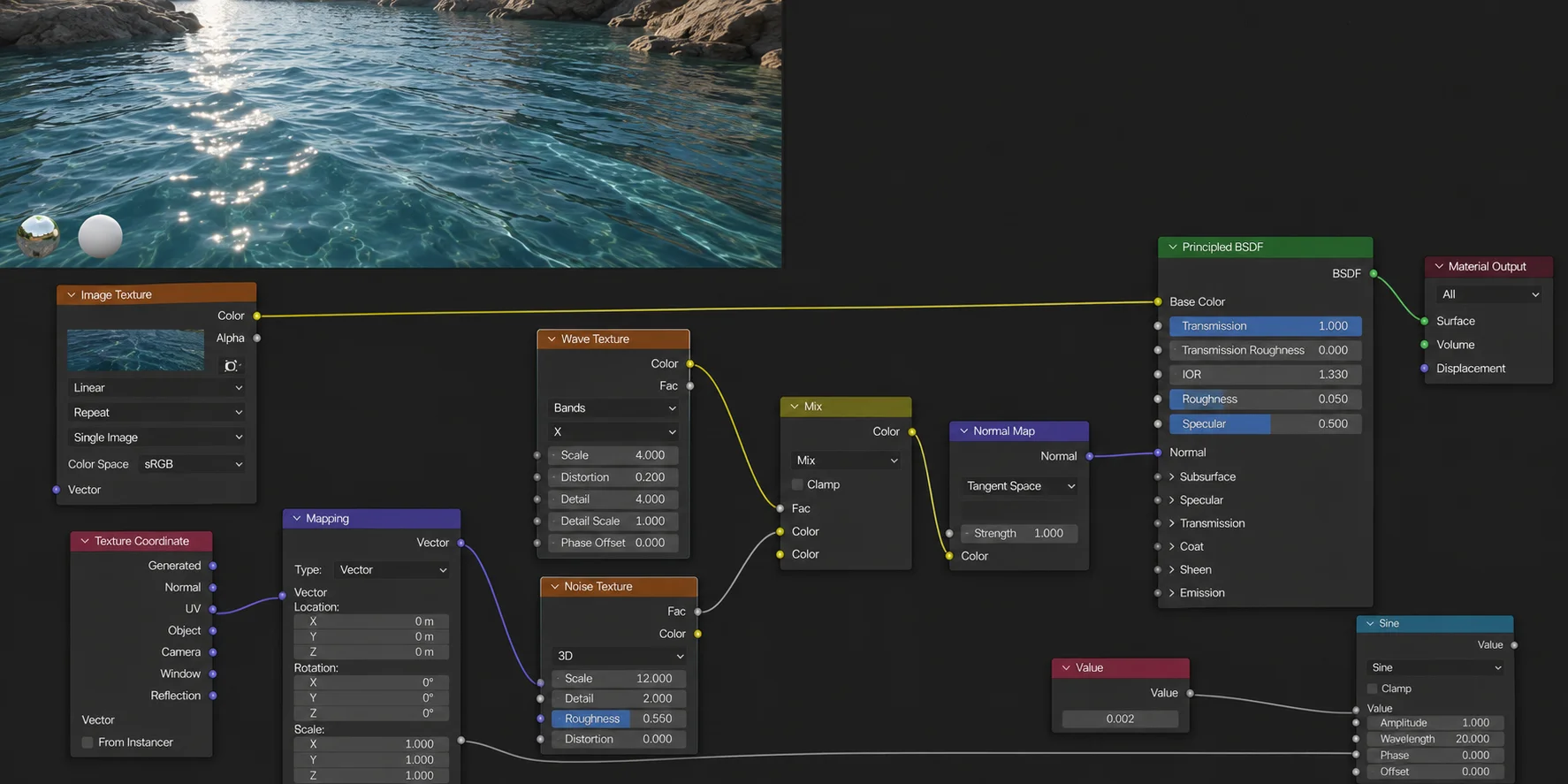
Apply a Principled BSDF material to a plane. For a clear-water starting point, use a high Transmission Weight and an IOR of about 1.33. Blender uses IOR for reflected and transmitted light. Final transparency and refraction also depend on the render engine, lighting, mesh thickness, and scene settings.
Connect image-based normal textures through a Normal Map node. For procedural grayscale textures, use a Bump node. Layer two ripple patterns with different scales, rotations, and animation speeds to prevent visible repetition.
Adjust roughness according to the water type. A clean swimming pool may use low roughness and sharp reflections, while a windy lake or dirty river should have broader, less consistent highlights.
For flowing water, animate the Mapping node’s location values. Use real displacement only when waves must change the model’s silhouette; small ripples are cheaper and cleaner as bump detail. Transparency and refraction may also require renderer-specific settings.
Water Textures in Unreal Engine & Unity
Unreal Engine
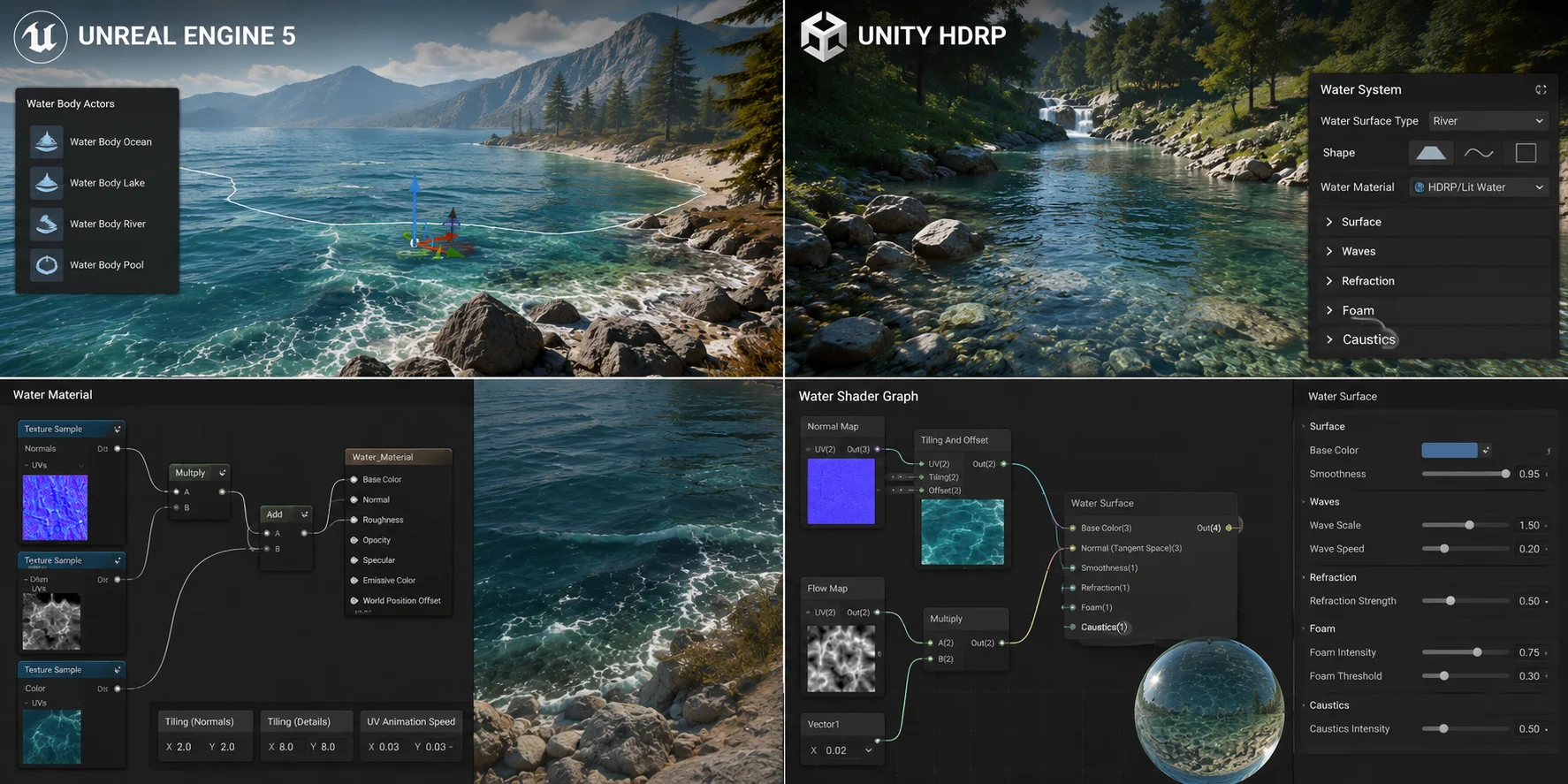
Unreal Engine’s Water system provides Water Body Actors for oceans, lakes, rivers, and custom water areas. These actors work with a shared water mesh and configurable materials.
Add the appropriate Water Body Actor, then customize its material with tiled normal maps, water color, foam, depth variation, and wave parameters. Unreal’s Single Layer Water shading model supports physically based scattering, absorption, reflection, refraction, and shadowing.
Two slower normal layers moving in different directions usually look more natural than one rapidly scrolling texture. Additional foam masks can define shorelines, waterfalls, rocks, and wave crests.
Unity
The correct Unity setup depends on the render pipeline. HDRP includes a dedicated Water System; its available settings and water-surface features depend on the HDRP version and project configuration.
In URP, create water with Shader Graph, a custom shader, or a compatible third-party package. URP does not include the same complete Water System found in HDRP, although Shader Graph provides a visual node-based workflow for building water materials.
Import normal textures as Normal Maps, then layer two scrolling directions. Add depth-based color, transparency, foam, and refraction according to the visual requirements and performance budget of the project.
Where to Find Free Water Textures
| Source type | Best use | License and map check |
|---|---|---|
| Poly Haven | Free PBR materials and HDRIs for Blender, game engines, and rendering workflows. | Poly Haven states that its assets are CC0. Confirm that the specific material includes the maps your shader needs. |
| Photo-reference libraries | Reference, mood boards, and source photography for making a custom texture. | Photos are not a substitute for a complete PBR pack. Review the current license and any restrictions before using, redistributing, or training from an image. |
| Texture and asset marketplaces | Additional seamless tiles, design textures, vectors, or PBR packs. | Availability, included maps, attribution, and commercial-use terms vary by asset. Check the individual asset page before downloading or using it in a project. |
Poly Haven is a practical starting point when you need a PBR workflow with a clearly stated CC0 license. For every other source, verify the individual asset page before relying on a free tier, a particular map set, or commercial-use permissions.
How to Photograph Water Texture
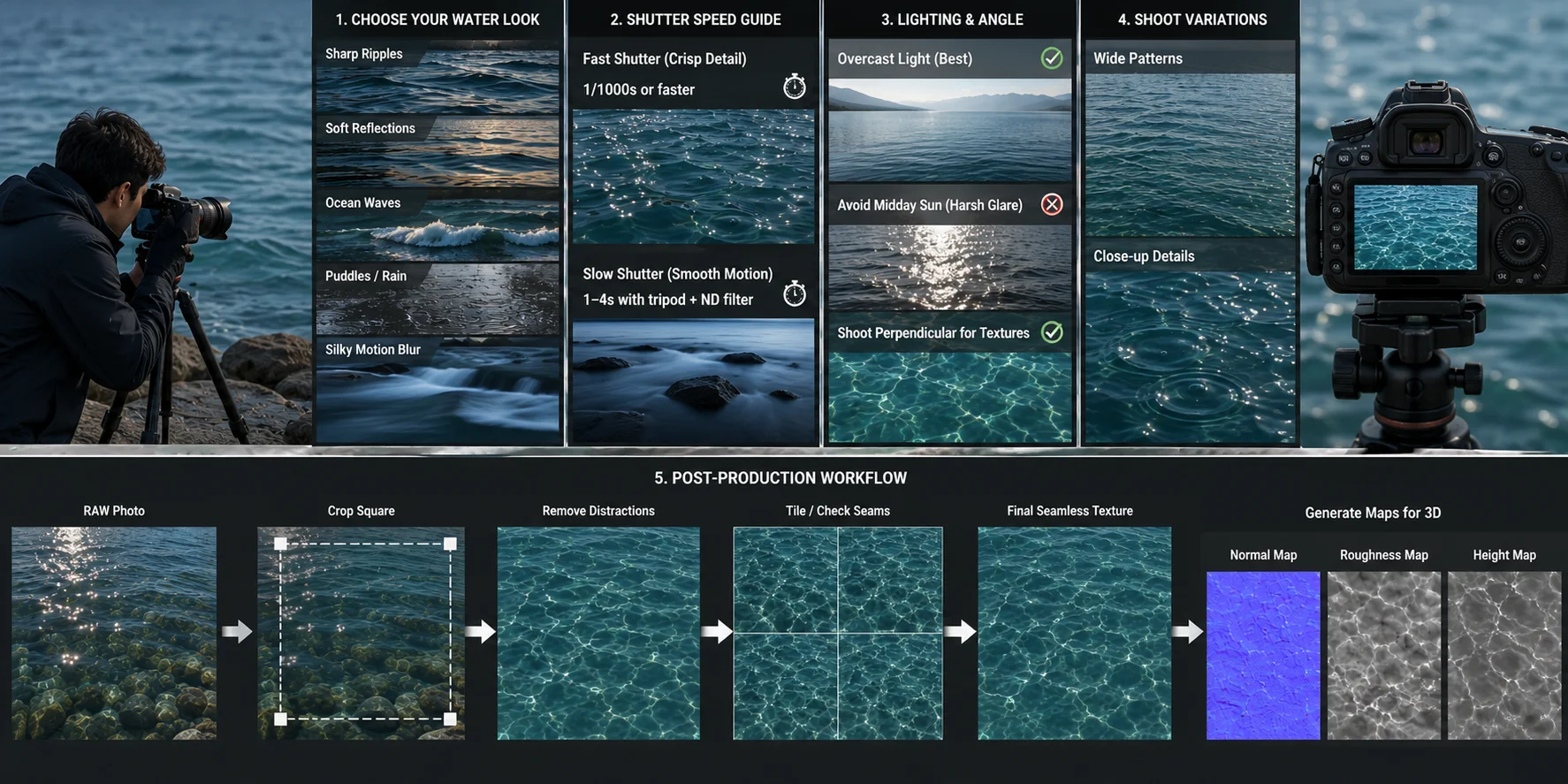
To photograph water texture, first decide what kind of surface you want: sharp ripples, soft reflections, ocean waves, puddles, or silky motion blur. For crisp ripple detail, use a fast shutter speed such as 1/1000s or faster. For smooth, dreamy water, use a slower shutter speed around 1–4 seconds with a tripod and neutral density filter.
Overcast light is usually easier to work with because it reduces harsh specular highlights. Avoid direct midday sun unless you specifically want strong glare. Shoot perpendicular to the surface if you plan to make a seamless texture, because angled photos can introduce perspective distortion. Capture several variations, including close-up details and wider surface patterns. In post-production, crop a square area, remove obvious repeating objects, tile the image, and generate normal or roughness maps for 3D use.
Go Beyond Flat Maps: Generate 3D Water Assets with Tripo AI
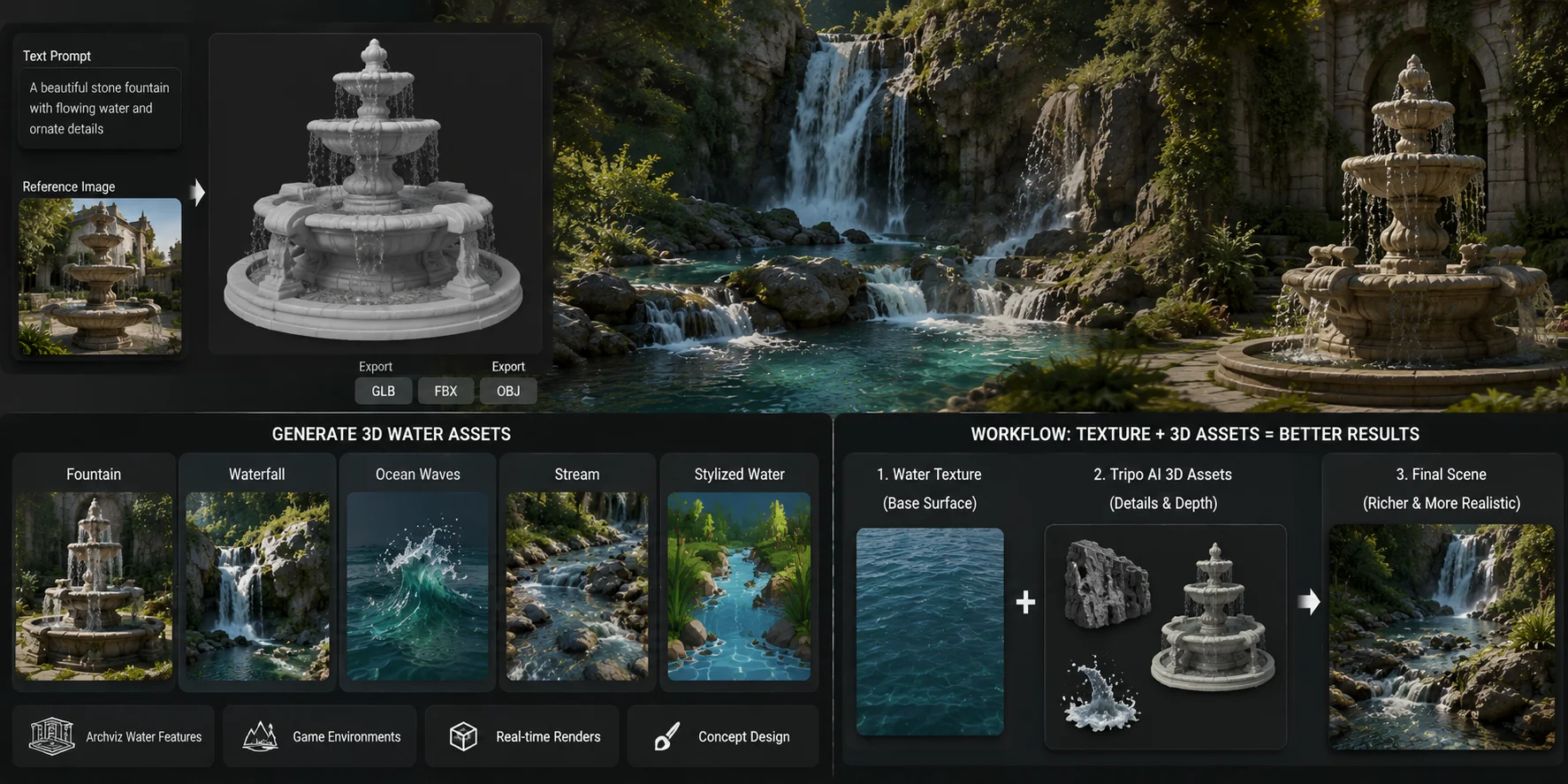
A water texture changes the appearance of an existing surface; it does not create the surrounding object or environment. Tripo AI converts text prompts and reference images into 3D models, which can help create surrounding scene assets such as fountains, pool features, stylized wave props, coastal rocks, and other water-themed environment pieces.
Tripo’s current website lists GLB, STL, and OBJ exports for moving generated models into game, visualization, and 3D-editing workflows. Check the export options in Studio for the current model type and plan.
Useful applications include:
- Fountain basins and decorative water features for architectural visualization
- Stylized wave and coastal assets for game environments
- Rock-and-waterfall compositions used as a base for real-time effects
- Pool structures, spillways, pond edges, and riverbank props
- Water-themed scene dressing for animation and concept design
Generated geometry should not be confused with a fluid simulation. A generated waterfall model can provide the rocks, splash forms, and overall composition, but convincing movement still requires scrolling materials, particles, geometry animation, or fluid simulation in Blender, Unreal Engine, Unity, or Houdini.
Frequently Asked Questions
How do you describe the texture of water?
Water is reflective, translucent, refractive, and dynamic. Its appearance ranges from mirror-smooth on calm lakes to rough, broken, and foamy on open water. Artists reproduce these qualities with layered normal maps, displacement, animated coordinates, and changing roughness.
What is water texture?
A water texture is a 2D image map or procedural shader used in 3D graphics and design to simulate the surface appearance of water. It can include color, reflection, transparency, ripples, waves, foam, and caustic details.
How to make a water texture?
Photograph water, convert the image into a seamless tile, and derive normal or height detail from it. Alternatively, combine Noise and Wave textures procedurally in Blender. Downloaded PBR maps still need a renderer-appropriate shader setup, including the surface, roughness, transparency, and animation controls the scene requires.
How can I photograph water texture?
Use a fast shutter speed to freeze ripples or a long exposure to smooth water movement. Overcast light reduces harsh reflections, while a top-down camera angle produces a cleaner source for seamless tiling.
Conclusion
The right water texture adds movement, depth, and believable reflection to a scene. Choose photographs for natural irregularity, procedural shaders for flexible animation, and PBR maps when you need detailed control over normals, roughness, opacity, and displacement.
For fountains, coastal props, pool structures, and other water-related elements that require real geometry rather than a flat surface, create the surrounding asset with Tripo AI. Then finish the water material and movement in your preferred 3D tool.
