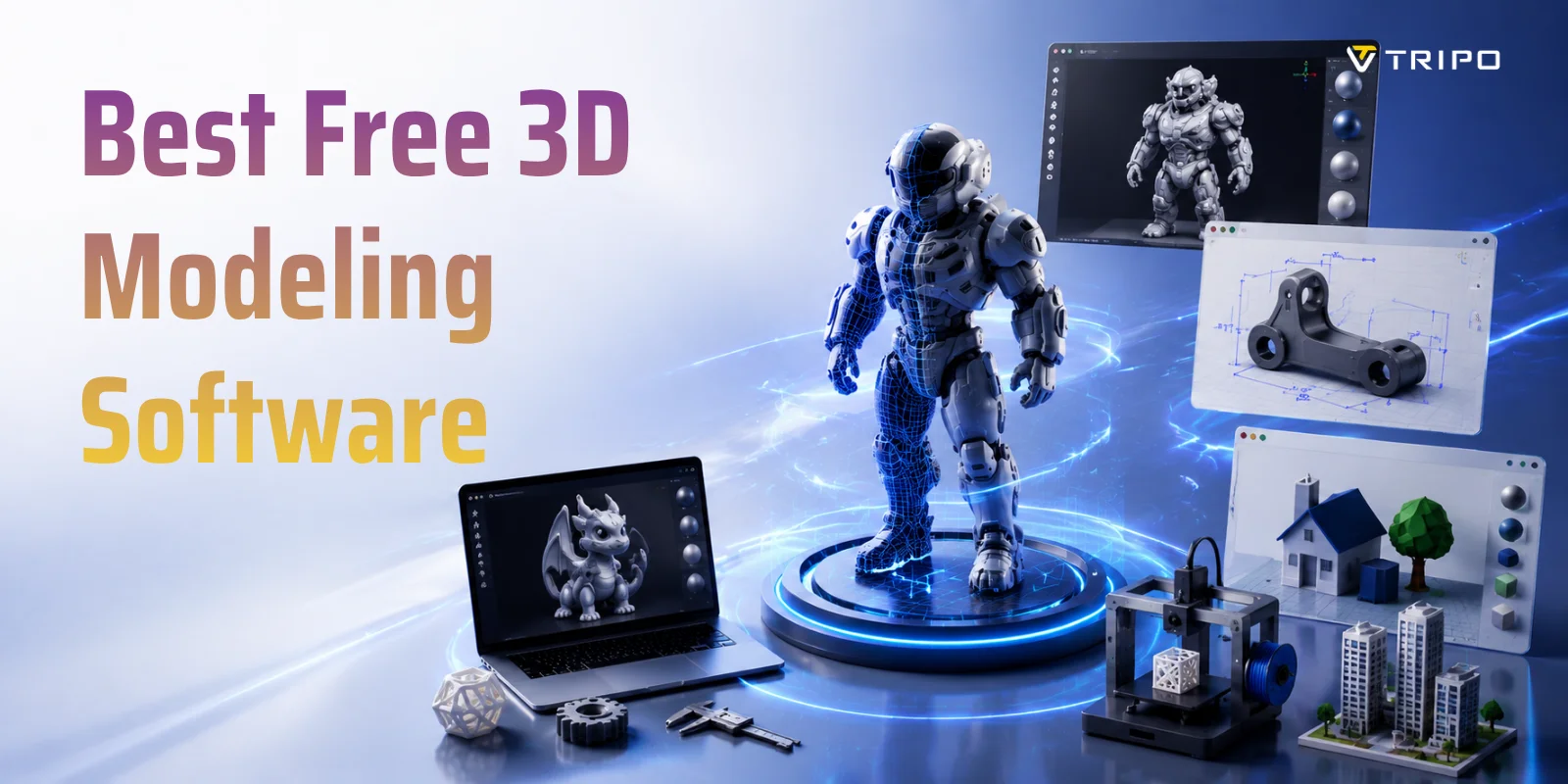
Best Free 3D Modeling Software in 2026
TL;DR:
- Blender — Best overall free 3D modeling software for animation, games, and advanced projects.
- Tinkercad — Best beginner-friendly tool for learning 3D modeling and simple 3D printing.
- FreeCAD — Best free CAD software for accurate engineering designs and functional parts.
- SketchUp Free — Best for beginner architecture and quick concept modeling.
- Onshape Free — Best browser-based CAD option for online collaboration.
- Tripo AI Studio — Best for quickly generating 3D models from images or text prompts.
- Choose based on your goal: Blender for creativity, FreeCAD for precision, Tinkercad for beginners, and AI tools for speed.
The best free 3D modeling software includes Blender for general use, Tinkercad for beginners, FreeCAD for engineering, and SketchUp Free for architecture. Each tool covers a different skill level and use case — so the "best" option depends entirely on what you are building and how much experience you have.
Over 4.5 million people use Blender alone — and that number keeps climbing as 3D modeling moves from specialist studios into classrooms, living rooms, and side projects. Whether you want to design a part for your 3D printer, build a game asset, or just experiment with 3D for the first time, there is a free tool built exactly for that job. This guide breaks down the top free options by use case, skill level, and what each one actually lets you do for free.
What Is 3D Modeling Software?
3D modeling software allows you to create digital objects in a three-dimensional space. You can use these models for many purposes, including game development, animation, product design, architecture, virtual reality, and 3D printing.
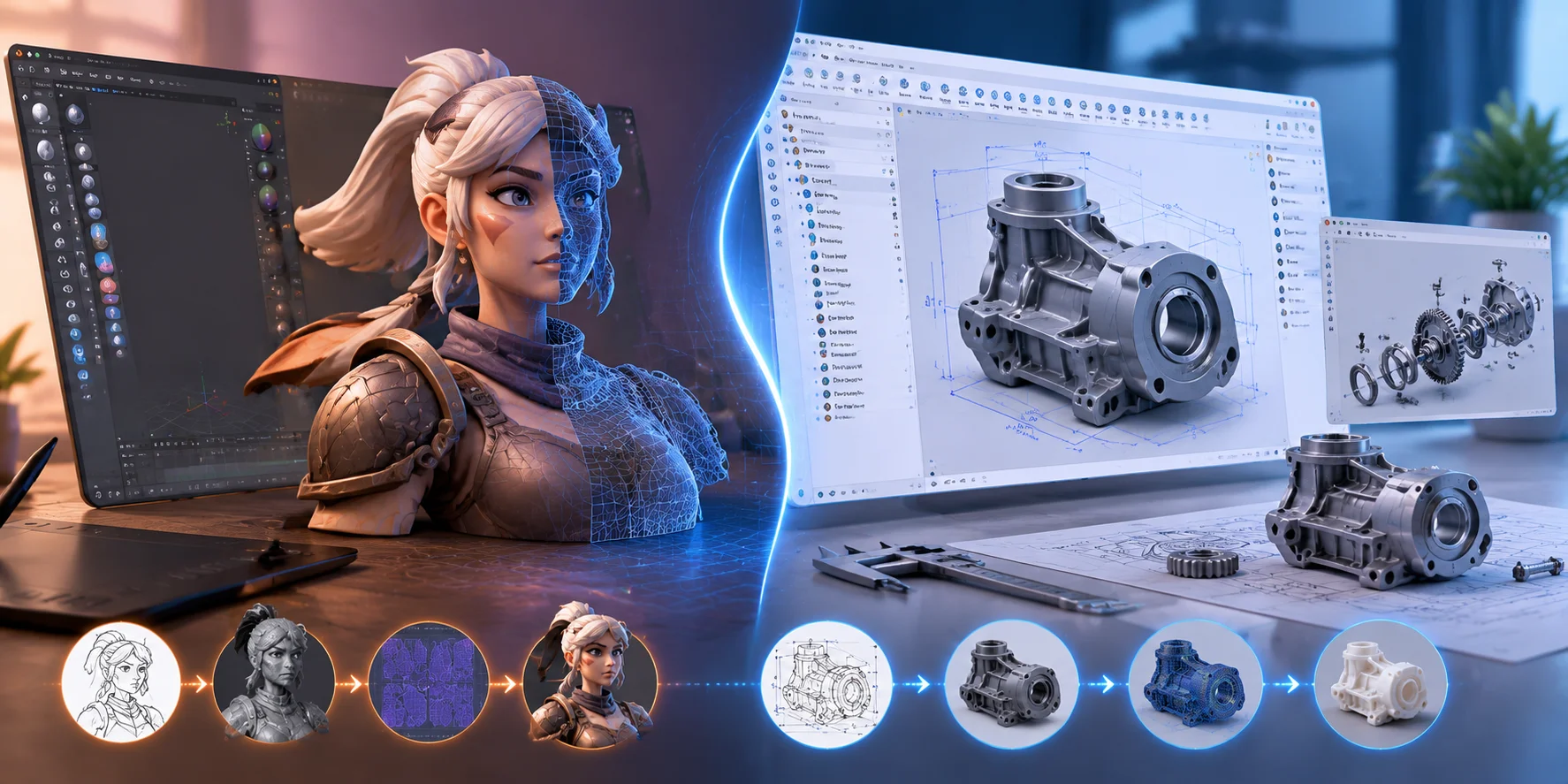
Most 3D modeling workflows use one of two approaches: polygonal modeling or CAD/parametric modeling.
Polygonal or mesh modeling focuses on shaping surfaces by editing points, edges, and faces. Artists use this workflow for characters, creatures, environments, and visual effects. Blender is one of the most popular examples because it combines modeling, sculpting, animation, and rendering.
CAD (Computer-Aided Design) uses precise measurements and parameters. Engineers and product designers use CAD tools to create mechanical parts, functional products, and accurate 3D printing designs. FreeCAD and Onshape are examples of this workflow.
The word “free” can also mean different things. Some programs are fully free and open-source, such as Blender and FreeCAD. Others offer free versions with limits, such as reduced exports or public projects. Browser-based tools like Tinkercad and SketchUp Free let you start modeling online without installing software.
Before choosing a tool, you should understand what type of modeling matches your goal.
Polygonal Modeling vs CAD Modeling: Two Core 3D Workflows Explained
How to Choose the Right Free 3D Modeling Tool
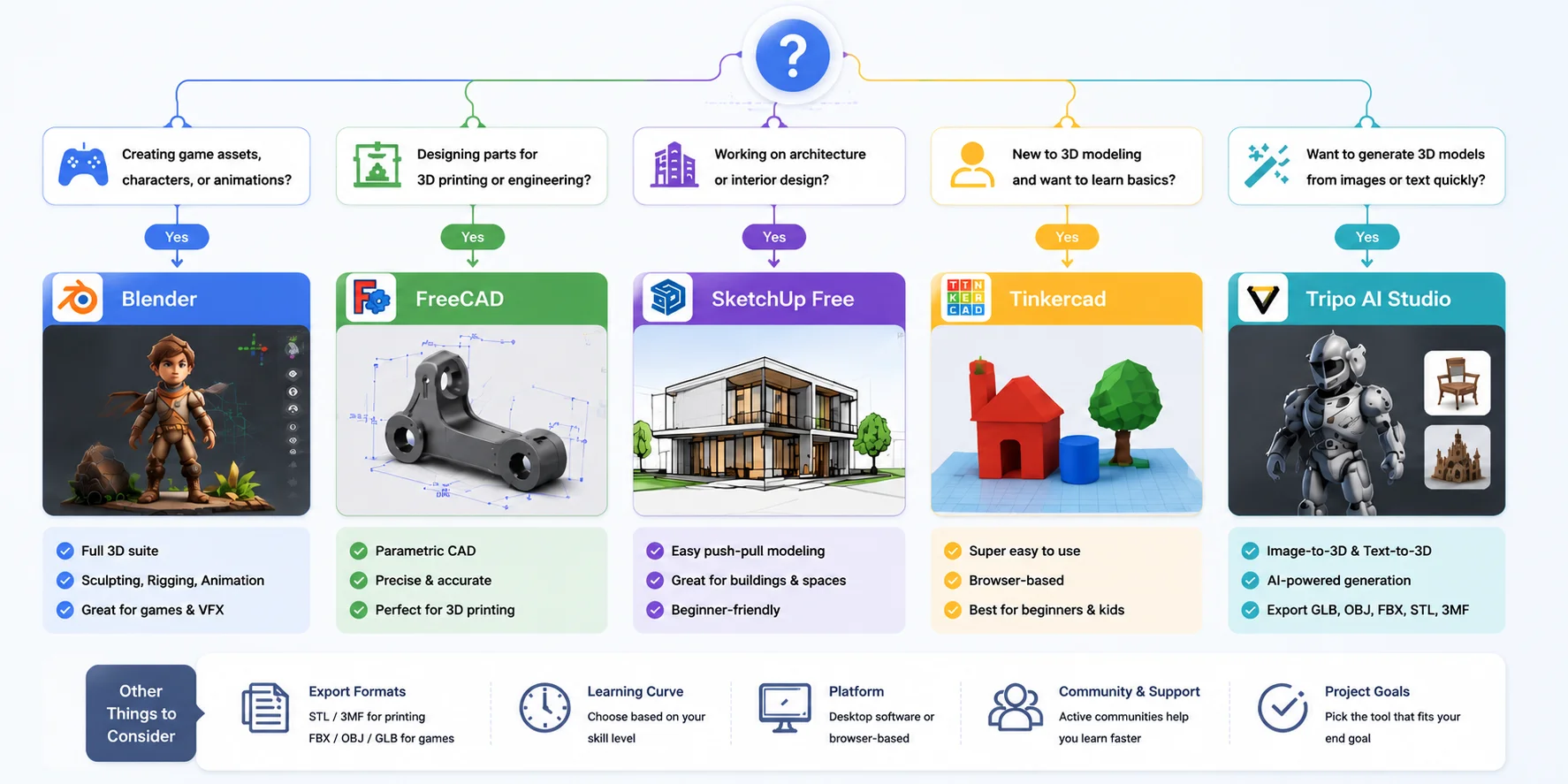
The best free 3D modeling tool depends on your project.
If you want to create characters, game assets, or digital sculptures, choose mesh-based software like Blender. These tools give you creative control over shapes, details, and materials.
If you want to create functional objects or 3D-printable parts, choose CAD software. Programs like FreeCAD help you build accurate models with exact dimensions.
For architecture, look for tools that make it easy to design spaces and buildings. SketchUp Free is popular because its push-pull workflow feels natural for beginners.
Your experience level also matters. Tinkercad is designed for complete beginners and teaches basic modeling through simple shapes. Blender and FreeCAD offer more power but require more practice.
Before committing to a tool, check these points:
- Purpose: game assets, printing, engineering, or architecture?
- Learning curve: do you want simple tools or professional features?
- Export formats: STL/3MF for printing, FBX/OBJ/GLB for games.
- Platform: desktop software or browser-based 3D modeling?
A simple rule:
- Beginners → Tinkercad or SketchUp Free
- Artists → Blender
- Engineers → FreeCAD or Onshape
- Fast AI-generated models → Tripo AI Studio
How to Choose the Right Free 3D Modeling Software
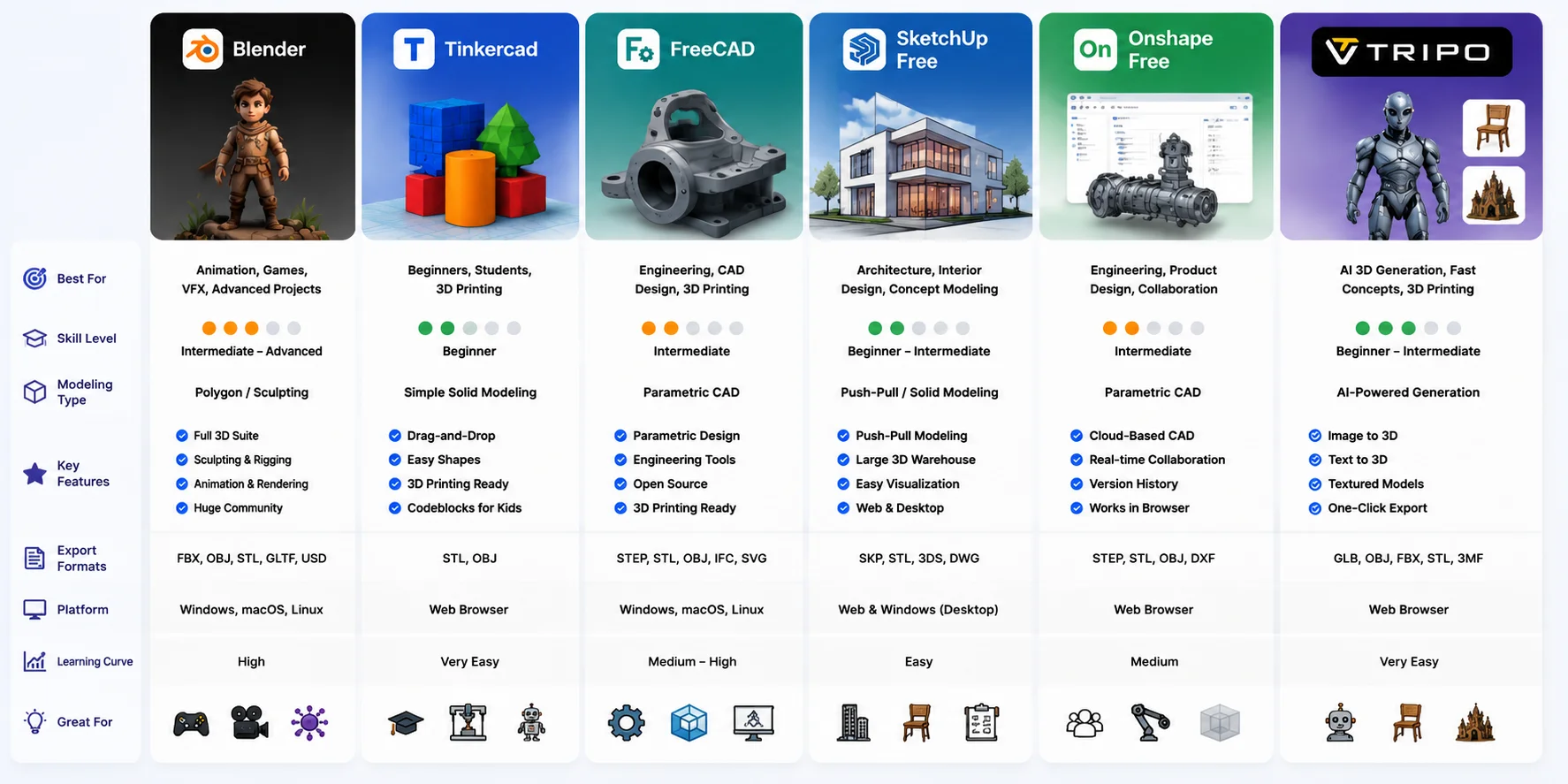
Best Free 3D Modeling Software at a Glance
| Tool | Best For | Skill Level | Platform | Key Free Limitation |
|---|---|---|---|---|
| Blender | Animation, sculpting, game assets | Intermediate–Advanced | Windows, Mac, Linux | None, fully free |
| Tinkercad | Beginners and simple printing projects | Beginner | Browser-based | Basic features only |
| FreeCAD | Engineering and precise 3D printing | Intermediate | Windows, Mac, Linux | Steeper learning curve |
| SketchUp Free | Architecture and concept design | Beginner–Intermediate | Browser-based | Advanced tools require paid plans |
| Onshape Free | Browser CAD and assemblies | Intermediate | Browser-based | Projects are public |
| Wings 3D | Simple polygon modeling | Beginner–Intermediate | Windows, Mac, Linux | No animation tools |
| OpenSCAD | Script-based CAD | Intermediate | Windows, Mac, Linux | Requires coding |
| Tripo AI Studio | AI-generated 3D models | Beginner | Browser-based | Free generation limits |
The sections below explain each tool in detail so you can choose the option that fits your workflow.
Best Free 3D Modeling Software Comparison: Features, Platforms, and Use Cases
Best Free 3D Modeling Software for General Use
Blender: The Most Complete Free 3D Modeling Software
Blender is often considered the best free 3D modeling software because it provides professional-level features without subscriptions or export restrictions.
With Blender, you can create:
- 3D characters
- Game environments
- Product models
- Animations
- Visual effects
- Sculpted artwork
It supports the full 3D workflow, including modeling, sculpting, rigging, animation, rendering, and compositing. Indie game developers often use Blender to create assets before importing them into Unity or Unreal Engine.
The biggest advantage of Blender is flexibility. You can start with simple objects and continue using the same software for advanced projects.
The downside is the learning curve. Blender has many tools, and beginners may feel overwhelmed at first. If you are new to 3D, start with basic tutorials and learn one workflow at a time.
For users who want one free tool that can grow with their skills, Blender is hard to beat.
Wings 3D: A Simpler Polygon Modeling Option
Wings 3D is a lightweight alternative for users who only need basic mesh modeling.
It focuses on polygon editing instead of animation or rendering. This makes it easier to understand than Blender, especially for beginners learning how vertices, edges, and faces work.
However, Wings 3D lacks advanced features like sculpting, rigging, and animation. For professional pipelines, Blender remains the stronger choice.
Best Free 3D Modeling Software for Beginners
When you start learning 3D modeling, simplicity matters. You need software that helps you understand basic ideas without a complicated interface.
Tinkercad: The Easiest Beginner Tool
Tinkercad is one of the most accessible free 3D modeling tools available today. It runs directly in your browser, requires no installation, and uses a simple drag-and-drop workflow.
You create models by combining basic shapes such as cubes, cylinders, and spheres. This makes it ideal for:
- First-time users
- Students
- Simple 3D printing projects
- Quick prototypes
A basic workflow looks like this:
- Select shapes from the library.
- Resize and combine objects.
- Create your final design.
- Export it as STL for printing.
Tinkercad is not designed for advanced characters or complex engineering parts, but it is one of the best ways to start learning 3D modeling.
SketchUp Free: Simple Architecture Modeling
SketchUp Free is another beginner-friendly option, especially for architecture and interior design.
Its push-pull modeling system lets you turn simple 2D shapes into 3D structures quickly. You can create rooms, buildings, furniture layouts, and design concepts without learning complex CAD tools.
A common question is: Is SketchUp 3D free?
Yes. SketchUp Free is a free browser-based version. However, advanced professional features, documentation tools, and some collaboration functions require paid plans.
For beginners exploring architecture, SketchUp Free offers one of the easiest learning paths.
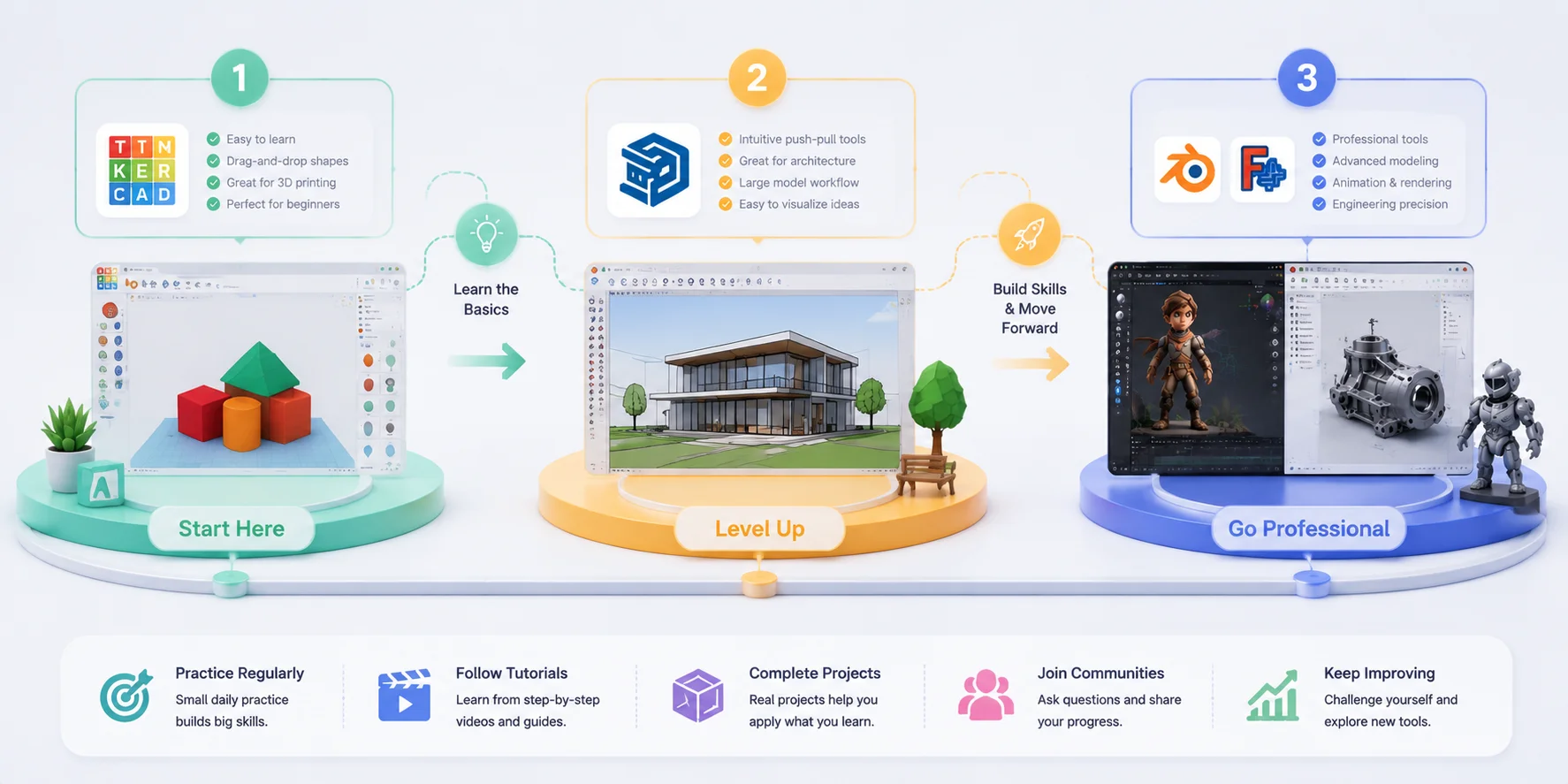
Beginner 3D Modeling Learning Path: From First Model to Advanced Skills
Best Free 3D Modeling Software for 3D Printing
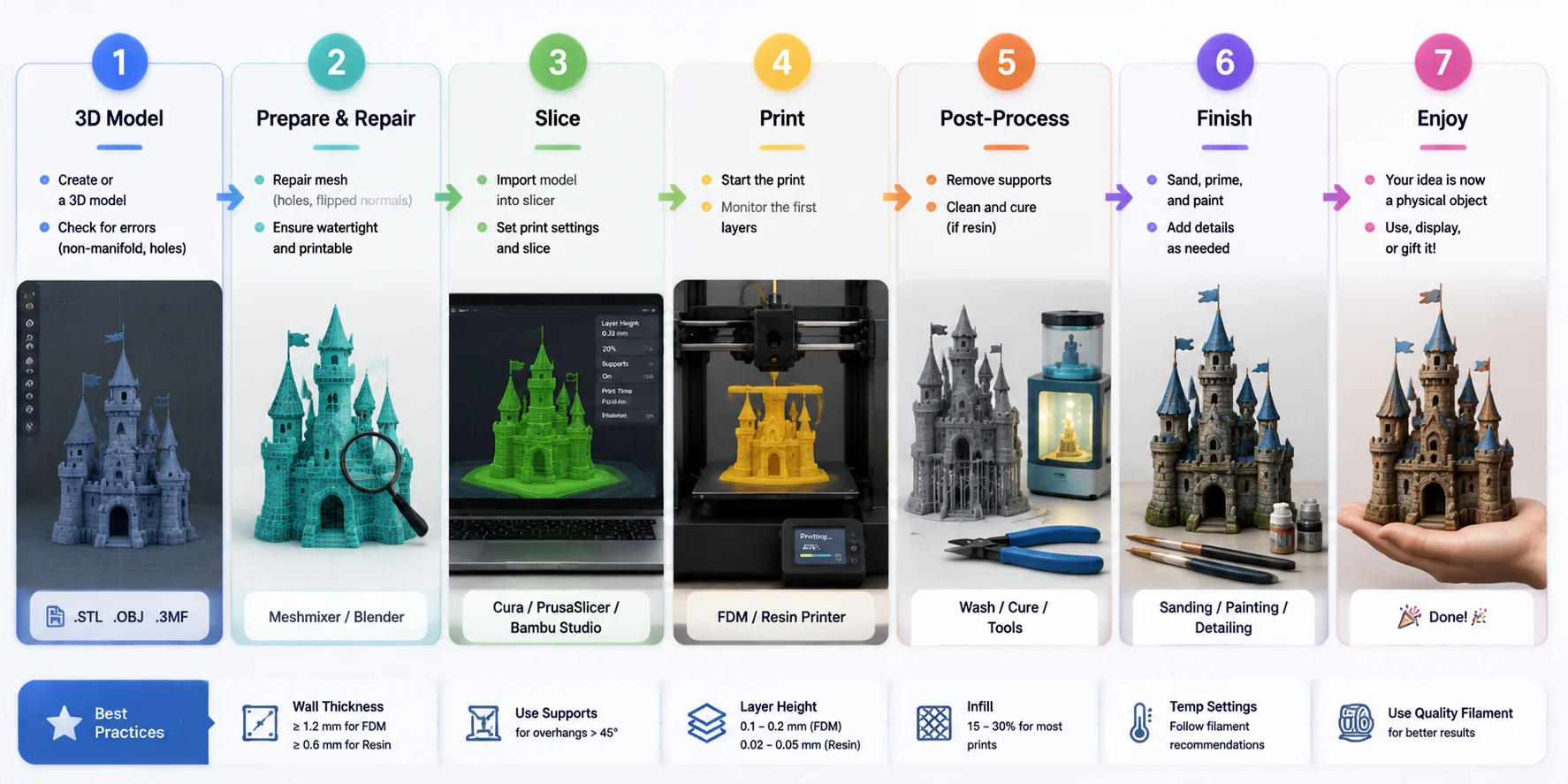
3D printing has different requirements from animation or game design. A model that looks good on screen may fail when printed. You need clean geometry, closed surfaces, and the right file formats.
Most 3D printers use STL or 3MF files. Good 3D printing software should help you create accurate models that can move smoothly from design software to a slicer.
FreeCAD: Best Free CAD Software for Precision Printing
FreeCAD is one of the strongest choices for engineering-focused 3D printing. Unlike mesh modeling tools, FreeCAD uses parametric modeling. This means you define exact dimensions, constraints, and relationships between parts.
FreeCAD works well for:
- Mechanical components
- Functional parts
- Product prototypes
- Replacement pieces
- Technical designs
A common question is: Is FreeCAD still free?
Yes. FreeCAD remains fully free and open-source. It has no subscription, no premium tier, and no locked features.
The main challenge is learning the workflow. Beginners may need time to understand sketches, constraints, and parametric design. However, if accuracy matters, FreeCAD is one of the best free CAD software options available.
Tinkercad for Simple 3D Printing
For simple printable objects, Tinkercad is often the better choice.
You can create basic designs quickly and export clean STL files without learning complex tools. It works well for:
- Simple toys
- Desk accessories
- Name tags
- Educational projects
Many beginners start with Tinkercad before moving to more advanced CAD software.
Onshape Free: Browser-Based CAD for Advanced Users
Onshape Free brings professional CAD features into the browser. It supports parametric modeling and assemblies, making it useful for more complex engineering projects.
The biggest advantage is accessibility. You can work from almost any computer without installing software.
The limitation is privacy: projects created with the free plan are publicly visible. For personal learning and open projects, this is usually fine, but businesses may need a paid plan.
AI Tools for Faster 3D Printing Creation
Traditional CAD is excellent for precise parts, but it can be slow for organic designs like characters, sculptures, and decorative objects.
An AI 3D model generator offers a faster alternative. Instead of building every shape manually, you can generate a starting model from an image or text prompt.
For example, Tripo AI Studio can turn an image or description into a 3D model and export formats such as STL and 3MF. You can then edit the model if needed or send it directly into a slicer workflow.
AI tools work best when you need fast ideas, creative models, or a starting point before further editing.
3D Printing Workflow: From 3D Model Export to Final Print
Best Free 3D Modeling Software for Architecture
Architecture requires a different modeling style. Instead of focusing on characters or detailed surfaces, architectural tools need accurate spaces, dimensions, and easy presentation.
SketchUp Free: Best for Architectural Concepts
SketchUp Free is one of the most popular free architecture modeling tools because its workflow matches how people naturally think about buildings.
You can quickly create:
- Floor plans
- Rooms
- Buildings
- Interior layouts
- Early design concepts
The push-pull system makes it easy to turn simple shapes into walls, floors, and structures.
For students, hobbyists, and early design work, SketchUp Free provides an excellent introduction to architectural modeling.
Professional architecture teams often use paid BIM platforms for advanced documentation and collaboration, but SketchUp Free is still a strong starting point.
FreeCAD Architecture: Free BIM-Like Modeling
FreeCAD also provides architecture features through its Architecture workbench.
BIM (Building Information Modeling) means a 3D model contains extra information, such as materials, dimensions, and building data.
Most professional BIM software is expensive, but FreeCAD gives users a free way to explore this workflow.
The tradeoff is usability. FreeCAD is more technical than SketchUp, so it takes longer to learn.
Choose:
- SketchUp Free for fast architectural concepts
- FreeCAD for technical exploration
Best Free 3D Modeling Software Online (Browser-Based)
Browser-based 3D modeling removes many common barriers. You do not need to download large files, upgrade your computer, or worry about operating system compatibility.
Tinkercad
Tinkercad is one of the easiest browser-based 3D modeling tools. It works directly online and is ideal for beginners.
SketchUp Free
SketchUp Free provides a simple online environment for architecture and design concepts. It works well in modern browsers and requires no installation.
Onshape Free
Onshape offers the most advanced browser-based CAD experience. It provides professional modeling features while keeping everything online.
Tripo AI Studio
Tripo AI Studio takes browser-based 3D modeling in a different direction.
Instead of manually creating geometry, you can upload an image or enter a text prompt and generate a 3D model online. The process does not require a powerful GPU or local software installation.
Tripo AI Text to 3D
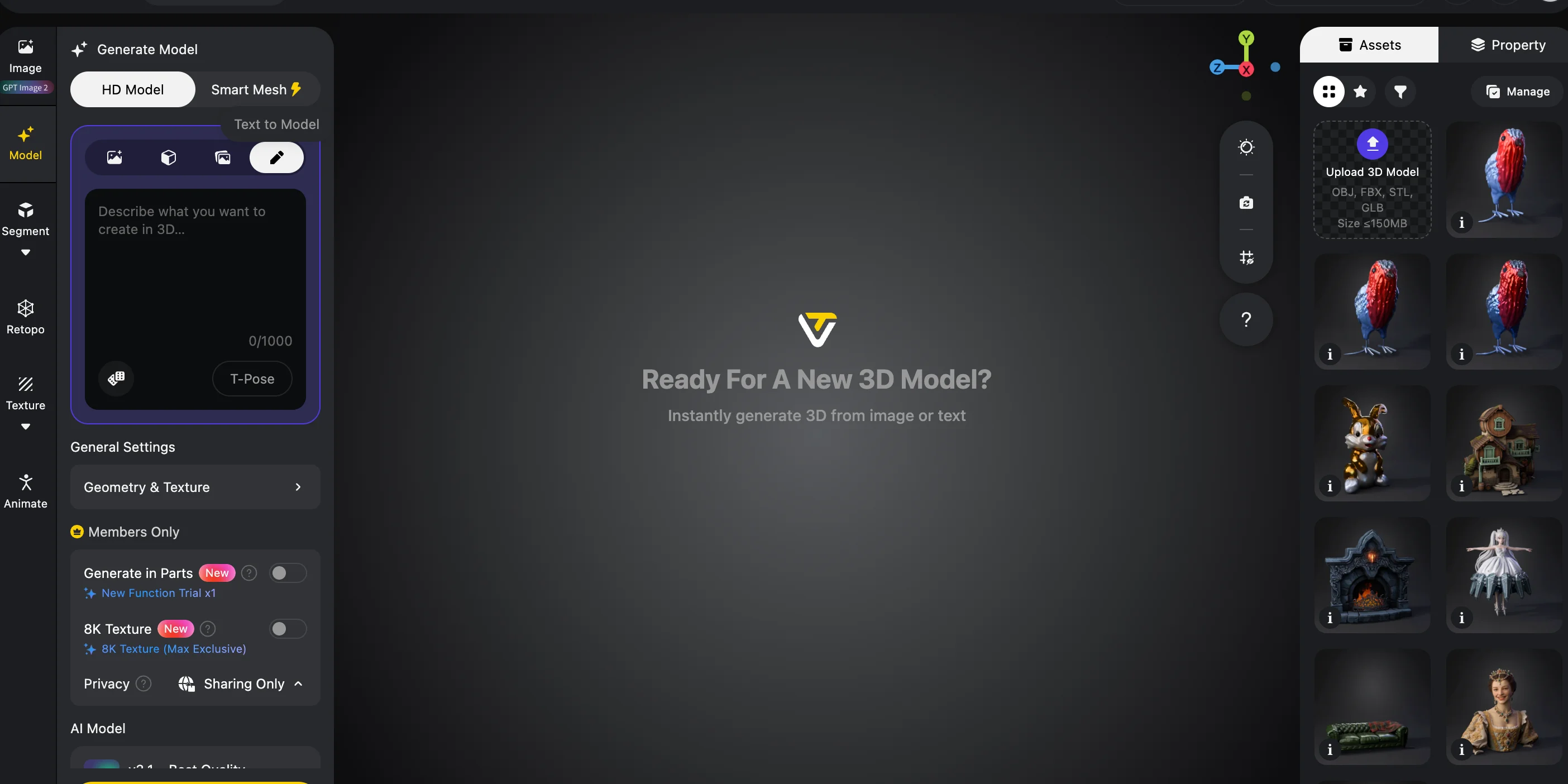
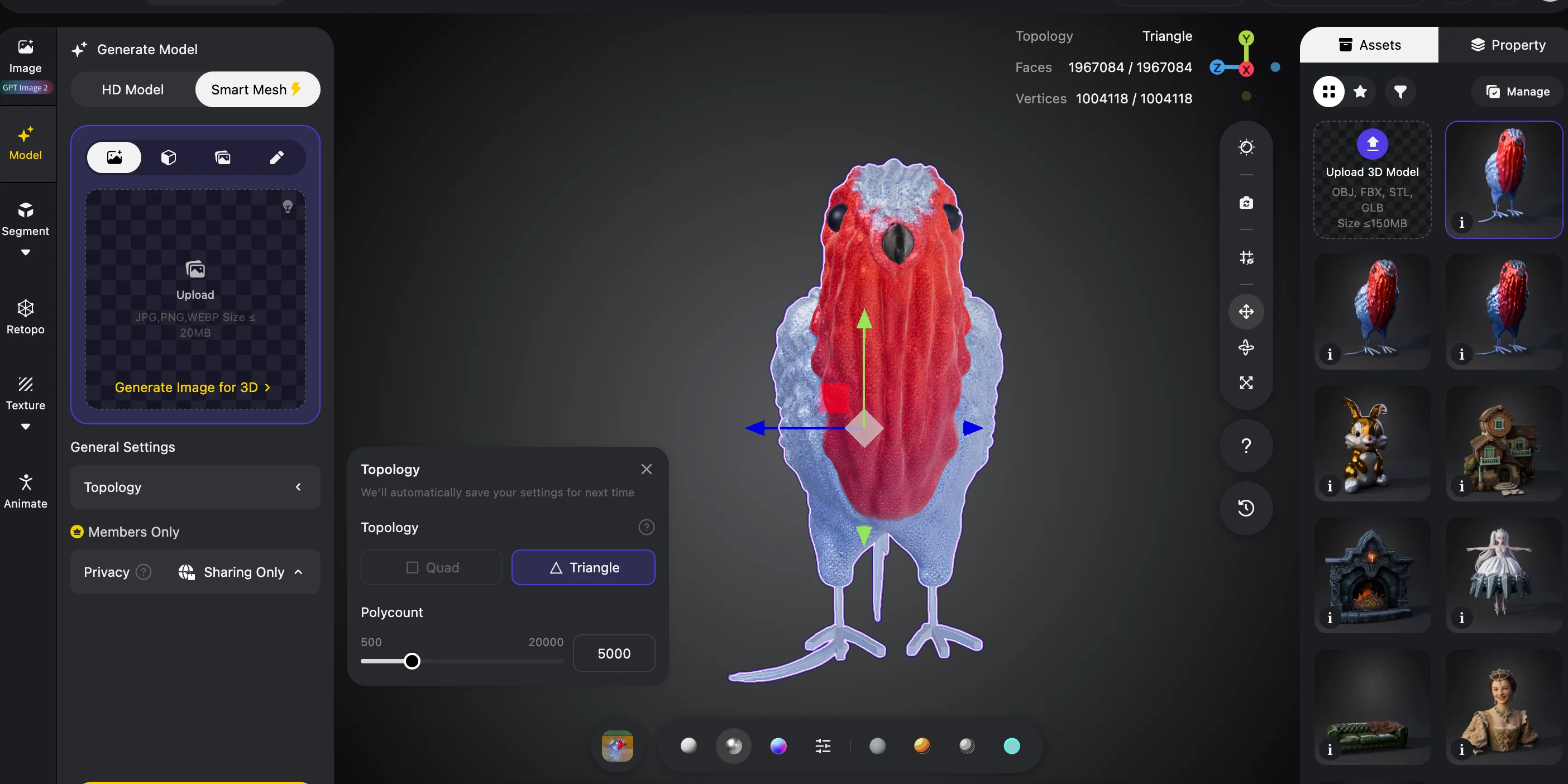
For users who want to move from idea to 3D asset quickly, AI-powered browser tools offer one of the fastest workflows available.
AI-Powered Free 3D Modeling: The Next Step
Traditional 3D modeling can take very different amounts of time depending on the tool. A beginner can learn basic shapes in Tinkercad within days, but mastering professional workflows in Blender can take years. AI-powered tools are changing this process by allowing you to create 3D geometry from simple inputs such as text descriptions and images.
A common question is: Can ChatGPT generate 3D models?
The answer is no. ChatGPT is a language model designed to generate and understand text. It can help you write prompts, explain modeling techniques, or plan a workflow, but it does not directly create 3D geometry files. Dedicated AI 3D tools like Tripo AI are built specifically for 3D generation, using trained 3D models to create actual meshes instead of only producing text responses.
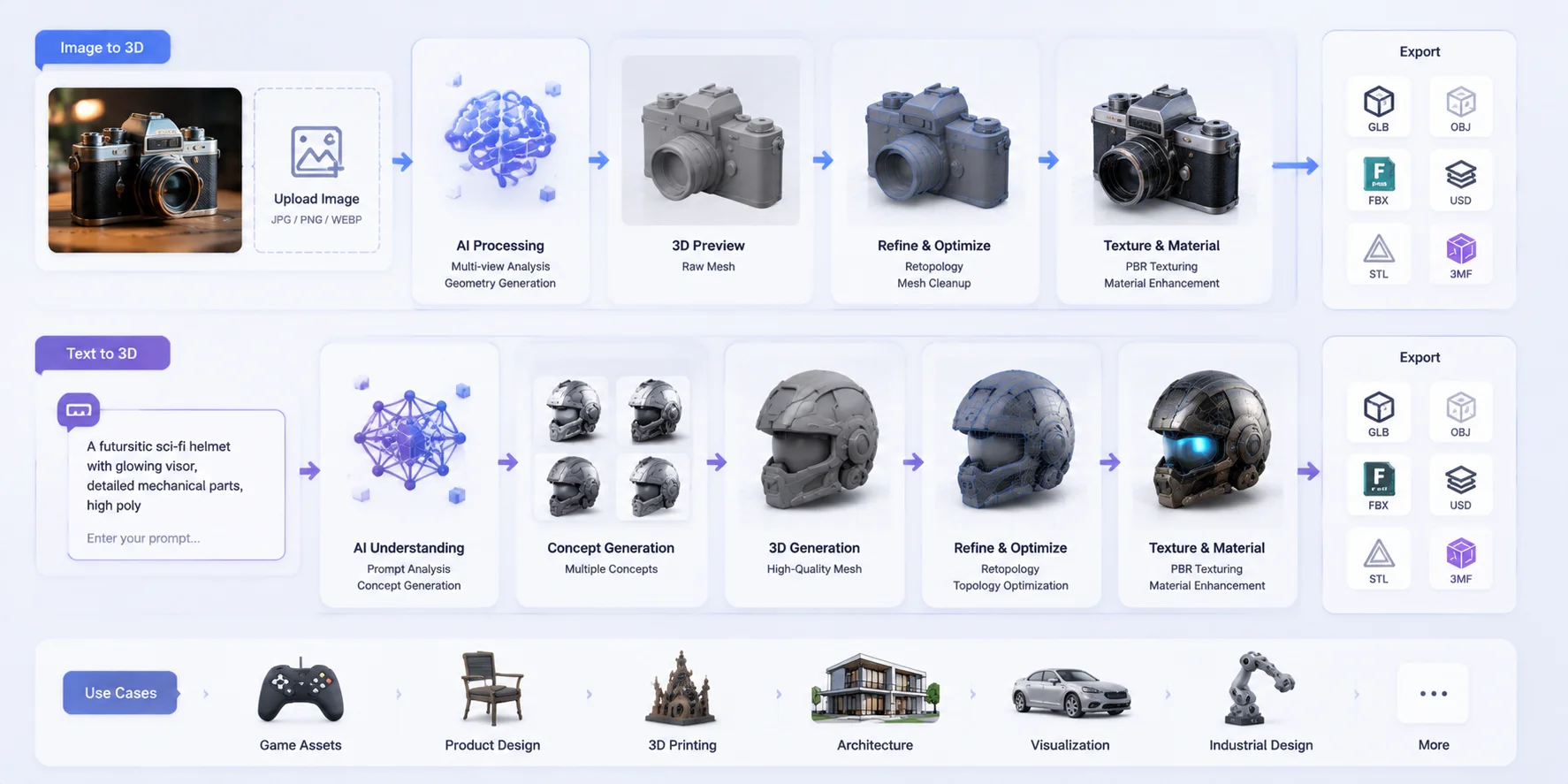
With an Image to 3D workflow, you can upload a photo of an object, character, or reference image, and the AI converts it into a textured 3D model automatically. This is useful when you want to transform real-world objects or visual ideas into editable 3D assets without modeling everything manually.
A Text to 3D workflow works from a written description. You can enter a prompt such as “a weathered stone gargoyle” or “a futuristic robot character,” and the AI generates a 3D model based on your idea.
Using Tripo AI Studio, you can create a model by uploading an image or entering a text prompt, then export the result in formats such as GLB, OBJ, FBX, STL, and 3MF. The free tier supports both Image to 3D and Text to 3D generation, making it accessible for beginners who want to explore AI-assisted modeling.
AI tools are especially useful for rapid concept creation, game asset prototypes, and organic shapes that are difficult to build manually. However, they work best alongside traditional software. Blender is still the better choice for detailed animation rigs, custom UV workflows, and professional production pipelines, while CAD tools remain essential for precise engineering designs. The strongest workflow combines AI speed with traditional modeling control.
AI Image to 3D and Text to 3D Workflow: From Idea to 3D Model
Frequently Asked Questions
Is there a free version of SketchUp?
Yes. SketchUp Free is a browser-based version available at no cost. It supports basic modeling and is suitable for architecture concepts and simple designs. Advanced professional features require paid plans.
Is FreeCAD still free?
Yes. FreeCAD is completely free and open-source. It has no subscription fees, usage limits, or premium-only features.
Can ChatGPT generate 3D models?
No. ChatGPT cannot create 3D geometry files directly. Dedicated AI 3D tools like Tripo AI are designed to generate downloadable 3D models from images or text prompts.
What is the best free 3D modeling software for beginners?
Tinkercad is usually the easiest choice because it is browser-based and simple to learn. SketchUp Free is another good option for beginners interested in architecture.
What is the best free software for 3D printing?
FreeCAD is best for accurate engineering prints because it uses parametric modeling. Tinkercad is better for simple beginner projects.
Is Blender really free?
Yes. Blender is fully free and open-source. It includes modeling, animation, sculpting, rendering, and other professional tools without subscriptions.
What is the best free 3D modeling software for mobile?
Browser-based tools are usually the easiest option on mobile devices. Tinkercad and Tripo AI Studio can run online without installing desktop software.
What is the best free 3D modeling software for architecture?
SketchUp Free is the easiest option for architectural concepts. FreeCAD is better for users who want a more technical workflow.
What formats do free 3D modeling tools export?
Formats depend on the software. Blender supports OBJ, FBX, GLB, and STL. CAD tools usually support STL and other engineering formats. Tripo AI Studio supports GLB, OBJ, FBX, STL, and 3MF for different workflows.
Do I need a powerful computer to run free 3D software?
Not always. Blender benefits from stronger hardware, but browser-based tools like Tinkercad and Tripo AI Studio run online and require much less local processing power.
Conclusion
The best free 3D modeling software depends on what you want to create. Blender gives you professional-level creative tools, Tinkercad helps beginners start quickly, FreeCAD provides accurate CAD modeling, and SketchUp Free makes architecture easier.
If you want to create 3D models without a long learning curve, try an AI workflow with Tripo AI Studio. You can turn ideas and images into 3D assets online without installing software or needing previous modeling experience.
Explore Tripo AI’s plans to find the workflow that fits your next 3D project.