Best AI Tools for Game Assets in 2026 (By Asset Type)
TL;DR:
- Tripo AI is the best overall choice for AI 3D game assets with fast generation, Smart Mesh, rigging, and game-ready exports.
- Use different AI tools for different needs, including 3D models, 2D sprites, textures, audio, and animation.
- Most popular AI game asset tools provide free plans or trial credits for testing workflows.
- AI-generated assets are usually allowed for commercial games, but always check each tool’s license terms.
- The fastest workflow combines AI generation with normal game development tools instead of replacing the entire pipeline.
The best AI tools for game assets help developers create 3D models, 2D sprites, textures, audio, and animation faster. The best choice depends on your project type, because most developers now combine several specialized tools instead of using one platform for everything.
AI-assisted workflows are helping teams reduce asset production time by up to 70%, while the generative AI for 3D asset market is projected to reach USD 9.4 billion by 2030. In this guide, you will find the best tools by asset type, learn how to choose the right AI workflow, and see how to create AI 3D game assets with Tripo AI from prompt to engine-ready model.
How to Choose an AI Tool for Game Assets
Before picking a tool, check these four factors:
- Asset type fit — A dedicated 3D generator, sprite tool, or texture AI usually performs better than an all-in-one platform.
- Engine compatibility — Check exports like FBX, GLB, OBJ, and sprite sheets for Unity, Unreal Engine, and Godot workflows.
- Commercial license — Most major AI tools allow commercial use, but always review current Terms of Service.
- Free tier and pricing — Free credits and trial plans are important for indie developers testing ideas.
AI Game Asset Categories: 3D Models, Sprites, Textures, Audio, and Animation Workflow
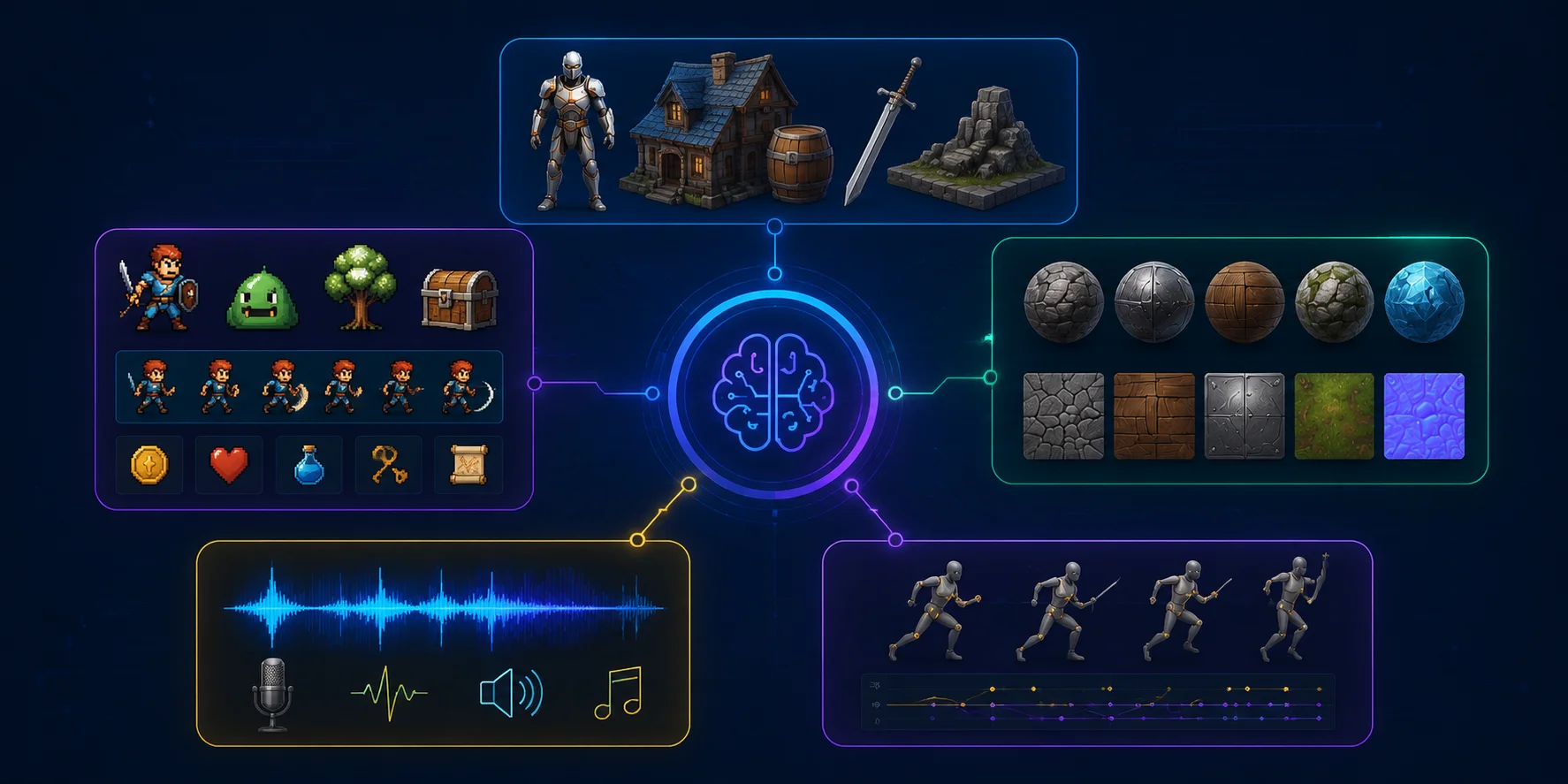
Best AI Tools for 3D Game Assets
3D generation is currently one of the strongest areas of AI for game development. Modern tools can create AI 3D game assets from text prompts or images in minutes, but the quality of the final pipeline matters more than generation speed.
A good game asset needs clean topology, proper formats, and reasonable performance. The best tools help you move from idea to engine without spending hours fixing every model.
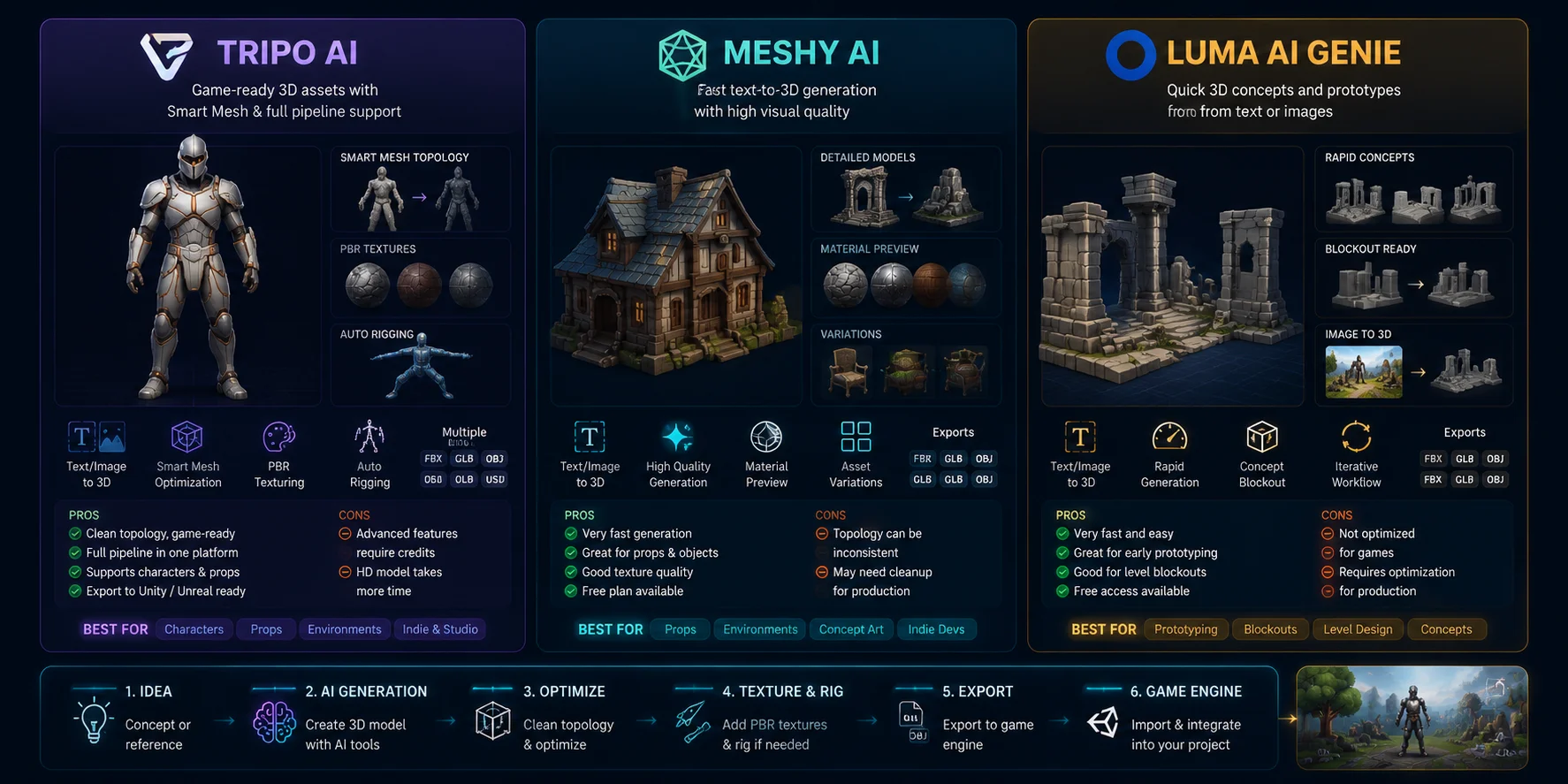
Tripo AI — Best Overall for 3D Game Assets
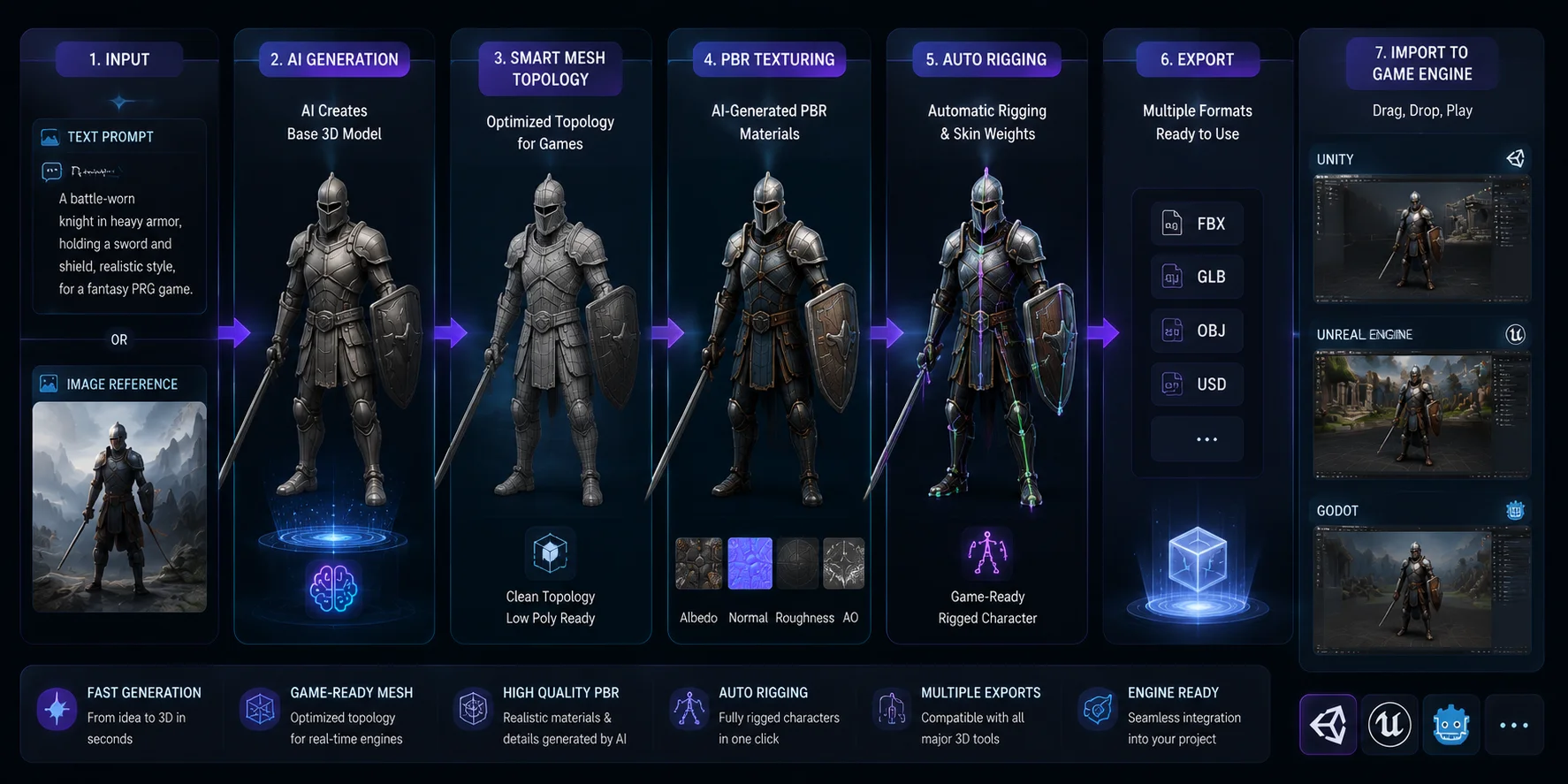
Tripo AI is one of the best choices for developers who need production-ready 3D assets. It supports both text-to-3D and image-to-3D generation, allowing you to create models from simple prompts or concept images.
The biggest advantage is its focus on game-ready output. Many AI-generated models look good but require heavy cleanup before entering Unity or Unreal. Tripo AI uses Smart Mesh technology to improve topology and create cleaner geometry for real-time use.
For different projects, you can choose different detail levels:
- Around 5,000 triangles for optimized mobile assets.
- Higher-detail HD models for close-up or AAA-style assets.
For characters, Tripo AI also provides automatic rigging, allowing you to prepare models for animation faster. After generation, you can export common formats such as FBX, GLB, OBJ, and USD for game engines and 3D software.
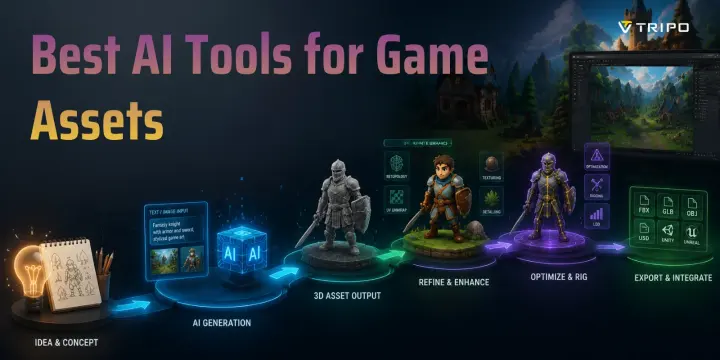
A typical indie workflow looks like this:
- Generate a model from text or an image.
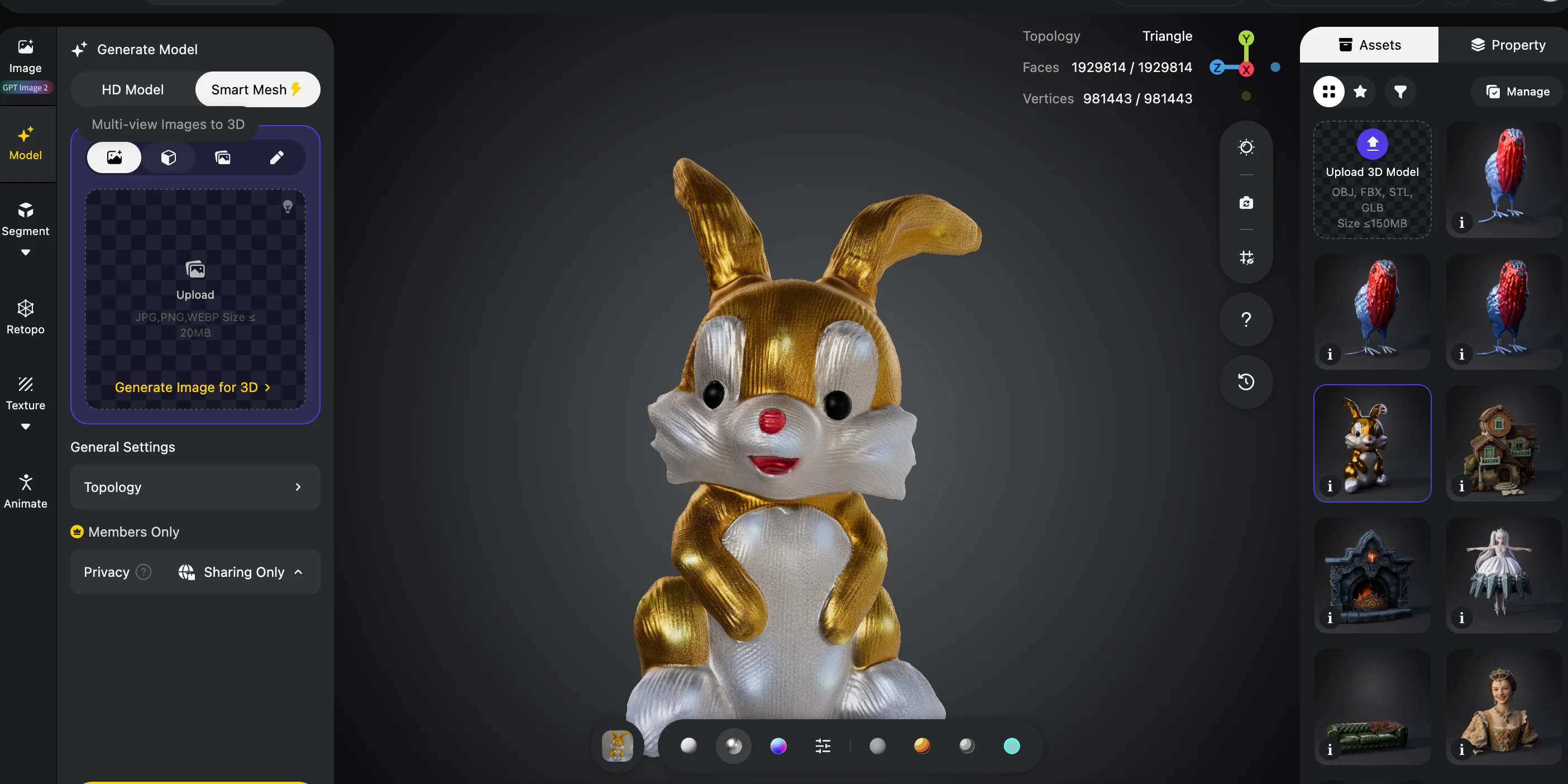
- Optimize the mesh with Smart Mesh.
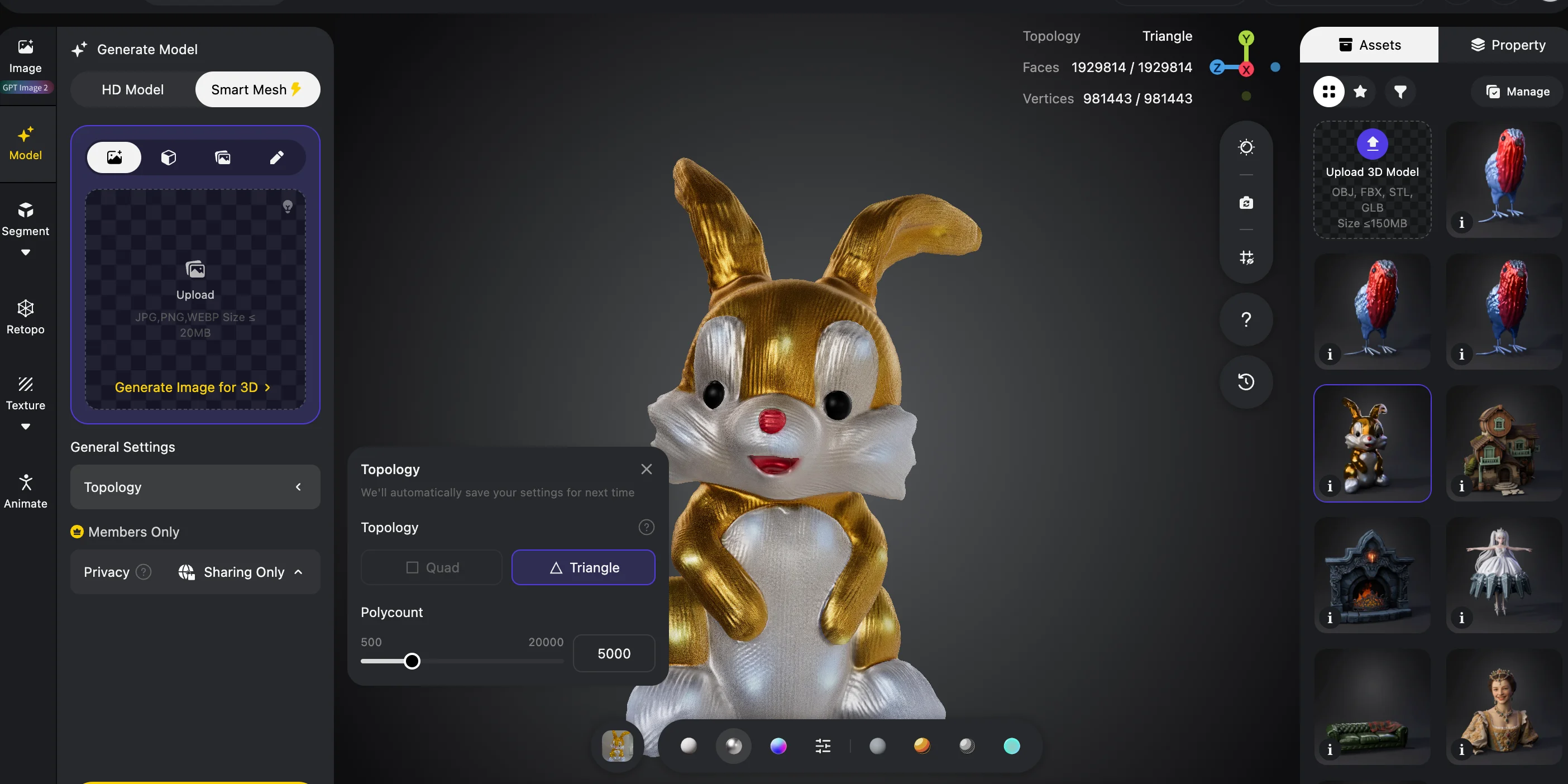
- Add textures and materials.
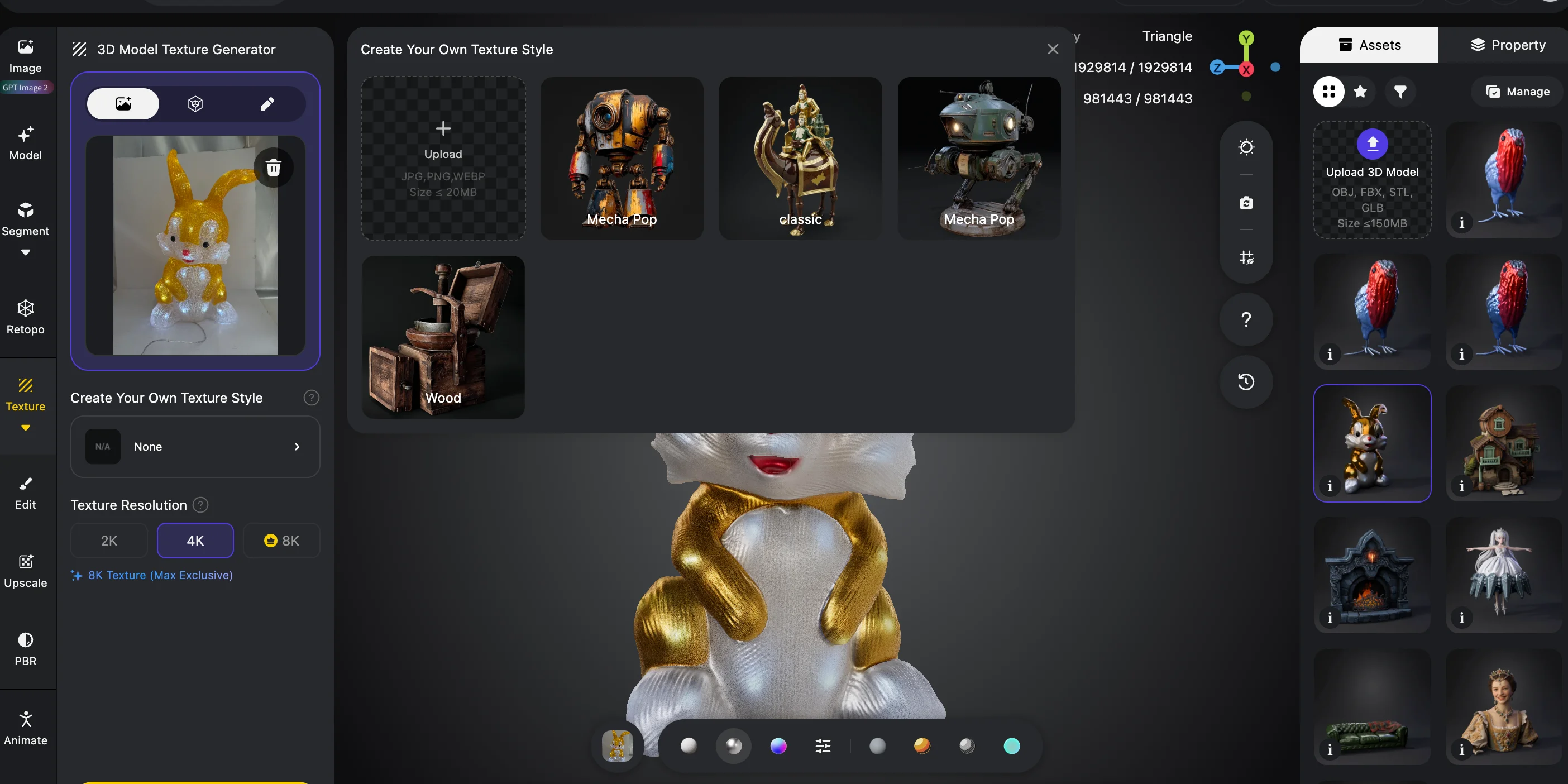
- Apply rigging if needed.
- Export to Unity or Unreal.
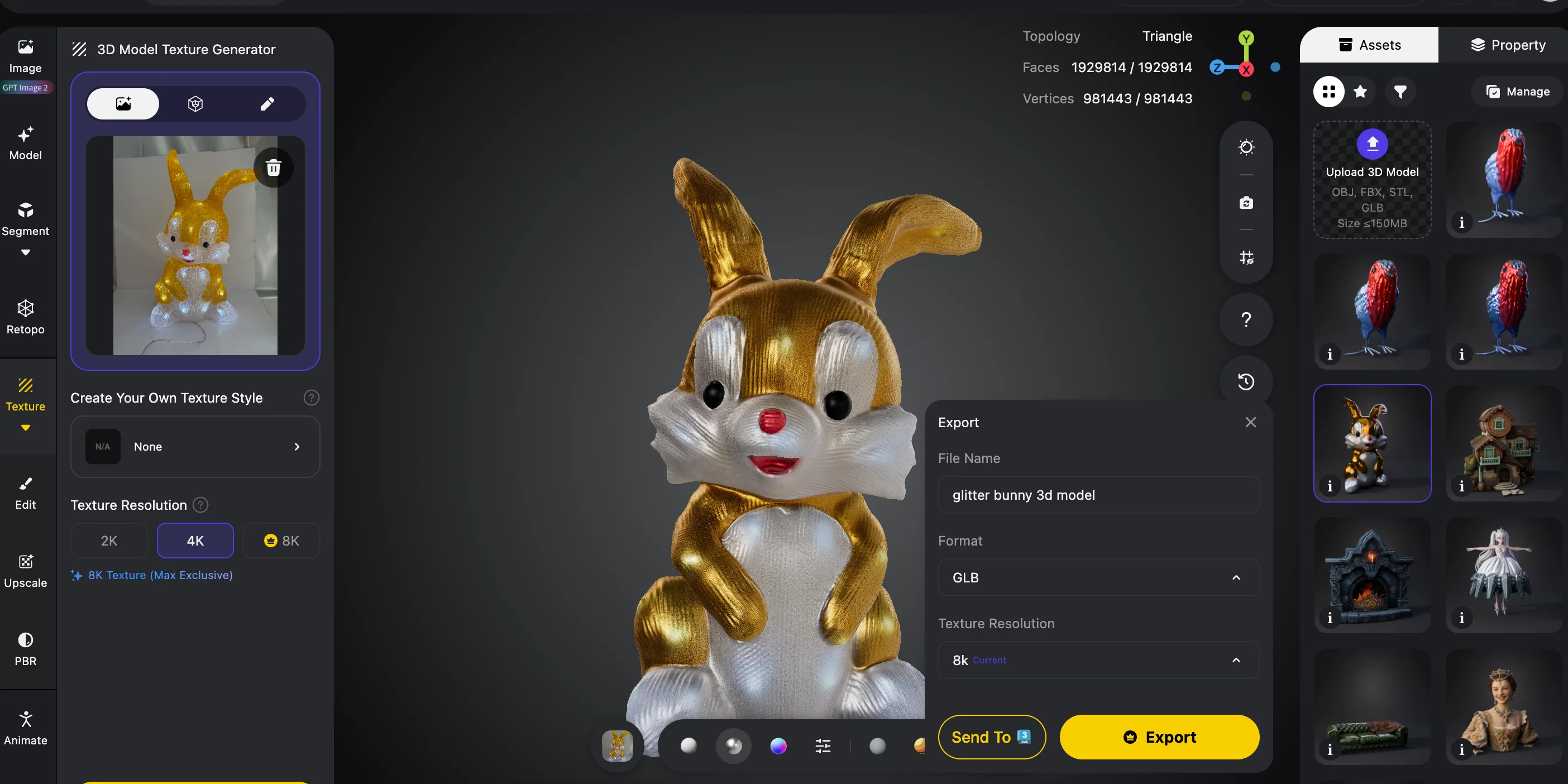
For developers exploring AI for indie game development, Tripo AI provides one of the most complete workflows because it covers generation, optimization, and export in one place.
Tripo AI Text and Image to 3D Game Asset Workflow
Meshy AI — Best for Fast Asset Creation
Meshy AI is popular for quick text-to-3D and image-to-3D generation. It works well for prototypes, environment props, and concept exploration.
Its strength is speed and visual quality, especially for static objects. However, some models may require additional topology cleanup before being used in production games.
Meshy is a good choice when you need many ideas quickly or want to test different art directions.
Luma AI Genie — Best for Early Prototypes
Luma AI Genie focuses on fast concept generation. It is useful for greyboxing levels, testing ideas, and creating rough 3D references.
The main limitation is that generated models often need optimization before final game use. It is better for early development than finished assets.
3D Game Asset Tool Comparison
| Tool | Best For | Export Formats | Free Tier |
|---|---|---|---|
| Tripo AI | Game-ready models, characters, optimized assets | FBX, GLB, OBJ, USD | Free credits available |
| Meshy AI | Fast props and texture-focused assets | FBX, OBJ, GLB | Free plan available |
| Luma AI Genie | Quick prototypes and blockouts | Common 3D formats | Free access available |
AI 3D Game Asset Generator Comparison: Tripo AI vs Meshy AI vs Luma AI
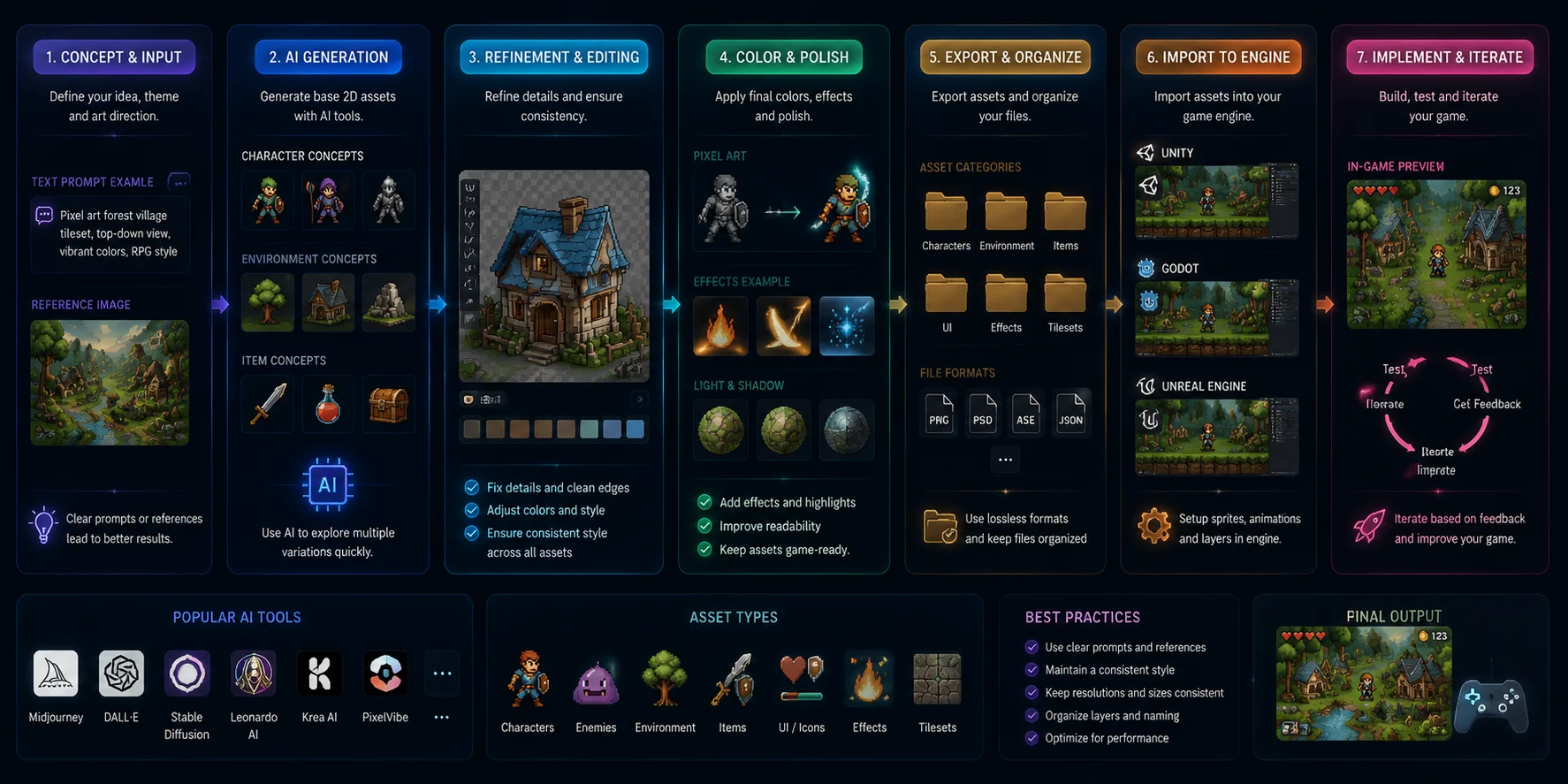
Best AI Tools for 2D Game Assets and Concept Art
While 3D AI tools are growing quickly, AI for 2D game assets remains valuable for concept art, character design, sprites, and UI elements.
Many developers use AI during the design stage: create ideas quickly, choose a direction, then refine the final assets manually.
Midjourney — Best for Concept Art
Midjourney is one of the strongest tools for creating game concepts. It produces high-quality artwork for characters, environments, creatures, and visual references.
Its weakness is that it is not a complete AI sprite generator. You usually need extra steps like background removal, sprite cutting, and animation preparation before using images in a game.
Use Midjourney when you need strong visual direction and fast creative exploration.
DALL-E 3 — Best for Quick Design Ideas
OpenAI DALL-E 3 through ChatGPT is useful for fast concept generation. Its strong prompt understanding makes it easy to create and modify character ideas, items, and environments.
It works best during brainstorming rather than final asset production because consistent sprite sets and high-resolution game assets may require additional tools.
Adobe Firefly — Best for Photoshop Workflows
Adobe Firefly fits well into existing design workflows. Photoshop integration makes it useful for editing concept art, creating variations, and generating UI elements.
It is a practical choice if your team already uses Adobe tools and wants AI assistance inside the existing pipeline.
Stable Diffusion + ControlNet — Best for Control
Stable Diffusion with ControlNet gives developers more control over poses, composition, and style consistency.
It requires more technical setup, but it is one of the most flexible options for creating repeatable game art styles.
For AI for 2D game assets, a simple recommendation is:
- Use Midjourney for creative concepts.
- Use Stable Diffusion + ControlNet for controlled sprites.
- Use Firefly for Photoshop-based production workflows.
AI for 2D Game Assets Creation Workflow: From Concept to Engine
Best AI Tools for Game Textures
Textures are often one of the most time-consuming parts of game development. Even after creating a model, you still need materials, surface details, and a consistent visual style. AI for game textures helps developers create variations faster and keep large projects visually consistent.
The best texture workflow depends on your goal. Some tools focus on style consistency, while others give you more control over individual materials.
Scenario AI — Best for Consistent Game Styles
Scenario is designed specifically for game creators who need consistent visual styles.
Its main advantage is custom training. You can teach the AI your project’s art style and generate new assets that match the same direction. This is useful for games that need many similar assets, such as cards, items, characters, or environment pieces.
Scenario AI works well when your priority is maintaining a unified look across hundreds of assets.
Stable Diffusion + ControlNet — Best Free Texture Workflow
Stable Diffusion with ControlNet is a flexible option for developers who want more control without paying for every generation.
You can use it to create:
- Material variations
- Surface details
- Texture references
- PBR workflow elements
The downside is that it requires more setup and manual editing. However, for indie developers with technical skills, it provides a powerful low-cost solution.
PolyHaven + AI Workflow — Best for Realistic Assets
PolyHaven provides free realistic textures and HDR assets. Combined with AI editing tools, it can help you quickly create variations for environments and realistic games.
For most developers:
- Choose Scenario AI for consistent stylized games.
- Choose Stable Diffusion for flexibility and low cost.
- Combine PolyHaven with AI for realistic environments.
AI Game Development Tool Stack: From Concept to Published Game
Best AI Tools for Game Audio and SFX
Audio is another important part of game production. AI tools can help indie developers create background music, sound effects, and character voices without a large audio budget.
Mubert — Best for AI Background Music
Mubert creates background music based on mood, style, and theme. It works well for prototypes and indie games that need quick soundtrack ideas.
Soundraw — Best for Custom Game Music
Soundraw allows you to adjust music length, energy, and mood. It is useful for creating looping tracks that match different gameplay situations.
ElevenLabs — Best for AI Voice
ElevenLabs creates realistic AI voices for NPC dialogue, narration, and prototypes.
One important reminder: audio licenses vary between platforms. Always check whether your subscription includes commercial rights before releasing a game.
Best AI Tools for Game Animation
Animation is another area where AI can reduce repetitive work, especially for character movement and testing.
Cascadeur — Best for AI-Assisted Animation
Cascadeur helps create character animations with AI-assisted posing and physics-based adjustments.
It is useful for developers who want more natural movement without manually adjusting every keyframe.
Mixamo — Best Free Auto-Rigging and Animation Library
Mixamo remains one of the most useful free tools for game character workflows.
You can upload a character model, generate a skeleton, and apply ready-made animations.
A common workflow is:
- Generate a character with Tripo AI.
- Export the model.
- Add or adjust animations with Mixamo.
- Import the final character into Unity or Unreal.
How to Create 3D Game Assets with Tripo AI
If you want a simple AI workflow for creating game-ready models, follow these steps:
Write a Clear Prompt or Upload Concept Art
Start with a detailed description or reference image. Include useful information such as object type, style, and intended use.
Example:
“A low-poly sci-fi robot character for a mobile game, clean design, optimized for real-time rendering.”
Generate the Base 3D Model
Tripo AI creates the initial model within seconds. You can review the shape and generate alternatives if needed.
Optimize with Smart Mesh
Choose the right quality level for your project:
- Around 5,000 triangles for mobile games.
- Higher detail for PC, console, or close-up assets.
This helps balance visual quality and performance.
Generate PBR Textures
Add materials and surface details to make the model ready for your game environment.
Apply Auto-Rigging for Characters
For characters, automatic rigging prepares the model for animation without manually building bones and weights.
Export to Unity or Unreal Engine
Export as FBX or GLB and continue your normal game workflow.
Start your first asset free with Tripo AI Studio →
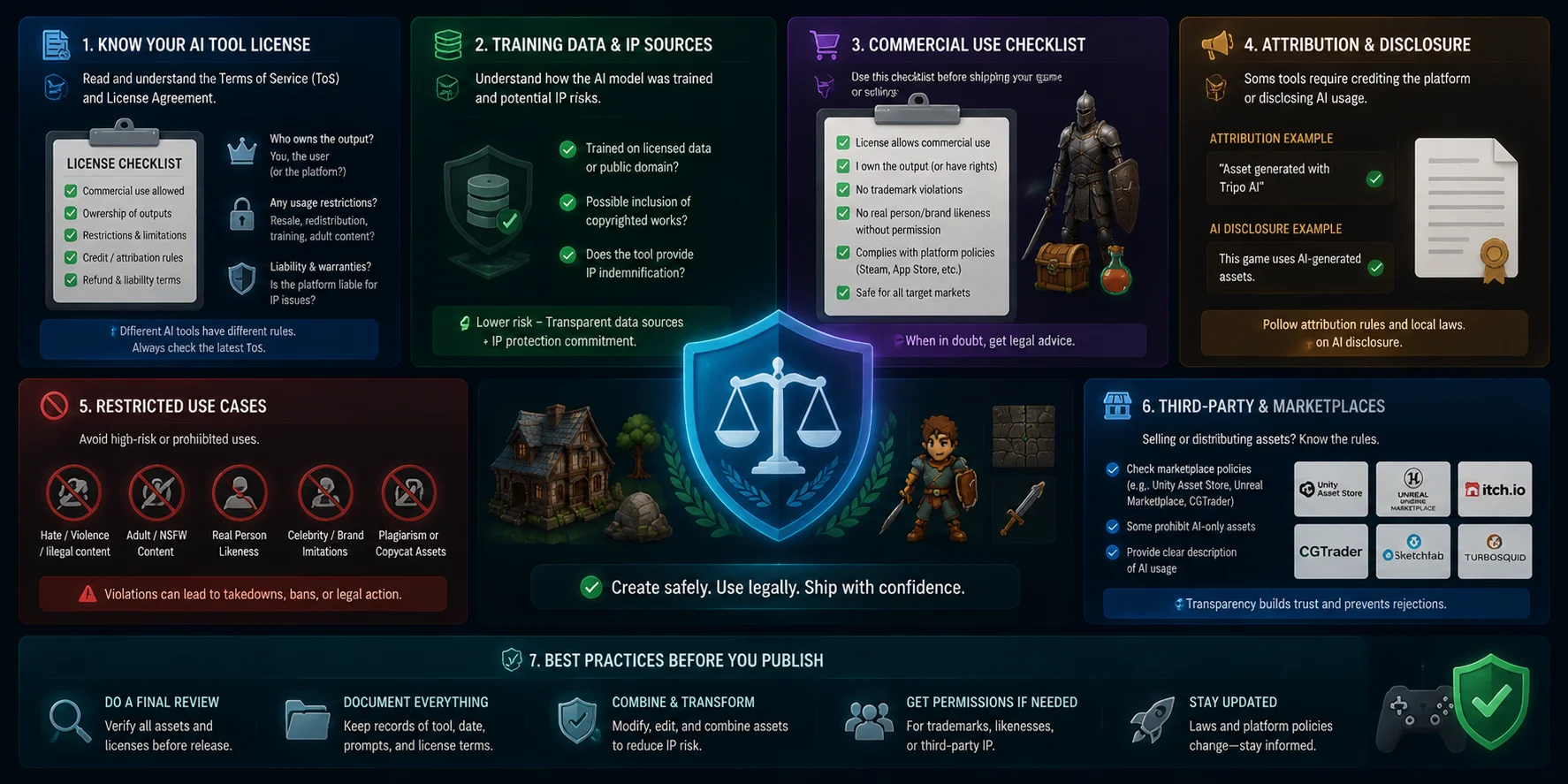
Are AI-Generated Game Assets Legal to Use?
Yes, most major AI tools allow commercial use of generated assets, but you should always check the current license terms before publishing your game.
Tools such as Tripo AI, Midjourney, DALL-E 3, and Adobe Firefly provide commercial usage options under specific conditions. Free plans may have different restrictions compared with paid subscriptions.
Game engines such as Unity and Unreal Engine do not ban AI-generated assets. Platforms like Steam and Epic Games Store also allow games using AI assets, although their policies may change over time.
A practical rule is simple: before shipping, check:
- Your AI tool’s commercial license.
- Your subscription level.
- Any platform-specific requirements.
AI-Generated Game Assets Commercial Use Checklist
Frequently Asked Questions (FAQ)
What is the best AI tool for making game assets?
The best tool depends on your asset type. Tripo AI is one of the strongest choices for 3D assets, while Midjourney, Scenario AI, and audio tools work better for specific needs.
Can AI generate game assets for free?
Yes. Many tools offer free credits or trial plans, including Tripo AI and Meshy AI. Free versions usually have limits on generations or export options.
What AI tools do game developers use?
Developers commonly use Tripo AI for 3D models, Midjourney or Stable Diffusion for concept art, Scenario AI for textures, and tools like ElevenLabs for voices.
Is it legal to use AI-generated game assets in games?
Usually yes, if the tool’s license allows commercial use. Always review the current Terms of Service before release.
What is the best AI tool for 3D game assets?
Tripo AI is a strong overall choice because it combines generation, mesh optimization, rigging, and engine-ready exports.
Can AI generate 2D game sprites?
Yes. Tools like Midjourney and Stable Diffusion can create sprite concepts, but you may need additional editing to prepare sprite sheets.
What AI tool is best for game textures?
Scenario AI is useful for consistent game styles, while Stable Diffusion provides more customization and control.
Do AI-generated 3D models need cleanup before going into a game engine?
Sometimes. Production assets may still require optimization, UV adjustments, or polygon reduction depending on the tool and project requirements.
What AI tools work with Unity and Unreal Engine?
Most game-focused AI tools support formats like FBX and GLB, which work well with Unity and Unreal workflows.
Is Tripo AI free to use for game assets?
Tripo AI offers free credits so you can test the workflow. Paid plans provide additional generations and advanced features.
Conclusion
Choosing the right AI game asset generator starts with your asset type, engine requirements, and licensing needs. Use specialized tools for each part of production, and combine AI with your existing workflow instead of replacing it.
For developers who want fast, game-ready 3D models, Tripo AI provides a complete path from idea to exported asset. Try creating your first model with Tripo AI Studio, or explore available options and limits through Tripo AI Pricing.