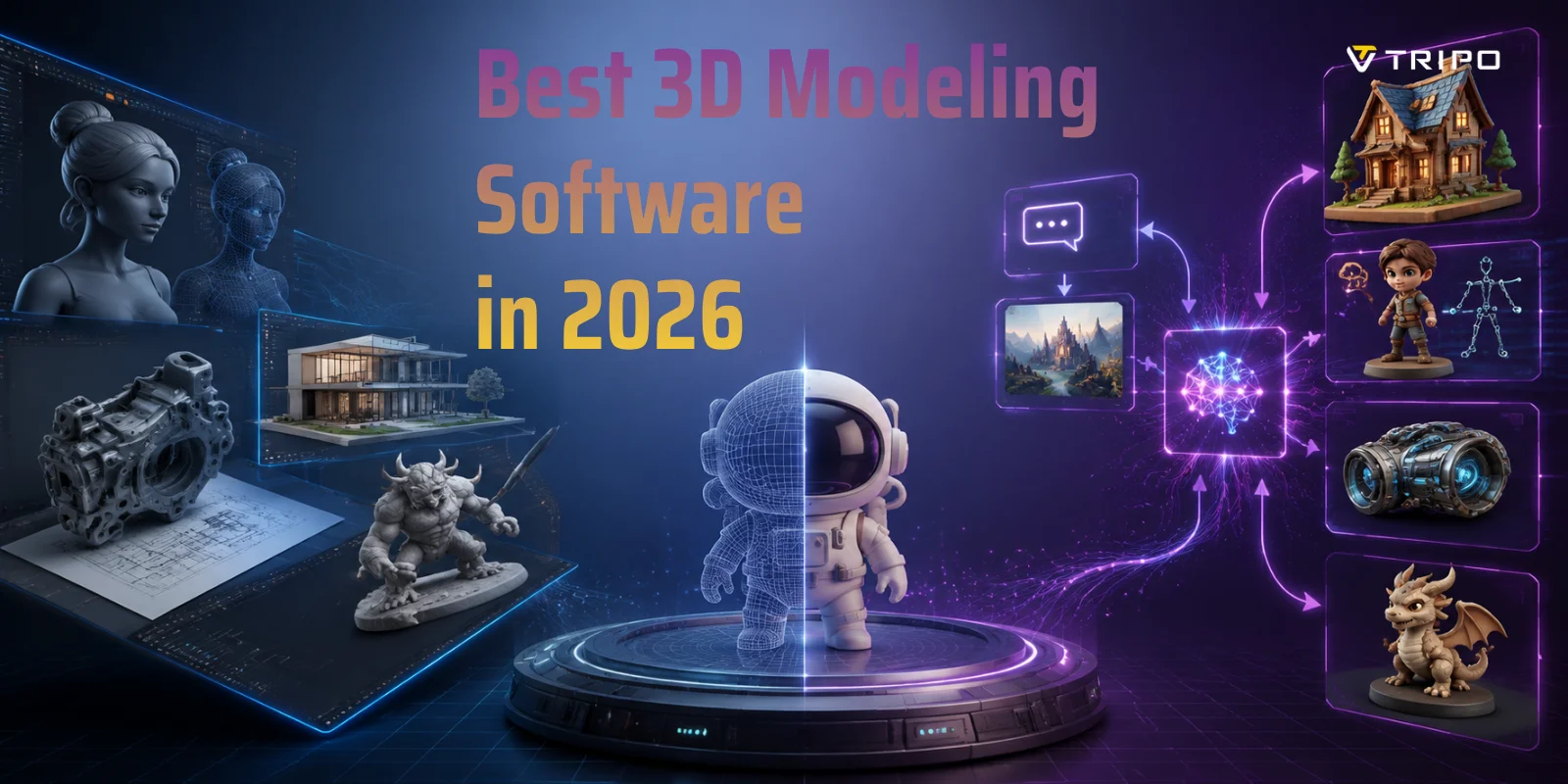
Best 3D Modeling Software in 2026
TL;DR:
- The best overall free tool: Blender.
- The best for beginners: Tinkercad or SketchUp Free.
- The best for professional animation: Maya.
- The best for 3D printing: Fusion 360.
- The best AI-powered option: Tripo AI.
- The best for architecture: Rhino 3D or Revit
The best 3D modeling software depends on your goal. Blender leads for free, professional-grade work. Maya and 3ds Max dominate animation and VFX studios. For rapid prototyping and AI-generated assets, Tripo AI lets you go from text or image to a 3D model in seconds — no modeling experience required.
The 3D modeling software market is projected to exceed $7 billion by 2030, driven by gaming, product design, architecture, and AI content creation. Whether you're a hobbyist prepping files for a 3D printer, a game developer building assets at scale, or a designer exploring AI-powered workflows, the tool you pick shapes how fast ideas become reality. This guide breaks down the best options by use case — so you can skip the trial-and-error and get to creating.
What to Look for in 3D Modeling Software
Before choosing software, you should understand the workflow behind each tool. The “best” software is the one that matches your project.
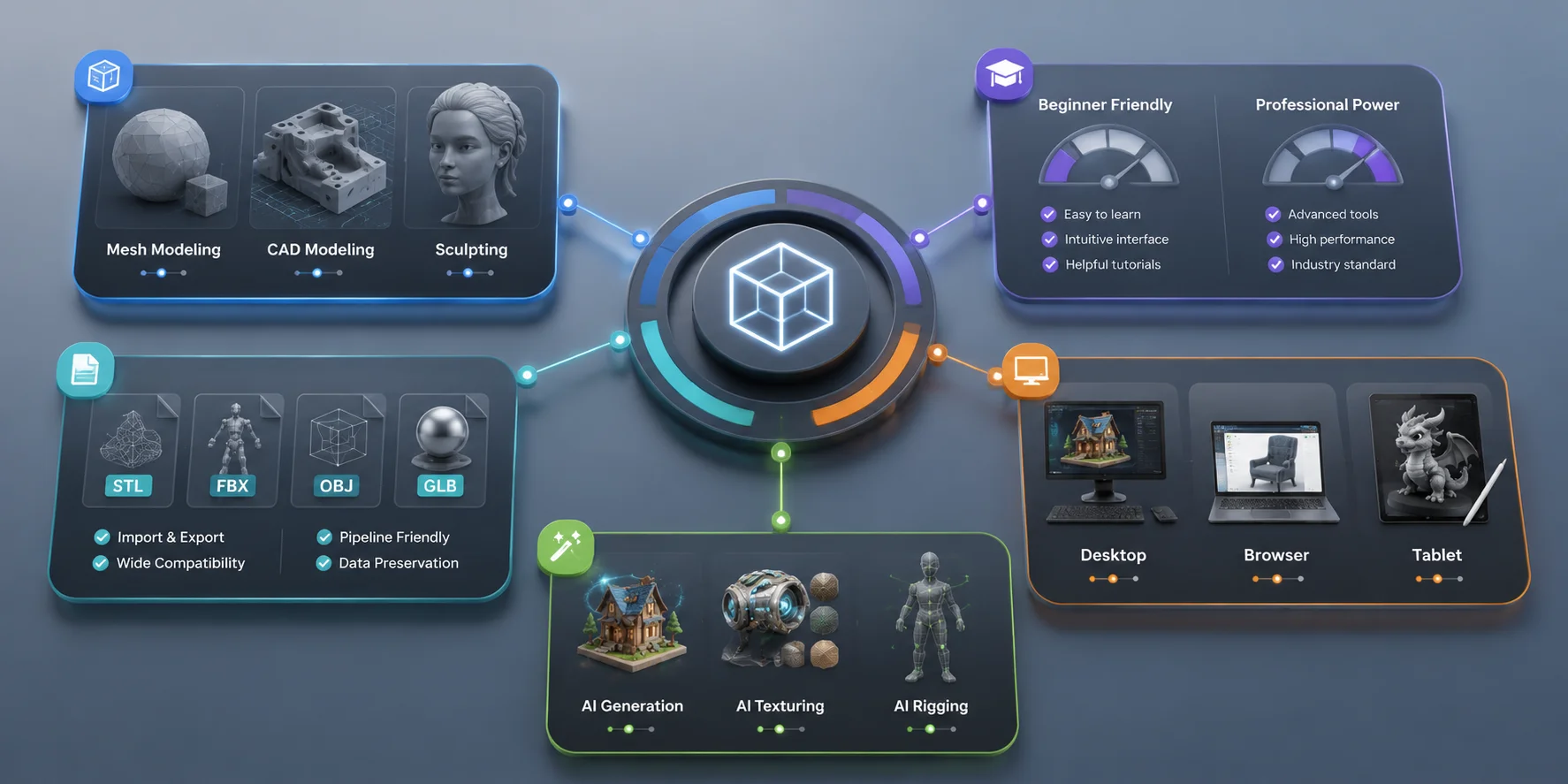
Modeling Approach: Mesh, CAD, or Sculpting
Different software uses different modeling methods.
Mesh modeling is the standard approach for characters, game assets, and creative objects. It gives artists detailed control over surfaces and shapes. Blender and Maya are strong examples of mesh-based workflows.
CAD modeling focuses on precision. It uses measurements, constraints, and editable parameters, making it better for mechanical parts, products, and engineering projects.
Sculpting tools work like digital clay. They are ideal for characters, creatures, and highly detailed organic models.
Choosing the wrong modeling approach can slow your work. A mechanical engineer does not need the same tool as a character artist
Learning Curve and Output Quality
Professional software often provides more control but requires more time to learn.
Blender can produce professional results but may take months to master. Simpler tools like Tinkercad allow beginners to create models quickly but have fewer advanced options.
When choosing software, decide whether you need:
- Fast results for simple projects
- Long-term skills for a career
- Faster production through AI assistance
The best tool is the one you can use consistently.
File Format Compatibility
Export options matter because your model usually moves into another workflow.
Common formats include:
- STL and 3MF for 3D printing
- FBX and OBJ for games and animation pipelines
- GLB and USD for web, AR, and real-time applications
A powerful modeler becomes less useful if it cannot export the formats your project requires.
Price and Platform
Free software has become much stronger in recent years. Many creators can complete professional work without paying for expensive subscriptions.
Consider:
- Desktop software for advanced production
- Browser tools for easy access
- Tablet apps for mobile workflows
You should pay for software when it saves time or directly supports your work, not simply because it is considered “professional.”
AI and Automation Features
AI is becoming an important part of 3D creation. Modern tools can help with generation, texturing, rigging, and repetitive tasks.
However, AI does not replace every traditional workflow. CAD software is still better for precision engineering, and professional modeling tools provide more control for complex projects.
The strongest workflow in 2026 often combines AI speed with human editing.
How to Choose the Right 3D Modeling Software: Key Factors to Consider
Best Free 3D Modeling Software
Free tools now cover many professional needs. The best option depends on whether you create artistic models, technical designs, or printable objects.
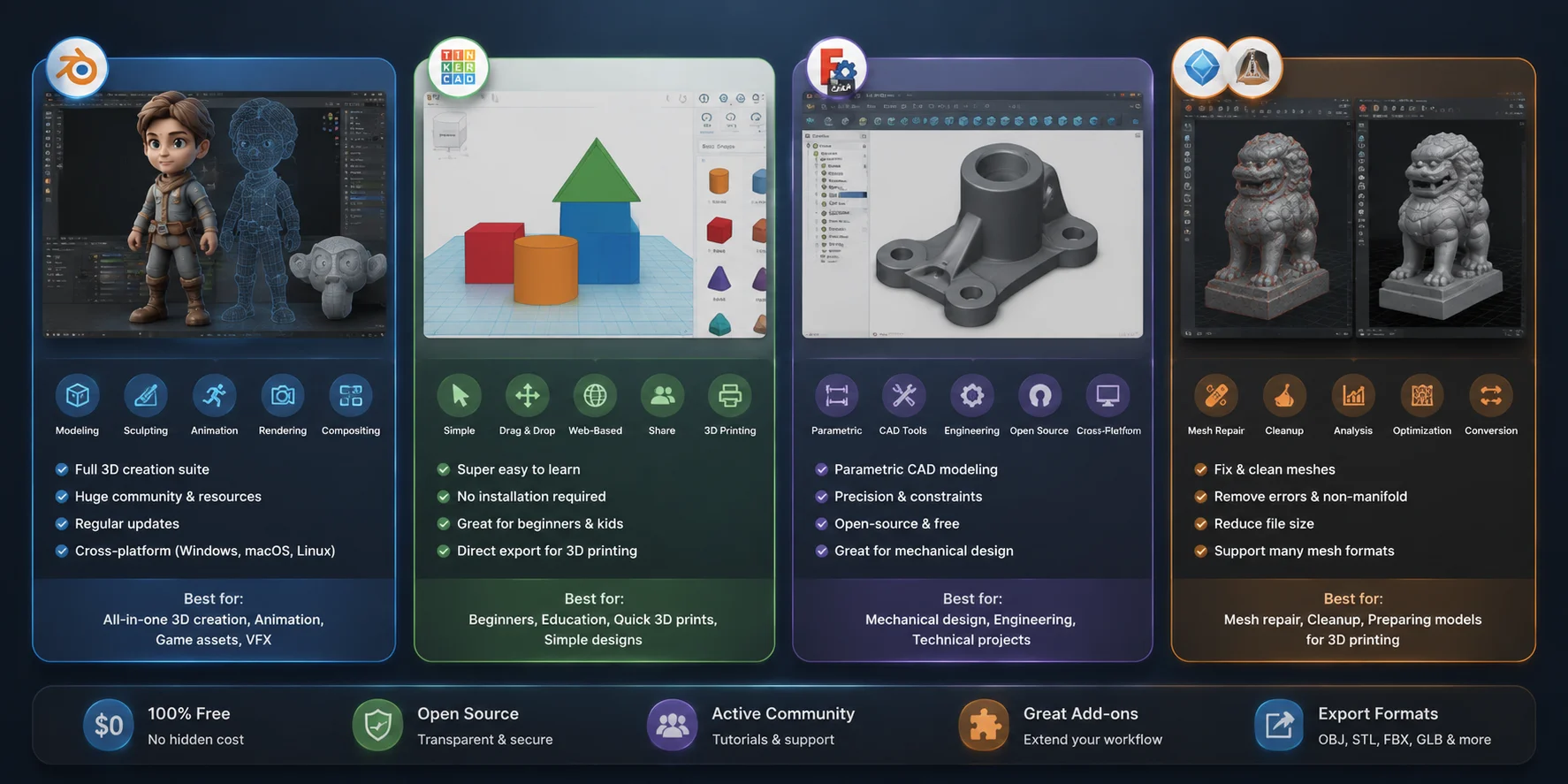
Blender: Best Overall Free 3D Modeling Software
Blender is the most complete free 3D creation tool available today.
It includes:
- Mesh modeling
- Sculpting
- Animation
- Rigging
- Rendering
- Simulation
Blender is suitable for game assets, animation projects, product visualization, and even some professional production pipelines.
Its biggest advantage is flexibility. You can start as a beginner and continue using it as your skills improve.
The main downside is the learning curve. Blender has many professional features, which can make the interface feel complex at first.
Choose Blender if you want one free tool that can grow with you.
Tinkercad: Best Free Tool for Beginners
Tinkercad is one of the easiest ways to start 3D modeling.
Because it runs in a browser, you can begin without installing heavy software. Its simple shape-based workflow helps beginners understand basic 3D concepts.
Tinkercad works well for:
- First 3D printing projects
- Simple mechanical objects
- Classroom learning
- Basic prototypes
The limitation is complexity. It is not designed for advanced characters, detailed environments, or professional assets.
For your first project, however, few tools are easier.
FreeCAD: Best Free CAD Modeling Software
FreeCAD is a strong choice for users who need engineering-focused design.
Yes, FreeCAD is completely free. It is open-source, has no paid tier, and does not lock features behind subscriptions.
Unlike mesh modeling tools, FreeCAD uses parametric CAD workflows. You can define exact dimensions and modify designs later without rebuilding the model.
It is best suited for:
- Mechanical parts
- Product design
- Technical projects
The interface is less polished than commercial CAD platforms, but the core capabilities are powerful.
Mesh Repair Tools: Meshmixer and MeshLab
Meshmixer and MeshLab are not full modeling applications, but they are useful additions to a 3D workflow.
They help with:
- Mesh cleanup
- Geometry repair
- Preparing models for printing
For makers working with downloaded or AI-generated models, these tools can solve common mesh problems before production.
Best Free 3D Modeling Software Comparison for 2026
Best 3D Modeling Software for Beginners
Learning 3D modeling can feel difficult because many tutorials assume you already understand navigation and modeling concepts.
The best beginner tools reduce this starting barrier.
SketchUp Free: Best for Architecture Beginners
SketchUp is ideal if you want to create buildings, rooms, furniture, or simple spaces.
Its push-pull workflow makes it easy to turn 2D shapes into 3D objects.
Choose SketchUp if your goal is:
- Architecture concepts
- Interior design
- Space planning
It is not the best choice for characters or advanced game assets, but it is one of the fastest ways to learn spatial modeling.
Tripo AI: Beginner-Friendly AI 3D Creation
For users who want to create 3D assets without learning traditional modeling first, AI tools provide another entry point.
An AI 3D model generator such as Tripo AI can create models from text descriptions or reference images. This helps beginners quickly move from an idea to a usable 3D asset.
AI generation is useful for:
- Game prototypes
- Concept models
- Product ideas
It does not replace Blender, CAD, or professional modeling skills. Instead, it removes the first barrier: starting from an empty scene.
A practical beginner workflow is:
- Generate an initial asset with AI.
- Learn traditional tools to edit and improve it.
- Build deeper modeling skills over time.
Best 3D Modeling Software for 3D Printing
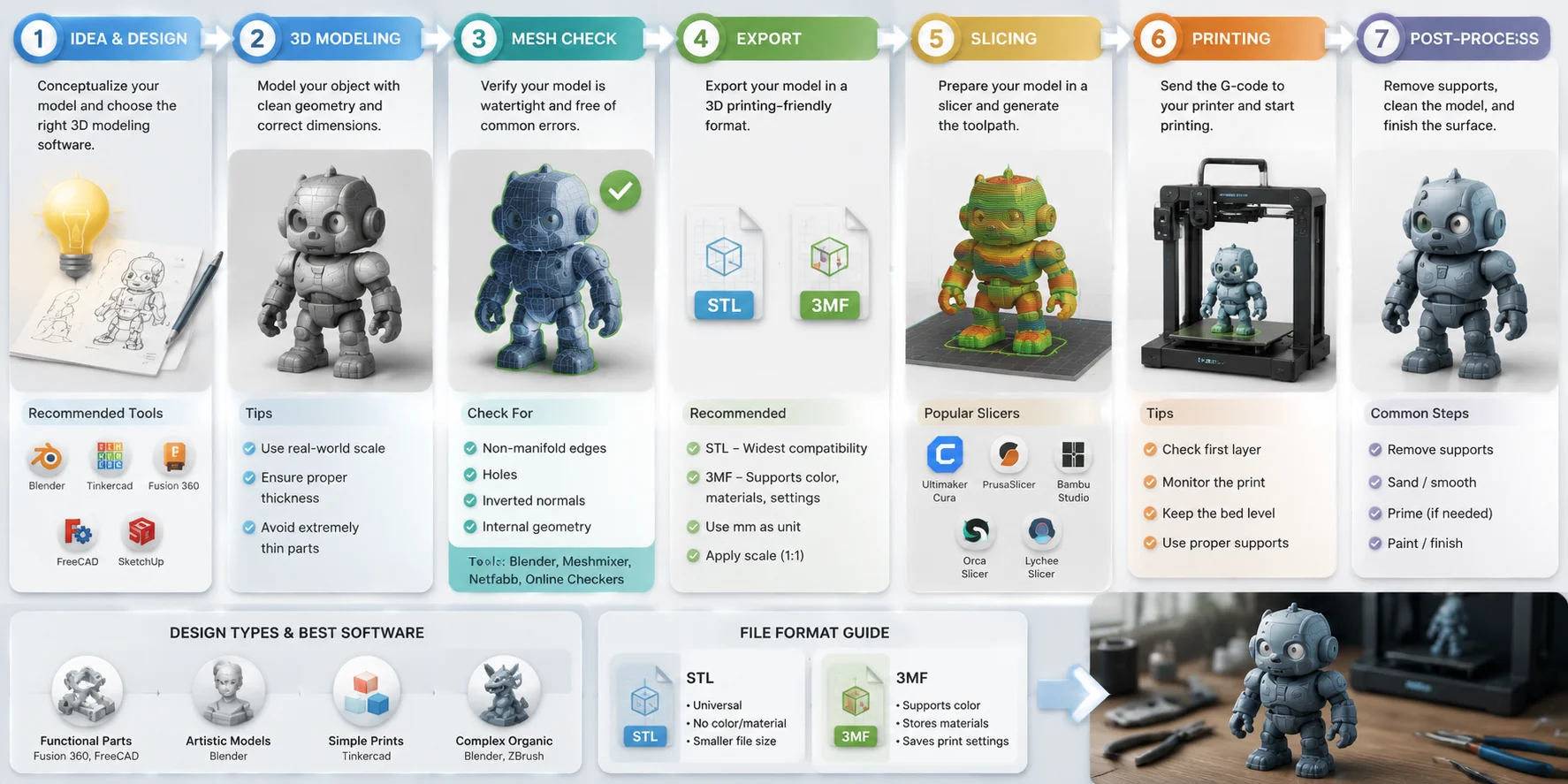
3D printing changes what you need from modeling software. A model that looks good on screen is not always ready for manufacturing. Before printing, you need to consider geometry quality, thickness, scale, and export formats.
The best 3D printing software should help you create models that are:
- Watertight and manifold
- Correctly scaled
- Easy to export
- Compatible with slicers
Your choice depends on the type of objects you create. Mechanical parts require precision, while artistic prints require flexible shape control.
3D modeling software workflow for 3D printing from design to STL and 3MF export
Fusion 360: Best for Functional and Mechanical Prints
Fusion 360 is one of the strongest choices for users who create functional 3D printed objects.
Unlike mesh-based modeling, Fusion 360 uses parametric CAD modeling. This means every dimension can be controlled and adjusted later. If you need to change the width of a bracket or modify a product enclosure, you can update the parameter instead of rebuilding the entire model.
Fusion 360 works especially well for:
- Mechanical components
- Engineering prototypes
- Replacement parts
- Custom tools
- Product development
For example, if you are designing a phone stand, hinge, or machine component, CAD modeling gives you the accuracy that artistic modeling tools cannot provide.
However, Fusion 360 is not the best choice for every project. Creating organic shapes, characters, or fantasy models is usually faster in Blender because mesh modeling provides more artistic freedom.
Choose Fusion 360 when function matters more than visual complexity.
Blender: Best for Artistic 3D Printing
Blender is one of the most flexible tools for creating printable artistic models.
Although Blender is not traditional CAD software, its mesh modeling and sculpting features make it excellent for:
- Figurines
- Miniatures
- Characters
- Decorative objects
Many creators use Blender because it allows detailed control over shapes and surface details. A sculptor can create a creature, fantasy character, or collectible figure in a way that would feel restrictive inside CAD software.
However, Blender requires more preparation before printing. You should check:
- Non-manifold edges
- Internal geometry
- Wall thickness
- Object scale
Blender’s 3D Print Toolbox can help identify common problems before exporting.
A good workflow is often:
Create the shape in Blender → repair the mesh → export STL or 3MF → prepare in slicer software.
For artistic printing, Blender remains one of the strongest options.
Tinkercad: Best for Simple Beginner Prints
For beginners, Tinkercad remains one of the easiest ways to enter 3D printing.
Its simple shape-based system teaches important concepts without overwhelming users with professional features.
It is ideal for:
- Simple household objects
- Educational projects
- Basic prototypes
- First-time prints
The advantage of Tinkercad is reliability. Because users create objects from basic solid shapes, many common mesh problems are avoided.
The limitation is complexity. Once you need detailed surfaces, advanced mechanical designs, or professional assets, you will quickly need a more powerful tool.
STL vs 3MF: Export Format Matters
Many beginners focus on modeling software but ignore file formats.
STL remains the most widely supported 3D printing format. Almost every slicer can open STL files.
However, 3MF is becoming increasingly popular because it stores more information, including:
- Color information
- Materials
- Scale data
- Printing settings
For simple hobby projects, STL is usually enough. For advanced workflows, especially when working with multiple materials or professional printing systems, 3MF is often the better choice.
Best 3D Modeling Software for Professionals
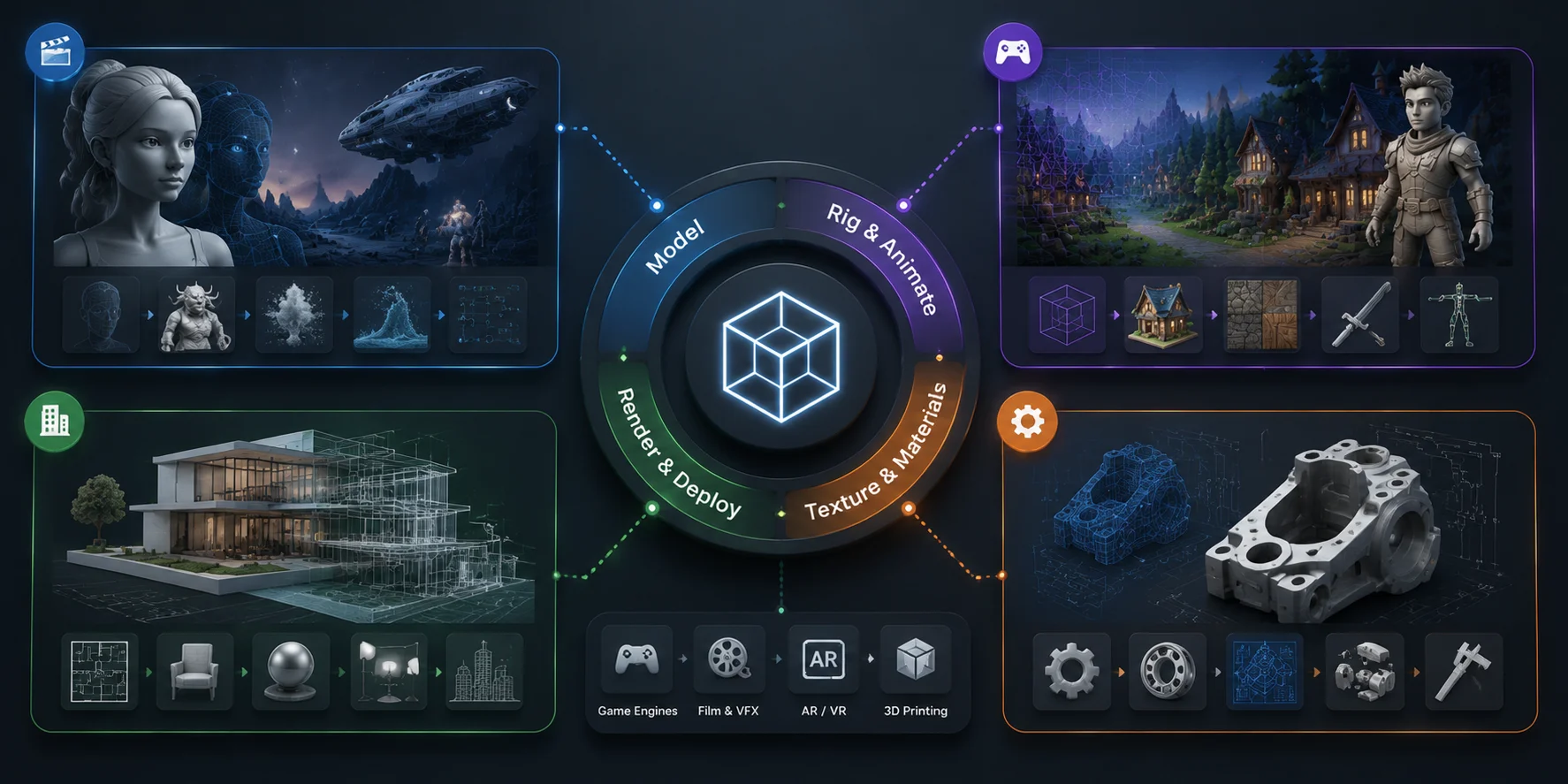
Professional users rarely choose software based only on features. They choose tools that fit existing industry pipelines.
A character artist, VFX specialist, architect, and product designer may all work with completely different software.
Maya: Best for Animation and VFX Pipelines
Maya remains one of the most important professional tools for character animation.
It is widely used for:
- Character modeling
- Rigging
- Animation
- Visual effects
Its biggest strength is production compatibility. Large studios often have established Maya pipelines, making it a valuable skill for artists entering animation and film.
The downside is accessibility. Maya requires a subscription and has a steep learning curve.
For hobbyists, Blender may provide better value. For studio careers, Maya remains highly relevant.
3ds Max: Best for Visualization and Game Production
3ds Max is widely recognized in architecture visualization and some game production environments.
It is commonly used for:
- Realistic environment creation
- Product visualization
- Interior scenes
- Game assets
Its strong rendering ecosystem makes it popular among visualization professionals.
However, 3ds Max is Windows-only, which limits flexibility compared with some other platforms.
Cinema 4D: Best for Motion Graphics
Cinema 4D is especially popular among designers creating animated graphics.
Its MoGraph system makes complex animations easier to build.
It is commonly used in:
- Advertising
- Broadcast graphics
- Brand animations
- Creative presentations
Cinema 4D is not always the first choice for traditional character modeling, but it is one of the strongest tools for motion-focused workflows.
Rhino 3D: Best for Precision Industrial Design
Rhino 3D is built around precision NURBS modeling.
It is popular in:
- Architecture
- Industrial design
- Jewelry design
- Product development
Rhino is especially powerful when combined with Grasshopper, which allows designers to create parametric systems and generate complex forms.
It is a better choice for precise design than freeform artistic modeling.
Houdini: Best for Procedural Workflows
Houdini takes a different approach from traditional modeling software.
Instead of manually creating every object, artists create systems that generate complex results.
Houdini is widely used for:
- Film effects
- Simulations
- Procedural environments
- Large-scale visual effects
Its learning curve is extremely high, so it is not recommended for beginners. But for technical artists and VFX professionals, it offers unmatched flexibility.
Professional 3D Software Landscape: Tools by Industry and Workflow
Best 3D Modeling Software for Architecture
Architecture has two different needs: exploring ideas and documenting buildings.
Many beginners make the mistake of choosing one tool for everything. In professional workflows, architects often combine multiple applications.
SketchUp Pro: Best for Early Design
SketchUp Pro is excellent for quickly exploring architectural ideas.
Its simple interface makes it popular for:
- Concept design
- Interior planning
- Client presentations
Architects can quickly test different layouts and communicate ideas before moving into detailed documentation.
The limitation is that SketchUp is not a complete BIM platform.
Rhino + Grasshopper: Best for Advanced Forms
Rhino is often used when architecture becomes more experimental.
Combined with Grasshopper, it allows architects to create rule-based designs instead of manually editing every element.
This is useful for:
- Parametric buildings
- Complex curves
- Computational design
It is especially popular in advanced architecture studios and academic environments.
Revit: Best for BIM Documentation
Revit focuses on Building Information Modeling.
Instead of only creating a visual model, Revit stores information about building elements.
This includes:
- Materials
- Dimensions
- Construction data
It is widely used for large commercial projects where multiple teams need accurate information.
However, Revit is less flexible for creative exploration. Many architects use SketchUp or Rhino for design concepts and Revit for final documentation.
AI-Powered 3D Modeling — A New Category
AI has changed how people think about 3D creation. Traditional modeling requires you to learn software, understand geometry, and manually build every surface. AI-powered tools introduce another workflow: you describe what you want, upload a reference image, and generate a starting 3D asset.
This does not mean AI replaces traditional 3D modeling. Instead, it creates a faster option for specific situations where speed matters more than complete control.
The best results usually come from combining both approaches:
AI creates the first version → artists refine the model → the final asset enters production.
AI-Powered 3D Modeling Workflow: From Prompt to Production-Ready Asset
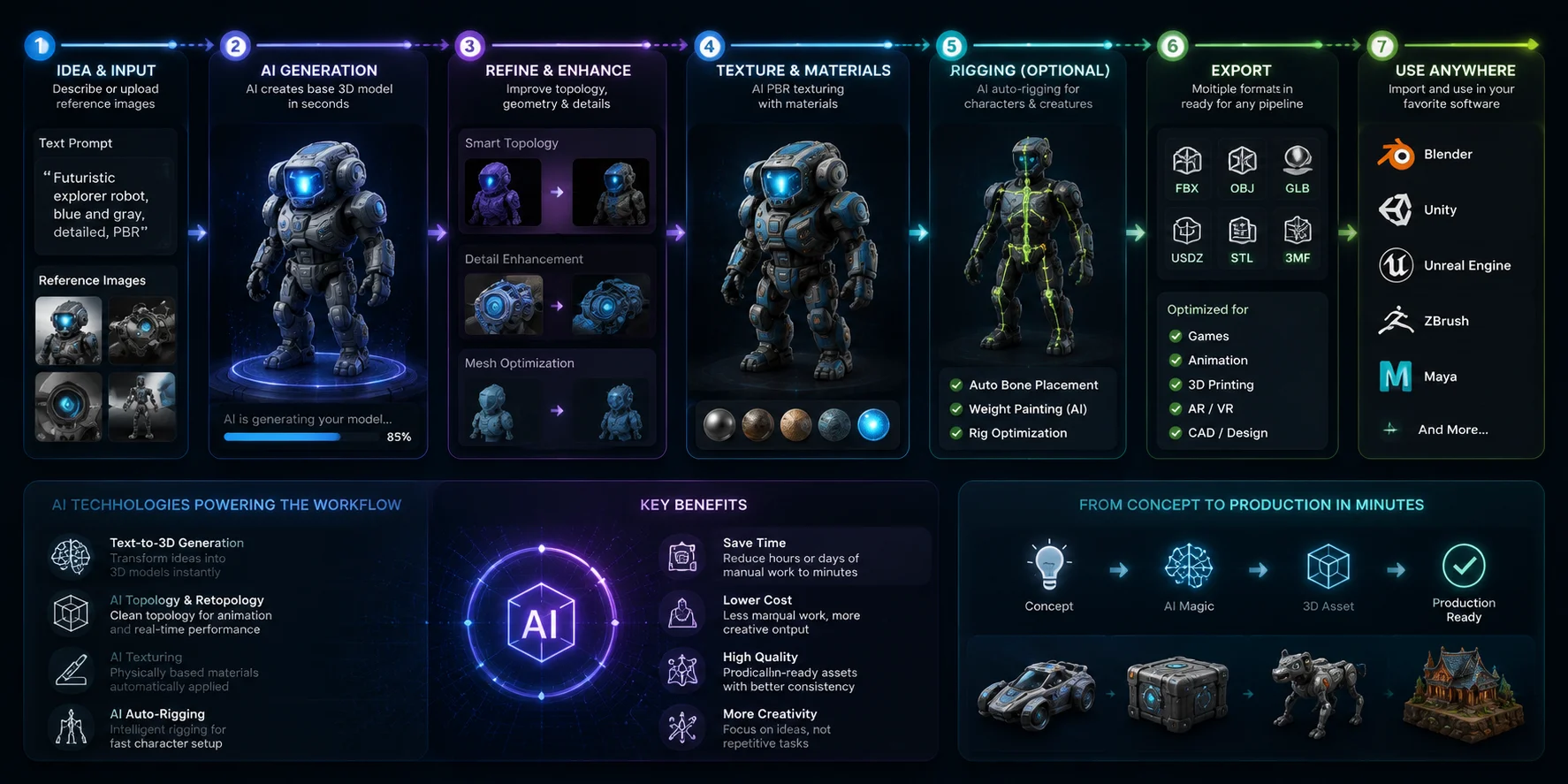
Where AI 3D Generation Works Best
An AI 3D model generator is especially useful when you need many ideas or assets quickly.
Common use cases include:
- Game asset prototyping
- Product concept visualization
- E-commerce 3D previews
- Early design exploration
- Creating variations of existing objects
For example, a small game team may need dozens of environment props. Building every object manually can take days or weeks. AI generation can create early versions quickly, allowing artists to spend more time improving the most important assets.
AI is also valuable for beginners because it removes the hardest first step: starting with an empty scene.
Tripo AI: Best AI 3D Model Generator for Fast Asset Creation
Tripo AI represents a new category of AI-powered 3D creation tools.
Instead of manually modeling every object, you can use text prompts or reference images to generate 3D assets. This makes it easier for beginners, designers, and developers to explore ideas without spending hours building basic geometry.
Tripo AI supports workflows such as:
- Text-to-3D generation
- Image-to-3D conversion
- AI texturing
- Auto-rigging
- Smart mesh optimization
The generated models can be used in common workflows involving Blender, Unity, Unreal Engine, and 3D printing pipelines through formats such as GLB, FBX, OBJ, STL, USD, and 3MF.
A practical example is game development. Instead of manually creating 50 simple props, a developer can generate initial assets quickly, then optimize and customize the best results inside traditional 3D software.
The Limits of AI 3D Modeling
AI generation is powerful, but it is not the right solution for every project.
Traditional tools are still better for:
Precision Engineering
Mechanical products, manufacturing parts, and industrial designs require exact measurements and constraints. CAD software remains the better choice.
Architecture Documentation
BIM platforms such as Revit are designed around construction information, materials, and collaboration. AI-generated models cannot replace these workflows.
Highly Optimized Production Assets
Game-ready models may require specific topology, polygon budgets, UV layouts, and animation preparation.
The best way to think about AI is not as a replacement for modeling software, but as another tool in your workflow.
How to Choose the Right 3D Modeling Software
The answer to “What is the best 3D modeling software?” depends on your goal.
There is no universal winner. Different tools solve different problems.
If You Are a Complete Beginner
Choose based on what you want to create:
- Tinkercad → first 3D printing projects
- SketchUp Free → architecture and simple spaces
- Blender → learning complete 3D workflows
- Tripo AI → creating assets without modeling experience
The biggest beginner mistake is trying too many tools at once. Pick one software, finish a project, then expand your skills.
If You Want a Career in 3D
Choose software based on your target industry:
Animation and VFX → Maya
Game development → Blender, Maya, or 3ds Max
Architecture → Revit, Rhino, SketchUp
Product design → Fusion 360 or other CAD platforms
Learning industry-standard software can make your portfolio more relevant when applying for professional roles.
If You Need Professional Results Now
For creative projects:
- Blender provides strong free capabilities.
- Maya and Cinema 4D fit established professional pipelines.
For precision projects:
- Rhino, Fusion 360, and FreeCAD are better choices.
Do not choose expensive software simply because professionals use it. Choose the tool that improves your actual workflow.
If You Need Assets Quickly
If your priority is speed, AI tools can save significant time.
An AI workflow is useful when you need:
- Many asset variations
- Quick prototypes
- Concept models
- Early visual experiments
You can generate a base model first, then improve it with Blender or another professional tool.
How to Choose the Right 3D Modeling Software: A Decision Guide for Every Workflow
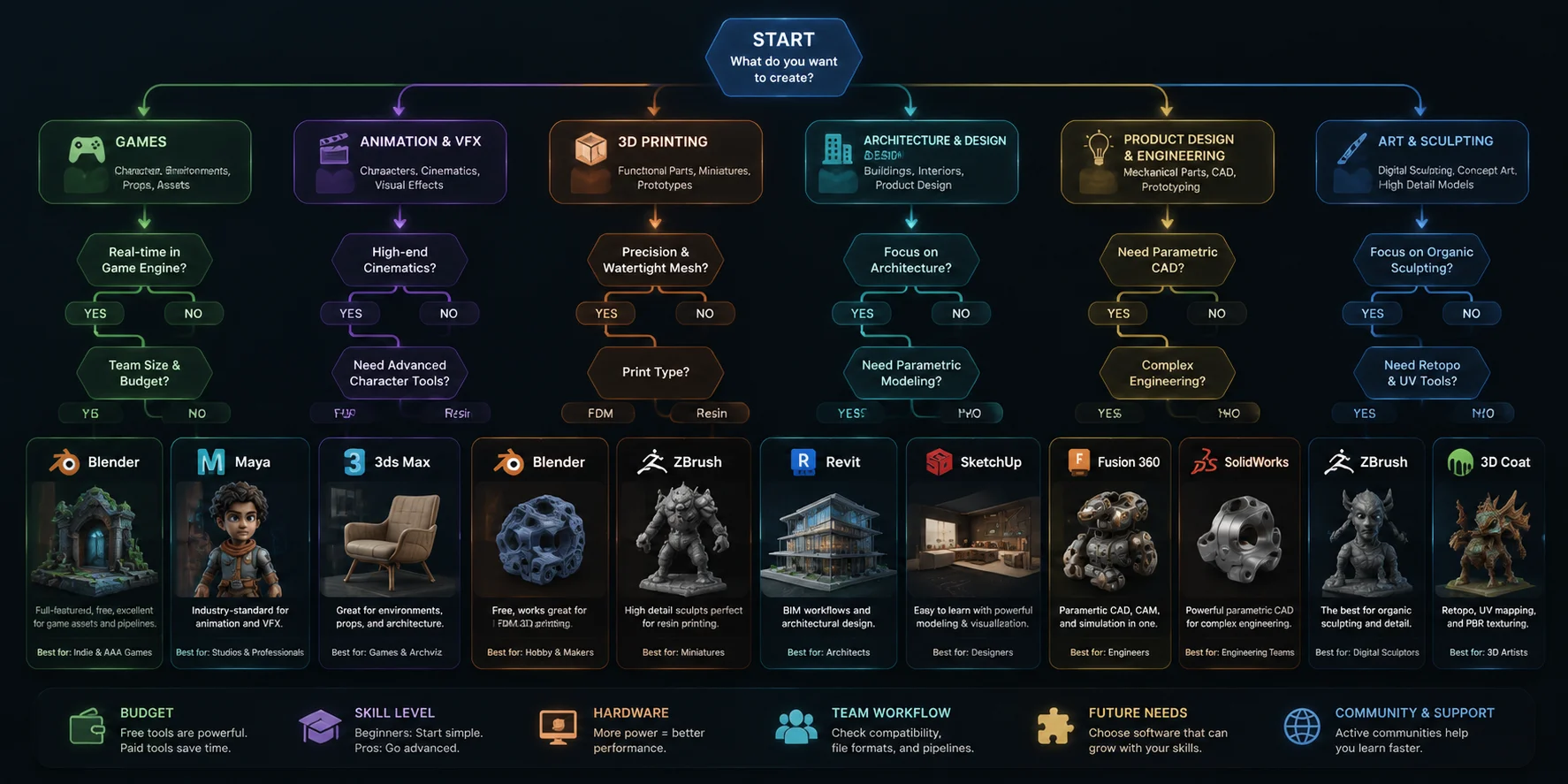
Frequently Asked Questions
Which 3D software is best for modeling?
There is no single best option. Blender is the strongest free all-purpose choice, Maya is better for professional animation, Fusion 360 is better for engineering, and AI tools like Tripo AI are useful for fast asset creation.
Is FreeCAD actually free?
Yes. FreeCAD is fully open-source with no paid tier or locked features. It is a strong choice for users who need free parametric CAD modeling.
What is the best 3D modeling app for iPad?
Shapr3D is one of the strongest iPad CAD tools, while Nomad Sculpt is popular for digital sculpting. Both work well with Apple Pencil workflows.
Can ChatGPT make a 3D model?
ChatGPT can help create ideas, prompts, and workflows, but it does not directly generate production-ready 3D geometry. Dedicated AI 3D tools are designed specifically for model creation.
What is the best free 3D modeling software?
Blender is the most capable free general-purpose option. Tinkercad is easier for beginners, while FreeCAD is better for technical CAD projects.
What is the best 3D modeling software for 3D printing?
Fusion 360 is best for mechanical parts, Blender is better for artistic models, and Tinkercad is ideal for simple beginner prints. A clean, watertight export is the most important requirement.
What is the best 3D modeling software for beginners?
Tinkercad is the easiest starting point for beginners. SketchUp works well for architecture, while AI tools help users create assets without learning traditional modeling first.
Do professionals use Blender?
Yes. Blender is widely used by freelancers, indie studios, visualization artists, and some professional production workflows. It is no longer limited to hobby users.
What is the difference between CAD and 3D modeling software?
CAD focuses on precision, measurements, and engineering constraints. General 3D modeling software focuses more on artistic flexibility and shape creation.
Which 3D software is best for architecture?
SketchUp is excellent for design concepts, Revit is preferred for BIM documentation, and Rhino with Grasshopper is powerful for complex architectural forms.
Conclusion
The best 3D modeling software depends on your goals, workflow, and experience level. Blender remains the strongest free all-purpose option, CAD tools dominate precision design, and professional platforms serve specialized industries.
For creators who want to move from ideas to 3D assets faster, AI-powered workflows provide a new option. Try** Tripo AI Studio** to explore AI-generated 3D creation, and check** Tripo AI Pricing** to find a plan that matches your projects.