Best AI 3MF Generator in 2026: Top Tools for 3D Printing
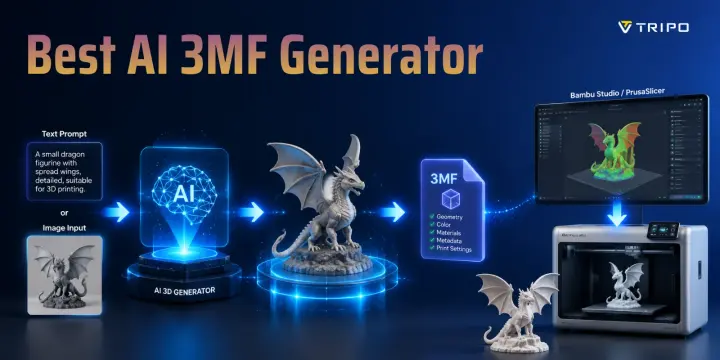
TL;DR:
- 3MF is the modern standard for 3D printing — supports color, materials, and metadata that STL cannot.
- Most AI 3D generators export STL or GLB, not 3MF. A conversion step is usually needed.
- Tripo AI is one of the only AI generators that exports 3MF directly — no slicer conversion required.
- For tools that export STL, PrusaSlicer or Bambu Studio can convert to 3MF on import in seconds.
- Direct 3MF export saves time and preserves mesh integrity for Bambu Lab and PrusaSlicer workflows.
AI 3D model generation has become dramatically faster, but there is still a major gap between AI creation and real-world 3D printing workflows. Most AI 3D generators export STL, OBJ, or GLB files, leaving users with an extra conversion step before importing models into modern slicers like Bambu Studio or PrusaSlicer. For anyone using a Bambu Lab printer or multi-color printing workflow, this extra step can mean lost metadata, missing color information, or additional mesh preparation.
3MF solves this problem by providing a more complete format built specifically for manufacturing. Unlike STL, 3MF can store color, materials, multiple objects, print settings, and other metadata inside a single compressed file. This guide compares the best AI 3MF generators in 2026, focusing on which tools can export 3MF directly and which still require an STL-to-3MF conversion workflow.
What Is 3MF and Why Does It Matter for AI-Generated Prints?
3MF (3D Manufacturing Format) is a modern 3D printing file format developed by the 3MF Consortium, with support from companies including Microsoft, Autodesk, and HP. It was designed to overcome the limitations of STL, the long-standing standard format for 3D printing.
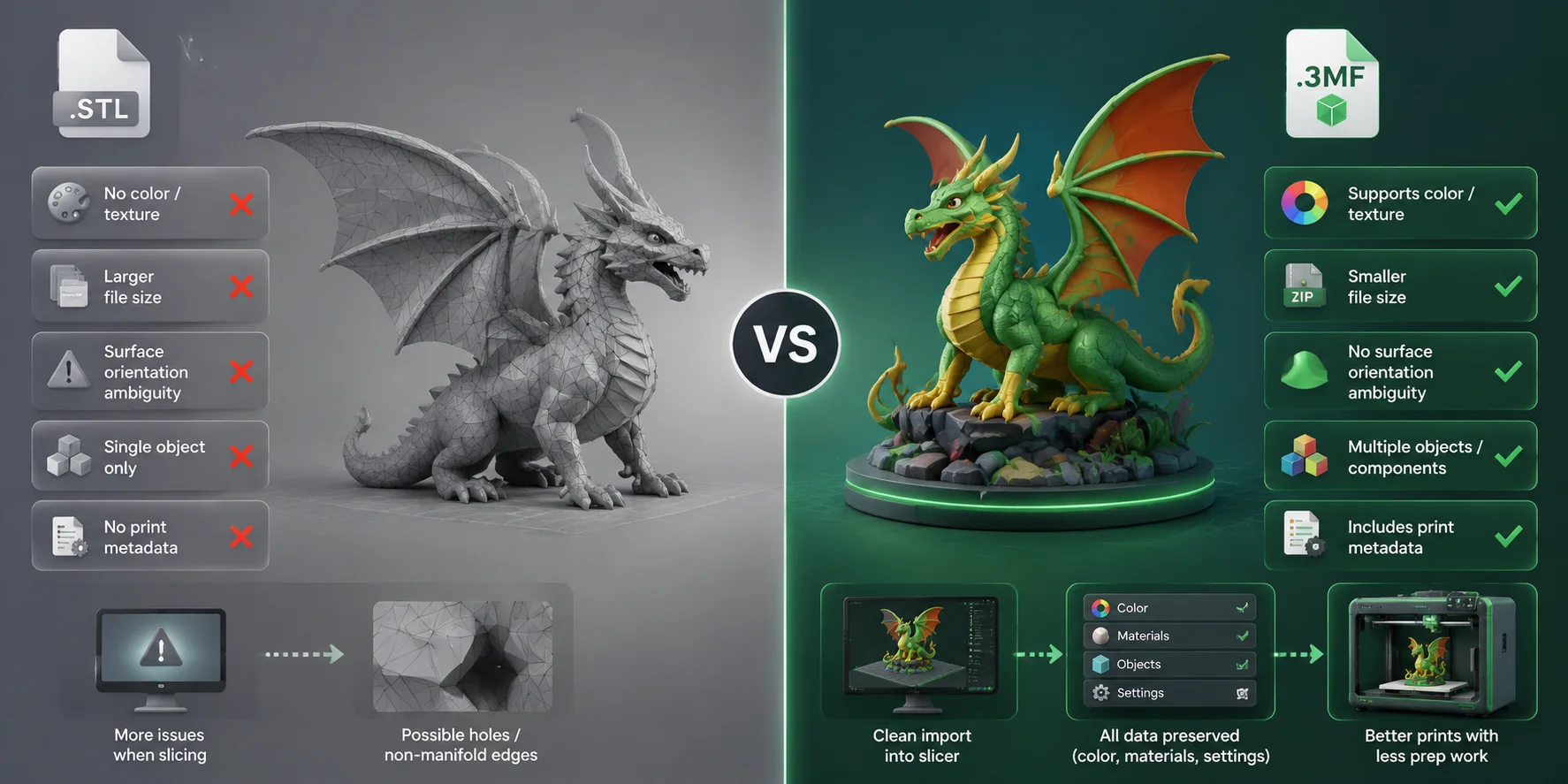
While STL only stores surface geometry, 3MF can include additional information such as colors, materials, multiple components, and printer settings. This makes it especially useful for AI-generated models, where complex geometry, multiple parts, and accurate scale information are often important.
Many AI generators still export STL because it has universal compatibility and is simple to create. However, for modern slicers and advanced workflows, 3MF provides a more reliable bridge between AI generation and physical printing.
| Feature | STL | 3MF |
|---|---|---|
| Color / texture support | No | Yes |
| File size | Larger | Smaller (compressed) |
| Surface orientation ambiguity | Possible | No |
| Multiple objects in one file | No | Yes |
| Print metadata | No | Yes |
| Slicer support | Universal | Bambu Studio, PrusaSlicer, Cura, and more |
For AI-generated meshes, 3MF is particularly valuable because it reduces manual setup. Correct scale, object arrangement, and print information can travel with the model instead of being recreated inside the slicer.
STL vs 3MF: Why AI 3MF Generators Need Modern Printing Formats
What Makes a Good AI 3MF Generator?
Choosing the best AI 3MF generator is not only about whether a tool can create a 3D model. The most useful tools combine direct 3MF export with reliable geometry, fast generation, and a workflow designed for printing.
Direct 3MF Export
The most important factor is whether the platform exports .3mf files directly. Many AI tools create impressive models but only provide STL, OBJ, or GLB outputs, forcing users to convert files before slicing.
A native 3MF export saves time and reduces the chance of losing important information during conversion. For Bambu Lab and Prusa workflows, direct export is a major advantage.
Mesh Quality and Print Readiness
AI-generated models need more than visual detail. A good AI 3D printing tool should produce watertight geometry, reasonable topology, and surfaces that slice correctly.
Important factors include polygon control, non-manifold error prevention, and whether the model can be printed without extensive cleanup. Tools that offer optimized mesh modes are usually better for practical printing.
Prompt-to-Model Speed
Generation speed directly affects usability. A tool that produces a printable model within minutes allows users to experiment with more designs and iterate faster.
The best workflows balance speed and quality by offering different generation modes, from quick previews to high-resolution final models.
Resolution Options
Different printing goals require different levels of detail. A simple prototype may only need a lightweight mesh, while collectible figures or detailed sculptures benefit from higher-resolution geometry.
AI 3MF generators should provide options for low-poly, optimized, or HD models depending on the final printing requirement.
Ease of Use
A strong AI printing workflow should not require advanced modeling knowledge. Browser-based tools with simple text-to-3D or image-to-3D interfaces allow beginners to move from idea to printable file without installing complex software.
For experienced users, additional export formats and editing flexibility are also important.
Pricing and Accessibility
Cost is another important consideration. Some platforms use subscription plans, while others use credit-based generation systems or limited free tiers.
A good AI 3MF generator should provide enough free access for testing while offering affordable upgrades for users who need more generations or higher-resolution exports.
How to Choose the Best AI 3MF Generator: Essential Features Compared
Top AI 3MF Generators Compared
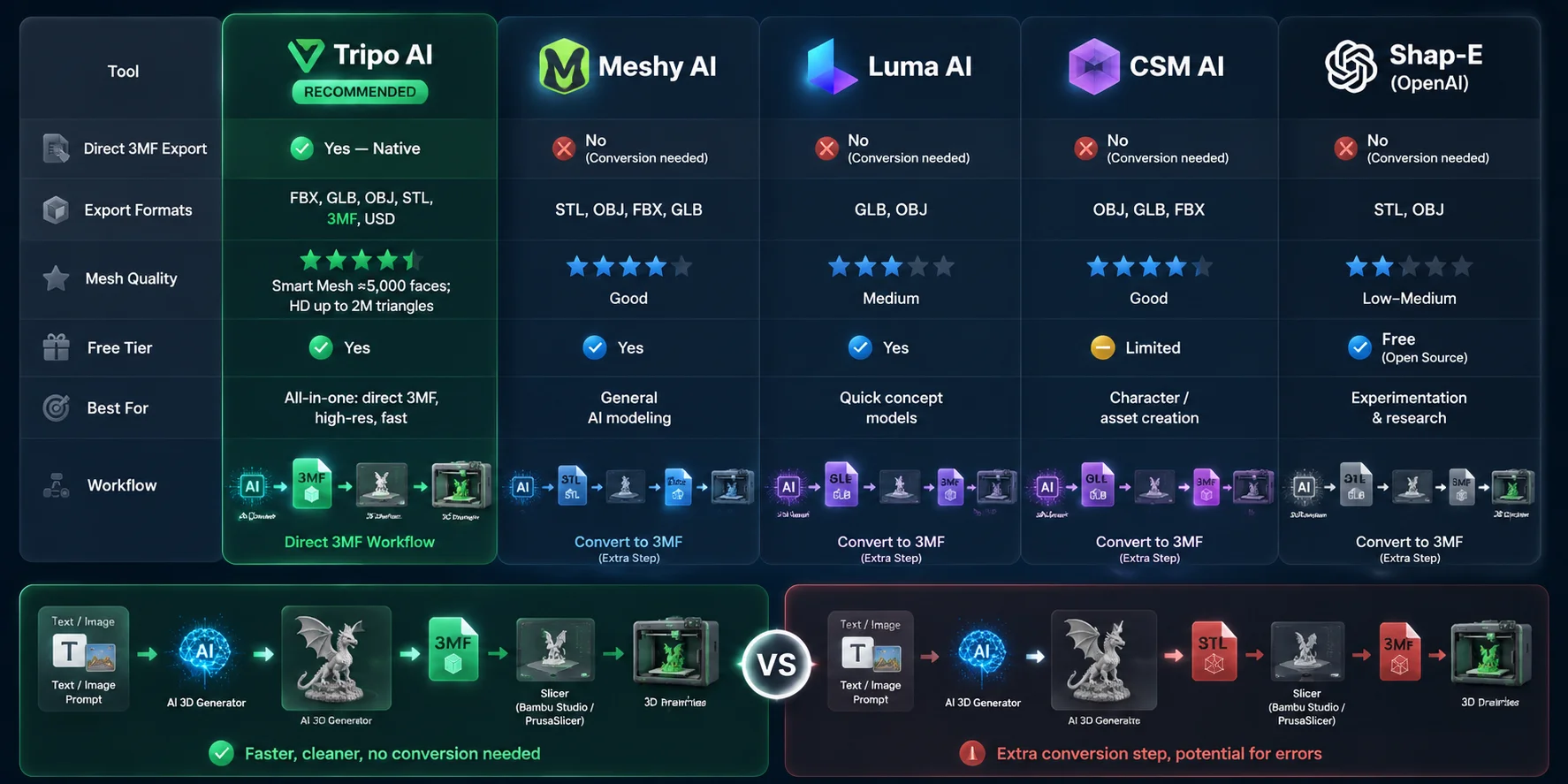
Most AI 3D generators in 2026 still focus on STL, OBJ, or GLB exports rather than direct 3MF output. The biggest difference between these tools is whether they support a complete printing workflow or require additional conversion.
| Tool | Direct 3MF Export | Export Formats | Mesh Quality | Free Tier | Best For |
|---|---|---|---|---|---|
| Tripo AI | Yes — native | FBX, GLB, OBJ, STL, 3MF, USD | Smart Mesh ≈5,000 faces; HD up to 2M triangles | Yes | Direct 3MF workflow, high-quality printing, fast generation |
| Meshy AI | No (STL/OBJ/FBX/GLB) | STL, OBJ, FBX, GLB | Good | Yes | General AI modeling |
| Luma AI | No (GLB/OBJ) | GLB, OBJ | Medium | Yes | Fast concept models |
| CSM AI | No (OBJ/GLB/FBX) | OBJ, GLB, FBX | Good | Limited | Characters and game assets |
| OpenAI Shap-E | No (STL/OBJ) | STL, OBJ | Low-medium | Free (open source) | Experimentation and research |
For users who specifically need a 3MF file, Tripo AI has a workflow advantage because the format is available directly at export. For other tools, converting an STL file through PrusaSlicer or Bambu Studio is usually possible and takes less than two minutes, but it adds an additional step between AI generation and printing.
Best AI 3MF Generators Comparison: Tools with Direct 3MF Export
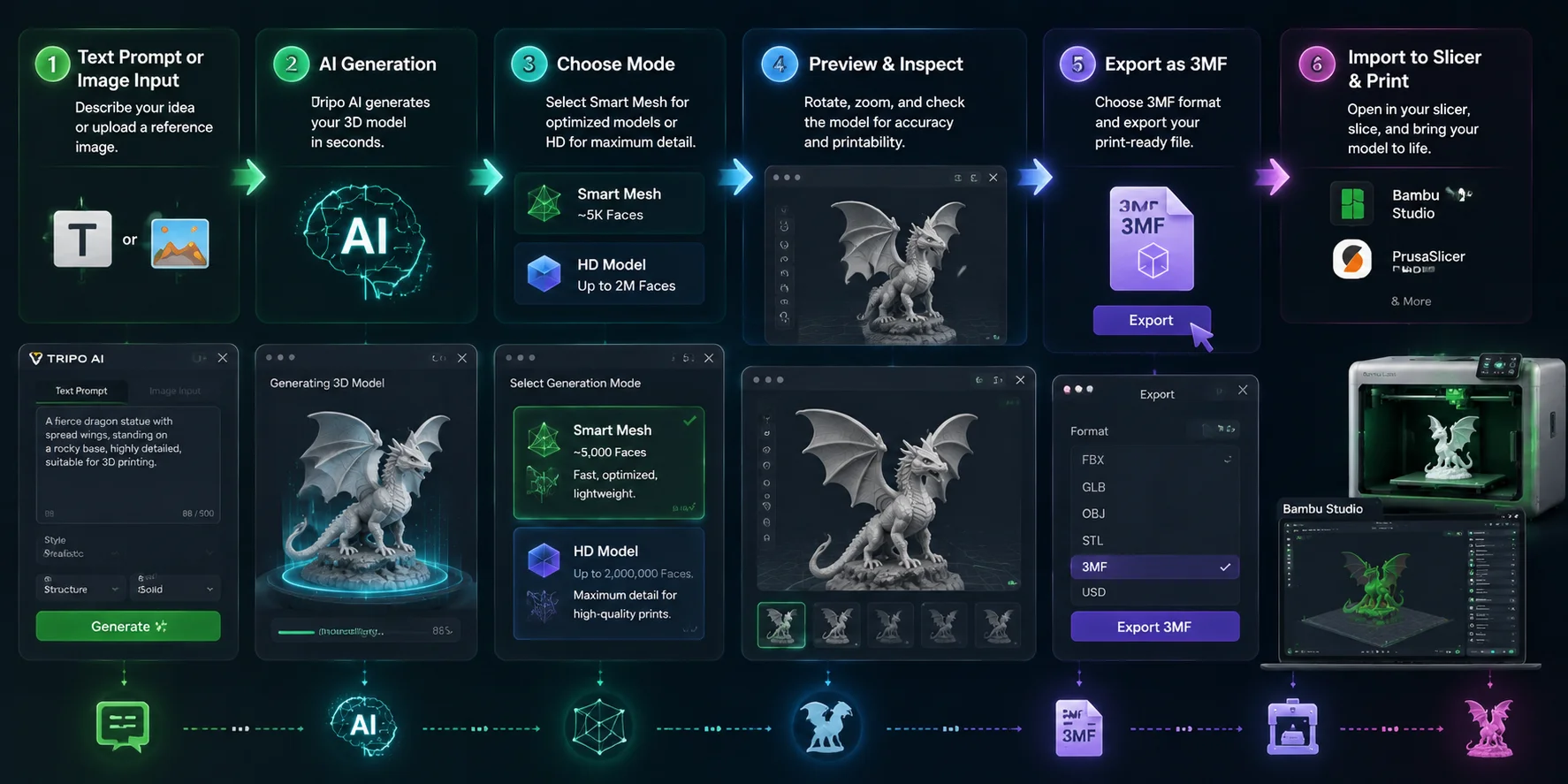
How to Generate a 3MF File with Tripo AI (Step-by-Step)
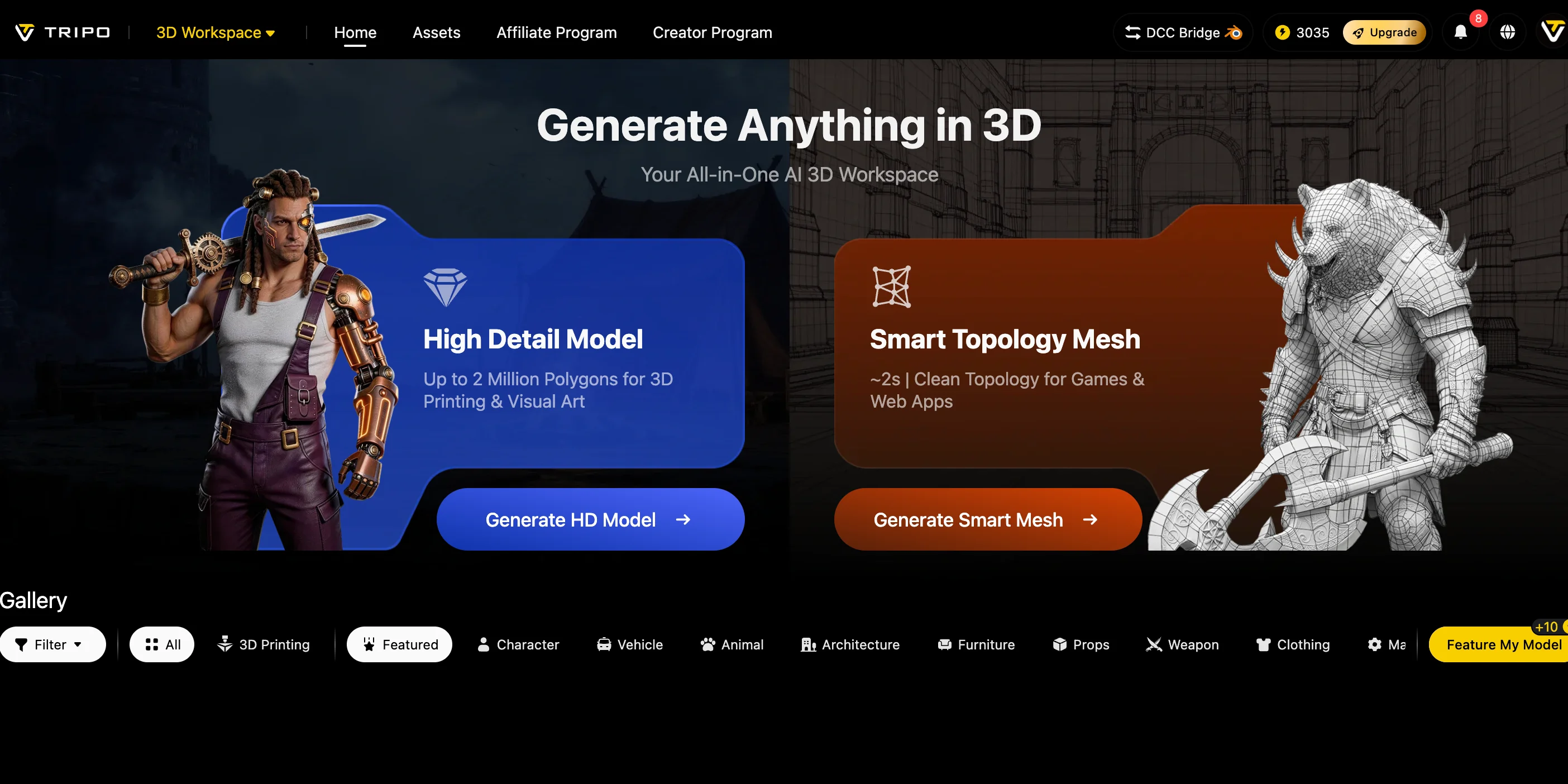
Tripo AI is one of the few AI 3D generation platforms that supports direct 3MF export, making it easier to move from an idea to a printable model without an additional conversion workflow. The process works for both text-to-3D and image-to-3D generation.
Open Tripo AI Studio
Start by opening Tripo AI Studio in your browser. The platform runs online, so there is no local software installation required. Users can create models directly from a text description or reference image.
Enter a Text Prompt or Upload a Reference Image
Describe the object you want to print or upload an image as a visual reference. For example, a prompt such as “a small dragon figurine with spread wings, designed for FDM 3D printing” provides both the subject and the intended use case.
For better printing results, prompts should describe a single object with clear shapes and avoid overly complex scenes. Clean references usually produce more reliable AI-generated geometry.
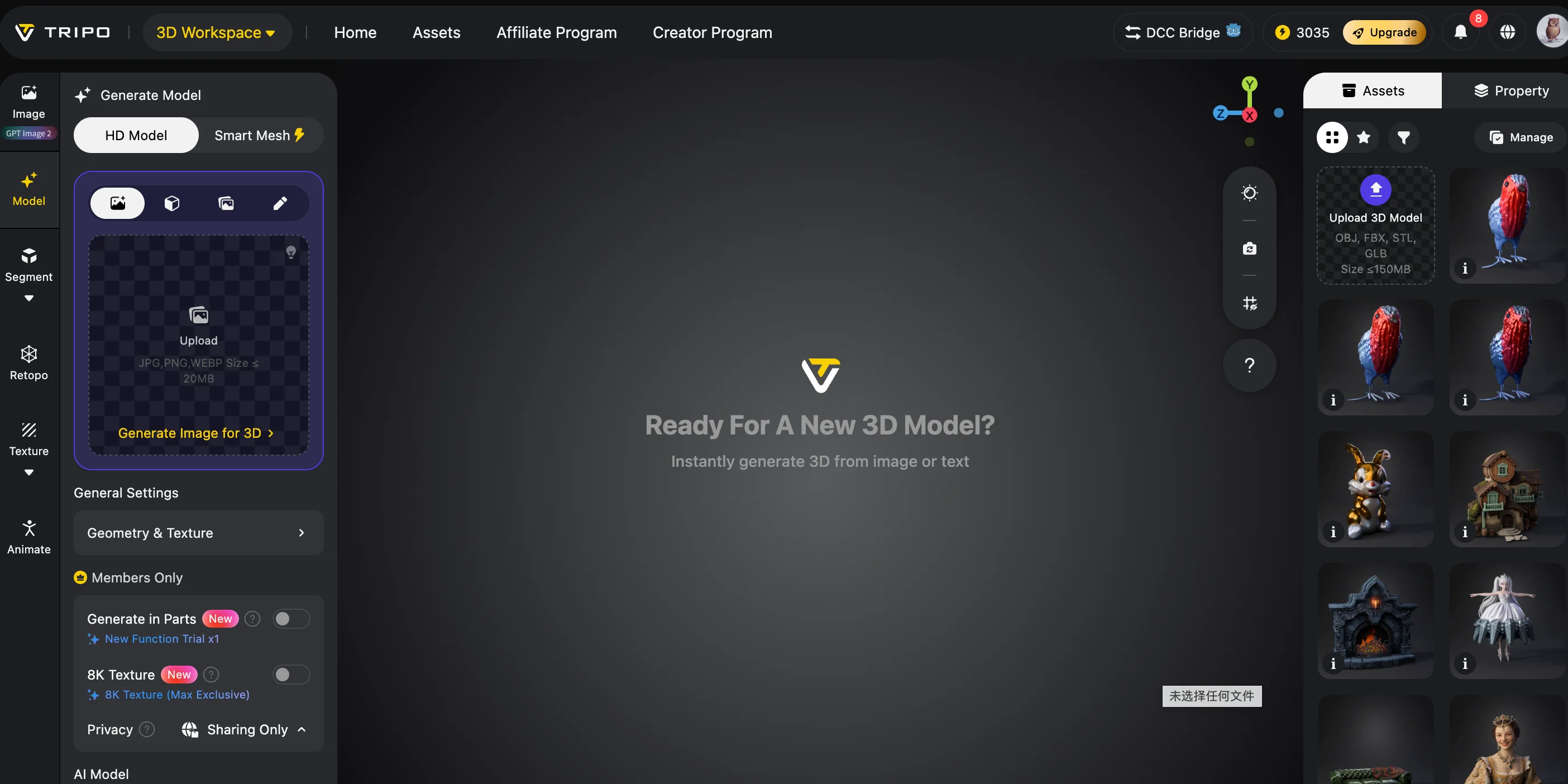
Select the Generation Mode
Choose the model quality based on your printing goal.
Smart Mesh mode provides optimized geometry with around 5,000 faces, making it suitable for fast previews, simple objects, and quick prototypes. It creates lightweight models that are easier to slice and edit.
For detailed figures, collectibles, or final production prints, HD mode can generate models with up to 2 million triangles, providing significantly more surface detail.
Review the 3D Preview
Before exporting, rotate the generated model in the browser viewer and inspect important areas such as thin parts, small details, and overall shape accuracy.
If the model contains obvious defects, missing geometry, or unrealistic structures, regenerate the model or adjust the prompt before moving to export.
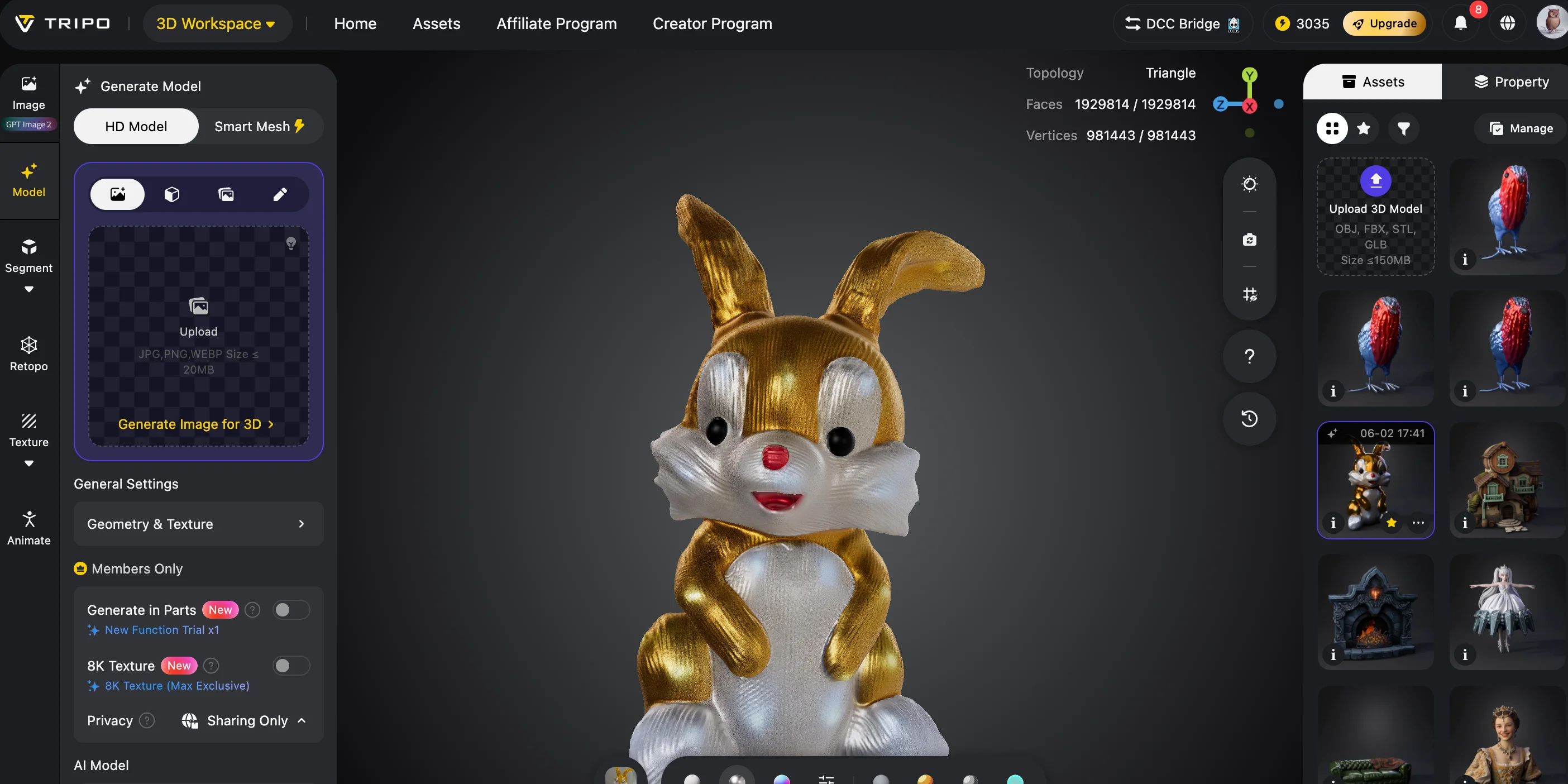
Export as 3MF
When the model is ready, select the export option and choose 3MF format. Tripo AI supports multiple formats including FBX, GLB, OBJ, STL, 3MF, and USD.
For 3D printing workflows, selecting 3MF keeps the process simple because the file can be imported directly into modern slicers without an STL conversion step.
Import Into Your Slicer
Drag the exported .3mf file into Bambu Studio, PrusaSlicer, or another compatible slicer. The slicer can read the model information and prepare it for printing.
For complex models, use HD mode when additional detail is required and check the slicer repair tools for possible non-manifold edges before starting the print.
Tripo AI 3MF Export Workflow: Generate Print-Ready Files with an AI 3MF Generator
STL to 3MF Conversion Workflow (For Tools Without Direct Export)
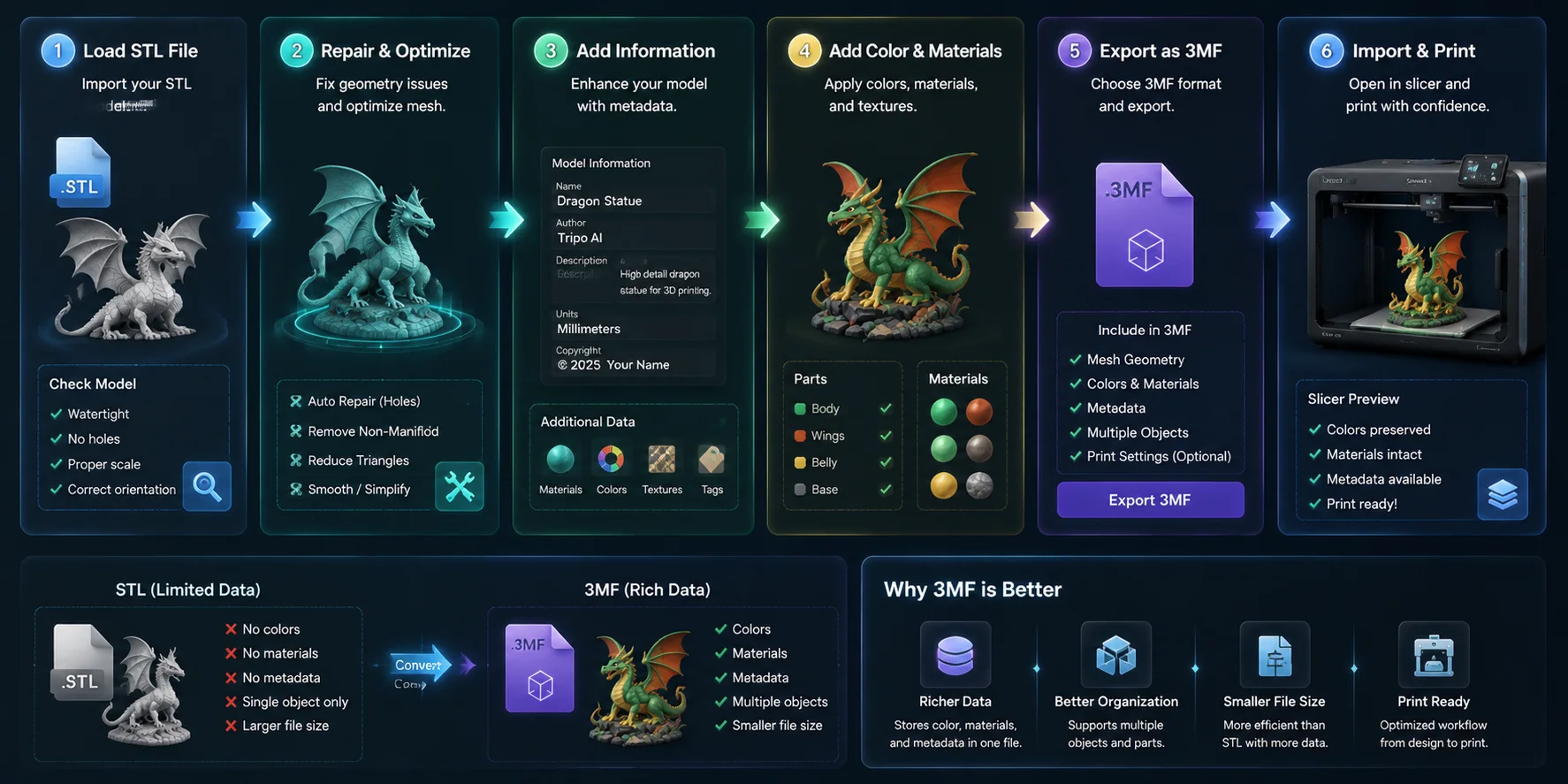
Not every AI 3D generator supports native 3MF export. If your chosen tool only provides STL files, you can still convert them into 3MF before printing.
The conversion process is simple, but it introduces an additional step where scale, orientation, or mesh issues may need to be checked.
Option A — Convert STL Using PrusaSlicer
PrusaSlicer is one of the easiest free ways to convert an AI-generated STL into 3MF.
Workflow:
- Open PrusaSlicer.
- Import the STL model.
- Adjust orientation, scale, or print settings if needed.
- Select File → Export → Export Plate as 3MF.
The entire process usually takes less than 30 seconds and creates a slicer-ready 3MF file.
Option B — Convert STL Using Bambu Studio
For users with Bambu Lab printers, Bambu Lab Studio provides a similar workflow.
Import the STL file, configure your print settings, and export the project as 3MF. This is especially useful because Bambu Studio uses 3MF as a native project format for printers such as the X1C, P1S, and A1 series.
Option C — Convert Using Microsoft 3D Builder
Windows users can also use Microsoft 3D Builder.
Open the STL file, select Save As, and choose 3MF format. This method is convenient for quick conversions when no slicer software is installed.
However, direct 3MF export remains the cleaner solution. A native AI 3MF generator avoids unnecessary conversion and reduces the possibility of introducing mesh errors during file processing.
STL to 3MF Conversion Workflow: Preparing AI-Generated Models for 3D Printing
Best Use Cases for AI 3MF Generators
Product Design and Prototyping
AI 3MF generators shorten the early design process by allowing creators to move from a concept description or reference image to a printable prototype quickly. Designers can generate initial models, test physical shapes, and iterate without manually building every component in CAD software.
Because 3MF stores additional manufacturing information, it works well for repeated design revisions where scale, object structure, and print settings need to remain consistent. Tripo AI’s HD mode is useful for prototypes that require more detailed geometry before production.
Bambu Lab and Multi-Color Printing
Bambu Lab printers rely heavily on Bambu Studio workflows, where 3MF is the preferred project format. For multi-color printing with the AMS system, 3MF provides a better foundation because it can preserve object information and color assignments.
Using an AI tool that exports directly to 3MF removes the traditional STL workflow: generate model → convert STL → recreate colors → prepare print. Instead, users can move directly from AI generation to slicing.
Rapid Prototyping for Beginners
For beginners without CAD experience, the shortest path from an idea to a physical object is an AI generator that outputs a print-ready format.
A direct AI-to-3MF workflow removes many technical barriers. Users do not need to manually repair files, convert formats, or rebuild slicer settings before printing.
Tripo AI’s Smart Mesh mode provides lightweight geometry designed for fast slicing, making it practical for beginners experimenting with AI-generated objects.
Frequently Asked Questions (FAQ)
Is there a free AI 3MF generator?
Yes. Tripo AI provides a free tier through Tripo AI Studio that includes limited monthly generations. The free workflow supports 3MF export, allowing users to test AI-generated 3D printing without purchasing a subscription.
Can I use an AI 3MF generator without installing software?
Yes. Browser-based tools such as Tripo AI do not require local installation. Users can create models from text prompts or images and download the final 3MF file directly from the web application.
Which AI 3MF generator works best for Bambu Lab printers?
Tripo AI is a strong choice because it exports 3MF directly, allowing models to open in Bambu Studio without conversion. Other AI tools can still work, but STL conversion adds an extra preparation step.
Does Tripo AI export 3MF directly?
Yes. Tripo AI supports FBX, GLB, OBJ, STL, 3MF, and USD export formats. Users can select 3MF during the download process to create a slicer-ready file.
What is the difference between STL and 3MF for 3D printing?
STL only stores basic surface geometry and does not include color, materials, or printing metadata. 3MF is a newer format designed specifically for manufacturing and supports additional information such as colors, multiple objects, and print settings.
Can I convert an AI-generated STL to 3MF?
Yes. Import the STL into PrusaSlicer or Bambu Studio and export it as a 3MF project. Microsoft 3D Builder can also perform this conversion on Windows.
Is 3MF better than OBJ for 3D printing?
For printing workflows, 3MF is generally better because it was designed specifically for manufacturing. OBJ is mainly a graphics and rendering format and does not include the same printing metadata or project information.
What mesh quality does Tripo AI produce for printing?
Tripo AI offers Smart Mesh mode with approximately 5,000 faces for optimized models and HD mode with up to 2 million triangles for high-detail prints. Both options are designed to produce printable geometry suitable for common FDM and resin workflows.
Can I generate a 3MF file from a photo using AI?
Yes. Tripo AI supports image-to-3D generation, allowing users to upload a reference image and convert it into a 3D model. The generated model can then be exported directly as a 3MF file.
Do all slicers support 3MF?
Most modern slicers support 3MF, including Bambu Studio, PrusaSlicer, Cura, and IdeaMaker. Some older software may still rely mainly on STL, but 3MF is increasingly becoming the preferred format for modern printing workflows.
Conclusion
3MF is becoming the preferred file format for modern 3D printing because it stores more than geometry — it carries the information slicers need for reliable manufacturing. However, many AI 3D generators still stop at STL or GLB, creating an unnecessary conversion step.
Tripo AI closes this gap with native 3MF export, multiple generation modes, and a browser-based workflow that takes users from text or images to printable models faster. For tools that only export STL, conversion through PrusaSlicer or Bambu Studio remains a practical workaround, but direct 3MF output provides the smoother workflow.
Ready to generate a print-ready 3MF file in minutes? Try Tripo AI free →
Need more generations or HD-quality exports? See Tripo AI pricing →