How to Generate a Dragon 3D Model with AI
TL;DR
- Create a high-quality dragon 3D model without traditional sculpting skills using AI text-to-3D tools like Tripo AI Studio.
- Compare free and paid AI 3D generators, understand export formats (STL, OBJ, FBX, GLB), and choose the right workflow for printing or game development.
- Follow a complete pipeline from AI generation → model cleanup → 3D printing preparation or game engine integration.
- Whether you are a gamer, maker, or fantasy artist, AI makes custom dragon creation faster and more accessible than ever.
You can generate a realistic dragon 3D model with AI in under a minute — no sculpting experience required. AI tools like Tripo AI allow you to enter a text prompt or upload a reference image and quickly create a downloadable 3D dragon model ready for games, 3D printing, animation, or creative projects.
Imagine a game developer who needs a powerful dragon boss character but cannot spend weeks sculpting from scratch. With AI 3D generators, that process can become a matter of minutes. This guide covers how to choose the right tool, write effective dragon prompts, export models in the best format, and optimize your results for print-ready or game-ready workflows.
What Is an AI Dragon 3D Model Generator?
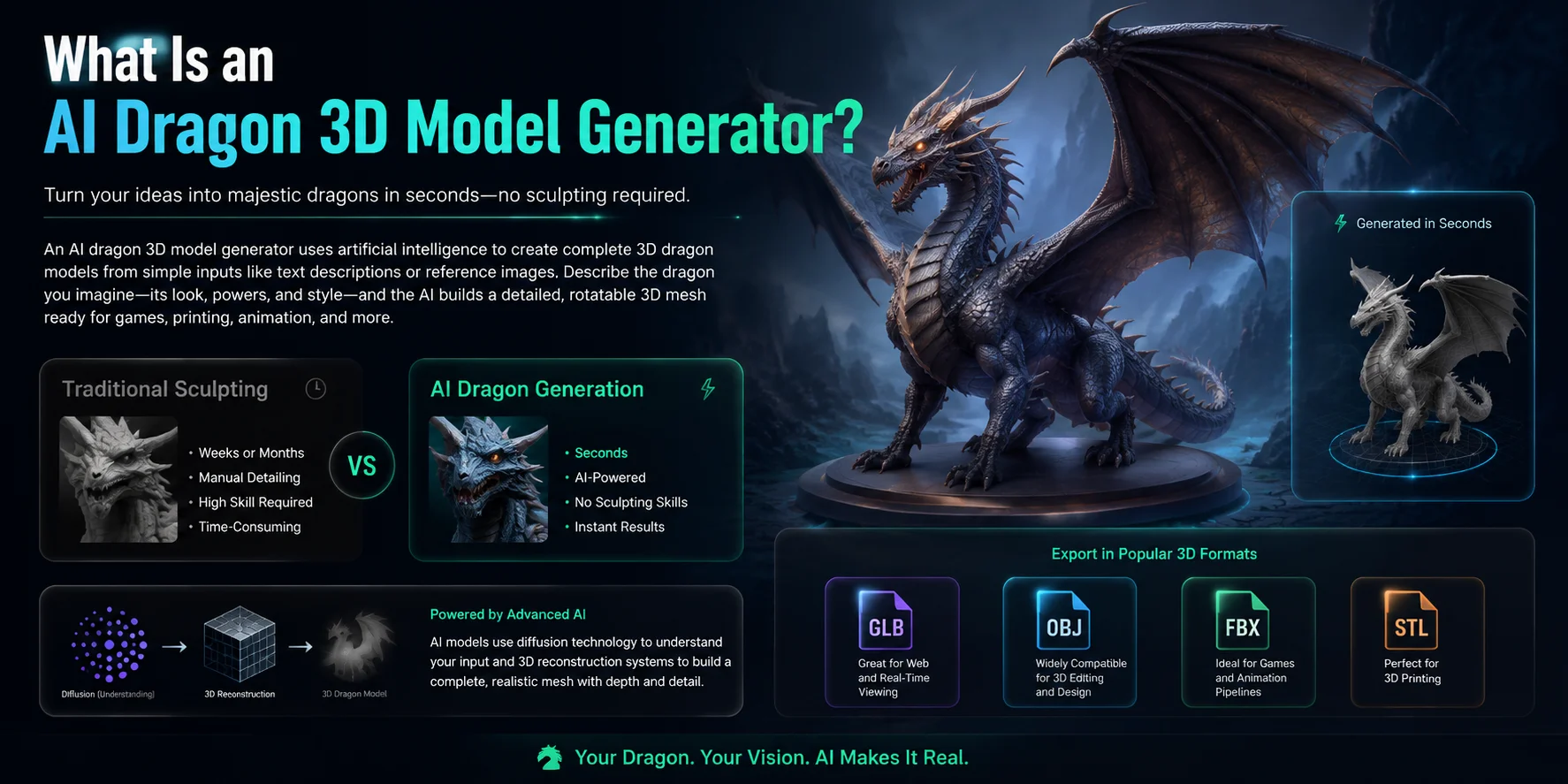
An AI dragon 3D model generator is a tool that uses artificial intelligence to create complete 3D dragon models from simple inputs such as text descriptions or reference images. Instead of manually sculpting every scale, horn, wing, and body detail, users can describe the creature they want — for example, “a fire-breathing ancient dragon with armored scales and large wings” — and the AI generates a ready-to-view 3D mesh automatically.
It works like a text-to-image generator, but the output is a fully rotatable 3D object that you can inspect from every angle, edit, animate, or prepare for printing. Traditional dragon sculpting in software like Blender or ZBrush can take professional artists weeks or even months, while AI generation can produce a first version within seconds.
Behind the scenes, these tools combine AI technologies such as diffusion models and 3D reconstruction systems to understand shapes, details, and spatial structure. The final model format depends on the platform and workflow. Common exports include GLB for web and real-time viewing, OBJ for general 3D editing, FBX for game engines and animation, and STL for 3D printing.
How to Generate a Dragon 3D Model with Tripo AI (Step by Step)
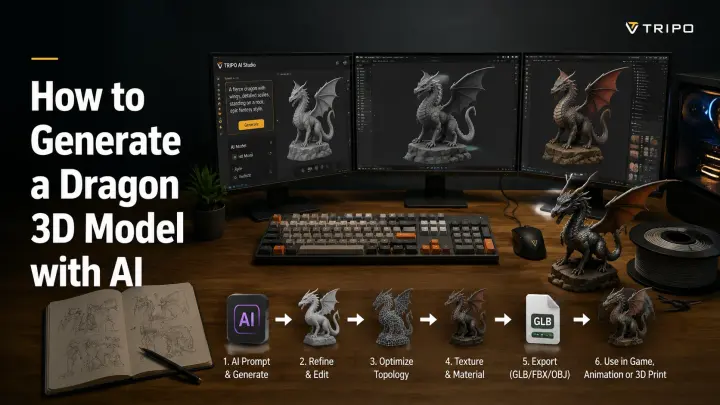
Creating a custom dragon 3D model no longer requires advanced sculpting skills or hours of manual modeling. With Tripo AI Studio, you can turn a simple text description or reference image into a complete 3D dragon model in just a few steps.
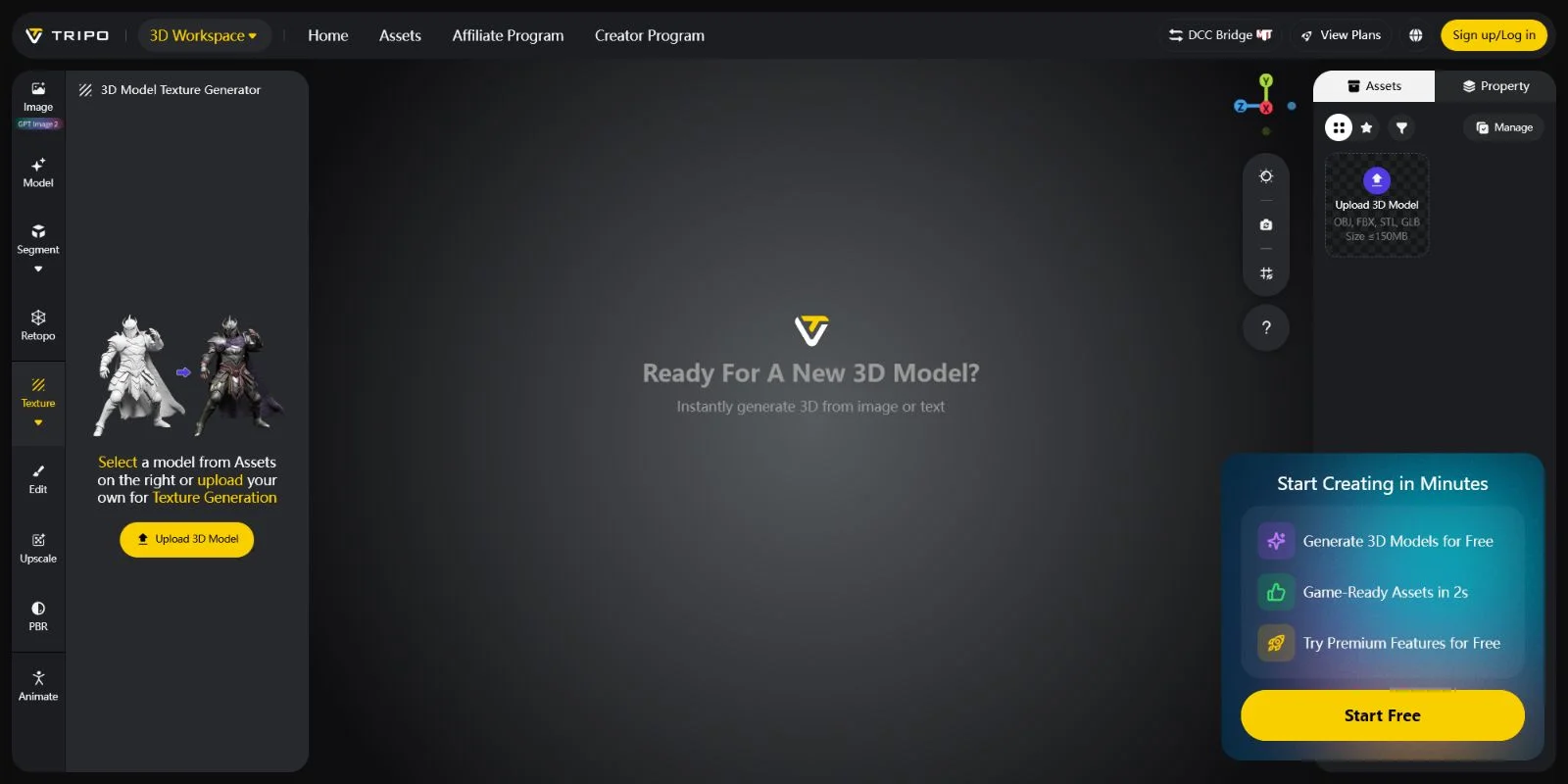
Step 1: Create a Free Tripo AI Studio Account Start by visiting Tripo AI Studio and creating a free account. Once logged in, you can access the AI 3D generation tools and begin creating your dragon model without installing complex 3D software.
Step 2: Choose Your Input Method Select the generation mode that matches your idea. Use Text-to-3D if you want to describe a dragon from your imagination, or choose Image-to-3D if you already have concept art, sketches, or reference images you want the AI to transform into a 3D asset.
Step 3: Write a Detailed Dragon Prompt The quality of your result depends heavily on your prompt. Instead of writing only “dragon,” describe the creature’s appearance, style, and purpose. For example: “A fire-breathing dragon with spread wings, detailed scales, sharp horns, fantasy style, cinematic design, game-ready 3D model.” Adding details about materials, pose, and environment can help the AI create a more specific result.
Prompt Writing Tip:Include three key elements for better results:Style adjectives: realistic, fantasy, medieval, cartoon, cinematicScale references: giant dragon, small collectible figure, tabletop miniatureIntended use: game character, 3D printing model, animation asset
Step 4: Click Generate and Wait After entering your prompt, click the Generate button. Tripo AI processes your description and creates a complete 3D dragon model within seconds. The AI automatically builds the shape, structure, and surface details based on your input.
Step 5: Preview and Improve Your Model Once generated, rotate and inspect your dragon from different angles. If needed, use AI Texturing features to improve the appearance with more detailed colors, materials, and surface effects. This step helps prepare your model for games, animation, or presentation.
Step 6: Export Your Dragon 3D Model When your dragon is ready, export it in the format that matches your workflow. Use GLB for web viewers, AR experiences, and real-time applications. Choose FBX for game engines like Unity or Unreal Engine and animation pipelines. Export OBJ for general 3D editing, or select STL/3MF when preparing the model for 3D printing.
With this workflow, anyone can go from a simple dragon idea to a downloadable 3D asset ready for gaming, printing, or creative projects — without needing years of 3D modeling experience.
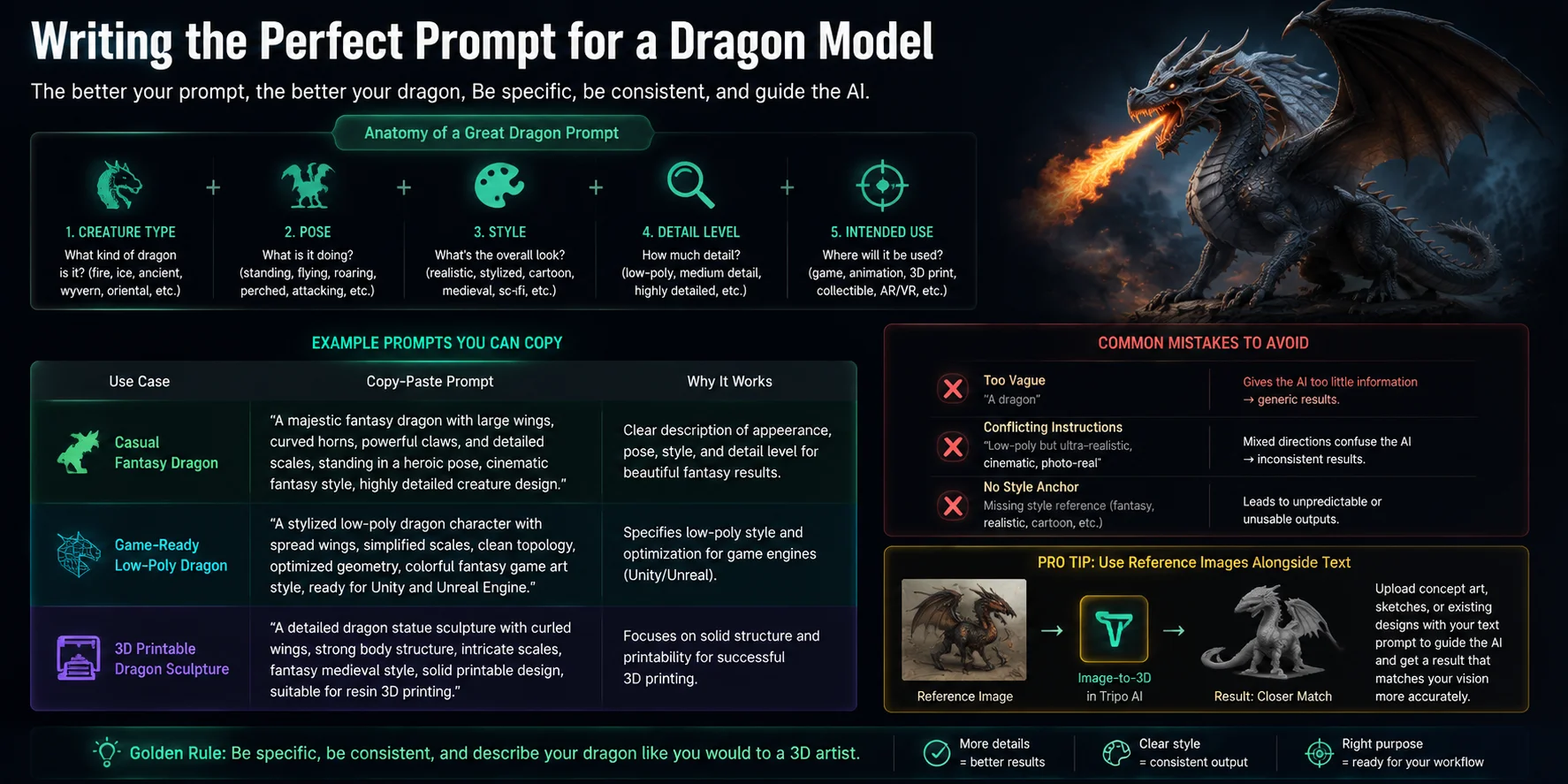
Writing the Perfect Prompt for a Dragon Model
The quality of an AI-generated dragon 3D model depends heavily on the prompt you provide. A strong dragon prompt should describe five key elements: creature type, pose, visual style, detail level, and intended use. Instead of simply writing “a dragon,” explain what kind of dragon you want, how it should look, what it is doing, and where the final model will be used.
A simple formula is:
Creature type + Pose + Style + Details + Purpose
For example, “an ancient ice dragon standing on a mountain peak, realistic fantasy style, detailed crystal scales and large wings, designed as a game-ready character” gives the AI much more information to work with.
Dragon Prompt Examples
| Use Case | Copy-Paste Prompt |
|---|---|
| Casual Fantasy Dragon | “A majestic fantasy dragon with large wings, curved horns, powerful claws, and detailed scales, standing in a heroic pose, cinematic fantasy style, highly detailed creature design.” |
| Game-Ready Low-Poly Dragon | “A stylized low-poly dragon character with spread wings, simplified scales, clean topology, optimized geometry, colorful fantasy game art style, ready for Unity and Unreal Engine.” |
| 3D Printable Dragon Sculpture | “A detailed dragon statue sculpture with curled wings, strong body structure, intricate scales, fantasy medieval style, solid printable design, suitable for resin 3D printing.” |
Avoid common prompt mistakes that reduce quality. A vague description like “a dragon” gives the AI too much freedom and often produces generic results. Conflicting instructions, such as asking for both “low-poly” and “ultra-realistic cinematic details,” can also create inconsistent results. Always include a clear style anchor, such as realistic, cartoon, medieval, sci-fi, or collectible figure.
For even more accurate results, combine text prompts with reference images. Tripo AI’s Image-to-3D feature allows you to upload concept art, sketches, or existing designs and guide the AI toward a closer match. Using both visual references and detailed descriptions is one of the best ways to create a unique dragon model that matches your original idea.
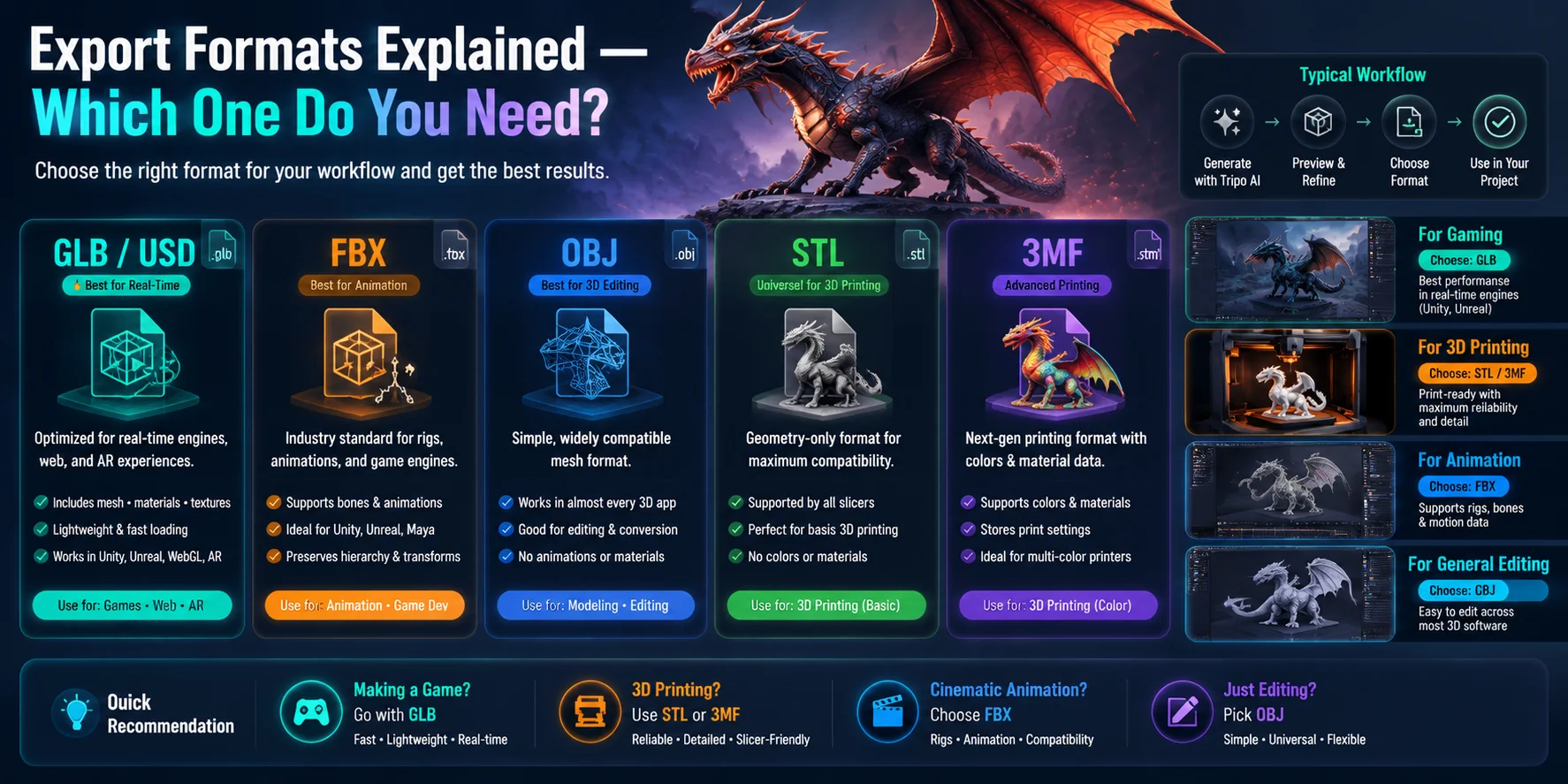
Export Formats Explained — Which One Do You Need?
Choosing the right export format depends on what you plan to do with your dragon 3D model. Instead of focusing only on technical differences, think about your workflow first: Are you making a game asset, preparing a 3D print, or creating an animation? The correct format will save you time and prevent compatibility issues later.
If you are creating a game asset or web experience, choose GLB (or USD). GLB is one of the best choices for real-time 3D because it can store the model, materials, and textures in a single lightweight file. It works well with web viewers, AR experiences, and game engines like Unity and Unreal Engine. USD is also widely used in advanced 3D pipelines, especially for large-scale animation and visual effects workflows.
If you are making an animation or editing the model, choose FBX or OBJ. FBX is a standard format for animation pipelines because it supports rigs, bones, and motion data, making it ideal for Blender, Maya, Cinema 4D, and game production workflows. OBJ is simpler but highly compatible, making it useful when you only need the mesh for editing or transferring between 3D applications.
If you are 3D printing your dragon, choose STL or 3MF. STL is the universal format supported by almost every slicer. It contains only the geometry, making it perfect for basic printing. 3MF is a newer option that stores additional information such as colors, materials, and printing settings, making it better for advanced printers and multi-color projects.
Quick recommendations:
- 🎮 Gaming → GLB
- 🖨️ 3D printing → STL or 3MF
- 🎬 Cinematic animation → FBX
- 🛠️ General 3D editing → OBJ
Choose the format based on your final goal, not just the model itself.
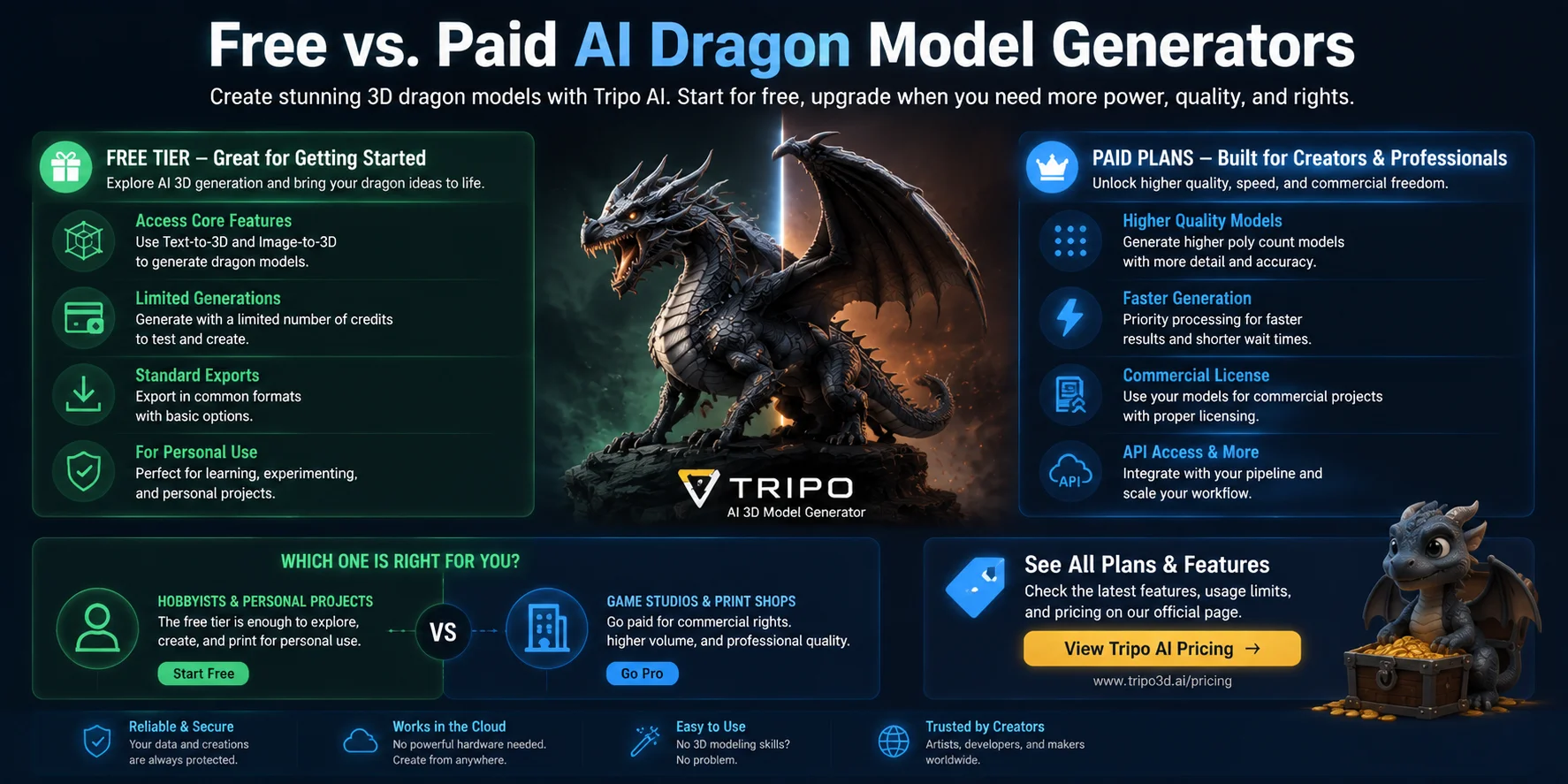
Free vs. Paid AI Dragon Model Generators
Many AI dragon 3D model generators offer both free and paid options, but the difference is usually not about whether you can create a model — it is about how much control, quality, and flexibility you need. Free tiers are often designed for testing and personal projects, with limits on generation credits, export options, model detail, or commercial usage rights. Some platforms may also add watermarks or restrict certain features on free accounts.
Tripo AI provides a free entry option that allows creators to explore AI 3D generation, test text-to-3D and image-to-3D workflows, and create dragon models before committing to a paid plan. The available features and limits can change over time, so check the official Tripo AI Pricing page for the latest plan details.
Paid plans are designed for users who need a more professional workflow. They can unlock benefits such as higher-quality models, faster generation, expanded usage limits, commercial licensing options, and API access for integrating AI 3D generation into larger pipelines.
For hobbyists, fantasy artists, and personal 3D printing projects, a free tier is often enough to experiment and create unique dragon designs. For game studios, professional creators, or businesses producing printable models at scale, a paid plan provides the reliability, rights, and volume needed for commercial work.
Use Cases — What Can You Do with a Dragon 3D Model?
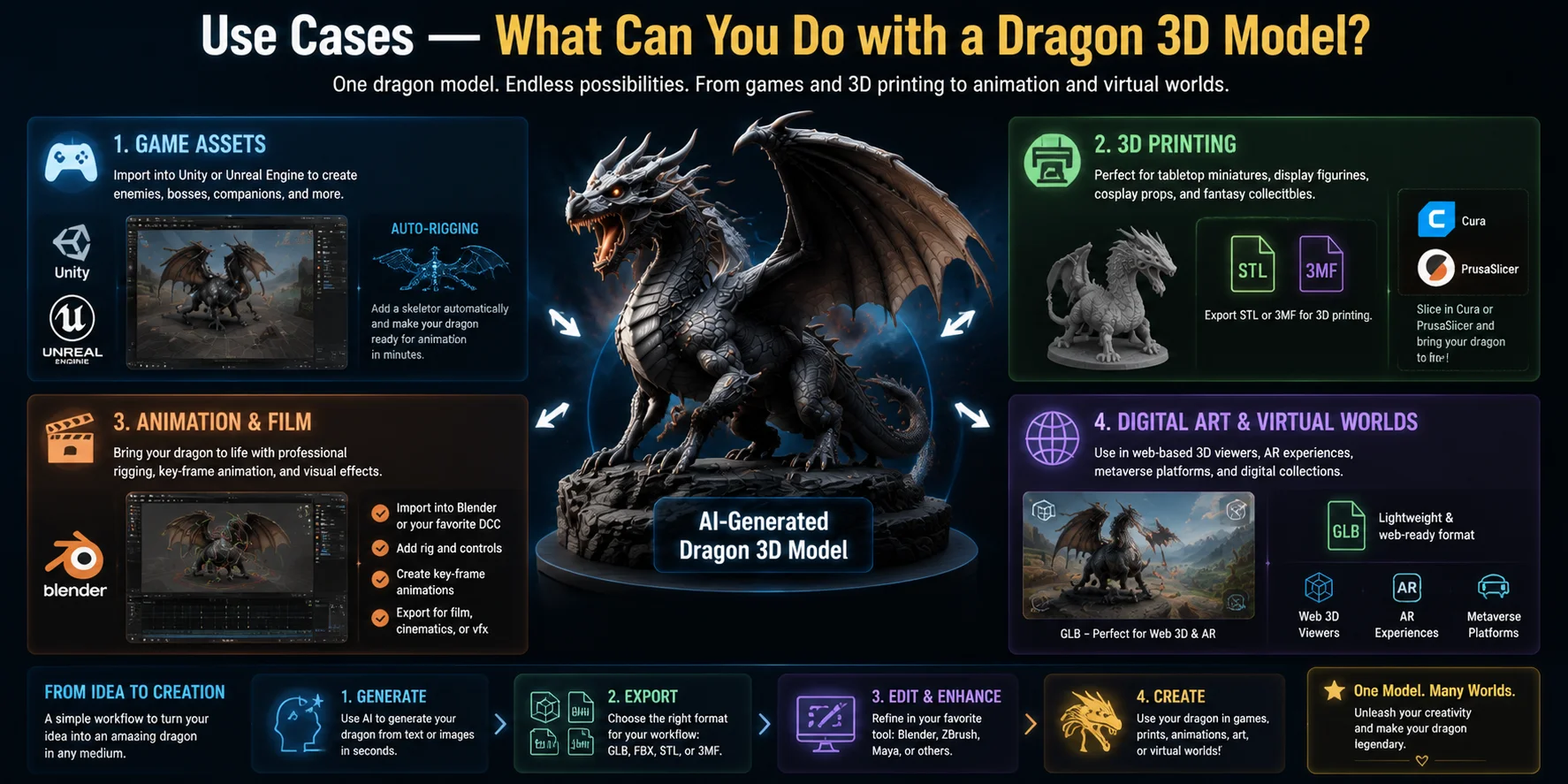
An AI-generated dragon 3D model is not limited to just viewing or downloading. Depending on your goal, the same model can become a game character, a physical collectible, an animation asset, or a digital creation. Here are the most common ways creators use dragon 3D models.
Game Assets Game developers can import dragon models into engines like Unity and Unreal Engine to create enemies, bosses, companions, or fantasy creatures. After export, the model can be optimized, textured, and prepared with rigging and animation workflows. AI features like Auto-Rigging can help add skeletons and make the dragon ready for movement without building a rig manually.
3D Printing Projects Dragon models are popular for tabletop miniatures, display statues, cosplay accessories, and fantasy collectibles. Export formats like STL or 3MF make the model compatible with slicers such as Cura and PrusaSlicer, allowing creators to prepare the file for resin or filament 3D printing.
Animation and Film Production For animation projects, dragon models can be imported into Blender or other 3D software for further editing. Artists can add custom rigs, create keyframe animations, and bring the creature to life for short films, trailers, or visual effects scenes.
Digital Art and Virtual Worlds Dragon 3D models can also be used for digital artwork, online showcases, virtual environments, and interactive experiences. Formats like GLB are ideal for web-based 3D viewers, AR experiences, and virtual platforms because they are lightweight and easy to display.
Whether you are building a fantasy game, printing a collectible dragon, or creating a digital world, AI-generated 3D models provide a faster starting point for turning creative ideas into usable assets.
Tips for Better AI Dragon Models
Generating a dragon 3D model with AI is fast, but a few optimization steps can significantly improve the final result. Use these tips to create models with better details, cleaner geometry, and a workflow that fits your project.
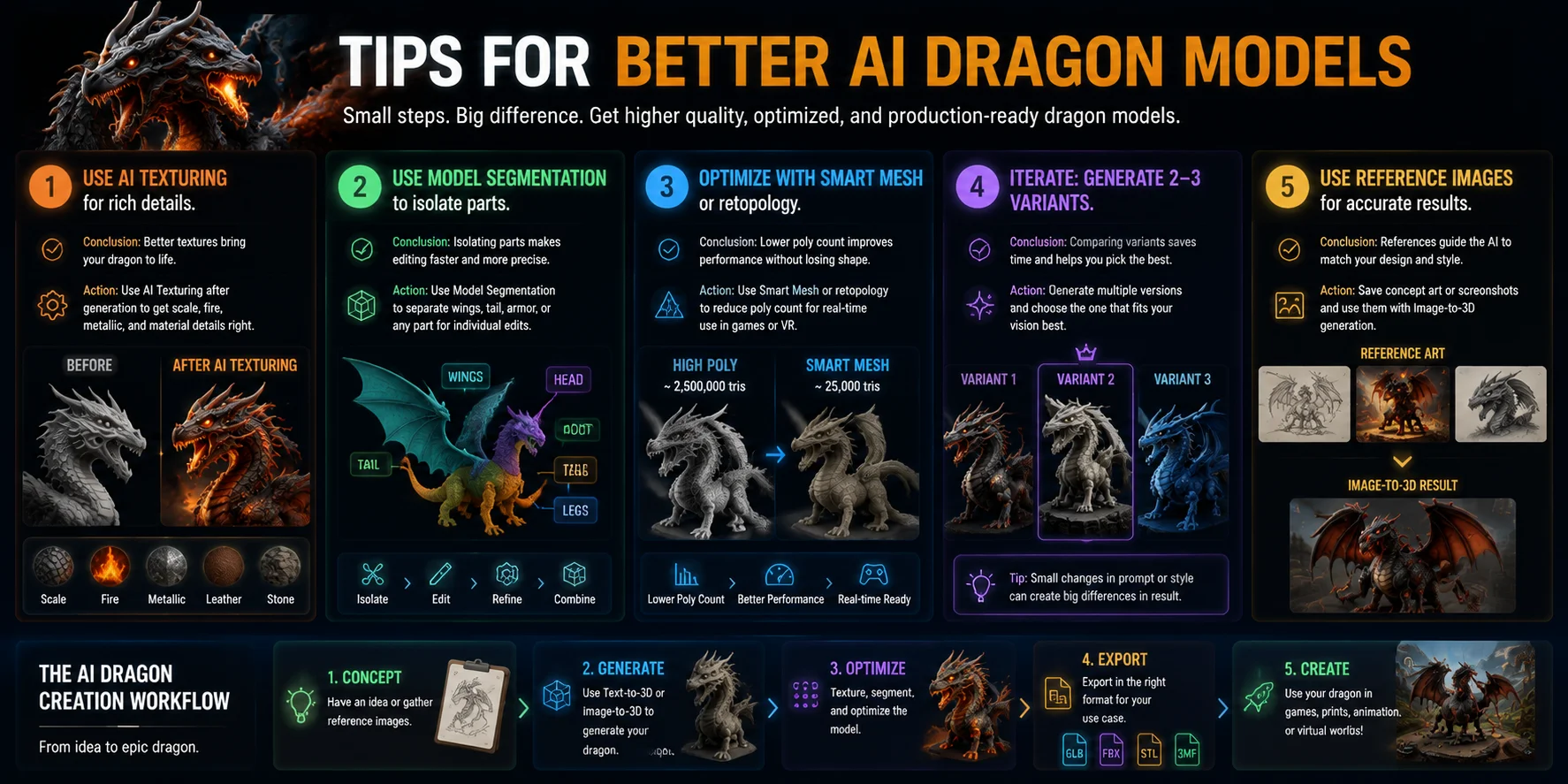
1. Improve surface details with AI Texturing. Use the AI Texturing feature after generation to enhance important visual elements like dragon scales, fire effects, armor, and metallic materials. Apply different texture styles and preview the result before exporting.
2. Separate complex parts with Model Segmentation. Use Model Segmentation to isolate areas such as wings, horns, tails, or armor pieces for individual adjustments. This makes it easier to edit specific parts without changing the entire dragon model.
3. Optimize geometry with Smart Mesh or retopology. Reduce polygon count with Smart Mesh or retopology tools when preparing your dragon for games, VR, or real-time applications. A lighter mesh improves performance while keeping the important shape details.
4. Generate multiple versions instead of chasing one perfect prompt. Create two or three dragon variations and compare the results before choosing the best model. Testing different styles, poses, and details is often faster than repeatedly modifying a single generation.
5. Use reference images for more accurate results. Save concept art, sketches, or screenshots and use them with Image-to-3D generation to guide the AI toward your desired dragon design. Visual references help maintain consistency in shape, style, and character details.
Frequently Asked Questions
How do I generate a dragon 3D model with AI for free?
Go to Tripo AI Studio, sign up for a free account, and type a text prompt like "fantasy dragon with wings, game-ready style." Tripo generates a downloadable 3D model in seconds. The free tier gives you a set number of monthly generations with no credit card required.
Is there an AI dragon 3D model generator online that's free?
Yes. Tripo AI Studio is a browser-based AI dragon 3D model generator you can use for free. No software installation is needed — just open the site, enter your prompt, and download your model.
Where can I download a dragon 3D model for free?
You can generate and download one directly from Tripo AI Studio. Free-tier users can export in formats like GLB and OBJ. For STL files suitable for 3D printing, check whether your plan includes that export option.
Can I use an AI-generated dragon model for 3D printing?
Yes. After generating your dragon model in Tripo AI, export it as an STL or 3MF file. Load that file into a slicer like Cura or PrusaSlicer, adjust supports for wings and limbs, and send it to your printer.
What is the best AI tool for generating fantasy creature 3D models?
Tripo AI is purpose-built for production-ready 3D generation from text or image prompts. It supports fantasy creatures like dragons and offers Auto-Rigging, AI Texturing, and multiple export formats in one platform.
Can I use an AI dragon 3D model in a game engine?
Yes. Export your dragon model as a GLB or FBX file from Tripo AI. GLB is ideal for Unity and Unreal Engine. Use Tripo's Auto-Rigging feature before export to add a skeleton, making the model ready for animation without extra software.
What file formats does Tripo AI export for 3D models?
Tripo AI supports GLB, USD, FBX, OBJ, STL, and 3MF. Choose STL or 3MF for 3D printing, GLB for games and web, and FBX or OBJ for animation pipelines like Blender or Maya.
Do I need 3D modeling experience to generate a dragon model with AI?
No. Tripo AI is designed so anyone can generate a 3D model by typing a description. You don't need to know how to sculpt or rig — the AI handles geometry, textures, and optionally rigging for you.
Conclusion
AI has made creating a dragon 3D model faster and more accessible than ever. Whether you want to build a game creature, print a fantasy miniature, or create digital artwork, you can now turn an idea into a usable 3D asset in under a minute — without years of traditional modeling experience. With the right prompt and export choice, anyone can start bringing their own dragon designs to life today.
Ready to create your own dragon? **Try **Tripo AI Studio free and generate your first AI-powered 3D model.
Need more capacity for professional projects? **View **Tripo AI Pricing and explore plans built for larger creative workflows.