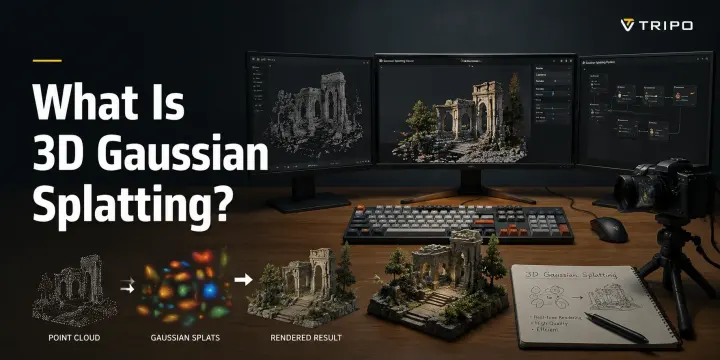
What Is 3D Gaussian Splatting?
TL;DR
- 3D Gaussian Splatting is a new scene-reconstruction technique that represents real-world spaces using millions of small 3D Gaussian points instead of traditional meshes, enabling fast rendering with high visual quality.
- Unlike NeRF, Gaussian Splatting focuses on real-time performance by replacing expensive neural rendering calculations with optimized point-based representations, making it useful for VR, digital twins, games, and virtual production.
- Gaussian Splatting and AI 3D generation solve different problems: Gaussian Splatting captures and reconstructs existing real-world scenes, while AI tools like Tripo AI generate new 3D assets from text or images.
- The future workflow is likely hybrid: creators can use Gaussian Splatting for realistic environment capture and AI 3D generation for creating original characters, props, and production-ready models.
3D Gaussian Splatting (3DGS) is a real-time rendering technique that reconstructs a 3D scene from a set of ordinary photos. Instead of using traditional polygons or neural networks, it represents the scene as millions of tiny, semi-transparent 3D blobs called Gaussians — each with its own position, shape, color, and opacity. The result is a highly realistic 3D view that can be rendered at real-time frame rates.
A year ago, creating a photorealistic digital copy of a room from a phone video could require hours of processing and complex workflows. Today, 3DGS can reconstruct and display captured environments in real time. This guide explains how Gaussian Splatting works, how it compares with NeRF, and where it fits alongside AI-native 3D generation tools like Tripo AI. By the end, you will understand not only the technology behind 3DGS, but also which approach makes sense for different creative workflows.
How 3D Gaussian Splatting Works
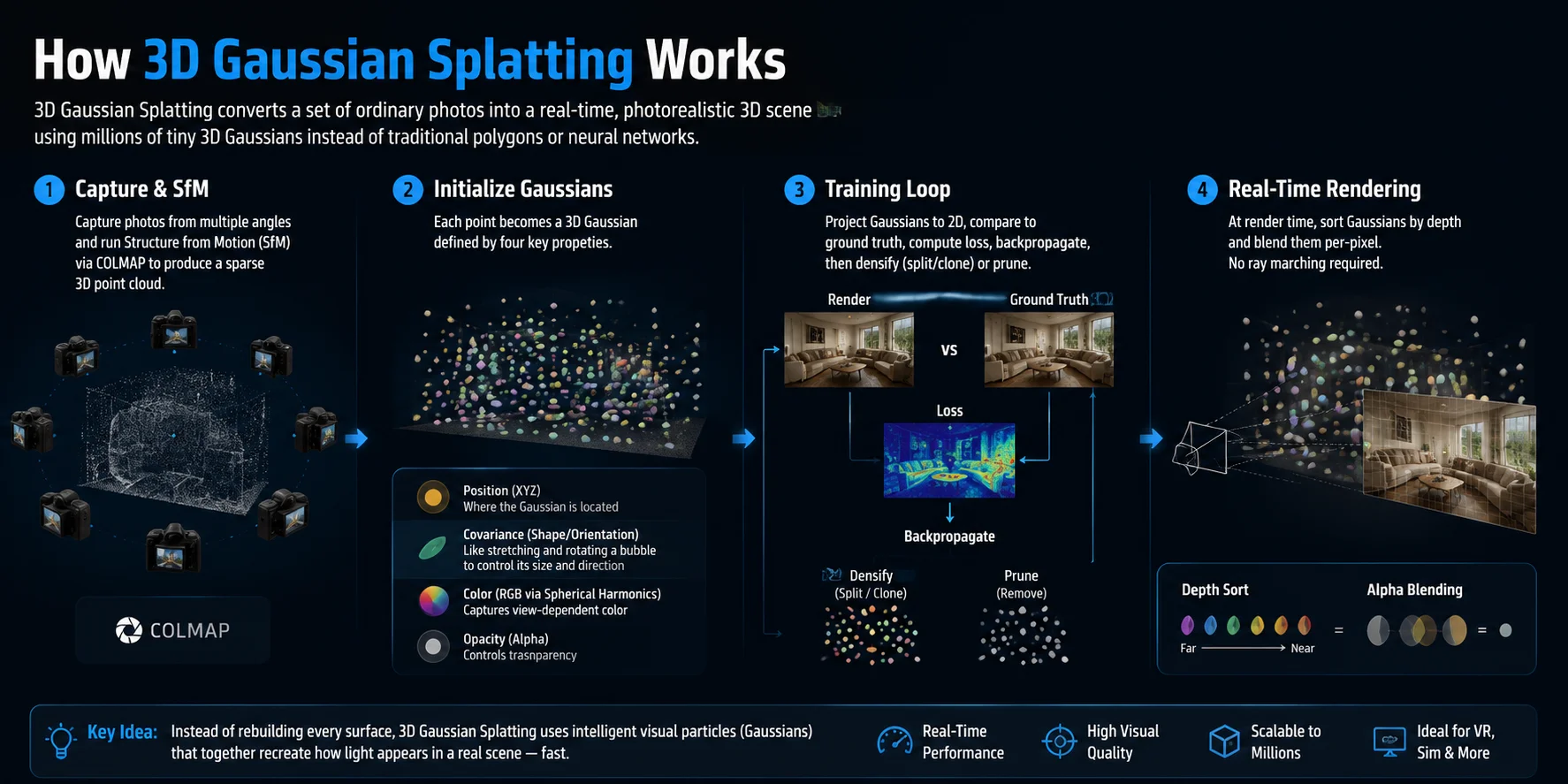
3D Gaussian Splatting works by converting a collection of ordinary images into a detailed 3D representation that can be viewed from different angles. Instead of rebuilding a scene with traditional polygons, it describes the environment using millions of small volumetric “blobs” that can be rendered quickly.
The process usually follows four main steps:
- Capture images and build initial geometry The workflow starts by taking photos of a scene from multiple viewpoints. A Structure from Motion (SfM) pipeline, commonly using tools such as COLMAP, analyzes these images to estimate camera positions and create a sparse 3D point cloud.
- Convert points into 3D Gaussians Each point in the initial cloud becomes a 3D Gaussian with several properties: its position in XYZ space, its shape and orientation through covariance, its color information represented with spherical harmonics, and its opacity. You can think of covariance like a flexible bubble — it controls how a Gaussian stretches, rotates, and spreads through space rather than being a simple fixed point.
- Optimize the scene through training The system repeatedly projects Gaussians into 2D images and compares the rendered result with the original photos. It calculates the difference, updates the Gaussian parameters through optimization, and improves the scene by adding detail through densification (splitting or cloning Gaussians) while removing unnecessary elements through pruning.
- Render the final scene in real time During rendering, the system sorts Gaussians based on their depth from the camera and blends them together pixel by pixel. Unlike NeRF-based methods, Gaussian Splatting does not require expensive ray marching, which is one reason it can achieve high-quality real-time performance.
The key idea is simple: instead of asking a computer to rebuild every surface, 3DGS creates a collection of intelligent visual particles that together recreate how light appears in a real scene.
3D Gaussian Splatting vs. NeRF: Key Differences
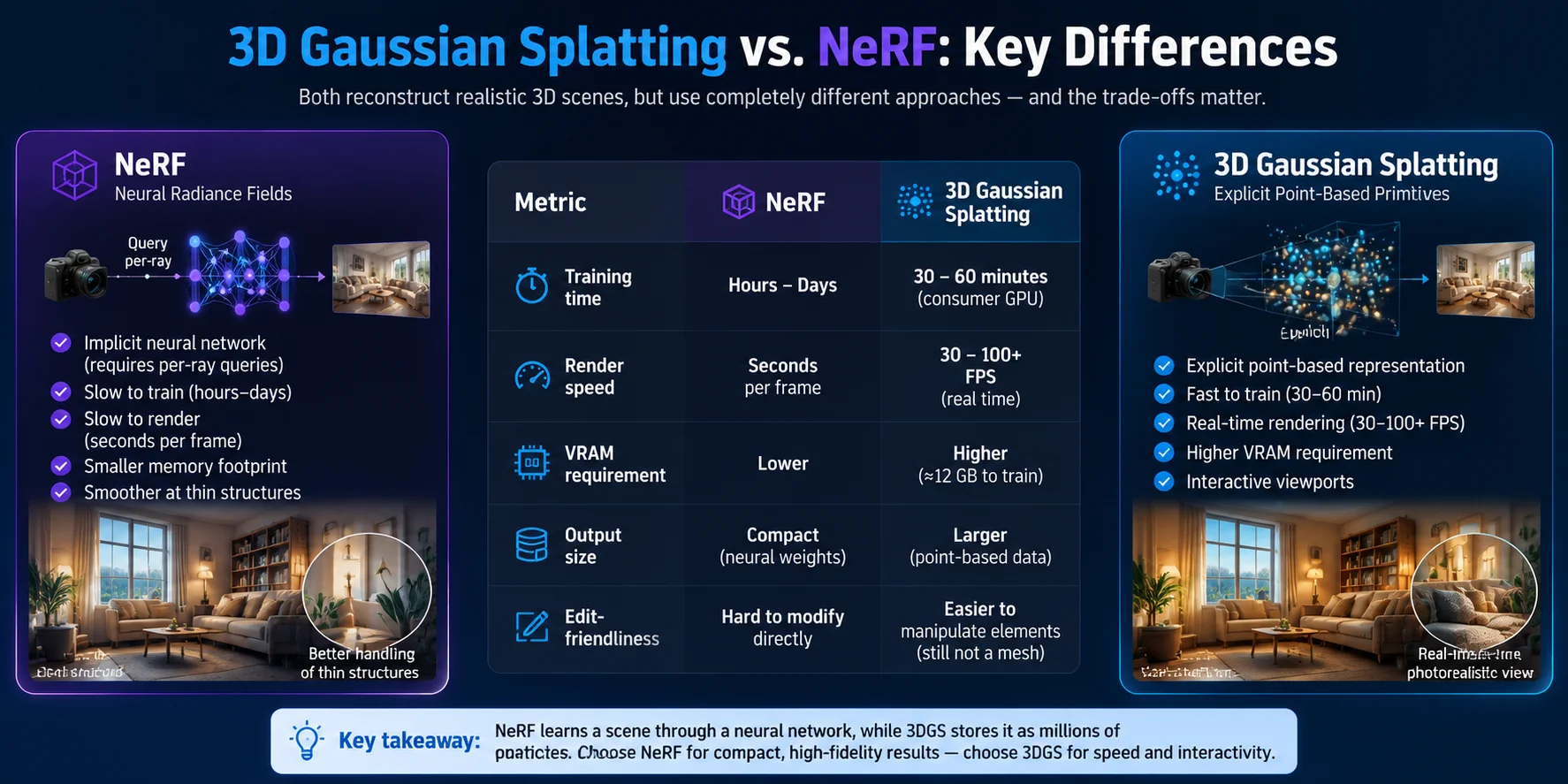
3D Gaussian Splatting and NeRF both reconstruct realistic 3D scenes from images, but they use very different approaches. NeRF represents a scene with a neural network that must be queried for every camera ray, producing impressive results but requiring long training times and slower rendering. 3D Gaussian Splatting uses explicit point-based primitives, allowing faster optimization and real-time rendering.
| Metric | NeRF | 3D Gaussian Splatting |
|---|---|---|
| Training time | Usually takes hours to days depending on the scene and hardware | Often trains in around 30–60 minutes on a consumer GPU |
| Render speed | Slower rendering, sometimes taking seconds per frame | Real-time rendering, commonly reaching 30–100+ FPS |
| VRAM requirement | Generally lower memory usage | Higher VRAM demand, around 12 GB for many training workflows |
| Output size | Compact neural representation | Larger explicit point-based representation |
| Edit-friendliness | Harder to directly modify individual scene elements | Easier to manipulate individual Gaussian elements, but still not a traditional editable mesh |
NeRF still has advantages in some areas. Its neural representation can produce smooth results and may handle certain thin structures more naturally while maintaining a smaller footprint. However, 3D Gaussian Splatting is often preferred for interactive applications because it provides a better balance between visual quality and speed.
The main difference comes down to representation: NeRF learns a scene through a neural network, while 3DGS stores the scene as millions of optimized visual particles. For applications such as VR, digital twins, and real-time viewers, this speed advantage makes Gaussian Splatting a practical alternative to traditional NeRF workflows.
What You Need to Run 3D Gaussian Splatting
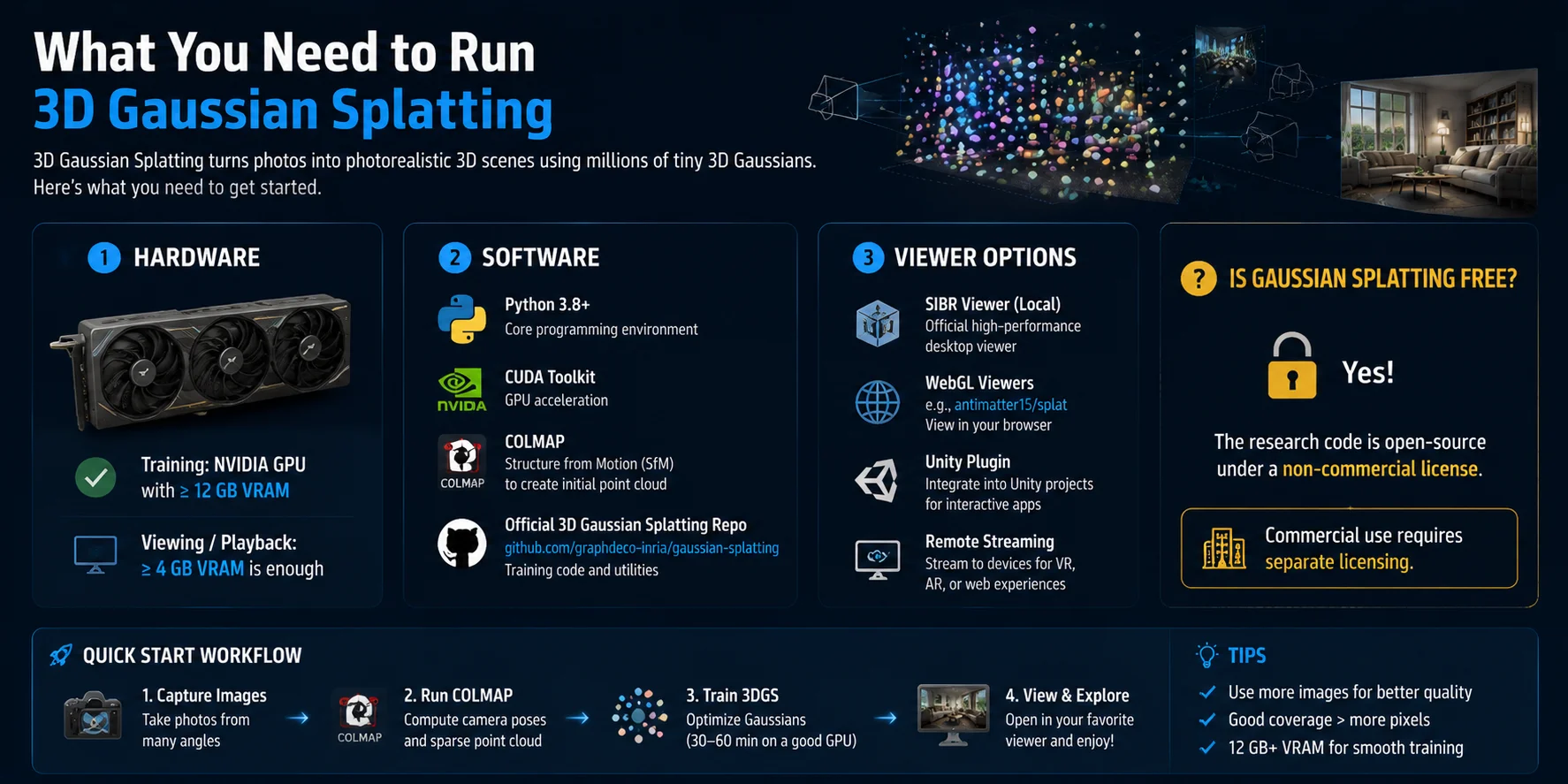
Running 3D Gaussian Splatting requires a combination of suitable hardware, software tools, and a compatible viewer. For training scenes, a NVIDIA GPU with at least 12 GB of VRAM is commonly recommended, while viewing existing Gaussian Splatting scenes requires much less — around 4 GB VRAM is often enough for basic playback.
A typical setup includes:
- Hardware: NVIDIA GPU with CUDA support, preferably with 12 GB or more VRAM for training and optimization.
- Software: Python, the CUDA Toolkit, COLMAP for Structure from Motion (SfM), and the official 3D Gaussian Splatting research repository from Graphdeco-Inria.
- Viewers: You can preview results using the local SIBR viewer, WebGL-based viewers such as browser splat viewers, Unity plugins, or remote streaming solutions for interactive applications.
Is Gaussian Splatting free?
Yes, the original research implementation is publicly available as open-source code under a non-commercial license. You can experiment with the technology, train 3D scenes, and explore the workflow freely. However, commercial applications may require separate licensing agreements.
For beginners, the quickest path is: capture images → run COLMAP → train 3DGS → open the result in a viewer. With the right GPU and software environment, you can create and explore photorealistic 3D scenes without traditional mesh modeling.
Real-World Applications of 3D Gaussian Splatting
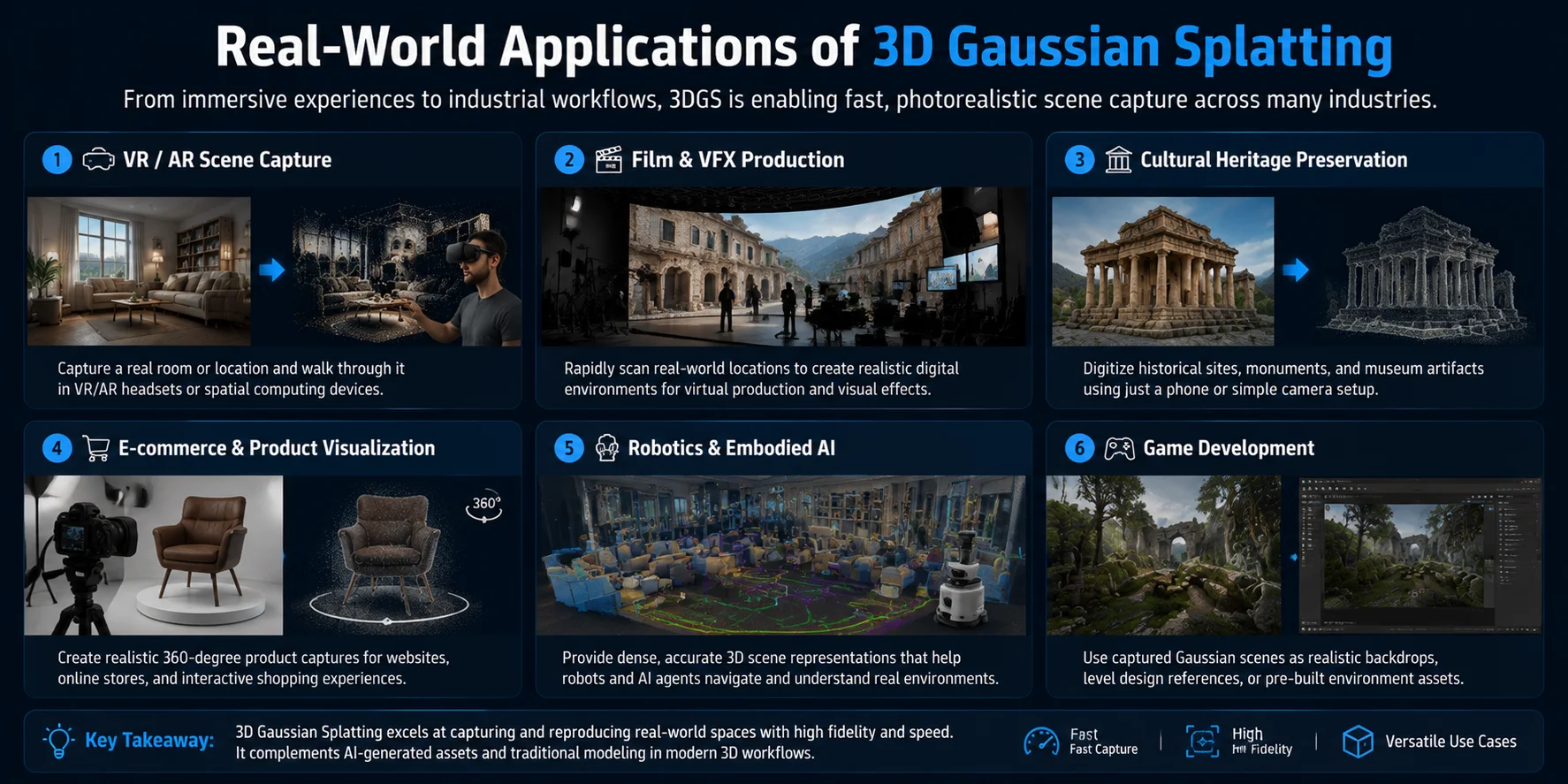
3D Gaussian Splatting is moving beyond research demos and becoming useful across industries that need realistic 3D scene capture. Its ability to reconstruct real environments quickly makes it valuable for immersive experiences, visualization, and AI systems.
- VR/AR scene capture — 3DGS can capture a real room or location from images or video and convert it into an explorable 3D environment. Users can then walk through the reconstructed space in VR headsets or spatial computing devices.
- Film and VFX production — Virtual production teams can use Gaussian Splatting to rapidly scan real-world locations and create realistic digital backgrounds, reducing the time needed for traditional environment modeling.
- Cultural heritage preservation — Museums, archaeologists, and researchers can digitize historical buildings, artifacts, and important locations using relatively simple camera setups, creating interactive digital archives.
- E-commerce and product visualization — Brands can create realistic 360-degree product views for websites and online shopping experiences without building every asset manually.
- Robotics and Embodied AI — Robots need accurate spatial understanding to navigate environments. 3DGS provides a detailed scene representation that can help AI systems perceive and reason about real-world spaces.
- Game development — Developers can use captured Gaussian scenes as realistic backgrounds, environment references, or visual assets for faster world-building and level design.
Across these applications, 3D Gaussian Splatting is especially powerful when the goal is to reproduce an existing place or object with high visual realism. It complements, rather than replaces, traditional 3D modeling and AI-generated asset creation workflows.
Limitations and Current Challenges
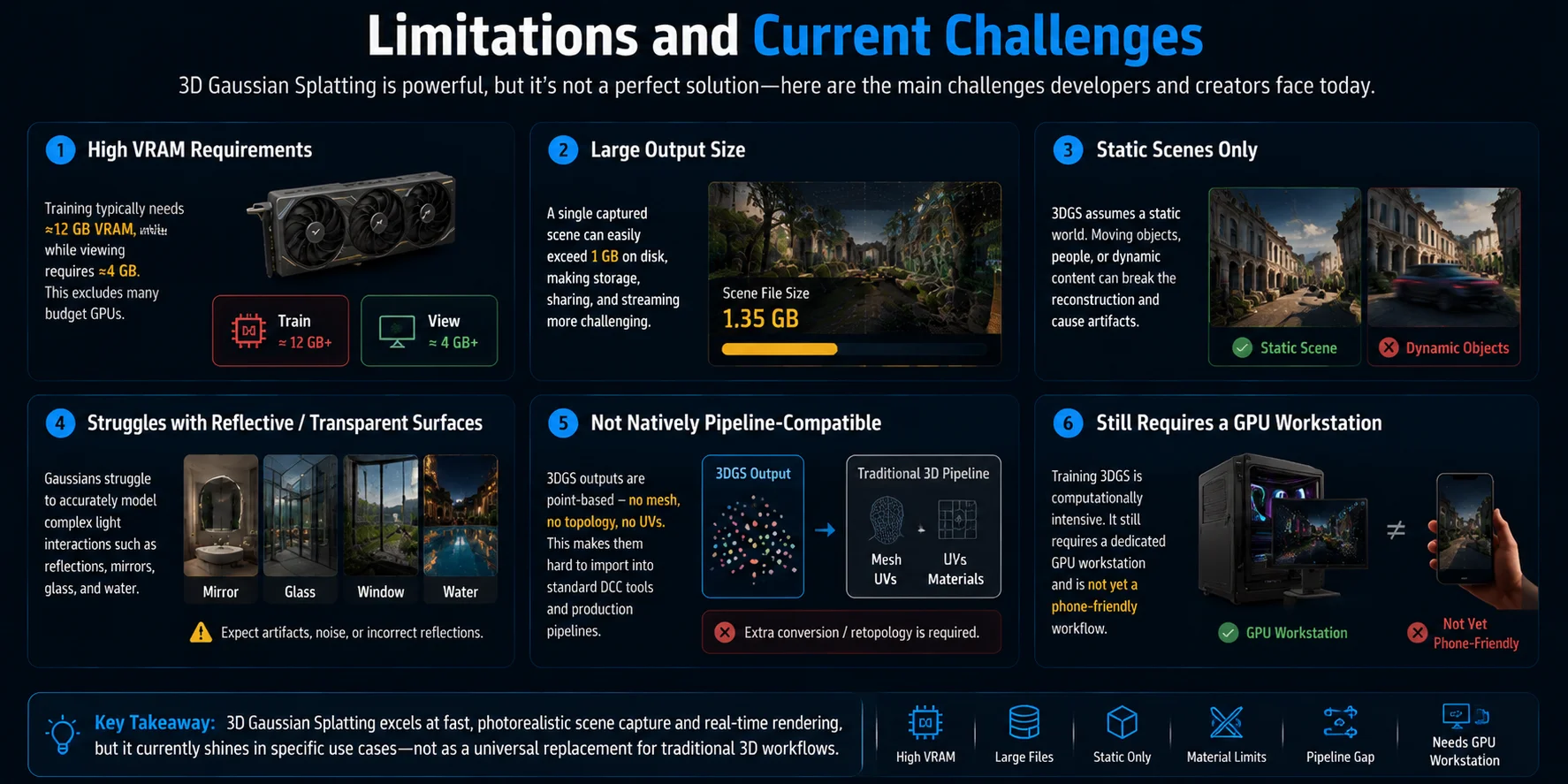
Despite its impressive speed and visual quality, 3D Gaussian Splatting still has several limitations that prevent it from replacing traditional 3D workflows entirely. The first challenge is hardware demand: training typically requires an NVIDIA GPU with around 12 GB of VRAM, while viewing scenes may need around 4 GB, making the technology less accessible on budget computers.
Storage is another issue. A single captured scene can easily exceed 1 GB, creating challenges for sharing, streaming, and large-scale production pipelines. In addition, 3DGS works best for static environments — moving objects, changing scenes, or dynamic performances can break the reconstruction quality.
Gaussian Splatting also struggles with complex materials such as mirrors, glass, and transparent surfaces because these rely on accurate light behavior that point-based representations do not handle perfectly. Unlike traditional meshes, Gaussian scenes do not naturally include topology or UV maps, making them difficult to edit and import into standard DCC software. Finally, the workflow still depends on a GPU workstation for training, meaning it has not yet become a simple phone-based capture solution. These limitations show that 3DGS is powerful for specific use cases, but it currently works best as a complement to existing 3D tools rather than a complete replacement.
How 3D Gaussian Splatting Compares to AI 3D Generation
3D Gaussian Splatting and AI 3D generation solve different problems. 3DGS reconstructs something that already exists by capturing a real-world scene from photos or video, making it ideal for photorealistic environment scanning and immersive viewing. AI 3D generation creates something new by interpreting text prompts or images and generating original 3D assets.
The biggest difference is the type of output. Gaussian Splatting produces a point-based scene representation rather than a traditional mesh, which makes it difficult to directly rig, animate, or edit in standard game and animation pipelines. AI 3D generation tools such as Tripo AI focus on creating production-ready meshes with textures that can be exported into common formats like GLB, FBX, OBJ, USD, STL, or 3MF.
| Dimension | 3D Gaussian Splatting | AI 3D Generation (Tripo AI) |
|---|---|---|
| Input | Photos or video of an existing scene | Text prompts or reference images |
| Output format | Gaussian splat scene data | Editable 3D mesh with textures |
| Editable mesh | No native mesh or topology | Yes, designed for 3D workflows |
| Animation-ready | Requires conversion and additional processing | Can support rigging and animation workflows |
| Time to result | Fast capture, but requires reconstruction processing | Generate a usable asset in seconds to minutes |
| Hardware needed | Usually requires GPU-based reconstruction workflow | Cloud-based generation requires less local hardware |
Use 3D Gaussian Splatting when you need a realistic digital copy of a real location, such as a scanned room, historical site, or virtual production environment. Use AI 3D generation when you need a new asset for games, animation, product visualization, or 3D printing.
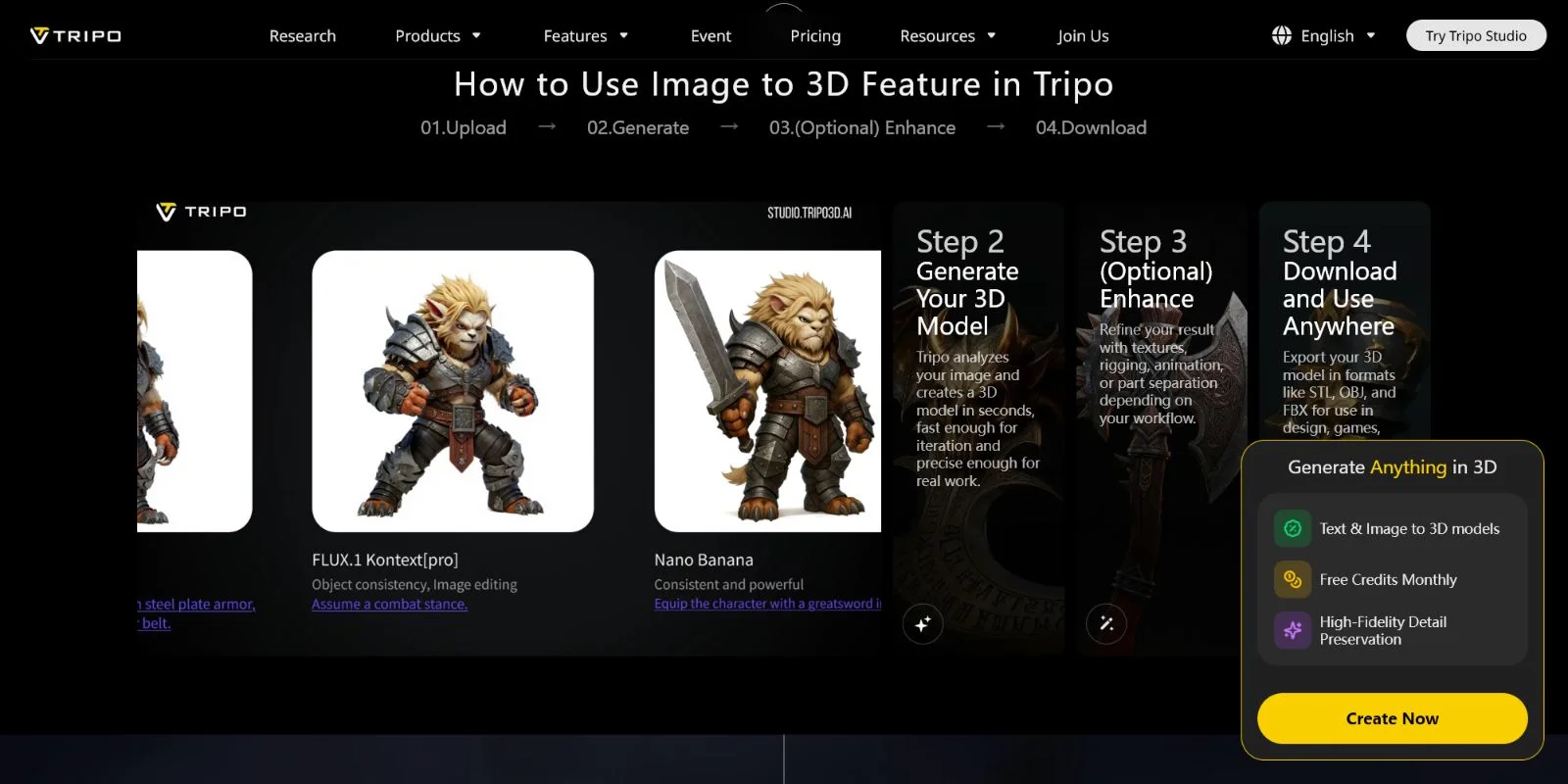
For creators who need a production-ready character, prop, or object, platforms like Tripo AI Studio can generate textured 3D models from a single image or text description and provide a faster path from idea to usable asset. The two technologies are not competitors — they are complementary tools for different stages of the 3D workflow.
Frequently Asked Questions
What is 3D Gaussian Splatting?
3D Gaussian Splatting is a real-time 3D rendering technique that reconstructs a scene from photos as a collection of semi-transparent 3D blobs called Gaussians. Each Gaussian stores position, shape, color, and opacity. During rendering, they are projected onto 2D and blended together to produce a photorealistic image at real-time frame rates.
How do you make a 3D Gaussian Splatting scene?
You start by capturing 50–200 photos of a scene from multiple angles, then run Structure from Motion (SfM) software like COLMAP to generate a point cloud. The 3DGS training script converts those points into Gaussians and optimizes them against your photos over roughly 30–60 minutes on a capable GPU.
Is Gaussian Splatting free to use?
The original 3DGS research code is open-source on GitHub and free for non-commercial use. Several viewer implementations (WebGL, Unity plugin) are also open-source. Commercial applications may require a separate license depending on the specific implementation you use.
Is Gaussian Splatting a form of generative AI?
Not in the traditional sense. 3DGS reconstructs a scene that already exists in the real world from photos — it does not generate new content from text or imagination. Generative AI 3D tools like Tripo AI synthesize brand-new 3D models from a text prompt or a single image, which is a fundamentally different process.
How does 3D Gaussian Splatting differ from NeRF?
Both techniques reconstruct 3D scenes from photos, but NeRF uses a neural network that renders slowly (seconds per frame), while 3DGS uses explicit point primitives that render in real time (30–100+ FPS). 3DGS trains faster but uses more VRAM and produces larger output files.
What are the hardware requirements for 3D Gaussian Splatting?
Training a scene requires an NVIDIA GPU with at least 12 GB of VRAM. Viewing an already-trained splat requires around 4 GB of VRAM. A standard consumer GPU like an RTX 3080 or 4080 is a common starting point for training.
Can you export a 3DGS scene into a game engine or DCC tool?
Not directly. A 3DGS scene is stored as a .ply splat file, not a mesh, so it cannot be imported into Blender, Maya, or Unreal Engine like a standard 3D asset. Some converters attempt to turn splats into meshes, but results vary. If you need a clean, production-ready mesh, an AI 3D generation workflow is a more direct path.
Where can I find 3D Gaussian Splatting open-source implementations?
The original implementation is at github.com/graphdeco-inria/gaussian-splatting. Notable community projects include antimatter15/splat (WebGL viewer), nerfstudio's splatfacto integration, and various Unity/Unreal plugins. Search "gaussian splatting" on GitHub for an actively updated list.
Conclusion
3D Gaussian Splatting is a powerful way to capture and replay real-world scenes with impressive visual quality and real-time performance. However, it is best understood as a reconstruction technology, not a creation tool. If your goal is to preserve a real environment, create a digital twin, or explore a captured location, 3DGS is an excellent choice. If you need a production-ready 3D asset that can be textured, animated, edited, and exported into a game engine or product visualization workflow, AI 3D generation provides a faster path from idea to usable model.
**Main CTA → Try generating a 3D model in seconds at **Tripo AI Studio Secondary CTA → Explore Tripo AI Pricing and plans