Why AI 3D Models Look Bad — and How to Fix It
TL;DR
- Why AI 3D models look bad: a model can look plausible from one view while hidden geometry, UVs, materials, or topology still fail under inspection.
- Single-image generation has to infer unseen surfaces. More complete references can reduce that uncertainty, while text-to-3D is best treated as a creative starting point rather than an exact reconstruction.
- Better results come from cleaner inputs, an appropriate detail and texturing workflow, and targeted cleanup of topology, normals, UVs, and materials.
- Before using an asset in a game engine or for 3D printing, validate its triangle budget, UVs, material maps, collision setup, and printability for the intended destination.
You upload a clean product photo into an AI 3D generator, wait a minute, and get back something that looks almost right from one angle—but then you rotate it and find a lumpy mesh, melted edges, missing details, weird shadows, or textures that look painted onto plastic. That frustration is exactly why ai 3d models look bad to many users the first time they try these tools.
AI 3D generation has improved fast, but it still fails in predictable ways. The problem is not simply “bad AI.” It is a mismatch between visual prediction and production-ready 3D asset requirements. This article breaks down the root causes, compares single-image, multi-image, and text-to-3D quality, and gives you a practical workflow to fix AI 3D model issues before using them in games, product visualization, 3D printing, or creative pipelines.
What “Looking Bad” Actually Means
“Bad” can mean several different things in 3D. A model may look fine in a thumbnail but fail once you inspect the mesh, UVs, or material setup.
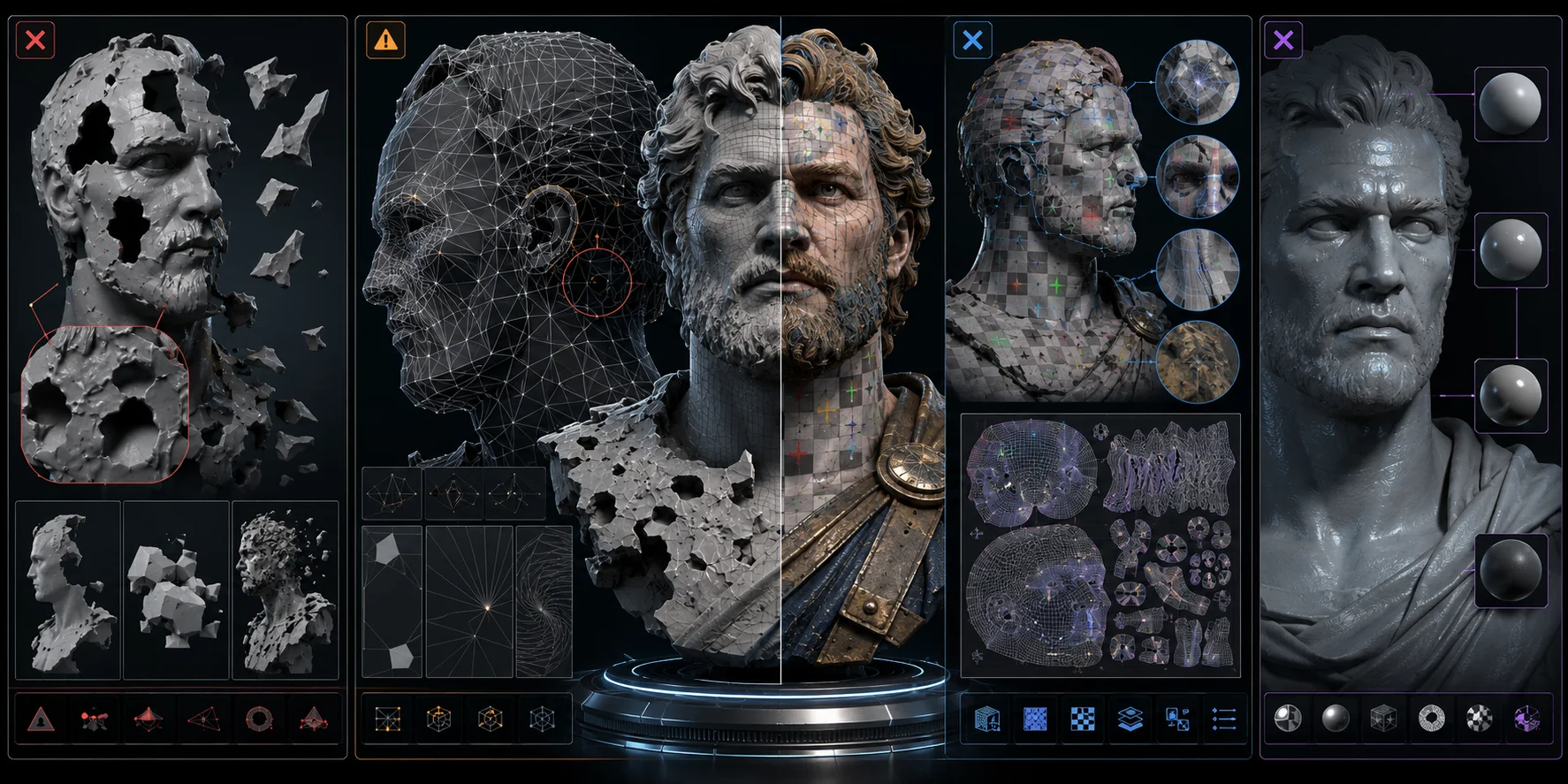
Geometry artifacts. These are visible mesh defects: holes, inverted normals, floating polygons, melted surfaces, or broken silhouettes. For example, a character face might have flipped normals around the mouth, so the front view looks like a dark cave instead of skin.
Topology problems. Topology is the structure of the mesh: edge flow, triangle distribution, quads, n-gons, and whether the surface is manifold. AI-generated meshes often contain dense, uneven triangles that are hard to rig, animate, sculpt, or optimize.
UV and texture failures. UVs tell a 2D texture how to wrap around a 3D surface. Bad UVs cause visible seams, stretched logos, blurry details, or baked shadows that stay on the model even when lighting changes.
Material and shader issues. A model may only include a flat color texture instead of proper PBR maps such as roughness, metallic, normal, and ambient occlusion. That is why some AI assets look plastic, waxy, or painted rather than physically believable.
Root Causes — Why the Model Looks the Way It Does
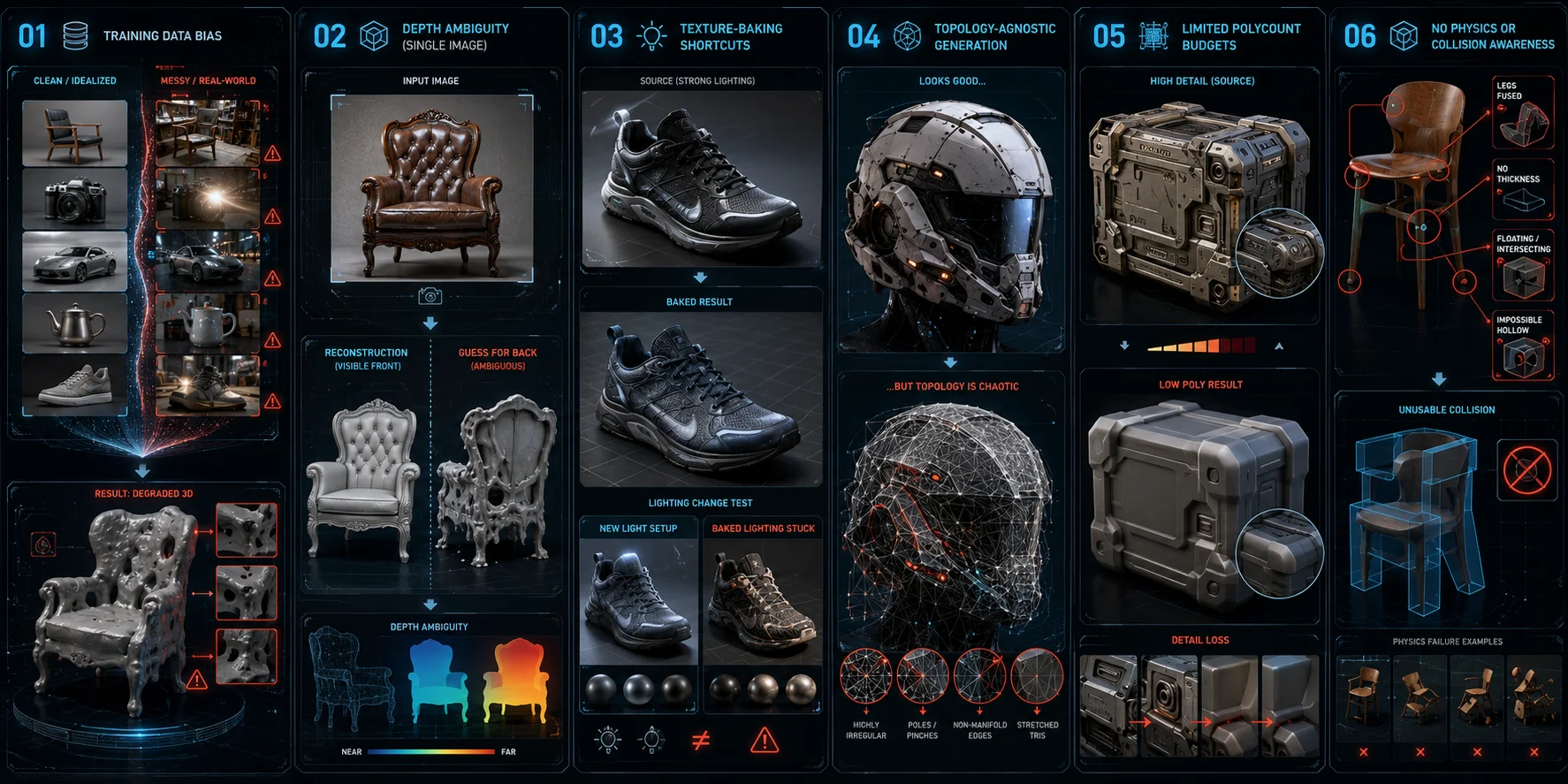
Training data bias. Many AI 3D systems learn from clean scans, curated asset libraries, or controlled studio-style objects. Real-world user inputs are messier: bad lighting, occlusion, reflections, motion blur, compression, and unusual shapes. When the input breaks the training assumptions, AI 3D model quality drops quickly.
Depth ambiguity from single images. A flat image does not contain full 3D information. The model has to guess the back, bottom, thickness, hidden edges, and internal structure. That guesswork is why image-to-3D model accuracy is often strongest on the visible front side and weakest on the far side.
Texture-baking shortcuts. AI often cannot fully separate surface color from lighting. A highlight on a shiny shoe may be interpreted as white material, and a cast shadow may become part of the albedo texture. It is like drawing shadows on paper: change the light angle and the illusion falls apart.
Topology-agnostic generation. Many AI pipelines optimize for “looks correct from a view” rather than “has clean edge loops.” Diffusion, NeRF-like, or reconstruction-based systems can produce visually convincing surfaces but messy mesh structure. For artists and developers, that means cleanup is not optional.
Limited polycount budgets. Some tools reduce the mesh to meet an export target. That downsampling can destroy small bevels, grooves, facial details, screws, buttons, and product edges. The result may be lightweight, but it can also look softened or melted.
No physics or collision awareness. AI can make a shape that looks plausible without understanding whether it is hollow, printable, balanced, riggable, or suitable for collision. A chair might look like a chair but have fused legs, no seat thickness, and an unusable physics mesh.
Accuracy by Input Type — Single Photo, Multiple Photos, and Text
Input type sets the quality ceiling. A single image gives the AI less evidence, while multiple views reduce guesswork. Text-to-3D offers more creative freedom, but text does not describe exact structure unless the prompt is very specific.
| Input Type | What It Can Preserve | Main Limitation | Topology Expectation | Best For |
|---|---|---|---|---|
| Single image | Visible front-side shape and surface cues | Hidden geometry, depth, and rear details are inferred | Inspect and clean before production use | Concept previews and quick mockups |
| Multi-image reference set | More surface coverage and clearer object boundaries | Results still depend on angle coverage, lighting, and input consistency | Often needs inspection and cleanup | Product visualization and reference-driven assets |
| Text-to-3D prompt | Style, silhouette, and creative direction | It is not a faithful reconstruction of a specific real object | Inspect and optimize for the target workflow | Creative exploration and stylized assets |
The key takeaway: when structural fidelity matters, give the workflow as much reference coverage as practical and validate the output before production. For fast ideation, text-to-3D can be useful for stylized assets, props, creatures, and early design options.
Where AI Excels — and Where It Still Struggles
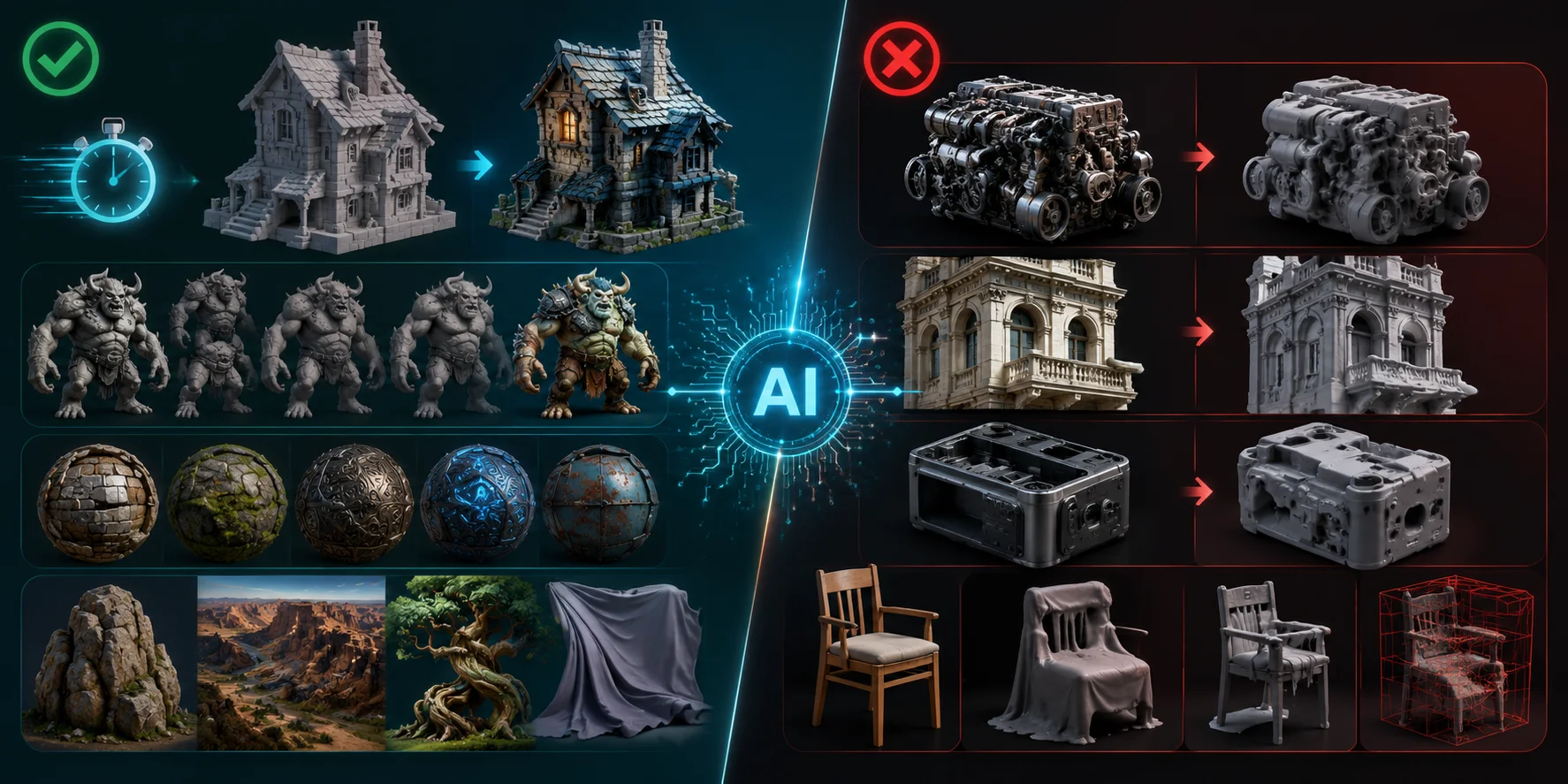
AI excels at speed. A base mesh that might take hours to block manually can often be generated in minutes. Even when the output is imperfect, it gives artists something to inspect, modify, and build on.
AI is also strong for concept iteration. You can explore ten silhouettes, material directions, or creature variants before committing to one. For organic shapes such as rocks, terrain, plants, monsters, fabric, and rough sculptural forms, perfect topology is often less important in the early stage.
AI can also generate creative surface ideas quickly. Patterns, stylized wear, fantasy materials, and decorative details are areas where AI texturing can be useful.
But AI still struggles with hard-surface precision. Mechanical parts, architectural details, product seams, hinges, vents, and exact bevels require clean structure. It also struggles with interiors, hollow objects, cavities, consistent multi-view reconstruction from one photo, and real-time game-ready topology without post-processing.
In other words, AI is excellent for starting assets. It is not always excellent at finishing them.
How to Get Better Results — Inputs, Settings, and Cleanup
Stage 1 — Better Inputs Before You Generate
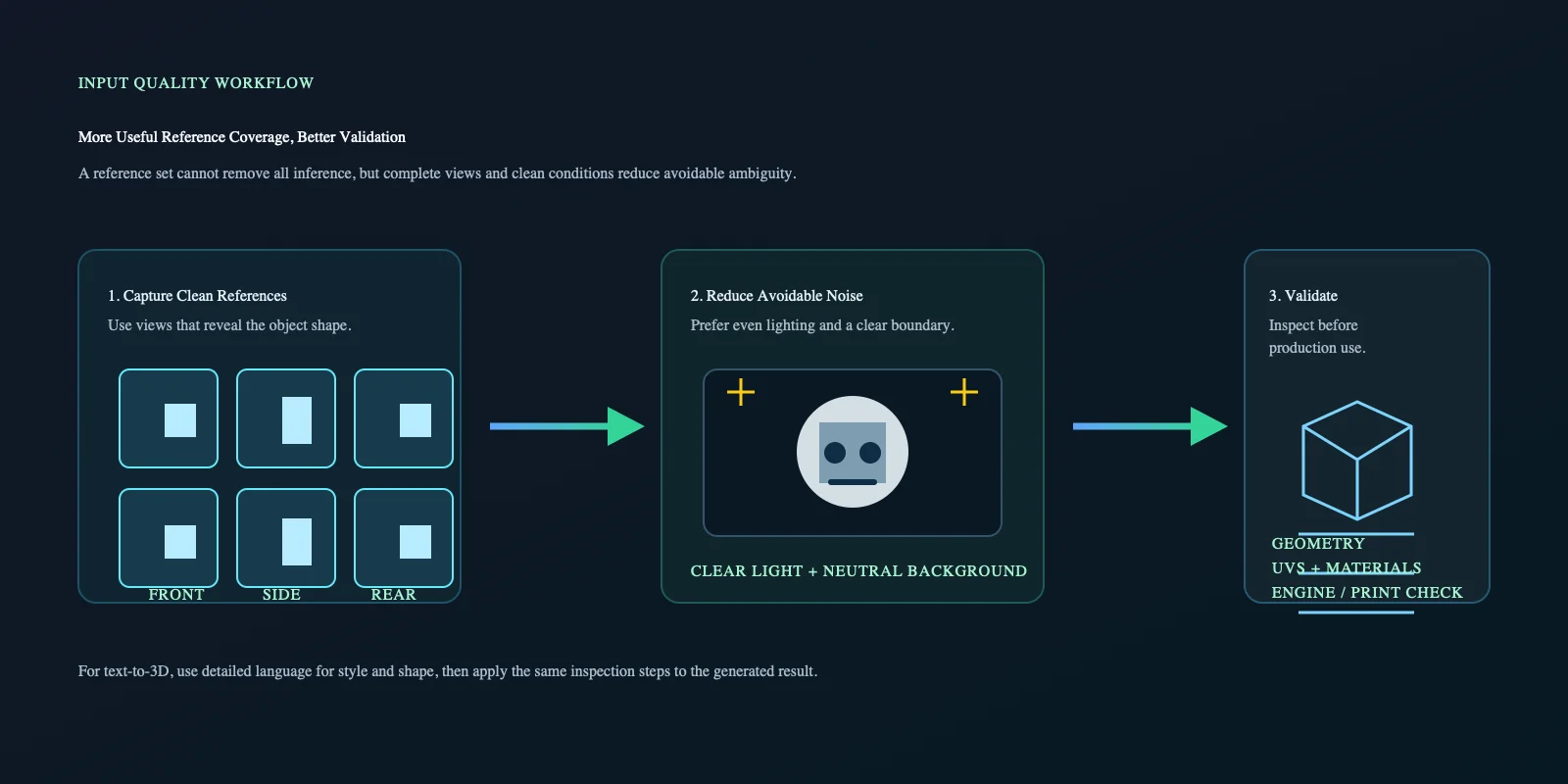
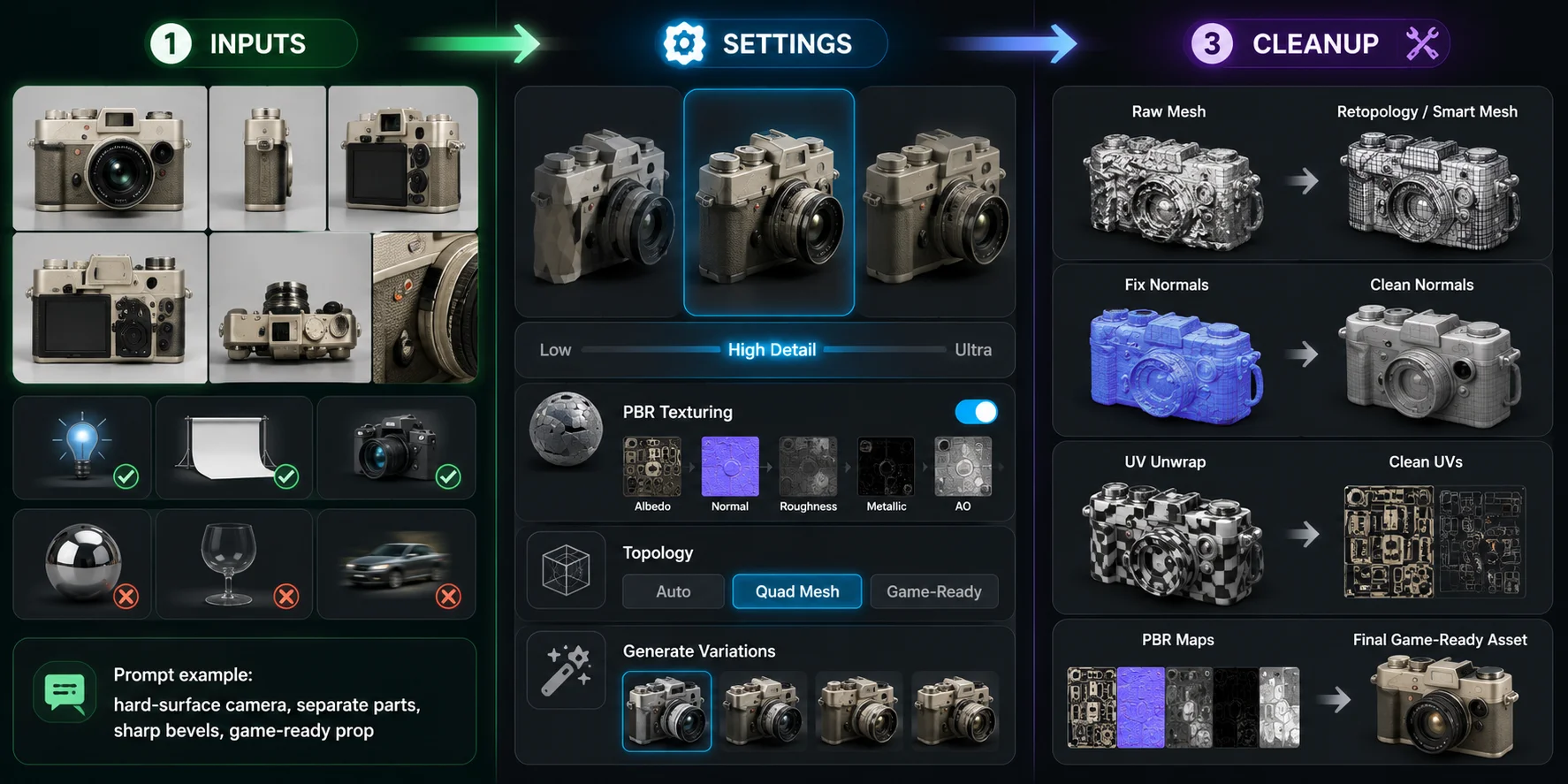
- Use multiple reference photos when the tool supports it. Front, side, back, top, and detail shots improve AI-generated 3D model accuracy.
- Use clean, even lighting. Harsh shadows often become baked into the texture.
- Shoot on a neutral background. A cluttered background can confuse object boundaries.
- Avoid reflective, transparent, or motion-blurred references. These are still difficult for most AI systems.
- For text-to-3D, describe geometry clearly: “hard-surface,” “low-poly stylized,” “manifold mesh,” “sharp bevels,” “separate parts,” or “game-ready prop.”
Stage 2 — Generation Settings
- Choose a higher-detail workflow when the asset depends on fine surface information. Tripo AI's High Detail Model is designed for fine surface detail and high-density geometry from images or text.
- Prefer PBR texture output instead of a single baked albedo. Tripo AI's AI Texturing can generate standard PBR maps including Base Color, Roughness, Metallic, and Normal.
- If topology options exist, select quad mesh, remesh, or game-ready settings. For triangle meshes that need quad-dominant topology, Tripo AI's AI Quad Remesher is designed to generate clean quad topology at a target polygon count.
- Generate more than one version. AI output is probabilistic, so the second or third result may solve issues the first one missed.
Stage 3 — Post-Generation Cleanup
- Run retopology or remeshing before production use. Tripo AI's Smart Mesh is intended to create low-poly, game-ready assets with clean topology; inspect the result against your own target constraints.
- In Blender, fix normals with Mesh > Normals > Recalculate Outside.
- Re-unwrap UVs if seams, stretching, or texture distortion are visible.
- Bake or rebuild PBR channels if the tool only exports albedo.
- For game-ready output, create a separate collision mesh instead of relying on the raw AI mesh.
The fastest way to fix AI 3D model problems is not one magic button. It is a pipeline: better input, smarter generation settings, then targeted cleanup.
AI 3D Models vs. Traditional Manual Modeling
AI is not replacing manual modeling in serious pipelines. It is compressing the blocking and exploration stage. Artists still matter because final assets need design judgment, topology control, UV cleanup, material tuning, optimization, and style consistency.
| Comparison Axis | AI 3D Generation | Traditional Manual Modeling |
|---|---|---|
| Time to mesh | Very fast; minutes for a base result | Slower; hours or days depending on complexity |
| Skill required | Low to medium | Medium to expert |
| Topology control | Limited unless cleanup tools are used | High |
| Texture control | Fast but sometimes inconsistent | Precise and art-directable |
| Customizability | Good for iteration, weaker for exact specs | Excellent |
| Cost per asset | Lower for drafts and variations | Higher, but more reliable |
| Best use case | Concepts, props, drafts, rapid iteration | Hero assets, production models, precision work |
The emerging standard is hybrid: generate a base mesh with AI, then refine manually. Studios are not removing modelers from the process; they are using AI to get to the first useful version faster.
Real-Time Engine and Game-Ready Pipeline Concerns
For Unity, Unreal Engine, WebGL, and mobile pipelines, raw AI output needs extra checks.
- Polycount. Set the triangle budget from the target platform, viewing distance, LOD strategy, and scene budget rather than using a universal number. Use decimation, retopology, or Smart Mesh where appropriate, then inspect silhouette loss and runtime performance.
- UV layout. AI-generated UVs may overlap, waste space, or create awkward islands. That causes problems with lightmap baking, texture edits, and material consistency. Fix: re-unwrap important assets manually or use a UV packing tool before engine import.
- Material channels. Real-time engines expect metallic/roughness PBR workflows. If the AI only exports albedo, the model may look flat or plastic. Fix: generate or rebuild roughness, normal, metallic, and ambient occlusion maps.
- LOD generation. Do not assume an AI-generated asset includes a complete LOD chain. A hero prop may look acceptable up close but be too expensive at distance. Fix: create and validate LOD0, LOD1, and LOD2 versions with progressive triangle reduction.
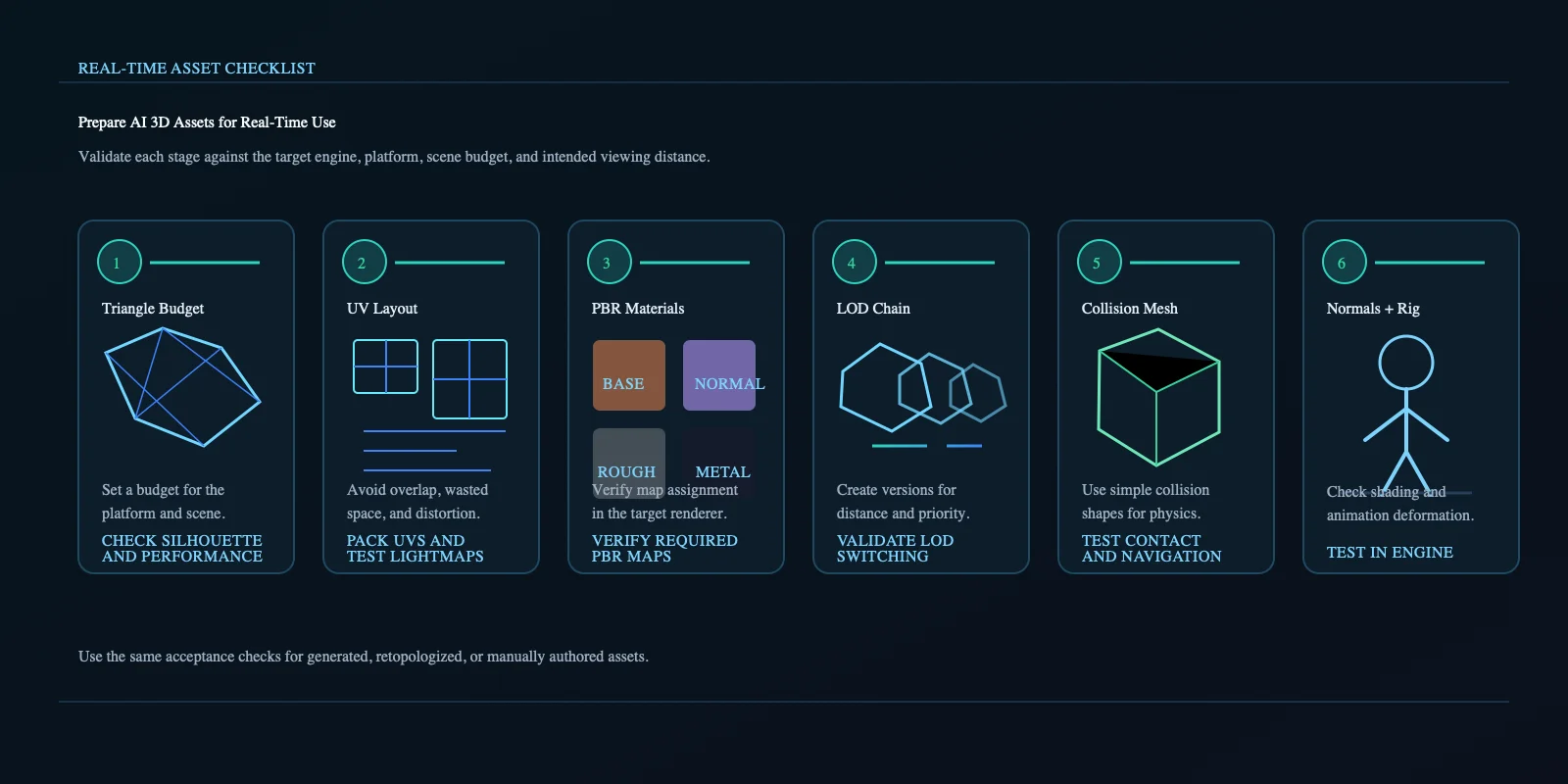
- Collision mesh. A dense AI mesh is usually terrible for physics queries. It may slow performance or behave unpredictably. Fix: author a simple convex collision mesh separately.
- Normals, tangents, and rigs. Broken normals create seams and strange shading. Characters also need usable skeletons before animation. Tripo AI's Auto-Rigging creates a skeleton and skinning for compatible models, while Smart Mesh provides a low-poly optimization workflow; final engine testing is still necessary.
Frequently Asked Questions
Are AI-generated 3D models good enough for professional use?
They can be useful starting assets for concept work, rapid prototyping, product previews, and background props. Production use still calls for review against the asset's intended requirements, especially for topology, UVs, materials, scale, and performance.
Why do AI 3D models have holes or broken geometry?
The system must infer hidden structure from incomplete visual evidence. Occlusion, reflections, shadows, and missing viewpoints can lead to holes, floating faces, or non-manifold geometry that needs repair.
Why does my AI 3D model look flat or plastic?
It may lack appropriate PBR material maps or may contain lighting baked into the base-color texture. Check the material setup and, where needed, generate or rebuild maps such as roughness, normal, metallic, and ambient occlusion for the target renderer.
Can AI 3D models be used for 3D printing?
Sometimes, but inspect and prepare the mesh first. A printable model needs to be watertight and manifold, correctly scaled, and free of unsupported or excessively thin features for the selected printing process.
Why do AI 3D models look worse on complex objects?
Complex objects combine occluded parts, fine details, overlapping surfaces, and multiple materials. When the input does not provide enough evidence for those relationships, the model has to infer more of the structure.
How do I fix bad topology on an AI-generated mesh?
Use retopology, quad remeshing, or manual cleanup, then inspect the result for the intended workflow. For animation and games, pay particular attention to edge flow around deformation zones, UV quality, and the final triangle budget.
Will AI make 3D modeling obsolete?
No. AI can speed up blocking and variation work, but production assets still require design judgment, technical control, optimization, and validation in their final context.
What is the best AI 3D model generator for quality output?
Choose a tool based on the controls and outputs your workflow requires, then evaluate it with representative inputs and the same acceptance checks you will use in production. For workflows that need higher-detail generation, PBR texturing, mesh optimization, or character rigging, Tripo AI provides tools for those stages.
Conclusion
AI 3D models look bad for structural reasons: depth hallucination, baked-in lighting, topology-agnostic generation, and weak production constraints. The gap is closing quickly, but quality still depends on input quality, generation settings, and cleanup.
To test a workflow designed around higher-detail output, smarter texturing, and mesh optimization, generate your first model in Tripo AI Studio. For teams comparing plans and production needs, review Tripo AI Pricing.