Text-to-3D API Use Cases: For Games, Apps & Platforms
TL;DR:
- A text-to-3D API turns a written prompt into a usable 3D mesh through a request, no manual modeling.
- Top use cases: game asset pipelines, e-commerce/AR previews, VR worlds, synthetic training data for robotics/CV, plus architecture, product, film, and education.
- The real value is automation at scale—batch-generate hundreds of variants instead of commissioning each by hand.
- Integration pattern is the same everywhere: POST a prompt → poll the task → download the asset (GLB/FBX/OBJ) → drop it into your engine.
- Pick an API by output formats, mesh quality/topology, rigging, batch limits, latency, and pricing model.
A text-to-3D API lets your software turn a plain-language prompt—"a low-poly oak tree," "a ceramic coffee mug"—into a ready-to-use 3D model through a single API call. Instead of modeling each asset by hand, teams generate them on demand. This guide walks through the most common text-to-3D API use cases across games, apps, and platforms, how to wire one into a pipeline, and how to choose.
What Is a Text-to-3D API (and Why It Matters)
A text-to-3D API is a developer tool that converts a text prompt into a 3D model through a programmable request. Instead of creating every asset manually in a 3D modeling software or searching through existing libraries, developers can integrate a 3D model generator API into their products and generate assets on demand. This makes 3D creation faster, more flexible, and scalable for applications that need large volumes of unique content.
Traditional 3D workflows often require skilled artists, long production cycles, or limited asset collections. An API-based approach changes this by allowing software, games, and platforms to request new models automatically whenever users need them. Whether it is generating game props, virtual items, product previews, or interactive environments, text to 3d api use cases are expanding because creation becomes programmable rather than manual.
Most text-to-3D APIs return a complete 3D asset package, including a generated mesh, materials, and often PBR textures. Depending on the service, developers may receive files in common formats such as GLB, FBX, OBJ, or other engine-compatible formats. Some platforms also support automated optimization, UV mapping, or texture generation as part of the pipeline.
This API-driven workflow is the foundation behind many prompt to 3d api use cases, from game development tools to creative apps and online platforms. By combining natural language input with automated asset generation, a procedural asset api can help teams create, customize, and scale 3D content without rebuilding the entire production process. As a result, text to 3d api integration is becoming a practical option for developers who want to add 3D generation capabilities directly into their products.
How a Text-to-3D API Turns Prompts into Ready-to-Use 3D Assets
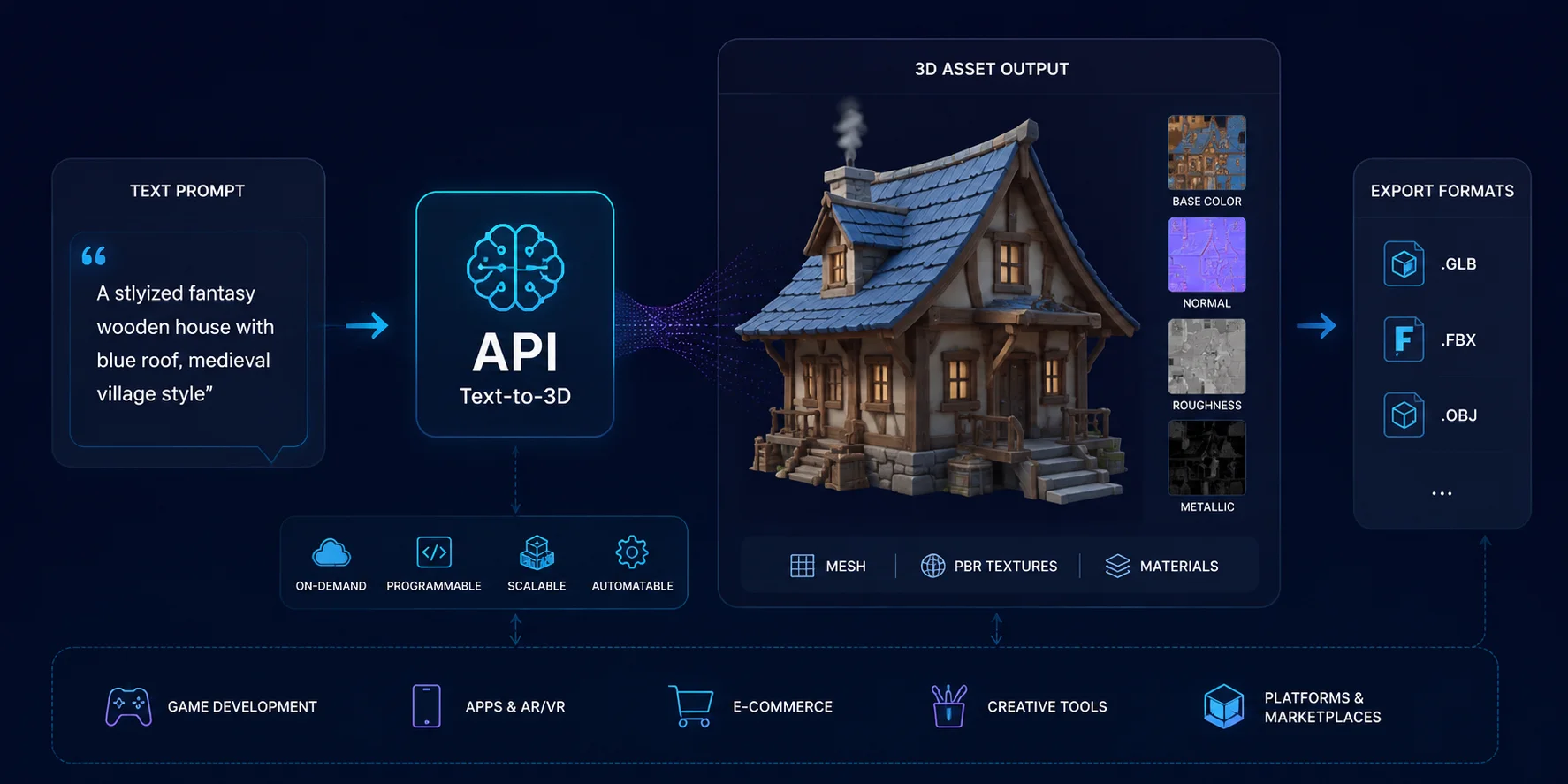
How a Text-to-3D API Fits Into a Pipeline
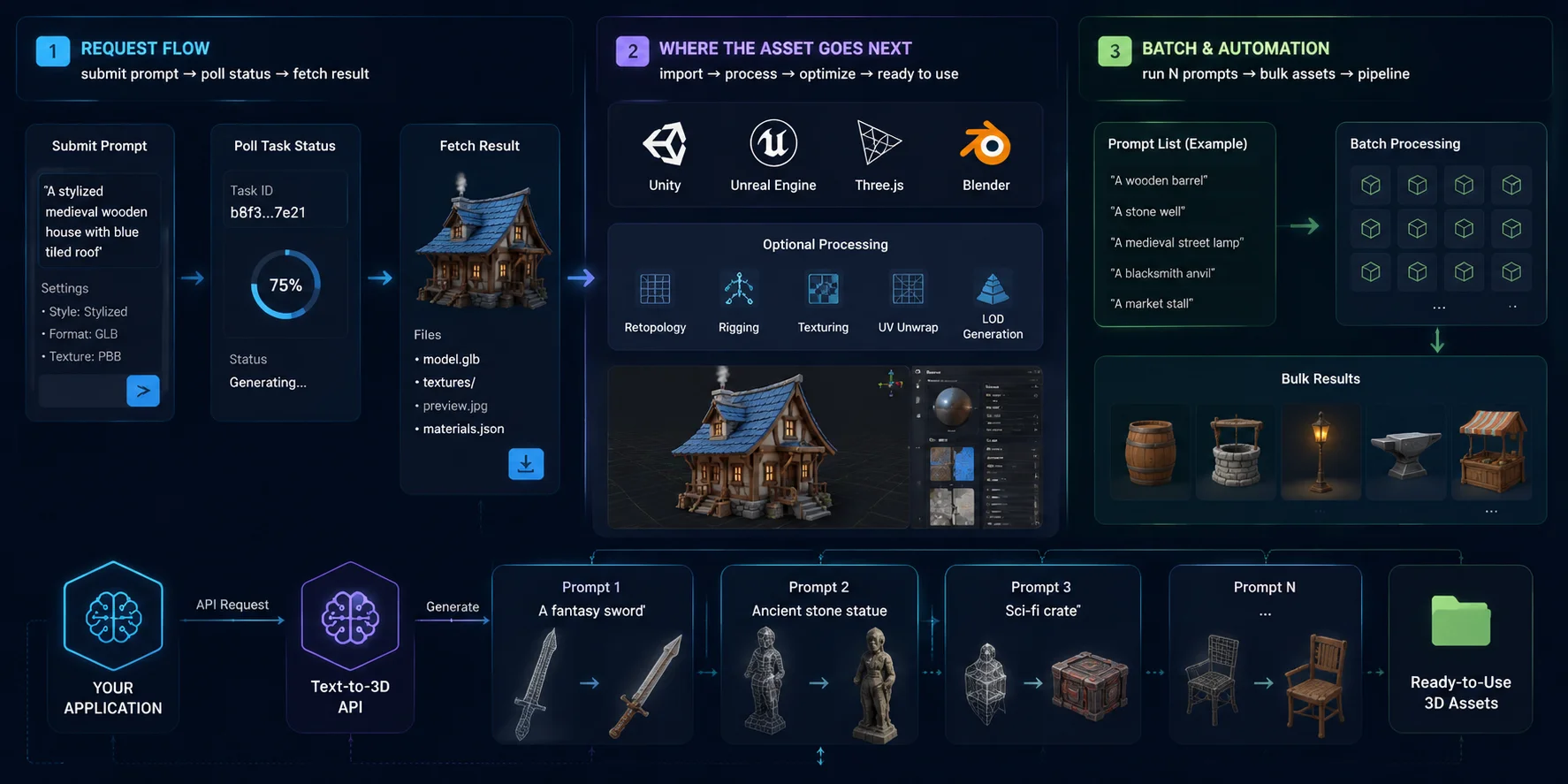
A text-to-3D API is not just a model generator—it is a service that needs to fit into a larger production pipeline. The real value comes from connecting generation, processing, and delivery together so developers can turn prompts into usable 3D assets inside their applications. A typical text to 3d api integration workflow includes sending a request, tracking generation progress, retrieving the final asset, and automatically moving it into the next stage of production.
The core request flow — submit prompt → poll task status → fetch result
Most text-to-3D APIs work through an asynchronous generation process. The application first sends a request containing the text prompt, generation settings, and output preferences. Because creating a 3D model can take longer than a normal API call, the service usually returns a task ID instead of the finished file immediately.
The application then checks the task status until generation is complete. Once the task succeeds, developers can fetch the generated files, such as the mesh, textures, and material data. This request → status check → result retrieval pattern makes it easier to integrate AI generation into games, design tools, and online platforms without blocking the user experience.
Where the asset goes next — from AI output to production
After receiving the model, the next step is usually connecting it to an existing 3D workflow. Game developers can import generated assets into engines like Unity or Unreal Engine, while web applications may load them through frameworks such as Three.js. Artists may also open files in Blender for additional editing.
Depending on the use case, AI-generated models may need extra steps such as retopology, rigging, animation setup, UV adjustments, or texture refinement. Enterprise solutions such as Tripo API focus on making this connection easier by allowing companies to add automated 3D generation capabilities directly into their own products and workflows.
Batch & automation — generating many assets at scale
One of the biggest advantages of an API approach is automation. Instead of manually creating one model at a time, developers can run multiple prompts through a pipeline and generate large collections of assets automatically. This is especially useful for games, virtual worlds, e-commerce platforms, and procedural content systems that require thousands of variations.
For example, a game studio could generate different furniture items from a prompt list, or an online marketplace could create customized product previews based on user input. These prompt to 3d api use cases show why APIs are becoming a practical solution for scalable content creation: generation becomes a repeatable process that can be controlled, monitored, and expanded like any other software service.
Text-to-3D API Workflow: From Prompt Request to Automated Asset Pipeline
Text-to-3D API Use Cases by Industry
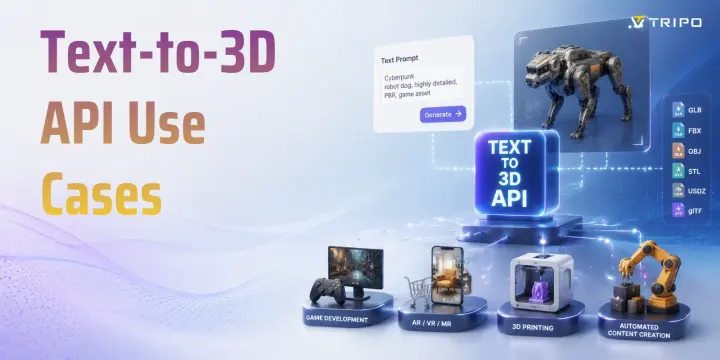
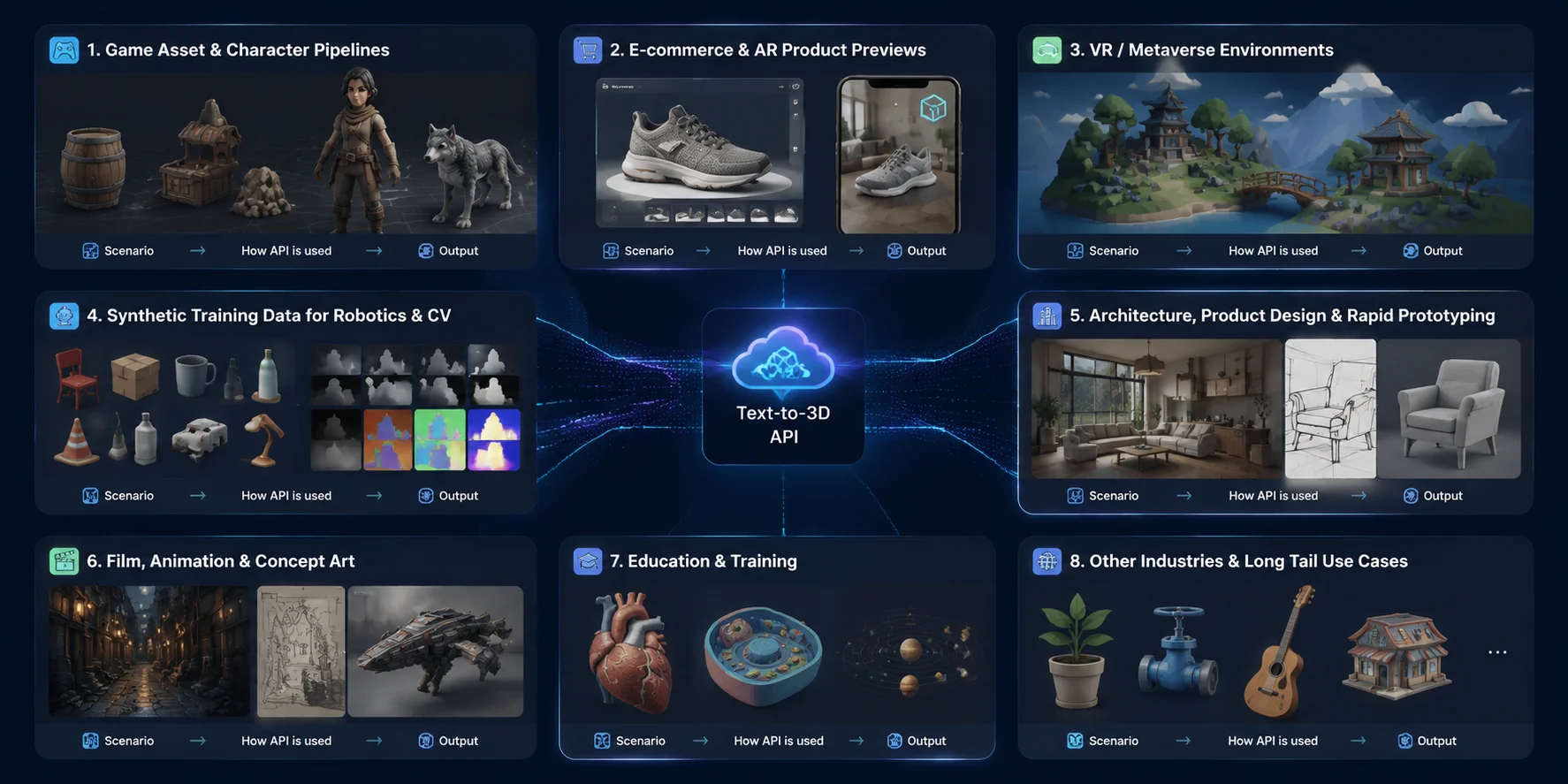
Text-to-3D APIs are no longer limited to experimental 3D generation demos. They are becoming practical tools inside production workflows where teams need to create, customize, and scale digital assets faster. From games and e-commerce to robotics and design, different industries use APIs in different ways: some generate thousands of variations, while others automate specific steps such as prototyping, visualization, or simulation. The following text to 3d api use cases show where API-based 3D generation creates the most value.
Game Asset & Character Pipelines
Scenario: Game studios often need large volumes of 3D content, including environment props, weapons, items, creatures, and NPC characters. Creating every asset manually can slow production, especially for teams building large worlds or frequently updating live games.
How the API is used: A Text-to-3D API can be connected directly to a game asset pipeline, allowing designers or automated systems to generate models from prompts and send them into the production workflow. For example, developers can create low-poly-ready assets, then refine topology, generate textures, add rigs, and export them into DCC tools or game engines. Solutions such as Tripo Text to 3D help teams quickly turn concepts into usable 3D models, while features like Smart Mesh provide cleaner topology and Auto-Rig can prepare T-pose humanoid or quadruped characters for animation workflows.
Output: The final result can include game-ready props, environment assets, and rigged characters exported in formats compatible with common 3D pipelines. These text-to-3d-model workflows reduce the gap between idea generation and engine-ready content creation.
E-commerce & AR Product Previews
Scenario: Online stores increasingly need interactive 3D product experiences, but manually modeling thousands of SKUs is expensive and time-consuming.
How the API is used: Businesses can connect a 3D model generator API to product databases and automatically create models from product descriptions, images, or specifications. Generated assets can include meshes, materials, and embedded textures, then be optimized for web viewers, AR shopping experiences, or product configurators.
Output: Retailers can create interactive product previews, digital catalogs, and AR-ready models. Formats such as GLB are especially useful because they can package geometry, materials, and textures together for efficient delivery across browsers, mobile AR applications, and 3D platforms.
VR / Metaverse Environments
Scenario: Virtual worlds and immersive applications need a continuous supply of objects, buildings, decorations, and environment elements to keep experiences fresh.
How the API is used: Developers can use prompts to quickly generate scene components and populate virtual spaces without modeling every asset from scratch. A text-to-3D API can become part of a content creation system that automatically creates variations of furniture, landscapes, structures, and interactive objects.
Output: The result is a larger library of lightweight 3D assets that can be used for VR scenes, virtual communities, training spaces, and interactive environments.
Synthetic Training Data for Robotics & Computer Vision
Scenario: Robotics and AI perception systems require diverse visual data to recognize objects in different conditions. Real-world data collection can be expensive and difficult to scale.
How the API is used: A batch-capable API can generate large numbers of 3D objects with different shapes, materials, colors, and viewpoints. These assets can then be placed into simulated environments to create synthetic datasets for computer vision training.
Output: Companies can produce diverse training samples, simulation assets, and virtual environments for robotics, autonomous systems, and AI perception models. In this case, the value of a procedural asset api comes from automation and variation rather than creating a single finished model.
Architecture, Product Design & Rapid Prototyping
Scenario: Designers, architects, and product teams often need quick visual concepts before investing in detailed modeling or manufacturing.
How the API is used: Teams can describe furniture, interior objects, product concepts, or industrial designs and generate early 3D versions for review. These models can be adjusted, presented to clients, or refined further in professional design software.
Output: The generated assets support concept visualization, virtual staging, prototype exploration, and early design decisions. Instead of replacing detailed CAD workflows, text-to-3D APIs help teams explore more ideas in less time.
Film, Education & Beyond
Scenario: Many creative and educational fields need custom 3D content but do not always have dedicated modeling resources.
How the API is used: Film creators can generate concept assets and scene references, while educators can create interactive visual models for lessons and demonstrations. Other industries can use APIs for specialized visualization needs without building a full 3D production team.
Output: Applications include storyboard assets, educational models, marketing visuals, training materials, and other long-tail 3D content. As generation quality improves, more industries can adopt API-based workflows for faster and more accessible 3D creation.
Text-to-3D API Use Cases Across Industries: From Games to Enterprise Applications
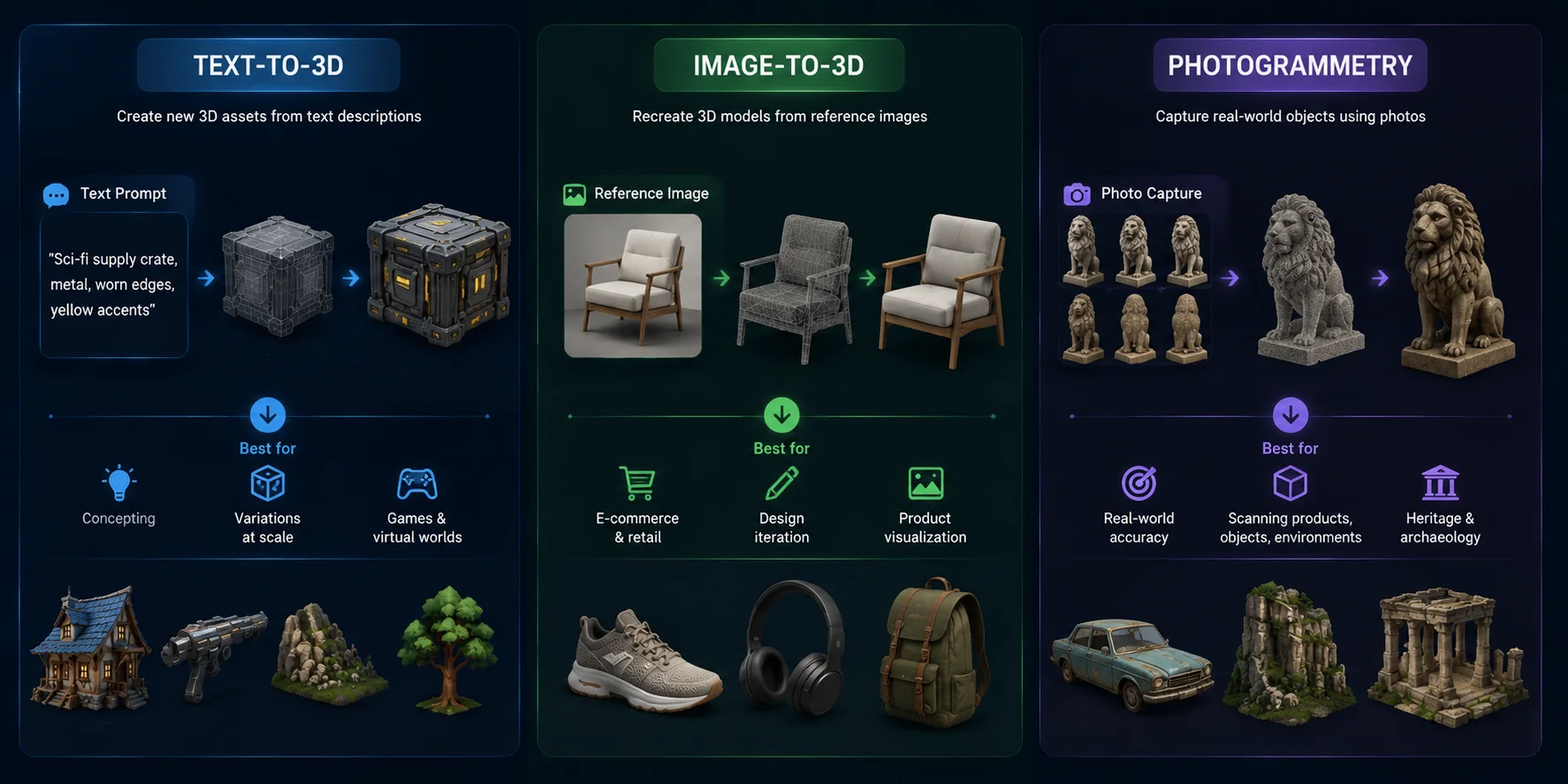
Text-to-3D vs Image-to-3D vs Photogrammetry
The right 3D generation method depends on your input and goal. Text-to-3D creates new assets from ideas, image-to-3D recreates designs from references, and photogrammetry captures real-world objects. Choosing the right approach helps developers build more efficient text to 3d api use cases.
When Text-to-3D Wins — No Reference Image Needed
Text-to-3D works best when you only have a concept and need fast asset creation. A prompt can generate new objects, characters, or environments without preparing images, making it useful for games, virtual worlds, and procedural content creation.
When Image-to-3D Wins — Match a Specific Look
Image-to-3D is better when you already have product photos, sketches, or concept art. It focuses on preserving the visual details and shape from the reference image, making it suitable for product previews, design workflows, and customization. Tools like Tripo Image to 3D support this reference-driven workflow.
When Photogrammetry Wins — Recreate Real Objects
Photogrammetry is the better choice when accuracy to a real object matters. By using multiple photos, it captures real-world details and textures, making it useful for scanning products, environments, and physical assets.
Text-to-3D vs Image-to-3D vs Photogrammetry: Choosing the Right 3D Generation Method
How to Choose a Text-to-3D API (Checklist)
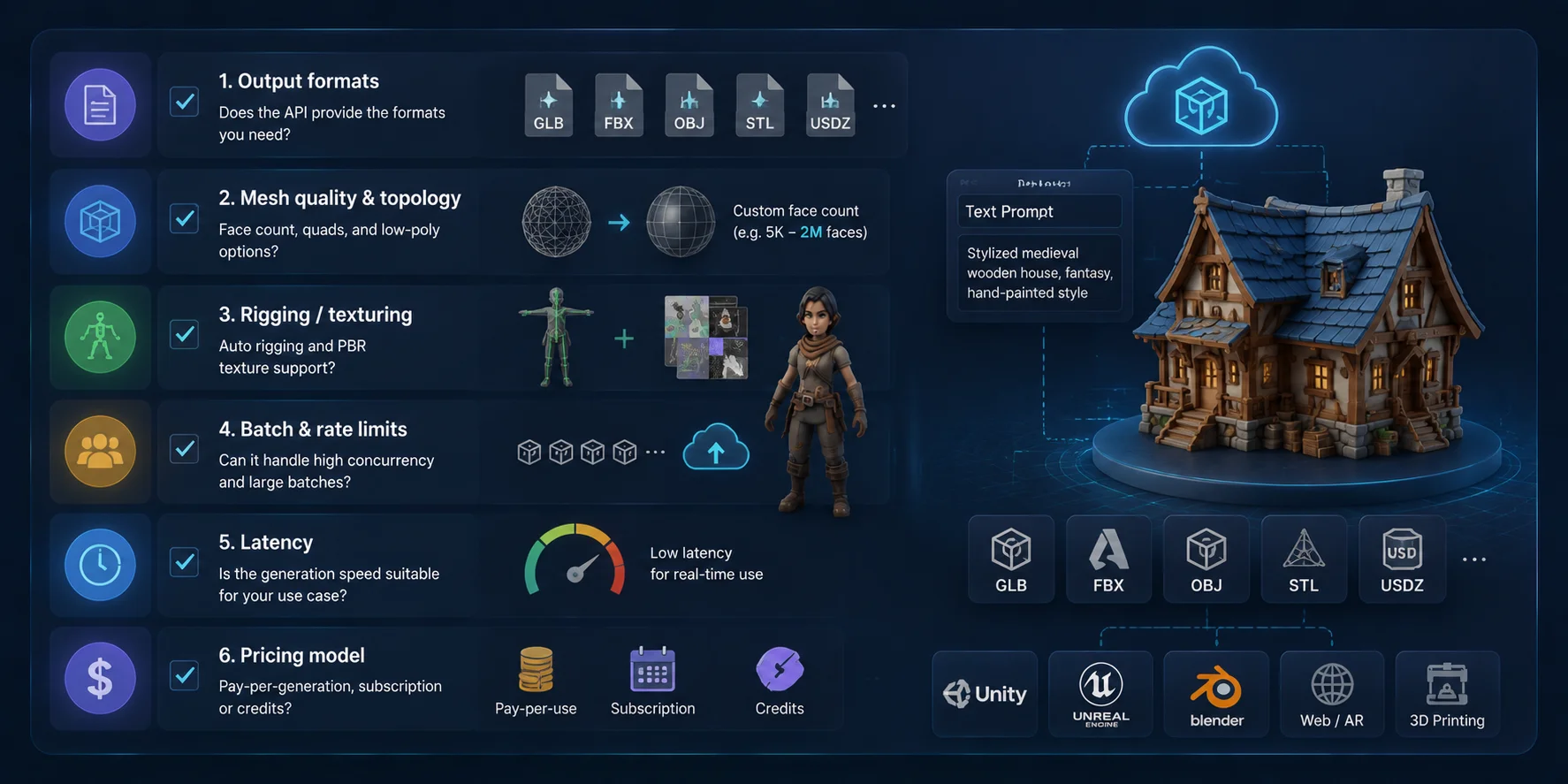
Choosing a text-to-3D API is not only about generation speed or visual quality. The right solution needs to fit your production workflow, from asset export and optimization to scaling and cost control. Use this checklist to compare different APIs before adding text to 3d api integration into your product.
✅ Output formats Check whether the API supports the formats your pipeline requires, such as GLB, FBX, OBJ, STL, or USDZ. Wider format support makes it easier to move assets between game engines, DCC tools, AR platforms, and 3D printing workflows.
✅ Mesh quality & topology Generated models should offer usable geometry, not just good-looking previews. Look for options such as low-poly generation, adjustable face counts, clean topology, and optimization features. For example, Tripo Smart Mesh helps customize mesh quality for different production needs.
✅ Rigging & texturing support For characters and interactive assets, automatic rigging and PBR texture generation can save significant production time. Features like Auto Rig can prepare humanoid or animal models for animation workflows.
✅ Batch generation & rate limits If you need thousands of assets, check API limits, concurrency support, and batch processing capabilities. A scalable procedural asset api should handle large generation workloads reliably.
✅ Latency Real-time applications need faster responses, while offline asset creation can accept longer generation times. Match API performance with your use case.
✅ Pricing model Compare whether costs are based on per-generation usage, subscriptions, credits, or enterprise plans. The best choice depends on your asset volume, team size, and expected API demand.
Text-to-3D API Selection Checklist: 6 Factors to Evaluate Before Integration
Costs & Limitations (Be Realistic)
A text-to-3D API can significantly speed up asset creation, but it is not a complete replacement for every 3D workflow. Understanding the costs and limitations helps teams choose the right use cases and avoid unrealistic expectations.
Pricing model: Most APIs use a generation-based pricing system, credits, or subscription plans. Some features, especially higher-quality generation modes or advanced export options, may require an active paid plan. For example, Tripo requires a valid paid subscription for exporting v3.0/v3.1 models, while Basic plans are limited to v2.5 exports.
Prompt limitations: Text prompts are powerful but not always perfectly predictable. Complex scenes with multiple objects, precise mechanical structures, or highly specific details may require several retries or additional manual refinement after generation.
When human artists are still needed: AI-generated models may need professional review for high-precision assets, strict brand consistency, or regulated industries. Areas such as medical applications, manufacturing components, or production-critical assets often require additional modeling, validation, and quality control.
In practice, the best workflow combines API-generated assets with human expertise. Text-to-3D APIs are most valuable when they reduce repetitive work, accelerate iteration, and help teams create more content without replacing specialized production processes.
Text-to-3D API Costs & Limitations: What Developers Should Know
Frequently Asked Questions
What is a text-to-3D API used for?
A text-to-3D API turns a written prompt into a generated 3D asset through a programmable request. Teams use it for game props, virtual-world content, product concepts, educational models, rapid prototypes, and other workflows that need many custom assets. Its main advantage is automation: software can submit prompts, track jobs, and route completed models into downstream tools without creating every asset manually. The output still needs review and may require retopology, texturing, rigging, or other production work.
Can I use a text-to-3D API to generate game assets in bulk?
Yes, but bulk generation should be treated as a queued production workflow rather than a single uncontrolled burst of requests. Submit each prompt as a traceable task, respect the provider's documented concurrency and rate limits, and use backoff for temporary failures. Store the prompt, task ID, status, and output location so individual assets can be retried without repeating the whole batch. Add automated checks and human review before generated models enter a game build or asset library.
What file formats do text-to-3D APIs output?
Available formats vary by provider, so choose one that matches the next tool in the pipeline. GLB is convenient for web and real-time delivery, FBX is common in game and animation workflows, OBJ is widely supported for editing, and STL or 3MF are intended for 3D-printing workflows. USD or USDZ support is provider-specific and should be verified rather than assumed. Tripo's current official export list is GLB, USD, FBX, OBJ, STL, and 3MF.
Text-to-3D API vs image-to-3D API—which should I use?
Use text-to-3D when the starting point is an idea and you want to explore new objects, styles, or variations without preparing a reference image. Use image-to-3D when the result should follow a particular silhouette, product, character, or visual design. A single image leaves hidden surfaces unspecified, so image-based output may still need multi-view references or manual correction. Many production pipelines use both methods, generating concepts from text and then using selected images as more controlled references.
How much does a text-to-3D API cost?
Pricing may be based on credits, per-generation usage, subscriptions, or a negotiated enterprise agreement. The effective cost depends on model quality, optional texture or topology operations, retries, and the number of assets that pass review. Test a representative sample and calculate the cost per usable asset instead of relying only on the advertised base generation charge. Production estimates should also include rate limits, storage, delivery, and any manual cleanup required.
Can I integrate a text-to-3D API with Unity or Unreal?
Yes. Generate the asset on a backend service, wait for the asynchronous task to complete, and export a format supported by the target engine and its import tooling. Tripo's current product materials list DCC Bridge workflows for Unity and Unreal Engine, while standard formats such as FBX and GLB can also be used where the engine or an installed importer supports them. After import, verify scale, axes, materials, polygon count, colliders, and animation data before adding the asset to a scene.
Conclusion
From game pipelines and AR shopping experiences to automated content creation, a text-to-3D API makes it possible to turn prompts into scalable 3D assets. Choose the right API based on your workflow needs, then connect it to your production pipeline and start building faster.
Try generating 3D assets with Tripo AI Studio, or explore Tripo API to integrate text-to-3D generation directly into your own applications and workflows.