How to Reduce Polygon Count in Blender, MeshLab & More (2026)

TL;DR
- Reducing polygon count (decimation/retopology) is essential for real-time use cases like games, AR, and web 3D.
- In Blender, the Decimate modifier is the fastest way — aim for under 10k triangles for desktop games, under 2k for mobile.
- MeshLab offers a free standalone alternative with more control over quality vs. reduction ratio.
- Tripo AI offers Smart Mesh and retopology controls that can provide a lower-poly starting mesh, but you should still check the final triangle count against your target platform.
Polygon count reduction means simplifying a 3D mesh while preserving its visible shape. The fastest method in Blender is the Decimate modifier: select Collapse mode, lower the Ratio, inspect the model, and apply the result.
What Is Polygon Count and Why Does It Matter?
A mesh contains vertices, edges, and faces. A face can be a triangle, quad, or n-gon, but real-time engines normally convert faces into triangles before rendering. Artists therefore model with faces while game, AR, and web teams often measure triangles.
More triangles require more processing, memory, and download data. Excess geometry can lower game frame rates, slow AR loading, and make web models sluggish. Removing too much, however, damages curves, silhouettes, deformation, and detail.
Polygons vs. triangles vs. faces
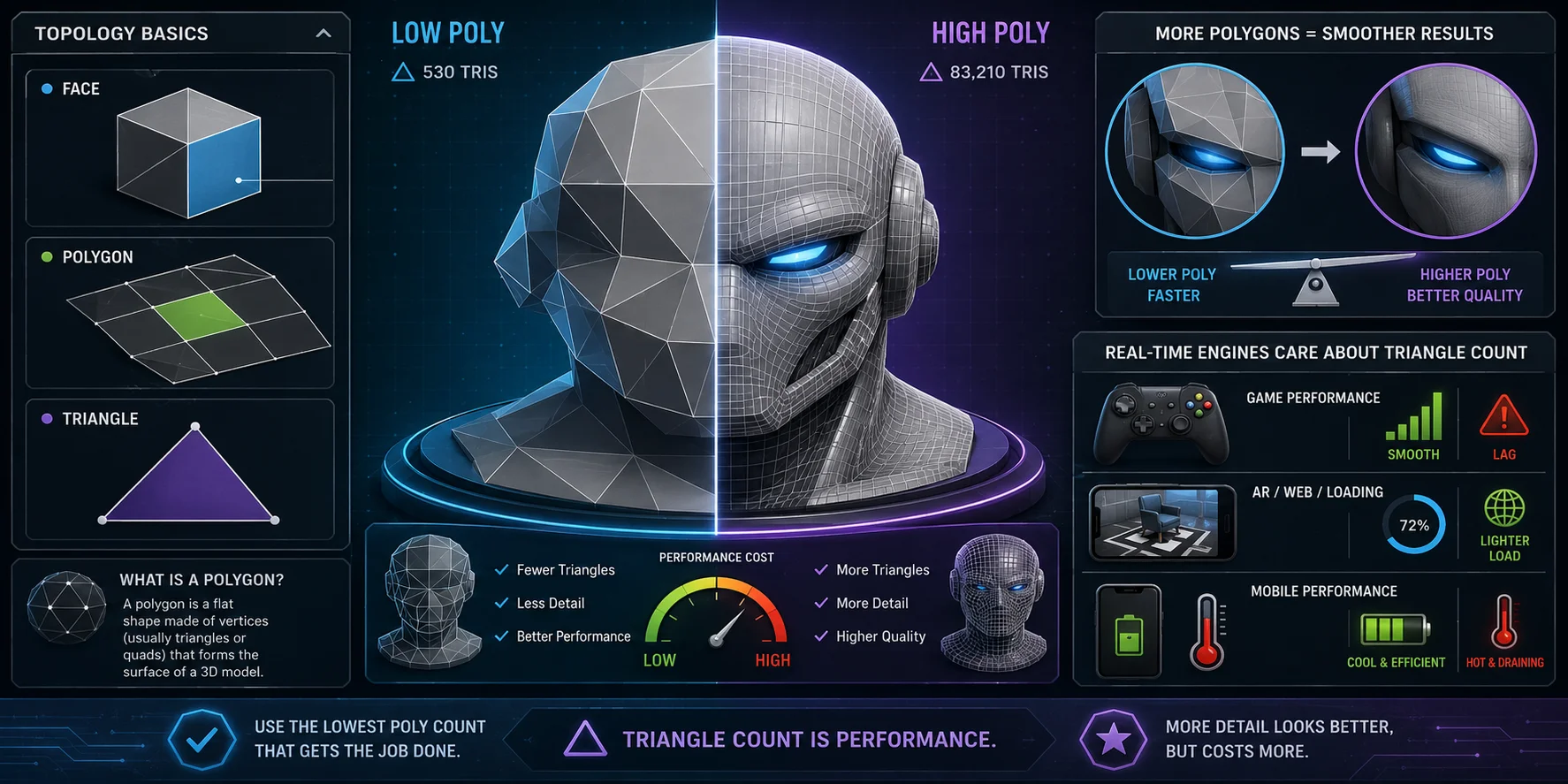
- Face: a surface in a mesh.
- Polygon: often used interchangeably with face.
- Triangle: the three-sided unit processed by real-time engines.
Target polygon counts by platform
| Platform | Suggested target |
|---|---|
| Mobile game | ≤2k tris per object |
| Desktop game | ≤10k tris per object |
| AR/VR | ≤5k tris per object |
| Web 3D | ≤15k tris per object |
| 3D print | No strict visual limit |
| Cinematic render | No strict real-time limit |
Use these figures as starting budgets, not universal limits. The right target also depends on asset size, screen coverage, materials, scene density, hardware, and the current requirements of the destination platform.
How to Reduce Polygon Count in Blender
Method 1: Decimate Modifier, fastest
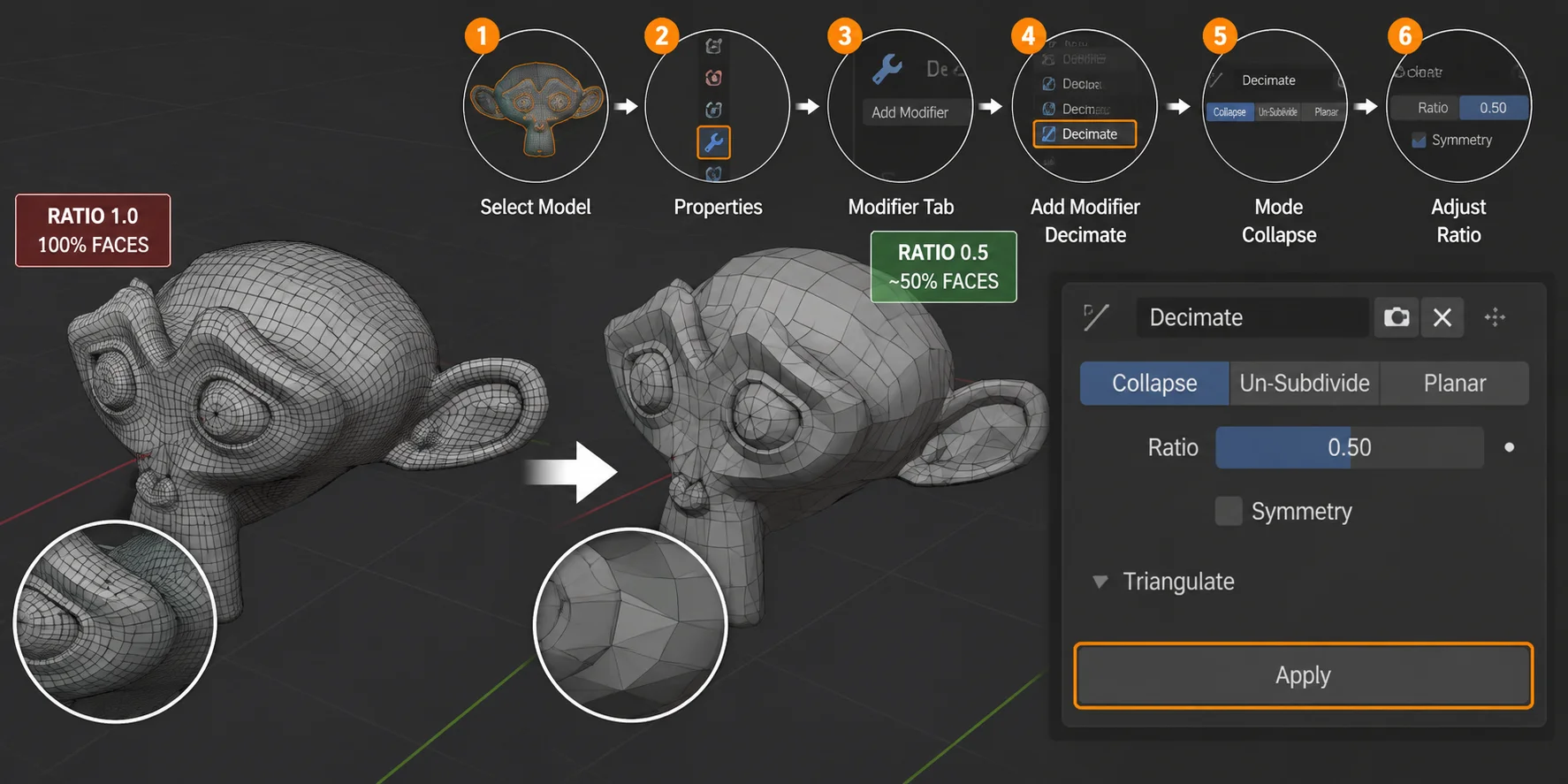
Select the model and open Properties → Modifiers → Add Modifier → Generate → Decimate. Keep Collapse mode selected. Ratio controls how much geometry remains: 0.5 keeps roughly 50% of the faces, while 0.2 keeps about 20%. Blender describes Decimate as a way to reduce vertex and face counts with minimal shape change.
Inspect the silhouette, curved edges, thin parts, and holes. When satisfied, open the modifier menu and click Apply. Duplicate the original first because applying the modifier permanently changes the mesh.
Method 2: Limited Dissolve
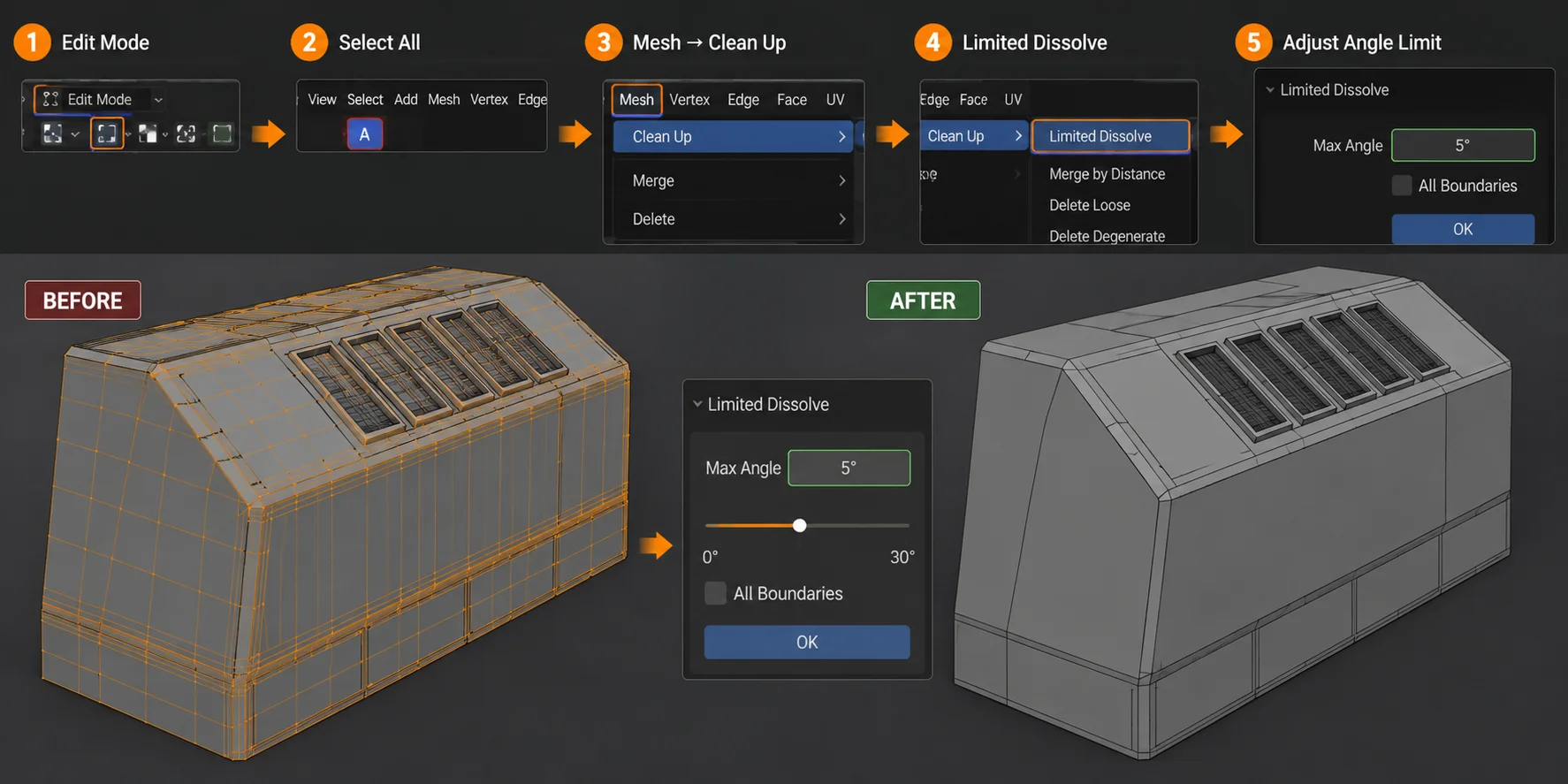
Enter Edit Mode, press A, then choose Mesh → Clean Up → Limited Dissolve. It removes unnecessary edges and vertices from nearly flat surfaces. Use it for flat panels and CAD-style imports rather than detailed organic models.
Method 3: Remesh Modifier for organic shapes
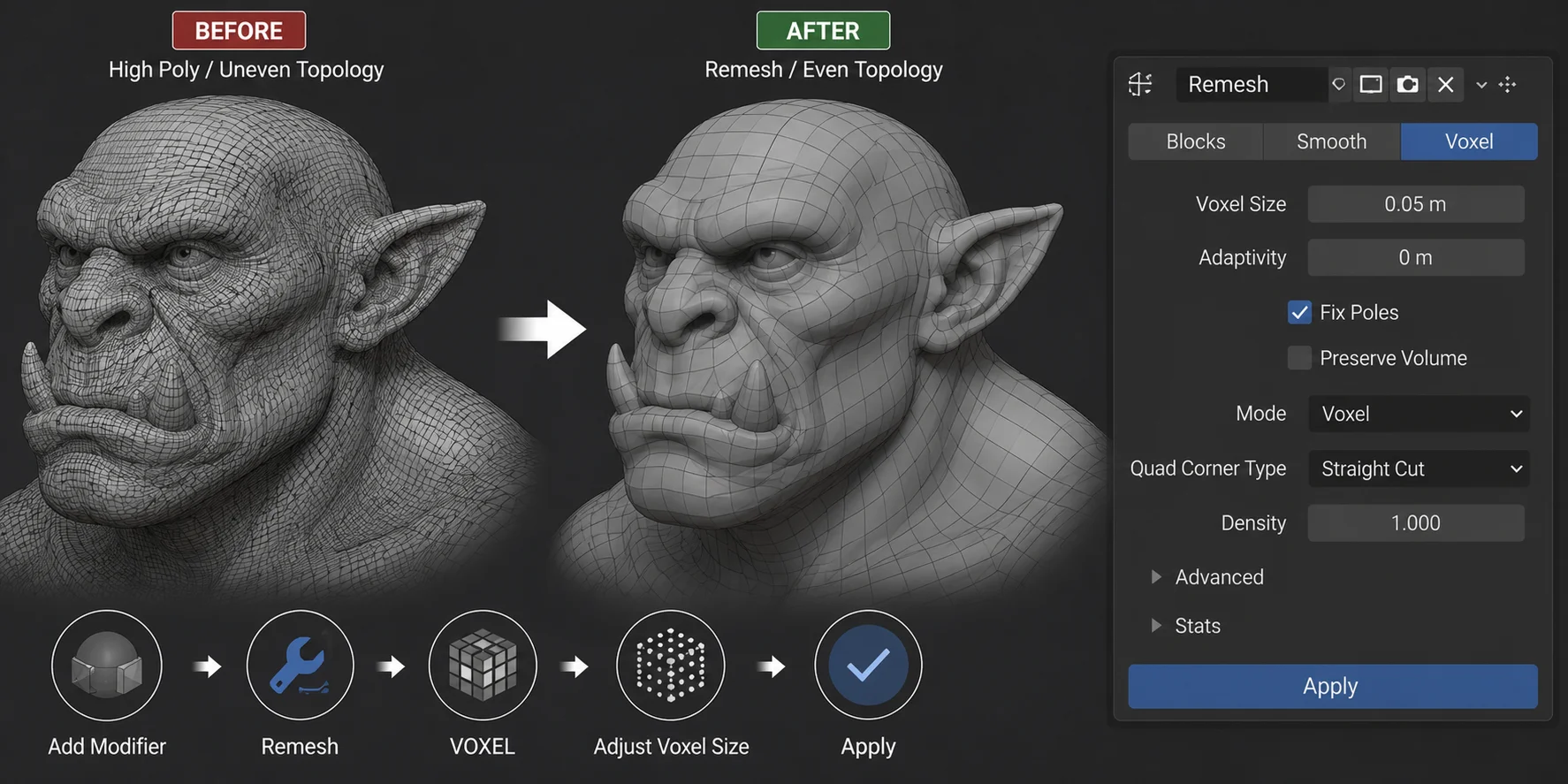
Use remeshing when a sculpt or generated object has uneven topology. Blender’s Remesh modifier creates new topology that follows the surface, while voxel remeshing redistributes geometry according to voxel size. Larger voxels produce fewer polygons but remove more detail. Remesh suits rocks, creatures, and sculptures, although it can alter UVs and sharp edges.
How to check your current poly count
Open Viewport Overlays and enable Statistics. Blender displays vertices, faces, and triangles in the viewport. Use the Tris value when checking real-time budgets.
How to Reduce Polygon Count in MeshLab
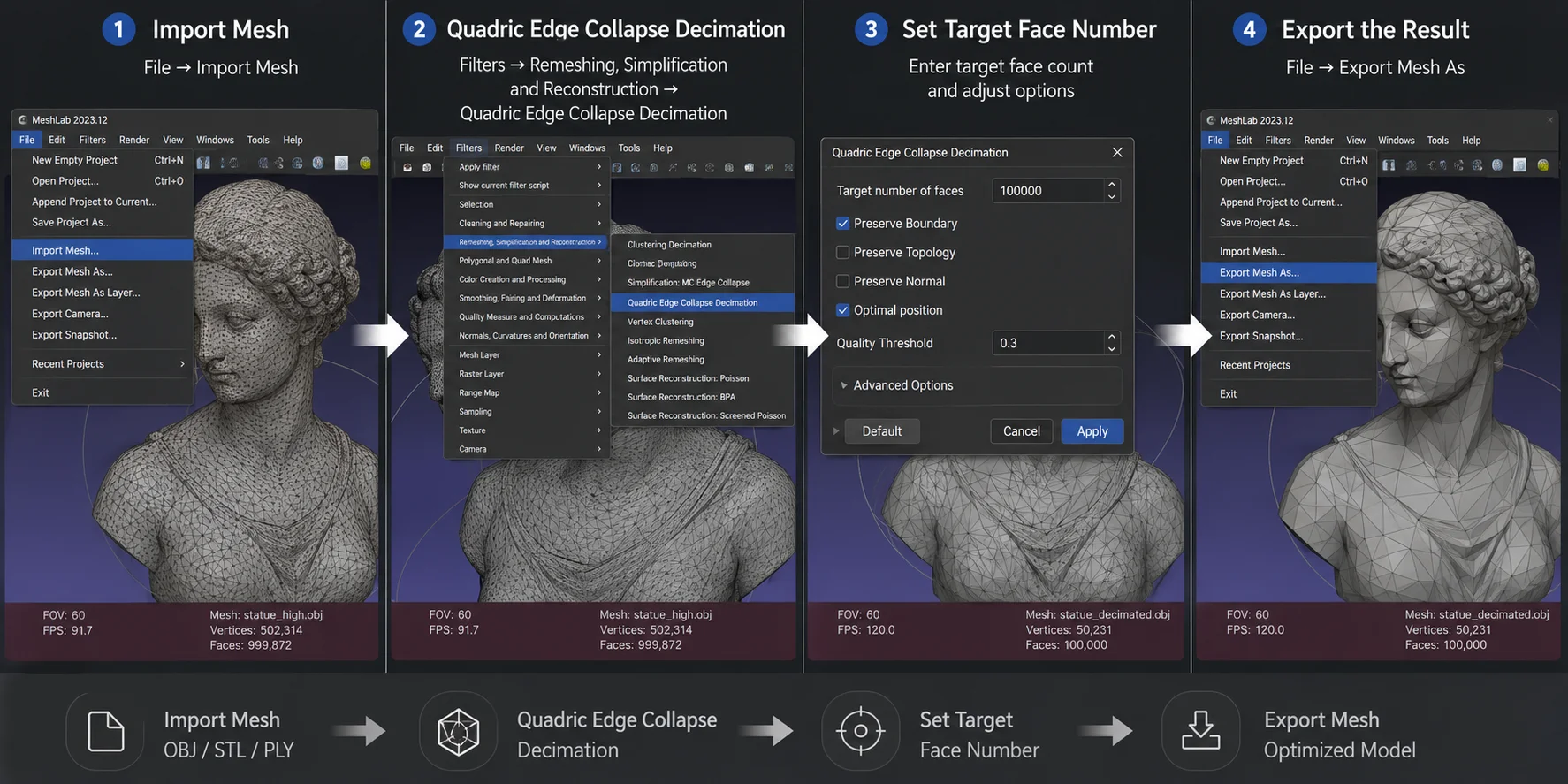
- Choose File → Import Mesh and load your OBJ, STL, PLY, or other mesh.
- Open Filters → Remeshing, Simplification and Reconstruction → Quadric Edge Collapse Decimation.
- Enter the target face count, enable Preserve Boundary when necessary, and apply.
- Inspect the result, then choose File → Export Mesh As.
MeshLab is an open-source application for processing, cleaning, converting, and simplifying triangular meshes.
Reducing Polygons in Other Tools
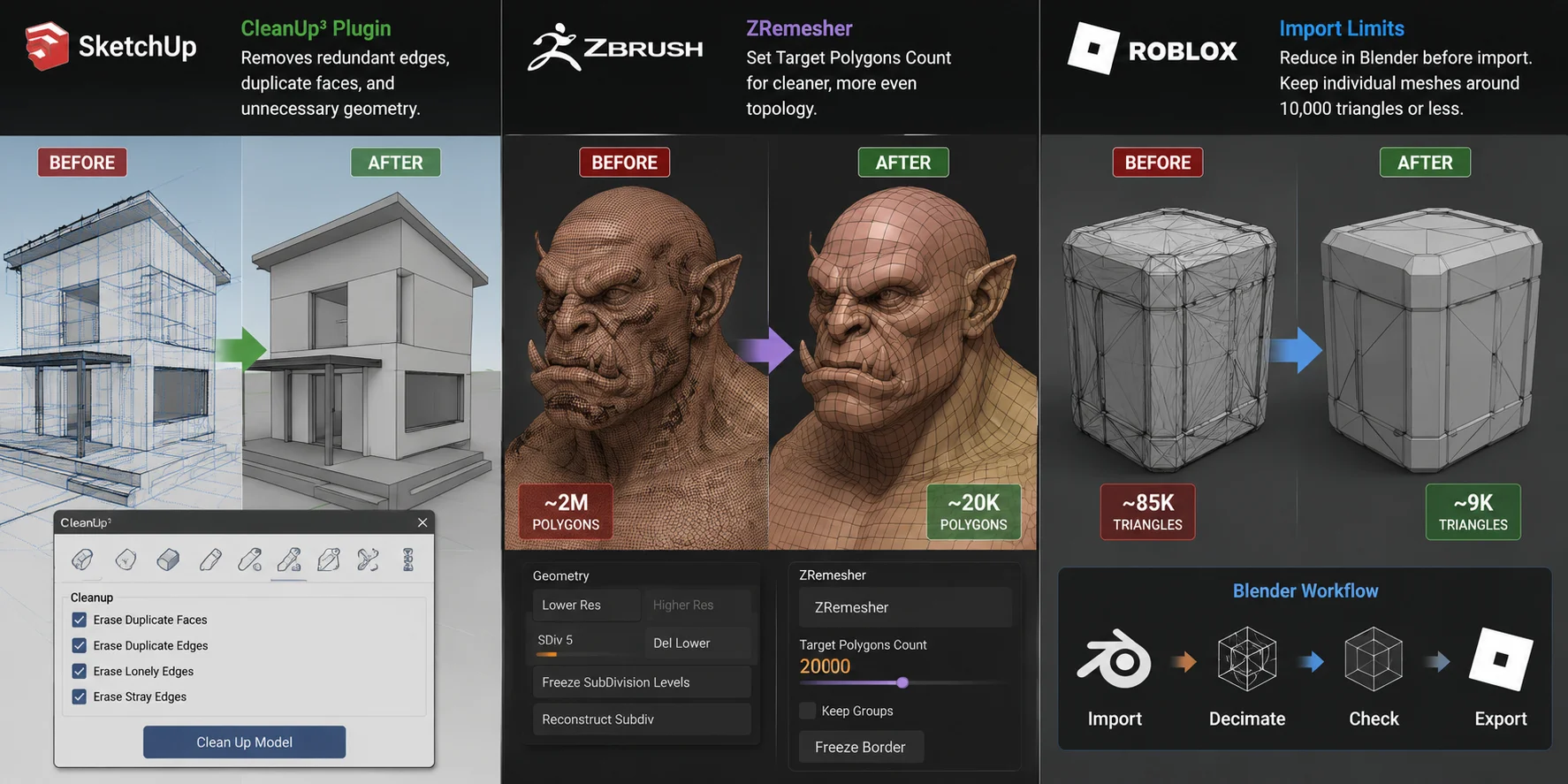
SketchUp: Install CleanUp³ from Extension Warehouse. It removes duplicate faces, lonely edges, hidden geometry, and other waste. Dense imported models may need a dedicated simplifier or Blender decimation.
ZBrush: Go to Tool → Geometry → ZRemesher, set Target Polygons Count, and run it. ZRemesher is especially useful for organic characters and sculpts; its final count is a target, not a guarantee.
Roblox: Reduce the mesh in Blender before import, then check Roblox Studio's current import requirements for the asset type and workflow you are using. Triangle limits and avatar guidance can change, so treat a project's published requirements as the final budget.
How Tripo AI Reduces the Polygon Problem at the Source
Generated meshes can vary widely in density and topology, so check the model's triangle count before exporting. Tripo AI offers Smart Mesh and retopology options that can help create a lower-poly starting mesh; inspect the result in your DCC or engine and adjust it to the target platform's requirements.
Start with Tripo AI to generate or optimize a mesh before platform testing.
Frequently Asked Questions
How do I lessen polygon count in Blender?
Use Decimate → Collapse, set Ratio between 0.1 and 0.5, inspect the result, and apply it. A ratio of 0.5 keeps about half the faces.
What is a good polygon count?
It depends on object size, visibility, hardware, and scene density. Under 2,000 triangles is a useful starting point for a simple mobile prop; desktop hero assets may use far more.
How do I lessen polygons in SketchUp?
Run CleanUp³ to remove redundant geometry. For a genuinely high-poly asset, simplify it with a dedicated extension or in Blender before importing.
How do I lower polygon count in 3D models?
First choose the triangle budget for the destination, then use decimation when you need a faster reduction or retopology when you need cleaner edge flow for deformation. Always compare the silhouette, thin parts, UVs, and shading before exporting.
How do I simplify a 3D mesh?
For a quick simplification, reduce the mesh with a tool such as Blender's Decimate modifier or MeshLab's Quadric Edge Collapse Decimation. Preserve important boundaries where needed, then test the simplified asset in the application that will use it.
Retopology vs. decimation: which is better for reducing polygon count?
Decimation removes geometry quickly and is useful when the asset does not need carefully controlled edge flow. Retopology takes more planning, but it is the better choice for characters, animation, and assets that need predictable quads or clean deformation.
How do I reduce polygon count in Blender for beginners?
Duplicate the original object, add a Decimate modifier in Collapse mode, and lower the Ratio in small steps. Enable Statistics so you can watch the triangle count, then apply the modifier only after the model still looks correct.
Conclusion
Reduce polygon count with tools like Blender, MeshLab, and ZBrush, but start by knowing your target poly count. Use the right method for the platform, and reduce cleanup by generating cleaner source models with Tripo AI.