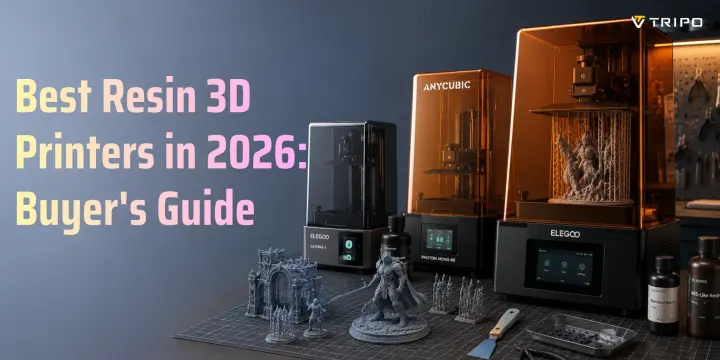
Best Resin 3D Printers in 2026: Buyer's Guide
- Most hobbyists should choose an MSLA printer with balanced volume, resolution, and usability.
- Miniatures and jewelry need sharper XY resolution than large functional parts.
- Resin printing requires ventilation, gloves, washing, curing, and careful waste handling.
- FDM is better for large, structural, or flexible objects.
- Tripo AI can generate STL and 3MF models for resin printing.
The best resin 3D printer for most hobbyists in 2026 balances print volume, XY resolution, and ease of use. MSLA, or LCD-based resin printing, now dominates the consumer market because it delivers fine detail at a lower cost than industrial SLA systems, making it practical for miniatures, jewelry, dental-style models, and detailed prototypes.
Resin 3D printing has grown into an approximately $2.6 billion market segment. A well-chosen machine can produce tabletop miniatures with visible facial features, smooth jewelry masters, and detailed prototype parts overnight. In this guide, you will learn which specs matter, how to choose by use case, how to set up a safe workspace, and how AI-generated models can move directly from idea to resin print.
How Resin 3D Printing Works
Resin 3D printers use UV light to cure liquid photopolymer resin one thin layer at a time. The model starts upside down on a build plate. Each layer hardens against a transparent film at the bottom of the resin vat, often called FEP, nFEP, or release film. After each exposure, the build plate lifts slightly, the cured layer separates from the film, and the next layer begins.
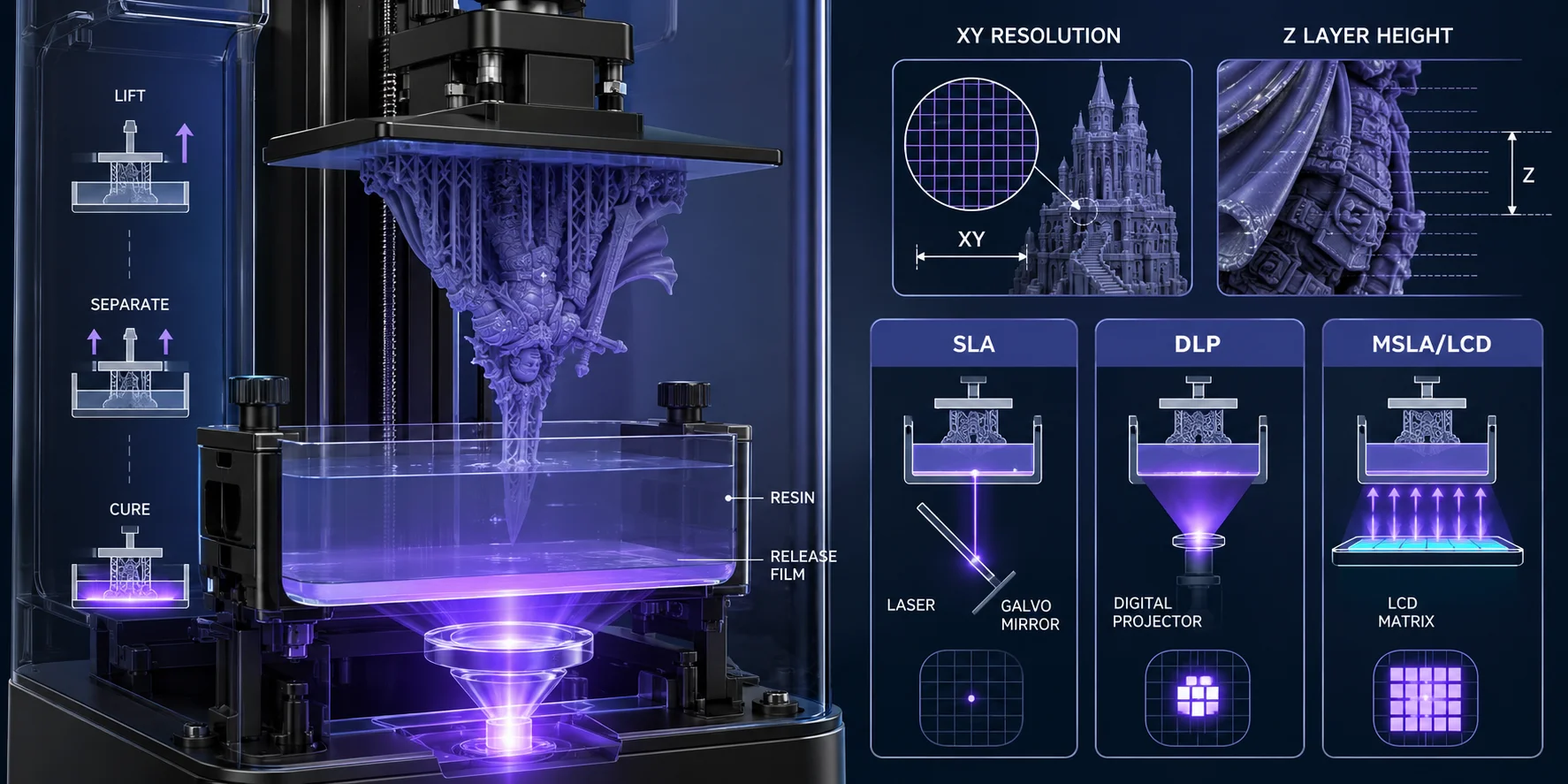
The three main resin technologies are SLA, DLP, and MSLA/LCD. SLA uses a laser point that traces each layer. DLP uses a digital projector to expose an entire layer at once. MSLA, also called LCD resin printing, uses a UV LED array and an LCD mask to expose each layer. Formlabs describes these as related resin processes that all cure liquid resin with light, but they differ in how the light is delivered.
For most buyers, MSLA is the practical consumer choice. It is relatively affordable, fast, and capable of excellent detail. Modern monochrome LCD screens cure faster and last longer than older RGB LCD screens, which is one reason budget and midrange resin printers improved so quickly.
Print detail depends on two measurements. XY resolution is controlled by screen resolution and build area. It affects how sharp details look across the build plate. Z-layer height is controlled in the slicer and usually ranges from about 25 to 100 microns. Smaller layers can look smoother, but they also increase print time.
Key Specs That Actually Matter (And Ones You Can Ignore)
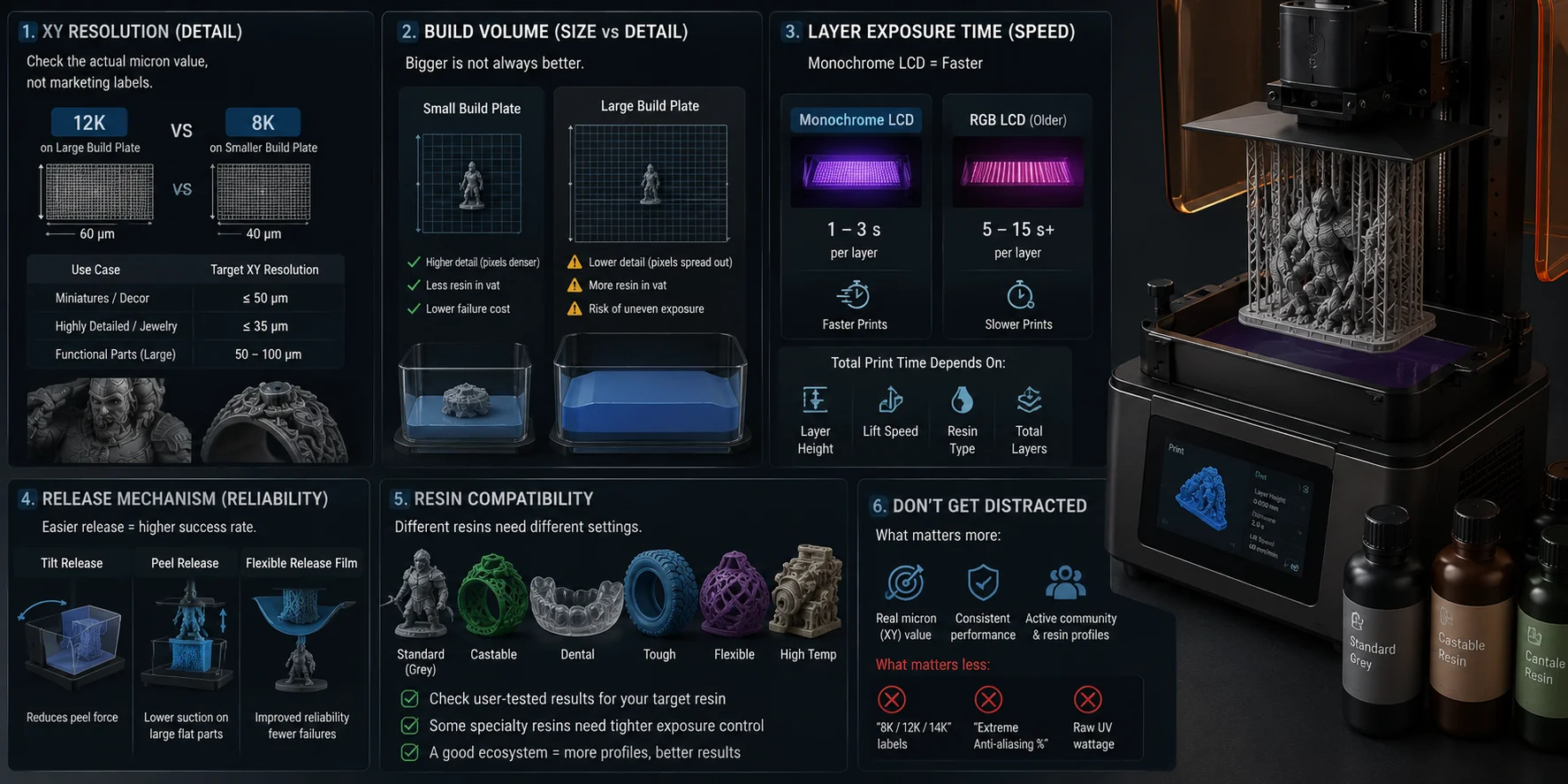
XY resolution is the first spec to check. It tells you the smallest detail the printer can reproduce across the screen plane. For miniatures, jewelry masters, and small decorative objects, aim for 50 microns or better. For very detailed figures or castable jewelry, 35 microns or better is a safer target. Larger functional parts do not need the same level of pixel density. Do not confuse XY resolution with marketing labels like 8K, 12K, or 14K. A 12K screen on a large build plate may not be sharper than an 8K screen on a smaller one. Always look for the actual micron value.
Build volume matters, but bigger is not always better. A large build plate lets you print more objects at once or taller parts in one piece. But as the screen grows, the same pixel count may spread over a larger area, lowering detail. Cheap large-format resin printers can also suffer from uneven light exposure near the edges if the UV system is weak. Large vats also require more resin to cover the film, even when the object itself is small. That raises the cost of failed prints and makes cleanup messier.
Layer exposure time affects speed. Modern monochrome LCD printers often expose layers in seconds. Older RGB-screen machines may need much longer exposure. Remember that total print time also depends on lift speed, layer height, resin type, and how many layers the print needs.
Release mechanism affects reliability. Every cured layer must peel away from the vat film. A tilt, peel, or flexible-release system can reduce suction forces, especially on large flat parts. This can improve print success and reduce stress on supports.
Resin compatibility is easy to overlook. Standard grey resin is forgiving, but castable, dental, tough, flexible, transparent, or high-temperature resins may need tighter exposure control. If you plan to print jewelry masters or functional prototypes, check whether users have tested your target resin on that printer.
You can mostly ignore vague marketing claims such as “extreme anti-aliasing” percentages or raw UV wattage without uniformity data. A clear product ecosystem, community resin profiles, and real user results are more useful than a flashy spec sheet.
Best Resin 3D Printers by Use Case
For miniatures and tabletop figures
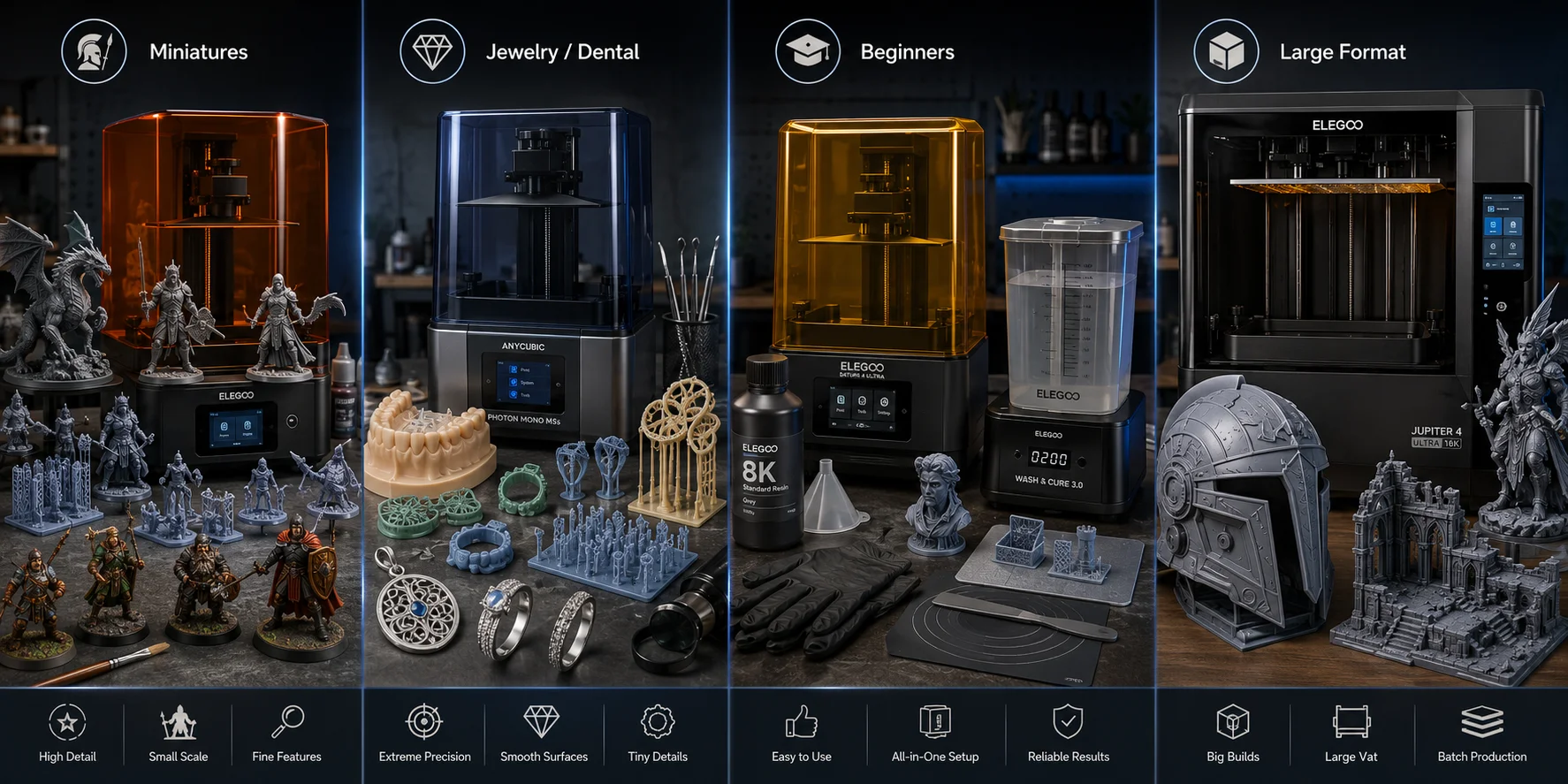
If you paint miniatures, prioritize XY resolution, print consistency, and a build plate that can handle multiple 28 mm figures at once. A smaller machine is fine because most miniatures are short, but the details are tiny: faces, armor edges, weapon tips, cloth folds, and creature scales. Look for printers with strong community profiles for popular miniature resins, because support settings matter as much as screen resolution.
A good miniatures printer should make cleanup easy. You will print many small parts, which means many supports and frequent washing. A stable build plate, easy leveling, and reliable first-layer adhesion reduce failed batches. Also think about how you paint. If you mostly paint display minis, prioritize detail. If you print armies or terrain pieces, batch capacity and fast repeatable results may matter more than the smallest possible pixel size.
For jewelry and dental-style models
Jewelry makers should care most about accuracy, castable resin support, and exposure repeatability. A large build volume is less important because rings, pendants, and small masters are compact. What matters is whether the printer can hold sharp edges, tiny engravings, prong details, and smooth curves.
For dental-style models, accuracy and resin validation matter even more. If you work in a professional dental workflow, choose a printer and resin system that fits the intended use and required standards. For hobby jewelry, make sure your slicer, resin, and burnout process are well documented. Castable resin is less forgiving than standard grey resin, so exposure calibration, supports, washing, and burnout testing become part of the workflow.
For beginners and general makers
Beginners should not chase the largest or highest-resolution printer first. Choose a machine with easy leveling, simple vat removal, available replacement films, an active user community, and many tested resin profiles. A printer that is easy to maintain will teach you faster than a fragile high-end machine with poor support.
A good beginner setup should include the printer, a wash-and-cure workflow, nitrile gloves, eye protection, resin filters, a silicone mat, paper towels, and enough space to work cleanly.
For large-format resin prints
Large resin printers are useful for helmets, terrain, statues, display pieces, and batch production. The trade-off is cost, resin consumption, and higher failure risk. Large flat surfaces create suction forces, and large vats require more resin just to start a print. Before buying, check whether the manufacturer publishes light-uniformity data and whether users report consistent results near the edges of the build plate. Also check whether your wash-and-cure setup can handle the same size parts. Many beginners buy a large printer and then realize their cleaning containers, curing station, and workspace are too small.
Resin 3D Printing vs. FDM: Which Should You Buy?
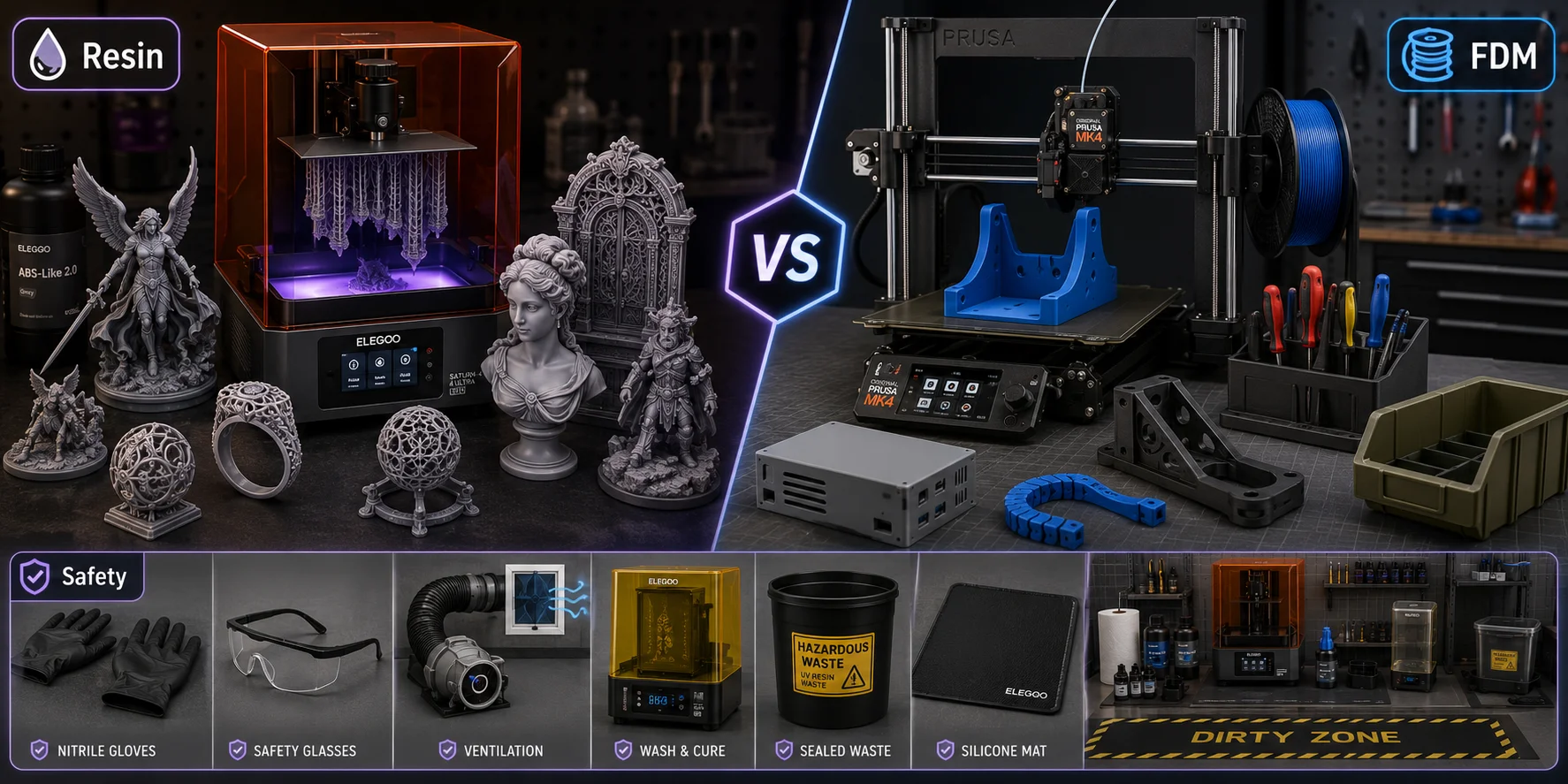
Resin printing wins when you need fine surface detail. It is the better choice for miniatures, jewelry masters, dental-style models, small sculptures, intricate props, and display objects. Layer lines can be very subtle, especially at 25–50 micron layer heights, and the surface usually needs less sanding than FDM. Resin also captures small text, skin pores, chainmail, teeth, claws, filigree, and ornamental patterns better than most consumer filament printers.
FDM wins when you need size, strength, material variety, and lower material cost. PLA, PETG, ABS, ASA, TPU, and nylon cover many practical uses that resin cannot easily match. If you need large brackets, flexible parts, outdoor parts, workshop tools, or functional enclosures, FDM is usually the better first printer.
The real question is not “Which technology is better?” It is “What do you print most?” If the object is under about 150 mm and detail matters, resin is often the better choice. If the object is structural, flexible, large, or cheap to iterate, FDM is safer.
Also remember post-processing. Resin prints must be washed, dried, and UV-cured after printing. That means extra equipment, extra time, chemical handling, and waste management. FDM is messier in other ways, but it is usually safer and simpler for shared spaces.
Safety and Workspace Requirements
Resin printing needs a real workspace plan. Uncured liquid resin can irritate skin and eyes, and resin fumes can be unpleasant or irritating in poorly ventilated rooms. Tom’s Hardware advises nitrile gloves, safety glasses, and proper ventilation when handling uncured resin.
Use nitrile gloves, not bare hands, whenever you handle resin, remove prints, clean supports, pour resin, or touch contaminated tools. Wear safety glasses when removing prints from the build plate or pouring resin. Keep resin away from children, pets, food surfaces, carpets, and absorbent furniture.
Ventilation is non-negotiable. Do not run a resin printer in a bedroom or small unventilated room. A garage, workshop, utility room, or enclosed cabinet with exhaust is safer. Activated carbon filtration can help with odor, but it should not replace fresh air or proper isolation.
Waste handling matters too. Do not pour liquid resin or resin-contaminated solvent down the drain. Formlabs advises checking the SDS and local authorities because liquid resin or resin dissolved in solvent may be classified as hazardous waste in your region.
A good resin workspace includes a non-porous surface, silicone mat, disposable towels, resin filters, sealed waste container, UV curing source, and a clear “dirty zone” for uncured parts. Keep your clean tools and finished prints separate from contaminated tools. Label containers clearly, close resin bottles immediately after pouring, and wipe the vat edge before putting the lid back on. Resin printing is not difficult, but it rewards careful habits.
From Digital Model to Physical Print — The AI Workflow
Every resin print starts as a digital 3D model. Traditionally, that meant downloading STL files from marketplaces, sculpting in software, hiring a 3D artist, or learning CAD. That still works, but it creates friction. You may find a model that is close but not exact, the license may block commercial use, or the file may need cleanup before slicing.
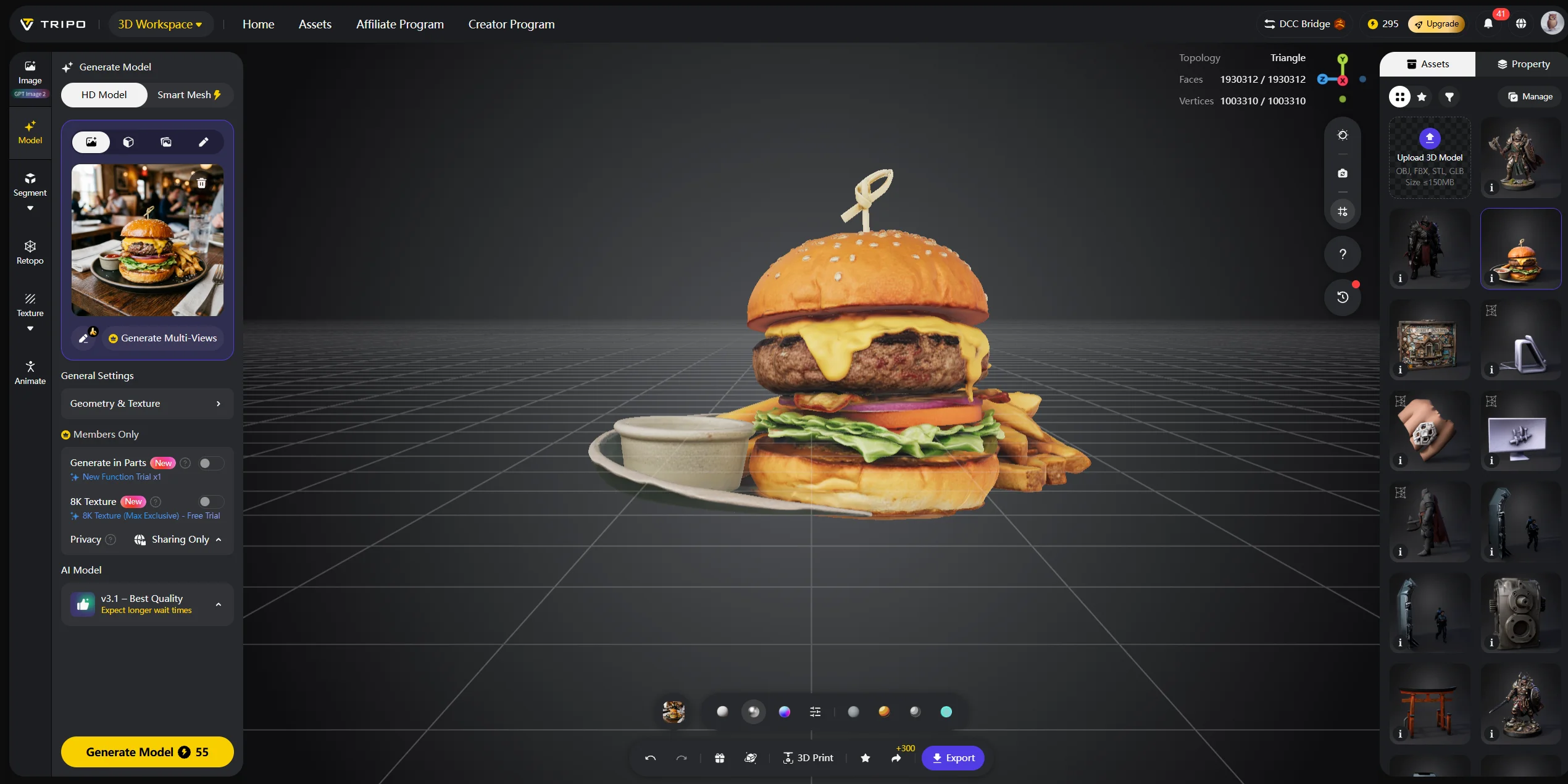
AI model generation changes that workflow. With Tripo AI’s Text-to-3D and Image-to-3D tools, you can start from a prompt or reference photo and generate a custom model without CAD experience. This is especially useful for miniature painters, toy makers, jewelry concept artists, and hobbyists who want original designs instead of another downloaded file.
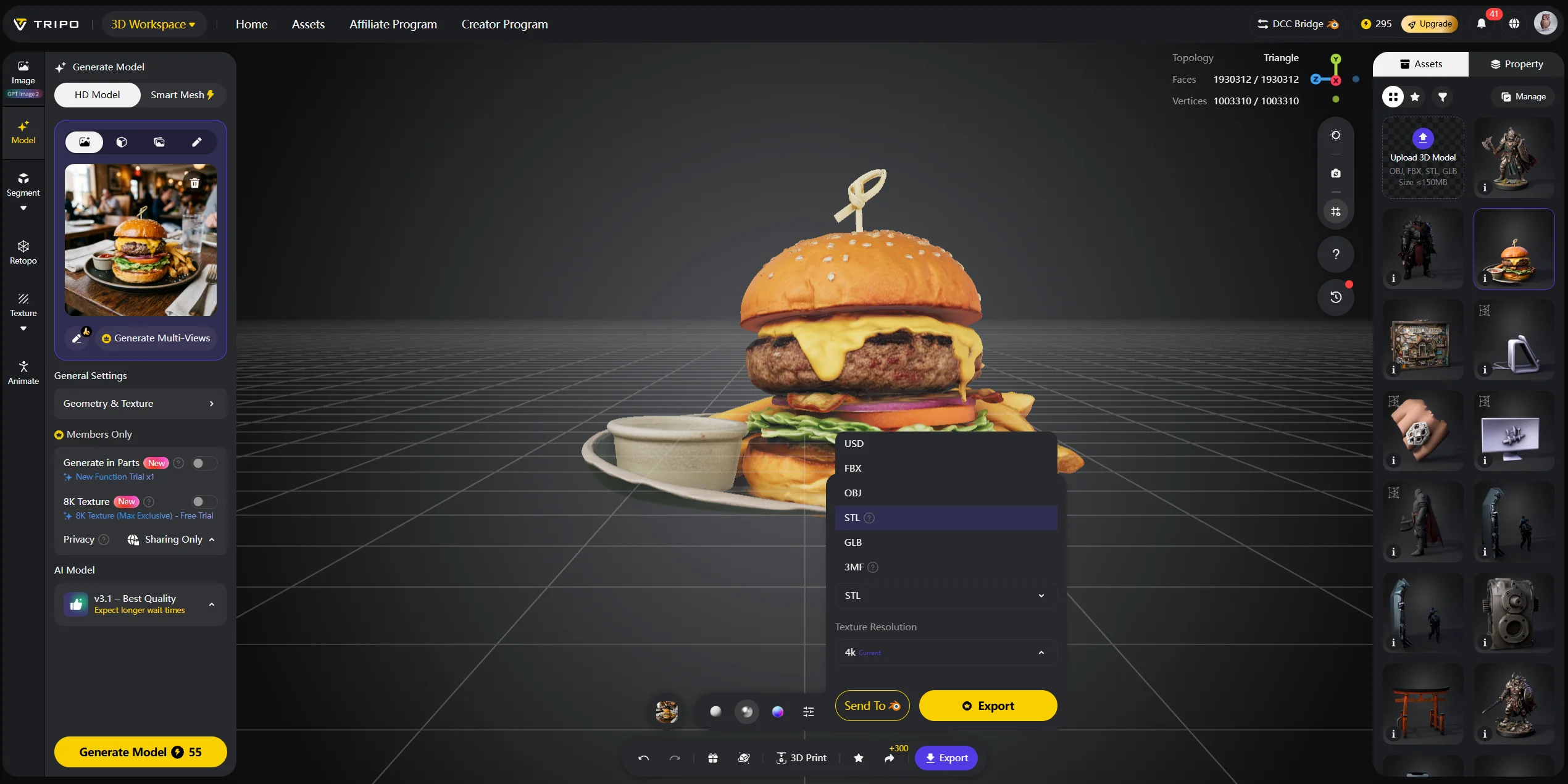
The workflow is direct: generate a model in Tripo AI Studio, inspect the mesh, export STL or 3MF, open it in your slicer, add supports, orient the model, and print. Tripo AI’s official 3D printing page lists one-click export to STL, OBJ, and 3MF, while its conversion documentation also includes STL and 3MF as supported output formats.
For resin printing, the slicer step still matters. Even if the model is generated quickly, you should check wall thickness, scale, hollowing, drain holes, island detection, and support placement. Small decorative models may print solid, while larger figures usually need hollowing to reduce suction and resin cost. AI helps you create the asset, but good resin printing still requires good slicing.
This does not replace every sculptor or marketplace. Highly detailed production miniatures may still need manual sculpting and cleanup. But for custom props, early jewelry concepts, decorative objects, creatures, accessories, and tabletop prototypes, AI generation can shorten the path from idea to physical object. It also helps when you need variations: a different pose, a themed accessory, a matching base, or a quick prototype before committing to a final sculpt.
What to Consider When Buying a Resin 3D Printer
Printer price is only one line item. Your real starter budget should include resin, replacement FEP or nFEP film, screen protectors, gloves, filters, wash solution, containers, and a curing setup. A wash-and-cure station is not mandatory, but it makes the process cleaner and more repeatable.
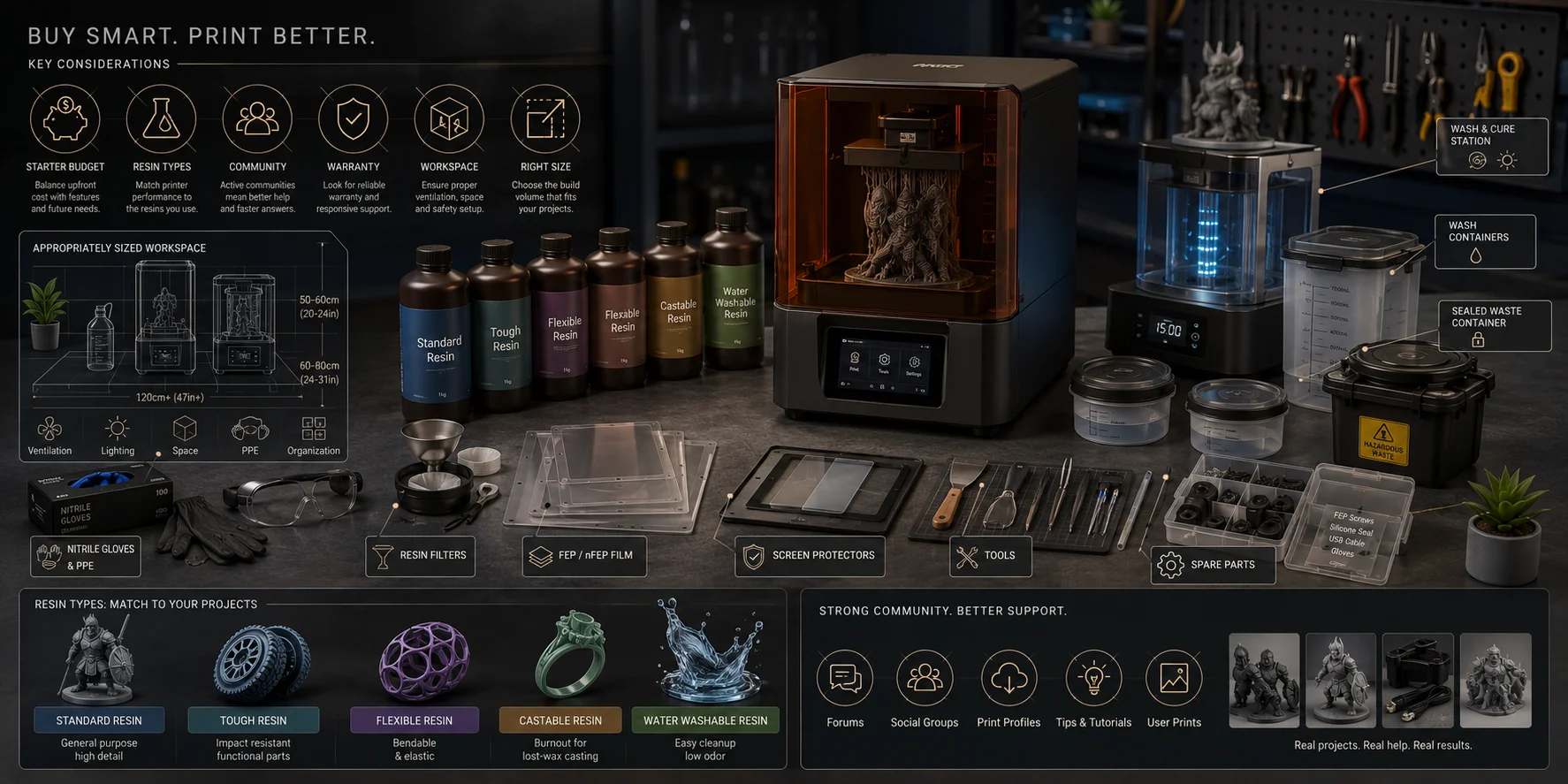
Resin choice affects the buying decision too. Standard resin is cheap and good for display models, but it can be brittle. Tough resin is better for parts that need impact resistance. Flexible resin can work for soft parts, but it is harder to support and clean. Castable resin is designed for jewelry workflows. Water-washable resin sounds beginner-friendly, but it still requires safe waste handling because contaminated wash water should not go down the drain.
Check the ecosystem before buying. Does the printer have an active community? Are there third-party resin profiles? Does the slicer support common workflows, or does the manufacturer lock you into proprietary settings? A strong community can save you hours when prints fail.
Warranty and support also matter. Resin printers have consumable parts: LCD screens, vat films, build plates, vats, gaskets, and sometimes light systems. If the screen is proprietary or difficult to source, repair costs can surprise you. Before buying, check whether replacement screens and vat films are easy to order.
Think about your upgrade path. If you are new, a beginner bundle with a wash-and-cure station, standard grey resin, and spare film can reduce setup friction. If you already print often, spend more on reliability, larger volume, and resin compatibility instead of headline resolution. The best second printer is often not the sharpest model available; it is the one that removes your current bottleneck, whether that is batch size, failed supports, resin temperature, or maintenance time.
Finally, measure your workspace. Resin printing needs room for the printer, wash station, curing station, resin bottles, tools, waste container, and drying area. If you only have a desk in a bedroom, wait until you can create a safer setup.
A simple buying rule helps: choose the smallest machine that comfortably fits your normal projects. Oversized printers cost more, consume more resin, and increase cleanup effort. Undersized printers force you to split models into parts and assemble them later. The best value usually sits in the middle: enough volume for your real projects, enough resolution for visible details, and enough support to keep you printing.
Frequently Asked Questions
Who makes suitable resin 3D printers for different users?
Premium and industrial users often consider brands such as Formlabs or Stratasys. Prosumer and hobby buyers often compare Phrozen, Elegoo, and Anycubic. The right choice depends on the use case, budget, support needs, material compatibility, and resin ecosystem.
Is it worth buying a resin 3D printer in 2026?
Yes, if you regularly print detailed small objects. Miniature painters, jewelry makers, and sculptors can save money compared with repeatedly buying custom prints. It is less worthwhile if you only print large functional parts.
What is the difference between SLA, DLP, and MSLA?
SLA uses a laser to cure resin point by point. DLP projects a full layer with a digital projector. MSLA uses a UV light array and LCD mask, which makes it common in consumer machines.
What is the best resin 3D printer for miniatures?
Look for 35-micron or better XY resolution, reliable supports, and a build area that fits several figures. Community-tested resin profiles are more important than chasing the highest “K” screen number.
What is the best resin 3D printer for beginners?
Choose a printer that is easy to level, easy to clean, and widely supported. A strong user community, available spare parts, and beginner-friendly resin profiles matter more than maximum resolution.
What is the best resin 3D printer for jewelry?
Choose a printer with excellent XY resolution, stable exposure, and support for castable resin. Small build volume is fine because jewelry pieces are compact, but resin calibration must be precise.
Do resin 3D printers need ventilation?
Yes. Resin printing should happen in a ventilated, isolated workspace. Use gloves, eye protection, and a plan for solvent and resin waste before your first print.
Are resin 3D printers toxic?
Uncured resin and resin-contaminated solvent should be treated as hazardous materials. They can irritate skin, eyes, and airways. Fully cured parts are safer to handle, but you should still follow resin manufacturer guidance.
What is the holy grail of 3D printing?
People often use this phrase for a printer that combines large build volume, high resolution, fast speed, low cost, and easy materials. No consumer machine fully achieves all of that yet.
Can I use AI to generate models for resin printing?
Yes. Tools like Tripo AI can generate models from prompts or reference images and export formats such as STL and 3MF. You still need to inspect, orient, support, slice, and test the model before printing.
Conclusion
The best resin 3D printer is the one that matches your specific use case, whether that means painting-ready miniatures, castable jewelry masters, or your first hobbyist project. Use the spec criteria and use-case framework in this guide to narrow your shortlist, then factor in total cost of ownership before you buy.
Tripo AI Studio can generate a custom 3D starting point from a prompt or reference image. Output quality and generation time depend on the input, settings, and model complexity. Before resin printing, inspect and repair the mesh, confirm scale and wall thickness, add supports in the slicer, and validate the sliced preview.