Best 3D Sculpting Software in 2026
TL;DR:
- SketchUp is best for architecture, interior design, and fast concept modeling with an easier learning curve.
- ZBrush — Best for professional artists and high-detail sculpting.
- Blender — Best free 3D sculpting software with a complete 3D workflow.
- Nomad Sculpt — Best for iPad and mobile sculpting.
- ZBrushCoreMini — Best beginner tool for learning digital sculpting.
- 3DCoat/Mudbox — Good choices for specialized production workflows.
- For 3D printing — Blender and ZBrush provide reliable STL/OBJ workflows.
- AI + sculpting — Use tools like Tripo AI to generate base meshes faster, then refine them in Blender or ZBrush.
The best 3D sculpting software depends on your goals: ZBrush leads for professional character work, Blender is the top free option, and Nomad Sculpt is the best choice for iPad and mobile. For 3D printing, ZBrush and Blender both export clean, print-ready geometry.
The global 3D animation and modeling software market is projected to exceed $25 billion by 2030 — and sculpting tools are at the heart of it. Whether you're a hobbyist shaping your first character or a studio artist polishing a game-ready asset, the right sculpting tool changes everything. This guide covers the best options for every skill level, budget, and platform — including free tools, mobile apps, and professional suites — so you can start sculpting today.
What Is 3D Sculpting Software?
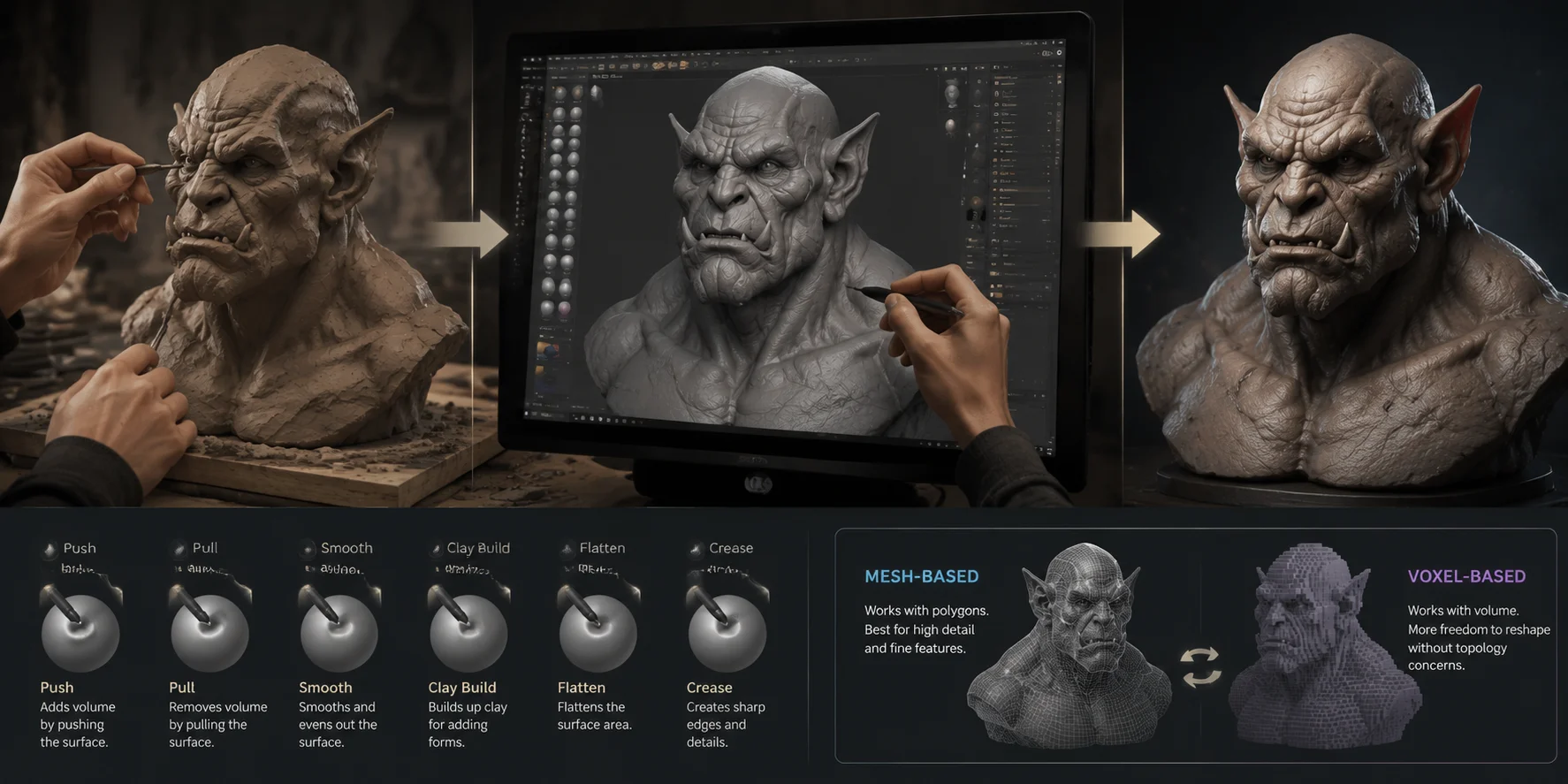
3D sculpting software lets you create digital models by pushing, pulling, smoothing, and carving surfaces, similar to working with real clay. Instead of controlling individual vertices and edges like traditional polygon modeling, you use brushes to directly shape the form.
This brush-based workflow makes sculpting ideal for organic shapes such as humans, animals, monsters, and fantasy designs. Artists can quickly block out large forms and then add small details like skin textures, wrinkles, or surface patterns.
Most sculpting software uses either mesh-based or voxel-based technology. Mesh-based tools like ZBrush and Blender modify polygon surfaces to create highly detailed models. Voxel-based workflows allow artists to reshape forms more freely without worrying about topology during the early stages.
Whether you create game characters, digital art, or printable models, choosing the right sculpting software can greatly improve your workflow.
3D Sculpting Workflow: From Digital Clay to Detailed 3D Model
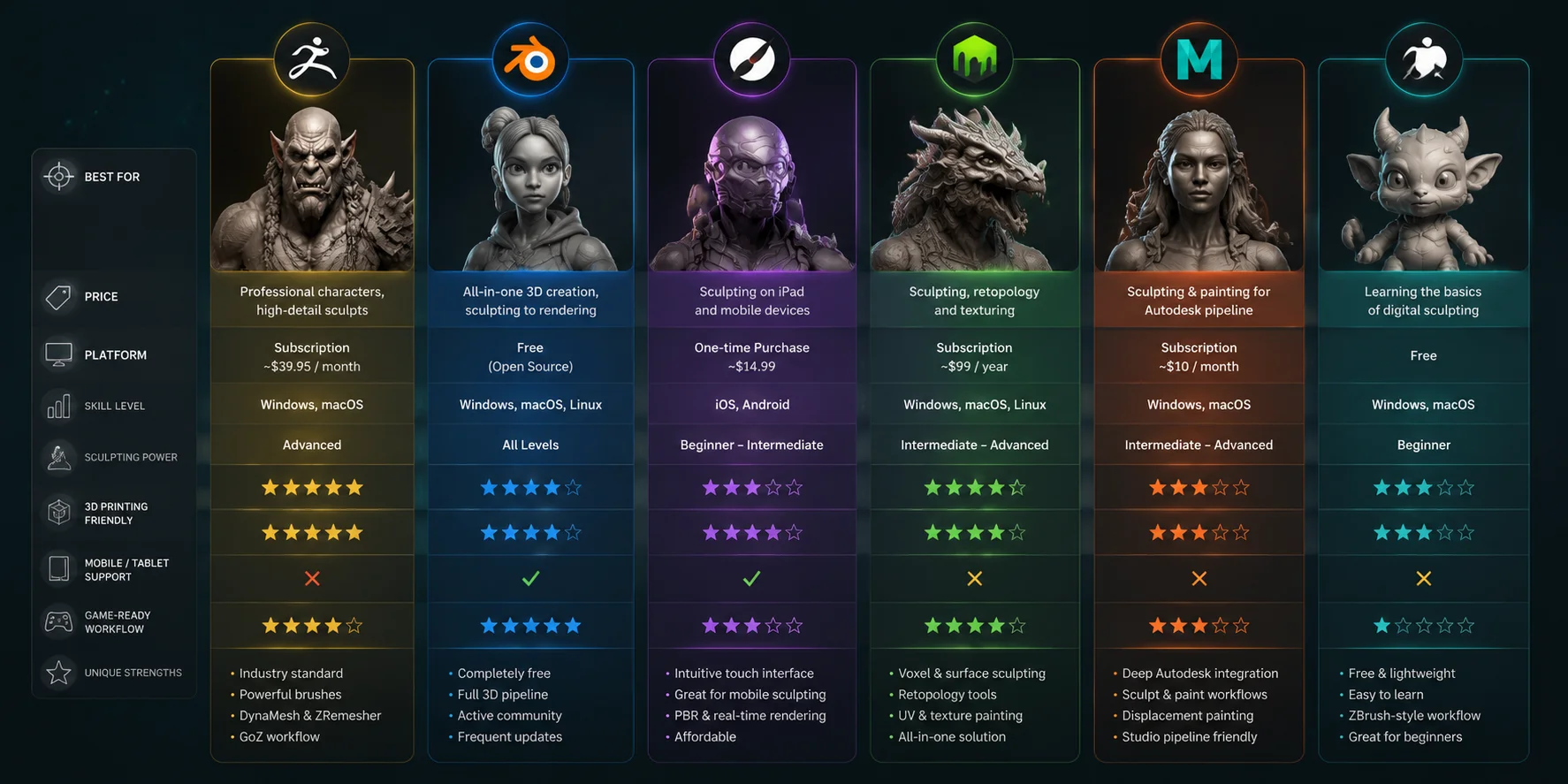
The Best 3D Sculpting Software at a Glance
| Software | Best For | Price | Platform | Skill Level |
|---|---|---|---|---|
| ZBrush | Professional character sculpting | About $39.95/month | Windows, macOS | Advanced |
| Blender | Free all-in-one 3D workflow | Free | Windows, macOS, Linux | All levels |
| Nomad Sculpt | iPad and mobile sculpting | About $14.99 one-time | iOS, Android | Beginner–Intermediate |
| 3DCoat | Sculpting, painting, retopology | About $99/year | Windows, macOS, Linux | Intermediate–Advanced |
| Mudbox | Autodesk pipeline workflows | About $10/month | Windows, macOS | Intermediate–Advanced |
| ZBrushCoreMini | Learning sculpting basics | Free | Windows, macOS | Beginner |
If you are new to sculpting, Blender and ZBrushCoreMini are great starting points because you can learn without spending money. If you want professional character creation, ZBrush remains the industry standard. For mobile sculpting, Nomad Sculpt is one of the easiest tools to start with.
Best 3D Sculpting Software Comparison: ZBrush, Blender, Nomad Sculpt & More
Best Free 3D Sculpting Software
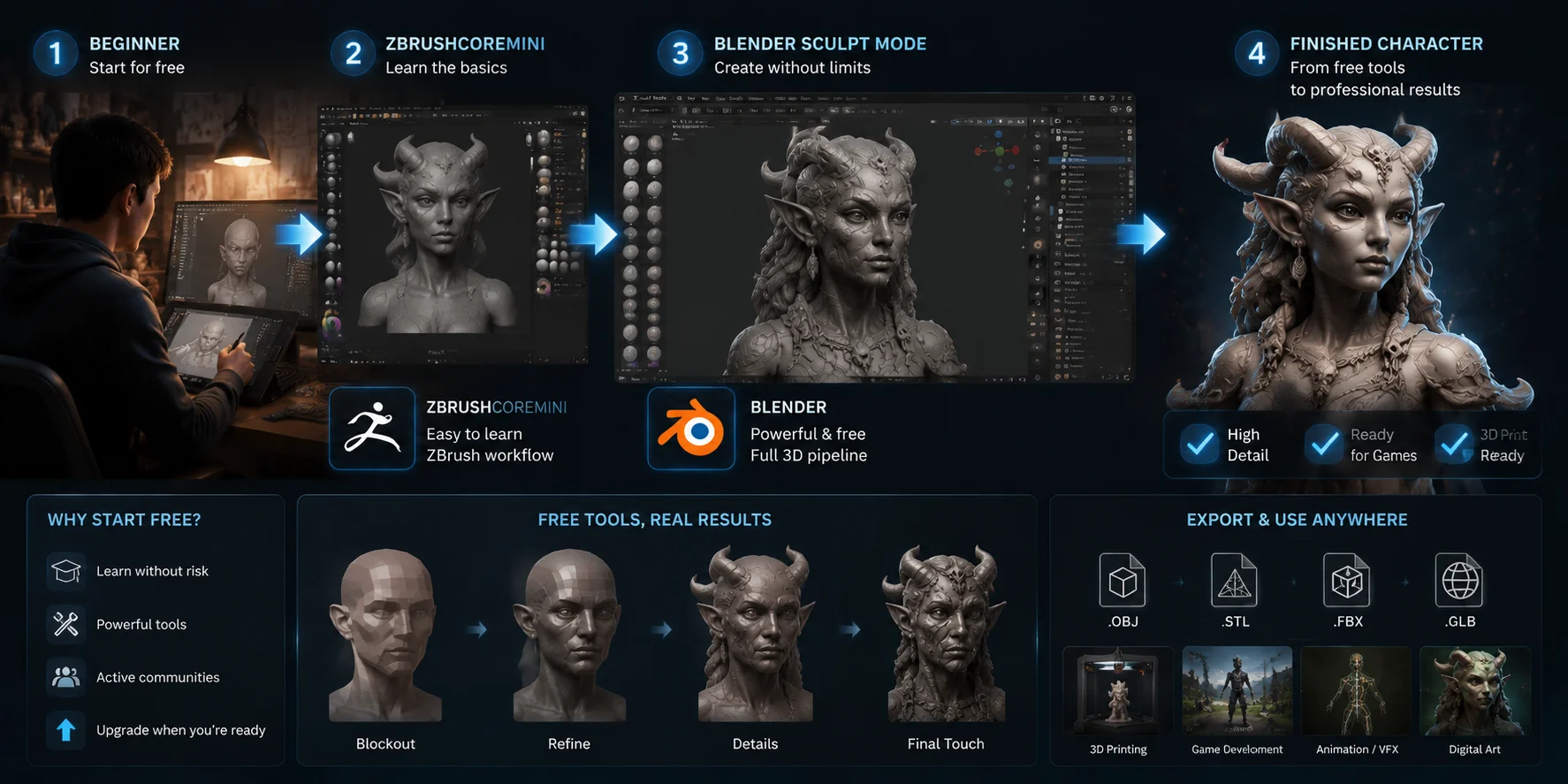
Many artists search for free 3D sculpting software because they want to learn before investing in expensive subscriptions. Today, free tools can handle serious projects, from concept art to printable models.
Blender — Best Free All-Round Option
Blender is the most powerful free sculpting tool available. Its Sculpt Mode includes brushes for smoothing, grabbing, inflating, carving, and building surface details.
The biggest advantage of Blender is that it covers the entire 3D pipeline. You can sculpt, model, texture, rig, animate, render, and export from one application.
For beginners, Blender has a large learning community with thousands of tutorials. The interface may feel complex at first, but you can gradually learn new features as your skills grow.
ZBrushCoreMini — Best Free ZBrush Introduction
ZBrushCoreMini gives beginners a simple way to learn ZBrush-style sculpting. It removes advanced professional features but keeps the basic workflow.
It is a good choice if you want to understand digital sculpting fundamentals before moving to full ZBrush.
SculptGL — Best Quick Browser Tool
SculptGL runs directly in your browser, so you do not need to install software. It works well for simple experiments and learning basic sculpting concepts.
However, it is limited compared with Blender or ZBrush and is not the best choice for professional projects or 3D printing.
Free 3D Sculpting Workflow: From Beginner Tools to Professional Results
Best 3D Sculpting Software for Beginners
For 3D sculpting for beginners, the easiest tool is not always the most powerful one. A good beginner program should have simple controls, helpful tutorials, and enough features to support long-term learning.
Blender
Blender is one of the best choices for beginners who want a complete 3D skill set. You can start with simple sculptures and later move into animation, games, or visual effects.
Its biggest advantage is the community. If you have a question, you can usually find a tutorial or solution online.
Nomad Sculpt
Nomad Sculpt is one of the most beginner-friendly sculpting apps available. Its touch interface feels natural, especially with an Apple Pencil or Android stylus.
You can rotate, smooth, and shape your model directly with your hands. The simple interface helps new artists focus on learning sculpting instead of managing complicated settings.
ZBrushCoreMini
ZBrushCoreMini is designed specifically for beginners. Because it removes advanced options, new users can focus on learning basic sculpting techniques without feeling overwhelmed.
A good beginner strategy is to choose one tool and complete several projects before switching. Learning the fundamentals matters more than constantly changing software.
Best 3D Sculpting Software for Professional Artists
Professional artists need tools that can handle high-detail models, complex characters, and production workflows.
ZBrush — Industry Standard for Digital Sculpting
ZBrush remains the leading choice for film, games, and collectibles.
Its powerful features include:
- DynaMesh for flexible shape editing
- ZRemesher for cleaner topology
- Advanced brushes for high-frequency details
- GoZ workflow for moving models between applications
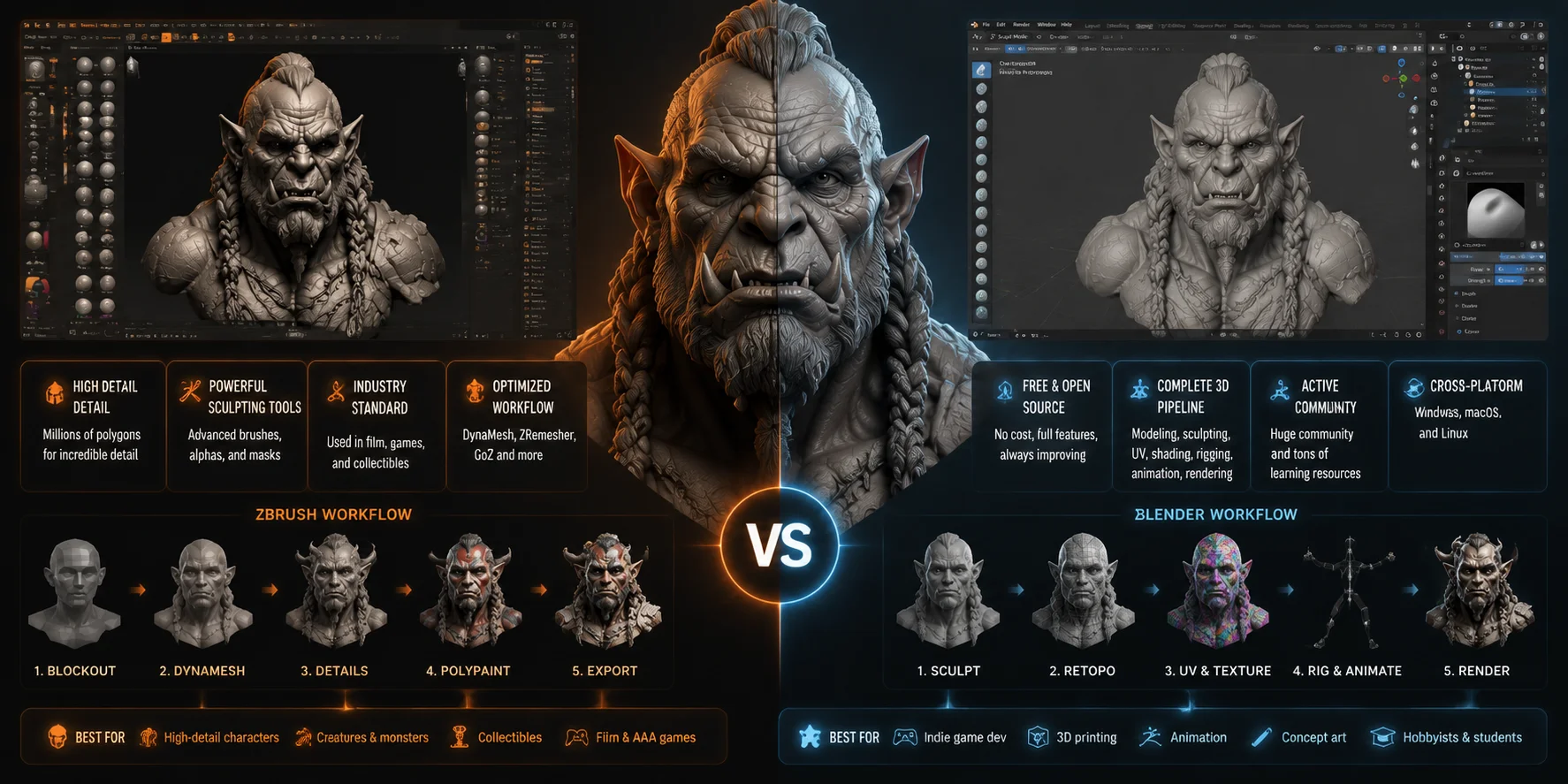
ZBrush is especially strong when creating detailed characters, creatures, and statues.
When people ask, “What is the best ZBrush alternative?” the answer depends on the workflow. No tool completely replaces ZBrush for professional high-detail sculpting, but Blender is the closest free alternative for many artists.
Mudbox
Mudbox works well for artists already using Autodesk software such as Maya or 3ds Max. It combines sculpting and texture painting and fits naturally into existing production pipelines.
3DCoat
3DCoat is a flexible option that combines sculpting, retopology, UV editing, and painting. It is popular among indie developers and artists who want multiple tools in one package.
ZBrush vs Blender Sculpting: Which 3D Sculpting Tool Should You Choose?
Best 3D Sculpting Software for 3D Printing
The best 3D printing sculpting software needs to create clean, printable geometry. A beautiful model can still fail if it has holes, broken surfaces, or incorrect topology.
ZBrush
ZBrush is excellent for printable models because it can handle extremely detailed sculptures. Artists often use it for miniatures, figurines, and collectibles.
You can export models directly as STL files and prepare them for resin or FDM printing.
Blender
Blender is the best free choice for 3D printing workflows. The 3D Print Toolbox helps you check:
- Non-manifold edges
- Thin walls
- Mesh errors
- Incorrect normals
After checking your model, you can export STL or OBJ files for slicing.
Meshmixer
Meshmixer is not a sculpting program, but it is useful for repairing and preparing models before printing. Many artists use it as a final cleanup tool.
Always check that your model is a closed, solid mesh before printing. Broken geometry can cause errors in slicers such as Cura or PrusaSlicer.
Best 3D Sculpting Apps for iPad and Mobile
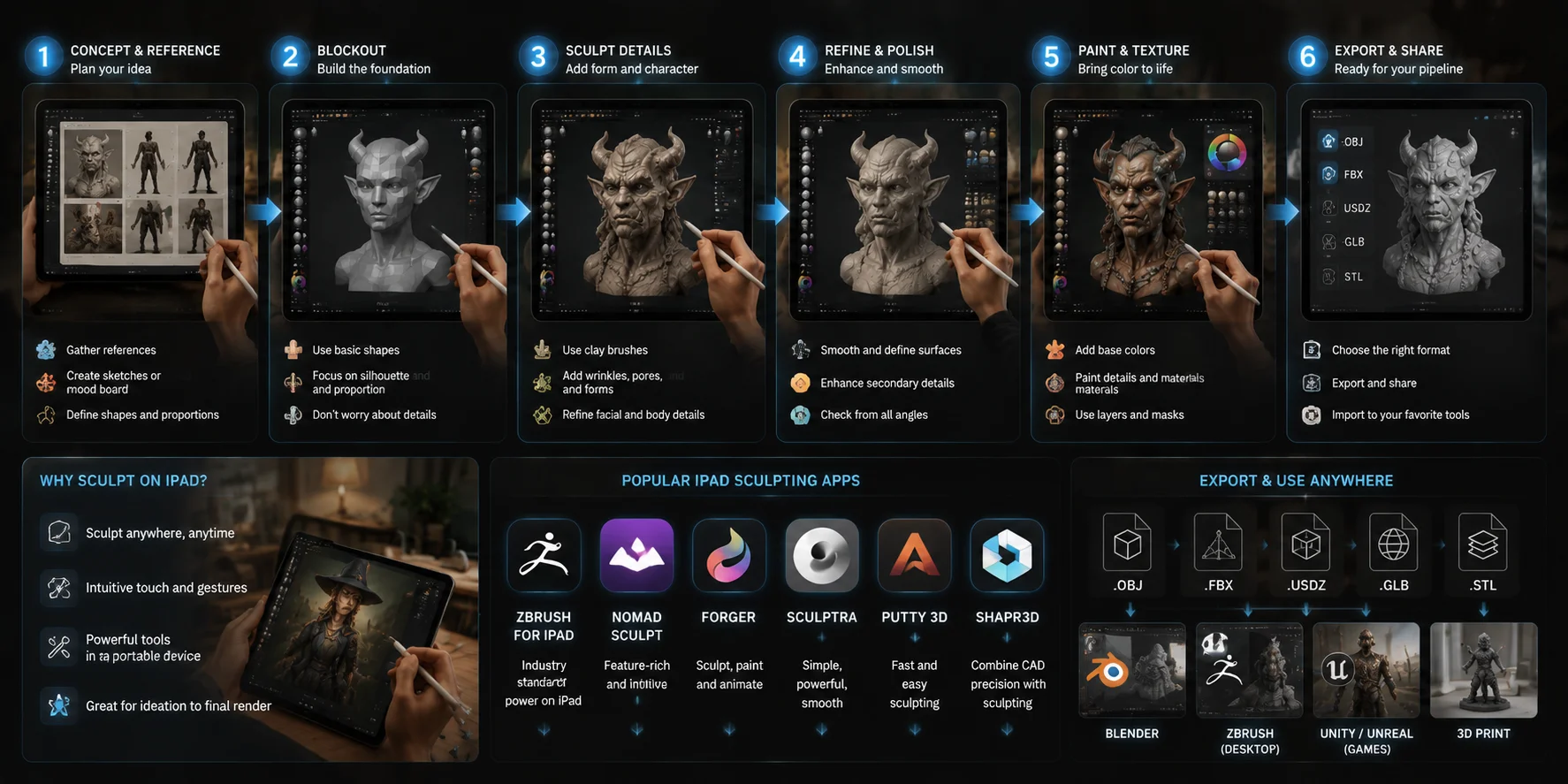
Mobile sculpting has become much more powerful. With modern tablets, you can create detailed models without a desktop computer.
Nomad Sculpt
Nomad Sculpt is currently one of the best mobile sculpting applications. It supports:
- Layers
- Symmetry
- PBR rendering
- OBJ, STL, and GLB export
It works well for character concepts, creatures, and 3D printing projects.
Forger
Forger is another strong iPad option. It supports Apple Pencil pressure sensitivity and works well for character and creature concepts.
Shapr3D
Shapr3D focuses more on CAD and product design rather than organic sculpting. However, it can be useful for precise 3D printing projects.
iPad 3D Sculpting Workflow: From Concept to Finished Digital Sculpture
How to Choose the Right 3D Sculpting Software
Choosing the right 3D sculpting software depends on your budget, platform, experience level, and the type of projects you create. You do not need the most powerful tool — you need the one that fits your workflow.
Budget: If you are learning, free options like Blender and ZBrushCoreMini are already powerful enough for serious practice. Blender gives you a complete 3D pipeline at no cost, while ZBrushCoreMini helps beginners learn professional sculpting concepts. If you create characters professionally every day, ZBrush can be worth the investment because it saves time with advanced sculpting features.
Platform: Most major tools work well on Windows and Mac. If you sculpt on an iPad, Nomad Sculpt is one of the best choices because of its touch-based workflow. For Linux users, Blender remains the strongest option.
Use case: Your project type should guide your choice. Choose ZBrush or Blender for organic characters and creatures. For 3D printing, ZBrush and Blender with the 3D Print Toolbox provide reliable workflows. For mobile sculpting, choose Nomad Sculpt. If you create game-ready assets, Blender is a strong option because it connects easily with engines like Unity and Unreal.
Skill level: Do not start with the most advanced software just because professionals use it. A tool with better learning resources will help you improve faster. Blender and Nomad Sculpt both have large beginner communities and extensive tutorials.
Workflow integration: Your existing tools also matter. If you already work with Maya or 3ds Max, Mudbox can fit naturally into an Autodesk pipeline. If you want to skip the slow process of creating a base mesh, AI tools like Tripo AI can generate starting models from images or text prompts. You can export these meshes as OBJ or STL and continue sculpting in Blender, ZBrush, or Nomad Sculpt. Explore Tripo AI’s Image to 3D and Text to 3D workflows to create a faster starting point for your sculpting projects.
Speed Up Your Sculpting Workflow with AI
One of the slowest parts of sculpting is creating the first base mesh. Artists often spend hours blocking proportions before they can start adding creative details.
AI 3D generation tools can speed up this early stage. Tools like Tripo AI can generate a base mesh from a text prompt or reference image, which you can then import into Blender, ZBrush, or Nomad Sculpt.
This workflow helps you:
- Explore multiple ideas quickly
- Create starting shapes for characters
- Prepare models for further sculpting
- Reduce repetitive modeling work
AI does not replace sculpting skills. Instead, it gives you a faster starting point so you can focus on improving the design.
Try Tripo AI Studio to create a base mesh and continue refining it in your favorite sculpting software.
Frequently Asked Questions
Which software is best for sculpting?
ZBrush is the best choice for professional sculpting. Blender is the best free option, while Nomad Sculpt is ideal for mobile users.
Is Blender or ZBrush better for sculpting?
ZBrush has more specialized sculpting features and handles very high-detail work better. Blender is free and provides a complete 3D workflow.
What is better than ZBrush?
No software fully beats ZBrush for professional sculpting. Blender is the strongest free alternative for most users.
What is the best 3D sculpting software for beginners?
Blender and Nomad Sculpt are the best choices for beginners because they have simple learning paths and large communities.
Can sculpting software create 3D printing models?
Yes. ZBrush and Blender can export STL and OBJ files. Always check your mesh before printing.
Can AI help with 3D sculpting?
Yes. AI tools can generate base meshes from text or images, allowing artists to begin sculpting faster.
Conclusion
The best 3D sculpting software depends on your goals. ZBrush remains the top choice for professional artists, Blender provides the strongest free workflow, and Nomad Sculpt offers an easy mobile experience.
The fastest workflow often starts before sculpting begins. By creating a base mesh with AI, you can spend more time improving your design and less time building basic forms.
Try Tripo AI Studio to generate your first sculpt-ready model, and explore Tripo AI Pricing to find a plan that fits your workflow.