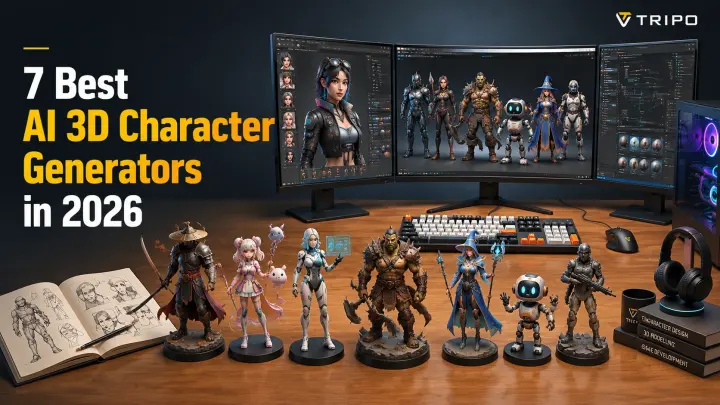
7 Best AI 3D Character Generators in 2026 (Rigging, FBX & Free Options)
TL;DR
- AI 3D character generators let anyone create game-ready 3D characters from a text prompt or image — no modeling skills needed
- Tripo AI leads on export flexibility: FBX (rigging-ready), GLB, OBJ, STL, 3MF, and USD in one platform
- Most competitors specialize in one niche (avatars, animations, or textures) rather than full end-to-end character generation
- Free tiers exist across most tools — but rigging and FBX export typically require a paid plan
AI 3D character generators have transformed the way game artists, VR creators, and animators build digital characters in 2026. What once required advanced modeling skills can now be achieved through a simple text prompt or reference image, allowing anyone to create usable 3D characters without professional experience. These tools are accelerating prototyping, reducing production time, and making custom character creation more accessible across creative industries. In this guide, we evaluate the best AI 3D character generators based on key factors including output quality, rigging support, export formats, platform compatibility, and available free credits, helping you choose the right tool for your workflow.
Quick comparison table
| Tool | Best For | Free Tier | Rigging Support | Key Export Formats |
|---|---|---|---|---|
| ⭐ Tripo AI (Editor's Pick) | Game characters, VR avatars, animation-ready prototypes | Free credits available | AI auto-rigging, animation support | FBX, GLB, OBJ, STL |
| Meshy AI | Fast character concepts and game assets | Free monthly credits | Basic AI rigging options | FBX, GLB, OBJ |
| Kaedim | Production-quality game characters from concepts | Limited trial credits | Manual/production pipeline support | FBX, OBJ, GLB |
| Ready Player Me | VR avatars and metaverse characters | Free avatar creation | Built-in avatar rigging | GLB, FBX |
| DeepMotion | AI motion capture and animated characters | Free limited animations | Strong AI rigging and motion generation | FBX, BVH, GLB |
| Sloyd | Stylized game-ready characters and assets | Free generation credits | Limited character setup | GLB, FBX, OBJ |
| Character Creator 4 | Professional character creation and animation | Trial version available | Advanced facial/body rigging | FBX, OBJ, USD |
This table provides a quick overview, while the following sections explore each tool’s strengths, limitations, and ideal use cases in more detail.
What Is an AI 3D Character Generator?
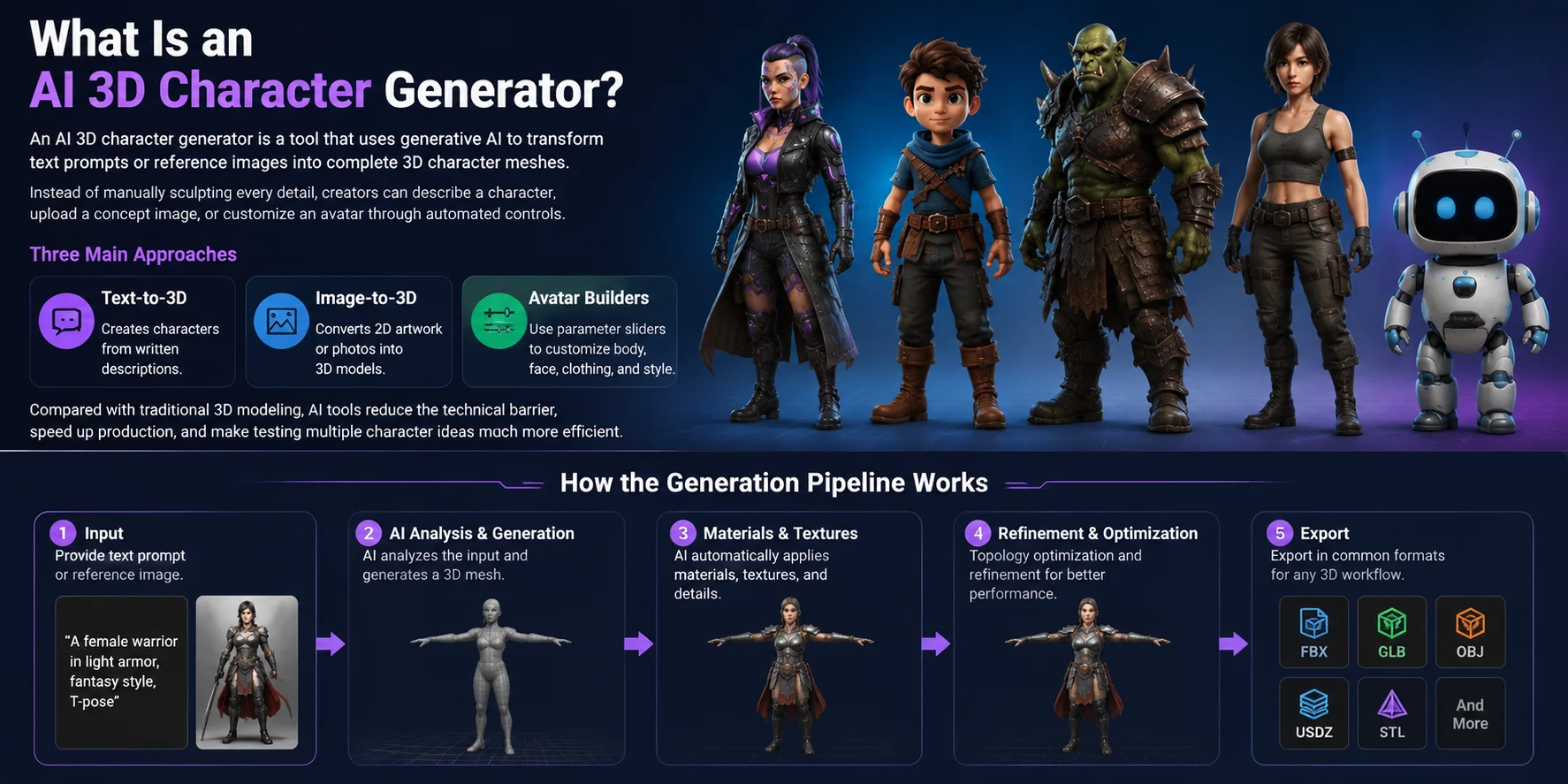
An AI 3D character generator is a tool that uses generative AI to transform text prompts or reference images into complete 3D character meshes. Instead of manually sculpting every detail, creators can describe a character, upload a concept image, or customize an avatar through automated controls. Most AI character generators follow three main approaches: text-to-3D, which creates characters from written descriptions; image-to-3D, which converts 2D artwork or photos into 3D models; and avatar builders, which use parameter sliders to adjust body shape, facial features, clothing, and style. Compared with traditional 3D modeling, AI tools reduce the technical barrier, speed up production, and make testing multiple character ideas much more efficient.
How the Generation Pipeline Works
The typical AI 3D character workflow follows a simple process: users provide an input such as text or an image, the AI analyzes the data and generates a 3D mesh, then automatically applies materials, textures, and basic topology optimization. After refinement, the finished character can be exported in common formats for games, animation, VR, or other 3D workflows.
Best AI 3D Character Generator Overall — Tripo AI
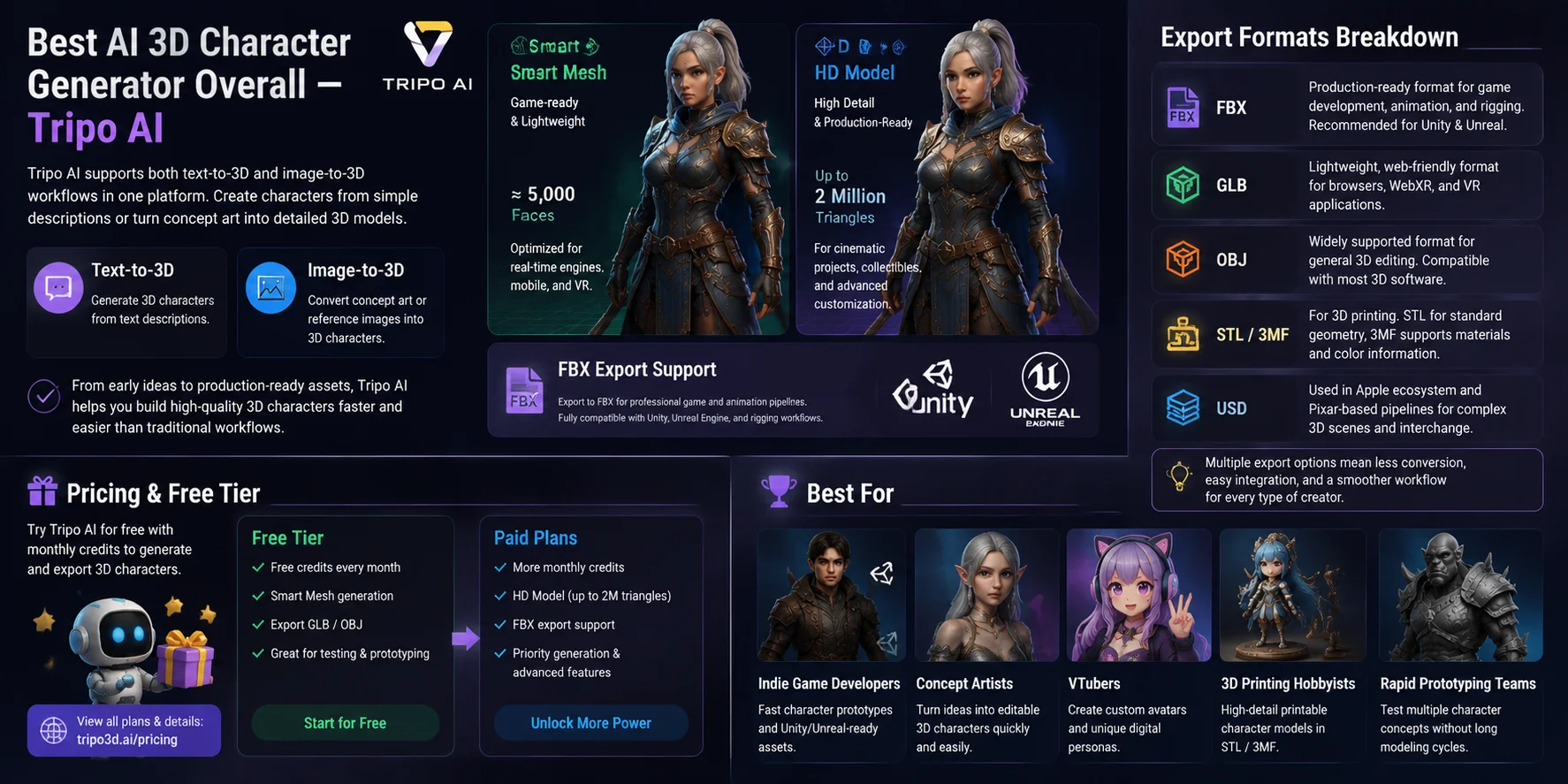
Tripo AI stands out as one of the most versatile AI 3D character generators because it supports both text-to-3D and image-to-3D workflows in a single platform. Users can create characters from simple descriptions or convert concept art and reference images into detailed 3D models. Its two generation modes cover different production needs: Smart Mesh creates lightweight, game-ready models with around 5,000 faces for real-time applications, while HD Model delivers high-detail assets with up to 2 million triangles for cinematic projects, collectibles, and advanced customization. This makes Tripo AI suitable for the full pipeline, from early character ideas to production-ready assets.
A major advantage is its FBX export support, which is often missing from competing AI character generators. FBX is the preferred format for professional game workflows because it works directly with engines like Unity and Unreal and supports character pipelines that require rigging, animation, and further editing. This allows creators to move from AI generation into a complete 3D production workflow without rebuilding the model from scratch.
Export Formats Breakdown
Tripo AI supports multiple export formats to fit different creative workflows:
- FBX — A production-focused format for game development, animation, and rigging workflows. It is the recommended choice for Unity and Unreal projects because it supports meshes, materials, and character pipelines.
- GLB — A lightweight web-friendly format ideal for browser-based 3D viewers, WebXR, and VR applications.
- OBJ — A widely supported format for general 3D editing, compatible with most modeling software.
- STL / 3MF — Formats designed for 3D printing workflows. STL works well for standard geometry, while 3MF supports additional data such as materials and color information.
- USD — A format used in Apple ecosystem workflows and professional Pixar-based pipelines for exchanging complex 3D scenes.
Having multiple export options is important because different creators have different requirements. A game developer may need FBX for animation, a VR creator may prefer GLB, and a 3D printing hobbyist may need STL or 3MF. Flexible exports reduce conversion steps and make AI-generated characters easier to integrate into existing workflows.
Pricing and Free Tier
Tripo AI provides free credits that allow users to test AI 3D character generation before upgrading. Paid plans unlock higher usage limits, advanced features such as HD Model generation, and production-focused exports including FBX. Users can compare available plans and credit options on the Tripo AI Pricing page.
Best For
Tripo AI is a strong choice for:
- Indie game developers who need fast character prototypes and Unity/Unreal-ready assets
- Concept artists who want to turn ideas into editable 3D characters quickly
- VTubers creating custom avatars and digital personas
- 3D printing hobbyists who need detailed printable character models
- Rapid prototyping teams testing multiple character concepts without long modeling cycles
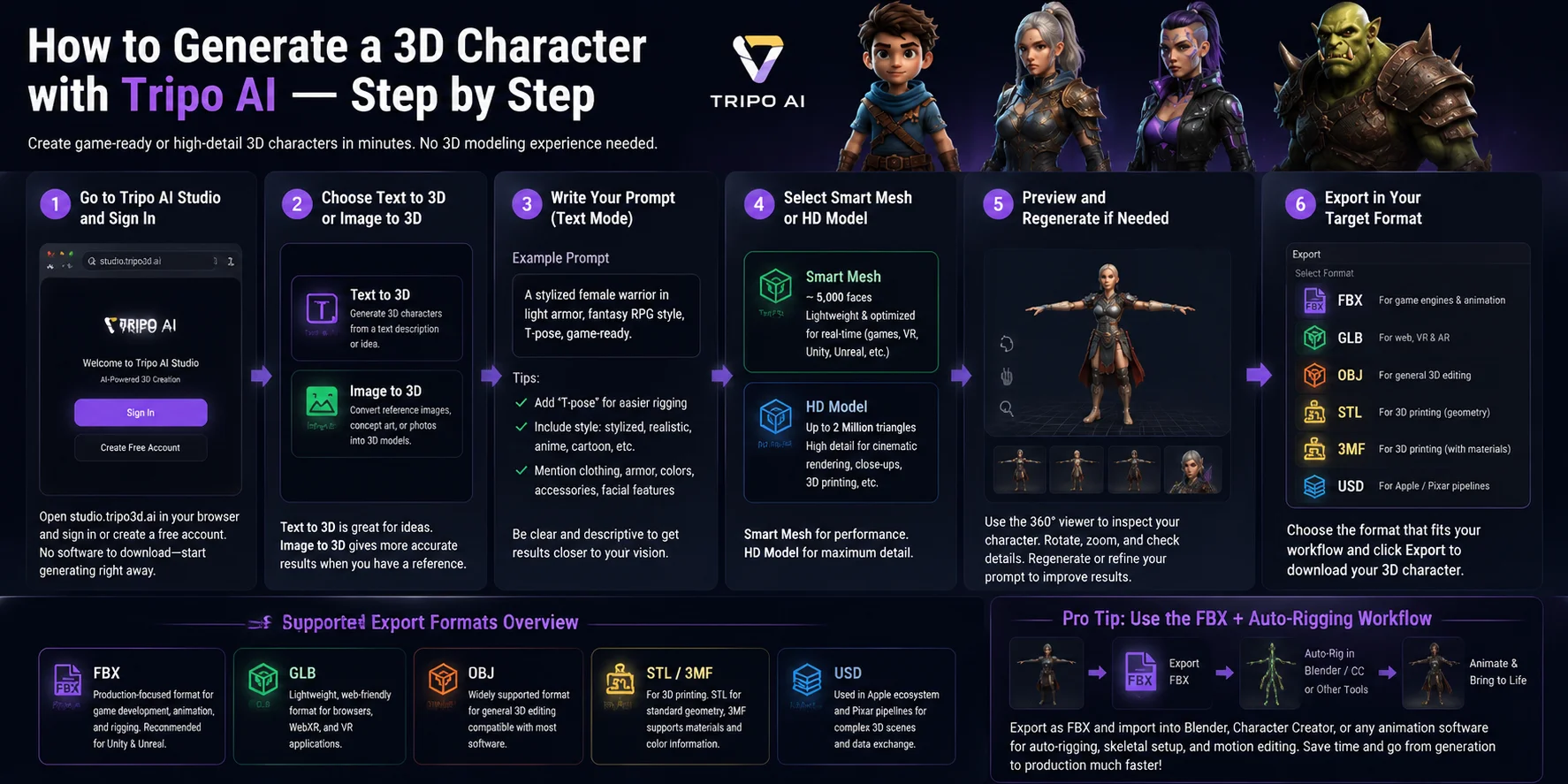
How to Generate a 3D Character with Tripo AI — Step by Step
Creating a 3D character with Tripo AI takes only a few minutes and does not require any prior 3D modeling experience. Whether you are designing a game character, a VR avatar, or a concept for animation, the workflow is simple enough for beginners while offering enough flexibility for professional projects.
Step 1: Go to Tripo AI Studio and Sign In
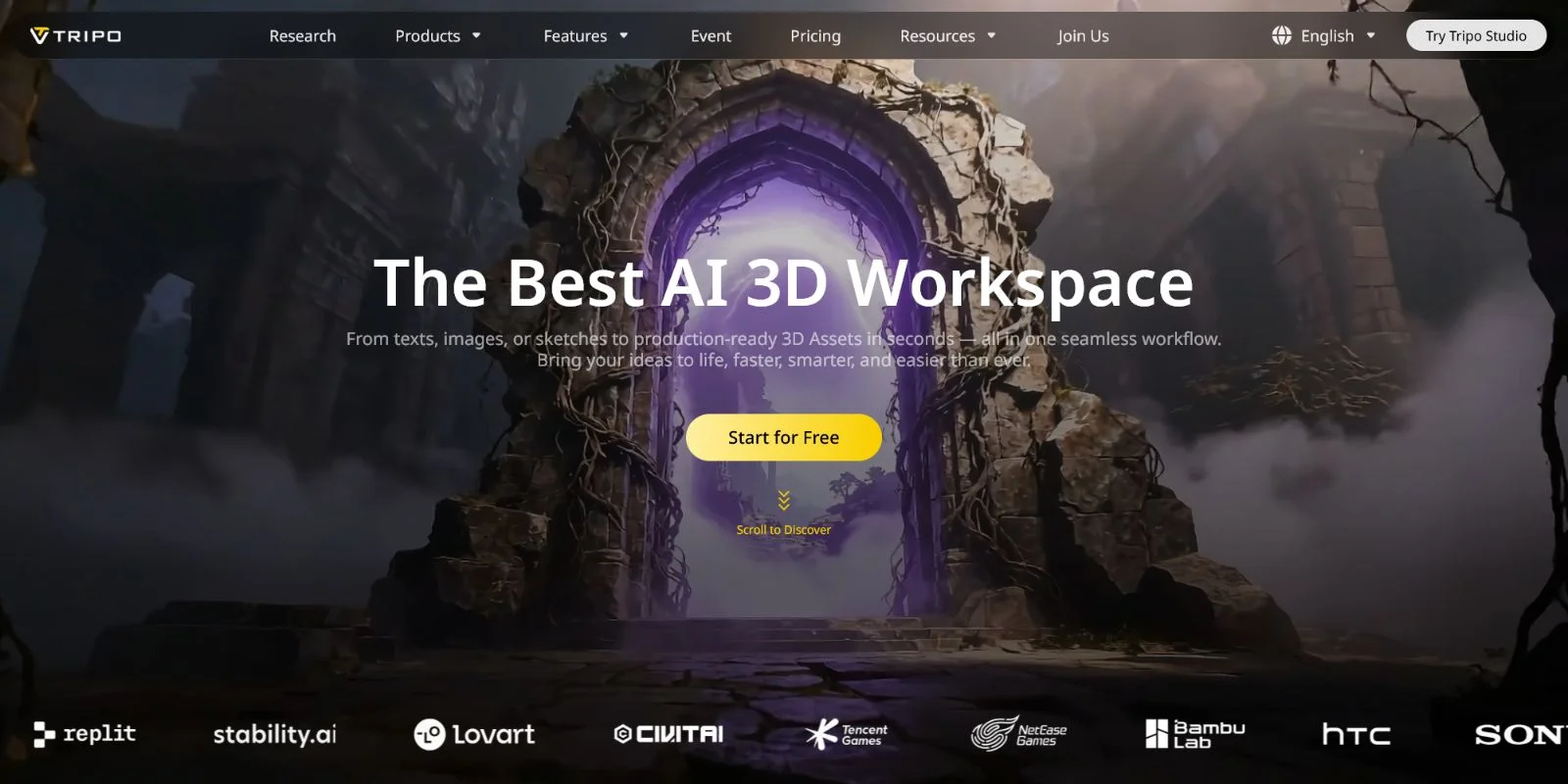
Open studio.tripo3d.ai in your browser and create a free account or sign in if you already have one. Everything runs in the browser, so there is no software to download or install. Once you're logged in, you can start generating 3D characters immediately using the free credits included with your account.
Step 2: Choose Text to 3D or Image to 3D
Next, decide how you want to create your character.
- Text to 3D is ideal when you're starting from an idea. Simply describe the character you want, and Tripo AI generates a complete 3D model from your prompt.
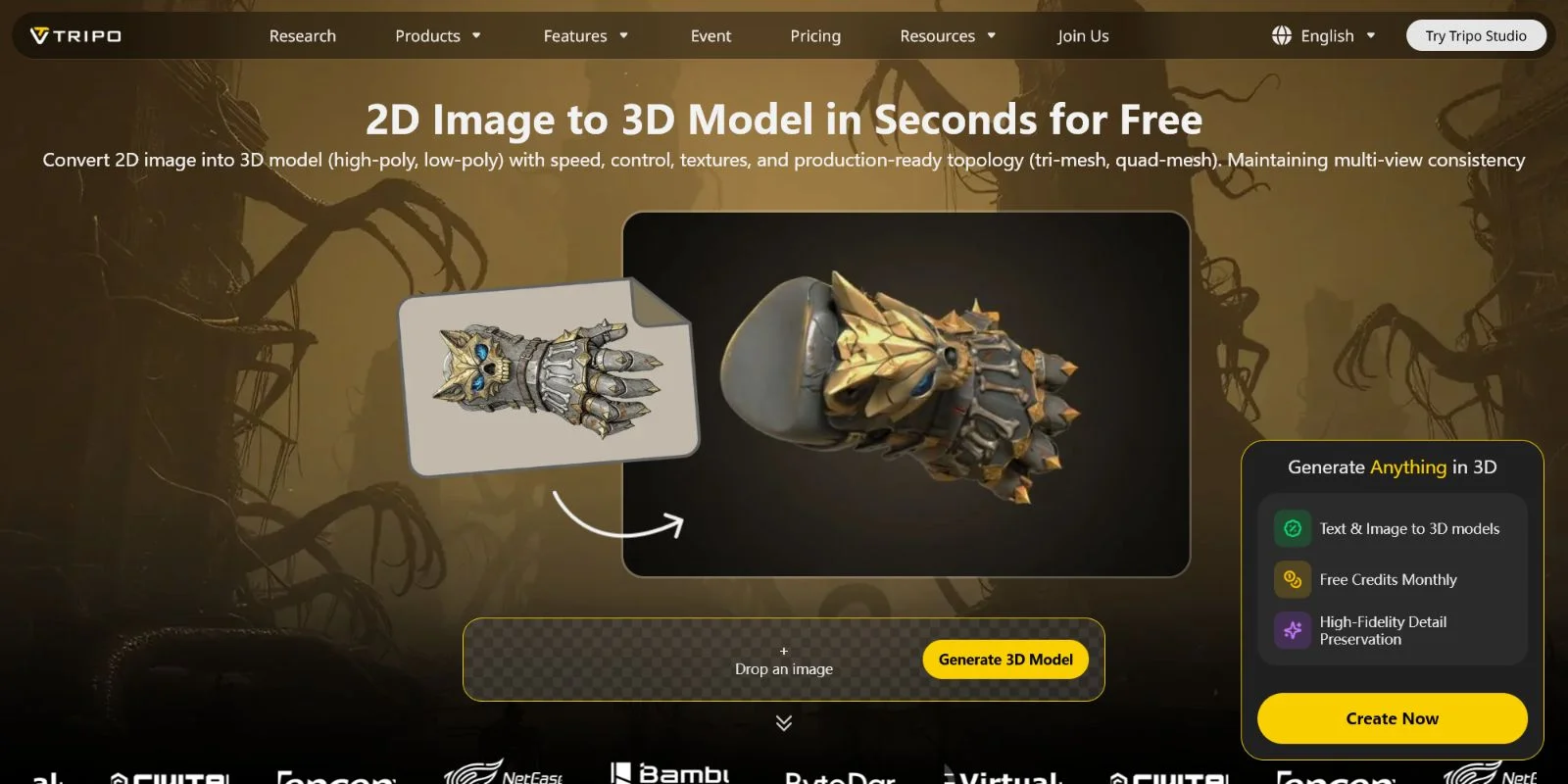
- Image to 3D works best when you already have a reference image, such as a concept sketch, character design sheet, photo, or 2D illustration. The AI uses the reference to produce a model that closely matches the original design.
If visual accuracy is important, Image to 3D usually provides more predictable results.
Step 3: Write Your Prompt (Text Mode)
If you're using Text to 3D, write a clear and descriptive prompt. For example:
"A stylized female warrior in light armor, fantasy RPG style, T-pose, game-ready."
Adding "T-pose" is especially useful because it makes later rigging and animation much easier. You can also include style keywords such as stylized, realistic, anime, cartoon, or semi-realistic to guide the visual direction. Mentioning clothing, armor, accessories, colors, or facial features will also help the AI generate a character closer to your vision.
Step 4: Select Smart Mesh or HD Model
Choose the generation mode that matches your project.
- Smart Mesh produces lightweight models with approximately 5,000 faces, making them well suited for Unity, Unreal Engine, VR applications, and other real-time experiences where performance matters.
- HD Model generates highly detailed meshes with up to 2 million triangles, making it a better choice for cinematic rendering, high-quality promotional artwork, close-up renders, or detailed 3D printing.
If you're building a playable game character, Smart Mesh is usually the best starting point. For maximum detail and visual fidelity, choose HD Model.
Step 5: Preview and Regenerate if Needed
After generation, inspect your character directly in the browser using the interactive 360° viewer. Rotate, zoom, and examine the model from every angle to check proportions, clothing details, and overall quality.
If something doesn't look right, simply regenerate the model or refine your prompt. Iterating a few times often produces significantly better results while keeping the workflow fast and straightforward.
Step 6: Export in Your Target Format
When you're happy with the result, export the model in the format that matches your workflow.
| Use Case | Recommended Export Format | ||
|---|---|---|---|
| Unity or Unreal Engine | FBX | ||
| "Web | VR | or AR applications" | GLB |
| General 3D workflows | OBJ | ||
| 3D printing | STL or 3MF |
Click Export, choose the desired format, and download the finished model.
Pro Tip: Use the FBX + Auto-Rigging Workflow
If you plan to animate your character, export it as FBX. The file can be imported directly into Blender, Character Creator, or other animation software for auto-rigging, skeletal setup, and motion editing. Starting with a clean FBX workflow significantly reduces the amount of manual topology cleanup and preparation typically required before creating animations, helping you move from character generation to production much faster.
Other AI 3D Character Generators Worth Knowing
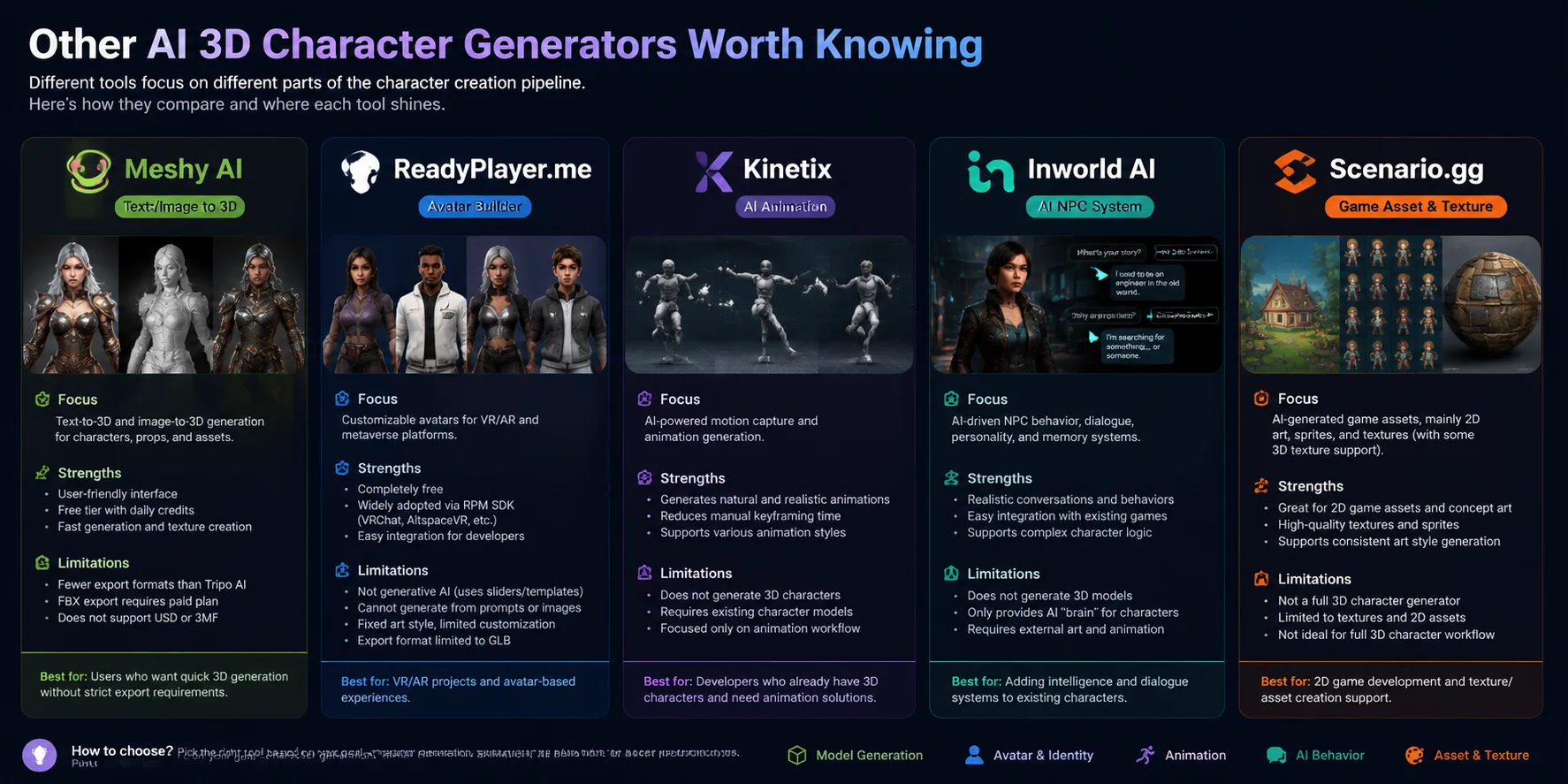
While Tripo AI focuses on end-to-end 3D character creation with text-to-3D, image-to-3D, and production-friendly exports, other AI tools serve different parts of the character creation workflow. Some specialize in avatars, animation, NPC intelligence, or game assets rather than full 3D model generation. Understanding these differences helps you choose the right tool based on your actual needs.
Meshy AI — Best Alternative for Quick Text/Image-to-3D Generation
Meshy AI is one of the closest alternatives to Tripo AI, offering both text-to-3D and image-to-3D generation for creating characters, props, and game assets. Its biggest advantage is accessibility: the interface is beginner-friendly, and the free tier allows users to test AI 3D generation without upfront cost. Meshy also provides texture generation features that make it useful for rapid prototyping and concept exploration. However, its export ecosystem is more limited compared with Tripo AI. FBX export is restricted to paid plans, and it does not support formats such as USD or 3MF. Meshy is a good choice for creators who mainly need quick previews or standard 3D outputs without advanced pipeline requirements.
ReadyPlayer.me — Best for VR and Avatar Creation
Ready Player Me specializes in customizable digital avatars rather than AI-generated 3D characters. The platform is completely free and widely used in VR and virtual world projects through its SDK ecosystem. Developers can integrate Ready Player Me avatars into applications, games, and social experiences with relatively simple workflows. However, it is not a generative AI character creator. Users customize characters through preset options, sliders, and avatar templates instead of generating designs from text prompts or reference images. The visual style is also more standardized, which limits creative freedom for users who need unique characters. Export options are mainly focused on GLB, making it best suited for VR, AR, and avatar-based applications rather than full game asset production.
Kinetix — Best for AI Animation Generation
Kinetix focuses on animation creation rather than 3D character modeling. Instead of generating a character mesh, Kinetix helps creators add motion to existing 3D avatars through AI-powered animation tools. This makes it useful for game developers, virtual worlds, and social platforms that already have character models but need faster ways to create movements. Users can generate animations without manually keyframing every action, reducing the time required for motion production. The main limitation is that Kinetix does not create the character itself. You still need a finished 3D model from another tool before using its animation features. It works best as a companion tool in a larger character production pipeline.
Inworld AI — Best for AI-Powered NPC Behavior
Inworld AI focuses on making game characters more interactive through AI-driven conversations, personalities, and behaviors. Unlike 3D character generators, Inworld does not create the visual appearance or mesh of a character. Instead, it provides systems for developers to add intelligent dialogue, memory, and personality layers to existing NPCs. This makes it valuable for games, virtual experiences, and interactive storytelling projects where characters need realistic responses and dynamic behavior. The limitation is that it only handles the intelligence layer; developers still need separate tools for modeling, rigging, texturing, and animation. Inworld AI is best viewed as a character-brain solution rather than a complete character creation platform.
Scenario.gg — Best for Game Asset and Texture Generation
Scenario is designed primarily for game asset creation, especially 2D elements such as sprites, concept art, and texture generation. It helps game developers create consistent visual assets and speed up the art production process. While Scenario includes some 3D-related texture capabilities, it is not a complete AI 3D character generator that can create finished characters from prompts or images. Its strengths are in supporting existing workflows, such as generating visual references, materials, or 2D assets for games. For 3D character pipelines, it works better as a texture and design assistant rather than a replacement for dedicated 3D generation tools. It is especially useful for 2D games or teams that need AI assistance across their art pipeline.
AI 3D Character Generator by Use Case
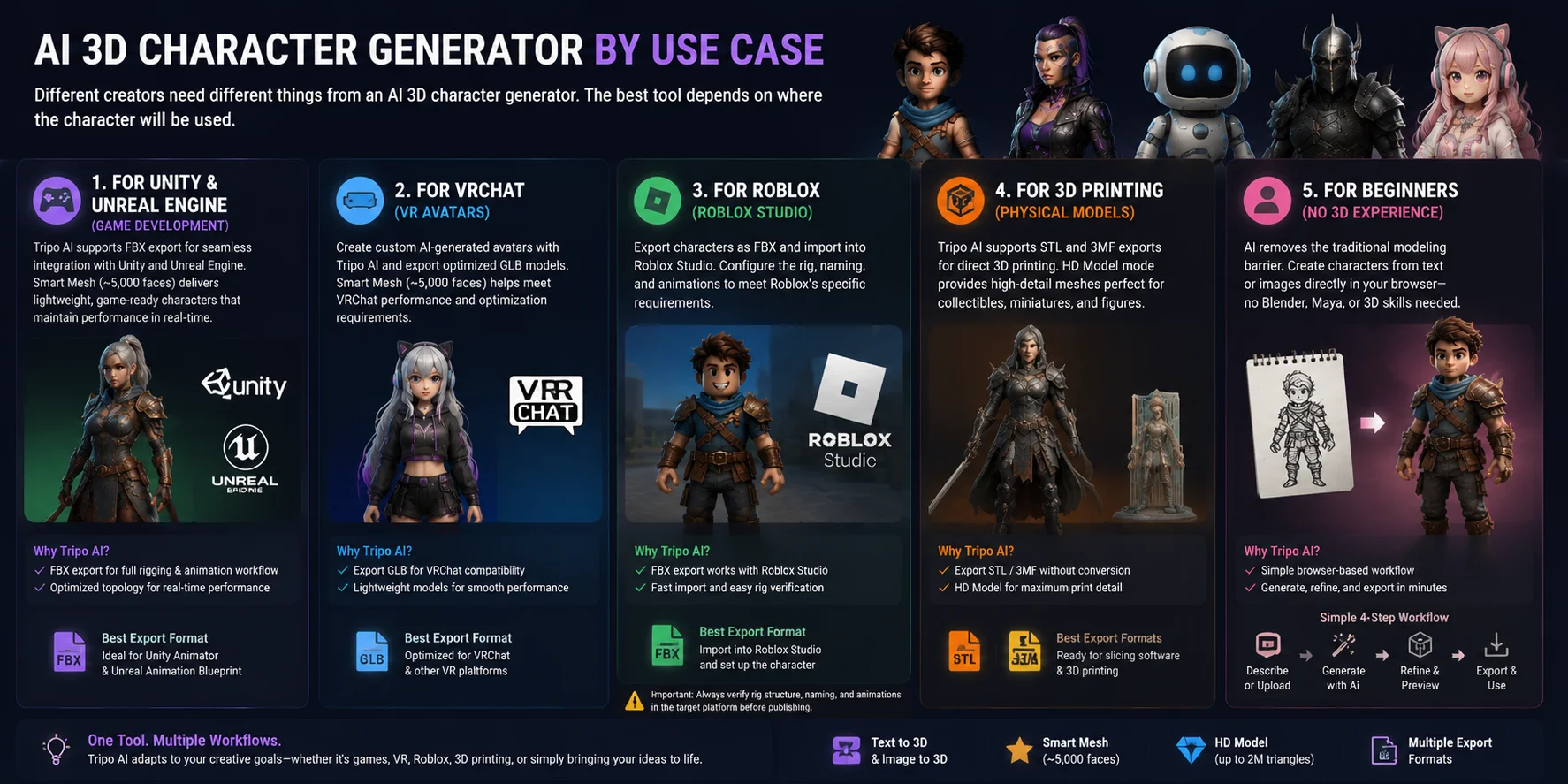
Different creators need different things from an AI 3D character generator. A game developer may prioritize rigging and engine compatibility, while a VR creator may care more about avatar limits and export formats. The best tool depends on where the character will be used.
For Unity and Unreal Engine (Game Development)
For game development, Tripo AI is one of the strongest choices because it supports FBX export, making it easy to connect with Unity and Unreal Engine workflows. Generated characters can be exported as FBX, imported into the engine, and paired with Unity’s Animator system or Unreal’s Animation Blueprint pipeline. Its Smart Mesh option produces lightweight models with around 5,000 faces, which helps maintain real-time performance while keeping enough detail for playable characters.
For VRChat
For VRChat avatars, Tripo AI and Ready Player Me serve different needs. Tripo AI is better for users who want AI-generated custom characters and can export optimized GLB models, while Ready Player Me focuses on avatar creation through its own ecosystem. VRChat performance depends heavily on polygon count, materials, and bone usage. Tripo AI’s Smart Mesh output of approximately 5,000 faces is suitable for creating lightweight avatars that meet common optimization requirements.
For Roblox
Roblox creators can use Tripo AI’s FBX export workflow to bring AI-generated characters into Roblox Studio. After exporting the model, users can import the FBX file and configure the character inside Roblox’s development environment. Since Roblox has specific requirements for skeleton structure, naming, and rig setup, creators should verify the imported character’s rig and animations before using it in a live experience.
For 3D Printing
For physical character models, Tripo AI supports direct STL and 3MF exports, reducing the need for extra format conversion. Its HD Model mode provides higher-detail meshes that are better suited for collectible figures, miniatures, and detailed prints. Users can generate a character, check the mesh for print readiness, and send the exported file directly into slicing software for preparation.
For Beginners With No 3D Experience
Beginners benefit most from AI character generators because they remove the traditional modeling barrier. With Tripo AI, users can create a character from a text prompt or reference image directly in a browser without learning Blender, Maya, or other complex 3D software. The workflow is simple: describe the character, generate the model, refine the result, and export it for the intended use case. This makes AI 3D generation a practical starting point for creators who have ideas but no previous modeling experience.
Free vs. Paid AI 3D Character Generators — What You Actually Get
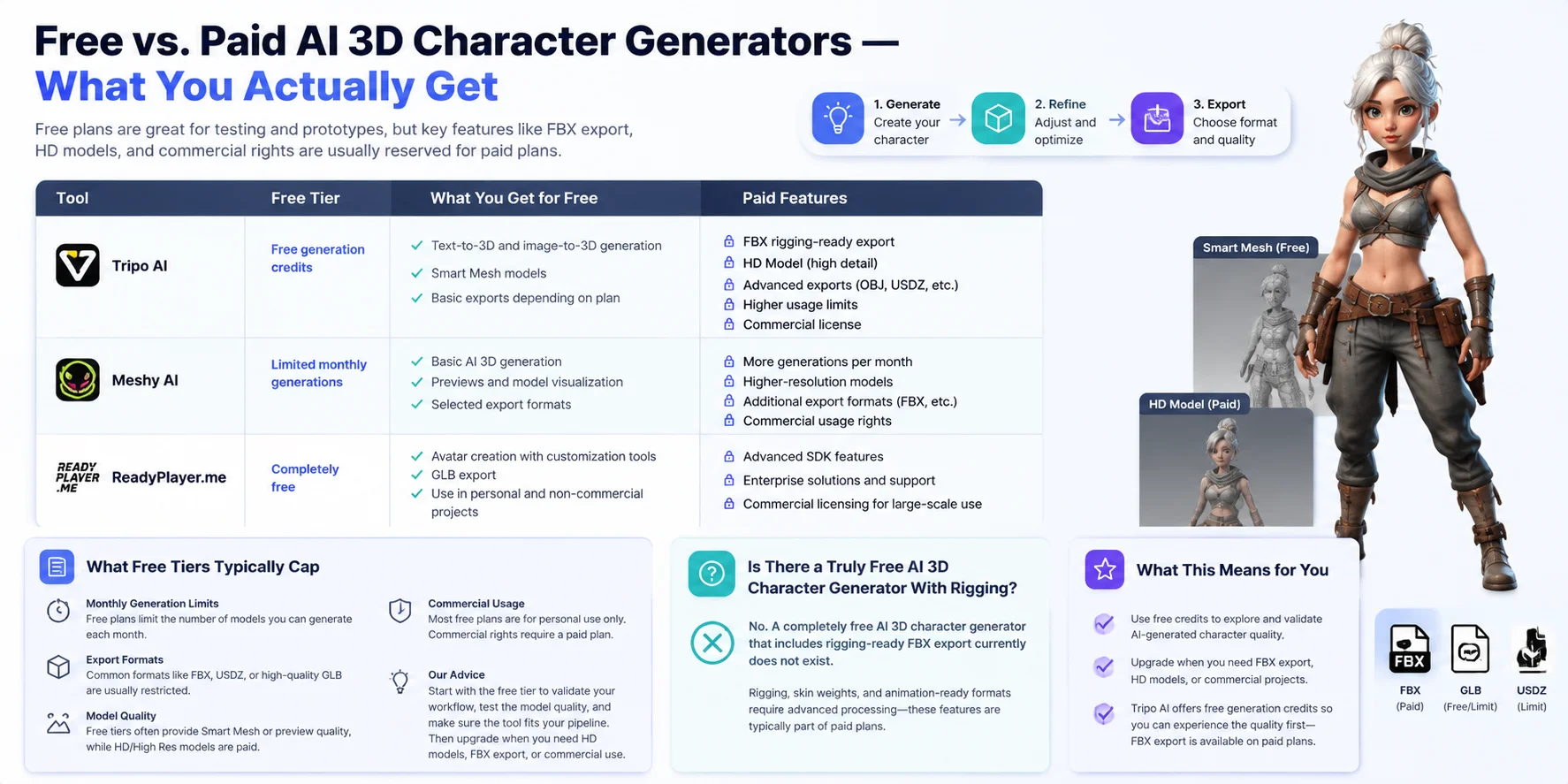
Free AI 3D character generators are useful for testing ideas, creating prototypes, and exploring different character styles, but the available features vary significantly between platforms. The main differences usually appear in export formats, model quality, rigging support, and commercial usage rights. A free plan can help you evaluate whether an AI 3D workflow fits your project, but production-ready features are often reserved for paid tiers.
| Tool | Free Tier | What You Get for Free | Paid Features |
|---|---|---|---|
| ⭐ Tripo AI | Free generation credits | Text-to-3D and image-to-3D generation, Smart Mesh models, basic exports depending on plan | FBX rigging-ready export, HD Model, advanced exports, higher usage limits |
| Meshy AI | Limited monthly generations | Basic AI 3D generation, previews, selected exports | More generations, higher-resolution models, additional export formats, commercial features |
| ReadyPlayer.me | Completely free | Avatar creation with customization tools and GLB export | Advanced SDK features and enterprise solutions |
What Free Tiers Typically Cap
Most free AI 3D character generators place limits on the parts that matter most for production workflows. Common restrictions include a monthly generation quota, lower model quality, fewer export formats, and limited commercial rights. For example, a free plan may allow you to create a character preview or a lightweight Smart Mesh model, while high-detail models, professional formats like FBX, or animation-ready workflows require a paid subscription.
The best approach is to use free credits to validate your workflow first. Test whether the generated style, topology, and character quality match your needs before upgrading for features like HD output, rigging support, or commercial projects.
Is There a Truly Free AI 3D Character Generator With Rigging?
Currently, there is no fully free AI 3D character generator that combines unlimited generation, high-quality output, and rigging-ready exports. Automatic rigging and production-friendly formats such as FBX usually belong to paid plans because they require additional processing for skeleton creation, skin weights, and animation compatibility.
Tripo AI offers free generation credits so users can test AI character creation before upgrading. For developers and creators who need rig-ready characters for Unity, Unreal Engine, or animation pipelines, FBX export and advanced character features are typically available through paid plans.
Frequently Asked Questions
What is the best free AI 3D character generator?
Tripo AI is one of the best free AI 3D character generators available, offering free credits to create characters from text prompts or images. Its free tier lets you test the workflow and generate usable 3D models, but advanced features such as HD models, FBX export, and some production-ready options require a paid plan. For beginners and creators who want to validate ideas before upgrading, Tripo AI provides one of the strongest free starting points.
Can I generate a 3D character from a photo using AI?
Yes, AI can generate a 3D character from a photo using image-to-3D technology. Tools like Tripo AI allow users to upload a reference image and automatically create a 3D character model with generated geometry and textures. This workflow is useful for turning concept art, character designs, or photos into editable 3D assets without traditional modeling skills.
Do AI 3D character generators support rigging?
Most AI 3D character generators can create the model itself, but many do not include full rigging or animation-ready skeletons by default. Tripo AI is an exception, offering rigging-ready FBX exports that can be imported directly into workflows such as Blender or Character Creator for further animation and editing.
What file formats do AI 3D character generators export?
AI 3D character generators commonly export formats such as GLB and OBJ, which are widely used for web, games, and general 3D workflows. Tripo AI supports these standard formats while also offering broader export options, including FBX for animation pipelines, STL and 3MF for 3D printing, and USD for advanced 3D workflows. This wider format support makes it easier to move AI-generated characters into different creative tools and platforms.
Can I use an AI-generated 3D character in Unity or Unreal Engine?
Yes, AI-generated 3D characters can be used in Unity and Unreal Engine through standard formats such as FBX. When exported with a proper rig, these characters can work with Unity Humanoid rigs and Unreal Engine’s character systems for animation and gameplay workflows. Tools like Tripo AI support rigging-ready FBX exports, making it easier to move generated characters directly into game engines.
Is there an AI 3D character generator for VRChat?
Yes, AI 3D character generators can be used to create VRChat avatars, especially when they support VR-friendly formats like GLB. Tools such as Tripo AI can generate optimized character models with Smart Mesh, which keeps polygon counts suitable for VRChat performance requirements. After export, the model can be further customized and configured in Unity before uploading as a VRChat avatar.
How long does it take to generate a 3D character with AI?
Most AI 3D character generators can create a complete 3D mesh within about 30–120 seconds, depending on the tool, model complexity, and output quality settings. The process requires no modeling experience, as AI automatically handles the base geometry and texture generation. Higher-detail models or additional features such as rigging may take longer.
Can I generate anime-style 3D characters with AI?
Yes, AI can generate anime-style 3D characters by using specific style prompts and image references. Adding keywords such as “anime,” “stylized,” “cel-shaded,” or “Japanese game character” helps guide the AI toward the desired visual style. Tools like Tripo AI can turn these prompts or reference images into customizable 3D anime characters.
Are AI-generated 3D characters commercially usable?
Commercial use of AI-generated 3D characters depends on the specific tool’s terms of service and licensing rules. Some platforms restrict commercial rights on free plans, while Tripo AI’s paid plans include commercial licensing options for creators who need to use generated models in games, products, or other business projects. Always check the license before publishing or selling AI-generated assets.
What's the difference between text-to-3D and image-to-3D character generation?
Text-to-3D generation creates a character from a written description, allowing users to design new concepts with prompts like “anime warrior” or “fantasy knight.” Image-to-3D uses a reference photo, concept art, or illustration as a visual guide to produce a model with a closer match to the original design. Both methods generate complete 3D meshes, but image-to-3D usually provides more control over appearance and details.
Conclusion
AI 3D character generators have made high-quality 3D content creation accessible to artists, developers, and creators without traditional modeling skills. If you need broad export options, game engine compatibility, and FBX support for animation workflows, Tripo AI is one of the most complete solutions available today. You can start with the free tier at https://studio.tripo3d.ai/ to test the workflow, and explore https://www.tripo3d.ai/pricing if you need advanced features such as HD models, commercial licensing, and additional export capabilities.