AI-Generated 3D Models Explained: What They Are & How to Use Them
TL;DR
- AI-generated 3D models are 3D assets (a mesh + textures) created automatically by AI from a text prompt or image—no manual modeling.
- Three main inputs: text-to-3D, image-to-3D, and multi-view (2–4 photos) for higher accuracy.
- Single-image results can leave hidden areas ambiguous; consistent multi-view inputs usually improve proportions and reduce missing geometry.
- Export formats such as GLB, FBX, OBJ, STL, and 3MF can support common DCC, engine, web, and 3D-printing workflows when the target software supports the chosen format.
- Best for fast drafts, prototypes, game assets, and prints; precision engineering parts still need traditional CAD.
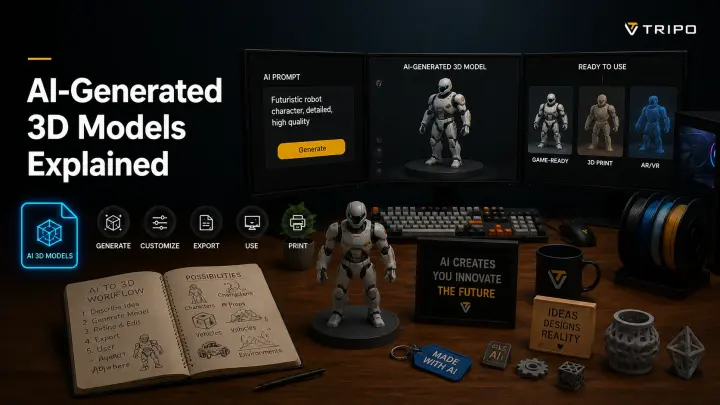
AI-generated 3D models are three-dimensional assets—a mesh with textures—that an AI tool builds automatically from a text prompt or an image, instead of an artist modeling them by hand. In seconds, you get a usable 3D object you can edit, export, drop into a game engine, or 3D print. This guide explains how they work and how to make your own.
What Are AI-Generated 3D Models?
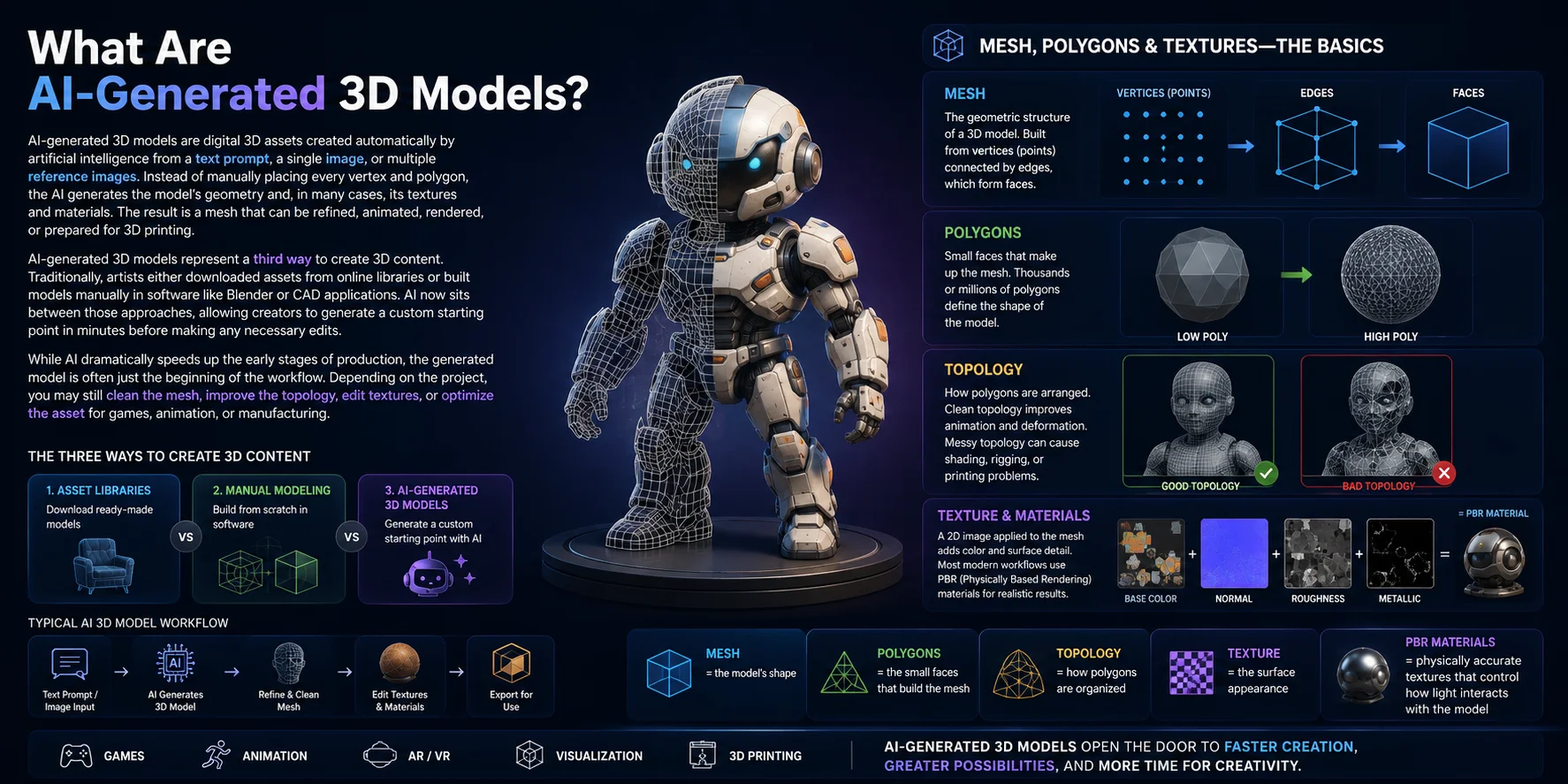
AI-generated 3D models are digital assets created from text, a single image, or multiple reference views. The system produces geometry and may also generate textures or materials, creating a mesh that can be refined, animated, rendered, or prepared for printing.
Mesh, polygons & textures—the basics
To understand AI-generated 3D models, it helps to know a few common terms.
A mesh is the geometric structure of a 3D model. It is built from vertices (points) connected by edges, which form faces. Most modern 3D models are made of thousands—or even millions—of small faces called polygons. Together, these polygons define the object's shape.
Topology refers to how those polygons are arranged. Clean topology improves animation, deformation, and rendering performance, while messy topology can cause shading, rigging, or printing problems.
A texture is a 2D image applied to the mesh to add color and surface detail without increasing the polygon count. Modern workflows usually use PBR (Physically Based Rendering) materials, which combine maps such as base color, roughness, metallic, and normal maps to create realistic surfaces under different lighting conditions.
In short:
- Mesh = the model's shape
- Polygons = the small faces that build the mesh
- Topology = how those polygons are organized
- Texture = the surface appearance
- PBR materials = physically accurate textures that control how light interacts with the model
Together, these elements form a complete AI-generated 3D asset that can be used in games, animation, AR/VR, visualization, or 3D printing.
How Do AI 3D Model Generators Work?
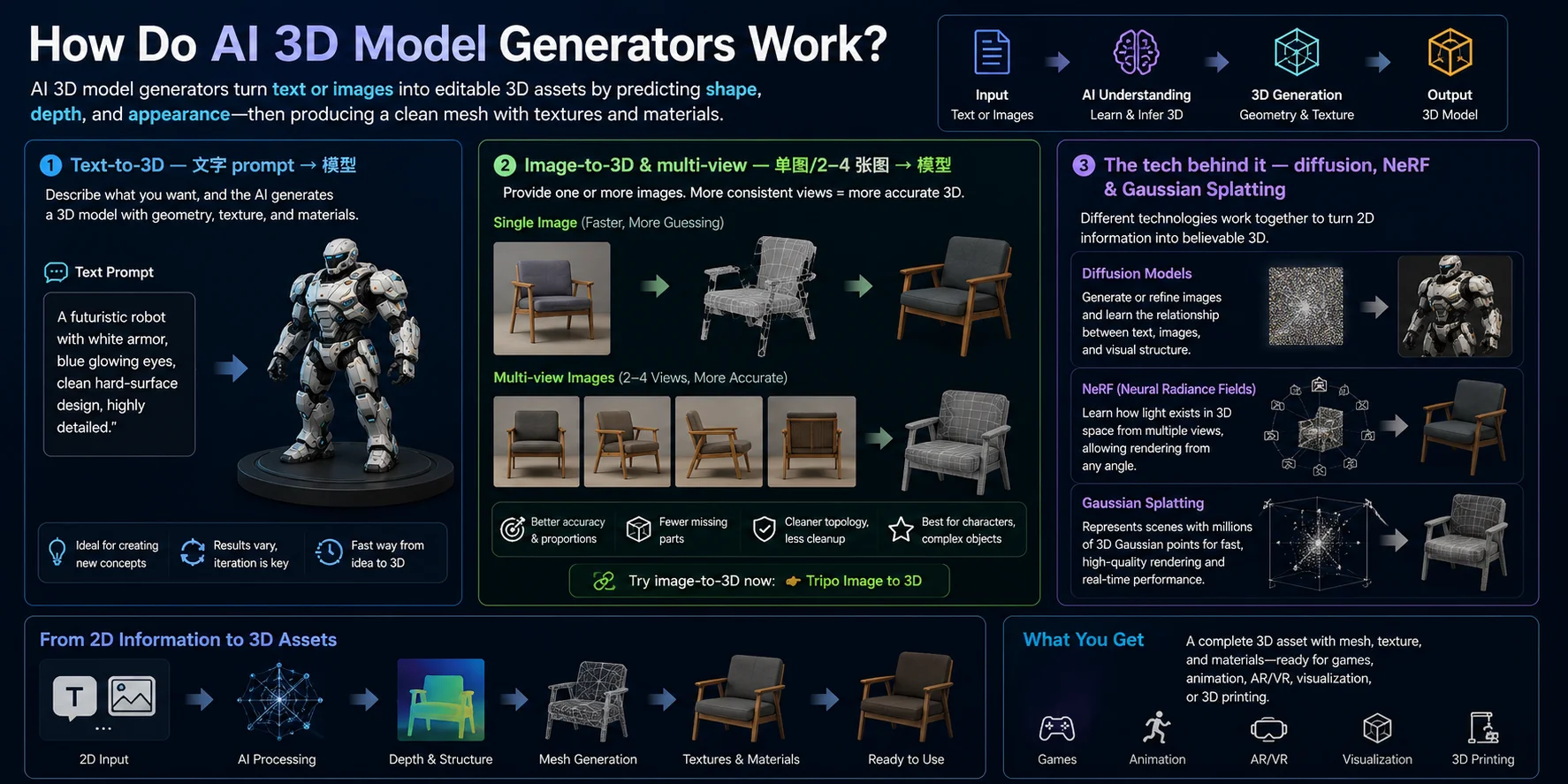
AI 3D generators infer an object's shape, depth, and surface appearance from text or images. Different systems use different pipelines, but the practical goal is an asset that can be inspected, edited, textured, and exported.
Today, many AI tools offer three common workflows: text-to-3D, image-to-3D, and multi-view image-to-3D. Each uses different input information to estimate the final 3D shape.
Text-to-3D — From a prompt to a 3D model
In a text-to-3D workflow, everything starts with a written prompt.
For example:
"A futuristic robot with white armor, blue glowing eyes, clean hard-surface design, highly detailed."
The AI interprets the prompt, predicts the object's structure, and generates a complete 3D mesh. Many modern systems also create textures and materials automatically, producing a model that is ready for further editing.
Image-to-3D & multi-view — From photos to geometry
Image-to-3D starts with one or more reference images instead of text.
With a single image, the AI estimates the hidden sides of the object by analyzing its silhouette, lighting, and visible depth cues. Since the back and unseen areas are not available, the system must infer missing geometry.
With multiple images—typically 2 to 4 consistent views such as front, side, and back—the AI has much more visual information. This greatly improves shape accuracy, preserves proportions, and reduces missing or distorted geometry.
In general:
- Single image → faster workflow, but more guessing
- 2–4 consistent views → higher accuracy and cleaner reconstruction
- Orthographic or turnaround images → best results for characters and complex objects
For a given tool, consistent multi-view inputs usually provide more shape information than a single image and can reduce ambiguity in hidden areas. The amount of cleanup still depends on the asset and the intended use.
The technology behind it — Diffusion, NeRF & Gaussian Splatting
Modern AI 3D generators combine several technologies rather than relying on a single algorithm.
Diffusion models generate or refine images and learn the relationship between text, images, and visual structure. They provide the semantic understanding that guides 3D generation.
NeRF (Neural Radiance Fields) reconstructs a continuous 3D scene by learning how light travels through multiple images. Instead of directly building polygons, it predicts the appearance of a scene from virtually any viewing angle, making it useful for realistic reconstruction.
Gaussian Splatting is a newer rendering technique that represents a scene using millions of tiny 3D Gaussian points. It renders complex scenes much faster than traditional NeRF while preserving high visual quality, making it increasingly popular for real-time visualization.
Although these technologies work differently, they all use visual evidence to estimate a believable 3D representation. Depending on the system, the output may be a renderable scene representation, an editable polygon mesh, or a mesh generated in a later reconstruction step.
AI 3D Modeling vs. Traditional Modeling
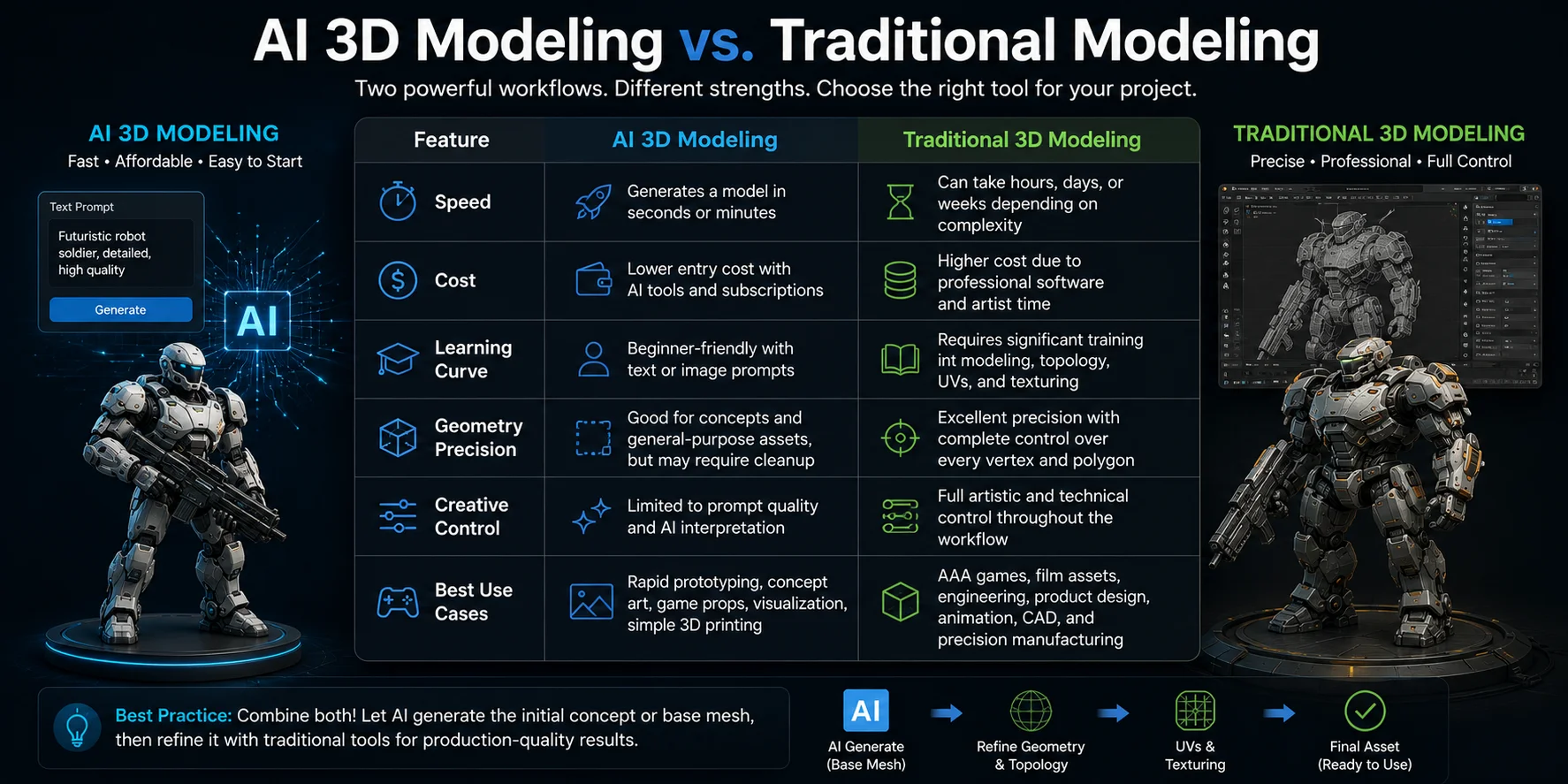
| Feature | AI 3D Modeling | Traditional 3D Modeling |
|---|---|---|
| Speed | Generates a model in seconds or minutes | Can take hours, days, or weeks depending on complexity |
| Cost | Lower entry cost with AI tools and subscriptions | Higher cost due to professional software and artist time |
| Learning Curve | Beginner-friendly with text or image prompts | Requires significant training in modeling, topology, UVs, and texturing |
| Geometry Precision | Good for concepts and general-purpose assets, but may require cleanup | Excellent precision with complete control over every vertex and polygon |
| Creative Control | Limited to prompt quality and AI interpretation | Full artistic and technical control throughout the workflow |
| Best Use Cases | Rapid prototyping, concept art, game props, visualization, simple 3D printing | AAA games, film assets, engineering, product design, animation, CAD, and precision manufacturing |
AI modeling is ideal when speed and iteration matter most. It allows designers to explore multiple ideas quickly without starting from an empty scene, making it especially useful during concept development and early production.
Traditional modeling, however, remains essential when accuracy is critical. Professional artists can optimize topology, create animation-ready meshes, control every surface, and meet strict technical requirements that current AI models cannot consistently achieve.
How Accurate (and Good) Are They?
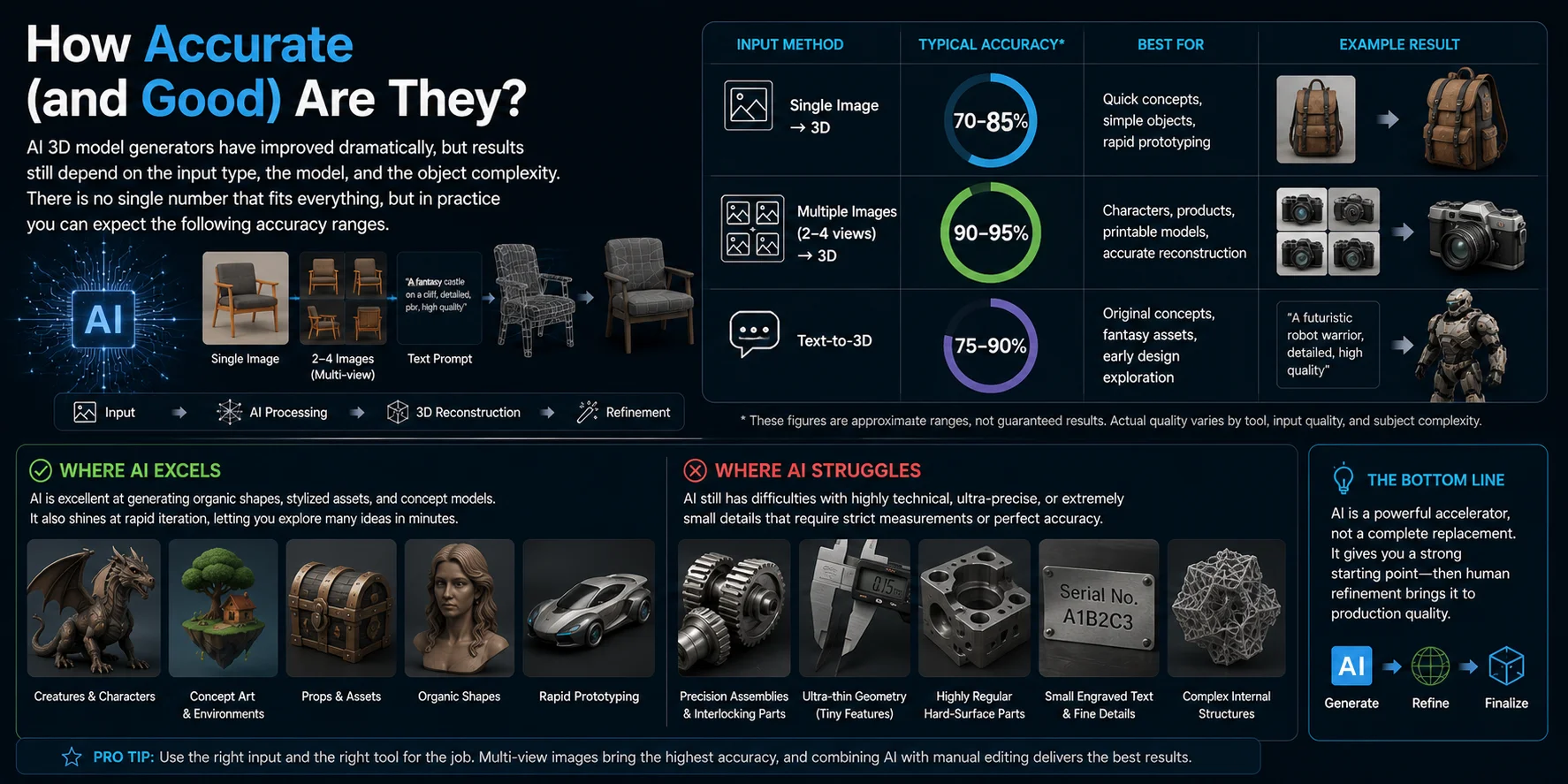
The quality of an AI-generated model depends on the input type, the generation model, the object, and the intended use. Because tools measure quality differently, compare results by checking proportions, hidden areas, topology, texture quality, and export readiness instead of relying on one universal percentage.
As a general guideline:
| Input Method | What to Expect | Best For |
|---|---|---|
| Single Image → 3D | Hidden areas may be ambiguous | Quick concepts, simple objects, rapid prototyping |
| Multiple Images (2–4 views) → 3D | Usually more complete reference coverage | Characters, products, printable models, accurate reconstruction |
| Text-to-3D | Strong for concepts; output varies by prompt | Original concepts, fantasy assets, early design exploration |
Where AI excels / where it struggles
AI performs best when generating organic shapes, stylized characters, creatures, props, and concept models. It is also excellent for rapid iteration, allowing creators to explore multiple ideas in minutes instead of spending hours building a model from scratch.
Image-to-3D workflows become especially reliable when using two to four consistent reference images with clean lighting and clear silhouettes. Multi-view inputs reduce missing geometry and improve proportions compared to single-image reconstruction.
However, AI still struggles with highly technical models. Precision mechanical assemblies, interlocking parts, engineering components, and objects with tight manufacturing tolerances often require manual CAD modeling. Likewise, ultra-thin geometry, perfectly symmetrical hard-surface designs, engraved text, and tiny surface details can be difficult for current AI models to reproduce accurately.
What Can You Use AI 3D Models For?
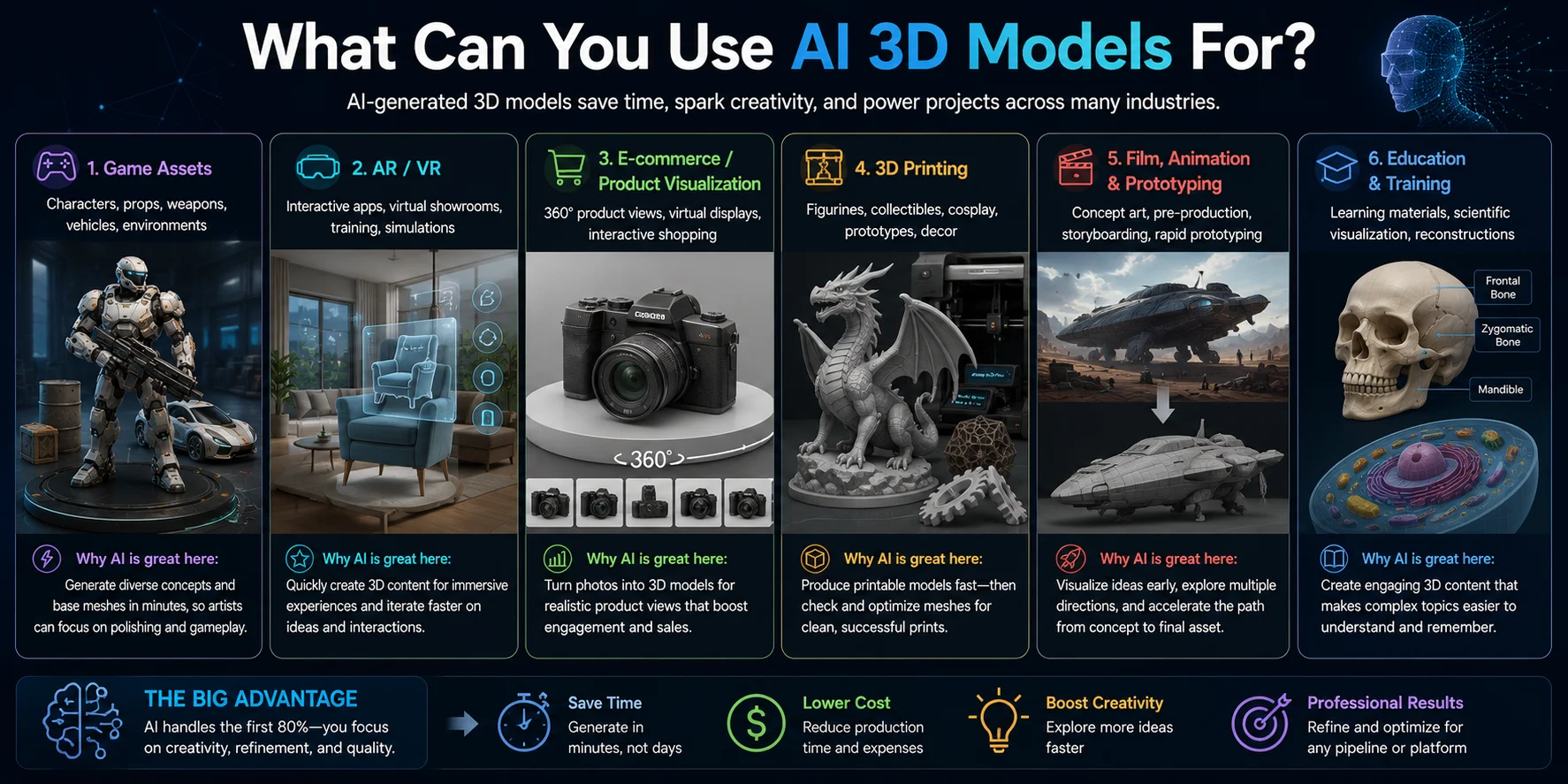
Game assets
AI is widely used to generate characters, props, weapons, vehicles, and environment assets during early game development. Artists can quickly create base meshes, then refine topology, textures, and animations for production-ready use.
AR and VR experiences
For augmented and virtual reality, AI helps produce lightweight 3D objects for interactive applications, product demonstrations, virtual showrooms, and training simulations. Fast generation allows teams to build immersive experiences with much shorter production cycles.
E-commerce and product visualization
Online retailers use AI-generated 3D models to create 360-degree product views, virtual product displays, and interactive shopping experiences. Instead of modeling every product from scratch, businesses can generate models from photos and refine them for web use.
3D printing
AI is an effective starting point for figurines, collectibles, cosplay props, prototypes, and decorative models. After checking the mesh for holes, wall thickness, and scale, many models can be prepared for printing much faster than traditional manual modeling.
Film, animation, and rapid prototyping
Studios often use AI to generate concept assets and rough models during pre-production. This allows artists to visualize ideas, test designs, and explore multiple creative directions before investing time in detailed manual modeling.
Education and training
Teachers, students, and researchers use AI-generated 3D models to create interactive learning materials, scientific visualizations, historical reconstructions, and classroom demonstrations. Complex subjects become easier to understand when learners can view and interact with three-dimensional objects.
Can You Use AI 3D Models in Blender, Unity & 3D Printers?
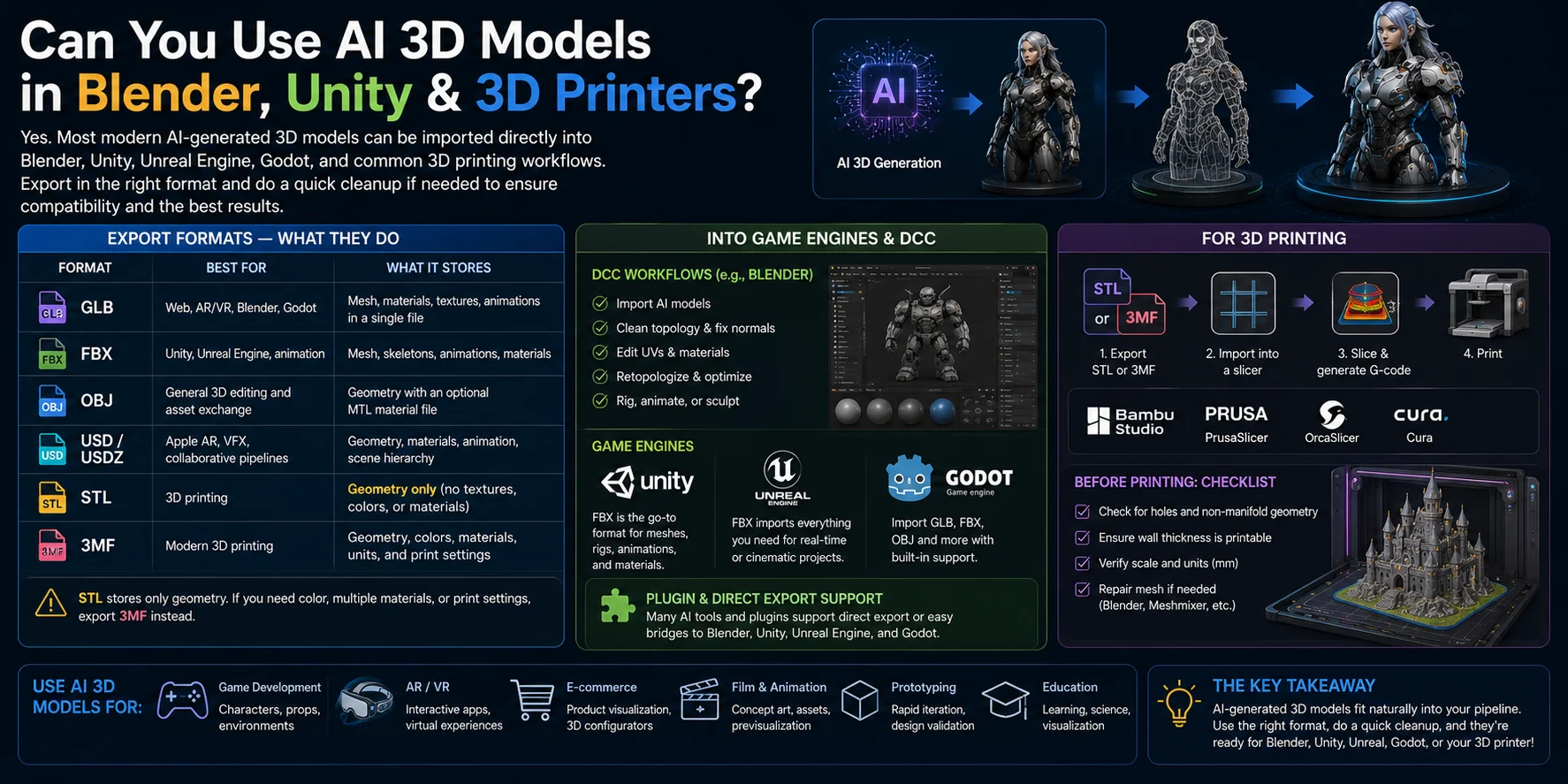
AI-generated models can be used in Blender, game engines, and 3D-printing workflows when the exported format and asset settings are supported by the target application. Before production use, check topology, normals, scale, materials, and any rig or animation data required by the destination.
Export formats — GLB, FBX, OBJ, USD, STL & 3MF
Different formats are designed for different workflows, so it is worth understanding what each one stores.
| Format | Best For | What It Stores |
|---|---|---|
| GLB | Web, AR/VR, Blender, Godot | Mesh, materials, textures, animations in a single file |
| FBX | Unity, Unreal Engine, animation | Mesh, skeletons, animations, materials |
| OBJ | General 3D editing and asset exchange | Geometry with an optional MTL material file |
| USD / USDZ | Apple AR, VFX, collaborative pipelines | Geometry, materials, animation, scene hierarchy |
| STL | 3D printing | Geometry only (no textures, colors, or materials) |
| 3MF | Modern 3D printing | Geometry, colors, materials, units, and print settings |
For 3D printing, remember one important limitation: STL stores only geometry. If you need color, multiple materials, or embedded print settings, export 3MF instead.
Into game engines & DCC
AI-generated models integrate well with modern digital content creation (DCC) software and game engines.
In Blender, you can import the model to clean topology, edit UVs, improve materials, retopologize the mesh, or prepare it for animation.
For Unity and Unreal Engine, FBX is usually the preferred format because it supports meshes, rigs, animations, and materials. GLB is also a strong choice for lightweight real-time applications, web viewers, and AR experiences.
Some platforms provide direct exports or plugin bridges for DCC and engine workflows. For example, Tripo offers DCC Bridge options for Blender, Unity, Unreal Engine, and Godot; availability and import behavior still depend on the chosen format, plugin, and target software version.
For 3D printing
AI-generated models can also be prepared for additive manufacturing with only a few extra steps.
First, export the model as STL for standard single-material printing or 3MF if you want to preserve colors, materials, or printer settings. Then import the file into a slicer such as Bambu Studio, PrusaSlicer, OrcaSlicer, or Cura to generate G-code.
Before printing, always inspect the mesh for holes, non-manifold geometry, wall thickness, and correct scale. A quick repair in Blender or a mesh repair tool can prevent failed prints and improve the final result.
How to Create Your First AI 3D Model (Step by Step)
To create a first AI 3D model, choose the right input, provide a clear prompt or image, inspect the generated asset, make any necessary corrections, and export it for the intended workflow.
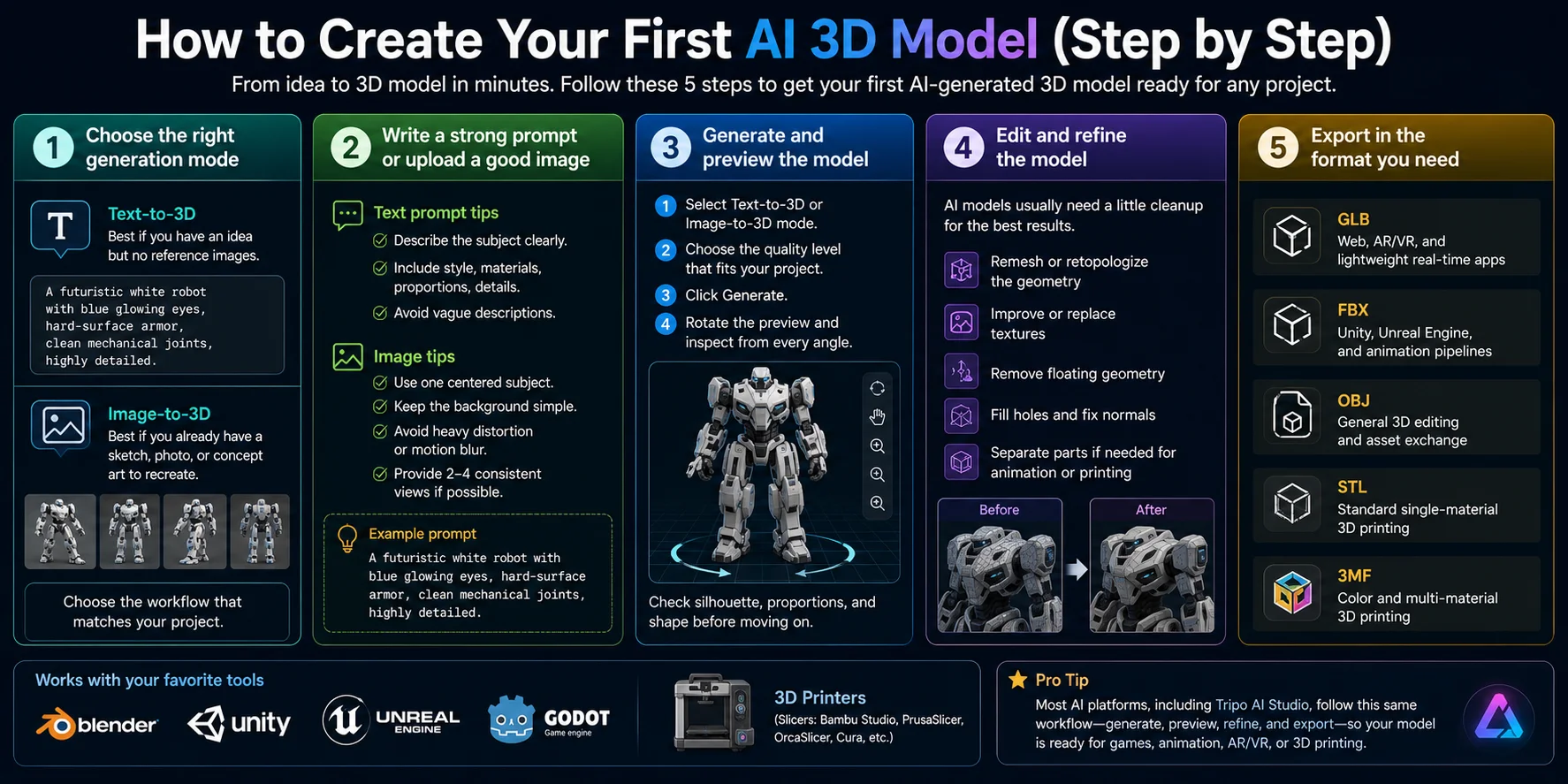
1. Choose the right generation mode
Start by deciding how you want to create your model.
- Text-to-3D is best if you have an idea but no reference images.
- Image-to-3D is ideal if you already have a sketch, photo, concept art, or AI-generated image and want to recreate it as a 3D model.
Choose the workflow that matches your project rather than trying to force one method to fit every situation.
2. Write a strong prompt or upload a high-quality image
Good input produces better output.
For text prompts:
- Describe the subject clearly.
- Include the style, materials, proportions, and important details.
- Avoid vague descriptions.
Example:
A futuristic white robot with blue glowing eyes, hard-surface armor, clean mechanical joints, highly detailed.
For image inputs:
- Use one centered subject.
- Keep the background simple.
- Avoid heavy perspective distortion or motion blur.
- If possible, provide two to four consistent views for higher reconstruction accuracy.
3. Generate and preview the model
After submitting your prompt or image:
- Select Text-to-3D or Image-to-3D mode.
- Choose the quality level that fits your project.
- Click Generate.
- Rotate the preview and inspect the model from every angle.
Check that the silhouette, proportions, and overall shape match your original idea before moving on.
4. Edit and refine the model
Most AI-generated models benefit from a small amount of cleanup.
Common improvements include:
- Remesh or retopologize the geometry.
- Improve or replace textures.
- Remove floating geometry.
- Fill holes and fix normals.
- Separate the model into individual parts if needed for animation or printing.
A few minutes of refinement can make the model much easier to use in production.
5. Export in the format you need
Choose the export format based on your final workflow.
- GLB — Web, AR/VR, and lightweight real-time applications.
- FBX — Unity, Unreal Engine, and animation pipelines.
- OBJ — General 3D editing and asset exchange.
- STL — Standard single-material 3D printing.
- 3MF — Color and multi-material 3D printing.
Tripo AI Studio follows this workflow: choose an input, generate, inspect, refine if needed, and export for a DCC tool, game engine, or 3D printer.
Limitations & When Not to Use AI 3D Models
Precision parts still belong in CAD
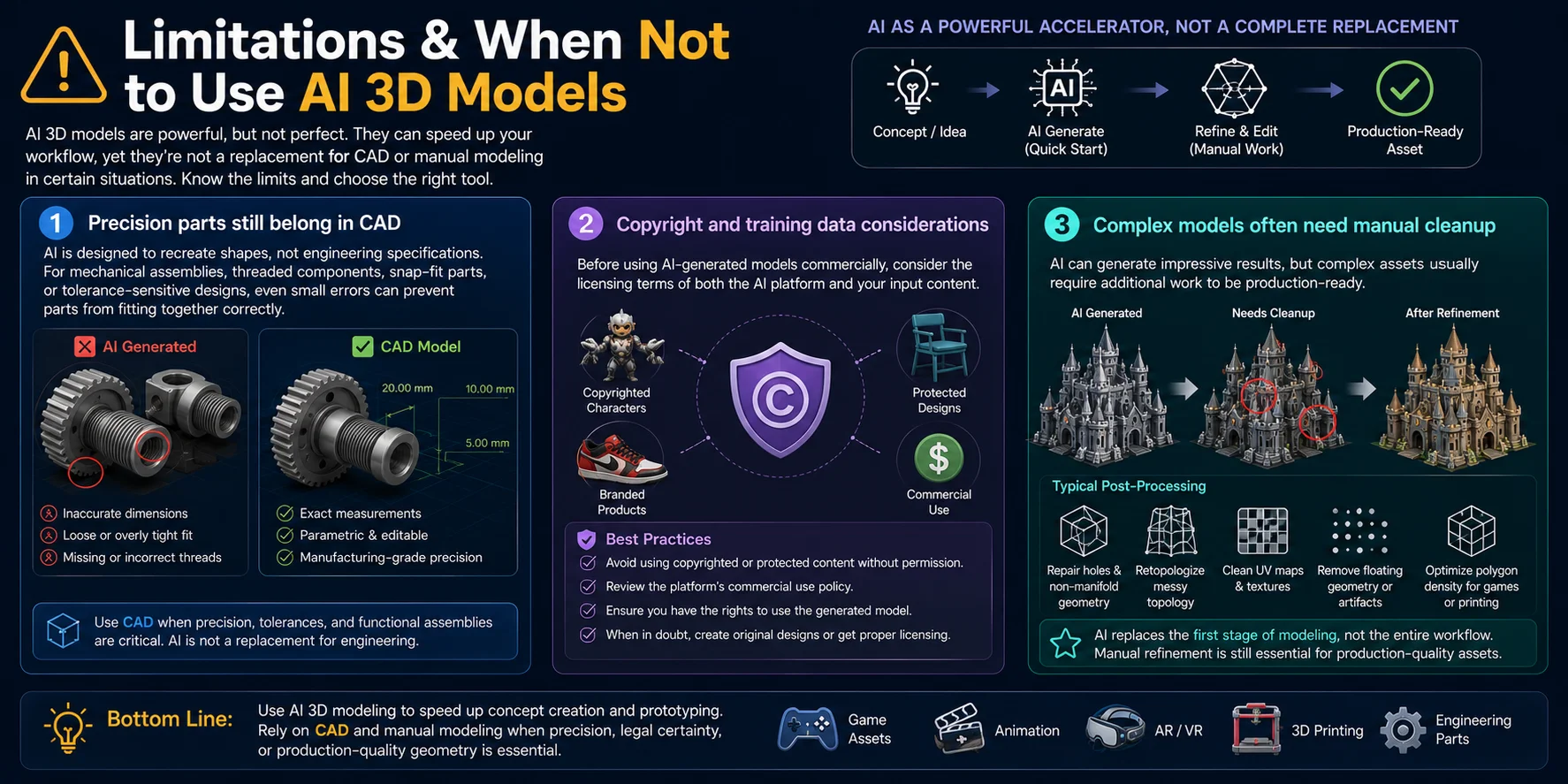
AI is designed to recreate shapes, not engineering specifications. If your project includes mechanical assemblies, threaded components, snap-fit parts, or tolerance-sensitive designs, even small dimensional errors can prevent parts from fitting together correctly.
For these applications, CAD software remains the better choice because it provides exact measurements, parametric editing, and manufacturing-grade precision.
Copyright and training data considerations
Before commercial use, check the platform license and confirm that you have permission to use any reference artwork, branded character, or protected design.
It is also worth reviewing the platform's commercial use policy and export license to ensure the generated assets can be used in your intended project.
Complex models often need manual cleanup
Although AI can generate impressive meshes, the output is rarely perfect. Large environments, highly detailed hard-surface objects, and models with thin structures or intricate mechanical features often require additional work.
Typical post-processing includes:
- Repairing holes and non-manifold geometry
- Retopologizing messy topology
- Cleaning UV maps and textures
- Removing floating geometry or artifacts
- Optimizing polygon density for games or printing
Frequently Asked Questions
How does an AI 3D model generator work?
An AI 3D model generator interprets a text prompt or reference image and predicts a 3D shape, often with textures or materials. Text-to-3D follows the description, while image-to-3D estimates visible and hidden geometry from one or more images. Review the result before exporting because proportions, topology, and unseen areas may need correction.
Can AI understand 3D models?
Specialized AI systems can analyze 3D geometry, materials, and spatial relationships for tasks such as classification, captioning, generation, or mesh processing. The supported analysis depends on the model and input format, so do not assume every AI tool can inspect or repair an arbitrary 3D asset.
Are AI-generated 3D models free to use?
Not always. Usage rights depend on the platform terms, subscription, and any images or protected designs used as input. Before publishing or selling an asset, check the platform's commercial-use terms and confirm that you have permission to use the source material.
Can I use AI-generated 3D models in Unity or Blender?
Yes, when the exported format is supported by the target software. FBX is common for Unity assets with rig or animation data, while GLB can carry lightweight assets with embedded materials. In Blender, check normals, topology, UVs, textures, and scale before using the model in production.
What's the difference between text-to-3D and image-to-3D?
Text-to-3D creates an asset from a written description, so it is useful for new concepts and rapid exploration. Image-to-3D uses one or more visual references and is better when the result should resemble an existing subject. Consistent multi-view images usually reduce ambiguity compared with a single view.
Are AI-generated 3D models good enough for 3D printing?
They can work well for figurines, props, decorative objects, and prototypes after inspection. Check that the mesh is watertight, repair non-manifold geometry, verify wall thickness and scale, then export as STL or 3MF. Use CAD for tolerance-sensitive mechanical parts.
Conclusion
AI-generated 3D models turn text or visual references into editable starting points. Choose the right input, inspect the mesh, refine it for the destination, and export in a compatible format.
Try the workflow in Tripo AI Studio to create and export a model for games, visualization, animation, or 3D printing.