Game Development Software: Best Tools by Category (2026)
TL;DR
- Game development software is a full pipeline, not just engines.
- Art tools (Blender, Maya, Aseprite, Photoshop) create 2D/3D assets.
- Version control (Git, Perforce, Plastic SCM) manages code and large assets.
- AI tools now generate models, textures, and animations faster.
- Best choice depends on level: beginner, indie, or AAA workflow.
Game development software falls into a few core categories: game engines (the foundation), 2D/3D art and modeling tools, audio software, AI asset generators, and version control. The right stack depends on your skill level, your budget, and the type of game you want to build.
What Counts as "Game Development Software"?
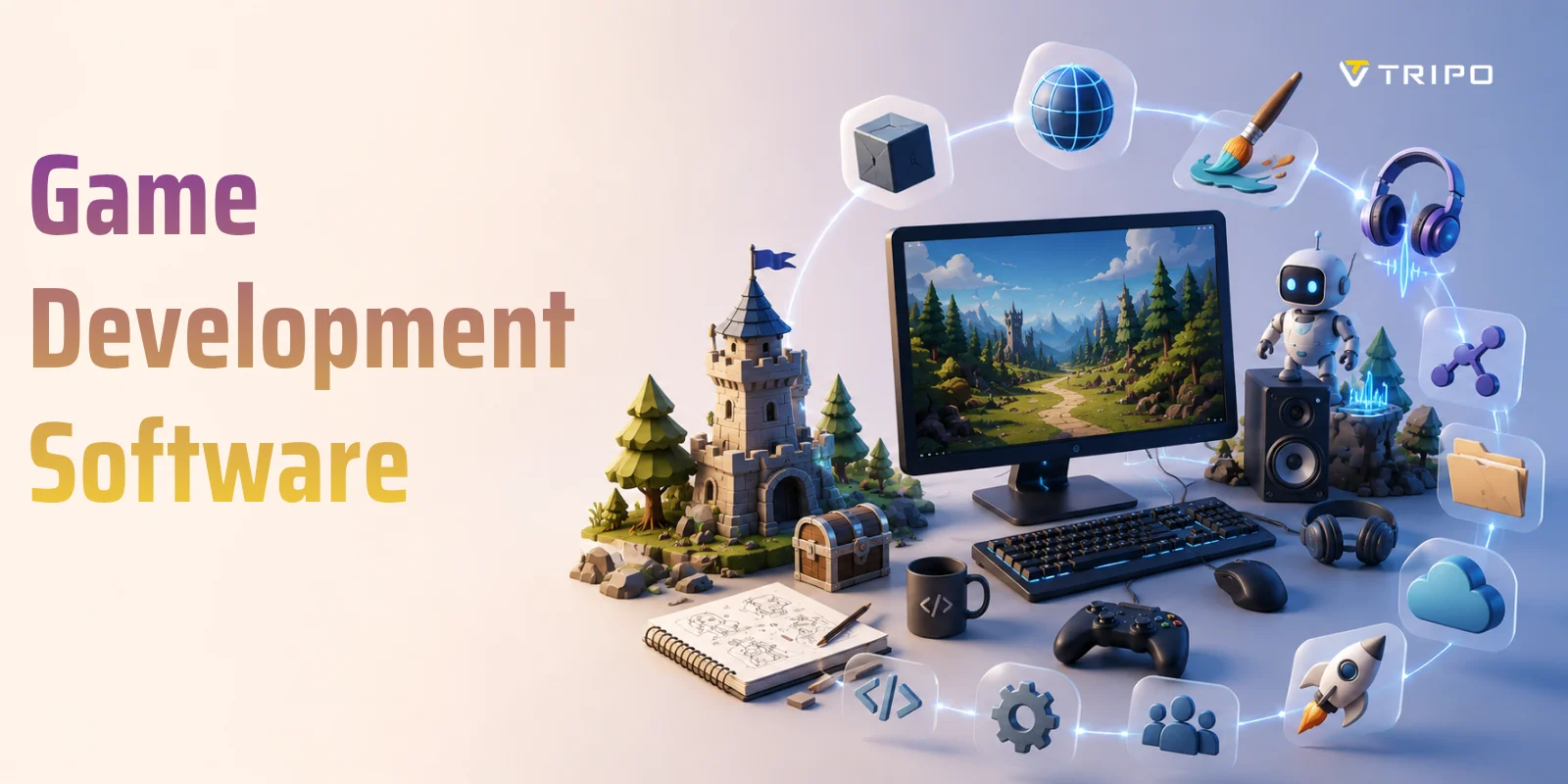
Many beginners assume that game development software simply refers to a game engine like Unity or Unreal Engine. While engines are indeed the core of the workflow, they are only one piece of a much larger production system. In reality, building a game requires a full stack of tools that work together across design, art, programming, audio, testing, and deployment.
Game creation is closer to a production pipeline than a single application. It typically begins with game design software, where developers plan mechanics, write documentation, and prototype ideas before any code is written. From there, projects move into a game engine, which serves as the central environment for building gameplay systems, rendering graphics, simulating physics, and exporting builds to different platforms.
However, the engine alone cannot produce a complete game. Developers also rely heavily on art and animation tools to create characters, environments, UI elements, and visual effects. At the same time, audio software is used to design music, sound effects, and voice assets that bring the game world to life. On the technical side, programming tools and IDEs support coding, debugging, and performance optimization, while version control systems ensure teams can collaborate without losing progress or overwriting work.
In modern pipelines, a new category has also become increasingly important: AI-powered asset tools. These tools can generate concept art, 3D models, textures, animations, and even audio assets, significantly reducing production time for small teams and indie developers.
To make this landscape easier to understand, you can think of game development software as a connected ecosystem rather than a single product. Each category plays a specific role in turning an idea into a playable experience.
Once you understand how these categories fit together, choosing the right tools becomes much clearer. The sections below break down the best options in each category depending on your skill level and project type.
Game Engines — The Core of Your Toolkit
The Game Engine Is the Center of Your Workflow
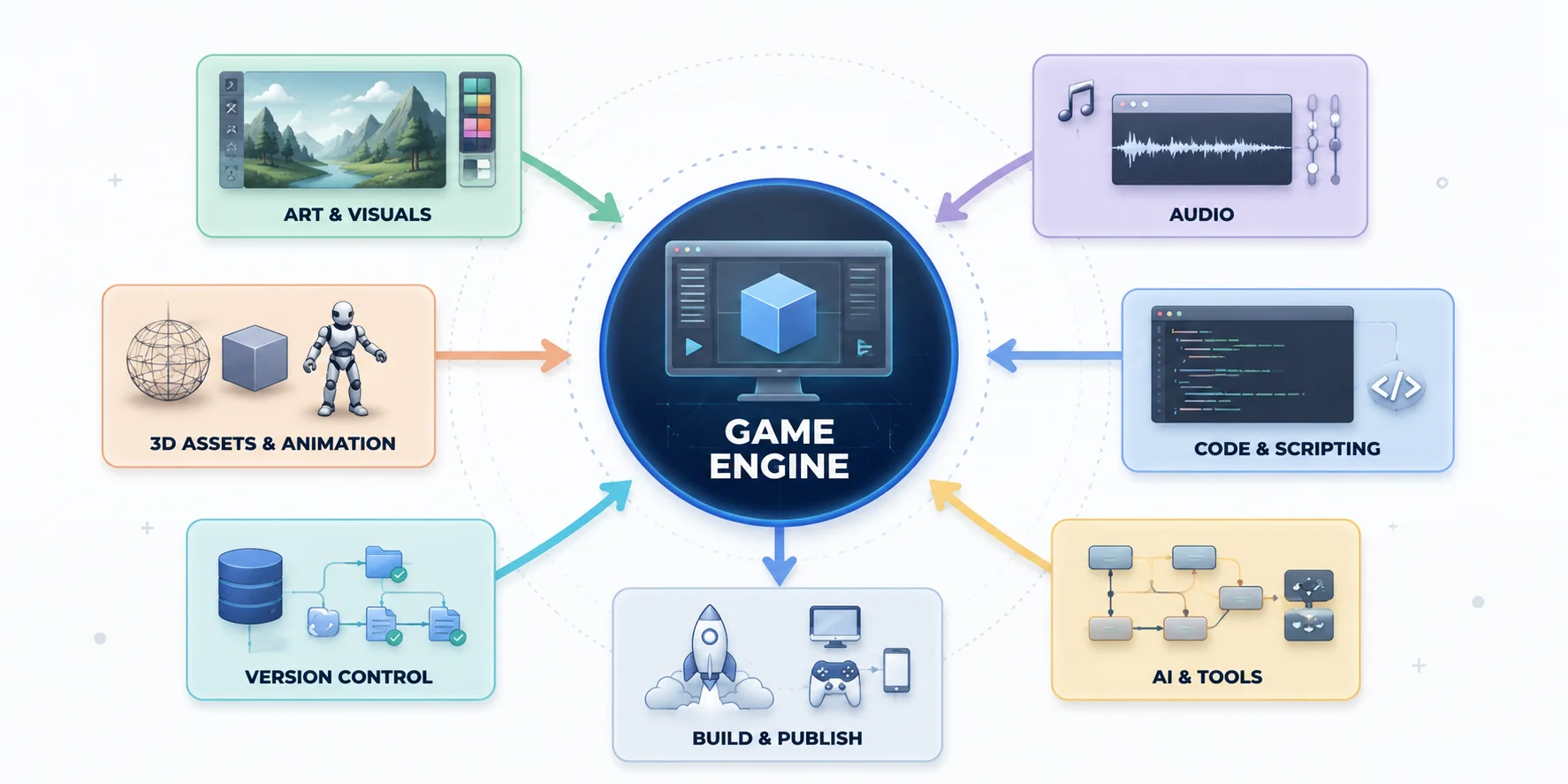
A game engine is the central software framework that powers your game. It is responsible for rendering graphics, simulating physics, processing player input, managing audio, running gameplay logic, and exporting your project to different platforms like PC, mobile, console, or web. In simple terms, if game development were a production line, the engine would be the factory where all systems come together and become a playable experience.
However, game engines are not one-size-fits-all tools. Different engines are optimized for different goals: some prioritize photorealistic 3D graphics, some focus on fast 2D development, and others aim to remove coding barriers entirely. Choosing the right engine often depends on your skill level, target platform, and the type of game you want to build.
Below is a quick overview of the most widely used game engines in 2026.
Unity
Best for: Indie developers, mobile games, and cross-platform production pipelines.
Unity uses C# and supports both 2D and 3D development, making it one of the most flexible engines in the industry. It is widely used for mobile games, indie PC titles, AR/VR projects, and even small studio productions. Its strength lies in its massive ecosystem—asset store, plugins, tutorials, and third-party integrations—allowing developers to scale projects quickly.
Unreal Engine
Best for: AAA games, cinematic-quality visuals, and high-end 3D experiences.
Unreal Engine uses C++ and a visual scripting system called Blueprints, making it powerful yet accessible for non-programmers. It is primarily focused on 3D development, especially games requiring realistic lighting, physics, and rendering. It is often used in large-scale console and PC titles, architectural visualization, and virtual production workflows.
Godot
Best for: Indie developers, hobbyists, and teams looking for a free open-source solution.
Godot supports both 2D and 3D development, with a strong reputation for its lightweight architecture and fast iteration speed. It primarily uses GDScript, a Python-like language, but also supports C# and C++. Because it is fully open-source, developers have complete control over the engine without licensing restrictions.
GameMaker
Best for: Fast 2D game development, especially platformers and arcade-style games.
GameMaker combines a visual drag-and-drop system with its scripting language GML (GameMaker Language). It is designed for speed and simplicity, allowing developers to prototype and publish 2D games quickly without dealing with complex engine architecture. It is especially popular among solo developers and game jam creators.
GDevelop
Best for: Beginners, educators, and creators who want to build games without coding.
GDevelop is a no-code engine that uses a visual event-based system to define game logic. It supports 2D game creation and includes AI-assisted features to speed up development. It is ideal for users who want to focus on game design rather than programming, making it popular in classrooms and early-stage prototyping.
Construct 3
Best for: Browser-based development and rapid prototyping.
Construct 3 runs entirely in the browser and uses a visual event sheet system instead of traditional coding. It is focused on 2D games and is widely used for educational purposes and fast game experiments. Its cloud-based workflow makes it easy to access projects from any device without installation.
microStudio
Best for: Learning programming while building lightweight browser games.
microStudio is a browser-based engine that supports microScript, along with Lua and Python-like languages. It is designed for simplicity and education, allowing users to create and publish small 2D games directly online. It is often used as a stepping stone into more advanced game engines.
Ultimately, the "best" game engine depends on your goals. If you want flexibility and industry adoption, Unity is a safe starting point. If you're aiming for cutting-edge visuals, Unreal Engine leads the field. If you prefer open-source control, Godot is the strongest option. And if your priority is simplicity or no-code creation, tools like GDevelop or Construct 3 lower the barrier significantly.
2D & 3D Art and Modeling Software
Every game needs visual assets, whether that's a realistic 3D character, a pixel-art hero, or a simple UI icon. The right art software depends on the style of your game, your experience level, and your budget. Fortunately, there are excellent options ranging from completely free tools to industry-standard professional applications.
3D Modeling Software
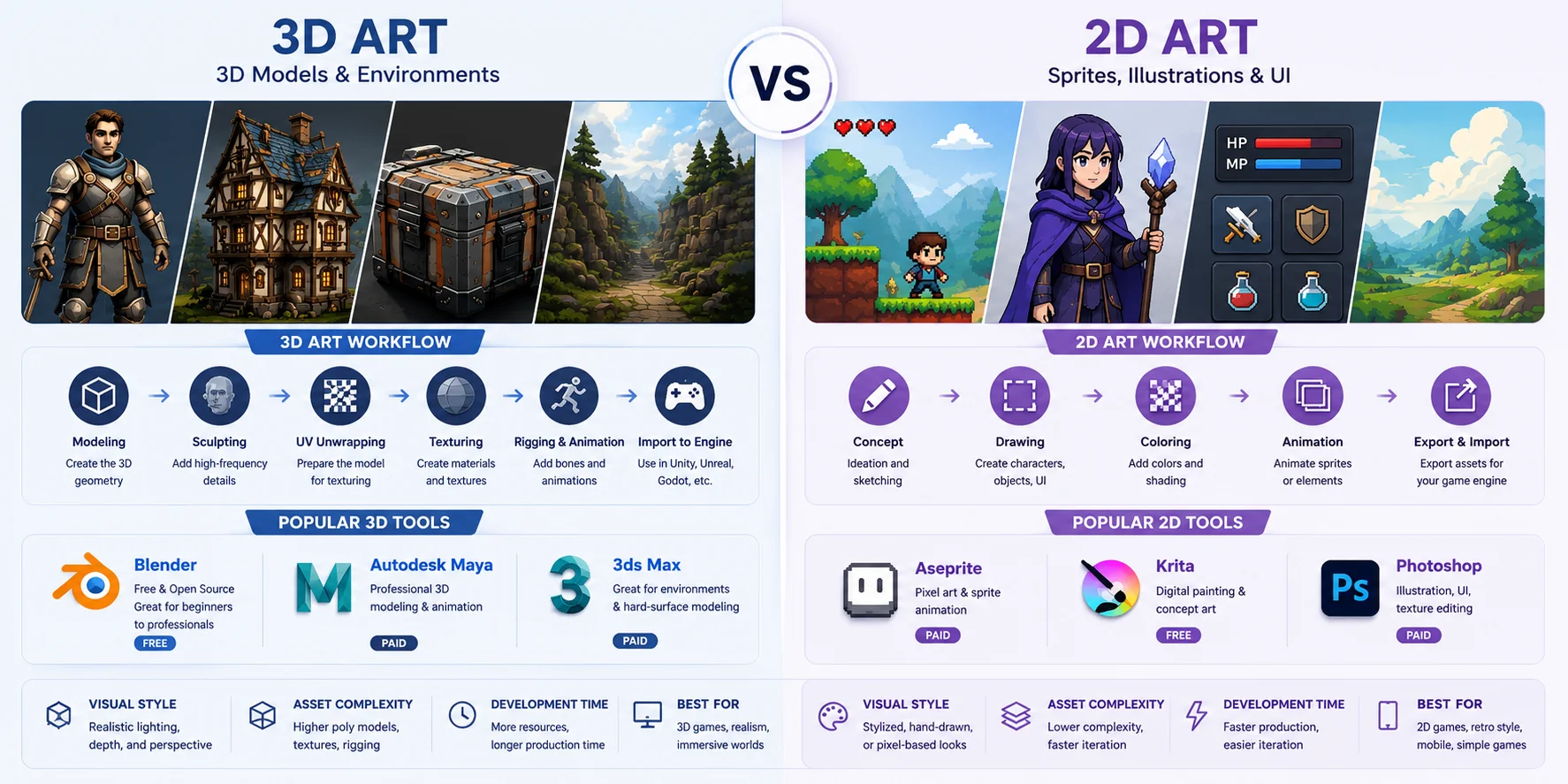
If you're building a 3D game, you'll need software for modeling, sculpting, UV mapping, rigging, and animation.
- Blender is the best all-around free 3D package. It includes modeling, sculpting, texturing, animation, rendering, and even video editing in a single application.
- Autodesk Maya is widely used by professional game studios, especially for character rigging and animation pipelines.
- 3ds Max remains a popular choice for environment artists and hard-surface modeling, particularly in larger production studios.
2D Art & Pixel Art Software
For 2D games, you'll create sprites, UI elements, backgrounds, and concept art instead of polygonal models.
- Aseprite is one of the most popular tools for creating pixel art and animated sprite sheets.
- Krita offers a professional digital painting experience completely free, making it ideal for concept artists and indie developers.
- Adobe Photoshop remains a common choice for UI artwork, hand-painted textures, and general image editing.
Texture & Material Creation
Once your models are finished, you'll often need dedicated tools to create realistic materials and textures. These applications help create physically based rendering (PBR) materials such as metal, wood, fabric, stone, and weathered surfaces that can be imported directly into modern game engines.
You don't need every tool on this list. Many indie developers complete an entire art pipeline using Blender, Krita, and Material Maker, while larger studios often combine Maya, Photoshop, and Substance 3D Painter for production-ready assets.
2D & 3D Art Tools for Game Development
Audio Software for Games
Audio is one of the most overlooked parts of game development, but it plays a huge role in immersion. A well-designed sound system can make a simple action feel impactful, guide player attention, and even shape emotional pacing. From footsteps and weapon effects to background music and dialogue, every sound in a game is usually created and managed through a combination of audio editing tools, digital audio workstations (DAWs), and audio middleware systems.
Essential Audio Tools for Game Development
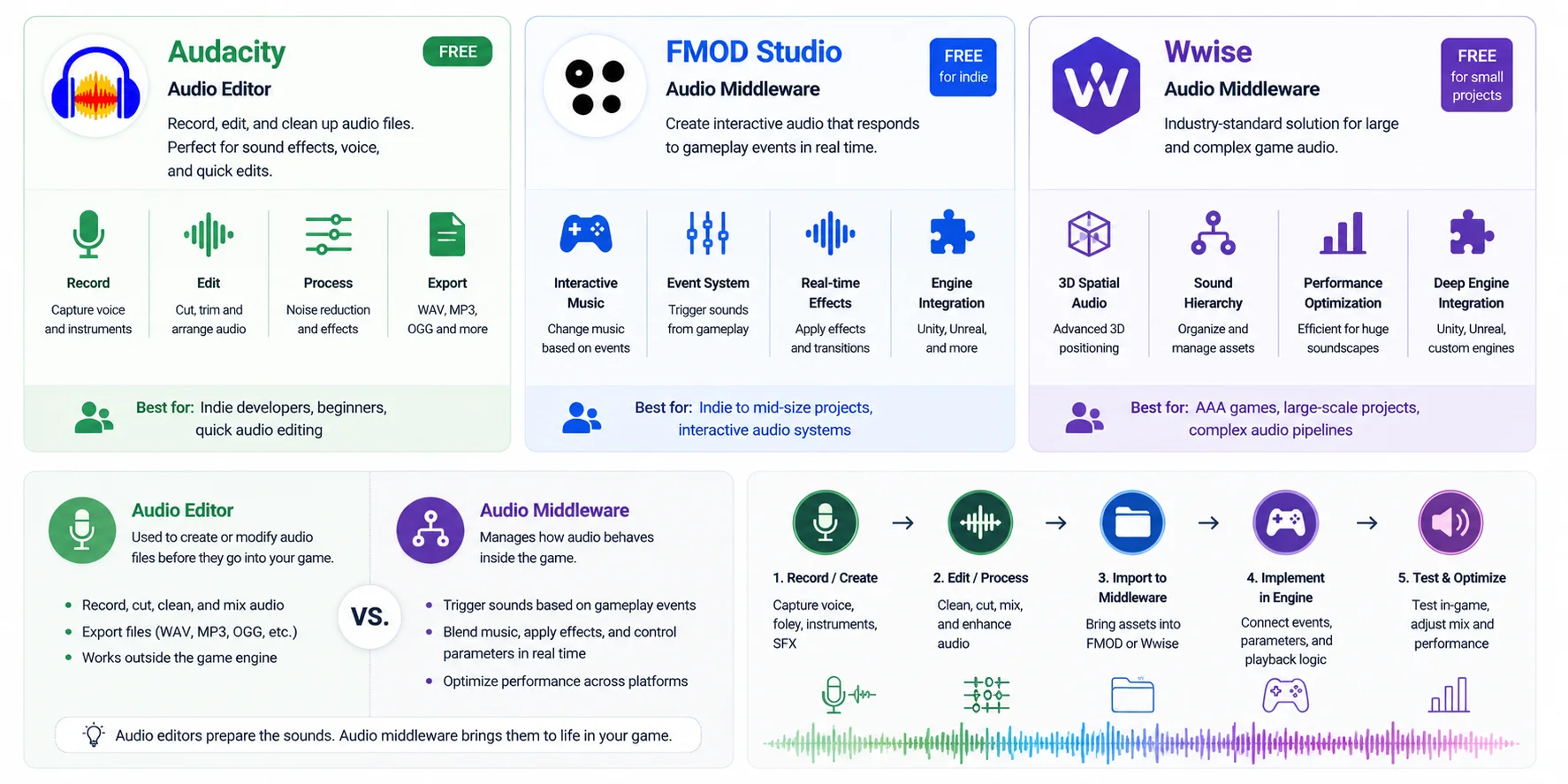
- Audacity is a lightweight and free audio editor used for basic sound production tasks such as recording voice lines, trimming sound effects, removing noise, and exporting game-ready audio files. It is often the first tool beginners use when working with game sound.
- FMOD Studio is a flexible audio middleware designed for interactive audio design. Instead of playing fixed sound files, FMOD allows sounds and music to change dynamically based on gameplay conditions—for example, intensifying background music during combat or adjusting environmental audio depending on player location.
- Wwise (Audiokinetic) is an industry-standard solution widely used in AAA game development. It provides advanced features such as real-time mixing, 3D spatial audio, performance optimization, and deep integration with engines like Unity and Unreal Engine. It is especially powerful for large projects with complex audio systems.
Audio Editor vs. Audio Middleware
An audio editor or DAW is primarily used to create and prepare sound assets before they enter the game. This includes recording, editing, mixing, and exporting audio files in formats such as WAV or OGG. It focuses on the creation stage of sound.
Audio middleware, by contrast, operates during gameplay. Instead of simply triggering pre-made audio files, it acts as a system layer between the game engine and audio assets. Middleware allows developers to define logic such as "play this sound when the player enters water" or "gradually fade music based on health level," making audio responsive and interactive rather than static.
In a typical workflow, developers first create or edit sounds in tools like Audacity or professional DAWs, then import them into FMOD or Wwise, and finally connect them to gameplay events inside a game engine like Unity or Unreal. This separation of creation and logic is what makes modern game audio scalable and dynamic.
For indie developers, Audacity combined with FMOD is often enough to build professional-sounding games. For AAA studios, Wwise becomes essential when managing thousands of audio events across large, open-world environments.
AI Asset & 3D Tools — The New Category
Game development has traditionally been constrained by one major bottleneck: asset creation. Characters, environments, props, and textures all require time-consuming manual work across modeling, sculpting, UV unwrapping, rigging, and texturing. As production demands grow, especially for indie teams and small studios, this process often becomes the limiting factor rather than coding or design.
In 2026, a new category of tools has emerged to address this problem: AI asset and 3D generation tools. These tools do not replace game engines or traditional art software, but instead introduce a new layer in the pipeline that sits between concept and production-ready assets.
The modern AI-assisted workflow typically looks like this:
Text prompt or image → AI 3D generation → game-ready topology optimization → auto rigging → export to engine
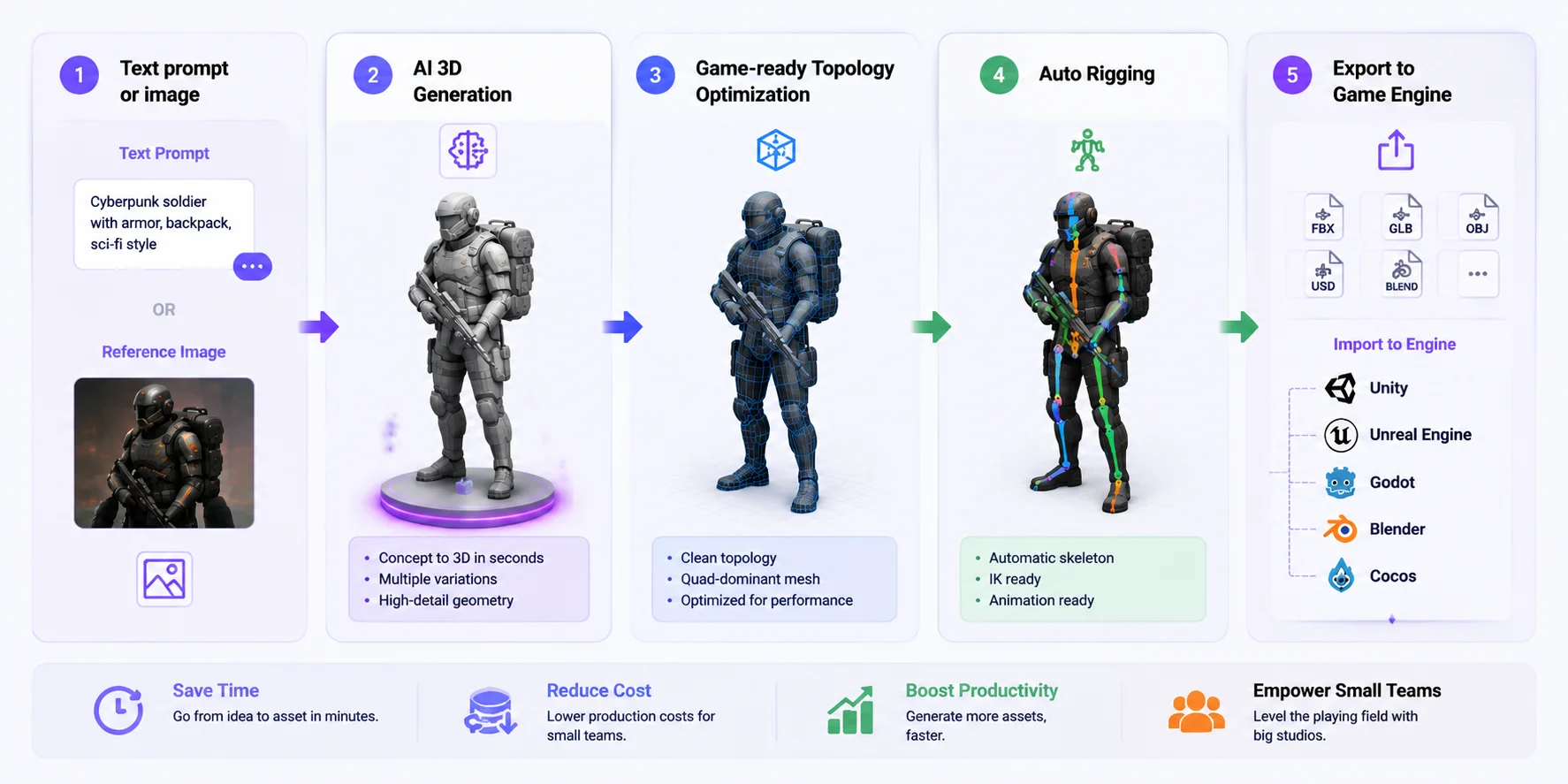
What makes this category different from earlier procedural tools is its focus on game-ready output, not just visual generation. Instead of producing rough models that require heavy cleanup, newer systems aim to deliver assets with usable topology, proper structure, and export compatibility for real engines.
Most AI tools today are also designed to integrate directly into existing production environments. Through plugins or export pipelines, generated assets can be sent into Blender, Unity, Unreal Engine, Godot, and Cocos, where artists can refine materials, adjust rigs, and finalize implementation. This makes AI tools part of the workflow rather than a separate experimental step.
Within this category, tools such as Tripo AI Text to 3D allow developers to generate 3D models directly from text descriptions or reference images, dramatically speeding up early prototyping. More importantly, features like Tripo AI Smart Mesh focus on converting raw outputs into clean, optimized geometry suitable for real-time engines—ensuring generated assets meet practical requirements such as performance constraints, animation readiness, and engine compatibility.
The impact of this category is especially significant for small teams. Instead of spending days or weeks building asset libraries, developers can now generate large portions of content in hours, then refine only what is necessary. This shifts the role of artists from pure production toward direction, refinement, and quality control.
Ultimately, AI asset tools should not be viewed as a shortcut or replacement for traditional workflows. Instead, they represent a structural expansion of the game development stack—adding a new layer that increases throughput while still relying on engines and art tools for final quality. As a result, they are increasingly becoming a standard part of modern game production pipelines rather than an optional experiment.
Version Control & Collaboration
As your project grows, keeping track of code, art assets, and scene files becomes just as important as creating them. That's where version control software comes in. It records every change, lets teammates work on the same project safely, and makes it possible to restore earlier versions if something goes wrong.
Unlike traditional software projects, games contain large binary files such as FBX models, textures, animations, audio, and Unity or Unreal scenes. These files cannot always be merged automatically, which is why many game studios use specialized version control systems in addition to standard Git workflows.
How Version Control Fits into Game Development
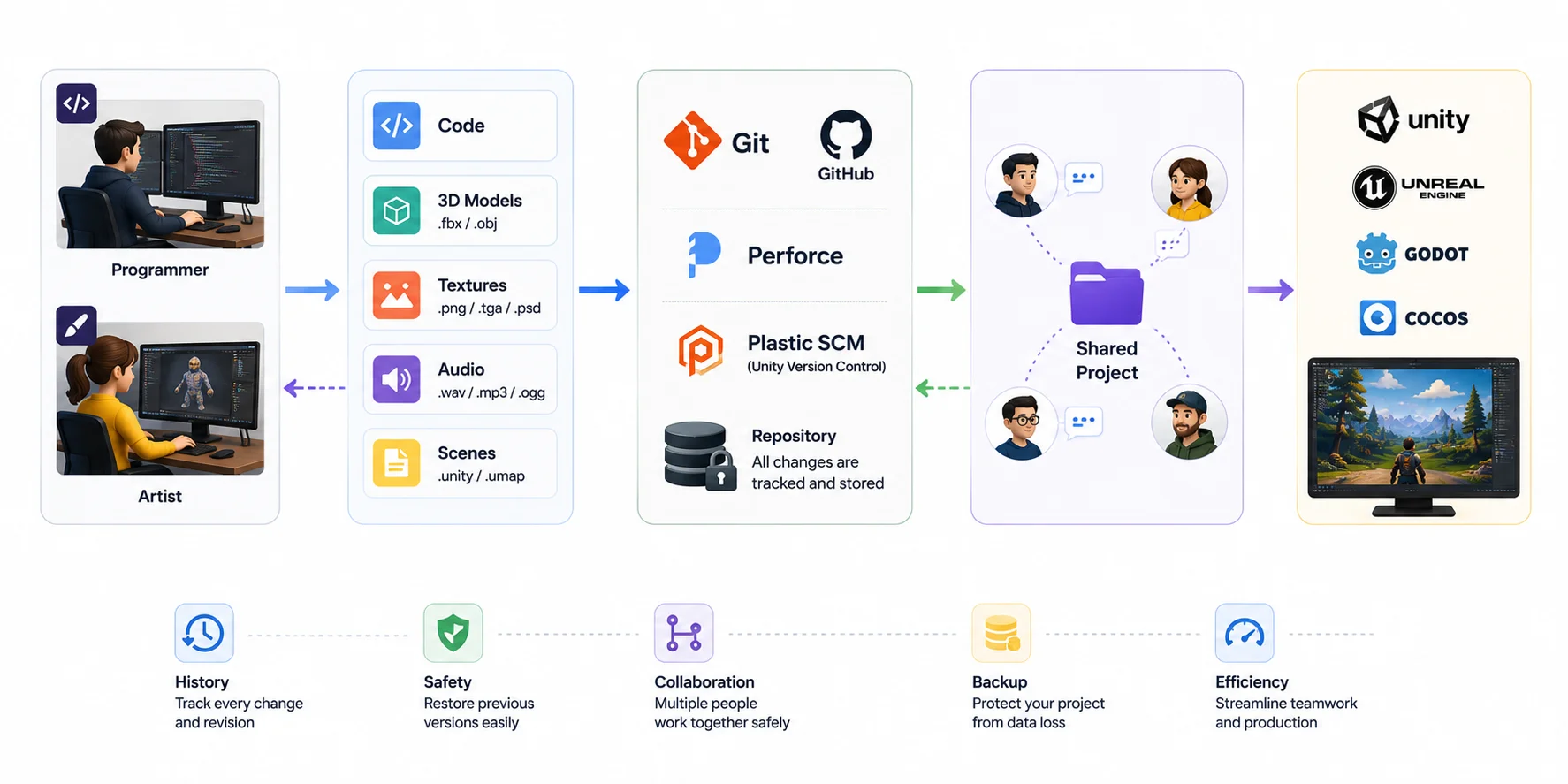
- Git + GitHub is the most widely used choice for programming and smaller indie projects. It works best when combined with Git LFS for larger files.
- Perforce is the industry standard for many AAA studios because it scales well to huge repositories with thousands of large assets.
- Unity Version Control (formerly Plastic SCM) is designed specifically for game development, offering better handling of binary assets and artist-friendly collaboration than a traditional Git workflow.
Even solo developers benefit from version control. It provides automatic project history, protects against accidental mistakes, and makes it much easier to experiment without risking weeks of work.
How to Choose Software by Skill Level & Genre
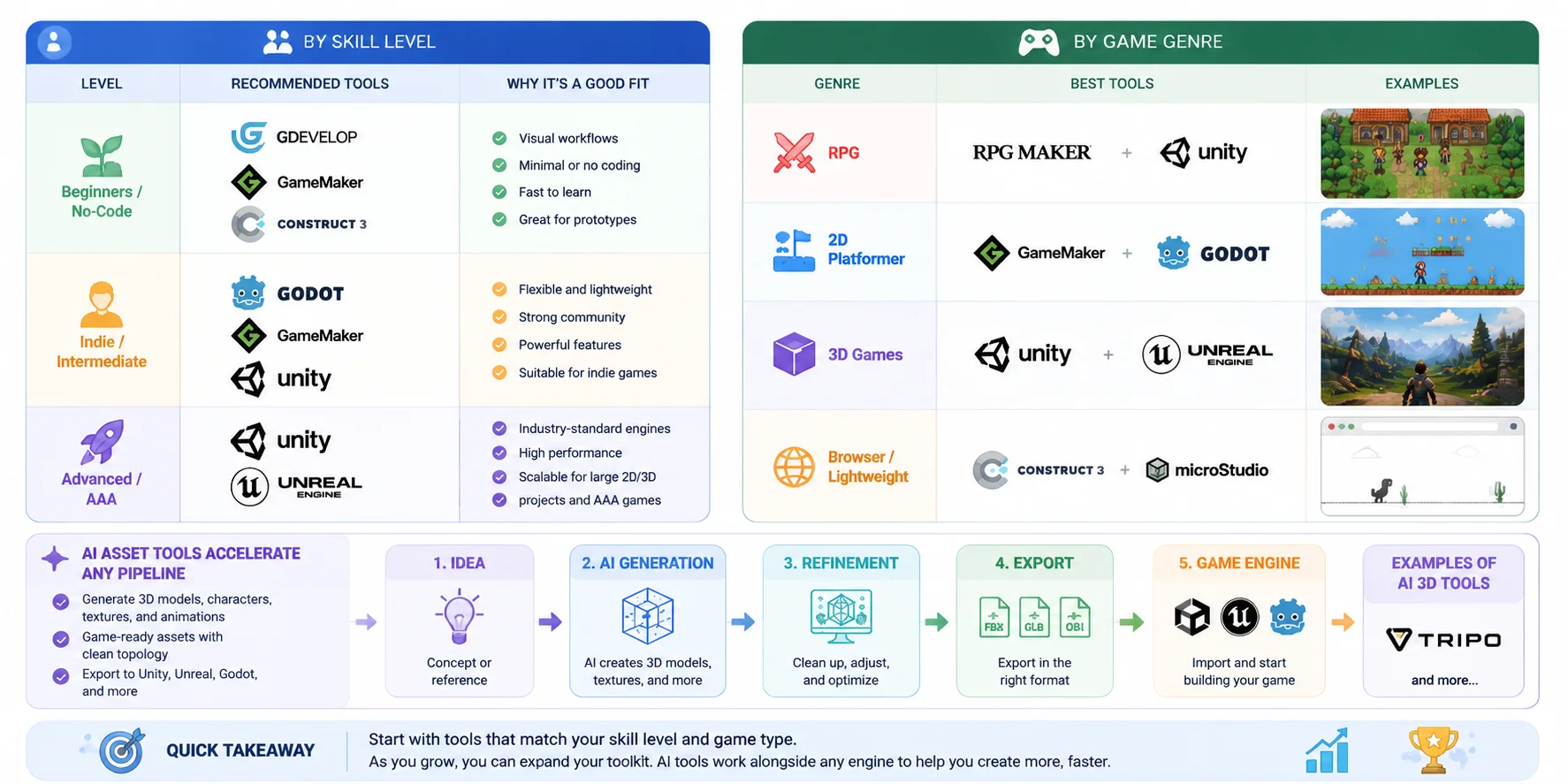
With so many game development tools available today, choosing the right software is less about finding a single "best engine" and more about matching tools to your skill level, project scope, and game genre. Different engines, editors, and supporting tools are designed for very different workflows—from simple no-code prototypes to large-scale AAA production pipelines.
A good setup usually combines a game engine, supporting creative tools, and increasingly, AI-powered asset generation tools. Understanding where you fit in helps you avoid overcomplicated workflows or, on the other hand, hitting limitations too early.
By Skill Level
For beginners, the priority is speed and learning fundamentals rather than mastering complex systems. Indie developers often look for flexibility and efficiency, while advanced teams need scalable architecture, performance control, and cross-platform deployment.
By Game Genre
Genre also plays a major role in tool selection. For example, RPG systems benefit from built-in narrative and inventory frameworks, while 2D platformers prioritize fast iteration and sprite workflows. 3D games require powerful rendering pipelines and physics systems, which is where engines like Unity and Unreal stand out.
Where AI Tools Fit In
Modern game development workflows increasingly include AI-assisted asset generation tools, which can plug into any engine or genre. These tools generate 3D models, textures, characters, and animations from text prompts or images, then export them directly into engines like Unity, Unreal Engine, or Godot.
Instead of replacing traditional software, AI tools sit alongside it as a production accelerator layer—helping small teams achieve output levels that previously required larger studios. This is especially useful for indie developers who need to rapidly prototype environments or fill game worlds with assets.
Final Takeaway
There is no universal "best game development software." The real answer depends on your workflow:
- If you want to learn quickly → start with no-code or beginner-friendly engines
- If you're building an indie game → choose flexible engines like Godot or Unity
- If you're targeting AAA visuals → Unreal Engine is often the strongest choice
- If you want faster content production → combine your engine with AI asset tools
The modern game development stack is no longer a single tool—it is a combination of engine + creative software + AI acceleration, tailored to your project's goals.
Frequently Asked Questions
What is the best software to develop a game?
There is no single best option. Unity and Unreal Engine are the most widely used for professional 2D/3D games, while Godot is popular for indie and open-source projects. Beginners often start with GameMaker or GDevelop because they are easier to learn and require less coding.
Is Godot still free?
Yes. Godot is completely free and open-source, licensed under the MIT license. You can use it for personal, indie, or commercial projects without paying royalties or subscription fees.
What game costs $1 billion to make?
There is currently no confirmed game that officially cost 1 billion in crowdfunding as of May 2026, making it the highest fan-funded game development in history—though crowdfunding contributions differ from traditional studio budgets.
Is C++ or C# better for games?
Neither is universally better—it depends on the engine and project type.
- C++ is used in Unreal Engine and offers maximum performance and control, but has a steeper learning curve.
- C# is used in Unity and is easier to learn, making it more popular for indie developers and rapid development.
Unity vs Unreal Engine: which should indie developers choose?
For most indie developers, Unity is the more practical starting point—it has a gentler learning curve, strong 2D support, and a vast ecosystem of affordable assets. Unreal Engine delivers more powerful out-of-the-box visuals but suits teams targeting high-end 3D experiences. If flexibility and ecosystem size matter most, start with Unity; if cinematic quality is the priority, Unreal is the stronger choice.
What is the best free game development software?
Godot is widely considered the best fully free, open-source engine for both 2D and 3D development. GDevelop is a strong free option for beginners who prefer a no-code approach. For 3D art, Blender is free and industry-grade; for 2D sprites, Krita covers most needs at no cost.
Can you make a game without coding?
Yes. GDevelop and Construct 3 use visual event systems that let you build and publish games without writing code. GameMaker also offers a drag-and-drop workflow before you need its scripting language. These tools are especially popular for prototyping, educational projects, and simple mobile or browser games.
What software do AAA game studios use?
Most AAA studios build around Unreal Engine or proprietary in-house engines. For art and animation, Autodesk Maya and 3ds Max are standard. Audio is typically managed through Wwise, version control through Perforce, and large-project asset tracking through tools like ShotGrid.
Godot vs GameMaker: which is better for 2D games?
Both are strong 2D choices. GameMaker has a longer commercial track record—Undertale and Hotline Miami were both built with it—and a fast prototyping workflow. Godot is fully free and open-source, handles both 2D and 3D, and has grown significantly since Godot 4. For zero licensing costs and long-term flexibility, Godot is the better pick; for proven 2D commercial output with a dedicated toolset, GameMaker is reliable.
What game development software is best for solo developers?
Solo developers benefit most from tools that cover multiple needs without overhead. Godot (free, 2D/3D, lightweight) and Unity (broad ecosystem, large community) are the most common choices. Pairing either with Blender for 3D assets and an AI generation tool for rapid asset creation keeps the pipeline lean without requiring a full team.
Conclusion
Pick your engine, then speed up the slowest part—asset production. Generate game-ready 3D models and characters with Tripo AI and drop them straight into Unity, Unreal, or Godot.