What Are PBR Textures? A Beginner's Guide to Physically Based Rendering Maps
TL;DR
- PBR = set of texture maps that simulate real-world light interaction.
- Core maps: albedo, normal, roughness, metallic, AO, height.
- Two workflows: metallic/roughness vs specular/glossiness.
- Used in games, film, AR/VR, real-time 3D.
- Tripo AI outputs PBR-ready models automatically.
Most 3D beginners have seen the term “PBR” in texture packs, game engines, or marketplace assets. But many can only describe it as “realistic textures,” which is partly true but incomplete.
Before PBR became standard, many 3D surfaces looked flat or fake because lighting and highlights were often painted directly into textures. A material might look acceptable in one lighting setup but fail in another. PBR changed this by giving artists a physically consistent way to describe surfaces.
This guide explains what PBR textures are, how each map works, why the physics matters, how the two major workflows differ, and where PBR is used in games, film, AR, product visualization, and AI-generated 3D assets.
What Is PBR (Physically Based Rendering)?
PBR, or Physically Based Rendering, is a rendering approach that simulates how light behaves in the real world. Instead of relying on hand-tuned tricks, PBR uses consistent material rules so surfaces respond predictably under different lighting conditions.
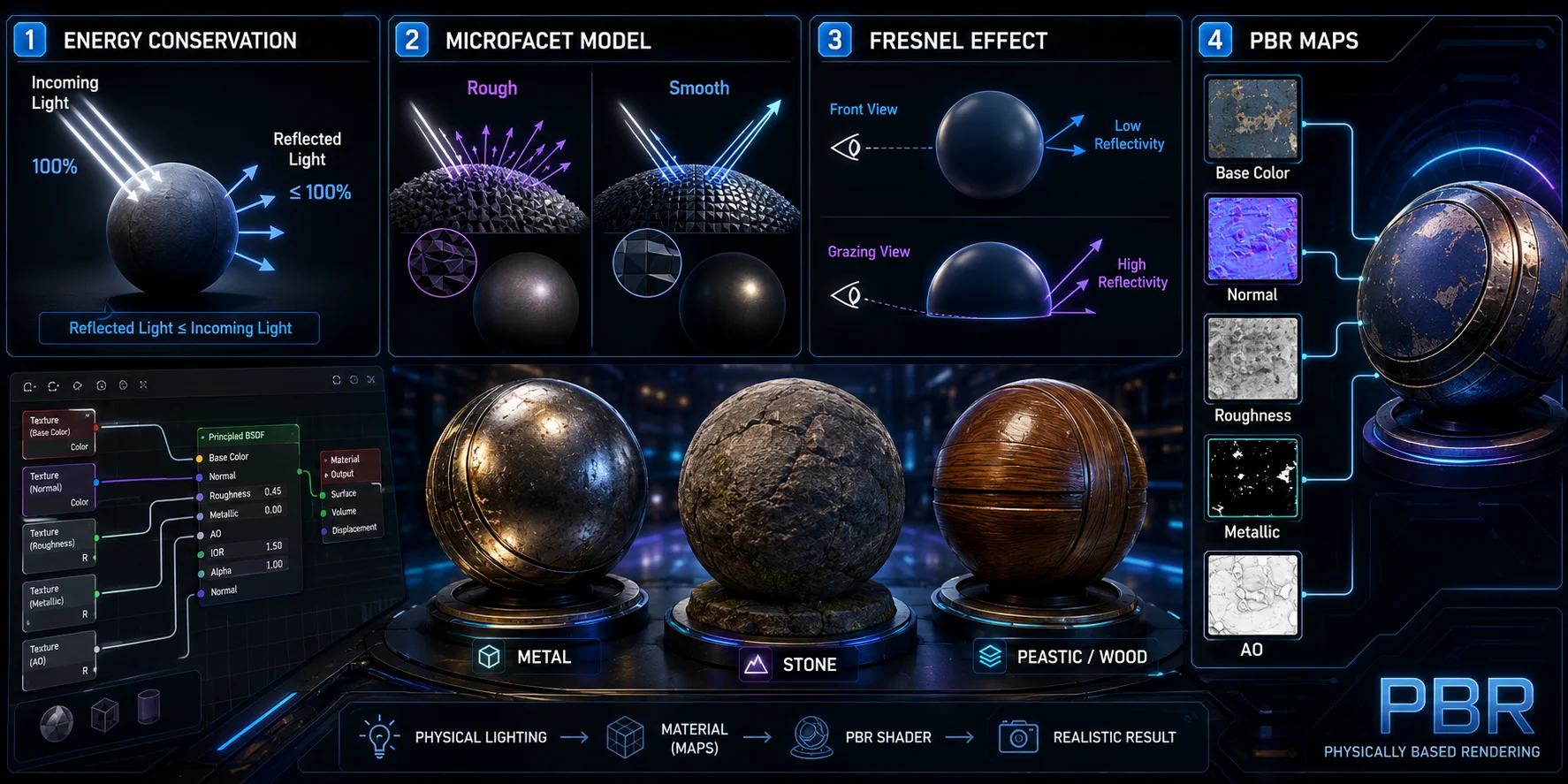
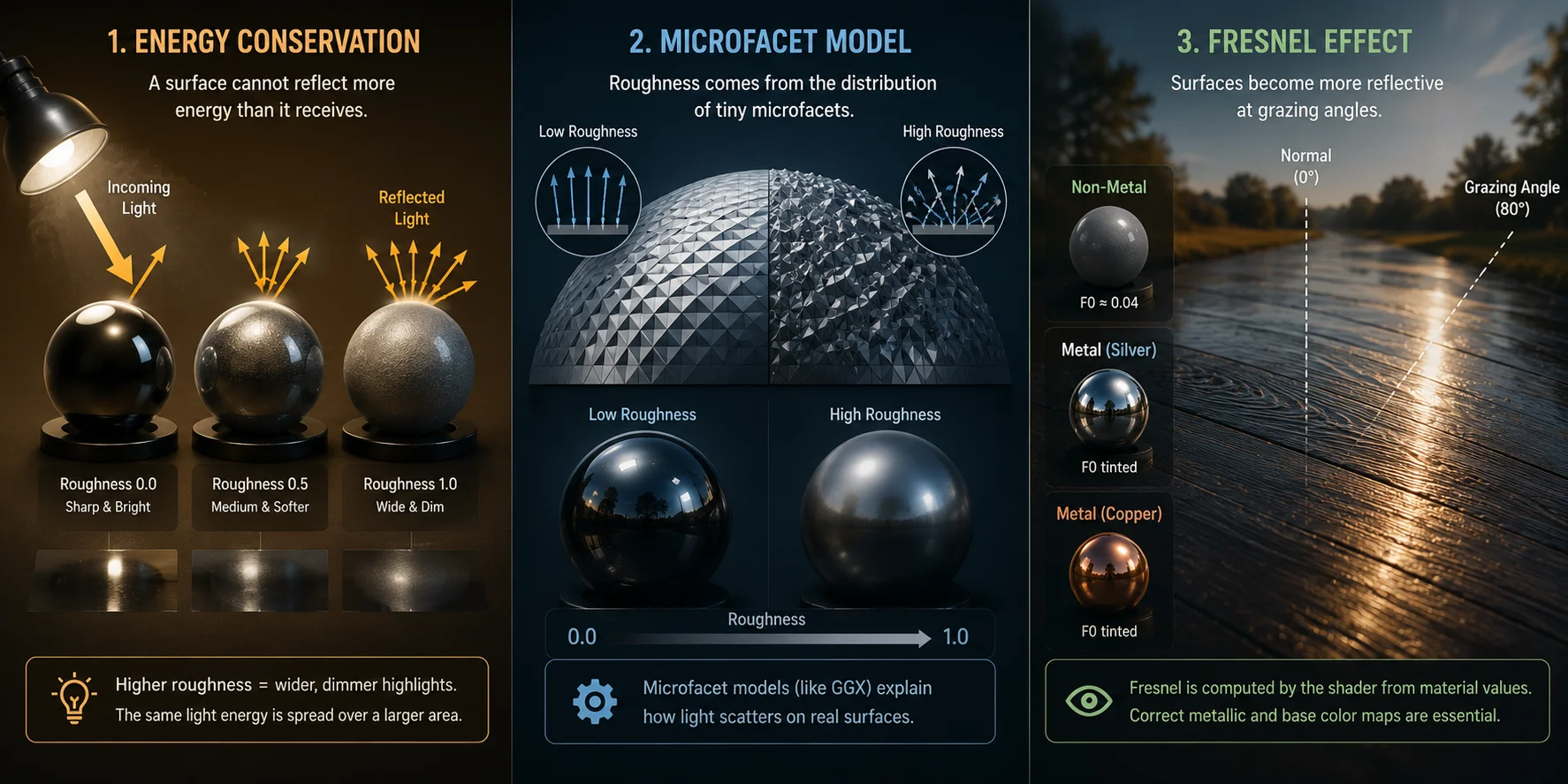
The first principle is energy conservation. A surface cannot reflect more light than it receives. A mirror can redirect light efficiently, but it does not create new light. In PBR, this prevents materials from becoming unrealistically bright and reflective at the same time.
The second principle is the microfacet model. At a microscopic level, surfaces are made of tiny uneven facets. A rough surface scatters light in many directions, like frosted glass. A smooth surface reflects light in a tighter direction, like a mirror. This is why roughness controls whether highlights look broad and soft or sharp and clear.
The third principle is the Fresnel effect. At grazing angles, almost every material becomes more reflective. This is why a wood floor, wet road, or plastic surface can look brighter when viewed from a low angle.
PBR textures are the data inputs that feed a PBR shader. They describe color, roughness, metalness, surface direction, and local shadowing pixel by pixel. Without accurate maps, even a PBR renderer will produce inaccurate results.
PBR became mainstream in real-time rendering during the early-to-mid 2010s, helped by tools such as Marmoset Toolbag, Substance Painter, and modern game engines.
What Are PBR Textures?
PBR textures are a collection of image maps, each storing a different property of a surface. A PBR shader reads those maps together at render time to compute the final material appearance.
Think of it like a house: one drawing shows the floor plan, another shows wiring, another shows plumbing. No single drawing explains the whole building. PBR works the same way. One map stores color, another stores bump direction, another stores reflectivity, and another stores local shadowing.
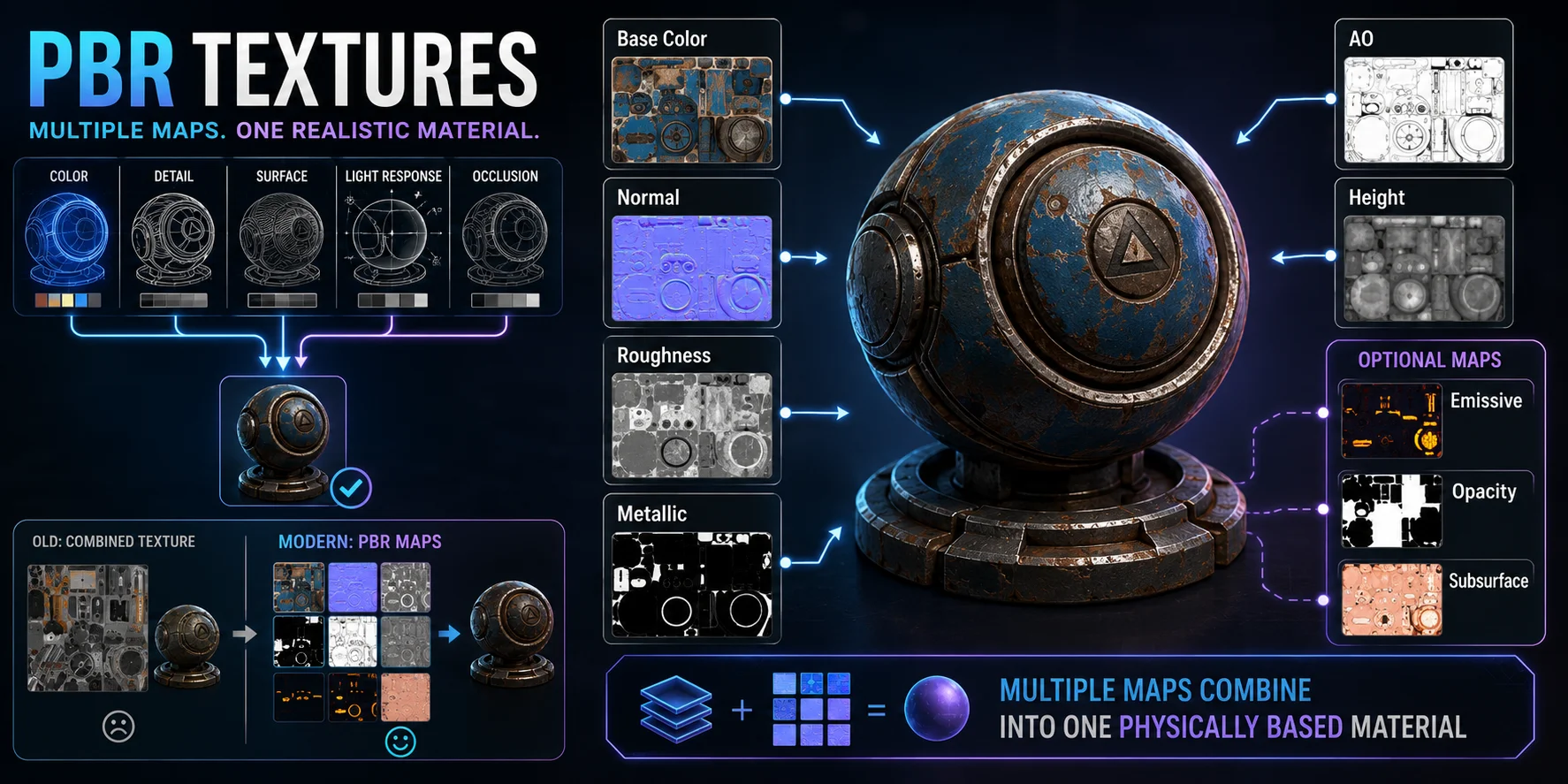
Traditional texturing often used diffuse and specular maps as artistic guesses. Artists might paint color, shadows, dirt, and highlights into one texture. PBR separates those properties so lighting remains dynamic and physically consistent.
The core PBR maps are:
- Albedo / Base Color
- Normal
- Roughness
- Metallic
- Ambient Occlusion
- Height / Displacement
- Optional maps such as Opacity, Emissive, and Subsurface
Core PBR Texture Maps Explained
Albedo / Base Color Map
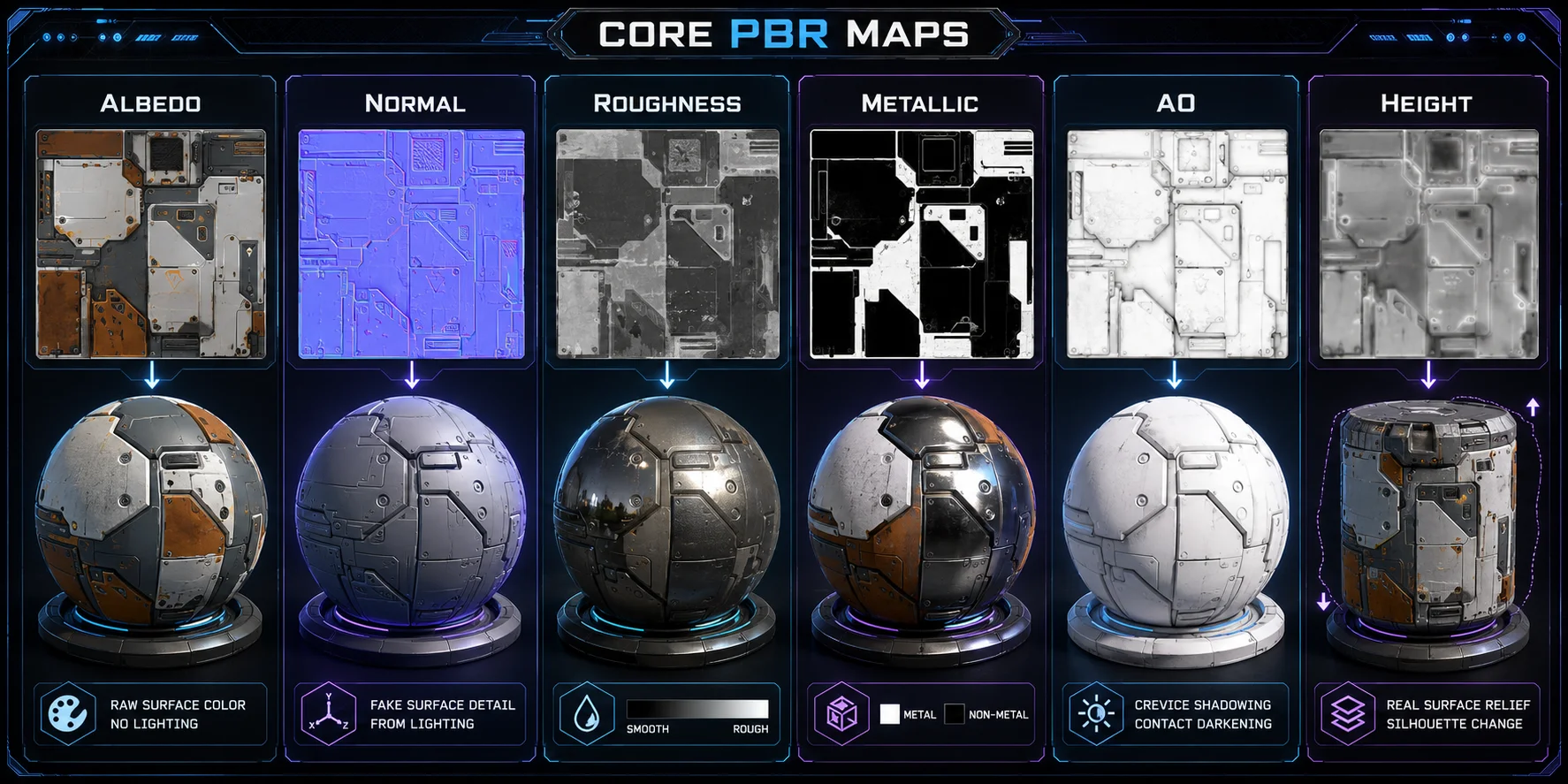
The albedo map, also called the base color map, stores the raw surface color of a material as RGB data. It should contain no baked lighting, shadows, ambient occlusion, or painted highlights. A common beginner mistake is treating albedo like an old diffuse texture, which breaks the physics because lighting should come from the renderer. Real-world albedo values are often lower than expected: snow is roughly 0.8–0.9, coal is around 0.04, and wood is often around 0.1–0.15.
Normal Map
The normal map stores surface direction data, usually encoded as XYZ values in RGB colors. Its blue or purple appearance is normal. It simulates small bumps, pores, scratches, fabric weave, and brick mortar lines without adding real geometry. Tangent-space normal maps are common for game assets, while object-space normal maps are more fixed to a specific model orientation.
Roughness Map
The roughness map is a grayscale texture that controls how sharp or blurry reflections appear. In a metallic/roughness workflow, white means rough and scattered, while black means smooth and mirror-like. This map often changes the material’s feel more than color does: rubber, ceramic, wet stone, and polished metal can look completely different mainly because of roughness. Beginners often make surfaces too smooth; real materials usually need subtle variation.
Metallic Map
The metallic map is a grayscale texture that defines whether a surface behaves like metal or non-metal. White means metal, and black means non-metal or dielectric. For physically accurate results, avoid broad mixed values such as 0.2–0.8 except where the surface genuinely changes material, such as rust, dirt, or an edge transition. Metals reflect with a tinted specular response, while dielectrics have a much lower, largely neutral reflectance at normal viewing angles.
Ambient Occlusion (AO) Map
The ambient occlusion map is a grayscale texture that stores pre-baked soft shadows in tight areas such as cracks, corners, seams, and crevices. It is usually applied as a multiplier to add local contact shadow detail. AO does not replace real-time ambient occlusion or proper lighting. Overusing it can make a material look dirty, flat, or artificially dark.
Height / Displacement Map
The height map, also called a displacement map when used to move geometry, stores actual surface elevation as grayscale data. Unlike normal maps, which only fake detail through lighting, displacement can physically push vertices and change the model’s silhouette. It is useful for deep grooves, carved wood, stone blocks, terrain relief, and cracked ground. Because it is more expensive, normal maps are usually better for small surface details, while displacement is reserved for close-up or high-quality assets.
The Two PBR Workflows: Metallic/Roughness vs Specular/Glossiness
Most confusion around PBR comes from the fact that there are two major workflows. Both are physically based, but they expose different controls.
The metallic/roughness workflow, also called metal/rough, is the dominant workflow in modern real-time rendering. It is used by Unreal Engine, Unity pipelines, Blender-style Principled BSDF workflows, Substance Painter presets, and glTF 2.0. It typically uses albedo, normal, roughness, metallic, and AO maps.
The specular/glossiness workflow, also called spec/gloss, appears in older pipelines, legacy export presets, and some film or VFX workflows. It uses diffuse, normal, glossiness, and specular maps. It gives artists more direct control over specular color but also makes it easier to create non-physical materials.
| Feature | Metallic/Roughness | Specular/Glossiness |
|---|---|---|
| Common maps | Albedo, Normal, Roughness, Metallic, AO | Diffuse, Normal, Glossiness, Specular |
| Reflection control | Roughness + metallic | Glossiness + specular color |
| Value direction | White roughness = rough | White glossiness = glossy |
| Artist control | More constrained | More flexible |
| Best for | Games, glTF, real-time assets | Legacy tools, unusual materials, VFX |
| Main advantage | Simpler and harder to misuse | More control over specular color |
| Main weakness | Less direct control over exotic materials | Easier to create non-physical results |
For beginners, metallic/roughness is usually the better choice. It is simpler, widely supported, and physically safer. If you download a PBR material today, it will most likely follow this workflow.
Specular/glossiness still matters when a legacy pipeline depends on it or when an artist needs unusual specular behavior. But for game development, web 3D, AR, and general real-time work, metallic/roughness is the safest default.
PBR Physics Principles: Energy Conservation, Microfacet, Fresnel
Energy Conservation
A mirror can reflect light, but it cannot create light. That is the basic idea behind energy conservation: a surface cannot reflect more energy than it receives.
In PBR, this rule keeps materials physically believable. As roughness increases, specular highlights become wider and dimmer because the same light energy is spread across a larger area. Modern renderers handle this through the BRDF, but artists still need plausible map values. If a material looks dull, do not simply make both albedo and specular values brighter; adjust roughness, lighting, or exposure first.
Microfacet Model
Even a smooth-looking surface is made of tiny microscopic “mirrors.” The microfacet model treats roughness as the distribution of those tiny facet angles.
When roughness is low, most facets align in the same direction, creating sharp mirror-like reflections. When roughness is high, the facets point in many directions, scattering light into softer highlights. This is why the roughness map is often the first place to check when a material feels too glossy, too plastic, or too flat. Modern renderers commonly use GGX-style microfacet models, including Unreal, Unity, and Blender.
Fresnel Effect
Look across a wet road or polished wood floor from a low angle, and the surface edge appears much brighter. That is the Fresnel effect: almost all materials become more reflective at grazing angles.
In PBR, artists usually do not paint Fresnel directly. The shader derives it from material values such as metallic and albedo. Non-metals typically have an F0 value around 0.04, meaning about 4% reflectivity at normal viewing angles. Metals behave differently: their reflectivity is tinted by the albedo color. This is why correct metallic and base color maps are essential for materials that hold up under changing camera angles and lighting.
Height / Displacement Map and When to Use It
A height map stores per-pixel elevation as grayscale data. When used as displacement, the renderer physically moves vertices based on those values. This creates real geometric change, which can affect silhouettes and shadows.
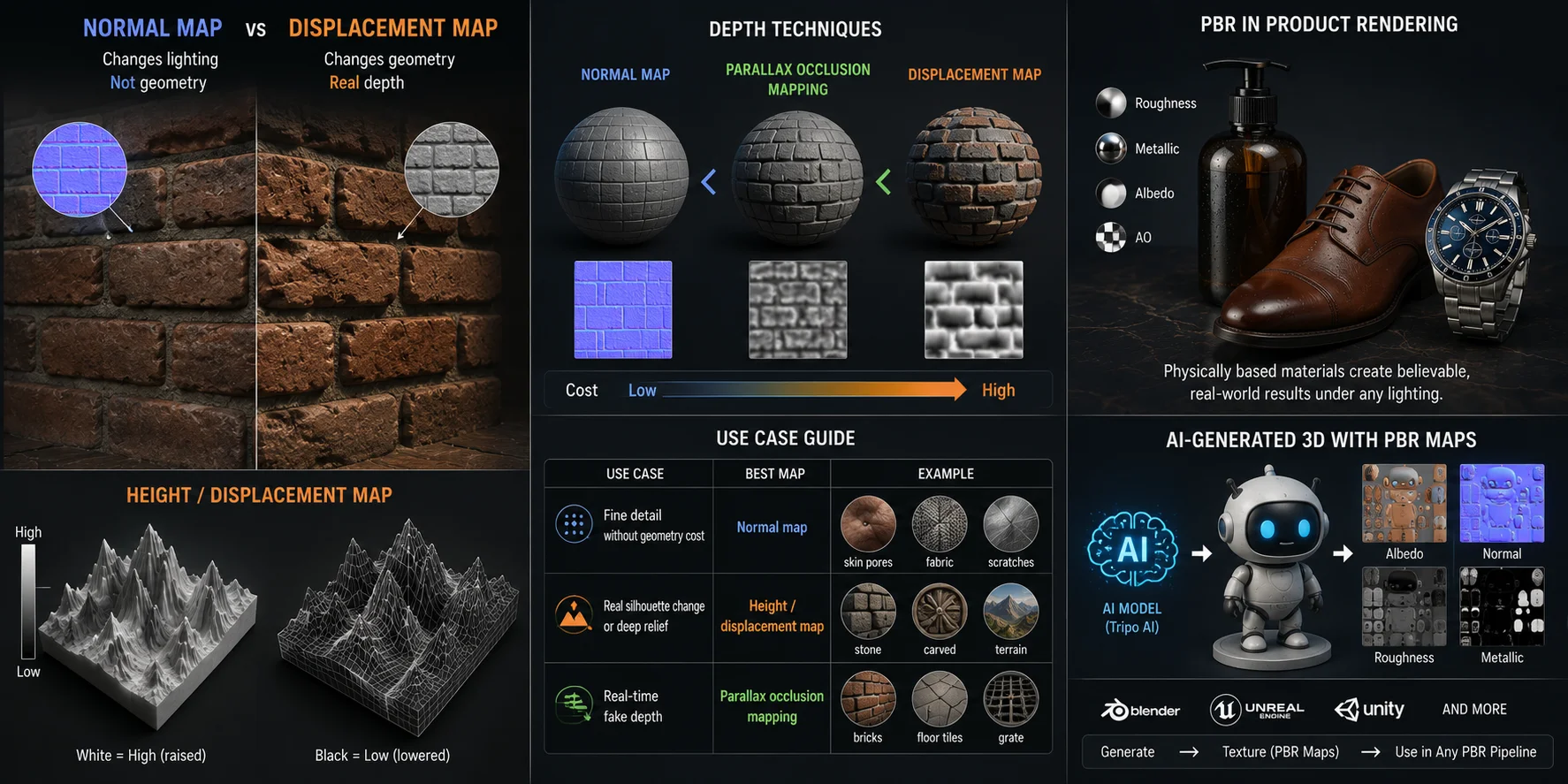
That is the key difference from a normal map. A normal map changes lighting response but not shape. A displacement map changes the shape itself.
Use a normal map for fine, cheap detail: skin pores, woven fabric, light scratches, shallow brick texture, leather grain, or brushed metal. It is efficient and ideal for real-time games.
Use height or displacement for deeper shape changes: stone blocks, carved symbols, terrain, bark ridges, roof tiles, cracked mud, or deep grooves. It is more expensive because the renderer needs enough geometry or tessellation.
A middle-ground technique is parallax occlusion mapping. It uses a height map to create the illusion of depth without fully displacing geometry. It costs more than a normal map but less than true displacement.
| Use case | Best map |
|---|---|
| Fine detail without geometry cost | Normal map |
| Real silhouette change or deep relief | Height / displacement map |
| Real-time fake depth | Parallax occlusion mapping |
In many tools, height and displacement refer to the same channel. The difference is how the renderer interprets the data.
Where PBR Textures Are Used
Game Development
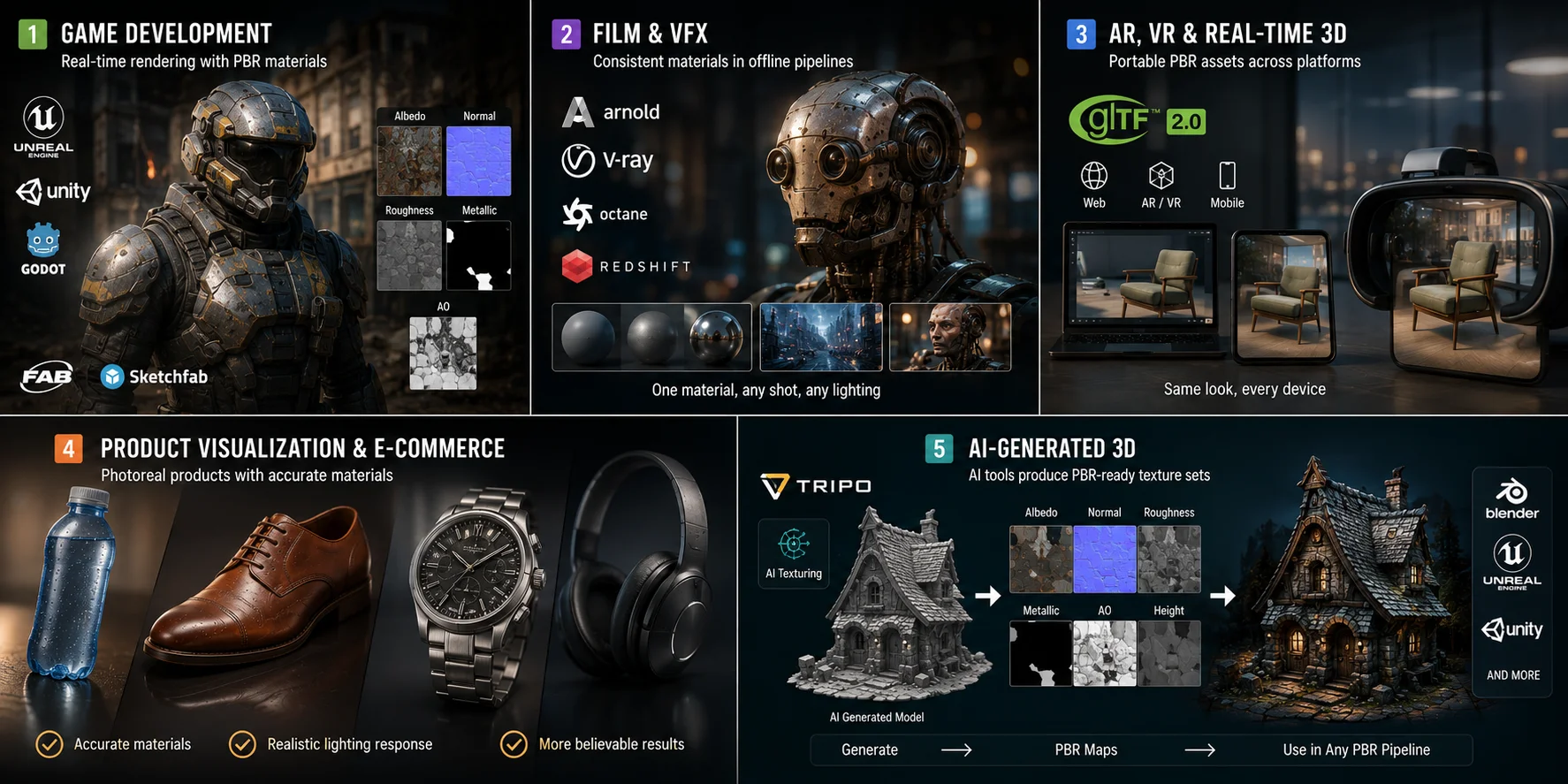
Game development is the largest and most familiar use case for PBR textures. Unreal Engine 5, Unity, and Godot all use PBR-style material systems by default, allowing assets to react consistently to real-time lighting. Marketplaces such as Fab and Sketchfab commonly package game assets as PBR texture sets because they can move more reliably between engines and lighting setups.
Film and VFX
Film and VFX pipelines use PBR-based shading in offline renderers such as Arnold, V-Ray, Octane, and Redshift. The main benefit is consistency: a material authored once can be reused across different shots, lighting environments, and compositing workflows. This is why large studios adopted PBR workflows to reduce material rework and improve visual continuity.
AR, VR, and Real-Time 3D
PBR is also central to AR, VR, and web-based 3D experiences. The glTF 2.0 standard uses the metallic/roughness workflow natively, making PBR textures important for portable real-time assets. Web viewers, AR product previews, virtual try-on, and mobile 3D applications all depend on materials that look stable across devices and lighting conditions.
Product Visualization and E-Commerce
Brands use PBR-accurate materials to render product imagery without relying on a full physical photo shoot. Correct roughness and metallic values help a plastic bottle read as plastic, a leather shoe read as leather, and a brushed watch case read as metal. In e-commerce, that material accuracy directly affects how believable a product render feels.
AI-Generated 3D
AI-generated 3D is an emerging use case for PBR workflows. Tripo AI's AI Texturing can create PBR materials and standard maps including Base Color, Roughness, Metallic, and Normal for untextured 3D models. It supports FBX, OBJ, and GLB input, and its exported PBR texture sets are designed for use with common engines and renderers, making them a practical starting point for further material review and refinement.
How to Create and Use PBR Textures
Creating PBR textures usually starts with a dedicated authoring tool. Adobe Substance Painter and Substance Designer are widely used for painting materials on a 3D model and building procedural materials through node graphs. Quixel Mixer is a free option for layered material work, while Blender supports texture painting and Cycles baking. For a faster starting point, Tripo AI Texturing can generate PBR materials and maps such as Base Color, Roughness, Metallic, and Normal from an untextured 3D model; use the result as a first pass, then check it in the target renderer.
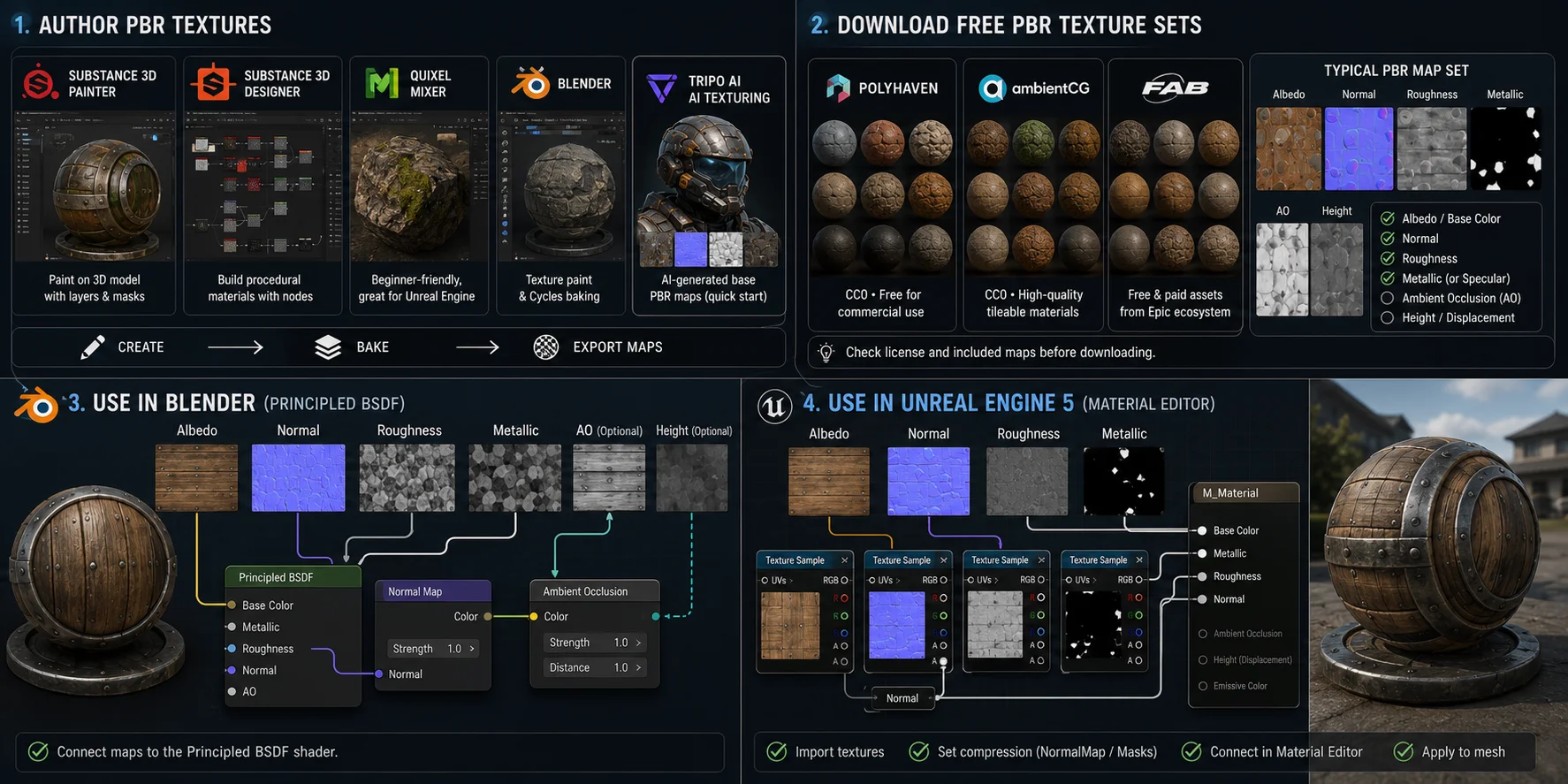
You can also download free PBR texture sets instead of creating every material from scratch. Polyhaven offers CC0 PBR textures, HDRIs, and models that are fully free for commercial use. ambientCG is another strong CC0 source for tileable PBR materials, while Fab.com provides a mix of free and paid assets from Epic’s marketplace ecosystem. When downloading any material, check both the license and the included map set. A practical PBR material should include at least albedo, normal, roughness, and metallic or specular maps; AO and height maps are useful for added depth but are not always required.
To use PBR textures in Blender, create a material with the Principled BSDF shader. Connect the albedo map to Base Color, roughness to Roughness, metallic to Metallic, and the normal map through a Normal Map node into the Normal input. Ambient occlusion can be mixed into Base Color or handled with an Ambient Occlusion node, depending on the workflow. In Unreal Engine 5, import the maps as texture assets, set normal maps to NormalMap compression, and set roughness or metallic maps as mask/data textures. Then wire them into the Material Editor: Base Color, Normal, Roughness, and Metallic should each receive the corresponding map before the material is applied to the mesh.
Frequently Asked Questions
What is a PBR texture?
A PBR texture set uses maps such as albedo, normal, roughness, and metallic to describe how a 3D surface responds to light. A PBR-capable renderer combines those maps to produce consistent shading under different lighting.
What does PBR stand for?
PBR stands for Physically Based Rendering. It describes a rendering approach that uses physically motivated rules for light response, including energy conservation, microfacet reflection, and the Fresnel effect.
What is the difference between PBR and HDR?
PBR is a method for describing realistic materials and light response. HDR, or High Dynamic Range, refers to images or displays that represent a wider range of brightness; HDR images are often used to light PBR scenes, but the terms describe different things.
What are the main PBR texture maps?
The core maps are albedo or base color, normal, roughness, and metallic. Depending on the material and renderer, a workflow may also use ambient occlusion, height or displacement, emissive, opacity, or subsurface data.
What are PBR textures in Roblox or Minecraft?
In supported Roblox and Minecraft resource-pack workflows, PBR maps can add normal detail, roughness variation, and metallic response on top of a base-color texture. The result can add surface depth and reflectivity while retaining the original art direction.
What is the difference between roughness and glossiness maps?
They describe opposite directions of the same surface property. A roughness value of 1.0 is fully rough, while a glossiness value of 1.0 is fully glossy, so the maps are commonly converted by inversion.
How do you create PBR textures?
Common tools include Substance 3D Painter, Substance 3D Designer, Quixel Mixer, and Blender. AI-assisted tools such as Tripo AI Texturing can generate PBR materials and standard maps as a starting point, which artists can refine for their target asset and renderer.
Where can I find free PBR textures?
Poly Haven and ambientCG provide CC0 PBR materials, while Fab offers a mix of free and paid assets. Check the license and included maps for every material before using it in a project.
Conclusion
PBR textures are not simply “realistic textures.” They are a structured, physics-based system of maps, where each map encodes one surface property and helps the renderer calculate how light should behave under different conditions. Albedo defines raw color, normal describes surface direction, roughness controls highlight spread, metallic defines conductor behavior, and AO or height maps add contact depth and surface relief.
For artists starting out, the metallic/roughness workflow is the best foundation. In most everyday materials, four maps — albedo, normal, roughness, and metallic — cover roughly 90% of what you need before moving into advanced channels such as height, opacity, emissive, or subsurface.
For anyone who wants to accelerate material authoring, Tripo AI's 3D Model Generator can create a starting model, and AI Texturing can generate PBR materials for it. Review the exported model and texture set in your target workflow, then try it in Tripo AI Studio or see available plans on Tripo AI Pricing.
