5 Best Hitem3D Alternatives for AI 3D Generation in 2026
Hitem3D, now branded as Hi3D, is known for turning one or more reference images into detailed 3D geometry. It is particularly appealing to creators who care about dense meshes, portrait reconstruction, reliefs, model segmentation, and 3D-printing workflows.
But high-resolution generation is only one part of making a useful 3D asset. Game developers may need clean low-poly topology. Character artists need rigging and animation. Studios need repeatable workflows, API access, predictable licensing, and connections to Blender or a game engine. Other creators simply want more ways to start, including text-to-3D and AI-assisted reference-image preparation.
This guide compares five Hitem3D alternatives and benchmarks them against Hi3D based on what happens after the first attractive render: geometry quality, topology, editing, rigging, export, production flexibility, and cost.
TL;DR
- Best overall Hitem3D alternative: Tripo
- Best multi-model integration platform: 3D AI Studio
- Best for high-fidelity professional generation: Rodin
- Best established general-purpose alternative: Meshy
- Best for source-available technical experimentation: Hunyuan3D
- Keep using Hi3D if: dense image-based geometry and print-focused tools are your main priorities
Why Look for a Hitem3D Alternative?
Hi3D covers more than basic image-to-3D. Its current plans include single-image and multi-view generation, a portrait-optimized model, resolutions up to 1536P³, staged generation, segmentation, and commercial-use rights on paid plans. Its pricing page also highlights GLB, OBJ, and STL-oriented workflows and plan levels for individual and high-volume use.
That makes Hi3D a credible tool, especially when the source image is already strong and the desired output is a detailed static model. However, a different platform may fit better when:
- You want to start from text as well as images.
- You need a clean low-poly mesh for a real-time engine.
- Quad topology and controllable polygon counts matter.
- The model needs to be rigged and animated.
- You want to separate parts, retexture the asset, or continue refining it.
- Your workflow spans Blender, Maya, Unity, Unreal Engine, or a slicer.
- You need a flexible API or a repeatable team pipeline.
- You want to compare several generation engines without maintaining several subscriptions.
The important question is therefore not “Which tool generates the most polygons?” It is “Which tool gets this asset to its final usable state with the least repair and repetition?”
Hitem3D Alternatives at a Glance
| Tool | Product type | Best for | Main advantage | Main trade-off |
|---|---|---|---|---|
| Tripo | Native AI 3D platform and model ecosystem | End-to-end production workflows | Fast high-detail and low-poly generation, topology tools, texturing, segmentation, rigging, animation, and export | More capabilities mean more workflow choices to learn |
| 3D AI Studio | Multi-model integration platform | Trying several AI engines in one workspace | Access to multiple underlying models plus image, texture, remesh, rigging, and workflow tools | Output quality and behavior depend on the selected underlying engine |
| Rodin | High-fidelity AI 3D generator | Hero assets and professional visualization | Detailed geometry and strong visual fidelity | Higher entry price; speed varies substantially by version, mode, and output target |
| Meshy | General-purpose AI 3D platform | Creators wanting a familiar all-in-one interface | Text/image generation, texturing, rigging, plugins, and API | Production topology and complex-generation consistency should be tested per asset |
| Hunyuan3D | Open-weight/source-available model family and hosted service | Research, local workflows, and technical control | Strong academic and developer ecosystem | Community License restrictions plus more setup and technical decision-making |
| Hi3D | Image-focused AI 3D platform | Detailed static assets and 3D printing | High-resolution geometry, portrait model, multi-view input, segmentation | Less compelling when the job requires a full animation or game-asset pipeline |
1. Tripo: Best Overall Hitem3D Alternative
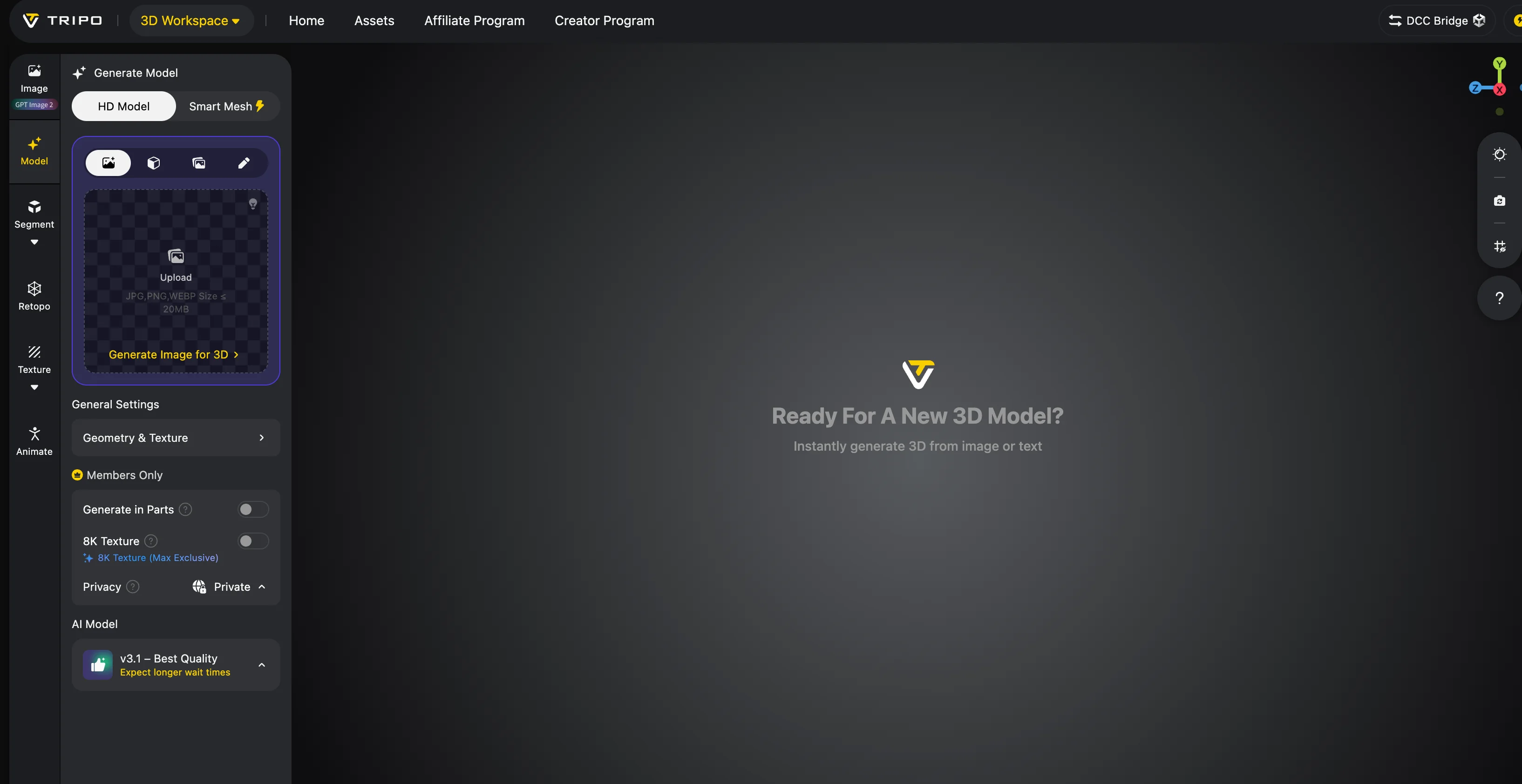
Under this article's workflow-weighted criteria, Tripo Studio is the strongest overall alternative when the work continues beyond initial generation. It supports single-image and multi-view image-to-3D, text-to-3D, high-detail models, low-poly generation, AI texturing, model segmentation, retopology, rigging, animation, and common production exports.
The difference is most visible when a creator needs more than a dense static mesh.
High detail and clean low-poly output
Hi3D emphasizes high-resolution geometry. Tripo addresses that requirement with its High Detail workflow, but it also provides Smart Mesh for fast, lightweight assets. Tripo claims that Smart Mesh P1.0 can produce optimized low-poly topology in about two seconds. Treat that as a vendor-claimed generation time rather than an independent benchmark; actual time varies with queue, input, mode, and service conditions.
This dual workflow matters. A high-poly asset is useful for a printable figurine, hero render, or texture bake. It can be a liability inside a real-time scene if the topology is irregular or the polygon count is unnecessarily high. Tripo lets the creator choose an output path instead of treating maximum density as the universal goal.
More control over topology
Topology was one of Tripo's clearest advantages in the tested versions and samples. Smart Mesh supports optimized triangle and quad-oriented outputs, while the AI Quad Remesher gives users control over polygon count and is designed to produce geometry that is easier to edit downstream. This is a workflow advantage, not proof that every generated asset will have superior topology.
This does not mean every generated model is immediately ready for deformation. Hair, layered clothing, thin accessories, and intersecting parts can still require inspection. But a dedicated topology workflow provides a much better starting point than simply decimating a dense, uneven mesh.
Rigging and animation inside the same workflow
Hi3D is primarily positioned around geometry generation, segmentation, and printing. Tripo extends further into character production. Its auto-rigging workflow supports multiple body types, including humanoid and non-human subjects, and generated characters can continue into animation or export.
For game developers and animation teams, this changes the evaluation criterion. The best result is not necessarily the most detailed unrigged model. It is the model that survives retopology, accepts a skeleton, deforms predictably, and reaches the engine without a long chain of external fixes.
Pre-3D and post-3D workflows
Tripo also treats the reference image as part of the workflow. Its image tools and templates can help prepare T-poses, multi-view references, completed character views, isolated heads or hair, and cleaner concept inputs before generation.
After generation, the asset can move through segmentation, texturing, rigging, animation, format conversion, or direct integration with tools such as Blender, Maya, Unity, Unreal Engine, Bambu Studio, and Cura.
That makes Tripo more than a Hitem3D replacement for a single task. It can function as the connective layer between concept, mesh, optimization, and delivery.
Best for
- Game-ready assets
- Rigged characters and creatures
- High-detail and low-poly production
- 3D-printing workflows that also need editing or repair
- Teams using DCC tools and game engines
- Developers who need an API
- Creators who want to iterate instead of repeatedly regenerating from scratch
When Hi3D may still be preferable
Choose Hi3D when your central requirement is image-based, high-resolution static geometry and its print or portrait tools match the subject well. For a detailed figurine that will not be animated or placed in a real-time environment, the broader Tripo workflow may be unnecessary.
2. 3D AI Studio: Best Multi-Model Integration Platform
3D AI Studio needs a different comparison label from the other products in this guide. It is an integration platform, not one independent foundation model competing directly with Tripo, Hi3D, Rodin, or Hunyuan3D.
The platform brings multiple AI 3D engines into one interface. Its own materials describe access to models from ecosystems including Tripo, Rodin/Hyper3D, Hunyuan3D, TRELLIS, and others. It then layers on image generation, texturing, remeshing, rigging, format conversion, API access, and a node-based Flow workspace.
The platform's real advantage is selection and orchestration. A user can try one engine for a hard-surface object, another for a portrait, and another for a stylized asset without moving between several accounts and billing systems. When comparing results, check which underlying engine, version, and mode were selected: the platform provides the workspace, while that configuration largely determines generation quality, speed, topology, and credit use.
Best for
- Creators who want multiple AI 3D models under one subscription
- Comparing engines with the same source image
- Mixed image, video, texture, and 3D workflows
- Teams that prefer a unified interface and API
- Users who value flexibility more than a single vertically integrated model
Trade-offs
The experience can be less predictable because generation settings, speed, topology, and output quality change with the selected engine. Users therefore need to keep track of which model produced each result.
In short, use 3D AI Studio when you want a well-equipped control room for several models. Use a native platform such as Tripo when you want the generation model and downstream workflow to be developed as one tightly connected system.
3. Rodin by Hyper3D: Best for High-Fidelity Professional Output
Rodin is aimed at creators who prioritize visual fidelity and detailed geometry. It is a strong candidate for product visualization, realistic objects, hero assets, VFX references, and other cases where a premium output can justify a higher entry price.
Its multi-view workflow can produce convincing shape and surface detail, but dense professional output is not the same as game-ready output. Rodin's speed varies considerably by model version and output mode. Older or higher-detail workflows may take minutes, while newer base-generation modes are designed to be much faster. Test the exact mode and output target you plan to use.
Best for
- Hero assets and high-quality renders
- Product and object visualization
- Multi-view reconstruction
- Teams willing to spend more for selected premium assets
Trade-offs
- Higher entry price than most individual creator plans
- Performance and credit cost vary by model version and generation mode
- Additional retopology may be required
- Less complete as an animation workflow
Rodin is a compelling Hi3D alternative when selected high-fidelity assets matter more than having a native rigging and animation pipeline. A more focused Tripo vs Hyper3D comparison can help teams compare their generation, topology, and production workflows before committing to a batch.
4. Meshy: Best Established General-Purpose Alternative
Meshy is one of the most recognizable general-purpose AI 3D platforms. It combines text-to-3D, image-to-3D, AI texturing, rigging, animation-oriented exports, plugins, and API access in a relatively approachable interface.
Compared with Hi3D, Meshy offers a broader creative entry point because the user can start with either text or an image. It also has a larger visible creator community, although community size does not establish generation quality.
The main question is how well a generated asset holds up in production. Some tested low-poly workflows took longer and produced inconsistent results on complex subjects; these findings are version- and sample-specific. Meshy provides native rigging and animation, with automated rigging primarily suited to standard humanoid or biped assets with clear limbs.
Several creator reviews cited Tripo's cleaner topology, faster generation, harder surface detail, and easier low-poly workflow as reasons for switching from Meshy. These are individual experiences rather than controlled universal benchmarks, but they point to the right test: inspect the wireframe and downstream editing time, not only the textured preview.
Best for
- General text-to-3D and image-to-3D use
- Creators who value an established product and community
- Native humanoid/biped rigging and animation workflows
- Plugin and API users
Trade-offs
- Complex assets may require repeated generation
- Low-poly output should be inspected carefully
- A “4K” texture setting does not by itself guarantee 4K-level visible detail
Meshy remains a solid Hitem3D alternative, especially for general creation. Tripo is the stronger choice when topology quality, workflow speed, and flexible downstream production carry more weight; the dedicated Tripo vs Meshy comparison examines those differences in more detail.
5. Hunyuan3D: Best for Source-Available Technical Workflows
Hunyuan3D is best understood as a model family and technical ecosystem. It has strong research visibility, publicly available technical work, model weights, and local-running instructions that appeal to developers, researchers, and teams seeking more control.
That makes it structurally different from Hi3D or Tripo Studio. Hunyuan3D is better described as open-weight/source-available under Tencent's Community License, not as an unrestricted MIT- or Apache-style open-source product. Local deployment can offer customization and integration flexibility, but it also shifts responsibility to the user: environment setup, GPU resources, version selection, mesh processing, interface design, licensing review, and downstream tooling.
Hunyuan3D-2.1 lists roughly 10 GB of VRAM for shape generation and about 29 GB for shape plus texture. Its Community License contains territory, scale, and acceptable-use restrictions, including exclusions covering the European Union, United Kingdom, and South Korea and an additional licensing requirement for products above one million monthly active users. Licensing requirements vary by version and deployment context.
Hosted Hunyuan3D services reduce some technical complexity, but the experience still tends to require more pipeline assembly than a polished end-to-end creator platform. In the tested samples, difficult structural transitions, hard edges, segmentation boundaries, and complex low-poly remeshing sometimes required correction. Those observations are not universal performance claims.
Best for
- Researchers and technical artists
- Local or private deployment
- Custom pipelines
- Teams that want to inspect or modify a source-available model stack
Trade-offs
- Higher setup burden
- Results depend heavily on version and implementation
- Rigging and animation remain separate concerns
- More manual pipeline assembly
Choose Hunyuan3D for technically managed control and experimentation when its license fits your territory and use case. Choose Tripo or Hi3D when a managed workflow and predictable creator experience are more important. For a closer look at the managed-platform and source-available approaches, see the Tripo vs Hunyuan3D comparison.
Two Practical Comparison Examples
Feature lists do not show whether an asset will survive close inspection or downstream editing. The following texture and automated segmentation cases come from specific test runs and should not be treated as universal benchmarks.
Example 1: Traditional portrait with layered jewelry
This texture case used a traditional female portrait with braided hair, patterned clothing, metal ornaments, tassels, and several layers of turquoise, coral, and warm-colored beads. The subject tests whether a tool can preserve small repeated objects, fine color boundaries, facial material, hair, fabric, and reflective decoration in the same asset.
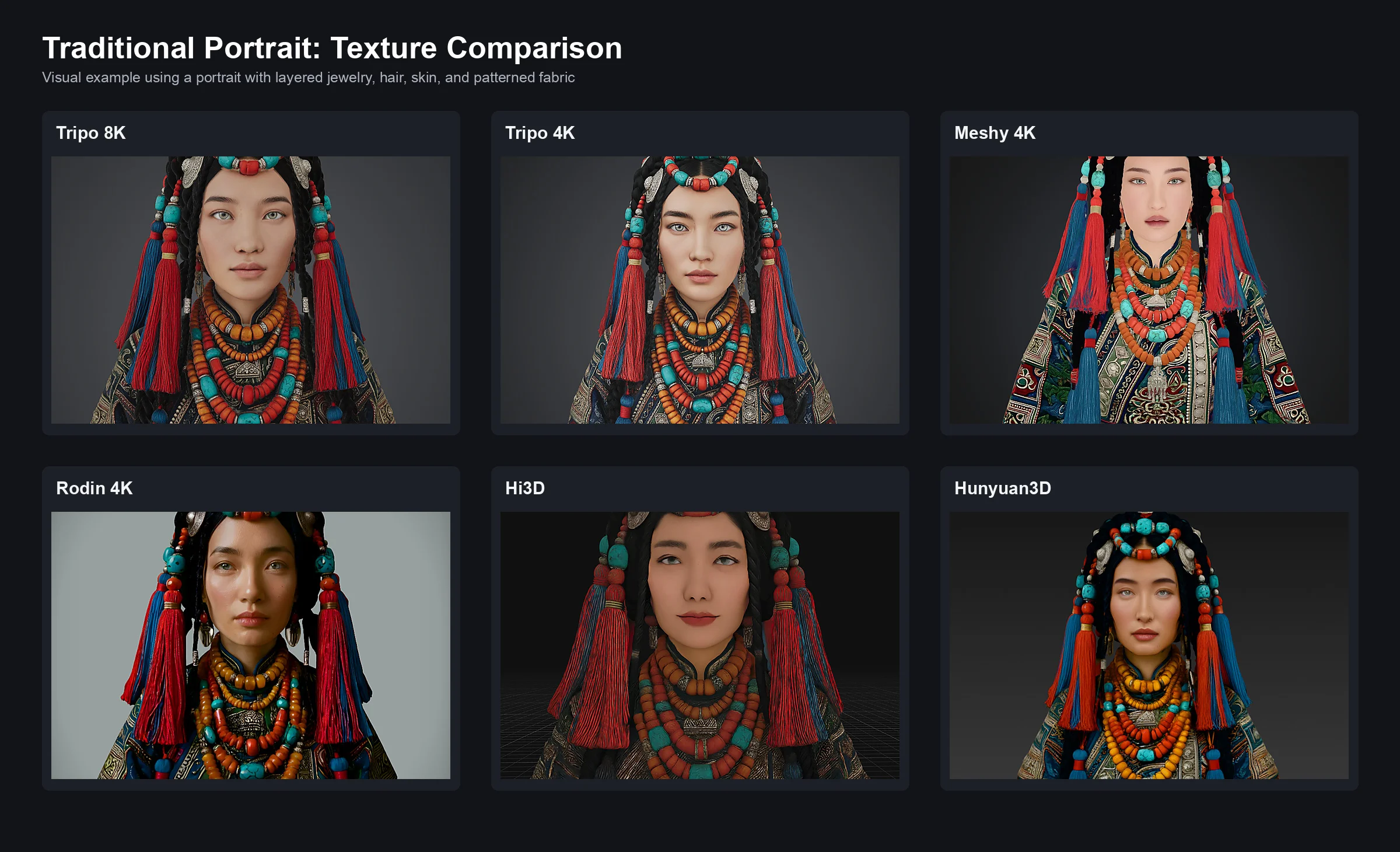
- Tripo 8K produced the clearest separation between individual bead strands, metal ornaments, tassels, hair, skin, and patterned fabric.
- Tripo 4K preserved the overall color organization and most accessory structure, although small beads and hair details appeared softer at close range.
- Meshy 4K retained the general portrait and ornament layout, but some small repeated details and soft materials appeared less distinct.
- Rodin 4K preserved useful surface variation and highlights, particularly around the face and ornaments, but the retained lighting made it harder to separate baked illumination from material response.
- Hi3D captured the broad color placement, while some jewelry, hair, and fabric detail appeared less clearly separated in the tested output.
- Hunyuan3D reproduced the main color groups, but fine ornament and textile detail was visibly softened.
The recurring lesson is that texture dimensions alone do not establish texture quality. Material separation, de-lighting, projection seams, occlusion handling, and texture-to-mesh alignment matter just as much as whether the exported image is labeled 4K or 8K.
The renders use different geometry, framing, and lighting, so these images are visual examples rather than a controlled texture benchmark. They support inspecting close-ups of several material types instead of judging a model from one front-facing beauty render.
Example 2: Stylized ogre warrior segmentation
The segmentation test used a stylized ogre warrior with armor, hair, clothing, an axe, ropes, and small accessories. The comparison focused on automated segmentation presets rather than fully manual editing.
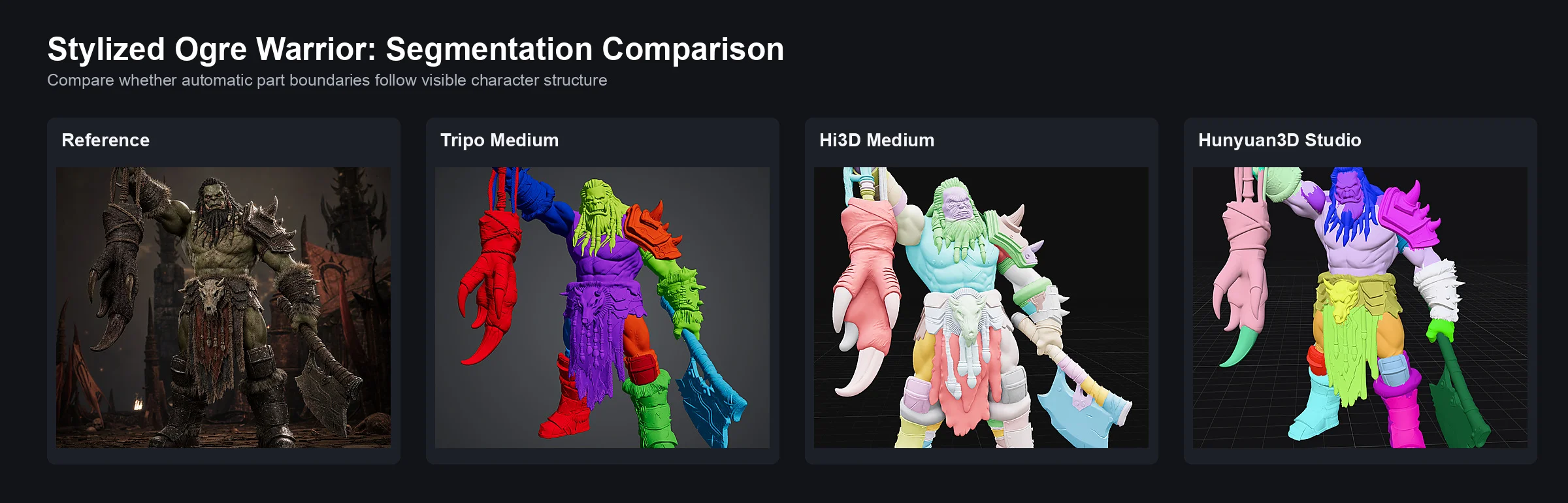
In the displayed character case, Tripo kept the main armor, clothing, hair, weapon, and body regions comparatively coherent. Hi3D also separated the major regions, with some boundaries and smaller assignments appearing less aligned to the character's visible structure. Hunyuan3D Studio produced clearly colored parts, although several regions were more fragmented or grouped less intuitively.
The case highlights a meaningful difference between producing colored parts and providing an editable segmentation workflow. For production, compare whether boundaries follow geometry, whether semantic parts remain intact, whether the user can change granularity, and whether parts can be merged, added, or corrected after the automatic pass.
Tripo vs Hi3D: The Most Important Differences
The table below summarizes the main workflow differences. The full Tripo vs Hitem3D comparison provides a more detailed feature-by-feature breakdown.
| Comparison area | Tripo | Hi3D |
|---|---|---|
| Input methods | Text, single image, and multi-view image | Single image and multi-view image |
| High-detail generation | High Detail workflow for dense production assets | Core strength, including a portrait-optimized model and high-resolution options |
| Low-poly generation | Smart Mesh with a vendor-claimed generation time of about two seconds | Not a primary product focus |
| Topology | Smart Mesh plus AI quad remeshing and polygon control | Dense geometry is emphasized more than production retopology |
| Texturing | AI texturing, PBR-oriented workflows, and texture enhancement | Textured generation and PBR-capable output |
| Segmentation | Model part separation with selectable precision | Segmentation tools, including print-oriented use |
| Rigging | Native auto-rigging for several subject types | No equivalent end-to-end rigging workflow highlighted |
| Animation | Connected character-animation workflow | Not a core workflow |
| 3D printing | Print-oriented geometry tools, STL/OBJ export, slicer integrations, and a broader print workflow | Strong high-detail, relief, segmentation, STL, and multi-color-print positioning |
| DCC and engine workflow | Blender, Maya, Unity, Unreal Engine, Godot, and other integrations | Blender/API and export-oriented workflow |
| Best fit | Assets that continue into editing, animation, engines, APIs, or printing | Detailed image-based static models and print-focused work |
Which Hitem3D Alternative Should You Choose?
Choose Tripo if:
- You need both high-detail and clean low-poly output.
- The asset must continue into editing, rigging, or animation.
- You create game assets or real-time content.
- You need a reusable workflow rather than one-shot generation.
- You work across DCC tools, engines, and slicers.
- You want text-to-3D as well as image-to-3D.
Choose 3D AI Studio if:
- You want to access several underlying AI 3D models in one platform.
- You want to compare Tripo, Rodin, Hunyuan3D, TRELLIS, and other engines.
- You need image, video, texture, mesh, and workflow tools in one interface.
- You understand that the selected model, not only the integration platform, determines the output.
Choose Rodin if:
- A smaller number of premium, visually detailed assets matters more than speed.
- You are creating product visuals, hero assets, or high-quality references.
Choose Meshy if:
- You want a familiar general-purpose AI 3D platform.
- Text-to-3D, image-to-3D, texturing, and humanoid/biped character workflows cover your needs.
Choose Hunyuan3D if:
- You want source-available model weights, local deployment, or research flexibility.
- Tencent's Community License fits your territory, scale, and commercial use.
- Your team can build and maintain the surrounding pipeline.
Stay with Hi3D if:
- Your work is primarily detailed image-to-3D.
- Portraits, reliefs, segmentation, or 3D printing are the main deliverables.
- You do not need a connected game or animation pipeline.
Pricing: Compare Cost per Usable Asset
The tools below offer creator plans at different price points and use different credit systems. The table compares representative monthly plans and estimated generation capacity. Actual cost depends on the model, settings, and workflow you use.
| Tool | Plan | Monthly price | Credits / estimated capacity | Billing note |
|---|---|---|---|---|
| Tripo | Pro | $19.90 | Up to about 120 assets | Actual cost varies by workflow |
| Meshy | Pro | $20 | Up to about 100 assets | Monthly and annual billing may differ |
| Rodin | Creator | $30 | Up to about 60 assets | Generation cost varies by Rodin mode |
| Hi3D | Pro | $19.90 | 1,000 credits; up to about 100 geometry models | Paid outputs are described as private and commercially usable |
| 3D AI Studio | Basic | $19 | 1,000 credits; up to about 100 assets | Credit cost depends on the selected underlying model and settings |
| Hosted Hunyuan3D | Plus | $19.90 | Up to about 100 assets | Separate from the hardware and operations cost of local deployment |
Higher-volume plans in the same snapshot also differ materially: Tripo Max was listed at $89.90 for up to about 1,000 assets; Hi3D Max at $39.90 for about 240 geometry models and Ultra at $129.90 for about 800; 3D AI Studio Studio at $39 for about 600 and Pro at $149 for about 3,500 across three seats. These estimates depend on the chosen operation, model, and credit cost, so compare the workflows you actually use.
Do not choose by subscription price alone. Measure:
- Credits consumed per attempt.
- Failed generations.
- Time spent waiting.
- Time spent repairing geometry.
- Cost of remeshing, texturing, rigging, or exporting.
- The percentage of outputs that are actually accepted.
A $1 generation that requires two hours of cleanup can be more expensive than a $3 result that reaches Blender, Unity, or the slicer immediately.
Trust, Licensing, and Data Use
Commercial creators should review more than output quality.
The compared services differ in ownership, commercial rights, privacy, training use, and enterprise exceptions. This is a practical reading guide, not legal advice.
| Service | Commercial rights / privacy | Training and improvement language to review |
|---|---|---|
| Tripo | Paid-user outputs are described as commercially usable, and paid-user data is described as excluded from model training | Confirm the current plan and Terms before uploading confidential material |
| Meshy | Paid plans provide private-license or commercial-use options | Terms for non-Enterprise customers may allow inputs and outputs to be used to train, validate, test, or improve the services, while separate pricing language is more consent-oriented |
| Hi3D | Free outputs are described as using CC BY 4.0, while paid outputs are described as private, customer-owned, and commercially usable | Terms include language allowing anonymized content to be used for training |
| 3D AI Studio | Paid plans advertise private, customer-owned assets | Its terms grant rights to use inputs and outputs to provide, maintain, improve, research, and train AI technology, with narrower language around private outputs; the selected underlying model may have separate terms |
| Rodin / Hyper3D | Rights depend on the current plan and agreement | The terms include broad service-improvement language but no equally explicit training statement; check the current controlling terms |
| Hunyuan3D | Hosted-service terms and the downloadable model license are separate | Local use is governed by the version-specific Tencent Community License, including territory, scale, and acceptable-use restrictions |
Terms can change, and marketing-page summaries do not replace the legal agreement. Before uploading client work, unreleased character designs, product CAD references, or other confidential material, check:
- Whether inputs or outputs may be used to improve or train models.
- Whether an opt-out is available.
- Whether free and paid plans have different licenses.
- Who owns the generated asset.
- Whether assets are public by default.
- How long files are retained.
- Whether the provider offers enterprise security or compliance documentation.
This review is particularly important when using an integration platform. Both the platform's terms and the selected underlying model provider may affect the workflow.
Final Verdict
Hi3D is a capable image-to-3D product, not a tool that needs to be replaced by default. Its detailed geometry, portrait model, multi-view input, segmentation, and print-oriented features make it a sensible choice for many static and physical assets.
Our editorial recommendation is that Tripo is the best overall Hitem3D alternative when workflow breadth is weighted more heavily than specialization in one output type. It can move from text or reference images to high-detail geometry, low-poly meshes, textures, separated parts, rigs, animations, DCC tools, engines, APIs, and print workflows. That breadth matters whenever generation is the beginning of the job rather than the end.
3D AI Studio occupies a separate and useful category. It is the best option here for users who want a multi-model integration platform, but it should not be mistaken for a single underlying generation model. Its strength is giving creators a unified place to select and orchestrate models such as Tripo, Rodin, Hunyuan3D, and others.
The practical decision is simple:
- Use Hi3D for detailed, image-first static and print-focused work.
- Use Tripo for the strongest connected production workflow.
- Use 3D AI Studio when model choice and cross-engine orchestration are the priority.
Frequently Asked Questions
What is the best Hitem3D alternative?
Tripo is the best overall alternative for creators who need more than dense image-to-3D geometry. It adds text-to-3D, fast low-poly generation, retopology, texturing, segmentation, rigging, animation, API access, and integrations with common 3D tools.
Is 3D AI Studio an AI 3D model?
No. 3D AI Studio is a multi-model integration platform. It provides one interface for several underlying generation engines and adds tools for image creation, texturing, remeshing, rigging, export, APIs, and node-based workflows.
Is there a free Hitem3D alternative?
Tripo, Meshy, Hi3D, and 3D AI Studio all offer a free entry point or free credits, although export rights, privacy, model access, and monthly allowances vary. Hunyuan3D provides source-available model weights, but local use requires suitable hardware and technical setup and remains subject to Tencent's version-specific Community License.
Is Tripo better than Hi3D?
Tripo is better suited to game assets, low-poly topology, rigging, animation, and end-to-end production. Hi3D can remain the better fit for some detailed image-based models, portraits, reliefs, and print-focused workflows. The subject and final deliverable should determine the choice.
Which alternative is best for 3D printing?
Both Hi3D and Tripo deserve testing with the actual object. Hi3D emphasizes high-resolution geometry, segmentation, reliefs, and printing. Tripo adds print-oriented geometry tools, high-detail generation, STL/OBJ export, slicer compatibility, and a broader path for repairing or editing the model. Check every final mesh for closed surfaces, wall thickness, and slicer errors before printing.
Which tool is best for game-ready assets?
Under the workflow criteria used in this article, Tripo is the strongest option because Smart Mesh, retopology, texturing, segmentation, rigging, animation, and engine integrations address the full asset pipeline. Always inspect polygon count, UVs, material maps, and deformation before shipping a generated model.
Can AI-generated 3D models be used commercially?
Paid plans commonly include commercial-use rights, but ownership, privacy, and training language differ by provider and may change. Check the current license and controlling terms for the exact plan, confirm whether the asset is private, and review how the service may use uploaded inputs and generated outputs. Enterprise terms may differ from self-service plans.