Can AI Make Usable 3D Models? A Practical Guide
TL;DR
- Yes, AI can create usable 3D models when the output matches your game, printing, animation, or visualization pipeline.
- Game assets need clean topology, efficient polygon counts, UVs, and compatible materials; printable models require watertight, correctly scaled geometry.
- Smart Mesh prioritizes lightweight, structured topology for real-time use, while HD Model prioritizes visual and geometric detail.
- Define the destination first, choose text or image input, export the right format, and validate the result in the target engine, DCC application, or slicer.
Yes, AI can make usable 3D models—but “usable” depends on where the model goes next. A game-engine asset needs efficient geometry, clean topology, UVs, and materials that hold up in real-time rendering; a printable asset needs watertight, correctly scaled geometry with no non-manifold errors. AI can accelerate both workflows, but it does not eliminate pipeline checks.
Text-to-3D and image-to-3D tools can create meshes fast, yet a persuasive preview is not automatically an asset you can import, animate, print, or ship. This guide explains what usable means, where AI delivers, where it still needs human judgment, and how to start well.
What Does “Usable” Actually Mean in 3D?
“Usable” is not a universal score. It is a set of technical conditions defined by the job the model must do.
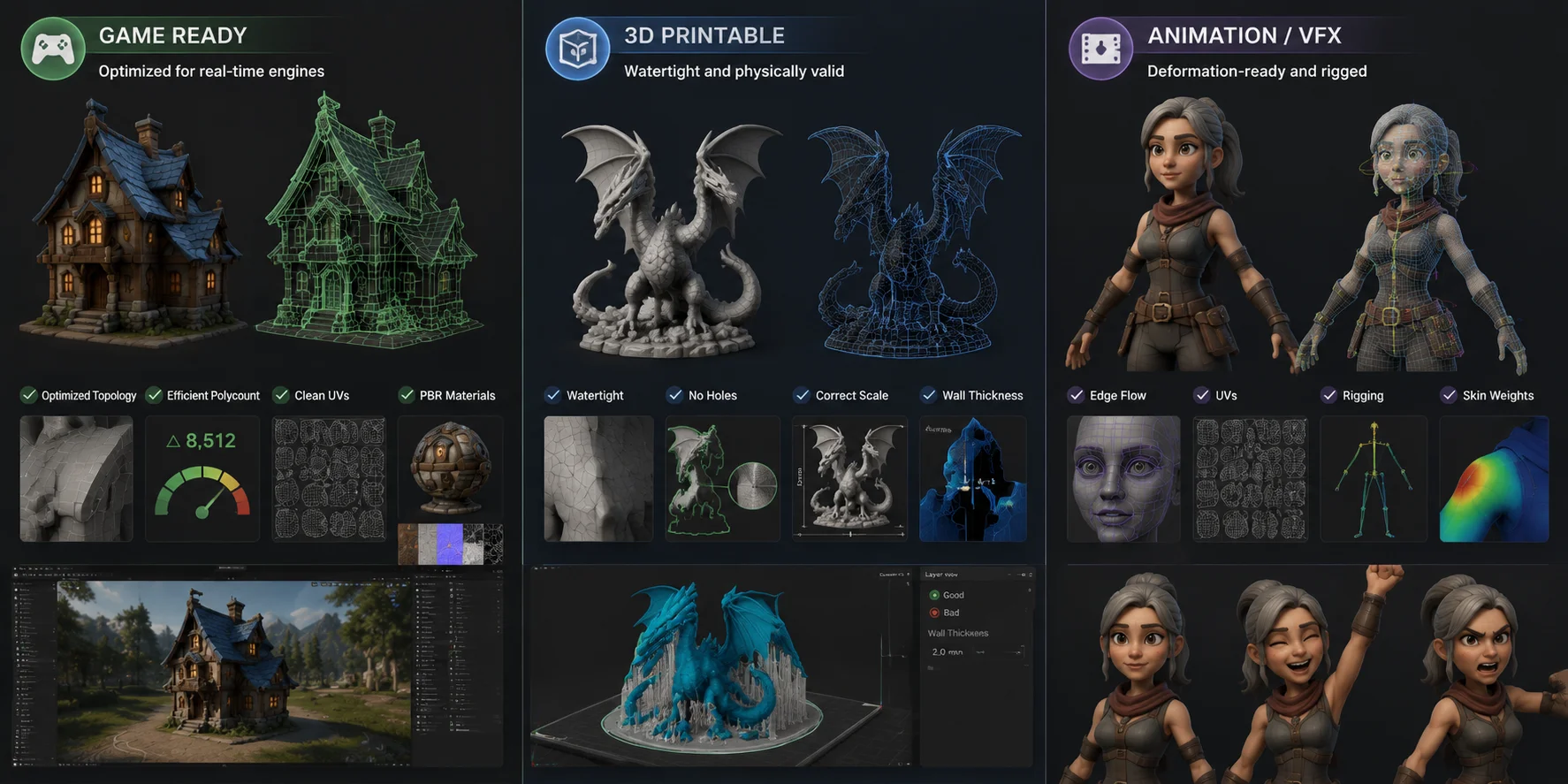
For a game-ready asset, usability means a mesh fits the project’s polygon budget, has clean topology, and can be textured and imported without avoidable artifacts. Polygon count matters in real-time rendering, but one number does not suit every project: a mobile prop, a stylized NPC, and a console hero character may each need different budgets. The essentials are efficient geometry, predictable edge flow, working UVs, and engine-compatible materials.
For a 3D printable asset, usability means the object behaves as a closed physical volume. It needs a watertight mesh without holes, self-intersections, flipped normals, or non-manifold geometry; it also needs correct scale, enough wall thickness, and a practical orientation for the printer.
For animation and VFX, usability goes further. The model needs deformation-friendly edge loops around joints and expressive areas, reliable UVs, and—when the asset moves—a rig with sensible joint placement and skin weights. A mesh can look excellent in a static render and still collapse at the elbows, eyelids, or mouth.
Can AI Really Deliver on These Standards?
Increasingly, yes—with caveats. AI can turn a text concept, product reference, or set of images into an editable starting mesh for props, stylized assets, background objects, concepts, and prototypes. Image-to-3D is most dependable when the reference clearly communicates silhouette, materials, and major structure.
The difference between a promising preview and a usable asset is the validation loop. A generation may look finished in a browser but reveal shading artifacts, overlapping UVs, inconsistent scale, fragile geometry, or poor deformation after import. The fastest production workflow is therefore not simply “generate and download”; it is generate, inspect, test in context, and repair only the defects that matter to the destination pipeline.
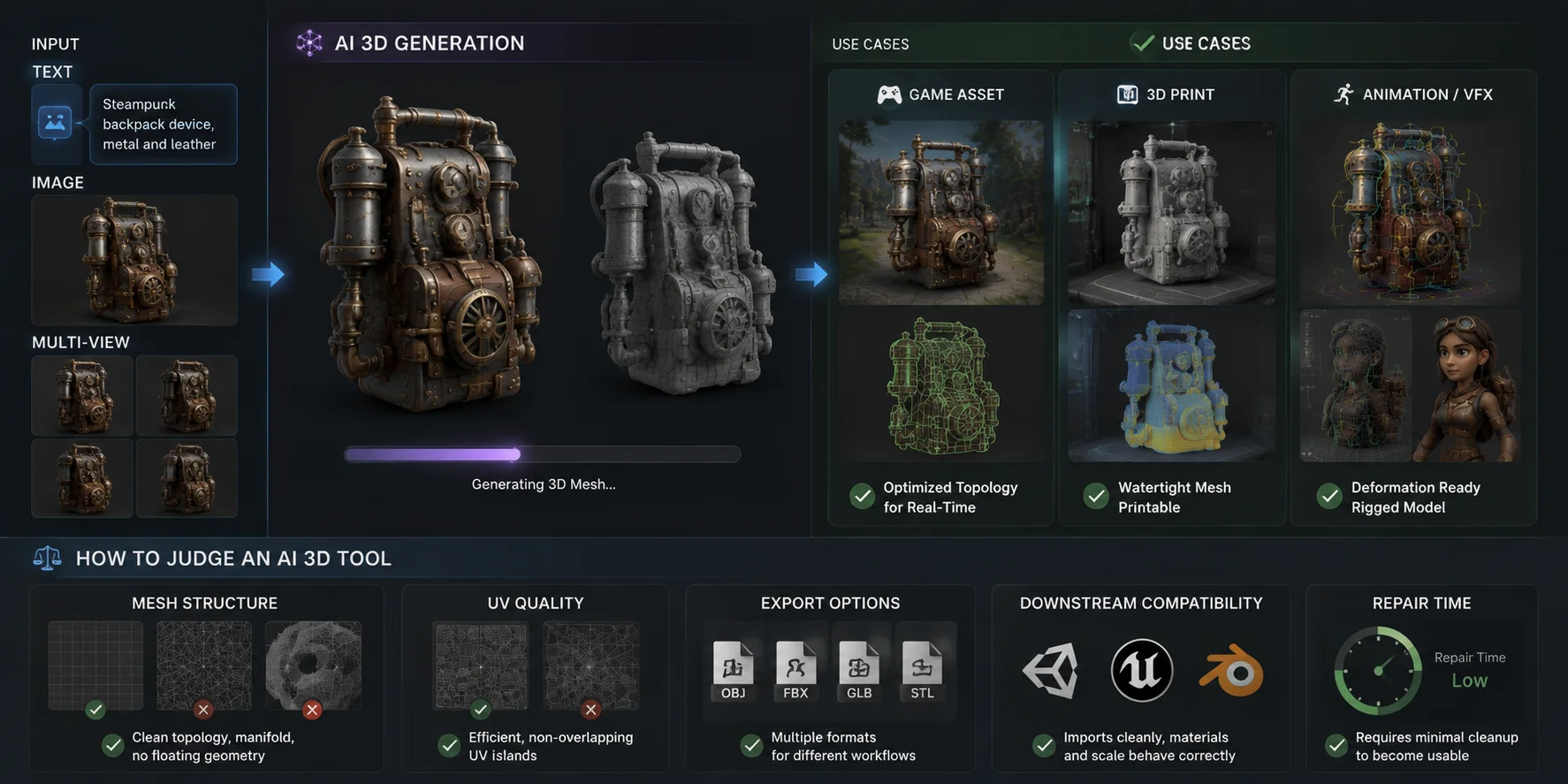
For games, topology-aware workflows are making low-poly output far more practical than the dense, chaotic triangle meshes common in early AI generations. For printing, AI can create a candidate quickly, but a slicer and mesh-validation pass still decide whether it is printable. For animation, AI can shorten the path to a base character or creature, but a demanding asset must still pass deformation tests and artist cleanup.
Judge an AI 3D tool by its mesh structure, UV quality, export options, downstream compatibility, and repair time—not just by the preview image.
A useful acceptance test is to define pass-or-fail checks before generating. For a game prop, specify the target engine, scale, polygon range, material count, texture resolution, and whether the asset needs LODs or collision geometry. For a printable figure, specify final dimensions, minimum wall thickness, required separations, and the slicer that will validate it. For animation, list the required motions and the joints most likely to expose deformation problems. These checks turn “looks good” into a repeatable review process and make tool comparisons more meaningful: the best output is not always the most detailed one, but the model that reaches the required standard with the least repair work.
Can AI Make Usable 3D Models for Games?
A game-ready model must look good while remaining affordable to render, store, stream, and animate. Choose the polygon budget before generation, not after import. A compact stylized or mobile asset may target fewer than about 10,000 polygons; more detailed assets can require more depending on platform, camera distance, LOD strategy, materials, and scene density.
That budget should be tested inside a representative scene rather than judged in isolation. Draw calls, texture memory, material complexity, skeletal joints, the number of animations, lighting, and the number of visible assets all affect performance. A mesh that runs comfortably by itself may still be too costly when dozens of instances appear at once, so profile the model on the least powerful target hardware and build LODs when camera distance changes significantly.
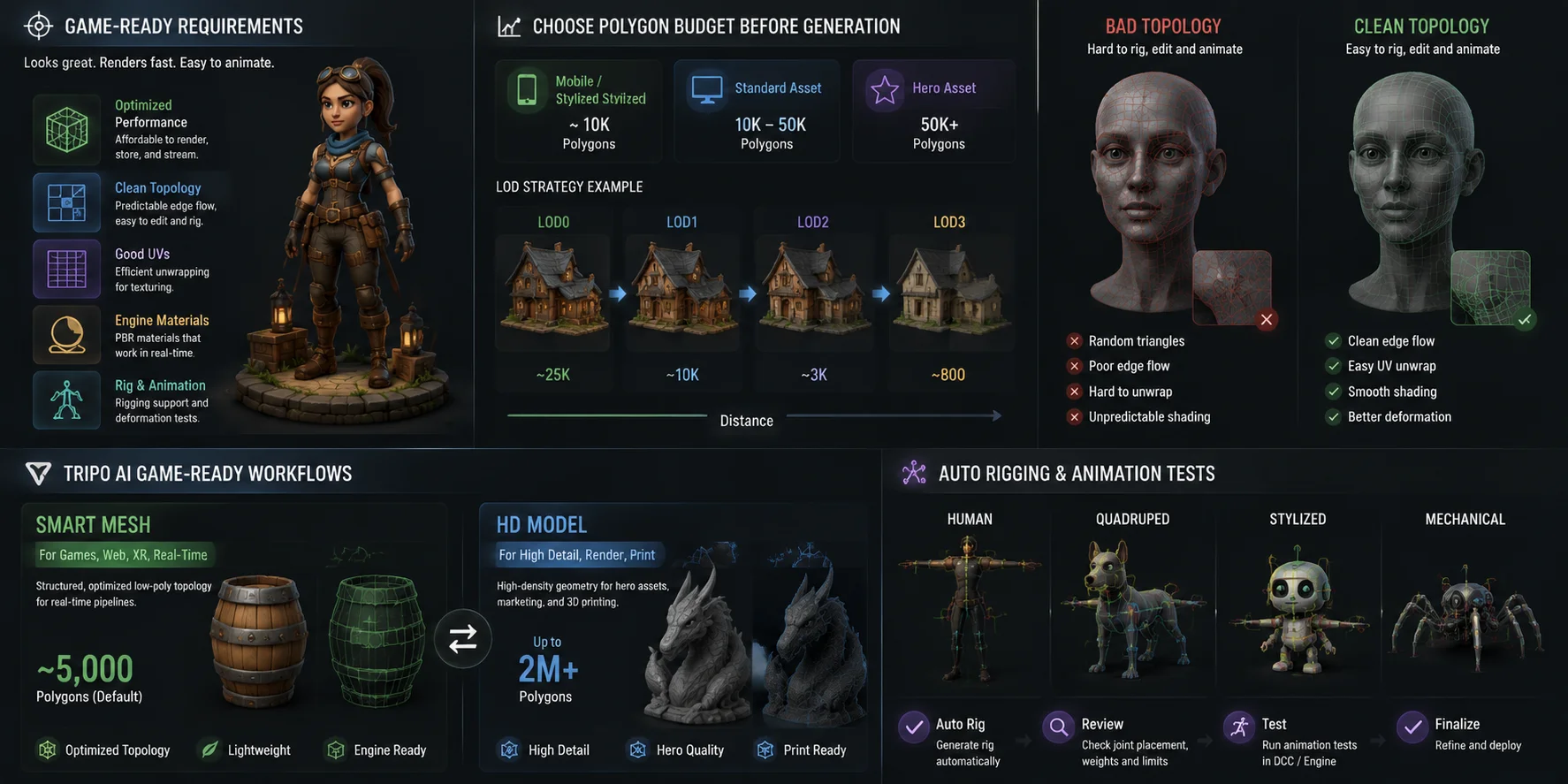
Topology matters as much as polygon count. Clean topology produces sensible edge flow, easier UV unwrapping, better baking, predictable shading, and more reliable deformation. A dense mesh with random triangles may look fine in a viewer but remain difficult to rig, hard to edit, and too expensive for a real-time scene.
Tripo AI’s Smart Mesh feature addresses this problem by generating structured, optimized low-poly topology for real-time pipelines. Its game-ready mesh output contains roughly 5,000 polygons by default, making it a useful starting point for lightweight assets and scalable production. Tripo’s HD Model workflow serves a different purpose: high-detail geometry for hero assets, marketing visuals, rendering, and some 3D-printing scenarios. Smart Mesh is designed for games, web, XR, and other real-time uses.
Characters also need rigging and animation tests. Tripo Auto Rig currently works best with T-pose humanoid characters and standard standing quadruped animals. Non-standard poses, unusual anatomy, mechanical forms, and abstract shapes may not rig correctly, so check joint placement, skin weights, and deformation in your DCC application or engine before production use.
AI 3D Models for 3D Printing: What to Check
An AI 3D model for 3D printing should be treated as a manufacturing asset, not simply a model that looks convincing on screen. Before exporting, verify that the mesh has watertight geometry: every opening must be sealed, surfaces should not intersect, and normals must face consistently outward. You should also confirm the model’s real-world dimensions in a slicer or 3D modeling application, since an otherwise correct asset can import at the wrong scale and become unusable for the intended print.
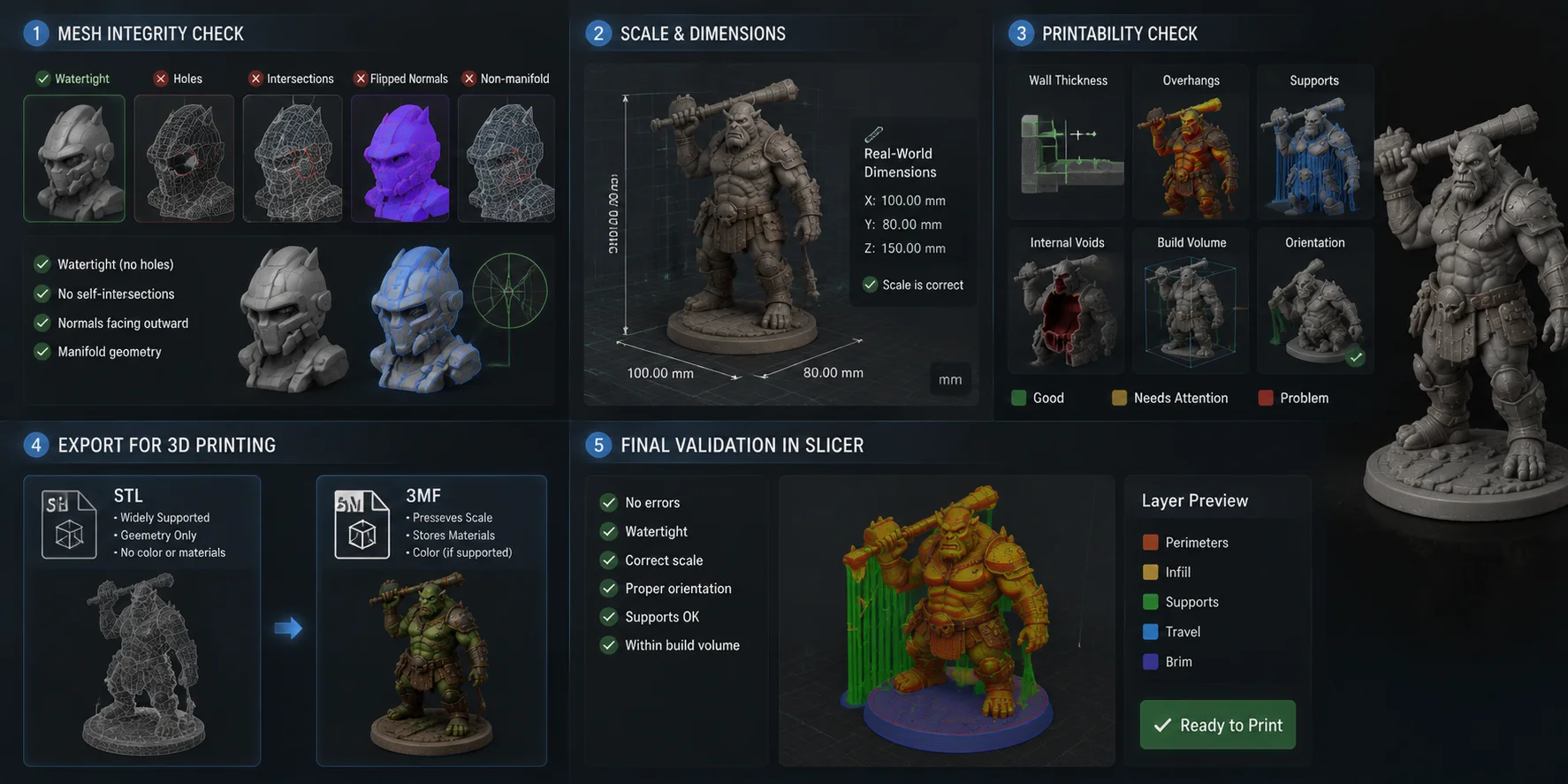
Run that validation at the intended print size. Scaling a model down can erase thin details and make walls too fragile, while scaling it up can expose low-resolution surfaces or push the asset beyond the printer’s build volume. For functional pieces, measure critical dimensions rather than trusting visual proportions; for display models, inspect contact points, balance, support scars, and whether small accessories should be separated before slicing.
For this workflow, export compatibility is essential. Tripo AI supports STL and 3MF exports for 3D printing, allowing users to move generated models into their preferred slicer quickly. STL remains the most widely supported format, but it stores geometry only—it does not retain textures, colors, or material appearance. When your slicer and printer support it, 3MF can be a stronger choice because it can preserve additional model information, including scale and material-related data. Regardless of the format, always run a final repair and validation check in the slicer before printing.
Where AI Still Falls Short
AI is strongest when it can infer a plausible form. It is weaker when “plausible” is not good enough.
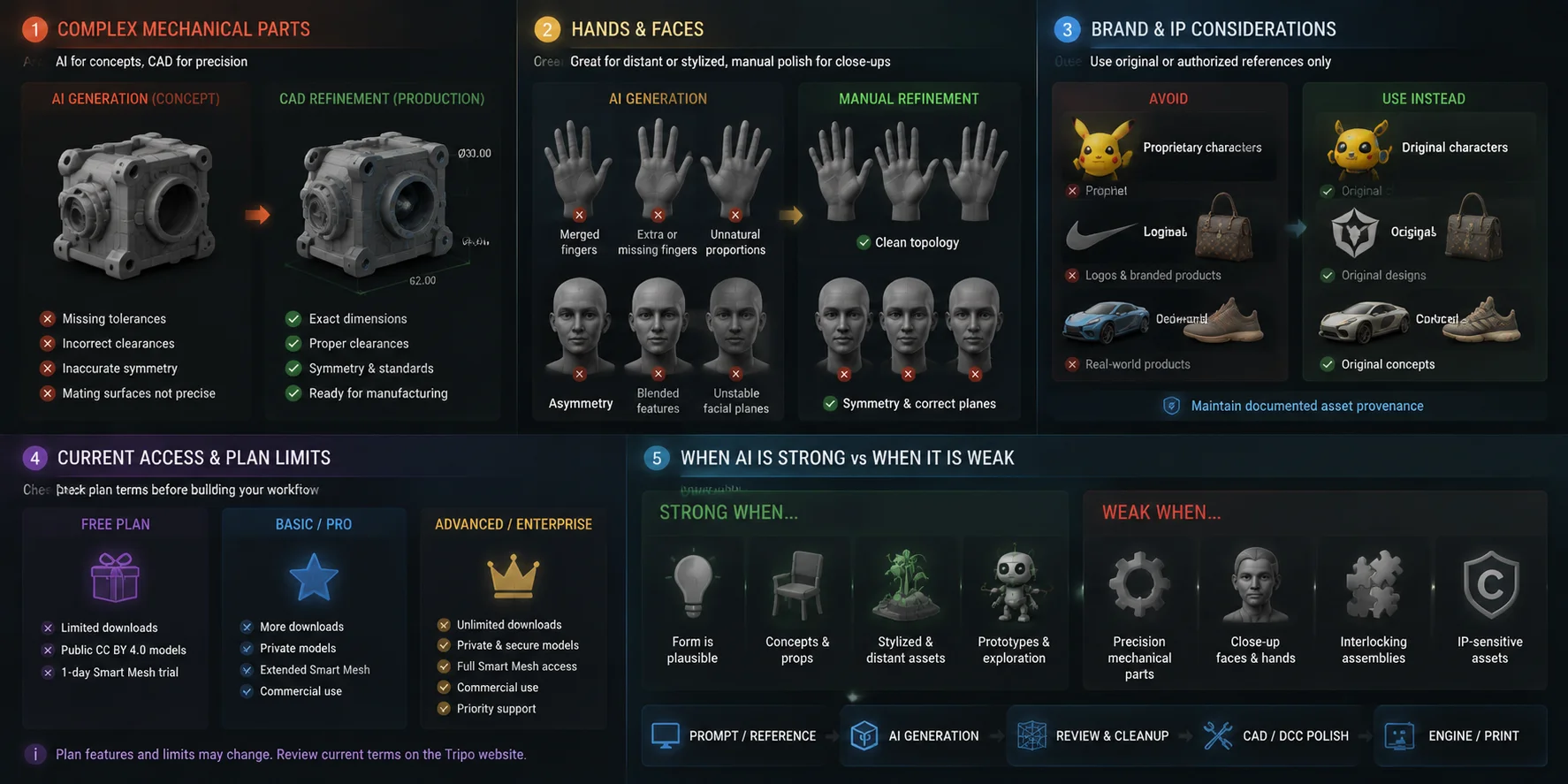
Complex mechanical parts remain difficult. A generated enclosure, snap fit, threaded connector, gear housing, or interlocking assembly may look credible but miss exact tolerances, symmetry, clearances, mating surfaces, and dimensional standards. Use AI for concept direction or rough external form, then use parametric CAD for components that must physically fit.
Hands and faces require extra care. Fingers may merge, facial planes can drift, and unwanted asymmetry is easy to notice. These problems may be acceptable for distant or stylized characters, but close-up animation, collectibles, and branded campaigns usually require manual sculpting, retopology, or texture cleanup.
Brand-specific assets create both quality and rights issues. Do not treat AI as a shortcut for recreating proprietary characters, logos, products, or protected visual identities. Use original prompts and references you are authorized to use, and maintain documented asset provenance.
Access, download limits, model visibility, supported versions, and commercial-use conditions can vary by plan and may change over time. Check the current pricing and terms before building a production workflow around a feature.
How to Get Started with AI 3D Model Generation
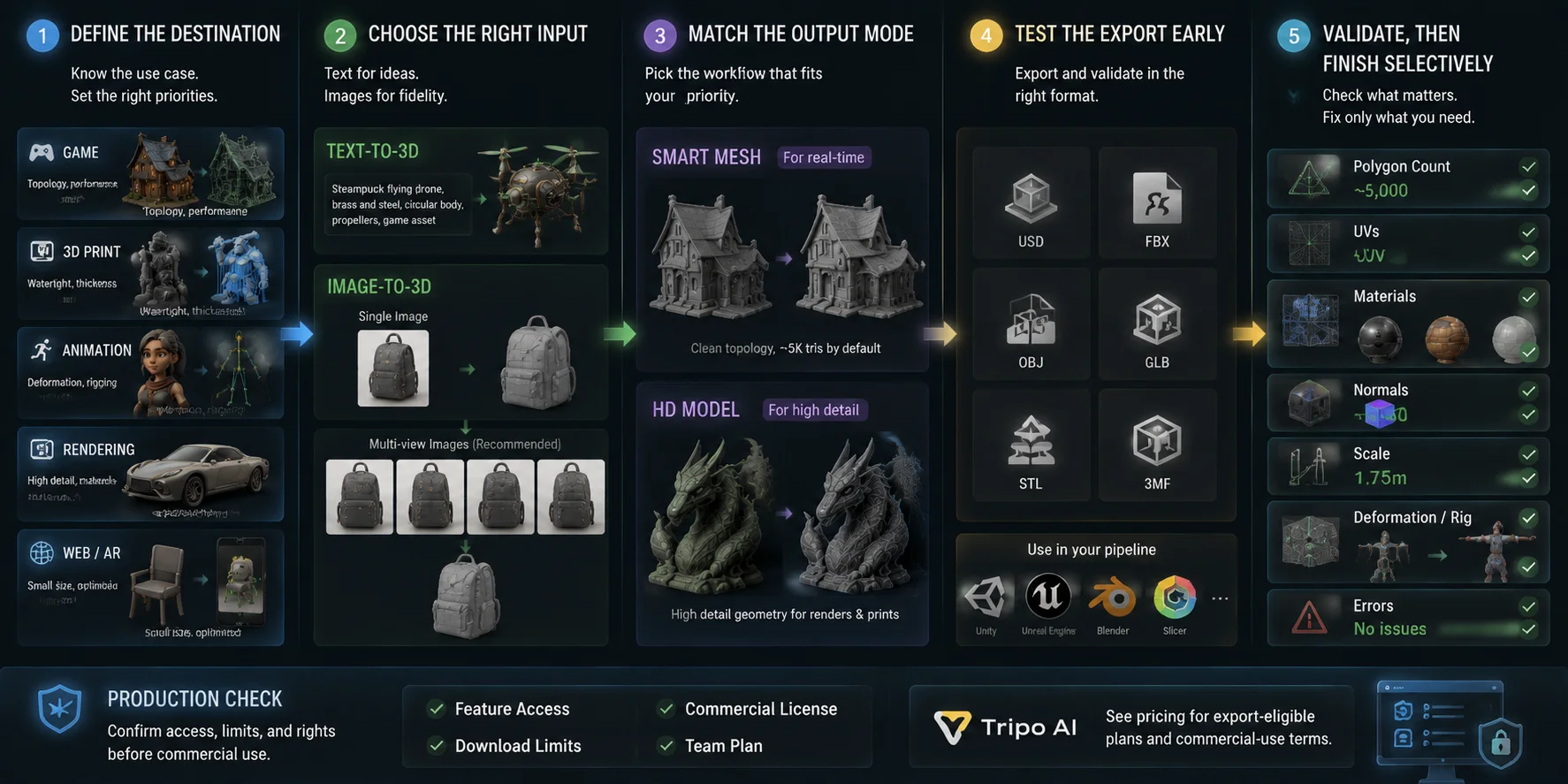
- Define the destination. Decide whether the asset is for a game, print, animation, rendering, web viewer, or AR. This tells you whether topology, surface detail, printability, rigging, or file size is the priority.
- Choose the right input. Use text-to-3D for quick original concepts. Use image-to-3D to preserve the silhouette or style of an approved reference; multi-view images usually provide stronger structural guidance than a single ambiguous image.
- Match the output mode to the job. Choose a topology-optimized workflow such as Smart Mesh for real-time assets. Choose a high-detail workflow when close-up surface detail, rendering, or print preparation matters more than runtime efficiency.
- Test the export early. Tripo AI Studio supports USD, FBX, OBJ, STL, GLB, and 3MF, so you can validate the asset immediately in the target software: FBX for many game and animation workflows, GLB for web and lightweight interactive use, and STL or 3MF for printing.
- Validate, then finish selectively. Import into Unity, Unreal Engine, Blender, Maya, or your slicer. Check polygon count, UVs, materials, normals, scale, deformation, and error messages—then spend manual time only on issues the final use case will reveal.
For commercial work, confirm feature access, download limits, and licensing before your team adopts the pipeline. See Tripo AI pricing for export-eligible plans and current commercial-use terms.
Frequently Asked Questions
Can ChatGPT create a 3D model?
ChatGPT can help describe a concept, write Blender Python scripts, or prepare prompts for a dedicated generator, but a text response is not automatically a usable 3D mesh. To obtain an actual model file, use a purpose-built 3D generator or run generated code in software that creates and exports geometry.
Can ChatGPT actually make STL files?
ChatGPT can write code or ASCII data intended to produce simple geometry, but the result still needs to be executed, opened, and validated as a real mesh. For normal production work, use a 3D tool that explicitly exports STL, then check manifold geometry, scale, wall thickness, and slicer errors before printing.
Can I sell 3D models made with AI?
Often yes, but commercial rights depend on the generator’s current plan and terms, as well as whether your prompts and reference materials are authorized. Review the latest terms before selling or licensing an asset.
Is AI good for 3D modeling?
AI is effective for rapid concepts, base meshes, props, stylized assets, and early production experiments. It is less dependable for precision mechanical parts, close-up hands and faces, exact tolerances, and demanding deformation. Treat it as a fast production stage with quality control, not as a universal replacement for modeling and technical art.
What file formats do AI 3D generators typically export?
Common formats include GLB, FBX, OBJ, STL, USD, and 3MF, although support varies by tool and plan. GLB is convenient for web and portable real-time use, FBX is common in game and animation pipelines, and STL or 3MF is used for printing. Confirm how the selected format handles animations, materials, scale, and textures before committing to a workflow.
How many polygons does a game-ready AI 3D model need?
There is no universal number because the correct budget depends on platform, camera distance, asset count, materials, animation, and LOD strategy. Lightweight mobile or stylized assets may stay below about 10,000 polygons, while prominent PC or console assets can use more. Tripo Smart Mesh produces roughly 5,000 polygons by default, but the final decision should come from profiling in the target scene.
Can AI-generated 3D models be 3D printed?
Yes, if the mesh is watertight, manifold, correctly scaled, and designed with enough wall thickness for the intended material and printer. Check intersections, normals, unsupported overhangs, small features, and build volume in a slicer. Exporting STL or 3MF starts the printing workflow; it does not replace validation.
How long does it take to generate a usable AI 3D model?
A base generation may take seconds or minutes, but “usable” includes inspection and downstream testing. Simple props can be ready quickly, while retopology, UV repair, texture cleanup, rigging, print preparation, or strict art direction can add substantial time. Measure the total time required to produce an accepted asset, not only the generation time.
Do I need 3D modeling experience to use an AI 3D generator?
You can generate a basic model without traditional modeling experience, but 3D fundamentals make the output much easier to evaluate. Understanding topology, UVs, normals, scale, polygon budgets, rigging, and printability helps you recognize failures before they enter a project. Beginners should start with a small asset and test the complete pipeline.
Can AI-generated models be rigged for animation?
Yes, when the mesh and pose suit the rigging system. Tripo Auto Rig currently works best with T-pose humanoid characters and standard standing quadruped animals; non-standard poses and unusual anatomy may require manual rigging. Always test shoulders, hips, elbows, knees, and other deformation areas before production use.
Conclusion
AI can create genuinely usable 3D models when usability is defined by the destination pipeline—not by how impressive the first preview appears. Prioritize topology, polygon count, UVs, and engine tests for games; watertight geometry, scale, and slicer validation for prints; and deformation plus rig quality for animation. Start with one real asset, test it in the software or printer you use, and let that result determine how AI fits your workflow. Record failures alongside successful results so the next model generation starts with clearer acceptance criteria.