AI 3D API for UGC Platforms: Generate, Moderate, and Scale Creator Content

TL;DR
- An AI 3D API accepts text or images and returns editable 3D assets through a programmatic workflow.
- UGC platforms use it to remove the specialist-modeling bottleneck and help more creators publish interactive content.
- Tripo AI supports text, single-image, and multi-view generation, plus PBR texturing, mesh processing, rigging, and animation.
- GLB suits web and AR delivery, while FBX and OBJ support common game-engine and general 3D pipelines.
- Start by creating an API key, submitting an asynchronous task, and storing the moderated result in your asset library.
Introduction
UGC platforms must publish more content faster, yet 3D asset creation still depends on skilled artists, costly software, and slow manual cleanup. An AI 3D API for UGC platforms changes that workflow by letting creators turn prompts, photos, sketches, or reference views into usable 3D assets inside the platform.
This article explains how these APIs work, what teams should evaluate, and how Tripo AI fits into creator tools, games, AR, commerce, and 3D marketplaces.
What Is an AI 3D API for UGC Platforms?

An AI 3D API is a programmatic interface that sends a text description or image to a generative model and returns a 3D asset, usually a mesh with textures. The creator uses controls embedded in the UGC platform rather than a separate modeling application.
For example, a creator enters “red sports car with a rear spoiler.” The platform submits the prompt, tracks the generation task, and stores the approved result in the creator’s asset library. Tripo’s product materials describe text, image, and multi-view 3D generation; the resulting asset can then be prepared for the platform’s own game, AR, or interactive-product workflow.
How the Tripo AI API Works
- Input: Your backend submits a text prompt, one image, or several reference views. Text supports ideation, while image and multi-view inputs provide stronger shape direction.
- Processing: Tripo’s developer offering describes API-based 3D generation plus texturing, rigging, animation, and format-conversion capabilities. Select only the processing steps that your asset type requires, then validate the output before publication.
- Output and delivery: Treat generation as an asynchronous workflow in your platform architecture. Store the task reference, retrieve the completed asset using the current API documentation, and export or optimize it for the target runtime. Confirm the supported endpoint, authentication method, callback options, and formats in the current developer documentation before implementation.
For the current feature overview, see the AI 3D Model Generator page and the Tripo Developers site.
Key Features UGC Platforms Need
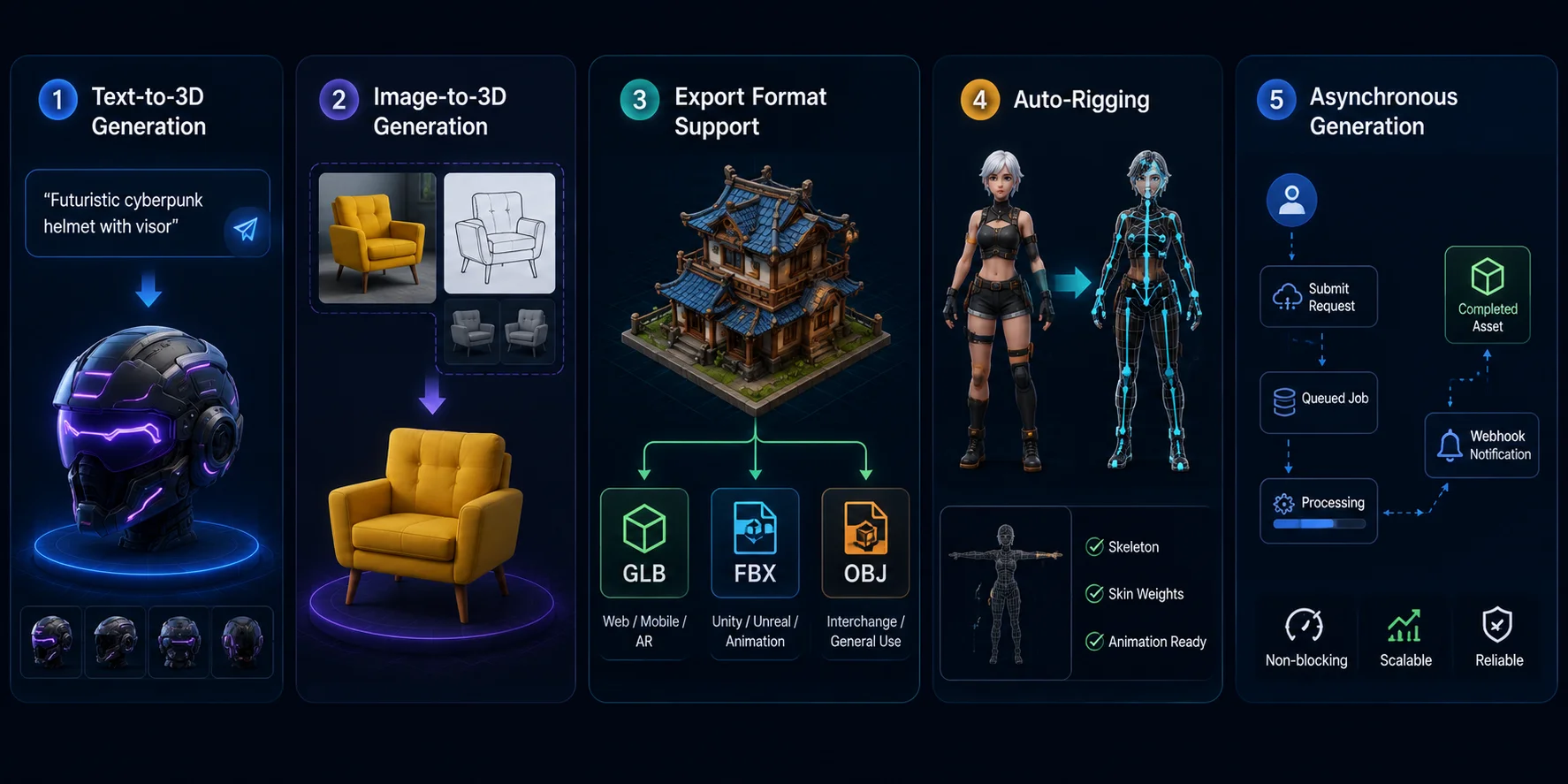
Text-to-3D generation. Creators describe props, characters, decorations, or collectibles in natural language and receive a 3D mesh. This accelerates ideation and lowers the barrier for non-experts. See Text-to-3D.
Image-to-3D generation. A photo, sketch, illustration, or screenshot becomes the visual reference for generating a model. This is useful for personalized items, branded assets, and designs that are hard to describe precisely. See Image-to-3D.
Export format support. GLB is efficient for web, mobile, and AR delivery. FBX is widely used in Unity, Unreal, and animation pipelines, while OBJ remains a flexible interchange format.
Auto-rigging. Character models require skeletons and skin weights before animation. Automated rigging reduces manual effort, though platforms should still validate pose, scale, and animation compatibility.
Asynchronous generation. UGC platforms should process long-running generation tasks outside the request-response path. Use queued jobs, status checks, and, where the current API supports them, callback mechanisms so traffic spikes do not block creator-facing requests.
Usage Limits, Credits, and Pricing Tiers
AI 3D APIs typically charge based on generation and processing tasks rather than polling frequency. Costs may vary depending on quality settings, texturing, rigging, and conversion steps. Tripo API and Studio use separate billing systems.
- Rate limits: Monitor requests per second, queued jobs, and concurrent tasks.
- Quota design: Allocate platform capacity across users or creator tiers.
- Overage handling: Define behavior when credits are exhausted, such as blocking tasks or enabling top-ups.
- SLA and uptime: Enterprise users should confirm availability guarantees and support terms.
Pricing, usage limits, and supported processing options can change. For a platform integration, model cost per approved asset rather than assuming a fixed cost per request: include generation, optional processing, retries, storage, delivery, and review. Check the current Tripo AI Pricing page and developer documentation before setting quotas or publishing customer-facing pricing.
Integration Requirements and Getting Started
Create credentials. Set up access through the current Tripo developer flow and keep credentials only on your backend. Never expose an API credential in client-side code.
Submit a generation request. Send the creator’s prompt or permitted reference image from your backend. Follow the current API reference for the endpoint, required fields, authentication, and task-tracking response.
Retrieve and prepare the asset. Track the generation result using the method documented for the endpoint, then store an approved asset in your own library or delivery pipeline. Generate platform-specific variants only after checking the available output and conversion options.
Choose the client layer. Standard HTTPS clients are a portable integration option. Use an official SDK only when the current developer documentation lists one for your required language or runtime.
- Moderate before publishing. Place generated assets in a review queue. Apply prompt filtering, visual moderation, geometry checks, and human review when necessary.
Developers can prototype workflows in Tripo AI Studio before deploying production integrations.
Benefits for Brands and Platform Operators
- Lower creation overhead. API-assisted generation can reduce repetitive modeling and iteration work, while quality assurance and cleanup remain part of a production workflow.
- Faster validation cycles. Teams can move from an idea to a reviewable asset more quickly than in a purely manual handoff, then decide which assets meet platform standards.
- Broader participation: Users without professional modeling skills can contribute interactive assets, widening the creator funnel.
- Consistent quality controls: Shared topology, texture, size, and validation rules reduce variation before manual review.
- Elastic infrastructure: A hosted API scales generation without requiring the platform to operate its own GPU cluster.
When safety, quality, and unit economics are controlled, these capabilities can support content velocity, catalog breadth, and creator participation. Treat business outcomes such as retention, engagement, or marketplace revenue as metrics to validate in a platform-specific pilot rather than guaranteed results.
Real-World Use Cases

Mobile game studio. A player photographs a household object and turns it into a collectible prop. The platform normalizes scale, polycount, collision, and materials. The result enters review before appearing in the game.
Virtual fashion marketplace. A designer uploads front and back sketches to generate a base garment. The platform applies mesh cleanup, rigging, and virtual try-on checks. Concepts can reach marketplace testing far sooner.
Social AR platform. A creator prompts a stylized sticker, mask element, or scene prop. The platform optimizes the GLB for mobile delivery. The asset is then attached to an approved effect template.
E-commerce UGC. A seller uploads product photos and receives an interactive 3D draft. The platform checks dimensions, branding, hidden surfaces, and texture accuracy. Approved assets can power product viewers or AR placement.
Content Moderation and Discovery
3D moderation is different because unsafe symbols, text, or geometry may be hidden on the back, underside, interior, or separate mesh parts. One thumbnail cannot represent the full asset.
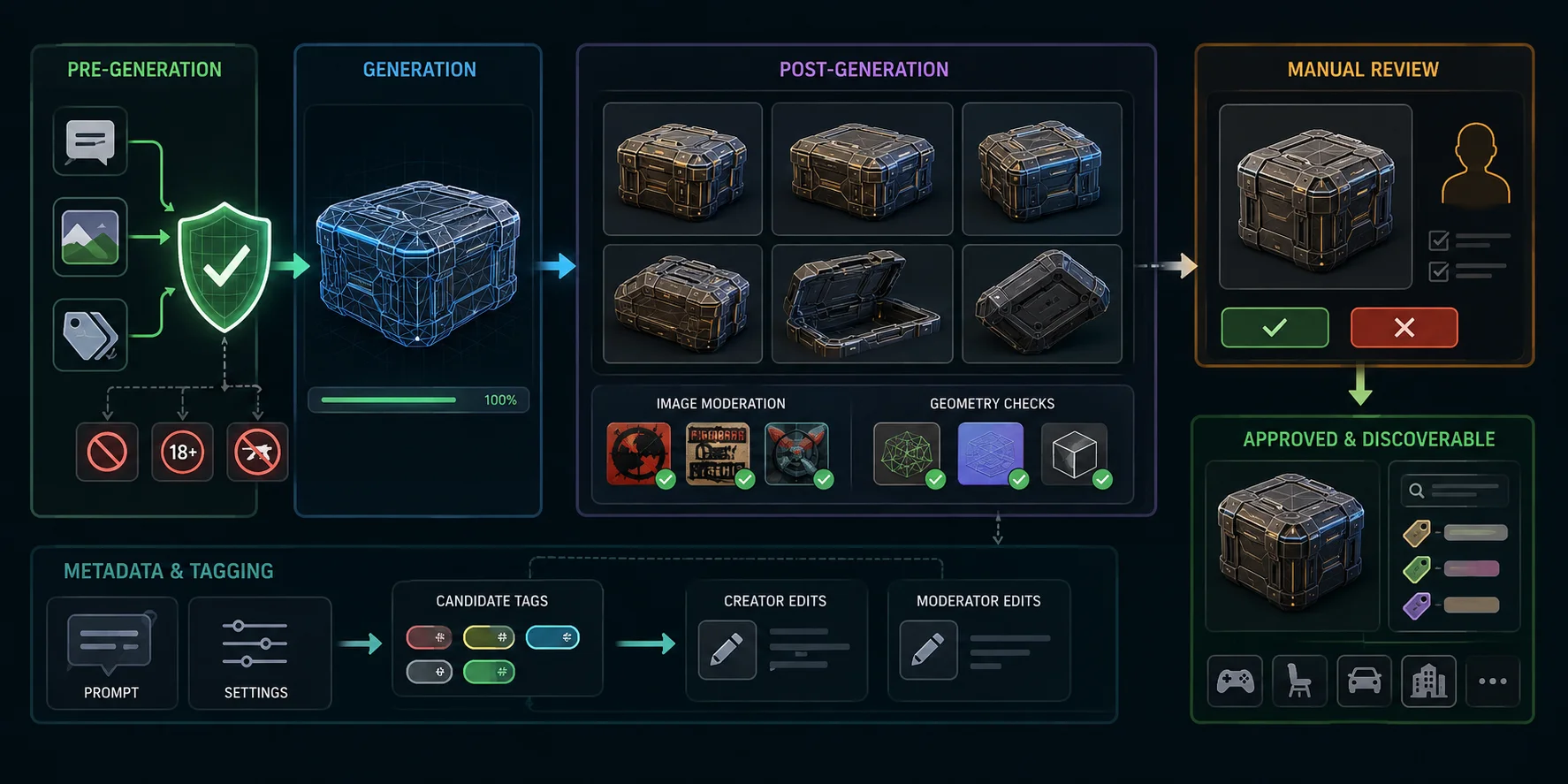
- Pre-generation: Filter prompts, uploaded images, metadata, and prohibited categories before spending credits.
- Post-generation: Render several fixed viewpoints, inspect textures and mesh parts, and run image moderation plus geometry checks.
- Manual review: Route uncertain, monetized, high-reach, or appealed assets to trained reviewers.
After approval, reuse the prompt and generation settings as candidate tags. Creators and moderators should be able to correct inaccurate metadata before it affects search or recommendations.
Scaling for Enterprise and Automation
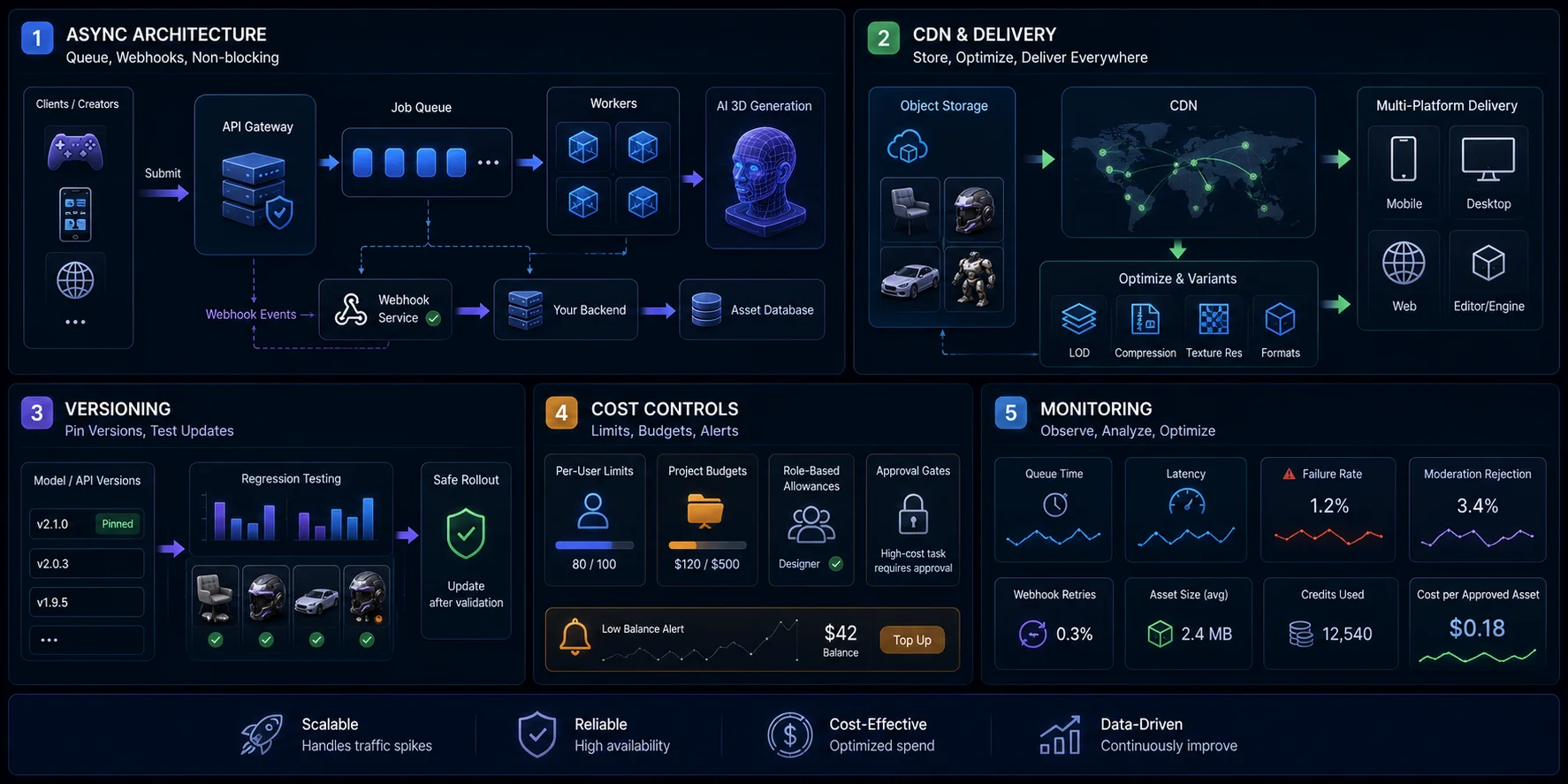
Async architecture. Put submissions behind a queue, store task IDs, and process webhook events idempotently. Long jobs should never block public request threads.
CDN and delivery. Copy generated files to your own object storage and CDN. Produce different LOD, texture-resolution, and compression variants for mobile, desktop, web, and editor clients.
Versioning. Pin model and API versions where supported. Record parameters and regression-test updates against a fixed asset set before changing production defaults.
Cost controls. Enforce per-user limits, project budgets, role-based allowances, and approval gates for expensive processing. Add low-balance alerts and prevent uncontrolled retry loops.
Monitoring. Track queue time, latency, failures, moderation rejection, asset size, webhook retries, and credits per published asset. Cost per approved asset is more useful than cost per generation.
Marketplace and UGC Game Platform Use Cases

In-game item marketplaces. Roblox-style creator economies demonstrate the value of user-made inventory, although each platform has different technical and ownership rules. An AI 3D API lowers the skill barrier and expands supply. The marketplace still controls originality checks, licensing, revenue sharing, and publish permissions.
Avatar customization. Players can generate hairstyles, outfits, accessories, or creature parts from prompts and references. The platform must standardize scale, attachment points, bounding volumes, rig specifications, and performance budgets. Without those constraints, generated items will not work reliably across the avatar system.
Virtual real estate and world-building. Creators can furnish rooms, social spaces, and game worlds with generated props. Text-to-3D enables fast variations in style, age, material, or theme. It offers more fidelity than basic block-building tools while keeping iteration accessible.
Cross-platform asset portability. Standard formats let approved assets move between compatible tools and marketplaces. GLB supports web-first delivery, while FBX fits many Unity and Unreal pipelines. Export rights, ownership, attribution, and marketplace licenses must remain explicit.
Tripo’s developer materials describe API-based text-to-3D, image-to-3D, texturing, rigging, animation, and format-conversion capabilities that may be relevant to these scenarios. Production suitability still depends on representative quality tests, documented capacity and pricing, moderation design, ownership rules, and cost per accepted asset. Run a pilot with representative prompts, difficult reference images, abusive inputs, and peak-load simulations before committing to launch.
Frequently Asked Questions
Can I use AI for UGC content?
Yes. A platform can embed text-to-3D or image-to-3D tools in creator workflows, then moderate and store the result before publication. AI can accelerate creation, but it should not bypass ownership, safety, or quality controls.
Is there an AI for 3D modeling?
Yes. AI 3D generation systems can turn text or images into 3D assets that a platform then validates for its own runtime. Tripo is one API-oriented option for teams evaluating generation and processing capabilities.
Which AI is best for UGC videos?
This article focuses on interactive 3D assets rather than marketing videos. Video tools suit ads and social clips, while 3D is useful when users need to rotate, place, animate, wear, or otherwise interact with an asset.
What are the best AI 3D APIs for UGC platforms?
Evaluate input modes, output options, quality controls, asynchronous workflow support, pricing, moderation, licensing, and developer support against your platform’s requirements. Tripo can be evaluated where text and image generation, processing tools, and API-based integration are relevant.
How do I integrate a 3D AI generation API into a mobile app?
Keep credentials on your server, send the app’s prompt or image through that backend, track the generation task, and deliver a validated asset through your own mobile pipeline. Confirm the current endpoint, authentication, task-status, and output details in the provider’s developer documentation.
What are the challenges of AI-generated 3D assets in UGC?
Common issues include quality variance, licensing and ownership checks, rig and scale consistency, multi-angle moderation, and mobile file size. Address them with validation rules, runtime budgets, optimized variants, multi-view review, and human escalation paths.
What is the difference between Arcads and MakeUGC?
They are commonly positioned around AI-generated UGC-style marketing videos rather than interactive 3D model generation. For games, AR, virtual worlds, and interactive product experiences, evaluate a 3D generation API against the platform’s asset, moderation, and delivery requirements.
How can AI reduce 3D content creation costs?
It can reduce repetitive asset-production and iteration work, but the total cost still includes generation, review, cleanup, storage, and delivery. Compare cost per approved asset against your current workflow, then consult the current provider pricing before setting production budgets.
Conclusion
UGC platforms should compare input modalities, output options, mesh and texture quality, integration design, pricing at scale, moderation, and enterprise operating requirements. Tripo’s developer site describes API-based 3D generation, texturing, rigging, animation, and format conversion; teams should validate the current endpoint-level capabilities against their workflow before implementation. Prototype representative assets in Tripo AI Studio, then review current options on Tripo AI Pricing and measure publishable quality, latency, moderation load, and cost per accepted asset.
