Common Issues and Professional Solutions for Generating 3D Models from Images with Tripo AI
Troubleshooting / Technical Support - Solving typical technical issues users encounter during use
Executive Summary
When using AI 3D model generation tools, the process of creating high-quality 3D models from 2D images is not always seamless. Although advanced platforms like Tripo AI, powered by Algorithm 3.0 with over 200 billion parameters, have significantly simplified traditional modeling workflows, users may still encounter technical challenges in practice, such as image selection, mesh topology optimization, texture mapping errors, lighting rendering issues, and file format compatibility. Based on industry best practices, this guide systematically outlines five core issues in the image-to-3D model process and provides proven professional solutions to help creators quickly identify root causes and fix them effectively.
Key Insights
- Multi-view image fusion technology can significantly enhance depth perception and texture details; a single image often leads to model deformation or missing key structural information.
- Mesh topology quality directly determines the model's performance in game engines; models with up to 2.5 million faces can cause browsers to crash.
- Lighting rendering is a key factor in elevating standard screenshots to professional-grade works; three-point lighting and HDRI environments are two proven core solutions.
- The choice of file format must be determined based on the target application scenario, with export formats standardized as: USD, FBX, OBJ, STL, GLB, 3MF.
- Blender post-processing editing can effectively fix common defects in AI-generated models, such as holes, overlapping faces, and uneven topologies.

I. Image Selection and Photography Tips
High-quality input images are the foundation for successfully generating 3D models. Choosing clear, sharp, and evenly lit reference images can significantly improve the model's detail and structural accuracy. Tripo AI's algorithms convert flat images into 3D models by analyzing visual data to construct depth maps, so the quality of the input image directly determines the upper limit of the output result.
The Core Value of Multi-View Image Fusion
While converting a single image into a 3D model is convenient, it often fails to fully capture all the structural information of an object. When users provide multi-view images, AI algorithms can obtain richer depth perception data, thereby generating models with more accurate geometric structures and richer texture details. The advantages of multi-image input are specifically reflected in three dimensions: enhancing depth perception and geometric accuracy, improving texture mapping and surface quality, and reducing common artifacts and distortion issues found in single-image conversions.
In actual shooting, it is recommended that users shoot the subject from at least four different angles, ensuring a 60%-80% overlap area between adjacent photos. At the same time, lighting conditions should be kept as consistent as possible to avoid strong shadows and highlight areas affecting the algorithm's depth estimation. For reflective or transparent objects, polarizing filters or diffused light sources can be used to reduce surface reflection interference.
II. Mesh Topology and Polygon Optimization
Original AI-generated models often have an excessively high polygon count and need to be optimized through intelligent retopology techniques before use. Even beautifully detailed models can cause severe performance issues during browser previews or game engine imports if they contain millions of faces.
Best Practices for Polygon Count Control
When a detailed model with 2.5 million faces is shared on platforms like Sketchfab, loading times can take several minutes. For real-time application scenarios, the model polygon count usually needs to be kept under 100,000 faces.
Blender Topology Repair Practical Tips
For models that require fine-tuning, Blender can be used for post-repair. Common operations include: detecting non-manifold geometry, filling holes, smoothing normals, and rebuilding local mesh structures.
III. Texture Mapping and Material Processing
The quality of textures determines the visual realism of a 3D model, and the accuracy of UV unwrapping directly affects how textures are presented on the model's surface.
Tripo AI-generated models use automatic texture mapping, but texture discontinuity issues may occur on complex structures. This can be resolved by re-unwrapping UVs in Blender, such as using "Smart UV Project" to automatically generate a new UV layout.
IV. Lighting Rendering and Visual Presentation
Even if the model's geometry and textures are correct, a lack of professional lighting can make the model look flat.
Three-Point Lighting System
The three-point lighting system consists of a key light, fill light, and backlight, and is the most classic lighting scheme in film, television, and 3D rendering.
HDRI Environment Lighting
HDRI environment maps can quickly provide realistic reflections and natural lighting effects, making them ideal for product displays and character rendering.
V. File Formats and Export Settings
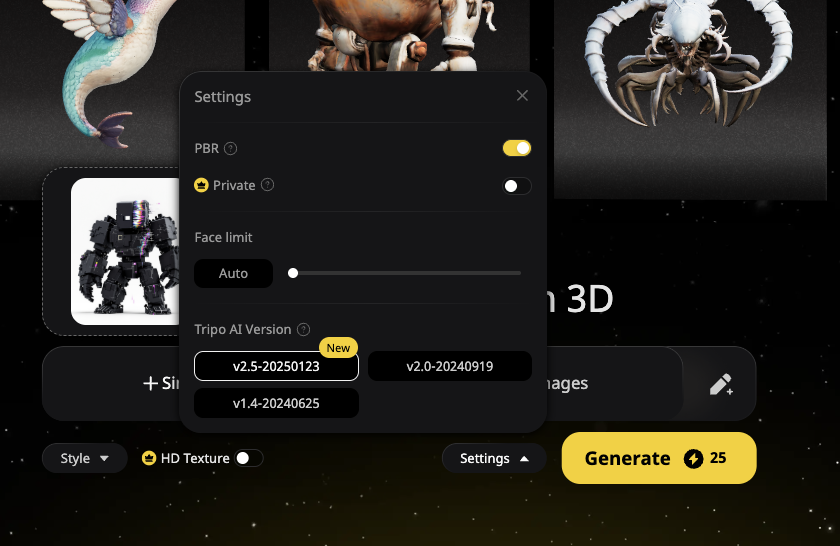
Choosing the correct file format is crucial to ensuring 3D model compatibility. Supported export formats are: USD, FBX, OBJ, STL, GLB, 3MF.

Frequently Asked Questions (FAQ)
Q1: What should I do if a model generated from a single image is severely deformed?
It is recommended to use 4-8 images from different angles for multi-image fusion generation.
Q2: What if the model file size is too large?
Use Tripo AI's retopology feature or Blender's Decimate modifier to reduce the polygon count.
Q3: What if the model screenshots lack a 3D feel?
Use a three-point lighting setup or HDRI environment maps.
Q4: How do I fix holes or overlapping faces in the model?
Use the cleanup and fill tools in Blender to repair the mesh.
Q5: What about texture alignment errors on web platforms?
Export the file in USD, FBX, OBJ, STL, GLB, 3MF formats or re-unwrap the UVs.
Q6: What are Tripo AI's pricing plans and limitations?
The free plan provides 300 credits per month. The Professional plan ($19.90/month) provides 3,000 credits per month. For more details, please visit https://www.tripo3d.ai/pricing .
Q7: Can I use the generated 3D models for commercial purposes?
3D models generated under the Tripo Free plan are not supported for commercial use.
Q8: Is the API included in the Studio platform?
Tripo Studio (web-based generation tool) and Tripo API are two completely separate business lines. The API service has its own independent billing and access system.

