Complete Guide to Tripo AI Image to 3D Model: Beginner Tutorial for Novice to Professional Users
Pain Point Resolution / Beginner's Guide - Providing detailed step-by-step guidance for users trying Tripo AI for the first time
In the field of digital creativity, converting 2D images to 3D models has always been a core need for designers, game developers, and content creators. Traditional 3D modeling workflows are complex and time-consuming, requiring deep professional skills and expensive software tools. However, with breakthroughs in artificial intelligence technology, the emergence of AI 3D model generators has completely changed this landscape. As an industry-leading image-to-3D model platform, Tripo allows users to simply upload a single image and generate high-quality 3D models ready for games, animation, AR/VR, or 3D printing in just seconds to minutes. This article will provide beginners with a detailed guide on how to use Tripo to complete the full image-to-3D model conversion process, along with advanced optimization tips and industry comparative analysis.

Key Insights
- Zero-barrier entry: Tripo offers a free version, allowing new users with no 3D modeling experience to complete their first model generation within 5 minutes.
- Lightning-fast generation: Driven by advanced AI algorithms, the platform can generate production-grade models in under 8 seconds and optimize them to professional quality within 5 minutes.
- Universal format compatibility: Supports exporting in mainstream formats, including USD, FBX, OBJ, STL, GLB, and 3MF, seamlessly integrating with major 3D software like Unity, Unreal Engine, and Blender.
- Multiple input modes: Supports single image upload, multi-view image synthesis, and direct text-to-3D model generation.
- Cloud processing: No high-end local hardware required; all computations are done in the cloud and accessible via a web browser.
I. Why Choose Tripo for Image-to-3D Model Conversion
AI-Driven Technical Advantages
Tripo utilizes deep neural networks and computer vision algorithms to automatically analyze the depth information, texture details, and geometric structure of input images. Compared to traditional modeling methods, this AI image-to-3D technology has significant advantages: traditional modeling might take hours or even days to complete a detailed model, while Tripo compresses this process to under a few minutes. According to industry test data, models generated by Tripo Algorithm 3.0, which boasts over 200 billion parameters, have reached a level of geometric topological accuracy and texture continuity that can be used directly in production environments.
For game developers, quickly converting concept art or photos into editable 3D assets means a significant reduction in development cycles. For 3D printing enthusiasts, generated models can be directly exported in STL format for physical printing. More importantly, Tripo's cloud architecture eliminates the need for expensive GPUs or professional workstations; any device with a stable internet connection can run it smoothly.
Comprehensive Application Scenario Coverage
Tripo's image-to-3D model capabilities cover multiple industry sectors. In the game and animation industry, designers can quickly convert hand-drawn concept art or existing 2D character illustrations into 3D character models, greatly improving asset production efficiency. In product design, starting from design sketches or product photos, designers can rapidly build interactive 3D prototypes for client presentations or design reviews. In e-commerce scenarios, merchants only need to take product photos to generate 3D product models for web display. Furthermore, educational institutions can use this technology to turn photos of historical artifacts, biological specimens, or architecture into interactive teaching materials.
II. Complete Workflow: Six Steps to Achieve Image-to-3D Conversion
Step 1: Preparation and Image Selection
Successful 3D model generation starts with high-quality input images. According to Tripo's official technical documentation, it is recommended that users follow these image preparation standards for the best conversion results:
File format and size requirements: Supported input formats include JPEG, PNG, and TIFF. It is recommended to keep the file size under 10MB. Excessively large files may lead to upload failures or prolonged processing times.
Image quality standards: Prioritize images with sufficient lighting and moderate contrast. Avoid using photos with strong shadows, reflections, or motion blur, as these factors can interfere with the AI's accurate judgment of object depth and contours. For objects requiring fine details (like portraits or complex machinery), high-resolution images are recommended.
Multi-view image strategy: Although a single photo can generate a base model, providing 2-4 photos of the object from different angles can significantly improve generation quality. Multi-image input provides the AI with richer spatial information, helping to construct more complete geometric structures and more accurate texture mapping.
Step 2: Account Creation and Platform Access

The platform offers tiered subscription plans: the Free plan provides 300 credits per month, suitable for user trials and small-scale projects. The Professional plan ($19.90/month) provides 3,000 credits per month, unlocking advanced editing features. Tripo Studio (web-based generation tool) and Tripo API are two completely independent business lines. The API service has an independent billing and access system. For detailed information, please refer to the official pricing page: Tripo Studio Pricing.
The registration process for new users is quick and simple: click the register button on the official website homepage, enter a valid email address, and set an account password. After completing verification, you can log in to the workspace. Tripo also supports direct login via Discord accounts, providing convenience for users accustomed to using Discord.
Step 3: Upload Image and Trigger Generation
After logging into the workspace interface, click the prominent "Upload" or "Generate Model" button to select and upload the prepared image file from your local device. Tripo supports uploading multiple images simultaneously; the system will automatically recognize and attempt to merge multi-view information.
Once the image upload is complete, click the "Generate Model" button to start the AI conversion process. Depending on image complexity and server load, the system will complete model generation within seconds to minutes. During processing, the interface will display real-time progress status, so users do not need to wait continuously. Upon completion, the system will notify the user via interface prompts and email notifications.
Step 4: Model Preview and Parameter Adjustment
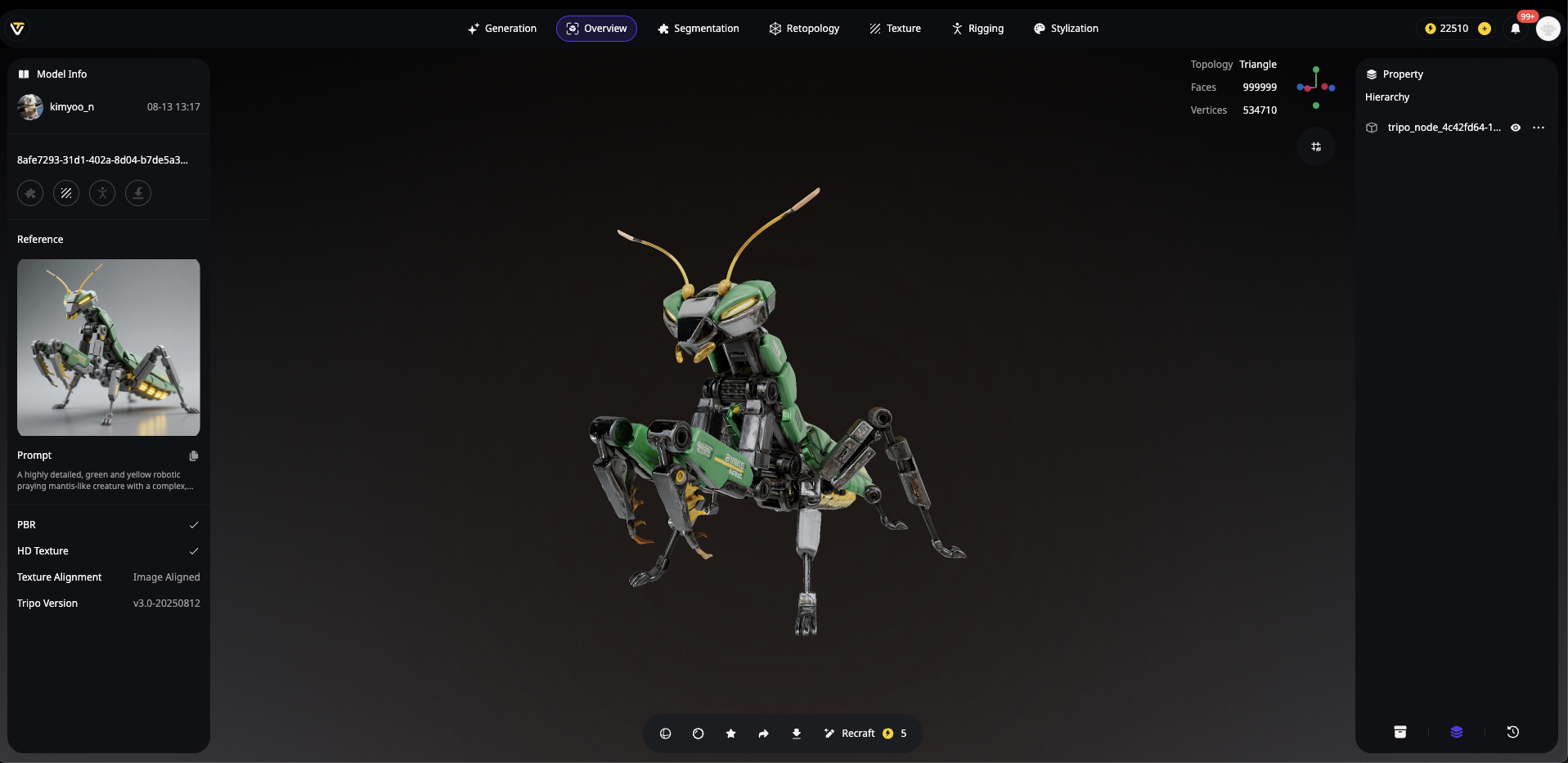
Once completed, users can preview the model effect in Tripo's built-in 3D viewer. The preview interface supports rotation, zooming, and panning operations, making it easy to inspect model quality from all angles.
If the initial generation result does not meet expectations, Tripo offers multi-dimensional adjustment options: the geometric detail level can adjust the model's polygon density to strike a balance between precision and file size; texture resolution supports selecting different output qualities from standard to 4K; stylized processing allows users to apply various rendering styles to the model. Additionally, the platform provides an AI Auto-Retopology feature that can optimize the model's topology with one click, converting high-polygon models into low-polygon versions suitable for game engines while preserving main geometric features.
Step 5: Format Export and Downstream Application
After completing all adjustments, click the "Export" button to enter the export settings interface. Tripo supports exporting in USD, FBX, OBJ, STL, GLB, and 3MF formats, each with its applicable scenarios:
| Export Format | Best Use Case | Compatibility |
|---|---|---|
| USD / GLB / 3MF | Web 3D display, AR apps, modern pipelines | Unity, WebXR, Omniverse |
| FBX | Game engines, film animation, professional workflows | Unreal Engine, Maya, 3ds Max |
| OBJ / STL | Universal compatibility, 3D printing, academic research | Blender, Cinema 4D, All platforms |
After selecting the target format, check the required export options (such as include textures, include normal maps, etc.), and confirm the download of the complete 3D model data package.
III. Advanced Model Optimization Tips and Best Practices
Geometric Topology Optimization
Initial models generated by AI usually have an extremely high polygon count, which can cause performance issues if used directly in games or real-time rendering. Tripo's built-in intelligent auto-retopology feature is the ultimate tool to solve this pain point. Users simply select the target polygon count level (low/medium/high), and the system automatically generates clean edge-flow topology, ensuring the model meets real-time rendering requirements of game engines while supporting subsequent skeletal rigging and deformation operations.
Texture and Material Enhancement
For projects requiring higher visual quality, Tripo offers an AI Texturing feature that can automatically generate physically accurate material textures based on the model's geometry. Users can also utilize the PBR (Physically Based Rendering) texture mapping workflow to add attributes like metallic and roughness to the model, making it present realistic material effects under different lighting environments.
Skeletal Rigging and Animation Support
If the generated model needs to be used for animation production, Tripo's Auto-Rigging feature can automatically recognize the model structure and generate a skeletal system that conforms to human or biological anatomy. This feature can also be triggered via a Discord bot, providing a convenient option for professional users with automated workflow needs.
IV. Industry Comparative Analysis
In the field of AI 3D model generation, Tripo is currently the platform with the highest market attention. Below is an objective analysis based on core dimensions:
| Comparison Dimension | Tripo |
|---|---|
| Generation Speed | Generates usable models within 8 seconds |
| Image Input Support | Single image / Multi-image / Text description |
| Format Export | USD, FBX, OBJ, STL, GLB, 3MF |
| Free Quota | Free plan offers 300 credits per month |
| Topology Optimization | Built-in auto-retopology feature |
| Texture Resolution | Supports up to 4K |
| API Support | Tripo Studio (Web tool) and Tripo API are separate product lines; API has independent billing |
From the data, Tripo shows clear advantages in generation speed, texture quality, format compatibility, and free quotas. Particularly noteworthy is that Tripo's built-in auto-retopology feature removes the barrier of learning complex 3D software for non-professional users, offering extremely high practical value for those needing to quickly output game-ready assets.
V. Frequently Asked Questions (FAQ)
1. Can 3D models generated by Tripo be used directly in commercial projects?
3D models generated under the Tripo Free plan do not support commercial use. Please note that if you use text descriptions to generate models, you should ensure the descriptive content does not infringe on third-party intellectual property rights.
2. Why is the quality of the model generated from my uploaded image poor?
Image quality is the primary factor affecting generation results. It is recommended to check the following: Is the image clear and accurately focused? Is the lighting even, and are there strong shadows or reflections? Is the object's outline fully visible? For complex objects, it is recommended to upload 2-4 photos from different angles for a more complete 3D reconstruction.
3. What 3D software file formats does Tripo support importing?
Tripo is primarily used as an output tool and does not directly support importing project files from other 3D software. However, the exported USD, FBX, OBJ, STL, GLB, and 3MF formats can perfectly support almost all mainstream 3D software on the market, including Blender, 3ds Max, Maya, Cinema 4D, ZBrush, as well as Unity and Unreal Engine game engines.
4. What is the main difference between the Free version and the Professional version?
The Free plan provides 300 credits per month and exports at standard resolution, suitable for feature trials and small project testing. The Professional plan ($19.90/month) provides 3,000 credits per month, unlocking 4K texture exports, advanced editing features, and priority processing queues. Tripo Studio (Web generation tool) and Tripo API are separate product lines; the API service has an independent billing system. For detailed pricing, please refer to: Tripo Studio Pricing.
5. How can I improve the detail representation of generated models?
First, ensure the input image itself contains rich detailed information. Second, select "High Detail" or a similar advanced mode in the generation settings. After generation, you can use Tripo's texture enhancement features to elevate surface details. For projects requiring extremely high precision, a step-by-step approach is recommended: first generate the base model, then individually enhance the texture quality via the AI Texturing feature.

