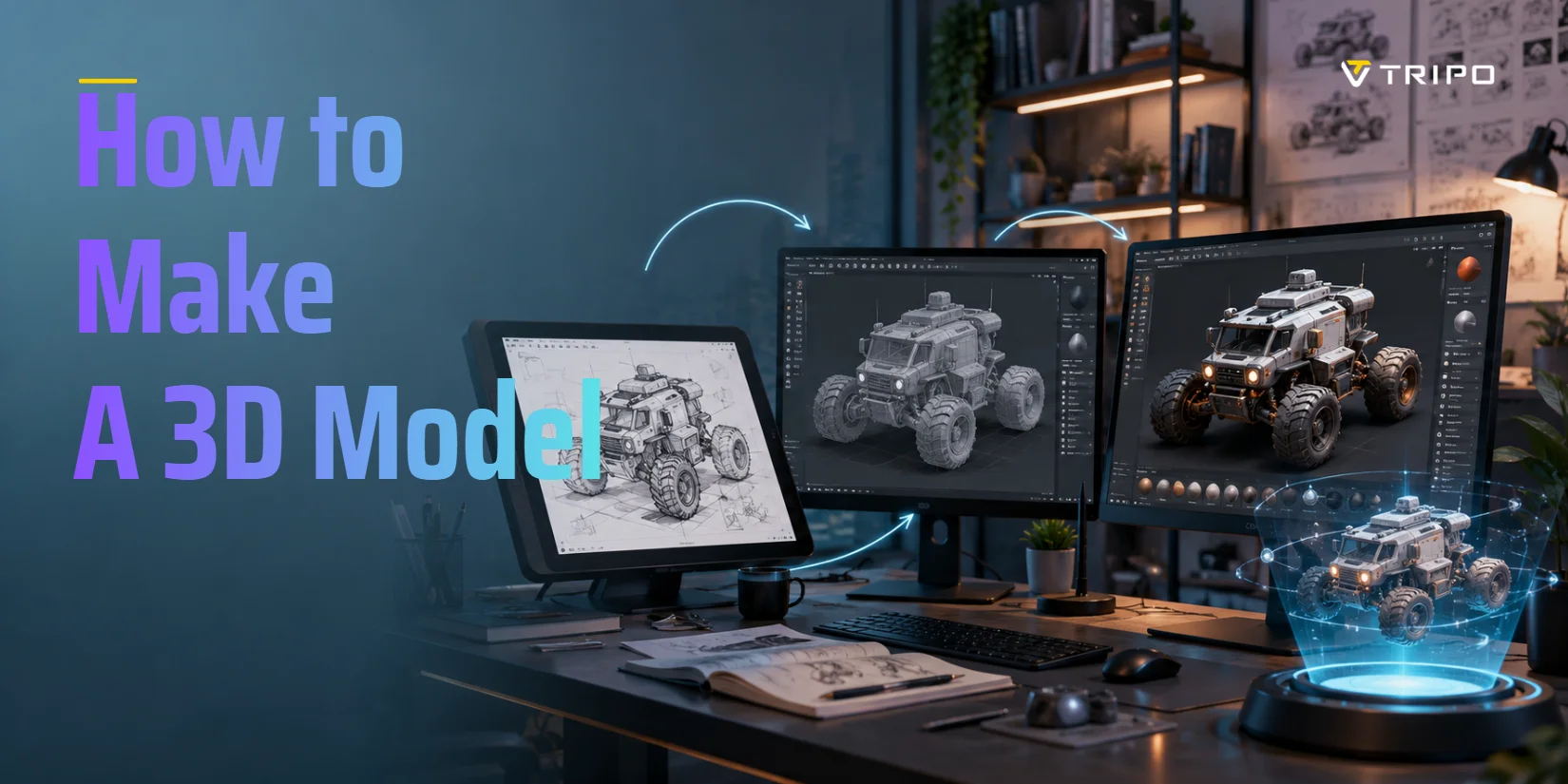
How to Make a 3D Model: A Beginner's Guide (5 Methods)
TL;DR
- Learning how to make a 3D model starts with choosing the right method for your goal.
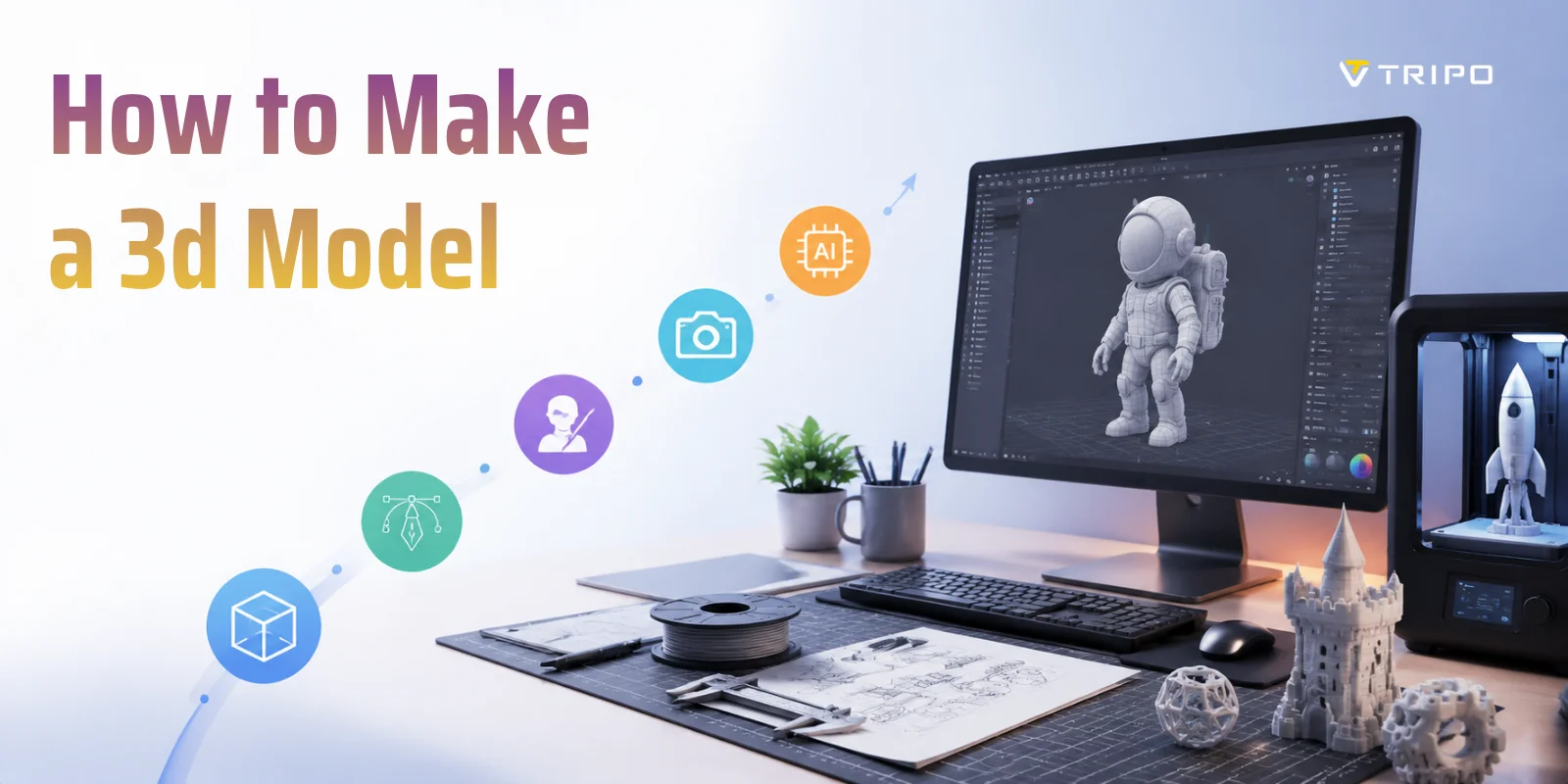
- The five main approaches are polygon modeling, digital sculpting, CAD, 3D scanning / photogrammetry, and AI generation.
- Tinkercad and Blender are strong free starting points for beginners who want to build models manually.
- AI tools are the fastest way to turn text or images into a starting mesh, though cleanup may still be needed.
- Export format depends on the use case: STL / 3MF for printing, FBX / GLB for games and web, and OBJ for general sharing.
To make a 3D model, you pick a method and build your object in 3D software. The five main approaches are polygon modeling, digital sculpting, CAD, 3D scanning, and AI generation (turning text or an image into a model). Beginners can start free with Tinkercad, Blender, or an AI tool - no experience needed.
This guide covers all five methods with beginner-friendly explanations, free software recommendations, and a breakdown of common export formats - so you can pick the right workflow for your goal.
What Is a 3D Model?
A 3D model is a digital object that represents a real or imagined item in three dimensions - length, width, and height. In simple terms, it's made up of tiny points in space called vertices, which are connected by lines called edges, and these form flat surfaces known as faces (or polygons). Together, all of these components create a structure called a mesh, which is basically the "skeleton" of any 3D object. Many models also include textures, which are images wrapped around the mesh to make it look like wood, metal, plastic, or anything else.
Vertex, Edge, and Face - Basic 3D Geometry Explained
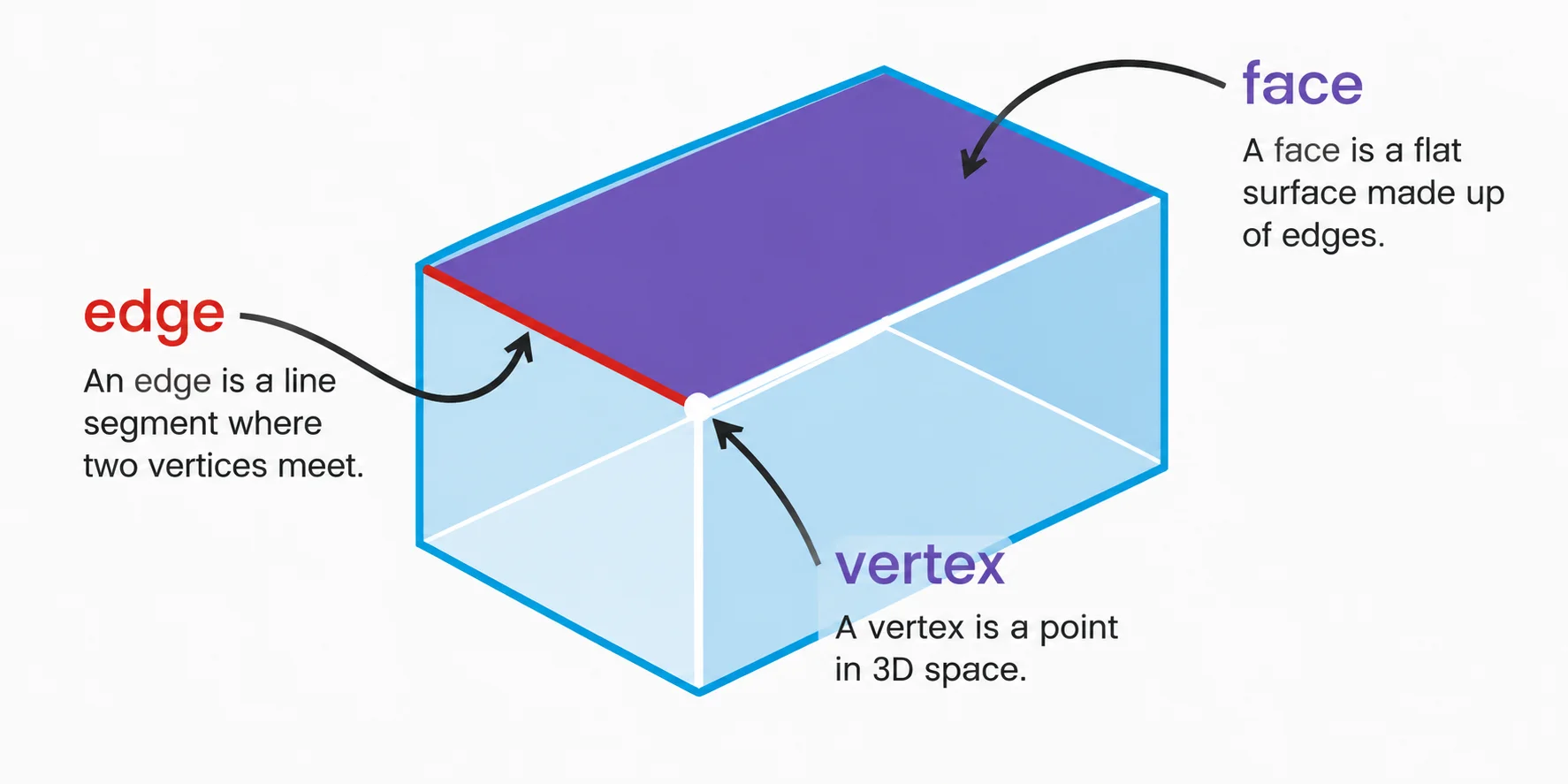
If you're just starting to learn how to make a 3D model, you'll see these terms everywhere - so it helps to think of them in plain language: a vertex is a dot, an edge is a line between dots, a face is a filled-in surface, and a mesh is the full shape built from all of them.
3D models are used in a wide range of industries. In games and animation, they bring characters and worlds to life. In 3D printing, they become physical objects you can hold. In product design, they help test ideas before manufacturing. They're also widely used in AR/VR experiences where digital objects interact with the real world.
Once you understand this basic idea, the next step is exploring how to make a 3D model from scratch using different tools and methods - from professional software like Blender to simple 3D modeling online free platforms.
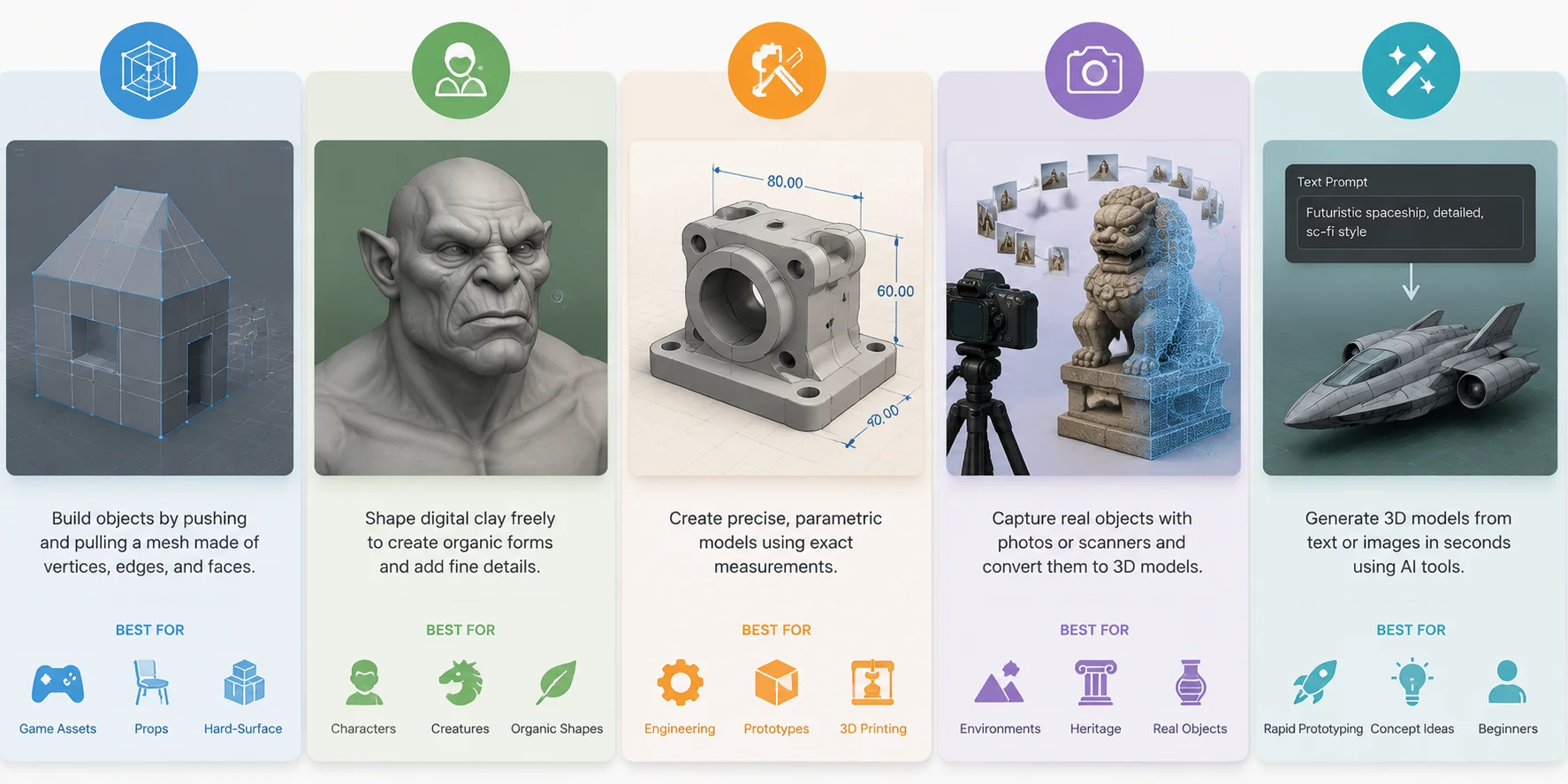
The 5 Main Ways to Make a 3D Model
There are five fundamental ways used in modern 3D modeling, and each one solves a different problem depending on what you want to create. When learning how to make a 3D model, it's important to understand that there is no single "correct" method-different industries rely on different pipelines. Some focus on artistic freedom, others on precision, and some prioritize speed or automation. This breakdown gives you a clear starting point before you dive into tools like Blender, CAD software, or 3D modeling online free platforms.
Polygon (Box) Modeling
Polygon modeling (also called box modeling) is the most widely used foundational technique in 3D creation. You typically start with a basic primitive shape such as a cube, sphere, or cylinder, then gradually refine it using tools like extrude, loop cut, bevel, and subdivision to shape the final object. The entire workflow is based on manipulating vertices, edges, and faces, which makes it highly controllable and efficient for structured models.
This method is especially popular in Blender (free), where beginners often learn how to make a 3D model in Blender by starting with simple objects like a chair, crate, or building block. It is heavily used in game development, environment design, and hard-surface modeling because it produces clean, optimized meshes that are easy to animate and render. If you're learning how to make a 3D model from scratch, polygon modeling is usually the first and most important skill to master.
Digital Sculpting
Digital sculpting is a more artistic and intuitive approach where you treat the model like digital clay. Instead of working with strict geometric structures, you push, pull, smooth, and carve the surface to create highly detailed forms. This makes it ideal for organic shapes such as characters, monsters, animals, and facial expressions, where realism and detail matter more than clean topology at the beginning stage.
Popular tools include Blender Sculpt Mode (free) and ZBrush (industry standard). Unlike polygon modeling, sculpting allows you to quickly build high-poly models without worrying about technical constraints early on. Later in the pipeline, these models are usually retopologized into cleaner meshes for animation or game use. This method is widely used in film, AAA games, and character design workflows where artistic detail is the priority.
CAD / Parametric Modeling
CAD (Computer-Aided Design) or parametric modeling is a precision-driven workflow focused on accuracy, measurements, and engineering logic rather than artistic freedom. You typically start by drawing a 2D sketch, then apply constraints such as dimensions, angles, and symmetry before extruding it into a fully defined 3D object. Every element is mathematically controlled, meaning changes to one parameter can automatically update the entire model.
This method is essential in product design, mechanical engineering, architecture, and manufacturing, where exact dimensions are required. Beginner-friendly tools like Tinkercad (browser-based, free) are often used by newcomers searching for how to make a 3D model online or how to make 3D models free. More advanced workflows use Fusion 360 or SolidWorks, which are standard in professional engineering environments. CAD is also the preferred method for creating 3D-printable parts, where precision is critical.
3D Scanning & Photogrammetry
3D scanning and photogrammetry are methods that convert real-world objects into digital 3D models. Instead of building geometry manually, you capture an object using multiple photos or a specialized scanner, and software reconstructs it into a 3D mesh. This allows you to quickly digitize real environments, props, or objects with high realism and detail.
This technique is widely used in game development, VFX, cultural preservation, and product digitization, especially when realism is important or when recreating complex surfaces would take too long to model manually. This directly addresses goals like how to make a 3D model in real life, since it bridges physical objects and digital workflows. In some creative workflows, even simple objects like sculptures or paper-based models can be photographed and reconstructed into 3D assets, making this one of the fastest ways to generate realistic geometry.
AI 3D Generation (Text-to-3D & Image-to-3D)
AI 3D generation is the newest and fastest-growing method in modern modeling workflows. Instead of manually building geometry, you simply provide a text prompt or reference image, and AI tools generate a 3D model within seconds. This dramatically lowers the barrier for beginners who want to learn how to make a 3D model from scratch without mastering complex software first.
This approach is especially useful for rapid prototyping, concept exploration, and early-stage game development, where speed matters more than perfect topology. Many platforms now support how to make a 3D model online or how to make 3D models free using AI-driven pipelines. While AI-generated assets often still require cleanup (retopology, UV correction, or texture adjustment), they significantly accelerate the creative process and are increasingly integrated into professional workflows as a starting point.
In practice, professionals rarely rely on just one method. For example, a character might be sculpted digitally, retopologized using polygon modeling, textured, and then enhanced with scanned details or AI-generated base assets. Understanding these five approaches gives you a complete foundation for choosing the right workflow for your project.
5 Core Methods of 3D Modeling (Beginner Overview)
The Fastest Way: Making a 3D Model with AI
AI-powered 3D generation has quickly become one of the most important shifts in modern modeling workflows. Today, AI generation is a legitimate, widely used method for creating 3D assets - especially when speed matters more than manual precision. In many cases, it is now the fastest way to get a usable mesh for 3D printing, prototyping, concept design, and real-time rendering.
However, it's important to set expectations clearly. AI does not replace CAD-level engineering precision, nor does it remove the need for artists in professional pipelines. Instead, it solves a different problem: it removes the biggest beginner barrier in 3D modeling - software complexity and technical skill. Instead of learning topology, sculpting tools, or parametric constraints first, users can instantly generate a base model and refine it later in Blender or other software.
This is why AI has become the first step for many beginners searching for how to make a 3D model from scratch - not because it replaces traditional workflows, but because it accelerates entry into them.
Text-to-3D: From Words to Mesh in Seconds
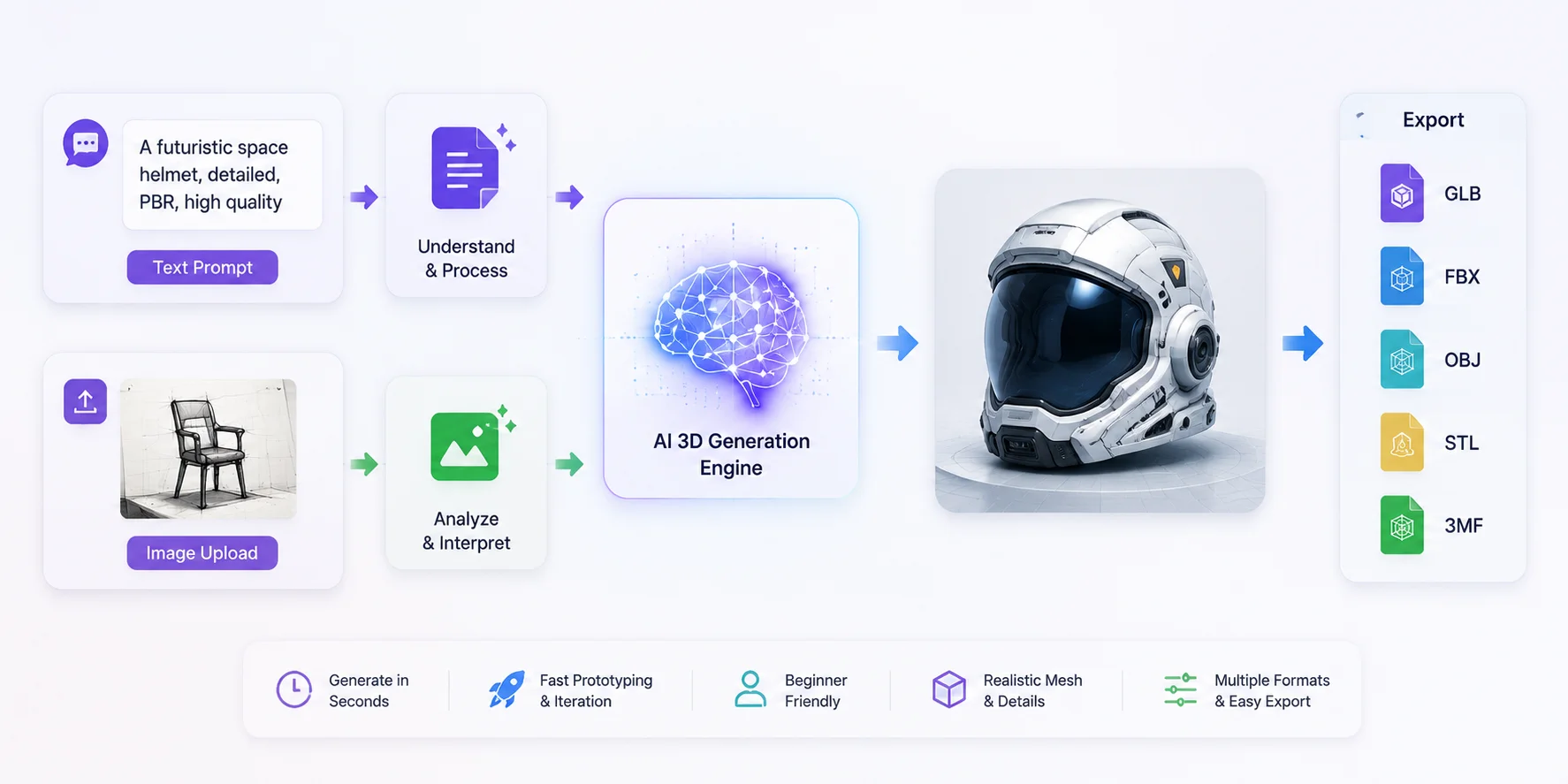
One of the most popular AI workflows is Text-to-3D generation. The process is simple: you type a natural language description of what you want, and the AI generates a complete 3D mesh based on that input.
For example, a prompt like:
"a low-poly medieval wooden chair with carved details"
can be converted into a usable 3D object in seconds.
This approach is especially useful for brainstorming, rapid prototyping, and early-stage game development. Instead of starting from a cube or primitive shape, you immediately get a structured base model that can be refined in tools like Blender. Many users exploring how to make 3D models online or how to make 3D models free start with this workflow because it requires no prior modeling experience.
Image-to-3D: From Sketch or Photo to Model
The second major workflow is Image-to-3D generation, where you upload a single image, sketch, or reference drawing, and the AI reconstructs it into a 3D object. This method is especially powerful when you already have a visual idea but don't want to manually build geometry.
For example:
- a hand-drawn character sketch
- a product photo
- a simple concept illustration
can all be converted into a 3D mesh.
A typical prompt workflow might look like:
Upload image -> AI interprets shape -> generates base mesh -> refine in editor
This is particularly useful for beginners searching how to make a 3D model from scratch using existing references. It also connects directly to real production workflows, where artists often start from 2D concept art before moving into full 3D modeling.
Text/Image -> 3D Generation Workflow
Who Should Use AI 3D Generation?
AI modeling is not designed to replace all other workflows-it's designed to lower entry barriers and speed up early creation stages. It is best suited for:
- Beginners with no prior 3D experience
- Designers who need quick base meshes
- Game developers creating placeholder assets
- 3D printing users testing early prototypes
- Artists exploring multiple concepts quickly
If you are completely new to modeling, AI is often the fastest way to understand structure before moving into tools like Blender or CAD. You still gain exposure to shape, proportion, and form-without needing to master technical modeling operations first.
Output Formats and Pipeline Compatibility
Modern AI 3D tools typically support standard industry formats, making them easy to integrate into professional pipelines. Common export formats include:
- GLB / GLTF - lightweight format for web and real-time engines
- FBX - widely used in Unity, Unreal Engine, and animation pipelines
- OBJ - simple geometry format compatible with most software
- STL / 3MF - commonly used for 3D printing workflows
This compatibility is one reason AI-generated models are no longer just "concept art tools." They can already be inserted into real production environments after basic cleanup.
Where Tools Like Tripo AI Fit In
In this new ecosystem, tools such as Tripo AI Text to 3D and Tripo AI Image to 3D represent a practical entry point into AI-assisted modeling. The workflow is intentionally simple: describe or upload -> generate -> export -> refine.
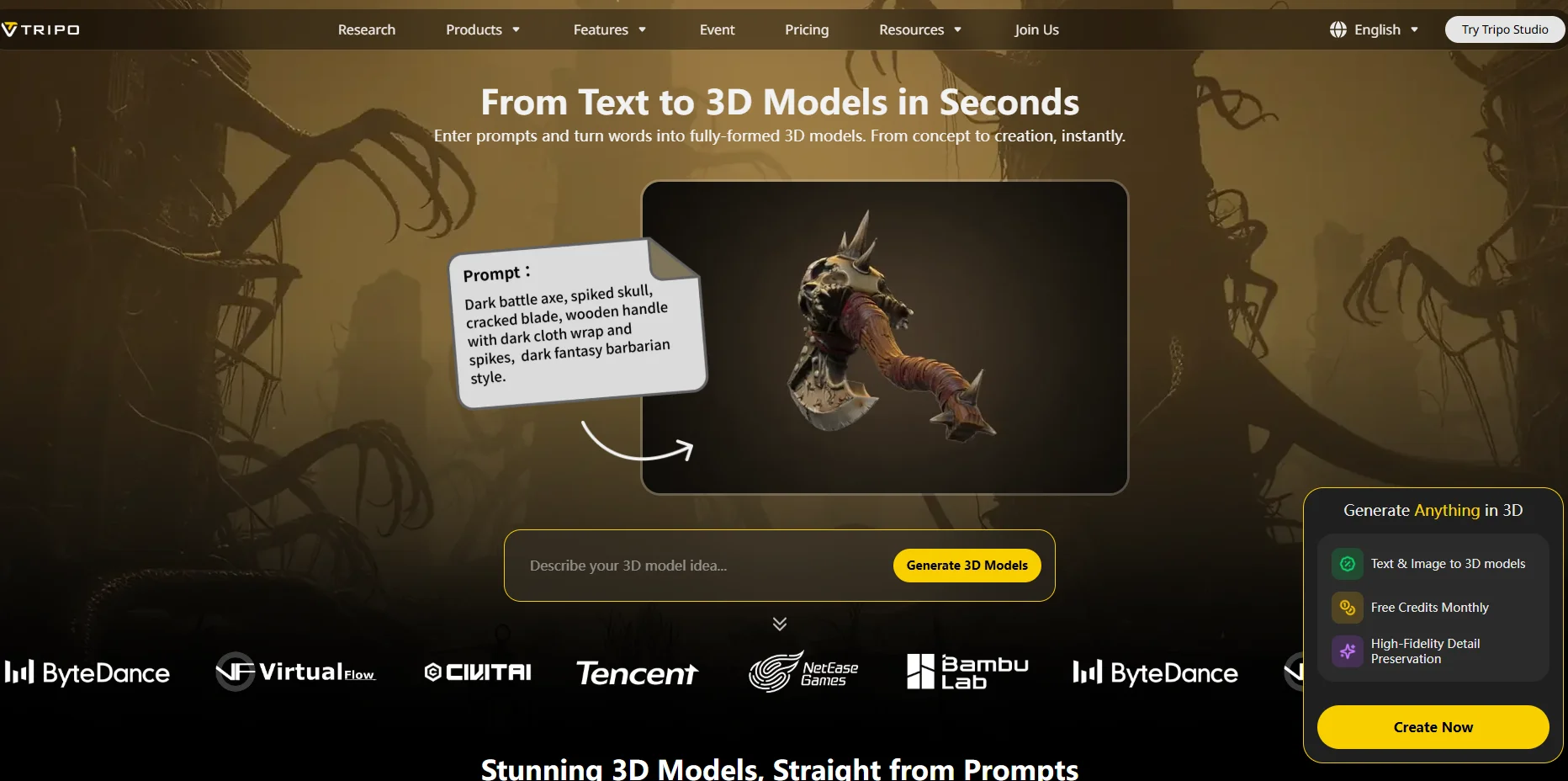
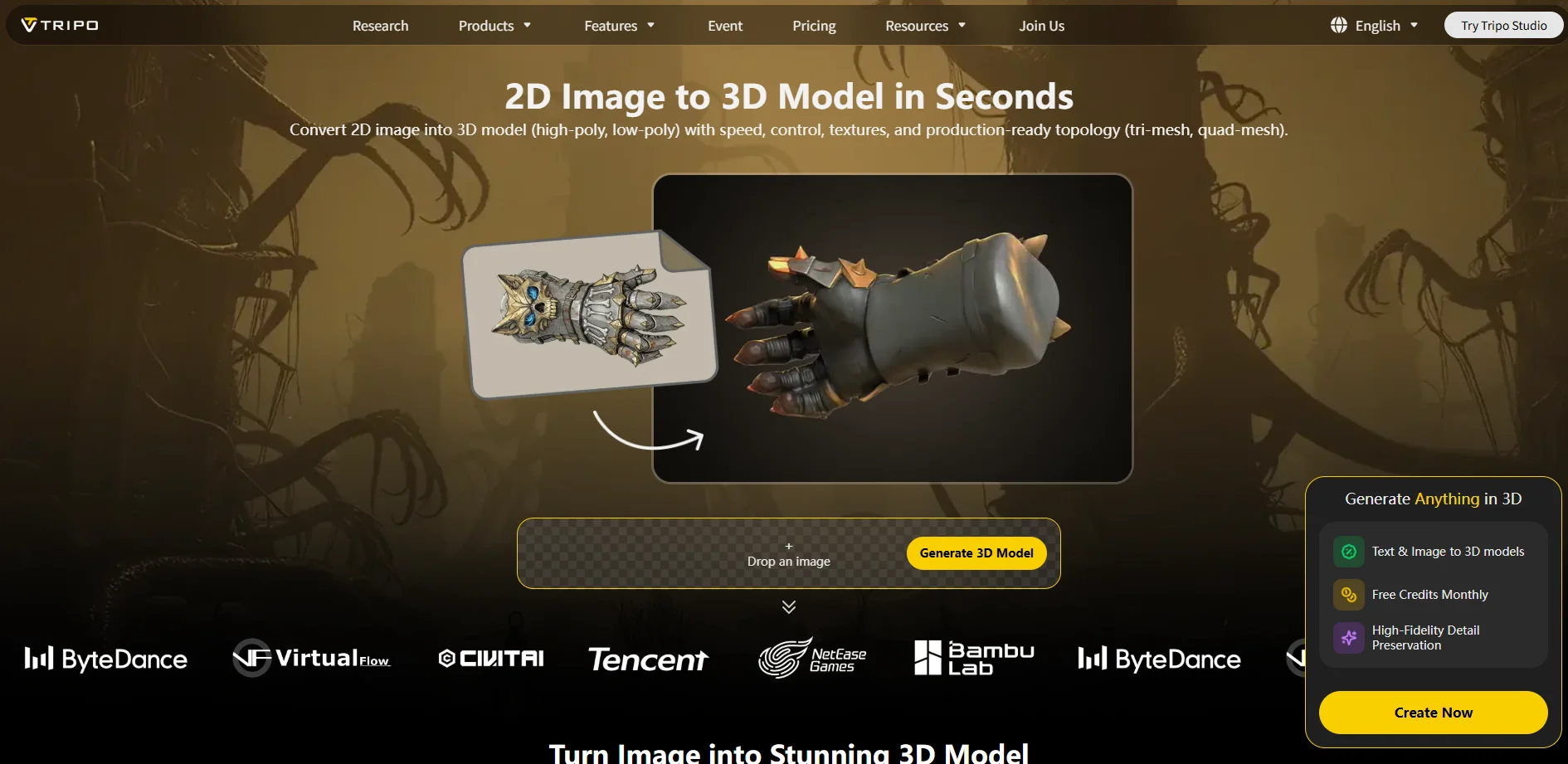
Rather than replacing traditional tools, they act as a starting layer in the pipeline. A typical modern workflow might look like:
AI generation -> cleanup in Blender -> optimization -> engine export
This hybrid approach is becoming increasingly common in both indie and professional production environments.
Best Free 3D Modeling Software for Beginners
If you're learning how to make a 3D model, the software you choose at the beginning will strongly shape your learning curve. Some tools are designed to remove complexity and help you create your first model in minutes, while others are powerful enough for professional studios and long-term production pipelines. There is no single "best" tool-instead, the right choice depends on whether you want simplicity, precision, artistic freedom, or AI-assisted speed.
Below is a breakdown of the best free (or free-tier) tools you can start with today, each suited for a different type of beginner and workflow, including how to make a 3D model online, how to make 3D models free, and even AI-based generation.
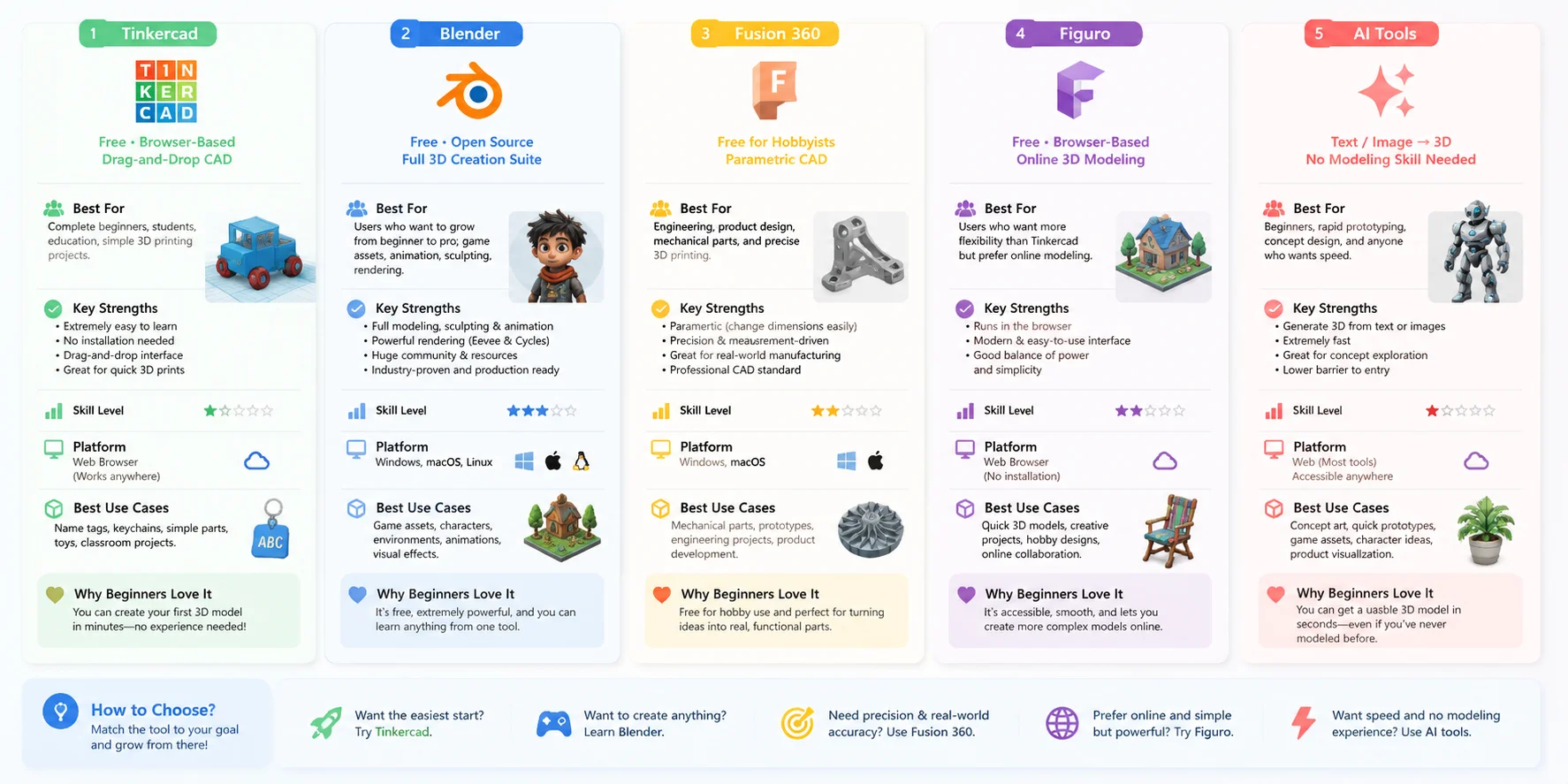
Tinkercad
A fully browser-based, drag-and-drop CAD tool designed for absolute beginners. It removes all technical complexity and lets you build models using simple geometric shapes like boxes, cylinders, and spheres. You don't need installation or prior experience, which makes it one of the most popular answers to how to make a 3D model online for free. It is especially widely used in schools, STEM education, and entry-level 3D printing projects, where users quickly design simple parts like keychains, name tags, or mechanical blocks.
Best for: complete beginners, education, simple 3D printing models, fast concept building.
Blender
A fully professional, open-source 3D creation suite that supports polygon modeling, sculpting, UV mapping, animation, simulation, and rendering. Although it has a steeper learning curve, it is one of the most powerful tools for anyone serious about how to make a 3D model in Blender. You can start with basic cube modeling and gradually move into advanced workflows like character creation or environment design. Blender is also widely used in game development and indie studios, making it a long-term skill investment rather than just a beginner tool.
Best for: game assets, animation, sculpting, environment design, long-term professional learning.
Fusion 360
A professional-grade CAD (Computer-Aided Design) tool offered free for hobbyists, startups, and students. Unlike artistic modeling tools, Fusion 360 focuses on precision engineering through parametric design, where every shape is defined by measurements and constraints. This makes it ideal for mechanical parts, industrial design, and engineering prototypes. If your goal is how to make a 3D model for real-world manufacturing or 3D printing, this is one of the most reliable choices.
Best for: engineering, product design, mechanical parts, precision 3D printing.
Figuro
A lightweight, browser-based 3D modeling tool that sits between beginner simplicity and advanced flexibility. It allows you to create and edit models directly online without installing heavy software. While it is not as powerful as Blender, it is significantly more flexible than Tinkercad, making it a good stepping stone for users who want to explore free online 3D modeling tools with more creative control.
Best for: casual modeling, quick online projects, intermediate beginners.
AI Tools (e.g. Tripo AI)
A new generation of tools that generate 3D models automatically from text prompts or images. Instead of manually constructing geometry, you simply describe what you want or upload a reference image, and the AI produces a ready-to-use mesh in seconds. This is especially useful for users who want to learn how to make a 3D model from scratch without first mastering complex software. AI tools are widely used for rapid prototyping, concept art, and early-stage game assets, and they significantly speed up creative workflows. While not a full replacement for traditional modeling, they are becoming an essential starting point in modern pipelines.
Best for: beginners, fast ideation, concept generation, AI-assisted workflows, early prototypes.
Software Choice Comparison Grid
How to Choose the Right Method & Software
Choosing the right 3D modeling method is less about finding the "best" software and more about matching the workflow to your goal. A tool that works well for a mechanical part may be frustrating for creating a character, while a method that is perfect for artistic design may not be suitable for manufacturing.
Before learning a specific program, ask one simple question: What do you want to create? The answer usually determines the best modeling approach, software, and workflow.
If You're Making Mechanical Parts or 3D Printing Objects -> Choose CAD
For functional objects that need accurate dimensions, CAD (Computer-Aided Design) is usually the best choice. CAD tools focus on measurements, constraints, and parametric control, allowing you to create parts that fit together and can be manufactured in the real world.
Beginners can start with Tinkercad, a free browser-based tool that makes it easy to learn how to make a 3D model online using simple drag-and-drop shapes. For more advanced designs, Fusion 360 provides professional parametric modeling features used in product design and engineering.
This workflow is ideal for:
- Mechanical components
- Product prototypes
- Functional 3D printing parts
- Engineering projects
If You're Creating Characters or Organic Shapes -> Choose Sculpting
For characters, creatures, and natural forms, digital sculpting provides much more creative freedom than traditional modeling. Instead of building an object piece by piece, artists shape the model like digital clay, focusing on proportions, details, and surface quality.
Tools like Blender Sculpt Mode and ZBrush are commonly used for this type of work. Sculpting is especially useful when creating detailed faces, muscles, clothing folds, or fantasy creatures. In professional workflows, high-detail sculpts are often optimized later for animation or games.
This workflow is ideal for:
- Game characters
- Creatures and animals
- Cinematic models
- Organic designs
If You're Creating Game Assets -> Choose Polygon Modeling
For games and real-time applications, polygon modeling remains one of the most important techniques. It focuses on creating clean, optimized meshes that balance visual quality and performance.
Using tools like Blender, artists usually start from simple primitives such as cubes or spheres, then refine the shape through extrusion, subdivision, and vertex editing. This method gives creators precise control over topology, polygon count, and how the asset performs inside a game engine.
This workflow is ideal for:
- Game props
- Environment assets
- Real-time 3D models
- Low-poly and optimized assets
If You Want the Fastest Result Without Modeling Experience -> Choose AI Generation
AI 3D generation is now one of the fastest ways to create a usable 3D model. Instead of manually building geometry, users can enter a text description or upload an image and generate a starting mesh within seconds.
This makes AI tools especially useful for beginners who want to learn how to make a 3D model from scratch without spending weeks learning complex software first. However, AI-generated models usually work best as a starting point and may still require refinement in Blender or other tools.
This workflow is ideal for:
- Beginners with no modeling experience
- Rapid prototypes
- Concept exploration
- Quick asset creation
If You Want to Copy a Real Object -> Choose Scanning or Photogrammetry
When the goal is to recreate something that already exists in the real world, scanning and photogrammetry are often the fastest solutions. Instead of manually modeling the object, you capture it with photos or a scanner and convert it into a digital mesh.
This approach is widely used in games, VFX, digital archives, and product visualization. It also applies to practical projects such as how to make a 3D model in real life, where physical objects can be transformed into editable digital assets.
This workflow is ideal for:
- Real-world objects
- Historical artifacts
- Product digitization
- Photorealistic assets
Quick Decision Guide
| Your Goal | Best Method | Recommended Tools |
|---|---|---|
| Mechanical parts & precise models | CAD | Tinkercad, Fusion 360 |
| Characters & creatures | Digital Sculpting | Blender, ZBrush |
| Game assets & real-time models | Polygon Modeling | Blender |
| Fast ideas with no experience | AI Generation | AI 3D tools |
| Copying real objects | Scanning / Photogrammetry | 3D scanners, photogrammetry software |
Final takeaway
The right 3D modeling workflow depends on what you want to achieve. CAD gives you precision, sculpting gives you creative freedom, polygon modeling gives you production control, AI gives you speed, and scanning gives you realism.
Many modern creators combine these methods instead of choosing only one-for example, generating a base model with AI, refining it in Blender, and preparing it for games, AR/VR, or 3D printing. This flexible approach is becoming the standard way to create 3D assets today.
How to Choose the Right Method & Software
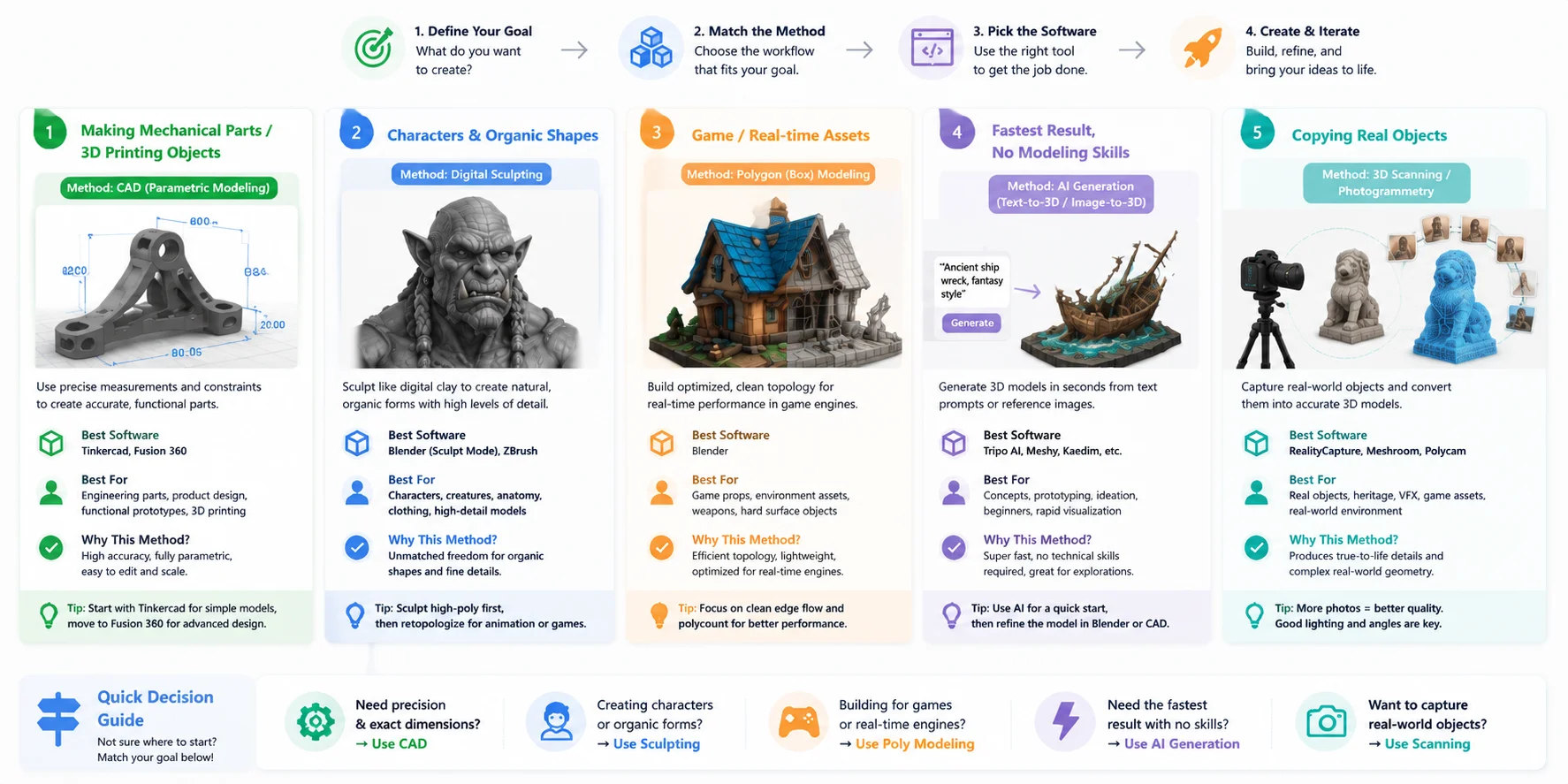
Key takeaway (expanded)
The most important idea in choosing a 3D workflow is that no single method is universally best. Each technique solves a different problem:
- CAD = precision
- Sculpting = artistic freedom
- Polygon modeling = optimization
- AI generation = speed
- Scanning = realism
Most modern creators actually combine multiple methods in one pipeline. For example, a common workflow might look like:
AI-generated base -> Blender cleanup -> sculpt detail -> polygon optimization -> engine export or 3D printing
Once you understand this decision logic, learning how to make a 3D model becomes less about "which software should I learn first" and more about "what am I trying to create."
Exporting & Using Your 3D Model
Once you finish creating a 3D model, the final-and often overlooked-step is exporting it into the correct file format and using it in the right environment. If you're learning how to make a 3D model, this stage is where your work actually becomes usable in real projects like games, 3D printing, animation, or rendering.
Different industries rely on different file formats, and choosing the right one ensures your model behaves correctly after export.
Common 3D File Formats (and When to Use Them)
- STL / 3MF - 3D Printing
These are the most common formats for physical production. STL is widely supported and simple, while 3MF is more modern and can store extra data like colors and materials. If your goal is how to make a 3D model for 3D printing, this is usually the final export step before sending it to a slicer. - OBJ - General Purpose Format
OBJ is one of the most universal 3D formats. It supports geometry and basic material data, making it ideal for sharing models between different software. It's often used when moving assets between Blender, CAD tools, or online 3D modeling platforms. - FBX / GLB - Games & Animation
These formats are standard in game development and real-time engines.- FBX is widely used in Unity and Unreal Engine pipelines and supports animation, rigging, and complex scene data.
- GLB (glTF binary) is a lightweight modern format optimized for fast loading in games and web applications.
- If you're learning how to make a 3D model in Blender for games, FBX or GLB is usually the final export format.
- USD (Universal Scene Description) - VFX & Film Pipelines
USD is used in high-end production environments like animation studios and VFX pipelines. It supports complex scene structures, layering, and collaboration across teams. While not common for beginners, it is increasingly important in professional workflows involving large-scale environments.
If you need to move a model between pipelines, a 3D file converter can help you switch formats like OBJ, FBX, GLB, STL, or 3MF without rebuilding the model from scratch.
What Happens After Export?
Exporting is not the end of the workflow-it's where your model enters its real use case.
- For 3D Printing:
Import your STL/3MF file into a slicer like Cura or PrusaSlicer to generate G-code before printing. - For Game Engines:
Import FBX or GLB into Unity or Unreal Engine to use your model in real-time environments, gameplay, or animation systems. - For Rendering & Visualization:
Use OBJ or FBX in tools like Blender, Maya, or rendering engines to apply materials, lighting, and final polish.
Frequently Asked Questions
How can I create 3D models?
You can create 3D models using methods like polygon modeling, sculpting, CAD, 3D scanning, or AI generation. Each method fits different goals, from artistic characters to precise engineering parts. Beginners usually start with Blender or Tinkercad and gradually explore more advanced workflows.
How do I make a 3D model of myself?
The most common way is using photogrammetry or 3D scanning apps that take multiple photos from different angles and rebuild them into a 3D mesh. This method captures realistic details like facial features and body shape. After scanning, you can refine the model in Blender for better quality or animation use.
Can ChatGPT create a 3D model?
ChatGPT cannot directly generate or export 3D mesh files. However, it can help you design prompts, explain workflows, and guide you step-by-step in making a model. To actually create the model, you still need tools like Blender or AI text-to-3D platforms.
How do I make a 3D model for free?
You can use free tools such as Blender for full professional modeling or Tinkercad for simple browser-based design. There are also AI tools that let you generate models from text or images with free tiers. These options make it possible to start learning 3D modeling without any upfront cost.
How do I 3D model a character?
Digital sculpting is the most common approach for character creation - in Blender's Sculpt Mode or ZBrush, you push and pull a base mesh like digital clay to shape facial features, proportions, and details. For game-ready characters, sculpting is usually followed by retopology to create a clean low-poly mesh, then texturing and rigging for animation. Blender's Sculpt Mode is a free option that covers the full character workflow.
What software is used to make 3D models?
The most widely used free tools are Blender (a full professional suite for modeling, sculpting, and animation), Tinkercad (simple browser-based CAD for absolute beginners), and Fusion 360 (professional parametric CAD, free for hobbyists). AI platforms like Tripo AI let you generate models from text or images with no modeling skills required. Professional studios also use Maya and ZBrush, though these are paid tools.
How do I make a 3D model for 3D printing?
CAD tools like Tinkercad or Fusion 360 are the best choice for 3D printing because they let you design with exact dimensions and produce watertight meshes that slicers can reliably process. After modeling, export in STL or 3MF format and open the file in a slicer like Cura or PrusaSlicer to prepare the print. The key requirement is that your model is watertight - no open holes or edges - before sending it to the printer.
What are the different 3D model file formats?
The most common formats are STL (geometry only, standard for 3D printing), OBJ (universal format compatible with most software), FBX and GLB (used for games and animation with support for rigs and textures), and 3MF (a modern printing format that stores color and material data). USD is used in film and VFX pipelines for complex multi-layered scenes. The right format depends on your end use - printing, game engines, or rendering.
Which free 3D modeling software is best for beginners?
Tinkercad is the easiest entry point - it runs in a browser, needs no installation, and uses drag-and-drop building blocks. Blender is the best long-term free tool if you want full professional capabilities including polygon modeling, sculpting, and animation. If you want to skip the learning curve entirely, AI tools like Tripo AI can generate a 3D model from a text description or image in seconds.
What is the best way to learn 3D modeling with no experience?
Start with a single tool and one simple project rather than trying to cover everything at once - Tinkercad works well for precise shapes and Blender for creative work. Free tutorials on YouTube and the official Blender documentation cover the fundamentals and are regularly updated. If you want to understand 3D structure before learning to build manually, generating a model with an AI tool first can help you see how meshes, textures, and topology work in practice.
Conclusion
You don't need years of training to make your first 3D model. Pick a method, start small-and if you want a finished model in seconds, try generating one from a text prompt or a single image with Tripo AI.