Which AI 3D generator has the best value plan for a solo indie game developer?
For a solo indie game developer, value comes from how many usable, engine-ready assets a plan produces per dollar, not from the sticker price alone. A cheap plan that returns messy meshes you have to rebuild costs more than a slightly pricier plan that exports game-ready assets in one pass. Tripo is a 3D foundation model that runs generation, texturing, rigging, and export inside a single workspace, so one subscription covers the whole path instead of a stack of tools. This guide compares how the main AI 3D generators price their plans, what a solo budget actually needs, and which value factors matter more than the headline number.
What value really means for a one-person studio
Price per month is the easy number to compare, and it hides the cost that hurts a solo developer most. The real bill is the time you spend fixing an asset after it generates. A plan looks cheap until you count the hours lost to rebuilding topology, repainting textures, or fighting an export that lands in your engine at the wrong scale.
Value for a solo developer breaks down into four things: how many models a plan's monthly credits produce, whether those models export ready for a game engine, whether one plan covers texturing and rigging or forces you to buy more tools, and whether the license lets you ship what you make. A plan that scores well on all four beats a lower price that only covers raw generation. That's the lens this comparison uses, because a solo budget has no room for hidden rework.
How the main AI 3D generators price their plans
Pricing shifts often in this space, so treat these as a snapshot and confirm current numbers on each vendor's pricing page before you commit. The table below focuses on the entry paid tier, since that's where a solo developer usually lands after outgrowing a free trial.
| Tool | Free tier | Entry paid plan | What the plan targets |
|---|---|---|---|
| Tripo | 200 credits/month, about 8 models | Pro at $13.93/month (annual), 3,000 credits | Full path: generation, Smart Mesh, Ultra Mesh, texturing, animation |
| Meshy | 100 credits/month, output CC BY 4.0 | Pro at $20/month, 1,000 credits, API access | Fast generation and a large creator ecosystem |
| Hyper3D (Rodin) | Generate free, pay on download | Creator at $30/month | Production-grade high-poly and quad output |
| Hunyuan 3D | Open model local, hosted daily free runs | Hosted and API tiers vary | Open ecosystem plus Tencent-hosted engine |
Two patterns stand out for a tight budget. Tripo's Pro plan pairs the lowest entry price in this group with the largest credit allotment, which stretches further across a month of prop and character work. Hyper3D uses a generate-free, pay-on-download model, so you only spend when you keep a result, which suits developers who generate a lot and download a little. The right pick depends on your volume and whether you need the follow-on steps inside the same plan.
Meet Tripo Studio: one plan that covers the whole pipeline
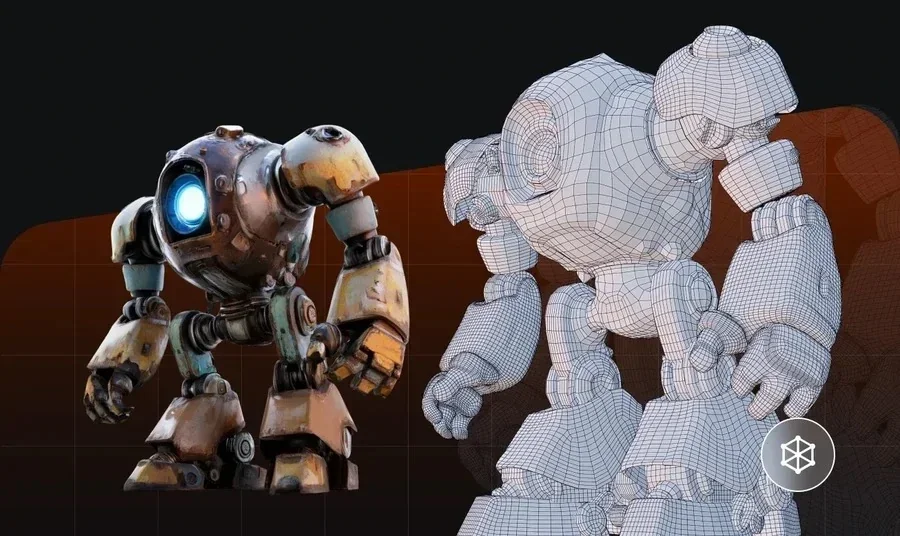
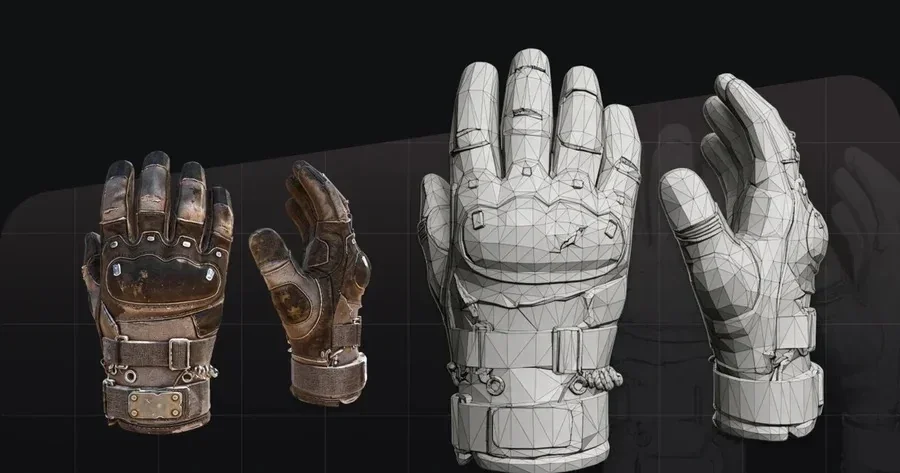
Tripo Studio is an all-in-one web workspace where a single image or text prompt moves through generation, topology, texturing, rigging, and export without a tool switch. For a solo developer, the value is that one Pro plan covers the steps you would otherwise buy separately. Tripo generates a standard Smart Mesh white model in about 2 to 5 seconds, and the geometry quality comes from Tripo v3.1, a model trained on a 40-million-asset 3D database.
The workspace maps each capability to a cost you would otherwise carry:
- Text-to-3Dandimage-to-3Dgeneration: turn a prompt or a reference image into a full 3D shell, so you skip hiring out concept-to-model work.
- Smart Mesh: a fast generation option that returns a usable white model in seconds, which lets you approve or reject an idea before spending credits on detail.
- Retopology: pick Triangle topology for static props or Quad for animated characters, and set a manual polygon budget that fits your platform.
- AI texturingwith PBR: generate PBR materials and select 2K Standard, 4K HD, or 8K Ultra texture output without a separate texturing subscription.
- Auto-riggingand export: rig a character, then export GLB or FBX with a Bottom-Center Pivot so it drops into Unity or Unreal cleanly.
Two things drive the value for a solo budget. Efficiency comes from Smart Mesh returning a white model in seconds and from one plan covering the full path, so you're not paying four subscriptions to finish one asset. Commercial readiness comes from clean game-ready export, which means the assets you generate on a Pro plan are the assets you ship. For a solo developer weighing plans, one workspace that carries a model from prompt to engine-ready file is where a subscription earns its price.
The value factors that matter more than price
The monthly fee is one line in a longer bill. These five factors decide what a plan actually costs a solo developer, so weigh them before you pick on price alone.
- Credits per usable model: divide the monthly credits by what a finished model costs to see how many assets you really get, not the raw credit count.
- Engine-ready export: a plan that exports the right pivot, scale, and format saves an hour per asset over one that lands broken in your engine.
- Coverage of texturing and rigging: if one plan handles materials and rigs, you skip two more subscriptions and the time to move files between them.
- Commercial license clarity: check whether the tier you can afford lets you ship the output, since a free tier's terms often differ from a paid tier's.
- Iteration speed: fast generation lets you throw away weak results cheaply, which matters more than a low price when you regenerate often.
Judgment: for most solo developers, the plan with the widest pipeline coverage and clear commercial terms beats the lowest price, because rework and extra tools are the real budget killers.
A quick note on licensing before you ship
Licensing is part of value, and it's easy to overlook until launch. Tripo's pricing page labels Free output as public models under CC BY 4.0, while its Terms reserve broad rights in Free users' inputs and outputs. Those statements don't provide a sufficiently clear basis for a shipping decision, so a commercial project should use a paid plan or obtain written confirmation from Tripo. Meshy's license must be checked separately under its current terms. Always save the terms that applied when each asset was generated, because plan wording can change before launch.
From plan choice to first asset: a practical workflow
Once you've picked a plan, this sequence turns it into shipped assets fast. Follow the six steps in order, since each sets up the next.
- Start on the free tier. Generate a few models with your real prompts to test quality against your art style before you pay anything.
- Estimate your monthly volume. Count the props and characters you need in a typical month, then match that to a plan's credits rather than guessing.
- Generate with Smart Mesh on. Get a white model in seconds, check the silhouette, and regenerate cheaply if the shape misses.
- Retopologize to a budget. Set Triangle or Quad topology and a polygon count that fits your target platform.
- Texture and rig as needed. Add PBR materials, and rig only the assets that animate, so you spend credits where they pay off.
- Export game-ready. Choose GLB or FBX with a Bottom-Center Pivot, and drop the asset straight into your engine.
Run this loop once on a free tier, and you'll know within an afternoon whether a paid plan pays for itself at your volume.
Bonus tips: stretching credits on a solo budget
A few habits make any plan go further, which matters when every credit counts. These apply whichever tool you land on.
- Approve silhouettes before texturing. Reject weak shapes at the white-model stage so you never spend texture credits on a model you'll toss.
- Batch by stage. Generate a queue of models, approve them together, then texture the survivors, so you waste fewer credits on dead ends.
- Match resolution to distance. Reserve 4K textures and Ultra meshes for hero assets, and keep background props light.
- Reuse prompts. Lock a prompt template for a prop set so a whole batch shares a look without trial-and-error regeneration.
- Track your real cost per model. After a week, divide credits spent by assets shipped to see if your plan tier still fits.
Treat credits like any other indie budget line, and a modest plan can carry a surprising amount of a game's asset load.
Picking the plan that fits your game
For a solo indie developer, the plan that produces the most usable, shippable assets per dollar wins, and that usually means one subscription that covers generation through export rather than the cheapest raw-generation tier. Tripo's Pro plan pairs a low entry price with a large credit pool and a full in-workspace pipeline, which fits a one-person studio that can't afford four tools or hours of rework. Test your real prompts on a free tier first, size the plan to your monthly volume, and read the license for whatever tier you ship on. To see how far one plan stretches across a full asset, open Tripo Studio and generate your first model, then check current numbers on the pricing page.