What Does CGI Mean? Definition, Uses & Examples
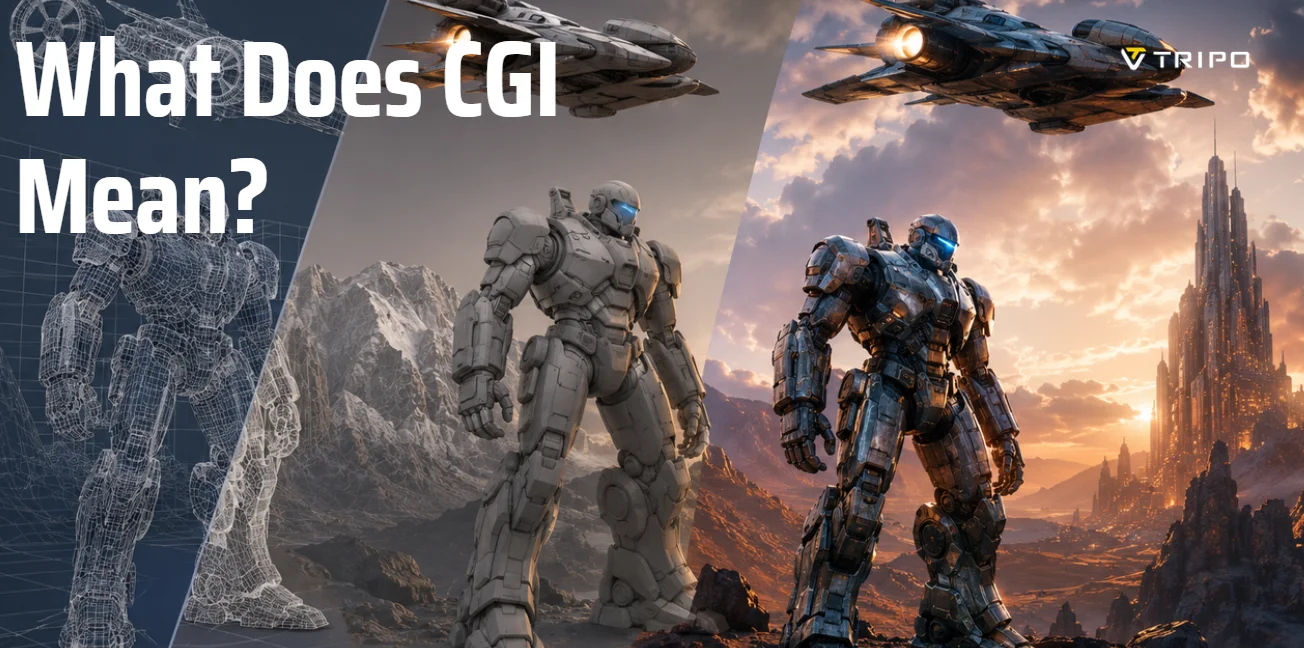
TL;DR
CGI (Computer-Generated Imagery) is visual content created with computer software, including 3D models, digital characters, animations, and virtual environments.
CGI is used across film, video games, advertising, and product visualization, powering everything from blockbuster movies to marketing renders.
A typical CGI workflow involves 3D modeling, texturing, lighting, rendering, and compositing.
CGI, VFX, and SFX are different: CGI creates digital assets, VFX integrates and enhances visuals, while SFX refers to practical effects created during filming.
Popular CGI software includes Blender, Maya, 3ds Max, Cinema 4D, Houdini, and Unreal Engine.
AI is making CGI creation faster by generating 3D assets from text prompts or images, reducing the need for manual modeling.
Tools like Tripo text to 3D models and Tripo image to 3D models help creators generate CGI-ready 3D models in minutes, making 3D content creation more accessible than ever.
CGI (computer-generated imagery) is the use of computer software to create still or animated visual content—from 3D objects and characters to entire environments. It's used in films, games, advertising, and product visualization. Modern AI tools can now generate the 3D assets behind CGI from text or images. This guide explains what CGI is, how it works, how it differs from VFX and SFX, where it's applied, the tools professionals use, and how AI is transforming the creation process.
What Is CGI? (Meaning)
CGI stands for Computer-Generated Imagery, a broad term that refers to visual content created with computer software. When people ask about the CGI meaning or wonder what CGI is, they are usually referring to digital images, characters, objects, or environments that are generated rather than captured entirely with a camera. CGI can be divided into two main categories: still imagery, such as architectural renderings, product visualizations, and digital artwork, and animated imagery, which includes moving characters, visual effects, and fully computer-generated scenes.
CGI technology allows artists and designers to create everything from a single 3D object to an entire virtual world. For example, a movie may use CGI to generate a realistic creature, while a video game may rely on CGI to build complete landscapes, cities, and interactive characters. This flexibility has made CGI an essential tool across industries including film, television, gaming, advertising, architecture, and product design.
Many people also confuse CGI vs VFX. While the two are closely related, CGI specifically refers to computer-generated visual elements, whereas visual effects (VFX) is a broader category that combines CGI with live-action footage and other post-production techniques. In other words, CGI is often one of the tools used to create VFX, but the terms are not exactly interchangeable.
A common application of this technology is CGI animation, where characters, objects, and environments are modeled and animated in 3D software to create realistic or stylized motion. From animated films to modern blockbuster effects, CGI animation has transformed the way stories are told on screen.
To understand how CGI works, it helps to think of it as a multi-step digital process. Artists first create 2D or 3D models, add textures and lighting, animate them when needed, and then render the final images or sequences. The result can range from simple graphics to photorealistic scenes that are nearly indistinguishable from real-world footage.
How CGI Works
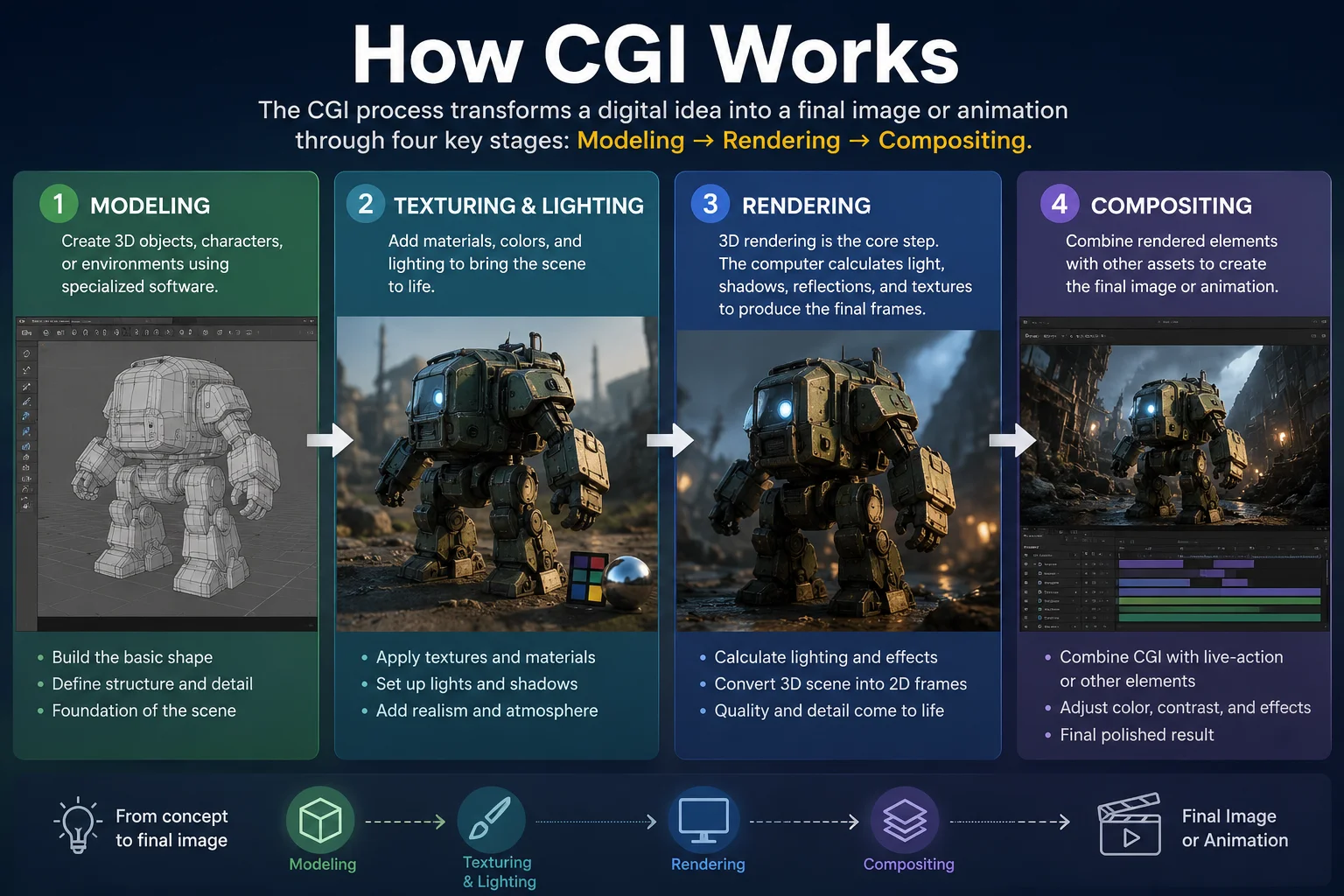
Understanding how CGI works is easier when you break the process into a few key stages. Although workflows vary across industries and projects, most CGI production follows the same fundamental pipeline: modeling, texturing and lighting, rendering, and compositing. Together, these steps transform a digital concept into a finished image or animation.
Modeling
The process begins with 3D modeling, where artists create digital objects, characters, or environments using specialized software. These models act as the foundation of the scene, defining the shape, size, and structure of everything that will appear on screen. Depending on the project, a model can be as simple as a product prototype or as complex as an entire city.
Texturing and Lighting
Once the models are built, artists add materials, colors, and surface details through texturing. Lighting is then applied to simulate how light interacts with objects in the real world. Proper lighting helps create depth, atmosphere, and realism, making digital scenes appear more believable.
Rendering
3D rendering is the core stage of the CGI workflow. During rendering, the computer calculates lighting, shadows, reflections, textures, and camera angles to convert a 3D scene into a final 2D image or sequence of frames. This process can be computationally intensive, especially when creating photorealistic visuals for films, games, or architectural visualizations. The quality of the rendering often has the greatest impact on the final appearance of CGI content.
Compositing
The final step is compositing, where rendered CGI elements are combined with other visual assets, such as live-action footage, backgrounds, special effects, or color corrections. This stage ensures that all elements blend seamlessly into a single polished image or animation. In many movie productions, compositing is what allows CGI characters and environments to appear naturally within real-world scenes.
By combining modeling, rendering, and compositing, CGI artists can create everything from simple product images to complex animated worlds and blockbuster visual effects.
How CGI Works: From 3D Modeling to Final Rendering
CGI vs VFX vs SFX: What's the Difference?
One of the most common questions about computer-generated imagery is how it differs from VFX and SFX. While these terms are often used interchangeably, they describe different techniques used in film, television, gaming, and digital content production. Understanding the distinction can help you better appreciate how modern visual experiences are created.
CGI (Computer-Generated Imagery)
CGI refers to any image, object, character, or environment that is created using computer software. It can be used to produce still images, animations, visual assets, and entire virtual worlds. CGI is responsible for creating digital elements that may not exist in reality, such as fantasy creatures, futuristic cities, or highly detailed product visualizations.
For example, a fully digital dragon in a fantasy film or a 3D animated character in a video game is CGI. The focus of CGI is the creation of visual content itself rather than how it is integrated into a final production.
VFX (Visual Effects)
VFX, or Visual Effects, is a broader term that refers to the process of enhancing, modifying, or combining visual elements after filming. VFX often uses CGI, but it also includes techniques such as compositing, motion tracking, green-screen replacement, matte painting, and digital environment extensions.
A simple way to think about VFX is that it helps blend digital and real-world footage into a seamless final image. For example, if a CGI dragon is added to a scene with live actors and made to appear as though it was filmed on set, the overall process is considered VFX. In other words, CGI is frequently one component of a larger VFX workflow.
SFX (Special Effects)
SFX, or Special Effects, refers to practical effects that are created physically during production rather than digitally afterward. These effects are filmed directly by the camera and often involve mechanical devices, makeup, prosthetics, miniatures, animatronics, weather machines, or controlled explosions.
For example, a real explosion on a movie set, realistic monster makeup, or a physical model spaceship used during filming would all be considered SFX. Even in today's digital era, filmmakers continue to use practical effects because they often provide more realistic interactions, lighting, and performances than computer-generated alternatives.
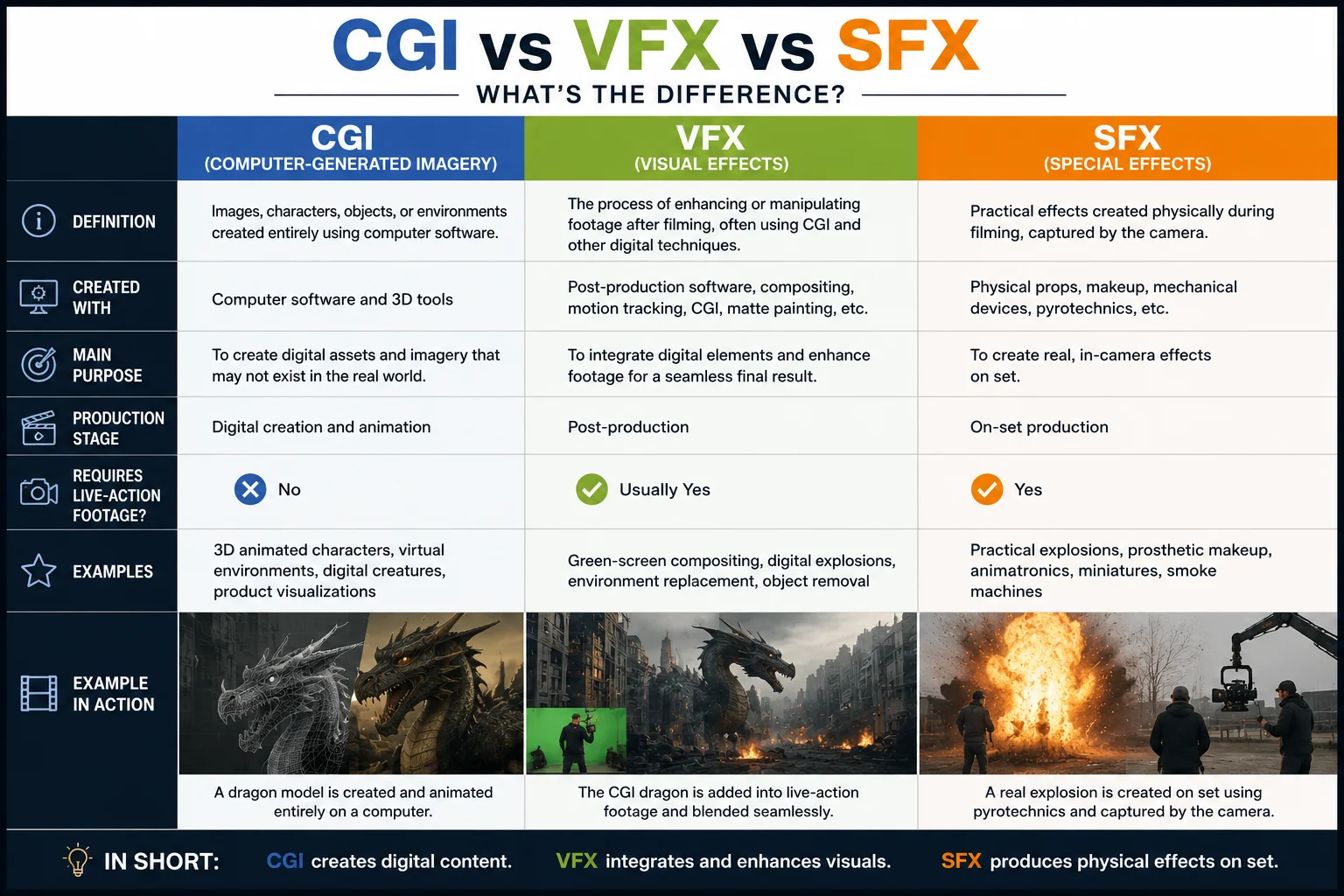
CGI vs VFX vs SFX Comparison
| CGI | VFX | SFX | |
|---|---|---|---|
| Definition | Images, characters, objects, or environments created entirely using computer software | The process of enhancing or manipulating footage after filming, often using CGI and other digital techniques | Practical effects created physically during filming, captured by the camera |
| Created With | Computer software and 3D tools | Post-production software, compositing, motion tracking, CGI, matte painting, etc. | Physical props, makeup, mechanical devices, pyrotechnics, etc. |
| Main Purpose | To create digital assets and imagery that may not exist in the real world | To integrate digital elements and enhance footage for a seamless final result | To create real, in-camera effects on set |
| Production Stage | Digital creation and animation | Post-production | On-set production |
| Requires Live-Action Footage? | No | Usually Yes | Yes |
| Examples | 3D animated characters, virtual environments, digital creatures, product visualizations | Green-screen compositing, digital explosions, environment replacement, object removal | Practical explosions, prosthetic makeup, animatronics, miniatures, smoke machines |
A Simple Example
Imagine a superhero movie featuring a giant monster attacking a city:
- The monster itself is designed and animated using CGI.
- The process of inserting that monster into footage of real actors and buildings is VFX.
- Any practical explosions, smoke effects, or physical props used during filming are SFX.
In short, CGI creates digital elements, VFX integrates and enhances visuals, and SFX produces physical effects on set. Modern productions often combine all three techniques to achieve the most realistic and immersive results possible.
CGI vs VFX vs SFX: Key Differences Explained
Types & Applications of CGI
Today, CGI is used far beyond blockbuster movies. Thanks to advances in 3D modeling, rendering technology, and real-time graphics, computer-generated imagery has become an essential tool across multiple industries. From creating animated characters to visualizing products before they are manufactured, CGI helps businesses and creators produce realistic, engaging, and cost-effective visual content. Below are four of the most common applications of CGI.
Film and Television
The film industry is perhaps the most recognizable user of CGI. Filmmakers use CGI to create digital characters, large-scale environments, visual effects, and scenes that would be impossible or too expensive to film in real life. Modern CGI can generate everything from realistic creatures to entire cities and planets.
One of the most famous examples is the work of Pixar Animation Studios, whose films such as Toy Story and Finding Nemo helped popularize fully computer-animated storytelling. CGI also plays a major role in blockbuster productions such as Avatar, where vast virtual environments and digital characters were combined with live-action performances to create an immersive cinematic experience.
Video Games
Video games rely heavily on CGI to create interactive worlds, characters, vehicles, and special effects. Unlike film CGI, which is rendered before viewers see it, game graphics are often rendered in real time, allowing players to interact with dynamic environments.
Popular titles such as Cyberpunk 2077 and The Last of Us Part II showcase how advanced CGI can deliver highly detailed characters, realistic lighting, and cinematic storytelling. Modern game engines have blurred the line between pre-rendered CGI and real-time graphics, making virtual worlds more lifelike than ever before.
Advertising and Marketing
Brands increasingly use CGI in advertising because it provides creative freedom and reduces production costs. Instead of organizing expensive photo shoots or filming physical prototypes, marketers can create photorealistic visuals entirely in a digital environment.
For example, automotive companies frequently use CGI to showcase vehicles in ideal lighting conditions or impossible camera angles before a car is even available for sale. Likewise, beverage, cosmetics, and technology brands often create eye-catching CGI advertisements for social media campaigns, product launches, and television commercials.
Product Visualization and Design
CGI has become a powerful tool for product visualization, allowing companies to present products before manufacturing begins. Designers can create accurate 3D models, test different materials and colors, and generate marketing assets without producing physical samples.
Furniture retailers, consumer electronics companies, and industrial manufacturers commonly use CGI to create product images, assembly demonstrations, and interactive 360-degree views. For example, a smartphone manufacturer can generate realistic product renders months before production starts, enabling marketing teams to prepare advertising materials well in advance of launch.
Why CGI Is So Widely Used
Across film, gaming, advertising, and product design, CGI offers three major advantages: creative flexibility, cost efficiency, and visual realism. Whether it's building an alien world for a movie, creating a next-generation game environment, producing a commercial, or showcasing a new product, CGI allows creators to bring ideas to life in ways that traditional photography and filming alone cannot achieve.
CGI Software & Tools
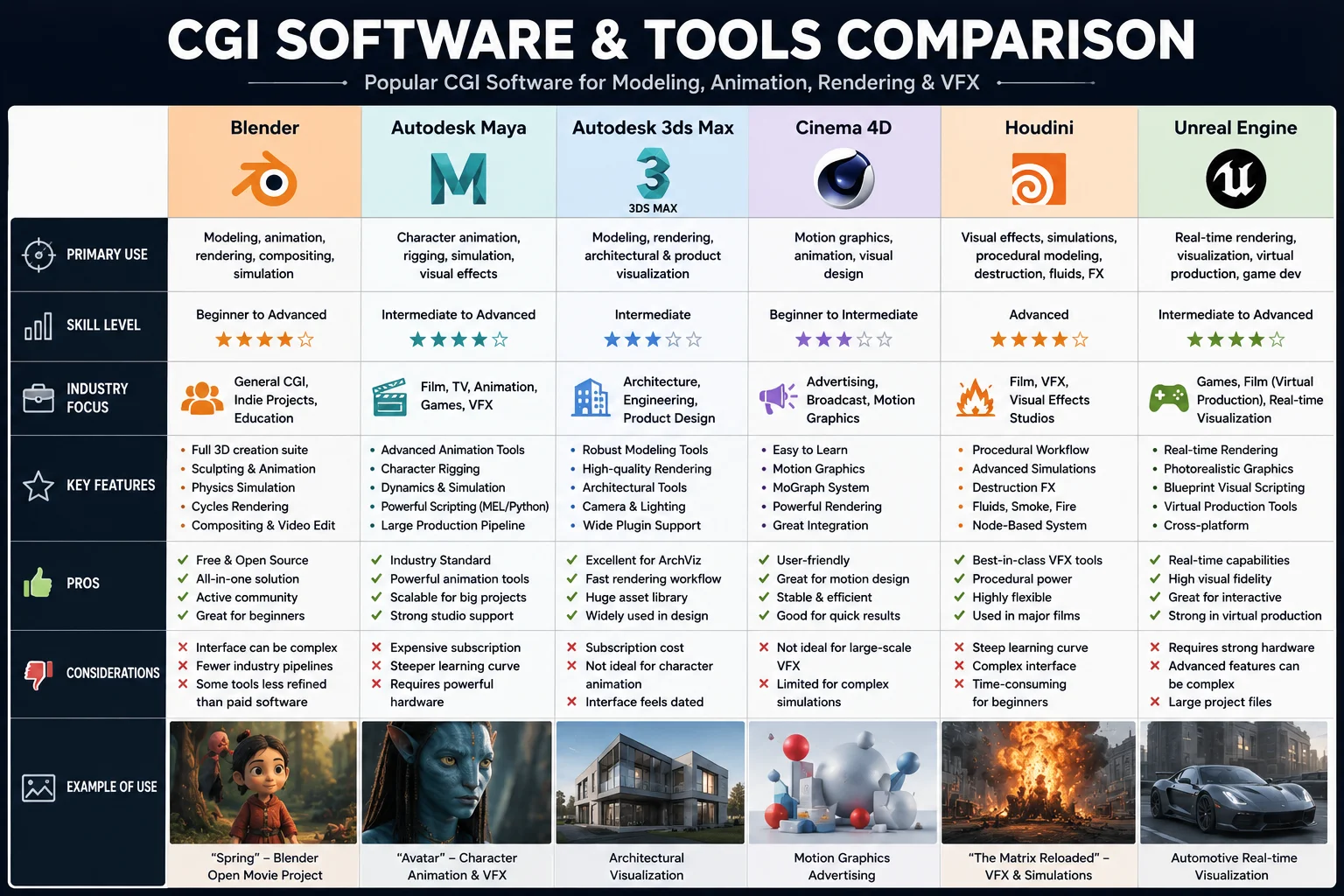
If you're wondering what software professionals use to create CGI, the answer depends on the type of project. Different tools specialize in modeling, animation, rendering, visual effects, or real-time graphics. While large studios often combine multiple applications in a single production pipeline, a handful of industry-standard CGI tools are used across film, gaming, advertising, and product visualization.
Blender
Blender is one of the most popular CGI tools available today. As a free and open-source platform, it provides a complete suite of features for 3D modeling, sculpting, animation, simulation, rendering, and compositing. Blender has become especially popular among independent artists, small studios, and beginners because it offers professional-level capabilities without licensing costs.
Best for: 3D modeling, animation, motion graphics, and general-purpose CGI.
Autodesk Maya
Autodesk Maya is widely regarded as one of the industry standards for professional animation and visual effects. Many major film studios and game developers use Maya to create complex character rigs, realistic animations, and large-scale CGI productions.
Movies from major studios, including many animated and visual-effects-heavy blockbusters, rely on Maya as part of their production pipeline.
Best for: Character animation, rigging, and film-quality CGI.
Autodesk 3ds Max
3ds Max is particularly popular in architectural visualization, interior design, engineering, and product rendering. It offers powerful modeling and rendering tools that allow designers to create highly realistic images of buildings, products, and environments.
Best for: Architectural visualization and product design.
Cinema 4D
Cinema 4D is known for its user-friendly interface and strong motion graphics capabilities. It is widely used in advertising, broadcast graphics, social media content, and commercial animation projects.
Many creative agencies choose Cinema 4D because it integrates well with design and video-editing workflows.
Best for: Motion graphics, advertising, and commercial content creation.
Houdini
Houdini is a procedural CGI software package widely used for advanced simulations and visual effects. It excels at creating realistic explosions, smoke, fire, water, destruction effects, and large-scale environments.
Because of its powerful simulation system, Houdini is frequently used in blockbuster film productions and high-end VFX studios.
Best for: Simulations, procedural effects, and complex VFX work.
Unreal Engine
Originally developed for video game creation, Unreal Engine has become an important CGI tool for real-time rendering and virtual production. It enables artists to create highly detailed scenes that can be viewed instantly without waiting for lengthy rendering processes.
Productions such as modern virtual film sets and interactive experiences increasingly rely on Unreal Engine for real-time CGI workflows.
Best for: Real-time rendering, virtual production, and game development.
Which CGI Software Is Best for Beginners?
For most beginners, Blender is the best starting point because it is free, widely supported, and capable of handling nearly every stage of the CGI workflow. As skills develop, artists often expand into specialized tools such as Maya for animation, Houdini for visual effects, or Unreal Engine for real-time production.
Ultimately, the best CGI software depends on your goals. Whether you're creating animated films, designing video games, producing advertisements, or building product visualizations, modern CGI tools provide the flexibility to turn digital concepts into realistic visual experiences.
Popular CGI Software and Tools Comparison
How AI Is Changing CGI
For decades, creating CGI assets required specialized skills in 3D modeling, texturing, rigging, and rendering. Artists often spent hours—or even days—building a single character, prop, or environment from scratch. Today, artificial intelligence is dramatically changing that workflow by making 3D content creation faster, more accessible, and less technically demanding.
One of the biggest shifts is the rise of AI-powered text-to-3D and image-to-3D generation. Instead of manually modeling an object vertex by vertex, creators can now describe what they want in natural language or upload a reference image, and an AI system generates a usable 3D asset automatically. This significantly reduces the time needed to create prototypes, game assets, product models, and CGI elements for animation or visual effects. Modern AI 3D generation tools can transform a text prompt or a single image into textured 3D models that are ready for further editing, rendering, or export into production pipelines.
As a result, the barrier to entry for CGI is becoming much lower. Tasks that once required advanced knowledge of modeling software can now be completed by designers, marketers, educators, and creators with little or no 3D experience. Rather than replacing professional artists, AI is increasingly being used to accelerate ideation, concept development, and asset creation, allowing teams to focus more on creative refinement and storytelling.
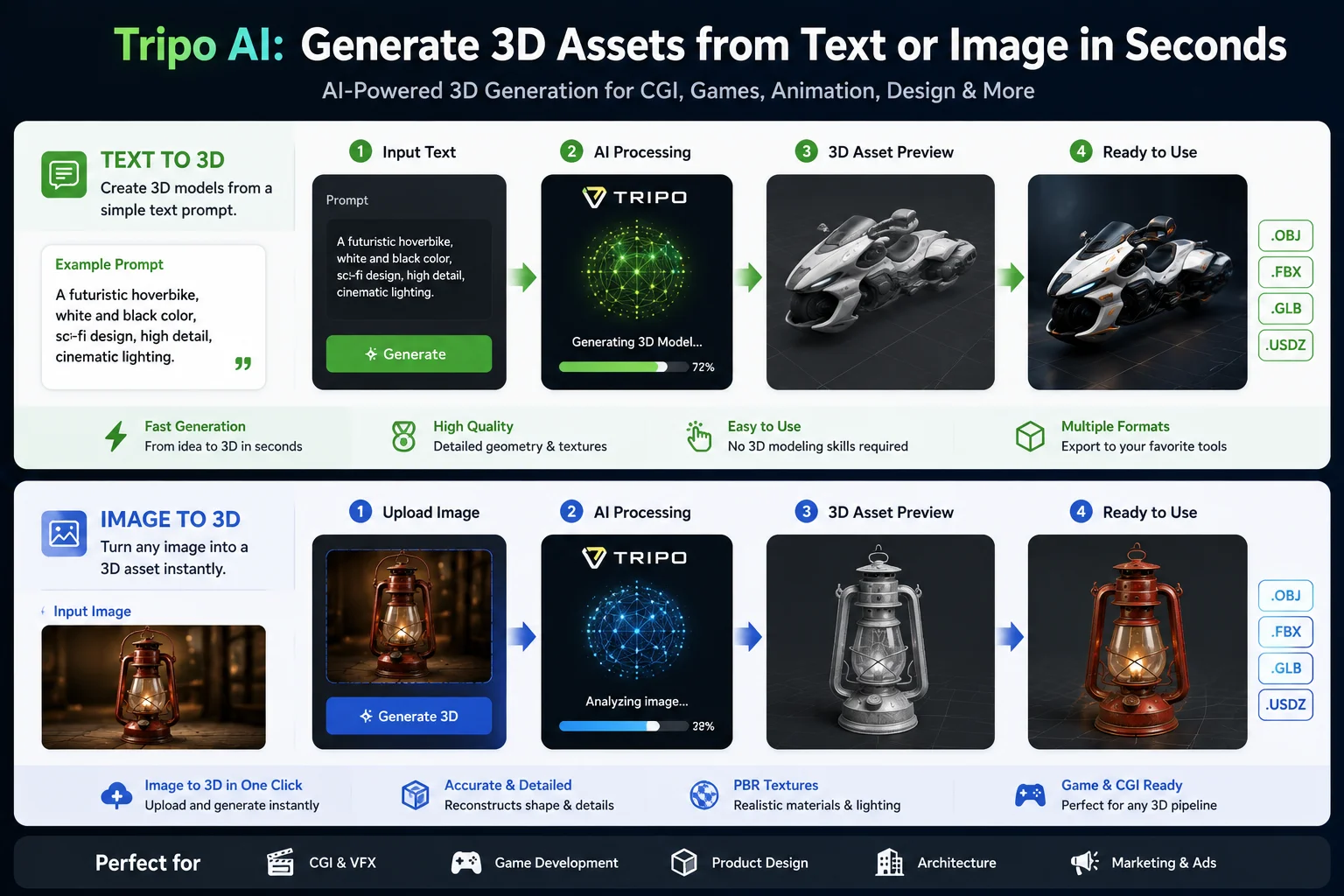
A good example of this trend is Tripo AI, which offers both Text to 3D and Image to 3D workflows. With text-to-3D generation, users can describe an object, character, or scene in plain language and quickly receive a 3D model. With image-to-3D generation, a single reference image can be converted into a textured 3D asset that can be further customized. The platform is designed to help creators generate 3D models from text prompts or images without requiring traditional modeling expertise.
Platforms like Tripo AI's text-to-3D generator let you describe an object and receive a ready-to-edit model in minutes, while image-to-3D workflows convert a reference photo into a textured 3D asset—two practical approaches that show how generative AI is reshaping the CGI production pipeline. Instead of spending hours creating every asset manually, creators can now generate a starting point in minutes and then refine it using traditional CGI software such as Blender, Maya, or Unreal Engine.
As AI-generated 3D technology continues to improve, the future of CGI will likely become more collaborative, combining the speed of AI generation with the artistic control and expertise of human creators. The result is a production workflow that is faster, more accessible, and capable of bringing ideas to life with far fewer technical barriers than ever before.
How Tripo AI Generates 3D Assets from Text or Images
Frequently Asked Questions
What does CGI mean?
CGI stands for Computer-Generated Imagery. It refers to visual content created using computer software, including 3D models, digital characters, animations, visual effects, and virtual environments used in movies, games, advertising, and design.
What is the difference between CGI and AI?
CGI is the process of creating digital images and 3D content using computer graphics tools, while AI (Artificial Intelligence) refers to systems that can generate, analyze, or automate tasks using machine learning algorithms. In simple terms, CGI is the visual output, whereas AI can be used to help create CGI assets more quickly through technologies such as text-to-3D and image-to-3D generation.
What is an example of CGI?
A well-known example of CGI is the Na'vi characters and virtual environments in the movie Avatar. These digital characters and worlds were created using computer-generated imagery and then combined with live-action footage to produce realistic visual effects.
What is CGI animation?
CGI animation is a subset of computer-generated imagery that focuses on creating animated 3D models and characters. It involves modeling objects, applying textures, rigging characters with skeletons, and animating them to create motion. CGI animation is widely used in animated films, video games, and visual effects sequences.
What is the difference between CGI and practical effects?
CGI refers to digital effects created using computer software, while practical effects (also called SFX) are physical effects created on set during filming. Practical effects include things like real explosions, makeup, prosthetics, and animatronics. CGI offers more flexibility and can create impossible visuals, while practical effects provide realistic lighting and physical interactions that cameras capture naturally.
How do CGI artists create effects?
CGI artists typically follow a multi-step pipeline: they start by modeling 3D objects or characters, then add textures and materials to define surface appearance. Next, they set up lighting to simulate real-world illumination, rig characters with skeletons for animation, animate the scene, and finally render the frames into images or video. Post-production compositing then integrates CGI elements with live-action footage or other digital layers.
Why is CGI used in movies?
CGI is used in movies because it allows filmmakers to create visuals that would be impossible, too dangerous, or too expensive to capture with traditional filming. It enables the creation of fantastical creatures, massive environments, complex stunts, and seamless visual effects. CGI also provides creative flexibility, allowing directors to modify scenes in post-production without reshooting.
What are some famous examples of CGI in film?
Notable examples include the dinosaurs in Jurassic Park, the character Gollum in The Lord of the Rings, the entire world of Pandora in Avatar, the realistic animals in The Lion King (2019), and the digital characters in Pixar films such as Toy Story and Finding Nemo. These examples showcase how CGI has evolved from early digital effects to photorealistic characters and environments.
Can beginners learn CGI?
Yes, beginners can learn CGI using free tools like Blender, which provides a complete suite of modeling, animation, and rendering features. Many online tutorials, courses, and communities are available to help newcomers understand the basics. Starting with simple projects like modeling objects and gradually progressing to texturing, lighting, and animation is a practical learning path.
What is the difference between 2D and 3D CGI?
2D CGI involves creating flat digital images or animations, typically using software like Adobe After Effects or Toon Boom. 3D CGI creates objects and scenes with depth, allowing for realistic lighting, shadows, and camera movement from any angle. 3D CGI is more common in modern films, games, and visual effects because it provides greater realism and flexibility.
Conclusion
CGI, or Computer-Generated Imagery, has transformed the way digital content is created across film, gaming, advertising, and product design. From creating realistic characters and virtual worlds to powering modern visual effects, CGI has become an essential part of today's creative industries. As AI-powered tools continue to evolve, creating high-quality 3D assets is becoming faster and more accessible than ever before.
Want to create 3D assets for CGI? Generate one from text or an image with Tripo AI. Visit Tripo AI Studio to get started.
