Best AI Product Prototype Generators in 2026 (Digital + Physical)
TL;DR
- AI prototype generators cover digital UI tools and physical 3D model tools.
- Use Figma or Miro for screens, flows, and software prototypes.
- Use Tripo AI for sketch-to-3D concepts and tangible product prototypes.
- Choose tools by product type, collaboration needs, and export formats.
- AI prototypes accelerate ideation, validation, stakeholder reviews, and pre-production checks.
AI product prototype generators generally fall into two workflows: digital tools for software interfaces and 3D tools for physical-product concepts. Figma Make helps teams turn prompts and design context into code-backed, visually editable prototypes. Miro, Magic Patterns, UX Pilot, and Relume are commonly used for collaborative planning, UI exploration, or website structure. Tripo AI and Meshy can turn text or images into 3D assets; Spline is better suited to interactive 3D scenes and web presentation. Treat every “best” choice as workflow-specific: product capabilities, plans, and export options change frequently.
Method note: this guide compares tools by prototype type, input method, collaboration workflow, and handoff needs. Product details were checked against official product pages on July 22, 2026; confirm live pricing, limits, and availability before committing to a team workflow.
What Is an AI Product Prototype Generator?
An AI product prototype generator is a tool that uses natural language, images, sketches, or structured product requirements to create an early version of a product concept. Instead of manually designing every screen, component, or 3D form from scratch, teams can describe what they want and receive a usable starting point in minutes.
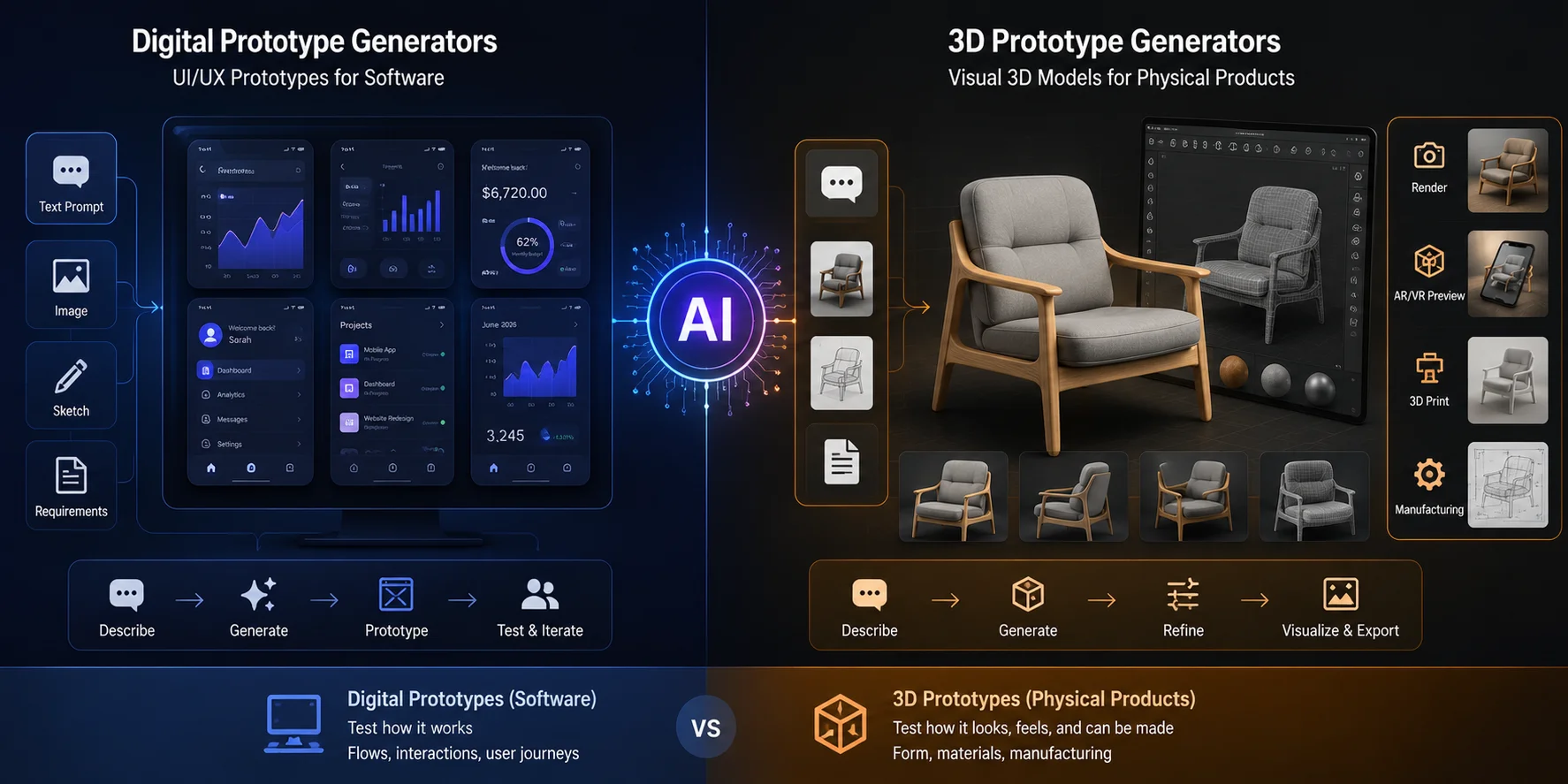
There are two main types.
Digital prototype generators create UI or UX prototypes, such as app screens, website wireframes, dashboards, and clickable flows. These are used to test user journeys, communicate software ideas, and collect feedback before engineering begins.
The key distinction is simple: digital tools help teams test screens, flows, and interactions; 3D tools help teams communicate and review an object’s visual form. Manufacturing feasibility still requires CAD cleanup, dimensions, materials, and engineering validation.
Physical or 3D prototype generators create visual 3D concepts for tangible products, such as consumer devices, packaging, toys, furniture, accessories, and industrial forms. They are useful when a team needs to inspect silhouette, proportion, material direction, or presentation quality. A generated asset can support early 3D-printing experiments, but it is not automatically a print-ready or manufacturing-ready file.
Best AI Prototype Generators for Digital Products (UI/UX)
Digital AI prototype tools are strongest when the product is a website, mobile app, SaaS interface, onboarding flow, dashboard, or interactive experience. Their value is not just generating screens, but helping teams move from an idea to something users and stakeholders can react to.
Miro is best considered when collaborative discovery, mapping, and workshop facilitation are central to the prototype workflow. Check Miro’s current AI prototyping documentation before relying on a specific generation or interaction feature, because availability can vary by plan and rollout.
Figma Make is a prompt-based, code-backed creation environment for digital products. Figma says teams can start from a prompt, design assets, or an existing codebase; use design context such as frames, PDFs, and Make kits; then refine the result visually on the canvas. It is a strong fit when a team needs a fast, editable prototype and a feedback loop inside the Figma workflow. Official product page.
UX Pilot is aimed at prompt-assisted wireframes, screens, and flows. It can be worth evaluating when a team wants to move from a written product idea to a UI draft, but verify its current Figma handoff and plan capabilities before making it a required production step.
Magic Patterns is useful for product teams exploring UI directions while maintaining consistency with an existing product or design system. Confirm current import, integration, and plan limits on its official site before adopting it for an enterprise workflow.
Relume is more specific: it focuses on website planning, including site structure, wireframes, and style direction. It is a better fit for marketing websites than for a software product with complex application logic. Official product page.
Best AI Prototype Generators for Physical Products (3D)
Most AI prototyping tools focus on UI screens, but physical products need a different kind of prototype. A founder designing a smart speaker, wearable device, kitchen tool, toy, collectible, or packaging concept needs more than app flows. They need shape, proportion, material direction, and a 3D object that can be reviewed, rendered, or printed.
For a product team, the workflow is straightforward: sketch or describe an idea, generate a visual starting point, review the form from multiple angles, then export it for presentation or further 3D work. Before printing or CAD handoff, validate scale, geometry, wall thickness, fit, and material requirements in the relevant downstream tools. A connected-device team might use Figma Make for the companion app and a 3D generator for early product-form exploration.
**Tripo AI — **AI 3D Product Prototype Generator Tripo AI supports text-to-3D and image-to-3D generation for visual 3D concepts. Its official site currently lists GLB, STL, and OBJ exports. That makes it useful for presentation, rendering, 3D editing, and early print experiments. File export alone does not establish dimensional accuracy, watertight geometry, wall thickness, material suitability, or manufacturing readiness.
Spline is worth considering for interactive 3D scenes and browser-based presentations rather than a CAD or manufacturing handoff.
Meshy is an option for quick text- or image-based 3D exploration. Evaluate current generation quality, licensing, and export options against the visual fidelity and cleanup your project requires.
Other text-to-3D tools can be useful for early visual ideation, but product names, availability, and capabilities change quickly. Evaluate them from current official documentation before including them in a production workflow.
How to Choose the Right AI Prototype Generator
Start with the prototype you need to test. For an app, dashboard, or interactive flow, prioritize tools that support design context, iteration, feedback, and handoff. For a marketing site, prioritize sitemap and wireframe workflows. For an object or package concept, choose a 3D tool that accepts the input you have, such as text, a sketch, or reference images.
Next, consider collaboration and handoff. Figma Make is useful when a team needs editable, code-backed prototypes and feedback in the Figma ecosystem. Miro can suit collaborative discovery and workshops. A 3D generator is most useful when designers, founders, or stakeholders need to discuss a tangible product concept before detailed CAD work begins.
For physical-product concepts, use a 3D-first workflow to explore form, proportion, and presentation. Do not choose solely on a long export-format list: verify current export options, license terms, and whether the output can enter your next tool. For print or manufacturing work, plan a separate CAD and engineering validation stage.
Finally, check current pricing, licensing, privacy controls, and export limits on the official product pages. Free access, commercial-use rights, and export availability can change, so avoid basing a production decision on an old comparison chart.
Step-by-Step: Generating a 3D Product Prototype with Tripo AI
Step 1: Describe or sketch your product concept
Start with a clear product idea. If you use text, describe the product’s function, shape, material, and style, such as “a compact smart desk lamp with a rounded matte-white base, adjustable curved arm, and minimalist consumer electronics style.” If you think visually, sketch the product by hand and upload a clear photo of the drawing.
Step 2: Upload reference images or use text-to-3D
Choose the generation mode based on your input. Use text-to-3D when you want to explore broad product directions quickly. Use image-to-3D when you already have a sketch, product drawing, mood-board image, or concept render and want the model to follow a specific silhouette.
Step 3: Review and refine the generated model
After generation, inspect the model from multiple angles. Check silhouette, proportion, surface artifacts, symmetry, and unwanted geometry. For any downstream print, CAD, or manufacturing use, also inspect scale, watertightness, wall thickness, fit, and material assumptions in the appropriate specialist software.
Step 4: Export for presentation or 3D printing
Choose the export format based on the next step. Tripo’s official site currently lists GLB, STL, and OBJ exports. GLB can suit lightweight sharing and web viewing; OBJ is commonly used for further 3D work; STL is a common starting format for print workflows. Exporting an STL does not by itself make a model printable or manufacturable.
Step 5: Share with stakeholders for feedback
Embed the exported model in a presentation, share it through a viewer link, or include it in a client review deck. Stakeholders can then comment on shape, proportion, material direction, and overall product appeal before CAD or manufacturing work begins.
AI Prototyping in the Product Development Lifecycle
AI prototypes are most valuable when they are used at the right stage of product development. They do not replace engineering validation, industrial design refinement, manufacturing drawings, or usability testing. Instead, they help teams reduce uncertainty earlier and move from vague ideas to reviewable concepts faster.
During concept ideation, AI tools help teams generate multiple design directions quickly. Founders, product managers, and designers can compare different forms, layouts, or interaction flows before committing resources to one direction.
During design validation, 3D prototypes help evaluate visual proportion, perceived ergonomics, material direction, and overall product feel. This can reduce the number of early physical samples required before moving into detailed design.
During stakeholder presentation, high-fidelity AI prototypes make communication more concrete. A 3D product model or interactive UI prototype is easier for clients, investors, and internal teams to evaluate than a written description.
During early validation, a 3D concept can support discussions about form, packaging, and perceived scale. Do not treat an AI-generated export as evidence of mechanical fit or manufacturing feasibility; those checks require dimensional CAD, tolerancing, material selection, and engineering review.
Frequently Asked Questions
What is the best free AI product prototype generator? There is no single best free option for every workflow. Figma Make can be a strong starting point for editable digital prototypes, while Tripo AI can be useful for testing text-to-3D or image-to-3D concepts. Confirm the current free-plan limits, commercial-use rights, and export availability on each official pricing page before relying on a tool for client or production work.
Can AI generate a 3D prototype from a sketch? Yes. Tools such as Tripo AI and Meshy can generate 3D models from sketches, reference images, or product concept art. The cleaner the sketch and the clearer the silhouette, the more useful the generated model will be.
Is there an AI prototype generator that works online? Yes. Many digital and 3D AI prototype tools are browser-based. Choose based on the prototype you need to test: editable UI behavior, collaborative planning, website structure, visual 3D form, or interactive 3D presentation. Check the official product page for current browser support, plan limits, and export options.
What is the difference between Figma Make and Tripo AI for prototyping? Figma Make is for digital products: teams use prompts and design context to create code-backed, visually editable prototypes. Tripo AI is for visual 3D concepts from text or images. They solve different problems and can be used together for a connected product with both an interface and a physical form.
What is automated product prototyping software? Automated product prototyping software uses AI or rule-based automation to create early versions of product ideas faster than manual design alone. In digital products, that may mean auto-generated UI screens or clickable flows. In physical products, it may mean text-to-3D or image-to-3D models that can be reviewed, rendered, or printed.
Can AI design a product prototype for me? Yes, AI can generate a starting prototype from a prompt, sketch, or reference image. However, it should be treated as a first iteration, not a final production design. Human review is still needed for usability, manufacturability, engineering constraints, safety, and brand fit.
How long does it take to generate a product prototype with AI? Simple UI screens or 3D concepts can often be generated in seconds or minutes. The full prototype workflow may take longer because teams still need to review, refine, export, test, and present the result. AI shortens the first draft, but validation remains a human process.
What is the difference between AI physical and UI prototyping? AI UI prototyping focuses on screens, layouts, flows, and interactions. AI physical prototyping focuses on shape, volume, material appearance, and 3D form. A complete product may need both: a digital interface in Figma and a physical 3D model in Tripo AI.
Can AI prototypes be used for patent applications? AI prototypes may help illustrate a concept, but they should not be treated as legal or engineering proof by themselves. Patent applications usually require precise descriptions, claims, drawings, and legal review. If intellectual property matters, consult a qualified patent professional before publishing or sharing generated concepts.
How do I go from AI prototype to final product? Start by using AI to explore and communicate the concept. Then move the chosen direction into CAD, engineering review, material selection, usability testing, and manufacturing preparation. For digital products, move from AI-generated screens into design-system refinement, user testing, and front-end implementation.
What accuracy can I expect from an AI-generated product model? AI-generated 3D models are usually good for visual form, concept communication, and early review. They are not guaranteed to meet manufacturing tolerances, mechanical fit, wall-thickness requirements, or material constraints. Use them for ideation first, then transition to CAD for production-grade accuracy.
Is Tripo AI suitable for product prototyping? It can be useful for early 3D product visualization from text prompts or reference images, especially when a team needs to discuss form, style, or presentation. For manufacturing, move the selected direction into CAD and complete engineering checks for dimensions, tolerances, materials, and mechanical fit.
Conclusion
The right AI product prototype generator depends on what you are building. If you are testing a digital interface, tools such as Figma, Miro, Magic Patterns, UX Pilot, and Relume help turn ideas into screens and flows. If you are prototyping a physical product, Tripo AI helps bridge the gap between sketch, concept image, and tangible 3D model.
For founders, product managers, and designers, the opportunity is not to replace design judgment. It is to get to a testable prototype faster. Start with the format your product needs most — UI or 3D — then build a workflow that turns rough ideas into reviewable concepts. To explore physical product prototyping, start with Tripo AI.
