Gaussian Splatting vs. AI 3D Models: What Creators Should Know
TL;DR
- Gaussian splatting reconstructs a real scene from photos or video; AI 3D models generate a new object from text or a single image.
- Splats render quickly and can look photorealistic, but they are not clean polygon meshes, so standard editing and rigging are difficult.
- AI-generated meshes can enter editing, rigging, and engine workflows, although many outputs still need topology or texture cleanup.
- Choose splatting to capture real places or objects for viewing; choose AI 3D for assets you plan to edit, animate, or prepare for printing.
- You can combine the approaches by converting a splat to a mesh or generating a mesh directly with an AI image-to-3D tool.
Gaussian splatting and AI 3D models solve different problems. Splatting reconstructs the appearance of a real scene from photos or video, while an AI image-to-3D tool generates a polygon mesh from creative input. This guide compares their data structures, workflows, limitations, and production uses.
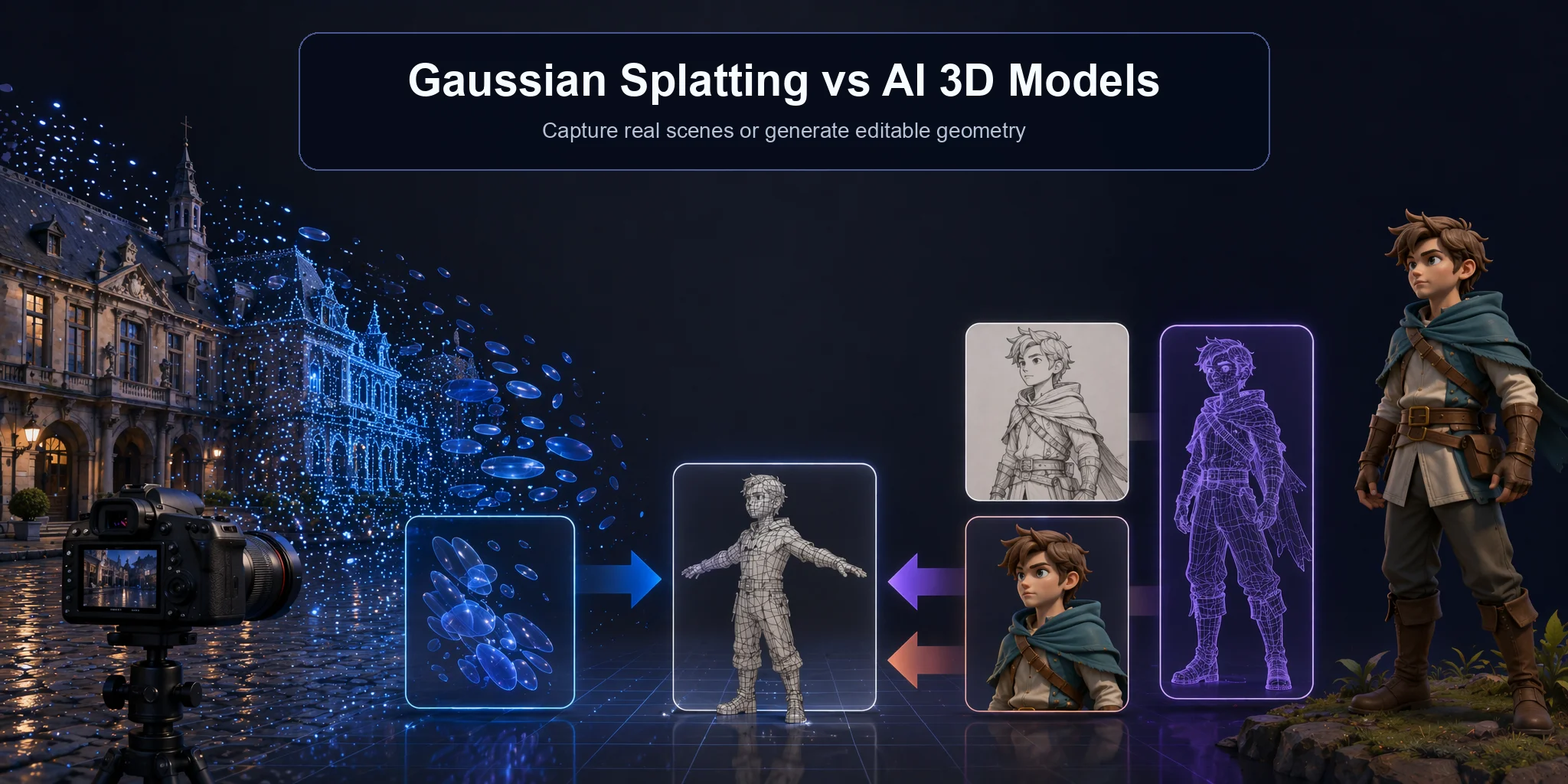
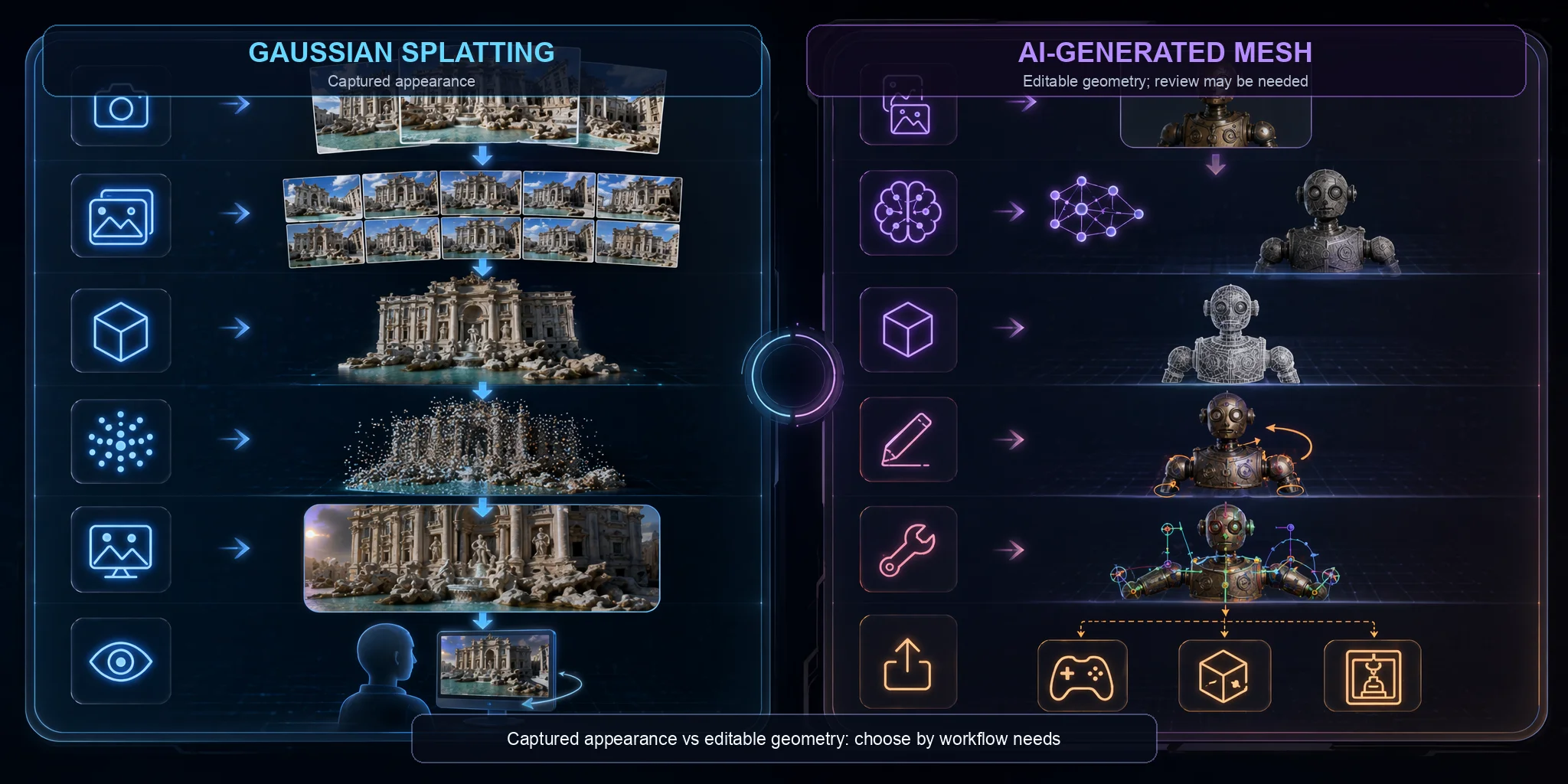
The Core Difference: Capture vs. Generate
Although both technologies can produce impressive 3D results, Gaussian splatting and AI 3D models are built for fundamentally different goals. Many beginners assume they are two ways of creating the same type of asset, but they answer completely different questions.
Gaussian splatting is a reconstruction technology. It starts with overlapping photographs or video frames of a real subject and optimizes a scene representation made of many 3D Gaussian primitives. These primitives reproduce captured color, opacity, scale, and view-dependent appearance, producing high visual fidelity from covered viewpoints. The result is optimized for rendering, but it should not be treated as guaranteed survey-grade geometry.
AI 3D model generation creates a new asset from a text prompt, sketch, or reference image. Its output is usually a polygon mesh that can enter retopology, texturing, rigging, animation, DCC, engine, or printing workflows. Whether the generated asset is production-ready depends on the tool, generation mode, and the cleanup required.
This distinction determines the practical choice. Use Gaussian splatting when visualizing a captured museum object, building, or location. Use AI generation when designing a new prop, character, product concept, or other asset that must be edited and reused downstream.
Capture vs. Generate
What Is Gaussian Splatting? (3D Gaussian Splatting Explained)
Gaussian splatting is a 3D scene reconstruction and rendering technique, not a generative AI model. It represents a captured scene with optimized 3D Gaussian primitives instead of a conventional polygon mesh. Each primitive stores properties such as position, scale, rotation, opacity, color, and view-dependent appearance. The parameters are learned through numerical optimization, but the method does not generate a new object from a prompt.
How It Works
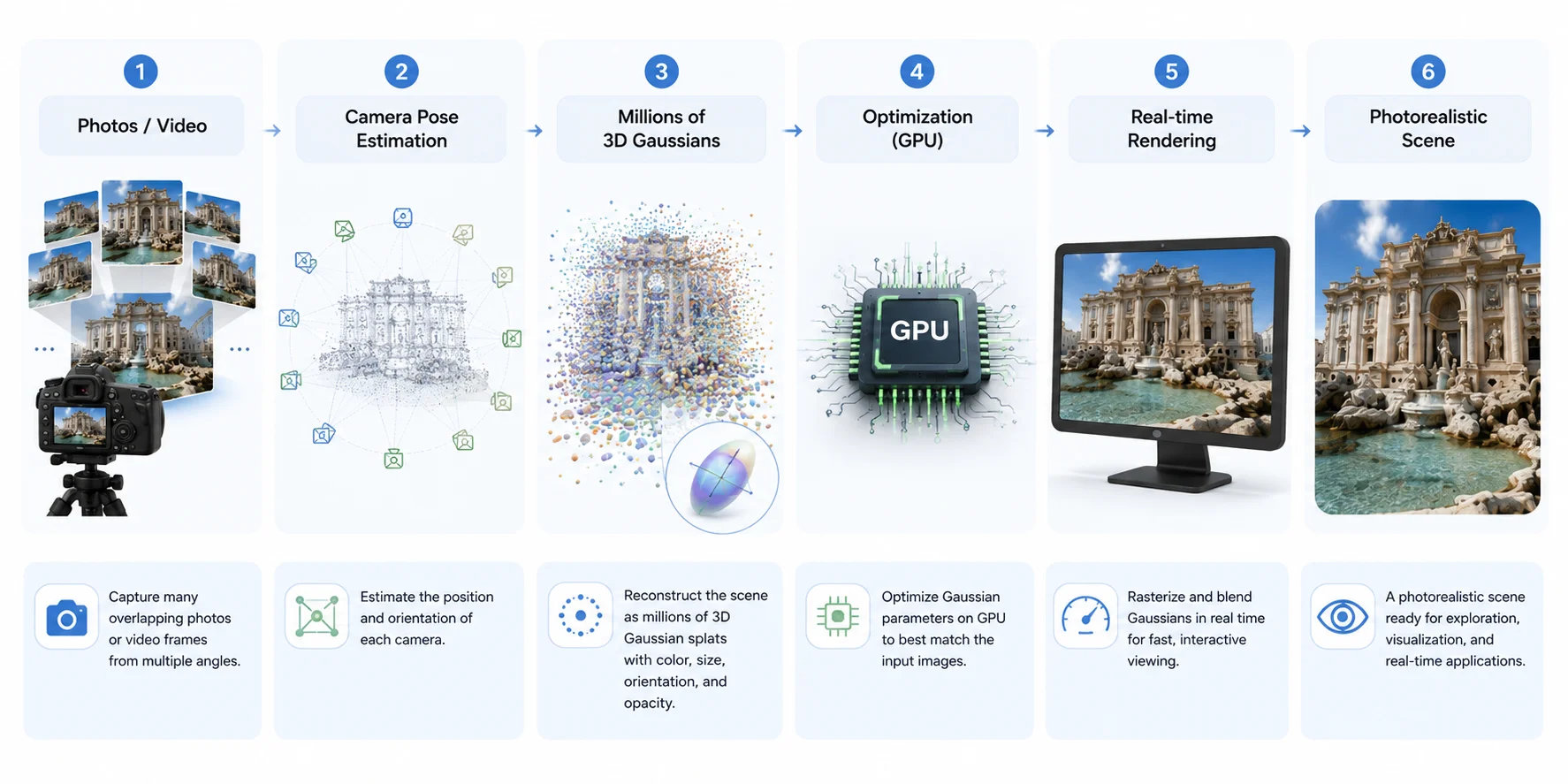
A typical gaussian splatting workflow starts with overlapping photos or video frames. Camera poses are estimated, an initial scene representation is created, and the Gaussian parameters are optimized to reproduce the input views. During rendering, the splats are projected and blended in real time to create novel views of the captured scene.
What You Need to Make One
To create a useful Gaussian splat, capture a real object or scene with consistent exposure and extensive overlap between viewpoints. Move smoothly, cover occluded areas, and avoid motion blur, reflective surfaces, and moving people where possible. The workflow estimates camera poses and optimizes the representation on a GPU, so processing time and quality depend on image count, scene complexity, capture coverage, and available hardware. Missing viewpoints often produce holes or unstable regions that visual realism from other angles can hide.
Strengths & Limits
Gaussian splatting is strong at photorealistic appearance reconstruction and interactive viewing, which is useful for architecture, cultural heritage, virtual tours, and some digital-twin or VFX workflows. However, a splat does not provide conventional mesh topology for UV editing, rigging, collision, physics, or printing. Complex captures may also require substantial storage and GPU memory.
Gaussian Splatting Workflow
What Are AI 3D Models? (Generative 3D)
Unlike Gaussian splatting, AI 3D models are designed to generate new 3D assets rather than reconstruct existing ones. Using generative AI, these tools can create objects, characters, or props from a text prompt, a single reference image, or multiple images. Instead of capturing reality, they predict what the object should look like and build it as an editable 3D model.
Text-to-3D and Image-to-3D
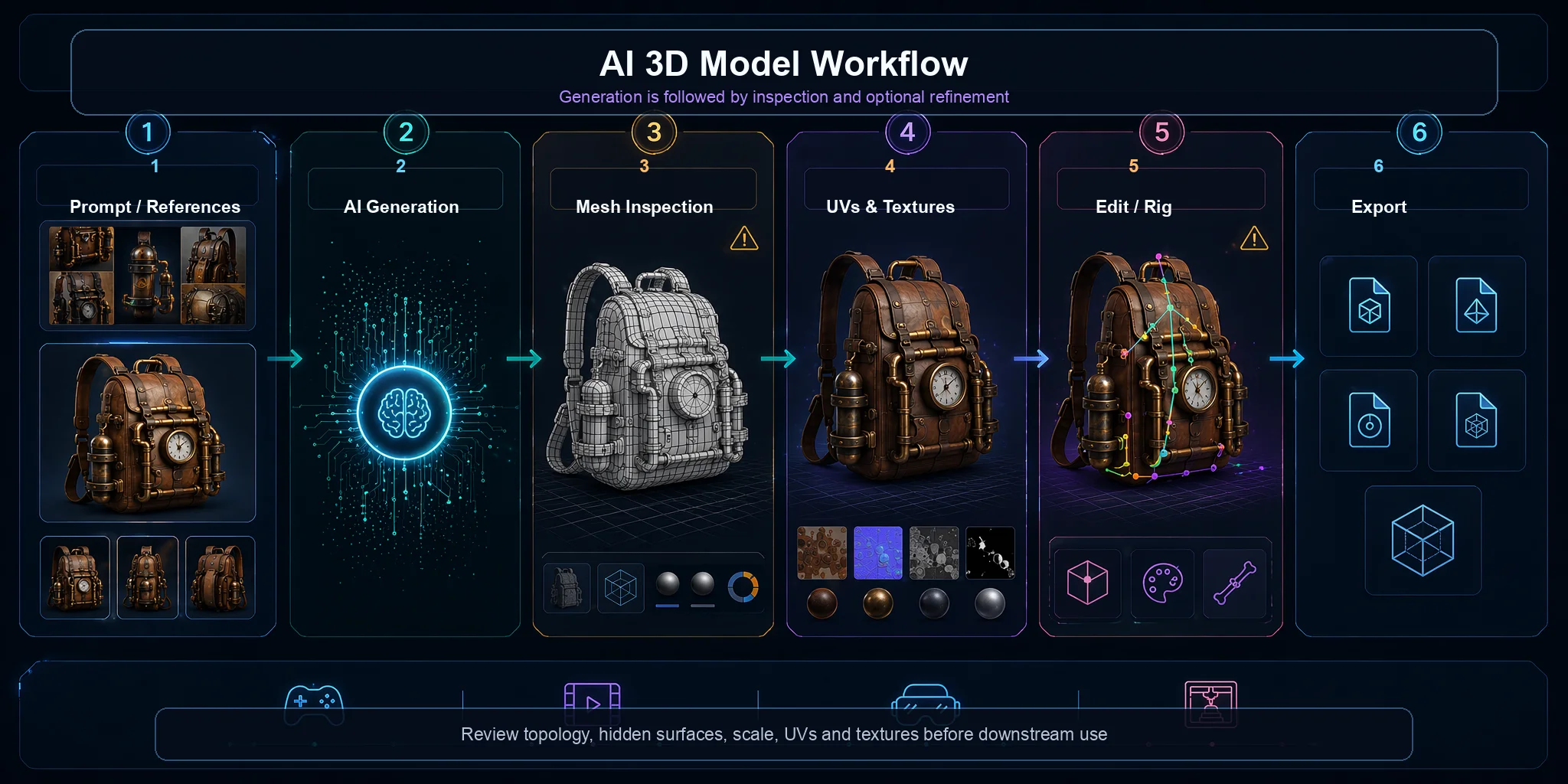
Modern generators support several inputs. Text-to-3D creates an asset from a written description, while image-to-3D uses one or more reference images to generate a corresponding mesh. Multi-view inputs can provide more structural evidence than a single view, although accuracy still depends on the references and model.
What Comes Out
The output is typically a polygon mesh, often with UVs and PBR texture maps. A mesh can be edited in DCC software and prepared for game engines, animation, AR/VR, or 3D printing. Some tools also offer retopology, segmentation, rigging, or optimization, but generated assets may still need repair or cleanup before production.
Strengths & Limits
The main advantage is editability. AI generation does not require a physical subject and can quickly produce original concepts for props, characters, product visualization, or prototypes. Because the output is a mesh, creators can modify its geometry and materials or route it into established pipelines.
The trade-off is consistency. Topology, hidden geometry, textures, scale, and printability may require manual review. AI generation is also not a substitute for a capture workflow when the goal is to reproduce an entire real environment or obtain measurement-grade geometry.
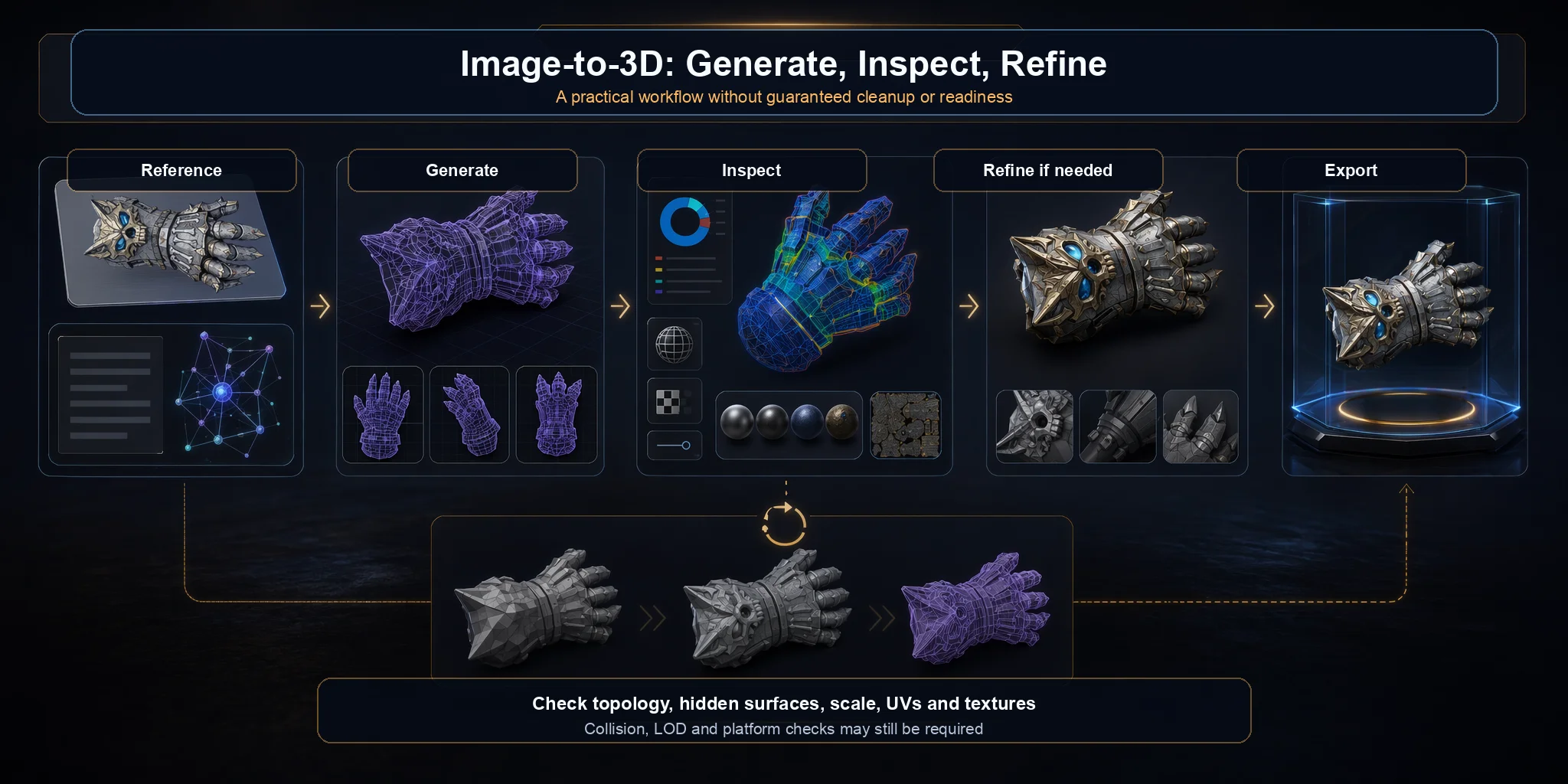
AI 3D Generation Workflow
Gaussian Splatting vs. AI 3D Models: Side-by-Side
Although both technologies produce impressive 3D results, Gaussian splatting and AI 3D models support different workflows. Gaussian splatting reconstructs the captured appearance of a real subject, while AI 3D generation creates editable digital assets from prompts or references. Comparing the deliverable, rather than visual quality alone, prevents teams from forcing one representation into a job it was not designed to do.
The comparison below summarizes the areas creators usually evaluate first. Read each row as a workflow tendency rather than a universal benchmark, not a promise for every asset or implementation. Rendering speed depends on scene complexity, resolution, implementation, compression, and target hardware; file size depends on splat count, texture resolution, mesh density, and packaging. Likewise, a mesh format being supported by an engine does not guarantee that materials, scale, skeletons, or animations will import exactly as intended. Hardware requirements also differ between creation and playback: training or optimizing a splat can be GPU-intensive even when the final scene renders interactively, while a cloud AI generator may move generation cost off the user's machine but still produce an asset that must be optimized locally. For a production decision, test representative content on the actual target device and measure memory use, frame time, loading time, visual artifacts, and cleanup effort. The best representation is the one that meets the project's visual and interaction requirements within its performance and maintenance budget.
| Feature | Gaussian Splatting | AI 3D Model / Mesh |
|---|---|---|
| Output type | 3D Gaussian splat cloud (no explicit polygon geometry) | Polygon mesh with UV mapping and PBR textures |
| Input | Multiple overlapping photos or video of a real object or scene | Text prompt, single image, or multi-view reference images |
| Best at | Photorealistic reconstruction of real-world scenes and objects | Creating original characters, props, products, and environments |
| Editability | Very limited; no mesh topology for traditional editing | High; editable in Blender, Maya, 3ds Max, and other DCC tools |
| Animation / Rigging | Generally unsupported | Can support rigging and animation after suitable topology and mesh preparation |
| Real-time rendering | Excellent; optimized for interactive viewing | Performance depends on polygon count, textures, materials, and LOD optimization |
| File size | Often large for complex scenes | Size varies; meshes are often easier to decimate and optimize for target platforms |
| Engine import | May require plugins or conversion workflows | Uses standard mesh formats; exact import support varies by engine and format |
| Hardware to create | Requires real-world capture and GPU optimization | Can be generated from a prompt using cloud or local AI models |
| 3D printing | Requires conversion to a mesh before slicing | Can be exported as STL or 3MF after mesh preparation |
The most important difference is the output. A Gaussian splat represents captured appearance with 3D primitives but lacks the explicit vertices, edges, faces, and topology expected by standard mesh tools. Editing, collision, skeletal deformation, and printing therefore require a conversion or a separate geometry proxy.
AI generators produce meshes that fit established content pipelines more naturally. The mesh can be retopologized, textured, rigged, optimized, and exported, but those steps are capabilities of the representation and workflow, not proof that every generated result is immediately production-ready.
Creation input is the other major difference: splatting depends on camera coverage, lighting, and capture quality, while AI generation starts from a prompt or reference image and can create objects that do not exist.
In practice:
- Choose Gaussian splatting for visually faithful capture of a real scene or object used in viewing, tours, or preservation.
- Choose an AI-generated mesh when you need editable geometry for games, animation, prototypes, AR/VR, or printing preparation.
- Use both together when a project combines real-world environments with original digital assets. For example, a virtual museum can use Gaussian splatting to recreate the exhibition space while AI-generated meshes provide interactive characters, furniture, or props.
The technologies are complementary: a project can use splats for captured surroundings and meshes for interactive assets. The right choice depends on whether the deliverable is primarily an appearance-based scene or editable geometry.
Gaussian Splatting vs. Mesh — Why the Data Structure Matters
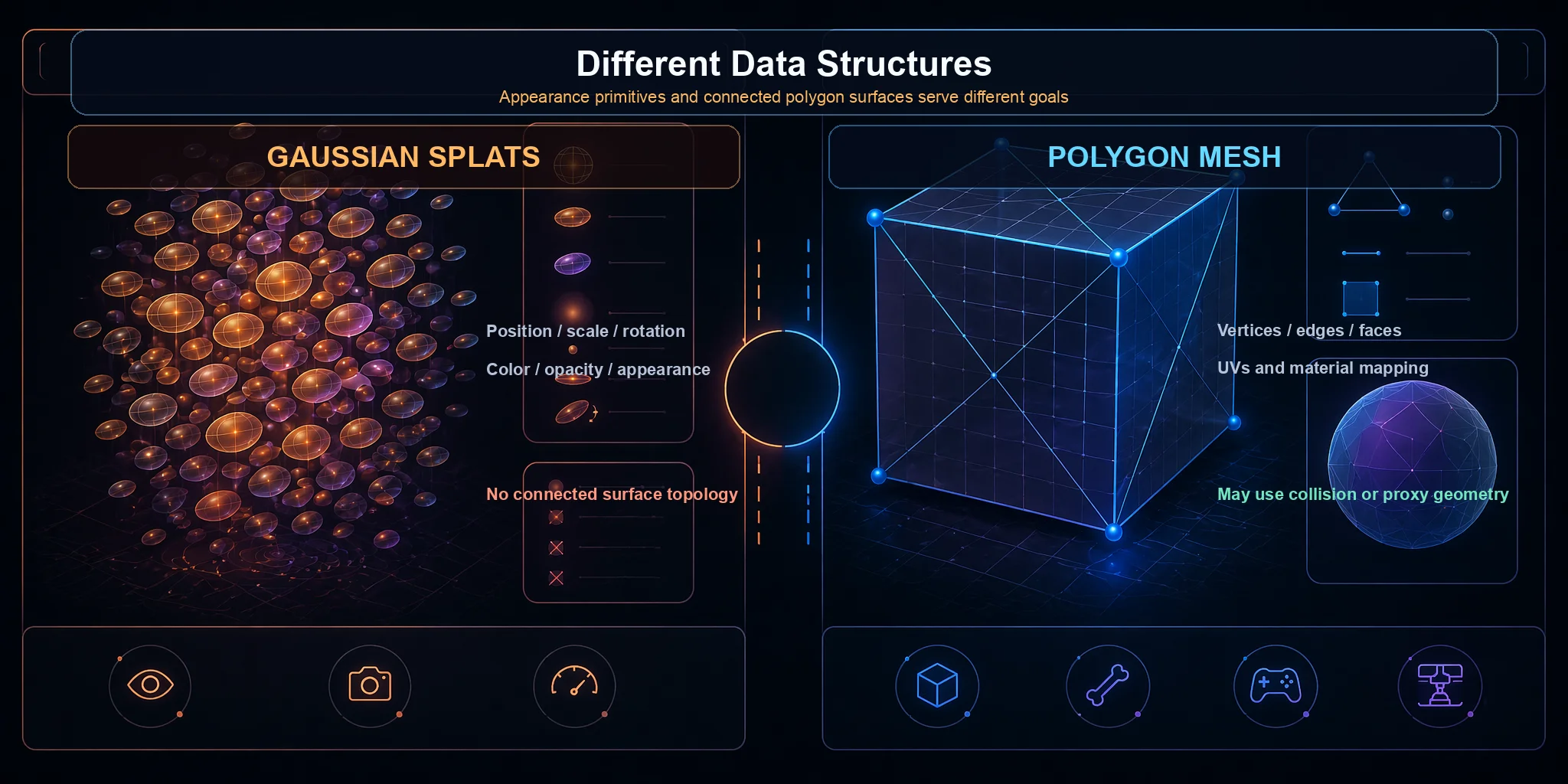
The central difference between Gaussian splatting and a mesh is the data structure. A splat represents captured appearance; a mesh provides explicit geometry that standard production tools can manipulate.
A Gaussian splat contains many primitives with position, scale, rotation, opacity, and appearance attributes, but no connected surface topology. This makes conventional sculpting, UV unwrapping, skeletal deformation, and collision authoring difficult without conversion.
A polygon mesh consists of connected vertices, edges, and faces. Blender, Maya, game engines, slicers, and physics systems understand this structure, so artists can edit it, create UVs, rig it, animate it, and build collision geometry.
This distinction matters whenever a project needs interaction, deformation, simulation, measurement, or printing. In those cases, use a mesh or a dedicated geometry proxy rather than relying on splat appearance alone.
Gaussian vs Mesh Data Structure
Bridging the Two: Converting Splats to Mesh (and Generating Mesh Directly)
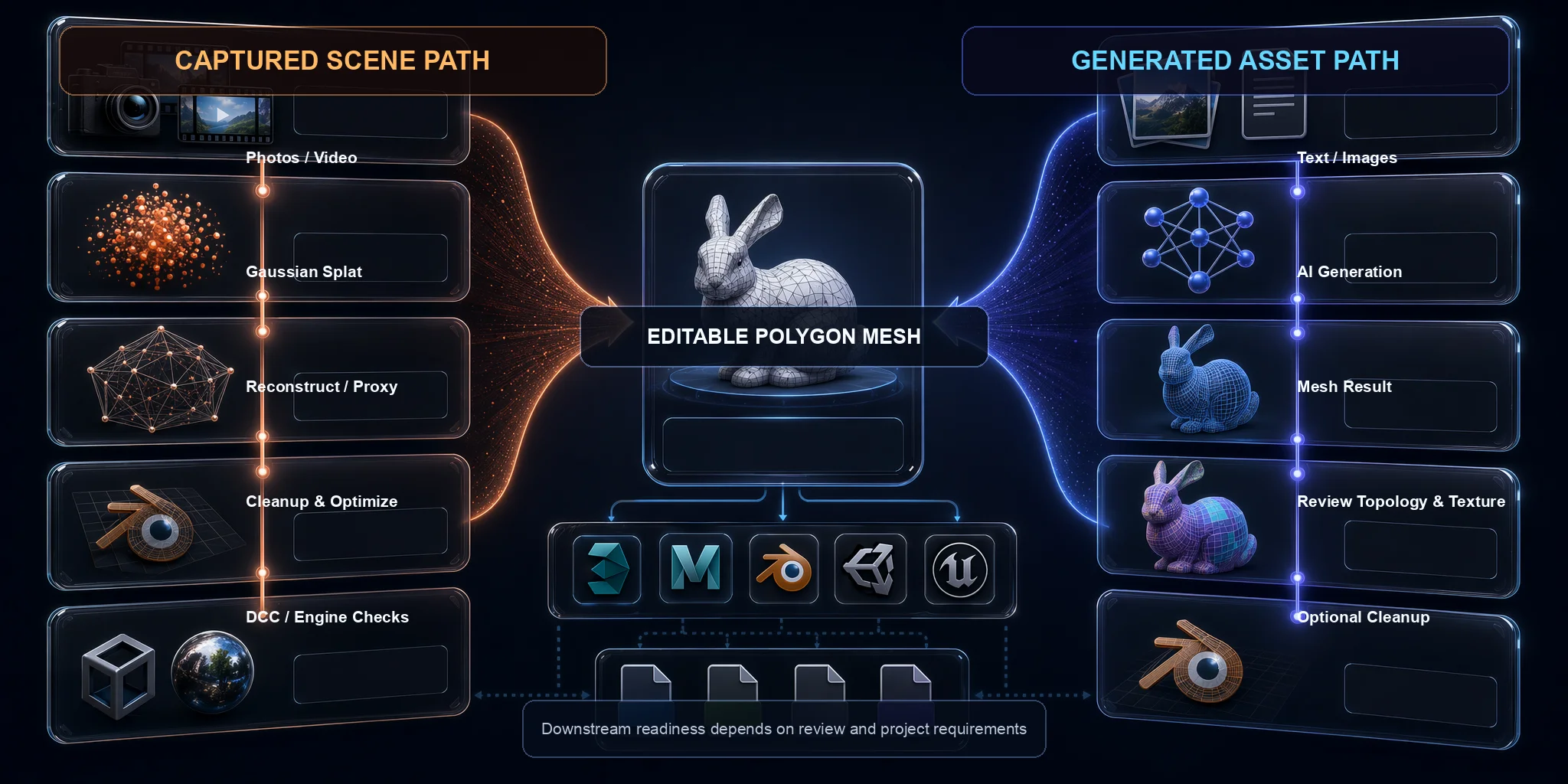
Many projects eventually need an editable mesh for collision, animation, UVs, simulation, or printing. At that point, teams can reconstruct geometry from the original capture or splat data, create a simplified proxy mesh, or generate a new mesh directly. The right path depends on whether preserving the captured subject or obtaining controllable topology is more important.
Splat → Mesh
If you already have a Gaussian splat, use a geometry-extraction or reconstruction method to produce a polygon surface, then inspect it in Blender or another DCC application. Typical cleanup includes removing floating fragments, filling holes, simplifying dense regions, rebuilding topology, creating UVs, and baking color or appearance into textures. Thin structures and reflective or poorly captured surfaces may not convert cleanly. For interactive applications, teams often keep the splat for visual appearance and build a separate low-complexity mesh for collision, navigation, or physics instead of forcing one converted mesh to do every job.
Skip the Conversion: Generate a Mesh Directly
If the target deliverable is an editable asset rather than a captured scene, generating a mesh directly can avoid an uncertain conversion step. Tripo's image-to-3D and text-to-3D workflows create mesh assets from references or prompts, while Smart Mesh provides a cleaner topology option intended to reduce downstream cleanup. Results should still be reviewed for the project's topology, scale, and deformation requirements.
Getting Assets into Unity / Unreal
Gaussian splats can be displayed in Unity or Unreal Engine through suitable renderers, plugins, or custom integrations; conversion to a mesh is not always required for viewing. However, standard gameplay systems such as collision, navigation, skeletal animation, and physics usually need mesh geometry or dedicated proxies. Before shipping, test platform support, GPU memory, sorting artifacts, LOD strategy, coordinate scale, and fallback behavior on target hardware.
Meshes use standard formats such as GLB, FBX, OBJ, or USD, although exact import support varies by application and format. Tripo's DCC Bridge supports downstream workflows with Blender, Unity, Unreal Engine, Godot, Cocos, 3ds Max, and Maya, reducing manual transfer steps for supported setups.
Convert a splat when preserving a captured subject is essential; generate a mesh directly when editability is the main requirement. Neither path removes the need to inspect geometry, textures, scale, and target-platform constraints.
Two Paths to an Editable Mesh
Which One Should You Use? (Decision Guide)
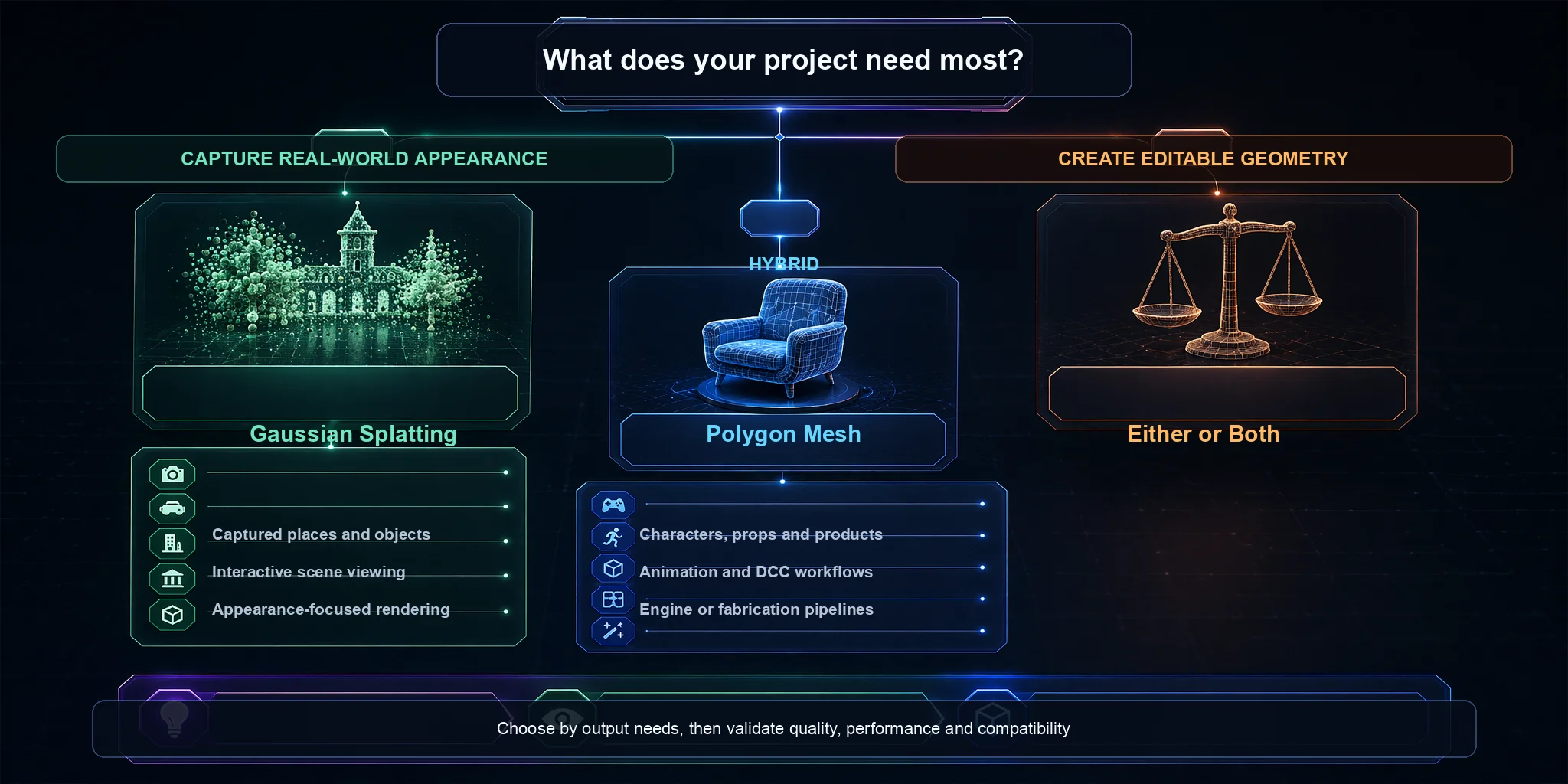
If you're still deciding between Gaussian splatting and AI 3D models, start by asking a simple question: Are you capturing something that already exists, or creating something new? Your answer usually determines the best workflow.
Use Gaussian Splatting When...
Choose Gaussian splatting when the goal is visually faithful capture of a real place or object for virtual tours, architectural visualization, cultural heritage, real estate, or VFX reference. It works best when immersive viewing matters more than topology, interaction, or measured geometry.
Use AI 3D Models When...
Choose AI 3D models for editable characters, props, prototypes, AR/VR assets, animation, or printing workflows, especially when no physical object exists to capture. The generated mesh can be refined, rigged, textured, and exported after the required quality checks.
A Quick Rule of Thumb
A simple way to decide is:
- Want to view a real scene? → Use Gaussian splatting.
- Want an asset you can edit and use? → Use an AI-generated mesh.
Projects can also mix both approaches: use a splat for the real environment and meshes for characters, props, collision, or other interactive elements.
Which Should You Use?
When AI 3D Generation Falls Short (and When Splatting Does)
Neither Gaussian splatting nor AI 3D generation is a perfect solution. Each has strengths, but each also has limitations that make it better suited to certain projects than others.
Where AI 3D Models Fall Short
AI-generated meshes are useful for creating new assets, but they are not designed to reconstruct large real environments with survey-level accuracy. When a project needs reliable dimensions or a digital record of an existing site, use an appropriate capture and measurement workflow. Generated assets may also need topology, texture, scale, or geometry repair.
Where Gaussian Splatting Falls Short
Gaussian splatting can deliver convincing captured appearance, but splats lack conventional mesh topology for rigging, physics, collision, UV workflows, or printing. Large scenes may also need substantial storage and GPU resources, and interactive applications often require plugins, optimization, or separate mesh proxies.
The Right Tool for the Right Job
Neither technology is a universal replacement for the other. Select the representation that matches the final deliverable, then budget for the capture, cleanup, optimization, and validation that workflow requires.
Frequently Asked Questions
What is the difference between a Gaussian splat and a 3D model?
A Gaussian splat represents captured appearance with many optimized 3D Gaussian primitives, while a conventional 3D model usually uses a polygon mesh with vertices, edges, and faces. Splats are effective for photorealistic viewing and novel-view rendering. Meshes are better suited to geometry editing, UV work, rigging, collision, animation, and printing.
What is the best AI for Gaussian splatting?
There is no single best AI tool for every Gaussian splatting workflow. Choose a capture tool when you want to reconstruct a real scene, a splat-to-mesh tool when existing capture data must become geometry, or an image-to-3D generator when the real goal is a new editable asset. Compare output quality, export options, hardware requirements, and cleanup effort before choosing.
Is AI replacing 3D modeling?
No. AI can accelerate ideation, base-mesh generation, texturing, and repetitive production tasks, but artists and technical teams still make decisions about form, topology, deformation, materials, performance, and art direction. In professional pipelines, AI is a production aid rather than a complete replacement for 3D modeling expertise.
Does Tesla use Gaussian splatting?
Tesla has publicly listed Gaussian Splatting among technologies relevant to roles in 3D computer vision, geometric vision, and world modeling, which indicates active research and engineering interest. Public materials do not establish it as the basis of Tesla's entire self-driving perception stack. It is more accurate to describe it as one technique being explored within a much broader system.
Is Gaussian splatting AI?
3D Gaussian splatting is not generative AI. It is an optimized scene representation used to reconstruct and render views of captured data. Machine-learning tools may appear elsewhere in a capture pipeline, but the method itself does not invent a new object from a text or image prompt.
Can you convert a Gaussian splat into a mesh?
Yes, but conversion is not a simple format change. Specialized methods can extract or reconstruct a polygon mesh from a splat or its source data, after which the mesh often needs cleanup, UV work, and texture refinement. If the project only needs an editable new asset, generating a mesh directly may be more efficient.
Conclusion
Gaussian splatting is a strong choice for capturing and viewing real-world appearance, while AI 3D generation creates meshes that can enter editing and production workflows. They solve different problems and can be combined when a project needs both a captured environment and interactive assets.
If you need an editable mesh from a single image or text prompt, generate the asset, inspect topology, hidden surfaces, scale, UVs, and texture quality, then refine it for the target pipeline. Tripo AI Studio provides generation and downstream editing or export options, but the final acceptance check should still match the requirements of your engine, animation setup, or print process.