Character Design for Indie Games: A Complete Guide (2026)
TL;DR
- Strong silhouettes, focused palettes, and personality make indie characters readable and memorable.
- A practical workflow moves from concept to model, rig, animation, and engine testing.
- Choose 2D or 3D based on style, skills, camera needs, and reuse.
- AI can turn concepts into game-ready, rigged 3D character starting points faster.
Character design for indie games means creating memorable game characters on a small budget—balancing strong visual principles (silhouette, color, personality) with a lean production workflow (concept → model → rig → animate). As an indie dev, the goal is a distinctive character that's also cheap and fast to build and ship.
What Makes Indie Game Character Design Different?
Indie teams work with limited time, budget, and staffing. That does not have to limit creativity. Constraints can become a visual advantage.
Simple shapes improve readability. Limited palettes strengthen visual identity. Reusable animation sets reduce production cost. Stylized characters are often faster to model, easier to rig, and lighter to render than realistic characters.
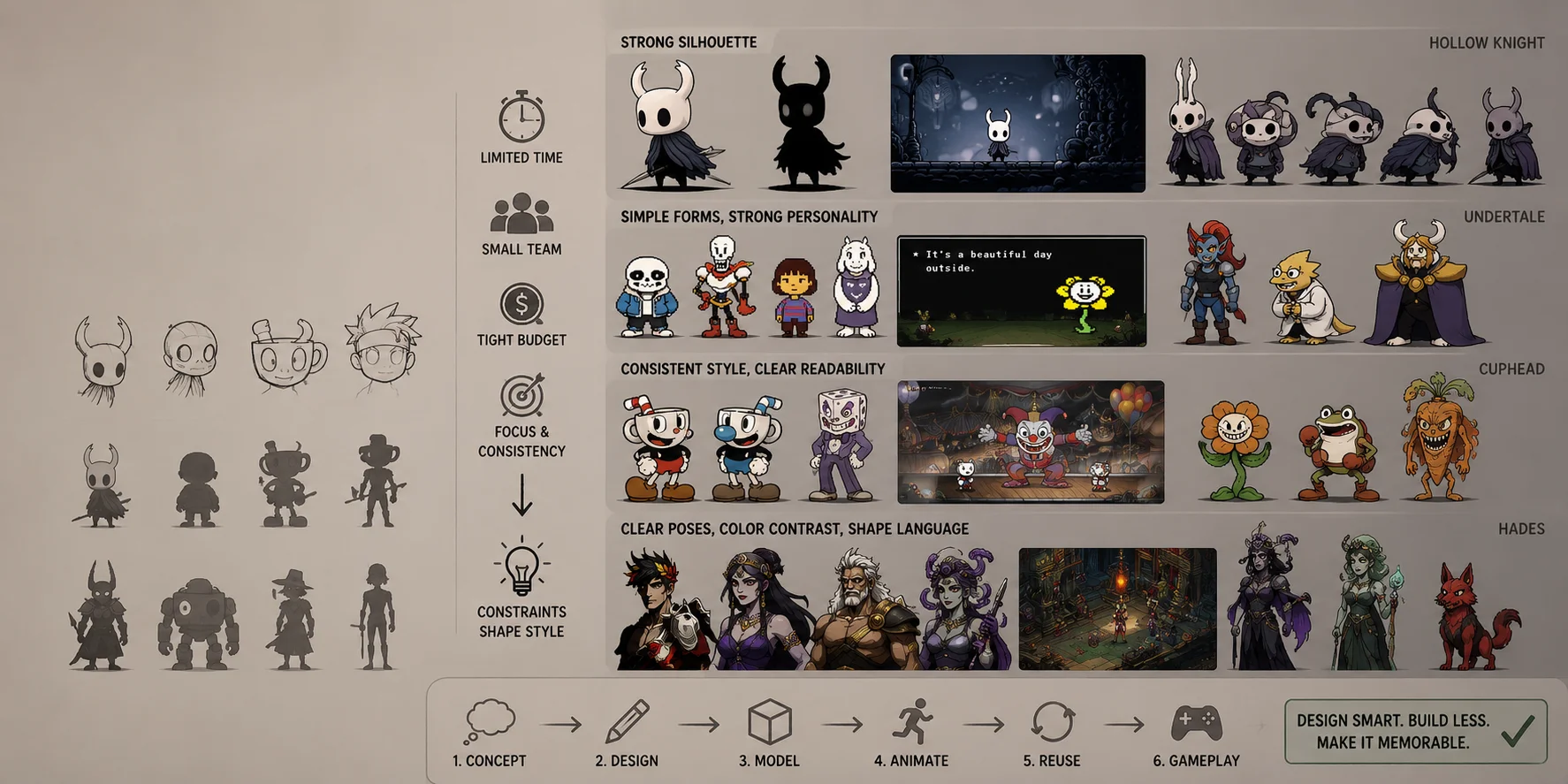
Hollow Knight, Undertale, Cuphead, and Hades all show that memorable characters do not depend on realism. Their designs are recognizable because they use strong silhouettes, coherent shapes, deliberate colors, and clear personality.
For a small team, the key question is:
Can this character be designed, built, animated, reused, and maintained within the project scope?
Character Design Principles: Silhouette, Color, and Personality
A strong character should communicate something before the player reads dialogue or sees a close-up. The most effective designs combine silhouette, shape language, color, proportion, and personality into one clear visual idea.
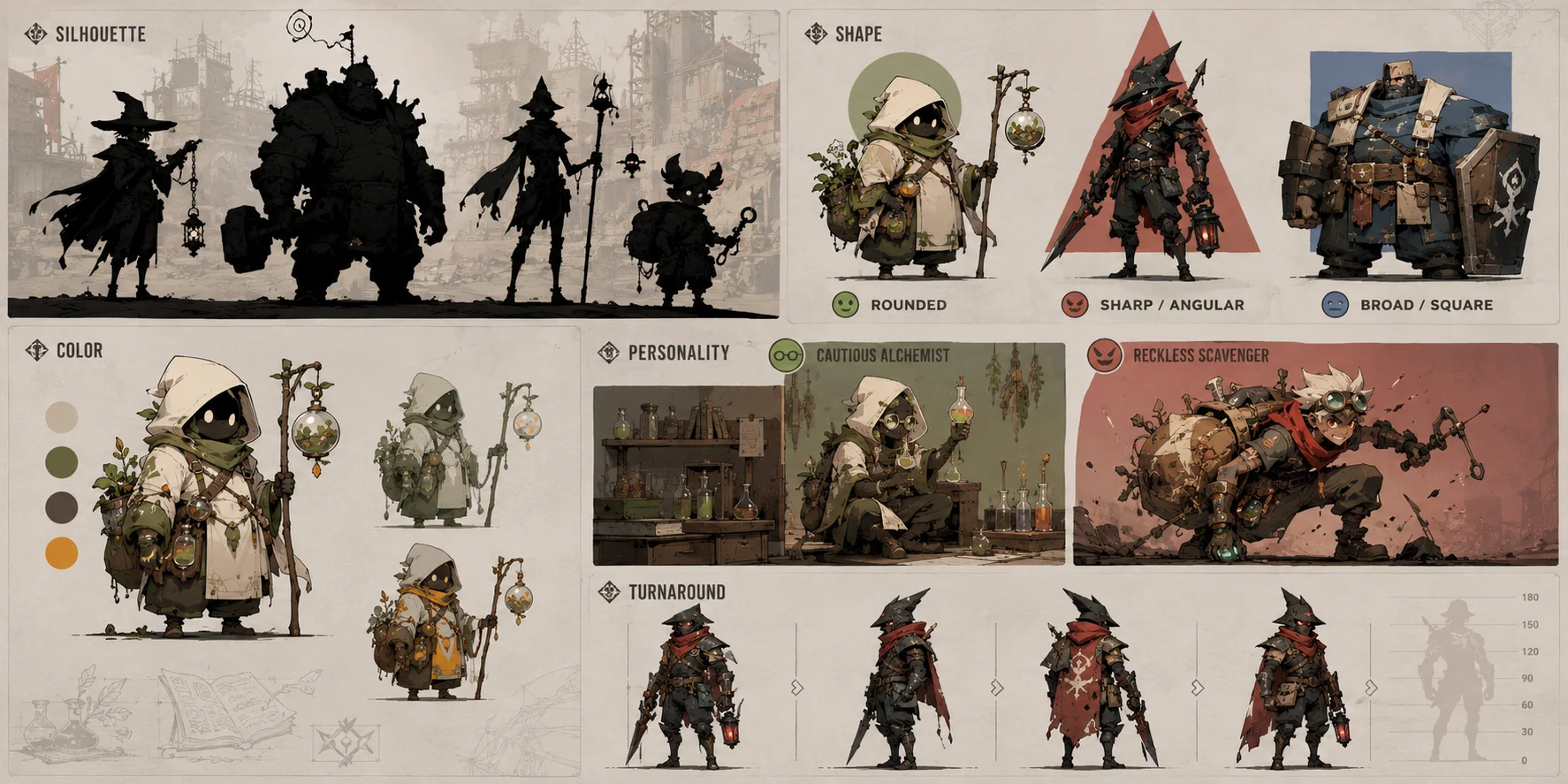
Start with silhouette
A silhouette is the character's outline with all internal detail removed. If the design is filled in black, players should still be able to identify its role, posture, and broad personality.
The Knight in Hollow Knight remains recognizable through its horns, rounded head, compact body, and cloak. Those features work at gameplay distance without relying on texture detail or facial animation.
For indie projects, test every major character as a small black shape against a typical game background. Remove accessories that do not improve recognition. A player character, enemy, merchant, and boss should not blend into one another.
Use Shape Language Intentionally
Shape language helps communicate personality before dialogue begins.
- Rounded forms often suggest friendliness, softness, youth, or humor.
- Angular forms can suggest danger, speed, aggression, or instability.
- Broad, square forms can imply strength, reliability, or mechanical weight.
A friendly shopkeeper may have soft clothing, wide proportions, and circular accessories. A hostile knight may use narrow armor, pointed shoulders, and a triangular cape. These are visual tendencies rather than fixed rules, but they help players understand a character quickly.
Keep the Palette Focused
A limited palette is easier to produce and usually easier to read. Start with two or three core colors, then use one accent color for a focal feature such as the face, scarf, weapon, emblem, or magical effect.
Color should separate the character from the environment and clarify gameplay roles. In Hades, characters remain readable in visually rich scenes because their palettes, pose language, and major shapes create strong contrast. In Cuphead, the restricted vintage palette makes every character feel like part of the same world.
Design Personality, Not Only Appearance
A character should reveal something through clothing, pose, equipment, and proportions—not only through backstory.
Ask:
- What does this character do every day?
- What do they value or fear?
- How do they move?
- What do they carry?
- Which detail exposes a habit or history?
A cautious mechanic may have an organized tool belt, a compact backpack, and a reserved stance. A reckless scavenger may have mismatched gear, patched clothing, and a forward-leaning pose.
Keep Proportions Consistent
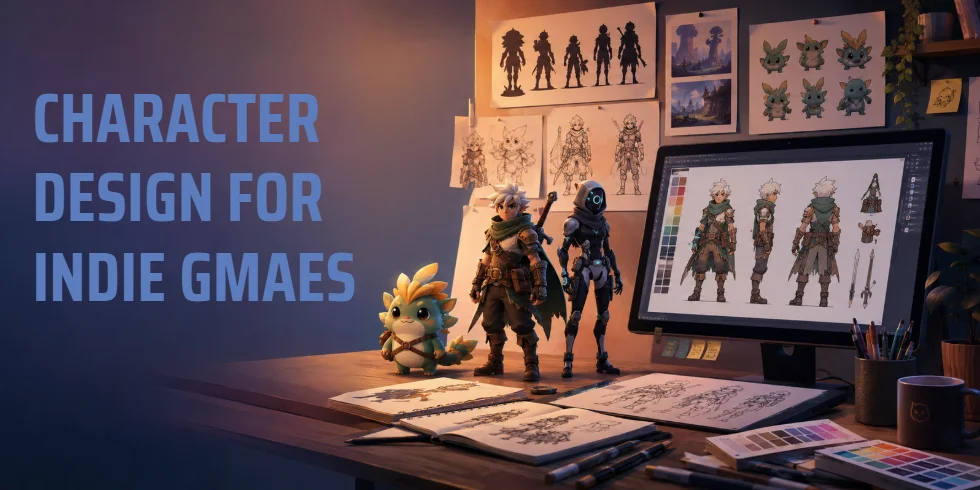
Characters must work from the front, side, back, and three-quarter view. This matters for 3D models, sprite sheets, combat animation, and promotional art. Create a simple turnaround with scale references, key accessories, and notes on moving parts before production begins.
This prevents confusion during modeling, animation, sprite creation, and engine integration.
The Indie Character Workflow: Concept → Model → Rig → Animate
A manageable workflow moves from idea to game integration without creating unnecessary rework.
- Concept and references
- Model or sprite creation
- Rigging
- Animation
- Engine integration
- Testing and iteration
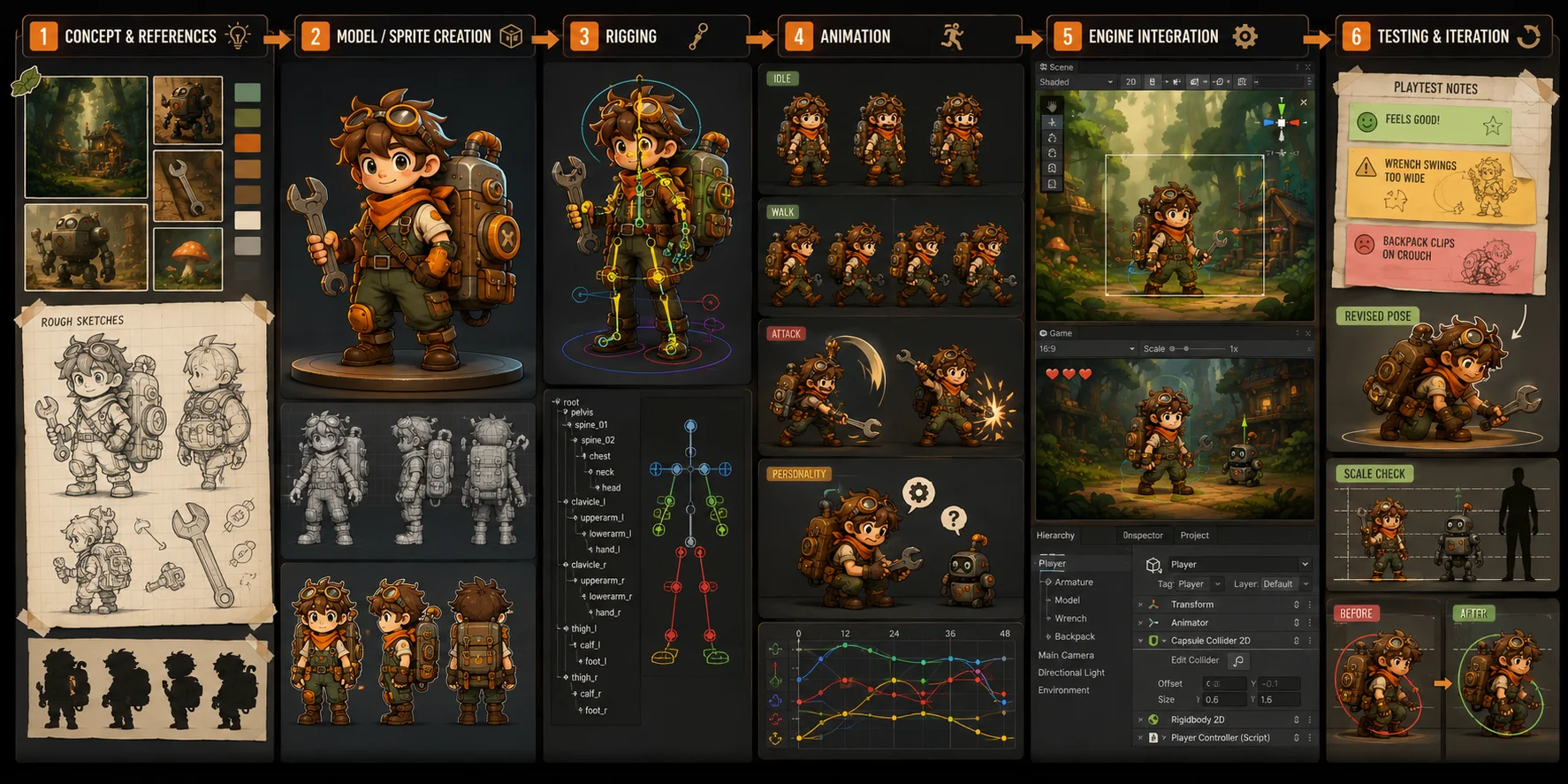
Start with a short brief rather than an open-ended idea. For example:
A curious forest mechanic with a rounded silhouette, oversized backpack, orange accent scarf, simple wrench, and readable top-down proportions.
This establishes both art direction and scope. Gather references, create several thumbnail silhouettes, and choose the clearest option before refining details.
For 2D games, the model stage may mean sprites, painted illustrations, vector art, or layered parts for skeletal animation. For 3D games, it includes mesh creation, topology, UVs, materials, and optimization.
Rigging adds bones that let the character move. In 2D, bones connect separate artwork layers; in 3D, they deform the mesh for walking, attacking, jumping, and reacting. Capes, armor layers, tails, wings, straps, and unusual anatomy all increase rigging complexity, so simplify them early where possible.
For an early prototype, begin with only the essential animations:
- idle;
- walk or run;
- jump, where required;
- attack or interaction;
- hit reaction;
- defeat;
- one personality animation.
Import the character into Unity, Unreal Engine, Godot, or your target engine early. Test scale, camera readability, animation speed, colliders, lighting, material response, and performance before polishing the final asset.
2D vs 3D Character Pipelines for Indie Games
Choosing between 2D and 3D changes your production workload, animation approach, tools, and design limits.
| Factor | 2D Pipeline | 3D Pipeline |
|---|---|---|
| Core output | Sprites, illustrations, vectors, layered parts | Meshes, textures, skeletons, animations |
| Best for | Pixel art, visual novels, tactical games, side-scrollers | Action games, exploration, simulations, VR |
| Main advantage | Strong stylistic control | Reusable animation and flexible camera angles |
| Main challenge | Frame-by-frame animation can become expensive | Modeling, topology, rigging, and texturing |
| Common tools | Krita, Aseprite, Spine, DragonBones | Blender, ZBrush, Substance 3D Painter |
| Best fit | Illustration-led teams | Teams needing multiple views and reusable motion |
Choose 2D when your game depends on illustration, pixel art, a fixed camera, or a hand-drawn visual identity. It works well for visual novels, card games, tactical games, side-scrollers, and turn-based RPGs.
Choose 3D when the project needs multiple camera angles, reusable animations, environmental interaction, character customization, third-person gameplay, or 3D exploration.
The main benefit of 3D is reuse. Once a character is modeled and rigged, you can create multiple animations, adjust camera angles, and reuse the same motion system across variants.
The main trade-off is technical complexity. A 3D character needs topology, UVs, materials, skin weights, rigging, animation, and optimization before it is ready for production.
Tools for Indie Character Design
Small teams need focused tools, not the largest possible software stack.
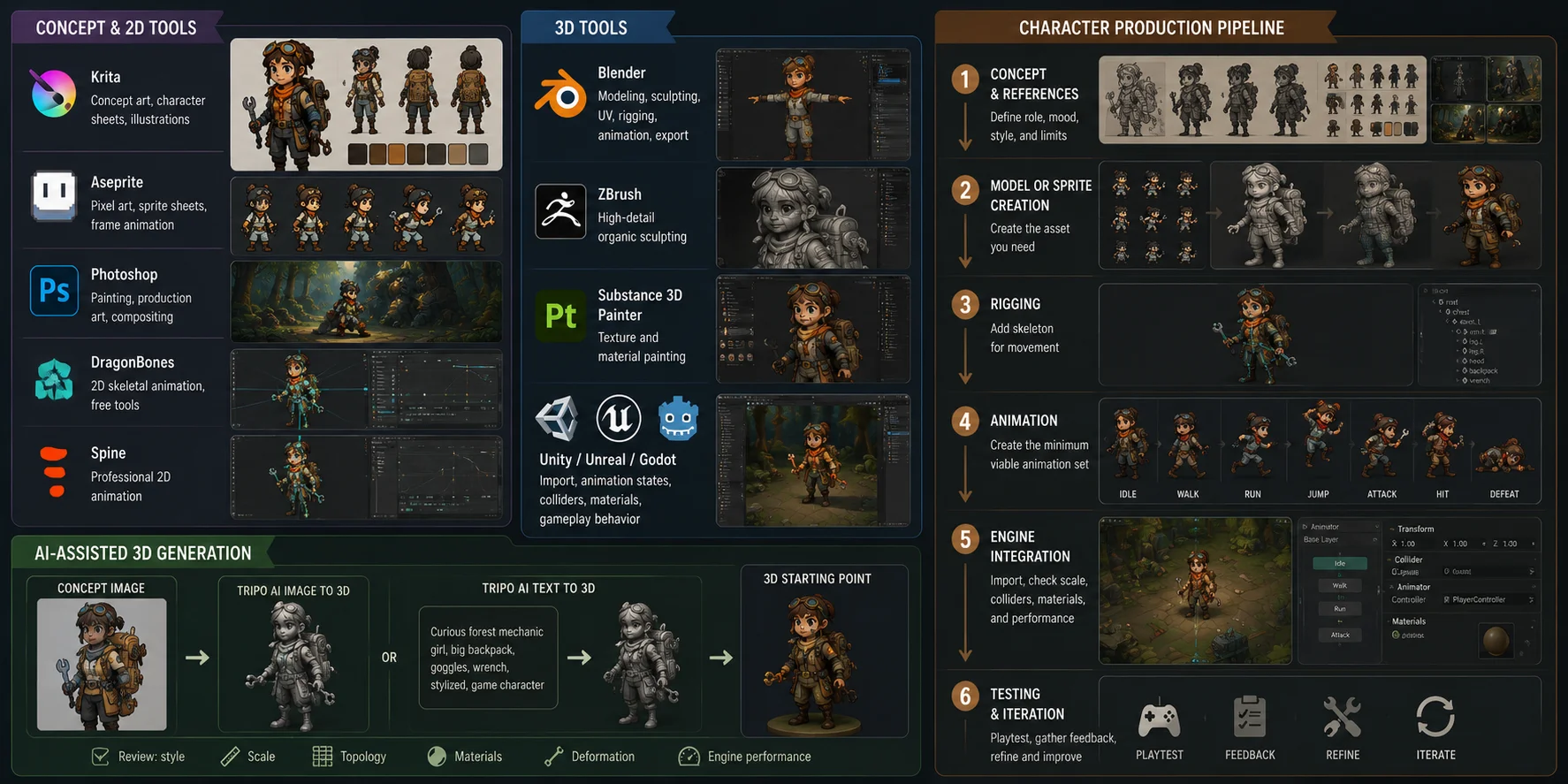
Concept and 2D tools
- Krita is a free digital-painting tool for concept art, character sheets, and illustrations.
- Aseprite is useful for pixel art, sprite sheets, and frame-based animation.
- Photoshop remains common for painting and production art in paid workflows.
- DragonBones provides free 2D skeletal animation tools.
- Spine is widely used for professional 2D character animation.
3D tools
- Blender is free and supports modeling, sculpting, UV work, rigging, animation, rendering, and export.
- ZBrush is useful for high-detail organic sculpting.
- Substance 3D Painter supports texture and material painting.
- Unity, Unreal Engine, and Godot manage character import, animation states, colliders, materials, and gameplay behavior.
AI-assisted 3D generation
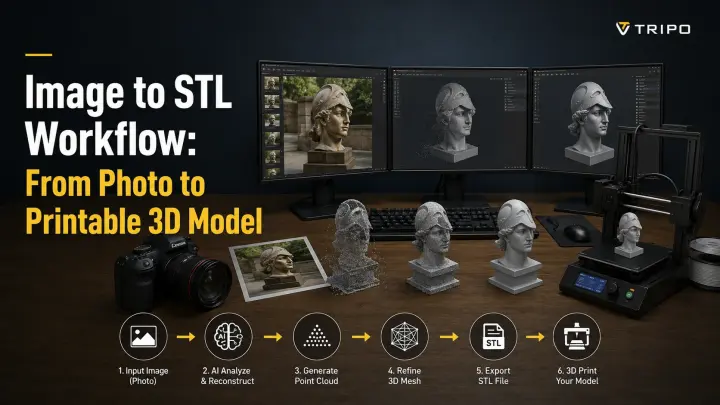
AI can help small teams create a usable 3D starting point from a concept image or short description.
Tripo AI Image to 3D can turn a concept image into a 3D model, while Tripo AI Text to 3D can generate a starting model from a prompt.
These tools are most useful when the visual direction is clear, but modeling capacity is limited. The result still needs review for style, scale, topology, materials, deformation, and game-engine performance.
AI 3D Character Generation: From Concept Art to a Rigged Game Character
For many indie teams, the biggest production bottleneck is the distance between concept art, modeling, topology cleanup, and rigging.
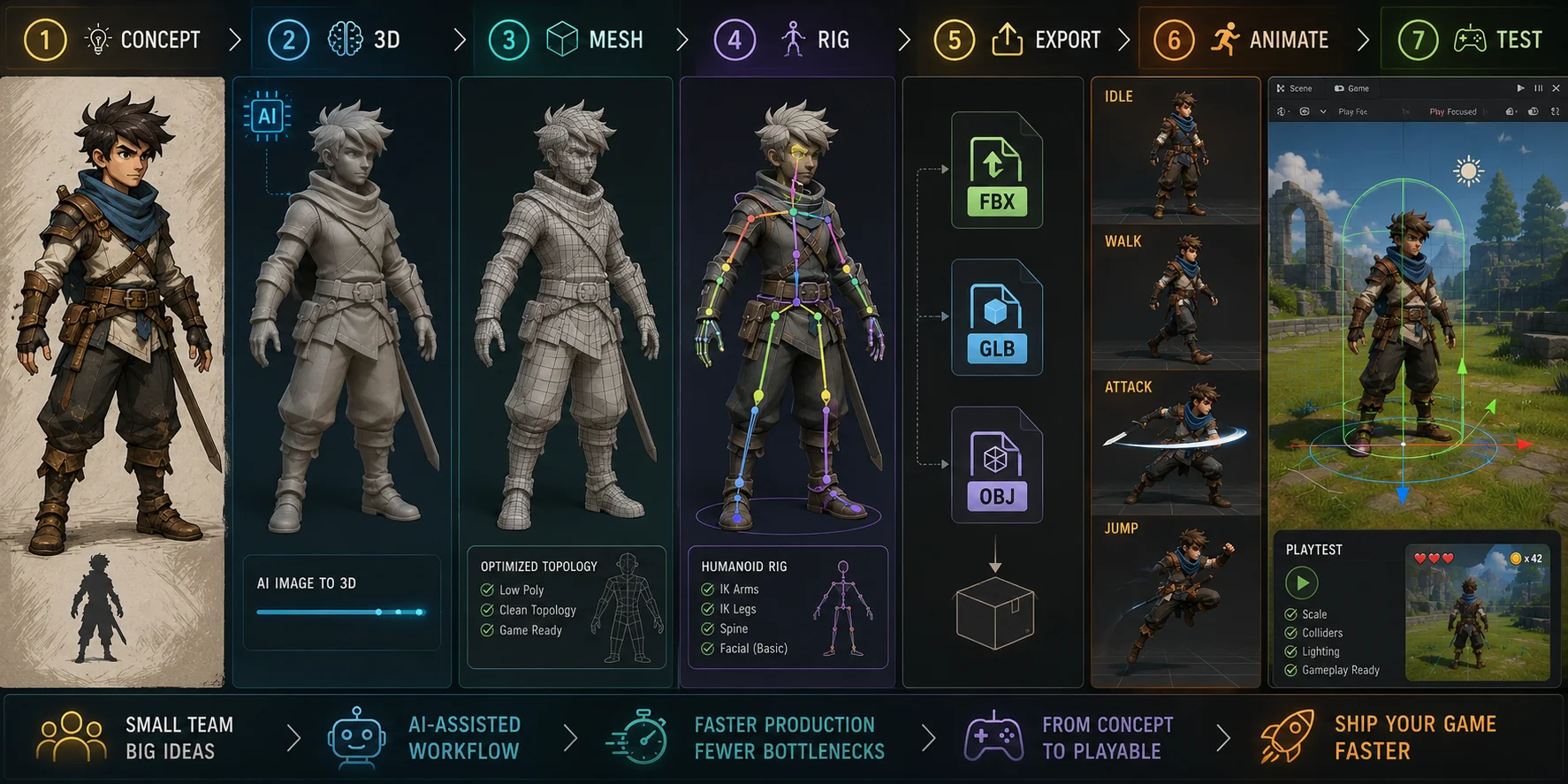
An AI-assisted workflow can shorten that path:
Concept art → image-to-3D → mesh optimization → rigging → export → animation → engine testing
Start with a clean concept image that has one clear character, readable proportions, limited background clutter, and a clear pose. Generate several versions, then choose the one with the cleanest silhouette and simplest usable structure rather than the one with the most decorative detail.
For real-time projects, topology matters as much as appearance.
Tripo AI Smart Mesh is designed to "automatically generate clean, optimized topology. It produces structured meshes, efficient polygon distribution, and outputs ready for real-time production pipelines."
Tripo describes the output as "Game-ready meshes generated in seconds." Smart Mesh uses approximately 5,000 polygons by default and is intended for game assets, real-time applications, and Web3D.
That does not remove review work. Check topology around elbows, knees, shoulders, hands, and facial areas; inspect silhouette quality, scale, materials, deformation, and runtime performance in the engine.
Rigging is often the next bottleneck. Tripo AI Auto-Rigging can generate skeletal bindings for uploaded GLB or OBJ models. Its supported scope is specific: "Auto Rig currently supports T-pose humanoid characters and standard standing quadruped animals only."
Winged creatures, hunched monsters, multi-legged characters, dynamic poses, and heavily asymmetrical designs may require additional preparation or manual rigging.
For supported assets, Tripo states: "Export to Any Workflow: FBX, GLB, or OBJ—your rigged model is ready for Blender, Maya, Unity, Unreal, or Mixamo." Auto Rig uses 20 credits, so it is more efficient to use after selecting a near-final character version.
This approach is useful for prototypes, stylized NPCs, early playable characters, and design variations. It does not replace art direction, animation review, or game QA; it reduces the time needed to reach those stages.
Examples of Great Indie Character Design
The Knight — Hollow Knight: The horns, mask-like face, and cloak form a readable silhouette even in dark environments. The lesson is to remove visual noise until the outline carries the identity.
Sans and Toriel — Undertale: Their designs are visually simple, but pose, expression, dialogue, and shape language communicate strong personalities. The lesson is that emotional clarity matters more than surface complexity.
Cuphead — Cuphead: Rounded forms, vintage colors, exaggerated limbs, and rubber-hose motion belong to one consistent visual system. The lesson is that style consistency can be more powerful than realism.
Zagreus — Hades: Strong contrast, sharp forms, recognizable hair, and confident pose language make him readable in detailed scenes. The lesson is to establish a visual anchor when backgrounds are busy.
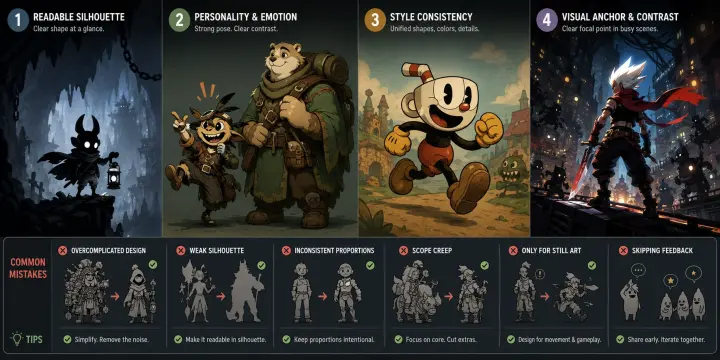
Common Mistakes and Tips
- Overcomplicating the design: Extra accessories and tiny details reduce readability and increase modeling, rigging, and animation cost; keep only what supports the role or personality.
- Ignoring silhouette: Test the character as a black shape at gameplay distance, not only as a close-up illustration.
- Inconsistent proportions: Use a basic turnaround before production to avoid mismatch across views and animations.
- Scope creep: Reuse body types, rigs, materials, and animation systems instead of creating every character from scratch.
- Designing only for still art: Characters must move, collide, and remain readable in the game engine.
- Skipping feedback: Use prototype screenshots and playtests to check whether players understand character roles quickly.
Frequently Asked Questions
What is the 70/30 rule in character design?
The 70/30 rule suggests making around 70% of a character familiar and readable, while using 30% for a distinctive twist. It helps avoid designs that feel either generic or confusing.
What are the 3 C's in game design?
The 3 C's usually mean Character, Camera, and Controls. Together, they define how the player experiences movement, viewpoint, and responsiveness.
Is Minecraft AAA or indie?
Minecraft began as an independent game but later grew under Microsoft into a scale beyond a typical indie project. It is best described as an indie-origin game.
How do I get into indie game design?
Start with small playable projects, learn one engine and one discipline at a time, join game jams, collect feedback, and finish short games before attempting a large commercial project.
Conclusion
Great indie characters come from strong principles plus a workflow you can actually finish. Strong silhouettes, focused colors, readable personality, and realistic production scope usually matter more than visual complexity.
When modeling and rigging bottleneck your pipeline, Tripo AI Studio converts concept art or text prompts into optimized real-time 3D meshes and pre-rigs standard humanoid and quadruped models for direct export to any engine or DCC tool.