AI Mesh Generation Explained: How Text & Images Become 3D Models
TL;DR
- A mesh is a 3D object's "skin": vertices, edges and faces (usually triangles) that define its shape.
- AI mesh generation turns a text prompt, a single image, or a few photos into that mesh automatically—no manual modeling.
- Under the hood: 3D reconstruction models, autoregressive "mesh-as-tokens" models (e.g. Meshtron, LLaMA-Mesh), and NeRF/Gaussian-splatting approaches solve it differently.
- Raw AI meshes often need cleanup (retopology) before they're game-ready or printable.
- Pick a tool by goal: speed and clean topology for games, max detail for printing/visuals.
AI mesh generation is the process of using artificial intelligence to build a 3D mesh—the network of vertices, edges and faces that defines an object's shape—from a simple input like a text description or a photo. Instead of modeling polygon by polygon, you describe or upload what you want, and an AI model generates the geometry in seconds. This guide explains how it works, the methods behind it, and how to use the output.
What Is a Mesh (and What Does "Mesh Generation" Mean)?
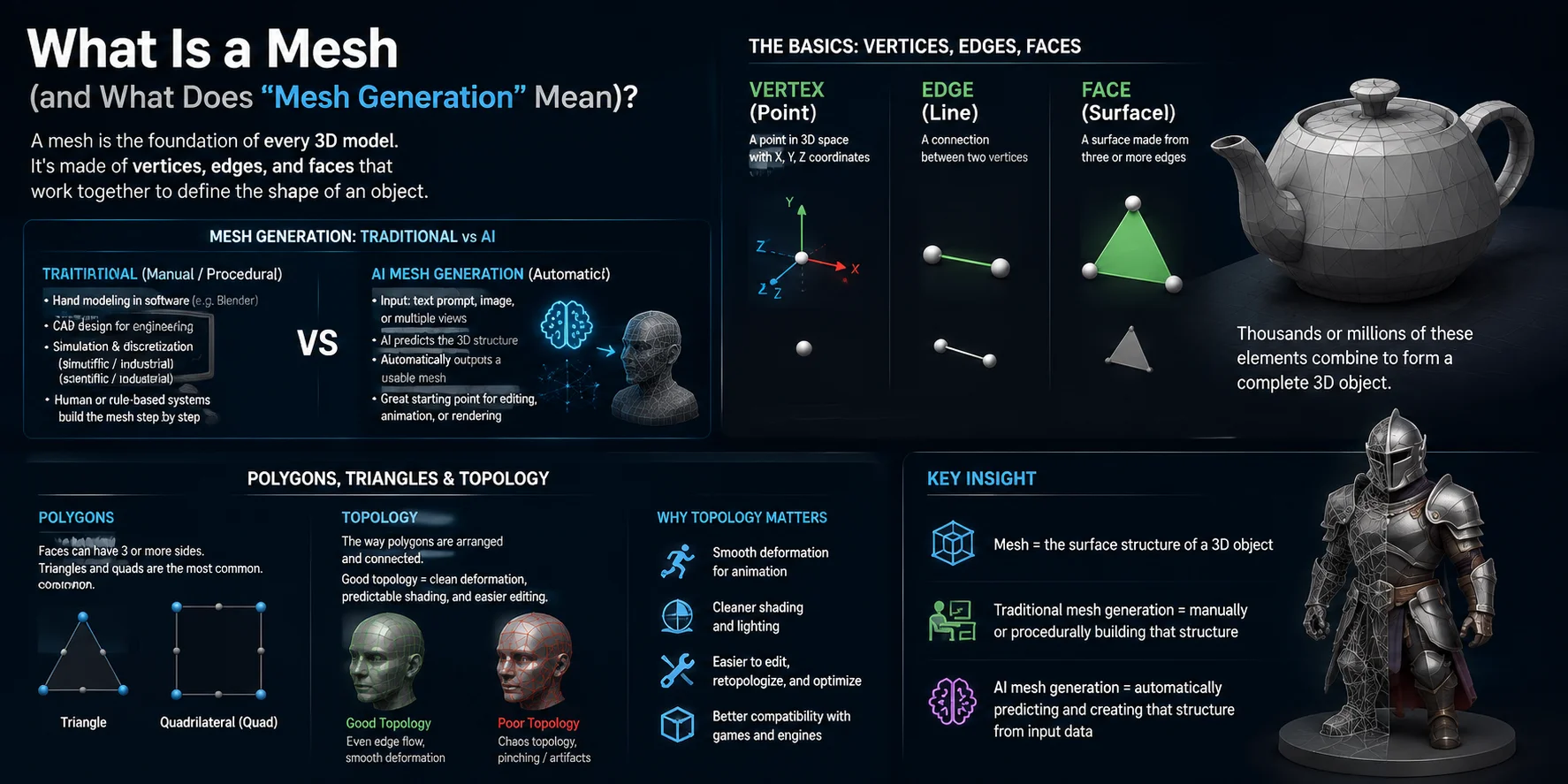
A mesh is the core structure of almost every 3D model. It is made up of vertices (points in space), edges (lines connecting points), and faces (flat surfaces formed by those edges). Most faces are built from triangles or quadrilaterals, and together they form the visible surface of a 3D object. Whether you see a character, a building, or a product model, you are essentially looking at a mesh wrapped in material and texture.
In traditional workflows, mesh generation refers to how this structure is created. This can happen through manual modeling in software like Blender, CAD design for engineering precision, or scientific simulation where surfaces are discretized into mesh elements. In all of these cases, a human or a predefined system explicitly defines the geometry step by step.
In modern AI workflows, however, AI mesh generation means something different: the system automatically predicts and constructs the full 3D structure from a text prompt, image, or multiple views. Instead of manually placing vertices, the model learns shape patterns and directly outputs a usable mesh as a starting point for editing, animation, or rendering.
Vertices, edges, faces — the basics
The simplest way to understand a mesh is to break it into its building blocks:
- Vertices: Individual points in 3D space with X, Y, and Z coordinates
- Edges: Connections between two vertices
- Faces: Surfaces formed by three or more connected edges
When thousands or millions of these elements are combined, they form a complete 3D object. For example, a character model might contain tens of thousands of vertices and even more triangular faces, all working together to define shape and detail.
Polygons, triangles & topology — why it matters
A polygon is any flat surface in a mesh, but in most real-time 3D workflows, polygons are usually broken down into triangles, because triangles are always mathematically stable for rendering.
Topology refers to how these polygons are arranged and connected. This structure is extremely important because it affects:
- How smoothly a model deforms during animation
- How cleanly light and shading behave on the surface
- How easy it is to edit, retopologize, or optimize the model
Good topology means predictable behavior in production pipelines. Bad topology can lead to shading errors, broken animations, or problems when exporting to engines like Unity or Unreal Engine.
Key insight
In simple terms:
- Mesh = the surface structure of a 3D object
- Traditional mesh generation = manually or procedurally building that structure
- AI mesh generation = automatically predicting and creating that structure from input data
Understanding this distinction is essential because it explains what AI actually produces: not a finished model, but a geometry foundation that still needs refinement for production use.
How AI Mesh Generation Works (Step by Step)
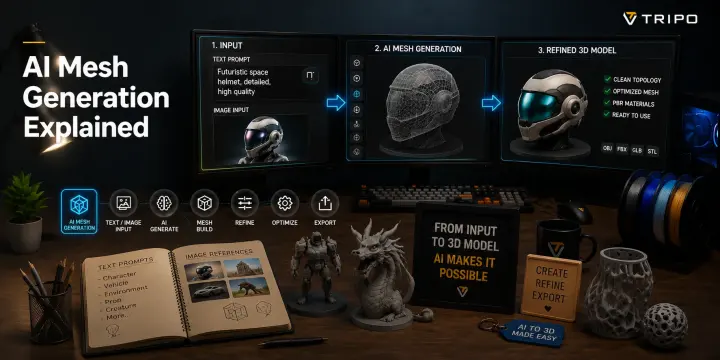
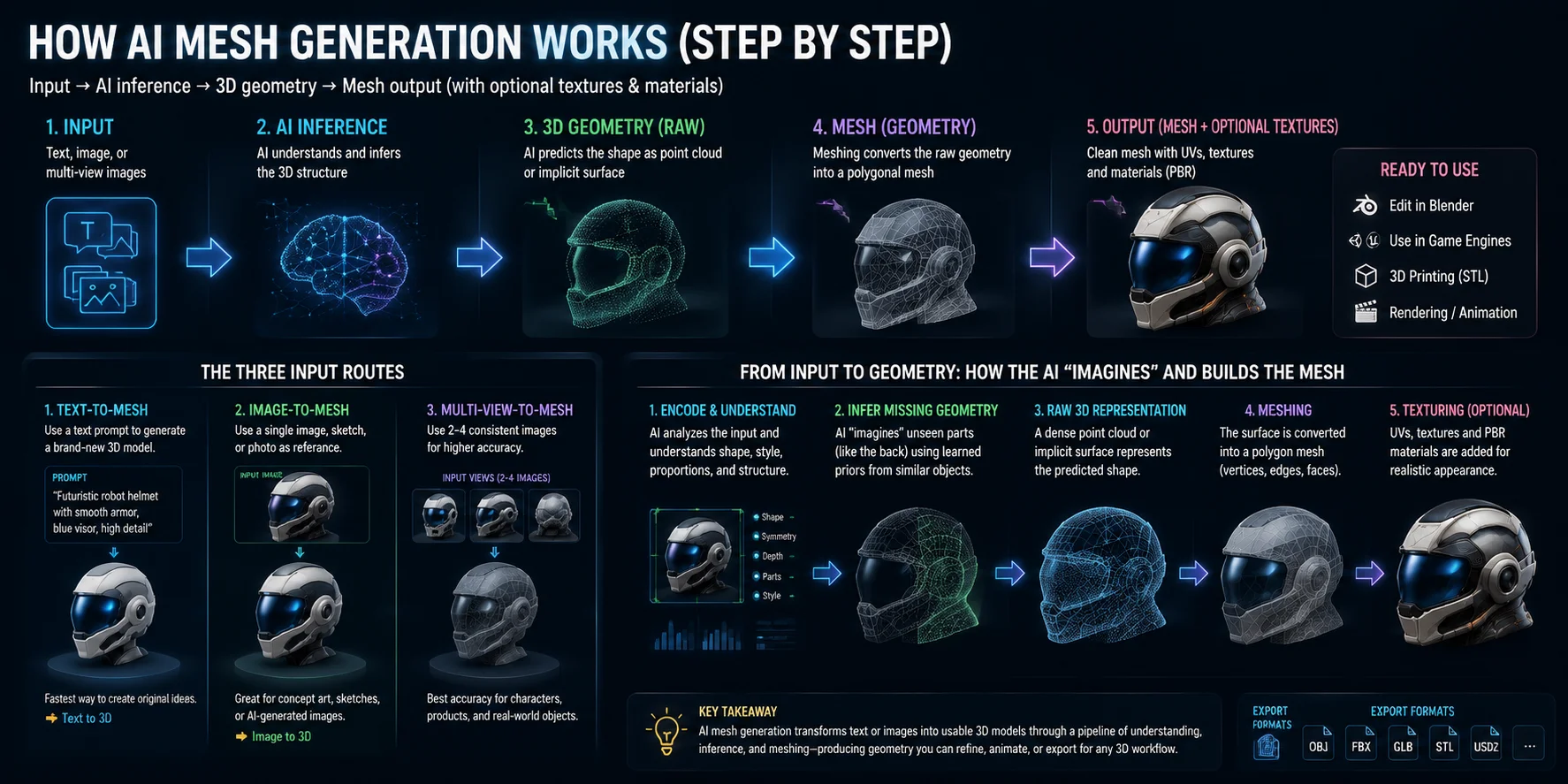
AI mesh generation follows a simple but powerful pipeline: input → AI inference → 3D geometry → mesh output (often with optional textures and materials). Instead of manually constructing vertices and faces, the system learns patterns from large datasets of 3D objects and predicts a plausible shape from user input. The result is a usable mesh that can be refined, rigged, or exported into tools like Blender, Unity, or 3D printing workflows.
The three input routes
AI can generate meshes from several different types of input. Each route trades speed, control, and accuracy.
- Text-to-mesh A text prompt such as “futuristic robot helmet with smooth armor” is converted directly into a 3D structure. The AI interprets semantic meaning (shape, style, material hints) and generates geometry from scratch. This is the fastest method and is often used for concept generation.
- Image-to-mesh A single image, sketch, or rendered photo provides a visual reference. The system estimates depth, structure, and proportions, while inferring unseen areas such as the back or underside.
- Multi-view-to-mesh Two to four consistent images from different angles provide more geometric constraints than a single view. This can improve coverage and reduce ambiguity around unseen surfaces, but the result still needs topology, scale, and use-case validation before production.
From input to geometry
Once input is provided, the AI performs a multi-stage reconstruction process.
After reading the input, the system builds an internal representation of likely shape, including cues such as silhouette, symmetry, depth, and material hints. It also has to infer unseen areas, such as the back of an object, from patterns learned during training.
The next representation depends on the model family. Some systems predict a mesh directly; others produce an implicit field or point-based representation first, while autoregressive systems can emit mesh tokens sequentially. When a mesh is produced, its vertices, edges, and faces can then be edited or exported.
Depending on the tool and workflow, later stages may add UV maps, textures, or PBR materials. The output is a starting asset that can be cleaned, optimized, and exported for the intended use.
The Methods Behind It (Without the Math)
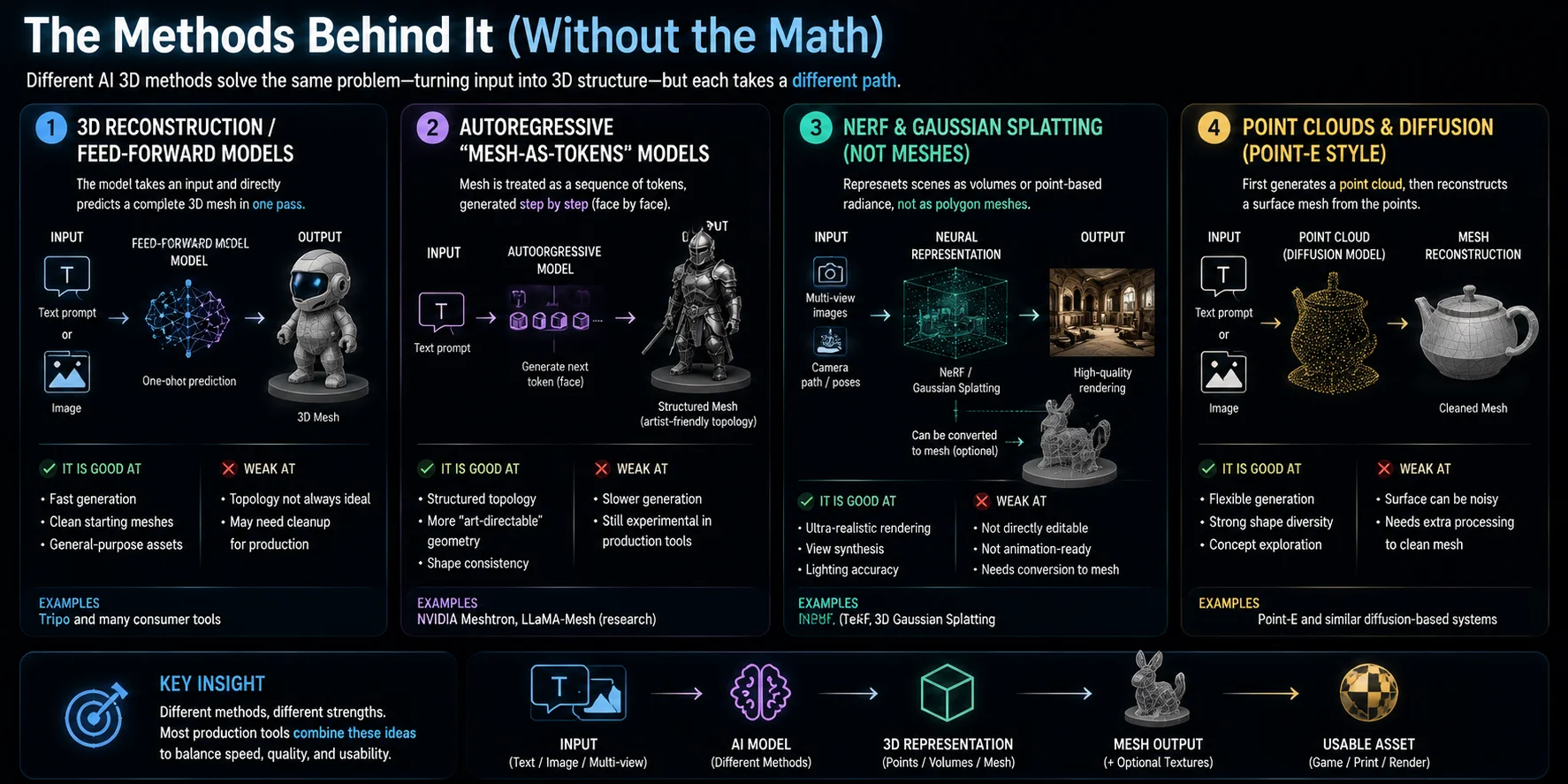
AI 3D generation is not a single technology—it is a collection of different methods that all try to solve the same problem: turning input (text, images, or data) into usable 3D structure. Each approach has its own strengths, weaknesses, and ideal use cases. Understanding them helps explain why different tools produce different kinds of models.
3D reconstruction / feed-forward models
Some modern 3D systems use feed-forward reconstruction: they process the input through a fixed inference pipeline and predict a 3D representation without per-object optimization. The exact architecture of commercial tools is often not public, and the final output may be a direct mesh or a representation that is converted into one.
- It is good at: fast inference and practical asset generation
- Examples: many consumer-facing image-to-3D services use fast reconstruction pipelines, although their internal architectures vary
- Weakness: topology is often not perfect and may need cleanup for production
Autoregressive “mesh-as-tokens” models
This method treats a 3D mesh like a sequence of tokens, similar to how language models generate text word by word. Instead of generating the whole shape at once, the model builds geometry step by step, face by face or block by block.
- Key characteristic: geometry is represented and generated as a sequence, enabling language-model-style training on mesh data
- Examples: research systems like NVIDIA Meshtron and LLaMA-Mesh
- Tradeoff: sequential generation can be computationally demanding, and output quality depends on the model, training data, and mesh representation
NeRF & Gaussian Splatting (and how they differ from meshes)
Neural Radiance Fields (NeRF) and 3D Gaussian Splatting are not polygon meshes. NeRF represents a scene through a learned function for color and density, while Gaussian Splatting uses a collection of optimized 3D Gaussian primitives for rendering.
- NeRF stores a learned function that predicts color and density in space
- Gaussian Splatting represents scenes as many small 3D “blobs” optimized for rendering
- They are good at: ultra-realistic view synthesis, lighting accuracy, smooth visual quality
- Weakness: not directly editable or animation-ready, and usually require conversion to mesh for games or printing
In short: they render beautifully, but they are not “true meshes” until converted.
Point clouds & diffusion (Point-E style methods)
This approach first generates a point cloud—a loose set of 3D points in space—and then reconstructs a surface mesh from those points.
- It is good at: flexible generation, strong diversity of shapes, simple conceptual modeling
- Examples: Point-E and similar diffusion-based systems
- Weakness: surface quality can be noisy, and mesh reconstruction may require additional processing
This method is often used as a bridge between raw generative output and structured 3D geometry.
AI Mesh Generation vs Traditional 3D Modeling
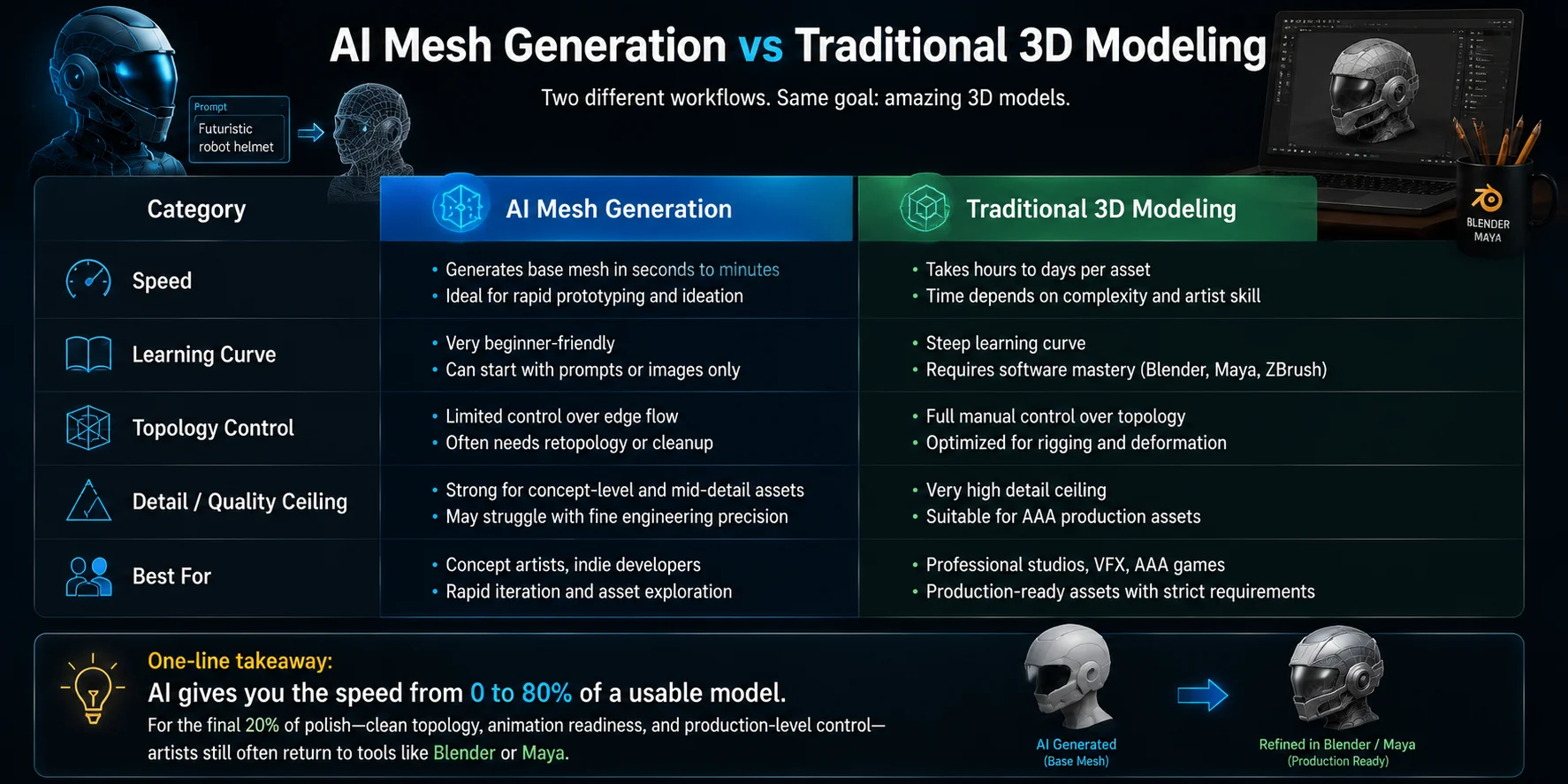
Below is a clear, scan-friendly comparison of AI mesh generation and traditional 3D modeling, focusing on practical production differences.
📊 Comparison Table
| Category | AI Mesh Generation | Traditional 3D Modeling |
|---|---|---|
| Speed | Generates a base mesh in seconds to minutes; ideal for rapid prototyping and ideation | Takes hours to days per asset; depends on complexity and artist skill |
| Learning Curve | Very beginner-friendly; can start with prompts or images only | Steep learning curve; requires Blender, Maya, or ZBrush mastery |
| Topology Control | Limited control over edge flow; often needs retopology or cleanup | Full manual control; optimized for rigging and deformation |
| Detail / Quality Ceiling | Strong for concept-level and mid-detail assets; may struggle with engineering precision | Very high detail ceiling; suitable for AAA production assets |
| Best For | Concept artists, indie developers, rapid iteration, and asset exploration | Professional studios, VFX, AAA games, and production assets with strict requirements |
AI mesh generation is strongest at accelerating ideation and producing a workable starting point. Traditional modeling still provides the precise topology, deformation control, measurements, and final polish required for demanding production assets.
Cleaning Up an AI-Generated Mesh (Retopology & Repair)
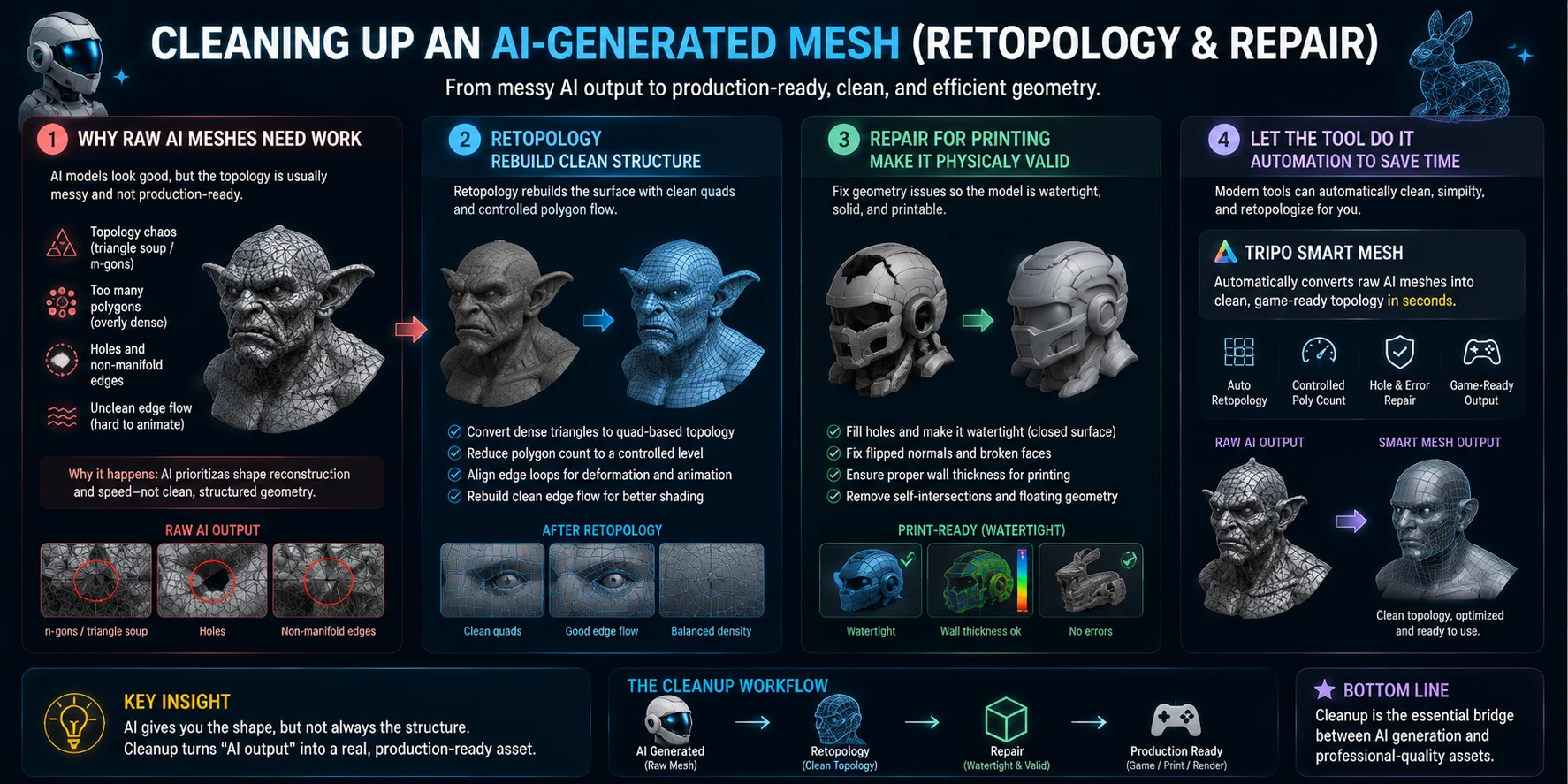
AI-generated meshes often look impressive at first glance, but in production they usually require cleanup. The raw output is optimized for “appearance,” not for animation, simulation, or manufacturing—so the next step is turning that messy geometry into something usable.
Why raw AI meshes need work
Most AI-generated meshes suffer from predictable issues:
- Topology chaos (triangle soup / n-gons) → faces are unevenly distributed
- Too many polygons → heavy, slow assets that are hard to animate
- Non-manifold geometry & holes → broken surfaces that fail in engines or slicers
- Unclean edge flow → deformation problems during rigging
This happens because AI prioritizes reconstructing shape quickly, not building clean, structured geometry. The result is a visually correct model that is technically messy underneath.
Retopology — rebuilding clean structure
Retopology is the process of rebuilding a clean mesh over the AI-generated one.
In practice, artists:
- Convert dense triangle meshes into quad-based topology
- Reduce polygon count to a controlled level
- Align edge loops for deformation (especially for characters)
- Rebuild surface flow for animation or sculpting
This step is essential for anything that needs rigging, animation, or high-quality shading. Without it, even a good-looking AI model can behave unpredictably in production.
Repair for printing — making it physically valid
For 3D printing, topology is less about animation and more about structural correctness.
Common fixes include:
- Filling holes to make the model watertight (closed surface)
- Fixing flipped normals and broken faces
- Ensuring wall thickness is sufficient for printing
- Removing self-intersections or floating geometry
A model that looks fine on screen may still fail in a slicer if it is not watertight or structurally solid.
Let the tool do it — automation is improving fast
Modern tools are increasingly automating cleanup workflows.
Some AI 3D platforms now include:
- Automatic mesh simplification
- Smart remeshing into cleaner topology
- One-click repair for holes and non-manifold edges
- Export-ready “game-ready” mesh generation
For example, workflows like Tripo Smart Mesh aim to convert raw AI output into cleaner, production-ready geometry with controlled complexity. Instead of manually fixing every issue, the system generates a more usable base mesh directly.
Key insight
AI gives you the shape, but not always the structure.
- Raw mesh → fast but messy
- Retopology → clean and animation-ready
- Repair → printable and structurally valid
- Smart tools → increasingly automate the gap between generation and production
In real pipelines, cleanup is not optional—it is the step that turns “AI output” into a real asset.
Is an AI Mesh Ready to Use? (Games, Print, AR/VR)
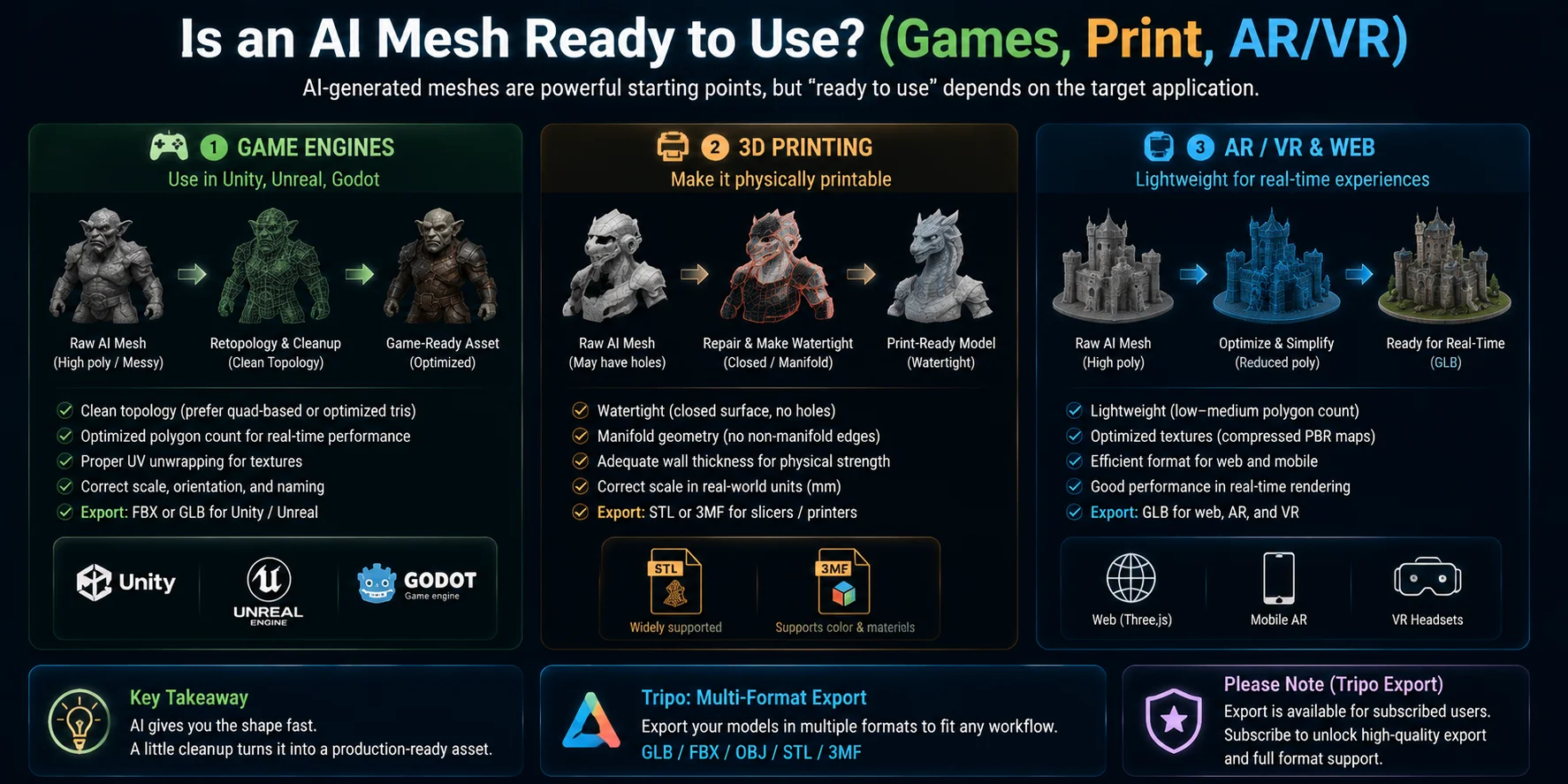
AI-generated meshes are increasingly usable across production pipelines, but “ready to use” depends heavily on the target application. In most cases, the raw output from AI still requires at least light cleanup, format conversion, or optimization before it can be safely deployed in games, printing, or real-time environments.
Game engines — game-ready requirements
For Unity, Unreal Engine, or Godot, an AI mesh is only “ready” if it meets several technical conditions:
- Clean topology (preferably quad-based or optimized triangles)
- Reasonable polygon count for real-time rendering
- Proper UV unwrapping for textures
- Correct scale and orientation
Most AI-generated models are usable after a quick pass of retopology or auto-clean tools, but they are rarely production-ready straight out of generation. Export formats like FBX or GLB are typically used to bring assets into engines.
Modern tools (including platforms like Tripo with multi-format export pipelines) help bridge this gap, but a validation step in Blender or the engine itself is still standard practice.
3D printing — watertight is mandatory
For 3D printing, requirements are stricter than for games.
A model must be:
- Watertight (closed surface, no holes)
- Free of non-manifold geometry
- Structurally thick enough for physical printing
- Properly scaled in real-world units
AI meshes often fail these checks initially, especially with thin structures or internal gaps. That is why users typically export to STL or 3MF, then repair the mesh using slicers or modeling tools before printing.
In practice, AI provides the shape, but repair ensures it becomes physically manufacturable.
AR/VR & web — performance matters most
For AR/VR and web applications, the key constraint is performance rather than perfect geometry.
A usable AI mesh should be:
- Lightweight (low to medium polygon count)
- Optimized textures (compressed PBR maps)
- Exported in efficient formats like GLB
Even if topology is not perfect, many real-time systems can tolerate minor imperfections as long as rendering remains fast and stable.
This makes AI-generated assets especially useful for prototyping AR/VR experiences or building early-stage interactive scenes.
Which AI Mesh Generator Should You Use?
There is no single “best” AI mesh generator. The right choice depends on your goal, budget, and integration needs. Instead of comparing brand-by-brand, it is more useful to choose based on workflow type.
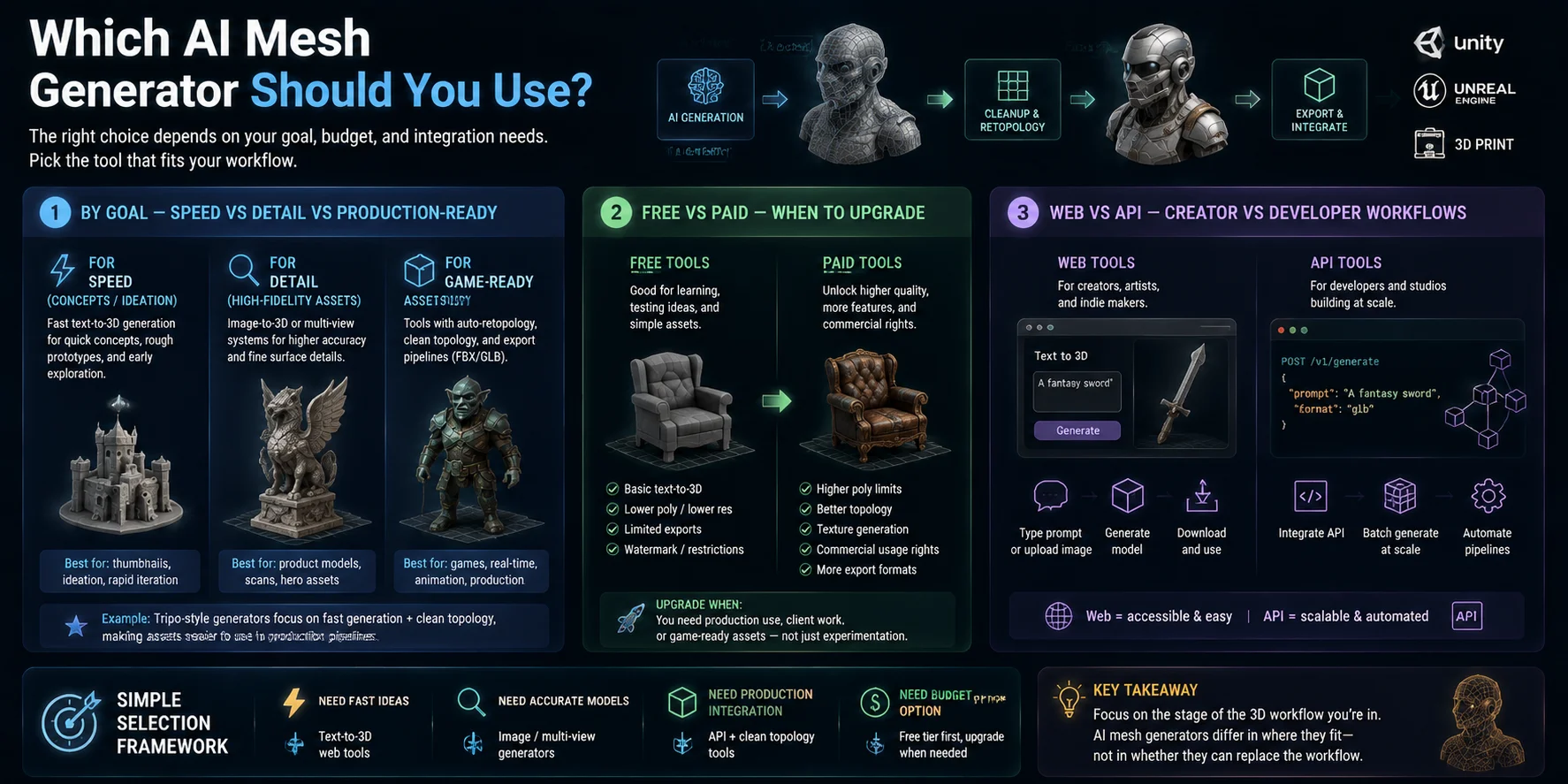
By goal — speed vs detail vs production-ready
Different tools optimize for different outcomes:
- For speed (concepts / ideation) → choose tools that prioritize fast text-to-3D generation. These are best for thumbnails, rough prototypes, or early design exploration.
- For detail (high-fidelity assets) → use image-to-3D or multi-view systems that focus on reconstruction accuracy and surface detail.
- For game-ready assets → look for tools that support controlled polygon counts, cleaner topology, UV workflows, and practical FBX or GLB export. Validate the result in the target engine before production.
Free vs paid — when to upgrade
- Free vs paid: free tiers are useful for learning and tests; paid plans may add more generations, export options, storage, higher-detail outputs, or commercial-use permissions. Features and licenses vary by provider, so check the current plan before upgrading.
Web vs API — creator vs developer workflows
- Web vs API: web tools suit interactive creation and manual downloads; APIs are useful when a team needs batch generation, automation, or integration with a product pipeline.
Limitations & What's Next
AI 3D generation is improving quickly, but it still has clear boundaries that matter in real production workflows. Understanding both the limitations and future direction helps set realistic expectations for how far the technology can go today.
Current limitations — where AI still struggles
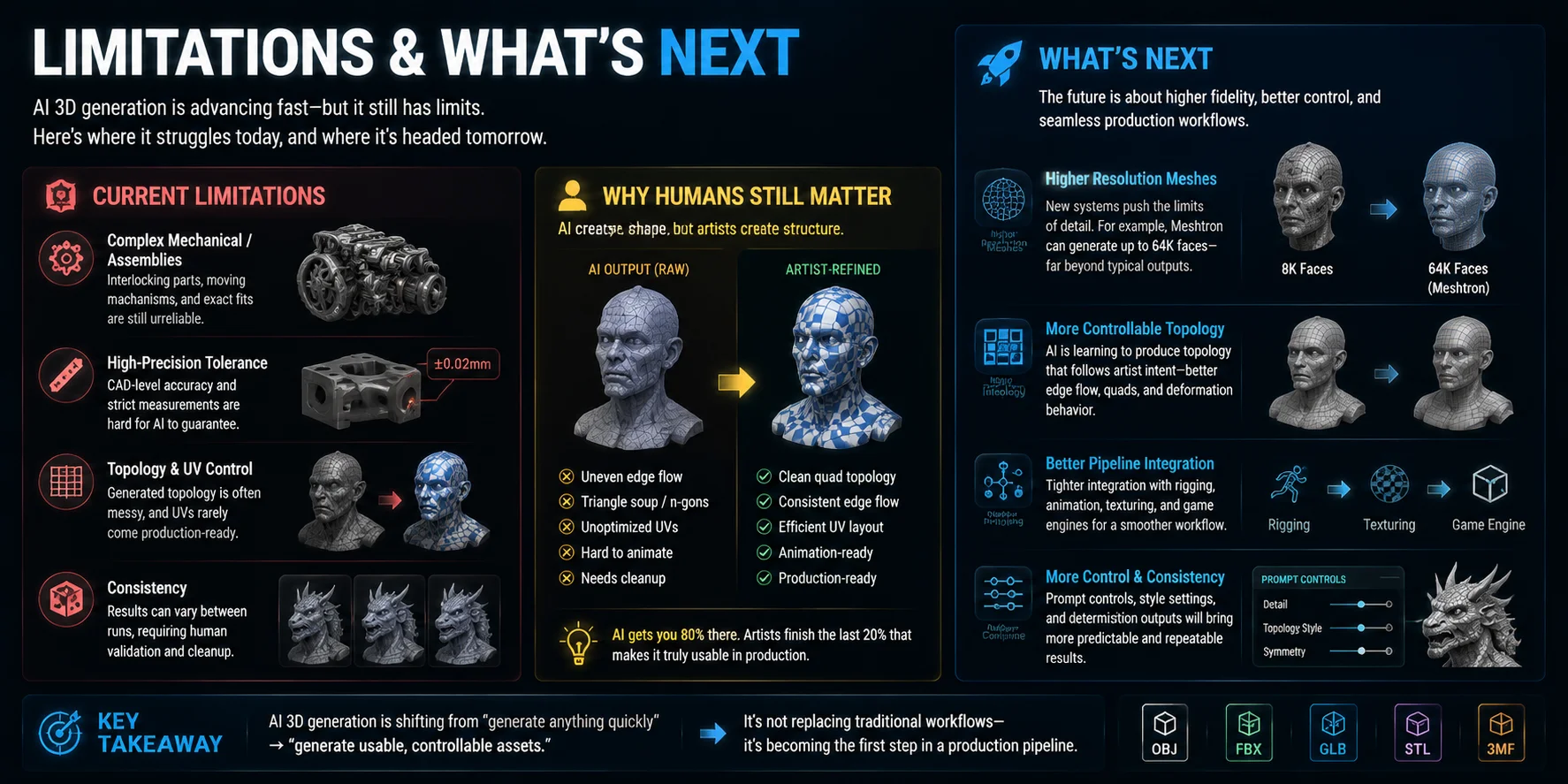
Even modern AI mesh generation cannot fully replace traditional modeling in some areas:
- Complex mechanical assemblies → precise tolerances and interlocking parts are still unreliable
- High-precision engineering models → AI struggles with exact measurements required for CAD-level accuracy
- Topology and UV control → outputs often need manual cleanup for animation or rendering pipelines
- Production consistency → results can vary between runs, requiring human validation
In practice, AI is excellent for generating a strong starting mesh, but it is not always production-ready without refinement.
Why topology and UV still need humans
One of the biggest remaining gaps is structural control.
AI can generate shape, but:
- Edge flow is often inconsistent
- UV layouts are rarely optimized for production textures
- Animation-ready deformation still requires manual correction
This is why artists still play a critical role: they turn “good-looking geometry” into “usable assets.”
Where things are going — higher fidelity and control
The next stage of AI 3D generation is not just about faster outputs, but better structured geometry.
Key trends include:
- Higher resolution meshes (for example, systems exploring 64K+ face outputs like Meshtron-style approaches)
- More controllable topology generation that behaves closer to artist-designed edge flow
- Better integration with rigging, animation, and game pipelines
- Stronger consistency across multiple generations
Instead of random topology, future systems are moving toward predictable, production-aware structure.
🧠 Key insight
AI 3D generation is shifting from:
“generate anything quickly” → “generate usable, controllable assets”
It is not replacing traditional workflows yet—it is gradually becoming the first step in a production pipeline, where humans still refine, direct, and finalize the result.
Frequently Asked Questions
What is AI mesh generation used for?
AI mesh generation creates a base 3D asset from text, images, or multiple reference views. It is useful for rapid ideation, prototypes, props, and early asset exploration; games, web experiences, and 3D printing workflows usually require follow-up checks such as topology cleanup, optimization, or watertight repair.
What is the difference between a 3D model and a mesh?
A 3D model is the broader asset and can include a mesh, materials, textures, rigging, animation, and scene data. A mesh is its geometric surface: vertices, edges, and faces that define the shape.
Can AI generate 3D models from just text?
Yes. In text-to-3D generation, a prompt describes the object and the system predicts a 3D representation, sometimes with textures or materials. The result is useful for concepts and starting assets, but it may still need topology, scale, or geometry cleanup for games, animation, or printing.
Are AI-generated meshes good enough for 3D printing?
Sometimes, especially for simple decorative objects, but not by default. Before printing, check that the mesh is watertight, free of non-manifold errors, thick enough for the process, and scaled correctly; functional or precision parts often need manual repair or redesign.
Can I use AI-generated meshes in video games?
Yes, particularly for prototypes, props, and early production. Before shipping, validate polygon count, UVs, scale, materials, topology, and deformation, then export in a format supported by the target engine, such as FBX or GLB.
What's the difference between a NeRF and a mesh?
A mesh stores explicit geometry as vertices, edges, and faces, so it can be edited, rigged, textured, and exported. A NeRF is a learned radiance-field representation used to synthesize views; it is not directly a polygon mesh and generally needs a geometry-extraction step for mesh-based games or printing.
Is there a free AI 3D mesh generator?
Yes. Many AI 3D services offer free credits or limited tiers for learning and experimentation. Generation limits, export formats, model quality, storage, and commercial-use terms vary, so check the current plan and license before using an asset in paid work.
Conclusion
AI mesh generation turns text or images into a useful 3D starting point for concept design, games, visualization, and printing. The best results come from matching the generation method to the goal and validating topology, scale, and geometry before production use.
Ready to try it yourself? Generate your first model from a text prompt or image and see how far AI can already take 3D creation. For a smoother workflow and fast results, you can start with a tool like Tripo AI Studio.