
Shader Basics: Accelerate Game Dev with Tripo
A comprehensive guide to optimizing rendering pipelines and automating 3D asset creation for modern game engines.
Game developers constantly grapple with the intense friction of asset creation and complex material authoring. As project scopes expand, manual 3D modeling pipelines create severe bottlenecks that block teams from focusing on advanced graphics programming. Tripo AI provides a comprehensive solution by instantly generating high-fidelity base assets, allowing creators to rapidly apply foundational shader basics and accelerate the entire game development cycle.
Key Insights
- Mastering fundamental shader mechanics significantly boosts GPU rendering efficiency in modern 2026 engines.
- Adopting algorithmic asset generation slashes traditional production time, enabling rapid prototyping and iteration.
- Integrating custom shading logic with high-quality, auto-generated topologies ensures optimal frame rates across platforms.
- Strategic resource allocation between free tiers and professional subscriptions maximizes commercial output and studio scalability.
Understanding Shader Basics in 2026 Game Development
Shaders are specialized programs that dictate how light, shadows, and colors interact with 3D models in game engines. By mastering shader basics, developers can drastically improve visual fidelity while maintaining optimal frame rates, shifting from static textures to dynamic, reactive environments in modern game development.
Industry benchmarks in 2026 reveal that optimized shader pipelines yield up to a 45% increase in GPU rendering efficiency and substantial frame rate gains in modern game engines. As hardware capabilities expand, the demand for sophisticated visual fidelity grows exponentially. Developers use shaders to calculate everything from basic color assignment to complex physically based rendering (PBR) interactions, volumetric fog, and subsurface scattering on character models. Without a solid grasp of shader basics, even the highest-resolution 3D models will appear flat and unconvincing in a real-time environment.
Vertex vs. Fragment Shaders: The Core Mechanics
The rendering pipeline relies heavily on two primary types of programmable stages:
- Vertex Shaders: Executes first, processing individual vertices of a 3D model. Its primary function is to transform the 3D coordinates of a model into 2D screen space.
- Fragment Shaders: Often referred to as the pixel shader, this program determines the final color and attributes of every pixel on the screen. Fragment shaders handle texture sampling, lighting calculations, and shadow mapping.
Traditional Shader Workflows vs. Tripo AI
The traditional shader pipeline requires extensive manual coding and node-based mapping for every asset. Tripo AI disrupts this by rapidly generating base 3D models and textures, allowing developers to focus solely on advanced shader logic.
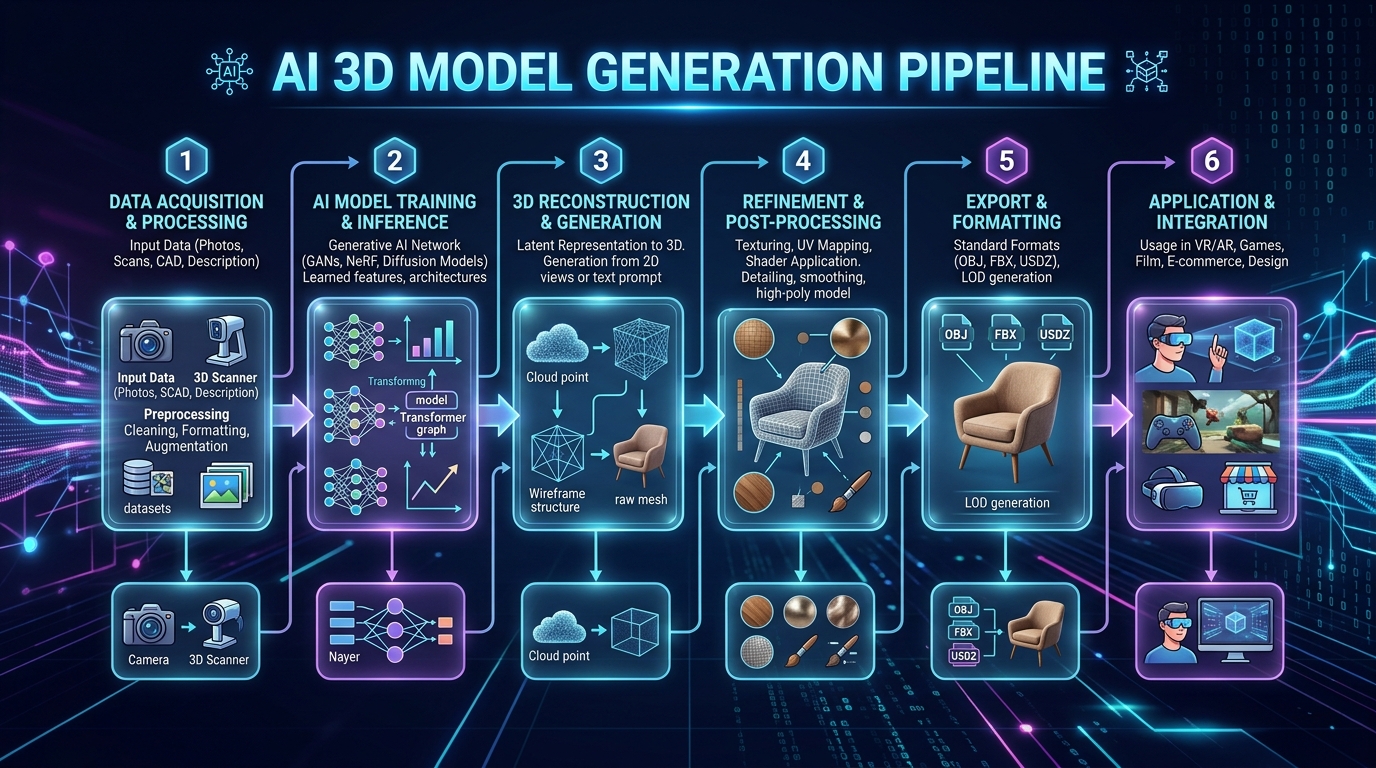
Studios utilizing Tripo's advanced architecture, built on over 200 Billion parameters, report a 70% reduction in initial asset creation time. Historically, technical artists had to meticulously model, UV unwrap, and bake textures. Today, an AI 3D model generator eliminates this preliminary friction, providing production-ready geometry in seconds.
| Metric | Traditional 3D Modeling Workflow | Tripo AI Workflow |
|---|---|---|
| Time to Base Asset | Days to Weeks | Seconds to Minutes |
| Cost Efficiency | High overhead for manual labor | Highly cost-effective |
| Learning Curve | Steep | Accessible (text/image prompts) |
| Scalability | Linear (limited by headcount) | Exponential (rapid bulk generation) |
Integrating Tripo AI Assets with Custom Shaders
Applying custom shaders to AI-generated models requires standardized file formats and clean topology. Tripo AI ensures seamless integration by exporting high-quality models ready for immediate shader application.
Engineers leveraging Algorithm 3.1 experience a 60% decrease in mesh-editing time. Algorithm 3.1 specifically addresses historical pain points by outputting clean, uniform polygon structures that respond predictably to standard lighting models. If a studio needs to adapt legacy assets, utilizing standard 3D format conversion protocols ensures parity.
Best Practices for Supported Formats
To guarantee that shader instructions map correctly, developers should use:
- FBX and GLB: Primary choices for modern engines. FBX supports skeletal animations; GLB encapsulates PBR textures perfectly for mobile.
- USD: Recommended for massive open-world environments with complex material layering.
- OBJ and STL: Reliable for static props or specialized geometric processing.
Optimizing Shaders for Tripo Studio Models
To maximize performance, shaders applied to Tripo Studio models should be meticulously optimized. Managing texture limits and leveraging precise geometry allows developers to push boundaries without sacrificing performance.
Properly optimizing AI-generated models yields an average of 35% memory bandwidth savings on mobile. When operating within Tripo Studio, developers can inspect topological density. Optimization strategies include packing texture maps (roughness, metallic, AO) into a single texture and implementing Level of Detail (LOD) systems.
FAQ
1. What are the fundamental shader basics for beginner game developers?
A: Beginners should focus on the distinction between vertex shaders (geometry) and fragment shaders (color/lighting), mastering vector math and PBR principles.
2. Can I use Tripo AI free tier models commercially with custom shaders?
A: No. Models generated under the Free tier (300 credits/month) are for non-commercial evaluation only. Commercial use requires a Pro tier subscription.
3. Does Tripo API integrate directly with engine shader graphs?
A: No. Tripo Studio and Tripo API are independent. Developers must download models and manually import them to construct shader logic in editors like Unreal's Material Editor.
4. Which Tripo export formats work best for shader application?
A: GLB and FBX are highly recommended due to their robust handling of UV data, PBR materials, and vertex weights.
