Comprehensive Guide to Removing Baked Lighting and Shadows When Using Image to 3D AI for Game Assets
Professional Workflows for PBR Texture Optimization and Real-Time Engine Integration
The integration of generative artificial intelligence into game development pipelines has dramatically accelerated asset creation, yet developers frequently encounter the challenge of baked-in illumination on generated textures. Removing baked lighting and shadows when using image to 3D AI for game assets is critical for ensuring that models react dynamically and realistically to in-engine real-time lighting systems. By leveraging advanced platforms like the AI 3D Model Generator, which utilizes Algorithm 3.1 and over 200 billion parameters, developers can systematically extract true albedo values and generate physically based rendering (PBR) materials. This guide explores the technical workflows required to eliminate baked shadows and achieve engine-ready 3D geometry.
Key Insights:
- Obtaining pure albedo textures requires neutralizing input images and leveraging advanced PBR generation algorithms to separate diffuse colors from illumination data.
- Removing baked lighting and shadows when using Image to 3D Model conversion for game assets relies heavily on the capabilities of Algorithm 3.1, powered by over 200 billion parameters, to intelligently process material properties.
- AI 3D Editor features like Magic Brush enable targeted texture repainting, allowing developers to manually correct areas where shadows or highlights were incorrectly baked into the mesh.
- Proper commercial deployment of these assets requires understanding the platform's independent product lines; for example, the Tripo API and Tripo Studio operate entirely separately.
- Generating true PBR maps (metallic, roughness, normal) is the definitive method for ensuring a model relies on engine lighting rather than baked 2D shadows.
The Technical Hurdle of Baked Lighting in Asset Generation
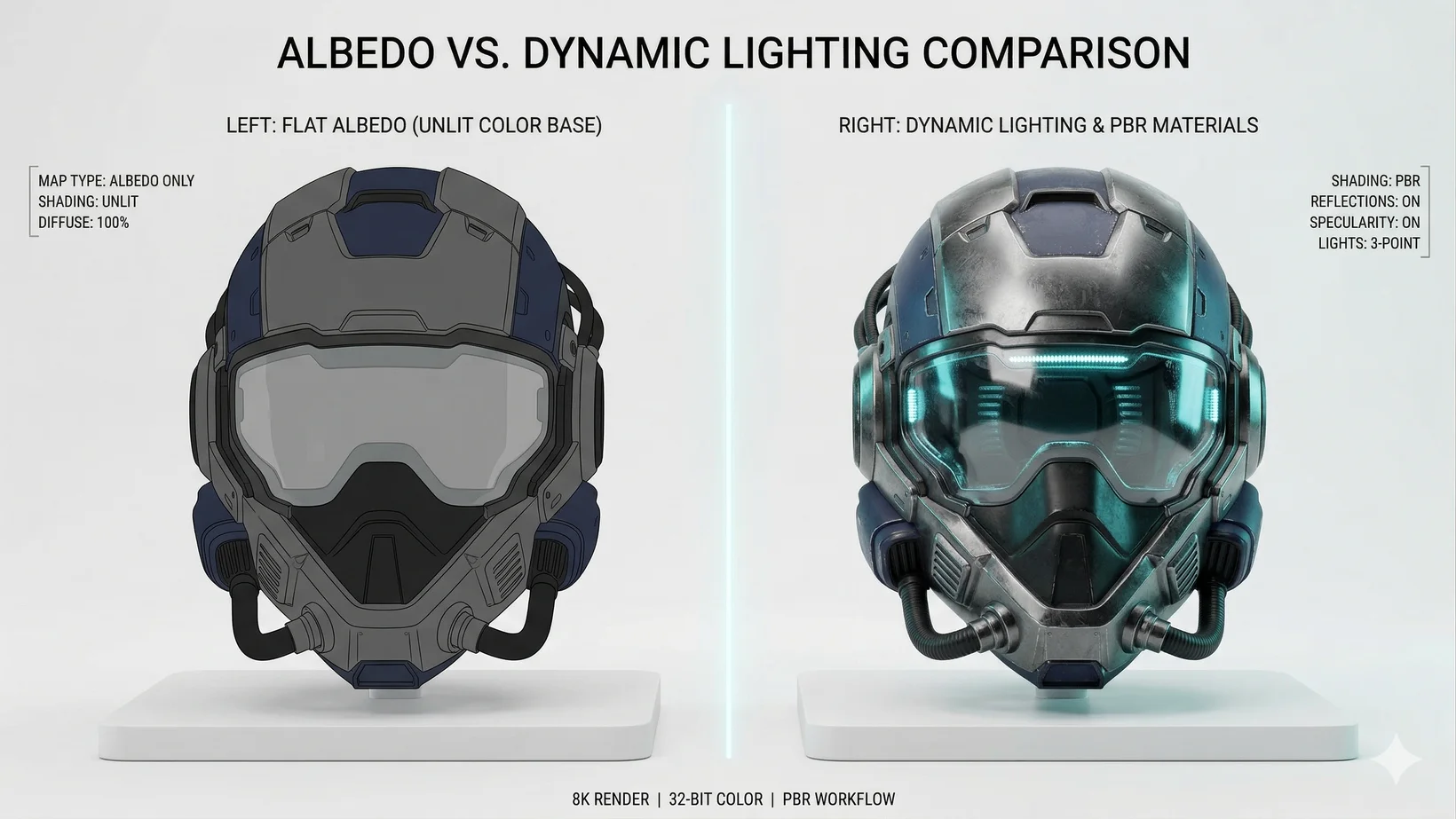
Baked lighting occurs when the shadows, highlights, and ambient occlusion from a 2D reference image are permanently rendered into the diffuse texture map of a 3D model, preventing the asset from reacting realistically to dynamic in-game environments. Removing baked lighting and shadows when using image to 3D AI for game assets requires specific pre-processing and post-generation techniques to separate the pure material color (albedo) from the directional light information captured in the source image.
In traditional 3D asset creation, artists author unlit albedo textures and rely on the game engine's shader systems to apply lighting mathematically based on the environment. However, when utilizing image-to-3D conversion tools, the neural networks often interpret the shadows and highlights present in the 2D reference photograph as actual color values on the object's surface. Consequently, if a model with baked shadows is placed into a game engine like Unreal Engine or Unity, it will display conflicting lighting cues—its baked shadows will clash with the dynamic shadows cast by the engine's light sources.
To achieve high-fidelity interactive entertainment, assets must be completely devoid of baked illumination. Removing baked lighting and shadows when using image to 3D AI for game assets is therefore a foundational requirement for any professional studio pipeline in 2026. The process involves multiple stages, beginning with the careful curation of the input image and culminating in the generation of separate, physically accurate texture maps.
Pre-Generation Optimization
The most effective strategy for removing baked lighting and shadows when using image to 3D AI for game assets begins before the generation process even starts; it involves preparing 2D reference images with perfectly flat, neutral lighting and utilizing strict prompt engineering to instruct the AI to ignore environmental illumination.
Success in generating clean, unlit textures starts at the source. When supplying an image to the AI generator, the reference must ideally feature a neutral studio lighting setup. Furthermore, modern platforms allow for text prompts to guide the image-to-3D conversion. Utilizing specific negative prompts—such as excluding terms like "directional light," "drop shadow," or "specular highlight"—signals to the model that the output should represent pure material colors.
Leveraging Algorithm 3.1 for PBR Assets
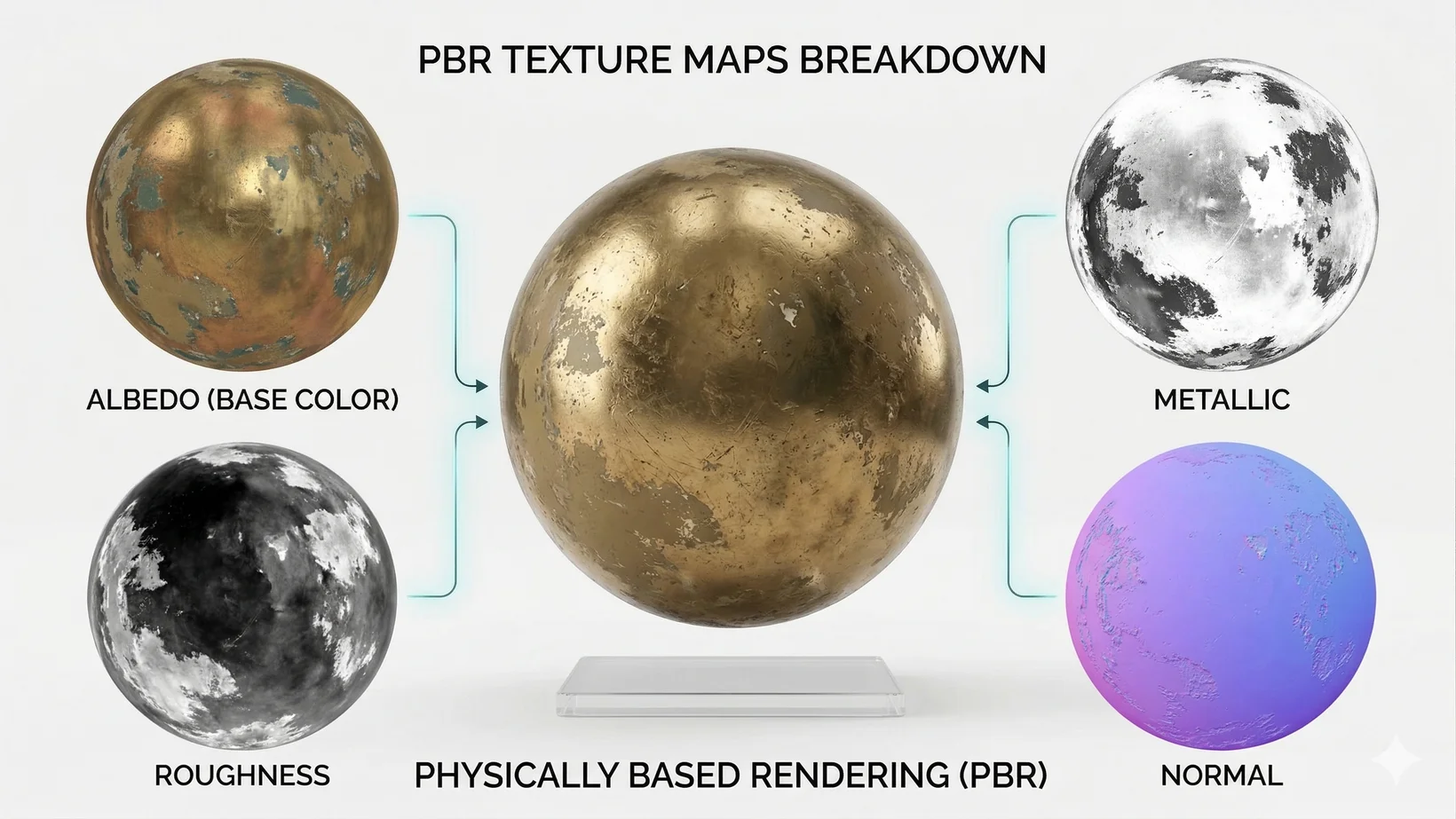
Advanced AI models utilize immense computational scale to differentiate between an object's intrinsic color and external lighting effects. Algorithm 3.1, with its robust architecture of over 200 billion parameters, is highly effective at removing baked lighting and shadows when using image to 3D AI for game assets. It automatically segments the visual data into separate maps: an albedo map containing only the base color, a roughness map, a metallic map, and a normal map for geometric depth.
Tripo Studio Texturing Tools
When automated generation leaves residual lighting artifacts, specialized post-processing tools like the Magic Brush enable targeted repainting. A user can lock the camera onto the problematic area containing the baked shadow, brush over the artifact with a prompt describing the pure material, and the AI will generate a seamless, shadow-free patch.
Post-Processing and Integration
After successfully removing baked lighting and shadows, the optimized models must be integrated into game engines, a process supported by structured polygon reduction and smart retopology features. When exporting these assets, the supported formats are USD, FBX, OBJ, STL, GLB, 3MF.
FAQ
1. What is the difference between the web-based Studio and the API?
Tripo Studio (Web-based tool) and Tripo API are two completely independent product lines. The API service operates with its own distinct billing system and is never an add-on feature of Studio subscriptions.
2. Can I use the generated 3D models for commercial projects on the free tier?
No. The Free plan provides 300 credits per month, but 3D models generated under Tripo's Free plan do not support commercial use. For commercial rights, you must upgrade to one of the Subscription Plans, such as the Pro plan ($19.90/month) which provides 3,000 credits per month.
3. What file formats are supported for exporting game assets?
After removing baked lighting and generating your PBR textures, you can export your optimized 3D models in standard industry formats: USD, FBX, OBJ, STL, GLB, 3MF.
