How to Make Money With a 3D Printer: 8 Real Ways (2026)
TL;DR
- To make money with a 3D printer, focus on products people already want: finished prints, custom orders, STL files, local printing services, prototypes, replacement parts, miniatures, or teaching/content.
- The printer is only one cost. Track filament or resin, electricity, failed prints, maintenance, packaging, platform fees, shipping, and your own labor.
- Original or customized designs usually beat generic free models because they reduce direct competition and support better pricing.
- AI 3D generation can help create starting models from text or images, but every design still needs license checks, printability checks, slicing, and test prints before selling.
Making money with a 3D printer takes more than printing random objects and hoping they sell. The most reliable path is to treat it like a small product business: choose a focused niche, calculate your real costs, sell through the right channel, and create designs customers cannot easily find elsewhere. This guide covers eight realistic ways to earn from 3D printing, plus startup costs, pricing, niche selection, and how AI-assisted design can help when original models become the bottleneck.
Can You Really Make Money With a 3D Printer?
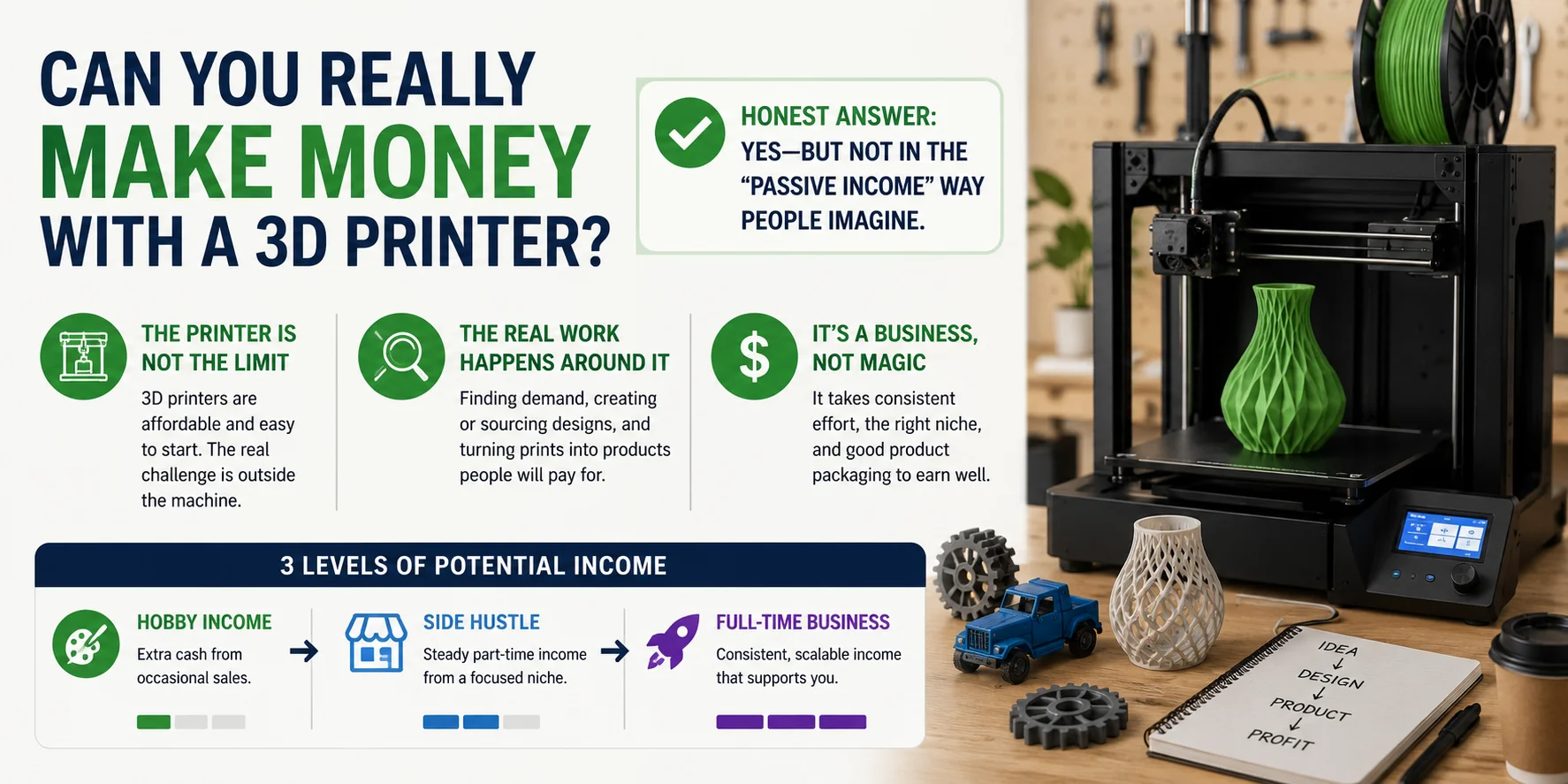
Honest answer: yes—but not in the “passive income” way people often imagine. A 3D printer itself is relatively cheap and easy to get started with, but that doesn’t automatically translate into easy money. What actually determines income is whether you can consistently solve real problems for real buyers.
The difficult part isn’t the machine—it’s everything around it. Finding demand, building or sourcing original designs, and turning prints into something people actually pay for is where most of the work happens. That’s why it behaves more like a small product business than a “print it and forget it” setup.
So expectations matter: most people start with hobby-level income, a smaller group builds it into a side hustle, and only a fraction turn it into a full-time business. The difference between those levels is usually consistency, niche selection, and how well you can package what you make—not the printer itself.
How Much It Costs to Start (and Real Profit Margins)
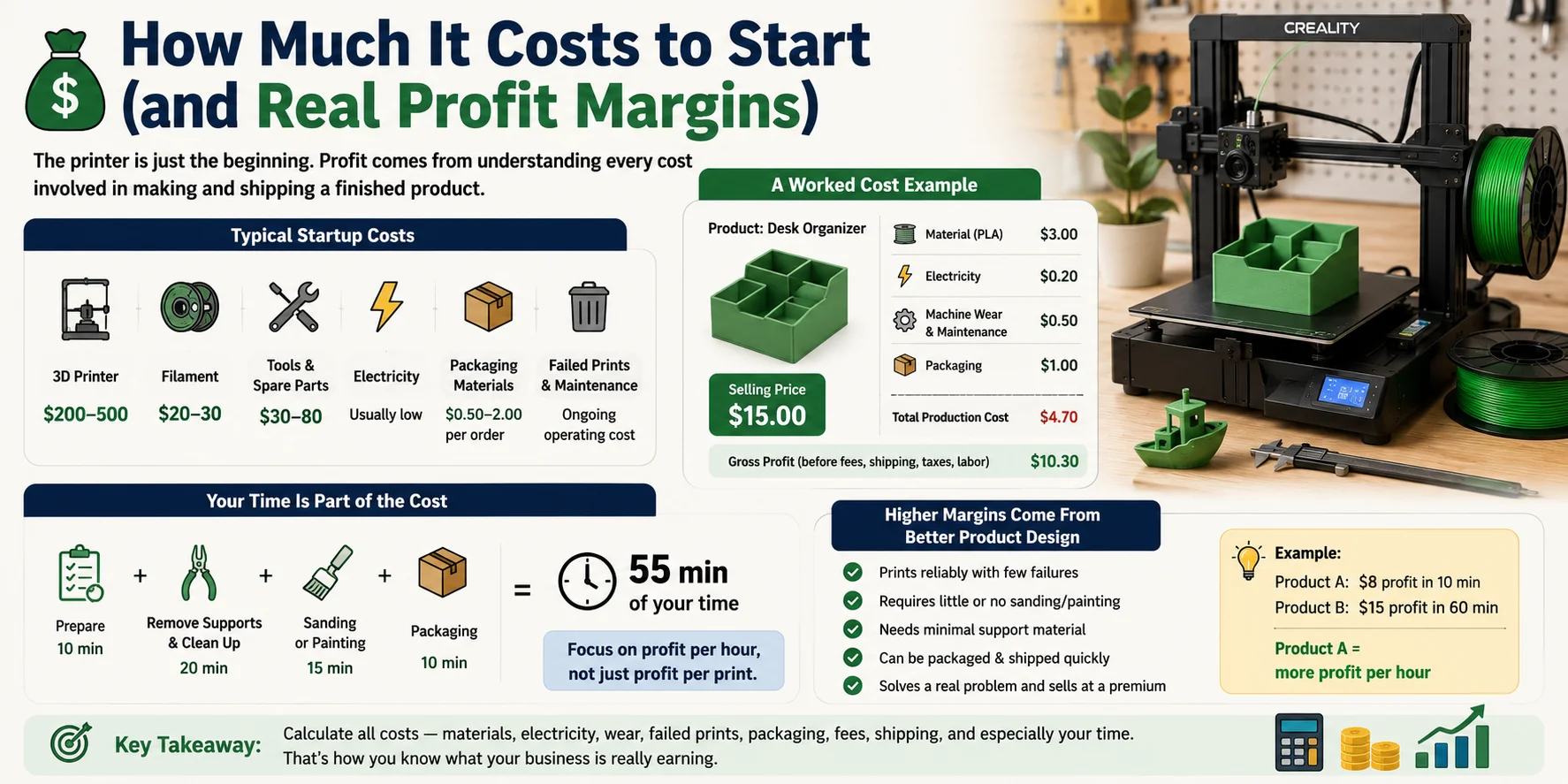
One of the biggest misconceptions about making money with a 3D printer is that the printer is the main expense. In reality, the printer is just the starting point. Your actual profit depends on understanding every cost involved in producing and shipping a finished product.
Typical Startup Costs
Here's what most beginners should budget for:
| Expense | Typical Cost |
|---|---|
| Entry-level FDM printer | $200–500 |
| Filament (1 kg PLA) | $20–30 |
| Basic tools & spare nozzles | $30–80 |
| Electricity | Usually low |
| Packaging materials | $0.50–2.00 per order |
| Failed prints & maintenance | Ongoing operating cost |
If you're using resin printing, also factor in resin, isopropyl alcohol, gloves, UV curing equipment, and replacement FEP films.
A Simple Cost Breakdown
Suppose you sell a desk organizer for $15.
- Material: $3.00
- Electricity: $0.20
- Machine wear & maintenance: $0.50
- Packaging: $1.00
Your direct production cost is about $4.70, leaving $10.30 before marketplace fees, shipping, taxes, and labor.
That looks like a healthy margin—but there's one cost many beginners forget.
Your Time Is Part of the Cost
If that $15 product requires:
- 10 minutes to prepare
- 20 minutes to remove supports and clean up
- 15 minutes to sand or paint
- 10 minutes to package
you've spent 55 minutes of your own time.
Now imagine another product that prints in the same amount of machine time but comes off the print bed ready to ship with almost no finishing. Even if both products earn the same profit per print, the second one generates much more profit for every hour you work.
That's why experienced sellers focus on profit per hour, not simply profit per print.
Higher Margins Come from Better Product Design
The most profitable products are usually those that:
- Print reliably with few failures.
- Require little or no sanding or painting.
- Need minimal support material.
- Can be packaged and shipped quickly.
- Sell at a premium because they solve a real problem.
A product that earns $8 in 10 minutes of work is often a better business than one that earns $15 but takes an hour to finish manually.
Before pricing any item, calculate all of your costs—not just filament. When you account for materials, packaging, maintenance, failed prints, marketplace fees, and especially your own time, you'll have a much clearer picture of what your business is actually earning.
8 Realistic Ways to Make Money With a 3D Printer
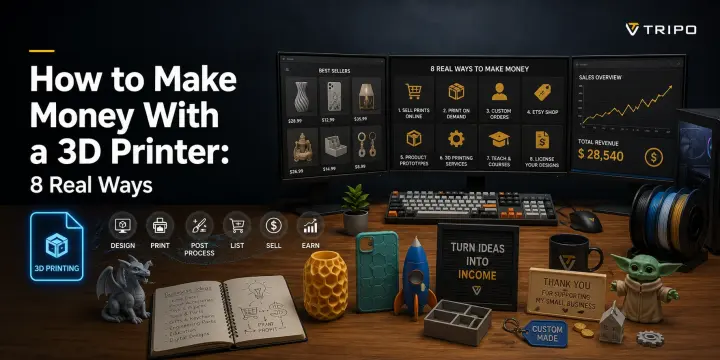
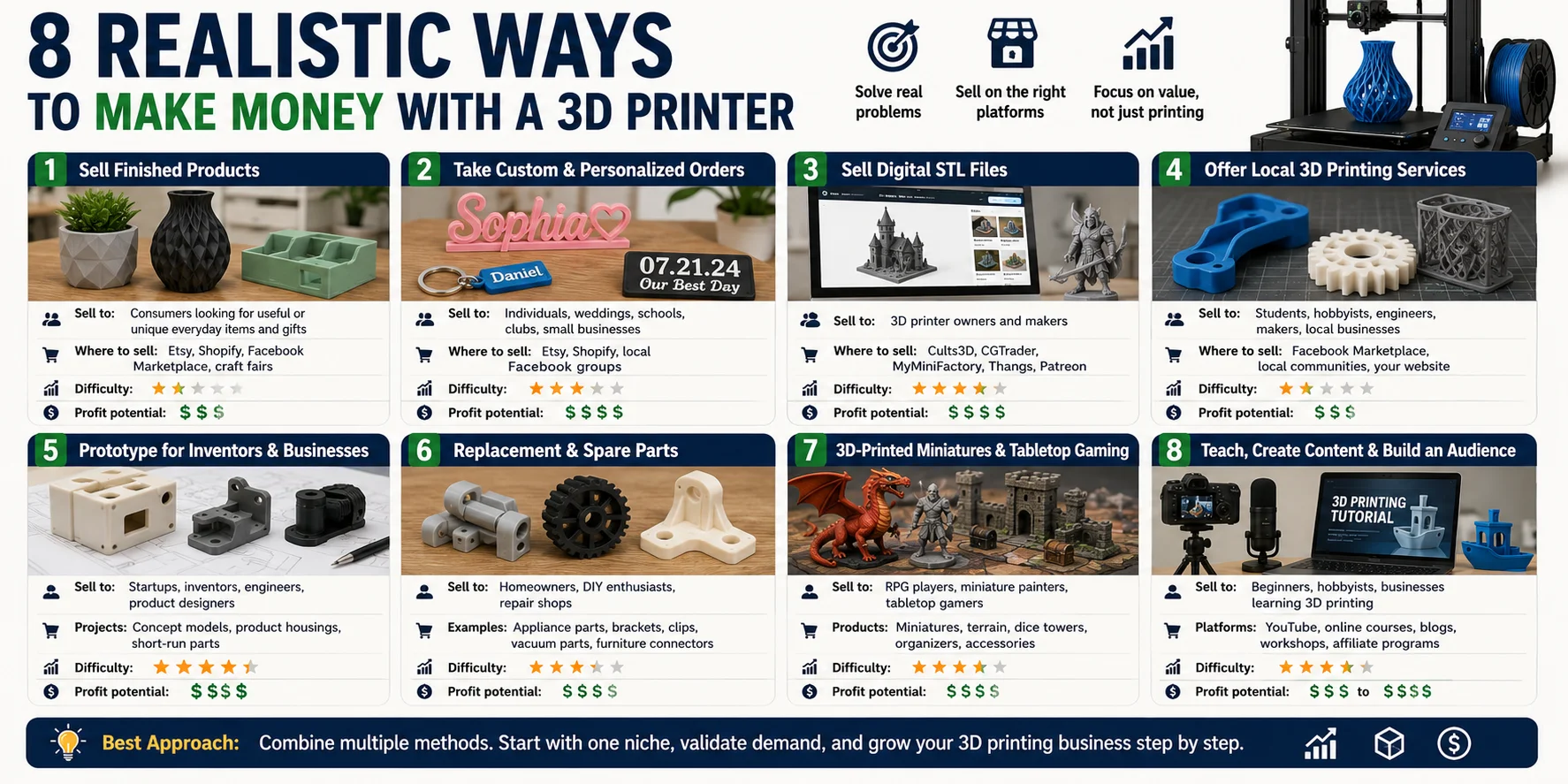
There are dozens of ways to earn money with a 3D printer, but not all of them are equally practical. The most successful sellers usually focus on solving a specific problem rather than simply selling random printed objects. Below are eight proven business models, along with who they serve, where to sell, the difficulty level, and their earning potential.
1. Sell Finished Products
This is the most common way to make money with a 3D printer. Instead of selling the printer's capabilities, you sell products that people actually want to buy.
Sell to: Consumers looking for home organizers, desk accessories, kitchen gadgets, planters, toys, or gifts.
Where to sell: Etsy, Shopify, Facebook Marketplace, local craft fairs.
Difficulty: ★★☆☆☆
Profit potential: Medium to High
Success depends on choosing a niche with steady demand rather than competing on generic products that thousands of other sellers already offer.
2. Take Custom & Personalized Orders
Personalized products often command much higher prices because customers are paying for something made specifically for them.
Sell to: Individuals, weddings, schools, clubs, and small businesses.
Examples: Name signs, keychains, cake toppers, anniversary gifts, pet tags, logo displays.
Where to sell: Etsy, Shopify, local Facebook groups.
Difficulty: ★★★☆☆
Profit potential: High
Customization adds value with very little additional material cost, making it one of the highest-margin business models.
3. Sell Digital STL Files
Instead of shipping physical products, you sell the design itself. Once a model is created, it can generate income repeatedly with no printing or shipping required.
Sell to: 3D printer owners and makers.
Where to sell: Cults3D, CGTrader, MyMiniFactory, Thangs, Patreon memberships.
Difficulty: ★★★★☆
Profit potential: High (long term)
Building a library of quality designs takes time, but successful creators can earn recurring income from digital downloads.
4. Offer Local 3D Printing Services
Many people need something printed but don't own a printer. Offering print-on-demand services fills that gap.
Sell to: Students, hobbyists, engineers, makers, and local businesses.
Where to sell: Facebook Marketplace, local maker communities, neighborhood groups, your own website.
Difficulty: ★★☆☆☆
Profit potential: Medium
Quick turnaround, good communication, and reliable print quality are often more important than having the newest printer.
5. Prototype for Inventors & Small Businesses
Small companies and product designers often need one or two prototype parts before investing in manufacturing.
Sell to: Startups, inventors, engineers, product designers.
Projects: Concept models, product housings, functional prototypes, short-run production parts.
Difficulty: ★★★★☆
Profit potential: High
Business clients generally value speed and accuracy more than the lowest price, making this a premium service.
6. Print Replacement & Spare Parts
Broken plastic parts are everywhere, and many are no longer sold by the manufacturer.
Sell to: Homeowners, DIY enthusiasts, repair shops.
Examples: Appliance clips, drawer brackets, vacuum accessories, furniture connectors, discontinued replacement parts.
Difficulty: ★★★☆☆
Profit potential: High
Solving a real repair problem often allows you to charge far more than the material cost.
7. Create Miniatures & Tabletop Gaming Products
The tabletop gaming community is one of the largest markets for high-detail 3D printing.
Sell to: RPG players, miniature painters, tabletop gamers.
Products: Miniatures, terrain pieces, dice towers, storage organizers.
Where to sell: Etsy, gaming conventions, online communities.
Difficulty: ★★★★☆
Profit potential: High
If you print someone else's designs, make sure you have a commercial license before selling physical copies.
8. Teach, Create Content & Build an Audience
You don't have to sell printed products to make money. Many creators earn income by sharing their expertise.
Sell to: Beginners, hobbyists, businesses learning 3D printing.
Platforms: YouTube, online courses, blogs, workshops, affiliate programs.
Difficulty: ★★★★☆
Profit potential: Medium to Very High
Content creation takes time to build, but it can diversify your income and support your product business over the long term.
Which Method Is Best?
There's no single "best" way to make money with a 3D printer. Many successful makers combine several of these approaches—for example, selling physical products on Etsy, offering custom orders, and earning additional income from digital STL files or educational content. Start with one niche, validate demand, and expand only after you have a repeatable process and consistent sales.
What Sells Best — and How to Avoid Saturated Niches
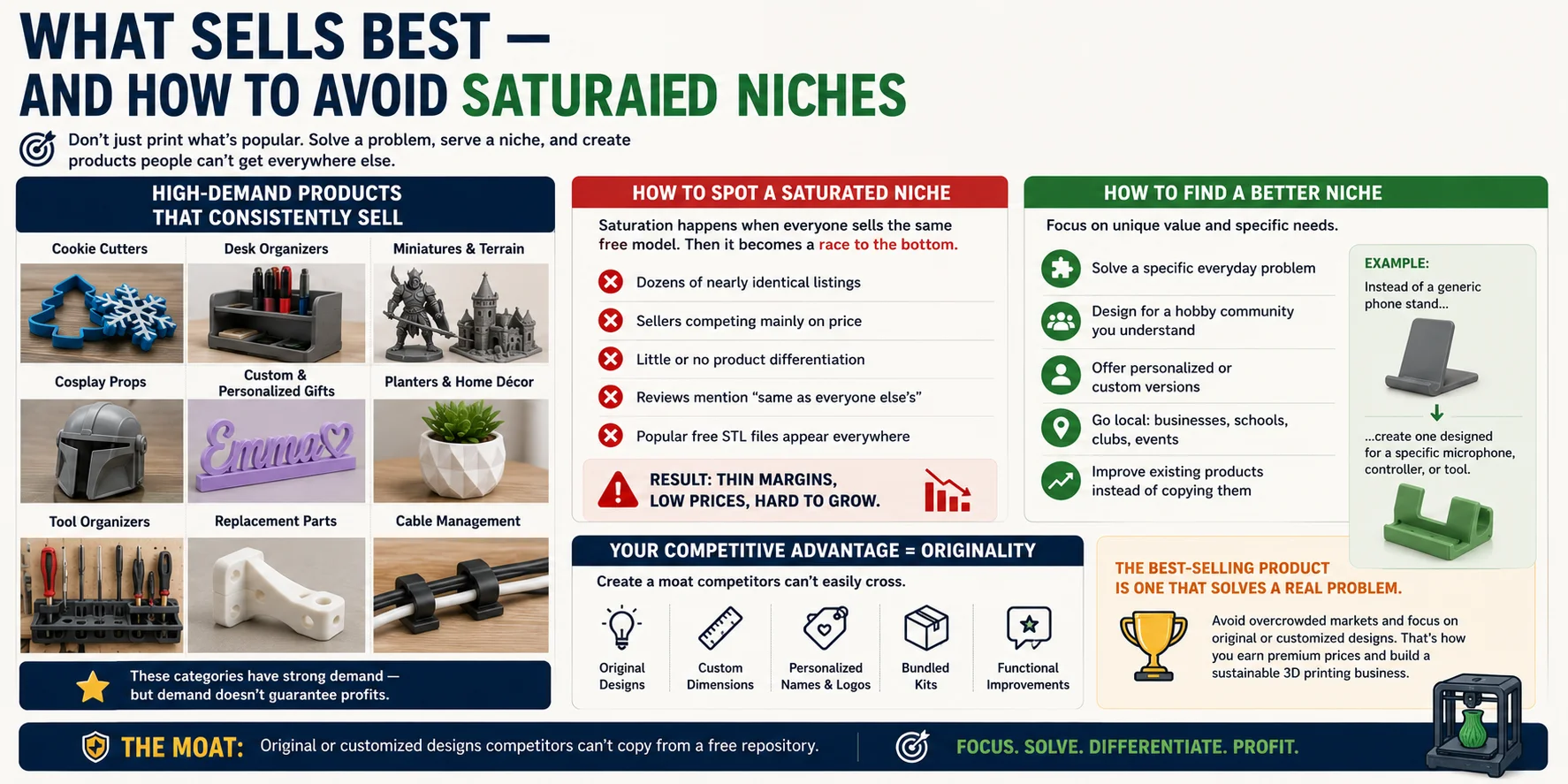
One of the biggest mistakes new sellers make is asking, "What's the most profitable thing to 3D print?" The better question is, "What problem can I solve that other sellers aren't solving?" A product becomes profitable not because it's easy to print, but because customers have a reason to choose yours over dozens of similar listings.
High-Demand Products That Consistently Sell
Some categories continue to perform well because they solve everyday problems or appeal to passionate hobby communities.
Popular examples include:
- Cookie cutters for holidays and special events
- Desk organizers and cable management accessories
- Tabletop gaming miniatures and terrain
- Cosplay props and costume accessories
- Personalized gifts with names, dates, or logos
- Plant pots and home décor
- Tool organizers and workshop accessories
- Replacement clips, brackets, and appliance parts
These products have proven demand—but demand alone doesn't guarantee success. For items that touch food, such as cookie cutters or kitchen gadgets, use materials and post-processing methods suitable for food contact and check the rules in your market before selling.
How to Spot a Saturated Niche
A niche becomes saturated when hundreds of sellers offer nearly identical products, often using the same free model downloaded from repositories like Thingiverse.
Common warning signs include:
- Dozens of nearly identical listings.
- Sellers competing mainly on price.
- Little or no product differentiation.
- Reviews mentioning "same as everyone else's."
- Popular free STL files appearing everywhere.
Once everyone is selling the same design, the market usually turns into a race to the bottom. Lower prices mean thinner profit margins, making it difficult to build a sustainable business.
How to Find a Better Niche
Instead of following trends, look for opportunities where you can provide unique value.
Good strategies include:
- Solve a specific everyday problem.
- Design products for a hobby community you understand.
- Offer personalized or custom versions.
- Focus on local businesses, schools, clubs, or events.
- Improve existing products instead of copying them.
For example, instead of selling a generic phone stand, create one designed specifically for a popular microphone, gaming controller, or woodworking tool. The more targeted the audience, the less direct competition you'll often face.
Your Competitive Advantage Is Originality
The strongest businesses rarely depend on selling the same free models as everyone else. Their advantage comes from offering products that competitors can't easily copy.
That could mean:
- Original designs.
- Custom dimensions for individual customers.
- Personalized names or logos.
- Bundled products or accessory kits.
- Functional improvements based on customer feedback.
These unique features create a competitive moat that helps you charge premium prices instead of competing solely on cost.
The Best-Selling Product Is One That Solves a Real Problem
The most profitable 3D-printed products aren't always the most complex or visually impressive—they're the ones that solve a specific need better than existing alternatives. By avoiding overcrowded markets and focusing on original or customized designs, you can build a business that's far more resilient than simply selling the latest trending free STL.
Designing Original Products to Sell — Even If You Can't Model
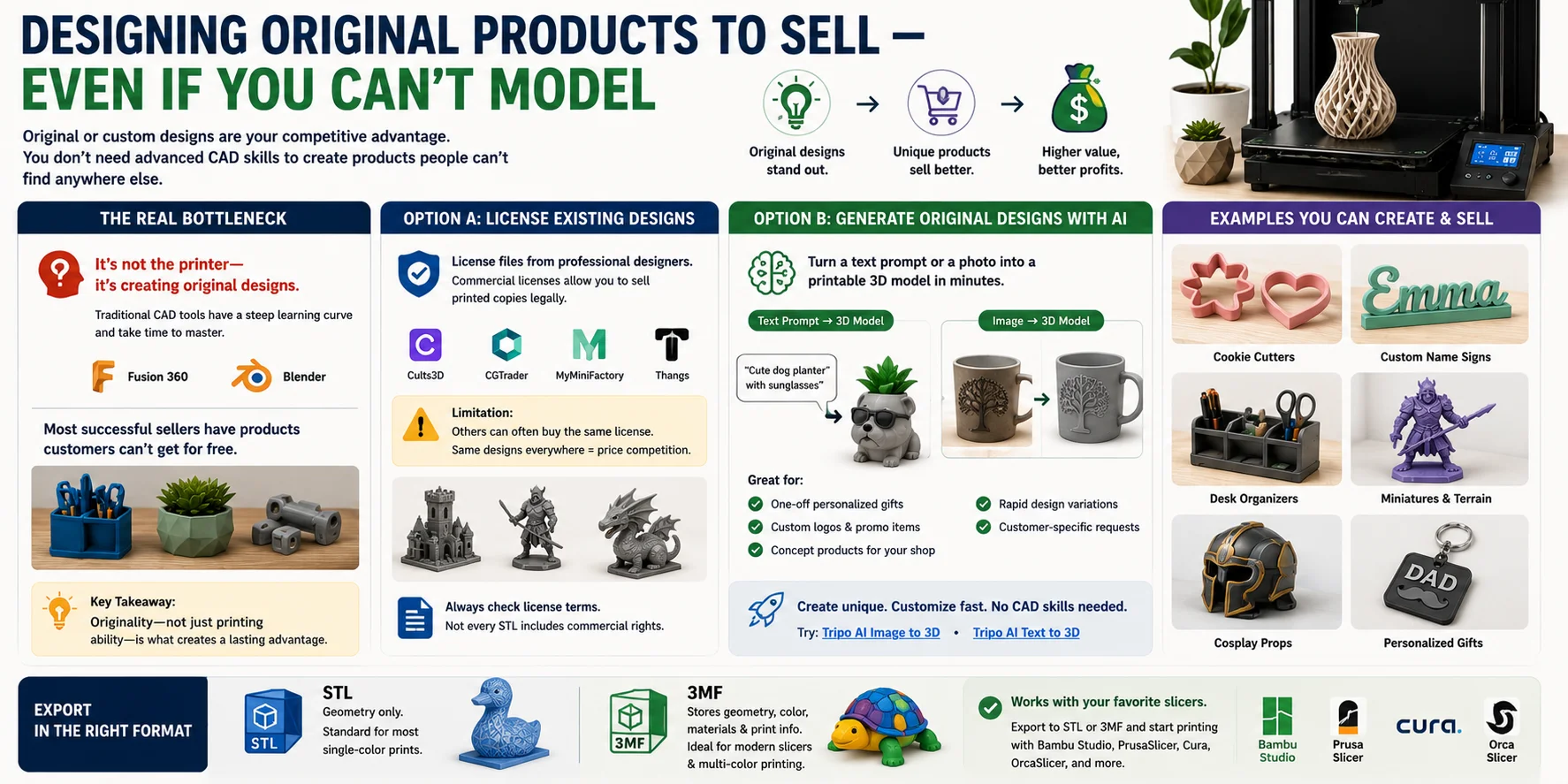
For many people, the biggest obstacle to selling 3D-printed products isn't owning a printer—it's creating designs that no one else is selling. If your products look exactly like everyone else's, competing usually comes down to lowering your price. That's why original or customized designs are often the real competitive advantage.
The Real Bottleneck: Original Designs
Many successful sellers don't have the fastest printer or the cheapest filament—they have products customers can't find anywhere else.
The challenge is that traditional CAD software has a steep learning curve. Tools like Fusion 360 or Blender are powerful, but becoming proficient can take weeks or even months. If you mainly want to launch products or offer custom orders, learning advanced modeling may not be the fastest path.
Option A: License Existing Designs
One way to get started is by licensing designs from professional creators.
Many marketplaces offer files that include a commercial license, allowing you to legally sell printed copies. This lets you build a product catalog quickly without designing every model yourself.
However, there's an important limitation: other sellers can often purchase the same license. If dozens of shops are printing the same model, it becomes difficult to stand out, and price competition usually increases.
Always check the license terms before selling printed versions of someone else's design. Not every downloadable STL includes commercial rights.
Option B: Generate Original Models with AI
If you need a unique design but don't have CAD experience, AI-based 3D generation offers another approach.
Modern AI tools can turn a text prompt or a single reference image into a starting 3D model in minutes. Instead of building every surface manually, you describe what you want—or upload a photo—then refine the generated result, check the mesh, and test it before printing or selling.
This workflow is especially useful for:
- One-off personalized gifts
- Custom business logos and promotional items
- Concept products for Etsy shops
- Rapid design variations
- Customer-specific requests that would otherwise require hours of CAD work
For example, if a customer wants a custom cookie cutter, decorative sign, or themed organizer, you can generate a starting model from a text description or photo, adjust the geometry, check dimensions and wall thickness, and prepare it for slicing much faster than modeling from scratch.
Before using any AI-generated design commercially, make sure the source image, prompt concept, logo, character, or reference material is free of copyright or trademark issues. AI can speed up design, but it does not remove your responsibility to verify rights and product safety.
Export in the Right Format
Most AI 3D generators can export models in the two formats most commonly used for 3D printing:
- STL – Stores geometry only and is the standard choice for most single-color prints.
- 3MF – Stores geometry along with color, materials, and additional print information, making it a better choice for modern slicers and multi-color printing.
If your workflow includes AI-generated models, STL or 3MF export makes it easier to continue in your preferred slicer without additional conversion.
Whether you design everything yourself, license commercial models, or use AI to create custom geometry, the goal is the same: offer products that customers can't simply download for free. Originality—not just printing ability—is what creates a lasting advantage in the 3D printing business.
From Model to Slicer — A Quick Print Workflow
Once you have a design, turning it into a finished product is a straightforward workflow. Whether the model was created from scratch, licensed from a designer, or generated with AI, the remaining steps are largely the same. Understanding this pipeline helps you move from idea to sale more efficiently.
Step 1: Get or Create a 3D Model
Every print starts with a digital model. You have three common options:
- Design your own model in CAD software.
- License a commercial model from a designer.
- Generate a custom model with an AI tool from a text prompt or a reference photo.
The goal is to end up with a model that can be prepared for slicing after you check scale, wall thickness, orientation, supports, and mesh errors.
Step 2: Export as STL or 3MF
Next, export the model in a format your slicer can read.
- STL is the standard choice for most single-color prints and stores geometry only.
- 3MF can also include colors, materials, units, and other print information, making it ideal for modern slicers and multi-color workflows.
Choose the format that best matches your printer and project.
Step 3: Slice the Model
Import the file into your preferred slicer, such as Bambu Studio, PrusaSlicer, OrcaSlicer, or Cura.
Here you'll configure:
- Layer height
- Infill
- Supports
- Print orientation
- Material profile
The slicer converts the model into machine instructions (G-code) that your printer can follow.
Step 4: Print and Inspect
Start the print and monitor the first few layers carefully. A successful first layer is one of the best indicators that the entire print will complete successfully.
Pay attention to:
- First-layer adhesion
- Warping or lifting
- Support placement
- Print quality during the first few minutes
Catching problems early can save hours of wasted print time.
Step 5: Finish the Product
After printing, remove supports if needed and perform any finishing work.
Depending on the product, this may include:
- Support removal
- Sanding
- Painting
- Assembly
- Packaging
Keep in mind that every minute spent on post-processing reduces your effective profit. Products that come off the print bed nearly finished generally offer better margins than those requiring extensive cleanup.
Save Time with Integrated Workflows
Many modern tools streamline the process by connecting directly to popular slicers. For example, some AI modeling platforms can export STL or 3MF files and, in supported workflows, send compatible models directly to Bambu Studio, reducing manual file handling.
The overall workflow is simple:
Model → Export (STL or 3MF) → Slice → Print → Finish → Ship
Once you've repeated this process a few times, it becomes a reliable production pipeline that can scale from one-off custom orders to small-batch manufacturing.
Where to Sell & How to Price for Profit
Making a great product is only half the business. The other half is getting it in front of the right customers and pricing it so every sale is actually profitable. The best sales channel depends on what you're selling, while good pricing starts with understanding your true costs—not just the price of filament.
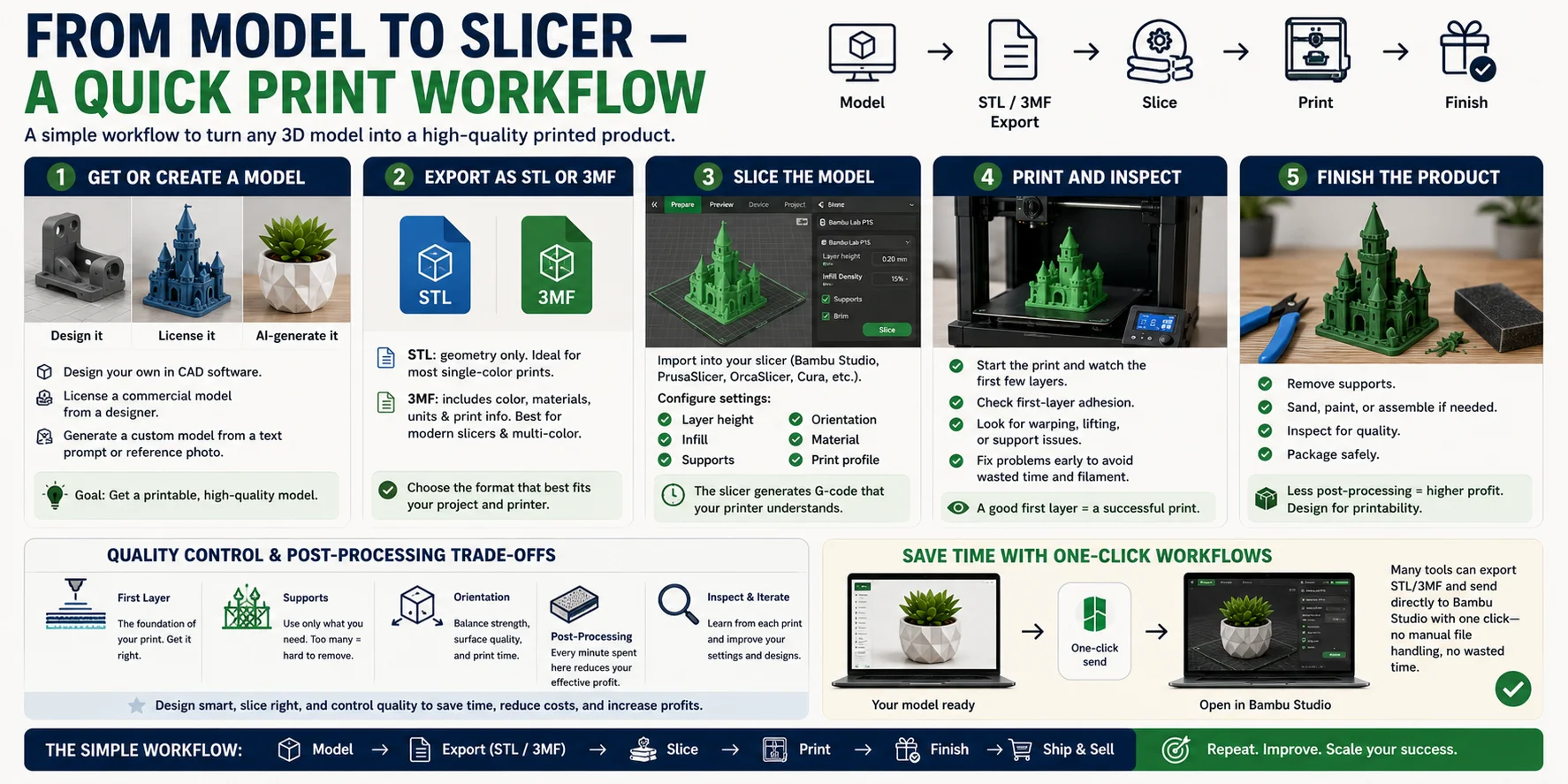
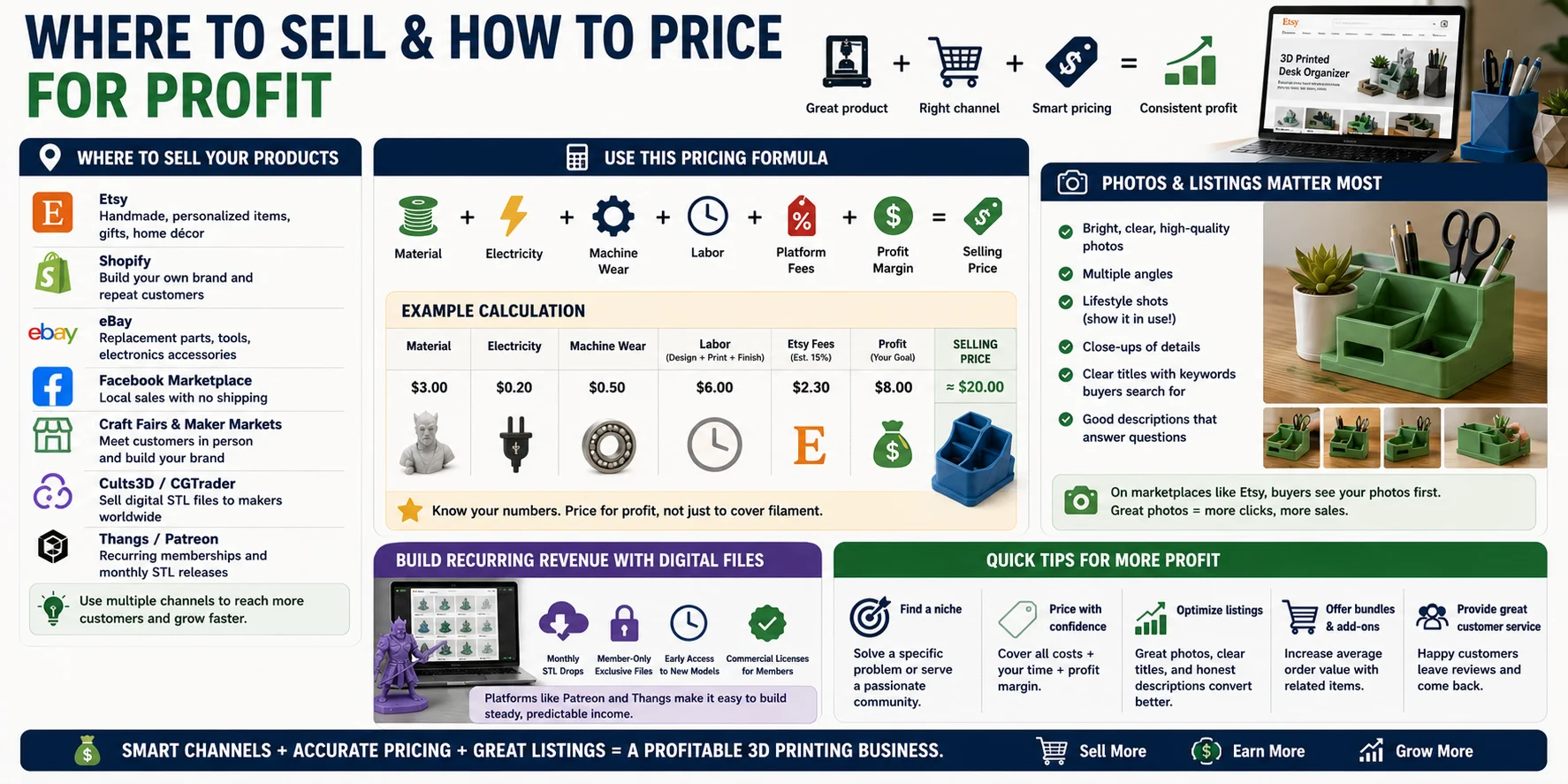
Where to Sell Your Products
Different platforms serve different types of buyers. Many successful sellers use more than one channel.
| Channel | Best For |
|---|---|
| Etsy | Handmade, personalized products, gifts, home décor |
| Shopify | Building your own brand and repeat customers |
| eBay | Replacement parts, tools, electronics accessories |
| Facebook Marketplace | Local sales with no shipping |
| Craft Fairs & Maker Markets | Meeting customers in person |
| Cults3D / CGTrader | Selling digital STL files |
| Thangs / Patreon | Recurring memberships and monthly STL releases |
If you're selling physical products, Etsy is often the easiest place to start. If you're selling digital designs, platforms like Cults3D, CGTrader, or a membership model on Patreon or Thangs can generate recurring revenue without shipping products.
Use a Simple Pricing Formula
Avoid pricing based on what competitors charge. Instead, calculate every cost involved.
A practical pricing formula looks like this:
Selling Price = Material + Electricity + Machine Wear + Labor + Platform Fees + Desired Profit Margin
For example:
- Material: $3.00
- Electricity: $0.20
- Machine wear: $0.50
- Labor: $6.00
- Etsy fees: $2.30
- Desired profit: $8.00
Final selling price: about $20.00
This approach helps ensure that every sale contributes to your business instead of simply covering material costs. Treat the Etsy fee line as an estimate: actual marketplace costs can vary by listing fees, transaction fees, payment processing, ads, shipping settings, taxes, and country.
Your Photos Sell the Product
On marketplaces like Etsy, buyers see your photos before they read your description.
High-quality listings should include:
- Bright, well-lit product photos.
- Multiple viewing angles.
- Lifestyle images showing the product in use.
- Close-ups of important details.
- Clear titles and searchable keywords.
A professionally photographed product often outsells a better-designed product with poor images.
Build Recurring Revenue
Physical products create one sale at a time, but digital products can generate income repeatedly.
If you create your own designs, consider offering:
- Monthly STL drops.
- Exclusive member-only files.
- Early access to new models.
- Commercial licenses for makers.
Platforms like Patreon and Thangs make it easy to build subscription-based income alongside your physical product business.
Think Beyond a Single Sale
The most successful 3D printing businesses combine smart pricing with multiple sales channels. By accurately calculating your costs, presenting products with high-quality listings, and adding recurring revenue through digital memberships, you can build a business that's both more profitable and more sustainable over time.
Tips to Actually Stay Profitable
Making sales is important, but staying profitable is what turns a hobby into a sustainable business. Many new sellers focus on printing faster or lowering prices, when the biggest gains often come from improving efficiency and protecting their margins. Keep these best practices in mind as your business grows.
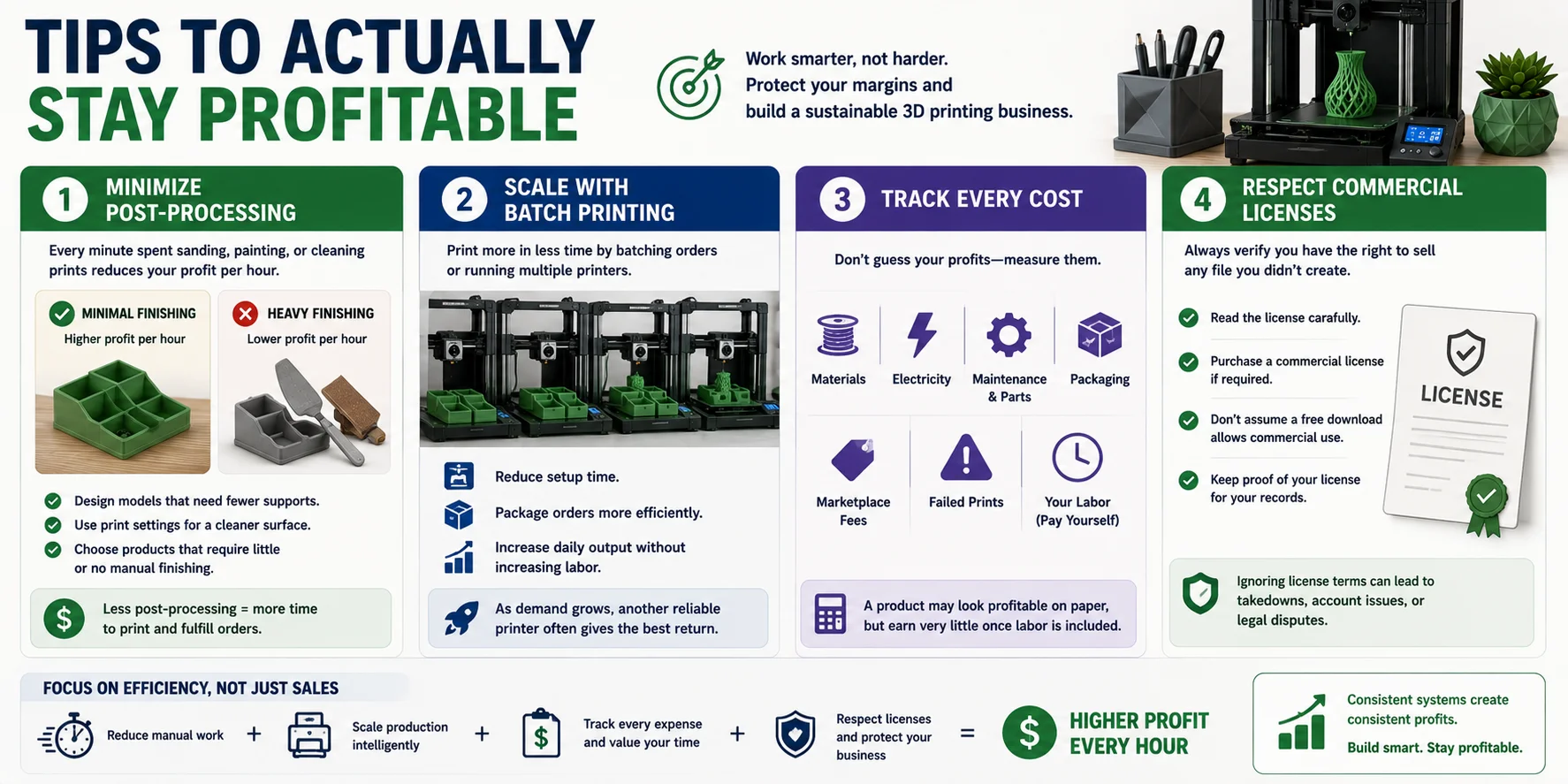
Minimize Post-Processing
Every minute spent sanding, painting, or cleaning prints reduces your profit per hour. Whenever possible, design or choose products that come off the print bed ready to ship.
- Optimize models to need fewer supports.
- Use print settings that produce a cleaner surface.
- Prioritize products that require little or no manual finishing.
Less post-processing means more time available for printing and fulfilling orders.
Scale with Batch Printing
Once a product starts selling consistently, increase output by printing multiple copies at once or running multiple printers.
Batch production helps you:
- Reduce setup time.
- Package orders more efficiently.
- Increase daily output without significantly increasing labor.
As demand grows, adding another reliable printer often delivers a better return than spending more hours doing manual work.
Track Every Cost
Don't estimate your profits—measure them.
Keep track of:
- Materials
- Electricity
- Machine maintenance and replacement parts
- Packaging
- Marketplace fees
- Failed prints
- Your own labor
Most importantly, pay yourself for your time. A product that looks profitable on paper may earn very little once labor is included.
Respect Commercial Licenses
If you're selling prints based on someone else's design, always verify that the file includes commercial rights.
Before listing any product:
- Read the license carefully.
- Purchase a commercial license if required.
- Don't assume a free download allows commercial use.
- Keep proof of your license for your records.
Ignoring licensing terms can lead to takedown requests, account issues, or legal disputes.
Focus on Efficiency, Not Just Sales
The most successful 3D printing businesses aren't always the ones with the most orders—they're the ones that consistently earn the highest profit from every hour of work. By reducing manual finishing, scaling production intelligently, tracking every expense, and respecting commercial licenses, you can build a business that's both profitable and sustainable over the long term.
Frequently Asked Questions
Can you really make money with a 3D printer?
Yes—but it's not passive income. A 3D printer is just a tool; your success depends on finding products people actually want to buy, creating or sourcing designs that stand out, and running it like a real business.
Most people start with hobby income. Growing into a serious side hustle depends on niche choice, pricing, cost control, and original or customized products competitors cannot easily copy.
What is the most profitable thing to 3D print?
There isn't a single most profitable item to 3D print. Strong categories often include personalized gifts, replacement parts, custom organizers, cookie cutters, and tabletop gaming accessories because buyers value the solution more than the raw material.
The best products combine steady demand, low post-processing time, and a niche that is not already flooded with identical free STL prints.
Is a 3D printer a good side hustle?
Yes—if you treat it like a small business rather than passive income. Many people start by selling custom products, personalized gifts, replacement parts, or local 3D printing services.
Your success depends on choosing the right niche, pricing for profit, and creating products people cannot easily find elsewhere.
How much does it cost to run a 3D printer for 1 hour?
For most desktop FDM 3D printers, electricity is usually a small cost—often around $0.02-$0.10 per hour, depending on local rates, printer size, and print temperature.
The true cost of a print usually depends more on filament, machine wear, failed prints, packaging, and labor than on electricity alone.
Conclusion
The printer isn't what makes a business successful—original products do. The hardest part isn't printing; it's creating designs that customers can't easily buy somewhere else.
If modeling is your bottleneck, you can turn a sketch, photo, or text idea into a strong starting model, then refine and test-print it before selling something only you offer. Explore Tripo AI Studio to speed up the design stage and bring original ideas to market.